Best E-Signature Software for Small Business - Page 3

How Many E-Signature Software Products Does G2 Track?

Total Products under this Category: 583

Category Stats (Oct 2026)

  • Average Rating: 4.59/5 The average rating of products in this category, based on all submitted ratings
  • Top Trending Product: Docusign (+0.2%) - Among all products in this category, Docusign recorded the largest rating increase compared to last month

Last updated: October 13, 2026

How Does G2 Rank E-Signature Software Products?

Why You Can Trust G2's Software Rankings:

  • 30 Analysts and Data Experts
  • 58,500+ Authentic Reviews
  • 583+ Products
  • Unbiased Rankings

G2's software rankings are built on verified user reviews, rigorous moderation, and a consistent research methodology maintained by a team of analysts and data experts. Each product is measured using the same transparent criteria, with no paid placement or vendor influence. While reviews reflect real user experiences, which can be subjective, they offer valuable insight into how software performs in the hands of professionals. Together, these inputs power the G2 Score, a standardized way to compare tools within every category.

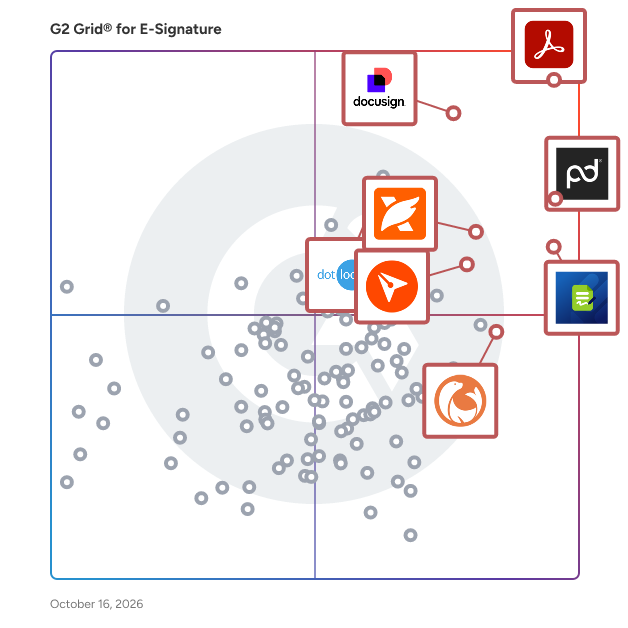
G2 Grid® for E-Signature Software

G2 Grid® for E-Signature Software plotting products by satisfaction and market presence

Highlighted products: Adobe Acrobat, PandaDoc, Jotform Sign, Docusign, BoldSign, Foxit PDF Editor, DocuSeal, and dotloop.

Underlying data: [Grid® JSON](https://www.g2.com/categories/e-signature/grids.json?focus%5B%5D=adobe-acrobat&focus%5B%5D=pandadoc&focus%5B%5D=jotform-sign&focus%5B%5D=docusign&focus%5B%5D=boldsign&focus%5B%5D=foxit-pdf-editor&focus%5B%5D=docuseal&focus%5B%5D=dotloop&segment=small-business)

emSigner

emSigner is an enterprise-grade eSignature and document workflow automation platform from eMudhra — one of the world's few WebTrust-audited Certifying Authorities and a member of Adobe AATL, the Microsoft Root Program, and the Apple Root Program. That trust foundation matters: every signature on emSigner is legally binding, tamper-evident, and globally verifiable. Built for organizations of all sizes, emSigner helps teams sign, send, track, and archive documents in minutes — not days. It supports the full spectrum of signature types, including electronic, digital, biometric, Aadhaar eSign, and eIDAS-qualified signatures, so businesses can meet the legal and regulatory requirements of every market they operate in. Drag-and-drop workflow design, role-based routing, conditional logic, real-time tracking, and a complete audit trail make it easy to automate everything from simple single-signer documents to complex, multi-party approval processes across departments and geographies. emSigner integrates natively with the tools your teams already use — SAP, Salesforce, Microsoft 365, Workday, ServiceNow, Oracle, and more — and offers a robust REST API for custom integrations. It can be deployed on the cloud, on-premise, or in a hybrid model, giving compliance, IT, and business teams one platform to go fully paperless without compromising on security, data sovereignty, or scalability. Trusted by banks, insurers, governments, telecom operators, and enterprises in 120+ countries, emSigner is the choice for regulated industries that need to digitize high-value transactions with confidence — securely, auditably, and at global scale.

Average Rating: 4.6/5.0

Total Reviews: 101

How Do G2 Users Rate emSigner?

  • Has the product been a good partner in doing business?: 9.2/10 (Category avg: 9.2/10)
  • Performance and Reliability: 9.0/10 (Category avg: 9.0/10)
  • Enterprise Scalability: 9.2/10 (Category avg: 8.9/10)
  • Signature Document Creation: 9.2/10 (Category avg: 9.1/10)

Who Is the Company Behind emSigner?

  • Seller: emudhra
  • Year Founded: 2008
  • HQ Location: Bangalore, Karnataka
  • Twitter: @eMudhra
    3,560 Twitter followers
  • LinkedIn® Page: www.linkedin.com
    951 employees on LinkedIn®

Who Uses This Product?

  • Who Uses This: Security Solutions Engineer
  • Top Industries: Information Technology and Services, Financial Services
  • Company Size: 45% Medium, 44% Small

What Do G2 Reviewers Say About emSigner?

AI-generated summary from verified user reviews

Pros
  • Users find emSigner to be very simple and easy to use, making document signing a hassle-free experience.
  • Users value the intuitive and paperless signing process offered by emSigner, enhancing document management efficiency.
  • Users value the security of emSigner, ensuring quick and compliant digital document signing with ease.
  • Users commend the easy integration of emSigner, simplifying document signing with user-friendly functionality.
  • Users value the efficiency of emSigner, which streamlines document signing and significantly reduces approval turnaround times.
Cons
  • Users report frequent bug issues including errors, crashes, and limitations that hinder document signing functionality.
  • Users face connectivity issues with emSigner, impacting performance and workflow, particularly in areas with slow internet.
  • Users find the repetitive signature requirement inconvenient, limiting the signing flexibility within the emSigner workflow.
  • Users experience slow performance with emSigner, especially during high-traffic times and with initial integrations.
  • Users face access limitations with emSigner, including document download restrictions and challenging workflow signing processes.

What Are Recent G2 Reviews of emSigner?

What Are G2 Users Discussing About emSigner?

Signify

Signify is a digital contracting platform that helps teams manage, automate, and track documents in one place. From sending and signing to organizing and archiving, it supports the full document workflow. Signify combines e-signatures, workflow automation, a team workspace, and a searchable archive. Set signing order and recipient roles, assign documents to folders with team-based permissions, and use structured templates to keep processes consistent across the company. You can see exactly what’s signed, pending, or in progress - and who’s involved. Permissions are clear, templates are shared with built-in rules, and folder access is controlled by team roles. Over 4.5 million documents have been sent through Signify, with 80% finalized in under 24 hours. Signify is built to support both the people who manage documents and those who sign them - making the entire process simple and efficient.

Average Rating: 4.9/5.0

Total Reviews: 119

How Do G2 Users Rate Signify?

  • Has the product been a good partner in doing business?: 10.0/10 (Category avg: 9.2/10)
  • Performance and Reliability: 9.6/10 (Category avg: 9.0/10)
  • Enterprise Scalability: 9.5/10 (Category avg: 8.9/10)
  • Signature Document Creation: 9.6/10 (Category avg: 9.1/10)

Who Is the Company Behind Signify?

  • Seller: Signify
  • Company Website:
  • Year Founded: 2021
  • HQ Location: Tbilisi, GE
  • LinkedIn® Page: www.linkedin.com
    38 employees on LinkedIn®

Who Uses This Product?

  • Who Uses This: Lawyer
  • Top Industries: Computer Software, Banking
  • Company Size: 41% Medium, 33% Small

What Do G2 Reviewers Say About Signify?

AI-generated summary from verified user reviews

Pros
  • Users appreciate the ease of use of Signify, highlighting its convenience and time-saving capabilities.
  • Users find Signify to be a time-saving tool, enhancing workflow and simplifying document management processes.
  • Users appreciate the time-saving benefits of Signify, enjoying its convenience and positive impact on nature.
  • Users enjoy the convenience of Signify, appreciating its time-saving features and effective collaboration capabilities.
  • Users highlight the efficiency of digital signatures, making signing documents easy and streamlining the approval process.
Cons
  • Users find the document visibility lacking for recipients and struggle with the commenting process before rejecting documents.
  • Users experience slow loading times, with delays in opening documents and navigating the interface affecting usability.
  • Users experience slow performance, as operations like document opening and file deletion can lag significantly at times.
  • Users find difficult editing of documents frustrating, wishing for easier in-upload modifications rather than re-uploading.
  • Users face legal uncertainty and system limitations with Signify, complicating the signing process and acceptance of documents.

What Are Recent G2 Reviews of Signify?

Nitro PDF

1. What is Nitro PDF? Nitro PDF is a full-featured PDF editor that enables you to create, edit, convert, sign, and secure PDF documents. It is designed for individuals, small businesses, and enterprises as a cost-effective alternative to Adobe Acrobat, combining powerful functionality with an intuitive interface that works across devices. 2. What are the main features of Nitro PDF? Nitro PDF is a comprehensive solution for creating, editing, and securing documents across Windows, Mac, iOS, and web browsers. It includes powerful AI productivity tools and is built with an intuitive interface mirroring the Microsoft Office and Apple toolbars. Key features of Nitro PDF include: • Core Editing: Tools to create, edit, convert, combine, and annotate PDFs, including advanced OCR and secure signing capabilities. • AI Smart Tools: Enhances productivity via smart data extraction, automated form creation, and intelligent document redaction. • Nitro Analytics: Real-time visibility into PDF usage, allowing organizations to measure productivity, prove ROI, and track sustainability. • Nitro Workspace: A centralized cloud hub for accessing PDF and eSign tools, AI assistants, and administration from any device. • Advanced Editing: Create PDFs from any file type and convert PDFs into editable Microsoft Word, Excel, and PowerPoint files while maintaining original layouts. • Powerful OCR (Optical Character Recognition): Turn scanned paper documents and images into fully searchable and editable PDFs with high-accuracy text recognition. Nitro PDF is available in multiple plans to suit different business needs. 3. What support options does Nitro offer? Whether you're a five-person team or a global enterprise, our dedicated support is available 24/7. • Human Support: Nitro offers dedicated customer support, including onboarding, training, and troubleshooting resources, to ensure a smooth experience for your team. • Knowledge Base and Guides: Access hundreds of detailed articles covering product features, integrations, workflows, and best practices. • Video Tutorials: Step-by-step walkthroughs and demonstrations to help you learn and master Nitro tools quickly. • Community Forum: Connect with other Nitro users, share feedback, ask questions, and discover tips and solutions. • Knowledge Assistant: A 24/7 in-app AI assistant providing instant, context-aware guidance on features, workflows, and troubleshooting. 4. Does Nitro PDF support integrations with other business tools? Yes. Nitro PDF integrates with software such as Microsoft Office suite, OneDrive, Dropbox, and other platforms. These integrations simplify document workflows and make it easy to create, edit, and share PDFs directly within your existing environment. 5. How does Nitro ensure document security and compliance? Nitro protects sensitive information with advanced encryption, password protection, granular access controls, and tamper-evident audit trails. Nitro's solutions are designed to meet enterprise and mid-market compliance requirements, including ISO 27001, SOC 2, HIPAA, GDPR, eIDAS, UETA, and the ESIGN Act.

Average Rating: 4.4/5.0

Total Reviews: 381

How Do G2 Users Rate Nitro PDF?

  • Has the product been a good partner in doing business?: 8.9/10 (Category avg: 9.2/10)
  • Performance and Reliability: 8.6/10 (Category avg: 9.0/10)
  • Enterprise Scalability: 8.8/10 (Category avg: 8.9/10)
  • Signature Document Creation: 8.9/10 (Category avg: 9.1/10)

Who Is the Company Behind Nitro PDF?

  • Seller: Nitro, Inc
  • Company Website:
  • Year Founded: 2005
  • HQ Location: San Francisco, CA
  • LinkedIn® Page: www.linkedin.com
    382 employees on LinkedIn®

Who Uses This Product?

  • Who Uses This: IT Manager
  • Top Industries: Information Technology and Services, Construction
  • Company Size: 48% Small, 35% Medium

What Do G2 Reviewers Say About Nitro PDF?

AI-generated summary from verified user reviews

Pros
  • Users find Nitro PDF's ease of use remarkable, appreciating its intuitive interface and minimal learning curve.
  • Users love the easy editing features of Nitro PDF, ensuring quick and accurate document management for all skill levels.
  • Users praise Nitro PDF for its exceptional security features and comprehensive editing tools, enhancing overall productivity.
  • Users appreciate the easy conversion feature of Nitro PDF, enabling quick and accurate file management for everyone.
  • Users value the robust PDF processing capabilities of Nitro PDF, enhancing document management and streamlining workflows effectively.
Cons
  • Users report performance issues with Nitro PDF, facing slow processing and uninstallation problems with large documents.
  • Users find the pricing too high, making Nitro PDF less accessible for casual and individual users.
  • Users experience slow performance with Nitro PDF, especially when handling large documents, affecting overall efficiency.
  • Users note the limited features of Nitro PDF, particularly when compared to high-end PDF tools for complex tasks.
  • Users report significant performance issues with Nitro PDF, especially when handling large files or after updates.

What Are Recent G2 Reviews of Nitro PDF?

What Are G2 Users Discussing About Nitro PDF?

AI can help you find the answers. G2 helps you trust them.

Connect G2 to Claude or ChatGPT for answers grounded in G2's trusted reviews, comparisons, and pricing from real user insights.

How it works

GoFormz

GoFormz is a platform used for creating digital forms and collecting data, used by teams of every industry and size. Using GoFormz's AI-powered online form builder, teams can digitize existing documents and build new forms from scratch – no code required. GoFormz is the only digital form solution that empowers users to create a digital version of an existing form, enabling any user (regardless of their technical proficiency) to effortlessly generate digital and online forms that meet their unique business needs. Use the GoFormz AI Form Builder to digitize your forms in seconds. Simply upload a form, and with just a click, AI will instantly analyze your form and automatically map and place key data fields, including text boxes, tables, checkboxes, signatures, and more. Your form fields can even be customized with dynamic fields, conditional logic, calculations, requirements, and more! Your digital forms can be filled out on mobile devices, like phones and tablets, and online from a computer. The GoFormz mobile apps are fully functional offline, allowing users to continue their work uninterrupted, no matter how remote their location. You can share forms with individuals outside of your organization, allowing them to fill them out and complete forms, even without a GoFormz login. GoFormz can also automate routine tasks and workflows, like sending completed forms to designated contacts, updating connected databases and dashboards, and uploading forms to integrated systems. By automating these tasks, businesses can rapidly implement streamlined processes for document approvals, authorizations, payroll activities, quality assurance, and numerous other activities quickly and efficiently. Your digital forms can also be directly integrated with your other business applications, like Salesforce, Google Suite, Microsoft 365, Procore, Box, and much more. Completed digital forms and collected data can be instantly uploaded to corresponding tools and records within connected systems, and data can even be pushed back to your digital forms, resulting in enhanced communication, improved operational efficiencies, and increased visibility. GoFormz’s award-winning Customer Support and Professional Services teams are readily available to help when you need it. Ready to jumpstart your digital transformation? Try GoFormz with a 14-day trial or request a demo today!

Average Rating: 4.7/5.0

Total Reviews: 225

How Do G2 Users Rate GoFormz?

  • Has the product been a good partner in doing business?: 9.5/10 (Category avg: 9.2/10)
  • Performance and Reliability: 9.2/10 (Category avg: 9.0/10)
  • Enterprise Scalability: 8.9/10 (Category avg: 8.9/10)
  • Signature Document Creation: 9.4/10 (Category avg: 9.1/10)

Who Is the Company Behind GoFormz?

  • Seller: GoFormz
  • Company Website:
  • Year Founded: 2012
  • HQ Location: San Diego, CA
  • Twitter: @goformz
    397 Twitter followers
  • LinkedIn® Page: www.linkedin.com
    65 employees on LinkedIn®

Who Uses This Product?

  • Top Industries: Construction, Oil & Energy
  • Company Size: 49% Small, 45% Medium

What Do G2 Reviewers Say About GoFormz?

AI-generated summary from verified user reviews

Pros
  • Users value the ease of use of GoFormz, enhancing efficiency and simplifying form creation and data collection.
  • Users value the easy form customization in GoFormz, streamlining data collection and enhancing digital transformation.
  • Users appreciate the ease of creation with GoFormz, effortlessly transforming PDF forms into digital formats within minutes.
  • Users highlight the easy setup of GoFormz, ensuring a seamless transition and intuitive user experience.
  • Users appreciate the easy creation of forms with GoFormz, enhancing efficiency and digital transformation in their processes.
Cons
  • Users find difficult customization in GoFormz time-consuming, with rigid designs and limited dynamic template options.
  • Users find limited customization options in GoFormz, making form management less flexible than desired.
  • Users experience connectivity issues with GoFormz, especially when lacking cell service, impacting usability temporarily.
  • Users experience customization issues with GoFormz, finding form designs rigid and assistance necessary for better solutions.
  • Users find GoFormz expensive, with rapid price increases and high maintenance costs for smaller teams.

What Are Recent G2 Reviews of GoFormz?

What Are G2 Users Discussing About GoFormz?

PDF Architect

PDF Architect is a versatile PDF editing and document management solution developed by pdfforge, a subsidiary of Avanquest Software. This software is specifically designed to assist business professionals and teams in their daily workflows by providing tools to create, edit, convert, secure, review, and sign PDF documents. It caters to a wide range of users, from individual professionals to larger teams, enabling them to manage their documents efficiently and effectively. The software encompasses the entire document lifecycle within a single desktop application for Windows, making it a comprehensive tool for any organization that relies heavily on PDF files. PDF Architect’s key features include the ability to edit and create PDFs by modifying text and layout directly. Users can also convert PDFs into various formats such as Word, Excel, PowerPoint, HTML, or image formats without compromising the original structure. This functionality is particularly beneficial for professionals who need to repurpose content or collaborate with colleagues who may not use PDF formats. Collaboration is made seamless with PDF Architect’s review and annotation capabilities, allowing users to comment, annotate, and compare different versions of documents. This is essential for teams that require input from multiple stakeholders, ensuring that everyone can contribute to the document's development. Additionally, the software provides tools for creating fillable forms, which can be used for invoices, surveys, and other data collection purposes, enhancing the overall functionality of the application. Security features are also a significant aspect of PDF Architect, enabling users to encrypt documents, set permission levels, and apply legally binding digital signatures. These features are crucial for businesses that handle sensitive information and need to ensure compliance with legal standards. The inclusion of Optical Character Recognition (OCR) allows users to make scanned documents searchable and editable, further enhancing the software's utility. PDF Architect is available in three distinct plans to accommodate varying user needs. The free version allows for basic PDF viewing and creation, while the Professional plan offers advanced features such as editing, conversion, security, forms, OCR, and a limited number of e-signatures per year. The Business plan expands on this by providing unlimited e-signatures, making it ideal for organizations with high-volume signing requirements. The software also integrates seamlessly with Microsoft Office applications and operates fully offline, ensuring that users can work without internet dependency. With support for multiple languages, PDF Architect is accessible to a global audience, making it a practical choice for diverse teams.

Average Rating: 4.5/5.0

Total Reviews: 42

How Do G2 Users Rate PDF Architect?

  • Has the product been a good partner in doing business?: 9.5/10 (Category avg: 9.2/10)
  • Performance and Reliability: 6.7/10 (Category avg: 9.0/10)
  • Signature Document Creation: 8.8/10 (Category avg: 9.1/10)

Who Is the Company Behind PDF Architect?

  • Seller: Avanquest Software
  • Company Website:
  • Year Founded: 1984
  • HQ Location: Courbevoie, FR
  • LinkedIn® Page: www.linkedin.com
    333 employees on LinkedIn®
  • Ownership: Claranova Group

Who Uses This Product?

  • Top Industries: Architecture & Planning
  • Company Size: 85% Small, 4% Medium

What Do G2 Reviewers Say About PDF Architect?

AI-generated summary from verified user reviews

Pros
  • Users appreciate the easy editing capabilities of PDF Architect, finding it intuitive and efficient for managing documents.
  • Users value the intuitive interface of PDF Architect, which significantly enhances efficiency and simplifies document tasks.
  • Users appreciate the affordable PDF editing capabilities of PDF Architect, enhancing productivity and simplifying document management tasks.
  • Users commend the easy setup of PDF Architect, enabling quick start and efficient editing of PDF files.
  • Users appreciate the easy form filling capability of PDF Architect, making document management and editing seamless and efficient.
Cons
  • Users report difficult editing experiences due to slowness and glitches, making the software frustrating to use.
  • Users find PDF Architect not user-friendly, citing slow performance and complicated initial setup that frustrates their experience.
  • Users find the constant upgrade requests for PDF Architect to be quite irritating and disruptive to their experience.
  • Users face client difficulties with PDF Architect's installation and update management in business environments.
  • Users highlight the compatibility issues with IT, suggesting improvements for smoother integration in business environments.

What Are Recent G2 Reviews of PDF Architect?

Sertifi

Sertifi provides a complete contracting, payment, and authorization platform for the hospitality and travel industry. Brands like Marriott, Topgolf, and AEG Worldwide trust Sertifi to efficiently and securely finalize event and travel bookings with their guests. Sertifi’s easy-to-use platform helps tens of thousands of businesses in more than 135 countries, with more than $5 billion in payment requests being sent through the system annually. With decades of experience in hospitality and travel, Sertifi is building a network that gives guests and travelers across the globe a great experience from the start. Sertifi for e-Signatures Send and sign fully branded agreements – anytime, anywhere, from any device. Give your guests a convenient, digital experience and see completed contracts flow in 90% faster. Sertifi for Payments Avoid delays and get paid 2.5x faster by sending payment and signature requests together. Behind the scenes, Sertifi captures and processes your payments as one PCI-compliant solution. SertifiPay Get paid even faster with our proprietary payment processor, available worldwide and powered by Stripe. In less than 10 minutes, you can sign up to accept payments directly in Sertifi – one account, one complete workflow. Sertifi for Digital Authorizations Digitize payment authorizations to keep your guest’s information secure with PCI compliance and receive completed forms 5x faster. Eliminate chargebacks with advanced fraud tools that instantly verify cards and detect fraud early. Enjoy seamless B2B payment delivery between travel companies - such as travel management companies and virtual card providers - and travel suppliers, particularly hotels. It's a convenient, secure alternative to faxes. Contact us directly at corp.sertifi.com.

Average Rating: 4.8/5.0

Total Reviews: 133

How Do G2 Users Rate Sertifi?

  • Has the product been a good partner in doing business?: 9.6/10 (Category avg: 9.2/10)
  • Performance and Reliability: 9.5/10 (Category avg: 9.0/10)
  • Enterprise Scalability: 9.7/10 (Category avg: 8.9/10)
  • Signature Document Creation: 9.4/10 (Category avg: 9.1/10)

Who Is the Company Behind Sertifi?

  • Seller: Flywire
  • HQ Location: Boston, MA
  • Twitter: @Flywire
    4,578 Twitter followers
  • LinkedIn® Page: www.linkedin.com
    1,342 employees on LinkedIn®
  • Ownership: NASDAQ: FLYW

Who Uses This Product?

  • Who Uses This: President, Carrier Development Specialist
  • Top Industries: Computer Software, Hospitality
  • Company Size: 36% Medium, 26% Large

What Are Recent G2 Reviews of Sertifi?

Box Sign

Boost efficiency with reliable e-signing. With millions of documents sent all around the world, SignRequest is the secure, legally binding and affordable e-signature solution.

Average Rating: 4.6/5.0

Total Reviews: 1,523

G2 Deal: Get the planet’s most complete e-signing solution

Get 20% off Business Edition by starting a free 14 day Trial via G2.

Price: ~~€15/user/year~~ → €12/user/year

View this exclusive G2 deal

How Do G2 Users Rate Box Sign?

  • Has the product been a good partner in doing business?: 9.3/10 (Category avg: 9.2/10)
  • Performance and Reliability: 9.2/10 (Category avg: 9.0/10)
  • Enterprise Scalability: 8.8/10 (Category avg: 8.9/10)
  • Signature Document Creation: 8.8/10 (Category avg: 9.1/10)

Who Is the Company Behind Box Sign?

  • Seller: Box
  • Year Founded: 1998
  • HQ Location: Redwood City, CA
  • Twitter: @Box
    78,537 Twitter followers
  • LinkedIn® Page: www.linkedin.com
    4,413 employees on LinkedIn®
  • Ownership: NYSE:BOX

Who Uses This Product?

  • Who Uses This: Owner, CEO
  • Top Industries: Real Estate, Marketing and Advertising
  • Company Size: 81% Small, 14% Medium

What Do G2 Reviewers Say About Box Sign?

AI-generated summary from verified user reviews

Pros
  • Users find Box Sign to be extremely easy to use, streamlining document management and signature processes effortlessly.
  • Users find Box Sign offers exceptional convenience for managing and securing documents in one centralized platform.
  • Users find Box Sign to be intuitive and user-friendly, making it accessible even for those not tech-savvy.
  • Users value the security and reliability of Box Sign, ensuring a safe environment for document management and signatures.
  • Users value the time-saving efficiency of Box Sign, simplifying document management and expediting the signature process.
Cons
  • Users feel there are layout issues on mobile, affecting responsiveness compared to the desktop experience.
  • Users find that mobile issues hinder the signing experience, needing improvements in UI responsiveness and layout.

What Are Recent G2 Reviews of Box Sign?

What Are G2 Users Discussing About Box Sign?

Signaturit

Building trust in every digital transaction. Signaturit Group, a Namirial Company, European leader in Trusted Digital Transactions. We drive the digital transformation of businesses and administrations with a cloud-native platform that covers the entire digital transaction lifecycle: digital identity, onboarding, electronic signature, fraud prevention, document management and archiving, certified communication, digital identity wallet, and e-invoicing. As a Qualified Trust Service Provider (QTSP) under eIDAS, we guarantee legal certainty, regulatory compliance and maximum trust in every digital transaction. Namirial Company +250,000 customers | +90 countries | +1,400 employees

Average Rating: 4.5/5.0

Total Reviews: 36

How Do G2 Users Rate Signaturit?

  • Has the product been a good partner in doing business?: 9.4/10 (Category avg: 9.2/10)
  • Performance and Reliability: 9.3/10 (Category avg: 9.0/10)
  • Enterprise Scalability: 8.9/10 (Category avg: 8.9/10)
  • Signature Document Creation: 8.5/10 (Category avg: 9.1/10)

Who Is the Company Behind Signaturit?

Who Uses This Product?

  • Company Size: 47% Small, 44% Medium

What Do G2 Reviewers Say About Signaturit?

AI-generated summary from verified user reviews

Pros
  • Users find the affordable pricing of Signaturit significantly more attractive compared to its competitors.
  • Users value the intuitive interface of Signaturit, enhancing the speed and reliability of the signing process.
  • Users value the intuitive interface of Signaturit, enhancing the signing process's speed and professionalism.
  • Users find Signaturit's pricing more attractive than competitors, making it a cost-effective choice for their needs.
  • Users commend the reliability of Signaturit, emphasizing its intuitive interface and legal security for fast, professional signing.
Cons
  • Users feel the pricing structure is high for small volumes, making it less accessible for some businesses.
  • Users find the limited customization options for emails in Signaturit to be a drawback in flexibility.
  • Users find the limited customization options in Signaturit restrict their ability to tailor communications effectively.

What Are Recent G2 Reviews of Signaturit?

What Are G2 Users Discussing About Signaturit?

E-Sign

At eSign.co.uk, we make signing smarter. We provide a secure, eIDAS compliant, and easy-to-use electronic signature platform that helps businesses digitise document workflows, reduce paperwork, and improve productivity. Unlike other providers, eSign.co.uk provides advanced electronic signatures as default, meaning you can sign with confidence that your signature is legally binding. Simple e-signatures without proper verification can be challenged in court. eSign ensures every signature is secure and legally compliant, so your documents hold up when it matters most. Our data centres are based in the UK and we also offer UK-based customer support. The price you see is the price you pay, no hidden fees, overages or bait-and-switch renewals. Our eSignatures meet global compliance standards and integrate seamlessly with your existing systems, helping you close deals faster and operate smarter. Our client portfolio includes the NHS, University of Oxford, UK Fuels, Somerset City Council, Mid Devon Council, Sureserve, the National Clinical Homecare Association and more. We’re accredited by ISO 27001, ISO 9001, Cyber Essentials Plus, FSQS and PSN and our product has approved Government status.

Average Rating: 4.7/5.0

Total Reviews: 85

How Do G2 Users Rate E-Sign?

  • Has the product been a good partner in doing business?: 9.7/10 (Category avg: 9.2/10)
  • Performance and Reliability: 9.7/10 (Category avg: 9.0/10)
  • Enterprise Scalability: 9.6/10 (Category avg: 8.9/10)
  • Signature Document Creation: 9.3/10 (Category avg: 9.1/10)

Who Is the Company Behind E-Sign?

  • Seller: E-Sign
  • Year Founded: 2012
  • HQ Location: Liverpool, England
  • Twitter: @eSignHQ
    718 Twitter followers
  • LinkedIn® Page: www.linkedin.com
    16 employees on LinkedIn®

Who Uses This Product?

  • Who Uses This: Director
  • Top Industries: Financial Services, Information Technology and Services
  • Company Size: 84% Small, 10% Medium

What Are Recent G2 Reviews of E-Sign?

What Are G2 Users Discussing About E-Sign?

Prime Document Sign

Prime Document Sign is web-based e-signature software for freelancers, agencies, and small businesses that need to send agreements and collect signatures online without printing, scanning, or faxing. It is operated by PrimeSquad and built on Google Firebase and Google Cloud: sessions use HTTPS (TLS), and data is stored on Google-managed services with encryption at rest consistent with Google Cloud’s standard protections. Senders authenticate with Firebase Authentication; Firestore security rules scope each customer’s documents, templates, and email activity to their own account. The workflow is intentionally straightforward: compose agreement text or work from PDFs on eligible plans, use starter templates where available, place signature and field blocks, email a unique signing link (or copy the link), optionally schedule reminder emails on supported plans, and download a signed PDF after completion. Recipients can sign in the browser on desktop or mobile without creating an account unless you enable stricter recipient verification on supported tiers (options such as email confirmation or one-time passcode–style checks where available). When signing completes, Prime Document Sign stores completion records for the document owner, sends confirmation notifications, and retains audit-friendly metadata such as signing timestamp, IP address when obtainable from the client, browser user agent, device timezone, and a SHA-256 fingerprint computed from a canonical string of the agreement content and captured signer field values. That combination supports everyday evidence of who agreed and when. Signed PDFs are produced by rendering the agreement and signing capture into a portable document; they are suitable for many routine B2B and B2C contracts, but they are not EU qualified electronic signatures (QES), embedded PAdES/PDF digital signatures, or a substitute for legal advice. Requirements for regulated industries, specific countries, or high-assurance identity should be validated with qualified counsel. Privacy Policy and Terms of Service describe how personal data is handled, limitations of retention and availability, and user responsibilities including downloading and retaining signed documents within the timeframes described in those terms. Regulated organisations should complete their own compliance review. Published FAQ content on primedocumentsign.com explains how electronic signatures differ by region and when to choose specialised vendors. Pricing is published (from $2/month) with a free first send where offered and pay-per-send options for occasional users. Prime Document Sign focuses on honest positioning: practical signing, verifiable completion details, infrastructure-backed security, and clear published policies, so teams get a credible, affordable alternative to heavyweight enterprise suites without overclaiming formal attestations (such as SOC 2 or ISO 27001 reports) or guaranteed legal outcomes in every jurisdiction.

Average Rating: 5.0/5.0

Total Reviews: 16

How Do G2 Users Rate Prime Document Sign?

  • Has the product been a good partner in doing business?: 9.7/10 (Category avg: 9.2/10)
  • Enterprise Scalability: 6.7/10 (Category avg: 8.9/10)
  • Signature Document Creation: 9.2/10 (Category avg: 9.1/10)

Who Is the Company Behind Prime Document Sign?

Who Uses This Product?

  • Company Size: 100% Small

What Are Recent G2 Reviews of Prime Document Sign?

Docubee

Docubee is a simple contract automation platform that makes it easy to securely gather information, generate documents, manage workflows, and collect legally binding eSignatures. Choose from pre-built templates or use the flexible workflow builder to automate your essential business agreements and cost-effectively scale your contract processes. Docubee seamlessly integrates with leading software tools to enhance productivity and features powerful API functionality that allows developers to incorporate contract automation capabilities into their applications. Built-in reminders, generative AI technology, and contract routing help you save time and eliminate errors so you can focus on growing your business.

Average Rating: 4.7/5.0

Total Reviews: 25

How Do G2 Users Rate Docubee?

  • Has the product been a good partner in doing business?: 9.9/10 (Category avg: 9.2/10)
  • Performance and Reliability: 9.1/10 (Category avg: 9.0/10)
  • Enterprise Scalability: 8.8/10 (Category avg: 8.9/10)
  • Signature Document Creation: 9.6/10 (Category avg: 9.1/10)

Who Is the Company Behind Docubee?

  • Seller: Apryse
  • Year Founded: 1998
  • HQ Location: Denver, CO
  • Twitter: @aprysesolutions
    381 Twitter followers
  • LinkedIn® Page: www.linkedin.com
    569 employees on LinkedIn®

Who Uses This Product?

  • Company Size: 56% Small, 36% Medium

What Do G2 Reviewers Say About Docubee?

AI-generated summary from verified user reviews

Pros
  • Users highlight the ease of use of Docubee, noting its seamless integration and user-friendly experience.
  • Users find Docubee to be affordable, making it a reliable and cost-effective choice for document management.
  • Users find Docubee to be a cost-effective solution that offers reliability and ease of use for multiple users.
  • Users value the easy integration of Docubee, enhancing efficiency and simplifying daily contract creation tasks.
  • Users appreciate the easy integrations of Docubee, streamlining their workflows and enhancing productivity with minimal support needed.
Cons
  • Users find the pricing unclear and desire more flexibility in advanced workflow options of Docubee.
  • Users face form management issues as changes can't be saved without Administrator privileges, causing delays in document handling.
  • Users find the limited customization options in Docubee restrict their ability to adapt workflows effectively.
  • Users face saving issues with Docubee, requiring administrator privileges to resend unacted documents, causing frustration.
  • Users wish for clearer pricing and more flexible advanced workflow options to enhance their experience with Docubee.

What Are Recent G2 Reviews of Docubee?

Roger

The easiest way to get agreements signed. 2x signatures 4x faster Edit and send in seconds Add unlimited users, free We turn boring PDF-based contracts into an app-like signup experience, so your customers love the filling and signing experience. Roger removes signing friction from start to finish, so you can be confident that your agreement never goes cold.

Average Rating: 4.9/5.0

Total Reviews: 17

How Do G2 Users Rate Roger?

  • Has the product been a good partner in doing business?: 10.0/10 (Category avg: 9.2/10)
  • Performance and Reliability: 9.7/10 (Category avg: 9.0/10)
  • Enterprise Scalability: 10.0/10 (Category avg: 8.9/10)
  • Signature Document Creation: 8.8/10 (Category avg: 9.1/10)

Who Is the Company Behind Roger?

  • Seller: Roger
  • Year Founded: 1956
  • HQ Location: Bristol, ri
  • Twitter: @ThanksRoger
    198 Twitter followers
  • LinkedIn® Page: www.linkedin.com
    1,813 employees on LinkedIn®

Who Uses This Product?

  • Company Size: 82% Small, 18% Medium

What Are Recent G2 Reviews of Roger?

What Are G2 Users Discussing About Roger?

Legalesign

Legalesign is UK-based eSignature software to send, sign and manage contracts online. Companies use Legalesign to gain significant productivity and financial benefits, increase their customers' satisfaction by removing the need for a printer and enabling them to sign from anywhere and, last but not least, relieve the burden of tiresome paperwork upon long suffering staff everywhere. Legalesign customers include legal firms, insurance companies, property firms, recruiters, accountants and many others. Legalesign is built from the ground up to deliver maximum value for our customers. The tariff price of business software is often far exceeded by its costs of use – the cost of adoption, training, the time in day-to-day usage, and the cost of change. Legalesign is designed throughout to minimise these costs so our customers see the most value through to the bottom line: from eliminating un-needed clicks in day-to-day actions so you don’t waste time getting contracts sent out, up to the entire architecture of the system that allows you to scale horizontally and vertically seamlessly and easily. We invest heavily in behind-the-scenes systems to ensure uptime and reliability, providing service where it matters.

Average Rating: 4.8/5.0

Total Reviews: 295

How Do G2 Users Rate Legalesign?

  • Has the product been a good partner in doing business?: 9.6/10 (Category avg: 9.2/10)
  • Performance and Reliability: 9.4/10 (Category avg: 9.0/10)
  • Enterprise Scalability: 9.2/10 (Category avg: 8.9/10)
  • Signature Document Creation: 9.0/10 (Category avg: 9.1/10)

Who Is the Company Behind Legalesign?

  • Seller: Legalesign
  • Year Founded: 2012
  • HQ Location: Cambridge, England
  • Twitter: @Legalesign
    512 Twitter followers
  • LinkedIn® Page: www.linkedin.com
    12 employees on LinkedIn®

Who Uses This Product?

  • Who Uses This: Director, Managing Director
  • Top Industries: Staffing and Recruiting, Accounting
  • Company Size: 66% Small, 29% Medium

What Do G2 Reviewers Say About Legalesign?

AI-generated summary from verified user reviews

Pros
  • Users praise the responsive and attentive customer support from Legalesign, enhancing their onboarding experience significantly.
  • Users appreciate the ease of use of Legalesign, enjoying seamless integration and excellent customer support.
  • Users find Legalesign incredibly intuitive, allowing both teams and clients to navigate effortlessly without prior training.
  • Users value the intuitive and reliable signing process of Legalesign, significantly streamlining their document workflows.
  • Users find Legalesign to be affordable, offering great value with helpful customer support throughout the setup process.
Cons
  • Users find the interface usability challenging due to quirky designs and persistent onboarding cards causing confusion.
  • Users find the checkbox functionality confusing, leading to difficulties for clients during the signing process.
  • Users note the signature field limitations in Legalesign, wishing for easier PDF signing options and improved features.
  • Users find difficult editing frustrating, as mistakes require deleting and starting the document over entirely.
  • Users find the limited integration options of Legalesign frustrating, affecting their workflow and efficiency.

What Are Recent G2 Reviews of Legalesign?

What Are G2 Users Discussing About Legalesign?

DigiSigner

Unlimited documents and templates, custom branding, signing links, team features and HIPAA compliance for $12/month. Legally binding, secure, easy to use. Ideal for small and mid businesses. 3 docs/month for free. DigiSigner is focused on ease of use, speed, and affordability. DigiSigner works on all web platforms, including laptops, iPhones, iPads, Android, and is fully optimized for mobile devices. DigiSigner complies with all major e-signature laws, including ESIGN, UETA, European eIDAS and HIPAA compliance. The signatures created with DigiSigner are legally binding and are recognized in court. DigiSigner has been on the market since 2014 and is trusted and loved by millions of businesses worldwide.

Average Rating: 4.7/5.0

Total Reviews: 316

How Do G2 Users Rate DigiSigner?

  • Has the product been a good partner in doing business?: 9.3/10 (Category avg: 9.2/10)
  • Performance and Reliability: 9.4/10 (Category avg: 9.0/10)
  • Enterprise Scalability: 8.9/10 (Category avg: 8.9/10)
  • Signature Document Creation: 9.2/10 (Category avg: 9.1/10)

Who Is the Company Behind DigiSigner?

  • Seller: DigiSigner
  • Year Founded: 2014
  • HQ Location: Munich, Bavaria
  • Twitter: @DigiSigner
    1,864 Twitter followers
  • LinkedIn® Page: www.linkedin.com
    8 employees on LinkedIn®

Who Uses This Product?

  • Who Uses This: President, CEO
  • Top Industries: Real Estate, Insurance
  • Company Size: 89% Small, 10% Medium

What Are Recent G2 Reviews of DigiSigner?

What Are G2 Users Discussing About DigiSigner?

SuiteDash

More than just Client Portal Software, SuiteDash is a fully integrated cloud-based platform that will completely satisfy the software needs of most small to medium-sized businesses. Unfortunately, many business owners have become incredibly frustrated with software because they've spent far too much time & money trying to learn multiple systems, and then get those multiple systems to work together. SuiteDash solves this problem by combining the most commonly used business tools into one.

Average Rating: 4.8/5.0

Total Reviews: 608

How Do G2 Users Rate SuiteDash?

  • Has the product been a good partner in doing business?: 9.6/10 (Category avg: 9.2/10)
  • Performance and Reliability: 9.0/10 (Category avg: 9.0/10)
  • Enterprise Scalability: 9.2/10 (Category avg: 8.9/10)
  • Signature Document Creation: 9.0/10 (Category avg: 9.1/10)

Who Is the Company Behind SuiteDash?

  • Seller: SuiteDash
  • Year Founded: 2012
  • HQ Location: Research Triangle Park, NC
  • Twitter: @SuiteDash
    1,174 Twitter followers
  • LinkedIn® Page: www.linkedin.com
    12 employees on LinkedIn®

Who Uses This Product?

  • Who Uses This: CEO, Owner
  • Top Industries: Marketing and Advertising, Information Technology and Services
  • Company Size: 98% Small, 1% Medium

What Do G2 Reviewers Say About SuiteDash?

AI-generated summary from verified user reviews

Pros
  • Users love the extensive features of SuiteDash, appreciating its integration and comprehensive capabilities for streamlining business operations.
  • Users appreciate the responsive customer support of SuiteDash, feeling it provides a partnership that enhances their experience.
  • Users appreciate the easy setup of SuiteDash, making it an ideal choice for daily business management.
  • Users love the automation features of SuiteDash, enabling streamlined daily operations and improved workflow integration.
  • Users appreciate the high level of customization in SuiteDash, allowing tailored solutions for unique business needs.
Cons
  • Users find the learning curve steep, requiring time to fully understand and utilize the platform's capabilities.
  • Users note a steep learning curve, requiring time and patience to fully grasp SuiteDash's extensive features.
  • Users report a learning difficulty due to complexity and time needed to master SuiteDash features and processes.
  • Users find the complex setup of SuiteDash challenging initially, but appreciate its extensive customization options.
  • Users express a desire for more limited customization options in SuiteDash, finding the current tools complicated and restrictive.

What Are Recent G2 Reviews of SuiteDash?

What Are G2 Users Discussing About SuiteDash?

Julie Jung
JJ
Researched and written by Julie Jung
Updated