Best Document Creation Software for Medium-Sized Businesses - Page 4

How Many Document Creation Software Products Does G2 Track?

Total Products under this Category: 334

Category Stats (Sep 2026)

  • Average Rating: 4.37/5 The average rating of products in this category, based on all submitted ratings
  • Top Trending Product: DocNexus (+2.22%) - Among all products in this category, DocNexus recorded the largest rating increase compared to last month

Last updated: September 26, 2026

How Does G2 Rank Document Creation Software Products?

Why You Can Trust G2's Software Rankings:

  • 30 Analysts and Data Experts
  • 156,900+ Authentic Reviews
  • 334+ Products
  • Unbiased Rankings

G2's software rankings are built on verified user reviews, rigorous moderation, and a consistent research methodology maintained by a team of analysts and data experts. Each product is measured using the same transparent criteria, with no paid placement or vendor influence. While reviews reflect real user experiences, which can be subjective, they offer valuable insight into how software performs in the hands of professionals. Together, these inputs power the G2 Score, a standardized way to compare tools within every category.

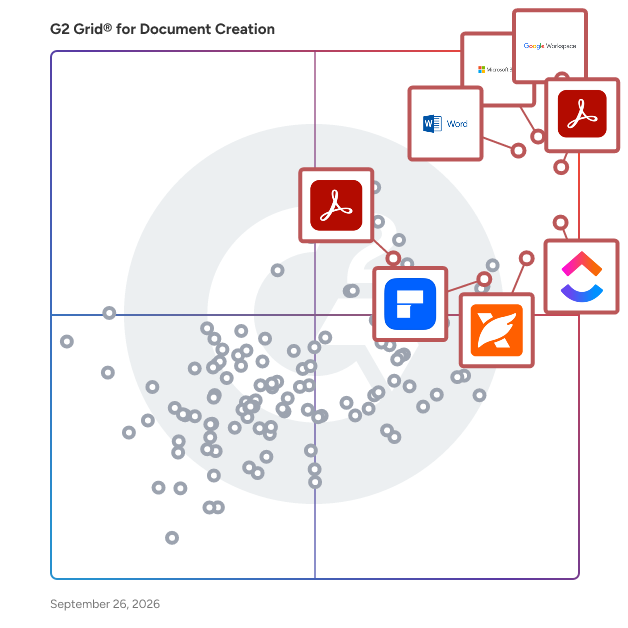
G2 Grid® for Document Creation Software

G2 Grid® for Document Creation Software plotting products by satisfaction and market presence

Highlighted products: Google Workspace, Microsoft 365, Adobe Acrobat, Microsoft Word, ClickUp, Wondershare PDFelement, Adobe PDF Pack, and Foxit PDF Editor.

Underlying data: [Grid® JSON](https://www.g2.com/categories/document-creation/grids.json?focus%5B%5D=google-workspace&focus%5B%5D=microsoft365&focus%5B%5D=adobe-acrobat&focus%5B%5D=microsoft-word&focus%5B%5D=clickup&focus%5B%5D=wondershare-wondershare-pdfelement&focus%5B%5D=adobe-pdf-pack&focus%5B%5D=foxit-pdf-editor&segment=mid-market)

Bit.ai

Bit.ai is an AI-powered document collaboration platform designed to help teams and individuals create, manage, and share interactive documents, wikis, and knowledge bases. It streamlines the documentation process by integrating various digital content types, enabling real-time collaboration, and offering advanced design options. With Bit.ai, users can efficiently organize their work, enhance productivity, and foster seamless communication across teams. Key Features and Functionality: - Interactive Document Creation: Craft dynamic documents by embedding rich media such as videos, images, code snippets, and more, making content more engaging and informative. - Real-Time Collaboration: Collaborate with team members simultaneously, with features like co-editing, inline comments, and @mentions to facilitate effective communication. - Content Library: Store and manage all digital assets in a centralized library, allowing easy access and reuse of content across various documents. - Integration with External Applications: Seamlessly integrate with over 100 popular applications, including Google Drive, OneDrive, and Box, to bring all your scattered knowledge together. - Document Tracking and Analytics: Monitor document engagement with tracking features that provide insights into how recipients interact with your content. - Customizable Templates and Themes: Utilize a wide range of professionally designed templates and themes to quickly create visually appealing documents tailored to your needs. Primary Value and Solutions Provided: Bit.ai addresses the challenges of traditional document management by offering a centralized platform that enhances collaboration, organization, and productivity. It eliminates the inefficiencies of juggling multiple tools by integrating document creation, content management, and communication into a single workspace. This unified approach ensures that teams can focus on their work without the distractions of managing disparate systems, leading to improved efficiency and better outcomes.

Average Rating: 4.1/5.0

Total Reviews: 28

How Do G2 Users Rate Bit.ai?

  • Has the product been a good partner in doing business?: 9.4/10 (Category avg: 9.0/10)
  • Quality of Support: 8.9/10 (Category avg: 8.6/10)
  • Ease of Use: 9.0/10 (Category avg: 8.9/10)
  • Ease of Admin: 9.7/10 (Category avg: 8.9/10)

Who Is the Company Behind Bit.ai?

  • Seller: Bit Tech Labs
  • Year Founded: 2017
  • HQ Location: San Francisco, CA
  • Twitter: @Bit_docs
    4,306 Twitter followers
  • LinkedIn® Page: www.linkedin.com
    4 employees on LinkedIn®

Who Uses This Product?

  • Top Industries: Computer Software
  • Company Size: 61% Small, 36% Medium

What Do G2 Reviewers Say About Bit.ai?

AI-generated summary from verified user reviews

Pros
  • Users appreciate the ease of use of Bit.ai, finding it simple and organized for seamless collaboration and content integration.
  • Users appreciate the simple and organized interface of Bit.ai, enhancing collaboration and content integration seamlessly.
  • Users appreciate the simple and organized interface of Bit.ai, enhancing their documentation experience and collaboration.
  • Users appreciate the simplicity and organization of Bit.ai, valuing its clean interface and seamless collaboration.
  • Users appreciate the smooth collaboration in Bit.ai, allowing teammates to comment and edit effortlessly.
Cons
  • Users feel the formatting options are limited, especially compared to advanced text editors, though it's not a major issue.

What Are Recent G2 Reviews of Bit.ai?

What Are G2 Users Discussing About Bit.ai?

novaPDF

novaPDF is a PDF creator for Windows that enables users to convert any printable document into a PDF format with ease. Designed for both individual and business use, it facilitates the creation of PDFs from reports, contracts, spreadsheets, emails, and more, ensuring seamless document sharing and collaboration. The software integrates as a virtual printer, allowing PDF generation from any application with print capabilities. Key Features and Functionality: - Universal Printing: Convert any printable document (e.g., DOCX, XLSX, PPTX, HTML) to PDF by selecting novaPDF as the printer. - Microsoft Office Add-ins: One-click PDF conversion from Word, Excel, PowerPoint, and other Office applications, preserving bookmarks and hyperlinks. - PDF Security: Apply 256-bit AES encryption and set permissions to control viewing, printing, and copying of PDFs. - Digital Signatures: Sign PDFs to certify authenticity and integrity, ensuring documents remain unaltered. - Merge PDFs: Combine multiple documents into a single PDF or insert pages into existing PDFs. - Watermarks: Add text or image watermarks with customizable settings for rotation, opacity, and positioning. - Email Integration: Automatically send generated PDFs via email using default clients, SMTP, or Outlook. - PDF Overlays: Overlay content from one PDF onto another, useful for adding letterheads or templates. - Clickable Links: Convert URLs and email addresses in documents into active hyperlinks in the PDF. - PDF/A Compliance: Create PDFs compliant with PDF/A standards for long-term archiving. Primary Value and User Solutions: novaPDF streamlines the process of converting documents into universally accessible PDFs, enhancing document portability and collaboration. Its robust security features protect sensitive information, while integration with Microsoft Office and other applications ensures a smooth workflow. By offering features like digital signatures, watermarks, and PDF merging, novaPDF addresses the diverse needs of users seeking efficient and secure document management solutions.

Average Rating: 4.5/5.0

Total Reviews: 55

How Do G2 Users Rate novaPDF?

  • Has the product been a good partner in doing business?: 8.3/10 (Category avg: 9.0/10)
  • Quality of Support: 8.7/10 (Category avg: 8.6/10)
  • Ease of Use: 8.8/10 (Category avg: 8.9/10)
  • Ease of Admin: 10.0/10 (Category avg: 8.9/10)

Who Is the Company Behind novaPDF?

  • Seller: Softland
  • Year Founded: 1999
  • HQ Location: Cluj-Napoca, Cluj
  • Twitter: @freesoft112
    998 Twitter followers
  • LinkedIn® Page: www.linkedin.com
    1 employees on LinkedIn®

Who Uses This Product?

  • Top Industries: Information Technology and Services, Computer Networking
  • Company Size: 39% Medium, 39% Small

What Do G2 Reviewers Say About novaPDF?

AI-generated summary from verified user reviews

Pros
  • Users value the customization options of novaPDF, allowing efficient management and secure conversion of various document types.
  • Users find easy integrations with novaPDF beneficial for quick and effective PDF conversion across various document types.
  • Users find novaPDF's easy setup for encryption and file conversion to be quick and effective, enhancing productivity.
  • Users value the flexibility of novaPDF for quick and effective PDF conversions, even with large files.
  • Users find phone calls with novaPDF helpful for fast and flawless support during PDF conversion tasks.

What Are Recent G2 Reviews of novaPDF?

What Are G2 Users Discussing About novaPDF?

DocFly

Looking for a PDF editor that's completely online? You don't need to spend hours wasting your time on overpriced software. We offer all the tools you'd expect to see - from adding a signature, to creating a form, to reordering pages and merging files. DocFly includes everything you need to create, edit and convert PDF files with no extra software to download. With a user-friendly interface, DocFly was designed to be a more seamless and inexpensive service than desktop PDF software. Say goodbye to spending money on expensive licenses and join the tens of thousands of customers that edit their PDFs on DocFly every day.

Average Rating: 4.3/5.0

Total Reviews: 32

How Do G2 Users Rate DocFly?

  • Has the product been a good partner in doing business?: 8.5/10 (Category avg: 9.0/10)
  • Quality of Support: 7.5/10 (Category avg: 8.6/10)
  • Ease of Use: 8.7/10 (Category avg: 8.9/10)
  • Ease of Admin: 8.7/10 (Category avg: 8.9/10)

Who Is the Company Behind DocFly?

  • Seller: DocFly
  • HQ Location: Zurich, Zurich
  • Twitter: @tryDocFly
    273 Twitter followers
  • LinkedIn® Page: www.linkedin.com
    1 employees on LinkedIn®

Who Uses This Product?

  • Top Industries: Information Technology and Services
  • Company Size: 41% Small, 34% Medium

What Do G2 Reviewers Say About DocFly?

AI-generated summary from verified user reviews

Pros
  • Users love the ease of use of DocFly, enjoying seamless PDF editing and quick document signing.
  • Users appreciate the easy editing capabilities of DocFly, enabling seamless PDF manipulation without installation or signup.
  • Users appreciate the all-in-one solution of DocFly, making document management simple, secure, and efficient.
  • Users find the intuitive interface of DocFly makes creating fillable PDFs from Word documents incredibly easy.
  • Users find the intuitive interface of DocFly makes converting documents to fillable PDFs incredibly easy.
Cons
  • Users often face PDF editing limitations with DocFly, finding it challenging and costly for extensive use.
  • Users find the pricing of DocFly to be high, questioning its value for the features offered.
  • Users face data deletion issues due to limited storage, necessitating the removal of old files unexpectedly.
  • Users find the manual creation of fillable sections difficult, wishing for a more streamlined process.
  • Users find the limited customization options frustrating, especially for non-PDF formats like Word documents.

What Are Recent G2 Reviews of DocFly?

What Are G2 Users Discussing About DocFly?

IronPDF

IronPDF is the leading C# PDF library for generating & editing PDFs. Its user friendly API allows developers to rapidly deliver professional, high quality PDFs from HTML in .NET projects.

Average Rating: 4.9/5.0

Total Reviews: 64

How Do G2 Users Rate IronPDF?

  • Has the product been a good partner in doing business?: 7.1/10 (Category avg: 9.0/10)
  • Quality of Support: 9.4/10 (Category avg: 8.6/10)
  • Ease of Use: 9.9/10 (Category avg: 8.9/10)
  • Ease of Admin: 7.5/10 (Category avg: 8.9/10)

Who Is the Company Behind IronPDF?

  • Seller: Iron Software
  • Year Founded: 2016
  • HQ Location: Chicago, IL
  • Twitter: @ironsoftwaredev
    143 Twitter followers
  • LinkedIn® Page: www.linkedin.com
    56 employees on LinkedIn®

Who Uses This Product?

  • Top Industries: Accounting, Information Technology and Services
  • Company Size: 66% Small, 26% Medium

What Do G2 Reviewers Say About IronPDF?

AI-generated summary from verified user reviews

Pros
  • Users appreciate the time-saving and formatting features of IronPDF, enabling professional and organized PDF generation effortlessly.
  • Users highlight the ease of use of IronPDF, making PDF creation smooth and professional for various projects.
  • Users value the product quality of IronPDF, as it maintains formatting and enhances the professionalism of documents.
  • Users value the easy integrations of IronPDF, enabling seamless PDF generation within existing systems effortlessly.
  • Users value the easy integration of IronPDF, enabling seamless creation of professional and consistent PDF documents.
Cons
  • Users find debugging rendering issues challenging with IronPDF, particularly when handling large workloads.
  • Users struggle with bug issues, including difficulties in debugging rendering problems and slow OCR performance under heavy loads.
  • Users find the customization options for fonts and styles limited, affecting their design flexibility with IronPDF.
  • Users find the licensing cost to be high, making it challenging for smaller teams and ongoing projects.
  • Users feel the high licensing cost makes it challenging for smaller teams and ongoing projects to adopt IronPDF.

What Are Recent G2 Reviews of IronPDF?

PrizmDoc

Founded in 1991, Accusoft is a software development company specializing in content processing, conversion, and automation solutions. From configurable applications to APIs built for developers, Accusoft software enables users to solve their most complex workflow challenges and gain insights from content in any format, on any device. The company's flagship product, PrizmDoc Viewer, is an HTML5 document viewer and collection of content manipulation APIs that help web developers embed document viewing, processing, and conversion into their applications with ease. PrizmDoc Viewer is a browser-based solution that renders and displays 100+ document and image formats without the need to open native applications. Users can view, search, annotate, redact, e-sign, print, and download using one common interface, which increases productivity and saves on licensing costs. Accusoft's zero-footprint viewer is fully customizable, from quick integrations with minimal configuration to complete programmatic control using our extensive Javascript API. Developers can augment and automate their end users’ viewing experience with key features that can be turned on or off depending on your business needs.

Average Rating: 4.6/5.0

Total Reviews: 58

How Do G2 Users Rate PrizmDoc?

  • Has the product been a good partner in doing business?: 9.2/10 (Category avg: 9.0/10)
  • Quality of Support: 8.8/10 (Category avg: 8.6/10)
  • Ease of Use: 9.0/10 (Category avg: 8.9/10)
  • Ease of Admin: 8.3/10 (Category avg: 8.9/10)

Who Is the Company Behind PrizmDoc?

  • Seller: Apryse
  • Year Founded: 1998
  • HQ Location: Denver, CO
  • Twitter: @aprysesolutions
    381 Twitter followers
  • LinkedIn® Page: www.linkedin.com
    569 employees on LinkedIn®

Who Uses This Product?

  • Top Industries: Information Technology and Services, Marketing and Advertising
  • Company Size: 45% Large, 40% Medium

What Are Recent G2 Reviews of PrizmDoc?

What Are G2 Users Discussing About PrizmDoc?

Easy PDF

Easy PDF is 15 tools in one. It's totally free and anonymous, you can convert files without limits and email registration. Convert PDF to most popular file formats and vice versa. Merge, compress and split PDFs.

Average Rating: 4.5/5.0

Total Reviews: 378

How Do G2 Users Rate Easy PDF?

  • Has the product been a good partner in doing business?: 9.4/10 (Category avg: 9.0/10)
  • Quality of Support: 8.8/10 (Category avg: 8.6/10)
  • Ease of Use: 9.3/10 (Category avg: 8.9/10)
  • Ease of Admin: 9.4/10 (Category avg: 8.9/10)

Who Is the Company Behind Easy PDF?

  • Seller: Easy PDF
  • Year Founded: 2020
  • HQ Location: Bath, Somerset
  • LinkedIn® Page: www.linkedin.com
    1 employees on LinkedIn®

Who Uses This Product?

  • Who Uses This: Marketing Staff, Sales And Marketing Specialist
  • Top Industries: Marketing and Advertising, Information Technology and Services
  • Company Size: 44% Medium, 35% Large

What Do G2 Reviewers Say About Easy PDF?

AI-generated summary from verified user reviews

Pros
  • Users praise the ease of use of Easy PDF, noting its intuitive interface for daily tasks.
  • Users find Easy PDF to be very easy to use, making it perfect for daily tasks and productivity.
  • Users appreciate the easy editing features of Easy PDF, enabling seamless text, image, and link modifications.
  • Users find the intuitive UI of Easy PDF very easy to use, enhancing their daily productivity.
Cons
  • Users experience file corruption issues if files aren't fully downloaded, complicating usage and access to documents.

What Are Recent G2 Reviews of Easy PDF?

What Are G2 Users Discussing About Easy PDF?

Hiration- Online Resume Builder

AI powered end to end career services platform which includes the following: - Resume Builder - Resume Reviewer - Job based Resume Optimizer - Cover Letter Builder - LinkedIn Profile Optimizer - Digital Portfolio Builder

Average Rating: 4.5/5.0

Total Reviews: 18

How Do G2 Users Rate Hiration- Online Resume Builder?

  • Quality of Support: 8.1/10 (Category avg: 8.6/10)
  • Ease of Use: 8.6/10 (Category avg: 8.9/10)

Who Is the Company Behind Hiration- Online Resume Builder?

  • Seller: Hiration
  • Year Founded: 2017
  • HQ Location: Palo Alto, California
  • Twitter: @teamhiration
    90 Twitter followers
  • LinkedIn® Page: www.linkedin.com
    20 employees on LinkedIn®

Who Uses This Product?

  • Company Size: 83% Medium, 28% Small

What Are Recent G2 Reviews of Hiration- Online Resume Builder?

SmartOffice

Work on the go with robust mobile productivity With SmartOffice you can easily view, edit, create, print, present, and share Microsoft Office and PDF documents via your mobile device. The SmartOffice PDF functionality allows you to view, annotate, redact, highlight, form-fill, digitally sign, and share PDF documents. Convert Office documents to PDF, save locally to your mobile device or to a cloud account, and print wirelessly to thousands of supported printers. SmartOffice is designed for today’s mobile devices. The small download size ensures fast loading and high-quality performance. SmartOffice Mobile App A full-featured app that serves as a faster, lighter alternative to MS Office 365. SmartOffice can be downloaded for free from the AppStore or GooglePlay for personal use. Upgrade to our PRO version to access premium features. SmartOffice is not dependent on Internet connectivity and can be used while offline. SmartOffice SDK and Enterprise SmartOffice offers a variety of solutions that can be securely incorporated into your enterprise document workflow platform. The SmartOffice SDK seamlessly and securely integrates with your EFSS, MDM, or EMM environment, while the SmartOffice for Enterprise mobile app can be wrapped in an organization's security platform. Enterprise IT departments can prevent data breaches via SmartOffice SDK controlled access permission tools and customizable document editing controls, that extend down to the user or document level.

Average Rating: 4.1/5.0

Total Reviews: 35

How Do G2 Users Rate SmartOffice?

  • Has the product been a good partner in doing business?: 9.2/10 (Category avg: 9.0/10)
  • Quality of Support: 8.1/10 (Category avg: 8.6/10)
  • Ease of Use: 8.3/10 (Category avg: 8.9/10)
  • Ease of Admin: 9.2/10 (Category avg: 8.9/10)

Who Is the Company Behind SmartOffice?

  • Seller: Artifex Software
  • Year Founded: 1993
  • HQ Location: San Francisco, US
  • Twitter: @Artifex
    211 Twitter followers
  • LinkedIn® Page: www.linkedin.com
    21 employees on LinkedIn®

Who Uses This Product?

  • Company Size: 49% Small, 37% Medium

What Do G2 Reviewers Say About SmartOffice?

AI-generated summary from verified user reviews

Pros
  • Users love the ease of automation for daily tasks, requiring no coding skills to streamline processes.
  • Users love the automation of daily tasks with SmartOffice, easily managing their workflow without coding skills.
  • Users find SmartOffice's ease of use exceptional, enabling task management without coding skills.

What Are Recent G2 Reviews of SmartOffice?

Ideagen Please Review

Ideagen PleaseReview is a document review, co-authoring and redaction software application that helps you to control and manage all aspects of the document creation and review process. Cut down your document review timescales by 65% using Ideagen PleaseReview, giving you more time to work on the things that matter. Cut review costs by 35% by reducing the amount of time spent on them. Wherever you are working, and whether you’re collaborating with colleagues or third parties, Ideagen PleaseReview provides a secure, controlled environment for real-time document review, co-authoring and redaction that handles Word, PDF, PowerPoint, Excel and more. So, you can protect sensitive information and focus on delivering high-quality documents. Ideagen PleaseReview supports teams of 2 to 200+ reviewers simultaneously, enabling fully auditable real-time document collaboration. Integration with Veeva Vault, Intelinotion and other leading quality management and quality control solutions and users can generate audit reports with one click, ensuring transparency and traceability. We offer advanced redaction complying with EMA Policy 70 for managing and processing document redactions.

Average Rating: 4.3/5.0

Total Reviews: 76

How Do G2 Users Rate Ideagen Please Review?

  • Has the product been a good partner in doing business?: 8.5/10 (Category avg: 9.0/10)
  • Quality of Support: 8.5/10 (Category avg: 8.6/10)
  • Ease of Use: 8.4/10 (Category avg: 8.9/10)
  • Ease of Admin: 8.5/10 (Category avg: 8.9/10)

Who Is the Company Behind Ideagen Please Review?

  • Seller: Ideagen
  • Company Website:
  • Year Founded: 2000
  • HQ Location: Ruddington, Nottingham
  • Twitter: @Ideagen_
    2,172 Twitter followers
  • LinkedIn® Page: www.linkedin.com
    1,386 employees on LinkedIn®

Who Uses This Product?

  • Top Industries: Pharmaceuticals, Biotechnology
  • Company Size: 43% Medium, 31% Large

What Do G2 Reviewers Say About Ideagen Please Review?

AI-generated summary from verified user reviews

Pros
  • Users appreciate the collaborative review feature of Please Review, enhancing teamwork across various departments effectively.
  • Users appreciate the collaborative review feature of Please Review, facilitating seamless teamwork across departments.
  • Users find Please Review very easy to use, appreciating its intuitive design and collaborative review features.
  • Users find Please Review's intuitive document management features enhance collaboration and streamline the review process effectively.
  • Users appreciate the collaborative authoring capability of Please Review, facilitating real-time updates and efficient document reviews.
Cons
  • Users find the software difficult to use, especially when making formatting changes and managing comments effectively.
  • Users struggle with editing issues in Please Review, including difficulties in formatting and managing tracked changes effectively.
  • Users express frustration with the missing features in Ideagen Please Review, limiting customization and reporting capabilities.
  • Users face access control issues with Please Review, making document navigation and locating files frustratingly difficult.
  • Users find the software difficult to use, despite educational resources provided to assist them.

What Are Recent G2 Reviews of Ideagen Please Review?

PDF Suite

PDF Suite allows users to read, create, convert, edit, review and secure PDFs.

Average Rating: 4.3/5.0

Total Reviews: 73

How Do G2 Users Rate PDF Suite?

  • Has the product been a good partner in doing business?: 9.0/10 (Category avg: 9.0/10)
  • Quality of Support: 8.0/10 (Category avg: 8.6/10)
  • Ease of Use: 8.8/10 (Category avg: 8.9/10)
  • Ease of Admin: 8.8/10 (Category avg: 8.9/10)

Who Is the Company Behind PDF Suite?

Who Uses This Product?

  • Top Industries: Information Technology and Services, Computer Software
  • Company Size: 49% Small, 28% Large

What Are Recent G2 Reviews of PDF Suite?

What Are G2 Users Discussing About PDF Suite?

PDF Document Writer

Corel® PDF Document Writer is a application designed to convert various file types into PDFs seamlessly on Windows® 8 Pro tablets and desktops. With a simple tap or click, users can transform documents, emails, images, and more into PDFs suitable for viewing and sharing. This tool ensures that whether you're in the office or on the move, creating and saving PDFs is both quick and efficient. Key Features and Functionality: - Universal File Conversion: Convert emails, images, documents, and other file types into PDFs effortlessly. - Instant PDF Saving: Save PDFs instantly for future reference or sharing purposes. - Cross-Device Compatibility: Print to PDF on both Windows 8 Pro tablets and desktop computers, supporting both 32-bit and 64-bit systems. Primary Value and User Solutions: PDF Document Writer addresses the need for a straightforward and reliable method to create PDFs from various file formats without requiring complex software. It simplifies the process of converting and sharing documents, enhancing productivity for users who frequently handle diverse file types. By offering compatibility across Windows 8 Pro devices, it ensures flexibility and convenience, catering to professionals and individuals who require efficient PDF creation on the go.

Average Rating: 4.4/5.0

Total Reviews: 43

How Do G2 Users Rate PDF Document Writer?

  • Has the product been a good partner in doing business?: 10.0/10 (Category avg: 9.0/10)
  • Quality of Support: 9.0/10 (Category avg: 8.6/10)
  • Ease of Use: 8.9/10 (Category avg: 8.9/10)
  • Ease of Admin: 9.2/10 (Category avg: 8.9/10)

Who Is the Company Behind PDF Document Writer?

  • Seller: Corel Corporation
  • Year Founded: 2006
  • HQ Location: Bellevue, WA
  • Twitter: @corelsoftware
    83 Twitter followers
  • LinkedIn® Page: www.linkedin.com
    1 employees on LinkedIn®

Who Uses This Product?

  • Company Size: 38% Medium, 33% Small

What Do G2 Reviewers Say About PDF Document Writer?

AI-generated summary from verified user reviews

Pros
  • Users value the ease of use of PDF Document Writer, as its intuitive UI enhances the user experience significantly.
  • Users value the stability and performance of PDF Document Writer, appreciating its lightweight design and intuitive UI.
  • Users value the intuitive design of PDF Document Writer, enhancing usability and streamlining their document conversion tasks.
  • Users value the reliability of PDF Document Writer, noting its stable performance and flawless conversion capabilities.
  • Users value the clean and intuitive UI of PDF Document Writer, enhancing their overall experience with its performance.
Cons
  • Users find the integration issues challenging, as the lack of APIs limits functionality and developer utility.
  • Users criticize the lack of advanced features, noting limited integration options and minimal editing capabilities.
  • Users noted that the slow loading occurs occasionally during export, impacting the overall experience but not frequently.

What Are Recent G2 Reviews of PDF Document Writer?

What Are G2 Users Discussing About PDF Document Writer?

Xtensio

The living deliverables workspace — consultants and agencies use Xtensio to build proposals, one-pagers, and client reports that update in real time without re-sending. Over 400,000 consultants, agencies, and founders use Xtensio to create and share client-facing documents that stay current. Unlike static PDFs or presentation files, Xtensio documents are live links — update the content once and every client who has the link sees the new version instantly. No re-sending, no version confusion. Built for professional deliverables: consulting proposals, startup one-pagers, capability statements, fact sheets, status reports, and pitch decks. Start from 100+ professionally-designed templates or build from scratch using a drag-and-drop block editor. Organize multiple documents in a branded workspace and share individual files or full workspaces with clients. Key difference from presentation tools: Xtensio documents live at a permanent URL. Your client bookmarks it once — and it always shows your latest version. Upgrade to add custom branding, remove the Xtensio watermark, and track when clients open your links. Free to start. Used by teams at agencies, consultancies, and early-stage companies since 2015.

Average Rating: 4.5/5.0

Total Reviews: 265

How Do G2 Users Rate Xtensio?

  • Has the product been a good partner in doing business?: 8.8/10 (Category avg: 9.0/10)
  • Quality of Support: 8.6/10 (Category avg: 8.6/10)
  • Ease of Use: 8.8/10 (Category avg: 8.9/10)
  • Ease of Admin: 9.0/10 (Category avg: 8.9/10)

Who Is the Company Behind Xtensio?

  • Seller: Xtensio
  • Year Founded: 2015
  • HQ Location: Los Angeles, CA
  • Twitter: @xtensio
    2,118 Twitter followers
  • LinkedIn® Page: www.linkedin.com
    2 employees on LinkedIn®

Who Uses This Product?

  • Who Uses This: CEO, Founder
  • Top Industries: Marketing and Advertising, Information Technology and Services
  • Company Size: 81% Small, 15% Medium

What Do G2 Reviewers Say About Xtensio?

AI-generated summary from verified user reviews

Pros
  • Users love the customizable templates in Xtensio, enabling easy and professional designs for client presentations.
  • Users find Xtensio's platform to be very easy to use, thanks to its flexibility and customizable templates.
  • Users find Xtensio's intuitive interface and real-time collaboration features invaluable for creating professional and engaging landing pages.
  • Users value the customization options in Xtensio, enabling the creation of tailored and professional client landing pages.
  • Users love the intuitive interface of Xtensio, making it easy to create professional and engaging landing pages.
Cons
  • Users find the limited customization options of Xtensio restrict creative possibilities and layout flexibility.
  • Users find the limited design options of Xtensio challenging, often requiring adjustments to templates for effective use.
  • Users find the limited features of Xtensio frustrating, especially in the free account's basic tool offerings.
  • Users desire more industry-specific templates in Xtensio, particularly for digital marketing, to enhance usability.
  • Users experience missing features like inadequate editing tools and confusing navigation, which hinder usability and efficiency.

What Are Recent G2 Reviews of Xtensio?

What Are G2 Users Discussing About Xtensio?

Neeraja Prakash
NP
Researched and written by Neeraja Prakash
Updated