Best Display Ad Design Software - Page 3

How Many Display Ad Design Software Products Does G2 Track?

Total Products under this Category: 79

Category Stats (Sep 2026)

  • Average Rating: 4.41/5 (↑0.01 vs Aug 2026) The average rating of products in this category, based on all submitted ratings
  • Top Trending Product: AdGPT.com (+0.34%) - Among all products in this category, AdGPT.com recorded the largest rating increase compared to last month

Last updated: September 15, 2026

How Does G2 Rank Display Ad Design Software Products?

Why You Can Trust G2's Software Rankings:

  • 30 Analysts and Data Experts
  • 24,200+ Authentic Reviews
  • 79+ Products
  • Unbiased Rankings

G2's software rankings are built on verified user reviews, rigorous moderation, and a consistent research methodology maintained by a team of analysts and data experts. Each product is measured using the same transparent criteria, with no paid placement or vendor influence. While reviews reflect real user experiences, which can be subjective, they offer valuable insight into how software performs in the hands of professionals. Together, these inputs power the G2 Score, a standardized way to compare tools within every category.

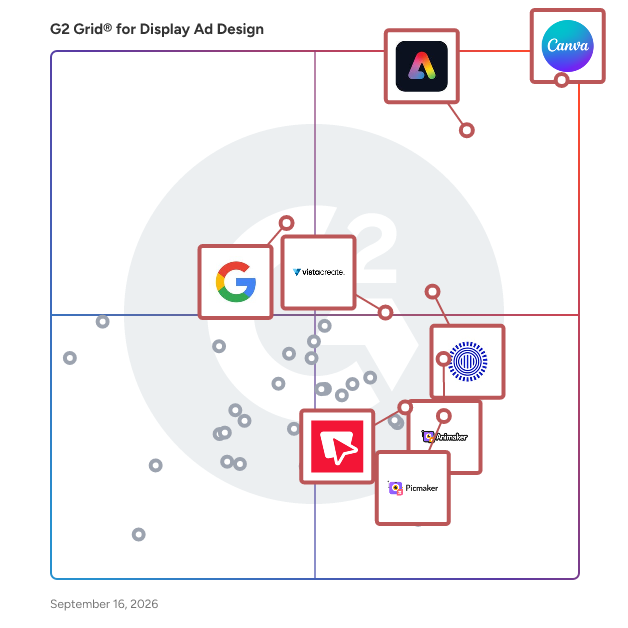
G2 Grid® for Display Ad Design Software

G2 Grid® for Display Ad Design Software plotting products by satisfaction and market presence

Highlighted products: Canva, Adobe Express, Prezi, Animaker, VistaCreate, Google Display Ad Network, Picmaker, and Bannersnack.

Underlying data: [Grid® JSON](https://www.g2.com/categories/display-ad-design/grids.json?focus%5B%5D=canva&focus%5B%5D=adobe-express&focus%5B%5D=prezi&focus%5B%5D=animaker&focus%5B%5D=vistacreate&focus%5B%5D=google-display-ad-network&focus%5B%5D=picmaker&focus%5B%5D=bannersnack-inc-bannersnack)

MiriCanvas

🩵MiriCanvas is the ultimate platform that makes designing effortless and fun. This free, user-friendly tool offers a stunning collection of customizable templates for every need—whether it's presentations, social media graphics, marketing materials, or more. Perfect for individuals, businesses, and educators, MiriCanvas empowers you to create professional-quality designs in minutes, no design experience required! Say goodbye to complexity and hello to creativity with MiriCanvas.😉 Targeted at a diverse audience, MiriCanvas caters to students, small business owners, marketers, and anyone in need of quick and effective design solutions. The platform is particularly beneficial for those who may lack the time or resources to engage a professional designer. With its intuitive interface and extensive library of templates, users can quickly find a starting point for their projects, allowing them to focus on content rather than design intricacies. MiriCanvas stands out in the design platform category by integrating AI-powered tools that enhance the creative process. These tools assist users in generating unique design elements, suggesting color palettes, and even recommending layout adjustments based on the content provided. This feature not only streamlines the design process but also encourages users to experiment with their creativity, resulting in more personalized and engaging content. Key features of MiriCanvas include a vast selection of customizable templates, an easy-to-navigate interface, and robust AI tools that facilitate design creation. Users can choose from a variety of layouts tailored for different platforms, ensuring that their content is optimized for its intended audience. Additionally, the platform supports collaboration, allowing multiple users to work on a project simultaneously, which is particularly useful for teams and educational settings. By offering a comprehensive suite of design tools and resources, MiriCanvas adds significant value to users looking to create high-quality visuals quickly and efficiently. Its combination of accessibility, versatility, and innovative features makes it a noteworthy option for anyone seeking to enhance their design capabilities without the steep learning curve typically associated with graphic design software.

Average Rating: 4.7/5.0

Total Reviews: 87

How Do G2 Users Rate MiriCanvas?

  • Has the product been a good partner in doing business?: 10.0/10 (Category avg: 9.1/10)
  • Image Upload: 10.0/10 (Category avg: 8.8/10)
  • Variety Of Banner Types: 10.0/10 (Category avg: 8.6/10)
  • Shape & Clip Art: 9.4/10 (Category avg: 8.3/10)

Who Is the Company Behind MiriCanvas?

  • Seller: MIRIDIH
  • Year Founded: 2008
  • HQ Location: Seoul, KR
  • LinkedIn® Page: www.linkedin.com
    228 employees on LinkedIn®

Who Uses This Product?

  • Top Industries: Design, Higher Education
  • Company Size: 14% Small, 1% Medium

What Do G2 Reviewers Say About MiriCanvas?

AI-generated summary from verified user reviews

Pros
  • Users find MiriCanvas to be easy to use, allowing for quick and effortless project creation and presentations.
  • Users love the intuitive design and ease of customization in MiriCanvas, making their creative process enjoyable and efficient.
  • Users love the easy-to-use templates with plenty of themes, facilitating friendly edits and fulfilling requirements seamlessly.
  • Users find MiriCanvas to be a time-saving tool, simplifying design and video creation for their online stores.
  • Users love the AI image generator feature of MiriCanvas for its ease and efficiency in creating visuals.
Cons
  • Users wish for more limited templates, indicating a need for greater variety and customization options in MiriCanvas.
  • Users experience slow performance on MiriCanvas, with frequent freezing and extended approval times causing frustration.
  • Users find MiriCanvas to be expensive, especially when premium options dominate their search results despite filtering for free products.
  • Users find MiriCanvas has limited customization, affecting their experience, especially for larger and more complex projects.
  • Users find limited editing options frustrating, noting restrictions on shaping, gradients, and animations in MiriCanvas.

What Are Recent G2 Reviews of MiriCanvas?

FotoJet

FotoJet is an all-in-one online platform that empowers users to create stunning photo collages, graphic designs, and edit photos effortlessly. Designed with a user-friendly interface, it caters to both beginners and professionals, enabling the creation of high-quality visuals without the need for extensive design skills. Accessible directly through web browsers, FotoJet eliminates the need for software downloads or installations, allowing users to work seamlessly across various devices. Key Features and Functionality: - Graphic Design: Offers a vast collection of professionally designed templates for social media graphics, posters, flyers, and more, facilitating quick and efficient design creation. - Photo Collage Maker: Provides numerous layouts and templates to craft personalized photo collages, enhancing storytelling through images. - Photo Editing: Equipped with essential editing tools such as cropping, resizing, rotating, exposure adjustments, color corrections, and a variety of photo effects and filters to enhance image quality. - Customization Tools: Allows users to add text, clipart, overlays, and frames, offering flexibility to personalize designs to specific preferences. - Cloud Storage: Enables saving and managing photos and projects online, reducing the risk of data loss and facilitating easy access from any device. - Ad-Free Experience: Provides an uninterrupted workspace, allowing users to focus solely on their creative projects. Primary Value and User Solutions: FotoJet addresses the need for an accessible, comprehensive, and efficient design tool that simplifies the creation of professional-quality visuals. By integrating graphic design, collage making, and photo editing into a single platform, it streamlines the creative process, saving users time and effort. Its browser-based accessibility ensures that users can work from any device without compatibility concerns, making it ideal for individuals, small businesses, and content creators seeking to produce polished visual content without investing in complex software or extensive training.

Average Rating: 4.3/5.0

Total Reviews: 67

How Do G2 Users Rate FotoJet?

  • Has the product been a good partner in doing business?: 7.8/10 (Category avg: 9.1/10)
  • Image Upload: 8.7/10 (Category avg: 8.8/10)
  • Variety Of Banner Types: 9.0/10 (Category avg: 8.6/10)
  • Shape & Clip Art: 9.2/10 (Category avg: 8.3/10)

Who Is the Company Behind FotoJet?

  • Seller: PearlMountain
  • Year Founded: 2006
  • HQ Location: Sichuan, China
  • Twitter: @fotojetapp
    250 Twitter followers
  • LinkedIn® Page: www.linkedin.com
    31 employees on LinkedIn®

Who Uses This Product?

  • Top Industries: Design, Internet
  • Company Size: 64% Small, 28% Medium

What Do G2 Reviewers Say About FotoJet?

AI-generated summary from verified user reviews

Pros
  • Users love the extensive customization options in FotoJet, allowing for unique and polished designs effortlessly.
  • Users admire the high quality of designs achievable with FotoJet, appreciating its polished results and user-friendly features.
  • Users love the extensive templates in FotoJet that make designing social media posts and flyers quick and easy.
  • Users love the variety of ready-to-use templates in FotoJet, making design simple and versatile for all projects.
  • Users find FotoJet's ease of use invaluable for quick, creative designs without needing advanced skills.
Cons
  • Users find the limited features of FotoJet restrict creative possibilities and hinder advanced editing needs.
  • Users experience slow loading times, particularly with larger projects, impacting overall editing efficiency and satisfaction.
  • Users feel that FotoJet is expensive since purchasing is necessary to access all desirable features.
  • Users face challenges with background inaccuracies, leading to unsatisfactory results when adding digital backgrounds.
  • Users experience frequent interface issues when trying to add and modify backgrounds in FotoJet, impacting usability.

What Are Recent G2 Reviews of FotoJet?

What Are G2 Users Discussing About FotoJet?

HTML5 Maker

HTML5Maker is an online animation tool created by OnlyMega LLC. It allows to produce cross-browser animated content such as javascript and html5 animation, Slideshows, Presentations and Sliders.

Average Rating: 4.2/5.0

Total Reviews: 16

How Do G2 Users Rate HTML5 Maker?

  • Has the product been a good partner in doing business?: 8.3/10 (Category avg: 9.1/10)
  • Image Upload: 9.3/10 (Category avg: 8.8/10)
  • Variety Of Banner Types: 8.1/10 (Category avg: 8.6/10)
  • Shape & Clip Art: 7.6/10 (Category avg: 8.3/10)

Who Is the Company Behind HTML5 Maker?

  • Seller: HTML5 Maker
  • HQ Location: N/A
  • Twitter: @onlymegacom
    5 Twitter followers
  • LinkedIn® Page: www.linkedin.com
    1 employees on LinkedIn®

Who Uses This Product?

  • Top Industries: Marketing and Advertising
  • Company Size: 75% Small, 31% Medium

What Are Recent G2 Reviews of HTML5 Maker?

What Are G2 Users Discussing About HTML5 Maker?

Viewst

Turn one master creative into native, editable, animated HTML5 ads. Ready for every size, every audience, every platform.

Average Rating: 4.7/5.0

Total Reviews: 20

How Do G2 Users Rate Viewst?

  • Has the product been a good partner in doing business?: 9.2/10 (Category avg: 9.1/10)
  • Image Upload: 8.9/10 (Category avg: 8.8/10)
  • Variety Of Banner Types: 7.8/10 (Category avg: 8.6/10)
  • Shape & Clip Art: 8.3/10 (Category avg: 8.3/10)

Who Is the Company Behind Viewst?

  • Seller: Viewst
  • Year Founded: 2020
  • HQ Location: New York, US
  • LinkedIn® Page: www.linkedin.com
    18 employees on LinkedIn®

Who Uses This Product?

  • Top Industries: Marketing and Advertising
  • Company Size: 95% Small

What Are Recent G2 Reviews of Viewst?

What Are G2 Users Discussing About Viewst?

Fotor Photo Editor

Fotor is an all-in-one photo editing platform that combines editing, design and AI image generation features. In addition to the online platform, Fotor covers all other platforms such as Windows, Mac, iOS and Android.

Average Rating: 4.2/5.0

Total Reviews: 330

How Do G2 Users Rate Fotor Photo Editor?

  • Has the product been a good partner in doing business?: 7.4/10 (Category avg: 9.1/10)
  • Image Upload: 9.1/10 (Category avg: 8.8/10)
  • Variety Of Banner Types: 8.5/10 (Category avg: 8.6/10)
  • Shape & Clip Art: 8.6/10 (Category avg: 8.3/10)

Who Is the Company Behind Fotor Photo Editor?

Who Uses This Product?

  • Who Uses This: Graphic Designer, Owner
  • Top Industries: Marketing and Advertising, Photography
  • Company Size: 73% Small, 19% Medium

What Do G2 Reviewers Say About Fotor Photo Editor?

AI-generated summary from verified user reviews

Pros
  • Users love the ease of use of Fotor Photo Editor, finding it beginner-friendly and efficient for quick edits.
  • Users praise Fotor Photo Editor for its one-tap enhance feature and easy-to-use tools that deliver professional results.
  • Users love Fotor Photo Editor for its one-tap enhance feature and convenient user-friendly interface, making editing effortless.
  • Users love the AI background remover in Fotor Photo Editor, which simplifies photo editing and saves significant time.
  • Users value the efficiency of Fotor Photo Editor, enjoying quick, professional results with its user-friendly tools.
Cons
  • Users find Fotor's high subscription costs off-putting, as key features require payment and can hinder the editing experience.
  • Users find the pricing excessive due to features locked behind paywalls and unexpected subscription charges.
  • Users report payment required issues, citing hidden charges and frustrating subscription practices that undermine their experience.
  • Users find that Fotor Photo Editor has limited features in the free version, making advanced editing less accessible.
  • Users find the annoying ads and limited features of the free version disruptive to their editing experience.

What Are Recent G2 Reviews of Fotor Photo Editor?

What Are G2 Users Discussing About Fotor Photo Editor?

Designbold

DesignBold is an online graphic design tool for everyone. DesignBold is loaded with over 4,500 easy-to-use features and functionalities that empower anyone to create a variety of engaging content that gets shared. There are 50+ materials that users can create which including social media ads, presentations, banners, posters, invitations, and so many more.

Average Rating: 4.3/5.0

Total Reviews: 42

How Do G2 Users Rate Designbold?

  • Image Upload: 8.6/10 (Category avg: 8.8/10)
  • Variety Of Banner Types: 8.0/10 (Category avg: 8.6/10)
  • Shape & Clip Art: 8.2/10 (Category avg: 8.3/10)

Who Is the Company Behind Designbold?

  • Seller: DesignBold
  • Year Founded: 2015
  • HQ Location: N/A
  • Twitter: @DesignBold_
    342 Twitter followers
  • LinkedIn® Page: www.linkedin.com
    7 employees on LinkedIn®

Who Uses This Product?

  • Who Uses This: Digital Marketing Consultant
  • Top Industries: Information Services, Financial Services
  • Company Size: 79% Small, 23% Medium

What Are Recent G2 Reviews of Designbold?

What Are G2 Users Discussing About Designbold?

Snapied

Snapied is a simple yet powerful online graphic design tool that helps both professional and non-designers create amazing designs easily and quickly. Q: What is Snapied used for? A: Creating designs can be very difficult. Especially for businesses that don't have the time or money to invest in professional designers. You need a professional design to stand out in the crowd. Snapied helps you achieve this by offering a free graphic designing platform that is simple to use and allows even non-designers to create stunning designs easily and quickly. Q: What is Snapied and how is it different from other design platforms? A: Snapied is a FREE Graphic Designing platform that helps both professional and non-designers create amazing designs easily and quickly. Try Now: https://www.Snapied.com Here are some of the advantages- Easy to Use: Snapied is an easy-to-use online graphic designing platform that lets you create and manage your professional-quality marketing material for free. Huge collection of quotes in almost all categories. Background Remove: one click to remove any image background. Multiple pages and layers. Create multiple workspaces and invite your team to work collaboratively. Color Palette: Try different color combinations before finalizing your design. Branding and presets: Save your brand's fonts, colors, logo, and logo position for a unified look across all designs. Snapied doesn't restrict you on the number of brands you create. Fonts: Snapied lets you select a font from a list of common fonts and also lets you upload your font files. Resize Design: Resize the image to a specific size. Split images into smaller grids. Favorite items: You can mark a template, image, illustration, quote, etc you favorite to use later. Millions of icons, illustrations, and elements. Embeddable Design Editor: Yes, Snapied's design editor is embeddable. You have a website and you want to be able to design graphics. You need a graphic design editor that is white label, so it can be embedded into your website or platform. Snapied is for you! Download options: Snapied offers the following import formats as of now: JPG PNG SVG Webp PDF (Single and multiple pages) Transparent images and the quality scale ranges from 1x to 5x. Snapied downloads the images in 300 dpi by default.

Average Rating: 4.6/5.0

Total Reviews: 16

How Do G2 Users Rate Snapied?

  • Has the product been a good partner in doing business?: 10.0/10 (Category avg: 9.1/10)
  • Image Upload: 9.2/10 (Category avg: 8.8/10)
  • Variety Of Banner Types: 9.6/10 (Category avg: 8.6/10)
  • Shape & Clip Art: 9.2/10 (Category avg: 8.3/10)

Who Is the Company Behind Snapied?

  • Seller: IdeaOnce
  • Year Founded: 2021
  • HQ Location: Dehradun, IN
  • LinkedIn® Page: www.linkedin.com
    1 employees on LinkedIn®

Who Uses This Product?

  • Company Size: 65% Small, 24% Medium

What Do G2 Reviewers Say About Snapied?

AI-generated summary from verified user reviews

Pros
  • Users value the ease of use of Snapied, enjoying its user-friendly templates and workspace organization.
  • Users praise the good range of social media post templates, finding them easy to use for various projects.
  • Users value the effective team collaboration offered by Snapied through versatile workspaces and user-friendly templates.
  • Users value the good range of templates in Snapied, enhancing their social media post creation process.
  • Users praise the good range of social media post templates and the ease of use for project management.
Cons
  • Users note the limited capabilities of Snapied compared to more powerful alternatives like Canva.

What Are Recent G2 Reviews of Snapied?

What Are G2 Users Discussing About Snapied?

Email Template Builder

Otowui is designed to help companies create emails and landing pages templates using a template builder. Enter a new era where template management is easy. Create, copy, clone, modify, then select your modules within our tool to create the template you need upon demand. Our modules are at the forefront of the latest trends and being constantly updated. One-click push to your marketing platform, or grab the HTML and for use anywhere. No coding skills required. Perfect email rendering across all platforms.

Average Rating: 4.6/5.0

Total Reviews: 6

How Do G2 Users Rate Email Template Builder?

  • Image Upload: 8.8/10 (Category avg: 8.8/10)
  • Variety Of Banner Types: 8.8/10 (Category avg: 8.6/10)
  • Shape & Clip Art: 7.5/10 (Category avg: 8.3/10)

Who Is the Company Behind Email Template Builder?

  • Seller: Otowui
  • Year Founded: 2021
  • HQ Location: Paris, FR
  • Twitter: @OTOWUI_company
    5 Twitter followers
  • LinkedIn® Page: www.linkedin.com
    3 employees on LinkedIn®

Who Uses This Product?

  • Company Size: 100% Small

What Do G2 Reviewers Say About Email Template Builder?

AI-generated summary from verified user reviews

Pros
  • Users enjoy the easy customization of the Email Template Builder, allowing for quick and professional email designs.
  • Users appreciate the ease of use of Email Template Builder, enabling quick, professional email designs without coding.
  • Users love the easy creation of Email Template Builder, making email design quick and professional without coding.
  • Users love the easy-to-use drag and drop editor, making email design quick and professional without coding.
  • Users love the ease of use of the Email Template Builder, making email design quick and professional.
Cons
  • Users find the limited customization options restrictive, often requiring workarounds for specific design needs.

What Are Recent G2 Reviews of Email Template Builder?

Designmaker

Designmaker is an intelligent design generator that connects inputted data with dynamic design templates to create stunning visual content.

Average Rating: 4.2/5.0

Total Reviews: 5

How Do G2 Users Rate Designmaker?

  • Image Upload: 9.2/10 (Category avg: 8.8/10)
  • Variety Of Banner Types: 8.3/10 (Category avg: 8.6/10)
  • Shape & Clip Art: 7.5/10 (Category avg: 8.3/10)

Who Is the Company Behind Designmaker?

  • Seller: Designs.ai
  • Year Founded: 2019
  • HQ Location: Singapore, SG
  • Twitter: @DesignsdotAI
    1,903 Twitter followers
  • LinkedIn® Page: www.linkedin.com
    5 employees on LinkedIn®

Who Uses This Product?

  • Company Size: 57% Small, 43% Medium

What Are Recent G2 Reviews of Designmaker?

What Are G2 Users Discussing About Designmaker?

IMG.LY

IMG.LY SDK brings state-of-the-art image, video, and design editing capabilities to your application. With intuitive, user-friendly features, extensive automation options, and powerful templating capabilities, IMG.LY enables efficient workflows by reducing repetitive tasks and providing users with customizable templates. This helps streamline content creation and ensures consistency across designs. We built a single creative engine that is portable to any platform. 
Whether iOS, Android, desktop, or the web, every platform uses the same underlying tech, empowering developers to seamlessly integrate advanced creative tools into mobile, web, and desktop platforms. Our SDK is designed to scale, offering full customization to align with your app's branding, style, and functionality. Whether you're building a social media app, e-commerce platform, or a content creation tool, IMG.LY equips your users with everything they need to create stunning visuals. Join hundreds of companies worldwide who trust IMG.LY to enhance their user experience with cutting-edge editing tools.

Average Rating: 4.7/5.0

Total Reviews: 19

How Do G2 Users Rate IMG.LY?

  • Has the product been a good partner in doing business?: 8.6/10 (Category avg: 9.1/10)
  • Image Upload: 9.7/10 (Category avg: 8.8/10)
  • Variety Of Banner Types: 6.7/10 (Category avg: 8.6/10)
  • Shape & Clip Art: 9.4/10 (Category avg: 8.3/10)

Who Is the Company Behind IMG.LY?

  • Seller: IMG.LY
  • Year Founded: 2018
  • HQ Location: Bochum, DE
  • LinkedIn® Page: www.linkedin.com
    42 employees on LinkedIn®

Who Uses This Product?

  • Top Industries: Marketing and Advertising
  • Company Size: 63% Small, 26% Medium

What Do G2 Reviewers Say About IMG.LY?

AI-generated summary from verified user reviews

Pros
  • Users commend IMG.LY for their responsive customer support, ensuring quick help and solutions when needed.
  • Users commend the ease of use of IMG.LY, highlighting smooth integration and excellent documentation for developers.
  • Users find the easy integration and excellent documentation of IMG.LY enhance their implementation experience significantly.
  • Users rave about the extensive features and customization options of IMG.LY, enhancing their development experience significantly.
  • Users find IMG.LY's easy integrations straightforward, backed by excellent documentation and responsive customer support.
Cons
  • Users note that the poor documentation can complicate finding specific information and hinder advanced customization efforts.
  • Users note the limited learning resources with IMG.LY, seeking improved documentation for advanced customization and clearer organization.
  • Users find the limited customization options challenging, particularly for advanced scenarios requiring extensive setup and support.
  • Users experience a steep learning curve with IMG.LY's advanced customization features, complicating initial integration and usage.
  • Users face poor description issues with IMG.LY, making it difficult to find accurate and organized documentation.

What Are Recent G2 Reviews of IMG.LY?

Artboard Studio

Artboard Studio is a comprehensive graphic and motion design platform that enables users to create compelling marketing assets with ease. With a user-friendly interface and a wealth of features, including design, animation, and mockup capabilities, it streamlines the creative process, allowing users to save time and money. It has extensive content library including various templates and mockups, integrations with popular tools, making it an essential tool for creative teams and marketers.

Average Rating: 4.0/5.0

Total Reviews: 12

How Do G2 Users Rate Artboard Studio?

  • Image Upload: 10.0/10 (Category avg: 8.8/10)
  • Variety Of Banner Types: 8.3/10 (Category avg: 8.6/10)
  • Shape & Clip Art: 10.0/10 (Category avg: 8.3/10)

Who Is the Company Behind Artboard Studio?

Who Uses This Product?

  • Company Size: 58% Small, 25% Medium

What Are Recent G2 Reviews of Artboard Studio?

What Are G2 Users Discussing About Artboard Studio?

Bannernow

BannerNow is a powerful platform where you can create, manage, translate, distribute, and schedule all your creatives in one place. With BannerNow you can create real-time data feeds within your ads, ensuring your audience always sees the most current information. This platform provides a seamless solution for scheduling your advertising campaigns. It allows you to plan, organize, and automate the deployment of your campaigns with ease. Additionally, access detailed analytics, including impressions, clicks, click-through rates, visibility, viewing time, video play time, ROI, and more, to evaluate and enhance your advertising strategy.

Average Rating: 4.3/5.0

Total Reviews: 4

How Do G2 Users Rate Bannernow?

  • Image Upload: 8.3/10 (Category avg: 8.8/10)
  • Variety Of Banner Types: 10.0/10 (Category avg: 8.6/10)
  • Shape & Clip Art: 8.3/10 (Category avg: 8.3/10)

Who Is the Company Behind Bannernow?

  • Seller: Bannernow
  • HQ Location: N/A
  • Twitter: @bannernow
    10 Twitter followers
  • LinkedIn® Page: www.linkedin.com
    9 employees on LinkedIn®

Who Uses This Product?

  • Company Size: 50% Medium, 50% Small

What Are Recent G2 Reviews of Bannernow?

What Are G2 Users Discussing About Bannernow?

CHILI GraFx

CHILI GraFx is a cloud-based platform that boosts your animated, digital, and print media creation. Businesses around the world rely on CHILI GraFx to create on-brand, personalized, and multichannel content at scale. Our platform enables: - Brands to deliver compelling, on-brand messaging at volume - Agencies to create impact by boosting the volume and agility of their design output - Retailers to target customers with data-driven, ‘phygital’ experiences Want to see it in action? Request a demo now!

Average Rating: 4.2/5.0

Total Reviews: 12

How Do G2 Users Rate CHILI GraFx?

  • Has the product been a good partner in doing business?: 9.8/10 (Category avg: 9.1/10)
  • Image Upload: 9.2/10 (Category avg: 8.8/10)
  • Variety Of Banner Types: 9.2/10 (Category avg: 8.6/10)
  • Shape & Clip Art: 8.3/10 (Category avg: 8.3/10)

Who Is the Company Behind CHILI GraFx?

  • Seller: CHILI publish
  • Year Founded: 2010
  • HQ Location: Erembodegem, Oost-vlaanderen
  • Twitter: @CHILI_publish
    2,275 Twitter followers
  • LinkedIn® Page: www.linkedin.com
    58 employees on LinkedIn®

Who Uses This Product?

  • Company Size: 33% Large, 33% Medium

What Are Recent G2 Reviews of CHILI GraFx?

Qwikbanners

Making web banners made easy. Get your display network campaign going in clicks, automatically generate multiple sizes in seconds, no coding or design skills required.

Average Rating: 4.6/5.0

Total Reviews: 4

How Do G2 Users Rate Qwikbanners?

  • Has the product been a good partner in doing business?: 10.0/10 (Category avg: 9.1/10)
  • Image Upload: 10.0/10 (Category avg: 8.8/10)
  • Variety Of Banner Types: 10.0/10 (Category avg: 8.6/10)

Who Is the Company Behind Qwikbanners?

Who Uses This Product?

  • Company Size: 75% Small

What Are Recent G2 Reviews of Qwikbanners?

What Are G2 Users Discussing About Qwikbanners?

Predis.ai

Predis.ai is an AI ad platform that helps businesses create ads that look like their brand - shaped by what works in their category. From product URL to launch-ready ad in under 3 minutes, Predis.ai generates on-brand video ads, UGC ads with lifelike AI actors, static creatives, and product ads across Meta, TikTok, Instagram, YouTube, LinkedIn, and Pinterest. The platform analyzes ads to surface which hooks, formats, and CTAs are working in each category. Predis.ai has powered over 200M ads to date, delivering 1.5× average ROAS improvement and 75% less production time.

Average Rating: 4.7/5.0

Total Reviews: 105

How Do G2 Users Rate Predis.ai?

  • Has the product been a good partner in doing business?: 9.6/10 (Category avg: 9.1/10)

Who Is the Company Behind Predis.ai?

  • Seller: EZML Technologies
  • Year Founded: 2020
  • HQ Location: Pune, IN
  • Twitter: @PredisAI
    773 Twitter followers
  • LinkedIn® Page: www.linkedin.com
    92 employees on LinkedIn®

Who Uses This Product?

  • Who Uses This: Owner
  • Top Industries: Marketing and Advertising, Information Technology and Services
  • Company Size: 93% Small, 5% Medium

What Do G2 Reviewers Say About Predis.ai?

AI-generated summary from verified user reviews

Pros
  • Users love the ease of use of Predis.ai, finding it seamless and efficient for social media management.
  • Users love the effortless content creation with Predis.ai, seamlessly generating perfect posts for social media and ads.
  • Users love the ad management capabilities of Predis.ai, facilitating seamless content generation and posting on social networks.
  • Users love the automation benefits of Predis.ai, effortlessly creating and posting content aligned with their brand.
  • Users appreciate the excellent customer service of Predis.ai, enhancing their overall experience and comfort.
Cons
  • Users find the missing features like varied posting styles and better avatar speech disappointing in Predis.ai.
  • Users find the AI limitations evident in the speech of avatars, noting poor timing and a mechanical sound.
  • Users find the permanent watermark on videos in the free plan annoying and disruptive to their content.
  • Users are frustrated with the permanent watermark on videos in the free plan, affecting overall presentation.
  • Users dislike the permanent watermark on videos from the free plan, impacting the overall presentation of their posts.

What Are Recent G2 Reviews of Predis.ai?

Neeraja Prakash
NP
Researched and written by Neeraja Prakash
Updated October 3, 2024