Best Display Ad Design Software

How Many Display Ad Design Software Products Does G2 Track?

Total Products under this Category: 79

Category Stats (Sep 2026)

  • Average Rating: 4.41/5 (↑0.01 vs Aug 2026) The average rating of products in this category, based on all submitted ratings
  • Top Trending Product: AdGPT.com (+0.34%) - Among all products in this category, AdGPT.com recorded the largest rating increase compared to last month

Last updated: September 15, 2026

How Does G2 Rank Display Ad Design Software Products?

Why You Can Trust G2's Software Rankings:

  • 30 Analysts and Data Experts
  • 24,200+ Authentic Reviews
  • 79+ Products
  • Unbiased Rankings

G2's software rankings are built on verified user reviews, rigorous moderation, and a consistent research methodology maintained by a team of analysts and data experts. Each product is measured using the same transparent criteria, with no paid placement or vendor influence. While reviews reflect real user experiences, which can be subjective, they offer valuable insight into how software performs in the hands of professionals. Together, these inputs power the G2 Score, a standardized way to compare tools within every category.

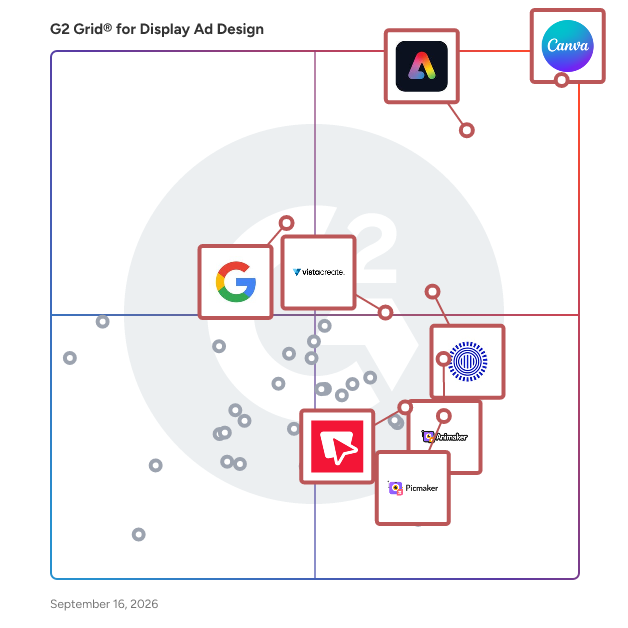
G2 Grid® for Display Ad Design Software

G2 Grid® for Display Ad Design Software plotting products by satisfaction and market presence

Highlighted products: Canva, Adobe Express, Prezi, Animaker, VistaCreate, Google Display Ad Network, Picmaker, and Bannersnack.

Underlying data: [Grid® JSON](https://www.g2.com/categories/display-ad-design/grids.json?focus%5B%5D=canva&focus%5B%5D=adobe-express&focus%5B%5D=prezi&focus%5B%5D=animaker&focus%5B%5D=vistacreate&focus%5B%5D=google-display-ad-network&focus%5B%5D=picmaker&focus%5B%5D=bannersnack-inc-bannersnack)

Canva

Canva is a visual communication platform that gives everyone a creative voice, no matter your design experience, team size, or budget. Whether you're a student making your first presentation, a marketer producing social graphics in minutes, or a global team creating on-brand content without touching a designer's inbox, Canva is where ideas become something you can actually show. Start with one of over a million professionally designed templates, or build from scratch with an AI-powered drag-and-drop editor. A library of stock images, videos, soundtracks, and fonts means you are easily equipped to create visual content at scale. Looking to work in Canva across your team? Real-time collaboration lets multiple people design simultaneously. Brand kits keep assets, colors, and fonts consistent across a one-person business or a Fortune 500 company. Canva AI helps you generate, resize, write, and edit visuals in a fraction of the time. Canva is used by more than 265 million people across 190 countries and trusted by 95% of Fortune 500 companies. Canva is available on the web, iOS and Android.

Average Rating: 4.7/5.0

Total Reviews: 6,499

How Do G2 Users Rate Canva?

  • Has the product been a good partner in doing business?: 9.4/10 (Category avg: 9.1/10)
  • Image Upload: 9.5/10 (Category avg: 8.8/10)
  • Variety Of Banner Types: 9.1/10 (Category avg: 8.6/10)
  • Shape & Clip Art: 8.9/10 (Category avg: 8.3/10)

Who Is the Company Behind Canva?

  • Seller: Canva
  • Company Website:
  • Year Founded: 2012
  • HQ Location: Sydney
  • Twitter: @canva
    339,250 Twitter followers
  • LinkedIn® Page: www.linkedin.com
    19,250 employees on LinkedIn®

Who Uses This Product?

  • Who Uses This: Owner, Marketing Manager
  • Top Industries: Marketing and Advertising, Information Technology and Services
  • Company Size: 66% Small, 23% Medium

What Do G2 Reviewers Say About Canva?

AI-generated summary from verified user reviews

Pros
  • Users appreciate the ease of use in Canva, enabling quick, intuitive designs on any device with minimal effort.
  • Users love the extensive templates in Canva, enabling quick and polished designs that suit varied needs effortlessly.
  • Users love Canva for its extensive design options, intuitive interface, and time-saving templates across devices.
  • Users love how Canva offers easy creation with intuitive templates and features, streamlining their design workflow effortlessly.
  • Users appreciate the wide variety of ready-made templates in Canva, enabling quick and easy design customization.
Cons
  • Users find Canva's limited features frustrating, especially with vector editing and costly premium options for essential tools.
  • Users find the limited options in Canva frustrating, especially for vector editing and bulk page creation.
  • Users express frustration over the missing features in Canva, impacting design capabilities and overall usability.
  • Users feel that the premium plan is expensive, especially for beginners who need essential features.
  • Users find the limited customization options in Canva restricts their creativity and flexibility in design projects.

What Are Recent G2 Reviews of Canva?

What Are G2 Users Discussing About Canva?

Adobe Express

Quickly and easily make standout content from thousands of beautiful templates with the all-new Adobe Express. Simply choose a template, add images and text, and quickly resize your creations to fit your favorite social media site. Available on web and mobile. Make stunning content. Start from thousands of templates for social media graphics, stories, and thumbnails, as well as posters, flyers, business cards, logos, and more. Get free Adobe Stock images. Access the Adobe Stock royalty-free photo collection* with millions of on-trend and seasonal images. Give your photos pro effects. Get the look you want with easy-to-apply effects, filters, textures, and overlays. Remove backgrounds instantly. Effortlessly cut out backgrounds without having to outline your subject — and start with a fresh canvas. Add design elements. Discover just what you need from tons of images, icons, backgrounds, and design assets. Resize content in a snap. Instantly resize and reflow content to fit any size for Instagram, Facebook, YouTube, banners, flyers, and more. Your content will adjust instantly using intuitive Adobe tools. Make it move. Create attention-grabbing content with features to animate text and photos. Apply your brand. Upload your brand logo, fonts, and colors and apply them to any design with one tap. Make videos made for social. Easily trim, crop, resize, and convert videos. Play with text. Choose from over 18,000 licensed fonts from the Adobe Fonts library. Start from text templates that feature curved type, grids, and beautiful font pairs. Remix it. Customize predesigned graphics and text to make them your own. Work better together. Share templates, assets, and brand identity across your team so content consistently reflects your look. Save favorite templates to your library for a faster start. *Adobe Express membership required. The Adobe Stock photo collection does not include Premium or editorial content. Limited Adobe Stock functionality available in web page and video features within the desktop app.​

Average Rating: 4.5/5.0

Total Reviews: 835

How Do G2 Users Rate Adobe Express?

  • Has the product been a good partner in doing business?: 9.1/10 (Category avg: 9.1/10)
  • Image Upload: 9.6/10 (Category avg: 8.8/10)
  • Variety Of Banner Types: 9.0/10 (Category avg: 8.6/10)
  • Shape & Clip Art: 8.8/10 (Category avg: 8.3/10)

Who Is the Company Behind Adobe Express?

  • Seller: Adobe
  • Company Website:
  • Year Founded: 1982
  • HQ Location: San Jose, CA
  • Twitter: @Adobe
    956,842 Twitter followers
  • LinkedIn® Page: www.linkedin.com
    42,975 employees on LinkedIn®

Who Uses This Product?

  • Who Uses This: Graphic Designer, Marketing Manager
  • Top Industries: Marketing and Advertising, Design
  • Company Size: 56% Small, 27% Medium

What Do G2 Reviewers Say About Adobe Express?

AI-generated summary from verified user reviews

Pros
  • Users love the user-friendly interface of Adobe Express, enabling quick and easy content creation without design experience.
  • Users love the ready-made templates in Adobe Express, which simplify and speed up graphic creation for social media.
  • Users love the speed and efficiency of Adobe Express, enabling quick creation of professional-looking content with ease.
  • Users appreciate the easy creation functionality of Adobe Express, making professional content design quick and intuitive.
  • Users find Adobe Express intuitive and easy to use, allowing for quick graphics and social media content creation.
Cons
  • Users find limited features in Adobe Express, especially for advanced projects and customization needs.
  • Users find feature limitations in Adobe Express, feeling it lacks flexibility and can hinder advanced design projects.
  • Users find the limited customization options restrict their ability to tailor designs for advanced projects effectively.
  • Users find limited options in Adobe Express, impacting creativity and complicating more complex design projects.
  • Users report that Adobe Express experiences slow performance, particularly when handling larger projects, impacting usability.

What Are Recent G2 Reviews of Adobe Express?

What Are G2 Users Discussing About Adobe Express?

Prezi

Prezi is an AI-powered presentation tool that's also a live audience response system. It's built so that the moment you have a presentation, you can put it in front of an audience and get them interacting with it. Users import a file they already have, like a PowerPoint, PDF, or Word doc, or just type a short prompt, and Prezi AI generates a fully designed, cinematic presentation in under eight seconds using a prompt-to-deck workflow. From there, presenters aren't left with just a finished deck. They land directly in an interactive view where live polls, quizzes, and Q&A are already available to turn on, with no separate polling tool or extra setup required. Prezi serves a wide range of users, including business professionals, educators, corporate trainers, and students, across scenarios like business pitches, classroom lessons, and training sessions. Its dynamic format moves between overarching concepts and supporting detail so audiences stay engaged throughout, which matters most in settings where clear, memorable communication is the goal. Refining a presentation happens through chat-based refinement: reordering slides, adjusting tone, swapping visuals. But it's an optional step. Presenters can just as easily import a file and go straight into engaging their audience. Once a presentation is live, audiences join with a single QR code, with no login or app download required, whether they're in the room, remote, or both. Presenters can run live polls, generate a quiz automatically from what's actually on the slides, and let audiences ask questions directly through Q&A for instant AI-generated answers. Newscaster mode lets presenters appear alongside their content on screen for a live or async session, and viewer analytics show what held attention and where engagement dropped off after the fact. Prezi's AI-driven design draws on a dataset of over 500 million presentations and input from a professional design team, offering more than 16 designer themes so presentations are visually polished and suited to their topic and audience without requiring design experience. For anyone who couldn't attend live, Prezi supports narrated video and podcast exports, Test Your Knowledge for self-paced comprehension quizzes, version history, and chat rewind, so teams can build on existing work rather than starting over. With over 170 million users across 195 countries, Prezi is a trusted, G2-recognized leader in Audience Response, AI Presentation Tools, and Presentation Software. By combining AI-powered generation with built-in audience engagement, Prezi helps presenters go from an imported file to an interactive session their audience actually participates in, not just a deck they watch. Targeted at a diverse audience, including business professionals, educators, corporate trainers, and students, Prezi is ideal for various scenarios such as business pitches, educational lessons, and corporate training sessions. Unlike traditional static slide decks, Prezi's dynamic format facilitates a seamless transition between overarching concepts and detailed information, ensuring that audiences remain engaged throughout the presentation. This capability is particularly beneficial in environments where clear and memorable communication is essential. One of the standout features of Prezi is its AI-driven design capabilities, which leverage a dataset of over 500 million presentations and insights from a professional design team. This allows Prezi to generate presentations that are not only visually appealing but also tailored to the specific topic and audience, thanks to a selection of more than 16 designer themes. Users do not need a design background to create impactful presentations, as the design expertise is embedded in the tool from the outset. In addition to its presentation creation features, Prezi offers a comprehensive suite of audience engagement tools. These include live polls, word clouds, quiz generation, and a Live Audience view, which enhance interactivity during presentations. Other features such as Newscaster mode, narrated video export, and viewer analytics provide valuable insights into audience engagement after the presentation has been shared. Furthermore, Prezi supports version history, chat rewind, and the ability to import content from PPTX, PDF, and Word files, allowing teams to build upon existing work seamlessly. With over 170 million users across 195 countries, Prezi has established itself as a trusted solution for creating persuasive presentations. By combining AI-powered generation with established design principles, Prezi empowers users to craft presentations that not only inform but also engage and leave a lasting impression on their audiences.

Average Rating: 4.2/5.0

Total Reviews: 5,698

How Do G2 Users Rate Prezi?

  • Has the product been a good partner in doing business?: 8.6/10 (Category avg: 9.1/10)
  • Image Upload: 9.5/10 (Category avg: 8.8/10)
  • Variety Of Banner Types: 9.0/10 (Category avg: 8.6/10)
  • Shape & Clip Art: 9.0/10 (Category avg: 8.3/10)

Who Is the Company Behind Prezi?

  • Seller: Prezi
  • Company Website:
  • Year Founded: 2009
  • HQ Location: Oakland, California
  • Twitter: @prezi
    173,976 Twitter followers
  • LinkedIn® Page: www.linkedin.com
    202 employees on LinkedIn®

Who Uses This Product?

  • Who Uses This: Teacher, Software Engineer
  • Top Industries: Higher Education, Education Management
  • Company Size: 42% Small, 31% Medium

What Do G2 Reviewers Say About Prezi?

AI-generated summary from verified user reviews

Pros
  • Users admire the visual clarity of Prezi presentations, making information easy to follow and engaging.
  • Users find Prezi to be easy to use, enhancing productivity and communication with its intuitive design features.
  • Users appreciate Prezi's innovative digital features and excellent customer service, enhancing professional presentations and collaboration.
  • Users appreciate the quality of presentations created with Prezi, enhancing communication and engagement in professional settings.
  • Users value Prezi for its creative presentation style, enabling dynamic storytelling and engagement in business projects.
Cons
  • Users find the steeper learning curve of Prezi challenging, especially when transitioning from traditional presentation software.
  • Users find a steep learning curve with Prezi, especially transitioning from traditional presentation tools like PowerPoint.
  • Users experience slow performance with Prezi, particularly during presentations and with complex files on weaker devices.
  • Users experience internet dependency with Prezi, as functionality diminishes significantly during connectivity issues.
  • Users find that limited customization in Prezi can lead to time-consuming edits for large presentations.

What Are Recent G2 Reviews of Prezi?

What Are G2 Users Discussing About Prezi?

Animaker

Animaker is an online animation maker that helps creators and teams bring ideas to life through animated videos - for training, communication, and marketing. Trusted by 35 million users and 80% of Fortune 500 companies, Animaker turns simple prompts, scripts, or data into professional animated content in minutes, no animation or design skills required. At its core, Animaker is built around animation, and its toolkit comes loaded with advanced AI tools that simplify every stage of video creation. ● AI Whiteboard Video - Create engaging animated videos in a hand-drawn whiteboard style from prompts. ● AI Clip Generator - Generate professional-looking clips from prompts or uploaded media. ● AI Video Generator - Produce full-length, studio-quality Gen AI videos from simple prompts. ● AI Infographic Maker - Convert data and reports into visually stunning animated infographic videos. ● AI Video Trainers - Build personalized, on-demand training videos at scale. ● AI Video Quiz - Make training videos engaging and interactive by adding quizzes within the content. ● AI Video Editor - Edit, enhance, and polish videos automatically with our AI Assistant Max. ● Subtitle Generator - Add accurate, multilingual subtitles in seconds with one click! ● AI Translate - Auto-translate animaker-made videos into 100+ languages to connect with the audience worldwide ● AI Voice Generator - Create realistic, human-like voiceovers from 180+ voices across 2000+ languages and accents. Our other powerful features include - ● Avatar Maker - Build unique, customizable animated characters that represent your brand and audience. ● Animaker Deck - Create animated presentations with characters for engagement and retention! ● 1000+ ready-to-use templates - Quickly make videos for any purpose from training and onboarding to marketing and internal communication. Since 2015, Animaker has powered over 50 million animated videos, helping L&D teams, educators, and enterprises revolutionize how they train, communicate, and grow through the power of AI-driven video creation. Need to work with regular videos instead? Animaker's AI tools generate, edit, and enhance them too.

Average Rating: 4.7/5.0

Total Reviews: 1,065

How Do G2 Users Rate Animaker?

  • Has the product been a good partner in doing business?: 8.9/10 (Category avg: 9.1/10)
  • Image Upload: 9.2/10 (Category avg: 8.8/10)
  • Variety Of Banner Types: 8.9/10 (Category avg: 8.6/10)
  • Shape & Clip Art: 8.9/10 (Category avg: 8.3/10)

Who Is the Company Behind Animaker?

  • Seller: Animaker, Inc
  • Company Website:
  • Year Founded: 2015
  • HQ Location: San Francisco, California
  • Twitter: @animakerhq
    4,054 Twitter followers
  • LinkedIn® Page: www.linkedin.com
    199 employees on LinkedIn®

Who Uses This Product?

  • Who Uses This: Student, Teacher
  • Top Industries: Animation, Higher Education
  • Company Size: 78% Small, 13% Medium

What Do G2 Reviewers Say About Animaker?

AI-generated summary from verified user reviews

Pros
  • Users find Animaker to be incredibly user-friendly, allowing easy creation of engaging animations and educational content.
  • Users find that Animaker makes video creation effortless with its animations, customization, and user-friendly features.
  • Users appreciate the user-friendly interface of Animaker, facilitating effortless navigation for engaging video creation.
  • Users love the easy-to-use animation features that simplify video creation and enhance creativity.
  • Users love the variety of character styles in Animaker, enhancing engagement and making video creation enjoyable.
Cons
  • Users find Animaker's free account limitations frustrating, especially with video length and export failures hindering their projects.
  • Users find Animaker's pricing to be expensive, especially for those on a budget or students.
  • Users find the limited access to premium features in Animaker frustrating, as it hampers their creative potential.
  • Users find the plan limitations of Animaker restrictive, particularly the 2-minute video cap and limited features.
  • Users experience slow rendering issues that hinder smooth animation and complicate video integration, affecting productivity.

What Are Recent G2 Reviews of Animaker?

What Are G2 Users Discussing About Animaker?

VistaCreate

VistaCreate (ex-Crello) is a graphic design platform where anyone can quickly create engaging projects for any industry or occasion — design skills are optional. Start with selecting from 150K+ professionally designed templates that are already preformatted and customizable. Quickly edit, resize, and remove image backgrounds in a few clicks. Edit video content and add music to create multi-dimensional visuals. Upload your photos or use a vast library of 70M+ royalty-free creative assets, including premium images, videos, and vectors. You can also easily brand your content with the Brand Kit functionality. With VistaCreate, everyone can produce designs that look like they took hours, in minutes.

Average Rating: 4.5/5.0

Total Reviews: 169

How Do G2 Users Rate VistaCreate?

  • Has the product been a good partner in doing business?: 8.7/10 (Category avg: 9.1/10)
  • Image Upload: 9.5/10 (Category avg: 8.8/10)
  • Variety Of Banner Types: 8.9/10 (Category avg: 8.6/10)
  • Shape & Clip Art: 8.7/10 (Category avg: 8.3/10)

Who Is the Company Behind VistaCreate?

  • Seller: Depositphotos
  • Year Founded: 2009
  • HQ Location: New York
  • Twitter: @Depositphotos
    14,798 Twitter followers
  • LinkedIn® Page: www.linkedin.com
    306 employees on LinkedIn®

Who Uses This Product?

  • Who Uses This: Graphic Designer, Community Manager
  • Top Industries: Marketing and Advertising, Design
  • Company Size: 80% Small, 16% Medium

What Do G2 Reviewers Say About VistaCreate?

AI-generated summary from verified user reviews

Pros
  • Users find VistaCreate to have ease of learning, making graphic design simple and accessible for beginners.
  • Users love the ease of use in VistaCreate, making graphic design accessible for beginners and professionals alike.
  • Users love the vast selection of templates, making it easy to create personalized designs for both personal and business use.
  • Users love the wide variety of templates and stock images that make creating business and personal projects a breeze.
  • Users love the customizability of VistaCreate, making graphic design easy and accessible for beginners.
Cons
  • Users desire more free options for stock photos on VistaCreate to enhance their design flexibility.
  • Users wish for more free stock photo options in VistaCreate, feeling limited by the current selection.
  • Users desire more free options for stock photos, highlighting limitations in VistaCreate's current offerings.

What Are Recent G2 Reviews of VistaCreate?

Google Display Ad Network

Google Ads display ads appear on over two million websites and in over 650,000 apps, so your ad can show up wherever your audience is.

Average Rating: 4.3/5.0

Total Reviews: 67

How Do G2 Users Rate Google Display Ad Network?

  • Has the product been a good partner in doing business?: 7.8/10 (Category avg: 9.1/10)
  • Image Upload: 9.1/10 (Category avg: 8.8/10)
  • Variety Of Banner Types: 8.4/10 (Category avg: 8.6/10)
  • Shape & Clip Art: 7.5/10 (Category avg: 8.3/10)

Who Is the Company Behind Google Display Ad Network?

  • Seller: Google
  • Year Founded: 1998
  • HQ Location: Mountain View, CA
  • Twitter: @google
    31,899,995 Twitter followers
  • LinkedIn® Page: www.linkedin.com
    301,144 employees on LinkedIn®
  • Ownership: NASDAQ:GOOG

Who Uses This Product?

  • Top Industries: Marketing and Advertising
  • Company Size: 53% Small, 36% Medium

What Do G2 Reviewers Say About Google Display Ad Network?

AI-generated summary from verified user reviews

Pros
  • Users love the massive reach and precise targeting of Google Display Ad Network, making advertising efficient and effective.
  • Users find the ease of use of Google Display Ad Network exceptional, simplifying ad management and targeting.
  • Users appreciate the vast and cost-effective reach of Google Display Ad Network, enabling precise audience targeting across platforms.
  • Users value the customization options of Google Display Network, enhancing targeting and marketing effectiveness across the web.
  • Users highlight the efficient targeting and reach of the Google Display Network, enhancing brand awareness and conversion rates.
Cons
  • Users report inaccuracy issues with Google Display Ad Network, resulting in low CTR and insufficient reporting data.
  • Users find the limited font options in Google Display Ad Network restrict their creative freedom and impact ad effectiveness.

What Are Recent G2 Reviews of Google Display Ad Network?

What Are G2 Users Discussing About Google Display Ad Network?

Picmaker

Picmaker - The smart AI-powered social media platform! With 1M+ users and counting, Picmaker is the ultimate all-in-one solution for businesses and individuals looking to boost their social presence. Discover trending topics, create stunning designs, schedule posts, engage audience, and analyze metrics - all in one place. Plus, Picmaker's AI features helps you with endless design suggestion, smart post captions, best time to publish , trending content and staying ahead of the competition. Get started for free with one of 10,000 built-in professional social media templates. Get access to 100 million images, 100,000 icons, colors, objects, shapes, and graphic elements that make your social graphics unique. Or, bring in our content calendar and one click scheduler, and get started right away - all within minutes. Visit https://www.picmaker.com/ to create a login id. If you already have a login id, visit https://accounts.animaker.com/login/picmaker/.

Average Rating: 4.7/5.0

Total Reviews: 111

How Do G2 Users Rate Picmaker?

  • Has the product been a good partner in doing business?: 9.3/10 (Category avg: 9.1/10)
  • Image Upload: 9.6/10 (Category avg: 8.8/10)
  • Variety Of Banner Types: 9.5/10 (Category avg: 8.6/10)
  • Shape & Clip Art: 9.1/10 (Category avg: 8.3/10)

Who Is the Company Behind Picmaker?

  • Seller: Animaker, Inc
  • Year Founded: 2015
  • HQ Location: San Francisco, California
  • Twitter: @animakerhq
    4,054 Twitter followers
  • LinkedIn® Page: www.linkedin.com
    199 employees on LinkedIn®

Who Uses This Product?

  • Who Uses This: Director
  • Top Industries: Marketing and Advertising, Information Technology and Services
  • Company Size: 80% Small, 16% Medium

What Do G2 Reviewers Say About Picmaker?

AI-generated summary from verified user reviews

Pros
  • Users love the extensive template selection for YouTube thumbnails, appreciating its easy customization and quick support.
  • Users enjoy the ease of creation with Picmaker, thanks to its vast templates and quick customer support.
  • Users praise the quick customer support that efficiently assists with their needs and questions.
  • Users appreciate the super quick customer support of Picmaker, making their experience smooth and efficient.
  • Users value the easy customizability of Picmaker, especially with its extensive YouTube thumbnail templates.
Cons
  • Users note a limited selection of templates for various categories, which restricts creative options on Picmaker.
  • Users feel disappointed by the lack of diverse templates in Picmaker, limiting their creative options.
  • Users feel the lack of templates for various categories limits their design options in Picmaker.

What Are Recent G2 Reviews of Picmaker?

What Are G2 Users Discussing About Picmaker?

Celtra

Celtra is an award-winning digital advertising creative platform that helps brands, agencies, and media organizations produce, adapt, and activate advertising creative at scale. The platform is designed for enterprise teams that manage high volumes of digital advertising across multiple channels, formats, and markets. Celtra supports creative operations by bringing together intelligent production, scalable personalization, and seamless activation workflows, allowing organizations to treat creative as a consistent and controllable driver of advertising performance. Celtra is commonly used in environments where creative complexity is high and speed, governance, and performance are critical. Teams rely on the platform to manage the creation and adaptation of ads, coordinate collaboration across internal and external stakeholders, and ensure creative assets meet media and platform requirements before launch. Automation and AI-driven processes help reduce manual effort, support faster turnaround times and help teams apply data insights to optimize creative and maximize campaign performance. The platform serves a broad range of use cases, including large-scale campaign execution, creative versioning and localization, dynamic and personalized advertising, and the development and delivery of premium rich media and video ad experiences. By aligning creative workflows with activation requirements, Celtra helps reduce friction between creative and media teams and improves operational efficiency across the advertising lifecycle. Celtra is used globally by more than 400 enterprise-level customers and supports the production of over 5 million creative assets annually, serving more than 120 billion ad impressions each year. The platform integrates with over 100 demand-side and supply-side platforms, enabling teams to operate within existing media ecosystems. Organizations such as Spotify, adidas, Unilever, Hearst, Bloomberg, CNN, and NBCUniversal use Celtra to manage creative operations at scale.

Average Rating: 4.4/5.0

Total Reviews: 366

How Do G2 Users Rate Celtra?

  • Has the product been a good partner in doing business?: 8.5/10 (Category avg: 9.1/10)
  • Image Upload: 10.0/10 (Category avg: 8.8/10)
  • Variety Of Banner Types: 10.0/10 (Category avg: 8.6/10)
  • Shape & Clip Art: 10.0/10 (Category avg: 8.3/10)

Who Is the Company Behind Celtra?

  • Seller: Celtra
  • Company Website:
  • Year Founded: 2006
  • HQ Location: Massachusetts
  • Twitter: @celtra
    4,349 Twitter followers
  • LinkedIn® Page: www.linkedin.com
    209 employees on LinkedIn®

Who Uses This Product?

  • Who Uses This: Designer, Account Manager
  • Top Industries: Marketing and Advertising, Publishing
  • Company Size: 46% Medium, 31% Small

What Do G2 Reviewers Say About Celtra?

AI-generated summary from verified user reviews

Pros
  • Users praise the efficiency improvement with Celtra, allowing rapid creation of diverse designs from a single template.
  • Users value the collaboration tools in Celtra that enhance alignment and efficiency among cross-functional teams.
  • Users appreciate the creativity and efficiency of Celtra, generating high-quality designs quickly across varied formats.
  • Users appreciate the design quality of Celtra, enabling high-quality templates and efficient asset management effortlessly.
  • Users appreciate the ease of use in Celtra, allowing quick design variations and streamlined sharing with stakeholders.
Cons
  • Users find functionality limitations in Celtra, including project management issues and complex template setups affecting efficiency.
  • Users find limited features for smaller campaigns, leading to complexity and inefficiency in using Celtra.
  • Users find the setup complexity of Celtra challenging, especially for smaller projects and templates.
  • Users find the complex setup of Celtra challenging, especially for smaller projects and template management.
  • Users find the difficult setup of Celtra cumbersome, especially for smaller projects requiring extensive time and effort.

What Are Recent G2 Reviews of Celtra?

What Are G2 Users Discussing About Celtra?

Bannersnack

Bannersnack is a specialized design tool that helps marketers, designers, and advertisers create professional banner ads quickly and without complexity. Whether you need static display banners or animated HTML5 creatives, Bannersnack delivers an intuitive interface and all the essential tools you need — without the steep learning curve of traditional design software. Trusted by thousands since 2008, Bannersnack focuses exclusively on digital advertising formats, making it the go-to solution for anyone looking to create ads that are ready to launch across platforms like Google Display Network, Meta Ads, and programmatic channels. Key features include: * Static, animated and video banner creation * Easy-to-use drag-and-drop editor * Predefined ad sizes and templates for digital campaigns * Export options for major ad networks * Simple collaboration and feedback tools Bannersnack is ideal for marketing teams, freelancers, media buyers, and small businesses who need to produce on-brand, high-performing digital ads — fast.

Average Rating: 4.6/5.0

Total Reviews: 169

How Do G2 Users Rate Bannersnack?

  • Has the product been a good partner in doing business?: 9.2/10 (Category avg: 9.1/10)
  • Image Upload: 9.4/10 (Category avg: 8.8/10)
  • Variety Of Banner Types: 9.1/10 (Category avg: 8.6/10)
  • Shape & Clip Art: 8.5/10 (Category avg: 8.3/10)

Who Is the Company Behind Bannersnack?

Who Uses This Product?

  • Who Uses This: Graphic Designer, Marketing Manager
  • Top Industries: Marketing and Advertising, Computer Software
  • Company Size: 69% Small, 25% Medium

What Are Recent G2 Reviews of Bannersnack?

Lapis

Lapis helps teams generate on-brand advertising creatives using AI. By using a company’s existing assets like logos, colors, fonts, and product images, Lapis produces image ads that match your brand’s visual identity and voice across Facebook, Instagram, WhatsApp, LinkedIn, and Google. Marketers can prompt Lapis in natural language to create, iterate, and export ad creatives in seconds, which gives them the ability to run experiments and A/B tests at scale. Designers can use Lapis and start from an already functional ad design, derived from Lapis' analysis of over 50,000+ high performing ads across all platforms. Lapis includes a variety of features that help teams create ad campaigns at scale while preserving their brand identity and voice. Ad Studio automatically formats assets to the correct dimensions for Meta, Google, LinkedIn, and other ad networks, eliminating the manual work of building campaigns from scratch. Built-in templates for product launches, promotions, and seasonal campaigns allow teams to test new creative concepts while maintaining brand consistency. Vibe Kit allows for further customization, curated from top designers across the world. The Discover tab lets you browse ads from other companies and generate new creatives based on their style. Teams can explore different creative directions, get inspired by what others are running, and quickly spin up new ad concepts. Products automatically imports your entire catalog from Shopify, Amazon, WooCommerce, or Meesho, and lets you generate individual ads for each product. Teams can also upload custom products from their camera and generate real-time ad campaigns and assets. Backed by Y Combinator, Lapis is used by 1,000+ marketing teams, from big businesses like Hyundai and Tata to small businesses around the world, and supports 15+ languages including English, Spanish, and Italian.

Average Rating: 4.9/5.0

Total Reviews: 118

How Do G2 Users Rate Lapis?

  • Has the product been a good partner in doing business?: 8.9/10 (Category avg: 9.1/10)
  • Image Upload: 10.0/10 (Category avg: 8.8/10)

Who Is the Company Behind Lapis?

  • Seller: Lapis
  • Company Website:
  • Year Founded: 2025
  • HQ Location: San Francisco, US
  • Twitter: @TryLapis
    1,411 Twitter followers
  • LinkedIn® Page: www.linkedin.com
    8 employees on LinkedIn®

Who Uses This Product?

  • Who Uses This: CEO
  • Top Industries: Information Technology and Services, Marketing and Advertising
  • Company Size: 49% Medium, 35% Small

What Do G2 Reviewers Say About Lapis?

AI-generated summary from verified user reviews

Pros
  • Users value Lapis for its time-saving capabilities, enabling quick ad creation and efficient workflow management.
  • Users appreciate the intuitive task automation of Lapis, streamlining workflows and enhancing documentation management.
  • Users appreciate the speed and ease of creating ads with Lapis, enabling quick and professional results.
  • Users appreciate Lapis for its AI-powered creative efficiency, enabling quick, brand-aligned ad production and streamlined workflows.
  • Users value Lapis for its Brand Intelligence, ensuring consistent and premium quality across all marketing channels.
Cons
  • Users report a learning difficulty with Lapis, particularly with advanced features and navigating initial setup challenges.
  • Users note a lack of advanced features, such as workflow approvals and native integrations, limiting customization and efficiency.
  • Users find the learning curve challenging for advanced features, especially for newcomers needing manual adjustments.
  • Users note a lack of creativity in Lapis, requiring manual adjustments for cultural nuances and niche requirements.
  • Users face a steep learning curve due to complex data mapping and integration, particularly for new team members.

What Are Recent G2 Reviews of Lapis?

PosterMyWall

PosterMyWall is an AI design and marketing platform for small and local businesses. Everything you need for awesome marketing is bundled in one value-packed app: create designs with AI prompts, social media publishing, event pages and calendars for your website,  email marketing, and free customizable templates. People around the world use PosterMyWall to create eye-catching designs, videos, newsletters, event pages, social media posts, and more. If your small business, church, or organization wants to reach more people and grow, PosterMyWall makes it happen – fast. PosterMyWall helps your business grow with quick design and marketing in one value-packed, affordable app. Key features include: - AI prompt and design tools: Generate unique images and designs, write engaging copy, and redesign content in a click. - Email marketing: Create and send professional emails and newsletters with easy drag-and-drop editing and branded templates. - Social media publishing: Plan, schedule, and publish posts directly to platforms like Facebook, Instagram, and X (Twitter) - Shareable event pages and calendars for your website increase the discoverability of your events, sales, and special offers. Collect registrations or link to your ticketing service. - Content planner gives you a snapshot of everything you’ve got scheduled. - Built-in analytics quantify campaign performance. - 3.3 million+ free customizable templates for every occasion, theme, and business category (restaurants, retail, salons, churches, schools, gyms, etc.) The platform provides web and mobile access (both android and iOS), enabling users to design and manage campaigns from anywhere.

Average Rating: 4.7/5.0

Total Reviews: 71

How Do G2 Users Rate PosterMyWall?

  • Has the product been a good partner in doing business?: 9.1/10 (Category avg: 9.1/10)
  • Image Upload: 9.9/10 (Category avg: 8.8/10)
  • Variety Of Banner Types: 9.5/10 (Category avg: 8.6/10)
  • Shape & Clip Art: 9.3/10 (Category avg: 8.3/10)

Who Is the Company Behind PosterMyWall?

  • Seller: PosterMyWall
  • Year Founded: 2010
  • HQ Location: San Mateo, California
  • Twitter: @postermywall
    6,571 Twitter followers
  • LinkedIn® Page: www.linkedin.com
    115 employees on LinkedIn®

Who Uses This Product?

  • Top Industries: Marketing and Advertising, Non-Profit Organization Management
  • Company Size: 65% Small, 35% Medium

What Do G2 Reviewers Say About PosterMyWall?

AI-generated summary from verified user reviews

Pros
  • Users love the ease of use of PosterMyWall, making creativity accessible to everyone with its intuitive interface.
  • Users love the vast library of templates on PosterMyWall, making design easy and inspiring creativity.
  • Users love the wide variety of templates in PosterMyWall, enhancing creativity for diverse design needs.
  • Users love the wide variety of templates on PosterMyWall, which inspires creativity for all design needs.
  • Users love the customization options in PosterMyWall, enabling them to create unique and professional designs effortlessly.
Cons
  • Users desire more templates in the healthcare category to enhance their design options and engagement.
  • Users dislike the watermarks and limited features in the free version, hindering their design experience.
  • Users find design limitations with templates, affecting editability and spacing alignment during poster creation.
  • Users find PosterMyWall expensive due to subscription prompts, despite its lower costs compared to Adobe alternatives.
  • Users are frustrated by the high premium cost, feeling pressured to upgrade for basic design needs.

What Are Recent G2 Reviews of PosterMyWall?

What Are G2 Users Discussing About PosterMyWall?

Sesimi

Sesimi is a brand management platform that helps marketing teams create, control, and scale content across channels, from one place. Built for multi-location teams, franchises, and distributed brands Sesimi simplifies: - Content creation, - Asset management, - Campaign planning, - Fund tracking. The Brands that use Sesimi are empowered to: - Produce brand-compliant content at scale using Creative Automation, - Manage and distribute assets securely through a purpose-built DAM, - Plan national campaigns and coordinate local rollouts from a shared Planner, - Streamline co-op and local fund approval with built-in workflows, - Maintain brand consistency and reduce production bottlenecks. What are Sesimi’s Key Modules? 1. Creative Automation Create campaign-ready content in minutes. Users can adapt templates to meet evolving needs while staying within brand guidelines. 1. Digital Asset Management (DAM) A secure, fast, and organized system for storing and sharing approved brand assets. Features include version control, expiry settings, and easy delivery to major channels. 1. Planner Coordinate national strategy and local execution in one view. Align teams around national timelines, briefs, and approvals without relying on spreadsheets or email threads. 1. Funds Management Manage and track all budgeted marketing activities across your organization with full visibility and compliance. Sesimi streamlines co-op and local fund approvals, reducing review time and ensuring funds reach external channels fast and accurately. Who Uses Sesimi? Sesimi is trusted by global brands and local companies across Auto, Manufacturing, Health & Pharma, QSR, Travel, and Hospitality industries. It’s built for organizations and franchises that want to spend their marketing more effectively by: - Reducing creative operation overheads, - Reinvesting saved time and budget into higher-impact design and distribution, - Strengthening brand consistency across every channel and team. Beyond cost savings, Sesimi helps teams work faster, stay aligned, and improve overall quality and accuracy of brand messaging. Sesimi is a platform that empowers day-to-day optimization, as well as long term brand impact.

Average Rating: 4.5/5.0

Total Reviews: 41

How Do G2 Users Rate Sesimi?

  • Has the product been a good partner in doing business?: 9.4/10 (Category avg: 9.1/10)
  • Image Upload: 8.3/10 (Category avg: 8.8/10)
  • Variety Of Banner Types: 9.0/10 (Category avg: 8.6/10)
  • Shape & Clip Art: 7.0/10 (Category avg: 8.3/10)

Who Is the Company Behind Sesimi?

  • Seller: Sesimi
  • Year Founded: 2010
  • HQ Location: Melbourne, AU
  • LinkedIn® Page: www.linkedin.com
    96 employees on LinkedIn®

Who Uses This Product?

  • Who Uses This: Marketing Manager
  • Top Industries: Automotive
  • Company Size: 51% Medium, 37% Small

What Do G2 Reviewers Say About Sesimi?

AI-generated summary from verified user reviews

Pros
  • Users find Sesimi easy to use, thanks to its intuitive interface and organized layout, enhancing overall marketing efficiency.
  • Users highlight the easy creation of content with Sesimi, enhancing team productivity and brand consistency.
  • Users commend Sesimi for its efficiency in streamlining marketing efforts and enhancing brand consistency across teams.
  • Users value Sesimi for its time-saving capabilities, enabling efficient content creation and streamlined marketing operations.
  • Users value the versatility of Sesimi, making it an efficient solution for diverse marketing needs across various teams.
Cons
  • Users notice slow performance and download issues in Sesimi, affecting file management and reliability.
  • Users experience slow performance with Sesimi, impacting workflow and file handling efficiency during critical tasks.
  • Users frequently experience download issues with Sesimi, including slow speeds and incorrect file formats.
  • Users find interface issues in Sesimi make it difficult to efficiently manage campaign assets and reset filters is frustrating.
  • Users find the login issues frustrating due to varying password protocols and unexpected resets, complicating access to Sesimi.

What Are Recent G2 Reviews of Sesimi?

What Are G2 Users Discussing About Sesimi?

BannerBoo

BannerBoo — online HTML5 Banner Maker, which allows you to create animated and static HTML5/AMP HTML/GIF banners without coding skills. Build your own custom banner ads or use professional templates — save your time and money.

Average Rating: 4.7/5.0

Total Reviews: 183

How Do G2 Users Rate BannerBoo?

  • Has the product been a good partner in doing business?: 9.5/10 (Category avg: 9.1/10)
  • Image Upload: 9.4/10 (Category avg: 8.8/10)
  • Variety Of Banner Types: 9.0/10 (Category avg: 8.6/10)
  • Shape & Clip Art: 9.0/10 (Category avg: 8.3/10)

Who Is the Company Behind BannerBoo?

  • Seller: BannerBoo
  • HQ Location: Tallinn, Harjumaa
  • Twitter: @BannerbooTeam
    47 Twitter followers
  • LinkedIn® Page: www.linkedin.com
    4 employees on LinkedIn®

Who Uses This Product?

  • Who Uses This: CEO, Founder
  • Top Industries: Marketing and Advertising, Design
  • Company Size: 92% Small, 4% Medium

What Do G2 Reviewers Say About BannerBoo?

AI-generated summary from verified user reviews

Pros
  • Users value the ease of use of BannerBoo, allowing effortless design of animated banners without coding skills.
  • Users love the intuitive interface of BannerBoo, allowing quick and easy creation of stunning animated ads.
  • Users value the intuitive navigation of BannerBoo, enabling effortless creation of animated banners for everyone.
  • Users love the beautifully designed and easy-to-customize templates of BannerBoo, streamlining the creation of professional ads.
  • Users love the streamlined animation features of BannerBoo, allowing for quick and professional ad creation.
Cons
  • Users report slow loading times and minor bugs that disrupt workflow, despite helpful support.
  • Users report limited access to BannerBoo, often needing to restart their modems due to connection errors.
  • Users report performance issues like slow loading times and minor bugs that hinder their workflow.
  • Users face a steep learning curve initially with BannerBoo, despite its no-code design and slow image library.

What Are Recent G2 Reviews of BannerBoo?

What Are G2 Users Discussing About BannerBoo?

Icon

Icon is the Human Admaker. 6 Human UGC ads filmed & edited for $1000 (no AI / 100% real). We find creators, ship products, curate formats, write scripts, coach creators, & edit videos. Powered by Admaker 2.0 software: track progress, review ads, rebook creators, & reuse assets.

Average Rating: 4.8/5.0

Total Reviews: 20

How Do G2 Users Rate Icon?

  • Has the product been a good partner in doing business?: 10.0/10 (Category avg: 9.1/10)
  • Image Upload: 9.8/10 (Category avg: 8.8/10)
  • Variety Of Banner Types: 10.0/10 (Category avg: 8.6/10)
  • Shape & Clip Art: 9.2/10 (Category avg: 8.3/10)

Who Is the Company Behind Icon?

  • Seller: Icon
  • Year Founded: 2024
  • HQ Location: New York, New York, United States
  • Twitter: @icon
  • LinkedIn® Page: www.linkedin.com
    135 employees on LinkedIn®

Who Uses This Product?

  • Company Size: 105% Small

What Do G2 Reviewers Say About Icon?

AI-generated summary from verified user reviews

Cons
  • Users note that creating videos can take a little long, impacting their overall productivity and experience.

What Are Recent G2 Reviews of Icon?

Visme

Visme is the operating system for business content, the platform teams use to create, manage, and scale everything their business communicates with, from presentations and reports to infographics, documents, and social graphics. Where most AI creates from a blank prompt, Visme works from what your business already knows. Connect your Drive, OneDrive, SharePoint, and existing decks, and Visme reads them, structures them, and learns your brand, voice, and key facts. Every new piece is held to that brand standard automatically, with the right fonts, colors, logos, and tone applied without anyone enforcing them manually. Visme's AI is grounded in your brand, your content, and your data rather than a generic prompt, so what it produces reads like your company instead of off-the-shelf output. From that foundation, Visme can build on-brand Sales Decks, QBRs, and Proposals from your own content, pull live data from Salesforce, Google Sheets, and Excel, and update a fact once so it carries across every piece built from it. Visme is built for the teams that produce recurring customer-facing content: sales, customer success, marketing, and revenue operations. Real-time collaboration keeps distributed teams working in one place, and Smart Link sharing shows how content performs after it is sent. The outcome is one system the whole company creates from, consistent, current, and built on what your team already has, so the people accountable for the brand can hold the standard without reviewing every piece.

Average Rating: 4.5/5.0

Total Reviews: 498

How Do G2 Users Rate Visme?

  • Has the product been a good partner in doing business?: 9.2/10 (Category avg: 9.1/10)
  • Image Upload: 9.0/10 (Category avg: 8.8/10)
  • Variety Of Banner Types: 8.6/10 (Category avg: 8.6/10)
  • Shape & Clip Art: 8.3/10 (Category avg: 8.3/10)

Who Is the Company Behind Visme?

  • Seller: Visme
  • Company Website:
  • Year Founded: 2014
  • HQ Location: Rockville, Maryland
  • Twitter: @VismeApp
    63,790 Twitter followers
  • LinkedIn® Page: www.linkedin.com
    91 employees on LinkedIn®

Who Uses This Product?

  • Who Uses This: CEO, Founder
  • Top Industries: Marketing and Advertising, Education Management
  • Company Size: 69% Small, 24% Medium

What Do G2 Reviewers Say About Visme?

AI-generated summary from verified user reviews

Pros
  • Users praise Visme for its ease of use, enabling non-designers to create stunning presentations effortlessly.
  • Users love the variety of templates in Visme, enabling easy creation of beautiful presentations for everyone.
  • Users value the intuitive user interface and extensive features of Visme, enhancing the design experience for all.
  • Users find the intuitive interface of Visme perfect for creating impressive presentations, even without design skills.
  • Users appreciate the variety of templates available in Visme, enabling easy creation of beautiful presentations.
Cons
  • Users express frustration over limited features in Visme, including collaboration restrictions and formatting issues.
  • Users express frustration over missing features like collaboration limitations and insufficient editing tools in Visme.
  • Users face limited editing capabilities in Visme, hindering collaboration and complicating project management across different formats.
  • Users find the pricing of Visme to be expensive, especially for freelancers needing budget-friendly options.
  • Users express concern over limited options in Visme, including basic shapes and audio tracks in videos.

What Are Recent G2 Reviews of Visme?

What Are G2 Users Discussing About Visme?

Neeraja Prakash
NP
Researched and written by Neeraja Prakash
Updated October 3, 2024