Best Data Visualization Tools for Small Business - Page 3

How Many Data Visualization Tools Products Does G2 Track?

Total Products under this Category: 478

Category Stats (Aug 2026)

  • Average Rating: 4.43/5 The average rating of products in this category, based on all submitted ratings
  • Top Trending Product: Supersimple (+0.89%) - Among all products in this category, Supersimple recorded the largest rating increase compared to last month

Last updated: August 04, 2026

How Does G2 Rank Data Visualization Tools Products?

Why You Can Trust G2's Software Rankings:

  • 30 Analysts and Data Experts
  • 26,200+ Authentic Reviews
  • 478+ Products
  • Unbiased Rankings

G2's software rankings are built on verified user reviews, rigorous moderation, and a consistent research methodology maintained by a team of analysts and data experts. Each product is measured using the same transparent criteria, with no paid placement or vendor influence. While reviews reflect real user experiences, which can be subjective, they offer valuable insight into how software performs in the hands of professionals. Together, these inputs power the G2 Score, a standardized way to compare tools within every category.

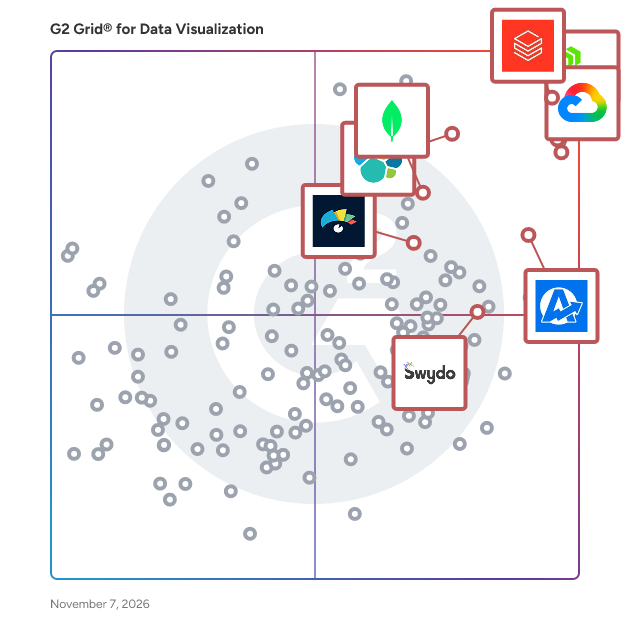
G2 Grid® for Data Visualization Tools

G2 Grid® for Data Visualization Tools plotting products by satisfaction and market presence

Highlighted products: Canva, AgencyAnalytics, Databricks, Looker, MongoDB Atlas, Elastic Stack, Domo, and Visme.

Underlying data: [Grid® JSON](https://www.g2.com/categories/data-visualization-tools/grids.json?focus%5B%5D=canva&focus%5B%5D=agencyanalytics&focus%5B%5D=databricks&focus%5B%5D=looker&focus%5B%5D=mongodb-atlas&focus%5B%5D=elastic-stack&focus%5B%5D=domo&focus%5B%5D=visme&segment=small-business)

Sponsored

Looker

Looker, Google Cloud’s business intelligence platform, enables you to chat with your data. Organizations turn to Looker for self-service and governed BI, to build custom applications with trusted metrics, or to bring Looker modeling to their existing environment. The result is improved data engineering efficiency and true business transformation.

Visit website

Reportei

Reportei is a cloud-based platform built for marketing teams and agencies to centralize data, automate reporting, and deliver clear, professional insights. Connect tools like Google Ads, Meta Ads, Google Analytics, and HubSpot to transform scattered data into organized, easy-to-read dashboards — all in one place. Create reports in minutes using ready-to-use templates, automate your workflow, and present results your clients will actually understand.

Average Rating: 4.6/5.0

Total Reviews: 49

How Do G2 Users Rate Reportei?

  • Has the product been a good partner in doing business?: 9.2/10 (Category avg: 9.0/10)
  • Dashboards: 9.0/10 (Category avg: 9.0/10)
  • Steps to Answer: 9.0/10 (Category avg: 8.6/10)
  • Formats: 8.7/10 (Category avg: 8.6/10)

Who Is the Company Behind Reportei?

  • Seller: Reportei
  • Year Founded: 2015
  • HQ Location: Juiz de Fora, Minas Gerais
  • LinkedIn® Page: www.linkedin.com
    28 employees on LinkedIn®

Who Uses This Product?

  • Top Industries: Marketing and Advertising
  • Company Size: 90% Small, 10% Medium

What Are Recent G2 Reviews of Reportei?

What Are G2 Users Discussing About Reportei?

ATLAS.ti

Leveraged by brands and academics alike, ATLAS.ti allows anyone to analyze data and uncover valuable insights – no matter which sector you work in. From basic analysis tasks to the most in-depth research projects: With ATLAS.ti, you can easily unlock actionable findings from your qualitative and mixed methods data with intuitive research tools and best-in-class technology: • Get access to native Mac and Win apps, plus our Web version • All features and tools included in one complete software package • Save time and find insights automatically, powered by AI • Experience seamless project exchange between versions • Take advantage of real-time collaboration for teams • Share multi-user licenses with as many people as you want • Benefit from our free live support and expert training Learn more here: www.atlasti.com

Average Rating: 4.7/5.0

Total Reviews: 58

How Do G2 Users Rate ATLAS.ti?

  • Has the product been a good partner in doing business?: 9.0/10 (Category avg: 9.0/10)
  • Dashboards: 8.3/10 (Category avg: 9.0/10)
  • Steps to Answer: 8.3/10 (Category avg: 8.6/10)
  • Formats: 8.3/10 (Category avg: 8.6/10)

Who Is the Company Behind ATLAS.ti?

Who Uses This Product?

  • Top Industries: Higher Education, Research
  • Company Size: 38% Small, 33% Medium

What Do G2 Reviewers Say About ATLAS.ti?

AI-generated summary from verified user reviews

Pros
  • Users find ATLAS.ti's ease of use exceptional, enhancing their ability to analyze qualitative data effortlessly.
  • Users value the effective categorization capabilities of ATLAS.ti, enhancing qualitative data analysis for research purposes.
  • Users find ATLAS.ti to be highly efficient, significantly saving time while enhancing qualitative data analysis.
  • Users find Atlas.ti to be intuitive, easily navigating its interface thanks to helpful resources and support.
  • Users love the time-saving capabilities of ATLAS.ti, streamlining coding and analysis processes effectively.
Cons
  • Users report experiencing data inaccuracy issues, yet find solace in the responsive support from the team.
  • Users experience system errors with large datasets, but appreciate the helpful support team for assistance.
  • Users request more language support and tutorials, particularly in Spanish, to enhance their experience with ATLAS.ti.

What Are Recent G2 Reviews of ATLAS.ti?

BlazeSQL

It is an AI-Native Self-Service BI Platform, centered around an AI Data Analyst chatbot that queries, analyzes and visualizes data from your SQL Database. It enables true self-service analytics by really understanding and learning about your company and Database, so it can reliably answer everyone's questions on demand. Unlike most tools that claim to do the same, BlazeSQL is not only reliable, but it provides intuitive tooling to provide the AI with context, explains its work to non-technical users so it's not a black box, and provides transparency for admins so they have visibility of all chats and can easily monitor accuracy. It helps non-technical people get insights independently, and technical people work faster. Results from the chat can effortlessly be added to dashboards, exported, saved for tracking, or shared. While Blaze can certainly return specific data or graphs on demand (ex. campaign performance), it can fully apply its intelligence and business understanding by taking a user's high level goals (ex. increasing Return on Ad spend) and autonomously conducting a comprehensive analysis to surface the right insights and make actionable suggestions. That way, it fully leverage's the capabilities of the world's most powerful AI models as they continue to become more and more capable. Advanced capabilities include autonomous agent monitoring & reporting, a slack integration, web research, and dynamic AI integrations with any API. Enterprise security features include Role Based Access Control, a desktop client with an "Offline-mode" that only sends metadata to the cloud but leaves query results completely local, SSO, 2FA, and strong encryption in transit and at-rest. Notable customers such as Yamaha have had success using BlazeSQL, and it continues to be successfully adopted by SMEs and Large enterprises alike. Various case studies and testimonials note results like a data team saving 1.5 days a week, data bottlenecks being eliminated so that business stakeholders are able to make data a daily part of their work and thinking, and teams starting to think more strategically and critically with their analysis to deliver real business impact and growth.

Average Rating: 4.4/5.0

Total Reviews: 94

How Do G2 Users Rate BlazeSQL?

  • Has the product been a good partner in doing business?: 9.0/10 (Category avg: 9.0/10)
  • Dashboards: 10.0/10 (Category avg: 9.0/10)
  • Steps to Answer: 10.0/10 (Category avg: 8.6/10)
  • Formats: 10.0/10 (Category avg: 8.6/10)

Who Is the Company Behind BlazeSQL?

Who Uses This Product?

  • Top Industries: Information Technology and Services, Computer Software
  • Company Size: 56% Small, 31% Medium

What Do G2 Reviewers Say About BlazeSQL?

AI-generated summary from verified user reviews

Pros
  • Users value the efficiency of BlazeSQL, enabling quicker data analysis and empowering non-technical users to explore insights.
  • Users appreciate the ease of use of BlazeSQL, enabling quick data requests and empowering non-technical users.
  • Users value the efficiency and accuracy of BlazeSQL, enabling fast data analysis and empowering non-technical users.
  • Users appreciate the flexibility of BlazeSQL, enabling quick adjustments and empowering non-technical users for data analysis.
  • Users value the seamless integrations of BlazeSQL, enhancing efficiency and empowering non-technical users for data analysis.

What Are Recent G2 Reviews of BlazeSQL?

SAP Crystal Reports

SAP Crystal Reports software is the worldwide de facto standard in desktop reporting. With SAP Crystal Reports, you can create powerful, richly formatted, dynamic reports from virtually any data source – delivered in dozens of formats, in up to 24 languages. A robust production reporting tool, SAP Crystal Reports turns almost any data source into interactive, actionable information that can be accessed offline or online, from applications, portals and mobile devices. SAP Crystal Server enables self-service access to reports, dashboards, and data exploration within a secure infrastructure.

Average Rating: 4.2/5.0

Total Reviews: 201

How Do G2 Users Rate SAP Crystal Reports?

  • Has the product been a good partner in doing business?: 7.8/10 (Category avg: 9.0/10)
  • Dashboards: 8.6/10 (Category avg: 9.0/10)
  • Steps to Answer: 8.3/10 (Category avg: 8.6/10)
  • Formats: 8.1/10 (Category avg: 8.6/10)

Who Is the Company Behind SAP Crystal Reports?

  • Seller: SAP
  • Year Founded: 1972
  • HQ Location: Walldorf
  • Twitter: @SAP
    297,052 Twitter followers
  • LinkedIn® Page: www.linkedin.com
    141,955 employees on LinkedIn®
  • Ownership: NYSE:SAP

Who Uses This Product?

  • Who Uses This: President
  • Top Industries: Information Technology and Services, Computer Software
  • Company Size: 39% Medium, 33% Large

What Do G2 Reviewers Say About SAP Crystal Reports?

AI-generated summary from verified user reviews

Pros
  • Users value the endless data visualization capabilities of SAP Crystal Reports, appreciating its vast options and integrations.
  • Users find SAP Crystal Reports to have ease of use for basic reporting, despite challenges with complex report creation.
  • Users value the easy integrations of SAP Crystal Reports across multiple databases, enhancing their reporting capabilities.
  • Users appreciate the endless capabilities of SAP Crystal Reports, enjoying numerous options and integrations for reporting.
  • Users enjoy the intuitive reporting process of SAP Crystal Reports, appreciating its versatility across multiple databases.
Cons
  • Users face compatibility issues with SAP Crystal Reports, especially regarding version requirements and limited OS support.
  • Users find the learning curve steep, requiring additional training to effectively use SAP Crystal Reports.
  • Users find SAP Crystal Reports to have a learning difficulty that necessitates additional training for proficiency.
  • Users find the limited customization in SAP Crystal Reports restricts their ability to modify and enhance reports effectively.
  • Users find the limited options in SAP Crystal Reports restrict customization, affecting report modification and interactivity.

What Are Recent G2 Reviews of SAP Crystal Reports?

What Are G2 Users Discussing About SAP Crystal Reports?

Grow.com

Grow is a no-code full-stack business intelligence (BI) platform that empowers everyone in your organization to make data-driven decisions. By combining ETL, data warehousing and visualization in one easy-to-use platform, any organization can connect and explore its data to surface insights. Our unlimited-user license model gives everyone access to the answers they need without waiting in line for an analyst. Now everyone can make great decisions in real-time to accelerate their growth.

Average Rating: 4.3/5.0

Total Reviews: 275

How Do G2 Users Rate Grow.com?

  • Has the product been a good partner in doing business?: 8.8/10 (Category avg: 9.0/10)
  • Dashboards: 8.8/10 (Category avg: 9.0/10)
  • Steps to Answer: 7.9/10 (Category avg: 8.6/10)
  • Formats: 8.0/10 (Category avg: 8.6/10)

Who Is the Company Behind Grow.com?

  • Seller: Epicor
  • Company Website:
  • Year Founded: 1972
  • HQ Location: Austin, TX
  • Twitter: @Epicor
    9,286 Twitter followers
  • LinkedIn® Page: www.linkedin.com
    6,174 employees on LinkedIn®

Who Uses This Product?

  • Who Uses This: Data Analyst, Account Manager
  • Top Industries: Marketing and Advertising, Computer Software
  • Company Size: 63% Small, 34% Medium

What Do G2 Reviewers Say About Grow.com?

AI-generated summary from verified user reviews

Pros
  • Users praise the ease of use of Grow.com, enabling quick data access and effortless dashboard creation for all teams.
  • Users appreciate the easy data visualization in Grow.com, enabling quick insights without navigating multiple tools.
  • Users appreciate the easy integrations of Grow.com, seamlessly connecting data sources for quick insights and reports.
  • Users appreciate the user-friendly interface of Grow.com, making performance tracking and reporting easily accessible.
  • Users love the seamless integrations of Grow.com, enabling easy data collection from various sources for effective reporting.
Cons
  • Users find Grow.com expensive, making it challenging for small firms and affecting overall accessibility.
  • Users face missing features, such as inadequate visualization and performance issues, impacting usability and flexibility.
  • Users find that the slow loading of data sources can hinder their overall experience with Grow.com.
  • Users often face slow performance with Grow.com, especially during data syncing and refreshing processes, impacting analysis accuracy.
  • Users experience performance issues due to large datasets, resulting in timeouts and a sluggish dashboard.

What Are Recent G2 Reviews of Grow.com?

What Are G2 Users Discussing About Grow.com?

Omni Analytics

Omni is a business intelligence and embedded analytics platform that empowers everyone—regardless of technical ability—to easily analyze data using SQL, spreadsheets, AI, or point-and-click interfaces. It is built on a semantic layer that ensures every insight is accurate and dependable. Beyond powering internal analytics, Omni makes it easy for businesses to offer highly customizable in-product analytics to their customers. We build our product fast and in the open, with new features releasing every week. You can follow along by watching our public engineering demos at: omni.co/demos To learn more about how companies like BuzzFeed use Omni, check out: omni.co/customer-case-studies

Average Rating: 4.8/5.0

Total Reviews: 65

How Do G2 Users Rate Omni Analytics?

  • Has the product been a good partner in doing business?: 9.9/10 (Category avg: 9.0/10)
  • Dashboards: 9.0/10 (Category avg: 9.0/10)
  • Steps to Answer: 8.9/10 (Category avg: 8.6/10)
  • Formats: 8.8/10 (Category avg: 8.6/10)

Who Is the Company Behind Omni Analytics?

  • Seller: Omni Analytics, Inc
  • Company Website:
  • Year Founded: 2022
  • HQ Location: San Francisco, CA
  • Twitter: @omni
    4,282 Twitter followers
  • LinkedIn® Page: www.linkedin.com
    805 employees on LinkedIn®

Who Uses This Product?

  • Top Industries: Computer Software, Information Technology and Services
  • Company Size: 42% Medium, 42% Small

What Do G2 Reviewers Say About Omni Analytics?

AI-generated summary from verified user reviews

Pros
  • Users commend the ease of use of Omni Analytics, appreciating its seamless integrations and powerful data handling capabilities.
  • Users highlight the consistent and helpful customer support from Omni, enhancing their overall experience with the product.
  • Users praise the easy integrations with the modern data stack, streamlining connections for a seamless experience.
  • Users praise the innovative AI features of Omni Analytics, enhancing functionality and streamlining data insights efficiently.
  • Users value the ease of data exploration and robust dashboard creation with Omni Analytics, enhancing their analytics experience significantly.
Cons
  • Users note missing features like robust IntelliSense and advanced organizational tools, impacting overall usability.
  • Users note a learning curve with Omni Analytics, particularly due to lagging documentation and feature updates.
  • Users note limited features in Omni Analytics, recognizing potential but desiring greater parity with established tools.
  • Users find complex data modeling challenging, citing hidden features and instability in dashboards impacting usability.
  • Users find the difficult setup of topics in Omni Analytics to be the most challenging aspect of the product.

What Are Recent G2 Reviews of Omni Analytics?

Screenful

Screenful is the easiest way to get a visual dashboard and automated team status reports that keep every stakeholder updated on a project's status. Screenful integrates with most common task management tools (Jira, Trello, GitHub, GitLab, Linear, Asana, monday.com) and builds reports and insights based on your projects and tasks. It’s an out-of-the-box dashboard with minimal setup needed from the user. WIth Screenful, users can track things like team velocity, task/issue lead & cycle times, current bottlenecks, and get a high level view across all of their projects. Consider it as the dashboards in steroids of your favourite task management tool!

Average Rating: 4.4/5.0

Total Reviews: 18

How Do G2 Users Rate Screenful?

  • Has the product been a good partner in doing business?: 9.4/10 (Category avg: 9.0/10)
  • Dashboards: 9.3/10 (Category avg: 9.0/10)
  • Steps to Answer: 8.3/10 (Category avg: 8.6/10)
  • Formats: 8.8/10 (Category avg: 8.6/10)

Who Is the Company Behind Screenful?

  • Seller: Screenful
  • Year Founded: 2013
  • HQ Location: Helsinki
  • Twitter: @screenful
    377 Twitter followers
  • LinkedIn® Page: www.linkedin.com
    10 employees on LinkedIn®

Who Uses This Product?

  • Company Size: 56% Small, 33% Medium

What Do G2 Reviewers Say About Screenful?

AI-generated summary from verified user reviews

Pros
  • Users value the advanced analytics of Screenful for effective sprint progress tracking and accurate release date forecasting.
  • Users appreciate the advanced analytics of Screenful, enabling precise forecasting of development sprint timelines based on historical data.
  • Users value the advanced analytics of Screenful, enhancing their sprint forecasting and tracking development progress effectively.
  • Users appreciate the advanced metrics analysis of Screenful, enhancing their sprint progress tracking and forecasting accuracy.
  • Users value the reliable forecasting of sprint completion times, enhancing their project planning accuracy over time.

What Are Recent G2 Reviews of Screenful?

What Are G2 Users Discussing About Screenful?

MAXQDA

MAXQDA Standard is a comprehensive software solution designed for qualitative and mixed methods research, compatible with both Windows and Mac operating systems. It facilitates the organization, analysis, and visualization of diverse data types, including text, audio, video, images, and survey data. With its intuitive interface, MAXQDA Standard streamlines the research process, making it accessible for both novice and experienced researchers. Key Features and Functionality: - Data Import and Organization: Easily import data from various sources such as interviews, focus groups, online surveys, web pages, images, audio and video files, spreadsheets, bibliographical data, emails, and even YouTube comments and Tweets. Organize materials into groups, link relevant quotes, and collaborate with team members effectively. - Coding and Retrieval: Apply codes using regular codes, colors, symbols, or emojis to mark significant information. Utilize drag-and-drop functionality or automatic coding for search terms. Retrieve coded segments efficiently and employ powerful search tools to test and develop new theories. - Memo Writing: Attach memos to any project element to document insights, interpretations, or methodological notes, ensuring a comprehensive audit trail throughout the research process. - Media Analysis and Transcription: Analyze audio and video files directly or transcribe them within the software. Adjust playback speed and volume, and use foot pedals to expedite transcription. Media clips can be coded, paraphrased, retrieved, commented on, and assigned weights, similar to text segments. - Visualization Tools: Generate visual representations of data to uncover patterns and insights. Create extensive maps with the integrated mapping tool, MAXMaps, and export visualizations for reports and presentations. - Mixed Methods Integration: Incorporate quantitative methods by linking qualitative data to demographic variables, quantifying qualitative analysis results, calculating statistical frequencies, and comparing groups based on both qualitative and quantitative findings. Primary Value and User Solutions: MAXQDA Standard empowers researchers to manage and analyze complex qualitative data efficiently. By supporting a wide array of data types and offering robust tools for coding, retrieval, transcription, and visualization, it enhances the depth and rigor of qualitative research. The software's flexibility and user-friendly design make it suitable for various research fields, including social sciences, psychology, education, and market research. By integrating qualitative and quantitative methods, MAXQDA Standard enables a holistic approach to data analysis, facilitating comprehensive insights and informed decision-making.

Average Rating: 4.5/5.0

Total Reviews: 36

How Do G2 Users Rate MAXQDA?

  • Has the product been a good partner in doing business?: 8.3/10 (Category avg: 9.0/10)
  • Dashboards: 9.6/10 (Category avg: 9.0/10)
  • Steps to Answer: 9.4/10 (Category avg: 8.6/10)
  • Formats: 10.0/10 (Category avg: 8.6/10)

Who Is the Company Behind MAXQDA?

  • Seller: VERBI Software
  • Year Founded: 1989
  • HQ Location: Berlin, Berlin
  • Twitter: @VerbiSoftware
    5,146 Twitter followers
  • LinkedIn® Page: www.linkedin.com
    66 employees on LinkedIn®

Who Uses This Product?

  • Top Industries: Research, Higher Education
  • Company Size: 61% Small, 21% Medium

What Do G2 Reviewers Say About MAXQDA?

AI-generated summary from verified user reviews

Pros
  • Users value the reliability of MAXQDA for seamless qualitative analysis, ensuring stability and ease of use in research projects.
  • Users find the setup process easy and stable, facilitating smooth installation and activation for their research needs.
Cons
  • Users find the steep learning curve and lack of intuitive features in MAXQDA can hinder effective collaboration.
  • Users face licensing issues that complicate collaboration on shared projects and hinder team efficiency.
  • Users express frustration over poor customer support, particularly regarding unclear guidance and advanced feature usage.

What Are Recent G2 Reviews of MAXQDA?

What Are G2 Users Discussing About MAXQDA?

Luzmo

Customers choose Luzmo to give their users clean, intuitive analytics directly inside their product, without forcing them into a separate BI tool. Reviews highlight how fast teams can move from raw data to fully branded dashboards, how easy it is for non‑technical users to explore and customize their own views, and how seamless the embedding experience feels. Many users call out Luzmo’s customer‑first support and dedicated CSMs as a key reason they can roll out new analytics experiences quickly and keep improving them over time.

Average Rating: 4.6/5.0

Total Reviews: 70

How Do G2 Users Rate Luzmo?

  • Has the product been a good partner in doing business?: 9.4/10 (Category avg: 9.0/10)
  • Dashboards: 9.7/10 (Category avg: 9.0/10)
  • Steps to Answer: 8.6/10 (Category avg: 8.6/10)
  • Formats: 9.2/10 (Category avg: 8.6/10)

Who Is the Company Behind Luzmo?

  • Seller: Luzmo NV
  • Year Founded: 2015
  • HQ Location: Brooklyn, US
  • Twitter: @luzmo_official
    895 Twitter followers
  • LinkedIn® Page: www.linkedin.com
    49 employees on LinkedIn®

Who Uses This Product?

  • Who Uses This: CEO
  • Top Industries: Computer Software, Information Technology and Services
  • Company Size: 59% Small, 32% Medium

What Do G2 Reviewers Say About Luzmo?

AI-generated summary from verified user reviews

Pros
  • Users appreciate the intuitive ease of use of Luzmo, enabling quick adoption and fast dashboard creation.
  • Users are impressed by Luzmo's embedding features, enabling quick insights and seamless integration into their SaaS applications.
  • Users value the customization features of Luzmo, enabling tailored applications and efficient management across diverse client environments.
  • Users commend Luzmo for its intuitive interface and rapid deployment, enabling quick insights and analytics integration.
  • Users praise the easy setup of Luzmo, enabling swift adoption and fast deployment of analytics tools.
Cons
  • Users find Luzmo's complexity challenging, with setup difficulties and limited querying capabilities hindering efficiency.
  • Users are disappointed by Luzmo's limited options for complex queries and insufficient chart functionality.
  • Users note performance issues with large datasets and lag in the interface, affecting overall workflow experience.
  • Users experience table limitations with Luzmo, hindering complex queries and causing challenges with data handling.
  • Users experience performance and sync issues with Luzmo, especially when handling larger datasets, impacting usability.

What Are Recent G2 Reviews of Luzmo?

What Are G2 Users Discussing About Luzmo?

Autonmis

𝗔𝘂𝘁𝗼𝗻𝗺𝗶𝘀 - 𝗔𝗜 𝘁𝗼 𝗲𝗹𝗶𝗺𝗶𝗻𝗮𝘁𝗲 𝗯𝘂𝘀𝗶𝗻𝗲𝘀𝘀 𝗼𝗽𝘀 𝗳𝗮𝗶𝗹𝘂𝗿𝗲𝘀 Operations run the business. Yet most teams still rely on spreadsheets, siloed systems, and delayed reports to track issues - creating blind spots across workflows, compliance, and outcomes. 𝗔𝘂𝘁𝗼𝗻𝗺𝗶𝘀 𝗳𝗶𝗹𝗹𝘀 𝘁𝗵𝗮𝘁 𝗺𝗶𝘀𝘀𝗶𝗻𝗴 𝗹𝗮𝘆𝗲𝗿: 𝗕𝘂𝘀𝗶𝗻𝗲𝘀𝘀 𝗢𝗽𝘀 𝗜𝗻𝘁𝗲𝗹𝗹𝗶𝗴𝗲𝗻𝗰𝗲. We plug into your existing tools and workflows, learn what “healthy operations” look like, and help your team detect, diagnose, and de-risk problems in real time: 𝗗𝗲𝘁𝗲𝗰𝘁: Stuck files, delays, mismatches, and broken workflows as they happen. 𝗗𝗶𝗮𝗴𝗻𝗼𝘀𝗲: Root causes across systems, not just surface-level tickets. 𝗗𝗲-𝗿𝗶𝘀𝗸: Early signals on operational, regulatory, customer, or revenue impact. Autonmis doesn’t replace your tools - it connects and illuminates them, giving your team clear visibility, audit-ready insights, and the freedom to focus on impact, not firefighting. For teams of any size managing critical operations, 𝗔𝘂𝘁𝗼𝗻𝗺𝗶𝘀 𝗯𝗲𝗰𝗼𝗺𝗲𝘀 𝘁𝗵𝗲 𝘀𝘆𝘀𝘁𝗲𝗺 𝗯𝗲𝗵𝗶𝗻𝗱 𝘀𝗺𝗼𝗼𝘁𝗵𝗲𝗿, 𝗳𝗮𝘀𝘁𝗲𝗿, 𝗮𝗻𝗱 𝗺𝗼𝗿𝗲 𝗿𝗲𝗹𝗶𝗮𝗯𝗹𝗲 - 𝗶𝗻𝘁𝗲𝗹𝗹𝗶𝗴𝗲𝗻𝘁 𝗯𝘂𝘀𝗶𝗻𝗲𝘀𝘀 𝗼𝗽𝗲𝗿𝗮𝘁𝗶𝗼𝗻𝘀.

Average Rating: 4.6/5.0

Total Reviews: 17

How Do G2 Users Rate Autonmis?

  • Has the product been a good partner in doing business?: 9.2/10 (Category avg: 9.0/10)
  • Dashboards: 10.0/10 (Category avg: 9.0/10)
  • Steps to Answer: 9.3/10 (Category avg: 8.6/10)
  • Formats: 10.0/10 (Category avg: 8.6/10)

Who Is the Company Behind Autonmis?

  • Seller: Autonmis
  • Year Founded: 2024
  • HQ Location: Bangalore, IN
  • Twitter: @helloautonmis
    7 Twitter followers
  • LinkedIn® Page: www.linkedin.com
    8 employees on LinkedIn®

Who Uses This Product?

  • Top Industries: Computer Software
  • Company Size: 76% Small, 24% Medium

What Do G2 Reviewers Say About Autonmis?

AI-generated summary from verified user reviews

Pros
  • Users highlight the efficiency of Autonmis' ETL pipelines, significantly streamlining data processes and enhancing productivity.
  • Users appreciate the ease of use of Autonmis, simplifying workflows and enabling smooth data transitions effortlessly.
  • Users appreciate how Autonmis offers time-saving capabilities by streamlining data workflows and reducing manual efforts significantly.
  • Users value the easy integrations of Autonmis, enhancing collaboration and streamlining data analysis workflows efficiently.
  • Users value the AI-powered query optimization, significantly improving efficiency and productivity across their analytics tasks.
Cons
  • Users find the poor visualization options limiting, hindering effective data representation and customization in Autonmis.
  • Users note the missing features in Autonmis, particularly in advanced analytics and customization for workflows.
  • Users note the limited chart functionality, suggesting enhancements for a more intuitive and user-friendly visualization experience.
  • Users find the limited customization of Autonmis restricts their ability to tailor workflows effectively.
  • Users face dependency issues with Autonmis, finding chart creation and dashboard building less intuitive than desired.

What Are Recent G2 Reviews of Autonmis?

Q Research Software by Displayr

Q by Displayr is data analysis and reporting software. It's designed to make survey analysis & reporting faster and easier. It performs all aspects of the analysis and reporting, from data cleaning and coding through to creating tables and advanced analyses. It's also tightly integrated with Displayr and PowerPowerpoint for seamless reporting.

Average Rating: 4.7/5.0

Total Reviews: 33

How Do G2 Users Rate Q Research Software by Displayr?

  • Has the product been a good partner in doing business?: 9.9/10 (Category avg: 9.0/10)
  • Dashboards: 10.0/10 (Category avg: 9.0/10)
  • Steps to Answer: 9.4/10 (Category avg: 8.6/10)
  • Formats: 8.9/10 (Category avg: 8.6/10)

Who Is the Company Behind Q Research Software by Displayr?

  • Seller: Displayr
  • HQ Location: Pyrmont, New South Wales
  • Twitter: @Displayrr
    499 Twitter followers
  • LinkedIn® Page: www.linkedin.com
    95 employees on LinkedIn®

Who Uses This Product?

  • Top Industries: Market Research
  • Company Size: 67% Small, 24% Medium

What Are Recent G2 Reviews of Q Research Software by Displayr?

What Are G2 Users Discussing About Q Research Software by Displayr?

Spotfire Analytics

Spotfire® is a visual data science platform designed to help organizations address complex, industry-specific challenges by effectively utilizing data. This solution offers a range of flexible packaging options tailored to meet the diverse needs of teams at various stages of their visual data science journey. Turn raw data into real-time decisions with powerful, interactive visual analytics with Spotfire® Analytics. Spotfire Analytics is designed for business agility, enabling every user to explore data visually, uncover patterns quickly, and make confident, data-driven decisions without writing a single line of code. As a self-service visual data science solution, it empowers teams across roles and departments to gain fast, actionable insights that drive impact. With its no-code interactive dashboards and rich visual exploration capabilities, Spotfire Analytics connects natively to hundreds of cloud, on-premises, and real-time data sources. Built-in geoanalytics extend the power of analysis with multi-layer mapping and seamless integration of spatial data, while data wrangling and transformation can be performed directly within the visual interface, making it easy to clean, shape, and blend data as you analyze. AI-assisted recommendations and anomaly detection help uncover hidden patterns, suggest the most meaningful visualizations, and accelerate the path to discovery. Customizable visualizations, workflows, and an intuitive interface ensure that insights are not only easier to create but also easier to share. With seamless collaboration features, Spotfire Analytics enables teams to work together, align on insights, and act decisively. Whether the goal is to analyze trends, detect anomalies, or unlock location-based intelligence, Spotfire Analytics delivers the speed, flexibility, and depth needed to make smarter decisions with confidence. Explore and understand your data visually, uncover hidden insights, and build powerful analytics applications - all without writing a single line of code. Spotfire Analytics combines advanced interactive visualizations and intuitive data wrangling in one environment. Connect to hundreds of data sources, from files to real-time streaming data, and transform messy data directly within your visuals. Built-in AI recommendations help you find patterns, anomalies, and trends faster. With flexible visualizations, spatial analytics, and custom applications, anyone can turn raw data into actionable insights in minutes. Designed for business agility, Spotfire Analytics empowers every user to explore, analyze, and share results confidently - turning questions into decisions. Best for: Analysts, data-savvy professionals, and teams looking to explore and share data visually with maximum flexibility.

Average Rating: 4.2/5.0

Total Reviews: 328

How Do G2 Users Rate Spotfire Analytics?

  • Has the product been a good partner in doing business?: 8.4/10 (Category avg: 9.0/10)
  • Dashboards: 8.3/10 (Category avg: 9.0/10)
  • Steps to Answer: 7.8/10 (Category avg: 8.6/10)
  • Formats: 8.3/10 (Category avg: 8.6/10)

Who Is the Company Behind Spotfire Analytics?

Who Uses This Product?

  • Who Uses This: Student, Manager
  • Top Industries: Oil & Energy, Information Technology and Services
  • Company Size: 52% Large, 26% Medium

What Do G2 Reviewers Say About Spotfire Analytics?

AI-generated summary from verified user reviews

Pros
  • Users find Spotfire's ease of use exceptional, enabling quick data visualization even for complex datasets.
  • Users appreciate the powerful and flexible data visualization capabilities of Spotfire Analytics, making complex data exploration effortless.
  • Users praise Spotfire Analytics for transforming complex data into user-friendly interactive visualizations, making analysis accessible to all team members.
  • Users praise the easy integrations of Spotfire Analytics, seamlessly connecting diverse data sources for powerful analysis.
  • Users love Spotfire Analytics for its seamless integration and powerful visualization features, enhancing decision-making and saving valuable time.
Cons
  • Users find the learning curve steep for Spotfire Analytics, particularly with advanced features and data modeling skills.
  • Users find learning difficult due to the overwhelming number of functions and complex features in Spotfire Analytics.
  • Users find Spotfire Analytics to be relatively expensive compared to competitors, with high licensing and maintenance costs.
  • Users find the steep learning curve of Spotfire Analytics challenging, especially regarding advanced features and user interface.
  • Users often find the complexity of Spotfire Analytics overwhelming initially, especially those new to data modeling or scripting.

What Are Recent G2 Reviews of Spotfire Analytics?

What Are G2 Users Discussing About Spotfire Analytics?

Highcharts

Highcharts is a multi-platform charting library that makes it easy for developers to add interactive charts to web and mobile projects of any size. Over 80% of the 100 largest companies in the world use Highcharts, and over 50,000+ companies across industries such as application development, publishing, data science, and finance. Highcharts has been in active development since 2009 and remains a developer favorite due to its robust feature set, ease of use, thorough documentation, accessibility compliance, and vibrant community.

Average Rating: 4.4/5.0

Total Reviews: 90

How Do G2 Users Rate Highcharts?

  • Has the product been a good partner in doing business?: 8.6/10 (Category avg: 9.0/10)
  • Dashboards: 8.3/10 (Category avg: 9.0/10)
  • Steps to Answer: 7.9/10 (Category avg: 8.6/10)
  • Formats: 8.5/10 (Category avg: 8.6/10)

Who Is the Company Behind Highcharts?

  • Seller: Highsoft AS
  • Company Website:
  • Year Founded: 2009
  • HQ Location: Vik i Sogn, Norway
  • Twitter: @Highcharts
    5,641 Twitter followers
  • LinkedIn® Page: www.linkedin.com
    69 employees on LinkedIn®

Who Uses This Product?

  • Who Uses This: Senior Software Engineer
  • Top Industries: Computer Software, Information Technology and Services
  • Company Size: 56% Small, 33% Medium

What Do G2 Reviewers Say About Highcharts?

AI-generated summary from verified user reviews

Pros
  • Users value the ease of use of Highcharts, easily creating interactive charts with minimal code and excellent documentation.
  • Users love the dynamism and adaptability of Highcharts, enhancing both development and user interaction through beautiful visualizations.
  • Users value the customizability of Highcharts, allowing personalized designs that enhance the professionalism of visualizations.
  • Users value the dynamic adaptability of Highcharts, enhancing interactivity and performance for a beautiful charting experience.
  • Users find the documentation thorough and beginner-friendly, making Highcharts easy to implement for data visualization projects.
Cons
  • Users find the learning curve for advanced features of Highcharts challenging, making setup for complex tasks tricky.
  • Users find the poor documentation challenging, particularly for advanced features and understanding licensing terms.
  • Users find the complexity of the API and licensing confusing, making initial use challenging for students.
  • Users face a difficult learning curve for advanced features, often needing to consult documentation for complex setups.
  • Users find the difficult setup process time-consuming, particularly due to the numerous options available for configuration.

What Are Recent G2 Reviews of Highcharts?

What Are G2 Users Discussing About Highcharts?

Zoho Analytics

Zoho Analytics is a GenAI-powered self-service BI and analytics platform that helps businesses collect, prepare, analyze, and present insights from their data, all within minutes. Integrate with 500+ native data sources, like files, feeds, local and cloud databases, cloud storage, and popular business apps. Clean, transform, enrich, and catalog data with our agentic AI-powered, self-service data preparation and management capabilities. Create and manage complex ETL data pipelines using our visual pipeline builder, process stream data for real-time analytics, and set up a strong metrics layer for quality analysis and management. Zoho Analytics comes with 100+ domain-specific prebuilt reports and dashboards, pre-trained NLQ models, intelligently modeled and blended data across business applications, and lots more. Use our intuitive drag-and-drop visualization builder to build insightful and interactive reports and dashboards using a wide variety of visual components, like charts, widgets, pivot tables, tabular views and more. Generate customized reports and dashboards using simple, natural language with our AI-powered conversational agent, Zia. Ask Zia goes beyond basic reporting; it enables users to perform diagnostic analytics, forecast key metrics, and receive intelligent insights and recommendations. Users can assign tasks and trigger actions just by conversing with our agentic AI, Zia, streamlining their workflows and empowering data-driven decisions. Seamlessly embed Ask Zia into your custom or business applications to deliver contextual insights and actions. Enrich your analysis with automated insights by using our NLG-powered narration engine, Zia Insights. With diagnostic analytics for smarter decision-making, Zia Insights takes automated insights to the next level by bubbling up key drivers for particular business tasks. Enumerate complex business scenarios with what-if analyses, forecast KPIs, uncover trends and patterns with advanced analytical capabilities. Leverage cognitive analysis for keyword extraction and sentiment analysis, and more. Evaluate the best ML models with no-code assistance or develop custom models and functions using Python Code Studio. Zoho Analytics comes with pre-packed ML models (AutoML) that allow you to evaluate and pick the best model for your use case. Alternatively custom models and functions using Python Code Studio Embed our full-fledged analytics platform into other software applications. Craft and present immersive data stories through slideshows or purpose-built analytics portals. Collaborate securely through contextual comment threads and real-time messaging. Zoho Analytics has a robust set of APIs that enables elaborate customization and highly extensible low-code and no-code integration with any technology stack. It also offers a high degree of deployment flexibility (private, public, multi-cloud, and on-premises) and platform extensibility (professional services, partner support, and marketplace). Zoho Analytics is modern and scalable, and it can readily match growing data volumes and usage. Its time-tested and accredited enterprise-grade security features and governance framework ensure continuous data management and stewardship. On top of everything else, the TCO for Zoho Analytics—including licensing, implementation, customization, training, and support—is the lowest in our market.

Average Rating: 4.2/5.0

Total Reviews: 282

How Do G2 Users Rate Zoho Analytics?

  • Has the product been a good partner in doing business?: 8.5/10 (Category avg: 9.0/10)
  • Dashboards: 10.0/10 (Category avg: 9.0/10)
  • Steps to Answer: 8.3/10 (Category avg: 8.6/10)
  • Formats: 7.5/10 (Category avg: 8.6/10)

Who Is the Company Behind Zoho Analytics?

  • Seller: Zoho
  • Year Founded: 1996
  • HQ Location: Austin, TX
  • Twitter: @Zoho
    137,880 Twitter followers
  • LinkedIn® Page: www.linkedin.com
    30,766 employees on LinkedIn®
  • Phone: +1 (888) 900-9646

Who Uses This Product?

  • Who Uses This: Director, Business Analyst
  • Top Industries: Information Technology and Services, Computer Software
  • Company Size: 50% Small, 43% Medium

What Do G2 Reviewers Say About Zoho Analytics?

AI-generated summary from verified user reviews

Pros
  • Users appreciate the ease of use of Zoho Analytics, benefiting from intuitive interfaces and customizable dashboards.
  • Users appreciate the intuitive interface of Zoho Analytics, allowing for easy data visualization and customizable reports.
  • Users commend the seamless integrations of Zoho Analytics, allowing easy data consolidation across various Zoho platforms.
  • Users appreciate the intuitive and customizable dashboards of Zoho Analytics, enhancing their data visualization experience.
  • Users value the data visualization tools in Zoho Analytics, enabling effective decision-making with visually appealing reports.
Cons
  • Users face a steep learning curve with Zoho Analytics, which can be overwhelming for beginners and hinders productivity.
  • Users find limited customization options in Zoho Analytics, hindering their ability to tailor the tool effectively.
  • Users report a clunky data integration process that complicates connecting multiple sources and reviewing long-term trends.
  • Users find integration issues with Zoho Analytics, making data connections difficult and requiring frequent manual checks.
  • Users feel that Zoho Analytics has missing features compared to competitors, limiting flexibility and customization options.

What Are Recent G2 Reviews of Zoho Analytics?

What Are G2 Users Discussing About Zoho Analytics?

NinjaCat

NinjaCat is the all-in-one performance data and AI agent platform built for enterprise marketing teams. We help agencies, media companies, and brands unify campaign data, automate reporting, and execute marketing workflows with intelligent agents. NinjaCat connects to 150+ marketing platforms, normalizes your data in a fully managed warehouse, and delivers real-time insights through dashboards and custom reports. And with our growing library of AI agents, teams can go from insight to action—faster than ever. No more data chaos. No more Frankenstack. Just marketing that moves. Key capabilities include: --150+ prebuilt marketing data connectors --Fully managed Data Cloud --ETL + semantic data modeling --Report templates & interactive dashboards --Budget and KPI monitoring --AI Agents for tasks like paid search, reporting, ad ops & more --Enterprise-grade security and scale

Average Rating: 4.2/5.0

Total Reviews: 312

How Do G2 Users Rate NinjaCat?

  • Has the product been a good partner in doing business?: 8.8/10 (Category avg: 9.0/10)
  • Dashboards: 7.8/10 (Category avg: 9.0/10)
  • Steps to Answer: 7.4/10 (Category avg: 8.6/10)
  • Formats: 7.3/10 (Category avg: 8.6/10)

Who Is the Company Behind NinjaCat?

  • Seller: NinjaCat
  • Year Founded: 2012
  • HQ Location: New York, NY
  • Twitter: @NinjaCat_io
    1,000 Twitter followers
  • LinkedIn® Page: www.linkedin.com
    55 employees on LinkedIn®

Who Uses This Product?

  • Who Uses This: Account Manager, Digital Marketing Specialist
  • Top Industries: Marketing and Advertising, Computer Software
  • Company Size: 55% Small, 36% Medium

What Do G2 Reviewers Say About NinjaCat?

AI-generated summary from verified user reviews

Pros
  • Users find NinjaCat's interface to be incredibly easy to use, allowing for seamless dashboard and report creation.
  • Users find the customer support at NinjaCat to be incredibly helpful during setup and usage, enhancing their experience.
  • Users value the easy integrations of NinjaCat, allowing seamless connections for comprehensive dashboards and reports.
  • Users appreciate the seamless integrations of NinjaCat, enabling effortless data connection across multiple platforms for reporting.
  • Users find the navigation ease of NinjaCat incredibly helpful and straightforward, enhancing their overall experience.
Cons
  • Users experience application instability, causing breakdowns that disrupt their ability to effectively use NinjaCat.
  • Users experience software bugs in NinjaCat, which can disrupt functionality despite its sophisticated technology.

What Are Recent G2 Reviews of NinjaCat?

What Are G2 Users Discussing About NinjaCat?