Best Cloud File Storage Software - Page 2

How Many Cloud File Storage Software Products Does G2 Track?

Total Products under this Category: 159

Category Stats (Oct 2026)

  • Average Rating: 4.4/5 The average rating of products in this category, based on all submitted ratings
  • Top Trending Product: CTERA Endpoint and Server Backup (+0.23%) - Among all products in this category, CTERA Endpoint and Server Backup recorded the largest rating increase compared to last month

Last updated: October 26, 2026

How Does G2 Rank Cloud File Storage Software Products?

Why You Can Trust G2's Software Rankings:

  • 30 Analysts and Data Experts
  • 6,300+ Authentic Reviews
  • 159+ Products
  • Unbiased Rankings

G2's software rankings are built on verified user reviews, rigorous moderation, and a consistent research methodology maintained by a team of analysts and data experts. Each product is measured using the same transparent criteria, with no paid placement or vendor influence. While reviews reflect real user experiences, which can be subjective, they offer valuable insight into how software performs in the hands of professionals. Together, these inputs power the G2 Score, a standardized way to compare tools within every category.

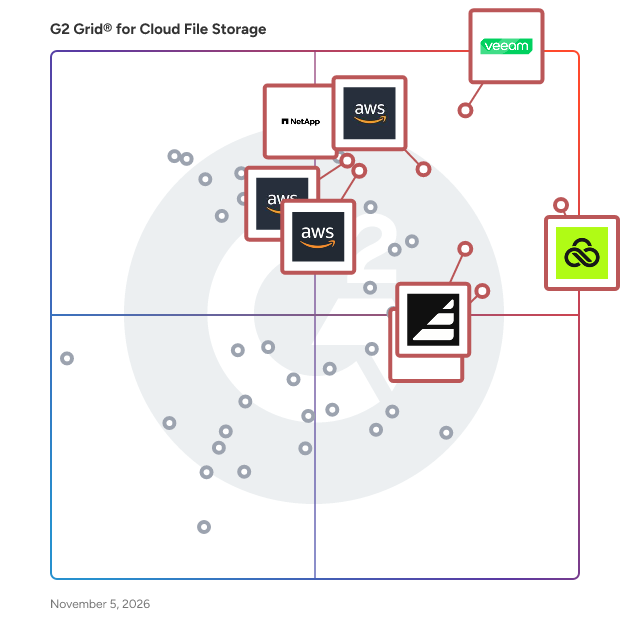
G2 Grid® for Cloud File Storage Software

G2 Grid® for Cloud File Storage Software plotting products by satisfaction and market presence

Highlighted products: Veeam Data Platform, LucidLink, Amazon FSx for Lustre, Assembly, NetApp ONTAP Data Management Software, Amazon FSx, CTERA Endpoint and Server Backup, and Amazon FSx for Windows File Server.

Underlying data: [Grid® JSON](https://www.g2.com/categories/cloud-file-storage/grids.json?focus%5B%5D=veeam-data-platform&focus%5B%5D=lucidlink&focus%5B%5D=amazon-fsx-for-lustre&focus%5B%5D=assemblysoftware&focus%5B%5D=netapp-ontap-data-management-software&focus%5B%5D=amazon-fsx&focus%5B%5D=ctera-endpoint-and-server-backup&focus%5B%5D=amazon-fsx-for-windows-file-server)

Playbook Cloud Storage

Playbook is the creative asset management platform built for teams who work visually. Marketers, brand managers, designers and production teams use Playbook to organize, find, and deliver creative work – without the complexity of traditional DAMs or the limitations of generic cloud storage. With AI-powered tagging, visual search, and built-in collaboration tools, Playbook gives teams one place to manage every asset from upload to delivery.

Average Rating: 4.5/5.0

Total Reviews: 61

How Do G2 Users Rate Playbook Cloud Storage?

  • Storage Scaling: 9.3/10 (Category avg: 9.1/10)
  • Backup Support: 9.4/10 (Category avg: 8.7/10)
  • Cloud Migration Support: 9.2/10 (Category avg: 8.6/10)
  • Quality of Support: 8.5/10 (Category avg: 8.5/10)

Who Is the Company Behind Playbook Cloud Storage?

  • Seller: Playbook
  • Year Founded: 2020
  • HQ Location: San Francisco
  • Twitter: @playbook_hq
    981 Twitter followers
  • LinkedIn® Page: www.linkedin.com
    14 employees on LinkedIn®

Who Uses This Product?

  • Top Industries: Photography
  • Company Size: 84% Small, 13% Medium

What Do G2 Reviewers Say About Playbook Cloud Storage?

AI-generated summary from verified user reviews

Pros
  • Users value the great customer support from Playbook Cloud Storage, enhancing their overall experience with the product.
  • Users praise the ease of use of Playbook Cloud Storage, making implementation and management simple and straightforward.
  • Users appreciate the easy implementation of Playbook Cloud Storage, finding it user-friendly and efficient.

What Are Recent G2 Reviews of Playbook Cloud Storage?

Azure Files

Azure File offers fully managed file shares in the cloud, accessible via the industry standard Server Message Block (SMB) protocol. Azure File shares is mounted concurrently by cloud or on-premises deployments of Windows, macOS, and Linux.

Average Rating: 4.0/5.0

Total Reviews: 51

How Do G2 Users Rate Azure Files?

  • Storage Scaling: 8.6/10 (Category avg: 9.1/10)
  • Backup Support: 8.6/10 (Category avg: 8.7/10)
  • Cloud Migration Support: 8.7/10 (Category avg: 8.6/10)
  • Quality of Support: 7.8/10 (Category avg: 8.6/10)

Who Is the Company Behind Azure Files?

  • Seller: Microsoft
  • Year Founded: 1975
  • HQ Location: Redmond, Washington
  • Twitter: @microsoft
    13,091,739 Twitter followers
  • LinkedIn® Page: www.linkedin.com
    232,750 employees on LinkedIn®
  • Ownership: MSFT

Who Uses This Product?

  • Top Industries: Information Technology and Services
  • Company Size: 44% Large, 35% Medium

What Do G2 Reviewers Say About Azure Files?

AI-generated summary from verified user reviews

Pros
  • Users value the high security and ease of use of Azure Files, making remote data storage seamless and efficient.
  • Users appreciate the high customer support of Azure Files, ensuring seamless assistance and problem resolution.
  • Users find Azure Files to be easy to use and implement, enjoying seamless integration and automated backup solutions.
  • Users appreciate the implementation ease of Azure Files, enjoying seamless integration and effortless subscription management.
  • Users value the high security of Azure Files, ensuring data is stored safely and accessible to authorized users.
Cons
  • Users find Azure Files expensive, suggesting that its pricing structure could be more accessible for broader usage.
  • Users find the storage limitations of Azure Files restrictive, hoping for improved pricing and capacity options.

What Are Recent G2 Reviews of Azure Files?

What Are G2 Users Discussing About Azure Files?

NetApp Cloud Volumes ONTAP

NetApp® Cloud Volumes ONTAP® offers a self-managed, unified storage management solution built on NetApp’s industry-leading ONTAP® software—empowering organizations with unmatched control and flexibility across block and file workloads in hybrid and multicloud environments. Seamlessly integrated with all major cloud providers, it runs natively on each cloud platform (Microsoft Azure, Google Cloud, AWS), allowing you to deploy and manage storage for mission-critical applications, databases, containers, and user files without requiring extra tooling or complex configuration. With support for iSCSI, NVMe/TCP, NFS, SMB/CIFS, and S3, Cloud Volumes ONTAP brings enterprise-class data services to your cloud environment.  

Average Rating: 4.5/5.0

Total Reviews: 26

How Do G2 Users Rate NetApp Cloud Volumes ONTAP?

  • Storage Scaling: 7.8/10 (Category avg: 9.1/10)
  • Backup Support: 8.3/10 (Category avg: 8.7/10)
  • Cloud Migration Support: 8.3/10 (Category avg: 8.6/10)
  • Quality of Support: 8.5/10 (Category avg: 8.5/10)

Who Is the Company Behind NetApp Cloud Volumes ONTAP?

  • Seller: NetApp
  • Year Founded: 1992
  • HQ Location: Sunnyvale, California
  • Twitter: @NetApp
    118,015 Twitter followers
  • LinkedIn® Page: www.linkedin.com
    12,706 employees on LinkedIn®
  • Ownership: NASDAQ

Who Uses This Product?

  • Top Industries: Information Technology and Services, Computer & Network Security
  • Company Size: 41% Large, 32% Small

What Do G2 Reviewers Say About NetApp Cloud Volumes ONTAP?

AI-generated summary from verified user reviews

Pros
  • Users value the comprehensive solutions provided by NetApp Cloud Volumes ONTAP, enhancing performance and reliability in storage.
  • Users value the reliable and powerful data storage provided by NetApp Cloud Volumes ONTAP for their needs.
  • Users find the ease of use in NetApp Cloud Volumes ONTAP beneficial for efficient management and operations.
  • Users value the user-friendly interface and powerful CLI of NetApp Cloud Volumes ONTAP, enhancing performance and availability.
  • Users value the high availability of NetApp Cloud Volumes ONTAP, ensuring reliable performance for their storage needs.
Cons
  • Users find the command line interface challenging, as frequent GUI changes complicate the navigation experience.
  • Users find the frequently changing GUI of NetApp Cloud Volumes ONTAP frustrating, often preferring the stability of CLI.
  • Users find the poor interface design frustrating, ultimately preferring the CLI over the frequently changing GUI.
  • Users find the poor UI of NetApp Cloud Volumes ONTAP frustrating, often preferring CLI for ease of use.
  • Users find the poor usability due to frequent GUI changes, often opting for CLI instead for simplicity.

What Are Recent G2 Reviews of NetApp Cloud Volumes ONTAP?

What Are G2 Users Discussing About NetApp Cloud Volumes ONTAP?

AI can help you find the answers. G2 helps you trust them.

Connect G2 to Claude or ChatGPT for answers grounded in G2's trusted reviews, comparisons, and pricing from real user insights.

How it works

IBM Cloud File Storage

IBM Cloud file storage leads the industry in performance cost ratios, security and versatility. And now you can try a volume with your current projects. For a limited time, get 1 TB of file storage endurance tiers at .25, 2, 4 or 10 IOPS with 1 TB of snapshot space.

Average Rating: 4.4/5.0

Total Reviews: 14

How Do G2 Users Rate IBM Cloud File Storage?

  • Quality of Support: 8.8/10 (Category avg: 8.6/10)

Who Is the Company Behind IBM Cloud File Storage?

  • Seller: IBM
  • Year Founded: 1911
  • HQ Location: Armonk, New York, United States
  • Twitter: @IBMSecurity
    74,660 Twitter followers
  • LinkedIn® Page: www.linkedin.com
    344,328 employees on LinkedIn®
  • Ownership: SWX:IBM

Who Uses This Product?

  • Company Size: 43% Small, 36% Large

What Are Recent G2 Reviews of IBM Cloud File Storage?

Google Cloud Resource Manager

Hierarchically manage resources by project, folder, and organization

Average Rating: 4.1/5.0

Total Reviews: 26

How Do G2 Users Rate Google Cloud Resource Manager?

  • Quality of Support: 8.4/10 (Category avg: 8.6/10)

Who Is the Company Behind Google Cloud Resource Manager?

  • Seller: Google
  • Year Founded: 1998
  • HQ Location: Mountain View, CA
  • Twitter: @google
    31,899,995 Twitter followers
  • LinkedIn® Page: www.linkedin.com
    301,144 employees on LinkedIn®
  • Ownership: NASDAQ:GOOG

Who Uses This Product?

  • Company Size: 54% Small, 25% Medium

What Are Recent G2 Reviews of Google Cloud Resource Manager?

What Are G2 Users Discussing About Google Cloud Resource Manager?

Google Cloud Filestore

Cloud Filestore is a managed file storage service for applications that require a filesystem interface and a shared filesystem for data. Filestore gives users a simple, native experience for standing up managed Network Attached Storage (NAS) with their Google Compute Engine and Kubernetes Engine instances. The ability to fine-tune Filestore's performance and capacity independently leads to predictably fast performance for your file-based workloads.

Average Rating: 4.0/5.0

Total Reviews: 20

How Do G2 Users Rate Google Cloud Filestore?

  • Quality of Support: 8.5/10 (Category avg: 8.6/10)

Who Is the Company Behind Google Cloud Filestore?

  • Seller: Google
  • Year Founded: 1998
  • HQ Location: Mountain View, CA
  • Twitter: @google
    31,899,995 Twitter followers
  • LinkedIn® Page: www.linkedin.com
    301,144 employees on LinkedIn®
  • Ownership: NASDAQ:GOOG

Who Uses This Product?

  • Company Size: 43% Small, 33% Large

What Do G2 Reviewers Say About Google Cloud Filestore?

AI-generated summary from verified user reviews

Pros
  • Users value the ease of access provided by Google Cloud Filestore across multiple platforms, enhancing their experience.
Cons
  • Users find that Google Cloud Filestore can be quite time-consuming due to its high internet bandwidth usage.

What Are Recent G2 Reviews of Google Cloud Filestore?

What Are G2 Users Discussing About Google Cloud Filestore?

Verizon Cloud

Verizon Cloud brings you flexible, high-performance computing the way you need it.

Average Rating: 3.8/5.0

Total Reviews: 11

How Do G2 Users Rate Verizon Cloud?

  • Quality of Support: 8.1/10 (Category avg: 8.5/10)

Who Is the Company Behind Verizon Cloud?

  • Seller: Verizon
  • Year Founded: 1983
  • HQ Location: Basking RIdge, NJ
  • Twitter: @Verizon
    1,486,564 Twitter followers
  • LinkedIn® Page: www.linkedin.com
    101,991 employees on LinkedIn®
  • Ownership: NYSE:VZ

Who Uses This Product?

  • Company Size: 82% Medium, 27% Large

What Are Recent G2 Reviews of Verizon Cloud?

Fastio

Fastio: The AI-first workspace where people and AI agents work on the same files Fastio gives teams one place to store, share, and work on content, with AI built into every workspace. It's a modern alternative to Box, Dropbox, and Google Drive for teams that use AI agents alongside people. ✓ Built-in AI: Every file is indexed automatically, so you can search by meaning, ask questions across a workspace, and get answers that cite the source files ✓ AI agents as teammates: Connect Claude or your own agents through MCP, the REST API, or the CLI, each with its own scoped permissions and a full audit trail ✓ Branded sharing: Client portals with your logo, colors, and custom URL, plus expiring, password-protected links with download tracking ✓ Review and approvals: Comments pinned to video frames, pages, and image regions, one-click approvals, and tasks linked to the files they cover ✓ Media and metadata: Adaptive video streaming, in-browser previews for professional formats, and AI extraction that turns documents into structured, searchable data ✓ Security: Geo-IP controls, virus scanning, and email risk screening, plus SSO, admin policies, and SIEM audit streaming on Enterprise. Import from Google Drive, Dropbox, OneDrive, or Box in a few clicks. Plans start at $9.99/month, or $99/year with yearly billing, with a 14-day trial on monthly plans. Built by VividEngine, the company behind MediaFire, and used by teams at Samsung, Amazon, Walmart, Target, Autodesk, Logitech, and GoPro.

Average Rating: 4.2/5.0

Total Reviews: 51

How Do G2 Users Rate Fastio?

  • Quality of Support: 8.3/10 (Category avg: 8.5/10)

Who Is the Company Behind Fastio?

  • Seller: VividEngine, LLC
  • Company Website:
  • Year Founded: 2017
  • HQ Location: Texas, US
  • Twitter: @fastdotio
    269 Twitter followers
  • LinkedIn® Page: www.linkedin.com
    4 employees on LinkedIn®

Who Uses This Product?

  • Top Industries: Computer Software, Marketing and Advertising
  • Company Size: 61% Small, 41% Medium

What Do G2 Reviewers Say About Fastio?

AI-generated summary from verified user reviews

Pros
  • Users love the ease of use of Fast.io, enabling quick performance testing and effortless file sharing.
  • Users value the simplicity and speed of Fast.io, enabling quick performance tests without unnecessary complexity.
  • Users praise Fast.io for its blazing fast performance, ensuring quick file loading and reliable access across devices.
  • Users find it easy to send and receive files with Fast.io, appreciating its speed and security features.
  • Users value the strong security measures of Fast.io, ensuring privacy and controlled access for their projects.
Cons
  • Users report slow performance during peak times, especially on the free plan, impacting their overall experience.
  • Users experience slow upload speeds, especially with large files, affecting overall performance and efficiency.
  • Users find the limited reporting capabilities of Fast.io restrict their ability to analyze performance effectively and optimize usage.
  • Users find the limited customization options on Fast.io restrict their ability to tailor the experience to their needs.
  • Users are concerned about potential data loss due to interrupted uploads or files flagged by the virus scanning feature.

What Are Recent G2 Reviews of Fastio?

Google Cloud NetApp Volumes

NetApp® Cloud Volumes for Google Cloud is a fully managed or self-managed file service that is integrated into Google Cloud with the multiprotocol support, performance, and availability required to run business-critical applications. It is designed to provide massively parallel shared access to thousands of Google Compute Engine and Google Kubernetes Engine instances, enabling your applications to achieve high levels of aggregate throughput and IOPS with consistent low latencies. Use cases. Customers can use the service to migrate existing enterprise applications to Google Cloud. Other use cases include hybrid deployments, multi-cloud mobility, big data analytics, web serving, and content management, application development and testing, media and entertainment workflows, database backups, container storage, and more. Features. Multiple performance tiers, standard file interfaces, advanced data management, metered service, fully managed service, native service experience, integrated support, and integrated billing. For more information: NetApp: https://cloud.netapp.com/cloud-volumes-service-for-gcp Google: https://cloud.google.com/netapp

Average Rating: 4.2/5.0

Total Reviews: 10

How Do G2 Users Rate Google Cloud NetApp Volumes?

  • Storage Scaling: 8.8/10 (Category avg: 9.1/10)
  • Backup Support: 9.0/10 (Category avg: 8.7/10)
  • Cloud Migration Support: 8.9/10 (Category avg: 8.6/10)
  • Quality of Support: 8.9/10 (Category avg: 8.6/10)

Who Is the Company Behind Google Cloud NetApp Volumes?

  • Seller: Google
  • Year Founded: 1998
  • HQ Location: Mountain View, CA
  • Twitter: @google
    31,899,995 Twitter followers
  • LinkedIn® Page: www.linkedin.com
    301,144 employees on LinkedIn®
  • Ownership: NASDAQ:GOOG

Who Uses This Product?

  • Company Size: 60% Large, 30% Medium

What Do G2 Reviewers Say About Google Cloud NetApp Volumes?

AI-generated summary from verified user reviews

Pros
  • Users value the snapshot technology of Google Cloud NetApp Volumes for seamless data backup and restoration without downtime.
  • Users value the incredible cloud storage integration of Google Cloud NetApp Volumes, enhancing performance and reliability.
  • Users appreciate the cost-effective solution of Google Cloud NetApp Volumes, highlighting its reliability and feasibility for their needs.
  • Users appreciate the incredible cloud storage integration with Google Cloud, benefiting from high availability and snapshot technology.
  • Users benefit from the high availability of Google Cloud NetApp Volumes, ensuring continuous access to their data.
Cons
  • Users find the pricing of Google Cloud NetApp Volumes to be quite high compared to alternatives on the market.
  • Users find the poor documentation of Google Cloud NetApp Volumes limits their ability to utilize its capabilities effectively.

What Are Recent G2 Reviews of Google Cloud NetApp Volumes?

What Are G2 Users Discussing About Google Cloud NetApp Volumes?

WebDrive File Access Client

WebDrive is a secure desktop application designed to map remote cloud and server storage to a local drive, enabling users to open, edit, and save remote files as if they were stored directly on their computer. This innovative solution simplifies workflows by transforming any supported cloud or SFTP connection into a native desktop experience. By eliminating the need for browser uploads, sync clients, or manual downloads, WebDrive enhances efficiency and user convenience. The application supports over 20 popular protocols and storage platforms, including SFTP, FTPS, WebDAV, SharePoint, Amazon S3, OneDrive, Dropbox, and Google Drive. This broad compatibility offers users a unified file management experience, allowing them to access and manage files across various platforms seamlessly. Changes made to documents are saved in real-time to the source location, ensuring that users always work with the most current version. Additionally, built-in encryption, connection logging, and credential management provide robust security for sensitive data. WebDrive is tailored for both individual professionals and IT teams, making it a versatile tool in various environments. Its capabilities include silent installation, enterprise-wide configuration, and group policy deployment, which are particularly beneficial for organizations looking to streamline their IT processes. The cross-platform support for both Windows and macOS positions WebDrive as an ideal solution for hybrid workforces and bring-your-own-device (BYOD) environments, accommodating diverse user preferences and operational needs. Key use cases for WebDrive include mapping cloud storage to a desktop as a local drive, enabling real-time file access and editing from remote servers, and providing secure desktop connections to SharePoint and SFTP. It also facilitates streamlined remote file workflows for distributed teams and supports mass enterprise deployment and IT automation, making it a valuable asset for organizations seeking to enhance their operational efficiency. By consolidating cloud and remote server access into a single, familiar interface, WebDrive significantly boosts productivity while reducing IT overhead. Users can manage files on various platforms, such as SFTP, SharePoint, or Google Drive, with secure, seamless access directly from Windows File Explorer or macOS Finder. This integration not only simplifies file management but also empowers users to focus on their core tasks without the distractions of complex file access methods.

Average Rating: 4.7/5.0

Total Reviews: 28

How Do G2 Users Rate WebDrive File Access Client?

  • Quality of Support: 9.5/10 (Category avg: 8.6/10)

Who Is the Company Behind WebDrive File Access Client?

Who Uses This Product?

  • Company Size: 75% Small, 21% Medium

What Are Recent G2 Reviews of WebDrive File Access Client?

What Are G2 Users Discussing About WebDrive File Access Client?

Odrive

Odrive aggregates all cloud storage accounts in one system and keeps it synchronized, sharable and encrypted.

Average Rating: 4.5/5.0

Total Reviews: 13

How Do G2 Users Rate Odrive?

  • Cloud Migration Support: 10.0/10 (Category avg: 8.6/10)
  • Quality of Support: 8.7/10 (Category avg: 8.6/10)

Who Is the Company Behind Odrive?

  • Seller: Odrive
  • Year Founded: 2014
  • HQ Location: Cupertino, CA
  • Twitter: @odrive
    1,741 Twitter followers
  • LinkedIn® Page: www.linkedin.com
    4 employees on LinkedIn®

Who Uses This Product?

  • Company Size: 85% Small, 8% Medium

What Do G2 Reviewers Say About Odrive?

AI-generated summary from verified user reviews

Pros
  • Users find Odrive's cloud storage service excellent for managing both personal and work-related files efficiently.
  • Users love the ease of use of Odrive, as it simplifies tracking URLs effortlessly for businesses.
  • Users love Odrive for its intuitive URL management, simplifying tracking and enhancing efficiency for business tasks.
  • Users love the simplicity of Odrive, making it easy to manage URLs without hassle.
Cons
  • Users find the internet dependence of Odrive challenging, particularly when accessing files and migrating them.
  • Users express frustration with the limited customization of Odrive, particularly in its basic file browser and glitchy sync app.
  • Users find the limited functionality of Odrive, like basic file browsing and glitches, somewhat frustrating.
  • Users find the limited options in the file browser and occasional glitches in the desktop sync app frustrating.
  • Users face offline limitations with Odrive, needing internet access for files and finding migration challenging.

What Are Recent G2 Reviews of Odrive?

What Are G2 Users Discussing About Odrive?

Cyberduck

Cyberduck is a free, open-source client for FTP, SFTP, WebDAV, and various cloud storage services, available for macOS and Windows. It offers a user-friendly interface that simplifies file transfers between local systems and remote servers or cloud platforms. Cyberduck supports connections to services like Amazon S3, Google Drive, Microsoft OneDrive, Dropbox, and Backblaze B2, making it a versatile tool for managing files across different environments. Key Features and Functionality: - Protocol Support: Cyberduck supports FTP, SFTP, WebDAV, and integrates with cloud storage services such as Amazon S3, Google Drive, Microsoft OneDrive, Dropbox, and Backblaze B2. - User Interface: The application features an intuitive interface with drag-and-drop functionality, facilitating easy file transfers. - External Editor Integration: Users can open and edit files directly from Cyberduck using their preferred external text editors. - Bookmark Management: Cyberduck includes a bookmark manager for quick access to frequently used connections. - Security Features: The client supports FTP/TLS (FTP secured over SSL/TLS) and integrates with system technologies like Keychain on macOS for secure credential storage. - Language Support: Cyberduck is available in multiple languages, including English, French, German, Japanese, and Spanish. Primary Value and User Solutions: Cyberduck provides a comprehensive solution for users needing to manage and transfer files across various servers and cloud storage services. Its support for multiple protocols and platforms ensures compatibility with a wide range of systems. The integration with external editors and the intuitive interface streamline workflows, making file management more efficient. By offering robust security features and support for numerous languages, Cyberduck caters to a diverse user base, addressing the need for a reliable and versatile file transfer client.

Average Rating: 4.3/5.0

Total Reviews: 86

How Do G2 Users Rate Cyberduck?

  • Storage Scaling: 8.6/10 (Category avg: 9.1/10)
  • Backup Support: 8.0/10 (Category avg: 8.7/10)
  • Cloud Migration Support: 7.5/10 (Category avg: 8.6/10)
  • Quality of Support: 7.3/10 (Category avg: 8.6/10)

Who Is the Company Behind Cyberduck?

Who Uses This Product?

  • Top Industries: Computer Software, Information Technology and Services
  • Company Size: 61% Small, 26% Medium

What Do G2 Reviewers Say About Cyberduck?

AI-generated summary from verified user reviews

Pros
  • Users praise Cyberduck's intuitive and friendly interface, making file management seamless and efficient across various platforms.
  • Users highlight the user-friendly interface of Cyberduck, enhancing efficiency with easy drag-and-drop functionality.
  • Users praise Cyberduck for its solid security, ensuring safe and efficient file transfers across various platforms.
  • Users appreciate the simple interface of Cyberduck, enhancing usability and allowing for efficient file transfers.
  • Users praise Cyberduck for its lightning fast speed, enhancing productivity and seamless file management across platforms.
Cons
  • Users experience slow performance with Cyberduck, noting high RAM usage and frequent hangs during connections.
  • Users experience integration issues with multiple warning messages appearing when a connection is lost.
  • Users find the interface outdated, making it feel less intuitive compared to newer Mac-native applications.
  • Users often face performance issues with Cyberduck, including frequent hangs and annoying donation prompts disrupting their workflow.
  • Users find Cyberduck to have slow internet speed, particularly when transferring large files or numerous small ones.

What Are Recent G2 Reviews of Cyberduck?

What Are G2 Users Discussing About Cyberduck?

DriveHQ

DriveHQ provides a secure, online collaboration solution for Enterprises and SMBs.

Average Rating: 4.5/5.0

Total Reviews: 32

How Do G2 Users Rate DriveHQ?

  • Quality of Support: 9.3/10 (Category avg: 8.6/10)

Who Is the Company Behind DriveHQ?

  • Seller: DriveHQ
  • Year Founded: 2003
  • HQ Location: San Ramon, California
  • Twitter: @TheDriveHQ
    174 Twitter followers
  • LinkedIn® Page: www.linkedin.com
    1 employees on LinkedIn®

Who Uses This Product?

  • Top Industries: Consumer Goods, Telecommunications
  • Company Size: 59% Medium, 28% Small

What Are Recent G2 Reviews of DriveHQ?

Business-in-a-Box

Business in a Box — The Business Operating System for SMBs Business in a Box (BIB) is the Business Operating System (BOS) for small and medium businesses that want to run their company with structure, clarity, and control — without juggling dozens of disconnected tools. Most businesses don’t struggle because of a lack of effort. They struggle because their operations are fragmented: tasks in one app, documents in another, communication scattered, and critical knowledge living in people’s heads. Business in a Box replaces that chaos with one unified system that defines how the business works. Unlike traditional project management or collaboration tools, BIB is designed as a system, not just software. It brings together execution, communication, documentation, and organizational structure into a single operating layer for the business. With Business in a Box, companies can: - Organize work through goals, projects, and tasks with clear ownership - Centralize documents, templates, and company knowledge - Collaborate through built-in chat and communication channels tied directly to work - Set up departments, roles, and responsibilities that persist even when people change - Onboard teams quickly using prebuilt structures and workflows BIB also includes AI-powered capabilities that go beyond basic automation. The platform builds a contextual understanding of each business — learning from goals, projects, tasks, documents, and activity — to support planning, execution, and decision-making. AI can assist with creating business documents, recommending templates, highlighting risks, and guiding next steps, all within the context of how the company actually operates. Business in a Box is built for businesses with 1 to 100 employees, from founders and small teams to growing organizations that need more structure without enterprise complexity. A Free Forever Starter Plan allows companies to begin operating with a system from day one, while paid plans unlock full BOS capabilities with simple, transparent per-user pricing. At its core, Business in a Box helps companies move from ad-hoc operations to intentional execution. Instead of relying on memory, emails, and scattered tools, teams run their business on one operating system — designed to scale as they grow. Business in a Box is not just another tool. It’s how your business runs. Get Started Free in Just a Few Minutes! https://account.business-in-a-box.com/create-account/

Average Rating: 4.7/5.0

Total Reviews: 13

How Do G2 Users Rate Business-in-a-Box?

  • Quality of Support: 9.4/10 (Category avg: 8.5/10)

Who Is the Company Behind Business-in-a-Box?

  • Seller: Biztree
  • Year Founded: 2002
  • HQ Location: Montreal, Quebec, Canada
  • LinkedIn® Page: www.linkedin.com
    4 employees on LinkedIn®
  • Ownership: Biztree Inc.
  • Phone: 514-768-4100

Who Uses This Product?

  • Company Size: 92% Small, 8% Medium

What Do G2 Reviewers Say About Business-in-a-Box?

AI-generated summary from verified user reviews

Pros
  • Users praise the affordability of Business-in-a-Box, effectively replacing costly tools with great value.
  • Users value the cost-effective collaboration features of Business-in-a-Box, replacing multiple expensive tools seamlessly.
  • Users value the cost-effective data management solution, successfully replacing multiple expensive tools with one platform.
  • Users value the efficiency of Business-in-a-Box, as it consolidates multiple tools into one affordable solution.
  • Users value the cost-effective replacement for expensive tools, providing great value for small to medium-sized businesses.

What Are Recent G2 Reviews of Business-in-a-Box?

What Are G2 Users Discussing About Business-in-a-Box?

Storj

Storj is an open-source distributed cloud storage platform based on blockchain technology where anyone can sell their extra hard drive space.

Average Rating: 4.5/5.0

Total Reviews: 11

How Do G2 Users Rate Storj?

  • Storage Scaling: 10.0/10 (Category avg: 9.1/10)
  • Backup Support: 10.0/10 (Category avg: 8.7/10)
  • Quality of Support: 9.0/10 (Category avg: 8.6/10)

Who Is the Company Behind Storj?

  • Seller: Storj Labs
  • Year Founded: 2014
  • HQ Location: Atlanta, Georgia
  • Twitter: @storjproject
    1,219 Twitter followers
  • LinkedIn® Page: www.linkedin.com
    27 employees on LinkedIn®

Who Uses This Product?

  • Top Industries: Non-Profit Organization Management
  • Company Size: 82% Small, 9% Medium

What Are Recent G2 Reviews of Storj?

What Are G2 Users Discussing About Storj?

Rachana Hasyagar
RH
Researched and written by Rachana Hasyagar
Updated October 3, 2024