Best Cloud Content Collaboration Software - Page 7

How Many Cloud Content Collaboration Software Products Does G2 Track?

Total Products under this Category: 263

Category Stats (Sep 2026)

  • Average Rating: 4.36/5 (↑0.01 vs Aug 2026) The average rating of products in this category, based on all submitted ratings
  • Top Trending Product: Assai Document Management (+26.07%) - Among all products in this category, Assai Document Management recorded the largest rating increase compared to last month

Last updated: September 01, 2026

How Does G2 Rank Cloud Content Collaboration Software Products?

Why You Can Trust G2's Software Rankings:

  • 30 Analysts and Data Experts
  • 118,600+ Authentic Reviews
  • 263+ Products
  • Unbiased Rankings

G2's software rankings are built on verified user reviews, rigorous moderation, and a consistent research methodology maintained by a team of analysts and data experts. Each product is measured using the same transparent criteria, with no paid placement or vendor influence. While reviews reflect real user experiences, which can be subjective, they offer valuable insight into how software performs in the hands of professionals. Together, these inputs power the G2 Score, a standardized way to compare tools within every category.

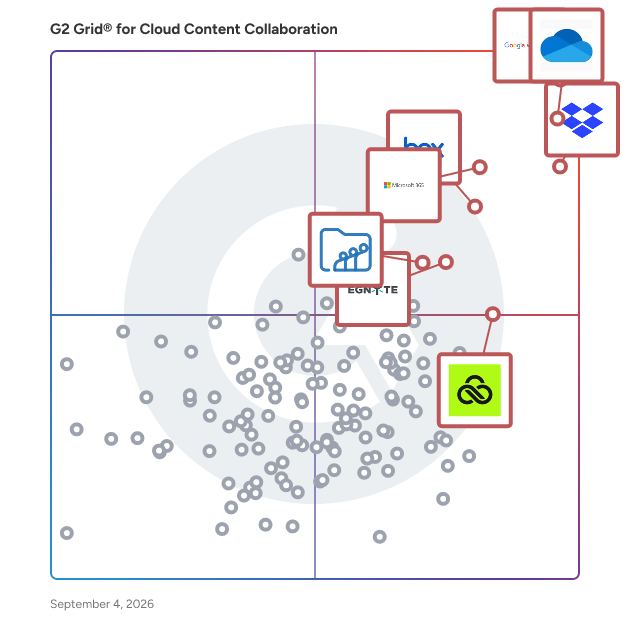
G2 Grid® for Cloud Content Collaboration Software

G2 Grid® for Cloud Content Collaboration Software plotting products by satisfaction and market presence

Highlighted products: Google Workspace, Microsoft OneDrive for Business, Dropbox, Microsoft 365, Box, Egnyte, LucidLink, and Zoho WorkDrive.

Underlying data: [Grid® JSON](https://www.g2.com/categories/cloud-content-collaboration/grids.json?focus%5B%5D=google-workspace&focus%5B%5D=microsoft-onedrive-for-business&focus%5B%5D=dropbox&focus%5B%5D=microsoft365&focus%5B%5D=box&focus%5B%5D=egnyte&focus%5B%5D=lucidlink&focus%5B%5D=zoho-workdrive)

DocumenTree

DocumenTree is an online document management system designed to facilitate seamless file sharing and collaboration over the internet. It enables users to access and share documents from any location using a web browser, eliminating the need for purchasing, downloading, installing, or maintaining software. This cloud-based solution is particularly beneficial for businesses aiming to enhance workforce mobility and streamline document exchanges with clients and vendors. Key Features: - Web-Based Access: Users can upload, download, browse, search, index, categorize, version, approve, track, and discuss documents through any internet browser. - No Software Installation: As a fully hosted service, there is no requirement for software purchase, download, installation, or maintenance. - Secure Collaboration: The platform offers a secure virtual office environment, allowing teams to collaborate effectively while ensuring document security. - Customizable Branding: Businesses can brand the document manager with their company logo and color scheme to maintain a consistent user experience. - Affordable Pricing: The subscription model includes unlimited free guest users with secure, view-only access, ensuring companies only pay for contributing users who upload and manage documents. Primary Value and Solutions: DocumenTree addresses the challenges of document management by providing a centralized, accessible, and secure platform for file sharing and collaboration. It eliminates the complexities associated with traditional document management systems, such as software maintenance and limited accessibility. By offering a web-based solution, it ensures that teams can work together efficiently from any location, enhancing productivity and reducing operational costs. The customizable branding and affordable pricing further make it an attractive option for businesses seeking a streamlined and cost-effective document management solution.

Average Rating: 4.0/5.0

Total Reviews: 20

How Do G2 Users Rate DocumenTree?

  • Has the product been a good partner in doing business?: 10.0/10 (Category avg: 8.8/10)
  • Performance and Reliability: 8.9/10 (Category avg: 8.7/10)
  • File following: 8.2/10 (Category avg: 8.8/10)
  • Device Syncing: 7.6/10 (Category avg: 8.8/10)

Who Is the Company Behind DocumenTree?

Who Uses This Product?

  • Company Size: 57% Small, 29% Medium

What Do G2 Reviewers Say About DocumenTree?

AI-generated summary from verified user reviews

Pros
  • Users find the ease of use of DocumenTree beneficial, as data is easily accessible and manageable.
  • Users love the easy access to data in DocumenTree, making their experience seamless and user-friendly.
  • Users appreciate the speed efficiency of DocumenTree, finding data access quick and user-friendly.

What Are Recent G2 Reviews of DocumenTree?

What Are G2 Users Discussing About DocumenTree?

Glasscubes

The ultimate solution for seamless collaboration from anywhere. Our secure online workspaces are designed for ease of use and rapid implementation. Experience a frictionless workflow with our powerful suite of tools, enabling you to collaborate effortlessly, and work with anyone inside or outside of your organisation. This is how we help businesses work better together: File sharing: A permission-controlled file repository with powerful document management functionality for fast, simple, and secure file sharing with anyone, inside or outside of your company. Collaboration: Connect dispersed groups of people in a user-friendly online workspace. Social discussion feeds organise communication, encourage collaboration and improve teamwork. Secure portals: Branded portals that provide an efficient way to collaborate by securely storing and exchanging information with clients or partners outside of your organisation's firewall. Company intranet: A centrally managed hub for your organisation that encourages a culture of idea-sharing and innovation by giving teams the power to create, share, and search content. Forms & workflow: Secure online forms that control the way information is received, combined with automated workflow that gathers and processes information, to save time and eliminate human error.

Average Rating: 4.7/5.0

Total Reviews: 12

How Do G2 Users Rate Glasscubes?

  • Has the product been a good partner in doing business?: 9.2/10 (Category avg: 8.8/10)
  • Performance and Reliability: 8.3/10 (Category avg: 8.7/10)
  • File following: 8.3/10 (Category avg: 8.8/10)
  • Device Syncing: 9.2/10 (Category avg: 8.8/10)

Who Is the Company Behind Glasscubes?

  • Seller: Glasscubes Limited
  • Year Founded: 2008
  • HQ Location: London, United Kingdom
  • Twitter: @Glasscubes
    603 Twitter followers
  • LinkedIn® Page: www.linkedin.com
    19 employees on LinkedIn®

Who Uses This Product?

  • Company Size: 50% Large, 50% Small

What Are Recent G2 Reviews of Glasscubes?

What Are G2 Users Discussing About Glasscubes?

ShareDocView

ShareDocView.com is a sales enablement tool that allows to share documents via links in order to get email leads, analytics and many other benefits. Upload PDF, Doc and PPT files to create links which can range from public to accessible only via verified emails or passwords. Add your company logo, colors and link to a website of your choice to keep promoting your brand. New Since July 2022 - Add your company custom domain (CNAME) for example docs.YOURDOMAIN.COM Stop Attaching files...just ShareDocView.com

Average Rating: 4.6/5.0

Total Reviews: 48

G2 Deal: New Customers Get 30% off ShareDocView Subscriptions

Upload PDF, DOC and PPT files on ShareDocView.com to get doc links for new 📧 email leads or embedding docs on your website. Get analytics 📈 on views or downloads by doc link + ⏱️ time spent on each page. Add your Brand🎖️ company logo + 🌈 colors + watermark.

Price: ~~$10 /month~~ → $7 /month

View this exclusive G2 deal

How Do G2 Users Rate ShareDocView?

  • Has the product been a good partner in doing business?: 8.8/10 (Category avg: 8.8/10)
  • Performance and Reliability: 9.4/10 (Category avg: 8.7/10)
  • File following: 9.0/10 (Category avg: 8.8/10)
  • Device Syncing: 8.9/10 (Category avg: 8.8/10)

Who Is the Company Behind ShareDocView?

  • Seller: Krivisoft
  • Year Founded: 2019
  • HQ Location: Delaware, US
  • Twitter: @sharedocview
    29 Twitter followers
  • LinkedIn® Page: www.linkedin.com
    13 employees on LinkedIn®

Who Uses This Product?

  • Top Industries: Marketing and Advertising
  • Company Size: 71% Small, 18% Medium

What Do G2 Reviewers Say About ShareDocView?

AI-generated summary from verified user reviews

Pros
  • Users value the intuitive UI of ShareDocView, enabling quick setup and effortless document sharing without needing tutorials.
  • Users value the easy sharing capabilities of ShareDocView, enhancing collaboration and document security effortlessly.
  • Users value the seamless integration of ShareDocView, enhancing collaboration and document management effortlessly across platforms.
  • Users value the easy access to documents with ShareDocView, enhancing collaboration and efficiency for teams and clients.
  • Users value the easy setup of ShareDocView, allowing quick access to documents and seamless integration with other tools.
Cons
  • Users experience inefficient searching due to glitches and limited file type support, which hinders their productivity.
  • Users report search difficulties due to glitches and limited file type support, impacting their overall experience.
  • Users experience technical glitches including search issues and limited file type support, impacting functionality and usability.
  • Users highlight the limited functionality of ShareDocView, particularly for non-PDF formats and search features.
  • Users experience search and file management glitches along with limited support for various file types.

What Are Recent G2 Reviews of ShareDocView?

What Are G2 Users Discussing About ShareDocView?

MyDocsOnline

MyDocsOnline is a secure, cloud-based document management and file-sharing platform designed to meet the needs of individuals, small teams, and larger organizations. It offers a user-friendly interface that facilitates efficient storage, management, and sharing of documents, ensuring data security and compliance with industry standards. Key Features and Functionality: - Secure Storage: Provides encrypted storage with 256-bit AES encryption and HTTPS protocols, ensuring data protection. - File Sharing: Allows users to share large files without size restrictions, with options for password protection and tracking of shared files. - Desktop Application: Offers a desktop app that supports online editing of various file types, including Office documents and QuickBooks files, with file locking to prevent data loss during collaborative editing. - User Permissions: Enables administrators to set specific access permissions for folders and files, controlling who can view or edit content. - Custom Branding: Allows customization of the user interface with company logos, providing a professional appearance for client interactions. - Audit Logs and Notifications: Maintains detailed activity logs for auditing purposes and offers email notifications for file uploads and changes. Primary Value and Solutions Provided: MyDocsOnline addresses the challenges of secure document management and collaboration by offering a reliable platform that ensures data security, facilitates efficient file sharing, and supports team collaboration. Its features cater to businesses requiring HIPAA compliance and those needing to manage sensitive information securely. The platform's ease of use, combined with robust security measures and customizable options, makes it a valuable tool for organizations aiming to streamline their document workflows and enhance productivity.

Average Rating: 4.3/5.0

Total Reviews: 87

How Do G2 Users Rate MyDocsOnline?

  • Has the product been a good partner in doing business?: 7.2/10 (Category avg: 8.8/10)
  • Performance and Reliability: 8.3/10 (Category avg: 8.7/10)
  • File following: 8.4/10 (Category avg: 8.8/10)
  • Device Syncing: 8.9/10 (Category avg: 8.8/10)

Who Is the Company Behind MyDocsOnline?

Who Uses This Product?

  • Top Industries: Computer Software, Information Technology and Services
  • Company Size: 50% Small, 22% Medium

What Do G2 Reviewers Say About MyDocsOnline?

AI-generated summary from verified user reviews

Pros
  • Users praise the ease of use of MyDocsOnline, highlighting its intuitive interface and straightforward setup.
  • Users find the easy setup of MyDocsOnline seamless, enabling a smooth start to their document management journey.
  • Users appreciate the reliability of MyDocsOnline, finding it fast and user-friendly for secure document sharing.
  • Users appreciate the robust security of MyDocsOnline, ensuring safe handling of sensitive documents with strong encryption.
  • Users value the easy collaboration features of MyDocsOnline, facilitating seamless document management and sharing with clients and colleagues.
Cons
  • Users are frustrated by the integration difficulty, finding limited options that create extra workflow challenges.
  • Users find that slow loading times, especially with large files, can hinder their overall experience with MyDocsOnline.
  • Users find the slow uploads frustrating, hindering efficient real-time collaboration on documents.
  • Users find MyDocsOnline's limited functionality, including outdated interface and few integrations, restricts usability and efficiency.
  • Users find MyDocsOnline to be lacking features, particularly in advanced collaboration and modern interface options.

What Are Recent G2 Reviews of MyDocsOnline?

What Are G2 Users Discussing About MyDocsOnline?

S-Drive

S-Drive is an easy, secure, and unlimited document management, document collection, file management, and file storage platform on Salesforce leveraging Amazon S3. Rather than using Salesforce files, attachments, or FTP, you can use S-Drive for your document management and content delivery needs. S-Drive’s document editing online feature is available for Lightning on desktop and allows users to edit Microsoft Word, Excel, or PowerPoint files while in S-Drive, without having to download, edit, and re-upload them. S-Drive’s eSignature feature allows you to send a document directly to DocuSign and have the signed document returned directly to S-Drive. Integrated DocuSign eSignature and Microsoft 365 with S-Drive help to deliver faster and more scalable solutions for you. Integrating eSignature helps provide an extra layer of security and offers rich document management solutions. Also, you can save time and resources by not having to download and run a separate process for eSignatures. S-Drive uses DocuSign’s Envelope Template structure and enables seamless end-to-end integration with DocuSign all within AppExchange. You can reduce risk by eliminating repetitive, manual tasks that may result in errors and increased risk. You can also increase productivity by automating workflows to route documents for signatures more efficiently and without leaving Salesforce. S-Drive Desktop Experience allows Salesforce users to manage documents and digital assets using their local file system. Users can browse, update, delete, and upload new documents without opening the Salesforce app. It can be used by any organization that wishes to work outside of Salesforce to manage their documents and easily make changes using local desktop applications. Save time and money with S-Drive's end-to-end Document Management solution for Salesforce. Increase efficiency, speed, security, and scalability for document collection. Streamline the entire document management process, ensuring efficiency by document collection and keeping all your data in one central and secure hub. Accelerate workflows like obtaining signatures, storing, and sharing documents all within the app for faster collaboration across teams. DocuFetch, a document collection feature from S-Drive, enhances document collection processes by providing efficient means to gather crucial documents, signatures, and forms from clients, prospects, and partners. Utilizing customizable templates and a user-friendly interface, it optimizes workflows, facilitating request initiation, seamless sharing, effortless validation, and secure storage within S-Drive solution. DocuFetch offers a comprehensive solution for document management within organizational frameworks, ensuring streamlined interactions and secure document handling throughout the process.

Average Rating: 4.5/5.0

Total Reviews: 31

How Do G2 Users Rate S-Drive?

  • Has the product been a good partner in doing business?: 8.6/10 (Category avg: 8.8/10)
  • Performance and Reliability: 8.6/10 (Category avg: 8.7/10)
  • File following: 8.1/10 (Category avg: 8.8/10)
  • Device Syncing: 8.4/10 (Category avg: 8.8/10)

Who Is the Company Behind S-Drive?

  • Seller: CyanGate
  • Year Founded: 2007
  • HQ Location: Cincinnati, OH
  • Twitter: @CyanGate
    191 Twitter followers
  • LinkedIn® Page: www.linkedin.com
    34 employees on LinkedIn®

Who Uses This Product?

  • Top Industries: Information Technology and Services
  • Company Size: 47% Medium, 28% Small

What Do G2 Reviewers Say About S-Drive?

AI-generated summary from verified user reviews

Pros
  • Users enjoy the seamless integration of S-Drive with Salesforce, simplifying document management and access across devices.
  • Users praise the easy setup of S-Drive, appreciating its straightforward installation and intuitive configuration process.
  • Users commend the reliability of S-Drive, appreciating its stability and seamless integration with Salesforce for document management.
  • Users value the seamless integration of S-Drive with Salesforce, enhancing document management and collaboration across devices.
  • Users value the easy access of S-Drive, enabling smooth collaboration and centralized storage for their documents.
Cons
  • Users experience slow loading times with S-Drive, particularly when accessing heavy data or reports, affecting usability.
  • Users find the limited customization options in S-Drive restrict their ability to tailor the experience to their needs.
  • Users face challenges due to automation difficulty, requiring more manual setup than anticipated for workflows and permissions.
  • Users find the difficult customization of S-Drive frustrating due to the lack of visual workflow tools and templates.
  • Users find the difficult setup of S-Drive cumbersome, particularly when compared to simpler alternatives like Gdrive.

What Are Recent G2 Reviews of S-Drive?

The Synchronoss Cloud Platform

For Operators, Our Cloud Platform Is a Profitable Service And a Differentiating, Cross Channel Customer Experience

Average Rating: 4.0/5.0

Total Reviews: 15

How Do G2 Users Rate The Synchronoss Cloud Platform?

  • Has the product been a good partner in doing business?: 8.3/10 (Category avg: 8.8/10)
  • Performance and Reliability: 7.9/10 (Category avg: 8.7/10)
  • File following: 7.7/10 (Category avg: 8.8/10)
  • Device Syncing: 8.1/10 (Category avg: 8.8/10)

Who Is the Company Behind The Synchronoss Cloud Platform?

  • Seller: Synchronoss
  • Year Founded: 2000
  • HQ Location: Bridgewater, NJ
  • Twitter: @Synchronoss
    1,682 Twitter followers
  • LinkedIn® Page: www.linkedin.com
    1,401 employees on LinkedIn®
  • Ownership: NASDAQ: SNCR

Who Uses This Product?

  • Company Size: 33% Small, 33% Medium

What Do G2 Reviewers Say About The Synchronoss Cloud Platform?

AI-generated summary from verified user reviews

Pros
  • Users appreciate the effortless usability of The Synchronoss Cloud Platform, enjoying seamless access and reliable data management.
  • Users value the easy access to data across devices, ensuring seamless syncing and reliable cloud storage.
  • Users highlight the easy setup of The Synchronoss Cloud Platform, appreciating its seamless integration and responsive support for providers.
  • Users admire the reliability of The Synchronoss Cloud Platform, ensuring smooth performance and effortless data management across devices.
  • Users appreciate the easy collaboration features of The Synchronoss Cloud Platform, enhancing brand loyalty and seamless device synchronization.
Cons
  • Users find the pricing of Synchronoss Cloud Platform to be high compared to similar cloud solutions, impacting overall satisfaction.
  • Users find the folder navigation to be dated and not intuitive, impacting their ability to organize files effectively.
  • Users experience a steep learning curve and clunky UX, complicating the initial setup and overall usability.
  • Users find the integration difficulty frustrating, needing custom solutions for connections to various internal tools and systems.
  • Users feel the need for improved customer support facilities and better dashboard functionality on the Synchronoss Cloud Platform.

What Are Recent G2 Reviews of The Synchronoss Cloud Platform?

What Are G2 Users Discussing About The Synchronoss Cloud Platform?

NiHao Cloud

NiHao Cloud is a secure and efficient cloud storage solution designed to facilitate seamless file sharing and collaboration between China and the rest of the world. It enables users to store, share, and sync files globally without the need for a VPN, ensuring reliable access even in regions with internet restrictions. With a focus on cross-border data transfers, NiHao Cloud provides a robust platform for businesses and individuals seeking to overcome connectivity challenges and enhance productivity. Key Features and Functionality: - Global Sync: Access and synchronize files from anywhere, including regions with internet restrictions, without requiring a VPN. - Secure Storage: Utilizes end-to-end encryption to protect data, ensuring that only authorized users can access files. - Fast File Transfers: Optimized servers provide high-speed uploads and downloads, facilitating efficient data exchange. - Seamless Collaboration: Supports multi-user access, allowing teams to manage office and project files effortlessly. - Snapshot Backups: Offers up to two years of file snapshots, enabling easy recovery of previous versions. - Developer API: Provides a REST API for integration with custom applications, enhancing workflow automation. - Cross-Platform Access: Compatible with Windows, Mac, Linux, iOS, and Android, ensuring accessibility across various devices. - Flexible Pricing: Offers a range of plans to suit different needs, with transparent pricing and no hidden costs. Primary Value and Solutions Provided: NiHao Cloud addresses the critical need for reliable and secure file sharing between China and other countries, eliminating the common obstacles posed by internet restrictions and VPN dependencies. By offering a platform that ensures fast, secure, and unrestricted access to data, NiHao Cloud empowers businesses and individuals to collaborate effectively across borders. Its robust security measures, including end-to-end encryption and snapshot backups, safeguard sensitive information, while its user-friendly interface and cross-platform compatibility enhance usability. Whether for multinational corporations or individual users, NiHao Cloud provides a dependable solution for overcoming the challenges of cross-border data exchange.

Average Rating: 4.4/5.0

Total Reviews: 21

How Do G2 Users Rate NiHao Cloud?

  • Has the product been a good partner in doing business?: 9.2/10 (Category avg: 8.8/10)
  • Performance and Reliability: 8.1/10 (Category avg: 8.7/10)
  • File following: 8.8/10 (Category avg: 8.8/10)
  • Device Syncing: 9.1/10 (Category avg: 8.8/10)

Who Is the Company Behind NiHao Cloud?

Who Uses This Product?

  • Company Size: 54% Small, 38% Large

What Do G2 Reviewers Say About NiHao Cloud?

AI-generated summary from verified user reviews

Pros
  • Users value the speed and reliability of NiHao Cloud, enhancing efficient collaboration on projects across distances.
  • Users find NiHao Cloud to be a reliable and fast platform, ideal for secure collaboration and everyday work.
  • Users appreciate the easy collaboration offered by NiHao Cloud, benefiting from its seamless and reliable platform.
  • Users value the real-time collaboration of NiHao Cloud, enhancing efficiency in working with overseas colleagues.
  • Users value the seamless integration of NiHao Cloud, enhancing secure and fast collaboration in their daily work.
Cons
  • Users experience playback issues with lags and errors when disconnecting from Wi-Fi, though it's been mostly resolved.
  • Users find it challenging to reach customer support, highlighting poor customer support as a significant issue with NiHao Cloud.
  • Users report slow performance with NiHao Cloud, experiencing lag and errors when disconnecting from Wi-Fi.

What Are Recent G2 Reviews of NiHao Cloud?

What Are G2 Users Discussing About NiHao Cloud?

Infrarch Cloud Office

Infrarch Cloud Office is an online document management system

Average Rating: 4.6/5.0

Total Reviews: 16

How Do G2 Users Rate Infrarch Cloud Office?

  • Has the product been a good partner in doing business?: 9.4/10 (Category avg: 8.8/10)
  • Performance and Reliability: 9.0/10 (Category avg: 8.7/10)
  • File following: 8.3/10 (Category avg: 8.8/10)
  • Device Syncing: 9.3/10 (Category avg: 8.8/10)

Who Is the Company Behind Infrarch Cloud Office?

Who Uses This Product?

  • Company Size: 50% Small, 31% Large

What Are Recent G2 Reviews of Infrarch Cloud Office?

What Are G2 Users Discussing About Infrarch Cloud Office?

My MX Data

MyMXData is a type of data exchange solution designed to help businesses securely transfer and manage confidential information. With a focus on speed and ease of use, MyMXData leverages patented technology to ensure that sensitive data remains private and protected during transmission. This solution is particularly valuable for organisations that require a reliable means of sharing information without compromising security. Targeted primarily at businesses across various sectors, MyMXData caters to organisations that prioritise data confidentiality and integrity. Industries such as finance, healthcare, and manufacturing, where the exchange of sensitive information is commonplace, can greatly benefit from this solution. The multi-strategy approach employed by MyMXData not only safeguards data from unauthorizsed access but also mitigates potential threats, making it an essential tool for businesses that handle critical information. One of the key features of MyMXData is its patented ASR technology, which guarantees perfect secrecy for confidential data. This feature is crucial for businesses that must comply with strict regulatory requirements regarding data protection. Additionally, MyMXData's user-friendly interface allows for seamless integration into existing workflows, enabling teams to exchange data efficiently without the need for extensive training or technical expertise. This multi-strategy approach further enhances its value proposition. By employing various security measures, including encryption and access controls, MyMXData ensures that data is not only protected during transmission but also remains secure at rest. This comprehensive security framework is designed to adapt to evolving threats, providing businesses with peace of mind that their data is well-guarded against potential breaches. Overall, MyMXData stands out in the data exchange category by combining speed, ease of use, and robust security features. Its focus on confidentiality and threat protection makes it an ideal solution for businesses that require a reliable means of exchanging sensitive information. By choosing MyMXData, organisations can enhance their data management practices while ensuring that their confidential information remains secure throughout the exchange process.

Average Rating: 4.1/5.0

Total Reviews: 15

How Do G2 Users Rate My MX Data?

  • Has the product been a good partner in doing business?: 9.2/10 (Category avg: 8.8/10)
  • Performance and Reliability: 8.9/10 (Category avg: 8.7/10)
  • File following: 9.0/10 (Category avg: 8.8/10)
  • Device Syncing: 10.0/10 (Category avg: 8.8/10)

Who Is the Company Behind My MX Data?

Who Uses This Product?

  • Top Industries: Automotive
  • Company Size: 47% Small, 40% Medium

What Do G2 Reviewers Say About My MX Data?

AI-generated summary from verified user reviews

Pros
  • Users appreciate the insightful analytics of My MX Data, enhancing their data-driven decision-making process.
  • Users love the fast file sharing and data chat tool of My MX Data, enhancing real-time communication effortlessly.
  • Users feel valued with exceptional client engagement from My MX Data, building trust through dedicated service and reliable information.
  • Users value the fast file sharing and data chat tool of My MX Data, enhancing real-time communication significantly.
  • Users love the fast file sharing feature of My MX Data, enhancing real-time communication effortlessly.
Cons
  • Users feel the app has a lack of native functionality, hindering the overall user experience and engagement.
  • Users express concerns over the limited filtering options in My MX Data, affecting their usability and experience.
  • Users feel that the app is lacking features that prevent a more intuitive and native experience.
  • Users face limited customization options with My MX Data, which restricts their ability to personalize the experience.
  • Users note the limited filtering options in My MX Data, which restricts customization and usability for their needs.

What Are Recent G2 Reviews of My MX Data?

TeamDrive

TeamDrive is a secure collaboration and file synchronization solution designed to facilitate seamless teamwork while ensuring the highest standards of data protection. Established in 2008, TeamDrive offers end-to-end encryption, enabling users to share and synchronize files across various devices and platforms without compromising confidentiality. Its modular architecture allows deployment in cloud, on-premise, or hybrid environments, catering to diverse organizational needs. Key Features and Functionality: - End-to-End Encryption: Utilizes AES-256 encryption to secure data during transfer and storage, ensuring that only authorized users can access the information. - Cross-Platform Compatibility: Supports multiple operating systems, including Windows, macOS, Linux, iOS, and Android, allowing users to collaborate seamlessly across different devices. - Flexible Deployment Options: Offers cloud-based, on-premise, and hybrid deployment models, providing organizations with the flexibility to choose the setup that best fits their security and operational requirements. - Automatic Synchronization: Monitors files and synchronizes changes across all connected devices, ensuring that team members always have access to the latest versions of documents. - Granular Access Control: Allows administrators to assign specific access rights to team members, enhancing security and ensuring that sensitive information is only accessible to authorized personnel. - Version Management and Audit Trails: Maintains a history of document versions and provides detailed logs of all activities, facilitating compliance with data protection regulations and internal policies. Primary Value and User Solutions: TeamDrive addresses the critical need for secure and efficient collaboration in today's digital workspace. By providing robust encryption and flexible deployment options, it ensures that sensitive data remains protected against unauthorized access and breaches. Its cross-platform compatibility and automatic synchronization enhance productivity by enabling teams to work together seamlessly, regardless of their location or device. The granular access controls and comprehensive audit trails support compliance with stringent data protection regulations, making TeamDrive an ideal solution for organizations handling confidential information.

Average Rating: 4.5/5.0

Total Reviews: 23

How Do G2 Users Rate TeamDrive?

  • Has the product been a good partner in doing business?: 9.6/10 (Category avg: 8.8/10)
  • Performance and Reliability: 9.2/10 (Category avg: 8.7/10)
  • File following: 8.8/10 (Category avg: 8.8/10)
  • Device Syncing: 8.8/10 (Category avg: 8.8/10)

Who Is the Company Behind TeamDrive?

  • Seller: Teamdrive
  • Year Founded: 2008
  • HQ Location: Hamburg
  • Twitter: @teamdrive
    461 Twitter followers
  • LinkedIn® Page: www.linkedin.com
    13 employees on LinkedIn®

Who Uses This Product?

  • Company Size: 60% Medium, 32% Small

What Do G2 Reviewers Say About TeamDrive?

AI-generated summary from verified user reviews

Pros
  • Users value the easy access to files anywhere, enhancing convenience and collaboration across devices.
  • Users value the strong security features of TeamDrive, ensuring safe storage and management of files.
  • Users enjoy the convenience of TeamDrive with easy access and collaboration across various devices.
  • Users value the ease of use of TeamDrive, enabling seamless organization and collaboration across all devices.
  • Users value the easy collaboration offered by TeamDrive, allowing multiple team members to work simultaneously with ease.
Cons
  • Users find the training required for initial encryption setup complex, especially for non-technical users.

What Are Recent G2 Reviews of TeamDrive?

What Are G2 Users Discussing About TeamDrive?

Proton Workspace

Proton Workspace is a business productivity and collaboration software suite that helps organizations manage communication, scheduling, files, documents, access, and internal collaboration, all with privacy-focused security controls. It is designed for businesses, distributed teams, startups, nonprofits, and regulated organizations seeking a single workspace for email, calendar, cloud storage, document collaboration, video meetings, password management, VPN access, and administrative controls. Proton positions it as an integrated business suite within the broader collaboration and secure workplace software category. Proton Workspace supports everyday business workflows, including company email and calendar management, secure file storage and sharing, document and spreadsheet collaboration, team meetings, credential management, and remote access protection. It can also support IT and operations teams that need centralized user administration, storage allocation, and policy enforcement across multiple workplace tools. According to Proton’s business materials, the suite brings together Proton Mail, Calendar, Drive, Docs, Sheets, Meet, Pass, VPN, and a private AI assistant in one subscription for business users. - Unified workspace for business operations: Combines encrypted email, calendar, cloud storage, document editing, spreadsheets, meetings, password management, and VPN services in one environment. - Privacy-focused architecture: Built around end-to-end encryption and zero-access encryption for core data types, which is relevant for teams handling sensitive communications, files, or credentials. - Team collaboration tools: Supports file sharing, permission controls, password-protected links, real-time document collaboration, spreadsheets, and video meetings for internal and external work. - Business administration features: Includes user management, storage allocation, support for custom email domains, and security settings for organizational deployment. - Use cases across secure work environments: Suitable for companies that need an alternative to standard office suites, especially where data protection, remote work security, and centralized tool management are priorities.

Average Rating: 4.6/5.0

Total Reviews: 33

How Do G2 Users Rate Proton Workspace?

  • Has the product been a good partner in doing business?: 9.2/10 (Category avg: 8.8/10)
  • Performance and Reliability: 5.0/10 (Category avg: 8.7/10)
  • Device Syncing: 10.0/10 (Category avg: 8.8/10)

Who Is the Company Behind Proton Workspace?

  • Seller: Proton AG
  • Company Website:
  • Year Founded: 2014
  • HQ Location: Plan-les-Ouates, Geneva, Switzerland
  • Twitter: @ProtonPrivacy
    363,085 Twitter followers
  • LinkedIn® Page: www.linkedin.com
    894 employees on LinkedIn®

Who Uses This Product?

  • Top Industries: Information Technology and Services
  • Company Size: 21% Small, 9% Medium

What Are Recent G2 Reviews of Proton Workspace?

Pydio

Pydio is a mature open source software solution for file sharing and synchronization.

Average Rating: 4.2/5.0

Total Reviews: 11

How Do G2 Users Rate Pydio?

  • Has the product been a good partner in doing business?: 5.0/10 (Category avg: 8.8/10)
  • Performance and Reliability: 7.2/10 (Category avg: 8.7/10)
  • File following: 9.0/10 (Category avg: 8.8/10)
  • Device Syncing: 9.0/10 (Category avg: 8.8/10)

Who Is the Company Behind Pydio?

  • Seller: Pydio
  • Year Founded: 2012
  • HQ Location: Paris, France
  • Twitter: @Pydio
    1,277 Twitter followers
  • LinkedIn® Page: linkedin.com
    2 employees on LinkedIn®

Who Uses This Product?

  • Company Size: 50% Medium, 33% Small

What Do G2 Reviewers Say About Pydio?

AI-generated summary from verified user reviews

Pros
  • Users value Pydio for its secure file sharing and collaboration features, enhancing productivity and data ownership.
  • Users value the secure sharing capabilities of Pydio, enabling safe and efficient file transfers with controlled access.
  • Users value the enhanced security and permissions in Pydio, ensuring safe and targeted file sharing.
  • Users value the automation capabilities of Pydio, making daily tasks smoother and more efficient in organizational settings.
  • Users value the secure file sharing and collaboration capabilities of Pydio, ensuring data ownership and customization.
Cons
  • Users find the lack of user-friendly features in Pydio complicates their experience and hampers ease of use.
  • Users note a lack of cloud-based features in Pydio, which can complicate workflows and lead to errors.
  • Users find the permission issues in Pydio cumbersome and believe improvements and more features are needed.

What Are Recent G2 Reviews of Pydio?

DropSend

DropSend is a file transfer and storage service designed to facilitate the secure and efficient sharing of large files. Catering to both individual and business users, DropSend enables the transmission of files up to 8GB in size without the need for recipients to have an account or download additional software. This user-friendly platform ensures that large videos, photos, documents, and other file types can be sent quickly and securely, streamlining workflows and enhancing productivity. Key Features and Functionality: - Large File Transfers: Send files up to 8GB in size, eliminating the constraints of email attachments. - Secure Online Storage: Store files in a secure cloud environment, accessible from any device. - Cross-Platform Accessibility: Access and manage files via web browsers, desktop applications for Windows and Mac, and mobile apps for iOS devices. - No Recipient Account Required: Recipients can download files without needing a DropSend account, simplifying the sharing process. - Password Protection and Download Limits: Enhance security by setting passwords and controlling the number of downloads per file. - Custom Branding: Business users can customize the interface with their company name, logo, and colors for a branded experience. Primary Value and User Solutions: DropSend addresses the common challenge of sharing large files that exceed email size limitations. By providing a secure, efficient, and user-friendly platform, it enables users to send substantial files without compromising on speed or security. The service's flexibility across various devices and operating systems ensures that users can manage and share their files seamlessly, whether for personal projects or professional collaborations. For businesses, DropSend offers advanced features like custom branding and multi-user accounts, facilitating enhanced collaboration and maintaining brand consistency.

Average Rating: 4.3/5.0

Total Reviews: 46

How Do G2 Users Rate DropSend?

  • Has the product been a good partner in doing business?: 10.0/10 (Category avg: 8.8/10)
  • Performance and Reliability: 8.3/10 (Category avg: 8.7/10)
  • File following: 8.7/10 (Category avg: 8.8/10)
  • Device Syncing: 8.0/10 (Category avg: 8.8/10)

Who Is the Company Behind DropSend?

  • Seller: Dropsend
  • Year Founded: 2009
  • HQ Location: Eugene, Oregon
  • Twitter: @dropsend
    2,402 Twitter followers
  • LinkedIn® Page: www.linkedin.com
    1 employees on LinkedIn®

Who Uses This Product?

  • Top Industries: Information Technology and Services, Marketing and Advertising
  • Company Size: 63% Small, 30% Medium

What Do G2 Reviewers Say About DropSend?

AI-generated summary from verified user reviews

Pros
  • Users love the ability to send large files easily with DropSend, making file transfer straightforward and secure.
  • Users find DropSend's ease of use remarkable, allowing quick and secure file transfers without complicated setups.
  • Users value the robust security of DropSend, enabling safe and easy file transfers without complex setups.
  • Users appreciate the seamless file sharing capabilities of DropSend, effortlessly sending large documents without size limitations.
  • Users appreciate the reliability of DropSend, ensuring secure and consistent file transfers without issues.
Cons
  • Users find the limited storage of DropSend's free plan restrictive, hindering effective sharing and file management.
  • Users often experience poor customer support with DropSend, finding it hard to reach and slow in response times.
  • Users experience frustrations with the slow uploads on DropSend, impacting their overall efficiency and file management.
  • Users are frustrated by DropSend's expensive pricing, as it requires purchasing a plan to access basic functionalities.
  • Users find the limited free plan restrictive, especially for students needing to send larger files.

What Are Recent G2 Reviews of DropSend?

What Are G2 Users Discussing About DropSend?

FutureVault

FutureVault is pioneering the Client Life Management Vault™, providing an AI-powered Digital Vault Platform-as-a-Service driving Intelligent Document Processing for financial institutions, wealth enterprises, advisors, their clients as well as management, operations, and compliance executives. FutureVault redefines how utilizing documentation and its embedded data via our Digital Vault platform is transforming enterprise workflow and the Advisor/Client relationship. FutureVault automates, aggregates, and centralizes client, advisor, and enterprise documentation (and data embedded within documentation) via bi-directional integrations and connections with other wealth tech providers. Data is extracted from documents in real time by leveraging private LLMs and OCR technology, where it is then accessible and utilized across the enterprise for various workflow and use cases, including sending critical document-data to an enterprise CRM or other databases. Our patented collaboration paradigm optimizes outcomes with trusted internal and external parties. FutureVault is certified as SOC 2 Type II and PCI DSS compliant and recognized as a 5-star WealthTech provider and a Top 100 Global WealthTech Innovator. FutureVault’s Digital Vault and Intelligent Document Processing Platform helps enterprise firms and institutions overcome document handling workflow and regulatory challenges while delivering a new relationship paradigm to Advisors and Clients with the following Platform capabilities and products: AI and Data Extraction ➜ Harness the power of AI and private LLMs to summarize documents, drive actionable insights, and extract critical data to power your workflow and enterprise-wide intelligence. Document Automation & Aggregation ➜ Automate, aggregate, and centralize Client, Advisor, and Enterprise documents (and their data) within a secure single source of truth. We leverage APIs and SFTP Bulk Uploads to ingest millions of documents (tax packages, tax slips, monthly statements, onboarding documents, financial plans, estate plans, trust documentations, etc) Enterprise Line of Sight & Dashboarding ➜ Gain actionable insights and enterprise-wide line of sight across your Lines of Business and Advisor-Client relationships. Advisor and Client Life Management Vaults ➜ Deliver more enterprise value with a unique digital experience that drives collaboration and engagement with clients, their next gen, and trusted third-parties. Secure Document Exchange Functionality ➜ Securely request, receive, distribute, and exchange critical documents across your organization and with clients. Information Security & Regulatory Oversight ➜ Improve enterprise-wide data security via bank-grade encryption while meeting regulatory data and document retention requirements. FutureVault is SOC 2 Type II and PCI DSS compliant. For more information, visit www.futurevault.com.

Average Rating: 4.7/5.0

Total Reviews: 13

How Do G2 Users Rate FutureVault?

  • Has the product been a good partner in doing business?: 10.0/10 (Category avg: 8.8/10)
  • Performance and Reliability: 8.3/10 (Category avg: 8.7/10)
  • File following: 8.3/10 (Category avg: 8.8/10)
  • Device Syncing: 8.3/10 (Category avg: 8.8/10)

Who Is the Company Behind FutureVault?

  • Seller: FutureVault
  • Year Founded: 2015
  • HQ Location: Toronto, CA
  • Twitter: @FutureVault
    950 Twitter followers
  • LinkedIn® Page: www.linkedin.com
    33 employees on LinkedIn®

Who Uses This Product?

  • Top Industries: Financial Services
  • Company Size: 71% Small, 21% Large

What Are Recent G2 Reviews of FutureVault?

What Are G2 Users Discussing About FutureVault?

JOIN

JOIN is a comprehensive document management system designed to streamline the handling of vast amounts of information within government organizations. By centralizing the creation, storage, sharing, editing, retrieval, and archiving of various document types—including emails, invoices, contracts, and mail—JOIN enhances operational efficiency and significantly reduces time spent searching for information. Key Features and Functionality: - Centralized Document Management: Facilitates the creation, storage, sharing, editing, retrieval, and archiving of diverse document types, ensuring all information is easily accessible. - Advanced Search Capabilities: Employs sophisticated search functions to quickly locate documents, minimizing time spent searching and reducing the risk of misplaced information. - Seamless Integration: Integrates with familiar programs like Microsoft Word, Excel, and Outlook, allowing users to store documents and emails directly into JOIN with minimal effort. - Template Management: Offers built-in tools for managing document templates, ensuring consistency and efficiency in document creation. - Version Control: Maintains organized version histories, enabling users to track changes and access previous versions of documents as needed. - Direct Scanning: Supports direct scanning of physical documents into the system, facilitating the transition from paper to digital formats. Primary Value and Solutions Provided: JOIN addresses the challenges associated with managing large volumes of documents by providing a centralized, user-friendly platform that enhances efficiency and transparency. By reducing the time spent searching for documents and ensuring that all information is easily accessible and well-organized, JOIN allows government organizations to focus more on their core tasks and deliver better services to the public. The system's integration with commonly used software and its advanced features like template management and version control further contribute to a streamlined workflow and improved document governance.

Average Rating: 4.3/5.0

Total Reviews: 21

How Do G2 Users Rate JOIN?

  • Has the product been a good partner in doing business?: 9.0/10 (Category avg: 8.8/10)
  • Performance and Reliability: 9.3/10 (Category avg: 8.7/10)
  • File following: 8.8/10 (Category avg: 8.8/10)
  • Device Syncing: 7.8/10 (Category avg: 8.8/10)

Who Is the Company Behind JOIN?

  • Seller: Decos
  • Year Founded: 1987
  • HQ Location: Noordwijk, Zuid-Holland
  • Twitter: @Decos
    865 Twitter followers
  • LinkedIn® Page: www.linkedin.com
    298 employees on LinkedIn®

Who Uses This Product?

  • Company Size: 43% Small, 33% Large

What Do G2 Reviewers Say About JOIN?

AI-generated summary from verified user reviews

Pros
  • Users highlight the effective collaboration features of JOIN, enhancing teamwork while being cost-effective and visually appealing.
  • Users value the effective team collaboration features of JOIN, enhancing teamwork while remaining cost-efficient.
Cons
  • Users experience technical glitches during data reporting, which detracts from the overall usability of JOIN.

What Are Recent G2 Reviews of JOIN?

What Are G2 Users Discussing About JOIN?

Neeraja Prakash
NP
Researched and written by Neeraja Prakash
Updated July 20, 2025