Best C/C++ Integrated Development Environments (IDE)

How Many C/C++ Integrated Development Environments (IDE) Products Does G2 Track?

Total Products under this Category: 41

Category Stats (Sep 2026)

  • Average Rating: 4.27/5 The average rating of products in this category, based on all submitted ratings
  • Top Trending Product: LyciaStudio IDE (+0.55%) - Among all products in this category, LyciaStudio IDE recorded the largest rating increase compared to last month

Last updated: September 18, 2026

How Does G2 Rank C/C++ Integrated Development Environments (IDE) Products?

Why You Can Trust G2's Software Rankings:

  • 30 Analysts and Data Experts
  • 10,200+ Authentic Reviews
  • 41+ Products
  • Unbiased Rankings

G2's software rankings are built on verified user reviews, rigorous moderation, and a consistent research methodology maintained by a team of analysts and data experts. Each product is measured using the same transparent criteria, with no paid placement or vendor influence. While reviews reflect real user experiences, which can be subjective, they offer valuable insight into how software performs in the hands of professionals. Together, these inputs power the G2 Score, a standardized way to compare tools within every category.

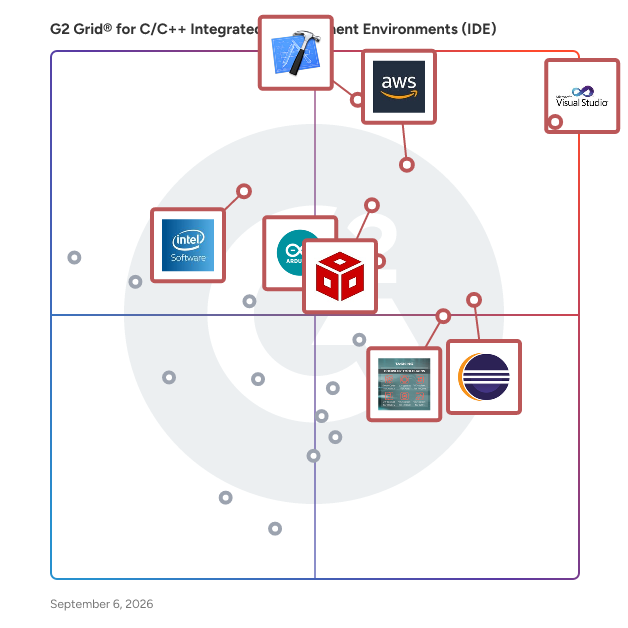
G2 Grid® for C/C++ Integrated Development Environments (IDE)

G2 Grid® for C/C++ Integrated Development Environments (IDE) plotting products by satisfaction and market presence

Highlighted products: Visual Studio, Xcode, AWS Cloud9, Code Composer Studio, Eclipse, TASKING Compiler Toolchains, Arduino IDE, and Intel System Studio IoT Edition.

Underlying data: [Grid® JSON](https://www.g2.com/categories/c-c-integrated-development-environments-ide/grids.json?focus%5B%5D=visual-studio&focus%5B%5D=xcode&focus%5B%5D=aws-cloud9&focus%5B%5D=code-composer-studio&focus%5B%5D=eclipse&focus%5B%5D=tasking-compiler-toolchains&focus%5B%5D=arduino-ide&focus%5B%5D=intel-system-studio-iot-edition)

Visual Studio

Visual Studio is a comprehensive integrated development environment (IDE) designed to empower developers in building applications across various platforms, including Android, iOS, Windows, web, and cloud. It supports multiple programming languages, such as .NET, C++, Python, and JavaScript, providing a versatile environment for software development. Key Features and Functionality: - IntelliSense: Offers context-aware code suggestions to enhance coding efficiency. - GitHub Copilot Integration: Provides AI-assisted coding to streamline complex tasks. - Advanced Debugging Tools: Includes a robust debugger to identify and resolve issues early in the development process. - Integrated Testing: Facilitates seamless testing with built-in tools for both manual and automated testing. - CI/CD Support: Enables continuous integration and deployment through Git and Azure DevOps integration. - Cross-Platform Development: Supports development for multiple platforms, including mobile, desktop, and cloud applications. Primary Value and Solutions Provided: Visual Studio enhances developer productivity by offering a unified environment that integrates coding, debugging, testing, and deployment tools. Its support for multiple languages and platforms allows developers to create diverse applications efficiently. The integration of AI tools like GitHub Copilot and comprehensive debugging features ensures high-quality code production. Additionally, Visual Studio's support for modern development practices, including CI/CD pipelines and cloud integration, streamlines the software development lifecycle, enabling faster and more reliable application delivery.

Average Rating: 4.5/5.0

Total Reviews: 3,836

How Do G2 Users Rate Visual Studio?

  • Has the product been a good partner in doing business?: 8.8/10 (Category avg: 8.5/10)
  • Straight-Out-the-Box Functionality: 8.8/10 (Category avg: 8.3/10)
  • File Management: 8.9/10 (Category avg: 8.1/10)

Who Is the Company Behind Visual Studio?

  • Seller: Microsoft
  • Year Founded: 1975
  • HQ Location: Redmond, Washington
  • Twitter: @microsoft
    13,091,739 Twitter followers
  • LinkedIn® Page: www.linkedin.com
    232,750 employees on LinkedIn®
  • Ownership: MSFT

Who Uses This Product?

  • Who Uses This: Software Engineer, Software Developer
  • Top Industries: Computer Software, Information Technology and Services
  • Company Size: 36% Small, 32% Large

What Do G2 Reviewers Say About Visual Studio?

AI-generated summary from verified user reviews

Pros
  • Users admire the ease of use of Visual Studio, seamlessly integrating all tools for efficient development and productivity.
  • Users appreciate the comprehensive feature set of Visual Studio, enhancing productivity and streamlining the development process.
  • Users value the comprehensive IDE quality of Visual Studio, making development seamless with its all-in-one environment.
  • Users value the strong debugging tools in Visual Studio, which enhance the coding experience and streamline error detection.
  • Users appreciate Visual Studio's comprehensive features, including IntelliSense and seamless Git integration, enhancing overall development efficiency.
Cons
  • Users experience slow performance with Visual Studio during heavy programming, leading to crashes and increased workload.
  • Users experience high resource consumption with Visual Studio, leading to slow performance and challenges on lower-end machines.
  • Users often find high memory usage with Visual Studio, impacting performance on lower-end machines and during large projects.
  • Users experience a slow startup that can be frustrating, impacting productivity during the initial setup and solution reloads.
  • Users find that Visual Studio often experiences performance issues like slow startup and sluggishness with larger projects.

What Are Recent G2 Reviews of Visual Studio?

What Are G2 Users Discussing About Visual Studio?

Xcode

Xcode is Apple's integrated development environment (IDE) that provides a comprehensive suite of tools for developing, testing, and distributing applications across all Apple platforms, including iOS, macOS, watchOS, and tvOS. Designed to streamline the app development process, Xcode offers features like predictive code completion, advanced debugging tools, and simulators for various Apple devices, enabling developers to create high-quality applications efficiently. Key Features and Functionality: - Coding Intelligence: Xcode leverages machine learning models to offer predictive code completion tailored to Swift and Apple SDKs, enhancing coding efficiency. - Previews: Developers can visualize and interact with their app's user interface in real-time using Xcode's preview feature, facilitating rapid iteration and design refinement. - Simulator: Xcode includes a simulator that allows testing of applications across different Apple devices and OS versions directly from a Mac, supporting scenarios like location changes and network conditions. - Debugging Tools: The IDE provides robust debugging capabilities, including breakpoints, memory usage inspection, and variable monitoring, aiding in the identification and resolution of issues. - Performance Analysis: With Instruments, developers can analyze app performance metrics such as CPU, memory, and GPU usage in real-time, helping to optimize app responsiveness and efficiency. - Testing Frameworks: Xcode supports unit and UI testing through frameworks like Swift Testing and XCTest, enabling comprehensive test coverage and quality assurance. - Xcode Cloud: Integrated continuous integration and delivery service that automates building, testing, and distributing apps, enhancing collaboration and development speed. Primary Value and User Solutions: Xcode serves as a unified platform that simplifies the app development lifecycle for Apple devices. By integrating coding, testing, debugging, and deployment tools within a single environment, it reduces development time and complexity. Features like real-time previews and simulators allow developers to iterate quickly and ensure their applications perform optimally across all Apple platforms. The inclusion of Xcode Cloud further streamlines workflows by automating routine tasks, enabling teams to focus on innovation and delivering high-quality apps to users efficiently.

Average Rating: 4.2/5.0

Total Reviews: 1,002

How Do G2 Users Rate Xcode?

  • Has the product been a good partner in doing business?: 8.1/10 (Category avg: 8.5/10)
  • Straight-Out-the-Box Functionality: 8.8/10 (Category avg: 8.3/10)
  • File Management: 8.8/10 (Category avg: 8.1/10)

Who Is the Company Behind Xcode?

  • Seller: Apple
  • Year Founded: 1976
  • HQ Location: Cupertino, CA
  • Twitter: @Apple
    9,935,357 Twitter followers
  • LinkedIn® Page: www.linkedin.com
    187,339 employees on LinkedIn®
  • Ownership: NASDAQ:AAPL

Who Uses This Product?

  • Who Uses This: Software Engineer, Senior Software Engineer
  • Top Industries: Computer Software, Information Technology and Services
  • Company Size: 55% Small, 23% Medium

What Do G2 Reviewers Say About Xcode?

AI-generated summary from verified user reviews

Pros
  • Users appreciate the ease of use in Xcode, highlighted by seamless integration and a user-friendly interface.
  • Users appreciate the seamless local app testing with Xcode, enabling easy simulation and straightforward setup for development.
  • Users value the efficient debugging capabilities of Xcode, which significantly expedite their app development process.
  • Users value the user-friendly interface of Xcode, which enhances their development experience with ease and efficiency.
  • Users value the integrated tools in Xcode, making development workflows simpler and more efficient for iOS apps.
Cons
  • Users experience slow performance with Xcode, especially during builds and when using the simulator, hindering productivity.
  • Users experience performance issues with Xcode, including slow speeds, crashes, and confusing error messages interrupting their workflow.
  • Users find Xcode's high specifications burdensome, especially regarding disk space and performance on older Macs.
  • Users face update issues, leading to stability concerns and complex configurations, especially on entry-level devices.
  • Users experience high memory usage with Xcode, causing slow performance and challenges, particularly on lower-end machines.

What Are Recent G2 Reviews of Xcode?

What Are G2 Users Discussing About Xcode?

AWS Cloud9

AWS Cloud9 is a cloud-based integrated development environment (IDE) that enables developers to write, run, and debug code directly from a web browser. It includes a code editor, debugger, and terminal, and comes pre-configured with essential tools for popular programming languages such as JavaScript, Python, and PHP. This eliminates the need for local installations or configurations, allowing developers to start new projects quickly. Being cloud-based, AWS Cloud9 facilitates seamless collaboration among team members, enabling real-time code sharing and pair programming from any location with internet access. Key Features and Functionality: - Browser-Based IDE: Access the development environment from any internet-connected device without local installations. - Pre-Configured Tools: Supports over 40 programming languages, including JavaScript, Python, PHP, Ruby, Go, and C++, with necessary tools and libraries pre-installed. - Integrated Debugger and Terminal: Features a built-in debugger for setting breakpoints and stepping through code, along with a terminal that provides sudo privileges and a pre-authenticated AWS Command Line Interface. - Serverless Application Development: Simplifies building serverless applications by offering an integrated experience for defining resources, debugging, and switching between local and remote execution. - Real-Time Collaboration: Allows multiple developers to work simultaneously on the same codebase, with real-time visibility into each other's inputs and built-in chat functionality. Primary Value and User Solutions: AWS Cloud9 streamlines the development process by providing a ready-to-use, cloud-based environment that reduces setup time and complexity. Its collaborative features enhance team productivity, while the pre-configured tools and serverless development support enable faster and more efficient application development. By eliminating the need for local development environments, AWS Cloud9 offers flexibility and scalability, allowing developers to focus on coding without worrying about infrastructure management.

Average Rating: 4.3/5.0

Total Reviews: 356

How Do G2 Users Rate AWS Cloud9?

  • Has the product been a good partner in doing business?: 8.7/10 (Category avg: 8.5/10)
  • Straight-Out-the-Box Functionality: 8.1/10 (Category avg: 8.3/10)
  • File Management: 8.3/10 (Category avg: 8.1/10)

Who Is the Company Behind AWS Cloud9?

  • Seller: Amazon Web Services (AWS)
  • Year Founded: 2006
  • HQ Location: Seattle, WA
  • Twitter: @awscloud
    2,232,483 Twitter followers
  • LinkedIn® Page: www.linkedin.com
    147,094 employees on LinkedIn®
  • Ownership: NASDAQ: AMZN

Who Uses This Product?

  • Who Uses This: Software Engineer, Software Developer
  • Top Industries: Computer Software, Information Technology and Services
  • Company Size: 45% Small, 28% Large

What Do G2 Reviewers Say About AWS Cloud9?

AI-generated summary from verified user reviews

Pros
  • Users value the cloud-based flexibility of AWS Cloud9, enabling effortless coding from anywhere without installations.
  • Users appreciate the ease of use of AWS Cloud9, enjoying a fully integrated and user-friendly cloud coding environment.
  • Users value the seamless AWS integration of AWS Cloud9, streamlining development and enhancing collaboration from anywhere.
  • Users value the seamless cloud-based development of AWS Cloud9, enhancing productivity and collaboration without local setup hassles.
  • Users value the real-time collaboration features of AWS Cloud9, enhancing teamwork and streamlining coding projects effectively.
Cons
  • Users experience slow performance with AWS Cloud9, especially when working on larger projects or with limited UI responsiveness.
  • Users note that the dependence on internet connectivity can lead to performance issues and limitations when using AWS Cloud9.
  • Users often experience connection issues that disrupt their workflow and impact performance, especially with larger projects.
  • Users note the reliance on a stable internet connection for AWS Cloud9, as disruptions hinder productivity.
  • Users face performance issues with AWS Cloud9, especially for large projects and with reliance on a stable internet connection.

What Are Recent G2 Reviews of AWS Cloud9?

What Are G2 Users Discussing About AWS Cloud9?

Eclipse

Eclipse is a robust, open-source integrated development environment (IDE) renowned for its extensibility and support for multiple programming languages. It provides a comprehensive suite of tools for software development, including code editing, debugging, and version control integration. Eclipse's modular architecture allows developers to customize their workspace with a vast array of plugins, catering to diverse development needs. Its cross-platform compatibility ensures a consistent experience across different operating systems. By offering a unified environment for various development tasks, Eclipse enhances productivity and streamlines the software development process. Key Features and Functionality: - Extensible Plugin System: Eclipse's architecture supports a wide range of plugins, enabling developers to tailor the IDE to their specific requirements. - Multi-language Support: It offers support for numerous programming languages, including Java, C++, Python, and more, facilitating diverse development projects. - Advanced Code Editing: Features such as syntax highlighting, code completion, and refactoring tools enhance code quality and developer efficiency. - Integrated Debugging: Eclipse provides powerful debugging tools that allow for real-time code analysis and troubleshooting. - Version Control Integration: Seamless integration with version control systems like Git enables efficient source code management. - Cross-Platform Compatibility: Eclipse runs on various operating systems, including Windows, macOS, and Linux, ensuring a consistent development environment. Primary Value and User Solutions: Eclipse addresses the complexities of modern software development by offering an all-in-one platform that integrates essential development tools. Its extensible nature allows developers to adapt the IDE to their evolving needs, promoting flexibility and scalability. By supporting multiple programming languages and providing advanced features like debugging and version control, Eclipse streamlines the development workflow, reduces context switching, and enhances overall productivity. Its open-source model fosters a collaborative community, ensuring continuous improvement and a wealth of resources for users.

Average Rating: 4.3/5.0

Total Reviews: 3,096

How Do G2 Users Rate Eclipse?

  • Has the product been a good partner in doing business?: 8.5/10 (Category avg: 8.5/10)
  • Straight-Out-the-Box Functionality: 8.3/10 (Category avg: 8.3/10)
  • File Management: 8.6/10 (Category avg: 8.1/10)

Who Is the Company Behind Eclipse?

  • Seller: Eclipse Foundation
  • Year Founded: 2004
  • HQ Location: Brussels, Belgium
  • Twitter: @EclipseFdn
    31,013 Twitter followers
  • LinkedIn® Page: www.linkedin.com
    249 employees on LinkedIn®

Who Uses This Product?

  • Who Uses This: Software Engineer, Senior Software Engineer
  • Top Industries: Computer Software, Information Technology and Services
  • Company Size: 43% Large, 29% Small

What Do G2 Reviewers Say About Eclipse?

AI-generated summary from verified user reviews

Pros
  • Users appreciate the ease of use of Eclipse, enjoying a smooth setup and efficient coding experiences.
  • Users appreciate the powerful IDE capabilities of Eclipse, enhancing their productivity with smart code completion and robust debugging tools.
  • Users value the powerful Java support in Eclipse, enhancing efficiency with advanced debugging and seamless enterprise integration.
  • Users appreciate the extensive plugin ecosystem in Eclipse, which enhances functionality and supports diverse development needs.
  • Users value Eclipse for its powerful debugging tools, enhancing efficiency and accuracy in Java development projects.
Cons
  • Users experience slow performance with Eclipse, especially when managing large projects, impacting usability and efficiency.
  • Users find the interface outdated, affecting the overall user experience and making navigation cumbersome.
  • Users find the poor interface design of Eclipse outdated and cluttered, complicating navigation and overall usability.
  • Users experience performance issues with lag and complexity, making Eclipse less ideal for lightweight development.
  • Users often face plugin issues due to frequent updates, leading to performance lags and confusion during initial setup.

What Are Recent G2 Reviews of Eclipse?

What Are G2 Users Discussing About Eclipse?

Code Composer Studio

Code Composer Studio is an integrated development environment (IDE) that supports TI's Microcontroller and Embedded Processors portfolio. Code Composer Studio comprises a suite of tools used to develop and debug embedded applications. It includes an optimizing C/C++ compiler, source code editor, project build environment, debugger, profiler, and many other features.

Average Rating: 4.0/5.0

Total Reviews: 29

How Do G2 Users Rate Code Composer Studio?

  • Has the product been a good partner in doing business?: 8.9/10 (Category avg: 8.5/10)

Who Is the Company Behind Code Composer Studio?

  • Seller: Texas Instruments
  • HQ Location: Dallas, TX
  • Twitter: @TXInstruments
    99,825 Twitter followers
  • LinkedIn® Page: www.linkedin.com
    33,604 employees on LinkedIn®
  • Ownership: NASDAQ: TXN
  • Total Revenue (USD mm): $143

Who Uses This Product?

  • Who Uses This: Embedded Software Engineer
  • Top Industries: Electrical/Electronic Manufacturing
  • Company Size: 44% Small, 31% Medium

What Are Recent G2 Reviews of Code Composer Studio?

What Are G2 Users Discussing About Code Composer Studio?

TASKING Compiler Toolchains

TASKING Compilers are TÜV-certified toolchains designed for developing safety-critical embedded software on leading microcontroller architectures. Products: SmartCode, VX-toolset for Arm, VX-toolset for TriCore, VX-toolset for RISC-V, VX-toolset for RH850, and VX-toolset for GTM.

Average Rating: 4.5/5.0

Total Reviews: 31

How Do G2 Users Rate TASKING Compiler Toolchains?

  • Straight-Out-the-Box Functionality: 9.3/10 (Category avg: 8.3/10)
  • File Management: 10.0/10 (Category avg: 8.1/10)

Who Is the Company Behind TASKING Compiler Toolchains?

  • Seller: TASKING
  • Company Website:
  • Year Founded: 1977
  • HQ Location: Munich, Bavaria
  • LinkedIn® Page: www.linkedin.com
    262 employees on LinkedIn®
  • Ownership: TRUE

Who Uses This Product?

  • Top Industries: Automotive
  • Company Size: 38% Small, 31% Large

What Do G2 Reviewers Say About TASKING Compiler Toolchains?

AI-generated summary from verified user reviews

Pros
  • Users value the compilation automation of TASKING, appreciating its ease and ISO 26262 certification support.
  • Users commend the excellent customer support of TASKING Compiler Toolchains, highlighting the team's helpfulness and knowledge.
Cons
  • Users find the legacy support expensive, making bug fixing a slower and more costly process.
  • Users feel that bug fixing speeds are slow and the costs for legacy support are too high.

What Are Recent G2 Reviews of TASKING Compiler Toolchains?

Arduino IDE

The Arduino Integrated Development Environment (IDE) is a cross-platform application designed for writing, compiling, and uploading code to Arduino-compatible boards. It supports programming in C and C++, offering a user-friendly interface that simplifies the development process for both beginners and experienced developers. The IDE is available for Windows, macOS, and Linux operating systems. Key Features and Functionality: - Code Editor: Provides syntax highlighting, automatic indentation, and brace matching to enhance code readability and writing efficiency. - Compiler and Uploader: Facilitates the compilation of code and its direct upload to Arduino boards, streamlining the development workflow. - Library Manager: Allows easy integration and management of libraries, expanding the functionality of projects with pre-written code modules. - Board Manager: Enables seamless addition and management of various Arduino boards and compatible third-party hardware. - Serial Monitor: Offers real-time communication with the board, aiding in debugging and monitoring of serial data. - Cross-Platform Support: Ensures compatibility across major operating systems, providing flexibility for developers. Primary Value and User Solutions: The Arduino IDE simplifies the process of programming microcontrollers, making it accessible to a wide range of users, from hobbyists to professionals. By offering an intuitive interface and comprehensive tools, it reduces the complexity associated with embedded systems development. The inclusion of a vast library ecosystem and support for numerous hardware platforms allows users to rapidly prototype and deploy interactive electronic projects. This accelerates innovation and learning in fields such as robotics, IoT, and automation.

Average Rating: 4.5/5.0

Total Reviews: 142

How Do G2 Users Rate Arduino IDE?

  • Has the product been a good partner in doing business?: 8.2/10 (Category avg: 8.5/10)
  • Straight-Out-the-Box Functionality: 8.6/10 (Category avg: 8.3/10)
  • File Management: 7.9/10 (Category avg: 8.1/10)

Who Is the Company Behind Arduino IDE?

  • Seller: Arduino
  • Year Founded: 2005
  • HQ Location: Somerville, MA
  • Twitter: @arduino
    494,980 Twitter followers
  • LinkedIn® Page: www.linkedin.com
    588 employees on LinkedIn®

Who Uses This Product?

  • Top Industries: Information Technology and Services, Electrical/Electronic Manufacturing
  • Company Size: 61% Small, 28% Medium

What Do G2 Reviewers Say About Arduino IDE?

AI-generated summary from verified user reviews

Pros
  • Users find the user-friendly interface of Arduino IDE makes programming and testing IoT projects easy and enjoyable.
  • Users find the Arduino IDE to be very user-friendly for beginners, making it easy to learn and develop projects.
  • Users value the debugging capabilities of Arduino IDE, enhancing their coding efficiency and troubleshooting experience.
  • Users appreciate the debugging features of Arduino IDE, which enhance troubleshooting and streamline the coding process.
  • Users value the ease of use of Arduino IDE, allowing for straightforward programming with minimal resource requirements.
Cons
  • Users believe that debugging issues can hinder development, suggesting a more robust interface could enhance the experience.
  • Users often struggle with limited customization, as some tools and boards aren't readily available in the Arduino IDE.
  • Users find the limited functionality of Arduino IDE challenging compared to more advanced development environments.
  • Users often face tool issues in Arduino IDE, making it difficult to add external tools and boards efficiently.

What Are Recent G2 Reviews of Arduino IDE?

What Are G2 Users Discussing About Arduino IDE?

Intel System Studio IoT Edition

Intel® System Studio IoT Edition is a comprehensive, cross-platform tool suite designed to accelerate the development of smart, connected devices and Internet of Things (IoT) applications. It simplifies system bring-up, enhances performance and power efficiency, and strengthens system reliability, enabling developers to move swiftly from prototype to production. Key Features and Functionality: - Optimizing Compilers and Libraries: Includes Intel® C/C++ Compiler and platform-tuned libraries such as Intel® Integrated Performance Primitives (Intel® IPP) and Intel® Math Kernel Library (Intel® MKL) to build performance-optimized code. - Advanced Debugging and Analysis Tools: Provides in-depth debugging, tracing, and analysis capabilities to identify and resolve system issues, ensuring application stability and reliability. - IoT Sensor and Cloud Connectivity: Offers access to over 400 sensors and enhanced debugger workflows that automate tracing, facilitating seamless integration with cloud services and IoT devices. - Multi-Language Support and Customization: Supports multiple programming languages, including C, C++, and Java, and allows interface customization to suit developer preferences. Primary Value and User Solutions: Intel® System Studio IoT Edition addresses the challenges of developing IoT applications by providing a unified environment that streamlines the development process. It reduces time-to-market through ready-to-use, domain-specific routines and system-wide visual performance analysis, enabling developers to quickly identify issues and optimize their applications. The suite's comprehensive tools enhance performance and power efficiency, while its robust debugging and analysis capabilities ensure system reliability, ultimately facilitating the creation of high-quality, connected devices.

Average Rating: 4.5/5.0

Total Reviews: 27

How Do G2 Users Rate Intel System Studio IoT Edition?

  • Has the product been a good partner in doing business?: 8.8/10 (Category avg: 8.5/10)
  • Straight-Out-the-Box Functionality: 8.9/10 (Category avg: 8.3/10)
  • File Management: 8.7/10 (Category avg: 8.1/10)

Who Is the Company Behind Intel System Studio IoT Edition?

  • Seller: Intel Corporation
  • Year Founded: 1968
  • HQ Location: Santa Clara, CA
  • Twitter: @intel
    4,467,591 Twitter followers
  • LinkedIn® Page: www.linkedin.com
    111,509 employees on LinkedIn®
  • Ownership: NASDAQ:INTC

Who Uses This Product?

  • Top Industries: Information Technology and Services, Computer Software
  • Company Size: 68% Small, 18% Medium

What Do G2 Reviewers Say About Intel System Studio IoT Edition?

AI-generated summary from verified user reviews

Pros
  • Users appreciate the advanced debugging capabilities of Intel System Studio IoT Edition, enhancing their IoT development experience.
  • Users appreciate the efficiency of debugging tools in Intel System Studio IoT Edition for seamless IoT development.
  • Users appreciate the strong performance efficiency of Intel System Studio IoT Edition for optimizing their IoT solutions.
  • Users appreciate the ease of IoT development with Intel System Studio, benefiting from integrated tools for coding and debugging.
  • Users appreciate the seamless integration with frameworks and operating systems, enhancing efficiency in IoT development.
Cons
  • Users find the beginner unfriendliness of Intel System Studio IoT Edition challenging due to complexity and setup requirements.
  • Users find the complex setup of Intel System Studio IoT Edition daunting, especially for those new to development.
  • Users find the complexity and heaviness of Intel System Studio IoT Edition challenging, especially for beginners.
  • Users find the difficult installation process challenging, especially for beginners, complicating the setup experience with Intel System Studio IoT Edition.
  • Users often face integration issues with non-Intel hardware, complicating setup and slowing down development processes.

What Are Recent G2 Reviews of Intel System Studio IoT Edition?

What Are G2 Users Discussing About Intel System Studio IoT Edition?

NetBeans

NetBeans IDE. The Smarter and Faster Way to Code. Quickly and easily develop desktop, mobile and web applications with Java, PHP, C/C++ and more. NetBeans IDE is FREE, open source, and has a worldwide community of users and developers.

Average Rating: 4.2/5.0

Total Reviews: 655

How Do G2 Users Rate NetBeans?

  • Has the product been a good partner in doing business?: 8.1/10 (Category avg: 8.5/10)
  • Straight-Out-the-Box Functionality: 8.5/10 (Category avg: 8.3/10)
  • File Management: 8.6/10 (Category avg: 8.1/10)

Who Is the Company Behind NetBeans?

  • Seller: NetBeans
  • HQ Location: N/A
  • Twitter: @netbeans
    59,685 Twitter followers
  • LinkedIn® Page: www.linkedin.com
    1 employees on LinkedIn®

Who Uses This Product?

  • Who Uses This: Software Engineer, Software Developer
  • Top Industries: Computer Software, Information Technology and Services
  • Company Size: 46% Small, 33% Medium

What Do G2 Reviewers Say About NetBeans?

AI-generated summary from verified user reviews

Pros
  • Users value the cross-platform compatibility of NetBeans, enabling seamless development across various operating systems.
  • Users appreciate the ease of use of NetBeans, enjoying a seamless experience across platforms and plugin integration.
  • Users value the easy integrations of NetBeans, enabling seamless plugin usage across various operating systems.
  • Users praise the superior interface of NetBeans, highlighting its ease of plugin integration and multi-OS functionality.
  • Users value the easy plugin integration in NetBeans, enhancing their development experience across various operating systems.

What Are Recent G2 Reviews of NetBeans?

What Are G2 Users Discussing About NetBeans?

Qt

Read more about our product here: https://www.qt.io/product Programming should be fast, easy and fun. That’s why we have been focusing on improving software development for the last 25 years, and with the amount of applications and devices growing every day, efficiency has become more important than ever. Qt has everything you need to quickly and cost-effectively design, develop, test, deploy and maintain your software for any project. Focus on creating the best user experiences instead of coding what’s already been coded for you. Qt Group (Nasdaq Helsinki: QTCOM) is a global software company with a strong presence in more than 70 industries and is the leading independent technology behind millions of devices and applications. Qt is used by major global companies and developers worldwide, and the technology enables its customers to deliver exceptional user experiences and advance their digital transformation initiatives. Qt achieves this through its cross-platform software framework for the development of apps and devices, under both commercial and open source licenses.

Average Rating: 4.3/5.0

Total Reviews: 53

How Do G2 Users Rate Qt?

  • Has the product been a good partner in doing business?: 7.8/10 (Category avg: 8.5/10)
  • Straight-Out-the-Box Functionality: 9.4/10 (Category avg: 8.3/10)
  • File Management: 10.0/10 (Category avg: 8.1/10)

Who Is the Company Behind Qt?

  • Seller: Qt Group
  • Year Founded: 1995
  • HQ Location: Espoo, Finland
  • Twitter: @qtproject
    21,456 Twitter followers
  • LinkedIn® Page: www.linkedin.com
    18 employees on LinkedIn®

Who Uses This Product?

  • Who Uses This: Software Engineer
  • Top Industries: Computer Software
  • Company Size: 50% Small, 30% Medium

What Do G2 Reviewers Say About Qt?

AI-generated summary from verified user reviews

Pros
  • Users value the ease of use of Qt, enabling efficient development of versatile and professional graphical interfaces.
  • Users value the cross-platform compatibility of Qt, simplifying deployment across multiple devices with a single code base.
  • Users value the cross-platform compatibility of Qt, enabling easy deployment across multiple devices with one code base.
  • Users value the fast development capabilities of Qt, enabling agile creation of user-focused interfaces across platforms.
  • Users appreciate the agile and dynamic UI development offered by Qt, simplifying cross-platform deployment from a single code base.
Cons
  • Users find the learning curve steep initially, as key concepts must be grasped to leverage Qt's advantages.
  • Users find the complex usability of Qt frustrating, particularly with limitations on resizing windows during creation.
  • Users find the difficulty in getting started with Qt daunting, but persistence leads to rewarding outcomes.
  • Users experience limited customization options in Qt, which complicates tasks like resizing windows during creation.
  • Users find the limited resizing features of Qt hinder their experience, especially with large window resolutions.

What Are Recent G2 Reviews of Qt?

What Are G2 Users Discussing About Qt?

CLion

CLion is a smart IDE for developing in C or C++ on Windows, Linux, and macOS. It’s packed with an in-depth code analyzer, a range of code generation options, and the ability to navigate to anywhere in your code in one click. CLion understands modern C++ standards and provides preprocessor support. It integrates with GDB/LLDB and a set of unit testing frameworks. CLion provides various options for remote and embedded development.

Average Rating: 4.4/5.0

Total Reviews: 54

How Do G2 Users Rate CLion?

  • Has the product been a good partner in doing business?: 8.3/10 (Category avg: 8.5/10)
  • Straight-Out-the-Box Functionality: 7.8/10 (Category avg: 8.3/10)
  • File Management: 8.3/10 (Category avg: 8.1/10)

Who Is the Company Behind CLion?

  • Seller: JetBrains
  • Year Founded: 2000
  • HQ Location: Prague
  • Twitter: @jetbrains
    213,126 Twitter followers
  • LinkedIn® Page: www.linkedin.com
    3,019 employees on LinkedIn®

Who Uses This Product?

  • Who Uses This: Software Engineer
  • Top Industries: Computer Software, Higher Education
  • Company Size: 62% Small, 20% Medium

What Are Recent G2 Reviews of CLion?

What Are G2 Users Discussing About CLion?

Particle

Particle is the leading edge-to-cloud infrastructure for the Internet of Things, helping thousands of companies power world-class connected machines, sensors, and devices. Particle provides everything you need to build an IoT product in one tightly-integrated platform, so you can focus your time and energy on what matters: your product, application, data, and customers. Hundreds of manufacturers, thousands of startups, and 260,000 developers use Particle to power their IoT products; to learn more, visit particle.io.

Average Rating: 4.5/5.0

Total Reviews: 180

How Do G2 Users Rate Particle?

  • Has the product been a good partner in doing business?: 8.4/10 (Category avg: 8.5/10)
  • Straight-Out-the-Box Functionality: 8.2/10 (Category avg: 8.3/10)
  • File Management: 7.5/10 (Category avg: 8.1/10)

Who Is the Company Behind Particle?

  • Seller: Particle
  • Year Founded: 2012
  • HQ Location: San Francisco, CA
  • Twitter: @particle
    21,942 Twitter followers
  • LinkedIn® Page: www.linkedin.com
    105 employees on LinkedIn®

Who Uses This Product?

  • Who Uses This: Student, CEO
  • Top Industries: Information Technology and Services, Higher Education
  • Company Size: 77% Small, 16% Medium

What Are Recent G2 Reviews of Particle?

What Are G2 Users Discussing About Particle?

Code::Blocks

Code::Blocks is a free, open-source, cross-platform Integrated Development Environment (IDE) designed primarily for C, C++, and Fortran programming. Developed in C++ using the wxWidgets GUI toolkit, it offers a consistent look and feel across various operating systems, including Windows, Linux, and macOS. Its modular architecture, based on plugins, allows users to extend its functionality to meet diverse development needs. Key Features and Functionality: - Compiler Support: Code::Blocks supports multiple compilers, including GCC (MinGW/GNU GCC), MSVC++, Clang, Digital Mars, Borland C++ 5.5, and Open Watcom. - Build System: It features a fast, custom build system that eliminates the need for makefiles, supports parallel builds to utilize multiple CPU cores, and allows for multi-target projects and workspaces combining multiple projects. - Debugger Integration: The IDE interfaces with GNU GDB and supports MS CDB (with some limitations). It offers full breakpoint support, including code and data breakpoints with conditions and ignore counts, displays local function symbols and arguments, provides user-defined watches, call stack, disassembly, custom memory dump, thread switching, and CPU register views. - User Interface: Features include customizable syntax highlighting, code folding for various file types, a tabbed interface, code completion, a class browser, smart indenting, one-key swapping between header and source files, an open files list for quick navigation, external customizable tools, and to-do list management with support for multiple users. Primary Value and User Solutions: Code::Blocks provides a versatile and extensible development environment that caters to the needs of programmers working with C, C++, and Fortran. Its support for multiple compilers and platforms ensures flexibility, while the plugin-based architecture allows for customization and scalability. The efficient build system and comprehensive debugging tools streamline the development process, enhancing productivity. By offering a free and open-source solution, Code::Blocks makes professional-grade development tools accessible to a wide range of users, from beginners to experienced developers.

Average Rating: 4.3/5.0

Total Reviews: 94

How Do G2 Users Rate Code::Blocks?

  • Has the product been a good partner in doing business?: 7.7/10 (Category avg: 8.5/10)
  • Straight-Out-the-Box Functionality: 7.7/10 (Category avg: 8.3/10)
  • File Management: 8.6/10 (Category avg: 8.1/10)

Who Is the Company Behind Code::Blocks?

Who Uses This Product?

  • Who Uses This: Student
  • Top Industries: Computer Software, Information Technology and Services
  • Company Size: 47% Small, 33% Medium

What Do G2 Reviewers Say About Code::Blocks?

AI-generated summary from verified user reviews

Pros
  • Users appreciate the easy debugging features in Code::Blocks, enhancing their coding experience with C and C++.
  • Users find the debugging efficiency of Code::Blocks enhances their coding experience for C and C++ development.
  • Users find the ease of use in Code::Blocks facilitates project management and enhances coding efficiency.
  • Users value the organized project management and ease of running, coding, and debugging in Code::Blocks.
Cons
  • Users find Code::Blocks to be beginner unfriendly, as there's a lack of guidance and support for new users.
  • Users often face debugging issues due to a lack of guides, making it challenging to troubleshoot efficiently.
  • Users find the lack of guidance and poor customer support frustrating when trying to troubleshoot Code::Blocks.
  • Users find the poor documentation of Code::Blocks frustrating, making it difficult to troubleshoot and seek help.

What Are Recent G2 Reviews of Code::Blocks?

What Are G2 Users Discussing About Code::Blocks?

PlatformIO

PlatformIO is an open source ecosystem for IoT development. Cross-platform build system. Continuous and IDE integration. Arduino and ARM mbed compatible.

Average Rating: 4.7/5.0

Total Reviews: 12

How Do G2 Users Rate PlatformIO?

  • Has the product been a good partner in doing business?: 10.0/10 (Category avg: 8.5/10)
  • Straight-Out-the-Box Functionality: 9.4/10 (Category avg: 8.3/10)
  • File Management: 9.2/10 (Category avg: 8.1/10)

Who Is the Company Behind PlatformIO?

  • Seller: PlatformIO
  • Year Founded: 2014
  • HQ Location: Kyiv, UA
  • Twitter: @PlatformIO_Org
    13,431 Twitter followers
  • LinkedIn® Page: www.linkedin.com
    4 employees on LinkedIn®

Who Uses This Product?

  • Company Size: 58% Small, 25% Large

What Are Recent G2 Reviews of PlatformIO?

What Are G2 Users Discussing About PlatformIO?

RAD Studio

RAD Studio delivers integrated tools to help you design, code, compile, test, and deploy every app you envision! RAD Studio’s UI design tools and native performance are trusted by organizations for robust enterprise-level systems and are flexible enough for cutting-edge consumer apps. With a single codebase and responsive UI that compiles natively for each target platform, you can stop rewriting the same functionality for each additional device and focus on making great apps. Single source code, any platform. Target Windows 11, iOS 15, macOS 12, Android 12 and Linux. Compile for Android API 30. Compile Delphi apps for macOS M-series (Apple Silicon) processors. Design on high-DPI 4k+ screens. View VCL Styles in design time. New & modernized VCL components. Use enhanced remote desktop support to collaborate remotely.

Average Rating: 4.5/5.0

Total Reviews: 12

How Do G2 Users Rate RAD Studio?

  • Has the product been a good partner in doing business?: 6.7/10 (Category avg: 8.5/10)
  • Straight-Out-the-Box Functionality: 9.0/10 (Category avg: 8.3/10)
  • File Management: 8.3/10 (Category avg: 8.1/10)

Who Is the Company Behind RAD Studio?

Who Uses This Product?

  • Top Industries: Computer Software
  • Company Size: 67% Small, 25% Medium

What Are Recent G2 Reviews of RAD Studio?

What Are G2 Users Discussing About RAD Studio?

Adam Crivello
AC
Researched and written by Adam Crivello
Updated October 3, 2024