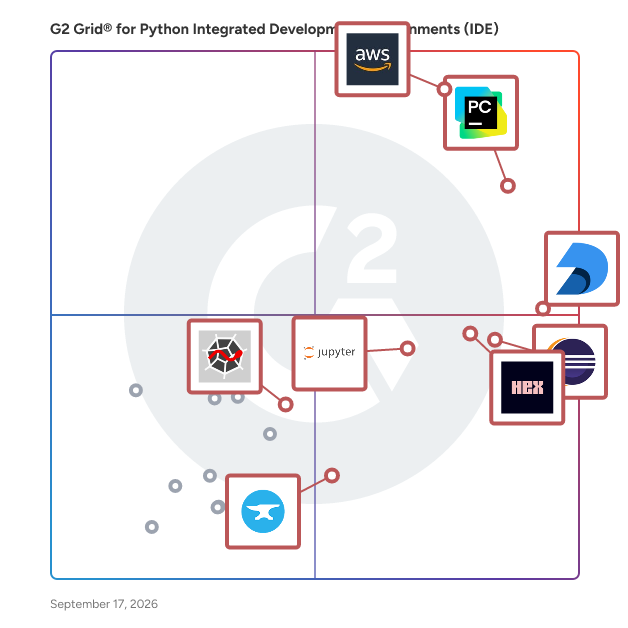
# Best Enterprise Python Integrated Development Environments (IDE)

  *By [Adam Crivello](https://research.g2.com/insights/author/adam-crivello)*

   Products classified in the overall Python Integrated Development Environments (IDE) category are similar in many regards and help companies of all sizes solve their business problems. However, enterprise business features, pricing, setup, and installation differ from businesses of other sizes, which is why we match buyers to the right Enterprise Business Python Integrated Development Environments (IDE) to fit their needs. Compare product ratings based on reviews from enterprise users or connect with one of G2&#39;s buying advisors to find the right solutions within the Enterprise Business Python Integrated Development Environments (IDE) category.

In addition to qualifying for inclusion in the Python Integrated Development Environments (IDE) category, to qualify for inclusion in the Enterprise Business Python Integrated Development Environments (IDE) category, a product must have at least 10 reviews left by a reviewer from an enterprise business.


## Category Overview

**Total Products under this Category:** 35


## Trust & Credibility Stats

**Why You Can Trust G2's Software Rankings:**

- 30 Analysts and Data Experts
- 6,000+ Authentic Reviews
- 35+ Products
- Unbiased Rankings

G2's software rankings are built on verified user reviews, rigorous moderation, and a consistent research methodology maintained by a team of analysts and data experts. Each product is measured using the same transparent criteria, with no paid placement or vendor influence. While reviews reflect real user experiences, which can be subjective, they offer valuable insight into how software performs in the hands of professionals. Together, these inputs power the G2 Score, a standardized way to compare tools within every category.


## Top-Rated Products (Ranked by G2 Score)
### 1. [AWS Cloud9](https://www.g2.com/products/aws-cloud9/reviews)
  AWS Cloud9 is a cloud-based integrated development environment (IDE) that enables developers to write, run, and debug code directly from a web browser. It includes a code editor, debugger, and terminal, and comes pre-configured with essential tools for popular programming languages such as JavaScript, Python, and PHP. This eliminates the need for local installations or configurations, allowing developers to start new projects quickly. Being cloud-based, AWS Cloud9 facilitates seamless collaboration among team members, enabling real-time code sharing and pair programming from any location with internet access. Key Features and Functionality: - Browser-Based IDE: Access the development environment from any internet-connected device without local installations. - Pre-Configured Tools: Supports over 40 programming languages, including JavaScript, Python, PHP, Ruby, Go, and C++, with necessary tools and libraries pre-installed. - Integrated Debugger and Terminal: Features a built-in debugger for setting breakpoints and stepping through code, along with a terminal that provides sudo privileges and a pre-authenticated AWS Command Line Interface. - Serverless Application Development: Simplifies building serverless applications by offering an integrated experience for defining resources, debugging, and switching between local and remote execution. - Real-Time Collaboration: Allows multiple developers to work simultaneously on the same codebase, with real-time visibility into each other&#39;s inputs and built-in chat functionality. Primary Value and User Solutions: AWS Cloud9 streamlines the development process by providing a ready-to-use, cloud-based environment that reduces setup time and complexity. Its collaborative features enhance team productivity, while the pre-configured tools and serverless development support enable faster and more efficient application development. By eliminating the need for local development environments, AWS Cloud9 offers flexibility and scalability, allowing developers to focus on coding without worrying about infrastructure management.


  **Average Rating:** 4.3/5.0
  **Total Reviews:** 328

**User Satisfaction Scores:**

- **Has the product been a good partner in doing business?:** 8.7/10 (Category avg: 8.5/10)
- **Customization:** 8.1/10 (Category avg: 8.0/10)
- **Patching &amp; Updates:** 8.2/10 (Category avg: 8.0/10)


**Seller Details:**

- **Seller:** [Amazon Web Services (AWS)](https://www.g2.com/sellers/amazon-web-services-aws-3e93cc28-2e9b-4961-b258-c6ce0feec7dd)
- **Year Founded:** 2006
- **HQ Location:** Seattle, WA
- **Twitter:** @awscloud (2,225,864 Twitter followers)
- **LinkedIn® Page:** https://www.linkedin.com/company/amazon-web-services/ (156,424 employees on LinkedIn®)
- **Ownership:** NASDAQ: AMZN

**Reviewer Demographics:**
  - **Who Uses This:** Software Engineer, Software Developer
  - **Top Industries:** Computer Software, Information Technology and Services
  - **Company Size:** 44% Small-Business, 28% Mid-Market


#### Pros & Cons

**Pros:**

- Cloud-Based Solutions (54 reviews)
- Ease of Use (53 reviews)
- Cloud Services (48 reviews)
- Cloud-Based Development (45 reviews)
- Collaboration (42 reviews)

**Cons:**

- Slow Performance (38 reviews)
- Internet Connectivity (31 reviews)
- Performance Issues (22 reviews)
- Connection Issues (21 reviews)
- Expensive (21 reviews)

### 2. [PyCharm](https://www.g2.com/products/pycharm/reviews)
  PyCharm is an integrated development environment (IDE) that helps professional Python developers be more productive, be more confident, and write better code. PyCharm Pro supports the entire Python workflowout of the box, including web frameworks, frontend technologies, databases, and scientific tooling. PyCharm Community Edition, a free and open-source project, is also available for general Python programming tasks.


  **Average Rating:** 4.6/5.0
  **Total Reviews:** 755

**User Satisfaction Scores:**

- **Has the product been a good partner in doing business?:** 9.0/10 (Category avg: 8.5/10)
- **Customization:** 8.7/10 (Category avg: 8.0/10)
- **Patching &amp; Updates:** 8.8/10 (Category avg: 8.0/10)


**Seller Details:**

- **Seller:** [JetBrains](https://www.g2.com/sellers/jetbrains)
- **Company Website:** https://www.jetbrains.com/
- **Year Founded:** 2000
- **HQ Location:** Prague
- **Twitter:** @jetbrains (211,490 Twitter followers)
- **LinkedIn® Page:** https://www.linkedin.com/company/12515/ (2,731 employees on LinkedIn®)

**Reviewer Demographics:**
  - **Who Uses This:** Software Engineer, Software Developer
  - **Top Industries:** Computer Software, Information Technology and Services
  - **Company Size:** 42% Small-Business, 31% Mid-Market


#### Pros & Cons

**Pros:**

- Ease of Use (18 reviews)
- Features (15 reviews)
- Code Editing (10 reviews)
- Debugging (9 reviews)
- Setup Ease (9 reviews)

**Cons:**

- High System Requirements (5 reviews)
- Limited Features (5 reviews)
- Expensive (4 reviews)
- Learning Curve (3 reviews)
- Resource Limitations (3 reviews)

### 3. [Eclipse](https://www.g2.com/products/eclipse/reviews)
  Eclipse is a robust, open-source integrated development environment (IDE) renowned for its extensibility and support for multiple programming languages. It provides a comprehensive suite of tools for software development, including code editing, debugging, and version control integration. Eclipse&#39;s modular architecture allows developers to customize their workspace with a vast array of plugins, catering to diverse development needs. Its cross-platform compatibility ensures a consistent experience across different operating systems. By offering a unified environment for various development tasks, Eclipse enhances productivity and streamlines the software development process. Key Features and Functionality: - Extensible Plugin System: Eclipse&#39;s architecture supports a wide range of plugins, enabling developers to tailor the IDE to their specific requirements. - Multi-language Support: It offers support for numerous programming languages, including Java, C++, Python, and more, facilitating diverse development projects. - Advanced Code Editing: Features such as syntax highlighting, code completion, and refactoring tools enhance code quality and developer efficiency. - Integrated Debugging: Eclipse provides powerful debugging tools that allow for real-time code analysis and troubleshooting. - Version Control Integration: Seamless integration with version control systems like Git enables efficient source code management. - Cross-Platform Compatibility: Eclipse runs on various operating systems, including Windows, macOS, and Linux, ensuring a consistent development environment. Primary Value and User Solutions: Eclipse addresses the complexities of modern software development by offering an all-in-one platform that integrates essential development tools. Its extensible nature allows developers to adapt the IDE to their evolving needs, promoting flexibility and scalability. By supporting multiple programming languages and providing advanced features like debugging and version control, Eclipse streamlines the development workflow, reduces context switching, and enhances overall productivity. Its open-source model fosters a collaborative community, ensuring continuous improvement and a wealth of resources for users.


  **Average Rating:** 4.3/5.0
  **Total Reviews:** 3,068

**User Satisfaction Scores:**

- **Has the product been a good partner in doing business?:** 8.5/10 (Category avg: 8.5/10)
- **Customization:** 8.5/10 (Category avg: 8.0/10)
- **Patching &amp; Updates:** 8.7/10 (Category avg: 8.0/10)


**Seller Details:**

- **Seller:** [Eclipse Foundation](https://www.g2.com/sellers/eclipse-foundation)
- **Year Founded:** 2004
- **HQ Location:** Brussels, Belgium
- **Twitter:** @EclipseFdn (31,075 Twitter followers)
- **LinkedIn® Page:** https://www.linkedin.com/company/34093/ (237 employees on LinkedIn®)

**Reviewer Demographics:**
  - **Who Uses This:** Software Engineer, Senior Software Engineer
  - **Top Industries:** Computer Software, Information Technology and Services
  - **Company Size:** 44% Enterprise, 29% Small-Business


#### Pros & Cons

**Pros:**

- Ease of Use (173 reviews)
- Features (148 reviews)
- Java Support (106 reviews)
- Plugins (97 reviews)
- Debugging (95 reviews)

**Cons:**

- Slow Performance (79 reviews)
- Outdated Interface (69 reviews)
- Poor Interface Design (52 reviews)
- Performance Issues (49 reviews)
- Plugin Issues (47 reviews)

### 4. [Deepnote](https://www.g2.com/products/deepnote/reviews)
  Deepnote is a data workspace where agents and humans work together. It&#39;s designed to simplify data exploration, accelerate analysis, and quickly deliver actionable insights for you and your team. Unlike outdated tools such as Jupyter, Deepnote is built with the next decade in mind. Deepnote gives anyone working with data superpowers. It unifies your data workflow through an integrated semantic layer, preparing your data for advanced AI applications. You can also leverage our AI data copilot to chat with your data, create charts, write code, or turn your AI notebooks into fully-fledged data dashboards or apps. Combine data, SQL or Python code, and visualizations side-by-side on a flexible canvas - enhanced with cutting-edge AI reasoning models. 🤖 Analyze with AI • Generate code and visualizations by describing your goal. • Auto-write, run, and debug code with AI. • Move faster with context-aware AI suggestions. 🔗 Unify • Connect to 60+ data sources like BigQuery, Snowflake, and PostgreSQL. • Combine Python and SQL in one notebook. • Build reusable ETL, analytics, and metric modules. • Create a semantic layer with shared definitions and trusted metrics. ⚖️ Scale • Instantly boost compute power, more included than Colab. • Schedule jobs and get notified with fresh results. • Organize work in projects and folders for team clarity. • Manage workflows via REST API. 🚀 Launch • Turn notebooks into dashboards or data apps, natively or with Streamlit. • Let users explore data with interactive inputs. • Share secure, live apps in one click.


  **Average Rating:** 4.5/5.0
  **Total Reviews:** 376

**User Satisfaction Scores:**

- **Has the product been a good partner in doing business?:** 8.6/10 (Category avg: 8.5/10)
- **Customization:** 7.5/10 (Category avg: 8.0/10)
- **Patching &amp; Updates:** 8.4/10 (Category avg: 8.0/10)


**Seller Details:**

- **Seller:** [Deepnote](https://www.g2.com/sellers/deepnote)
- **Company Website:** https://www.deepnote.com
- **Year Founded:** 2019
- **HQ Location:** San Francisco , US
- **Twitter:** @DeepnoteHQ (5,245 Twitter followers)
- **LinkedIn® Page:** https://www.linkedin.com/company/deepnote (25 employees on LinkedIn®)

**Reviewer Demographics:**
  - **Who Uses This:** Student, Data Analyst
  - **Top Industries:** Computer Software, Higher Education
  - **Company Size:** 68% Small-Business, 24% Mid-Market


#### Pros & Cons

**Pros:**

- Ease of Use (170 reviews)
- Collaboration (120 reviews)
- Easy Integrations (76 reviews)
- Team Collaboration (76 reviews)
- Data Management (67 reviews)

**Cons:**

- Slow Performance (61 reviews)
- Limited Features (32 reviews)
- Data Management Issues (29 reviews)
- Missing Features (26 reviews)
- Lacking Features (25 reviews)

### 5. [The Jupyter Notebook](https://www.g2.com/products/the-jupyter-notebook/reviews)
  Jupyter Notebook is an open-source, web-based interactive computing environment that enables users to create and share documents containing live code, equations, visualizations, and narrative text. It supports over 40 programming languages, including Python, R, Julia, and Scala, making it a versatile tool for data science, scientific computing, and machine learning. Key Features: - Interactive Computing: Allows real-time code execution and immediate feedback, facilitating an interactive development process. - Multi-Language Support: Supports numerous programming languages, enabling flexibility in project development. - Rich Text Integration: Incorporates Markdown for formatting text, creating headings, lists, and embedding links alongside code. - Data Visualization: Integrates seamlessly with libraries like Matplotlib and Seaborn to produce dynamic, inline visualizations. - Notebook Sharing: Enables easy sharing of notebooks via email, GitHub, or conversion to formats like HTML and PDF. - Extensible Architecture: Supports extensions and plugins, allowing for customization and additional functionality. - Kernel Flexibility: Allows switching between different programming languages within the same notebook. Primary Value and User Solutions: Jupyter Notebook streamlines the process of developing, documenting, and sharing computational workflows. Its interactive environment promotes reproducibility and transparency in research, making it an invaluable tool for data scientists, educators, and researchers. By combining code execution, rich text, and visualizations in a single document, it enhances collaboration and simplifies the communication of complex ideas.


  **Average Rating:** 4.6/5.0
  **Total Reviews:** 237

**User Satisfaction Scores:**

- **Has the product been a good partner in doing business?:** 9.4/10 (Category avg: 8.5/10)
- **Customization:** 7.8/10 (Category avg: 8.0/10)
- **Patching &amp; Updates:** 8.3/10 (Category avg: 8.0/10)


**Seller Details:**

- **Seller:** [Jupyter Open Source](https://www.g2.com/sellers/jupyter-open-source)
- **Year Founded:** 2014
- **HQ Location:** N/A
- **Twitter:** @ProjectJupyter (87,311 Twitter followers)
- **LinkedIn® Page:** https://www.linkedin.com/company/10445198/ (39 employees on LinkedIn®)

**Reviewer Demographics:**
  - **Who Uses This:** Data Scientist, Software Engineer
  - **Top Industries:** Computer Software, Information Technology and Services
  - **Company Size:** 36% Enterprise, 34% Small-Business


#### Pros & Cons

**Pros:**

- Ease of Use (7 reviews)
- Data Visualization (6 reviews)
- Data Analysis (5 reviews)
- Useful (5 reviews)
- Performance (4 reviews)

**Cons:**

- File Management (3 reviews)
- Large Data Management (3 reviews)
- Complex Setup (2 reviews)
- Difficult Management (2 reviews)
- Learning Curve (2 reviews)

### 6. [Hex](https://www.g2.com/products/hex-tech-hex/reviews)
  Hex is the world’s leading AI Analytics platform. With Hex, anyone can explore data using natural language, with or without code, all on trusted context, in one AI-powered platform. Get started now \&gt; https://app.hex.tech/signup?source=g2 Get a demo \&gt; https://hex.tech/request-a-demo/?source=g2


  **Average Rating:** 4.5/5.0
  **Total Reviews:** 381

**User Satisfaction Scores:**

- **Has the product been a good partner in doing business?:** 9.1/10 (Category avg: 8.5/10)
- **Customization:** 7.4/10 (Category avg: 8.0/10)
- **Patching &amp; Updates:** 7.9/10 (Category avg: 8.0/10)


**Seller Details:**

- **Seller:** [Hex Tech](https://www.g2.com/sellers/hex-tech)
- **Company Website:** https://hex.tech/
- **Year Founded:** 2019
- **HQ Location:** San Francisco, US
- **Twitter:** @_hex_tech (6,795 Twitter followers)
- **LinkedIn® Page:** https://www.linkedin.com/company/hex-technologies/ (222 employees on LinkedIn®)

**Reviewer Demographics:**
  - **Who Uses This:** Data Analyst, Data Scientist
  - **Top Industries:** Computer Software, Information Technology and Services
  - **Company Size:** 54% Mid-Market, 22% Small-Business


#### Pros & Cons

**Pros:**

- Ease of Use (129 reviews)
- SQL Queries (80 reviews)
- Data Management (78 reviews)
- SQL Querying (73 reviews)
- Data Analysis (62 reviews)

**Cons:**

- Limited Features (44 reviews)
- Missing Features (40 reviews)
- Lacking Features (38 reviews)
- Data Management Issues (29 reviews)
- Limited Visualization (29 reviews)

### 7. [spyder download](https://www.g2.com/products/spyder-download/reviews)
  Spyder is a powerful scientific environment written in Python, for Python, and designed by and for scientists, engineers and data analysts. It offers a unique combination of the advanced editing, analysis, debugging, and profiling functionality of a compr


  **Average Rating:** 4.4/5.0
  **Total Reviews:** 60

**User Satisfaction Scores:**

- **Has the product been a good partner in doing business?:** 8.3/10 (Category avg: 8.5/10)
- **Customization:** 7.8/10 (Category avg: 8.0/10)
- **Patching &amp; Updates:** 7.8/10 (Category avg: 8.0/10)


**Seller Details:**

- **Seller:** [Spyder](https://www.g2.com/sellers/spyder)
- **HQ Location:** N/A
- **Twitter:** @pypi (23,038 Twitter followers)
- **LinkedIn® Page:** https://www.linkedin.com/company/No-Linkedin-Presence-Added-Intentionally-By-DataOps (1 employees on LinkedIn®)

**Reviewer Demographics:**
  - **Top Industries:** Computer Software, Information Technology and Services
  - **Company Size:** 43% Enterprise, 38% Small-Business


### 8. [Kite](https://www.g2.com/products/kite/reviews)
  Kite is an AI-powered coding assistant that automates the repetitive parts of programming. Supports 13 languages and 16 editors/IDEs. Kite provides an autocomplete plugin for your favorite IDE, plus a desktop app for searching for Python docs. More developers use Kite than any other code completion tool because it is secure, easy-to-use, and uses deep learning models trained on open source code to achieve the highest code completions confidence. Kite is available for Atom, IntelliJ/ PyCharm/ WebStorm, Spyder, Sublime Text 3, Vim, and VS Code. (JupyterLab integration under development and expected in Q3 2020) Visit kite.com/pricing for more information about our paid and enterprise products.


  **Average Rating:** 4.2/5.0
  **Total Reviews:** 58

**User Satisfaction Scores:**

- **Has the product been a good partner in doing business?:** 9.0/10 (Category avg: 8.5/10)
- **Customization:** 6.7/10 (Category avg: 8.0/10)
- **Patching &amp; Updates:** 7.0/10 (Category avg: 8.0/10)


**Seller Details:**

- **Seller:** [Kite](https://www.g2.com/sellers/kite)
- **Year Founded:** 2014
- **HQ Location:** San Francisco,CA
- **LinkedIn® Page:** https://www.linkedin.com/company/kite-co-/about (67 employees on LinkedIn®)

**Reviewer Demographics:**
  - **Top Industries:** Computer Software, Information Technology and Services
  - **Company Size:** 56% Small-Business, 31% Mid-Market


### 9. [Selenium IDE](https://www.g2.com/products/selenium-ide/reviews)
  Selenium IDE is an open-source integrated development environment (IDE) designed for automating web application testing. As a browser extension available for Chrome, Firefox, and Edge, it enables users to record, edit, and debug test cases directly within the browser. This tool simplifies the creation of automated tests by capturing user interactions and converting them into executable scripts, making it accessible for both novice and experienced testers. Key Features and Functionality: - Record and Playback: Easily record user actions and replay them to validate web application functionality. - Cross-Browser Compatibility: Supports major browsers, including Chrome, Firefox, and Edge, facilitating consistent testing across different environments. - Easy Debugging: Offers features like setting breakpoints and pausing on exceptions to streamline the debugging process. - Parallel Test Execution: Utilizes the Command-line Runner to execute tests in parallel across various browser and operating system combinations, enhancing efficiency. - No Programming Required: Allows testers to create and execute tests without prior programming knowledge, lowering the barrier to entry for test automation. Primary Value and Problem Solved: Selenium IDE addresses the challenge of efficiently creating and managing automated tests for web applications. By providing a user-friendly interface with record and playback capabilities, it eliminates the need for extensive programming skills, enabling testers to quickly develop reliable end-to-end tests. Its cross-browser support and parallel execution features ensure comprehensive testing coverage, reducing the time and effort required to validate web applications across different platforms. This leads to faster development cycles, improved software quality, and a more streamlined testing process.


  **Average Rating:** 4.2/5.0
  **Total Reviews:** 124

**User Satisfaction Scores:**

- **Has the product been a good partner in doing business?:** 7.6/10 (Category avg: 8.5/10)
- **Customization:** 8.3/10 (Category avg: 8.0/10)
- **Patching &amp; Updates:** 8.1/10 (Category avg: 8.0/10)


**Seller Details:**

- **Seller:** [Selenium](https://www.g2.com/sellers/selenium)
- **Year Founded:** 2004
- **HQ Location:** Chicago, IL
- **Twitter:** @SeleniumHQ (23,707 Twitter followers)
- **LinkedIn® Page:** https://www.linkedin.com/company/4826427/ (103 employees on LinkedIn®)

**Reviewer Demographics:**
  - **Who Uses This:** Software Engineer, Software Developer
  - **Top Industries:** Information Technology and Services, Computer Software
  - **Company Size:** 38% Mid-Market, 34% Enterprise


#### Pros & Cons

**Pros:**

- Ease of Use (3 reviews)
- Testing (3 reviews)
- Code Automation (2 reviews)
- Beginner Friendliness (1 reviews)
- Convenience (1 reviews)

**Cons:**

- Limited Features (2 reviews)
- Beginner Unfriendliness (1 reviews)
- Compatibility Issues (1 reviews)
- Complex Setup (1 reviews)
- File Management (1 reviews)

### 10. [Codenvy](https://www.g2.com/products/codenvy/reviews)
  Codenvy is a developer workspace cloud that runs behind your firewall, connected to your systems and projects, removing configuration maintenance from development. Codenvy allows developers to: - Start a project in seconds, from any computer. - Work on-prem or in the cloud with an adaptable and well-paced IDE - Configure workspaces to include any stack using Dockerfiles. - Customize the IDE with Eclipse Che extensions and assemblies. - Launch parallel processes to build, run and deploy. - Work online, or offline with CLI push, pull and clone. Codenvy can be deployed to your own datacenter or any cloud in just seconds.


  **Average Rating:** 4.2/5.0
  **Total Reviews:** 66

**User Satisfaction Scores:**

- **Has the product been a good partner in doing business?:** 7.3/10 (Category avg: 8.5/10)
- **Customization:** 6.0/10 (Category avg: 8.0/10)
- **Patching &amp; Updates:** 6.3/10 (Category avg: 8.0/10)


**Seller Details:**

- **Seller:** [Red Hat](https://www.g2.com/sellers/red-hat)
- **Year Founded:** 1993
- **HQ Location:** Raleigh, NC
- **Twitter:** @RedHat (300,026 Twitter followers)
- **LinkedIn® Page:** https://www.linkedin.com/company/3545/ (19,305 employees on LinkedIn®)

**Reviewer Demographics:**
  - **Who Uses This:** Software Engineer, Desarrollador de software
  - **Top Industries:** Computer Software, Information Technology and Services
  - **Company Size:** 66% Small-Business, 18% Enterprise


#### Pros & Cons

**Pros:**

- Cloud Services (2 reviews)
- Ease of Use (2 reviews)
- Language Support (2 reviews)
- Tool Integration (2 reviews)
- Versatility (2 reviews)

**Cons:**

- Slow Performance (2 reviews)
- Customization Difficulty (1 reviews)
- Expensive (1 reviews)
- Lack of Customization (1 reviews)
- Learning Curve (1 reviews)


## Parent Category

[Integrated Development Environments (IDE)](https://www.g2.com/categories/integrated-development-environments-ide)


## Related Categories

- [Java Integrated Development Environments (IDE)](https://www.g2.com/categories/java-integrated-development-environments-ide)
- [PHP Integrated Development Environments (IDE)](https://www.g2.com/categories/php-integrated-development-environments-ide)
- [C/C++ Integrated Development Environments (IDE)](https://www.g2.com/categories/c-c-integrated-development-environments-ide)