Best .NET Integrated Development Environments (IDE)

How Many .NET Integrated Development Environments (IDE) Products Does G2 Track?

Total Products under this Category: 15

Category Stats (Oct 2026)

  • Average Rating: 4.43/5 The average rating of products in this category, based on all submitted ratings

Last updated: October 10, 2026

How Does G2 Rank .NET Integrated Development Environments (IDE) Products?

Why You Can Trust G2's Software Rankings:

  • 30 Analysts and Data Experts
  • 5,300+ Authentic Reviews
  • 15+ Products
  • Unbiased Rankings

G2's software rankings are built on verified user reviews, rigorous moderation, and a consistent research methodology maintained by a team of analysts and data experts. Each product is measured using the same transparent criteria, with no paid placement or vendor influence. While reviews reflect real user experiences, which can be subjective, they offer valuable insight into how software performs in the hands of professionals. Together, these inputs power the G2 Score, a standardized way to compare tools within every category.

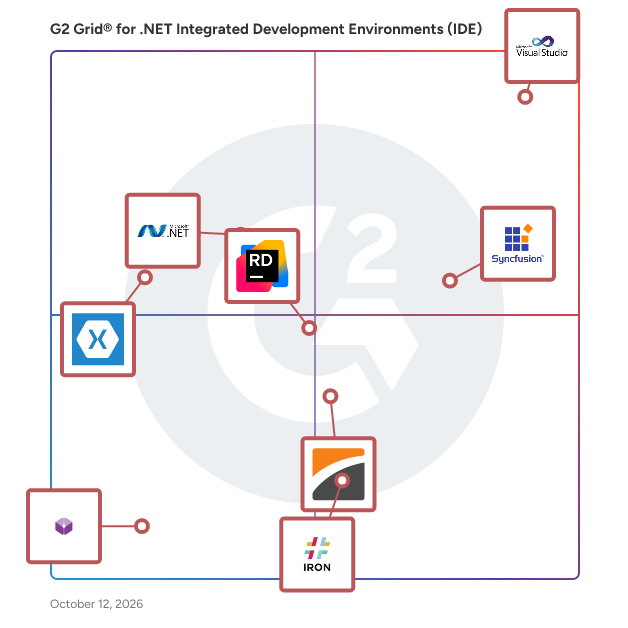
G2 Grid® for .NET Integrated Development Environments (IDE)

G2 Grid® for .NET Integrated Development Environments (IDE) plotting products by satisfaction and market presence

Highlighted products: Visual Studio, Essential Studio, .NET 4.5, Rider, DevExpress, Monodevelop, IronPDF, and Codeanywhere.

Underlying data: [Grid® JSON](https://www.g2.com/categories/net-integrated-development-environments-ide/grids.json?focus%5B%5D=visual-studio&focus%5B%5D=essential-studio&focus%5B%5D=net-4-5&focus%5B%5D=rider&focus%5B%5D=devexpress&focus%5B%5D=monodevelop&focus%5B%5D=ironpdf&focus%5B%5D=codeanywhere)

Visual Studio

Visual Studio is a comprehensive integrated development environment (IDE) designed to empower developers in building applications across various platforms, including Android, iOS, Windows, web, and cloud. It supports multiple programming languages, such as .NET, C++, Python, and JavaScript, providing a versatile environment for software development. Key Features and Functionality: - IntelliSense: Offers context-aware code suggestions to enhance coding efficiency. - GitHub Copilot Integration: Provides AI-assisted coding to streamline complex tasks. - Advanced Debugging Tools: Includes a robust debugger to identify and resolve issues early in the development process. - Integrated Testing: Facilitates seamless testing with built-in tools for both manual and automated testing. - CI/CD Support: Enables continuous integration and deployment through Git and Azure DevOps integration. - Cross-Platform Development: Supports development for multiple platforms, including mobile, desktop, and cloud applications. Primary Value and Solutions Provided: Visual Studio enhances developer productivity by offering a unified environment that integrates coding, debugging, testing, and deployment tools. Its support for multiple languages and platforms allows developers to create diverse applications efficiently. The integration of AI tools like GitHub Copilot and comprehensive debugging features ensures high-quality code production. Additionally, Visual Studio's support for modern development practices, including CI/CD pipelines and cloud integration, streamlines the software development lifecycle, enabling faster and more reliable application delivery.

Average Rating: 4.5/5.0

Total Reviews: 3,835

How Do G2 Users Rate Visual Studio?

  • Has the product been a good partner in doing business?: 8.8/10 (Category avg: 8.5/10)
  • Ease of Use: 8.7/10 (Category avg: 8.5/10)
  • Quality of Support: 8.4/10 (Category avg: 8.1/10)

Who Is the Company Behind Visual Studio?

  • Seller: Microsoft
  • Year Founded: 1975
  • HQ Location: Redmond, Washington
  • Twitter: @microsoft
    13,091,739 Twitter followers
  • LinkedIn® Page: www.linkedin.com
    232,750 employees on LinkedIn®
  • Ownership: MSFT

Who Uses This Product?

  • Who Uses This: Software Engineer, Software Developer
  • Top Industries: Computer Software, Information Technology and Services
  • Company Size: 36% Small, 32% Large

What Do G2 Reviewers Say About Visual Studio?

AI-generated summary from verified user reviews

Pros
  • Users admire the ease of use of Visual Studio, seamlessly integrating all tools for efficient development and productivity.
  • Users appreciate the comprehensive feature set of Visual Studio, enhancing productivity and streamlining the development process.
  • Users value the comprehensive IDE quality of Visual Studio, making development seamless with its all-in-one environment.
  • Users value the strong debugging tools in Visual Studio, which enhance the coding experience and streamline error detection.
  • Users appreciate Visual Studio's comprehensive features, including IntelliSense and seamless Git integration, enhancing overall development efficiency.
Cons
  • Users experience slow performance with Visual Studio during heavy programming, leading to crashes and increased workload.
  • Users experience high resource consumption with Visual Studio, leading to slow performance and challenges on lower-end machines.
  • Users often find high memory usage with Visual Studio, impacting performance on lower-end machines and during large projects.
  • Users experience a slow startup that can be frustrating, impacting productivity during the initial setup and solution reloads.
  • Users find that Visual Studio often experiences performance issues like slow startup and sluggishness with larger projects.

What Are Recent G2 Reviews of Visual Studio?

What Are G2 Users Discussing About Visual Studio?

Essential Studio

Syncfusion® Essential Studio® is a suite of 1,600+ software components and frameworks for developing web, mobile, and desktop applications. Its UI controls are designed to be flexible, optimized for high performance, and relied on by 80% of the Fortune 500. With Syncfusion in your toolkit, you can speed up the creation of modern user interfaces and read and write common file formats. Having supplied components to over 1 million developers across more than 33,000 organizations around the world, Syncfusion has a proven track record of delivering cutting-edge products and above-and-beyond support.

Average Rating: 4.5/5.0

Total Reviews: 834

How Do G2 Users Rate Essential Studio?

  • Has the product been a good partner in doing business?: 8.9/10 (Category avg: 8.5/10)
  • Ease of Use: 8.5/10 (Category avg: 8.5/10)
  • Quality of Support: 9.1/10 (Category avg: 8.1/10)

Who Is the Company Behind Essential Studio?

  • Seller: Syncfusion
  • Company Website:
  • Year Founded: 2001
  • HQ Location: Morrisville, North Carolina
  • Twitter: @Syncfusion
    11,907 Twitter followers
  • LinkedIn® Page: www.linkedin.com
    2,739 employees on LinkedIn®

Who Uses This Product?

  • Who Uses This: Developer, Owner
  • Top Industries: Computer Software, Information Technology and Services
  • Company Size: 83% Small, 11% Medium

What Do G2 Reviewers Say About Essential Studio?

AI-generated summary from verified user reviews

Pros
  • Users appreciate the document editor with track changes, enhancing development tasks through excellent compatibility and toolset.
  • Users appreciate the full-featured capabilities of Essential Studio, especially for its Excel-like UI and extensive support.
  • Users find Essential Studio easy to use and integrate, enhancing productivity across various development environments.
  • Users value the responsive customer support of Essential Studio, appreciating their quick and helpful assistance.
  • Users find the comprehensive documentation of Essential Studio helpful for resolving queries efficiently.
Cons
  • Users find the poor documentation lacking in advanced examples, hindering complex customization and understanding of deeper functionalities.
  • Users highlight documentation issues, noting missing advanced examples and insufficient detail for complex customization in Essential Studio.
  • Users often face update issues with Essential Studio, experiencing new bugs and complexity in licensing after each update.
  • Users find the confusing documentation challenging, especially for advanced features, due to its lack of detailed examples.
  • Users find complex customization challenging, as identifying necessary components and implementing files can be bewildering.

What Are Recent G2 Reviews of Essential Studio?

What Are G2 Users Discussing About Essential Studio?

.NET 4.5

.NET Framework 4.5 is a comprehensive and consistent programming model developed by Microsoft for building applications with visually stunning user experiences, seamless and secure communication, and the ability to model a range of business processes. This version introduces significant enhancements that improve developer productivity and application performance. Key Features and Functionality: - Asynchronous Programming: Incorporates the `async` and `await` keywords, simplifying asynchronous code and enhancing application responsiveness. - Networking Enhancements: Adds support for WebSockets, enabling real-time, bidirectional communication between client and server. - ASP.NET Improvements: Introduces model binding for Web Forms, allowing for cleaner and more maintainable code. - Windows Presentation Foundation (WPF) Enhancements: Includes the new Ribbon control for rich user interfaces and improved performance when displaying large data sets. - Windows Communication Foundation (WCF) Updates: Simplifies configuration and supports multiple authentication modes on a single endpoint. - Windows Workflow Foundation (WF) Enhancements: Adds support for state machine workflows and improved designer features. Primary Value and Solutions Provided: .NET Framework 4.5 addresses the need for developers to create high-performance, scalable, and responsive applications across various platforms. By introducing asynchronous programming patterns, it allows applications to remain responsive under heavy workloads. The support for WebSockets and improved networking capabilities enable the development of modern web applications with real-time communication features. Enhancements in ASP.NET, WPF, WCF, and WF provide developers with powerful tools to build rich user interfaces, efficient communication systems, and complex workflows, thereby reducing development time and improving application maintainability.

Average Rating: 4.2/5.0

Total Reviews: 74

How Do G2 Users Rate .NET 4.5?

  • Has the product been a good partner in doing business?: 8.8/10 (Category avg: 8.5/10)
  • Ease of Use: 8.5/10 (Category avg: 8.5/10)
  • Quality of Support: 8.2/10 (Category avg: 8.1/10)

Who Is the Company Behind .NET 4.5?

  • Seller: Microsoft
  • Year Founded: 1975
  • HQ Location: Redmond, Washington
  • Twitter: @microsoft
    13,091,739 Twitter followers
  • LinkedIn® Page: www.linkedin.com
    232,750 employees on LinkedIn®
  • Ownership: MSFT

Who Uses This Product?

  • Who Uses This: Software Engineer
  • Top Industries: Computer Software, Information Technology and Services
  • Company Size: 36% Medium, 33% Small

What Do G2 Reviewers Say About .NET 4.5?

AI-generated summary from verified user reviews

Pros
  • Users appreciate the stability and reliability of .NET 4.5, enhancing development for desktop and enterprise applications.
  • Users praise the performance efficiency of .NET 4.5, highlighting faster execution and improved memory management for smoother development.
  • Users value the ease of coding and debugging in .NET 4.5, making development more efficient and accessible.
  • Users value the stability and performance of .NET 4.5, enhancing development with excellent tooling and a strong library.
  • Users value the ease of coding/debugging in .NET 4.5, enhancing their development experience significantly.
Cons
  • Users find compatibility issues with .NET 4.5, noting its outdated features and limited cross-platform support.
  • Users note the limited features of .NET 4.5, feeling it lacks modernization compared to newer versions.
  • Users feel .NET 4.5 has missing features like modern options for cross-platform and cloud-native applications.
  • Users note a steep learning curve for beginners, particularly with C# syntax and project structure challenges.
  • Users are frustrated by the limited cross-platform compatibility of .NET 4.5, hindering flexibility and deployment options.

What Are Recent G2 Reviews of .NET 4.5?

What Are G2 Users Discussing About .NET 4.5?

AI can help you find the answers. G2 helps you trust them.

Connect G2 to Claude or ChatGPT for answers grounded in G2's trusted reviews, comparisons, and pricing from real user insights.

How it works

Rider

Rider helps you develop .NET, .NET Core,.NET Framework, ASP.NET, Xamarin, or Unity applications on Windows, Mac, and Linux. It provides outstanding editing support and code insight for languages used in .NET development including C#, F#, Razor/Blazor syntax, JavaScript, TypeScript, XAML, HTML, CSS, and SQL. Rider includes 2500+ live code inspections, hundreds of context actions and refactorings provided by ReSharper, all combined with IntelliJ Platform’s robust IDE feature set. Although it is heavily loaded with features, Rider is fast and responsive.

Average Rating: 4.4/5.0

Total Reviews: 74

How Do G2 Users Rate Rider?

  • Has the product been a good partner in doing business?: 9.0/10 (Category avg: 8.5/10)
  • Ease of Use: 8.9/10 (Category avg: 8.5/10)
  • Quality of Support: 8.9/10 (Category avg: 8.1/10)

Who Is the Company Behind Rider?

  • Seller: JetBrains
  • Company Website:
  • Year Founded: 2000
  • HQ Location: Prague
  • Twitter: @jetbrains
    213,126 Twitter followers
  • LinkedIn® Page: www.linkedin.com
    3,019 employees on LinkedIn®

Who Uses This Product?

  • Top Industries: Computer Software, Computer Games
  • Company Size: 52% Small, 24% Medium

What Do G2 Reviewers Say About Rider?

AI-generated summary from verified user reviews

Pros
  • Users appreciate Rider for its intelligent code completion and seamless integration with Unity, enhancing their development experience.
  • Users appreciate the seamless integrations in Rider, ensuring a smooth experience for developers with straightforward setups.
  • Users praise the awesome IntelliSense feature in Rider for its intelligent code completion and flexibility in error tracking.
  • Users love the vast variety of language support, enhancing their coding experience across different platforms.
  • Users appreciate the customization options in Rider, enhancing usability and overall experience effectively.
Cons
  • Users are concerned about the high licensing costs of Rider, which may drive them away from Jetbrains products.
  • Users experience high memory usage with Rider, leading to functionality issues, especially when multiple windows are open.
  • Users criticize Rider for its high resource consumption, making it less efficient compared to alternatives like Visual Studio Code.
  • Users find integration difficult with Rider, facing challenges like slow text generation and manual code application.
  • Users struggle with the learning difficulty of Rider, finding it unfamiliar compared to other IDEs like Visual Studio Code.

What Are Recent G2 Reviews of Rider?

What Are G2 Users Discussing About Rider?

FAQs About .NET Integrated Development Environments (IDE)

Generated using AI

Last updated: June 3, 2026

Net Integrated Development Environments Ide tools with strong user adoption and minimal team training requirements

According to verified users, teams tend to adopt .NET IDEs more easily when setup is guided, core workflows stay in one place, and common tasks like coding, debugging, testing, and source control do not require extra tool switching. Recent reviews repeatedly describe Visual Studio as approachable once workloads are selected, with built-in IntelliSense, debugging, Git support, extensions, and AI assistance helping users become productive quickly. Reviewers also note that ease of adoption can vary by experience level: beginners may find the interface feature-heavy at first, while more experienced teams value the unified environment. The clearest friction points mentioned are hardware demands, slower startup on larger projects, and occasional UI complexity during initial onboarding.

Net Integrated Development Environments Ide platforms that integrate with existing enterprise systems effectively

According to verified users, effective enterprise integration in this category means connecting development workflows with version control, cloud services, package management, databases, and deployment processes without leaving the IDE. In recent reviews, Visual Studio is commonly described as fitting well into .NET-heavy environments through built-in Git workflows, Azure connectivity, NuGet support, SQL project work, and support for large codebases. Reviewers also mention integrations with Docker, Kubernetes, Azure DevOps, repositories, and test or deployment pipelines as useful for enterprise teams trying to reduce fragmentation. At the same time, some users say that third-party or non-Microsoft tooling can require more configuration, and larger integrated environments may feel heavier when teams work on complex solutions or multiple services at once.

Comparing Net Integrated Development Environments Ide solutions that teams actually adopt and continue using long-term successfully

According to verified users, long-term adoption comes down to whether an IDE keeps daily work centralized, scales to larger projects, and consistently improves coding speed without adding too much friction. Across recent reviews, Visual Studio is frequently described as a tool teams continue using because it combines IntelliSense, debugging, testing, extensions, Git workflows, and AI assistance in one environment. Users often say that this reduces context switching and helps maintain momentum across enterprise, backend, web, and multi-language projects. Reviewers also highlight reasons adoption can stall over time, especially resource usage, slower launches on big solutions, and an interface that can feel crowded for newer users. In practice, sustained use appears strongest when teams need deep .NET support and integrated workflows more than a lightweight editor experience.

What features matter most in a .net ide

According to verified users, the most valued .net ide features are strong debugging, context-aware code completion, integrated source control, extension support, and the ability to keep coding, testing, and troubleshooting in one place. Recent reviews repeatedly mention IntelliSense, breakpoints, watch windows, refactoring support, hot reload, AI-assisted coding, and built-in Git workflows as features that improve speed and reduce errors. Buyers also seem to care about support for large solutions, multi-language work, package management, and cloud or deployment connections when projects become more complex. On the other hand, reviewers signal that feature depth should be balanced with usability, since heavy resource use, slower startup, and crowded interfaces can reduce the value of an otherwise capable environment.

How do teams use .NET Integrated Development Environments (IDE) for debugging

According to verified users, teams use .NET IDEs for debugging by keeping issue isolation, code inspection, and fix validation inside the same workspace. Recent reviews describe developers relying on breakpoints, conditional breakpoints, watch windows, variable inspection, code analyzers, error highlighting, and step-by-step tracing to understand failures faster. Users also mention hot reload, edit-and-continue style workflows, and integrated testing as helpful for shortening feedback loops while working on web apps, backend services, and larger enterprise solutions. A recurring theme is that strong debugging reduces trial and error and cuts down on context switching between editors, terminals, and external tools. The main tradeoff reviewers mention is performance, since larger solutions and heavier debugging sessions can make startup, memory use, and interface responsiveness more noticeable.

DevExpress

DevExpress engineers feature-complete Presentation Controls, IDE Productivity Tools, Business Application Frameworks, and Reporting / Dashboard Systems for Visual Studio, Delphi, HTML5 or iOS & Android development. Our product line includes UI components and libraries for desktop and mobile development (WinForms / WPF / WinUI / MAUI / Xamarin / VCL), the web (ASP.NET Core / Blazor / Web Forms / MVC / JavaScript: Angular, React, Vue, jQuery), Office File API, .NET Application Frameworks, ORM Tools, and End-to-End Web Testing.

Average Rating: 4.8/5.0

Total Reviews: 112

How Do G2 Users Rate DevExpress?

  • Has the product been a good partner in doing business?: 9.8/10 (Category avg: 8.5/10)
  • Ease of Use: 8.6/10 (Category avg: 8.5/10)
  • Quality of Support: 9.6/10 (Category avg: 8.1/10)

Who Is the Company Behind DevExpress?

  • Seller: DevExpress
  • Year Founded: 1998
  • HQ Location: Glendale, CA
  • Twitter: @DevExpress
    8,517 Twitter followers
  • LinkedIn® Page: www.linkedin.com
    193 employees on LinkedIn®

Who Uses This Product?

  • Top Industries: Computer Software, Information Technology and Services
  • Company Size: 70% Small, 16% Medium

What Do G2 Reviewers Say About DevExpress?

AI-generated summary from verified user reviews

Pros
  • Users praise DevExpress for their responsive customer support, which consistently delivers effective solutions quickly and professionally.
  • Users value the responsive tech support and the high quality features and documentation of DevExpress.
  • Users appreciate the superior product quality of DevExpress, consistently outperforming alternatives with excellent code and features.
  • Users appreciate the high-quality code editing features of DevExpress, consistently surpassing other component suites in performance.
  • Users highlight the excellent documentation of DevExpress, making it easier to utilize its Angular features.
Cons
  • Users note a lack of features in DevExpress, though improvements are being made over time.
  • Users often face navigation issues with DevExpress, finding the user experience challenging and frustrating.
  • Users find the user experience not intuitive, making it challenging to navigate DevExpress effectively.
  • Users experience performance issues with DevExpress, finding the interface challenging and not user-friendly.
  • Users experience poor customer support, often facing unhelpful responses that detract from their overall satisfaction.

What Are Recent G2 Reviews of DevExpress?

What Are G2 Users Discussing About DevExpress?

Monodevelop

MonoDevelop enables developers to quickly write desktop and web applications on Linux, Windows and Mac OS X. It also makes it easy for developers to port .NET applications created with Visual Studio to Linux and Mac OS X maintaining a single code base for all platforms.

Average Rating: 3.8/5.0

Total Reviews: 53

How Do G2 Users Rate Monodevelop?

  • Has the product been a good partner in doing business?: 6.7/10 (Category avg: 8.5/10)
  • Ease of Use: 7.5/10 (Category avg: 8.5/10)
  • Quality of Support: 6.6/10 (Category avg: 8.1/10)

Who Is the Company Behind Monodevelop?

  • Seller: Microsoft
  • Year Founded: 1975
  • HQ Location: Redmond, Washington
  • Twitter: @microsoft
    13,091,739 Twitter followers
  • LinkedIn® Page: www.linkedin.com
    232,750 employees on LinkedIn®
  • Ownership: MSFT

Who Uses This Product?

  • Top Industries: Computer Games, Computer Software
  • Company Size: 87% Small, 9% Medium

What Are Recent G2 Reviews of Monodevelop?

What Are G2 Users Discussing About Monodevelop?

IronPDF

IronPDF is the leading C# PDF library for generating & editing PDFs. Its user friendly API allows developers to rapidly deliver professional, high quality PDFs from HTML in .NET projects.

Average Rating: 4.9/5.0

Total Reviews: 64

How Do G2 Users Rate IronPDF?

  • Has the product been a good partner in doing business?: 7.1/10 (Category avg: 8.5/10)
  • Ease of Use: 9.9/10 (Category avg: 8.5/10)
  • Quality of Support: 9.4/10 (Category avg: 8.1/10)

Who Is the Company Behind IronPDF?

  • Seller: Iron Software
  • Year Founded: 2016
  • HQ Location: Chicago, IL
  • Twitter: @ironsoftwaredev
    143 Twitter followers
  • LinkedIn® Page: www.linkedin.com
    56 employees on LinkedIn®

Who Uses This Product?

  • Top Industries: Accounting, Information Technology and Services
  • Company Size: 66% Small, 26% Medium

What Do G2 Reviewers Say About IronPDF?

AI-generated summary from verified user reviews

Pros
  • Users appreciate the time-saving and formatting features of IronPDF, enabling professional and organized PDF generation effortlessly.
  • Users highlight the ease of use of IronPDF, making PDF creation smooth and professional for various projects.
  • Users value the product quality of IronPDF, as it maintains formatting and enhances the professionalism of documents.
  • Users value the easy integrations of IronPDF, enabling seamless PDF generation within existing systems effortlessly.
  • Users value the easy integration of IronPDF, enabling seamless creation of professional and consistent PDF documents.
Cons
  • Users find debugging rendering issues challenging with IronPDF, particularly when handling large workloads.
  • Users struggle with bug issues, including difficulties in debugging rendering problems and slow OCR performance under heavy loads.
  • Users find the customization options for fonts and styles limited, affecting their design flexibility with IronPDF.
  • Users find the licensing cost to be high, making it challenging for smaller teams and ongoing projects.
  • Users feel the high licensing cost makes it challenging for smaller teams and ongoing projects to adopt IronPDF.

What Are Recent G2 Reviews of IronPDF?

Codeanywhere

Codeanywhere is a Cloud Integrated Development Environment. Saving developer's time by deploying development environment in seconds, enabling them easily to code, learn, build, and collaborate on software development projects. All the features you will need for any coding task are built into Codeanywhere, making development more productive and fun. Features include support for debugging, syntax highlighting, intelligent code completion, snippets, code refactoring, and embedded Git. Languages included are all the most popular programming ones such as C, C#, C++, CSS, HTTP, Java, JavaScript, PHP, Python, Ruby, SQL.

Average Rating: 4.2/5.0

Total Reviews: 69

How Do G2 Users Rate Codeanywhere?

  • Has the product been a good partner in doing business?: 8.5/10 (Category avg: 8.5/10)
  • Ease of Use: 8.4/10 (Category avg: 8.5/10)
  • Quality of Support: 6.1/10 (Category avg: 8.1/10)

Who Is the Company Behind Codeanywhere?

  • Seller: Codeanywhere
  • Year Founded: 2011
  • HQ Location: San Francisco, California
  • Twitter: @Codeanywhere
    54,229 Twitter followers
  • LinkedIn® Page: www.linkedin.com
    1 employees on LinkedIn®

Who Uses This Product?

  • Who Uses This: CEO
  • Top Industries: Computer Software, Information Technology and Services
  • Company Size: 94% Small, 7% Medium

What Are Recent G2 Reviews of Codeanywhere?

What Are G2 Users Discussing About Codeanywhere?

SNMP .Net Component

SnmpSource component is a 100% powerful .net library for building cross-platform, real-time applications to monitor the network performance.

Average Rating: 3.4/5.0

Total Reviews: 5

How Do G2 Users Rate SNMP .Net Component?

  • Has the product been a good partner in doing business?: 6.7/10 (Category avg: 8.5/10)
  • Ease of Use: 9.4/10 (Category avg: 8.5/10)
  • Quality of Support: 5.0/10 (Category avg: 8.1/10)

Who Is the Company Behind SNMP .Net Component?

Who Uses This Product?

  • Company Size: 40% Medium, 40% Small

What Are Recent G2 Reviews of SNMP .Net Component?

What Are G2 Users Discussing About SNMP .Net Component?

Workflow Engine

Flexible Embeddable Workflow Engine Embeddable .NET library for running workflows in .NET applications with integrated HTML5 graphical workflow designer. You can integrate Workflow Engine as an embedded component. Workflow Engine is the perfect solution if you are dealing with business entities life cycle management in a project. Using embedded drag&drop process designer you can create processes in your system and manage your workflows via a simple API. The basic set of elements allows business users to modify workflow schemes themselves. 

Average Rating: 4.6/5.0

Total Reviews: 5

How Do G2 Users Rate Workflow Engine?

  • Has the product been a good partner in doing business?: 10.0/10 (Category avg: 8.5/10)
  • Ease of Use: 8.7/10 (Category avg: 8.5/10)
  • Quality of Support: 9.3/10 (Category avg: 8.1/10)

Who Is the Company Behind Workflow Engine?

  • Seller: OptimaJet
  • Year Founded: 2011
  • HQ Location: Hong Kong, HK
  • Twitter: @OptimaJet
    19 Twitter followers
  • LinkedIn® Page: www.linkedin.com
    6 employees on LinkedIn®

Who Uses This Product?

  • Company Size: 50% Medium, 50% Small

What Are Recent G2 Reviews of Workflow Engine?

What Are G2 Users Discussing About Workflow Engine?

JNBridge

JNBridgePro is a robust interoperability tool designed to seamlessly connect Java and .NET components, enabling developers to build cross-platform applications that operate within the same process or across networks, both on-premises and in the cloud. Key Features and Functionality: - Cross-Platform Integration: Facilitates the integration of Java and .NET components, allowing them to function cohesively within a single application. - Versatile Deployment: Supports deployment in various environments, including on-premises, cloud, and hybrid setups. - Visual Studio and Eclipse Plug-ins: Provides plug-ins for both Visual Studio and Eclipse, simplifying the development process by enabling developers to explore and expose classes across platforms. - GUI Embedding: Allows embedding of Java AWT or Swing widgets in .NET WinForm applications and vice versa, enhancing user interface flexibility. - Comprehensive Support: Offers features like cross-platform exception handling, integrated object lifecycle management, garbage collection, data type conversions, and efficient object marshalling and unmarshalling. Primary Value and Problem Solved: JNBridgePro addresses the challenge of integrating Java and .NET components, which traditionally operate in separate ecosystems. By providing a seamless bridge between these platforms, it eliminates the complexities associated with cross-platform interoperability. This enables organizations to leverage existing codebases, reduce development time, and deploy applications across diverse environments without the need for extensive rewrites or platform-specific adaptations. Ultimately, JNBridgePro enhances productivity and accelerates time-to-market for cross-platform applications.

Average Rating: 4.3/5.0

Total Reviews: 10

How Do G2 Users Rate JNBridge?

  • Has the product been a good partner in doing business?: 6.7/10 (Category avg: 8.5/10)
  • Ease of Use: 8.8/10 (Category avg: 8.5/10)
  • Quality of Support: 8.3/10 (Category avg: 8.1/10)

Who Is the Company Behind JNBridge?

  • Seller: JNBridge
  • Year Founded: 2001
  • HQ Location: N/A
  • Twitter: @jnbridge
    82 Twitter followers
  • LinkedIn® Page: www.linkedin.com
    3 employees on LinkedIn®

Who Uses This Product?

  • Company Size: 60% Medium, 20% Small

What Do G2 Reviewers Say About JNBridge?

AI-generated summary from verified user reviews

Pros
  • Users value the seamless integration of JNBridge, allowing effortless interaction between Java and .NET applications.
  • Users value the development efficiency of JNBridge, seamlessly integrating Java and .NET for enhanced productivity.
  • Users value the ease of use of JNBridge, seamlessly integrating Java and .NET with simple calls.
  • Users value the seamless integration of .NET and Java, enhancing interoperability in their development processes.
  • Users value the seamless integration between Java and .NET, enhancing their coding experience and efficiency.
Cons
  • Users find limited compatibility regarding supported technologies and available libraries and frameworks for .NET.
  • Users find the limited features of JNBridge, especially regarding technology support, to be restrictive for their projects.

What Are Recent G2 Reviews of JNBridge?

Stingray

Develop complex GUI applications that are easy to build, maintain, and evolve as new technologies improve the look and feel of user interfaces. Controls in Stingray include many common items found in GUI applications: combo boxes, tool bars, frames, menus, tree controls, and much more. In addition to these basic controls, Stingray has embeddable components that provide a starting point for your application, similar to popular Microsoft applications such as Excel, Visio, Chart, Visual Studio, and Access. Easily extend and customize these base components to meet your development needs.

Average Rating: 4.7/5.0

Total Reviews: 3

How Do G2 Users Rate Stingray?

  • Ease of Use: 6.7/10 (Category avg: 8.5/10)
  • Quality of Support: 5.0/10 (Category avg: 8.1/10)

Who Is the Company Behind Stingray?

  • Seller: Perforce
  • Year Founded: 1995
  • HQ Location: Minneapolis, MN
  • Twitter: @perforce
    5,090 Twitter followers
  • LinkedIn® Page: www.linkedin.com
    2,009 employees on LinkedIn®

Who Uses This Product?

  • Company Size: 67% Large, 33% Small

What Are Recent G2 Reviews of Stingray?

Unisys ClearPath Visual IDE

Unisys ClearPath Visual IDE is a software product that extends the capabilities of Microsoft Visual Studio to enable you to use it to develop ClearPath applications.

Average Rating: 4.3/5.0

Total Reviews: 10

How Do G2 Users Rate Unisys ClearPath Visual IDE?

  • Has the product been a good partner in doing business?: 10.0/10 (Category avg: 8.5/10)
  • Ease of Use: 9.4/10 (Category avg: 8.5/10)
  • Quality of Support: 9.2/10 (Category avg: 8.1/10)

Who Is the Company Behind Unisys ClearPath Visual IDE?

  • Seller: Unisys
  • HQ Location: Blue Bell, PA
  • Twitter: @unisys
    33,730 Twitter followers
  • LinkedIn® Page: www.linkedin.com
    23,518 employees on LinkedIn®
  • Ownership: NYSE:UIS
  • Total Revenue (USD mm): $2,820

Who Uses This Product?

  • Top Industries: Information Technology and Services
  • Company Size: 60% Medium, 20% Large

What Do G2 Reviewers Say About Unisys ClearPath Visual IDE?

AI-generated summary from verified user reviews

Pros
  • Users value the reliability and tight integration of Unisys ClearPath Visual IDE, enhancing development for critical applications.
  • Users value the reliability and stability of Unisys ClearPath Visual IDE, enhancing development and debugging for enterprise applications.
  • Users value the tight integration of Unisys ClearPath Visual IDE with ClearPath systems, enhancing development and debugging efficiency.
  • Users value the effective debugging tools of Unisys ClearPath Visual IDE, enhancing reliability in mission-critical systems.
  • Users value the debugging efficiency of Unisys ClearPath Visual IDE, enhancing stability and organization in critical applications.
Cons
  • Users find the beginner unfriendliness of Unisys ClearPath Visual IDE challenging due to its complex setup and workflow.
  • Users find the complexity of the learning curve challenging, especially transitioning from modern IDEs to ClearPath Visual IDE.
  • Users find the complexity issues daunting, especially with the steep learning curve and unintuitive UI for newcomers.
  • Users find the complex setup challenging, especially those new to the system or transitioning from modern IDEs.
  • Users face a significant learning curve and complex usability in Unisys ClearPath Visual IDE, particularly if they are new.

What Are Recent G2 Reviews of Unisys ClearPath Visual IDE?

What Are G2 Users Discussing About Unisys ClearPath Visual IDE?

MDriven Framework

MDriven Framework is a model-driven application development framework for .NET developers. It allows you to design your entire application using models, defining data structures, logic, and UI instead of writing large amounts of manual code. It works inside Visual Studio, letting developers combine model-driven logic with traditional C# code. This makes it possible to build powerful, enterprise-grade applications faster and more consistently, using the model as the single source of truth. MDriven Framework is ideal for professional developers, software architects, and IT teams who want full control of their applications’ codebase while benefiting from model-driven automation.

Average Rating: 5.0/5.0

Total Reviews: 1

How Do G2 Users Rate MDriven Framework?

  • Ease of Use: 6.7/10 (Category avg: 8.5/10)
  • Quality of Support: 10.0/10 (Category avg: 8.1/10)

Who Is the Company Behind MDriven Framework?

Who Uses This Product?

  • Company Size: 100% Medium

What Are Recent G2 Reviews of MDriven Framework?

What Are G2 Users Discussing About MDriven Framework?

Measurement Studio

Measurement Studio is an extension of Microsoft Visual Studio that provides .NET tools for creating test and measurement applications. Measurement Studio is a set of .NET tools designed for building engineering applications. You can present data clearly with engineering UI controls that are compatible with hardware-acquired data types. Measurement Studio removes the complexity of hardware communication through high-level, intuitive, object-oriented hardware class libraries. You can add custom information to acquired data by using the fastest and most flexible file format for storing measurement data to disk, TDMS. You can also perform inline analysis in real time on acquired signals without the difficult task of writing custom parsing algorithms.

Average Rating: 5.0/5.0

Total Reviews: 1

Who Is the Company Behind Measurement Studio?

  • Seller: NI
  • Year Founded: 1976
  • HQ Location: Austin, TX
  • Twitter: @NIglobal
    26,204 Twitter followers
  • LinkedIn® Page: www.linkedin.com
    8,041 employees on LinkedIn®
  • Ownership: NASDAQ: NATI

Who Uses This Product?

  • Company Size: 100% Small

What Are Recent G2 Reviews of Measurement Studio?

What Are G2 Users Discussing About Measurement Studio?

Adam Crivello
AC
Researched and written by Adam Crivello
Updated October 3, 2024