AI-Generated Results
Finding matches…
Codex CLI is OpenAI's open-source, terminal-based coding agent designed to enhance developers' productivity by integrating AI assistance directly into the command-line interface. It enables users to generate, edit, and execute code locally through natural language prompts, streamlining the development process without leaving the terminal environment.
Key Features and Functionality:
- Local Execution: Codex CLI operates entirely on the user's machine, ensuring that code remains within the local environment, thereby maintaining privacy and security.
- Multimodal Input Support: The tool accepts various input forms, including text, screenshots, and diagrams, allowing for versatile code generation and editing capabilities.
- Multiple Programming Language Support: Codex CLI supports a wide range of programming languages, including Python, JavaScript, TypeScript, C++, and Bash, catering to diverse development needs.
- Flexible Operation Modes: Users can choose from three distinct modes based on their requirements:
- Suggest Mode: Proposes edits and commands, requiring user approval before implementation.
- Auto Edit Mode: Automatically edits files but seeks confirmation before executing shell commands.
- Full Auto Mode: Performs read, write, and execute operations autonomously within a sandboxed environment.
- Version Control Integration: Codex CLI is aware of version control systems like Git, providing safety prompts to prevent unintended changes to live code.
- Open Source Accessibility: Being open-source under the Apache-2.0 license, Codex CLI allows for customization and community contributions, fostering continuous improvement and adaptability.
Primary Value and User Solutions:
Codex CLI addresses several challenges faced by developers:
- Enhanced Productivity: By automating routine coding tasks and providing intelligent suggestions, it reduces the time spent on manual coding, allowing developers to focus on complex problem-solving.
- Seamless Integration: Operating directly within the terminal, it eliminates the need to switch between different tools or interfaces, maintaining a smooth and efficient workflow.
- Improved Code Quality: With features like code reviews and debugging assistance, Codex CLI helps in identifying and rectifying errors early, leading to more robust and reliable codebases.
- Privacy Assurance: Since all operations are performed locally, users have full control over their code, ensuring that sensitive information remains secure.
In summary, Codex CLI serves as a powerful AI-driven assistant that integrates seamlessly into the terminal, offering developers an efficient, secure, and versatile tool to enhance their coding experience.
Not seeing what you're looking for?
Dive deeper into "Termius" on G2 AI

Insights by Promevo is a read-only visibility and governance platform for organizations using Gemini Enterprise and Google Cloud. It pulls together license usage, AI agent inventory, access permissions, and cloud spend data from across Google’s admin consoles and billing into one set of dashboards.
The platform is organized around three areas:
Cost Intelligence: Identifies inactive or underused Gemini Enterprise licenses. It attributes AI token and model consumption to specific teams, agents, and Google Cloud projects, and analyzes overall cloud spend, resource allocation, and budget versus actuals.
Environment and Agent Intelligence: Maintains an automated inventory of the custom AI agents, models, and tools deployed across an organization. It tracks agent health, error rates, and deployment activity.
Access Intelligence: Maps user permissions across Google Cloud and Gemini Enterprise. It shows which assets and projects each user can access and flags overpermissioned accounts.
Dashboards
Insights includes seven continuously updated dashboards:
- Agent Operations: a fleet-level view of agent health, deployment activity, and error rates.
- Agent Cost: AI consumption broken down by team, model, and project, with spend trends over time.
- User Usage: Gemini Enterprise license activity, including inactive seats that are candidates for reclamation.
- Asset Discovery & Hierarchy: a map of Google Cloud structure across organizations, folders, projects, and assets.
- FinOps & Cloud Spend: cloud resource allocation, spend trends, budget versus actuals, and cost optimization opportunities.
- Member Summary: the assets and projects each user can access, and the distribution of asset categories.
- Daily Trends: changes in AI infrastructure and cloud environment health over time.
The platform also includes a Recommendations feature that suggests actions to improve Google Cloud health.
How It Works
Insights connects to Google environments through read-only APIs and does not make changes to them. It reports on usage, cost, and permission metadata. It does not read, store, or expose prompt content. Data typically begins populating within days of setup.
Who It’s For
Insights is designed for IT administrators, security and compliance teams, and finance or FinOps teams. These teams typically need to track Gemini Enterprise adoption, keep an inventory of custom agents, review access permissions, and attribute AI and cloud costs to the teams responsible for them.
Insights is developed by Promevo and can be used alongside gPanel, Promevo’s Google Workspace management platform. Promevo also offers services to help organizations act on what the dashboards surface, such as reclaiming licenses or fixing misconfigurations.

The Attribute-Based Continuous Data Controller is a security solution designed to provide fine-grained access control over data resources by leveraging attribute-based access control (ABAC methodologies. By defining permissions based on user attributes—such as department, job role, or team name—this controller ensures that access to data is both dynamic and scalable, adapting seamlessly to organizational changes without the need for constant policy updates.
Key Features and Functionality:
- Dynamic Authorization: Utilizes user attributes to grant or restrict access to data resources, allowing permissions to adjust automatically as user roles or attributes change.
- Simplified Policy Management: Reduces the complexity of managing numerous access control policies by consolidating them into attribute-based rules, thereby decreasing administrative overhead.
- Enhanced Security Posture: Ensures that users have access only to the data resources that correspond with their attributes, minimizing the risk of unauthorized data exposure.
- Scalability: Facilitates the onboarding of new users and the creation of new resources without necessitating manual policy adjustments, as access permissions are inherently tied to user attributes.
Primary Value and Problem Solved:
The Attribute-Based Continuous Data Controller addresses the challenges associated with traditional role-based access control systems, which often require frequent manual updates to access policies as organizations evolve. By implementing an ABAC approach, this solution streamlines access management, enhances security by ensuring users access only appropriate data, and scales effortlessly with organizational growth and change. This results in a more efficient, secure, and adaptable data access control framework for enterprises.

Microsoft Purview Privileged Access Management (PAM is a security feature within Microsoft 365 designed to provide granular control over privileged administrative tasks. By implementing just-in-time (JIT access, PAM ensures that users receive only the necessary permissions for specific tasks, reducing the risk associated with standing administrative privileges. This approach enhances organizational security by minimizing potential exposure to sensitive data and critical configuration settings.
Key Features and Functionality:
- Just-in-Time Access: Users request time-bound access to perform elevated tasks, ensuring permissions are granted only when needed.
- Approval Workflows: Access requests undergo a defined approval process, adding an extra layer of security and oversight.
- Granular Access Control: Administrators can define policies that specify which tasks require elevated permissions and the conditions under which they can be performed.
- Audit Logging: All privileged operations are logged, providing a comprehensive audit trail for monitoring and compliance purposes.
- Integration with Microsoft Entra Privileged Identity Management (PIM: While PAM controls access at the task level, PIM manages role-based access, offering a layered security approach.
Primary Value and Problem Solved:
Privileged Access Management addresses the security challenges associated with standing administrative privileges. By enforcing JIT access and approval workflows, it mitigates the risks of unauthorized access, insider threats, and potential breaches. This ensures that organizations can maintain a robust security posture, comply with regulatory requirements, and protect sensitive information effectively.

Oso is an authorization-as-a-service platform designed to simplify the implementation of robust, enterprise-grade Role-Based Access Control systems. It enables developers to integrate fine-grained permissions and custom roles into their applications without overhauling existing architectures. By decoupling authorization logic from business code, Oso allows for faster development cycles and reduces the risk of errors.
Key Features and Functionality:
- Local Authorization: Oso operates directly over your existing data in PostgreSQL, eliminating the need for data synchronization and ensuring high performance with latencies under 10 milliseconds and support for up to 1 million reads per second.
- Extensibility: The platform supports various authorization models, including RBAC, Relationship-Based Access Control , and Attribute-Based Access Control , allowing for flexible and customizable permission structures.
- Deterministic and Testable: Built in Rust, Oso offers a deterministic environment that is testable, debuggable, and observable, ensuring reliability and ease of maintenance.
- Deployment Flexibility: Oso can be deployed across cloud, hybrid, or on-premises environments, providing adaptability to various infrastructure needs.
Primary Value and User Solutions:
Oso addresses the complex challenge of implementing secure and scalable authorization systems by providing a service that integrates seamlessly with existing application architectures. It enables organizations to implement fine-grained permissions and custom roles efficiently, reducing development time and minimizing errors. By decoupling authorization logic from business code, Oso enhances security, ensures correctness, and supports rapid iteration, allowing businesses to meet evolving access control requirements without significant architectural changes.

Elementary POS is your mobile cash register or a complex point-of-sale system, tailored to meet your specific requirements. For a single, fair price, you gain access to countless features designed to simplify and speed up your business processes, and an unlimited number of users and connected devices. With Elementary POS, you can access a flexible sales module and a virtual office, providing you with on-the-go access to sales statistics, stock management and much more.
Elementary POS is ideal for small and medium-sized companies, freelancers, as well as those starting a new business. It is a user-friendly, comprehensive system designed to grow with your company. Whether you require a single mobile cash register or a more complex system, Elementary POS can be tailored precisely to your needs. You can picture it like a construction game that you can shape exactly to the requirements of your business model.
Within minutes, you can connect Elementary POS with external devices like customer displays, kitchen displays, barcode readers, or payment terminals—all in the form of tablets or mobile phones with Android, or specialized devices.
The app provides a wide range of features, including sales, remote ordering, stock management, advanced sales statistics and reports, and a virtual office that enables you to manage your business from anywhere. You can add an unlimited number of users and cash registers to your account.
Elementary POS operates on any mobile or tablet with Android, saving you from investing in costly hardware.

Struggling with Sharing Power BI reports and dashboards externally? External users don't have a Power BI licence? Introducing Binokula. Share simply, securely, at scale.
Empower your business partners, customers and even the community at large with clear insight so they can make better decisions anytime, anywhere. Share simply, securely and at scale to your ecosystem of contacts: franchisees, sub-contractors, clients, agencies, vendor partners, project groups, mergers and acquisitions, and endless other contacts outside of your company entity.
Binokula Instant is a Web Portal designed to help small to medium organisations to share Power BI reports and dashboards with non-Power BI users.
Maintain and extend your organisation's presence:
Customise Binokula colours and login pages to your organization's visual standards.
Add your business name and logo to Binokula screens to maintain your organisation’s presence.
Use the Binokula API to share Power BI reports inside your own web portal application. Enables you to use Binokula as a back-end for seamless user authentication and report access management.
Simple for your Administration:
Flexible user and report management. Manage user and report groups, create multiple assignment types (One-to-One, One-to-Many, Many-to-Many) and structures for assignment of reports to users.
Use Row-Level-Security (RLS) to enable different users to view the same report but only view their data.
Control who in the business partner organisation can send report links to associates or other parties, and export to PDF and PPT formats. Track what reports are accessed and by who.
A single, simple interface that enables administration to be performed by a business unit. Quickly add users and change permissions without having to make changes in Azure Active Directory (No IT people or skills required).
Simple for users:
Have the latest up-to-date interactive reports at their fingertips.
View only the information they need. Row-level security automatically limits the data available.
Be able to email a report’s link to a trusted associate so they can view exactly the same interactive report.
Apply saved filters, export to PDF and PPT formats or take snapshots to facilitate presenting the information to other audiences.
Display Power BI reports natively on MacOS and iOS.
Manage your report-sharing costs:
Scale up only when you need by upgrading your plan at any time.
Power BI Embedded capacity cost optimisation solutions are included.

MSI CloudPM is a cloud-based property management system (PMS designed to streamline hotel operations and enhance guest experiences. By eliminating the need for on-site hardware and IT resources, CloudPM offers a cost-effective solution that allows hoteliers to manage single or multiple properties remotely. Its intuitive interface provides real-time visibility into guest activities and operational metrics, facilitating efficient management from any location.
Key Features and Functionality:
- Reservation Management: Efficiently handle bookings and availability across all properties.
- Front Desk Operations: Streamline check-in and check-out processes for guests.
- Housekeeping Management: Assign and monitor housekeeping tasks to ensure room readiness.
- Billing and Invoicing: Automate financial transactions and generate invoices seamlessly.
- Reporting and Analytics: Access detailed reports and analytics for informed decision-making.
- Channel Management: Integrate with online travel agencies (OTAs to manage room distribution.
- Rate Management: Implement flexible rate plans with daily, weekly, and monthly configurations.
- Online Booking Engine: Enable direct bookings through the hotel's website.
- Customer Relationship Management (CRM: Maintain comprehensive guest profiles for personalized service.
- Point of Sale (POS Integration: Connect with POS systems for seamless billing across services.
- Mobile Access: Manage operations on-the-go via mobile devices.
- Multi-Property Management: Oversee multiple properties from a centralized platform.
- Inventory Management: Track and control inventory levels efficiently.
- Maintenance Management: Schedule and monitor maintenance tasks to ensure property upkeep.
- Guest Messaging: Communicate directly with guests through integrated messaging tools.
- Payment Processing: Securely handle various payment methods.
- Third-Party Integrations: Seamlessly connect with other hospitality software solutions.
- User Access Controls: Define user roles and permissions for enhanced security.
- Customizable Dashboards: Tailor dashboards to display relevant metrics and information.
Primary Value and Solutions Provided:
MSI CloudPM addresses the challenges of traditional property management by offering a scalable, cloud-based solution that reduces capital expenditures on hardware and IT infrastructure. It enhances operational efficiency through automation and real-time data access, allowing hoteliers to focus on delivering exceptional guest experiences. The system's flexibility and comprehensive feature set make it suitable for independent hotels, management companies, and hotel chains seeking to optimize their operations and drive revenue growth.

Forum Sentry is a comprehensive API Security Gateway designed to manage, secure, and modernize applications and services. It offers integrated technologies such as API Management, API Security, Multi-Factor Authentication, Continuous Authentication, Single Sign-On , Data Transformation, Integration Adapters, AI Logging, and Zero Trust Policy Enforcement. Available in various cloud and on-premise form factors—including Amazon Image, Azure Image, VMWare Image, Docker Image, Windows and Linux software, and custom-designed hardware appliances—Forum Sentry ensures flexible deployment options. With hundreds of pre-built templates, it enables rapid deployment of common industry use cases, maintaining a 100% deployment success track record.
Key Features and Functionality:
- API Cyber-Security Protection: Safeguards APIs against cyber threats through robust security measures.
- Data Transformation: Facilitates seamless data conversion and integration across diverse systems.
- Data Leakage Protection: Prevents unauthorized data exposure and ensures data confidentiality.
- Antivirus Scanning: Detects and mitigates malware threats within API traffic.
- TLS Acceleration: Enhances the performance of secure communications via Transport Layer Security.
- Access Control: Manages and enforces user permissions and access rights effectively.
- Mobile and Cloud Security: Extends security protocols to mobile and cloud-based applications.
- Encryption: Ensures data privacy through advanced encryption techniques.
- Single Sign-On : Provides seamless authentication across multiple applications.
- Data Filtering: Monitors and controls data flow to maintain integrity and compliance.
- Protocol Conversion: Enables interoperability between different communication protocols.
- Monitoring: Offers real-time oversight of API performance and security.
- Legacy Enablement: Modernizes legacy systems by integrating them with contemporary technologies.
- Continuous Authentication: Maintains ongoing verification of user identities to enhance security.
Primary Value and Problem Solved:
Forum Sentry addresses the critical need for secure, efficient, and scalable API management in today's complex digital environments. By consolidating multiple security and integration functions into a single platform, it simplifies architectural complexities, reduces deployment times, and minimizes the risk of security breaches. Organizations benefit from enhanced data protection, streamlined authentication processes, and the ability to modernize legacy systems without extensive redevelopment. This comprehensive approach ensures that enterprises can confidently manage and secure their APIs, facilitating seamless and secure data exchange across diverse platforms and services.

Dooster is helping Freelancers, Entrepreneurs,Small & Medium Sized Businesses, Multi National Companies,Start ups,Project Managers & Senior Level Executives since last 7 years by Skyrocketing their Business Productivity, Saved their Time, Money & Efforts.
Start managing all your TASKS and PROJECTS Collaboration today with our easy to use online organizing Tool Dooster. Simplify your life & make yourself better organized & less stressful.
1.IMPROVE your effectiveness,Sky rocket your business productivity, making you more money for less effort
2.MAKE your business run better, giving you more time off for the important things in life
3.HELP you see exactly who your best performers are and help you allocated workloads more effectively among your team
4.SAVE you from being overwhelmed by all the tasks, appointments and emails while keeping important stuff like contacts and files always close to hand.
5.REDUCE your need for all those time keeping instruments like calendars, paper time sheets.
No set up fees, No expensive technical support / maintenance costs, No software to
install & No hardware to buy to use our tool.
For using Our tool customers just need simple email address.
Get going in minutes. Minimal staff training – 10 minutes at most.
Fully Customizable. Use your own logo and colors. Plus embed in your website. Impress clients.
Set priorities, dates, reminders .Assign to your Team instantly.Automated reminders / reduce chasing
Awesome filtering capacities that help you identify tasks that are overdue, as well as those coming up in the next week; as well as tasks organized by importance, urgency or an assigned team member.
Your work is kept, totally secure, in the cloud. Access it on any device, from anywhere.
The handy File Library which keeps track of all files associated with a project, even files stored externally on Google Drive.
Our tool has powerful permissions / access levels for various people depending on the project. These determine how much of a project a user can see / edit /create the tasks. This differentiates between other tools.

The RADIUS Server - Wireless Authentication NPS on Windows 2016 is a pre-configured solution designed to facilitate secure wireless network authentication using Microsoft's Network Policy Server (NPS on Windows Server 2016. This setup enables organizations to implement robust authentication protocols, ensuring that only authorized users and devices can access their wireless networks.
Key Features and Functionality:
- Active Directory Integration: Utilizes Active Directory or local security accounts for user authentication, streamlining access control within existing organizational structures.
- Network Access Control: Allows or denies connections to specific wireless networks based on network type and Service Set Identifier (SSID, providing granular control over network access.
- Group-Based Access Policies: Enables connection permissions based on Active Directory group memberships, facilitating tailored access policies for different user groups.
- Certificate-Based Authentication: Supports machine certificate authentication using trusted certificates, enhancing security through mutual authentication mechanisms.
- IEEE 802.1X Support: Offers built-in support for IEEE 802.1X authenticated wireless access with PEAP-MS-CHAP v2, ensuring compatibility with industry-standard authentication protocols.
- Comprehensive Logging: Provides accounting logging capabilities, aiding in monitoring and auditing network access activities.
- Scalability: Supports an unlimited number of RADIUS clients (Access Points and remote RADIUS server groups, accommodating growing network infrastructures.
- Flexible Client Configuration: Allows configuration of RADIUS clients by specifying IP address ranges, simplifying the management of multiple access points.
- Single Sign-On (SSO: Integrates with existing SSO solutions, enhancing user convenience and security.
- Standards Compliance: Adheres to the RADIUS standards specified by the Internet Engineering Task Force (IETF in RFCs 2865 and 2866, ensuring interoperability with various network devices.
Primary Value and Problem Solved:
This solution addresses the critical need for secure and efficient wireless network authentication within organizations. By leveraging NPS on Windows Server 2016, it provides a centralized authentication mechanism that integrates seamlessly with Active Directory, simplifying user management and enforcing consistent access policies. The implementation of certificate-based authentication and support for IEEE 802.1X protocols enhances network security, mitigating risks associated with unauthorized access. Additionally, the scalability and flexibility of the solution make it suitable for organizations of varying sizes, ensuring that as the network grows, the authentication infrastructure can adapt accordingly.

Cleo Pay is an accounts payable automation platform built for restaurants, hotels, venues, and event production companies. It handles the full AP workflow from invoice receipt through payment and year-end tax compliance, replacing manual processes with automated vendor payments, AI-powered invoice scanning, and built-in 1099 filing.
Hospitality businesses deal with high volumes of vendor invoices across food suppliers, contractors, rental companies, and service providers, often across multiple locations. Cleo Pay centralizes that workflow into one platform where teams can onboard vendors via shareable links, capture and extract invoice data with AI, route payments through custom approval chains, and send same-day ACH transfers with no per-transaction fees.
The platform collects W-9s during vendor onboarding, tracks contractor payments throughout the year, and handles 1099 preparation and e-filing at year-end. A two-way QuickBooks Online sync keeps accounting records current without manual data entry. Cleo Pay was purpose-built for the operational realities of hospitality: high vendor counts, multi-location management, fast payment cycles, and lean finance teams that need to move quickly without sacrificing oversight.
Key Benefits
- Same-day and next-day ACH vendor payments with no per-transaction fees
- AI invoice scanning that extracts line items, amounts, and GL codes automatically
- Vendor self-onboarding via shareable links and QR codes, including W-9 collection
- Multi-step approval workflows with role-based permissions and spend thresholds
- Automated 1099 tracking, preparation, and year-end e-filing
- Two-way QuickBooks Online sync for real-time bookkeeping accuracy
- Multi-location support with centralized visibility across all properties
- Payment scheduling for future-dated ACH transfers
- Real-time payment status tracking and notifications
Who Uses Cleo Pay?
Cleo Pay is used by finance teams, controllers, operations managers, and owners at hospitality businesses including restaurant groups, hotels, event venues, production companies, nightlife operators, yoga and fitness studios, and travel agencies. It is designed for small to mid-size businesses managing 50 to 500+ vendor payments per month across one or more locations.
Common users include:
- AP clerks and bookkeepers processing invoices and scheduling payments
- Controllers and CFOs setting approval workflows and monitoring cash flow
- Operations managers managing vendor relationships and onboarding
- Business owners maintaining visibility across locations and teams

Nativine is a premium web-to-app development platform that transforms websites and web applications into high-quality Android and iOS apps. Unlike basic WebView wrappers or cross-platform builders, every Nativine app is powered by dedicated Android (Kotlin) and iOS (Swift) codebases, delivering the performance, stability, and user experience expected from a true native application.
Our architecture combines a high-performance Chromium WebView with native UI components, native SDKs, and a secure JavaScript Bridge. This allows your existing website to communicate seamlessly with native mobile features while preserving your current backend, database, and business logic.
Native Features
Every app can include native capabilities such as:
Push Notifications
Face ID & Fingerprint Authentication
Native Navigation
Pull to Refresh
Native Splash Screen
Camera & Gallery Access
File Upload & Download
Deep Linking
Native Share Sheet
In-App Rating
Offline & Error Screens
Download Manager
Firebase SDK Integration
Google Play Services
Native Permission Handling
Secure JavaScript Bridge
These native integrations create an app that feels and behaves like a professionally developed mobile application—not simply a website inside an app.
Security & Compliance
Security is built into every project. Nativine follows modern Android and iOS development practices with secure data handling, platform security standards, Google Play policy compliance, App Store guideline compliance, reliable SDK integrations, and regular platform updates to keep your application stable and secure.
Simple Pricing
We believe businesses should own their mobile apps.
Nativine offers a straightforward one-time payment model with lifetime access to your purchased application.
No monthly subscriptions
No recurring platform fees
No revenue sharing
No hidden costs
Build once, own it for life.
Who We Serve
Nativine is trusted by businesses of all sizes, including SaaS companies, e-commerce stores, marketplaces, educational platforms, healthcare providers, media organizations, agencies, startups, and enterprises looking to launch production-ready mobile applications without rebuilding their entire platform.
Whether you're converting an existing website or deploying a complex web application to mobile, Nativine delivers the flexibility of the web with the power of native Android and iOS development.

B2BKing is a comprehensive WooCommerce plugin designed to transform standard online stores into powerful B2B and wholesale platforms. It caters to both pure B2B and hybrid B2B+B2C models, offering a suite of over 137 features that enhance functionality and user experience. B2BKing seamlessly integrates with any WooCommerce site, whether new or established, providing tools for dynamic pricing, order management, and customer segmentation. Its intuitive interface ensures ease of use, while robust support guarantees smooth operation.
Key Features and Functionality:
- Dynamic Pricing and Order Rules: Implement flexible pricing structures and order conditions tailored to different customer groups.
- Wholesale Order Form: Facilitate bulk purchasing with an efficient order form optimized for wholesale transactions.
- Request a Quote: Enable customers to initiate price negotiations and receive custom offers directly through the platform.
- Extended B2B Registration: Customize registration processes with additional fields and approval workflows specific to business clients.
- Customer Groups: Organize users into distinct groups to apply specific pricing, visibility, and access rules.
- Product Visibility Control: Manage which products or categories are visible to different user groups, ensuring a tailored shopping experience.
- Tax Exemptions and EU VAT Support: Handle complex tax scenarios, including VAT validation and exemptions for eligible businesses.
- Messaging System: Facilitate direct communication between buyers and sellers through an integrated messaging platform.
- Subaccounts: Allow businesses to create multiple user accounts with specific permissions under a single company profile.
- CSV Import/Export Tool: Streamline data management by importing or exporting pricing and product information in bulk.
Primary Value and Solutions Provided:
B2BKing addresses the unique challenges faced by businesses operating in the B2B and wholesale sectors. By offering advanced features like dynamic pricing, customer segmentation, and tailored registration processes, it enables store owners to create a customized and efficient purchasing environment for business clients. The plugin simplifies complex operations such as tax handling, bulk ordering, and customer communication, thereby enhancing operational efficiency and customer satisfaction. With B2BKing, WooCommerce stores can effectively expand their reach into the B2B market, offering a seamless and professional experience that meets the specific needs of business customers.
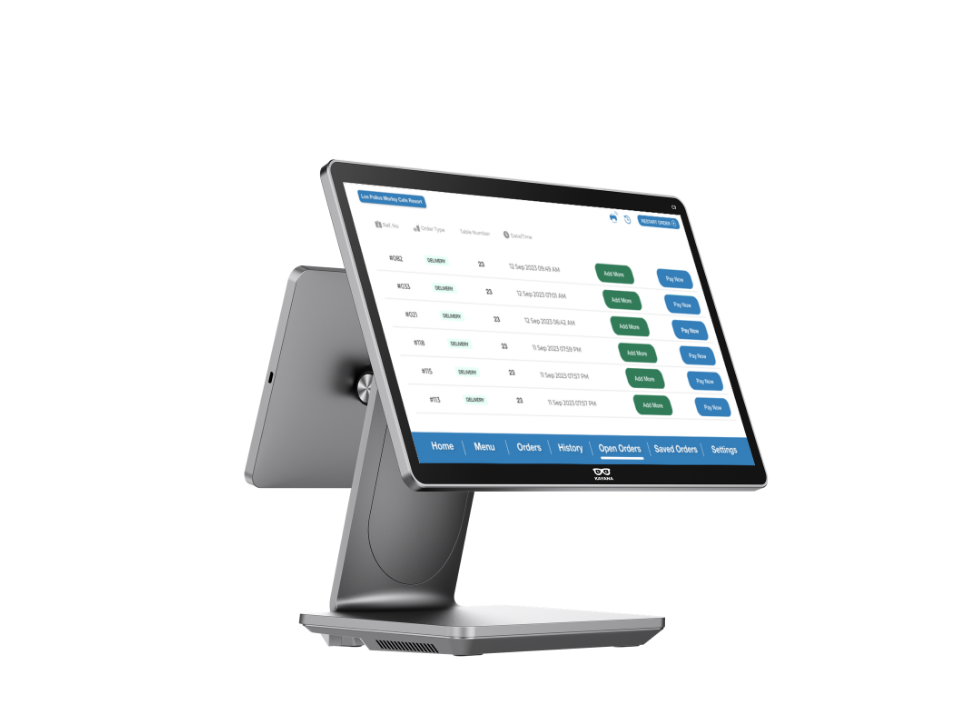
The Kayana EPOS system centralises order processing, payment handling, and live reporting for hospitality and retail operations.
It runs on commercial 15.6-inch hardware terminals or standard Android tablets, syncing counter, tableside, kiosk, and online sales into a single dashboard.
Key Features:
Centralised Dashboard: Real-time tracking of sales, inventory, and staff performance across single or multiple locations.
Offline Operation: Continues processing orders and card payments during internet outages and auto-syncs when reconnected.
Hardware & Software Integrations: Connects with kitchen display screens, card terminals, scales, and third-party accounting or delivery software.
Built-in Workflows: Supports open tabs, split bills, course timing, barcoding, and automated upsell prompts.

Switchio (by Monet+) is an enterprise-grade, in-person payment orchestration platform designed specifically for retail, global merchants, and self-service businesses.
As a hardware-agnostic software bridge, Switchio connects your entire POS terminal infrastructure, SoftPOS systems, and unattended self-service kiosks to multiple acquirers and processing centers through a single integration.
Built to eliminate single-vendor lock-in and optimize transaction fees, Switchio provides retailers with advanced Terminal Management (TMS), dynamic rule-based routing, and support for value-added services (such as fleet cards and meal vouchers). Fully PCI-DSS compliant, Switchio helps mid-market and enterprise retailers secure their checkout lines, maximize transaction approval rates, and scale globally with complete payment independence.

Swyft POS empowers U.S. businesses of all sizes with a comprehensive suite of smart payment and operational solutions. Beyond cutting-edge Point of Sale hardware and software, we streamline your entire workflow, offering integrated Accounting Services for seamless financial management and convenient ATM Services for enhanced customer experience. Whether you require robust Desktop Terminals, flexible Wireless Terminals, or specialized solutions for eCommerce and Restaurants, including innovative Pay-at-the-Table and diverse Mobile Payments, Swyft POS provides a unified platform. We are dedicated to helping you achieve faster checkouts, smarter inventory management, secure transactions, and insightful sales analytics, driving efficiency and growth across every facet of your business.

Access Witness is self-hosted software for investigating SharePoint Online permission history. It runs on the customer's Windows Server, stores recorded history in the customer's SQL Server, and helps reconstruct historical effective SharePoint authorization from collected evidence: who had access to a site, library, folder or file on a recorded date, how they got it (directly, through SharePoint, Microsoft 365 or nested Entra ID groups, or through sharing links) and what changed. When the records are not enough to confirm an answer, it shows the limits. History starts with each site's first full scan. It reads SharePoint permissions without changing them. Made by NATHELVO TECHNOLOGIES INC.; not affiliated with Microsoft.

RaiseEHS Safety Management Software centralizes environment, health, and safety operations across sites. It consolidates safety observations, work permits, audits, training records, compliance tracking, and performance metrics into one platform. Key features include risk-categorized safety observations, work permit management for confined spaces and electrical shutdowns, and accident tracking with investigation tools. The software supports audits aligned with IS 14489 and ISO 45001, task-based safety training with attendance tracking, and compliance deadline reminders. Dashboards display safety metrics, permit statuses, and site performance. Additional features include document management, job safety analysis, and employee performance tracking, connecting observations, permits, reminders, and reports in one system.

QuietAD is built for IT administrators, helpdesk technicians, and
managed service providers who manage one or more on-premises Active
Directory environments and want the routine parts of that work handled
faster, without adopting a full enterprise identity governance platform
they don't otherwise need. It performs directive changes to Active
Directory, so it's intended for use by staff who already have
appropriate, delegated AD permissions for the objects they're managing
— the OU-restriction settings exist specifically to make it easier to
extend safe, limited use to more junior helpdesk staff without
over-granting native AD permissions to do so.
Core AD management
Built for the helpdesk, not just the admin
Bulk operations
Admin-configurable safety rails
Security model