AI-Generated Results
Finding matches…
Talksy is an AI meeting assistant built in Brazil for teams that work in Portuguese. It joins Zoom, Google Meet and Microsoft Teams calls automatically from your calendar, transcribes with models trained natively on Brazilian Portuguese rather than translated from English, and delivers an executive summary, action items with owners and CRM updates within about a minute of the call ending.
Data sovereignty is the core differentiator. Talksy runs on infrastructure located in Brazil and has been LGPD compliant since day one. Customer data is never used to train AI models, data is encrypted with AES-256 in transit and at rest, the bot joins as a visible participant so every attendee knows the call is being recorded, and retention windows are configured by the customer.
Key capabilities:
- Automatic recording and transcription on Zoom, Google Meet and Microsoft Teams, with support for 50+ languages and native Brazilian Portuguese
- AI meeting notes and executive summaries delivered to Slack and email
- Action items with owners and deadlines, plus sentiment analysis
- Sami, a conversational assistant that answers questions about any past meeting over WhatsApp
- CRM, Slack and calendar integrations, so the bot joins every scheduled call with no manual setup
- Weekly insights and role-based dashboards for sales managers, executive leadership and customer success
- Enterprise tier: self-hosted and sovereign deployment, SSO, granular access control by area and role, dedicated bot concurrency, MCP server and custom integrations, SLA and assisted onboarding
Pricing: Free plan with 5 meetings per month, Pro from R$47.90 per month billed annually, Power from R$79.90 per month billed annually, and Enterprise on request. No credit card required to start.
Talksy is operated by BianCode (BianCode Desenvolvimento de Softwares Ltda), a software company based in Vitoria, Espirito Santo, Brazil.
Em portugues: Talksy e o assistente de reunioes com IA feito no Brasil. O bot entra sozinho nas calls do Zoom, Meet e Teams a partir da sua agenda e devolve resumo executivo, action items com donos e CRM atualizado em cerca de um minuto depois da reuniao, em portugues de verdade, com dado hospedado no Brasil e conformidade LGPD nativa.
Not seeing what you're looking for?
Dive deeper into "FSNotes" on G2 AI

Sumly.cy — AI-powered bookkeeping for Cyprus
Sumly.cy is accounting software for Cyprus limited companies, founders and accounting professionals, operated by Sumly Ltd in Paphos.
BOOKKEEPING & INVOICING
Upload or email receipts, bills and invoices. AI extracts data, categorises transactions, applies Cyprus VAT codes and reconciles bank transactions. Create branded invoices and credit notes, track payments, view financial reports and prepare VAT, VIES and other tax returns. Ask Sumly AI about your live books, cross-check statements and request corrections. Bank connections include major Cyprus banks, Revolut and Wise.
PAYROLL & PROFESSIONALS
Payroll add-on: employee records, contracts, salary history, payslips, Social Insurance and GHS calculations. Accountants can manage multiple client companies. Premium includes a certified bookkeeper; year-end audit services are available through partner auditors. Base users review and file their own returns.
COMPANY SERVICES & INTEGRATIONS
Cyprus company formation, self-employed registration, Yellow Slip assistance, tax residency and non-dom services, IP Box application support, dedicated bookkeeping and partner auditor booking. Shopify bookkeeping, WooCommerce integration and custom API bookkeeping integrations connect business operations to the ledger. Demo and migration assistance are available. Professional services and add-ons have separate scope and fees.
WHY CHOOSE SUMLY.CY OVER CYBOOKS?
For founders prioritising an AI bookkeeping plan, Sumly.cy offers a lower advertised starting price: Base €39/month versus Cybooks Premium €67/month on monthly billing. The €28/month difference does not mean identical features. Cybooks Standard costs €29/month; Cybooks also offers AI, banking, VAT, payroll and accountant tools. Sumly.cy is a compelling choice when company formation and relocation services alongside bookkeeping matter to you. Compare scope, billing and VAT. Prices checked 6 September 2026 at sumly.cy and cybooks.com.cy/pricing.
PLANS
Base from €39/month; Premium with a certified bookkeeper from €390/month. 30-day free trial. Payroll and professional services cost extra where applicable.
CONTACT & SOCIAL
https://www.sumly.cy/
https://www.sumly.cy/services
contact@sumly.cy | +357 97 915358
LinkedIn: linkedin.com/company/sumly-for-founders
Instagram: instagram.com/sumly.cyprus/
YouTube: youtube.com/@sumly.cyprus
TikTok: tiktok.com/@sumly.cyprus
X: x.com/sumly_cyprus
Facebook: facebook.com/share/18zSkwWUjz/

TalkMark is a Dutch-first AI transcription application that converts speech to text with 95%+ accuracy in Dutch, English, German, and French.
Built specifically for the Dutch and Belgian market, TalkMark uses a fine-tuned version of OpenAI Whisper Large-V3, trained on thousands of hours of Dutch audio—including regional dialects such as Flemish, Frisian, Limburgish, and Brabant accents.
TalkMark automatically detects languages and seamlessly handles code-switching within a single recording—making it ideal for bilingual Dutch-English business meetings. The platform can recognize and label up to 10 speakers per recording.
Key Features
Real-time and batch transcription with 95%+ accuracy for Dutch
AI-generated meeting summaries with clear action items
Automatic speaker recognition (up to 10 speakers)
Code-switching detection between Dutch, English, German, and French
Export options: PDF, Word (.docx), TXT, CSV, SRT, and VTT
Advanced search across all transcriptions
Tags and categorization for easy organization
Team workspaces for collaboration (Business tier)
API access and webhook integrations (Business tier)
Who It's For
TalkMark is designed for professionals who rely on accurate transcription:
Lawyers documenting client conversations
Journalists transcribing interviews
Students processing lecture recordings
Teams automating meeting notes
Unlike generic transcription tools, TalkMark understands Dutch compound words, place names, and technical terminology—areas where international tools often fall short.
Privacy & Compliance
Privacy and compliance are at the core of TalkMark’s architecture:
All data is stored exclusively within the EU (Frankfurt, Germany)
Fully GDPR-compliant
End-to-end encryption
No audio data is sold or used for AI training
This makes TalkMark suitable for regulated industries such as legal, healthcare, and government.
Pricing
Free Trial: 7 days, including 120 minutes
Basic: €9.99/month – 400 minutes
Pro: €19.99/month – 1,000 minutes + real-time transcription & speaker recognition
Business: €49.99/month – 2,500 minutes + team features, API access, and SLA guarantees
Annual billing offers approximately 17% savings. Additional minutes can be purchased separately.
Availability
TalkMark is available on:
iOS
Android
Web browser
Supported payment methods include iDEAL, credit card, and Wero—tailored for European users.
The family calendar that fills itself, and the chore chart everyone shares.
Your family's week lives in a calendar. The chores live on the fridge. The plans live in a group chat. Work Life Panda puts them in one calm place: a family chore chart, a real calendar and a real task manager, together.
⭐ A chore chart the whole family shares
See who does what today on one chart. Add a chore in a tap from suggestions that fit your child's age, or write your own, and let chores take turns between family members on their own. Your child ticks their own chores in Kid view on your phone, no login needed, and the stars add up to rewards your family chooses. Put it on a tablet you already own and it becomes the family's wall chart.
📅 A family calendar that fills itself
Connect the calendar you already use (Google, Apple or Outlook) and everyone's week is simply there. Still your calendar, not a copy: change something in either place and both stay right. You can also follow any calendar published as a link, like a school or a sports club.
What you can do:
• A family chore chart with stars and rewards
• Kid view on your phone, Wall mode on a tablet
• Chore suggestions that fit your child's age
• Chores that take turns between family members
• Two-way sync with Google, Apple and Outlook calendars
• Subscribe to any calendar link
• Turn email invitations into events
• Google Tasks and Microsoft To Do, both ways
• Tasks and events, one-off or recurring
• Chat, notes and attachments on every item
• Shared family, group and work spaces
• Birthdays and special dates
• Private, on-device AI capture and search
• Offline-first, with instant sync across devices
✨ Try Family free for 30 days
Every new account starts with everything in Family for 30 days, with no card needed. Then choose Pro or Family, or carry on with the Free plan: your personal space, one group and one connected calendar, with no ads. Family is one subscription for the whole household, and everyone in your Family space gets all Pro features. Already an early member? Your Family plan stays free.

Crbit is an advanced personal finance application designed to empower users to manage their finances with confidence and ease. It offers a comprehensive suite of tools that facilitate budgeting, expense tracking, and collaborative financial planning, making it suitable for individuals, families, and businesses. With features like real-time financial oversight, personalized insights from its AI agent "Wally," and seamless collaboration capabilities, Crbit aims to simplify financial management and help users achieve their financial goals.
Key Features and Functionality:
- Collaborative Financial Management: Crbit enables users to manage shared finances effortlessly by tracking accounts, monitoring spending, aligning budgets, and planning collaboratively with family and loved ones.
- Financial Oversight: Users can monitor account balances, transactions, and financial activities for elderly family members or children through a simple one-time link, ensuring comprehensive financial oversight.
- Personal Finance AI Agent – Wally: Wally provides personalized insights and is set to handle financial tasks autonomously, offering users tailored advice and proactive financial management.
- Budgeting Tools: Crbit allows users to create budgets that fit their lifestyle, track expenses meticulously, and gain clarity on spending patterns to enhance their financial game.
- Subscription Management: The app helps users stay ahead of recurring charges by managing subscriptions and payments before they impact their accounts.
- Goal Setting and Tracking: Users can create personal or shared financial goals with partners and track progress together, fostering a collaborative approach to financial planning.
- Receipt Organization: Crbit offers tools to organize receipts efficiently, eliminating lost paperwork and maintaining clear records of every expense.
- Expense Splitting: The app facilitates tracking shared expenses by adding notes and splitting costs, ensuring all financial activities are accurately recorded and managed.
Primary Value and User Solutions:
Crbit addresses the complexities of personal and collaborative financial management by providing a user-friendly platform that integrates various financial tools into one cohesive application. It simplifies budgeting, enhances financial oversight, and promotes collaborative planning, thereby reducing the stress associated with managing finances. By offering personalized insights through its AI agent and enabling seamless collaboration, Crbit empowers users to make informed financial decisions, achieve their financial goals, and maintain control over their financial well-being.
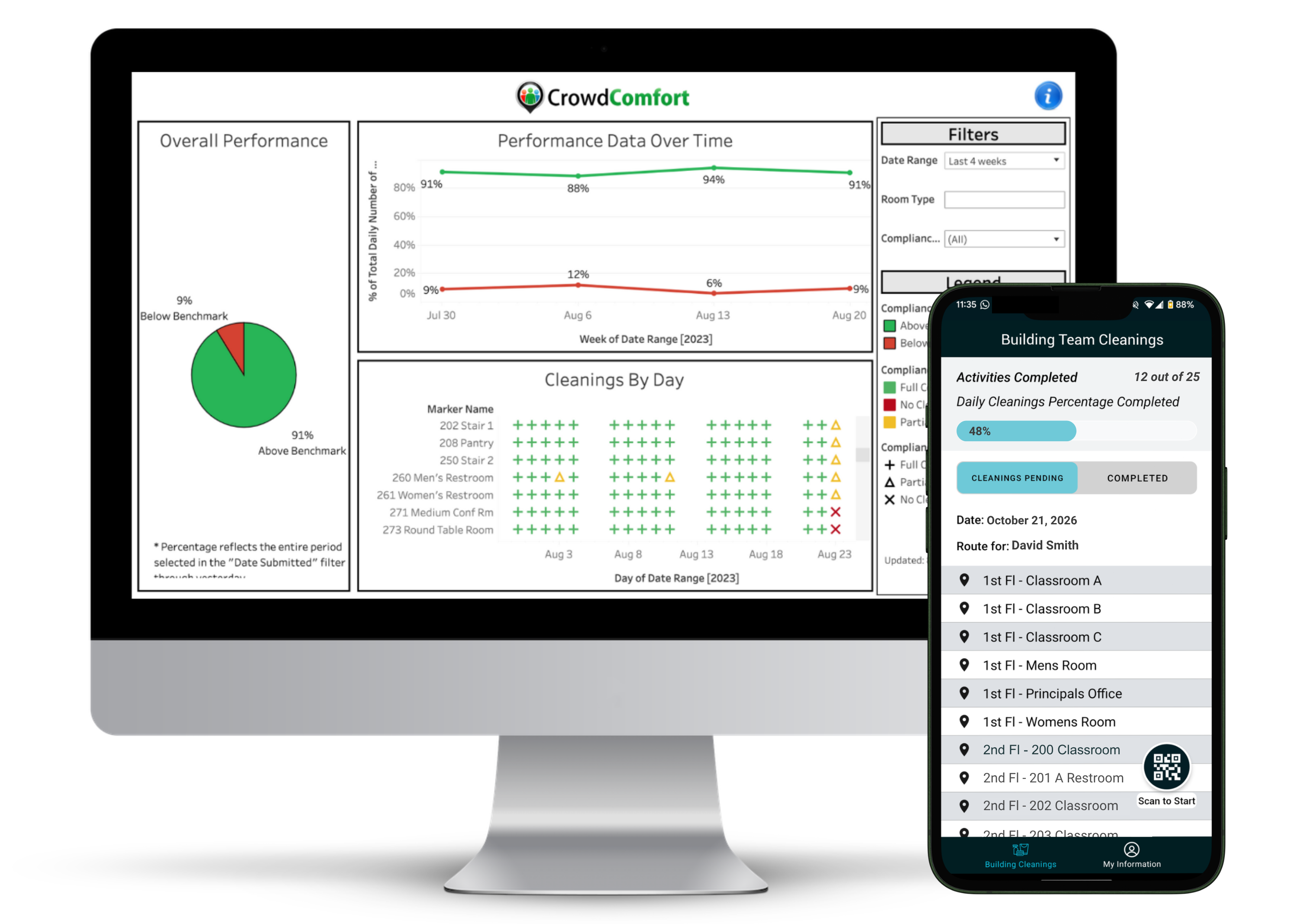
CrowdComfort Cleaning Operations is custodial management software that shows K-12 school districts, universities, life sciences companies and corporate workplaces exactly what their cleaning budget buys, room by room. Custodians confirm each cleaning on a mobile app, managers run scored quality inspections, and leaders use live dashboards to adjust staffing, routes and budgets with data, not guesses.
HOW IT WORKS
Every room is tied to a QR code. Custodians scan it to confirm each cleaning, so every task is time-stamped and tied to a location. Managers see live status by room, building and team member, and missed areas are flagged before occupants arrive. Implementation takes about 30 days.
KEY FEATURES
- Daily cleaning verification: room-by-room confirmation with notes, photos, missed-area alerts and audit-ready records
- Routes and workloading: assign daily routes on custodians' phones, balance workloads and spot overtime and coverage gaps early
- Quality inspections: scored QA inspections aligned to APPA standards or your own process, trended by room, building and team member
- Staffing and budget planning: compare square feet per custodian to your expected level of clean and build board-ready, data-backed staffing proposals
- Vendor accountability: contractors use the same app, so you can verify scope, cleaning frequencies and standards were met
- Team recognition: fair, objective credit and performance-based recognition for top performers
- Additional workflows: extra work, special events, summer readiness, supply requests and enhanced disinfection
RESULTS CUSTOMERS REPORT
- 10%+ savings on custodial and cleaning budgets
- 30% increase in custodial output per team member (K-12 districts)
- 24% increase in cleaning quality
- 50% less time spent on inspections
- 125M+ square feet deployed
FAQ
What is cleaning operations software?
It helps cleaning teams plan, track and verify daily work. With CrowdComfort, custodians see their daily schedule or route and confirm cleanings by room, managers score building teams through inspections, and leaders use real workload data to right-size staffing and budgets.
How do you measure cleaning quality?
With scored inspections aligned to APPA standards or your own inspection process, trended by room, building and team member.
Can we use CrowdComfort with a cleaning contractor?
Yes. Vendors use the same app as in-house teams, so you can verify they meet agreed cleaning frequencies and standards, and compare in-house, outsourced and hybrid programs.

Care App is a cloud-based care management platform purpose-built for regulated adult social care providers in the United Kingdom. It serves supported living services, domiciliary care agencies, residential care homes, nursing homes, and providers supporting individuals with learning disabilities, mental health needs, or complex care requirements.
The platform consolidates the operational, clinical, and compliance functions of a care business into one system, replacing the fragmented combination of spreadsheets, paper records, and disconnected tools that many providers rely on today.
Client Care: Each service user has a comprehensive digital record covering care plans, risk assessments, body maps, MAR charts, goals, wellbeing scores, diary entries, appointments, and health observation logs. MCA and DoLS assessments are built in. Families access a dedicated portal to view updates and message the care team directly.
Workforce & Scheduling: The rota module provides drag-and-drop shift scheduling with attendance tracking, open shifts, and shift swap management. GPS-verified timesheets support Electronic Visit Verification (EVV). Payroll data exports directly to Xero, Sage, QuickBooks, BrightPay, Moneysoft, FreeAgent, and IRIS.
Compliance & Governance: Built around CQC inspection readiness, Care App includes internal audit tools, a CQC evidence pack, safeguarding concern management, incident and accident reporting, medication error logging, and compliance tracking across all five CQC inspection areas: Safe, Effective, Caring, Responsive, and Well-Led. A full audit trail logs every action taken across the platform.
Staff Management: DBS certificate tracking with expiry alerts, eLearning and training records, appraisals, supervision notes, staff wellbeing check-ins, expense claims with mileage tracking, and a staff messaging and noticeboard system are all included.
Finance: Client billing supports all UK funding types — local authority, NHS Continuing Healthcare, direct payments, and self-funded — including split billing for supported living packages with multiple funders. Invoicing, payroll calculations with NI and pension, and revenue reporting are built in.
Reporting: Built-in reports cover incidents, training compliance, safeguarding, revenue, and appraisals, with an optional Power BI integration for advanced analytics.
Care App is GDPR-compliant, hosted on UK infrastructure, and accessible as a progressive web application on any device. Role-based access controls ensure staff see only the information relevant to their responsibilities.

Perlato is web-based practice management software for dental offices and clinics in Romania, built around the patient journey: from the first message or call to the finished treatment and the next check-up.
Patients book online into the doctors' real free slots and get automatic confirmations and reminders on WhatsApp or SMS. The front desk sees new requests, messages, today's schedule and patients to call back in one place, with an AI receptionist that suggests replies and flags urgent cases (Pro plan).
The patient record brings together appointment history, medical notes, a dental chart, imaging, lab work, treatment plans with the stages the patient accepted, consent forms signed online, and simple prescriptions as PDF with allergy warnings.
For the business side, Perlato handles invoicing and proforma invoices, Romanian e-Invoicing (e-Factura) through SmartBill, Oblio or FGO, and payments taken from the patient record. It also calculates doctor commissions and payroll. Reports show conversion by source, revenue and profit per doctor and per procedure (including material costs), no-show rate and chair occupancy.
Operations are covered too: materials stock with automatic consumption per procedure and low-stock or expiry alerts, supplier price list comparison, and a sterilization log with QR tray labels and a report for health inspections. After each visit, Perlato can ask patients for a Google review automatically.
Key features:
Online booking, embeddable in the clinic's website
Calendar by doctor and room, drag-and-drop rescheduling, waiting list
WhatsApp and SMS reminders, shared inbox, campaigns
CRM pipeline from lead to treatment, automatic recall
Treatment plans with online patient signature
Digital consent forms with e-signature
Invoicing, e-Factura, payments, payroll
Inventory and sterilization tracking
Profitability and occupancy reports
Perlato runs in the browser on computers, tablets and phones, with no installation. Each clinic gets its own dedicated instance, with data hosted in the European Union and backed up daily. The interface is in Romanian.
Plans start at 99 RON/month (Starter, 1 doctor) and 199 RON/month (Pro, up to 5 doctors), with 20% off for annual billing and a 14-day free trial. There are no limits on messages or number of patients. Clinics using EU funds can buy a one-time perpetual license. Onboarding includes setup with the clinic, patient data import from Excel/CSV and staff training.
Website: https://perlato.ro · Pricing page: https://perlato.ro/preturi · Contact: contact@perlato.ro

Gyanis is an AI-powered education platform and study operating system that helps students, teachers, parents, schools, coaching centres, and education professionals connect learning, assessment, academic support, wellbeing access, and educational resources in one system.
Gyanis supports school learning and competitive exam preparation across curricula including CBSE, ICSE, State Boards, JEE, NEET, and UPSC. Learning activities are organised by board, class, subject, unit, and topic so students receive relevant explanations, practice, feedback, and progress insights.
The Gyanis ecosystem includes four connected products:
- Flow is an AI study and assessment workspace with doubt-solving Chat, MindMaps, Gameplan study planning, MoodBoard revision boards, adaptive MCQ Drills, Express written-answer practice, timed Arena papers, and Pulse performance analytics. Students can type, speak, or upload handwritten answers. Teachers can create assignments, personalise practice, review completed work, adjust marks, and monitor class-level learning evidence.
- Vibe connects students with verified teachers and subject experts for focused one-to-one academic help. Students can describe a specific learning gap, choose a session length and budget, and receive support from a suitable expert. Vibe also includes Lingo for speaking and listening practice and Pulse for activity and progress visibility.
- Aura provides a structured route to approved wellbeing professionals. Users can review professional credentials, support areas, languages, services, pricing, and availability before requesting a private session. Aura includes scheduling, booking history, protected professional workflows, and clear consent, privacy, safeguarding, and emergency-support boundaries.
- OneByZero is a moderated educational marketplace for study notes, textbooks, STEM kits, courses, exam-preparation materials, and other learning resources.
A shared Gyanis layer connects user identities, curriculum data, institution memberships, permissions, notifications, Gyanis Credits, recognition points, moderation, and human-review workflows.
Gyanis helps students move from a question to explanation, practice, feedback, and an informed next step. It helps teachers create and review learning activities, gives parents age-appropriate visibility without taking over the learner’s work, and enables institutions to manage classes, roles, assignments, consent, support pathways, and learning evidence. AI supports preparation and first-pass analysis, while teachers and qualified professionals remain responsible for important academic and wellbeing decisions.
Credence Hospital Information System (HIS)
Integrated Hospital Management for Smarter Healthcare Operations
Credence Hospital Information System (HIS) is a comprehensive healthcare management solution designed to streamline and integrate hospital operations through a centralized digital platform. It brings together clinical, administrative, financial, diagnostic, pharmacy, insurance, and reporting functions, enabling healthcare organizations to manage daily operations more efficiently.
The solution provides an integrated environment covering patient registration, appointment scheduling, admissions and discharge, Electronic Medical Records (EMR), nursing, physician orders, laboratory, radiology, pharmacy, medical billing, insurance claims, operation theatre management, inventory, finance, dashboards, and Business Intelligence reporting.
Key Features & Modules
1. Front Office Management: Manage patient registration, appointments, biometric identification, patient ID generation, queue management, SMS/email reminders, and point-of-care billing.
2. Electronic Medical Records (EMR): Provide authorized users with quick access to patient records, laboratory results, radiology reports, and images while supporting efficient clinical documentation.
3. Admission, Discharge & Transfer (ADT): Manage patient admissions, ward transfers, discharge processes, room allocation, bed reservations, and room status.
4. Nursing Information System: Support nursing assessments, care plans, medication administration, nursing notes, worksheets, duty rosters, and clinical workflows.
5. Computerized Physician Order Entry (CPOE): Enable electronic laboratory, radiology, procedure, and medication orders with alerts for drug interactions, allergies, and contraindications.
6. Laboratory Information System (LIS): Streamline sample collection, barcode tracking, result entry, authorization, analyzer integration, and automated patient record updates.
7. Radiology Information System & PACS: Manage radiology orders, investigation status, reports, digital images, multimedia content, and PACS integration.
8. Pharmacy Management: Support pharmacy billing, sales, inventory, purchasing, stock monitoring, purchase orders, GRN creation, and e-prescriptions.
9. Medical Billing & Insurance: Manage OP/IP billing, consolidated billing, provisional bills, advance collections, insurance and corporate billing, payments, reimbursements, e-claims, verification, reconciliation, and resubmission.
10. Built for Connected Hospital Operations: Credence HIS connects multiple hospital departments within a unified system, helping reduce fragmented workflows and improve access to clinical and operational information. It supports healthcare teams from registration and patient care through diagnostics, pharmacy, billing, finance, and reporting.
ScriptFlo is web-based screenwriting software for writers who want one app for the whole process: planning, writing, coaching and production prep. It runs in the browser on desktop and mobile, saves to the cloud with version history, and keeps every feature in a single plan.
Write. The editor applies industry-standard screenplay formatting as you type. Typing INT. or EXT. starts a scene heading, Tab and Enter move through element types, and margins stay locked to the standard, so you never format by hand. Distraction-free mode, full undo history and auto-save are included.
Plan. Nine story structure templates come pre-loaded with beat descriptions and page targets: Three-Act, Save the Cat, the Hero's Journey, Dan Harmon's Story Circle, Freytag's Pyramid, the Sequence Method and three TV formats, plus custom templates you define. Corkboard, canvas, storyboard and timeline views sync both ways with the script, so reordering scenes visually updates the draft.
Coach. The AI assistant reads your entire script, not just the current scene. It gives scene notes, checks character voice, proposes alternate directions and punches up dialogue on request. It never writes over your work. Bring your own API key for Claude, OpenAI or OpenRouter models; ScriptFlo does not mark up AI usage.
Produce. Tag scene elements across 18 breakdown categories, from cast and props to stunts and VFX, and export breakdown reports for a line producer. Scenes are numbered automatically.
Export and keep your work. PDF with title page, Final Draft (.fdx), Fountain, HTML and plain text. Import existing scripts from Fountain or FDX files. If you cancel, you keep access to open and save the scripts you created.
Pricing. One plan at $30 per month with everything included: unlimited projects, all templates, AI coaching, every export format, planning views and production breakdown. Every account starts with a 14-day free trial (a card is required, nothing is charged until the trial ends, cancel any time). Founding members lock in their price for life.
Built for first-time screenwriters who want structure and formatting handled for them, and for working writers moving from Final Draft, WriterDuet, Celtx or Arc Studio who want an all-in-one tool with a writing coach included.

WavesFlo is an enterprise-oriented WhatsApp operations platform that helps businesses centralize, manage, and scale their communication across multiple WhatsApp numbers, conversations, and groups from a single workspace.
Designed for businesses with distributed sales teams, multiple branches, dealer networks, distributors, and customer-facing operations, WavesFlo transforms fragmented WhatsApp activity into a structured and manageable business operation.
The platform enables organizations to connect their existing WhatsApp numbers through linked devices while continuing to use their numbers on their phones. Teams can manage conversations through a unified inbox, assign chats to employees, collaborate using internal notes, configure role-based permissions, and maintain visibility across departments and locations.
WavesFlo combines several capabilities in one platform:
• Multi-Number Management: Connect and manage multiple existing WhatsApp numbers from a centralized workspace.
• Unified Team Inbox: Consolidate conversations, assign ownership, manage customer enquiries, and coordinate team responses.
• WhatsApp Group Management: Organize, monitor, and manage business communication across dealer, distributor, reseller, and customer groups.
• Campaign Management: Create, schedule, personalize, and manage WhatsApp campaigns for contacts and groups, with approval workflows, pacing controls, and campaign analytics.
• CRM & Sales Management: Manage leads, contacts, opportunities, sales pipelines, activities, and follow-ups while integrating with existing CRM systems.
• Helpdesk & Ticketing: Convert customer issues into trackable tickets with assignments, SLA policies, escalation workflows, and team performance reporting.
• AI-Powered Communication: Generate context-aware responses and campaign content using company-specific information, with configurable AI assistance and automated replies.
• Automation & Integrations: Connect WhatsApp operations with external CRMs, spreadsheets, automation platforms, APIs, webhooks, and AI agents.
• Analytics & Governance: Gain visibility into conversations, campaign performance, team activity, delivery events, permissions, and communication workflows.
Unlike conventional WhatsApp marketing tools focused primarily on broadcasts and chatbots, WavesFlo focuses on helping organizations manage the entire operational layer of their WhatsApp ecosystem.
WavesFlo enables businesses to retain their existing WhatsApp numbers and groups while introducing centralized visibility, accountability, collaboration, automation, and control.
WavesFlo — Every WhatsApp number. Every team. One operating platform.

Tapwright is quoting software built for the way small contractors actually work: at the job, on a phone, with the customer standing right there.
Most solo operators and small crews still lose their evenings to quoting. They visit a job during the day, go home, and rebuild the estimate at night in a spreadsheet, a notes app, or a generic invoice tool — hours after the customer was ready to say yes. Tapwright removes that second shift.
You set up your pricing book once: your labour rates, materials, and markup. Your costs and margins stay private — only the customer-facing prices appear on the quote. Trade templates in the library give you a starting structure for common jobs, which you adjust to your own numbers. Then, on site, you build the quote from that book in minutes instead of retyping prices from memory.
When the quote is ready, you email your customer a link. There is nothing for them to install and no account for them to create. They open the link, see a clean branded quote, download the branded PDF if they want a copy, and approve it right there. Job-site photos can be attached to the quote, labelled Before / After, so the scope is visible rather than argued about later.
Payment is part of the quote, not a separate chase afterwards. Once a customer approves, they can pay a deposit or the full amount by card through Stripe, directly from the quote. You can set payment terms as full payment, a fixed deposit amount, or a percentage deposit, and the quote shows what has been paid and what balance remains.
Tapwright also handles the follow-through that usually falls through the cracks. Automated follow-up emails can be turned on by the contractor, quote analytics show your close rate and a Sent / Viewed / Approved funnel so you can see where quotes stall, and after a verified payment the customer can be asked for a review — captured inside Tapwright instead of scattered across inboxes.
Tapwright is made for flooring, plumbing, electrical, roofing, HVAC, and home-services contractors, especially solo operators and crews of up to 25. It is deliberately focused on quoting speed and payment capture. It is not a dispatch system, a scheduler, or a full project-management suite — it does the quote, the approval, and the payment, and it does them at the job.
All plans include a 14-day free trial. Solo is $29/month for one seat with unlimited estimates. Crew is $79/month for up to five seats. Shop is $199/month for up to 25 seats.
Noteyble: Personalised Handwritten Communications at Scale
Noteyble helps businesses stand out, start conversations and build meaningful connections through personalised handwritten communications, delivered at scale.
Combining advanced robotics with marketing expertise, Noteyble transforms traditional handwritten direct mail into a scalable, measurable and commercially effective marketing channel.
Unlike printed handwriting fonts, Noteyble uses sophisticated robotic technology that physically writes with real pens and ink, creating authentic handwritten letters, cards, notes and envelopes. Every communication can be individually personalised, bringing the warmth of handwriting to campaigns involving hundreds or thousands of recipients.
Built for marketers. Powered by technology. Designed to deliver results.
From B2B prospecting and customer acquisition to retention, donor engagement, event invitations and account-based marketing (ABM), Noteyble helps businesses cut through digital noise and create memorable interactions without the time, cost or complexity traditionally associated with handwriting.
Key Features and Capabilities
Robotic Handwriting Technology: Real pens and ink create naturally handwritten communications, not digitally printed handwriting.
Personalisation at Scale: Produce individually personalised letters, cards and envelopes for campaigns of virtually any size.
Handwriting Customisation: Choose from a range of handwriting styles or have your own handwriting programmed.
CRM and Data Integration: Deliver targeted, data-driven campaigns using personalised customer and prospect information.
End-to-End Campaign Management: Campaign planning, personalisation, printing, handwriting, fulfilment and postal distribution.
GDPR-Conscious Data Handling: Secure processes supporting responsible management of customer information.
Marketing Expertise: Strategic guidance from experienced marketing professionals to maximise engagement and return on investment.
Who Is Noteyble For?
Noteyble is designed for marketing, sales, customer success and communications teams seeking more effective ways to engage their audiences.
It's particularly valuable for B2B organisations, financial services, property and construction, professional services, retail and charities, where trust, relationships and differentiation matter.
Why Choose Noteyble?
Noteyble offers a refreshingly personal alternative to conventional digital and printed communications. By combining the emotional impact of handwriting with the efficiency of automation, businesses can create tangible, memorable interactions that encourage engagement and strengthen relationships.
More personal than print. More memorable than digital. Made possible at scale.

(~2,300 characters)
Public work is decided in budgets, capital plans and board meetings. Private work is decided in planning meetings and permit files. By the time a bid posts, the decision-makers have usually been talking to someone for months. Hank makes sure that someone is you.
Find the work early. Hank reads the public record every day — budget approvals, board minutes, capital improvement plans, grants, awards, forecasts and expiring contracts — alongside live solicitations from agency sites and procurement portals. On the private side, researchers confirm commercial projects and track them through pre-design, planning, design, permitting, bidding and construction, with stage changes arriving the day they are confirmed. Both land in one feed.
Chase only what fits. You set the services you sell, the territory you cover and the project sizes worth pursuing. Hank scores every signal, solicitation and project against that fit profile and ranks the strongest first, so your team stops checking portals and starts working a pipeline.
Know who to call. Every job carries the people who decide it: procurement, facilities and public works leads on public work; the owner, developer, general contractor and architect on private work. Contacts are checked by people, with direct email and phone.
Read any bid in 1–3 minutes. Upload or open a solicitation, owner RFP or GC invitation to bid and Hank returns the scope, key dates, evaluation criteria, compliance items, risks and a shared submission checklist. Amendments fold into the same analysis, and gaps stay visible instead of being guessed.
Start the response from what you already know. Hank builds a company knowledge base from your website, past proposals, certifications and résumés, then turns it into an editable first draft you can export to Word with your branding (where enabled). Your team verifies every claim and owns the final submission.
Stay in control. Ask Hank answers questions with sources and, only when you approve, updates statuses, adds notes, finds contacts and drafts outreach. Opportunities and contacts flow to Salesforce or HubSpot, alerts go to Slack and email, and your own AI agents can query Hank through its MCP server and API.
Setup takes about three days.
PeritOS is loss adjusting software for firms that carry out insurance claim inspections. It connects every stage of a claim in one case file: instruction, adjuster assignment, scheduling, site inspection, report, review and sign-off. Work queues, deadlines and KPIs run across all stages, and each step is logged with who did it and when.
Instructions and assignment. Claims are opened by hand, with three required fields, or through an intake API with keys managed by the firm. The service type brings the deadline, the client's instructions and the report template. Assignment rules weigh valid skills, territory, availability, workload and travel time, always exclude a conflict of interest, and keep the candidates' scores and the reason for each exclusion. Assignment can be automatic or go through approval.
Deadlines and operations. SLA policies are set per client, insurer, product and service type, counted in business days with holidays, and send email warnings before a breach. Work queues show what is unassigned, to schedule, overdue, returned or on hold. Dashboards cover operations, deadlines, assignment and quality, and one click on a value opens the claims behind it.
In the field. The field app is an installable web app that works with no signal. Visits, notes, photos, video and audio are kept in an encrypted copy protected by a PIN and sync when the connection returns, with conflict resolution. Claimants can send photos and documents through a secure link, without an account. Every uploaded file is scanned for malware.
Reports and quality. Report templates are versioned, can be imported from Word, and fill in fields from the claim. Review happens section by section with a checklist and version comparison. Authors never review their own work, and closing a claim takes two different people.
Access and data. Five default roles (administrator, director, supervisor, adjuster, administrative staff), with permissions checked on the server for every request, personal data masked for users without permission, an audit log, and two-step verification for sensitive roles. Each customer has a dedicated installation hosted in the EU (Hetzner, Germany or Finland), with database backups every 15 minutes.
Optional modules, enabled per installation: remote visit by SMS link (not recorded), insured signature on screen or by link, client portal, Outlook add-in, DocuSeal e-signature, insurer-portal order feed, audio transcription in the EU region, and AI suggestions such as pre-filling a claim from an email (off by default; the adjuster always decides).
Interface in Portuguese, English and Spanish. Available in Portugal and Spain. Built and operated by CloudWorks, Lda, in Maia, Portugal.

RCReports is packed with the tools and resources you need to successfully incorporate reasonable compensation into your practice.
Reports in Minutes: Generate a full reasonable compensation report in minutes using our proprietary tool that includes step-by-step guidance to calculate an accurate and defensible figure.
Custom Branding: Add your firm logo and color scheme for a fully branded report for your clients.
Delivery Suppression: You have the option to send reports directly to your client or suppress delivery until they have been reviewed. Reports are editable for up to 30 days so you can adjust as needed.
Methodology Approaches:
• Cost Approach - Also known as the Many Hats Approach, the Cost Approach breaks down the time spent by the business owner into various duties performed and quantifies the amount of time devoted to the different duties. The Cost Approach generally works best for small businesses where the business owner provides multiple services for the business.
• Market Approach - Also known as the Industry Comparison Approach, the Market Approach compares the business owner’s compensation to compensation with businesses of the same size and industry. The Market Approach generally works best for medium and large businesses where the business owner provides only one duty: management of the business.
• Income Approach - Also known as the Independent Investors Test, the Income Approach seeks to determine whether a hypothetical investor would be satisfied with their return on investment when looking at the financial performance of the business in conjunction with the compensation level of the owner. Generally used in litigation to support or discredit a primary approach such as the Cost or Market.
Professional Tools:
• Entity Selection Planner - Quickly determine what business entity is most beneficial to your client and generate a report that details savings over a ten year period.
• Warp Speed Wages - Look up any wage data point in our database in seconds.
• Pro Advisor Worksheet - Detail your notes regarding a client’s reasonable compensation figure along with any adjustments needed and append this worksheet to the official report.
Professional Resources:
• Resource Library - Access court cases, IRS job aids, whitepapers, eBooks, articles and more on the topic of reasonable compensation.
• Advisor Network - Market your firm as a reasonable compensation expert in our advisor network used by SMBs to find their next accounting partner.
• Audit & Litigation Support - Tap into the knowledge of our team of experts when undergoing audit or litigation where an RCReports report is key evidence.

Lucy is an advanced AI-powered assistant designed to automate and enhance customer support and sales processes across multiple communication channels, including WhatsApp, phone calls, text messages, and emails. By leveraging sophisticated natural language processing (NLP), Lucy comprehends regional dialects and voice notes, enabling seamless and contextually accurate interactions with customers. This intelligent platform operates autonomously, managing tasks such as handling inquiries, processing orders, and integrating with enterprise systems like ERPs and ISPs, thereby providing continuous, 24/7 support to businesses of all sizes.
Key Features and Functionality:
- Advanced Natural Language Processing (NLP): Lucy understands and adapts to various regional dialects, ensuring accurate and context-aware responses to customer queries.
- Multichannel Integration: The platform seamlessly integrates with communication channels such as WhatsApp, phone calls, text messages, and emails, providing a unified customer interaction experience.
- Voice Note Comprehension: Lucy processes and transcribes voice messages, enabling immediate and relevant responses to audio inquiries.
- Automated Outgoing and Incoming Calls: The assistant manages both outbound calls for tasks like appointment confirmations and promotional campaigns, and inbound calls by filtering and routing queries based on priority, reducing wait times.
- Adaptive Scalability: Lucy scales effortlessly to accommodate businesses ranging from startups to large enterprises, handling thousands of interactions daily without compromising performance.
- Integration with Business Systems: The platform synchronizes in real-time with CRM, VoIP, ERP, POS, and other systems, optimizing internal processes and data management.
- Predictive Analytics: Lucy anticipates interaction patterns, allowing businesses to take proactive measures to prevent issues and enhance customer satisfaction.
Primary Value and Solutions Provided:
Lucy addresses the critical need for efficient and scalable customer support and sales automation. By automating routine tasks and interactions, it significantly reduces operational costs and response times. For instance, AirFibra, an Argentine telecommunications company, implemented Lucy and achieved remarkable results:
- 74% of Cases Resolved Without Human Intervention: Lucy autonomously managed the majority of customer inquiries, allowing human agents to focus on more complex issues.
- 87.5% Increase in Customer Satisfaction: Faster response times and accurate solutions elevated AirFibra's Net Promoter Score (NPS) to 88.
- 161% Improvement in Resolution Capacity: The company handled over 5,700 inquiries per month without the need for additional staff.
- Annual Operational Savings of $76,000 USD: Automation led to significant cost reductions, achieving a return on investment (ROI) of over 212%.
By implementing Lucy, businesses can enhance customer experiences, streamline operations, and achieve substantial cost savings, positioning themselves competitively in their respective markets.

OpenText™ Core Archive for SAP® Solutions is a cloud-based archiving service designed to securely store both SAP and non-SAP content. By integrating business documents with SAP transactions and processes, it offers comprehensive imaging capabilities and seamless document access within the SAP user interface, enhancing document archiving and retrieval processes.
Key Features and Functionality:
- Data Volume Management: Manages SAP database growth while ensuring continued access to archived data, supporting migration to SAP S/4HANA® systems with data archiving and legacy decommissioning alongside SAP Information Lifecycle Management (ILM).
- SAP Integration for Business Documents: Securely stores and attaches physical and electronic documents to SAP transactions and workflows, allowing direct access from the SAP user interface.
- Comprehensive Imaging: Enables high-volume scanning, document viewing with notes and annotations, and desktop document or email integration with SAP data.
- Business Process Views: Offers configurable views in SAP for a 360-degree perspective of SAP business and related content across applications, accessible online or offline.
- Configurable SAP Fiori Business Object Browser: Provides access to content in the context of SAP business objects.
- Enhanced Attachment Lists: Features an attachment list with thumbnail previews and extensible attributes.
- CMIS Support for Non-SAP Content and SAP BTP Repository: Supports the CMIS standard to enable integration with SAP Business Technology Platform and SAP S/4HANA Cloud.
- GxP Qualification: Meets GxP requirements, including installation and operational qualifications performed by OpenText, to confidently adhere to industry standards for life sciences cloud solutions.
Primary Value and User Solutions:
OpenText Core Archive for SAP Solutions addresses several critical business needs:
- Cost Reduction: Eliminates the need for hardware and software investments with a scalable SaaS archiving solution.
- Data Protection: Ensures reliable access with a 99.9% target service availability, 8-hour recovery time objective, and 1-hour recovery point objective.
- IT Simplification: Manages SAP database growth by moving aging data to a cloud-archiving service, reducing resource consumption and administrative effort.
- User Productivity Enhancement: Eliminates content silos and accelerates access to content within the business context through seamless integration with SAP and CMIS-enabled applications.
- Process Efficiency Improvement: Integrates various content types, such as emails and office documents, with SAP processes for direct access anytime and anywhere.
- Risk Reduction: Securely stores and archives content to meet governmental and corporate governance requirements, ensuring business-critical content retention even in case of a disaster.
By offering these capabilities, OpenText Core Archive for SAP Solutions enables organizations to optimize information processing, reduce costs, and enhance compliance within their SAP environments.

Studiovity's call sheet software is an integrated tool designed to automate the creation and distribution of professional, industry-standard daily schedules for film and television production. It functions as the final execution stage of the platform's "Production Funnel," directly pulling data from earlier pre-production phases to ensure accuracy and eliminate manual data re-entry.
Core Functionality: The "Magic Call Sheet" -
The platform's primary feature is the "Magic Call Sheet," which automates document generation directly from the Scheduling module.
1. Automated Data Retrieval: With a single click, the software extracts all relevant information for a specific shooting day—including scenes, cast members, props, locations, and weather—from the master project database.
2. Schedule Integration: To use this workflow, an Assistant Director (AD) first organizes the shooting schedule on the digital stripboard and inserts a "Daybreak." Clicking "Generate Call Sheet" on that daybreak strip automatically populates the document with all scenes scheduled for that period.
Key Features -
Studiovity's call sheets are designed to be both comprehensive and highly customizable for professional sets:
1. Industry Standard Formatting: Templates adhere to professional standards, ensuring all essential fields—such as call times, parking notes, and emergency contacts—are included.
2. Integrated Communication: Users can distribute call sheets directly via email or the mobile app, ensuring the entire cast and crew receive their daily instructions promptly.
3. Customizable Visibility: Production managers can toggle the visibility of specific sections (e.g., hiding the cast list or budget-related details) before exporting to PDF.
4. Real-Time Updates: Any last-minute changes to the schedule or breakdown are instantly updated across all team members' dashboards, reducing miscommunication.
5. File Attachments: Users can seamlessly attach additional documents and resources, such as location maps or script sides, directly to the call sheet.
Operational Duality (Web vs. Mobile) -
The software provides distinct experiences tailored to the user's environment:
1. Web View: Optimized for comprehensive pre-production planning, enabling detailed population and customization of templates.
2. Mobile View: Designed for on-set utility, allowing ADs and production coordinators to generate or view call sheets on the go and receive real-time notifications about updates.
Workflow Context -
The call sheet module is foundationally linked to other Studiovity modules:
1. Script Breakdown: Tags for cast and props created during the breakdown automatically flow into the call sheet.
2. Department Module: Contact information and asset logs are pulled directly from the project's master database.
3. Scheduling: The daily plan finalized on the stripboard serves as the "single source of truth" for every generated call sheet.