Compare this with other toolsSave it to your board and evaluate your options side by side.
Save to board

TCC Reviews & Product Details

Profile Status

This profile is currently managed by TCC but has limited features.

Are you part of the TCC team? Upgrade your plan to enhance your branding and engage with visitors to your profile!

TCC Media

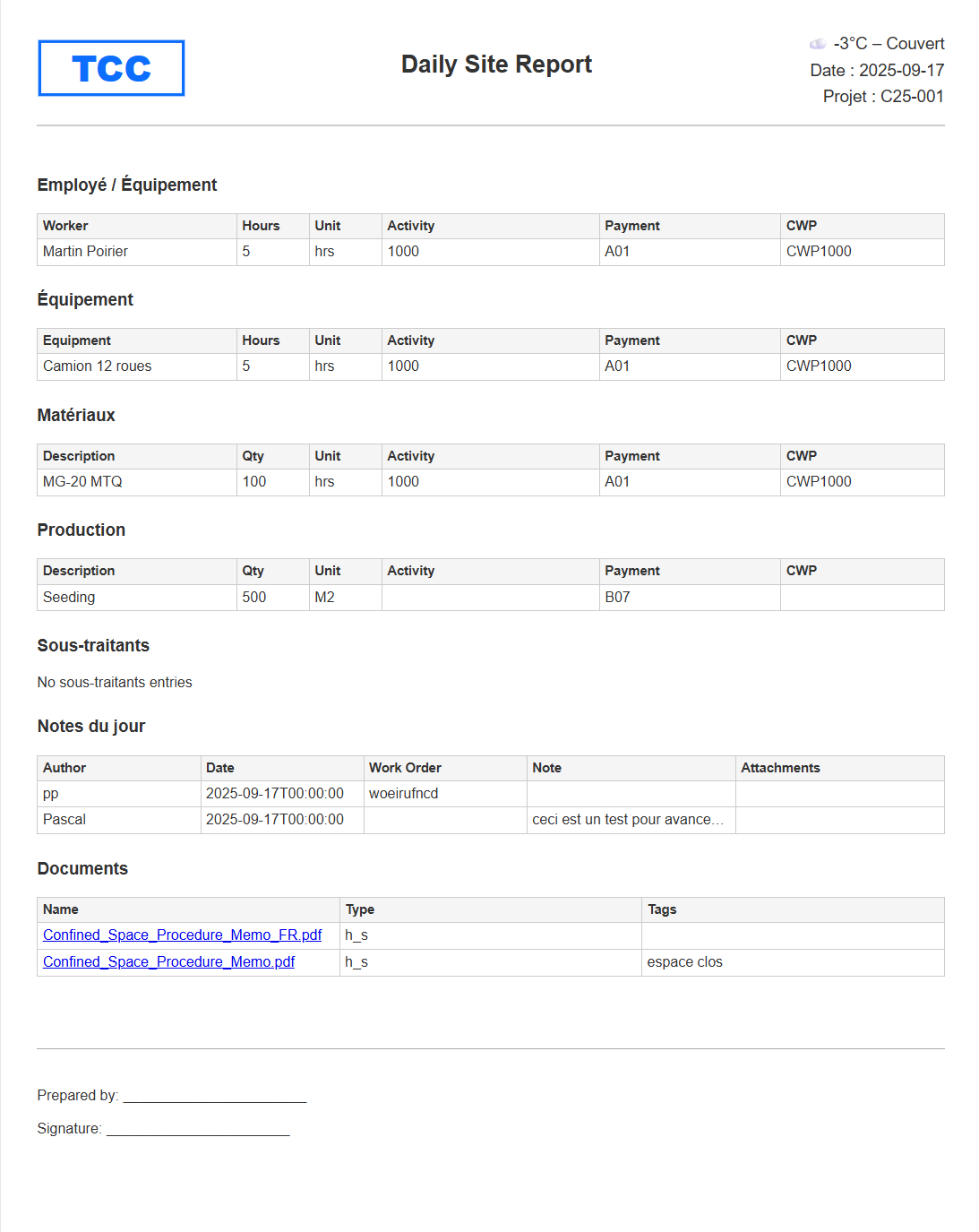
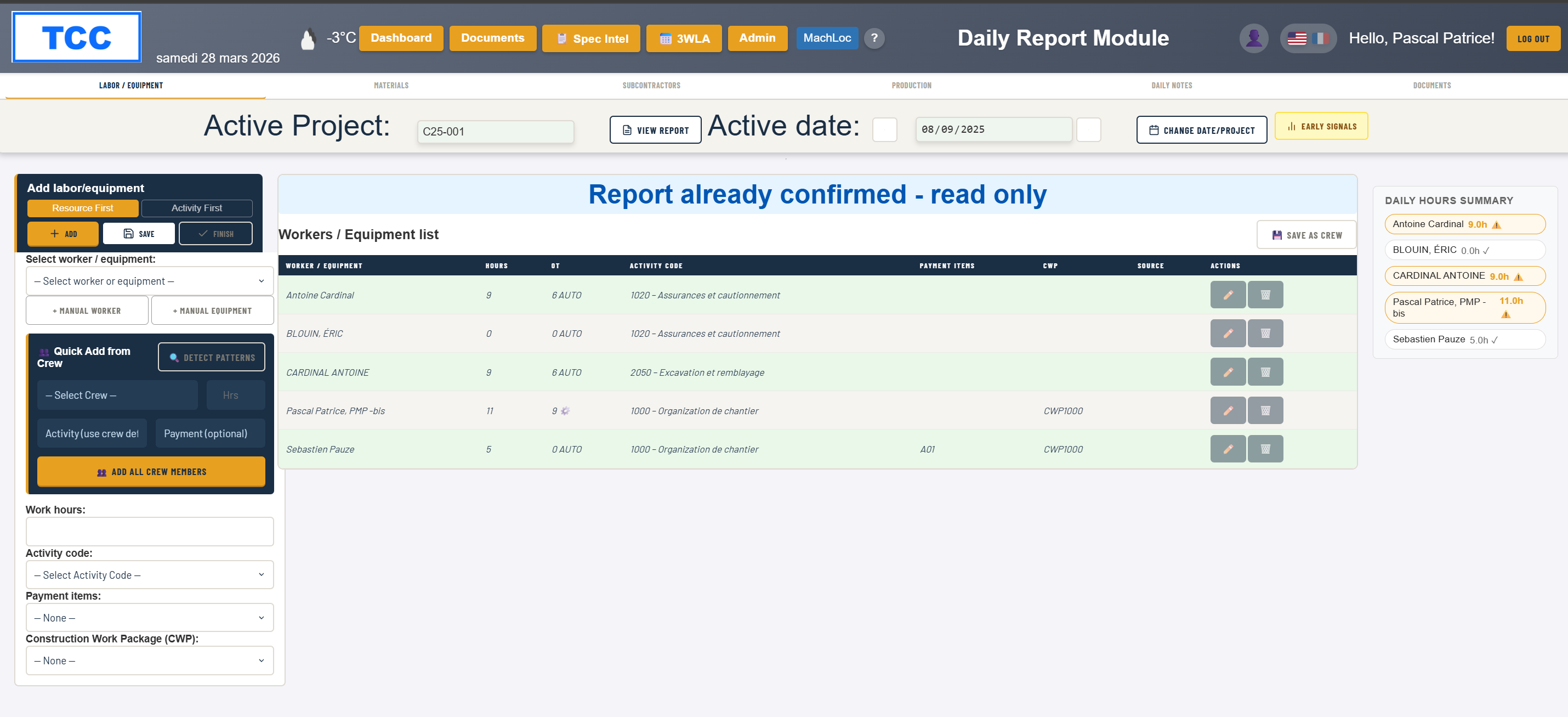
TCC Demo - Daily Site Report — Labour, Equipment, Materials by Activity
TCC captures daily site activity directly from the field, including labor hours, equipment usage, materials, and production quantities — all linked to activity codes. The interface is designed to match how foremen already think and report, making data entry fast and practical without adding ad...
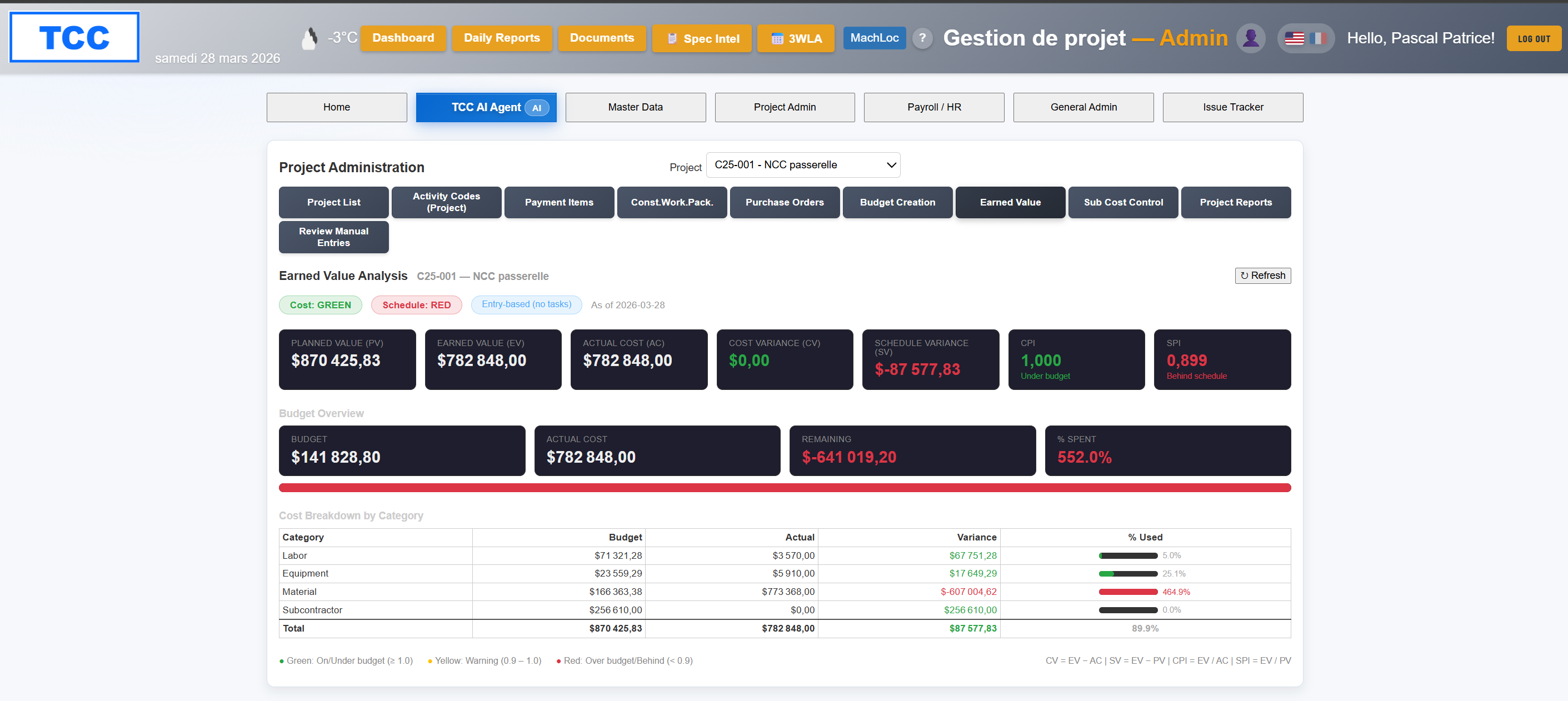
TCC Demo - Cost Performance — Budget vs Actual by Activity
TCC compares actual costs to planned values at the activity level, combining labor, equipment, materials, and subcontractor data. Instead of waiting for end-of-period reports, project teams can quickly identify where cost performance is drifting and focus attention on the activities driving th...
TCC Demo - Daily Field Report — Labour and Equipment Tracking
Foremen record workers, equipment hours, materials, and installed production quantities by activity code. TCC calculates productivity rate and unit cost automatically and compares against the project budget daily.
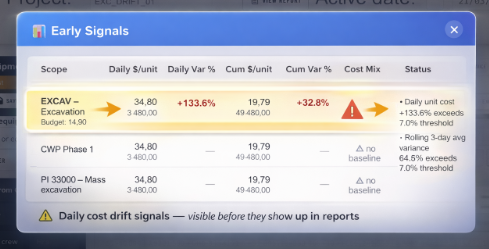
TCC Demo - What early cost drift actually looks like
This didn’t look like a problem. Slight variance. Small shift in productivity. Nothing urgent. But this is exactly where projects start losing money. Not all at once — but quietly, over a few days. And by the time it’s visible in a report, it’s already too late to act.
Product Avatar Image

Have you used TCC before?

Answer a few questions to help the TCC community

TCC Reviews (3)

Reviews

TCC Reviews (3)

4.5
3 reviews
Search reviews
Filter Reviews
Clear Results
G2 reviews are authentic and verified.
Pascal P.
PP
Project manager
Small-Business (50 or fewer emp.)
"TCC Keeps Field Execution on Track with Simple, Activity-Level Tracking"
What do you like best about TCC?

What stands out is how TCC focuses on daily execution instead of reporting.

Most tools in construction tell you what already happened. TCC shows you what is starting to go wrong while the work is still happening.

The ability to capture labor, equipment, and materials at the activity level and quickly see cost drift over a few days is a big shift from traditional monthly reporting.

It’s also clearly built with the field in mind. The data entry is simple enough that a foreman can actually use it without turning it into an administrative burden. Review collected by and hosted on G2.com.

What do you dislike about TCC?

The product is still evolving, especially on the reporting and integration side.

If you are expecting a fully mature ecosystem like large enterprise platforms, it’s not there yet.

However, that seems intentional. The focus is clearly on solving the execution layer first before expanding into more complex features. Review collected by and hosted on G2.com.

PP
Construction Director
Small-Business (50 or fewer emp.)
Business partner of the seller or seller's competitor, not included in G2 scores.
"Finally a tool that captures what actually happens on site"
What do you like best about TCC?

Finally a tool that captures what actually happens on site Review collected by and hosted on G2.com.

What do you dislike about TCC?

It doesn’t try to do everything.

If you’re looking for a traditional project management platform with full scheduling, financials, and documentation, this isn’t that.

It’s built specifically to capture what actually happens on site — and that’s a different mindset. Review collected by and hosted on G2.com.

RA
Small-Business (50 or fewer emp.)
"A formidable simplicity to drive site productivity in real time"
What do you like best about TCC?

The disconcerting simplicity for construction site teams. Most management software is designed by accountants for accountants. TCC is made for builders. In a few clicks, our foremen can document the workforce, equipment, and production achieved. On the office side, the integration of this data with our budget allows us to detect productivity drops within 48 hours, instead of waiting for subcontractor invoices. Review collected by and hosted on G2.com.

What do you dislike about TCC?

It is not a flaw in the software itself, but TCC abruptly ends the gray areas on construction sites. As the tool cross-references hours with physical production in less than 24 hours, productivity declines become immediately visible. This greatly disrupts the habits of managers who liked to hide behind the fog of the current month. TCC forces you to be proactive every day: you can no longer manage by autopsy. This therefore requires a real effort in change management at the beginning. Review collected by and hosted on G2.com.

There are not enough reviews of TCC for G2 to provide buying insight. Below are some alternatives with more reviews:

1
Hubstaff Logo
Hubstaff
4.4
(2,214)
Time tracking software with proof of work, screenshots, activity tracking, application monitoring and in-depth reports.
2
Toggl Track Logo
Toggl Track
4.6
(1,586)
Toggl Track is a flexible cloud-based online time tracking solution for teams of one to 1000. It allows users to track time on projects and analyze profitability and productivity, and is available on multiple platforms.
3
Runrun.it Logo
Runrun.it
4.8
(1,334)
Runrun.it is a ‘Work Collaboration Software’ (SaaS) that helps managers of traditional companies to get more productivity out of their teams by providing Task, Time and Talent management in an incredibly simple way.
4
ClickTime Logo
ClickTime
4.6
(1,142)
Track time and expenses with ClickTime - a highly-customizable, easy-to-use cloud-based timesheet and expense system.
5
Harvest Logo
Harvest
4.3
(832)
Harvest lets you and your staff track time and send invoices from one integrated application. Get set up in just a few minutes and instantly start tracking time and invoicing your clients.
6
GanttPRO Logo
GanttPRO
4.8
(574)
GanttPRO is a chart software for project management, designed to allow users to create tasks and assign them, set dependencies and milestones, track progress of each task and the whole project as well as collaborate with team members.
7
Zoho Projects Logo
Zoho Projects
4.3
(536)
Zoho Projects, our cloud-based project management software, helps you plan your projects, track work efficiently, and collaborate with your team, wherever they are.
8
Timely Logo
Timely
4.8
(482)
Timely is an AI-powered time tracking solution available on web, Mac, Windows, Android and iOS — favored by enterprises and small teams seeking organizational transparency with minimal effort.
9
Oracle Primavera Logo
Oracle Primavera
4.4
(385)
Oracle's Primavera Enterprise Project Portfolio Management is the most powerful, robust, and easy-to-use solution for globally prioritizing, planning, managing, and executing projects, programs, and portfolios.
10
Avaza Logo
Avaza
4.6
(368)
Cloud Professional Services Automation software for small-to-medium sized businesses. Includes fully-integrated Project Management, Collaboration, Time Tracking, Expense Management Quoting & Invoicing. 100% Mobile friendly.
Show More
People Icons

Start a Discussion about TCC

Have a software question? Get answers from real users and experts.

Start a Discussion
Pricing

Pricing details for this product isn’t currently available. Visit the vendor’s website to learn more.