Best Digital Accessibility Tools

How Many Digital Accessibility Tools Products Does G2 Track?

Total Products under this Category: 90

Category Stats (Oct 2026)

  • Average Rating: 4.49/5 (↑0.01 vs Sep 2026) The average rating of products in this category, based on all submitted ratings
  • Top Trending Product: Accessiway (+3.46%) - Among all products in this category, Accessiway recorded the largest rating increase compared to last month

Last updated: October 01, 2026

How Does G2 Rank Digital Accessibility Tools Products?

Why You Can Trust G2's Software Rankings:

  • 30 Analysts and Data Experts
  • 8,100+ Authentic Reviews
  • 90+ Products
  • Unbiased Rankings

G2's software rankings are built on verified user reviews, rigorous moderation, and a consistent research methodology maintained by a team of analysts and data experts. Each product is measured using the same transparent criteria, with no paid placement or vendor influence. While reviews reflect real user experiences, which can be subjective, they offer valuable insight into how software performs in the hands of professionals. Together, these inputs power the G2 Score, a standardized way to compare tools within every category.

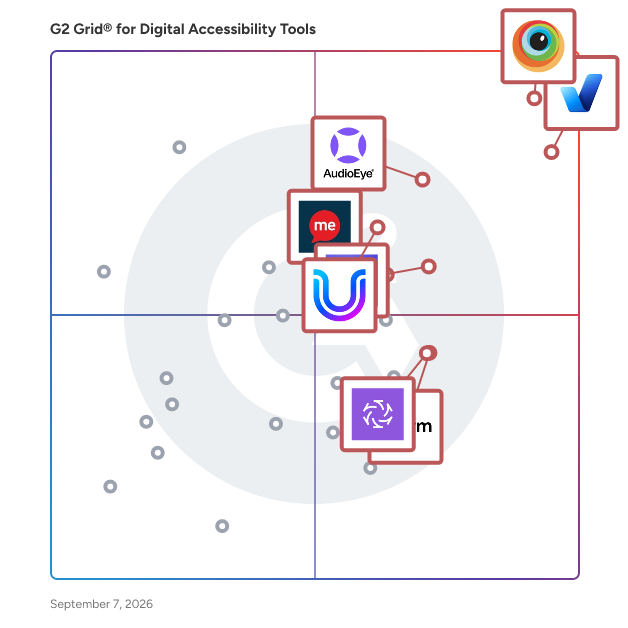
G2 Grid® for Digital Accessibility Tools

G2 Grid® for Digital Accessibility Tools  plotting products by satisfaction and market presence

Highlighted products: BrowserStack, accessiBe, AudioEye, Silktide, UserWay, Recite Me, TABNAV, and Clym Inc..

Underlying data: [Grid® JSON](https://www.g2.com/categories/digital-accessibility-tools/grids.json?focus%5B%5D=browserstack&focus%5B%5D=accessibe&focus%5B%5D=audioeye&focus%5B%5D=silktide&focus%5B%5D=userway&focus%5B%5D=recite-me&focus%5B%5D=tabnav&focus%5B%5D=clym-inc)

BrowserStack

BrowserStack is the world’s leading cloud-based testing platform, trusted by 50,000+ Dev and QA teams to deliver fast, reliable, and high-quality software. From manual to automated, visual to accessibility testing, BrowserStack brings every layer of the QA process onto a single, integrated platform, so you can ship confidently at scale. Our Products: Manual Testing Live: Cross-browser testing App Live: Real device testing Testing Toolkit: Essential manual testing tools Test Automation Automate: Browser automation cloud App Automate: Mobile app automation cloud Percy: Visual testing & review App Percy: Visual testing & review Management & Optimization Test Management: Plan, track, and manage tests Test Management for Jira: Manage tests inside Jira Test Reporting & Analytics: Monitor & optimize all tests Automation without coding Low Code Automation: AI-driven automated tests Website Scanner: All-in-one website checker

Average Rating: 4.4/5.0

Total Reviews: 3,325

How Do G2 Users Rate BrowserStack?

  • AI Text-to-Speech: 7.8/10 (Category avg: 8.5/10)
  • Quality Assurance Dashboard: 8.4/10 (Category avg: 8.4/10)
  • Ease of Use: 8.9/10 (Category avg: 9.1/10)
  • Recommendations: 8.4/10 (Category avg: 8.8/10)

Who Is the Company Behind BrowserStack?

  • Seller: BrowserStack
  • Company Website:
  • Year Founded: 2011
  • HQ Location: Dublin, Dublin
  • Twitter: @browserstack
    11,547 Twitter followers
  • LinkedIn® Page: www.linkedin.com
    1,731 employees on LinkedIn®

Who Uses This Product?

  • Who Uses This: Software Engineer, QA Engineer
  • Top Industries: Computer Software, Information Technology and Services
  • Company Size: 41% Small, 38% Medium

What Do G2 Reviewers Say About BrowserStack?

AI-generated summary from verified user reviews

Pros
  • Users find BrowserStack's interface easy to use, facilitating seamless access to real device testing across multiple platforms.
  • Users value the real device testing feature of BrowserStack, enhancing compatibility across diverse platforms without physical hardware.
  • Users value the wide coverage of real devices on BrowserStack, ensuring comprehensive product testing across different environments.
  • Users appreciate the extensive device and browser combinations in BrowserStack, significantly enhancing testing efficiency and compatibility.
  • Users find BrowserStack's easy testing capabilities invaluable for efficient cross-platform and UI-specific testing.
Cons
  • Users often experience slow performance with BrowserStack, impacting testing efficiency and reliability of results.
  • Users experience slow loading times with BrowserStack, leading to frustrating delays during tests and setup.
  • Users feel that the pricing of BrowserStack is expensive and suggest more affordable package options.
  • Users report testing difficulties due to inconsistencies and lag, making reliable results hard to achieve.
  • Users often face slow speed during peak hours, impacting performance and complicating debugging efforts.

What Are Recent G2 Reviews of BrowserStack?

What Are G2 Users Discussing About BrowserStack?

accessiBe

accessiBe is an end-to-end accessibility platform that helps organizations make their websites and digital assets accessible, in compliance with regulations like the ADA, AODA, and the EAA. Offering the best in AI automation, developer tools, and human expertise, accessiBe’s solutions audit and remediate websites and digital assets to adhere with the Web Content Accessibility Guidelines (WCAG) - the widely accepted framework organizations follow to comply with legislation and mitigate legal risk. accessiBe also supports organizations navigating the legal landscape with dedicated litigation support - including documentation, guidance, and expert review. For agencies and service providers, the accessiBe Partner Program offers training, resources, and co-selling opportunities to help expand accessibility offerings and deliver stronger value to clients.

Average Rating: 4.7/5.0

Total Reviews: 1,422

How Do G2 Users Rate accessiBe?

  • AI Text-to-Speech: 8.7/10 (Category avg: 8.5/10)
  • Quality Assurance Dashboard: 9.4/10 (Category avg: 8.4/10)
  • Ease of Use: 9.6/10 (Category avg: 9.1/10)
  • Recommendations: 9.1/10 (Category avg: 8.8/10)

Who Is the Company Behind accessiBe?

  • Seller: accessiBe
  • Company Website:
  • HQ Location: New York, NY
  • Twitter: @AccessiBe
    2,020 Twitter followers
  • LinkedIn® Page: www.linkedin.com
    210 employees on LinkedIn®

Who Uses This Product?

  • Who Uses This: Owner, CEO
  • Top Industries: Marketing and Advertising, Retail
  • Company Size: 76% Small, 20% Medium

What Do G2 Reviewers Say About accessiBe?

AI-generated summary from verified user reviews

Pros
  • Users appreciate the ease of use of accessiBe, citing its smooth integration and quick implementation for accessibility compliance.
  • Users appreciate the ease of installation and legal compliance of accessiBe, enhancing website accessibility for everyone.
  • Users love the easy setup of accessiBe, appreciating its simple integration and excellent customer support.
  • Users commend accessiBe's responsive and helpful customer support, enhancing the experience of making websites ADA compliant.
  • Users value accessiBe for its ability to ensure ADA compliance, enhancing website accessibility for individuals with disabilities.
Cons
  • Users express that the high cost may deter some, especially start-ups needing affordability for accessibility solutions.
  • Users note that pricing issues can be a barrier for clients, particularly those with low-traffic websites.
  • Users experience lack of clarity regarding product functionality, leading to confusion and the need for manual adjustments.
  • Users find accessibility issues arise in highly customized sites, requiring manual adjustments despite accessiBe's strong baseline.

What Are Recent G2 Reviews of accessiBe?

What Are G2 Users Discussing About accessiBe?

AudioEye

AudioEye is an all-in-one accessibility platform designed to help organizations achieve and maintain compliance with the Web Content Accessibility Guidelines (WCAG). This solution is particularly valuable for businesses looking to enhance their digital presence while minimizing legal risks associated with accessibility violations. By integrating advanced automation with expert insights, AudioEye streamlines the process of identifying and addressing accessibility issues, ensuring that websites are usable for all individuals, including those with disabilities. The target audience for AudioEye includes businesses of all sizes, from small enterprises to large corporations, that recognize the importance of digital accessibility. Organizations in sectors such as e-commerce, education, and government can significantly benefit from implementing this platform. Specific use cases include enhancing website usability for individuals with visual impairments, hearing disabilities, or cognitive challenges, thereby fostering an inclusive online environment. Additionally, AudioEye serves as a proactive measure against potential legal challenges, providing peace of mind to businesses navigating the complexities of accessibility compliance. Key features of AudioEye include powerful automation tools that facilitate rapid issue detection, allowing organizations to identify accessibility barriers quickly. The platform also offers custom fixes developed by IAAP-certified experts, ensuring that solutions are both effective and tailored to the unique needs of each website. Furthermore, AudioEye provides developer tools that enable teams to catch accessibility issues before content is published, thereby preventing potential compliance failures from occurring in the first place. This proactive approach not only enhances user experience but also reinforces a company’s commitment to inclusivity. AudioEye stands out in the accessibility platform category by offering industry-leading WCAG coverage and ongoing testing informed by feedback from the disability community. This ensures that the platform remains current with evolving standards and user needs. Additionally, AudioEye claims to provide up to 400% more protection against valid claims compared to other solutions, making it a robust choice for organizations serious about maintaining compliance and fostering accessibility. By leveraging AudioEye, businesses can create a more inclusive digital landscape while safeguarding themselves against legal repercussions.

Average Rating: 4.7/5.0

Total Reviews: 237

How Do G2 Users Rate AudioEye?

  • AI Text-to-Speech: 8.4/10 (Category avg: 8.5/10)
  • Quality Assurance Dashboard: 9.2/10 (Category avg: 8.4/10)
  • Ease of Use: 9.3/10 (Category avg: 9.1/10)
  • Recommendations: 9.0/10 (Category avg: 8.8/10)

Who Is the Company Behind AudioEye?

  • Seller: AudioEye
  • Company Website:
  • Year Founded: 2005
  • HQ Location: Tucson, Arizona
  • Twitter: @audioeyeinc
    1,799 Twitter followers
  • LinkedIn® Page: www.linkedin.com
    141 employees on LinkedIn®

Who Uses This Product?

  • Top Industries: Marketing and Advertising, Computer Software
  • Company Size: 53% Medium, 39% Small

What Do G2 Reviewers Say About AudioEye?

AI-generated summary from verified user reviews

Pros
  • Users value how AudioEye provides simplified ADA compliance, enhancing accessibility while minimizing manual adjustments and effort.
  • Users commend AudioEye for its effective compliance standards, enhancing accessibility and usability for all website visitors.
  • Users value AudioEye for its exceptional accessibility support, making website compliance simple and efficient.
  • Users appreciate the ease of use in AudioEye, benefiting from its user-friendly interface and efficient reporting tools.
  • Users praise the responsive customer support of AudioEye, aiding seamless onboarding and resolving queries effectively.
Cons
  • Users struggle with lack of clarity in identifying issues, making it challenging to address and fix accessibility concerns.
  • Users find AudioEye's pricing expensive, which may deter agencies catering to budget-conscious SMBs.
  • Users note a lack of missing features, such as enhanced controls and options to manage third-party issues effectively.
  • Users experience poor customer support, citing slow response times and limited contact with AudioEye representatives.
  • Users face accessibility issues with AudioEye due to the need for manual fixes and a complex dashboard experience.

What Are Recent G2 Reviews of AudioEye?

What Are G2 Users Discussing About AudioEye?

AI can help you find the answers. G2 helps you trust them.

Connect G2 to Claude or ChatGPT for answers grounded in G2's trusted reviews, comparisons, and pricing from real user insights.

How it works

Silktide

Silktide is an all-in-one platform for analyzing and improving websites. It combines tools for accessibility, content quality, marketing performance, legal compliance, and user behavior—making it easier for organizations to understand and enhance their entire web presence from one place. Silktide automatically scans your website and highlights issues across a wide range of areas: from broken links and slow-loading pages to inaccessible design elements, outdated content, and poor SEO. It also checks for GDPR compliance, cookie notices, and mobile responsiveness—giving teams a complete picture of what needs fixing, and how to fix it. Used by governments, universities, enterprises, and more, Silktide makes complex web standards easier to manage. Everyone from developers to marketers can see what matters to them via intuitive dashboards, role-specific recommendations, and scheduled reporting. Key features include: * Accessibility testing based on WCAG standards, with visual guides and easy-to-follow fixes * Content optimization covering spelling, grammar, readability, and link quality * SEO and marketing audits for metadata, discoverability, and keyword usage * Heatmaps and analytics to track how users interact with your pages—from clicks to scroll depth (requires installing a tracking script) * Performance insights around speed, mobile usability, and UX quality * Legal and compliance checks, including cookie notices and HTML validity Silktide also offers tools for workflow management, task assignment, and trend tracking, so teams can collaborate and demonstrate improvement over time. Most of the platform runs directly in the browser—setup is minimal, with just a small code snippet to be added to your site if you use our analytics and heatmaps functionality. Whether you run one website or manage hundreds, Silktide helps you understand what’s working, what isn’t, and how to make it better.

Average Rating: 4.8/5.0

Total Reviews: 288

How Do G2 Users Rate Silktide?

  • AI Text-to-Speech: 7.1/10 (Category avg: 8.5/10)
  • Quality Assurance Dashboard: 9.3/10 (Category avg: 8.4/10)
  • Ease of Use: 9.3/10 (Category avg: 9.1/10)
  • Recommendations: 9.3/10 (Category avg: 8.8/10)

Who Is the Company Behind Silktide?

  • Seller: Silktide
  • Company Website:
  • Year Founded: 2001
  • HQ Location: United Kingdom
  • LinkedIn® Page: www.linkedin.com
    62 employees on LinkedIn®

Who Uses This Product?

  • Who Uses This: Web Developer
  • Top Industries: Government Administration, Higher Education
  • Company Size: 43% Large, 35% Medium

What Do G2 Reviewers Say About Silktide?

AI-generated summary from verified user reviews

Pros
  • Users find the easy-to-use interface of Silktide enhances their overall experience and streamlines their workflow.
  • Users appreciate the exceptional support from the Silktide team, which greatly enhances their accessibility and website management experience.
  • Users praise the exceptional customer support from Silktide, specifically highlighting the effectiveness and responsiveness of their team.
  • Users value the ease of use and comprehensive accessibility tools provided by Silktide, significantly improving website compliance.
  • Users value the comprehensive accessibility features of Silktide, significantly enhancing website standards and user-friendliness.
Cons
  • Users express that complex usability may hinder quick mastery of Silktide, requiring additional time and effort to navigate.
  • Users find the absence of key features in Silktide frustrating, limiting efficiency and customization options.
  • Users struggle with difficult navigation, finding sections complex and workflows unclear, impacting overall user experience.
  • Users experience lack of clarity in communication and options, making the tool less efficient and user-friendly.
  • Users express frustration over limited features in Silktide, wishing for more flexibility and options tailored to their needs.

What Are Recent G2 Reviews of Silktide?

What Are G2 Users Discussing About Silktide?

UserWay

UserWay, a global leader in web accessibility, is trusted by millions of websites worldwide. Combining AI and human expertise, UserWay helps organizations fix code violations and meet accessibility laws and standards such as the ADA and WCAG 2.2, making digital content accessible to users with disabilities.

Average Rating: 4.8/5.0

Total Reviews: 641

How Do G2 Users Rate UserWay?

  • AI Text-to-Speech: 8.4/10 (Category avg: 8.5/10)
  • Quality Assurance Dashboard: 9.2/10 (Category avg: 8.4/10)
  • Ease of Use: 9.4/10 (Category avg: 9.1/10)
  • Recommendations: 9.2/10 (Category avg: 8.8/10)

Who Is the Company Behind UserWay?

  • Seller: UserWay Inc.
  • Company Website:
  • Year Founded: 2016
  • HQ Location: Wilmington, Delaware
  • Twitter: @UserWayOrg
    793 Twitter followers
  • LinkedIn® Page: www.linkedin.com
    50 employees on LinkedIn®

Who Uses This Product?

  • Who Uses This: CEO, Owner
  • Top Industries: Marketing and Advertising, Computer Software
  • Company Size: 77% Small, 19% Medium

What Do G2 Reviewers Say About UserWay?

AI-generated summary from verified user reviews

Pros
  • Users love the ease of use of UserWay, finding setup quick and the dashboard incredibly user-friendly.
  • Users praise the responsive and knowledgeable customer support of UserWay, enhancing their overall experience.
  • Users value the effortless accessibility management of UserWay, enjoying its quick setup and intuitive interface.
  • Users appreciate how UserWay enhances accessibility management through a simple interface and efficient oversight tools.
  • Users appreciate the simplified accessibility oversight provided by UserWay, improving management and compliance effortlessly.
Cons
  • Users find the complex usability of UserWay challenging, needing better guidance for issue resolution and compliance.
  • Users express concerns over pricing issues with UserWay, desiring clearer coverage information and more affordable options.
  • Users find the product expensive and desire clearer, consistent information on coverage for accessibility laws.
  • Users face accessibility issues needing manual adjustments and technical knowledge for advanced configurations on UserWay.
  • Users find the lack of clarity in recommendations frustrating, often needing developer help for complex issues.

What Are Recent G2 Reviews of UserWay?

What Are G2 Users Discussing About UserWay?

Recite Me

Recite Me is a digital accessibility solutions platform that helps organisations create more inclusive and accessible online experiences. With over 1 billion people worldwide currently facing barriers when reading, understanding, or interacting with content online, Recite Me’s tools help to bridge this gap. The Recite Me Accessibility Checker helps organisations identify and fix accessibility issues. Aligned with WCAG 2.2, it supports compliance with global accessibility standards including the EAA, ADA, Section 508, ACA, AODA, DDA, and more. The Recite Me Checker tool follows a three-step approach: • Plan & Scan: Instantly analyse your entire digital landscape to uncover accessibility barriers, prioritise high-impact fixes, and lay the groundwork for inclusive user experiences. • Fix & Improve: Enable teams to act quickly with AI-driven fixes, developer-ready code, and smart editing tools that accelerate progress and reduce manual workload. • Maintain & Scale: Monitor progress and demonstrate compliance with comprehensive reporting tools, ensuring new and existing content remains accessible, supporting long-term compliance. The Recite Me Assistive Toolbar makes your website more inclusive by giving visitors the freedom to customise content in a way that best suits their individual needs. Popular features of the Recite Me Toolbar include: • Translation into 100+ languages • Text-to-speech functionality with over 65 voices • Styling and customisation options for fonts, text size, colours, and cursors • Reading aids such as a screen mask, ruler, and built-in dictionary • An AI-powered page summariser In essence, the Recite Me Assistive Toolbar improves the front-end user experience by making websites more inclusive, while the Accessibility Checker works on the back-end to ensure alignment with the core principles of WCAG 2.2. As an all-in-one accessibility solutions platform, Recite Me offers additional support through: • PDF Checker & Remediation: Scan all PDFs on your website for accessibility issues and automatically apply AI-powered fixes. • Accessibility Consultancy: Receive one-to-one guidance from industry experts through manual audits and tailored remediation plans designed to meet your organisation’s specific needs. • Accessibility Training: Build your understanding of digital accessibility with comprehensive training courses covering WCAG, EAA, ADA, and other key compliance standards. • Accessibility Documentation: Demonstrate your commitment to accessibility with professionally crafted statements, policies, VPATs, and supporting documentation.

Average Rating: 4.6/5.0

Total Reviews: 53

How Do G2 Users Rate Recite Me?

  • AI Text-to-Speech: 9.3/10 (Category avg: 8.5/10)
  • Quality Assurance Dashboard: 9.3/10 (Category avg: 8.4/10)
  • Ease of Use: 9.1/10 (Category avg: 9.1/10)
  • Recommendations: 8.6/10 (Category avg: 8.8/10)

Who Is the Company Behind Recite Me?

  • Seller: Recite Me
  • Company Website:
  • Year Founded: 2009
  • HQ Location: Gateshead, Tyne and Wear
  • Twitter: @reciteme
    2,797 Twitter followers
  • LinkedIn® Page: www.linkedin.com
    82 employees on LinkedIn®

Who Uses This Product?

  • Top Industries: Non-Profit Organization Management, Computer Software
  • Company Size: 42% Small, 38% Medium

What Do G2 Reviewers Say About Recite Me?

AI-generated summary from verified user reviews

Pros
  • Users appreciate the ease of use of Recite Me, making websites more inclusive with simple, self-serve tools.
  • Users highlight the wide range of accessibility features in Recite Me, making websites inclusive and user-friendly.
  • Users highlight the reading accessibility features of Recite Me, enhancing inclusivity for individuals with visual impairments.
  • Users value the inclusive accessibility features of Recite Me, enhancing web experiences for everyone, including those with disabilities.
  • Users praise the easy setup of Recite Me, making integration a straightforward process for enhancing website accessibility.
Cons
  • Users note accessibility issues with Recite Me, particularly regarding advanced tools and recognition of the toolbar.
  • Users feel the UX improvement is necessary, citing the need for a more user-friendly and appealing interface.
  • Users experience device limitations with Recite Me, making functionality and access to features challenging and unclear.
  • Users report confusing feature improvements due to false positives and lack of guidance on tool functionality.
  • Users find the inefficiency in feature explanations frustrating, leading to confusion and reduced usability of Recite Me.

What Are Recent G2 Reviews of Recite Me?

What Are G2 Users Discussing About Recite Me?

Clym Inc.

Clym is an all-in-one digital compliance solution that helps businesses simplify data privacy, accessibility, transparency, and accountability requirements through automation, localization, and easy-to-manage tools. Designed for organizations of all sizes, Clym is an affordable, scalable alternative to managing multiple vendors, consolidating consent management, data privacy, accessibility, and whistleblowing into a single solution. As a Consent Management Platform, Clym automates jurisdiction-based consent collection and documentation with real-time visibility, audit-ready reporting, and dynamic detection of third-party cookies across 190+ global regulations via ReadyCompliance® and RealtimeCompliance™. Data Subject Request Management is fully streamlined through secure, workflows that handle privacy rights requests, making Clym a top choice for organizations seeking efficient, compliant DSAR handling. The platform's Whistleblowing module enables secure, confidential issue reporting to support proactive governance, while built-in Accessibility solutions, including a customizable widget, issue reporting, statement generation, and WCAG/ADA/EAA testing tools, help organizations support digital inclusion standards with ease. Geofencing and localization capabilities deliver region- and language-specific compliance interactions automatically, while legal document generation, age gating, and content takedown round out the platform's comprehensive feature set.

Average Rating: 4.9/5.0

Total Reviews: 48

How Do G2 Users Rate Clym Inc.?

  • Quality Assurance Dashboard: 9.5/10 (Category avg: 8.4/10)
  • Ease of Use: 9.7/10 (Category avg: 9.1/10)
  • Recommendations: 9.9/10 (Category avg: 8.8/10)

Who Is the Company Behind Clym Inc.?

  • Seller: Clym
  • Company Website:
  • Year Founded: 2018
  • HQ Location: Wilmington, US
  • Twitter: @ClymInc
    119 Twitter followers
  • LinkedIn® Page: www.linkedin.com
    28 employees on LinkedIn®

Who Uses This Product?

  • Who Uses This: Executive Director
  • Top Industries: Non-Profit Organization Management
  • Company Size: 90% Small, 8% Medium

What Do G2 Reviewers Say About Clym Inc.?

AI-generated summary from verified user reviews

Pros
  • Users find Clym Inc. easy to install and use, enhancing accessibility and customization for their websites.
  • Users praise Clym Inc. for its effective accessibility tools, enhancing website usability for individuals with disabilities.
  • Users love the easy setup of Clym, appreciating its user-friendly installation and customization options.
  • Users value Clym for its comprehensive compliance solutions that ensure data privacy and accessibility in one affordable tool.
  • Users admire Clym for its easy installation and comprehensive customization, providing solutions for data privacy and accessibility.
Cons
  • Users find a learning difficulty with Clym's setup, requiring clearer instructions despite helpful support.
  • Users note the poor icon placement at the bottom, suggesting it would be better positioned for accessibility.
  • Users feel the website's positioning of the Clym icon hinders visibility and accessibility for all users.
  • Users note accessibility issues, particularly with lacking support for those who are totally blind.
  • Users note the complex setup can be time-consuming but are ultimately satisfied with the results.

What Are Recent G2 Reviews of Clym Inc.?

TABNAV

TABNAV provides AI-powered accessibility solutions that help websites comply with WCAG 2.2 and global accessibility standards. Trusted by businesses across industries, TABNAV offers an AI Accessibility Widget and a smart Accessibility Monitor Agent to detect, fix, and prevent accessibility issues—making the web more usable for everyone.

Average Rating: 5.0/5.0

Total Reviews: 28

How Do G2 Users Rate TABNAV?

  • Ease of Use: 9.9/10 (Category avg: 9.1/10)

Who Is the Company Behind TABNAV?

  • Seller: TABNAV
  • Year Founded: 2024
  • HQ Location: Oklahoma(OK), US
  • LinkedIn® Page: www.linkedin.com
    6 employees on LinkedIn®

Who Uses This Product?

  • Company Size: 82% Small, 11% Medium

What Do G2 Reviewers Say About TABNAV?

AI-generated summary from verified user reviews

Pros
  • Users praise the helpful and friendly customer support of TABNAV, ensuring a smooth installation and integration process.
  • Users find TABNAV incredibly easy to use and integrate, streamlining accessibility features for their websites effortlessly.
  • Users appreciate the user-friendly accessibility features of TABNAV, enhancing website compliance and user experience.
  • Users find the easy installation of TABNAV straightforward, enabling quick setup and smooth integration into existing sites.
  • Users find the easy setup of TABNAV quick and seamless, enhancing accessibility without hassle.
Cons
  • Users experience frustrating delay issues with TABNAV, as the menu often takes too long to open after clicking.
  • Users often experience a frustrating delay when clicking the TABNAV icon before the menu appears.
  • Users feel the additional charges for features make TABNAV expensive and prefer a single all-inclusive price.
  • Users miss the absence of a Pixel location dashboard control, limiting their ability to track locations effectively.
  • Users often face network issues due to reliance on external service availability, impacting overall functionality.

What Are Recent G2 Reviews of TABNAV?

All in One Accessibility

AI-powered accessibility solution enables websites to be accessible among people with hearing or vision impairments, elderly, motor impairment, color blindness, dyslexia, cognitive & learning impairments, seizure and epileptic, ADHD problems, epilepsy, Parkinson disease. It allows users to select the accessibility features as per their needs and peruse the content. It just takes 2 minutes to install. It reduces the risk of time-consuming accessibility lawsuits. It improves accessibility compliance for the standards WCAG 2.0, 2.1, 2.2, ADA Title III, Section 508, European EAA EN 301 549, Canada ACA, California Unruh, Israeli Standard 5568, Australian DDA, UK Equality Act, Ontario AODA, France RGAA, German BITV, Brazilian Inclusion law LBI 13.146/2015, Spain UNE 139803:2012, JIS X 8341, Italian Stanca Act, and Switzerland DDA, Indian RPD Act, PDF / UA, Austrian Web Accessibility Act (WZG), ATAG 2.0, and more. It includes 90 plus features like AI screen reader, talk & type, voice navigation, dictionary, virtual keyboard, Google Analytics 4 and Adobe Analytics Integration, text resizing, dyslexia-friendly fonts, accessibility statement, color contrast, pause animations, orientation adjustments, and more. It supports 190+ languages, and all the major open-source platforms like Drupal, WordPress, Adobe Commerce, Adobe Experience Manager, Joomla, Shopify, BigCommerce, Wix, Squarespace, and more. It supports GDPR, HIPAA, CCPA, SOC Type 2, ISO 9001:2015, ISO 27001:2022. All in One Accessibility dashboard includes automated accessibility compliance reports, and widget customization available including its size, icon, color, position, user access management, screen reader voice, accessibility statement page link, widget open / close sound preferences. It is a comprehensive solution with paid add-ons like manual accessibility audit, remediation, document / PDF accessibility remediation, VPAT report / ACR, modify accessibility menu, white label, live site translation, SkynetAccessibility Scanner, and Video subtitle. Overall, it serves as a vital resource for businesses and organizations committed to fostering an inclusive digital environment.

Average Rating: 4.7/5.0

Total Reviews: 27

How Do G2 Users Rate All in One Accessibility?

  • AI Text-to-Speech: 9.5/10 (Category avg: 8.5/10)
  • Quality Assurance Dashboard: 9.5/10 (Category avg: 8.4/10)
  • Ease of Use: 9.7/10 (Category avg: 9.1/10)
  • Recommendations: 9.3/10 (Category avg: 8.8/10)

Who Is the Company Behind All in One Accessibility?

  • Seller: Skynet Technologies
  • Company Website:
  • Year Founded: 2019
  • HQ Location: Independence, US
  • Twitter: @Skynet_LV
    906 Twitter followers
  • LinkedIn® Page: www.linkedin.com
    16 employees on LinkedIn®

Who Uses This Product?

  • Who Uses This: Manager
  • Top Industries: Manufacturing
  • Company Size: 59% Medium, 22% Small

What Do G2 Reviewers Say About All in One Accessibility?

AI-generated summary from verified user reviews

Pros
  • Users appreciate the centralized accessibility adjustments offered by All in One Accessibility, enhancing their experience effortlessly.
  • Users love the ease of use of All in One Accessibility, making it accessible for beginners and customizable for everyone.
  • Users commend the ADA compliance features of All in One Accessibility, ensuring comprehensive support and ease of use.
  • Users praise the feature-packed design of All in One Accessibility, highlighting its ease of use and great value.
  • Users value the centralized accessibility adjustments in All in One Accessibility, enhancing their personalized experience effortlessly.
Cons
  • Users note significant accessibility issues remain unaddressed in the tool's markup and require additional development for compliance.
  • Users notice that browser compatibility issues hinder certain features in older browsers, affecting overall accessibility.
  • Users find the price of All in One Accessibility to be quite high compared to similar plugins on the market.
  • Users express the need for better feature bundling, as some advanced functions are only available through costly add-ons.
  • Users find that legal compliance remains unaddressed as core accessibility issues persist in the markup, needing further development.

What Are Recent G2 Reviews of All in One Accessibility?

Colorblindly

Colorblindly is a Chrome extension designed to assist developers in creating accessible websites by simulating how users with various types of color blindness perceive web content. By applying specific CSS filters, it enables developers to experience their websites through the lens of individuals with color vision deficiencies, facilitating the identification and correction of potential accessibility issues. Key Features: - Simulation of Multiple Color Blindness Types: Colorblindly offers eight distinct simulation modes, including: - Blue Cone Monochromacy (Achromatomaly - Monochromacy (Achromatopsia - Green-Weak (Deuteranomaly - Green-Blind (Deuteranopia - Red-Weak (Protanomaly - Red-Blind (Protanopia - Blue-Weak (Tritanomaly - Blue-Blind (Tritanopia - Real-Time Application: The extension overlays CSS filters directly onto the webpage, modifying color ratios to reflect the visual experience of colorblind users. - User-Friendly Interface: Developers can easily switch between different simulation modes to assess and enhance their website's accessibility. Primary Value: Colorblindly addresses the critical need for web accessibility by enabling developers to understand and rectify color-related issues that may hinder users with color vision deficiencies. By providing real-time simulations of various types of color blindness, it empowers developers to create more inclusive web experiences, ensuring that content is perceivable and navigable for all users, regardless of their color vision capabilities.

Average Rating: 4.7/5.0

Total Reviews: 10

How Do G2 Users Rate Colorblindly?

  • Quality Assurance Dashboard: 9.6/10 (Category avg: 8.4/10)
  • Ease of Use: 9.5/10 (Category avg: 9.1/10)
  • Recommendations: 9.7/10 (Category avg: 8.8/10)

Who Is the Company Behind Colorblindly?

Who Uses This Product?

  • Company Size: 50% Large, 50% Small

What Are Recent G2 Reviews of Colorblindly?

Alt Magic: AI Powered Alt Texts at Scale

Alt Magic is an AI-powered tool designed to generate descriptive and SEO-optimized alt text for images, enhancing website accessibility and search engine performance. By leveraging advanced AI models, Alt Magic automates the creation of accurate and contextually relevant alt text, streamlining the process for content creators and developers. Key Features and Functionality: - API Integration: Alt Magic offers a REST API that allows users to programmatically generate alt text by making POST requests with image URLs. The API supports parameters such as `blog_title`, `seo_keywords`, and `language_code` to tailor the generated text to specific contexts and languages. - Language Support: The platform supports over 200 languages, enabling users to generate alt text in their preferred language by specifying the appropriate `language_code` in API requests. - WordPress Plugin: Alt Magic provides a WordPress plugin that automatically generates alt text for images added to the media library or editor. It also offers bulk generation for existing images without alt text, enhancing website accessibility and SEO. - Bulk Processing: Users can generate alt text for multiple images simultaneously, saving time and ensuring consistency across large volumes of content. Primary Value and User Solutions: Alt Magic addresses the challenge of creating accurate and SEO-friendly alt text for images, a crucial aspect of web accessibility and search engine optimization. By automating this process, it reduces manual effort, ensures compliance with accessibility standards, and enhances the discoverability of web content. This is particularly beneficial for content creators, web developers, and businesses aiming to improve user experience and search engine rankings.

Average Rating: 4.7/5.0

Total Reviews: 40

How Do G2 Users Rate Alt Magic: AI Powered Alt Texts at Scale?

  • AI Text-to-Speech: 10.0/10 (Category avg: 8.5/10)
  • Quality Assurance Dashboard: 8.8/10 (Category avg: 8.4/10)
  • Ease of Use: 9.7/10 (Category avg: 9.1/10)
  • Recommendations: 9.0/10 (Category avg: 8.8/10)

Who Is the Company Behind Alt Magic: AI Powered Alt Texts at Scale?

Who Uses This Product?

  • Company Size: 100% Small

What Do G2 Reviewers Say About Alt Magic: AI Powered Alt Texts at Scale?

AI-generated summary from verified user reviews

Pros
  • Users love the ease of use of Alt Magic, finding it intuitive and efficient for adding alt text effortlessly.
  • Users love the reading accessibility improvements with Alt Magic, making image descriptions quick and effortless.
  • Users find the easy setup of Alt Magic saves them time while efficiently generating alt texts for their images.
  • Users love the automatic alt-text generation of Alt Magic, saving time and enhancing SEO effortlessly.
  • Users value the speed and accuracy of Alt Magic for generating alt texts, streamlining their workflow significantly.
Cons
  • Users note the lack of detailed descriptions and customization options, limiting the effectiveness for content creators.
  • Users find limited customization options for alt text, leading to generic descriptions for complex images.
  • Users find the product expensive, especially for beginners who may be hesitant to fully commit.
  • Users find the lack of advanced features limits the potential of Alt Magic in customizing and detailing alt texts.
  • Users find the integration issues somewhat challenging, especially with a steep learning curve and lack of tutorials.

What Are Recent G2 Reviews of Alt Magic: AI Powered Alt Texts at Scale?

Acquia Web Governance

Acquia Web Governance, formerly known as Monsido, is a leading web governance solution designed to enable organizations to deliver a superior and inclusive user experience across their digital presence and support their journey to ensure communications are open, optimized, and compliant. Acquia Web Governance includes a cohesive suite of tools for web accessibility, website quality assurance, brand and content compliance, user consent management, social and web content archiving, and more. For more information, visit https://www.acquia.com/products/acquia-web-governance.

Average Rating: 4.5/5.0

Total Reviews: 152

How Do G2 Users Rate Acquia Web Governance?

  • AI Text-to-Speech: 6.3/10 (Category avg: 8.5/10)
  • Quality Assurance Dashboard: 9.1/10 (Category avg: 8.4/10)
  • Ease of Use: 8.7/10 (Category avg: 9.1/10)
  • Recommendations: 9.3/10 (Category avg: 8.8/10)

Who Is the Company Behind Acquia Web Governance?

  • Seller: Acquia
  • Year Founded: 2007
  • HQ Location: Boston, MA
  • Twitter: @Acquia
    44,968 Twitter followers
  • LinkedIn® Page: www.linkedin.com
    1,085 employees on LinkedIn®
  • Phone: -8836.219

Who Uses This Product?

  • Top Industries: Government Administration, Higher Education
  • Company Size: 50% Medium, 26% Large

What Do G2 Reviewers Say About Acquia Web Governance?

AI-generated summary from verified user reviews

Pros
  • Users appreciate the ease of use of Acquia Web Governance, highlighting its straightforward interface and integration capabilities.
  • Users value Monsido for its efficient problem-solving capabilities, significantly enhancing accessibility and content quality on their websites.
  • Users value the comprehensive accessibility features of Acquia Web Governance, enhancing usability and compliance with standards.
  • Users value the efficient website analysis provided by Acquia Web Governance, enabling quick fixes and compliance recognition.
  • Users value the Accessibility features of Acquia Web Governance for enhancing user experience and WCAG compliance.
Cons
  • Users find the limited features of Acquia Web Governance hinder comprehensive data analysis and reporting speed.
  • Users notice the learning curve can be challenging for new users as they navigate the platform's features.
  • Users find the platform's complex usability challenging, especially for beginners navigating extensive features and integrations.
  • Users find Acquia Web Governance's UI outdated and report limitations in reporting and mobile site crawling.
  • Users experience limited reporting speed with Acquia Web Governance, which hampers their ability to analyze data efficiently.

What Are Recent G2 Reviews of Acquia Web Governance?

What Are G2 Users Discussing About Acquia Web Governance?

WideAccess

WideAccess Accessibility Tools is designed for businesses, organizations, and individuals who manage public-facing websites and want to make their content easier to read, navigate, and interact with for users with visual, cognitive, or motor impairments. The software operates through an on-site accessibility widget that can be installed with minimal technical effort and works across different content management systems and custom websites. The primary use case of WideAccess is to provide end users with control over how a website is displayed and interacted with, while giving site owners a centralized way to offer accessibility related adjustments without modifying core website code. It is commonly used by small and medium-sized businesses, e-commerce sites, content publishers, service providers, and agencies managing multiple client websites. WideAccess Accessibility Tools supports a range of customization and localization needs, making it suitable for websites with international audiences and varying design requirements. The software functions as a client-side interface layer that adapts the visual and navigational experience in real time based on user preferences. Main features and capabilities include: • An accessibility widget that enables adjustments to text size, font style, spacing, contrast, and color schemes • Navigation assistance features such as focus highlighting, keyboard navigation support, and content emphasis tools • Language support with automatic detection of the user’s browser language and multilingual interface options • Customization controls that allow website owners to align the widget’s appearance with their site design • A statement generator that helps site owners publish an accessibility related notice on their website Key benefits for website owners and users include • Improved readability and usability for visitors with different access needs • Reduced dependency on custom development for accessibility related interface changes • A consistent accessibility interface across pages and devices • Better user experience for a broader audience without altering existing content structure WideAccess Accessibility Tools falls under the web accessibility and user experience enhancement software category. It is intended to complement existing website design and development practices by adding adaptive interface functionality rather than replacing the underlying site architecture.

Average Rating: 5.0/5.0

Total Reviews: 20

How Do G2 Users Rate WideAccess?

  • Quality Assurance Dashboard: 9.2/10 (Category avg: 8.4/10)
  • Ease of Use: 10.0/10 (Category avg: 9.1/10)
  • Recommendations: 10.0/10 (Category avg: 8.8/10)

Who Is the Company Behind WideAccess?

Who Uses This Product?

  • Top Industries: Computer Software
  • Company Size: 70% Small, 30% Medium

What Do G2 Reviewers Say About WideAccess?

AI-generated summary from verified user reviews

Pros
  • Users value the ease of use of WideAccess, appreciating its quick setup and seamless integration into websites.
  • Users highlight the easy setup of WideAccess, appreciating its quick, intuitive integration and seamless functionality.
  • Users love the user-friendly interface and seamless integration of WideAccess, enhancing website accessibility effortlessly and effectively.
  • Users appreciate the inclusive and customizable accessibility features of WideAccess, enhancing website usability for all visitors.
  • Users value the extensive accessibility features of WideAccess, making websites inclusive and easy to customize.
Cons
  • Users highlight the lack of documentation for features, making advanced settings difficult for new users to grasp.
  • Users feel the lack of customization options in WideAccess limits their ability to fully personalize the experience.
  • Users find the overwhelming complexity of WideAccess's interface challenging, suggesting a need for better onboarding support.

What Are Recent G2 Reviews of WideAccess?

Stark

Stark supercharges accessibility compliance for software teams—from months of arduous manual work, to minutes with ease. Through various integrations, we detect accessibility issues, provide smart suggestions for fixes, and educate you along the way. Use Stark to ensure your websites and apps are accessible, compliant, and inclusive—from first design draft and code, to final product.

Average Rating: 4.6/5.0

Total Reviews: 84

How Do G2 Users Rate Stark?

  • AI Text-to-Speech: 6.3/10 (Category avg: 8.5/10)
  • Quality Assurance Dashboard: 8.0/10 (Category avg: 8.4/10)
  • Ease of Use: 8.8/10 (Category avg: 9.1/10)
  • Recommendations: 8.2/10 (Category avg: 8.8/10)

Who Is the Company Behind Stark?

  • Seller: Stark
  • Year Founded: 2017
  • HQ Location: United States
  • Twitter: @getstarkco
    6,309 Twitter followers
  • LinkedIn® Page: www.linkedin.com
    26 employees on LinkedIn®

Who Uses This Product?

  • Top Industries: Design, Computer Software
  • Company Size: 48% Small, 25% Medium

What Do G2 Reviewers Say About Stark?

AI-generated summary from verified user reviews

Pros
  • Users appreciate the ease of use of Stark, finding it intuitive and seamlessly integrated into their design process.
  • Users praise Stark's comprehensive accessibility features, enhancing design processes and ensuring inclusive experiences.
  • Users highlight the excellent accessibility features of Stark, enhancing their design processes with intuitive tools and checks.
  • Users value Stark for its seamless integration and comprehensive compliance tools, enhancing accessibility in their design workflows.
  • Users appreciate the easy integrations of Stark, seamlessly enhancing their design workflows with real-time accessibility checks.
Cons
  • Users find the pricing steep and struggle to justify the monthly fees for Stark's premium features.
  • Users find Stark's limited features frustrating, especially when upgrading feels necessary after initial use.
  • Users find the lack of clarity in color selection and contrast determination to hinder their design process.
  • Users find subscription limitations frustrating, as essential tools are only available with paid plans.
  • Users face significant accessibility issues with Stark, citing high costs and lack of support for individual designers.

What Are Recent G2 Reviews of Stark?

DubBot

DubBot helps organizations create digital experiences that are inclusive, consistent, and easy to manage. Our platform simplifies website quality assurance with automated testing for accessibility, PDF checks, broken links, image inventory management, uptime, spelling, and custom governance rules, all in one dashboard. Recognized on G2 for Best Usability, Best Support, and top-rated Customer Satisfaction, DubBot combines powerful technology backed by boutique-style support to help every team build a better web. DubBot is headquartered in Decatur, Georgia (USA).

Average Rating: 4.9/5.0

Total Reviews: 110

How Do G2 Users Rate DubBot?

  • AI Text-to-Speech: 9.7/10 (Category avg: 8.5/10)
  • Quality Assurance Dashboard: 9.7/10 (Category avg: 8.4/10)
  • Ease of Use: 9.7/10 (Category avg: 9.1/10)
  • Recommendations: 9.6/10 (Category avg: 8.8/10)

Who Is the Company Behind DubBot?

  • Seller: DubBot
  • Company Website:
  • Year Founded: 2016
  • HQ Location: Decatur, GA
  • Twitter: @DubbotQA
    96 Twitter followers
  • LinkedIn® Page: www.linkedin.com
    13 employees on LinkedIn®

Who Uses This Product?

  • Top Industries: Higher Education, Computer Software
  • Company Size: 36% Medium, 35% Small

What Do G2 Reviewers Say About DubBot?

AI-generated summary from verified user reviews

Pros
  • Users appreciate the remarkable responsiveness of DubBot, highlighting the quick implementation of feedback and support inquiries.
  • Users appreciate the intuitive accessibility support from DubBot, making website management accessible for everyone involved.
  • Users commend DubBot for its excellent pricing, making it a cost-effective choice for accessibility solutions.
  • Users praise DubBot's user-friendly interface and responsive support, making website management efficient and manageable.
  • Users find DubBot's ease of use impressive, with a straightforward interface and efficient task management for accessibility testing.
Cons
  • Users note the missing features in DubBot, such as task assignment and advanced integrations, which limit usability.
  • Users find the initial setup and configuration complex, making it challenging to get everything running smoothly.
  • Users find the lack of clarity in settings creates initial confusion, but support helps resolve issues quickly.
  • Users note limited features in DubBot, wishing for better task assignment and integrations with other tools.
  • Users note accessibility issues with DubBot, particularly concerning the lack of certain services and features.

What Are Recent G2 Reviews of DubBot?

What Are G2 Users Discussing About DubBot?

Neeraja Prakash
NP
Researched and written by Neeraja Prakash
Updated January 13, 2025

Learn More About Digital Accessibility Tools

What are Digital Accessibility Tools?

Digital accessibility tools are software applications, plugins, and other features designed to ensure that digital content and technology are accessible to disabled people. These tools help reduce the barriers that prevent disabled individuals from accessing and interacting with digital information, websites, and applications.

Some disabled people need assistive technology to use the internet, which is where digital accessibility tools play a significant role. These tools may be standalone products or plugins. Development and design teams use some of these tools to monitor websites or perform audits for accessibility metrics. Other tools include screen and text readers, which disabled users employ to modify or facilitate their website experience in real time. The objective of these tools is to ensure that all individuals can access and use digital content and technology equitably

What are the Common Features of Digital Accessibility Tools?

Digital accessibility tools target different accessibility issues.

Screen readers: These tools convert text into synthesized speech so visually impaired individuals can access and understand digital content.

Magnification tools: These applications allow visually impaired users to enlarge the text, images, or other elements on digital interfaces to make them easier to read.

Voice recognition: This feature lets anyone with physical difficulty typing control and navigate digital interfaces using voice commands.

Captioning and transcription: These provide captions or transcripts for audio and video content, enabling deaf or hard-of-hearing individuals to access content via a written format.

Keyboard accessibility: This feature enhances keyboard navigation and provides alternative keyboard input methods for people who cannot use a traditional mouse or touchscreen.

Color contrast adjustors: This modifies the colors and contrast levels of digital content, which can aid visually-impaired people in seeing information more clearly.

Alternative text (alt-text) generation: These tools come up with descriptive text about images, and oftentimes also have the ability to convert the alt text into synthesized speech.

Accessibility evaluation: These evaluations analyze websites and digital content for accessibility issues and provide suggestions for improvement based on recognized accessibility standards, such as the Web Content Accessibility Guidelines (WCAG).

Assistive input: Digital accessibility tools often include alternative input devices, like specialized keyboards, switches, joysticks, or eye-tracking systems, which help people with physical disabilities interact with digital interfaces.

What are the Benefits of Digital Accessibility Tools?

Customers and visitors to business websites are the ones primarily using digital accessibility tools, businesses themselves can also greatly benefit from them.

Expanded customer base: Because these applications help disabled people access digital content, incorporating them extends a business’s reach. Disabled people make up 20% of the US population; prioritizing them is essential for businesses that want to expand their customer base.

Improved user experience: Digital accessibility tools help make digital interfaces easier to use and navigate, providing more clarity to all users. This enhances the overall customer experience and increases user satisfaction.

Legal compliance: Several countries have laws and regulations that mandate digital accessibility for businesses. By implementing digital accessibility solutions, businesses ensure compliance, avoiding potential legal issues, fines, or reputation damage.

SEO performance: Search engines prioritize accessible content and rank it higher in their results. Knowing this, businesses should optimize their websites for accessibility because it can improve their online presence and attract more traffic.

Improved brand image: By committing to accessibility, businesses can improve their reputation and establish themselves as socially responsible and inclusive. Consumers use their spending power as a vote for brands they want to align with so it’s crucial for businesses to maintain a positive image.

Who Uses Digital Accessibility Tools?

E-commerce businesses: Creating more accessible websites and mobile apps means that e-commerce businesses are able to reach a wider audience and make their customers’ digital shopping experience more engaging and enjoyable.

Healthcare institutions: Healthcare institutions turn to digital accessibility tools on their digital platforms to help disabled people access important information, schedule appointments, and manage their overall healthcare needs.

Financial institutions: With an increasing amount of financial institutions developing a digital presence and offering online services, they need to make sure their digital platforms are accessible, so that everyone can access and manage their own financial information.

Educational institutions: Schools, universities, and e-learning platforms employ digital accessibility tools to ensure that all students have equal access to learning materials.

Government agencies: At both the national and local level, governing bodies need to provide equal online access to important information and services.

Software designers and developers: When creating and maintaining websites and software, designers and developers use these tools to test their products for accessibility and to comply with digital accessibility standards.

What are the Alternatives to Digital Accessibility Tools?

Digital accessibility platforms: These tools are often thought of as standalone applications that aid in various aspects of digital accessibility. For example, magnifier tools enlarge text and images to help individuals with visual impairments see and understand content better – that is the sole purpose of that tool. Digital accessibility platforms, on the other hand, combine various aspects of digital accessibility into one solution. This also includes accessibility testing tools, reports about accessibility scores, and dashboards for monitoring purposes.

Challenges with Digital Accessibility Tools

While digital accessibility tools are meant to make digital interfaces more accessible and inclusive, some obstacles can get in the way of accomplishing that goal.

Compatibility: Digital accessibility tools may not be compatible with all types of websites and applications. Buyers have to confirm before deciding which tools to purchase.

Evolving technological landscape: It can be difficult for digital accessibility tools to keep up with the rapid advancement of technology, including new web standards, frameworks, and development techniques.

Lack of awareness: Many developers and designers omit digital accessibility features because they aren’t aware of accessibility guidelines and best practices.

Cost: The cost may deter small businesses from investing in digital accessibility tools.

Testing and monitoring: Regular monitoring is crucial to maintaining accessibility. However, it can be challenging to test all aspects of a digital platform comprehensively, especially when considering different devices, browsers, and assistive technologies.

How to Buy Digital Accessibility Tools

Requirements Gathering (RFI/RFP) for Digital Accessibility Tools

Before selecting a tool, it’s important that organizations consider a few key requirements to ensure they select the best possible tool to meet their needs. Here are some important factors to consider:

Compliance: Make sure the tools offer features that align with recognized accessibility standards such as WCAG 2.1 or 2.2. 

Compatibility: The tools have to be compatible with the digital products they will be used on.

Scalability: Consider whether the tools can scale with the organization’s growth along with advancing technologies. Also, consider if the tool will be able to handle large volumes of data or any future changes in the digital infrastructure.

User-friendliness: Evaluate the ease of implementation of the tools within your organization and consider factors such as the learning curve of the team and the level of training and documentation needed.

Data privacy: Make sure the accessibility tools adhere to strong security standards and protect user data.

Compare Digital Accessibility Tools Products

Create a long list

After writing down requirements, buyers can browse products at a high level to make a long list. These products won’t necessarily meet every need  Buyers can visit G2’s category for digital accessibility tools to add products to their “My List” within g2.com.

Create a short list

Once buyers have created a short list, they can further sort their options by checking the product’s ratings on the G2 Grid® and reading user reviews to understand their peers’ experience with the software. This way, buyers can find the best software for their needs.

Conduct demos

After narrowing down the selection, buyers should contact the vendors to schedule demonstrations of the solution. Businesses can contact many vendors directly on g2.com to request demos by selecting the “Get a Quote” button. At each demo, buyers must be sure to ask the same questions and use case scenarios to best evaluate each product.

Selection of Digital Accessibility Tools

Negotiation

The amount of features included or the number of user accounts needed usually determines the price or by.

Final decision

Whoever will be overseeing the digital accessibility tools regularly should be the one to decide which software to purchase.