# Best Text to Speech Software - Page 2

  *By [Bijou Barry](https://research.g2.com/insights/author/bijou-barry)*

   Text-to-speech (TTS) software converts written text into natural-sounding voice outputs, offering features such as voice selection, speed and pitch adjustment, multilingual support, and voice customization, enabling businesses to enhance user experience, improve accessibility, and add synthesized voices to websites or applications via API.

### Core Capabilities of Text-to-Speech Software

To qualify for inclusion in the Text-To-Speech (TTS) category, a product must:

- Convert written text to natural-sounding speech
- Integrate with applications and websites via a connector such as an API
- Control aspects of the synthesized voice, such as volume, pitch, and emotion

### Common Use Cases for Text-to-Speech Software

Developers, content creators, and accessibility teams use TTS software to make content more accessible and engaging across platforms. Common use cases include:

- Adding synthesized voice narration to websites, e-learning courses, and mobile applications via API
- Creating multilingual audio content by converting text into multiple languages and accents
- Improving accessibility for visually impaired users by converting written content to spoken audio

### How Text-to-Speech Software Differs from Other Tools

TTS software converts text into speech, making it the inverse of [voice recognition software](https://www.g2.com/categories/voice-recognition), which transforms speech data into text. [Natural language understanding (NLU) software](https://www.g2.com/categories/natural-language-understanding-nlu) complements TTS by helping produce natural pauses, phrasing, and prosody that make synthesized speech sound more human, working alongside TTS rather than duplicating its functionality.

### Insights from G2 on Text-to-Speech Software

Based on category trends on G2, voice naturalness and [API](https://www.g2.com/glossary/api-definition) integration flexibility as the most valued capabilities. These platforms deliver improvements in accessibility and time savings in audio content production as primary outcomes of adoption.


## How Many Text to Speech Software Products Does G2 Track?
**Total Products under this Category:** 195

### Category Stats (May 2026)
- **Average Rating**: 4.5/5
- **New Reviews This Quarter**: 231
- **Buyer Segments**: Small-Business 74% │ Mid-Market 16% │ Enterprise 10%
- **Top Trending Product**: smallest.ai (+0.15)
*Last updated: May 18, 2026*

  
## How Does G2 Rank Text to Speech Software Products?

**Why You Can Trust G2's Software Rankings:**

- 30 Analysts and Data Experts
- 20,400+ Authentic Reviews
- 195+ Products
- Unbiased Rankings

G2's software rankings are built on verified user reviews, rigorous moderation, and a consistent research methodology maintained by a team of analysts and data experts. Each product is measured using the same transparent criteria, with no paid placement or vendor influence. While reviews reflect real user experiences, which can be subjective, they offer valuable insight into how software performs in the hands of professionals. Together, these inputs power the G2 Score, a standardized way to compare tools within every category.

  
## Top Text to Speech Software at a Glance
| # | Product | Rating | Best For | What Users Say |
|---|---------|--------|----------|----------------|
| 1 | [ElevenLabs](https://www.g2.com/products/elevenlabsio/reviews) | 4.5/5.0 (1,136 reviews) | Emotionally expressive voice cloning and multilingual TTS | "[Rich Voice Quality with Room for Enhancement](https://www.g2.com/survey_responses/elevenlabs-review-12413572)" |
| 2 | [Synthesia](https://www.g2.com/products/synthesia/reviews) | 4.6/5.0 (2,731 reviews) | AI avatar narration for multilingual training videos | "[Lightning-Fast Video Creation and Instant Localization at Scale](https://www.g2.com/survey_responses/synthesia-review-12670717)" |
| 3 | [HeyGen](https://www.g2.com/products/heygen/reviews) | 4.8/5.0 (1,683 reviews) | AI avatar video creation with voice cloning | "[HeyGen Helps Me Create Professional AI Avatar Videos](https://www.g2.com/survey_responses/heygen-review-12893693)" |
| 4 | [VEED](https://www.g2.com/products/veed/reviews) | 4.5/5.0 (2,105 reviews) | AI voiceovers for social video content | "[Intuitive Video Editing with Accurate Auto Subtitles and Great Collaborative Features](https://www.g2.com/survey_responses/veed-review-12874866)" |
| 5 | [Creatify AI](https://www.g2.com/products/creatify-labs-inc-creatify-ai/reviews) | 4.8/5.0 (1,488 reviews) | UGC-style video ads with AI avatars | "[Creatify AI Turns Ideas Into Marketing Videos](https://www.g2.com/survey_responses/creatify-ai-review-12875428)" |
| 6 | [Amazon Polly](https://www.g2.com/products/amazon-polly/reviews) | 4.4/5.0 (74 reviews) | AWS-native voice synthesis for developer workflows | "[Reliable Text-to-Speech Solution for Web Applications](https://www.g2.com/survey_responses/amazon-polly-review-11728238)" |
| 7 | [Murf.ai](https://www.g2.com/products/murf-ai/reviews) | 4.7/5.0 (1,405 reviews) | Multi-language voiceovers with pronunciation control | "[Natural, Professional Voiceovers Made Effortless with Murf ai](https://www.g2.com/survey_responses/murf-ai-review-12401552)" |
| 8 | [Google Cloud Text-to-Speech](https://www.g2.com/products/google-cloud-text-to-speech/reviews) | 4.4/5.0 (146 reviews) | Multilingual voice synthesis via cloud API | "[Makes Voice and Educational Content Creation Much More Efficient and Time Saving](https://www.g2.com/survey_responses/google-cloud-text-to-speech-review-12834951)" |
| 9 | [Vyond](https://www.g2.com/products/vyond/reviews) | 4.8/5.0 (495 reviews) | Animated training videos with AI voiceover | "[Saves Hours with Reusable Characters, Scenes, and Flexible Styles](https://www.g2.com/survey_responses/vyond-review-12781412)" |
| 10 | [IBM Watson Text to Speech](https://www.g2.com/products/ibm-watson-text-to-speech/reviews) | 4.2/5.0 (45 reviews) | Multi-language accessibility integration via API | "[IBM WATSON TEXT TO SPEECH AT EASE](https://www.g2.com/survey_responses/ibm-watson-text-to-speech-review-8680194)" |

  
## Which Text to Speech Software Is Best for Your Use Case?

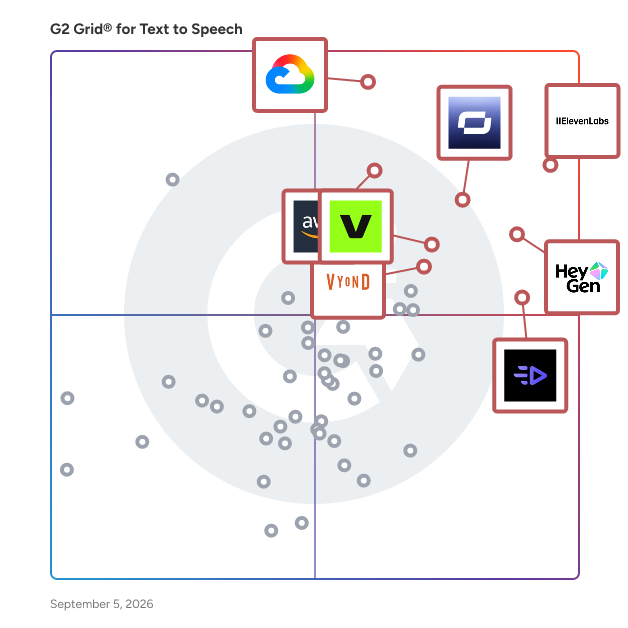
- **Leader:** [ElevenLabs](https://www.g2.com/products/elevenlabsio/reviews)
- **Highest Performer:** [Colossyan Creator](https://www.g2.com/products/colossyan-creator/reviews)
- **Easiest to Use:** [Creatify AI](https://www.g2.com/products/creatify-labs-inc-creatify-ai/reviews)
- **Top Trending:** [ElevenLabs](https://www.g2.com/products/elevenlabsio/reviews)
- **Best Free Software:** [ElevenLabs](https://www.g2.com/products/elevenlabsio/reviews)

  
## Which Type of Text to Speech Software Tools Are You Looking For?
  - [Text to Speech Software](https://www.g2.com/categories/text-to-speech) *(current)*
  - [AI Video Generators](https://www.g2.com/categories/ai-video-generators)
  - [Video Content Creation Software](https://www.g2.com/categories/video-content-creation)
  - [Video Translation Software](https://www.g2.com/categories/video-translation-software)


## Buyer Guide: Key Questions for Choosing Text to Speech Software Software
  ### What does Text to Speech software do?
  I think of Text to Speech software as the production layer that turns written scripts into spoken audio for videos, training, ads, products, and customer-facing experiences. Across the G2 feedback I analyzed, users connect this category with AI voiceovers, narration, voice cloning, multilingual audio, avatars, subtitles, transcripts, APIs, and video creation workflows. These tools help teams choose a voice, adjust delivery, generate audio, and revise scripts without booking a voice actor or recording every take manually. The category matters most when businesses need repeatable audio output that sounds clear, natural, and easy to update.


  ### Why do businesses use Text-to-Speech software?
  The clearest pattern I saw in G2 reviews was faster audio production. Users want professional voiceovers, training narration, product videos, and customer content without waiting on recording sessions or post-production cycles.

- **Voiceover production:** Reviewers use text-to-speech tools to create narration for training videos, ads, explainers, social content, and product walkthroughs.
- **Natural voice quality:** Users often value realistic voices, tone options, accents, and speaking styles that make generated audio sound closer to a human read.
- **Multilingual content:** Teams use these tools to localize videos, adjust language output, and reach audiences across regions.
- **Creator speed:** G2 reviewers connect the category with faster script-to-audio workflows, easier revisions, and fewer recording costs.

Pricing, credits, pronunciation issues, limited emotional range, editing controls, and language coverage need close review.


  ### Who uses Text to Speech software primarily?
  When I reviewed G2 reviewer profiles, I saw Text to Speech software serving teams that create audio, video, training, and voice-based product experiences.

- **Content creators:** Turn scripts into voiceovers for YouTube, social media, podcasts, ads, and short-form videos.
- **Marketing teams:** Create campaign narration, product explainers, UGC-style ads, and multilingual promotional content.
- **Learning and development teams:** Build training videos, e-learning modules, software walkthroughs, and internal lessons.
- **Developers and product teams:** Use APIs to add voice output, speech features, and AI agents into applications.
- **Agencies and freelancers:** Produce client videos, localized audio, ad variants, and voiceover drafts without repeated studio work.


  ### What types of Text-to-Speech software should I consider?
  From the way G2 reviewers describe their workflows, these tools are generally separated by what happens to the voice after the script is ready:

- **Voiceover studio tools:** Suited to narration, training content, explainer videos, podcasts, and marketing audio.
- **Developer API platforms:** Built around real-time audio, app voice output, AI agents, call flows, and custom product experiences.
- **Video creation platforms with TTS:** Useful when teams need avatars, subtitles, script editing, voiceover, and video export in one workflow.
- **Voice cloning and brand voice tools:** Designed for teams that need a consistent speaker style, custom voice, or reusable audio identity.
- **Dubbing and localization tools:** A strong match for translating videos, preserving speaker style, and adapting content across languages.


  ### What are the core features to look for in Text-to-Speech software?
  When I assessed this category, the features that consistently determine whether audio is usable or needs rework came down to a few core areas:

- Voice realism and control covering natural tone, pacing, emphasis, pauses, emotion, and voice variety.
- Pronunciation and language handling for names, acronyms, accents, custom pronunciations, and multilingual output.
- Script-to-audio editing with regeneration, segment edits, timeline control, audio previews, and quick script changes.
- Voice cloning and consistency through custom voices, consent controls, speaker matching, and brand voice settings.
- Export and integration options across MP3, WAV, video export, subtitles, APIs, webhooks, and production tools.


  ### What trends are shaping Text to Speech software right now?
  From the G2 themes and market signals I reviewed, several shifts are accelerating in this category:

- **Real-time voice output** is making TTS more useful for agents, apps, support flows, and live interactions.
- **Voice control is getting more detailed** as teams shape accent, tone, speed, emotion, and speaking style.
- **AI dubbing** is becoming part of regular content production for translated video, training, and marketing assets.
- **Voice licensing and consent** are becoming buying checks as commercial use of synthetic voices grows.
- **Safeguards for voice cloning** are gaining weight as teams pay closer attention to fraud prevention, disclosure, and usage control.


  ### How should I choose Text-to-Speech software?
  I recommend choosing around the audio workflow your team repeats most often. Marketing and creator teams should prioritize voice realism, script editing, language options, export formats, and credit limits. Training teams need stronger control over pronunciation, consistent voices, easy revisions, and a video workflow that fits. Developer teams should look closely at API quality, latency, pricing, uptime, and voice customization. I also advise checking commercial rights, consent controls, support quality, and how well the tool handles names, acronyms, and emotional scripts because G2 reviewers often tie those details to whether the audio is publishable without extra editing.


---

  ## What Are the Top-Rated Text to Speech Software Products in 2026?
### 1. [WellSaid Studio](https://www.g2.com/products/wellsaid-studio/reviews)
  **Average Rating:** 4.6/5.0
  **Total Reviews:** 125
  **Product Description:** WellSaid is the AI voice platform for teams who create content that teaches, guides, and informs — and need to produce more of it, faster, without sacrificing quality, accessibility, or scale. Where generic AI voice tools chase novelty, WellSaid is built for high-performing teams who rely on natural, consistent, studio-quality voiceover production across modules, languages, and workflows. We remove the slowest, most painful part of building learning and communication content: recording voiceovers. Teams responsible for learning and communication are under pressure from every direction: ◎More content, more often ◎Multiple languages for global audiences ◎Strict accessibility requirements ◎Flat budgets ◎Stakeholders expecting content to stay continuously updated The one step that consistently slows everything down is voiceover. ◎Recording internal SMEs is slow and inconsistent ◎Hiring voice actors is expensive and hard to scale ◎Generic AI voice tools are fast but sound “good enough,” not learner-ready WellSaid removes that bottleneck. We plug directly into the way modern teams already build content — like Articulate and LMS workflows — and replace manual recording with studio-quality AI voice that updates in minutes, not days. Teams use WellSaid to: ◎Narrate courses, tutorials, microlearning, and onboarding ◎Keep evergreen content accurate and up to date ◎Meet accessibility requirements with captions + aligned voiceover production ◎Deliver multilingual content with a consistent tone and clarity ◎Produce content collaboratively with a single, trusted voice Wherever teams create learning and communication content, they create it faster, with higher quality and less friction, on WellSaid.


### What Do G2 Reviewers Say About WellSaid Studio?
*AI-generated summary from verified user reviews*

**Pros:**

- Users praise the **ease of use** of WellSaid Studio, appreciating its user-friendly interface and quick operation.
- Users appreciate the **wide variety of realistic voices** in WellSaid Studio, enhancing content creation for diverse projects.
- Users praise the **natural and lifelike voice quality** in WellSaid Studio, enhancing their projects with ease and efficiency.
- Users appreciate the **variety of audio options** in WellSaid Studio, enhancing e-learning experiences with authentic, customizable voices.
- Users appreciate the **user-friendly interface and diverse voice options** that enhance content creation effectively.

**Cons:**

- Users find the **word mispronunciation** in WellSaid Studio challenging, especially for unique names and industry-specific terms.
- Users find the **unnatural voices** in lower tiers detract from the overall quality of WellSaid Studio.
- Users feel limited by the **restricted voice and language options** , which hampers their overall experience with WellSaid Studio.
- Users experience **pronunciation issues** with WellSaid Studio, especially with specialty terms and inconsistent AI voice outputs.
- Users express frustration with **accent limitations** that hinder accurate pronunciation and reduce the quality of output.
  #### What Are Recent G2 Reviews of WellSaid Studio?

**"[Easy to Use. Powerful Voiceover.](https://www.g2.com/survey_responses/wellsaid-studio-review-8713933)"**

**Rating:** 4.5/5.0 stars
*— Shiann A.*

[Read full review](https://www.g2.com/survey_responses/wellsaid-studio-review-8713933)

---

**"[Versatile Voices, Seamless Experience](https://www.g2.com/survey_responses/wellsaid-studio-review-12671426)"**

**Rating:** 5.0/5.0 stars
*— Candice D.*

[Read full review](https://www.g2.com/survey_responses/wellsaid-studio-review-12671426)

---

  #### What Are G2 Users Discussing About WellSaid Studio?

- [What do you like most about WellSaid Studio for voice-over creation, and what improvements would you suggest?](https://www.g2.com/discussions/what-do-you-like-most-about-wellsaid-studio-for-voice-over-creation-and-what-improvements-would-you-suggest)
- [What is WellSaid Studio used for?](https://www.g2.com/discussions/what-is-wellsaid-studio-used-for)
### 2. [Speechify Studio - AI Voice Generator](https://www.g2.com/products/speechify-speechify-studio-ai-voice-generator/reviews)
  **Average Rating:** 4.3/5.0
  **Total Reviews:** 15
  **Product Description:** With Speechify Studio you can create AI voice overs for videos, ads, e-learning, audiobooks, dubbing, website content, or any use case you need. Includes voice cloning, 200+ voices, 60+ languages, a pronunciation library, and emotional &amp; speed controls. https://speechify.com/ai-voice-generator/


### What Do G2 Reviewers Say About Speechify Studio - AI Voice Generator?
*AI-generated summary from verified user reviews*

**Pros:**

- Users find Speechify Studio to be extremely **easy to use** , enabling quick and natural audio generation with minimal effort.
- Users love the **natural-sounding voices** of Speechify Studio, significantly enhancing their videos with realistic narrations and emotions.
- Users love the **natural-sounding voice customization** in Speechify Studio, enhancing their video narrations and storytelling.
- Users find Speechify Studio to be **affordable** , making high-quality voiceovers accessible for budget-conscious content creators.
- Users appreciate the **natural audio quality** of Speechify Studio, enhancing their voiceover and narration experiences significantly.

**Cons:**

- Users find the AI voice **lacks emotional depth** , resulting in a less engaging listening experience, especially for books.
- Users report **performance issues** with Speechify Studio, including slow processing and export glitches that disrupt workflow.
- Users experience **artificiality in voice quality** , especially with accents, impacting overall authenticity in their projects.
- Users are frustrated by the **monthly word limit** in Speechify Studio, which restricts voice options after reaching it.
- Users find the **documentation too complicated** , making it challenging to effectively use the Speechify Studio API.
  #### What Are Recent G2 Reviews of Speechify Studio - AI Voice Generator?

**"[Realistic Audio Enhances Learning, Needs More Offline Features](https://www.g2.com/survey_responses/speechify-studio-ai-voice-generator-review-12688350)"**

**Rating:** 4.0/5.0 stars
*— Harsh G.*

[Read full review](https://www.g2.com/survey_responses/speechify-studio-ai-voice-generator-review-12688350)

---

**"[Intuitive AI Voice Tool with Room for Improvement](https://www.g2.com/survey_responses/speechify-studio-ai-voice-generator-review-12680916)"**

**Rating:** 4.5/5.0 stars
*— Khushal  G.*

[Read full review](https://www.g2.com/survey_responses/speechify-studio-ai-voice-generator-review-12680916)

---

### 3. [Trinity Audio](https://www.g2.com/products/trinity-audio/reviews)
  **Average Rating:** 4.5/5.0
  **Total Reviews:** 20
  **Product Description:** Trinity Audio is the only unified platform that advances content owners to strategically evolve to deliver audio experiences. The company’s technology instantly converts content from text to audio with the most natural sounding voices, continuously learns listeners&#39; behavior, and creates futuristic smart audio experiences, covering every stage of the audio journey from creation to distribution. - Convert content from text to audio with the most natural sounding voices, while learning listeners&#39; behavior and creating smart audio experiences. - Edit and fine-tune the listening experience, adjust how words are pronounced to make sure your voice is heard exactly as you envisioned - Distribute your audio on leading platforms such as Spotify, apple and google podcasts.


### What Do G2 Reviewers Say About Trinity Audio?
*AI-generated summary from verified user reviews*

**Pros:**

- Users find Trinity Audio incredibly **easy to use and integrate** , enhancing the audio experience for their audience seamlessly.
- Users commend the **excellent customer support** from Trinity Audio, highlighting their quick responses and effective problem resolution.
- Users find the **implementation ease** of Trinity Audio outstanding, with straightforward setup and quick integration.
- Users commend the **exceptional quality** of Trinity Audio, recognizing its value in enhancing engagement and accessibility.
- Users applaud the **easy integration and setup** of Trinity Audio, enhancing user engagement and functionality effortlessly.

**Cons:**

- Users express a need for **improved accuracy in revenue reporting** on the Dashboard for better performance analysis.
- Users express concern over **credit issues** in the Creator plan, as credits deplete rapidly when accessing older articles.
- Users express concern over **credit limitations** on the Creator plan, as article clicks rapidly consume available credits.
- Users find Trinity Audio **expensive** due to payment challenges and limited language options for diverse educational needs.
- Users find the **limited language options** of Trinity Audio restrictive, hindering outreach in educational settings.
  #### What Are Recent G2 Reviews of Trinity Audio?

**"[Trinity Audio Made Learning Easier and Accessible for English and Non-English Learners](https://www.g2.com/survey_responses/trinity-audio-review-12235319)"**

**Rating:** 4.5/5.0 stars
*— Trevor F.*

[Read full review](https://www.g2.com/survey_responses/trinity-audio-review-12235319)

---

**"[Effortless Integration and Outstanding Support with Trinity Audio](https://www.g2.com/survey_responses/trinity-audio-review-11908836)"**

**Rating:** 4.5/5.0 stars
*— Zelle G.*

[Read full review](https://www.g2.com/survey_responses/trinity-audio-review-11908836)

---

  #### What Are G2 Users Discussing About Trinity Audio?

- [What is Trinity Audio used for?](https://www.g2.com/discussions/what-is-trinity-audio-used-for)
### 4. [Animaker](https://www.g2.com/products/animaker/reviews)
  **Average Rating:** 4.7/5.0
  **Total Reviews:** 1,028
  **Product Description:** Animaker is a power-packed, AI-powered video creation platform built to transform the way creators and teams easily produce videos for training, communication, and marketing. Trusted by 30 million users and 80% of Fortune 500 companies, Animaker empowers anyone to create professional videos in minutes, with no editing experience required. Animaker’s toolkit comes loaded with advanced AI tools that simplify every stage of video creation. ● AI Whiteboard Video - Create engaging videos in a hand-drawn whiteboard style from prompts. ● AI Clip Generator - Generate professional-looking clips from prompts or uploaded media. ● AI Video Generator - Produce full-length, studio-quality Gen AI videos from simple prompts. ● AI Infographic Maker - Convert data and reports into visually stunning animated infographic videos. ● AI Video Trainers - Build personalized, on-demand training videos at scale. ● AI Video Quiz - Make training videos engaging and interactive by adding quizzes within the content. ● AI Video Editor - Edit, enhance, and polish videos automatically with our AI Assistant Max. ● Subtitle Generator - Add accurate, multilingual subtitles in seconds with one click! ● AI Translate - Auto-translate animaker-made videos into 100+ languages to connect with the audience worldwide ● AI Voice Generator - Create realistic, human-like voiceovers from 180+ voices across 2000+ languages and accents. Our other powerful features include - ● Avatar Maker - Build unique, customizable characters that represent your brand and audience. ● Animaker Deck - Create animated presentations with characters for engagement and retention! ● 1000+ ready-to-use templates - Quickly make videos for any purpose from training and onboarding to marketing and internal communication. Since 2015, Animaker has powered over 50 million video creations, helping L&amp;D teams, educators, and enterprises revolutionize how they train, communicate, and grow through the power of AI-driven video creation.


### What Do G2 Reviewers Say About Animaker?
*AI-generated summary from verified user reviews*

**Pros:**

- Users find Animaker to be incredibly **user-friendly** , making animation creation an easy and efficient process.
- Users find Animaker&#39;s **video creation process effortless** , thanks to its intuitive features and customizable options.
- Users love the **user-friendly design** of Animaker, making video creation easy and enjoyable for everyone.
- Users find that Animaker&#39;s **animation features** make creating videos easy and enjoyable, enhancing their creative process.
- Users love the **variety of character styles and actions** , enhancing engagement in their video projects effortlessly.

**Cons:**

- Users find the **limited free account features** restrictive, especially for nonprofit and casual use of Animaker.
- Users find Animaker to be **expensive** , especially for students and those on a budget, limiting access to premium features.
- Users find the **lack of free access** to features frustrating, limiting creative possibilities and increasing costs for premium plans.
- Users find the **limitations of the free account** restrictive, especially regarding video length and feature access.
- Users experience **slow rendering** issues with Animaker, leading to frustrating delays and decreases in video quality.
  #### What Are Recent G2 Reviews of Animaker?

**"[A Powerful and User-Friendly Tool for Creating Professional Videos](https://www.g2.com/survey_responses/animaker-review-12500776)"**

**Rating:** 5.0/5.0 stars
*— Ricardo U.*

[Read full review](https://www.g2.com/survey_responses/animaker-review-12500776)

---

**"[Animaker Makes Animation Easy for Beginners](https://www.g2.com/survey_responses/animaker-review-12889853)"**

**Rating:** 5.0/5.0 stars
*— Nita E.*

[Read full review](https://www.g2.com/survey_responses/animaker-review-12889853)

---

  #### What Are G2 Users Discussing About Animaker?

- [What is Animaker used for?](https://www.g2.com/discussions/what-is-animaker-used-for)
- [Which software is best for animation?](https://www.g2.com/discussions/which-software-is-best-for-animation) - 1 comment
- [Is Animaker a safe site?](https://www.g2.com/discussions/is-animaker-a-safe-site) - 1 comment, 2 upvotes
### 5. [Elai.io](https://www.g2.com/products/elai-io/reviews)
  **Average Rating:** 4.6/5.0
  **Total Reviews:** 123
  **Product Description:** Panopto&#39;s AI video studio, Elai, extends the platform&#39;s capabilities with an all-in-one solution for AI-generated video content. Trusted by over 2,000 clients, Elai enables organizations to produce professional, interactive videos narrated by digital human presenters—in minutes, and without a camera, studio, or green screen. Its intuitive editor supports instant video creation from text, PowerPoint, and PDF files; translation into 75+ languages; and interactive elements including buttons, quizzing, and branching scenarios—making scalable content creation accessible to everyone.


### What Do G2 Reviewers Say About Elai.io?
*AI-generated summary from verified user reviews*

**Pros:**

- Users appreciate the **ease of use** of Elai.io, highlighting its intuitive design and supportive features for content creation.
- Users appreciate the **realistic avatars** offered by Elai.io, enhancing video creation for e-learning with personalization options.
- Users value the **extensive features** of Elai.io, enabling easy and scalable video creation for diverse e-learning needs.
- Users value the **attentive customer support** of Elai.io, greatly enhancing their experience and integration with the platform.
- Users find that Elai.io significantly simplifies **scalable video creation** , enhancing e-learning experiences with its rich features.

**Cons:**

- Users note significant **limitations in avatar quality** , including gesture reliability and video clip size restrictions, affecting overall satisfaction.
- Users experience **slow rendering** times occasionally, impacting video generation but still value the tool&#39;s capabilities.
- Users note the **quality and realism limitations** of Elai.io&#39;s AI avatars and video generation capabilities.
- Users find the **limited avatars** restrictiveness frustrating, impacting the overall quality and diversity of the platform.
- Users feel the **avatar quality** lacks realism and faces limitations, impacting overall satisfaction with Elai.io.
  #### What Are Recent G2 Reviews of Elai.io?

**"[Simplifies Video Creation for E-Learning](https://www.g2.com/survey_responses/elai-io-review-12551113)"**

**Rating:** 5.0/5.0 stars
*— Manuel G.*

[Read full review](https://www.g2.com/survey_responses/elai-io-review-12551113)

---

**"[Empowers In-House Video Creation with Excellent Support](https://www.g2.com/survey_responses/elai-io-review-12633725)"**

**Rating:** 4.0/5.0 stars
*— Dajana K.*

[Read full review](https://www.g2.com/survey_responses/elai-io-review-12633725)

---

  #### What Are G2 Users Discussing About Elai.io?

- [What is Elai.io used for?](https://www.g2.com/discussions/what-is-elai-io-used-for)
### 6. [Synthesys AI Studio](https://www.g2.com/products/synthesys-ai-studio/reviews)
  **Average Rating:** 4.3/5.0
  **Total Reviews:** 16
  **Product Description:** Content Creation Made Simple. Effortlessly Shape Your Content, Optimize Your Process


### What Do G2 Reviewers Say About Synthesys AI Studio?
*AI-generated summary from verified user reviews*

**Pros:**

- Users are impressed by the **impressive results** from Synthesys AI Studio, enhancing content with realistic voices and images.
- Users rave about the **exceptional quality** of Synthesys AI Studio, significantly enhancing their content creation experience.
- Users love the **incredibly realistic avatars** from Synthesys AI Studio, enhancing their content with unmatched quality.
- Users rave about the **incredibly realistic AI voices** of Synthesys AI Studio, enhancing their content remarkably.
- Users love the **variety of features** in Synthesys AI Studio, enhancing their content with realistic voices and versatile image generation.

  #### What Are Recent G2 Reviews of Synthesys AI Studio?

**"[Good company, great people, perfect product](https://www.g2.com/survey_responses/synthesys-ai-studio-review-10564757)"**

**Rating:** 5.0/5.0 stars
*— Matt P.*

[Read full review](https://www.g2.com/survey_responses/synthesys-ai-studio-review-10564757)

---

**"[Experiences I&#39;ve had as a beta tester for Synthesys AI Studio](https://www.g2.com/survey_responses/synthesys-ai-studio-review-9005373)"**

**Rating:** 5.0/5.0 stars
*— Dave K.*

[Read full review](https://www.g2.com/survey_responses/synthesys-ai-studio-review-9005373)

---

### 7. [Async Creator](https://www.g2.com/products/async-creator/reviews)
  **Average Rating:** 4.7/5.0
  **Total Reviews:** 186
  **Product Description:** Async is shaping a new standard for content creation with a fully integrated, AI-powered platform designed for end-to-end video, audio, and voice production. Its browser-based platform turns ideas into ready-to-publish content in seconds, bringing recording, AI generation, editing, and publishing into one cohesive environment - no tool-switching required. At the center is chat-based editing. Instead of hunting through timelines and menus, creators just type what they want - tighten the intro, add Spanish subtitles, cut the filler - and the edit happens. It&#39;s the fastest path from raw footage to finished content, with no experience needed. Around it, intelligent automation handles the time-consuming work: removing background noise, cutting filler words, generating precise transcripts, and producing natural, multilingual voiceovers instantly. Async doesn&#39;t stop at creation - it&#39;s built to help content scale. Subtitles, translation, dubbing, reframing, eye contact correction, AI avatars, and short-form clipping are all part of the same system, making it easy to adapt content for any platform. And with the Engagement Booster, every piece is optimized to maximize performance. Millions of creators and businesses already rely on Async. By combining 100+ advanced AI generative models with a unified, prompt-driven workflow, Async makes high-quality content creation faster, more accessible, and ready to scale with the demands of modern creators.


### What Do G2 Reviewers Say About Async Creator?
*AI-generated summary from verified user reviews*

**Pros:**

- Users appreciate the **ease of use** of Async Creator, finding it intuitive and efficient for video podcasting.
- Users highlight the **excellent quality** of Async Creator, making podcasting easy and accessible for everyone.
- Users love the **easy editing** features of Async Creator, allowing quick and efficient podcast production and distribution.
- Users find the **easy recording** feature of Async Creator highly beneficial for remote podcast production and editing.
- Users love the **intuitive interface** of Async Creator, making podcast creation easy and enjoyable for everyone.

**Cons:**

- Users face **recording issues** such as a lack of a pause button and challenges with multiple microphones.
- Users find Async Creator **expensive** , particularly for those who don&#39;t require extensive features or a full studio setup.
- Users find the **limited features** of Async Creator restrict their creativity and functionality compared to other tools.
- Users face **technical issues** with Async Creator, struggling with lack of support and various bugs affecting usability.
- Users find the **limited advanced features** in Async Creator frustrating, particularly in the free version and mobile app.
  #### What Are Recent G2 Reviews of Async Creator?

**"[Easy to Use, Great Value, and Invaluable for Podcasts, Show Notes, and Videos](https://www.g2.com/survey_responses/async-creator-review-12373376)"**

**Rating:** 4.5/5.0 stars
*— Molly W.*

[Read full review](https://www.g2.com/survey_responses/async-creator-review-12373376)

---

**"[Podcastle allowed me to achieve my dream of an online interview podcast](https://www.g2.com/survey_responses/async-creator-review-11780224)"**

**Rating:** 5.0/5.0 stars
*— iCast P.*

[Read full review](https://www.g2.com/survey_responses/async-creator-review-11780224)

---

### 8. [Voicemaker](https://www.g2.com/products/voicemaker/reviews)
  **Average Rating:** 4.3/5.0
  **Total Reviews:** 17
  **Product Description:** Voicemaker is a state-of-the-art Text-to-Speech (TTS) platform that generates Ultra realistic human-like AI voices with emotions and styles, offering over 1,500+ AI voices in 130 languages worldwide. It has customisable audio style, voice speed, pitch, volume, audio format, and audio profile settings. Designed for creators, developers, and enterprises. Built to scale with a seamless APIs.


### What Do G2 Reviewers Say About Voicemaker?
*AI-generated summary from verified user reviews*

**Pros:**

- Users love the **ease of use** of Voicemaker, finding it simple and user-friendly for beginners.
- Users love the **high-quality, natural-sounding voice output** of Voicemaker, enhancing text-to-speech experiences effectively.
- Users appreciate the **wide range of voice options** in Voicemaker, enhancing video speech with ease and customization.
- Users love the **natural sounding voices** offered by Voicemaker, enhancing their text-to-speech conversion experience.
- Users love the **natural-sounding voices** of Voicemaker, which enhance the realism of text-to-speech experiences.

**Cons:**

- Users express frustration with the **limited features** available for free, hindering their ability to fully evaluate the app.
- Users find that some voices can sound **robotic or unnatural** , impacting the overall quality of the output.
- Users feel the **artificiality of the voice** detracts from the experience, alongside character limits in the free version.
- Users find the **character limit in the free version** restrictive, impacting their overall satisfaction with Voicemaker.
- Users find the **expensive higher plans** limit access to more natural or expressive voices in Voicemaker.
  #### What Are Recent G2 Reviews of Voicemaker?

**"[Effortless Onboarding with an Exceptionally Simple Platform](https://www.g2.com/survey_responses/voicemaker-review-12024800)"**

**Rating:** 4.5/5.0 stars
*— Rupak S.*

[Read full review](https://www.g2.com/survey_responses/voicemaker-review-12024800)

---

**"[One of the industry&#39;s Best Voices](https://www.g2.com/survey_responses/voicemaker-review-11999308)"**

**Rating:** 5.0/5.0 stars
*— Aparna G.*

[Read full review](https://www.g2.com/survey_responses/voicemaker-review-11999308)

---

### 9. [Yepic Studio](https://www.g2.com/products/yepic-studio/reviews)
  **Average Rating:** 4.5/5.0
  **Total Reviews:** 72
  **Product Description:** Yepic AI – Real-Time Video Avatars That See, Hear, and Adapt Like a Human. Yepic is the operating system for human capital. We transform training, onboarding, and customer service with real-time AI avatars that respond in under a second—with emotional intelligence, visual awareness, and multilingual fluency.


### What Do G2 Reviewers Say About Yepic Studio?
*AI-generated summary from verified user reviews*

**Pros:**

- Users find Yepic Studio&#39;s **ease of use** remarkable, enabling quick video creation without technical expertise.
- Users appreciate the **user-friendly editing options** in Yepic Studio, enabling quick adjustments and a personal touch without recording.
- Users appreciate the **time-saving efficiency** of Yepic Studio, enabling quicker task completion and improved workflow.
- Users love the **realistic avatars** of Yepic Studio, appreciating the high-quality animation and easy usability.
- Users praise the **high quality and realism** of Yepic Studio&#39;s animation and lip-sync features.

**Cons:**

- Users express a desire for more **avatar options** in Yepic Studio to enhance their creative possibilities.
- Users experience **slow performance** when exporting longer videos, causing delays and frame drops during the process.
- Users experience **lagging performance** during longer video exports, with noticeable delays and frame drops affecting quality.
- Users find the **limited avatars** in Yepic Studio restrictive, wishing for more variety to enhance their creations.
- Users find **customization options limited** in Yepic Studio, expressing a desire for more avatar choices and editing features.
  #### What Are Recent G2 Reviews of Yepic Studio?

**"[Perfect for Quick, Professional Videos](https://www.g2.com/survey_responses/yepic-studio-review-10770897)"**

**Rating:** 5.0/5.0 stars
*— Kristina M.*

[Read full review](https://www.g2.com/survey_responses/yepic-studio-review-10770897)

---

**"[Tool for Educational Content](https://www.g2.com/survey_responses/yepic-studio-review-11150950)"**

**Rating:** 5.0/5.0 stars
*— Srikandi U.*

[Read full review](https://www.g2.com/survey_responses/yepic-studio-review-11150950)

---

  #### What Are G2 Users Discussing About Yepic Studio?

- [What is Yepic Studio used for?](https://www.g2.com/discussions/what-is-yepic-studio-used-for)
### 10. [Rask AI](https://www.g2.com/products/rask-ai/reviews)
  **Average Rating:** 4.7/5.0
  **Total Reviews:** 269
  **Product Description:** Meet Rask AI – a one-stop-shop localization tool that allows content creators and companies to translate their videos into 130+ languages quickly and efficiently. With &quot;Text-to-Voice&quot; and &quot;Voice Cloning&quot; technologies, they can add a professional-quality voiceover to videos without the need for recording or hiring a voice actor. And now you can keep your own voice or your voiceover tone when dubbing. Check it out here for free: https://www.rask.ai/


### What Do G2 Reviewers Say About Rask AI?
*AI-generated summary from verified user reviews*

**Pros:**

- Users find Rask AI **easy to use** , appreciating its intuitive interface and support for multiple languages.
- Users find Rask AI **intuitive and user-friendly** , appreciating the availability of multiple languages.
- Users appreciate the **language diversity** of Rask AI, making it easy and intuitive to use across many languages.
- Users appreciate the **extensive language support** of Rask AI, enhancing their experience through intuitive communication.
- Users appreciate the **multilingual support** of Rask AI, enhancing accessibility and user-friendliness across various languages.

**Cons:**

- Users often cite **high costs and poor service** as significant drawbacks of the Rask AI product experience.
- Users find Rask AI to be **expensive** and often criticize the quality of service and voice speed.
- Users find Rask AI&#39;s interface **not user-friendly** , noting issues like robotic voices and poor customer service.
- Users express concerns about **poor customer support** and issues with voice quality in Rask AI.
- Users express concerns about **pricing issues** and inadequate service quality, impacting their overall satisfaction with Rask AI.
  #### What Are Recent G2 Reviews of Rask AI?

**"[The best in terms of dubbing!](https://www.g2.com/survey_responses/rask-ai-review-8944990)"**

**Rating:** 5.0/5.0 stars
*— Rayssa A.*

[Read full review](https://www.g2.com/survey_responses/rask-ai-review-8944990)

---

**"[THE BEST Ai video translation tool](https://www.g2.com/survey_responses/rask-ai-review-8977861)"**

**Rating:** 5.0/5.0 stars
*— Fausto M.*

[Read full review](https://www.g2.com/survey_responses/rask-ai-review-8977861)

---

### 11. [LOVO](https://www.g2.com/products/lovo/reviews)
  **Average Rating:** 4.4/5.0
  **Total Reviews:** 181
  **Product Description:** LOVO is a professional-grade content creation platform powered by Generative AI and advanced text to speech technologies to create high-quality audio and video content for marketing, advertising, eLearning, onboarding, and localization purposes. LOVO boasts a growing library of 500+ human-like emotional voices in 100+ languages, granular audio control, and an easy-to-use interface. This is why over 1,000,000 professionals trust LOVO for their audio and video content needs. Try LOVO now - lovo.ai


### What Do G2 Reviewers Say About LOVO?
*AI-generated summary from verified user reviews*

**Pros:**

- Users find LOVO&#39;s **ease of use** impressive, allowing intuitive operation and efficient management of content across platforms.
- Users value the **high quality** of Lovo&#39;s realistic voices and user-friendly interface for audio content creation.
- Users praise Lovo.ai for its **high-quality audio content** and realistic voices, enhancing their creative projects significantly.
- Users love the **vast library of voices and accents** in LOVO, enabling highly tailored audio content creation.
- Users are impressed with LOVO&#39;s **user-friendly interface** and vast library of realistic voices for diverse needs.

**Cons:**

- Users note the **limited support for regional accents** , which affects voice quality and usability for diverse projects.
- Users find the **expensive cost** of LOVO a challenge, especially for casual users or smaller projects.
- Users note a **limited variety of voices** in LOVO, affecting expressiveness and overall satisfaction with the product.
- Users find the **slow performance** of LOVO manageable, but improvements in processing speed would enhance overall experience.
- Users struggle with **limited voice variety** and features, making audio editing and improvements cumbersome and time-consuming.
  #### What Are Recent G2 Reviews of LOVO?

**"[Awesome experience using LOVO. And their customer support is very friendly and supportive](https://www.g2.com/survey_responses/lovo-review-11441950)"**

**Rating:** 5.0/5.0 stars
*— Pankit M.*

[Read full review](https://www.g2.com/survey_responses/lovo-review-11441950)

---

**"[Friendly and fast service, the AI is very good.](https://www.g2.com/survey_responses/lovo-review-11263236)"**

**Rating:** 5.0/5.0 stars
*— Nicole N.*

[Read full review](https://www.g2.com/survey_responses/lovo-review-11263236)

---

  #### What Are G2 Users Discussing About LOVO?

- [What is AI voiceover?](https://www.g2.com/discussions/what-is-ai-voiceover)
- [How do you use Lovo?](https://www.g2.com/discussions/how-do-you-use-lovo)
- [Is Lovo Studio good?](https://www.g2.com/discussions/is-lovo-studio-good)
### 12. [Wavel.ai](https://www.g2.com/products/dolce-lte-ltd-wavel-ai/reviews)
  **Average Rating:** 4.3/5.0
  **Total Reviews:** 50
  **Product Description:** Wavel is a complete Video Translation Platform, where video creators can dub, voiceover or subtitle their videos seamlessly. Users can create voice clones to get video translation in the desired voice with perfect emotion, expressions and sync.


### What Do G2 Reviewers Say About Wavel.ai?
*AI-generated summary from verified user reviews*

**Pros:**

- Users appreciate the **AI and automation** features of Wavel.ai, simplifying workflows and saving valuable time.
- Users find Wavel.ai&#39;s **ease of use** remarkable, requiring no training for effective voiceover creation.
- Users appreciate the **high-quality voice output** of Wavel.ai, enhancing their professional and educational content effectively.
- Users love the **diverse voice options** of Wavel.ai, enhancing communication and creativity across multiple languages and styles.
- Users appreciate the **simple and intuitive interface** of Wavel.ai, making video editing accessible for everyone.

**Cons:**

- Users experience **pronunciation issues** with Wavel.ai, noting it&#39;s often unnatural and lacks emotional depth in voiceovers.
- Users find the **artificiality of the output** noticeable, leading to unsatisfactory voice quality and manual adjustments needed.
- Users find Wavel.ai&#39;s subscription costs to be **expensive** , making it challenging for startups and budget-conscious companies.
- Users find the **pricing issues** of Wavel.ai burdensome, especially for startups and those on tight budgets.
- Users find the **robotic voice quality** lacking, failing to convey emotional nuance and professionalism needed for business interactions.
  #### What Are Recent G2 Reviews of Wavel.ai?

**"[Exceptional Support with User-Friendly Content Creation](https://www.g2.com/survey_responses/wavel-ai-review-12196292)"**

**Rating:** 4.5/5.0 stars
*— Brendan R.*

[Read full review](https://www.g2.com/survey_responses/wavel-ai-review-12196292)

---

**"[Fast, Manageable AI Voice &amp; Video Creation But Credits and Pricing Need Clarity](https://www.g2.com/survey_responses/wavel-ai-review-12824772)"**

**Rating:** 4.5/5.0 stars
*— Muzammil M.*

[Read full review](https://www.g2.com/survey_responses/wavel-ai-review-12824772)

---

### 13. [Typecast](https://www.g2.com/products/typecast/reviews)
  **Average Rating:** 4.0/5.0
  **Total Reviews:** 22
  **Product Description:** Typecast is an AI voiceover and virtual actor service. Typecast empowers creators to build video content without the need to hire a production team or a professional voice over. Typecast utilizes AI text to speech technology to produce life-like voices with different ranges of emotions.


### What Do G2 Reviewers Say About Typecast?
*AI-generated summary from verified user reviews*

**Pros:**

- Users enjoy the **ease of use** of Typecast, finding it straightforward for creating high-quality voiceovers effortlessly.
- Users value the **extensive voice variety** of Typecast, enhancing creativity and confidence in their projects.
- Users appreciate the **high-quality AI voiceovers** of Typecast, making it accessible and versatile for presentations and dubbing.
- Users appreciate the **accessible and versatile content creation** offered by Typecast, enhancing their AI voiceover experiences.
- Users love the **variety of templates** in Typecast, enhancing creativity and simplifying the content creation process.

**Cons:**

- Users find **accent limitations** in Typecast, particularly lacking diverse and natural-sounding Indian voice options.
- Users note the **naturalness of voiceovers** is lacking, with some voices sounding robotic and repetitive.
- Users find the **download limitations** of Typecast restrictive, particularly with only three minutes available on the free version.
- Users feel the **high subscription price** of Typecast makes it less accessible for small businesses and personal use.
- Users find the **artificiality of voices** off-putting, noting a lack of realism and limited language support.
  #### What Are Recent G2 Reviews of Typecast?

**"[Quick and realistic voice overs with Typecast](https://www.g2.com/survey_responses/typecast-review-8324258)"**

**Rating:** 4.5/5.0 stars
*— Viktoras J.*

[Read full review](https://www.g2.com/survey_responses/typecast-review-8324258)

---

**"[Easily Converts Text Scripts into Audio Files](https://www.g2.com/survey_responses/typecast-review-12298381)"**

**Rating:** 5.0/5.0 stars
*— Prerak J.*

[Read full review](https://www.g2.com/survey_responses/typecast-review-12298381)

---

### 14. [Resemble AI](https://www.g2.com/products/resemble-ai/reviews)
  **Average Rating:** 3.9/5.0
  **Total Reviews:** 20
  **Product Description:** Resemble AI is a voice technology company dedicated to producing high-quality synthetic voices. We supercharge your synthetic voice experience with a state-of-the-art text-to-speech generator, paired with real-time APIs to build immersive and dynamic experiences. Our innovative solutions are designed to meet the diverse needs of various industries, ensuring that your audio content is always realistic, versatile, and secure.


### What Do G2 Reviewers Say About Resemble AI?
*AI-generated summary from verified user reviews*

**Pros:**

- Users find Resemble AI&#39;s **ease of use** impressive, with a user-friendly interface that simplifies voice generation for everyone.
- Users love the **voice customization** of Resemble AI, enabling diverse emotional tones and effortless revisions in narration.
- Users value the **AI-powered human-like voice models** of Resemble AI, enhancing versatility and emotional depth in voiceovers.
- Users appreciate the **diverse voice options** of Resemble AI, which enhance the realism and emotional depth of their projects.
- Users admire the **realistic and expressive voiceovers** of Resemble AI, significantly enhancing their marketing and communication projects.

**Cons:**

- Users express concern about the **high costs** of Resemble AI, making it less accessible for everyone.
- Users highlight the **high costs** of Resemble AI, especially for extensive use and accessing premium features.
- Users find the **voice quality lacking** , citing issues like noise, missing words, and a lack of human-like characteristics.
- Users note the **limitations with longer inputs** , requiring multiple prompts and lacking human-like voice elements.
- Users note that the **user interface and voice quality need improvement** for a more effective experience with Resemble AI.
  #### What Are Recent G2 Reviews of Resemble AI?

**"[Exceptional Voice Quality and Effortless Integration](https://www.g2.com/survey_responses/resemble-ai-review-11996757)"**

**Rating:** 5.0/5.0 stars
*— DONGA UDAYA S.*

[Read full review](https://www.g2.com/survey_responses/resemble-ai-review-11996757)

---

**"[Effortless Voice Creation and Cloning with User-Friendly AI](https://www.g2.com/survey_responses/resemble-ai-review-11951722)"**

**Rating:** 4.5/5.0 stars
*— Konjengbam  M.*

[Read full review](https://www.g2.com/survey_responses/resemble-ai-review-11951722)

---

### 15. [Voiser](https://www.g2.com/products/voiser/reviews)
  **Average Rating:** 4.2/5.0
  **Total Reviews:** 10
  **Product Description:** Voiser is an advanced AI-powered voice technology platform that helps businesses, educators, and creators generate natural-sounding speech and accurate transcriptions in more than 140 languages. With a suite of products including Text to Speech, Speech to Text, AI Dubbing, and Voice Cloning, Voiser enables organizations to communicate globally with efficiency and authenticity. Designed for enterprises that prioritize data security and scalability, Voiser also offers On-Prem and API-based solutions that can be fully deployed within institutional infrastructures, ensuring compliance with GDPR and KVKK standards. From marketing teams producing multilingual content to educational departments localizing training materials, Voiser provides a seamless and cost-effective way to automate voice production and transcription giving every brand a voice of its own.


### What Do G2 Reviewers Say About Voiser?
*AI-generated summary from verified user reviews*

**Pros:**

- Users find Voiser&#39;s **ease of use** exceptional, allowing for quick and smooth voiceovers and transcriptions across multiple languages.
- Users rave about the **exceptional voice quality** of Voiser, highlighting its natural sound and accurate multilingual pronunciation.
- Users praise Voiser for its **natural-sounding multilingual voiceovers** and seamless integration, enhancing productivity significantly.
- Users praise the **easy setup** of Voiser, allowing quick access and smooth integration for efficient content production.
- Users praise Voiser for its **natural-sounding multilingual voice support** , enhancing content engagement and professional quality.

**Cons:**

- Users desire more **style options and voice customizations** in Voiser to enhance the overall experience and expression.
- Users desire **more regional accent options** and deeper voice customization features for improved voice variety and expression.
- Users desire more **regional accent options** and deeper customization for a more personalized experience with Voiser.
- Users criticize the **billing issues** , expressing frustrations over missing invoices and unresponsive customer service.
- Users express concerns about **credit issues** caused by incorrect typing, suggesting a need for a spell-check feature.
  #### What Are Recent G2 Reviews of Voiser?

**"[Natural Voices, Efficient Workflow](https://www.g2.com/survey_responses/voiser-review-12365226)"**

**Rating:** 4.5/5.0 stars
*— Nisha K.*

[Read full review](https://www.g2.com/survey_responses/voiser-review-12365226)

---

**"[Exceptional Multilingual Voice Platform with Room for Niche Enhancements](https://www.g2.com/survey_responses/voiser-review-11888568)"**

**Rating:** 5.0/5.0 stars
*— Barıs .*

[Read full review](https://www.g2.com/survey_responses/voiser-review-11888568)

---

### 16. [Dubverse](https://www.g2.com/products/dubverse/reviews)
  **Average Rating:** 4.6/5.0
  **Total Reviews:** 20
  **Product Description:** Dubverse SUB is an AI-powered subtitle generator designed to enhance video accessibility and global reach by providing accurate, time-coded subtitles in over 30 languages. With a single click, users can generate customized subtitles for long-form videos, significantly improving SEO and viewer engagement. The platform supports seamless integration with social media channels, allowing direct uploads to platforms like YouTube, Facebook, and Twitter. Dubverse SUB also offers features such as subtitle editing, resynchronization for perfect alignment, and the ability to embed subtitles permanently into videos. By automating the subtitle creation process, Dubverse SUB enables content creators to connect with diverse audiences worldwide, ensuring their messages are understood across different languages and regions. Key Features: - Accurate, Time-Coded Subtitles: Automatically generates 99% accurate, time-stamped subtitles, reducing manual effort. - Multilingual Support: Provides subtitles in over 30 languages, facilitating global audience engagement. - Seamless Integration: Allows direct sharing of subtitled videos to social media platforms like YouTube, Facebook, and Twitter. - Subtitle Editing and Resynchronization: Offers tools to edit subtitles and adjust synchronization for perfect alignment. - Permanent Subtitle Embedding: Enables embedding of subtitles directly into videos, enhancing accessibility and watch time. Primary Value: Dubverse SUB addresses the challenge of making video content accessible and understandable to a global audience. By automating the creation of accurate, multilingual subtitles, it saves time and resources for content creators, improves SEO rankings, and increases viewer engagement. This ensures that messages resonate across different languages and cultures, expanding the reach and impact of video content.


### What Do G2 Reviewers Say About Dubverse?
*AI-generated summary from verified user reviews*

**Pros:**

- Users find Dubverse remarkably **easy to use** , effortlessly converting text into accurate dubbed videos.
- Users praise the **accuracy** of Dubverse, appreciating its effective dubbing capabilities for their videos.
- Users appreciate the **affordability** of Dubverse, making it ideal for seasonal video dubbing needs.
- Users appreciate the **ease of use and accuracy** of Dubverse for dubbing videos effectively at an attractive price.
- Users commend Dubverse for its **impressive dubbing accuracy** and affordability, making seasonal video dubbing efficient.

**Cons:**

- Users face **limited character counts** , making it difficult to fully utilize Dubverse&#39;s features effectively.
- Users face **difficulty due to limited character counts** , making proper usage of Dubverse challenging.
- Users face a **steep learning curve** due to barriers like limited character counts affecting effective usage.
- Users struggle with **limited features** like character counts, hindering effective usage of Dubverse.
- Users face **barriers to entry** due to limited character counts, hindering effective usage of Dubverse.
  #### What Are Recent G2 Reviews of Dubverse?

**"[Dubverse is excellent for my educational content](https://www.g2.com/survey_responses/dubverse-review-11098884)"**

**Rating:** 4.5/5.0 stars
*— Mark S.*

[Read full review](https://www.g2.com/survey_responses/dubverse-review-11098884)

---

**"[Quick, Simple, and Easy Subtitling for Beginners](https://www.g2.com/survey_responses/dubverse-review-12661347)"**

**Rating:** 4.0/5.0 stars
*— Ana P.*

[Read full review](https://www.g2.com/survey_responses/dubverse-review-12661347)

---

### 17. [BeyondWords](https://www.g2.com/products/beyondwords/reviews)
  **Average Rating:** 4.4/5.0
  **Total Reviews:** 56
  **Product Description:** BeyondWords is an AI voice and audio publishing platform that brings frictionless audio to writers, newsrooms, and businesses. Our voice library offers over 720 advanced AI voices across 64 languages. You can even commission a custom voice. Production Auto-convert content using our API, RSS Feed Importer, WordPress plugin, or Ghost plugin, or use our text-to-speech editor to create audio manually. Distribution Distribute audio anywhere with our automatic player embeds, API, or SDKs. Create a podcast feed to publish on platforms like Spotify, Google Podcasts, and Apple Podcasts. Analytics Measure audio engagement to granular detail with our analytics, which can be connected to your Google Analytics account, and use insights to optimize your audio strategy. Monetization Upload audio ads from sponsors, use VAST to connect to programmatic ad platforms like Google Ad Manager, or restrict audio access to subscribers only.


  #### What Are Recent G2 Reviews of BeyondWords?

**"[Great Little Yet Powerful Helper](https://www.g2.com/survey_responses/beyondwords-review-8714451)"**

**Rating:** 5.0/5.0 stars
*— Dana K.*

[Read full review](https://www.g2.com/survey_responses/beyondwords-review-8714451)

---

**"[Difficult to get the hang of, but well worth it once you do!](https://www.g2.com/survey_responses/beyondwords-review-8671495)"**

**Rating:** 4.0/5.0 stars
*— Eric F.*

[Read full review](https://www.g2.com/survey_responses/beyondwords-review-8671495)

---

  #### What Are G2 Users Discussing About BeyondWords?

- [What is BeyondWords used for?](https://www.g2.com/discussions/what-is-beyondwords-used-for) - 1 comment
### 18. [Unreal Text-to-Speech API](https://www.g2.com/products/unreal-text-to-speech-api/reviews)
  **Average Rating:** 4.6/5.0
  **Total Reviews:** 14
  **Product Description:** Unreal Speech is a cost-effective and high-performance text-to-speech (TTS) API designed to convert written text into natural-sounding speech. It offers a scalable solution for developers and businesses seeking to integrate voice capabilities into their applications without incurring high costs. Key Features: - Cost Efficiency: Unreal Speech is up to 11 times more affordable than competitors, providing significant savings for users. - Rapid Audio Streaming: Delivers audio streams with a latency of just 300 milliseconds, ensuring real-time responsiveness. - Extensive Voice and Language Support: Offers 48 distinct voices across 8 languages, including US English, UK English, Mandarin Chinese, Hindi, Spanish, Portuguese, Japanese, French, and Italian. - Long-Form Audio Generation: Capable of generating audio files up to 10 hours in length, suitable for extensive content needs. - Per-Word Timestamps: Provides precise per-word timestamps, facilitating accurate synchronization in multimedia projects. - Developer-Friendly API: Features multiple endpoints such as `/stream`, `/speech`, and `/synthesisTasks`, with SDKs available in Python for seamless integration. - High Reliability: Ensures 99.9% uptime, offering dependable service for critical applications. - Scalable Volume Handling: Efficiently processes high volumes, capable of handling over 10,000 pages per hour. Primary Value and Solutions: Unreal Speech addresses the need for an affordable, high-quality TTS solution that scales with user requirements. By significantly reducing costs compared to other TTS services, it enables businesses and developers to incorporate voice functionalities without financial strain. The API&#39;s low latency and extensive language support make it ideal for applications requiring real-time audio responses and multilingual capabilities. Additionally, its ability to generate long-form audio and provide precise timestamps enhances content creation workflows, particularly for multimedia projects. Overall, Unreal Speech empowers users to deliver engaging and accessible audio content efficiently and cost-effectively.


### What Do G2 Reviewers Say About Unreal Text-to-Speech API?
*AI-generated summary from verified user reviews*

**Pros:**

- Users find the **ease of integration** with the Unreal Text-to-Speech API highly beneficial for their applications.
- Users love the **affordable pricing** of Unreal Text-to-Speech API, offering great value for integration and usage.
- Users find the **easy integrations** of the Unreal Text-to-Speech API highly beneficial for their applications.
- Users are pleased with the **quick and easy setup** , enjoying the tokens received upon account creation.
- Users enjoy the **time-saving efficiency** of Unreal Text-to-Speech API, finding it quick and easy to navigate.

**Cons:**

- Users express concerns about **credit issues** related to unexpected charges and unclear costs for additional characters.
- Users find it **difficult to understand character additions** and unexpected charges, complicating their usage experience.
  #### What Are Recent G2 Reviews of Unreal Text-to-Speech API?

**"[$5 for 3M Characters (First 6 Months) great way to save on TTS](https://www.g2.com/survey_responses/unreal-text-to-speech-api-review-12247336)"**

**Rating:** 4.5/5.0 stars
*— Verified User in Information Services*

[Read full review](https://www.g2.com/survey_responses/unreal-text-to-speech-api-review-12247336)

---

**"[This is the best possible TTS service at a fraction of cost compared to other competitors](https://www.g2.com/survey_responses/unreal-text-to-speech-api-review-11790486)"**

**Rating:** 5.0/5.0 stars
*— Vlad D.*

[Read full review](https://www.g2.com/survey_responses/unreal-text-to-speech-api-review-11790486)

---

### 19. [Kukarella](https://www.g2.com/products/kukarella-kukarella/reviews)
  **Average Rating:** 4.6/5.0
  **Total Reviews:** 14
  **Product Description:** Need to create professional voiceovers quickly without hiring voice actors? Kukarella gives you instant access to over 1,000 AI voices across 130 languages and accents for commercial use. Creating training or educational content? Skip the hassle of recording multiple people - use Kukarella&#39;s dialogue creator to generate natural conversations between AI voices. Our unique AI assistants can even write your dialogue scripts in seconds and automatically assign appropriate voices, saving you hours of writing and editing time. Common challenges we solve: - Time and cost of hiring voice actors - access 1,000+ professional AI voices instantly - Complexity of recording dialogue - create multi-voice conversations automatically - Script writing delays - generate voiceover scripts with AI in seconds - Need for voice customization - clone voices or create custom ones in seconds - Visual content creation - generate matching images and video for your voiceovers - Audio transcription needs - convert speech from videos, audio files, and YouTube - Text extraction - pull content from websites and images Trusted by organizations like the Government of Canada, Salesforce, DHL, McDonald&#39;s, University of London, and Daimler-Mercedes, Kukarella partners with Google, Amazon, Microsoft, and IBM to provide reliable, high-quality voice technology that helps you create content faster and more efficiently.


### What Do G2 Reviewers Say About Kukarella?
*AI-generated summary from verified user reviews*

**Pros:**

- Users love Kukarella&#39;s **ease of use** , with intuitive features that streamline script writing and voice generation effortlessly.
- Users value the **voice customization options** in Kukarella, enhancing narrations with diverse tones and emotional styles.
- Users love the **variety of voices** and customization options in Kukarella, enhancing their creative projects effortlessly.
- Users love the **ease of use** and versatility in creating dialogues with Kukarella&#39;s text to speech feature.
- Users love Kukarella&#39;s **advanced AI features** , including diverse voice libraries and customizable emotional styling for engaging dialogues.

**Cons:**

- Users report **accuracy issues** with Kukarella, facing challenges like mispronunciations and costly retakes during usage.
- Users find the **credit system frustrating** , as hidden costs and retakes can quickly exhaust their monthly allowance.
- Users find Kukarella&#39;s **credit system frustrating** , as multipliers can quickly deplete monthly allowances and incur extra charges.
- Users find Kukarella to be **expensive** due to its complex credit system and costs for retakes and premium voices.
- Users report frequent **inaccuracies** in voice pronouncement, leading to additional charges for corrections and frustrating experiences.
  #### What Are Recent G2 Reviews of Kukarella?

**"[Easy Voice Generation, but Free Limits and Credits Feel Restrictive](https://www.g2.com/survey_responses/kukarella-review-12824760)"**

**Rating:** 4.5/5.0 stars
*— Muzammil M.*

[Read full review](https://www.g2.com/survey_responses/kukarella-review-12824760)

---

**"[Versatile TTS and Transcription with a Few Learning Curves](https://www.g2.com/survey_responses/kukarella-review-12190622)"**

**Rating:** 4.0/5.0 stars
*— Praneeth P.*

[Read full review](https://www.g2.com/survey_responses/kukarella-review-12190622)

---

### 20. [Play.ht](https://www.g2.com/products/play-ht/reviews)
  **Average Rating:** 4.2/5.0
  **Total Reviews:** 89
  **Product Description:** Play (PlayHT and PlayAI) is one of the leaders in AI Voice Generation, Text to Speech &amp; Voice Cloning. Play specializes in realtime conversational Voice AI models that can clone any voice, speak like a human across any language and accent. Play offers an AI Voiceover studio at play.ht with state-of-the-art AI Voices in 100+ languages to help you create engaging voiceovers for your projects. Play&#39;s Text-to-Speech AP (play.ht/text-to-speech-api/) offers 180ms latency and allows anyone to build realtime conversational voice AI use-cases, Play&#39;s new platform (play.ai) offers businesses a no-code solution to build and deploy human-like voice agents for sales and custom support use cases. Thousands of companies use Play to create realistic AI voices or automate their business functions with realtime conversational voices. If you have a project in mind, reach out to us - play.ht/contact-us


### What Do G2 Reviewers Say About Play.ht?
*AI-generated summary from verified user reviews*

**Pros:**

- Users commend Play.ht&#39;s **exceptional customer support** , highlighting quick responses and dedicated assistance throughout the learning process.
- Users commend the **high-quality audio results** achieved with Play.ht, praising its ease of use and excellent support.
- Users love the **quick and easy usability** of Play.ht, appreciating its quality and diverse voice options.
- Users appreciate the **quick and easy creation** of audio, enjoying great quality and voice variety.
- Users appreciate the **ease of use** of Play.ht, finding it fun and supported by excellent customer service.

**Cons:**

- Users report **poor customer support** , with unresolved issues and no responses complicating their experience significantly.
- Users find Play.ht to be **expensive** for the content produced, questioning its overall value and service reliability.
- Users express frustration over **software unreliability** , with features disappearing and inadequate support impacting their experience.
- Users face **word mispronunciation issues** with Play.ht, finding available accents inadequate and challenging to use effectively.
- Users find the **limited avatars** frustrating, with few genuine Australian accents and many influenced by other dialects.
  #### What Are Recent G2 Reviews of Play.ht?

**"[Top quality support](https://www.g2.com/survey_responses/play-ht-review-10316043)"**

**Rating:** 4.5/5.0 stars
*— Verified User in Consulting*

[Read full review](https://www.g2.com/survey_responses/play-ht-review-10316043)

---

**"[Great platform, easy to use](https://www.g2.com/survey_responses/play-ht-review-10791803)"**

**Rating:** 4.0/5.0 stars
*— Verified User in Industrial Automation*

[Read full review](https://www.g2.com/survey_responses/play-ht-review-10791803)

---

### 21. [Listnr AI](https://www.g2.com/products/listnr-ai/reviews)
  **Average Rating:** 4.4/5.0
  **Total Reviews:** 15
  **Product Description:** Listnr AI is one of the best-rated AI Voice and Video generators in 2025, trusted by 3 million+ users all across the globe 🌏. Create realistic audio and video content in seconds. Choose from over 1000+ voices in 142 different languages or create your own voice. - https://www.producthunt.com/products/listnr#listnr-2-0


  #### What Are Recent G2 Reviews of Listnr AI?

**"[LiSTN Up folks!](https://www.g2.com/survey_responses/listnr-ai-review-8648039)"**

**Rating:** 4.5/5.0 stars
*— Phillip H.*

[Read full review](https://www.g2.com/survey_responses/listnr-ai-review-8648039)

---

**"[Listnr AI - Review](https://www.g2.com/survey_responses/listnr-ai-review-9127710)"**

**Rating:** 4.5/5.0 stars
*— Shubham  M.*

[Read full review](https://www.g2.com/survey_responses/listnr-ai-review-9127710)

---

### 22. [Narration Box](https://www.g2.com/products/narration-box/reviews)
  **Average Rating:** 4.3/5.0
  **Total Reviews:** 9
  **Product Description:** Narration Box is an AI-powered text-to-speech and voiceover platform built for creators, teams, and businesses that need natural-sounding audio at scale. It offers 1000+ human-like AI voices across 76+ languages and accents, including multilingual and expressive narrators that can adapt tone, emotion, and pacing based on context. Users can import text from URLs or documents and produce audio inside a block-based studio that feels like editing a document. Voices, styles, pauses, and emotions can be controlled per block, making it easy to create multi-speaker content, long-form narration, and audiobooks without complex workflows. Narration Box also supports voice cloning, advanced style instructions, and fine-grained voice controls, allowing users to tailor each narration to their exact use case. Whether you are creating product demos, audiobooks, e-learning content, or multilingual voiceovers, Narration Box provides a fast, flexible, and reliable solution backed by responsive customer support.


### What Do G2 Reviewers Say About Narration Box?
*AI-generated summary from verified user reviews*

**Pros:**

- Users enjoy the **user-friendly interface** of Narration Box, making text-to-speech conversion simple and efficient.
- Users are impressed by the **high quality** of narration, praising its clarity and user-friendly features.
- Users love the **easy integrations** of Narration Box, enabling seamless audio generation from various sources effortlessly.
- Users love the **variety of audio file formats** supported by Narration Box, enhancing convenience and versatility.
- Users love the **wide variety of audio options** , enabling customized speech generation for diverse needs and preferences.

**Cons:**

- Users find the **generation time to be a bit time-consuming** , wishing for more efficient audio processing while typing.
- Users find the **slow performance** of Narration Box frustrating, as it requires repeated actions for rendering audio.
- Users find the **time inefficiency** of needing to hit the Generate Block button repeatedly to be frustrating.
- Users find the **timing issues** frustrating as they must constantly hit the Generate Block button to hear audio.
- Users find the **transcription process time-consuming** , desiring an improvement for more efficient audio loading.
  #### What Are Recent G2 Reviews of Narration Box?

**"[Real-human like narration with AI at its best](https://www.g2.com/survey_responses/narration-box-review-10586769)"**

**Rating:** 4.5/5.0 stars
*— Verified User in Primary/Secondary Education*

[Read full review](https://www.g2.com/survey_responses/narration-box-review-10586769)

---

**"[Best text to Audio converting workspace !](https://www.g2.com/survey_responses/narration-box-review-10448018)"**

**Rating:** 4.5/5.0 stars
*— Shubham D.*

[Read full review](https://www.g2.com/survey_responses/narration-box-review-10448018)

---

### 23. [Perso AI](https://www.g2.com/products/perso-ai/reviews)
  **Average Rating:** 3.9/5.0
  **Total Reviews:** 33
  **Product Description:** ### What is Perso AI? Perso AI is an AI-powered video dubbing platform that automatically translates and localizes videos into 34+ languages — preserving the original speaker&#39;s voice, tone, and emotion through voice cloning and lip sync technology. Trusted by 100+ leading creators with a combined 30 million subscribers, Perso AI cuts global video production costs by up to 98% compared to traditional dubbing studios. Where conventional localization takes days and thousands of dollars per language, Perso AI delivers studio-quality dubbed video in minutes — with human-in-the-loop script editing so teams never lose control of brand voice or cultural accuracy. Designed for marketing teams, content creators, educators, and enterprises that need to scale multilingual video production without scaling headcount or budget. --- ### How to Use Perso AI? Dubbing a video with Perso AI takes less than 5 minutes: Step 1 — Upload your video or audio file. Supported formats: mp4, mov, webm, mp3, wav (up to 2GB per file, from 5 seconds to 60 minutes). Step 2 — Select Language from 34+ supported languages. Perso AI automatically detects and separates multiple speakers, applying culturally-aware translations to each voice individually. Step 3 — Review &amp; Edit Script in real-time. Adjust translations to match brand tone, fix terminology, or adapt cultural references — before dubbing is rendered. Step 4 — Export the final video with AI lip sync and cloned voice audio, ready to publish across any platform or channel. This review-before-render workflow is what separates Perso AI from fully automated alternatives: production speed without sacrificing editorial control. --- ### Perso AI&#39;s Core Features - AI Dubbing — Multi-speaker detection with individual voice cloning per speaker; preserves each speaker&#39;s original identity across all 34+ languages - AI Lip Sync — Advanced lip movement synchronization that works even when faces are partially covered by glasses, masks, or hands - Voice Separation — Precisely isolates voices from background audio to enhance dubbing clarity and quality - 34+ Language Support — Culturally-adapted localization covering major global markets: English, Japanese, Spanish, French, German, Korean, Portuguese, and more - Real-Time Script Editor — Review, refine, and approve translations before final dubbing; no costly post-production revisions - Flexible Export — Output clean audio tracks, subtitles, or lip-synced video in multiple formats --- ### Perso AI&#39;s Primary Use Cases - Global Marketing Teams — Localize brand and campaign videos into 33 languages without re-shooting; reduce localization costs by up to 98% vs. traditional dubbing studios - YouTube &amp; Podcast Creators — Expand your audience globally while preserving your original voice identity through AI voice cloning — trusted by 100+ creators with 30M+ subscribers - L&amp;D and Training Teams — Translate compliance, onboarding, and e-learning videos for global workforces in hours, not weeks - Enterprise Communications — Align multilingual, distributed teams with localized executive briefings, product demos, and town halls - Marketing Agencies — Scale multilingual video production for clients without adding headcount, studio time, or per-language overhead --- ### Frequently Asked Questions Q: How many languages does Perso AI support? Perso AI supports 34+ languages including English, Japanese, Spanish, French, German, Korean, and Portuguese — covering major global markets for enterprise teams and individual creators. Q: Does Perso AI preserve the original speaker&#39;s voice? Yes. Perso AI uses AI voice cloning to replicate the original speaker&#39;s tone, pitch, and emotional nuance in the target language — not a generic TTS voice. In multi-speaker videos, each speaker is cloned and dubbed individually. Q: What file formats and sizes does Perso AI support? Perso AI accepts mp4, mov, webm, mp3, and wav files up to 2GB per upload. Content from 5 seconds to 60 minutes in length is supported in a single workflow. Q: Can I edit the translation before dubbing is finalized? Yes. Perso AI includes a real-time script editor that lets users review and modify translations before the final dubbing is rendered — ensuring brand voice, terminology, and cultural context are accurate before export. Q: How much does AI dubbing cost compared to traditional studios? Perso AI reduces video localization costs by up to 98% compared to traditional dubbing studios, which typically charge thousands of dollars per language per video. Perso AI processes the same content in minutes at a fraction of the cost. Q: How is Perso AI different from HeyGen or ElevenLabs? Perso AI is purpose-built for video dubbing workflows: multi-speaker detection, AI lip sync, voice separation, and pre-render script editing in one platform — optimized for teams localizing real video content, not single-speaker avatar or TTS generation.


### What Do G2 Reviewers Say About Perso AI?
*AI-generated summary from verified user reviews*

**Pros:**

- Users commend the **superb dubbing quality** of Perso AI, particularly praising its natural voice accuracy and effective lip-syncing.
- Users praise the **excellent dubbing quality** of Perso AI, highlighting its natural voice accuracy and emotion capture.
- Users praise the **translation efficiency** of Perso AI, highlighting its seamless and high-quality dubbing capabilities.
- Users appreciate the **ease of use** of Perso AI, simplifying content creation and enhancing the overall experience.
- Users appreciate the **expanding language support** of Perso AI, enhancing their content&#39;s reach for global audiences.

**Cons:**

- Users express frustration with the **limitations on dubbing time and available languages** , impacting their overall experience with Perso AI.
- Users find the **limited features** of Perso AI disappointing, wishing for more options and capabilities.
- Users report **slow performance** with long videos and inadequate support, impacting their overall experience with Perso AI.
- Users report **significant time delays** with processing, especially for longer videos, affecting overall workflow efficiency.
- Users find Perso AI to be **overpriced** with limited features, feeling misled about subscription plans and service quality.
  #### What Are Recent G2 Reviews of Perso AI?

**"[Easy and Realistic Lip Sync with Voice Cloning](https://www.g2.com/survey_responses/perso-ai-review-11849642)"**

**Rating:** 5.0/5.0 stars
*— Hyeram L.*

[Read full review](https://www.g2.com/survey_responses/perso-ai-review-11849642)

---

**"[Efficient Subtitle Translation, Needs Tech Term Refinement](https://www.g2.com/survey_responses/perso-ai-review-12884518)"**

**Rating:** 5.0/5.0 stars
*— Henrique F.*

[Read full review](https://www.g2.com/survey_responses/perso-ai-review-12884518)

---

### 24. [Speaktor](https://www.g2.com/products/speaktor/reviews)
  **Average Rating:** 4.8/5.0
  **Total Reviews:** 9
  **Product Description:** With the power of artificial intelligence, SPEAKTOR turns written content into professional-quality audio content you can listen to.


### What Do G2 Reviewers Say About Speaktor?
*AI-generated summary from verified user reviews*

**Pros:**

- Users appreciate the **ease of use** of Speaktor, making podcast creation and sharing simple and efficient.
- Users value the **seamless script conversion** to podcasts, enhancing content sharing and engagement with their audience.
- Users love how Speaktor allows for **easy script conversion to podcasts** , enhancing their ability to share content effortlessly.
- Users find Speaktor easy to use, making it **ideal for producing corporate videos** quickly and efficiently.

**Cons:**

- Users experience **random pauses** during long texts, making it difficult to track their reading progress.
  #### What Are Recent G2 Reviews of Speaktor?

**"[Effortlessly Turns Scripts into Shareable Podcasts](https://www.g2.com/survey_responses/speaktor-review-12238709)"**

**Rating:** 5.0/5.0 stars
*— Prerak J.*

[Read full review](https://www.g2.com/survey_responses/speaktor-review-12238709)

---

**"[Exceptionally Easy to Use](https://www.g2.com/survey_responses/speaktor-review-12162301)"**

**Rating:** 5.0/5.0 stars
*— chaitry e.*

[Read full review](https://www.g2.com/survey_responses/speaktor-review-12162301)

---

### 25. [Syllaby](https://www.g2.com/products/syllaby/reviews)
  **Average Rating:** 4.8/5.0
  **Total Reviews:** 47
  **Product Description:** Syllaby is your all-in-one AI studio for viral video creation. Instantly turn ideas into faceless or cinematic content with trending topics, ready-to-film scripts, and studio-quality visuals. From planning to publishing, Syllaby streamlines every step—so your content stays consistent, professional, and unmistakably yours.


### What Do G2 Reviewers Say About Syllaby?
*AI-generated summary from verified user reviews*

**Pros:**

- Users praise Syllaby for its **ease of use** , allowing beginners to quickly create great content without hassle.
- Users find the **ease of creation** with Syllaby remarkable, boosting productivity by streamlining content generation for faceless channels.
- Users praise Syllaby for its **time-saving features** , simplifying content creation across multiple platforms effortlessly.
- Users praise Syllaby for its **easy creation** process, significantly boosting productivity and simplifying content generation.
- Users love the **user-friendly interface and fast rendering speeds** of Syllaby, enhancing their video editing experience.

**Cons:**

- Users find the **credit system complicated** , facing storage issues and losing unused credits, impacting the overall experience.
- Users criticize the **complicated credit system** and encounter issues with charges and subscription cancellation, leading to frustration.
- Users find the **limited credits** frustrating, as they don&#39;t roll over and can be quickly exhausted.
- Users report **software bugs** with Syllaby, causing frustration and hindering the editing process frequently.
- Users criticize the **high costs** associated with Syllaby, feeling it&#39;s unreasonably expensive for basic functionalities.
  #### What Are Recent G2 Reviews of Syllaby?

**"[An all-in-one solution for content generation.](https://www.g2.com/survey_responses/syllaby-review-11456025)"**

**Rating:** 5.0/5.0 stars
*— Moaz A.*

[Read full review](https://www.g2.com/survey_responses/syllaby-review-11456025)

---

**"[Streamlined Video Creation and Publishing](https://www.g2.com/survey_responses/syllaby-review-12589091)"**

**Rating:** 4.5/5.0 stars
*— Henry M.*

[Read full review](https://www.g2.com/survey_responses/syllaby-review-12589091)

---


    ## What Is Text to Speech Software?
  [ Synthetic Media Software](https://www.g2.com/categories/synthetic-media)
  ## What Software Categories Are Similar to Text to Speech Software?
    - [AI Video Generators](https://www.g2.com/categories/ai-video-generators)
    - [Video Content Creation Software](https://www.g2.com/categories/video-content-creation)
    - [Video Translation Software](https://www.g2.com/categories/video-translation-software)

  
---

## How Do You Choose the Right Text to Speech Software?

### What You Should Know About File Migration Software

### What is text-to-speech software?

Text-to-speech (TTS) software converts written text into natural-sounding speech. It utilizes advanced [artificial intelligence](https://www.g2.com/articles/what-is-artificial-intelligence) and [deep learning](https://www.g2.com/articles/deep-learning) algorithms to generate voices resembling human speech.&amp;nbsp;

This software is designed to enhance user experiences by providing audio content in various formats, like WAV. and mp3 files, to increase engagement and improve accessibility. With TTS, text files of any type, including Microsoft Word, Google Docs, and Pages documents, can be read aloud.

The key features of TTS software empower businesses to control and create custom voices according to their specific needs. This software allows users to adjust the speech output&#39;s volume, pitch, and speed to ensure optimal clarity and comprehension.&amp;nbsp;

For example, a company developing an e-learning platform can utilize TTS tools to transform written course materials into spoken words, allowing learners to listen to the content instead of reading it. This feature makes the material more accessible, particularly for visually impaired individuals or those who prefer auditory learning.

Furthermore, TTS software enables businesses to modify the pronunciation of specific words, customize the accent of the voice, and even control the emotion conveyed by the synthesized speech. For instance, an interactive storytelling application can use TTS tools to bring characters to life with unique voices, accents, and emotional expressions, enhancing the immersive storytelling experience for the audience.

### Who uses text-to-speech software?

- **Content creators and writers:** Content creators and writers can utilize this software to proofread their written content by listening to the synthesized voice. This can help identify errors, inconsistencies, or awkward phrasings that may have been missed during editing. It can also help refine and improve the quality of their written content, ultimately enhancing the overall user experience.
- **E-learning professionals and educators:** E-learning professionals and educators can leverage TTS tools to enhance their online courses and educational materials. Converting written course content into spoken words makes the content more accessible to learners with visual impairments or reading difficulties. Additionally, the software enables them to create engaging and interactive learning experiences by incorporating audio components, such as voice-overs for instructional videos or narration for multimedia presentations.
- **Customer support and call center representatives:** Customer and call center representatives can benefit from TTS software in their daily interactions. The software allows them to access written customer queries or support tickets and convert them into spoken words. This capability enables representatives to listen to the content, providing real-time assistance and improving response times. It also helps ensure accuracy and consistency in their responses, enhancing the overall customer experience and satisfaction.
- **Mobile app and game developers:** [Mobile app](https://www.g2.com/glossary/mobile-apps) and game developers can utilize TTS software to enhance the audio experience within their applications. By incorporating synthesized voices for character dialogues, narrations, or in-game instructions, they can create immersive and interactive experiences for their users. This software enables developers to add voice-based functionalities, such as voice commands or voice-activated features, making their applications or games more engaging and user-friendly.
- **Audiobook producers and narrators:** Audiobook producers and narrators can benefit from TTS software in their production processes. The software can help them streamline the recording process by generating initial voice recordings based on the written book content. Narrators can then use these recordings as a reference or starting point for their narration, saving time and effort. This tool also allows them to experiment with different voice styles, pitches, or accents to find the most suitable audiobook voice.

### What types of text-to-speech software exist?&amp;nbsp;

Different types of text-to-speech software are available, each catering to specific needs and use cases. Here are some common types:

#### Built-in text-to-speech

Several devices come with TTS tools preinstalled. This includes Chrome, digital tablets, smartphones, and desktop and laptop PCs. Built-in TTS cover read-aloud and dictation features.&amp;nbsp;

#### Text-to-speech API

This type of software provides an [application programming interface (API)](https://www.g2.com/articles/what-is-an-api) that allows developers to integrate TTS capabilities into their applications or websites. It is commonly used by developers and businesses who want to incorporate synthesized voices into their software products or services.

#### E-learning text-to-speech

This software is designed explicitly for e-learning use cases. It enables the conversion of written course materials, textbooks, or educational content into spoken words. E-learning platforms, educational institutions, and online course providers can utilize this software to make their content more accessible and engaging for learners.

#### Accessibility text-to-speech

This software provides TTS functionality for accessibility purposes. It makes digital content, such as websites, documents, or ebooks, accessible to individuals with visual impairments or reading difficulties.

For example, one may use a website&#39;s &quot;reading assist&quot; option to have a webpage read aloud to them. Organizations, including government agencies, educational institutions, and businesses, can use this software to ensure their content is inclusive and accessible to all users.

#### Multilingual text-to-speech

Multilingual TTS software supports the conversion of text into spoken words in multiple languages. It is valuable for businesses operating in global markets or those catering to diverse linguistic audiences. This software enables localized content creation and enhances the user experience for individuals who prefer consuming content in their native language.

### What are the common features of text-to-speech software?

The following are some core features within text-to-speech software that can help users add text-to-speech to their applications or business processes:

- **Integration with existing applications or devices:** TTS software that supports integration with existing applications or devices allows businesses to incorporate synthesized voices into their workflows seamlessly. This feature enables the software to connect with and leverage the functionalities of other systems, such as [content management systems](https://www.g2.com/categories/content-management), [chatbots](https://www.g2.com/glossary/chatbot-definition), or voice-controlled devices. By integrating this software into their existing infrastructure, businesses can enhance their applications, improve accessibility and interactive user experiences, and personalize content delivery.
- **Real-time streaming via API:** Real-time streaming enables instant conversion of written text into spoken words, allowing businesses to deliver synthesized voices to their applications in real-time. Through an API, companies can seamlessly stream the synthesized voices to their applications or websites, eliminating delays in generating the speech output. Real-time streaming enhances user engagement and enables applications to respond dynamically to user inputs or changes in content. For example, a language learning app can provide real-time pronunciation feedback to learners by instantly converting their typed text into spoken words.
- **Voice customization:** TTS software offers extensive voice customization options, allowing businesses to tailor the synthesized voice to their needs and user experiences. Users can adjust the voice generator&#39;s volume, pitch, and speed for optimal audibility, tone, and pace. Precise pronunciation customization ensures accuracy and clarity for specific words.

Accent customization aligns the voice with regional preferences or brand identity. Emotion customization conveys specific emotions through the voice, such as happiness or sadness. Speaking style customization offers different delivery styles, such as newscaster or conversational. These voice customization features allow businesses to create unique and personalized audio experiences.

### Text-to-speech software pricing

When considering the costs of TTS software, it is essential to consider factors such as implementation costs (e.g., customization, training), ongoing licenses or subscription fees, maintenance and support costs, and potential additional expenses for consultation, customization, or integration with other systems.

Pricing may vary based on factors like the number of users, usage volume, or the organization&#39;s specific requirements.

#### Return on investment (ROI)

Calculating the ROI for TTS software involves considering various factors. These can include the license cost of the software, additional fees such as customization or integration, productivity gains through time saved on manual tasks, improved accessibility leading to a broader user base, enhanced user experiences, and potential cost savings in areas like customer support or content creation.&amp;nbsp;

To calculate ROI, organizations should assess the financial impact of the software in terms of cost savings or revenue generation, as well as the intangible benefits such as improved customer satisfaction or increased engagement. Consider leveraging ROI calculators provided by the software vendor or consulting with financial experts to estimate the potential return on investment.

### What are the benefits of text-to-speech software?

Text-to-speech software offers several benefits that can make people&#39;s jobs easier and improve sales or profitability. Here are some key benefits:

- **Enhanced accessibility and inclusivity:** TTS solutions improve accessibility by converting written content into spoken words. This feature enables individuals with visual impairments or reading difficulties to access information more effectively. By making content accessible to a broader audience, businesses can increase their reach and create a more inclusive environment. This accessibility also extends to individuals who prefer audio-based learning or those who are multitasking and prefer listening to content rather than reading it.
- **Increased user engagement and interaction:** By adding synthesized voices to applications, websites, or interactive experiences, businesses can significantly enhance user engagement. The dynamic and interactive nature of speech output can capture users&#39; attention and increase their interaction with the content. This increased engagement can lead to improved user retention, higher conversion rates, and increased sales or profitability.
- **Time and resource optimization:** TTS software automates converting written text into spoken words, saving significant time and resources. Instead of manually recording voiceovers or hiring voice actors, businesses can leverage the software to generate synthesized voices instantly.&amp;nbsp;This automation streamlines content production workflows, allowing companies to allocate resources more efficiently and focus on other critical tasks.
- **Customization and personalization:** TTS tools provide extensive customization options, allowing businesses to tailor the synthesized voices to their needs. Customization features like volume, pitch, speed, and emotion enable enterprises to create personalized and engaging user experiences. This customization adds a human-like touch to the synthesized voices, making the content more relatable and resonating with the audience.
- **Multilingual capabilities:** TTS software solutions with multilingual capabilities are invaluable for businesses operating in global markets. It allows them to cater to diverse linguistic audiences by converting text into spoken words in multiple languages. This capability enables localized content delivery and improves the overall customer experience, ultimately driving sales and profitability in international markets.

### What are the challenges with text-to-speech software?

TTS solutions can come with their own set of challenges.&amp;nbsp;

- **Naturalness and intelligibility:** One of the challenges with TTS software is achieving a balance between naturalness and intelligibility in the AI voice output. While advancements in neural networks have improved voice quality, some synthesized voices may still lack the natural cadence, prosody, or pronunciation needed for optimal user experience. To overcome this challenge, businesses can explore options for voice customization within the software, such as adjusting pitch, speed, or emphasis, to make the speech output sound more natural and intelligible. Additionally, conducting user testing and gathering feedback can help identify areas for improvement and refine the synthesized voice output.
- **Language-specific nuances and accents:** TTS solutions may face challenges when dealing with language-specific nuances, accents, or dialects. Different languages have unique speech patterns, phonetics, and pronunciation rules, which can affect the accuracy and naturalness of the synthesized voice. Overcoming this challenge may involve developing language-specific models or acquiring high-quality linguistic data to improve speech synthesis for specific languages or accents. Collaborating with linguists or experts in the target language can help address these challenges and refine the synthesized voice to match the linguistic characteristics of the intended audience.
- **Integration and compatibility:** Integrating TTS software into existing Android or Apple applications, platforms, or workflows can present challenges. Compatibility issues, differences in programming languages or frameworks, and the need for seamless data exchange between systems can complicate the integration process. To overcome this challenge, businesses should ensure that this software provides robust integration capabilities, such as well-documented APIs and compatibility with commonly used programming languages. Collaborating with experienced developers can help address integration challenges and ensure a smooth integration process.
- **Compliance requirements:** Certain industries, such as healthcare or finance, have specific regulations for handling sensitive data. TTS software may encounter challenges in meeting these compliance requirements, especially when dealing with confidential or personal information. To overcome this challenge, businesses should carefully assess the security and data protection measures the TTS provider implements. Seeking software solutions that offer encryption, data anonymization, and compliance with industry-specific regulations can help address compliance challenges and ensure the safe and secure handling of sensitive data.

### How to choose the best text-to-speech software?

#### Requirements gathering (RFI/RFP) for text-to-speech software

To gather requirements for TTS software, it is essential to identify the specific needs and objectives of the organization. Buyers should engage stakeholders from relevant departments such as content development, customer support, or e-learning to understand their requirements, prioritizing them based on their importance and impact on achieving the company’s goals.&amp;nbsp;

Once the requirements are defined, buyers must prepare a request for information (RFI) or request for proposal (RFP) document detailing the organization&#39;s needs, desired features, integration requirements, and any industry-specific compliance requirements. Then, they can distribute the RFI/RFP to potential TTS program providers to gather information and evaluate their solutions.

#### Compare text-to-speech software products

**Create a long list**

To create a long list of potential TTS software products, buyers should start by researching and identifying reputable vendors in the market. They can consult industry reports, online directories, and review platforms like [G2](https://www.g2.com/) to find a comprehensive list of software providers in the text-to-speech category.

Buyers must evaluate each vendor based on their features, customer reviews, commercial use, and compatibility with the company’s requirements, considering factors such as voice quality, language support, customization options, integration capabilities, and scalability.&amp;nbsp;

**Create a short list**

Buyers must narrow down options and create a short list by conducting a more in-depth evaluation of the software products from the long list. They should evaluate each product&#39;s user interface, ease of use, documentation, support, and customer service.

Buyers should consider scheduling demos or requesting a free TTS trial access to test the software&#39;s functionality and performance. They can review tutorials, case studies, customer testimonials, and references to gauge the vendor&#39;s track record and reliability.&amp;nbsp;

**Conduct demos**

When conducting demos for TTS software, buyers must prepare a set of relevant questions to ask the vendor. Inquire about the free versions, customization options available, supported languages, voice quality, integration possibilities with Windows and iOS, and scalability. They should assess the software&#39;s user interface and workflow to ensure it aligns with the team&#39;s needs and capabilities and consider the vendor&#39;s responsiveness, technical support, and willingness to address concerns or specific requirements.

Conducting demos allows the company to gain hands-on experience with the software and make a more informed decision based on its usability, performance, and alignment with the organization&#39;s goals.

#### Selection of text-to-speech software

**Choose a selection team**

The selection team for TTS software should include key stakeholders from departments that will be using the software, such as social media content developers, customer support representatives, or e-learning professionals. Additionally, they should involve IT personnel or technical experts who can assess the software&#39;s integration capabilities and compatibility with their existing infrastructure. The team should represent diverse perspectives and have the authority to make decisions regarding software selection.

**Negotiation**

Buyers must carefully review the licensing terms, pricing structure, and any additional costs associated with the TTS tools during the negotiation process. They should try to negotiate for favorable pricing, discounts, or bundled services based on the organization&#39;s needs and budget.

Buyers should also discuss implementation support, training, and ongoing maintenance agreements to ensure a smooth and successful deployment. They can seek clarity on any customization options or future upgrades that may be required and understand the vendor&#39;s support policies, including response times and issue resolution processes.

**Final decision**

The final decision-making process for TTS software can vary depending on the organization. Sometimes, it may be made at a team or business unit level, especially if the software is specific to a particular department&#39;s needs. In other cases, the decision may be made company-wide, considering the overall organizational requirements and budget. The decision-maker should thoroughly understand the organization&#39;s goals, technical requirements, budget constraints, and input from the selection team. It is crucial to consider factors such as alignment with the organization&#39;s strategy, potential for scalability, and long-term support when making the final decision.

### What are the alternatives to text-to-speech software?

Alternatives to TTS software can replace this type of software, either partially or entirely:

- [Voice recognition software](https://www.g2.com/categories/voice-recognition) **:** Voice recognition software can convert text from spoken language. This alternative category is suitable for applications primarily transcribing speech and AI text or enabling voice-controlled applications. Voice recognition software can be used with TTS tools to create a complete voice-based interaction system.
- [Video editing software](https://www.g2.com/categories/video-editing) **:** Video editing software allows users to create and edit videos, incorporating voiceovers, captions, and subtitles. While not directly replacing TTS, video editing software can produce multimedia content that combines visual elements with synthesized voices or natural speech recordings. This category is suitable for applications where visual content plays a significant role alongside audio.
- [Audio editing software](https://www.g2.com/categories/audio-editing) **:** Audio editing software provides tools for recording, editing, and manipulating audio files. While not a direct replacement for TTS tools, audio editing software can help fine-tune voice recordings or integrate natural speech recordings into multimedia content. This category is beneficial for applications where high-quality audio production or customization is a priority.

### Software and services related to text-to-speech software

- [Natural language processing (NLP) software](https://www.g2.com/categories/natural-language-processing-nlp) **:** NLP software can be used with TTS software to enhance the text&#39;s overall understanding and contextual interpretation. NLP software enables advanced language analysis, semantic understanding, and sentiment analysis, which can help optimize the synthesized voice output regarding pauses, emphasis, and intonation. Combining this software with NLP capabilities allows businesses to create more natural and contextually accurate speech experiences.
- [Translation management software](https://www.g2.com/categories/translation-management) **:** Translation management software can be used with TTS apps for multilingual applications. This software type streamlines the translation and localization process, enabling businesses to convert written text into spoken words in different languages. For instance, Spanish text can easily be converted into an English audio with TTS. Companies can create localized and personalized audio content for their global audience using translation management software and TTS tools.
- [Content management systems](https://www.g2.com/categories/content-management) **:** Content management systems can be used with TTS software to manage and distribute content efficiently. This software streamlines the creation, storage, and delivery of various content types, including written text, audio, and multimedia. By combining TTS solutions with content management solutions, businesses can easily convert written content into spoken words, manage and organize audio files, and distribute them seamlessly across platforms.

### Which companies should buy text-to-speech software?

Text-to-speech software can benefit companies across various industries. Its versatility and customizable voice output make it valuable for enhancing user experiences, improving accessibility, and enabling interactive applications. Below are some company types that can benefit from incorporating TTS software:

- **E-learning platforms:** E-learning platforms can benefit from this software as it allows them to convert written course content into spoken words, making it more accessible for learners with visual impairments or reading difficulties. The software enhances the learning experience by enabling interactive audio components and supporting voice-controlled interactions, ensuring inclusive and engaging educational content.
- **Customer service centers:** Customer service centers can utilize TTS tools to streamline operations and improve customer interactions. By converting written customer queries or support tickets into spoken words, representatives can access and respond to customer inquiries more efficiently, reducing response times and improving overall customer satisfaction. The software also enables personalized voice interactions, enhancing the quality and effectiveness of customer support services.
- **Content creation and media production companies** : They can leverage TTS tools to enhance their multimedia content. Incorporating synthesized voices into videos, podcasts, or audio presentations can efficiently add narration, voice-overs, or character dialogues. This software allows for the customization of voice characteristics, ensuring a seamless integration of synthesized voices with the overall content.
- **Accessibility and inclusion initiatives:** Companies or organizations focusing on accessibility and inclusion can benefit from TTS software. By incorporating synthesized voices into their websites, applications, or assistive technologies, they can make their content accessible to individuals with visual impairments or reading difficulties.
- **Language learning platforms:** They can enhance their offerings by integrating TTS solutions. The software enables the conversion of written text into spoken words, allowing learners to practice pronunciation and listening skills. With customizable voice characteristics and multilingual capabilities, TTS software provides a valuable tool for language learning platforms to offer realistic and engaging language learning experiences.

### Implementation of text-to-speech software

#### How is text-to-speech software implemented?

TTS software can be implemented through various approaches. Organizations can work directly with the software vendor for implementation, engage a third-party implementation partner or consultant, or handle the implementation in-house with internal resources.

The chosen approach depends on factors such as the organization&#39;s technical capabilities, resource availability, and complexity of the implementation process. The software vendor or implementation partner often provides guidance, documentation, and support to ensure a smooth implementation process.

#### Who is responsible for text-to-speech software implementation?

Implementing this software typically involves collaboration among various individuals and teams. This may include project managers, IT personnel, content development teams, customer support representatives, and relevant subject matter experts (SMEs) from the vendor or partner and the customer organization.&amp;nbsp;

Project managers oversee the implementation process, ensuring that milestones are met, resources are allocated effectively, and communication channels remain open between all parties involved. IT personnel are critical in integrating the software with existing systems and infrastructure. Content development teams and SMEs provide insights and guidance for customizing the software to meet specific content requirements or industry standards.

#### What does the implementation process look like for text-to-speech software?

The implementation process for TTS software solutions typically involves several stages. These stages may include initial planning and scoping, data migration if applicable, customization, and software configuration to align with specific requirements. Other steps will also include pilot testing to evaluate functionality and performance, user training to ensure proper software utilization, and a go-live phase where the software is deployed for production.

Throughout the implementation process, regular communication, collaboration, and feedback between the implementation team and the software vendor are essential to ensure a successful and smooth transition to using TTS solutions.

#### When should you implement text-to-speech software?

The timing of implementing TTS software depends on the organization&#39;s specific needs, goals, and readiness. Factors such as data migration requirements, availability of resources, and the impact on existing workflows must be considered. Conducting a pilot phase to test the software in a controlled environment and gather feedback before full deployment is often beneficial.

Additionally, adequate training and change management processes should be in place to support users during the transition. The implementation process may involve stages such as data migration, pilot testing, training, and ongoing change management, and the timing for each stage should be carefully planned to ensure a smooth implementation experience.

### Text-to-speech software trends

More inventive applications and technological breakthroughs will revolutionize how people engage with information and technology as it improves.&amp;nbsp;

#### Voice cloning and overdubbing

TTS is being used to clone and alter genuine human voices, enabling personalized experiences and lifelike [voiceovers](https://www.g2.com/glossary/voiceover-definition). This opens the door to producing personalized voices for audiobooks, e-learning materials, and even virtual assistants.&amp;nbsp;

#### Emotional TTS

TTS engines are improving their ability to portray emotions through speech, enabling more engaging and meaningful conversations with realistic voices. This is especially important for customer service encounters, instructional content, and marketing materials. Additionally, this trend is also catering to people with disabilities, such as those with visual impairments, dyslexia, or learning difficulties.

#### Singing TTS

TTS technology is being used to create realistic singing voices, opening up new possibilities for music creation and teaching. This trend can democratize music creation while providing opportunities for personalized singing experiences.

#### AI integration

TTS software is being integrated into various AI applications, including chatbots, virtual assistants, and translation tools. This enables more natural and smooth interactions with technology, ultimately improving user experience and accessibility.

Reviewed and edited by [Jigmee Bhutia](https://www.linkedin.com/in/jigmeebhutia1408/)