


Introducing G2.ai, the future of software buying.Try now
Barracuda Cloud-to-Cloud Backup

By Barracuda

4.5 out of 5 stars

How would you rate your experience with Barracuda Cloud-to-Cloud Backup?

Barracuda Cloud-to-Cloud Backup Reviews & Product Details

Value at a Glance

Averages based on real user reviews.

Time to Implement

1 month

Barracuda Cloud-to-Cloud Backup Integrations

(5)
Verified by Barracuda Cloud-to-Cloud Backup

Barracuda Cloud-to-Cloud Backup Media

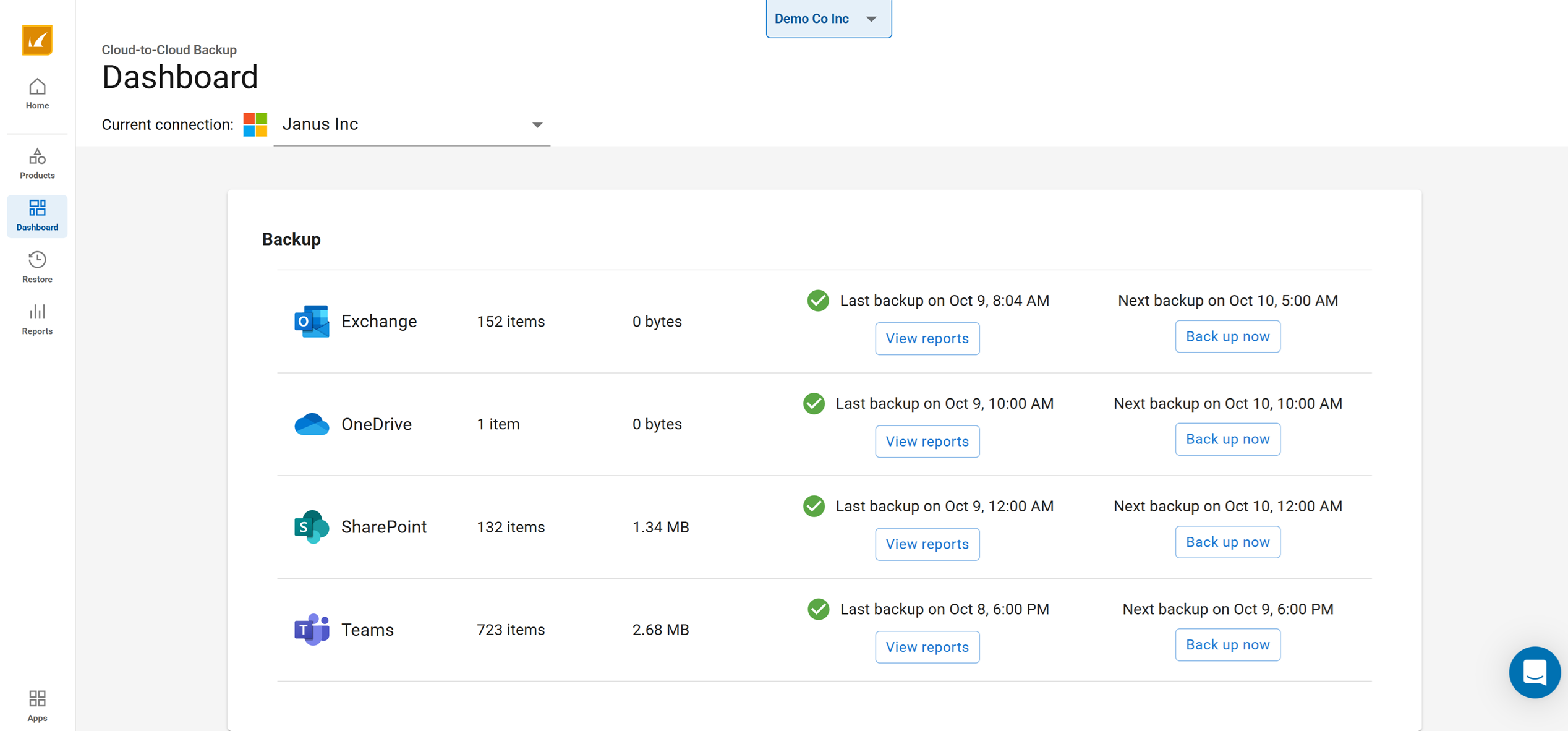
Barracuda Cloud-to-Cloud Backup Demo - Back up Microsoft 365
Back up Microsoft 365 to protect against ransomware and data loss.
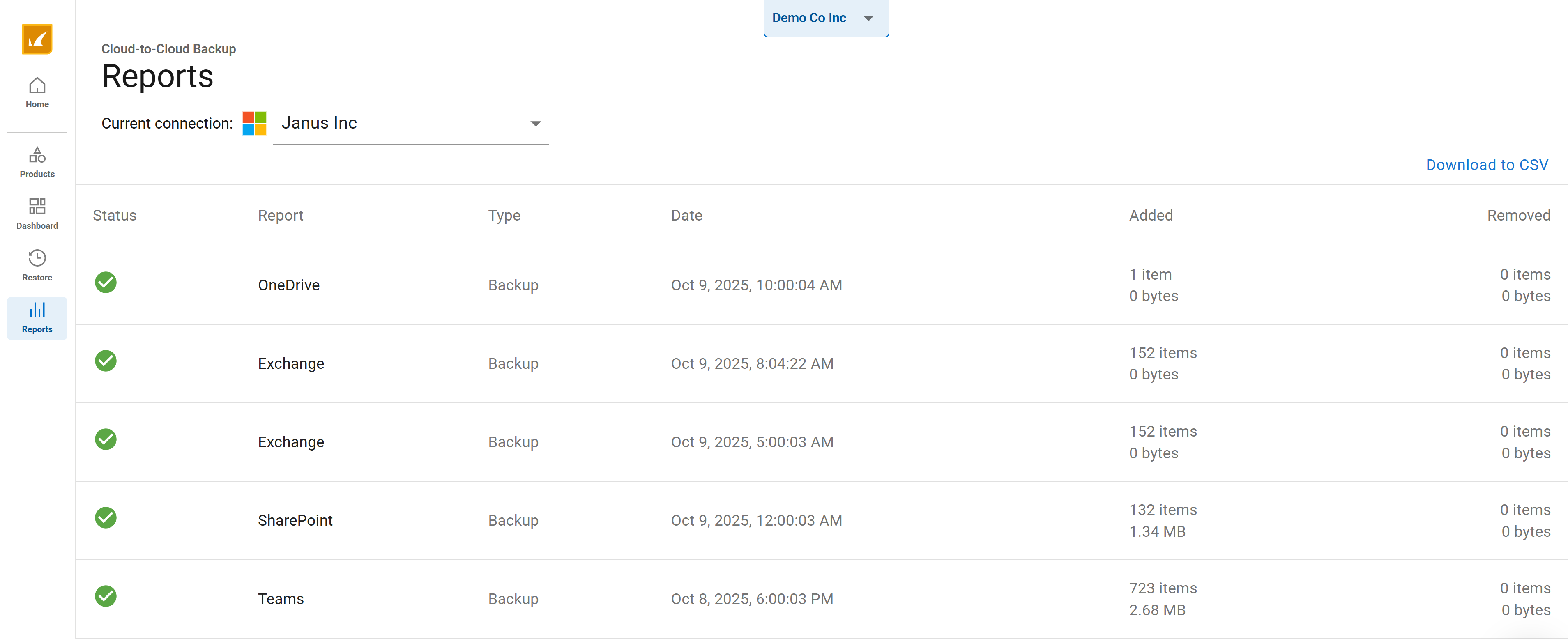
Barracuda Cloud-to-Cloud Backup Demo - Get reports
Get reports on what was backed up and when it was backed up
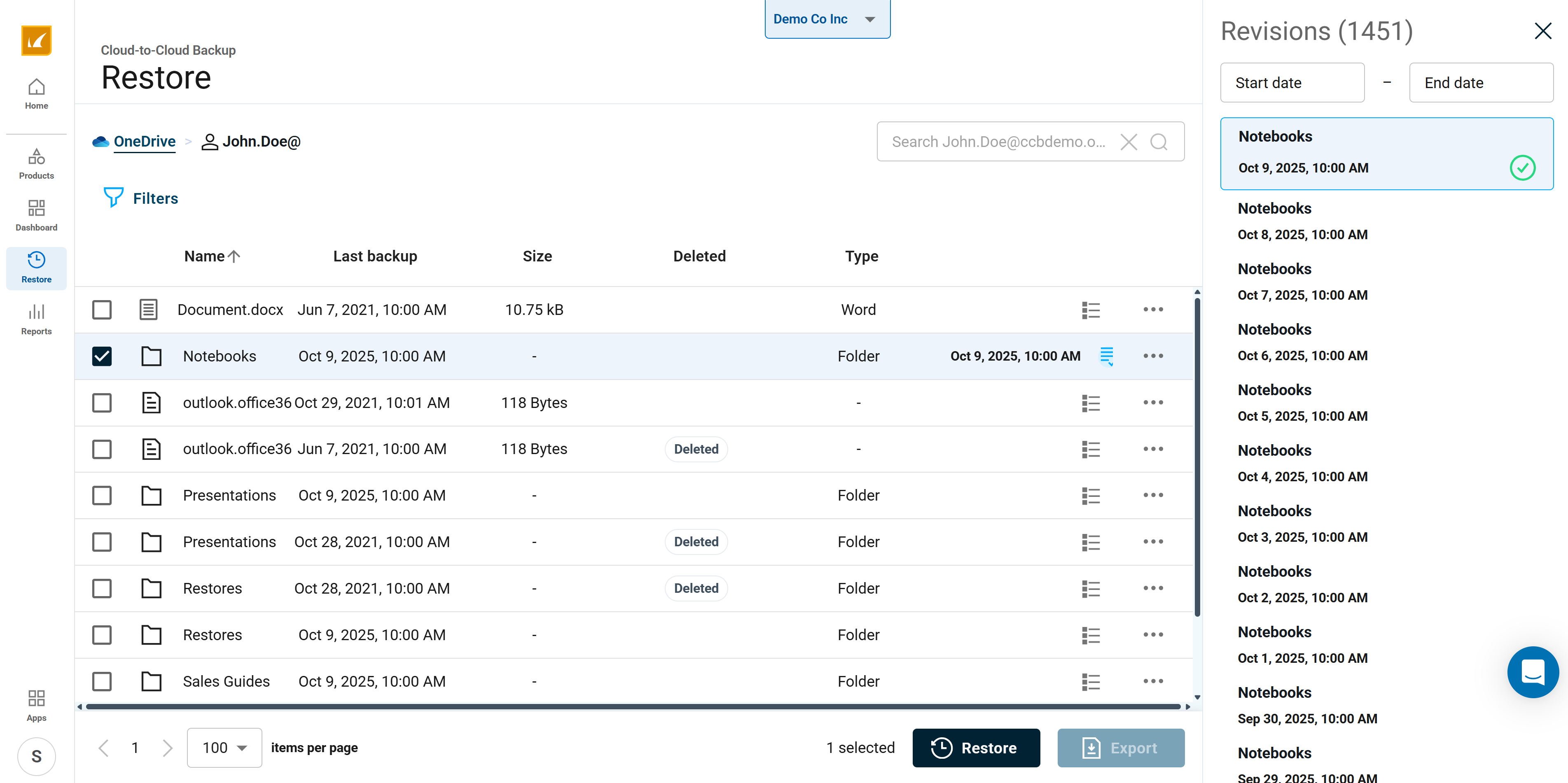
Barracuda Cloud-to-Cloud Backup Demo - Find, restore or export files
Find, restore or export files quickly and easily
Barracuda Cloud-to-Cloud Backup Overview
Play Barracuda Cloud-to-Cloud Backup Video
Barracuda Cloud-to-Cloud Backup Overview
Microsoft's Shared Responsibility Model
Play Barracuda Cloud-to-Cloud Backup Video
Microsoft's Shared Responsibility Model
Product Avatar Image

Have you used Barracuda Cloud-to-Cloud Backup before?

Answer a few questions to help the Barracuda Cloud-to-Cloud Backup community

Barracuda Cloud-to-Cloud Backup Reviews (163)

Reviews

Barracuda Cloud-to-Cloud Backup Reviews (163)

4.5
163 reviews

Review Summary

Generated using AI from real user reviews
Users consistently praise the product for its ease of use and simple setup, allowing for a seamless backup experience with minimal maintenance. Many appreciate the peace of mind it provides, knowing their data is securely backed up and easily recoverable. However, some users note that the restore process can be complex and time-consuming at times.

Pros & Cons

Generated from real user reviews
View All Pros and Cons
Search reviews
Filter Reviews
Clear Results
G2 reviews are authentic and verified.
CP
IT Director
Mid-Market (51-1000 emp.)
"Effortless Backup for Microsoft 365"
What do you like best about Barracuda Cloud-to-Cloud Backup?

I like being able to backup directly from the Microsoft cloud to Barracuda as it saved a lot of administrative effort for us and provided a solution that just worked. It is extremely useful when needing to backup emails and OneDrive files for separated employees. Grabbing PSTs and OneDrive files has been a huge help, and it's a straightforward, easy process in Barracuda compared to Microsoft Purview, which took a lot of touches and time. The initial setup was extremely simple, basically involving connecting Barracuda to our environment with just a few inputs and approvals. I've been extremely happy with our Barracuda products. Review collected by and hosted on G2.com.

What do you dislike about Barracuda Cloud-to-Cloud Backup?

The only thing I can think of was an issue we had actually exporting a large PST from Barracuda to a computer in our environment. However, Barracuda Support came to the rescue and fixed the issue. Review collected by and hosted on G2.com.

CH
IT Manager
Mid-Market (51-1000 emp.)
"Easy, Set-and-Forget Backup That Delivers Audit-Ready Confidence"
What do you like best about Barracuda Cloud-to-Cloud Backup?

The setup was easy and straightforward, and the "set it and forget it" nature of the service has been flawless. It runs quietly in the background, sending the necessary alerts and reports that give us full visibility. For us, its greatest value isn't in daily use, but in the confidence of knowing that we are protected against accidental deletion, security threats, or retention policy gaps.

Also, Barracuda Cloud-to-Cloud backup addresses our audit and compliance requirements. Having a third-party backup of our cloud data satisfies internal and external governance checks. The ability to quickly produce proof of backups and demonstrate a sound disaster recovery plan is a huge win for us. Review collected by and hosted on G2.com.

What do you dislike about Barracuda Cloud-to-Cloud Backup?

On the rare occasion that we've needed to retrieve a single file or email, the restore interface can feel a bit complex for such a straightforward task. A more streamlined "quick restore" wizard for common, simple requests would be a nice feature. Review collected by and hosted on G2.com.

JL
Director of I.T.
Mid-Market (51-1000 emp.)
"Effortless Backup Solution with Seamless Office 365 Integration"
What do you like best about Barracuda Cloud-to-Cloud Backup?

I like that Barracuda Cloud-to-Cloud Backup works with minimal effort, which lets us set it up for all users and verify successful backups daily. It is easy to recover individual files, emails, or entire folder structures. I also appreciate that the initial setup was very easy, done in just minutes. The biggest benefit is having backups of data from local devices like laptops and desktops, which were at risk before implementing Office 365 with Barracuda Cloud-to-Cloud Backup. Review collected by and hosted on G2.com.

What do you dislike about Barracuda Cloud-to-Cloud Backup?

I have no dislikes about this product. It has been working well for many years. Review collected by and hosted on G2.com.

"Simple Integration, But Needs UI Improvements"
What do you like best about Barracuda Cloud-to-Cloud Backup?

I like Barracuda Cloud-to-Cloud Backup for its simplicity and ease of setup and integration. It requires less work for maintaining and configuring, which builds higher trust in the backup due to its simple integration. It saves me from the complexity of running backup software and using Microsoft's expensive and disorganized fragmented options. Review collected by and hosted on G2.com.

What do you dislike about Barracuda Cloud-to-Cloud Backup?

The restore process is confusing and not as intuitive as I'd like. It's not as quick as I would prefer—though it's still decently quick. The menu for the entire Barracuda Cloud-to-Cloud Backup could be improved for intuitiveness. It can be confusing as it considers some things as Teams and others as SharePoint. Data is there and everything works, but more development should be done to improve it rather than just maintaining it. Review collected by and hosted on G2.com.

Maya O.
MO
Mid-Market (51-1000 emp.)
"Reliable Backups, Needs UI Improvement"
What do you like best about Barracuda Cloud-to-Cloud Backup?

I like that Barracuda Cloud-to-Cloud Backup retains data for a long time and usually finds what I'm looking for. I also appreciate that it offers separate backups for SharePoint, Teams, OneDrive, and Exchange mailboxes, which are very helpful. It makes it easier to find what I am looking for because the data is organized by service, and the initial setup was fairly simple and didn't require much work on my end. Review collected by and hosted on G2.com.

What do you dislike about Barracuda Cloud-to-Cloud Backup?

I find the user interface can be slow and not always very intuitive. It's sometimes hard to figure out where a single file will be restored to. It is hard to get down to the file level sometimes on the backups, and email folders as well. Review collected by and hosted on G2.com.

"Effortless Backup with Some UI Flaws"
What do you like best about Barracuda Cloud-to-Cloud Backup?

I really like how easy it is to access offsite cloud backups with Barracuda Cloud-to-Cloud Backup. It's a 'set it and forget it' type of setup, which means I don't have to worry about it. The software is easy to use and runs without issues, and I appreciate that I don't need to adjust anything with the backups when we add new SharePoint sites or mailboxes. The initial setup was also very simple. Review collected by and hosted on G2.com.

What do you dislike about Barracuda Cloud-to-Cloud Backup?

I find the user interface could be improved. There's a lot of wasted white space on the pages. Additionally, when I'm searching for a specific item to restore, the folders you need to drill through could be made more clear. Review collected by and hosted on G2.com.

"Effortless Backup Solution with Minor Hiccups"
What do you like best about Barracuda Cloud-to-Cloud Backup?

I find Barracuda Cloud-to-Cloud Backup really easy to set up and integrate with our current systems, which is a huge plus. It's really hands-off, so I don't have to worry about it during the day-to-day operations. It's peace of mind for our department, and that's really great. Even setting up a hardware appliance in our environment was simple and easy. Compared to unmanaged solutions we've tried in the past that required frequent attention, this managed solution is really great. Plus, getting support when we rarely need it is always great. It hasn't let us down. Review collected by and hosted on G2.com.

What do you dislike about Barracuda Cloud-to-Cloud Backup?

Sometimes we get some synchronization errors with the backups. It's rare, but when it happens, it's hard to tell if the backup was successful or if there was an issue with it. Even after getting the error message, it's a bit difficult to know if the backup was completed or if it affected the backup in any way. Review collected by and hosted on G2.com.

"Reliable Backup with Easy Setup, Needs Improved File Retrieval"
What do you like best about Barracuda Cloud-to-Cloud Backup?

I think the easy setup for restoring an entire mailbox, OneDrive, Teams project, or SharePoint folder is quite convenient. The date range finder is also very helpful. With some quick hands-on experience, you can easily understand the restore mechanics, and even if restoring can be time-consuming depending on what you're restoring, at least you know that you will never lose your data. Even if your data is compromised, you can restore it through backups. Review collected by and hosted on G2.com.

What do you dislike about Barracuda Cloud-to-Cloud Backup?

If you are trying to find a file that was deleted, the process is laborious and requires patience. You may need to plow through multiple dates in order to find the file and the correct version. Review collected by and hosted on G2.com.

"Robust Backup with Room for Improvement"
What do you like best about Barracuda Cloud-to-Cloud Backup?

I like that Barracuda Cloud-to-Cloud Backup offers immutable backup copies, encryption in transit and at rest, and point-in-time recovery. These features are crucial, especially during a ransomware attack, as they ensure my data remains preserved and recoverable. I also find the product to be better with faster restore times and it provides details about the restore process when running a job. Additionally, the initial setup was very easy. Review collected by and hosted on G2.com.

What do you dislike about Barracuda Cloud-to-Cloud Backup?

No status or time given when you are doing a restore. Sometimes restores fail and there are no error messages as to why they did. They don't provide anything, so providing an error message and details on why restore backups fail. Review collected by and hosted on G2.com.

JD
Director of Information Technology
"Effortless Backups with Seamless Integration"
What do you like best about Barracuda Cloud-to-Cloud Backup?

I like Barracuda Cloud-to-Cloud Backup for its cost-effective backups and restores for various M365 components without needing on-prem hardware. The integration with my existing Barracuda backup environment is seamless. I really appreciate the ease of use and how easy it was to set up. The web interface is simple and easily understood, which made me proficient very quickly. There's no client software to install or constantly update because it's all managed by Barracuda. Overall, the initial setup was very easy, just required providing my M365 tenant information and credentials. Review collected by and hosted on G2.com.

What do you dislike about Barracuda Cloud-to-Cloud Backup?

I cannot think of anything that I dislike or that does not work the way that I would need. Review collected by and hosted on G2.com.

Trending Discussions related to Barracuda Cloud-to-Cloud Backup

Pricing Insights

Averages based on real user reviews.

Time to Implement

1 month

Return on Investment

12 months

Average Discount

11%

Barracuda Cloud-to-Cloud Backup Comparisons
Product Avatar Image
Veeam Data Cloud for Microsoft 365
Compare Now
Product Avatar Image
AvePoint Confidence Platform
Compare Now
Product Avatar Image
Keepit
Compare Now
Barracuda Cloud-to-Cloud Backup Features
Real-time Sync
Storage Capacity
Remote Backup
Endpoint Variety
SaaS Application Variety
Storage Formats
File Sharing
Security Standards
Encrypted Storage
Product Avatar Image
Barracuda Cloud-to-Cloud Backup