Best Privileged Access Management (PAM) Software

How Many Privileged Access Management (PAM) Software Products Does G2 Track?

Total Products under this Category: 179

Category Stats (Oct 2026)

  • Average Rating: 4.49/5 The average rating of products in this category, based on all submitted ratings
  • Top Trending Product: Securden Unified PAM (+1.16%) - Among all products in this category, Securden Unified PAM recorded the largest rating increase compared to last month

Last updated: October 01, 2026

How Does G2 Rank Privileged Access Management (PAM) Software Products?

Why You Can Trust G2's Software Rankings:

  • 30 Analysts and Data Experts
  • 13,700+ Authentic Reviews
  • 179+ Products
  • Unbiased Rankings

G2's software rankings are built on verified user reviews, rigorous moderation, and a consistent research methodology maintained by a team of analysts and data experts. Each product is measured using the same transparent criteria, with no paid placement or vendor influence. While reviews reflect real user experiences, which can be subjective, they offer valuable insight into how software performs in the hands of professionals. Together, these inputs power the G2 Score, a standardized way to compare tools within every category.

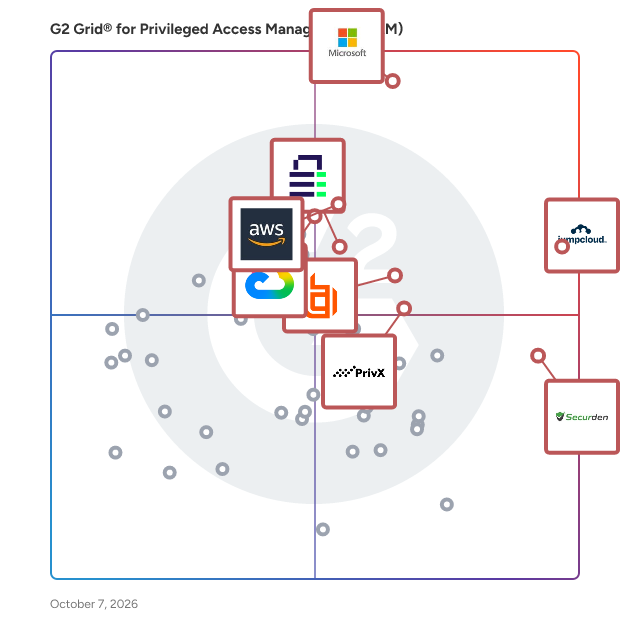
G2 Grid® for Privileged Access Management (PAM) Software

G2 Grid® for Privileged Access Management (PAM) Software plotting products by satisfaction and market presence

Highlighted products: JumpCloud, Microsoft Entra ID, Securden Unified PAM, AWS Secrets Manager, BeyondTrust Remote Support, Google Cloud Identity & Access Management (IAM), SSH PrivX, and Delinea Secret Server.

Underlying data: [Grid® JSON](https://www.g2.com/categories/privileged-access-management-pam/grids.json?focus%5B%5D=jumpcloud&focus%5B%5D=microsoft-entra-id&focus%5B%5D=securden-unified-pam&focus%5B%5D=aws-secrets-manager&focus%5B%5D=beyondtrust-remote-support&focus%5B%5D=google-cloud-identity-access-management-iam&focus%5B%5D=ssh-privx&focus%5B%5D=delinea-secret-server)

Microsoft Entra ID

Entra ID is a complete identity and access management solution with integrated security that connects people to their apps, devices, and data and helps protect from identity compromise. With Entra ID, you get: • Secure adaptive access with multi-factor authentication and Conditional Access policies • Seamless user experience with single sign-on, passwordless and user portal • Unified identity management that connect all internal and external users to all apps and devices. • Simplified Identity Governance with provisioning, access packages, and access reviews. Microsoft Entra is our new product family that encompasses all of Microsoft’s identity and access capabilities. The Entra family includes Microsoft Entra ID, as well as two new product categories: Cloud Infrastructure Entitlement Management (CIEM) and decentralized identity. The products in the Entra family will help provide secure access to everything for everyone, by providing identity and access management, cloud infrastructure entitlement management, and identity verification.

Average Rating: 4.5/5.0

Total Reviews: 873

How Do G2 Users Rate Microsoft Entra ID?

  • Has the product been a good partner in doing business?: 9.0/10 (Category avg: 9.3/10)
  • Reporting: 9.2/10 (Category avg: 8.9/10)
  • Approval Workflows: 8.8/10 (Category avg: 8.8/10)
  • Audit log: 9.1/10 (Category avg: 8.8/10)

Who Is the Company Behind Microsoft Entra ID?

  • Seller: Microsoft
  • Year Founded: 1975
  • HQ Location: Redmond, Washington
  • Twitter: @microsoft
    13,091,739 Twitter followers
  • LinkedIn® Page: www.linkedin.com
    232,750 employees on LinkedIn®
  • Ownership: MSFT

Who Uses This Product?

  • Who Uses This: Software Engineer, System Engineer
  • Top Industries: Information Technology and Services, Computer Software
  • Company Size: 39% Medium, 37% Large

What Do G2 Reviewers Say About Microsoft Entra ID?

AI-generated summary from verified user reviews

Pros
  • Users praise the strong security features of Microsoft Entra ID, ensuring efficient identity management without compromising user experience.
  • Users commend the intuitive interface of Microsoft Entra ID, making it simple to navigate without prior training.
  • Users appreciate the seamless integration of Microsoft Entra ID with Microsoft 365 and its robust identity management capabilities.
  • Users appreciate the easy integrations of Microsoft Entra ID, simplifying identity management across various applications and services.
  • Users appreciate the seamless SSO integration of Microsoft Entra ID, enhancing security and simplifying access across applications.
Cons
  • Users often face complexity in configuration and management of Microsoft Entra ID, leading to frustration and confusion.
  • Users find the complex administration of Microsoft Entra ID challenging, especially with configuration and licensing issues.
  • Users find Microsoft Entra ID's complex configuration challenging, particularly with Conditional Access and licensing clarity.
  • Users find the complex usability of Microsoft Entra ID challenging, especially with configuration and licensing issues.
  • Users find the complex setup of Microsoft Entra ID daunting, especially for beginners and smaller IT teams.

What Are Recent G2 Reviews of Microsoft Entra ID?

What Are G2 Users Discussing About Microsoft Entra ID?

JumpCloud

JumpCloud® is the AI-powered identity infrastructure that unifies lifecycle management for humans, devices, and autonomous agents. JumpCloud gives IT teams complete visibility and control over every identity and every access point. JumpCloud helps organizations cut complexity, automate secure workflows, and put AI to work safely. Secure every identity. Human or not. Intelligent, secure IT for the agentic era.

Average Rating: 4.5/5.0

Total Reviews: 3,978

How Do G2 Users Rate JumpCloud?

  • Has the product been a good partner in doing business?: 9.0/10 (Category avg: 9.3/10)
  • Reporting: 8.5/10 (Category avg: 8.9/10)
  • Approval Workflows: 8.4/10 (Category avg: 8.8/10)
  • Audit log: 8.6/10 (Category avg: 8.8/10)

Who Is the Company Behind JumpCloud?

  • Seller: JumpCloud Inc.
  • Company Website:
  • Year Founded: 2012
  • HQ Location: Louisville, CO
  • Twitter: @JumpCloud
    36,368 Twitter followers
  • LinkedIn® Page: www.linkedin.com
    998 employees on LinkedIn®

Who Uses This Product?

  • Who Uses This: IT Manager, System Administrator
  • Top Industries: Information Technology and Services, Computer Software
  • Company Size: 54% Medium, 35% Small

What Do G2 Reviewers Say About JumpCloud?

AI-generated summary from verified user reviews

Pros
  • Users value the ease of use of JumpCloud, simplifying user management across diverse systems and enhancing productivity.
  • Users value JumpCloud's straightforward device management, enabling seamless user management across various systems with intuitive controls.
  • Users value the enhanced security provided by JumpCloud's passwordless login and MFA enforcement features.
  • Users appreciate the seamless integrations with popular apps, simplifying user management across platforms effortlessly.
  • Users find JumpCloud's intuitive user management and responsive support invaluable for seamless integration and enhanced security.
Cons
  • Users report missing features such as better macOS controls and advanced reporting capabilities, limiting overall effectiveness.
  • Users find that improvement is needed in navigation and feature clarity, particularly for beginners navigating JumpCloud.
  • Users note the limited features of JumpCloud, especially in SSO app catalog and Linux device management capabilities.
  • Users face deployment challenges and lack of advanced endpoint controls, impacting their overall experience with JumpCloud.
  • Users feel the user interface needs improvement, as it should be more user-friendly and interactive.

What Are Recent G2 Reviews of JumpCloud?

What Are G2 Users Discussing About JumpCloud?

Securden Unified PAM

Securden Unified PAM is a privileged access security solution that lets you discover, centrally store, organize, share, manage, and keep track of all privileged identities, passwords, keys, documents, and other identities. It helps you establish a centralized password management system, automate management with approval workflows, control ‘who’ can access ‘what’, monitor, and record all access to critical IT assets, and enforce password security best practices. The major modules of Securden Unified PAM are password management, privileged account management, secure remote access, application control, endpoint privilege management, privileged session management, and SSH key management. The platform supports compliance with NIS2, DORA, NIST, PCI-DSS, HIPAA, and ISO-IEC 27001. Installation typically takes only a few minutes, and a complete production-ready PAM can be achieved in less than a month with Securden Unified PAM.

Average Rating: 4.9/5.0

Total Reviews: 49

How Do G2 Users Rate Securden Unified PAM?

  • Has the product been a good partner in doing business?: 9.9/10 (Category avg: 9.3/10)
  • Reporting: 10.0/10 (Category avg: 8.9/10)
  • Approval Workflows: 9.6/10 (Category avg: 8.8/10)
  • Audit log: 10.0/10 (Category avg: 8.8/10)

Who Is the Company Behind Securden Unified PAM?

Who Uses This Product?

  • Who Uses This: System Administrator
  • Top Industries: Information Technology and Services, Computer & Network Security
  • Company Size: 54% Large, 30% Medium

What Do G2 Reviewers Say About Securden Unified PAM?

AI-generated summary from verified user reviews

Pros
  • Users find Securden PAM very easy to setup and use, appreciating the seamless browser integration and regular updates.
  • Users appreciate the easy browser integration of Securden PAM, enhancing usability and convenience for their needs.
  • Users highlight the affordable pricing of Securden PAM, appreciating its value alongside easy setup and integration.
  • Users value the strong security features of Securden PAM, ensuring protection for privileged accounts effectively.
  • Users find Securden PAM's setup to be very easy, enhancing user experience through seamless browser integration.

What Are Recent G2 Reviews of Securden Unified PAM?

What Are G2 Users Discussing About Securden Unified PAM?

AI can help you find the answers. G2 helps you trust them.

Connect G2 to Claude or ChatGPT for answers grounded in G2's trusted reviews, comparisons, and pricing from real user insights.

How it works

AWS Secrets Manager

AWS Secrets Manager helps you protect secrets needed to access your applications, services, and IT resources. The service enables you to easily rotate, manage, and retrieve database credentials, API keys, and other secrets throughout their lifecycle.

Average Rating: 4.5/5.0

Total Reviews: 17

How Do G2 Users Rate AWS Secrets Manager?

  • Has the product been a good partner in doing business?: 9.3/10 (Category avg: 9.3/10)
  • Reporting: 10.0/10 (Category avg: 8.9/10)
  • Approval Workflows: 8.9/10 (Category avg: 8.8/10)
  • Audit log: 7.8/10 (Category avg: 8.8/10)

Who Is the Company Behind AWS Secrets Manager?

  • Seller: Amazon Web Services (AWS)
  • Year Founded: 2006
  • HQ Location: Seattle, WA
  • Twitter: @awscloud
    2,232,483 Twitter followers
  • LinkedIn® Page: www.linkedin.com
    148,266 employees on LinkedIn®
  • Ownership: NASDAQ: AMZN

Who Uses This Product?

  • Top Industries: Computer Software
  • Company Size: 56% Large, 28% Medium

What Are Recent G2 Reviews of AWS Secrets Manager?

BeyondTrust Remote Support

BeyondTrust Remote Support (formerly Bomgar Remote Support) is the #1 solution for leading enterprises to accelerate and secure your service desk with centralized, efficient, and secure access for servicing and monitoring any endpoint, anywhere, attended or not. Service desks are provided with everything they need, end-to-end: centralized controls, remote access, automated scripts, encrypted file sharing, chat and collaboration for end-users and technicians, and live dashboards for KPIs and metric reporting. Organizations in all vertical markets around the globe use Remote Support to deliver superior support services and reduce threats to valuable data and systems. BeyondTrust is privately held and headquartered in Atlanta, GA with offices and channel partners around the world. Connect with BeyondTrust at www.beyondtrust.com, the BeyondTrust Blog, or on Facebook, Twitter and LinkedIn. Get a Free Trial: https://www.beyondtrust.com/remote-support/trial Watch a Demo: https://www.beyondtrust.com/demos Learn more about BeyondTrust Remote Support: https://www.beyondtrust.com/products/remote-support

Average Rating: 4.7/5.0

Total Reviews: 388

How Do G2 Users Rate BeyondTrust Remote Support?

  • Has the product been a good partner in doing business?: 9.4/10 (Category avg: 9.3/10)
  • Reporting: 9.1/10 (Category avg: 8.9/10)
  • Approval Workflows: 7.3/10 (Category avg: 8.8/10)
  • Audit log: 8.9/10 (Category avg: 8.8/10)

Who Is the Company Behind BeyondTrust Remote Support?

  • Seller: BeyondTrust
  • Company Website:
  • Year Founded: 1985
  • HQ Location: Johns Creek, GA
  • Twitter: @BeyondTrust
    14,335 Twitter followers
  • LinkedIn® Page: www.linkedin.com
    1,750 employees on LinkedIn®

Who Uses This Product?

  • Who Uses This: IT Manager, System Administrator
  • Top Industries: Information Technology and Services, Higher Education
  • Company Size: 47% Large, 36% Medium

What Do G2 Reviewers Say About BeyondTrust Remote Support?

AI-generated summary from verified user reviews

Pros
  • Users highlight the ease of use of BeyondTrust Remote Support, enhancing efficiency with user-friendly features and setup.
  • Users appreciate the ease of access to remote desktops with BeyondTrust Remote Support, enhancing collaboration and security.
  • Users value the effective collaboration enabled by BeyondTrust Remote Support, enhancing productivity and simplifying remote assistance.
  • Users highlight the reliability of BeyondTrust Remote Support, emphasizing its stability and efficient session management.
  • Users value the effective remote control of BeyondTrust Remote Support for seamless troubleshooting and support.
Cons
  • Users find the pricing to be high, especially in comparison to competing products on the market.
  • Users find the complexity of BeyondTrust Remote Support challenging, especially for newcomers and those seeking a quick setup.
  • Users experience connectivity issues with clients going offline, impacting seamless remote support interactions.
  • Users often find the learning curve steep with BeyondTrust Remote Support, causing initial confusion and frustration.
  • Users struggle with high pricing issues for BeyondTrust Remote Support, finding it more expensive than simpler alternatives.

What Are Recent G2 Reviews of BeyondTrust Remote Support?

What Are G2 Users Discussing About BeyondTrust Remote Support?

Google Cloud Identity & Access Management (IAM)

Fine-grained access control and visibility for centrally managing cloud resources.

Average Rating: 4.4/5.0

Total Reviews: 55

How Do G2 Users Rate Google Cloud Identity & Access Management (IAM)?

  • Has the product been a good partner in doing business?: 8.8/10 (Category avg: 9.3/10)
  • Reporting: 9.7/10 (Category avg: 8.9/10)
  • Approval Workflows: 9.7/10 (Category avg: 8.8/10)
  • Audit log: 9.2/10 (Category avg: 8.8/10)

Who Is the Company Behind Google Cloud Identity & Access Management (IAM)?

  • Seller: Google
  • Year Founded: 1998
  • HQ Location: Mountain View, CA
  • Twitter: @google
    31,899,995 Twitter followers
  • LinkedIn® Page: www.linkedin.com
    301,144 employees on LinkedIn®
  • Ownership: NASDAQ:GOOG

Who Uses This Product?

  • Top Industries: Information Technology and Services, Computer Software
  • Company Size: 47% Small, 26% Medium

What Do G2 Reviewers Say About Google Cloud Identity & Access Management (IAM)?

AI-generated summary from verified user reviews

Pros
  • Users praise the ease of access and user-friendly experience provided by Google Cloud IAM for managing their data.
  • Users value the strong security features of Google Cloud IAM, enabling secure and accessible storage of important data.
  • Users appreciate the ease of access provided by Google Cloud IAM, enabling secure management of permissions globally.
  • Users appreciate the intuitive management of access controls in Google Cloud IAM, enhancing security and efficiency across teams.
  • Users appreciate the centralized access management of Google Cloud IAM, simplifying permission assignments and enhancing security effortlessly.
Cons
  • Users find the difficult learning curve of Google Cloud IAM challenging, especially regarding complex permissions and roles management.
  • Users find the complexity of Google Cloud IAM increases with scale, making it challenging to manage permissions effectively.
  • Users find the complex usage at scale challenging, particularly in managing permissions and custom roles efficiently.
  • Users find the complex role management of Google Cloud IAM confusing, leading to permission misconfigurations and access issues.
  • Users find the access control complex and confusing, making it challenging to manage permissions effectively.

What Are Recent G2 Reviews of Google Cloud Identity & Access Management (IAM)?

Delinea Secret Server

Delinea Secret Server is a comprehensive Privileged Access Management (PAM) solution designed to help organizations identify, secure, manage, monitor, and audit privileged accounts effectively. In an era where cyber threats are increasingly sophisticated, managing access to sensitive accounts is crucial for maintaining security and compliance. Secret Server provides a centralized platform that allows security and IT leaders to safeguard administrator, service, application, and root accounts from potential breaches. Targeted towards organizations of all sizes, Secret Server addresses the complexities associated with managing privileged access. It is particularly beneficial for enterprises that require stringent security measures due to regulatory compliance or the sensitive nature of their operations. The solution is versatile, catering to various use cases, including securing access for IT administrators, managing service accounts, and controlling application credentials. This flexibility makes it an essential tool for businesses looking to enhance their security posture without overwhelming their existing infrastructure. One of the standout features of Delinea Secret Server is its ability to streamline the management of privileged accounts. The solution offers a vaulting mechanism that securely stores credentials, ensuring that only authorized users have access. Additionally, it provides robust monitoring and auditing capabilities, allowing organizations to track access and usage patterns effectively. This level of oversight is critical for identifying potential security threats and ensuring compliance with industry regulations. Secret Server also distinguishes itself with its user-friendly interface and ease of deployment. Organizations can implement the solution quickly, allowing them to realize its benefits in a short timeframe. The availability of both on-premise and cloud-based options further enhances its adaptability, enabling businesses to choose the deployment method that best fits their operational needs. By minimizing complexity and facilitating security policy adoption, Secret Server empowers organizations to manage privileged access more efficiently than many competing PAM solutions. Overall, Delinea Secret Server is a robust and scalable PAM solution that not only protects privileged accounts but also simplifies the management process. Its comprehensive features, combined with a focus on usability and rapid deployment, make it a valuable asset for any organization looking to fortify its security framework against evolving cyber threats.

Average Rating: 4.4/5.0

Total Reviews: 62

How Do G2 Users Rate Delinea Secret Server?

  • Has the product been a good partner in doing business?: 8.5/10 (Category avg: 9.3/10)
  • Reporting: 8.8/10 (Category avg: 8.9/10)
  • Approval Workflows: 8.2/10 (Category avg: 8.8/10)
  • Audit log: 9.2/10 (Category avg: 8.8/10)

Who Is the Company Behind Delinea Secret Server?

  • Seller: Delinea
  • Company Website:
  • Year Founded: 2004
  • HQ Location: San Francisco
  • Twitter: @DelineaInc
    897 Twitter followers
  • LinkedIn® Page: www.linkedin.com
    1,385 employees on LinkedIn®

Who Uses This Product?

  • Top Industries: Information Technology and Services, Computer & Network Security
  • Company Size: 55% Medium, 31% Large

What Do G2 Reviewers Say About Delinea Secret Server?

AI-generated summary from verified user reviews

Pros
  • Users value the strong security features of Delinea Secret Server for effective password management and enhanced security.
  • Users value the strong security features of Delinea Secret Server, enhancing password management and overall security effectively.
Cons
  • Users find the initial setup complex and challenging, making deployment a frustrating experience.
  • Users find the initial setup difficult, often leading to challenges in deployment and configuration.

What Are Recent G2 Reviews of Delinea Secret Server?

What Are G2 Users Discussing About Delinea Secret Server?

SSH PrivX

PrivX is a Privileged Access Management (PAM) solution designed to help organizations secure and manage access to sensitive systems and data across hybrid and multi-cloud environments. As cyber threats become increasingly sophisticated, PrivX provides a scalable and cost-effective approach to safeguarding critical assets while ensuring compliance with various regulatory standards. Targeted primarily at IT administrators, security teams, and organizations operating within complex cloud infrastructures, PrivX is adaptable for businesses of all sizes. Its versatility allows for a range of use cases, including secure remote access for third-party vendors, management of cloud resource access, and facilitation of secure DevOps workflows. By streamlining privileged access management, PrivX effectively mitigates the risk of unauthorized access and potential data breaches, which are critical concerns for modern enterprises. PrivX boasts several core features that enhance its functionality. Automated password vaulting securely stores and manages credentials, ensuring that sensitive information is protected from unauthorized access. Additionally, the password rotation feature automatically updates passwords, maintaining strong security hygiene and significantly reducing the risks associated with credential theft. Another key aspect of PrivX is its passwordless authentication capability, which allows users to access systems securely without relying on traditional passwords, thereby minimizing the chances of falling victim to phishing attacks. A notable differentiator of PrivX is its quantum-safe connections, designed to protect data against the future risks posed by quantum computing. This forward-thinking feature ensures secure communications between users and systems, enhancing long-term security resilience. By incorporating such advanced security measures, PrivX not only addresses current security challenges but also prepares organizations for emerging threats. The combination of automation, scalability, and cutting-edge security features—such as quantum-safe encryption and passwordless access—positions PrivX as a compelling solution in the PAM landscape. By implementing PrivX, organizations can gain tighter control over privileged access, reduce administrative overhead, and improve compliance with regulatory requirements. This makes PrivX a practical and forward-looking choice for modern access management needs, enabling organizations to navigate the complexities of today’s digital landscape with confidence.

Average Rating: 4.4/5.0

Total Reviews: 56

How Do G2 Users Rate SSH PrivX?

  • Has the product been a good partner in doing business?: 9.1/10 (Category avg: 9.3/10)
  • Reporting: 8.0/10 (Category avg: 8.9/10)
  • Approval Workflows: 8.6/10 (Category avg: 8.8/10)
  • Audit log: 8.5/10 (Category avg: 8.8/10)

Who Is the Company Behind SSH PrivX?

Who Uses This Product?

  • Who Uses This: Cloud Operations Engineer
  • Top Industries: Computer & Network Security, Information Technology and Services
  • Company Size: 44% Large, 33% Medium

What Do G2 Reviewers Say About SSH PrivX?

AI-generated summary from verified user reviews

Pros
  • Users find SSH PrivX to be easy to use and integrate, making PAM implementation straightforward and efficient.
  • Users appreciate the security features of SSH PrivX, benefiting from on-demand, keyless access and seamless integration.
  • Users value the secure access of SSH PrivX, enjoying simplified deployment and efficient management without server overhead.
  • Users value the exceptional customer support from SSH, enhancing their overall experience with PrivX.
  • Users value the easy accessibility of SSH PrivX, with seamless onboarding and intuitive browser-based access enhancing their experience.
Cons
  • Users often find integration difficulties with SSH PrivX, citing complexity in setup and lack of intuitive configuration.
  • Users find the complex setup of SSH PrivX challenging, especially in larger environments and with integration issues.
  • Users express frustration over limited OS compatibility, which hampers deployment and user-friendliness across platforms.
  • Users find the poor documentation of SSH PrivX frustrating, with circular advice and missing crucial information hindering setup.
  • Users note that the reporting features in SSH PrivX are lacking detail and user-friendliness, complicating their experience.

What Are Recent G2 Reviews of SSH PrivX?

Segura 360° Privilege Platform

Segura (formerly senhasegura) is an identity security company focused on Privileged Access Management (PAM). Its platform is designed to support IT teams managing complex identity security needs, helping organizations protect and manage privileged identities across hybrid and cloud environments. Segura supports use cases like credential vaulting, session monitoring, least privilege enforcement, and secrets management for DevOps and cloud workloads. The company operates globally and, together with its network of partners, serves organizations across banking, telecom, government, and critical infrastructure sectors.

Average Rating: 4.8/5.0

Total Reviews: 74

How Do G2 Users Rate Segura 360° Privilege Platform?

  • Has the product been a good partner in doing business?: 9.7/10 (Category avg: 9.3/10)
  • Reporting: 9.2/10 (Category avg: 8.9/10)
  • Approval Workflows: 9.4/10 (Category avg: 8.8/10)
  • Audit log: 9.4/10 (Category avg: 8.8/10)

Who Is the Company Behind Segura 360° Privilege Platform?

  • Seller: Segura
  • Year Founded: 2010
  • HQ Location: São Paulo, São Paulo
  • LinkedIn® Page: www.linkedin.com
    305 employees on LinkedIn®

Who Uses This Product?

  • Who Uses This: Information Security Analyst
  • Top Industries: Telecommunications, Government Administration
  • Company Size: 67% Large, 23% Medium

What Do G2 Reviewers Say About Segura 360° Privilege Platform?

AI-generated summary from verified user reviews

Pros
  • Users highlight the ease of use of Segura 360° Privilege Platform, enhancing security for both Linux and Windows servers.
  • Users value the enhanced security of Segura 360° Privilege Platform, appreciating precise access control and real-time monitoring.
  • Users commend the excellent customer support of Segura 360° Privilege Platform, enhancing their implementation and user experience.
  • Users commend the precise access control and robust security of Segura 360°, enhancing compliance and monitoring.
  • Users value the credentials security and precise access control of Segura 360° Privilege Platform for enhanced data protection.
Cons
  • Users find the complex coding to implement access rules challenging, especially for beginners and small businesses.
  • Users note a need for limited reporting options that hinder visibility into risks and user customization.
  • Users note a lack of reporting options and customization, impacting risk visibility and overall experience.
  • Users find the setup difficulty challenging, especially when configuring and importing users and applications.
  • Users find the steep learning curve challenging, especially for beginners adapting to the platform's complex features.

What Are Recent G2 Reviews of Segura 360° Privilege Platform?

miniOrange Privileged Access Management (PAM)

miniOrange Privileged Access Management (PAM) is an enterprise-grade solution designed to secure, control, and monitor privileged access across servers, endpoints, databases, cloud environments, applications, and remote infrastructure. It helps organizations enforce least-privilege access, eliminate standing privileges, protect privileged credentials, and maintain complete visibility into privileged activity. miniOrange PAM provides centralized control over privileged identities and access through granular access policies, role-based access controls, just-in-time (JIT) access, privileged session management, password vaulting and rotation, endpoint privilege management, and privileged remote access. Organizations can define who can access critical resources, what they can access, when access is permitted, and what actions they can perform. Key capabilities include: Privileged Session Management: Monitor, record, and control privileged sessions across SSH, RDP, databases, and other supported protocols. Security teams can view live sessions, review session recordings, terminate sessions when required, detect suspicious activity, and maintain detailed audit trails for investigations and compliance. Granular Access Control: Enforce least-privilege access using role-based, attribute-based, policy-based, and other granular access controls. Administrators can define access based on users, groups, resources, conditions, and organizational policies. Just-in-Time (JIT) Access: Provide temporary, on-demand privileged access instead of persistent administrative privileges. Access can follow request, approval, time-bound provisioning, and automatic revocation workflows to reduce the attack surface. Privileged Password Management: Secure privileged credentials in a centralized password vault with encrypted storage, controlled access, password rotation, and credential management capabilities. This helps prevent credential exposure and reduces reliance on shared or permanently exposed privileged passwords. Endpoint Privilege Management (EPM): Apply least privilege at the endpoint by controlling application execution and privilege elevation. Organizations can allow trusted applications to run with the required privileges while restricting unauthorized applications and unnecessary administrative rights. Privileged Remote Access: Secure remote access for employees, contractors, vendors, and third-party users without exposing privileged credentials or directly exposing critical infrastructure. Organizations can control remote access, monitor activity, and maintain an auditable record of privileged connections. Privileged Account Discovery: Discover privileged accounts and identify privileged access across the environment to improve visibility and help organizations identify excessive, unused, or unmanaged privileges. Audit, Monitoring & Compliance: Maintain centralized audit trails and visibility into privileged access and user activity. Real-time monitoring, session recording, alerts, and detailed activity logs help security teams investigate incidents, demonstrate accountability, and support security and compliance requirements. miniOrange PAM can integrate with existing identity, security, IT service management, cloud, and infrastructure environments, allowing organizations to incorporate privileged access controls into their existing security workflows.

Average Rating: 4.9/5.0

Total Reviews: 19

How Do G2 Users Rate miniOrange Privileged Access Management (PAM)?

  • Has the product been a good partner in doing business?: 10.0/10 (Category avg: 9.3/10)
  • Reporting: 8.7/10 (Category avg: 8.9/10)
  • Approval Workflows: 9.0/10 (Category avg: 8.8/10)
  • Audit log: 8.5/10 (Category avg: 8.8/10)

Who Is the Company Behind miniOrange Privileged Access Management (PAM)?

  • Seller: miniOrange
  • Year Founded: 2012
  • HQ Location: Pune, India
  • Twitter: @miniOrange_it
    28 Twitter followers
  • LinkedIn® Page: www.linkedin.com
    576 employees on LinkedIn®

Who Uses This Product?

  • Top Industries: Information Technology and Services
  • Company Size: 68% Medium, 21% Large

What Do G2 Reviewers Say About miniOrange Privileged Access Management (PAM)?

AI-generated summary from verified user reviews

Pros
  • Users highlight the excellent customer support of miniOrange PAM, responding promptly to inquiries and enhancing user experience.
  • Users value the easy integration of miniOrange PAM with existing systems, enhancing security and streamlining workflows.
  • Users commend miniOrange PAM for its cost-effective pricing while offering essential security features and excellent support.
  • Users value the high level of security provided by miniOrange PAM, ensuring data privacy and controlled access.
  • Users value the compliance-ready audit reports of miniOrange PAM, ensuring secure and efficient data management.
Cons
  • Users find the complex setup requires expert support, which can be challenging during initial implementation.
  • Users experience time delays during deployment, especially in sensitive environments, affecting overall setup efficiency.

What Are Recent G2 Reviews of miniOrange Privileged Access Management (PAM)?

BeyondTrust Password Safe

BeyondTrust Password Safe automatically protects and manages sensitive assets and more by securely discovering, storing, managing, rotating and controlling access to privileged account passwords and secrets. Password Safe drives automated credential and secrets management, real-time session management & monitoring, and advanced auditing & forensics capabilities – all while enabling zero trust. Watch a Demo: https://www.beyondtrust.com/demos Learn more about BeyondTrust Password Safe: https://www.beyondtrust.com/products/password-safe

Average Rating: 4.5/5.0

Total Reviews: 52

How Do G2 Users Rate BeyondTrust Password Safe?

  • Has the product been a good partner in doing business?: 8.7/10 (Category avg: 9.3/10)
  • Reporting: 8.4/10 (Category avg: 8.9/10)
  • Approval Workflows: 8.7/10 (Category avg: 8.8/10)
  • Audit log: 8.4/10 (Category avg: 8.8/10)

Who Is the Company Behind BeyondTrust Password Safe?

  • Seller: BeyondTrust
  • Company Website:
  • Year Founded: 1985
  • HQ Location: Johns Creek, GA
  • Twitter: @BeyondTrust
    14,335 Twitter followers
  • LinkedIn® Page: www.linkedin.com
    1,750 employees on LinkedIn®

Who Uses This Product?

  • Top Industries: Banking, Information Technology and Services
  • Company Size: 58% Large, 33% Medium

What Do G2 Reviewers Say About BeyondTrust Password Safe?

AI-generated summary from verified user reviews

Pros
  • Users find BeyondTrust Password Safe to have ease of use, especially appreciating the smooth implementation and local support.
  • Users value the effective privileged account management of BeyondTrust Password Safe, enhancing security and control over access.
  • Users value the effective auditing features of BeyondTrust Password Safe, enhancing security and accountability in privileged access management.
  • Users value the effective privileged account management and timely password rotation, enhancing security and control significantly.
  • Users appreciate the effective privileged account management of BeyondTrust Password Safe, enhancing security and control significantly.
Cons
  • Users find the initial setup and configuration complex, especially in multi-integration environments, leading to a challenging experience.
  • Users find the premium pricing of BeyondTrust Password Safe challenging, especially for small businesses and tight budgets.
  • Users struggle with poor reporting in BeyondTrust Password Safe, finding analytics cumbersome and time-consuming to manage efficiently.
  • Users report that the setup difficulty is high, with complex configurations and a steep learning curve.
  • Users face a steep learning curve with BeyondTrust Password Safe, making initial setup and customization challenging.

What Are Recent G2 Reviews of BeyondTrust Password Safe?

What Are G2 Users Discussing About BeyondTrust Password Safe?

BeyondTrust Endpoint Privilege Management

BeyondTrust Endpoint Privilege Management (EPM) empowers organizations to enhance security, streamline compliance, and reduce operational complexity by centralizing policy control and compliance reporting for all endpoints. With best-in-class capabilities across Windows, macOS, Unix, and Linux, EPM supports the zero-trust journey by addressing key principles such as least privilege and zero standing privilege. BeyondTrust EPM enables IT and security teams to elevate application permissions without granting full admin rights, minimizing risk while maintaining productivity. Detailed audit logs help businesses easily meet cyber-insurance requirements while improving visibility and the ability to efficiently manage multi-platform infrastructures. As part of the BeyondTrust platform, EPM integrates seamlessly with a full range of security solutions to protect identities, stop threats, and ensure secure, dynamic access across diverse IT environments. Watch a Demo: https://www.beyondtrust.com/demos Learn more about BeyondTrust Endpoint Privilege Management: https://www.beyondtrust.com/products/endpoint-privilege-management

Average Rating: 4.2/5.0

Total Reviews: 30

How Do G2 Users Rate BeyondTrust Endpoint Privilege Management?

  • Has the product been a good partner in doing business?: 9.1/10 (Category avg: 9.3/10)
  • Reporting: 9.2/10 (Category avg: 8.9/10)
  • Approval Workflows: 8.5/10 (Category avg: 8.8/10)
  • Audit log: 8.9/10 (Category avg: 8.8/10)

Who Is the Company Behind BeyondTrust Endpoint Privilege Management?

  • Seller: BeyondTrust
  • Company Website:
  • Year Founded: 1985
  • HQ Location: Johns Creek, GA
  • Twitter: @BeyondTrust
    14,335 Twitter followers
  • LinkedIn® Page: www.linkedin.com
    1,750 employees on LinkedIn®

Who Uses This Product?

  • Company Size: 52% Large, 42% Medium

What Do G2 Reviewers Say About BeyondTrust Endpoint Privilege Management?

AI-generated summary from verified user reviews

Pros
  • Users find BeyondTrust Endpoint Privilege Management to be impressively simple to use, enhancing overall accessibility and maintenance.
  • Users value the easy accessibility of BeyondTrust Endpoint Privilege Management, simplifying permission management and security processes.
  • Users value the robust auditing capabilities of BeyondTrust EPM, enhancing accountability and streamlining policy management.
  • Users value the flexible policy management of BeyondTrust EPM, enhancing permissions and productivity without user disruptions.
  • Users value the strong security management of BeyondTrust, ensuring access controls are effective while minimizing IT involvement.
Cons
  • Users find the setup difficult, noting complexity and challenges in automation and integration with BeyondTrust EPM.
  • Users find the difficult learning curve frustrating, especially with the detailed policy setup and rule interactions.
  • Users find BeyondTrust Endpoint Privilege Management a bit expensive for small businesses, making cost a consideration during setup.
  • Users find the implementation process challenging, although maintenance becomes easier once set up.
  • Users find the integration difficulty challenging, especially with API and third-party setups for automation tasks.

What Are Recent G2 Reviews of BeyondTrust Endpoint Privilege Management?

BeyondTrust Privileged Remote Access

Privileged Remote Access (PRA) eliminates the risks inherent in remote access solutions dependent on VPNs and RDP. PRA delivers seamless, just-in-time access through encrypted tunnels to IT and OT systems. Each connection is brokered by the BeyondTrust platform, ensuring a zero-trust approach that grants the least amount of privilege necessary. By providing least-privileged access on demand, you can streamline operations, while reducing your attack surface and administrative overhead. Get a Free Trial: https://www.beyondtrust.com/privileged-remote-access-trial Watch a Demo: https://www.beyondtrust.com/demos Learn more about BeyondTrust Privileged Remote Access: https://www.beyondtrust.com/products/privileged-remote-access

Average Rating: 4.5/5.0

Total Reviews: 60

How Do G2 Users Rate BeyondTrust Privileged Remote Access?

  • Has the product been a good partner in doing business?: 9.4/10 (Category avg: 9.3/10)
  • Reporting: 9.0/10 (Category avg: 8.9/10)
  • Approval Workflows: 9.0/10 (Category avg: 8.8/10)
  • Audit log: 9.0/10 (Category avg: 8.8/10)

Who Is the Company Behind BeyondTrust Privileged Remote Access?

  • Seller: BeyondTrust
  • Company Website:
  • Year Founded: 1985
  • HQ Location: Johns Creek, GA
  • Twitter: @BeyondTrust
    14,335 Twitter followers
  • LinkedIn® Page: www.linkedin.com
    1,750 employees on LinkedIn®

Who Uses This Product?

  • Top Industries: Information Technology and Services, Computer & Network Security
  • Company Size: 52% Medium, 42% Large

What Do G2 Reviewers Say About BeyondTrust Privileged Remote Access?

AI-generated summary from verified user reviews

Pros
  • Users value the secure access provided by BeyondTrust PRA, ensuring controlled and efficient privileged user sessions.
  • Users value the enhanced security features of BeyondTrust PRA, ensuring safe and controlled remote privileged access.
  • Users value the flexible remote access options of BeyondTrust, enabling seamless connectivity without compromising security.
  • Users value the tight control over privileged access provided by BeyondTrust PRA, ensuring secure and streamlined access.
  • Users value the flexible access methods of BeyondTrust Privileged Remote Access, enhancing productivity and maintaining security seamlessly.
Cons
  • Users face challenges with access control approvals, especially during emergencies, complicating vendor interactions and efficiency.
  • Users find the lack of features in BeyondTrust Privileged Remote Access limits functionality and efficiency, particularly on Linux.
  • Users find the navigation confusing and slow, requiring excessive clicks and time to locate essential features.
  • Users find the reporting features lacking, as customization and export options could significantly improve usability.
  • Users find the steep learning curve of BeyondTrust Privileged Remote Access challenging due to its complex interface and configurations.

What Are Recent G2 Reviews of BeyondTrust Privileged Remote Access?

What Are G2 Users Discussing About BeyondTrust Privileged Remote Access?

Doppler secrets management platform

Doppler is a centralized, secure secrets management platform tailored for DevOps engineers and CTOs at mid-market and enterprise companies. Secrets sprawl and fragmented processes can create significant risks, inefficiencies, and operational headaches. Doppler tackles these issues by consolidating secret management into a single, secure platform, ensuring reliability and consistency across teams and environments. Doppler’s mission reflects its core value: replacing disorganized, high-risk workflows with a unified, reliable system. With Doppler, teams can better manage their secrets while fostering security and operational stability. Managing secrets across diverse systems can often feel overwhelming. Doppler eliminates this complexity by organizing and securing sensitive data in one place. Its unified interface allows teams to maintain control over their secrets, enforce security best practices, and reduce the likelihood of misconfigurations or breaches. Doppler provides a structured and dependable solution to secrets management by addressing key challenges like: - Manual secret rotations - Synchronization issues - Compliance tracking Integration with popular tools and workflows is central to Doppler’s design. This ensures compatibility without disrupting established processes. This reduces operational bottlenecks, helping teams maintain productivity and focus on deploying critical applications. Connect with tools like: - Kubernetes - Terraform - CI/CD pipelines Its built-in logging and audit trails reduce the burden of manual compliance tasks, allowing teams to focus on strategic initiatives rather than administrative overhead. The platform also enhances visibility by providing insights into secret usage and access, ensuring that no detail is overlooked. For organizations concerned with compliance, Doppler simplifies the process of meeting industry standards such as: - SOC 2 - HIPAA - GDPR - ISO Doppler delivers a dependable way to centralize and safeguard secrets, reducing the risk of operational disruptions while maintaining compliance. Whether managing daily operations or scaling infrastructure, Doppler ensures your organization is prepared to handle the challenges of modern development environments. By bringing security, organization, and clarity to secret management, Doppler empowers teams to focus on what truly matters—driving innovation and delivering impactful results.

Average Rating: 4.8/5.0

Total Reviews: 96

How Do G2 Users Rate Doppler secrets management platform?

  • Has the product been a good partner in doing business?: 9.7/10 (Category avg: 9.3/10)
  • Reporting: 8.8/10 (Category avg: 8.9/10)
  • Approval Workflows: 6.7/10 (Category avg: 8.8/10)
  • Audit log: 8.9/10 (Category avg: 8.8/10)

Who Is the Company Behind Doppler secrets management platform?

  • Seller: Doppler
  • Year Founded: 2018
  • HQ Location: San Francisco, California
  • Twitter: @doppler
    1,586 Twitter followers
  • LinkedIn® Page: www.linkedin.com
    49 employees on LinkedIn®

Who Uses This Product?

  • Who Uses This: CTO
  • Top Industries: Computer Software, Information Technology and Services
  • Company Size: 74% Small, 24% Medium

What Do G2 Reviewers Say About Doppler secrets management platform?

AI-generated summary from verified user reviews

Pros
  • Users value the ease of use of Doppler, appreciating its straightforward integration and smooth setup across environments.
  • Users love the easy integrations of Doppler, streamlining workflow and enhancing efficiency across tools and environments.
  • Users value the seamless integrations of Doppler, enhancing efficiency and workflow management across platforms.
  • Users value the seamless synchronization capabilities of Doppler, making secret management effortless across environments.
  • Users value the easy access management while ensuring secure protection for sensitive data against threats.
Cons
  • Users find the complex setup requires technical expertise, making it challenging and costly for medium businesses.
  • Users find the platform expensive for medium businesses, requiring technical expertise for setup and maintenance.
  • Users find limited OS compatibility challenging, especially with complex setup processes on Windows compared to Linux.
  • Users find the setup process challenging in Windows, noting easier implementation on Linux environments instead.

What Are Recent G2 Reviews of Doppler secrets management platform?

What Are G2 Users Discussing About Doppler secrets management platform?

ARCON | Privileged Access Management (PAM)

ARCON | Privileged Access Management (PAM) is a comprehensive solution designed to secure, manage, and monitor privileged accounts within an organization's IT infrastructure. By implementing ARCON | PAM, enterprises can effectively mitigate risks associated with unauthorized access, insider threats, and compliance violations. The solution offers a scalable architecture, making it suitable for diverse industries such as banking, healthcare, and government agencies. Key Features and Functionality: - Discovery & Onboarding: Automatically discover and onboard privileged accounts from platforms like Microsoft Active Directory, AWS, Azure, and GCP. This process helps identify and manage orphaned accounts, ensuring comprehensive oversight of all privileged identities. - Multi-Factor Authentication (MFA): Enhance security by enforcing MFA, integrating seamlessly with tools such as Google Authenticator, Microsoft Authenticator, hardware tokens, facial recognition, and biometric authentication. - Single Sign-On (SSO): Simplify access by enabling secure, one-time authentication to multiple applications, supporting protocols like OAuth2.0, OpenID Connect (OIDC), and SAML. - Access Control: Implement the principle of least privilege by granting access based on specific roles and responsibilities, reducing the risk of unauthorized access and data breaches. - Credential Management: Securely manage and protect credentials, SSH keys, and secrets through vaulting, randomization, and retrieval mechanisms, safeguarding critical systems from unauthorized access. - Session Management: Monitor, record, and, if necessary, terminate privileged sessions in real-time, ensuring authorized operations and maintaining audit trails for compliance purposes. Primary Value and Problem Solved: ARCON | PAM addresses the critical need for robust privileged access security by providing organizations with the tools to manage, monitor, and control privileged accounts effectively. By implementing this solution, enterprises can: - Enhance Security: Protect sensitive systems and data from unauthorized access and potential breaches. - Ensure Compliance: Meet regulatory requirements such as PCI-DSS, HIPAA, and GDPR by enforcing stringent access controls and maintaining comprehensive audit trails. - Improve Operational Efficiency: Streamline access management processes, reduce administrative overhead, and facilitate secure remote access, thereby enhancing overall IT efficiency. Trusted by over 1,200 global organizations, ARCON | PAM is recognized for its swift integrations, lower total cost of ownership, and world-class IT support, making it a preferred choice for enterprises seeking to fortify their privileged access management framework.

Average Rating: 4.4/5.0

Total Reviews: 28

How Do G2 Users Rate ARCON | Privileged Access Management (PAM)?

  • Has the product been a good partner in doing business?: 9.1/10 (Category avg: 9.3/10)
  • Reporting: 7.1/10 (Category avg: 8.9/10)
  • Approval Workflows: 8.3/10 (Category avg: 8.8/10)
  • Audit log: 7.4/10 (Category avg: 8.8/10)

Who Is the Company Behind ARCON | Privileged Access Management (PAM)?

  • Seller: Arcon
  • Year Founded: 2006
  • HQ Location: Mumbai, Maharashtra
  • Twitter: @ARCONRiskCtrl
    1,098 Twitter followers
  • LinkedIn® Page: www.linkedin.com
    941 employees on LinkedIn®

Who Uses This Product?

  • Who Uses This: Consultant
  • Top Industries: Information Technology and Services, Insurance
  • Company Size: 54% Medium, 43% Large

What Do G2 Reviewers Say About ARCON | Privileged Access Management (PAM)?

AI-generated summary from verified user reviews

Pros
  • Users value the automatic discovery of privileged accounts by Arcon PAM, enhancing security and centralized control effectively.
  • Users benefit from centralized management with Arcon PAM, effectively controlling privileged accounts and enhancing security across platforms.
  • Users value the flexibility of Arcon PAM in managing privileged accounts across various cloud platforms securely.
  • Users value the automated password management features of ARCON PAM, enhancing security and reducing risks effectively.
  • Users value the automated discovery and centralized control of privileged accounts, enhancing security and reducing risks significantly.
Cons
  • Users find the documentation lacking, making it challenging for newcomers to effectively use Arcon PAM.
  • Users find integration difficult with Arcon PAM due to its complexity and limited documentation, hindering operational flexibility.
  • Users face challenges due to limited OS compatibility, impacting integration and flexibility with other tools and services.
  • Users struggle with poor documentation, leading to a steep learning curve for new admins and limited support.
  • Users find the steep learning curve of Arcon PAM challenging, especially due to limited documentation and support.

What Are Recent G2 Reviews of ARCON | Privileged Access Management (PAM)?

What Are G2 Users Discussing About ARCON | Privileged Access Management (PAM)?

Brandon Summers-Miller
BS
Researched and written by Brandon Summers-Miller
Updated October 3, 2024

Learn More About Privileged Access Management (PAM) Software

What is Privileged Access Management Software?

When managing user accounts, companies should set a clear divide between customer-generated accounts and internal ones. The benefit of doing this is twofold. First, customer accounts and internal users have vastly different needs and requirements for your business. Second, compartmentalization helps prevent cross-contamination. More simply, if something goes wrong in your customer account management system, it won’t affect your internal account management system or vice versa.

Thankfully, different management systems exist specifically to focus on customer account management and internal accounts. While customer identity and access management (CIAM) software is built for handling your business’ customer-facing accounts and account security, privileged access management (PAM) software focuses on managing and securing your business’ own internal user accounts. PAM solutions also differ in a drastic way from CIAM solutions by dealing with access to critical systems (e.g., databases, servers, domains, and networks) as well as handling IT admin accounts.

Key Benefits of Privileged Access Management Software

  • Manage employee access privileges to key business systems
  • Centralize storage of employee information
  • Monitor employee behavior, web-based threats, and unapproved internal actors
  • Customize access privileges for users
  • Monitor employee account behavior

Why Use Privileged Access Management Software?

There are many security benefits to PAM solutions. Older methods of key sharing and word-of-mouth communication are not sufficient in protecting information and business-critical systems. These tools will help security professionals and administrative personnel better track who in their organization has access to what and may document their actions or behaviors within privileged systems or applications.

Security — Privileged access management tools centralize the storage credentials and administration of access. Without IAM tools, this data can be more vulnerable to threats if it is not properly safeguarded. IAM tools are fortified with authentication features to limit viewing to only those administrators with granted access. These tools will also provide alerts for potential threats or users who have accessed sensitive data without permission.

Administration — Administrators can create databases, document user account histories, and view approved privileges, all of which helps to simplify the onboarding process. Administrators can quickly create new accounts and approve applications for new users to access. Some products even offer templates to have ready when adding employees to specific roles. The same goes for those no longer employed; administrators can quickly restrict their privileges or delete their account.

Cloud application management — Many cloud applications have the ability to connect dozens of applications, user credentials, and access privileges. Large, enterprise-sized companies will benefit greatly from having a cloud-based database that securely contains this sensitive data. Many products come with prebuilt integrations for hundreds of applications, while others may require customization or simply offer a limited variety of applications.

Who Uses Privileged Access Management Software?

Administrative professionals — Administrators—typically security administrators—will most often be the ones using privileged access management solutions. Other system admins may find use in PAM solutions as well, since certain roles may need more or less access to different business systems, pending their role.

Service providers — Third-party service providers will often manage cloud services directly and may need to integrate with other business systems or networks. Privileged access management tools allow for role-based access control to limit what information and systems can be accessed by third-party services providers or other external entities requiring access to sensitive information or business-critical systems.

Human resources — HR professionals may use privileged access management solutions to delegate access to internal employees or new hires during the onboarding process. Many PAM tools integrate with directory services and identity servers and other identity management solutions to integrate identity information and simplify privileged account management. These accounts may be set up for access to applications, cloud services, databases, or any other IT system requiring privileged access.

Internal employees — These are the end users accessing applications and networks by the allowance of administrative or security staff. These individuals may only interact with the PAM solution in that they use the credentials to access information. But some tools may provide a dashboard or access portal with information about what applications, networks, services, and databases they have been approved to access.

Privileged Access Management Software Features

These are a few common features of privileged access management software.

Local access — Local access functionality facilitates administrative access to on-premises systems, legacy applications, web-based applications, network resources, and servers.

Multi-factor authentication (MFA) — MFA or 2FA functionality adds a supplementary level of security for systems by requiring SMS codes, security questions, or other verification methods before granting access.

Bulk changes — Bulk change functionality can simplify the administration, federation, and identity governance of individuals in large amounts through batch update capabilities.

Self-service access requests — Self-service features allow users to request access to applications, networks, or databases, automatically provisioning individuals if they meet policy requirements.

Partner access — Local access functionality facilitates administrative access to users who are not company employees but are either within the company’s local area network or outside the network.

BYOD support — Bring-your-own-device (BYOD) features enable users to use their own device(s) to access company applications.

Bidirectional profile synchronization — Synchronization keeps all profile attributes consistent across applications whether the change is made in the provisioning system or the application.

Policy management — This feature enables administrators to create access requirements and standards while applying policy controls throughout request and provisioning processes.

Role management — Role management features help administrators establish roles that provide authentication and access rights for each user in the role.

Approval workflows — Process and approval workflows allow business stakeholders and administrators to approve or reject requested changes to access via a defined workflow.

Compliance audits — Auditing features allow for standards and policies to be established while proactively auditing access rights against predefined requirements.

Smart provisioning — Self-learning or automated provisioning helps to reduce the amount of manual work associated with creating access rights, as well as managing changes and removals for on-premises and cloud-based applications.

Potential Issues with Privileged Access Management Software

Security — Security is always a concern, especially with technologies specialized in protecting sensitive information. Individuals should be sure the administration of PAM software is controlled only by trusted individuals. Integrations with cloud services should be secure, and businesses should read the fine print on service provider contracts to ensure their security standards are sufficient. Without proper security protocols in place, systems may be vulnerable to data breaches, privilege escalation, and dozens of other web-based threats from both internal and external actors.

Compliance requirements — New compliance requirements are emerging across the globe. As this occurs, it’s important to remain adaptable in planning to secure, store, and deliver sensitive information in compliance with international regulations. Compliance management features will help to audit identity stores and servers to ensure each person is properly documented and their sensitive data is stored securely. Compliance auditing tools are also great add-ons for ad-hoc compliance checks and can be helpful in general to ensure a well-rounded security system is in place.

Device compatibility — End-user devices pose potential security risks if they are not compatible with identity management tools. They also pose a threat if they are not properly updated, patched, and protected in general. Device compatibility, support for servers, virtual environments and any other system requiring privileged access should be documented and integrated with systems to ensure every device is properly protected.