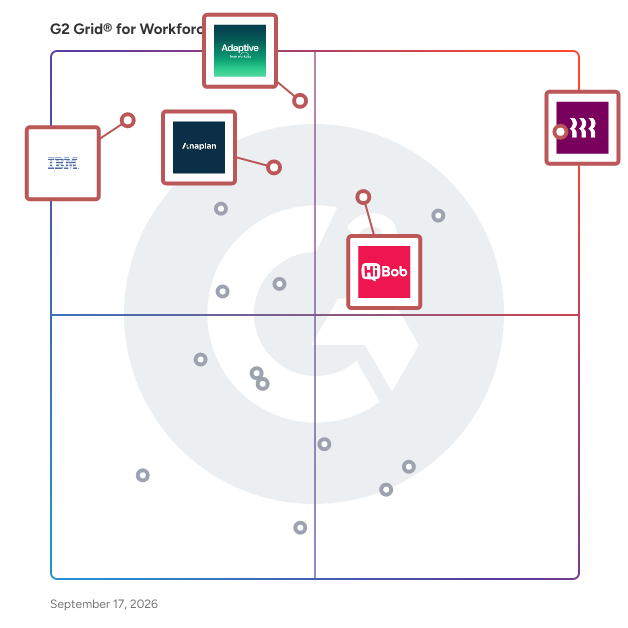
  # Best Enterprise Workforce Planning Software

  *By [Neya Kumaresan](https://research.g2.com/insights/author/neya-kumaresan)*

   Products classified in the overall Workforce Planning category are similar in many regards and help companies of all sizes solve their business problems. However, enterprise business features, pricing, setup, and installation differ from businesses of other sizes, which is why we match buyers to the right Enterprise Business Workforce Planning to fit their needs. Compare product ratings based on reviews from enterprise users or connect with one of G2&#39;s buying advisors to find the right solutions within the Enterprise Business Workforce Planning category.

In addition to qualifying for inclusion in the Workforce Planning Software category, to qualify for inclusion in the Enterprise Business Workforce Planning Software category, a product must have at least 10 reviews left by a reviewer from an enterprise business.


## How Many Workforce Planning Software Products Does G2 Track?
**Total Products under this Category:** 30

### Category Stats (May 2026)
- **Average Rating**: 4.51/5
- **New Reviews This Quarter**: 84
- **Buyer Segments**: Mid-Market 60% │ Small-Business 33% │ Enterprise 8%
- **Top Trending Product**: Anaplan (+0.003)
*Last updated: May 19, 2026*

  
## How Does G2 Rank Workforce Planning Software Products?

**Why You Can Trust G2's Software Rankings:**

- 30 Analysts and Data Experts
- 22,700+ Authentic Reviews
- 30+ Products
- Unbiased Rankings

G2's software rankings are built on verified user reviews, rigorous moderation, and a consistent research methodology maintained by a team of analysts and data experts. Each product is measured using the same transparent criteria, with no paid placement or vendor influence. While reviews reflect real user experiences, which can be subjective, they offer valuable insight into how software performs in the hands of professionals. Together, these inputs power the G2 Score, a standardized way to compare tools within every category.

  
## Top Workforce Planning Software at a Glance
| # | Product | Rating | Best For | What Users Say |
|---|---------|--------|----------|----------------|
| 1 | [Rippling](https://www.g2.com/products/rippling/reviews) | 4.8/5.0 (11,252 reviews) | Workforce operations tied to HR, payroll, and IT | "[Organized and Efficient Platform for Hiring and Employee Management](https://www.g2.com/survey_responses/rippling-review-12876145)" |
| 2 | [HiBob HRIS](https://www.g2.com/products/hibob-hris/reviews) | 4.5/5.0 (2,259 reviews) | People data, onboarding, and org visibility | "[All Employee Data in One Place, Backed by Constant HiBob Improvements](https://www.g2.com/survey_responses/hibob-hris-review-12522671)" |
| 3 | [Anaplan](https://www.g2.com/products/anaplan/reviews) | 4.6/5.0 (392 reviews) | Connected planning for workforce and business models | "[Anaplan’s Real-Time Calculations Are a Game-Changer](https://www.g2.com/survey_responses/anaplan-review-12677648)" |
| 4 | [Keka](https://www.g2.com/products/keka/reviews) | 4.5/5.0 (1,851 reviews) | HR planning with attendance and payroll data | "[Intuitive, All-in-One HR Platform for Attendance, Leaves, Payroll, and Expenses](https://www.g2.com/survey_responses/keka-review-12850790)" |
| 5 | [IBM Planning Analytics](https://www.g2.com/products/ibm-planning-analytics/reviews) | 4.4/5.0 (222 reviews) | Enterprise planning with forecasting and scenarios | "[Robust, Efficient Yet Complex for New Users](https://www.g2.com/survey_responses/ibm-planning-analytics-review-12802559)" |
| 6 | [Workday Adaptive Planning](https://www.g2.com/products/workday-adaptive-planning/reviews) | 4.3/5.0 (301 reviews) | Budgeting, modeling, and workforce forecasts | "[Makes Budgeting Easier and Replaces Complex Spreadsheets](https://www.g2.com/survey_responses/workday-adaptive-planning-review-12694059)" |
| 7 | [Pigment](https://www.g2.com/products/pigment-2024-01-19/reviews) | 4.6/5.0 (104 reviews) | Live planning dashboards and role forecasting | "[Power Pivot on Steroids—Intuitive, Modern Planning with Real-Time Collaboration](https://www.g2.com/survey_responses/pigment-review-12511185)" |
| 8 | [Deel HR](https://www.g2.com/products/deel-hr/reviews) | 4.8/5.0 (1,300 reviews) | Global workforce onboarding and payroll coordination | "[User-Friendly Platform with Fast, Trackable Payments](https://www.g2.com/survey_responses/deel-hr-review-12683686)" |
| 9 | [Paycor](https://www.g2.com/products/paycor/reviews) | 3.9/5.0 (1,238 reviews) | Payroll, time off, and employee request visibility | "[One Stop Shop and Friendly UI for PTO, Pay Stubs, and Performance Reviews](https://www.g2.com/survey_responses/paycor-review-12702364)" |
| 10 | [ChartHop](https://www.g2.com/products/charthop/reviews) | 4.3/5.0 (164 reviews) | Visual org planning and people data visibility | "[ChartHop Makes 1:1s More Meaningful with Transparent, Real-Time Insights](https://www.g2.com/survey_responses/charthop-review-12512416)" |


## Which Type of Workforce Planning Software Tools Are You Looking For?
  - [Workforce Planning Software](https://www.g2.com/categories/workforce-planning) *(current)*
  - [FP&amp;A Software](https://www.g2.com/categories/fp-a-financial-planning-analysis)
  - [Core HR Software](https://www.g2.com/categories/core-hr)
  - [HR Analytics Software](https://www.g2.com/categories/hr-analytics)

  
---

**Sponsored**

### Abacum

Abacum is an AI-native Financial Planning and Analysis (FP&amp;A) platform designed to enhance business performance through clarity, speed, and impactful decision-making. This innovative solution provides users with instant access to essential operational and financial key performance indicators (KPIs) all in one centralized location. With just a single click, users can automate management reporting, forecast revenue, plan headcount, budget operational expenditures (OPEX), and run multiple scenarios, all seamlessly integrated within the Abacum environment. Targeted primarily at mid-market companies, Abacum caters to finance teams seeking a robust yet user-friendly solution for their planning and analysis needs. The platform stands out by combining intuitive workflows with enterprise-grade flexibility, allowing users to create collaborative plans, analyze performance in real time, and share valuable insights that drive business progress. Its ability to integrate with over 700 systems, including ERP, CRM, HRIS, and data warehouses, ensures that all data is automatically synced, cleaned, structured, and consistently up to date, thus eliminating the need for manual data handling. One of the key features of Abacum is its multi-dimensional modeling engine, which empowers finance teams to conduct complex analyses and scenario planning with ease. This capability, coupled with collaborative workflows, facilitates seamless business partnering across various functions within an organization. As a result, finance teams can plan and report up to 75% faster, significantly improving efficiency and allowing them to focus on strategic initiatives rather than time-consuming manual processes. Abacum is designed to support fast-growing companies and industry leaders, including names such as Strava, Dish Networks, JG Wentworth, BetterUp, Factorial, Kajabi, Abridge, and Aiven. By providing a scalable FP&amp;A solution that balances power with simplicity, Abacum enables organizations to navigate the complexities of financial planning and analysis confidently.


[Visit website](https://www.g2.com/external_clickthroughs/record?secure%5Bad_program%5D=ppc&amp;secure%5Bad_slot%5D=category_product_list&amp;secure%5Bcategory_id%5D=1006516&amp;secure%5Bdisplayable_resource_id%5D=1006516&amp;secure%5Bdisplayable_resource_type%5D=Category&amp;secure%5Bmedium%5D=sponsored&amp;secure%5Bplacement_reason%5D=page_category&amp;secure%5Bplacement_resource_ids%5D%5B%5D=1006516&amp;secure%5Bprioritized%5D=false&amp;secure%5Bproduct_id%5D=154807&amp;secure%5Bresource_id%5D=1006516&amp;secure%5Bresource_type%5D=Category&amp;secure%5Bsource_type%5D=category_page&amp;secure%5Bsource_url%5D=https%3A%2F%2Fwww.g2.com%2Fcategories%2Fworkforce-planning%2Fenterprise&amp;secure%5Btoken%5D=104834dbf39a65dfc90008fae7658a7fb8cb5a4697b2aa0f35adda0d823c39d3&amp;secure%5Burl%5D=https%3A%2F%2Fwww.abacum.ai%2F%3Futm_source%3Dg2%26utm_medium%3Dcpc%26utm_campaign%3Dg2_paid&amp;secure%5Burl_type%5D=custom_url)

---

  
## Buyer Guide: Key Questions for Choosing Workforce Planning Software Software
  ### What does Workforce Planning software do?
  I frame Workforce Planning software as a system that connects people data with hiring, capacity, and budget planning. These platforms help teams track headcount, employee records, open roles, schedules, approvals, compensation, and workforce forecasts. In the reviews I evaluated, users connect the category with HR, finance, payroll, recruiting, and operations planning. It gives teams a clearer way to understand who they have, which roles are planned, what those roles cost, and how workforce changes affect the business plan.


  ### Why do businesses use Workforce Planning software?
  Across the review data I analyzed, businesses used Workforce Planning software when spreadsheet-based planning, manual updates, or disconnected HR systems became hard to trust. Teams wanted a clearer way to understand current headcount, planned hires, workforce cost, and the budget impact of changes.

Several benefits often show up:

- Reviewers like cleaner employee data, automatic updates, and easier reporting.
- HR teams value onboarding, time off, approvals, employee records, and policy-related workflows.
- Finance teams use headcount and compensation data for budgets and forecasting.
- Recruiting and operations teams use workforce plans to match hiring or staffing needs with business demand.

Common friction areas include learning curves, implementation work, support delays, customization limits, and confusing reports.


  ### Who uses Workforce Planning software primarily?
  After examining G2 reviewer profiles, I found that Workforce Planning software supports teams that plan people, cost, and capacity.

- **HR teams:** Manage employee records, onboarding, approvals, time off, and workforce changes.
- **People operations teams:** Keep employee data clean and coordinate updates across teams.
- **Finance and FP&amp;A teams:** Use headcount forecasts, compensation data, and budget models.
- **Recruiting teams:** Connect hiring plans with open roles, approvals, and headcount targets.
- **Operations teams:** Plan staffing, schedules, capacity, and team coverage.
- **Payroll teams:** Use workforce data tied to pay, benefits, and employee status.
- **IT admins:** Manage permissions, integrations, and system access.


  ### What types of Workforce Planning software should I consider?
  According to the way reviewers describe this category, Workforce Planning software usually falls into these groups:

- **HRIS-connected planning tools:** Best for employee records, payroll, benefits, onboarding, and time-off data.
- **Headcount planning tools:** Best for hiring requests, org changes, approvals, and workforce budgets.
- **Financial planning platforms:** Best when workforce planning needs to connect with revenue forecasts, project budgets, and long-range models.
- **Scheduling and capacity tools:** Best for shifts, project staffing, employee availability, and coverage planning.
- **Compensation planning tools:** Best for merit cycles, pay equity, total rewards, and salary planning.


  ### What are the core features to look for in Workforce Planning software?
  Based on the G2 feedback I evaluated, the capabilities that matter most include:

- Employee records covering roles, departments, locations, and reporting structures.
- Open position tracking with hiring requests, approvals, and headcount planning tools.
- Compensation fields, payroll inputs, benefits data, and budget impact visibility.
- Scenario planning, forecasting, org charts, dashboards, and reporting for strategic decisions.
- Scheduling, availability, time-off visibility, and capacity planning for operational needs.
- Integrations with HRIS, payroll, finance, and spreadsheet systems.
- Permissions, audit trails, exports, and change tracking for governance and accountability.


  ### What trends are shaping Workforce Planning software right now?
  From my evaluation of review patterns and current workforce research, these themes stand out:

- **AI-enabled workforce planning:** HR teams are being asked to plan how AI changes work, roles, and staffing needs.
- **Skills and role redesign:** Companies are reviewing current roles against future business needs.
- **Closer HR-finance planning:** Headcount, compensation, and budgets are being reviewed together.
- **Scenario planning for volatility:** Workforce plans need to account for hiring freezes, growth targets, and org changes.
- **Employee data quality:** Planning tools are only useful when employee, role, and cost data are kept up to date.


  ### How should I choose Workforce Planning software?
  I recommend starting with the planning decision that creates the most rework today. If headcount approval is the issue, prioritize request workflows, org views, compensation fields, and budget impact. If finance needs better models, review forecasting, scenarios, imports, and reporting. If HR owns the use case, check payroll, benefits, onboarding, time off, and employee record updates.


---

  ## What Are the Top-Rated Workforce Planning Software Products in 2026?
### 1. [Anaplan](https://www.g2.com/products/anaplan/reviews)
  **Average Rating:** 4.6/5.0
  **Total Reviews:** 392
  **Why buyers love it?:** In Anaplan’s G2 feedback, I saw its clearest fit in connected planning models that span finance, quotas, workforce needs, and broader business scenarios. Reviewers call out multidimensional modeling, real-time calculations, APIs, CloudWorks pipelines, dashboards, territory planning, and quota tracking. A good match for organizations that need workforce planning connected to larger enterprise planning models.


### What Do G2 Reviewers Say About Anaplan?
*AI-generated summary from verified user reviews*

**Pros:**

- Users find Anaplan to be **very easy to use** , thanks to its intuitive interface and seamless integration capabilities.
- Users value Anaplan&#39;s **user-friendly interface** and customization options, enhancing a wide range of planning applications.
- Users value the **flexibility** of Anaplan, allowing customization and adaptation to diverse business needs effectively.
- Users value the **efficiency** of Anaplan, enabling quick decision-making and seamless integration across business functions.
- Users value the **ease of use and scalability** of Anaplan, enhancing their planning and decision-making processes.

**Cons:**

- Users experience **performance limitations** and costly licensing issues with Anaplan, impacting overall usability and scalability.
- Users are frustrated with the **lack of essential features** in Anaplan, hindering usability and efficiency.
- Users note a **steep learning curve** for mastering Anaplan, requiring significant time and expertise for full potential.
- Users experience **performance issues** with Anaplan, particularly citing slow recalculations and workspace limitations affecting usability.
- Users find Anaplan **expensive** , especially compared to Excel, with significant cost increases during contract negotiations.

#### Key Features
  - Customization 
  - Shift Scheduling
  - Data Visualization
  - Collaboration
  - Production Planning - Supply Chain Planning
  #### What Are Recent G2 Reviews of Anaplan?

**"[Real-Time, Flexible Modeling That Speeds Up Decision-Making](https://www.g2.com/survey_responses/anaplan-review-12715706)"**

**Rating:** 4.0/5.0 stars
*— Alex P.*

[Read full review](https://www.g2.com/survey_responses/anaplan-review-12715706)

---

**"[Anaplan’s Real-Time Calculations Are a Game-Changer](https://www.g2.com/survey_responses/anaplan-review-12677648)"**

**Rating:** 5.0/5.0 stars
*— Tony V.*

[Read full review](https://www.g2.com/survey_responses/anaplan-review-12677648)

---

  #### What Are G2 Users Discussing About Anaplan?

- [What is Fluence Technologies used for?](https://www.g2.com/discussions/what-is-fluence-technologies-used-for) - 1 comment
- [How is anaplan different?](https://www.g2.com/discussions/how-is-anaplan-different) - 6 comments
- [Is anaplan any good?](https://www.g2.com/discussions/is-anaplan-any-good) - 1 comment
### 2. [Rippling](https://www.g2.com/products/rippling/reviews)
  **Average Rating:** 4.8/5.0
  **Total Reviews:** 11,252
  **Why buyers love it?:** After I reviewed Rippling’s G2 feedback, I placed it around workforce planning that sits close to payroll, onboarding, benefits, and employee records. Reviewers call out automated workflows, e-signatures, benefits syncing, payroll access, employee data, and device setup as parts of the same operating system. A strong fit for teams that want workforce decisions tied to the systems managing daily employee actions.


### What Do G2 Reviewers Say About Rippling?
*AI-generated summary from verified user reviews*

**Pros:**

- Users enjoy the **ease of use** in Rippling, benefiting from a smooth experience with single login access to tools.
- Users praise the **intuitive interface** of Rippling, making navigation and feature access effortless and efficient.
- Users appreciate the **simplicity and ease of navigation** in Rippling, making access to features quick and efficient.
- Users appreciate the **user-friendly interface** of Rippling, highlighting its ease of navigation and effective search bar feature.
- Users appreciate the **easy access** to clock in/out and payslips, making navigation efficient and streamlined.

**Cons:**

- Users find **missing features** in Rippling frustrating, particularly with reporting complexities and inconsistent app functionality.
- Users find the **learning curve challenging** , as adapting to the many features can be overwhelming initially.
- Users find Rippling has **limited features** , with outdated design and clunky interfaces that can hinder usability.
- Users find Rippling **not user-friendly** , citing slow loading times and complicated reporting processes that hinder efficiency.
- Users find the **navigation challenging** , making it difficult to locate important documents and features in Rippling.
  #### What Are Recent G2 Reviews of Rippling?

**"[Organized and Efficient Platform for Hiring and Employee Management](https://www.g2.com/survey_responses/rippling-review-12876145)"**

**Rating:** 5.0/5.0 stars
*— Melanie B.*

[Read full review](https://www.g2.com/survey_responses/rippling-review-12876145)

---

**"[Efficient Payment Tracking, Needs MFA Improvement](https://www.g2.com/survey_responses/rippling-review-12868905)"**

**Rating:** 4.0/5.0 stars
*— Aparajita B.*

[Read full review](https://www.g2.com/survey_responses/rippling-review-12868905)

---

  #### What Are G2 Users Discussing About Rippling?

- [How is Rippling innovating in the field of HR and IT management for businesses?](https://www.g2.com/discussions/how-is-rippling-innovating-in-the-field-of-hr-and-it-management-for-businesses) - 5 comments, 6 upvotes
- [What is Rippling used for?](https://www.g2.com/discussions/what-is-rippling-used-for) - 6 comments, 3 upvotes
### 3. [IBM Planning Analytics](https://www.g2.com/products/ibm-planning-analytics/reviews)
  **Average Rating:** 4.4/5.0
  **Total Reviews:** 222
  **Why buyers love it?:** As I worked through IBM Planning Analytics’ G2 feedback, I placed it around large-scale planning where finance, operations, and workforce assumptions need to stay connected. Reviewers call out TM1 modeling, rolling forecasts, scenario planning, real-time calculations, centralized data, and Excel integration. Well suited to teams that need planning depth and can support a more technical setup.


### What Do G2 Reviewers Say About IBM Planning Analytics?
*AI-generated summary from verified user reviews*

**Pros:**

- Users appreciate the **efficiency** of IBM Planning Analytics, enabling fast financial planning and streamlined decision-making.
- Users value the **planning efficiency** of IBM Planning Analytics, enjoying seamless creation of KPIs and autonomous workflows.
- Users appreciate the **real-time data analysis and user-friendly interface** of IBM Planning Analytics for faster decision-making.
- Users commend the **forecasting accuracy** of IBM Planning Analytics, enabling efficient decision-making and streamlined budget processes.
- Users appreciate the **ease of use** of IBM Planning Analytics, enjoying its seamless navigation and user-friendly interface.

**Cons:**

- Users face a **steep learning curve** with IBM Planning Analytics, making setup and adjustments challenging without technical support.
- Users note a **steep learning curve** with IBM Planning Analytics, making initial setup and effective navigation challenging for newcomers.
- Users face a **steep learning curve** with IBM Planning Analytics, making setup and usability challenging for new users.
- Users find the **complexity** of IBM Planning Analytics challenging, especially during initial setup and for newcomers.
- Users face a **difficult learning curve** with IBM Planning Analytics, requiring significant training and technical knowledge.

#### Key Features
  - Budgeting
  - Collaboration
  - Variance Analysis
  - Optimization
  - Data Import
  #### What Are Recent G2 Reviews of IBM Planning Analytics?

**"[Robust, Efficient Yet Complex for New Users](https://www.g2.com/survey_responses/ibm-planning-analytics-review-12802559)"**

**Rating:** 4.0/5.0 stars
*— Jeanpierre L.*

[Read full review](https://www.g2.com/survey_responses/ibm-planning-analytics-review-12802559)

---

**"[Powerful Planning &amp; Forecasting With Fast Updates and Smooth Excel Integration](https://www.g2.com/survey_responses/ibm-planning-analytics-review-12648783)"**

**Rating:** 4.5/5.0 stars
*— Himanshu J.*

[Read full review](https://www.g2.com/survey_responses/ibm-planning-analytics-review-12648783)

---

  #### What Are G2 Users Discussing About IBM Planning Analytics?

- [What is IBM Planning Analytics with Watson used for?](https://www.g2.com/discussions/what-is-ibm-planning-analytics-with-watson-used-for)
- [How do you upgrade planning analytics workspace?](https://www.g2.com/discussions/how-do-you-upgrade-planning-analytics-workspace)
- [What is planning analytics for Excel?](https://www.g2.com/discussions/what-is-planning-analytics-for-excel)
### 4. [Workday Adaptive Planning](https://www.g2.com/products/workday-adaptive-planning/reviews)
  **Average Rating:** 4.3/5.0
  **Total Reviews:** 301
  **Why buyers love it?:** Workday Adaptive Planning came through in G2 reviews as a planning tool for budgeting, forecasting, modeling, and shared planning inputs across teams. Users point to real-time updates, scenario planning, ad hoc reporting, OfficeConnect, spreadsheet replacement, and centralized budget work. A strong fit for finance-led teams that need workforce and financial plans easier to adjust and explain.


### What Do G2 Reviewers Say About Workday Adaptive Planning?
*AI-generated summary from verified user reviews*

**Pros:**

- Users appreciate the **ease of use** of Workday Adaptive Planning, enjoying smooth management and quick resource utilization.
- Users appreciate the **efficiency** of Workday Adaptive Planning, praising its speed and accuracy in managing business forecasts.
- Users appreciate the **flexibility and ease of use** of Workday Adaptive Planning, enabling fast, accurate forecasting and collaboration.
- Users value the **collaboration capabilities** of Workday Adaptive Planning, enhancing budget management and organizational transparency.
- Users appreciate the **integration of planning capabilities** in Workday Adaptive Planning, enhancing collaboration and efficiency across teams.

**Cons:**

- Users face a **steep learning curve** with Workday Adaptive Planning, making efficient use challenging for new users.
- Users find the **complexity** of Workday Adaptive Planning challenging, especially for new users and data integration.
- Users find the **complex setup** of Workday Adaptive Planning to be a significant barrier, complicating data integration and usage.
- Users note a **steep learning curve** with Workday Adaptive Planning, requiring substantial training and expertise for effective use.
- Users find the **learning difficulty** of Workday Adaptive Planning a barrier due to its complex integration and setup processes.

#### Key Features
  - Forecasting
  - Data Visualization
  - Collaboration
  - Data Import
  - Integration
  #### What Are Recent G2 Reviews of Workday Adaptive Planning?

**"[Makes Budgeting Easier and Replaces Complex Spreadsheets](https://www.g2.com/survey_responses/workday-adaptive-planning-review-12694059)"**

**Rating:** 4.0/5.0 stars
*— Shrutika P.*

[Read full review](https://www.g2.com/survey_responses/workday-adaptive-planning-review-12694059)

---

**"[Efficient and flexible solution for financial planning and forecasting](https://www.g2.com/survey_responses/workday-adaptive-planning-review-12737318)"**

**Rating:** 4.0/5.0 stars
*— Dharamveer p.*

[Read full review](https://www.g2.com/survey_responses/workday-adaptive-planning-review-12737318)

---

  #### What Are G2 Users Discussing About Workday Adaptive Planning?

- [What is Workday Adaptive Planning used for?](https://www.g2.com/discussions/what-is-workday-adaptive-planning-used-for) - 2 upvotes
- [Does workday do workforce planning?](https://www.g2.com/discussions/does-workday-do-workforce-planning) - 1 comment
### 5. [HiBob HRIS](https://www.g2.com/products/hibob-hris/reviews)
  **Average Rating:** 4.5/5.0
  **Total Reviews:** 2,259
  **Why buyers love it?:** HiBob HRIS stood out to me in G2 reviews for making employee data, onboarding, org charts, and time-off details easier to navigate. Users point to clean UI, customizable flows, reporting, onboarding automation, policy access, integrations, and organization-tree visibility. Works well for HR teams that need people data and workforce structure easy to find across the company.


### What Do G2 Reviewers Say About HiBob HRIS?
*AI-generated summary from verified user reviews*

**Pros:**

- Users find HiBob HRIS **exceptionally user-friendly** , enhancing both HR processes and employee onboarding experiences.
- Users love the **user-friendly interface** of HiBob HRIS, enhancing daily tasks and team celebrations efficiently.
- Users appreciate the **intuitive design** of HiBob HRIS, enabling easy navigation and efficient information sharing.
- Users appreciate the **intuitive interface and exceptional customer support** of HiBob HRIS, enhancing their overall experience.
- Users appreciate the **user-friendly interface and customization** of HiBob HRIS, enhancing efficiency and data management.

**Cons:**

- Users note the **limited features** of HiBob HRIS, indicating a need for more customization and functionality.
- Users feel the **missing features** include necessary tracking options and an intuitive interface for better usability.
- Users wish for more **customization options** in HiBob HRIS, as the limited settings can lead to confusion.
- Users report **integration issues** with HiBob HRIS, especially when using third-party tools for essential HR functionalities.
- Users find HiBob HRIS to be **not user-friendly** , with a cluttered interface and buried options causing confusion.

#### Key Features
  - Organization Management
  - User, Role, and Access Management
  - E-Forms
  - Onboarding Notifications
  - Visualization
  #### What Are Recent G2 Reviews of HiBob HRIS?

**"[All Employee Data in One Place, Backed by Constant HiBob Improvements](https://www.g2.com/survey_responses/hibob-hris-review-12522671)"**

**Rating:** 5.0/5.0 stars
*— Mel K.*

[Read full review](https://www.g2.com/survey_responses/hibob-hris-review-12522671)

---

**"[HiBob Consolidates Core HR with an Intuitive UI and Powerful Analytics](https://www.g2.com/survey_responses/hibob-hris-review-12355120)"**

**Rating:** 4.0/5.0 stars
*— Angelos C.*

[Read full review](https://www.g2.com/survey_responses/hibob-hris-review-12355120)

---

  #### What Are G2 Users Discussing About HiBob HRIS?

- [What is Hibob HRIS used for?](https://www.g2.com/discussions/what-is-hibob-hris-used-for)

    ## What Is Workforce Planning Software?
  [HR Software](https://www.g2.com/categories/hr)
  ## What Software Categories Are Similar to Workforce Planning Software?
    - [FP&amp;A Software](https://www.g2.com/categories/fp-a-financial-planning-analysis)
    - [Core HR Software](https://www.g2.com/categories/core-hr)
    - [HR Analytics Software](https://www.g2.com/categories/hr-analytics)

  
---

## How Do You Choose the Right Workforce Planning Software?

### What You Should Know About Workforce Planning Software

### Workforce planning software buying insights at a glance

[Workforce planning software](https://www.g2.com/categories/workforce-planning) helps organizations **forecast staffing needs, align hiring plans with budgets, and maintain visibility into workforce costs** as teams grow. These platforms allow HR, finance, and operations leaders to model headcount changes, evaluate compensation impact, and track organizational structure in a centralized system rather than managing workforce decisions across disconnected spreadsheets.

Across G2 reviews, buyers often describe workforce planning systems as tools that bring structure to hiring requests, role approvals, and staffing forecasts. Instead of reconciling multiple documents or email threads, teams use these solutions to manage workforce planning workflows in one place and maintain clearer alignment between hiring plans and business priorities.&amp;nbsp;

As organizations scale, these tools also help leadership teams understand how workforce changes affect budgets, reporting structures, and long-term staffing strategies.

Pricing for workforce planning solutions typically varies based on implementation scope, number of users, integration requirements, and whether the software is part of a broader [HR](https://www.g2.com/categories/hr) or [financial planning platform](https://www.g2.com/categories/fp-a-financial-planning-analysis).

### Top 5 FAQs from software buyers

- How does workforce planning software improve headcount forecasting and workforce cost planning?
- What capabilities should I evaluate when selecting workforce planning software?
- How well do workforce planning tools integrate with HRIS, payroll, and financial planning systems?
- How do workforce planning platforms support scenario planning and workforce analytics?
- How scalable is workforce planning software for multi-department or multi-location organizations?

G2&#39;s top-rated Workforce Planning Software, based on verified reviews, includes [Rippling](https://www.g2.com/products/rippling/reviews), [HiBob HRIS](https://www.g2.com/products/hibob-hris/reviews), [Anaplan](https://www.g2.com/products/anaplan/reviews), [Keka](https://www.g2.com/products/keka/reviews), and [Deel Payroll](https://www.g2.com/products/deel-payroll/reviews).

### What are the top-reviewed workforce planning software on G2?

[Rippling](https://www.g2.com/products/rippling/reviews)

- Number of Reviews: 11,648
- Satisfaction: 100
- Market Presence: 95
- G2 Score: 97

[HiBob HRIS](https://www.g2.com/products/hibob-hris/reviews)

- Number of Reviews: 2,045
- Satisfaction: 69
- Market Presence: 80
- G2 Score: 75

[Anaplan](https://www.g2.com/products/anaplan/reviews)

- Number of Reviews: 427
- Satisfaction: 44
- Market Presence: 83
- G2 Score: 64

[Keka](https://www.g2.com/products/keka/reviews)

- Number of Reviews: 1,682
- Satisfaction: 64
- Market Presence: 58
- G2 Score: 61

[Deel Payroll](https://www.g2.com/products/deel-payroll/reviews)

- Number of Reviews: 11,868
- Satisfaction: 63
- Market Presence: 50
- G2 Score: 56

**Satisfaction** reflects user-reported ratings, including ease of use, support, and feature fit. ([Source 2](https://www.g2.com/reports))

**Market Presence** scores combine review and external signals that indicate market momentum and footprint. ([Source 2](https://www.g2.com/reports))

**G2 Score** is a weighted composite of Satisfaction and Market Presence. ([Source 2](https://www.g2.com/reports))

Learn how G2 scores products. ([Source 1](https://documentation.g2.com/docs/research-scoring-methodologies?_gl=1*5vlk6s*_gcl_au*MTAwMzU5MzUxLjE3NjM0MTg0NzYuNjY0NTIxMTY0LjE3NjQ2MTc0NzcuMTc2NDYxNzQ3Nw..*_ga*NzY1MDU0NjE3LjE3NjM0NzQ3ODM.*_ga_MFZ5NDXZ5F*czE3NjYwODk1MTMkbzY3JGcxJHQxNzY2MDkyMjQyJGo1NyRsMCRoMA..))

### What I often see in Workforce Planning Software

#### Feedback Pros: What Users Consistently Appreciate

• **Centralized headcount tracking replacing spreadsheet-based workforce planning processes**

_“What I like best about Rippling is the platform’s ability to bring multiple HR functions together in one system. It provides a centralized place to manage employee data, payroll, and other HR operations, which helps streamline processes and improve efficiency. The interface is user-friendly, and the system allows for good visibility into employee information and workflows. Additionally, the flexibility in configuration and reporting makes it easier to manage HR operations and adapt the system to organizational needs.”_

- [Rippling review](https://www.g2.com/products/rippling/reviews/rippling-review-12458250), Aarthee S.

• **Scenario modeling for hiring plans, compensation impact, and budget forecasting**

_“Anaplan is robust in bringing diverse operations together for easier planning, including supply, sales, and finance, among others. The app has remarkable scenario-modeling capabilities, and it keeps updating based on the analytics conducted. It also offers multi-dimensional models that handle large enterprises and ensure efficiency. In addition, the app is cloud-based, with secure and governable systems that support smooth coordination and collaboration.”_

- [Anaplan review](https://www.g2.com/products/anaplan/reviews/anaplan-review-12230750), Samantha L.

• **Shared visibility into workforce data across HR, finance, and leadership teams**

_“HiBob is strong because it consolidates core HR processes (employee data, time off, onboarding, performance) into one intuitive platform, with flexible workflows and automations that reduce manual effort. The modern UI drives high adoption, while reporting and analytics give leadership clear visibility into key people metrics for faster, data-driven decisions.”_

- [HiBob HRIS review](https://www.g2.com/products/hibob-hris/reviews/hibob-hris-review-12355120), Angelos C.

#### Cons: Where Many Platforms Fall Short

• **Advanced configuration required for complex approval flows and planning rules**

_“The first weakness I have identified with Rippling is that some processes, such as multi-step approvals or intricate rules on payroll, are not easily customized. In the process of attempting to configure certain workflows, this could necessitate additional testing so that we can verify that everything is fine. The frequency of use is also high, and even minor errors during configuration can paralyze HR operations in the meantime.”_

- [Rippling review](https://www.g2.com/products/rippling/reviews/rippling-review-12467905), Richard F.

• **Custom reporting and dashboards sometimes require additional setup effort**

_“Anaplan&#39;s main challenges are its learning curve and the complexity of large models, which can take time and expertise to manage. Integrations with some third-party tools can also require extra setup. The initial setup of Anaplan can be challenging, especially for teams new to connected planning. Building models, configuring drivers, and integrating with other systems takes time and sometimes requires guidance from Anaplan specialists.”_

- [Anaplan review](https://www.g2.com/products/anaplan/reviews/anaplan-review-12226017), Faga K.

• **Customer support responsiveness or resolution speed varies across implementations**

_“I don&#39;t like the payroll processing and customer support because they&#39;re very slow. We don&#39;t have enough flexibility in terms of the payroll process, and customer support is really bad; it takes 6-7 days to respond.”_

- [Keka review](https://www.g2.com/products/keka/reviews/keka-review-12319596), Tushar A.

### My Expert Takeaway on Workforce Planning Software in 2026

While reviewing the feedback across this dataset, I noticed that many organizations adopt workforce planning software after their hiring processes become too complex to manage in spreadsheets. Reviewers say these platforms help track open roles, plan staffing, and understand workforce costs clearly.

Another pattern I saw in the reviews is how often these tools sit at the intersection of HR and financial planning. Teams regularly mention connecting these platforms with HRIS tools, [payroll systems](https://www.g2.com/categories/payroll), and financial planning software so leadership can evaluate hiring decisions alongside budget impact. When workforce planning tools are integrated into these systems, they tend to become a central reference point for staffing discussions rather than just a reporting layer.

Industry distribution in the dataset suggests that adoption is especially strong in technology and IT services companies, where rapid hiring cycles make structured planning more important. At the same time, reviewers from healthcare, insurance, and other regulated industries emphasize the value of workforce planning solutions for managing staffing levels, maintaining compliance requirements, and ensuring operational continuity.

One recurring challenge in the reviews is the complexity of implementation when organizations move from informal planning methods to a structured system. Several reviewers note that setting up approval paths, reporting views, and workforce planning models requires careful planning. From what I observed in the feedback, teams that establish these processes early tend to adopt the software more smoothly.&amp;nbsp;

Once those foundations are in place, the best workforce planning software supports more informed hiring decisions and better alignment between staffing plans and business growth.

### Workforce Planning Software FAQs

#### What AI tools are useful for workforce planning?

AI in workforce planning tools supports headcount forecasting, workforce cost modeling, and hiring scenario simulations. These features assist HR and finance leaders in evaluating staffing plans before hiring. Examples of AI-enabled workforce planning tools:

- [Anaplan](https://www.g2.com/products/anaplan/reviews): Used by enterprise teams to run predictive workforce models and evaluate hiring scenarios alongside financial planning.
- [Workday Adaptive Planning](https://www.g2.com/products/workday-adaptive-planning/reviews): Provides workforce forecasting and scenario modeling that helps HR and finance teams anticipate hiring needs and workforce costs.
- [IBM Planning Analytics](https://www.g2.com/products/ibm-planning-analytics/reviews): Supports AI-driven analytics for workforce planning, allowing organizations to analyze staffing demand and optimize workforce allocation.

#### What are the best workforce planning tools?

Leading workforce planning tools help organizations project staffing requirements, manage headcount strategies, and align workforce decisions with financial objectives. Commonly used workforce planning platforms include:

- [Anaplan](https://www.g2.com/products/anaplan/reviews): Enterprise planning platform that connects workforce planning with financial and operational planning.
- [Rippling](https://www.g2.com/products/rippling/reviews): Combines workforce planning with HR, payroll, and employee lifecycle management.
- [HiBob HRIS](https://www.g2.com/products/hibob-hris/reviews): Offers workforce analytics and organizational planning tools for growing companies.

#### What is the most affordable workforce planning software for SMBs?

SMBs typically choose workforce planning tools that are easy to implement and combine workforce planning with HR management. [Affordable workforce planning platforms often used by SMBs](https://www.g2.com/categories/workforce-planning/small-business) include:

According to **G2 market segment data** , several workforce planning platforms have strong adoption among small businesses:

- [Rippling](https://www.g2.com/products/rippling/reviews) _(31% small business users):_ Combines workforce planning, HR, payroll, and IT management, appealing to SMBs seeking a unified platform.
- [HiBob HRIS](https://www.g2.com/products/hibob-hris/reviews) _(12% small business users):_ Designed for growing organizations needing workforce analytics, headcount visibility, and planning tools.
- [Workday Adaptive Planning](https://www.g2.com/products/workday-adaptive-planning/reviews) _(10% small business users):_ Offers workforce forecasting and budgeting tools to align staffing with financial plans.

#### What is the top-rated workforce planning platform for enterprises?

Enterprise organizations typically choose workforce planning platforms that support large-scale workforce modeling, financial alignment, and multi-department planning.

Based on **G2 enterprise usage data** , [commonly adopted platforms include](https://www.g2.com/categories/workforce-planning/enterprise):

- [Anaplan](https://www.g2.com/products/anaplan/reviews) _(61% enterprise users):_ Enterprise connected planning platform used for complex workforce modeling across departments and global teams.
- [IBM Planning Analytics](https://www.g2.com/products/ibm-planning-analytics/reviews) _(45% enterprise users):_ Advanced analytics platform that supports workforce forecasting and enterprise planning scenarios.
- [Rippling](https://www.g2.com/products/rippling/reviews) _(5% enterprise users):_ Workforce management platform that integrates HR, payroll, and workforce data into a centralized planning system.

#### Which solution supports multi-location workforce planning?

Multi-location workforce planning tools help organizations model staffing across regions, departments, and business units. Tools commonly used for multi-location workforce planning include:

- [Anaplan](https://www.g2.com/products/anaplan/reviews): Allows companies to plan workforce needs across multiple regions and organizational structures.
- [Workday Adaptive Planning](https://www.g2.com/products/workday-adaptive-planning/reviews): Supports workforce forecasting across global offices and distributed teams.
- [Rippling](https://www.g2.com/products/rippling/reviews): Provides workforce visibility across distributed teams while integrating employee and payroll data.

#### Sources

- [G2 Scoring Methodologies](https://documentation.g2.com/docs/research-scoring-methodologies?_gl=1*5ky9es*_gcl_au*MTY2NDg2MDY3Ny4xNzU1MDQxMDU4*_ga*MTMwMTMzNzE1MS4xNzQ5MjMyMzg1*_ga_MFZ5NDXZ5F*czE3NTUwOTkzMjgkbzQkZzEkdDE3NTUwOTk3NzYkajU3JGwwJGgw)
- [G2 Winter 2026 Reports](https://company.g2.com/news/g2-winter-2026-reports)

Researched By: [Jeffrey Lin](https://research.g2.com/insights/author/jeffrey-lin)

Last updated on March 12, 2026


