# Best Enterprise Video Conferencing Software - Page 4

## How Many Video Conferencing Software Products Does G2 Track?

**Total Products under this Category:** 221

### Category Stats (Jul 2026)

- **Average Rating:** 4.39/5 (↓0.01 vs Jun 2026) The average rating of products in this category, based on all submitted ratings
- **Top Trending Product:** Muvi Live (+1.75%) - Among all products in this category, Muvi Live recorded the largest rating increase compared to last month

_Last updated: July 23, 2026_

## How Does G2 Rank Video Conferencing Software Products?

**Why You Can Trust G2's Software Rankings:**

- 30 Analysts and Data Experts
- 197,700+ Authentic Reviews
- 221+ Products
- Unbiased Rankings

G2's software rankings are built on verified user reviews, rigorous moderation, and a consistent research methodology maintained by a team of analysts and data experts. Each product is measured using the same transparent criteria, with no paid placement or vendor influence. While reviews reflect real user experiences, which can be subjective, they offer valuable insight into how software performs in the hands of professionals. Together, these inputs power the G2 Score, a standardized way to compare tools within every category.

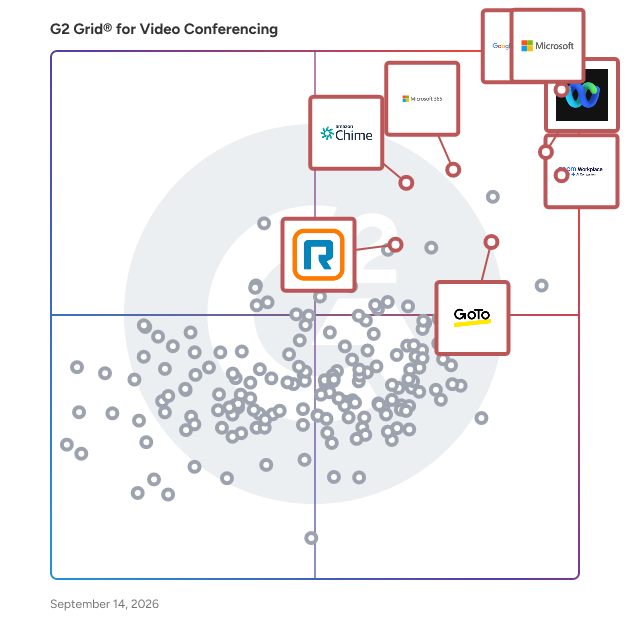
## G2 Grid® for Video Conferencing Software
 ![G2 Grid® for Video Conferencing Software plotting products by satisfaction and market presence](https://www.g2.com/categories/video-conferencing/grids.png?focus%5B%5D=25592&focus%5B%5D=1434&focus%5B%5D=7372&focus%5B%5D=18255&focus%5B%5D=663&focus%5B%5D=25535&focus%5B%5D=1173&focus%5B%5D=306)

Highlighted products: Microsoft Teams, Google Workspace, Zoom Workplace, Webex Suite, Microsoft 365, Amazon Chime, RingEX, and GoTo Meeting.

Underlying data: [Grid® JSON](https://www.g2.com/categories/video-conferencing/grids.json?focus%5B%5D=microsoft-teams&focus%5B%5D=google-workspace&focus%5B%5D=zoom-workplace&focus%5B%5D=cisco-webex-suite&focus%5B%5D=microsoft365&focus%5B%5D=amazon-chime&focus%5B%5D=ringex&focus%5B%5D=goto-meeting&segment=enterprise)

**Sponsored**

### Sequel.io

Sequel runs webinars directly on your website and turns the engagement into first-party data you can use to drive pipeline, personalization, and attribution. Webinars Belong on Your Website Webinars shouldn’t send your best prospects to a third-party destination. Sequel delivers the entire webinar experience on your website, so traffic, brand experience, and conversion paths stay under your control. Webinars are embedded directly into your CMS, not hosted on an external domain. Registration, viewing, CTAs, and follow-up all happen within your owned site—keeping attendees surrounded by your product pages, pricing, and next steps. Instead of siphoning traffic away, webinars contribute to organic traffic, SEO, and conversion. Actionable, First-Party Intent Data Attendance alone isn’t insight. When Sequel is embedded on your website, it unlocks access to a deep data layer that captures how people engage during the webinar and what they do on your website before and after, creating a single behavioral record per person and account. In-event actions like polls, questions, CTAs, and watch time are combined with website behavior and post-event actions such as pricing page visits or demo clicks to create a unified timeline with clean, configurable data pushed directly into CRM and MAP systems—enabling scoring, routing, and follow-up based on real behavior, not assumptions. Faster Follow-Up and Better Attribution Sequel is built to shorten the gap between engagement and action. With real-time sync to Salesforce, HubSpot, and Marketo, teams can map custom engagement fields, trigger alerts and nurture flows, and tie webinars directly to pipeline and revenue—not just MQLs. It’s designed for teams that care about forecast accuracy and ROI credibility. AI-Powered Content Repurposing Extends the Life of Every Event Webinars shouldn’t end when the live session does. Sequel uses AI to turn every event into a scalable content engine—automatically transforming long-form video into high-performing assets that drive ongoing engagement and pipeline. Studio-quality local recordings power better outputs, while AI generates clips, highlights, summaries, written content, and chapters that break replays into navigable, topic-based sections. Sales and marketing can share precise moments instead of entire recordings, fueling SEO, nurture, and on-site discovery without post-production bottlenecks or loss of brand control. Built for Global Audiences Modern B2B audiences are global. Sequel makes it easy to serve international viewers without duplicating programs or fragmenting data. Live AI-powered translations with captions support multiple spoken languages in a single session. On-demand replays include translated subtitles, viewers select their preferred language seamlessly, and AI dubbing enables multilingual versions of webinar content—all within the same owned-site experience. The Foundation of the Intelligent Website Sequel is not just a webinar tool. It’s the starting point for making the website adaptive, personalized, and revenue-aware. Webinars act as high-signal moments to identify intent and interests. Engagement data feeds personalization and recommendations over time. AI summarizes, repurposes, and operationalizes content—setting the groundwork for adaptive web experiences by role, account, or behavior, and evolving naturally into a broader Intelligent Website strategy.

[Visit website](https://www.g2.com/external_clickthroughs/record?secure%5Bad_program%5D=ppc&secure%5Bad_slot%5D=category_product_list&secure%5Bcategory_id%5D=19&secure%5Bchosen_at%5D=2026-07-31T10%3A48%3A36Z&secure%5Bdisplayable_resource_id%5D=1113&secure%5Bdisplayable_resource_type%5D=Category&secure%5Bmedium%5D=sponsored&secure%5Bplacement_reason%5D=neighbor_category&secure%5Bplacement_resource_ids%5D%5B%5D=1113&secure%5Bprioritized%5D=false&secure%5Bproduct_id%5D=170956&secure%5Bresource_id%5D=19&secure%5Bresource_type%5D=Category&secure%5Bsource_type%5D=category_page&secure%5Bsource_url%5D=https%3A%2F%2Fwww.g2.com%2Fcategories%2Fvideo-conferencing%2Fenterprise%3Fpage%3D4&secure%5Btoken%5D=1907bdc9ac064faa3cced04eabfd07e46ca4535e92b66b58f307a3f8100cc7ed&secure%5Burl%5D=https%3A%2F%2Fwww.sequel.io%3Futm_campaign%3DG2%26utm_source%3DG2%2520clicks%26utm_medium%3DJune%25202026%26utm_term%3DWebinar%2520category&secure%5Burl_type%5D=custom_url)

### [MegaMeeting](https://www.g2.com/products/megameeting/reviews)

MegaMeeting is a web and video conferencing solution.

**Average Rating:** 4.3/5.0

**Total Reviews:** 26

#### How Do G2 Users Rate MegaMeeting?

- **Has the product been a good partner in doing business?:** 8.8/10 (Category avg: 8.9/10)
- **Presentations:** 10.0/10 (Category avg: 8.9/10)
- **Participant Permissions:** 8.9/10 (Category avg: 8.8/10)

#### Who Is the Company Behind MegaMeeting?

- **Seller:** [Internet MegaMeeting](https://www.g2.com/sellers/internet-megameeting-3a9aad82-dc97-41cb-ad79-5cfd4bad225d)
- **Year Founded:** 2003
- **HQ Location:** Encino, California
- **Twitter:** @MegaMeeting  
1,250 Twitter followers
- **LinkedIn® Page:** [www.linkedin.com](https://www.g2.com/external_clickthroughs/record?secure%5Bsource_type%5D=product_profile&secure%5Btoken%5D=88e550f2f107477f462f791e58cdb066ca34100ab8d17dc552e5f6996459a308&secure%5Burl%5D=https%3A%2F%2Fwww.linkedin.com%2Fcompany%2F145681%2F&secure%5Burl_type%5D=linkedin_company_website)  
14 employees on LinkedIn®

#### Who Uses This Product?

- **Company Size:** 46% Medium, 42% Large

#### What Are Recent G2 Reviews of MegaMeeting?

**["MegaMeeting is wanting to dispatch the most up to date form of their video conferencing stage."](https://www.g2.com/survey_responses/megameeting-review-4365774)**

**Rating:** 5.0/5.0 stars

_— Linda S._

[Read full review](https://www.g2.com/survey_responses/megameeting-review-4365774)

**["MegaMeeting is an especially designed application for video conferencing."](https://www.g2.com/survey_responses/megameeting-review-4359826)**

**Rating:** 4.5/5.0 stars

_— Jaxon a._

[Read full review](https://www.g2.com/survey_responses/megameeting-review-4359826)

#### What Are G2 Users Discussing About MegaMeeting?

- [What is MegaMeeting used for?](https://www.g2.com/discussions/what-is-megameeting-used-for)

### [TIXEO](https://www.g2.com/products/tixeo/reviews)

Tixeo is a European leader in secure video conferencing solutions, offering organizations a platform that ensures the strict confidentiality of their communications. With over 20 years of innovation, Tixeo provides a range of services tailored to various infrastructures, including cloud-based and on-premise options. Their technology is certified by the French Cybersecurity Agency (ANSSI), highlighting a commitment to high security standards. Key Features and Functionality: - End-to-End Encryption: Tixeo's unique architecture enables true end-to-end encryption for multipoint communications, ensuring that audio, video, and data streams remain confidential, even in the event of server attacks. - Flexible Collaboration Modes: The platform offers three collaboration modes—Meeting, TixeoFusion, and Conference—along with a wide array of features designed to enhance teamwork and adaptability. - High-Quality Performance: Users experience high-definition video (up to 4K) and crystal-clear audio, providing a seamless and comfortable communication experience. - Universal Accessibility: Tixeo is compatible with various devices and operating systems, including Windows, macOS, iOS, Android, and Linux. It also integrates with traditional systems via H.323/SIP protocols, ensuring broad accessibility. Primary Value and User Solutions: Tixeo addresses the critical need for secure and confidential communication in an era where cyber threats and industrial espionage are prevalent. By providing a platform with robust security measures, including end-to-end encryption and compliance with European data protection regulations, Tixeo ensures that organizations can conduct their communications without compromising sensitive information. This is particularly vital for sectors handling confidential data, such as defense, aerospace, finance, and public administration. Furthermore, Tixeo's flexible deployment options—ranging from cloud services to on-premise solutions—allow organizations to choose the setup that best fits their infrastructure and security requirements. The platform's high-quality performance and user-friendly features enhance collaboration and productivity, making it a comprehensive solution for secure video conferencing needs.

**Average Rating:** 4.5/5.0

**Total Reviews:** 137

#### How Do G2 Users Rate TIXEO?

- **Has the product been a good partner in doing business?:** 9.2/10 (Category avg: 8.9/10)
- **Presentations:** 8.7/10 (Category avg: 8.9/10)
- **Participant Permissions:** 8.7/10 (Category avg: 8.8/10)
- **Whiteboarding:** 9.5/10 (Category avg: 8.6/10)

#### Who Is the Company Behind TIXEO?

- **Seller:** [TIXEO](https://www.g2.com/sellers/tixeo)
- **Year Founded:** 2003
- **HQ Location:** Montpellier
- **Twitter:** @Tixeo  
476 Twitter followers
- **LinkedIn® Page:** [www.linkedin.com](https://www.g2.com/external_clickthroughs/record?secure%5Bsource_type%5D=product_profile&secure%5Btoken%5D=e13cac0a5e621c05ab1c9fe6fdca673e03cac3abcd62d9f3b88abf14c00b1fa6&secure%5Burl%5D=https%3A%2F%2Fwww.linkedin.com%2Fcompany%2F1023064%2F&secure%5Burl_type%5D=linkedin_company_website)  
37 employees on LinkedIn®

#### Who Uses This Product?

- **Who Uses This:** Software Engineer, Ingeniero de software
- **Top Industries:** Information Technology and Services, Computer Software
- **Company Size:** 49% Small, 40% Medium

#### What Do G2 Reviewers Say About TIXEO?

_AI-generated summary from verified user reviews_

##### Pros

- Users value TIXEO’s **exceptional security** features, including end-to-end encryption and official certifications for sensitive discussions.
- Users praise TIXEO for its **consistent clear video and audio quality** , even with lower bandwidth connections.
- Users value the **high-quality audio** of TIXEO, ensuring clear communication even in challenging network conditions.
- Users appreciate Tixeo's **high reliability and security** , ensuring secure video conferencing for sensitive communications across all platforms.
- Users love the **high-quality video and audio** of TIXEO, ensuring seamless and immersive virtual meetings.

##### Cons

- Users find TIXEO's pricing to be **expensive** , especially when compared to more mainstream options in the market.
- Users find TIXEO's **interface design outdated** , struggling with intuitiveness and navigation, especially for new users.
- Users find TIXEO’s **limited features** on mobile and lack of advanced customization hinder overall user experience.
- Users often face **minor glitches** with TIXEO, particularly during file transfers and screen sharing.
- Users note that TIXEO has **limited customization** , making it hard to tailor the dashboard and reports to their needs.

#### What Are Recent G2 Reviews of TIXEO?

**["Secure video meetings that feel enterprise ready!"](https://www.g2.com/survey_responses/tixeo-review-12386642)**

**Rating:** 4.5/5.0 stars

_— Julien M._

[Read full review](https://www.g2.com/survey_responses/tixeo-review-12386642)

**["TIXEO’s End-to-End Encryption Makes Secure Meetings Effortless"](https://www.g2.com/survey_responses/tixeo-review-12741709)**

**Rating:** 4.5/5.0 stars

_— Anson D._

[Read full review](https://www.g2.com/survey_responses/tixeo-review-12741709)

#### What Are G2 Users Discussing About TIXEO?

- [What is your experience with TIXEO for secure video conferencing, and how does it compare to other platforms?](https://www.g2.com/discussions/what-is-your-experience-with-tixeo-for-secure-video-conferencing-and-how-does-it-compare-to-other-platforms)
- [What is TIXEO used for?](https://www.g2.com/discussions/what-is-tixeo-used-for) - 1 comment

### [Sylaps](https://www.g2.com/products/sylaps/reviews)

Instantaneous, Audio and Video meeting collaboration. As simple as opening on a link to join a meeting on web browser, mobile devices and desktops. You no longer need to hassle your contacts with installing plugins. Just send them a link. Audio call and Video conferencing, file transfer and screen sharing. All-in-one secure service. All your data are encrypted and we assure you very high quality audio and video, screen-share and unlimited file transfer.

**Average Rating:** 4.4/5.0

**Total Reviews:** 110

#### How Do G2 Users Rate Sylaps?

- **Has the product been a good partner in doing business?:** 8.7/10 (Category avg: 8.9/10)
- **Presentations:** 8.4/10 (Category avg: 8.9/10)
- **Participant Permissions:** 8.9/10 (Category avg: 8.8/10)
- **Whiteboarding:** 8.1/10 (Category avg: 8.6/10)

#### Who Is the Company Behind Sylaps?

- **Seller:** [Sylaps Inc.](https://www.g2.com/sellers/sylaps-inc)
- **Year Founded:** 2014
- **HQ Location:** Wixom, US
- **Twitter:** @sylapsinc  
186 Twitter followers
- **LinkedIn® Page:** [www.linkedin.com](https://www.g2.com/external_clickthroughs/record?secure%5Bsource_type%5D=product_profile&secure%5Btoken%5D=27466399d8cfd65c20c11822556684a1ef14852dd2bb4b819b87d6d991265488&secure%5Burl%5D=https%3A%2F%2Fwww.linkedin.com%2Fcompany%2Fsylaps&secure%5Burl_type%5D=linkedin_company_website)  
1 employees on LinkedIn®

#### Who Uses This Product?

- **Top Industries:** Information Technology and Services, Computer Software
- **Company Size:** 46% Small, 27% Medium

#### What Do G2 Reviewers Say About Sylaps?

_AI-generated summary from verified user reviews_

##### Pros

- Users appreciate the **ease of use** of Sylaps, enabling quick and efficient connections for online meetings.
- Users value the **easy setup** of Sylaps, enabling quick access to meetings without any downloads or installations.
- Users value the **HD video and audio quality** of Sylaps, enhancing their meeting experiences significantly.
- Users praise the **smooth video quality** of Sylaps, enhancing efficiency and facilitating seamless communication during calls.
- Users highly value the **screen sharing feature** of Sylaps, enhancing clarity and professionalism during virtual meetings.

##### Cons

- Users note the **limited features** of Sylaps, wishing for more advanced tools and better collaboration options.
- Users feel the **missing features** of Sylaps limit collaboration and customization compared to larger platforms.
- Users find Sylaps lacking in **integrations** , noting limited collaboration features compared to larger platforms in the market.
- Users note that the **user interface could be more modern** , with better mobile support and advanced features for improved functionality.
- Users experience **connectivity issues** during calls, causing disruptions and a frustrating virtual meeting experience.

#### What Are Recent G2 Reviews of Sylaps?

**["Online Meetings, Discussions, and Follow Up Sessions Feel Much Easier to Manage"](https://www.g2.com/survey_responses/sylaps-review-12878684)**

**Rating:** 4.5/5.0 stars

_— Ishan S._

[Read full review](https://www.g2.com/survey_responses/sylaps-review-12878684)

**["Sylaps Makes Virtual Meetings Simple and Reliable"](https://www.g2.com/survey_responses/sylaps-review-12910495)**

**Rating:** 4.0/5.0 stars

_— Verified User in Marketing and Advertising_

[Read full review](https://www.g2.com/survey_responses/sylaps-review-12910495)

#### What Are G2 Users Discussing About Sylaps?

- [What is Sylaps used for?](https://www.g2.com/discussions/what-is-sylaps-used-for) - 1 comment, 1 upvote

### [Vectera](https://www.g2.com/products/vectera/reviews)

Vectera is the better way to meet customers online. A single URL is all you need to access the online meeting rooms. Schedule appointments and conduct secure video meetings for up to 10 people. Get creative with whiteboards, cobrowsing and document annotation. 1-click start, no downloads, no frustrations.

**Average Rating:** 4.5/5.0

**Total Reviews:** 143

#### How Do G2 Users Rate Vectera?

- **Has the product been a good partner in doing business?:** 8.6/10 (Category avg: 8.9/10)
- **Presentations:** 9.5/10 (Category avg: 8.9/10)
- **Participant Permissions:** 8.9/10 (Category avg: 8.8/10)
- **Whiteboarding:** 9.0/10 (Category avg: 8.6/10)

#### Who Is the Company Behind Vectera?

- **Seller:** [Vectera](https://www.g2.com/sellers/vectera)
- **Year Founded:** 2016
- **HQ Location:** Ghent, Flemish Region
- **Twitter:** @TeamVectera  
39 Twitter followers
- **LinkedIn® Page:** [www.linkedin.com](https://www.g2.com/external_clickthroughs/record?secure%5Bsource_type%5D=product_profile&secure%5Btoken%5D=5e3ae0dec8399176dbf2c5c2d7022762357a35ec447a07921216bae228757fd1&secure%5Burl%5D=https%3A%2F%2Fwww.linkedin.com%2Fcompany%2F3035838%2F&secure%5Burl_type%5D=linkedin_company_website)  
5 employees on LinkedIn®

#### Who Uses This Product?

- **Top Industries:** Information Technology and Services, Marketing and Advertising
- **Company Size:** 61% Small, 27% Medium

#### What Do G2 Reviewers Say About Vectera?

_AI-generated summary from verified user reviews_

##### Pros

- Users find Vectera's **ease of use** exceptional, allowing quick meeting starts and smooth client participation without complications.
- Users value Vectera for its **easy setup** , enabling quick meetings without complex configurations, ensuring smooth collaboration.
- Users appreciate the **scheduling ease** of Vectera, enabling seamless meeting setups and instant client access without hassle.
- Users value the **effective collaboration tools** of Vectera, enhancing teamwork through seamless document sharing and whiteboarding.
- Users love Vectera's **intuitive interface** , making scheduling and hosting meetings effortless and client-friendly.

##### Cons

- Users commonly experience **connectivity issues** , impacting call quality and usability during sessions with Vectera.
- Users find Vectera's features **limited** , especially compared to larger tools, indicating a need for more advanced options.
- Users desire **limited integrations** and customization options in Vectera, affecting its overall usability and appeal.
- Users often face **performance issues** with Vectera, including lag during multitasking and video quality drops during calls.
- Users often face **technical issues** like glitches and audio problems that disrupt video conferencing and collaboration.

#### What Are Recent G2 Reviews of Vectera?

**["Online Appointment Booking and Consultation Sessions Feel More Comfortable"](https://www.g2.com/survey_responses/vectera-review-12885118)**

**Rating:** 5.0/5.0 stars

_— Ishan S._

[Read full review](https://www.g2.com/survey_responses/vectera-review-12885118)

**["Simple, Client-Friendly Meetings That Keep Collaboration Running Smoothly"](https://www.g2.com/survey_responses/vectera-review-12885612)**

**Rating:** 5.0/5.0 stars

_— Sumisha J._

[Read full review](https://www.g2.com/survey_responses/vectera-review-12885612)

#### What Are G2 Users Discussing About Vectera?

- [What does Vectera do?](https://www.g2.com/discussions/what-does-vectera-do)
- [What is the use of Vectera?](https://www.g2.com/discussions/what-is-the-use-of-vectera) - 1 comment
- [What is Vectera com?](https://www.g2.com/discussions/what-is-vectera-com) - 2 comments
- [Is Vectera safe?](https://www.g2.com/discussions/is-vectera-safe) - 2 comments

- [&lsaquo; Prev‹ Prev](/categories/video-conferencing/enterprise?order=g2_score&page=3#product-list)
- [1](/categories/video-conferencing/enterprise?order=g2_score#product-list)
- [2](/categories/video-conferencing/enterprise?order=g2_score&page=2#product-list)
- [3](/categories/video-conferencing/enterprise?order=g2_score&page=3#product-list)
- 4
- Next &rsaquo;Next ›

Spotlight Categories

[Accounting Software](https://www.g2.com/categories/accounting)

[Procure to Pay Software](https://www.g2.com/categories/procure-to-pay)

[VoIP Providers](https://www.g2.com/categories/voip)

[Corporate Learning Management Systems](https://www.g2.com/categories/corporate-learning-management-systems)

[Online Reputation Management Software](https://www.g2.com/categories/online-reputation-management)

Similar Categories

- [Team Collaboration](/categories/team-collaboration)
- [Other Collaboration](/categories/other-collaboration)
- [Agentic AI Browser](/categories/agentic-ai-browser)
- [AI Meeting Assistants](/categories/ai-meeting-assistants)
- [AI Presentation Tools](/categories/ai-presentation-tools)

- [Audio Conferencing](/categories/audio-conferencing)
- [Board Management](/categories/board-management)
- [Bookmark Manager](/categories/bookmark-manager)
- [Browser](/categories/browsers)
- [Business Scheduling](/categories/business-scheduling)

- [Calendar](/categories/calendar-software)
- [Cloud PBX Platforms](/categories/cloud-pbx-platforms)
- [Collaborative Research Writing Tools](/categories/collaborative-research-writing-tools)
- [Decision-Making](/categories/decision-making)
- [Digital Adoption Platform](/categories/digital-adoption-platform)

[Browse Video Conferencing Themes](/categories/video-conferencing/themes)

 ![Neeraja Prakash](/assets/transparent-ad5be28fbcd25b7b08d2cebe1d957125437fb5407d75ee717965ad22c8808791.gif "Neeraja Prakash")
NP

Researched and written by [Neeraja Prakash](https://research.g2.com/insights/author/neeraja-prakash)

Updated 

Products classified in the overall Video Conferencing category are similar in many regards and help companies of all sizes solve their business problems. However, enterprise business features, pricing, setup, and installation differ from businesses of other sizes, which is why we match buyers to the right Enterprise Business Video Conferencing to fit their needs. Compare product ratings based on reviews from enterprise users or connect with one of G2's buying advisors to find the right solutions within the Enterprise Business Video Conferencing category.

In addition to qualifying for inclusion in the Video Conferencing Software category, to qualify for inclusion in the Enterprise Business Video Conferencing Software category, a product must have at least 10 reviews left by a reviewer from an enterprise business.

Show More

* * *

## How Do You Choose the Right Video Conferencing Software?

### What You Should Know About Video Conferencing Software

### What is Video Conferencing Software?

Video conferencing software enables online communication for audio meetings, video meetings, and seminars, with built-in features such as chat, screen sharing, and recording. This software can be an incredibly flexible tool in a business’s software ecosystem. Video conferencing solutions eliminate the need for in-person attendance, adding convenience to daily schedules for all involved, improving client relationships, and ensuring open and consistent communication between teams.

These solutions can be used for internal check-ins, conference calls, external meetings, and presentations. Many video conferencing tools also offer additional functionality outside of video conferencing itself, providing file sharing and instant communication features that support collaboration within teams.&nbsp;Some video conferencing systems offer integrations with [marketing automation software](https://www.g2.com/categories/marketing-automation) and [CRM software](https://www.g2.com/categories/crm) to sync critical business data into relevant conferences and allow for streamlined follow-up communications and updates to contact accounts.

Outside of the straightforward video calling capability, many video conferencing products come with extensive feature sets that support collaboration and communication on several fronts. This can include the option for simple audio calling without video, whiteboarding and screen sharing, and call recording tools. Understanding which of these features the business might need outside of video conferencing is key to finding the best product.

### What are the Common Features of Video Conferencing Software?

The following are some core features within video conferencing software that enable users to communicate and collaborate in real time:

**Video calling:** Apart from face-to-face meetings, high-quality video calls are the next best thing for one-on-ones or team meetings. Video calling not only enhances collaboration but helps teams feel more connected when they are unable to meet in person.

**Audio calling** : Many video conferencing tools will offer the option to attend a video conference via audio only by joining via a dial-in number. These calls are akin to a typical phone call or phone system, and utilize VoIP software. Similarly, most products will give participants the option to join a conference call with either audio only or video and audio.

**Recording:** Products with this feature will allow users to record a video or audio conference call so it can be reviewed later. Some products will even host the recorded video within the platform with the option to download it to share either within or outside of the organization.

**Screen sharing:** This feature allows participants to share their screens alongside, or instead of, a webcam feed. [Screen sharing software](https://www.g2.com/categories/screen-sharing) is a great collaborative tool, especially for remote or hybrid teams that participate in frequent online meetings.&nbsp;

**Document sharing:** Document sharing features will occasionally be built inside of a text chat function, but this is not a hard-and-fast rule. Some video conferencing software will offer straightforward document sharing without a text chat.

**Scheduling:** The ability to schedule meetings in-app comes with some video conferencing tools. Others will integrate with external scheduling or [calendar software](https://www.g2.com/categories/calendar).

**Text chat:** Some video conferencing tools provide a live text chat for participants to use alongside or instead of audio. These text chats can be recorded and referred to later. Some video conferencing products will allow for peer-to-peer or peer-to-group instant messaging outside of video meetings as well.

**Presentations:** While some video conferencing tools will allow for presentation hosting via integration with external [presentation software](https://www.g2.com/categories/presentation), others will allow users to build and present slideshows within the application.

**Subtitles and closed captions:** Some video conferencing products offer subtitles and closed captions, which is not only inclusive but allows global teams to reduce friction around language barriers or cultural differences. In some cases, live transcription may be available as well. However, the supported languages may differ from one product to another.

**Other Features of Video Conferencing Software:** [Hand Raising](https://www.g2.com/categories/video-conferencing/f/hand-raising), [Presentations](https://www.g2.com/categories/video-conferencing/f/presentations), [Whiteboarding](https://www.g2.com/categories/video-conferencing/f/whiteboarding)

### What are the Benefits of Video Conferencing Software?

**Save costs:** Video conferencing software can be a financially beneficial tool as it can save users the costs associated with long distance and international calls. For businesses, this means no hiccups in communication for remote employees, potential prospects, or outside stakeholders, regardless of travel capability. Video conferencing software can also reduce travel costs by allowing employees to attend meetings from the comfort of their office. This can be especially useful for small businesses looking to grow without exorbitant travel costs.

Another financial benefit of some video conferencing platforms is the ability to utilize this software in replacement of traditional [webinar software](https://www.g2.com/categories/webinar). If a company needs to host a webinar or virtual event but doesn’t necessarily need all of the bells and whistles of a traditional webinar tool, using video conferencing software can result in substantial savings. Furthermore, savings can increase significantly if a company can get by on a free plan vs paid plan as many video conferencing tools offer free plans (with limitations, of course).

**Maximize time and resources:** By utilizing video conferencing software, colleagues can easily meet for a quick one-on-one or hold a last-minute virtual meeting. Others can boost team collaboration by screen sharing, file sharing, and using collaborative whiteboards—all without leaving their desks or having to book meeting rooms unnecessarily. This can save time and free up conference rooms for those who need them.&nbsp;

**Empower remote and hybrid teams:** In addition to enhancing collaboration, video conferencing enables teams to work together while working remotely. Employees are no longer required to work from the same office building or even the same state, or country, for that matter. In a post-pandemic world that is shifting to remote and hybrid teams, video conferencing tools are critical for connection and collaboration. Additionally, these tools allow companies to pursue prospects outside of a specific location, which can boost talent acquisition.

### Who Uses Video Conferencing Software?

**Most businesses:** A variety of businesses and industries, regardless of size, can benefit from video conferencing tools. Client-facing businesses, such as consulting and advisory firms, legal firms, and other services providers, can leverage these tools as a means to reduce unnecessary travel and work with clients near and far.&nbsp;Video conferencing software is also used by growing businesses to expand their prospects and check in with employees, regardless of location. Even mid-market and enterprise-level businesses use video conferencing in their daily operations to connect with stakeholders and prospects.&nbsp;&nbsp;

**Freelancers:** Many free video conferencing options are available as well, making them an appealing tool for small businesses, freelancers, and other self-employed individuals. Free versions of video conferencing offerings usually provide less extensive functionality and limit the number of participants, making these plans more suitable for single users or small teams.

**Schools:** Video conferencing tools are sometimes built into [online learning platforms](https://www.g2.com/categories/online-learning-platform) or [learning management systems](https://www.g2.com/categories/learning-management-system-lms) as a medium to connect teachers with their students. These offerings are more specialized to the online learning environment, often providing additional collaboration tools such as file sharing, polling, and whiteboarding capability to effectively simulate a physical learning space.

### Challenges with Video Conferencing Software&nbsp;

Video conferencing solutions can come with their own set of challenges, including:&nbsp;

**Call quality:** One of the most common issues with video conferencing software is call quality. While the software itself can be robust, the quality of the video or audio itself is highly dependent on the internet speed of the users involved. It’s critical to ensure that users have access to reliable internet when using video conferencing software to prevent potential frustration.

**Security concerns:** As with any software used for internal and confidential communication, buyers need to assess a product’s security protocol. While video conferencing tools have been the subject of security breaches in the past, vendors have taken steps to enhance meeting security, such as requiring passcodes to enter a meeting, implementing the use of waiting rooms, and strengthening administrative controls.

### What are the top video conferencing software options for remote teams?

For remote teams, the best video conferencing software offers reliability, strong collaboration features, and seamless integration across devices and tools. Based on G2 reviews, these platforms are top choices for distributed workforces:

- [Google Meet](https://www.g2.com/products/google-meet/reviews): A simple, browser-based solution that integrates with Google Workspace, offering real-time captions, screen sharing, and easy calendar-based scheduling for remote collaboration.
- [Skype](https://www.g2.com/products/skype/reviews): Known for its familiarity and ease of use, Skype supports HD video and chat for smaller teams needing a straightforward communication tool without added complexity.
- [Microsoft Teams](https://www.g2.com/products/microsoft-teams/reviews): Combines video conferencing, team chat, file sharing, and app integrations in one platform, ideal for remote teams already using Microsoft 365.
- [Zoom Workplace](https://www.g2.com/products/zoom-workplace/reviews): Delivers consistently high-quality video and audio, along with breakout rooms, recordings, and strong security controls, making it a remote work staple for businesses of all sizes.

### What is the best video conferencing app for small businesses?

For everyday meetings and client calls, [small businesses](https://www.g2.com/categories/video-conferencing/small-business) value simplicity, reliability, and strong core features. According to G2 reviews, these tools deliver exactly that:

- [Zoho Meeting](https://www.g2.com/products/zoho-meeting/reviews): A browser-based platform that offers secure video meetings, screen sharing, and webinar tools—well-suited for small teams looking for affordability and ease of use without sacrificing essential features.
- [Webex Suite](https://www.g2.com/products/cisco-webex-suite/reviews): Provides HD video, built-in AI enhancements (like background noise removal), and whiteboarding tools, all in a scalable package that supports small businesses as they grow.
- [BlueJeans Meetings](https://www.g2.com/products/bluejeans-meetings/reviews): Delivers crisp audio and video quality with Dolby Voice, along with meeting analytics and calendar integrations,ideal for small businesses prioritizing call clarity and professionalism.

### How to Buy Video Conferencing Software&nbsp;

#### Requirements Gathering (RFI/RFP) for Video Conferencing Software

Whether a company is just starting to explore video conferencing software or looking for a more appropriate solution for its needs, G2.com can help inform buyers of the market and assist them in selecting the best software for their business.

The first step in deciding what kind of video conferencing software a buyer should look at is to assess the needs of the organization as a whole. Does the organization already use this kind of software? If so, what works and what doesn’t? Is this the first time the organization will be using video conferencing software? If that’s the case, buyers will need to determine how they plan to implement this software and whether or not their current systems are compatible. Some points to consider are:

**Company size:** Buyers will need to ensure that the products they are looking at will suit the size and need of the organization. When purchasing software, it’s important to ensure the product has the appropriate scalability to adapt to changing needs.&nbsp;

**Integrations:** Many companies need to leverage adaptable solutions that easily fit into an existing software ecosystem. To ensure that a new product is adopted and properly utilized by employees, it’s critical to ensure that the new tool is compatible with a company’s devices and applications, such as calendars, [email software](https://www.g2.com/categories/email), [CRM software](https://www.g2.com/categories/crm), and [project management software](https://www.g2.com/categories/project-management). Additionally, buyers must confirm that the new conferencing system is compatible with existing technology such as room systems, mobile devices (iOS and Android), operating systems such as PC and Mac, as well as common web browsers such as Safari and Chrome. This will help to reduce any potential friction users frequently face when implementing new technology.&nbsp;

#### Compare Video Conferencing Software Products

**Create a long list**

The first step to finding the perfect video conferencing software is to create a preliminary list of products that fit the buyer’s general needs. The next step is to narrow down the list by selecting specific features that are must haves or requirements for the buyer. G2.com provides information about the best video conferencing software, allowing buyers to filter options as well as user reviews to help narrow down the product list to a more relevant selection.

**Create a short list**

Creating a short list of products is an important step in the buying process. While it may be daunting to filter through various products, users can get help by utilizing G2’s compare feature. This feature will take products of choice and display them side by side so the buyer can easily determine which software ticks the important boxes on the list.

**Conduct demos**

Once the buyer has narrowed down the product list, the next step is to conduct a demo. Demos allow buyers to see a product and its features in more detail. To ensure a buyer gets the most out of a demo, it’s important to go in prepared. Buyers should have a business scenario ready that will fully test each product in consideration. Additionally, buyers should inquire about cost, vendor support, and any concerns they have about the product. Adequate preparation will make it easier for a buyer to compare products after the demos are completed.

#### Selection of Video Conferencing Software

**Choose a selection team**

Video conferencing software is very practical and widely used in many businesses. With that in mind, a good starting point would be to select three to five team members from various departments and seniority levels (such as IT, upper management, and associates) to be part of the selection team. The more varied the selection team is, the better a company can assess how well a product will meet its needs.

**Negotiation**

Once the selection team has narrowed down their software picks, it’s time to discuss customization options, pricing, and the type of support needed from the vendor. It’s always important to address pricing options, even when they are listed on a vendor’s website. Many software vendors will provide discounts and custom pricing options based on what the buyer is looking to purchase.&nbsp;

**Final decision**

Once a buyer has made the final decision on a product and is ready to move forward with a purchase, it is recommended that they conduct a final demo, inquire about a trial run, and determine what the next steps are if the product doesn’t ultimately fit their needs. It's also important to look into the kind of support the vendor provides following implementation. Most vendors will provide customer support services, such as video chat, to ensure ease of use as well as a pleasant customer experience. These steps can provide a buyer with an additional sense of security and confidence when making a final decision.

### Video Conferencing Software Trends

**Focus on security and privacy**

Due to remote work and hybrid teams becoming more common, companies will begin to permanently rely on video conferencing software for everyday communications. As a result, privacy and security are becoming increasingly important to businesses. Following some well-known security concerns in 2020, such as the infamous [FBI warning](https://www.fbi.gov/contact-us/field-offices/boston/news/press-releases/fbi-warns-of-teleconferencing-and-online-classroom-hijacking-during-covid-19-pandemic) about hackers and the hijacking of online meetings, software vendors are continuing to implement changes to ensure customers are protected from outside threats. Features such as end-to-end encryption, passcodes, and multi-factor authentication are becoming more common across various video conferencing tools.&nbsp;

**Enhanced user experience**

Vendors are utilizing advanced artificial intelligence (AI) and machine learning to enhance audio and video functionality and quality, which is vital now that so many people are working from home who rely on these tools daily. For example, natural language processing, a subset of AI, can automatically detect unwanted sounds, toning down the background noise for those who are not on mute and enhancing the speaker’s voice. Visually, computer vision is used to blur the user’s background or add a virtual backdrop, adjust color and lighting, and even touch up the user’s appearance. These advanced features take HD video conferencing solutions to a new level.