# Best Project Management Software for Small Business - Page 6

## How Many Project Management Software Products Does G2 Track?

**Total Products under this Category:** 704

### Category Stats (Jul 2026)

- **Average Rating:** 4.37/5 The average rating of products in this category, based on all submitted ratings
- **Top Trending Product:** Planisware Orchestra (+4.17%) - Among all products in this category, Planisware Orchestra recorded the largest rating increase compared to last month

_Last updated: July 31, 2026_

## How Does G2 Rank Project Management Software Products?

**Why You Can Trust G2's Software Rankings:**

- 30 Analysts and Data Experts
- 140,800+ Authentic Reviews
- 704+ Products
- Unbiased Rankings

G2's software rankings are built on verified user reviews, rigorous moderation, and a consistent research methodology maintained by a team of analysts and data experts. Each product is measured using the same transparent criteria, with no paid placement or vendor influence. While reviews reflect real user experiences, which can be subjective, they offer valuable insight into how software performs in the hands of professionals. Together, these inputs power the G2 Score, a standardized way to compare tools within every category.

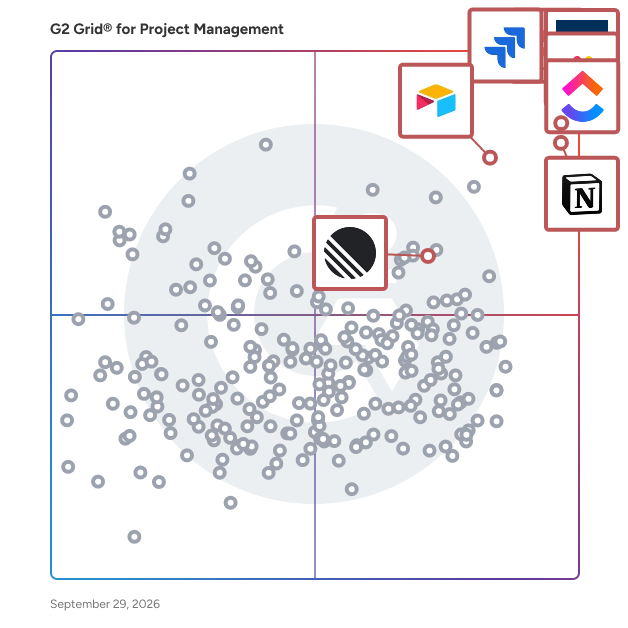
## G2 Grid® for Project Management Software
 ![G2 Grid® for Project Management Software plotting products by satisfaction and market presence](https://www.g2.com/categories/project-management/grids.png?focus%5B%5D=278&focus%5B%5D=530&focus%5B%5D=25675&focus%5B%5D=16194&focus%5B%5D=82623&focus%5B%5D=650&focus%5B%5D=36096&focus%5B%5D=5803)

Highlighted products: Asana, Smartsheet, ClickUp, monday AI Work Platform, Notion, Jira, Airtable, and Zoho Projects.

Underlying data: [Grid® JSON](https://www.g2.com/categories/project-management/grids.json?focus%5B%5D=asana&focus%5B%5D=smartsheet&focus%5B%5D=clickup&focus%5B%5D=monday-com&focus%5B%5D=notion&focus%5B%5D=jira&focus%5B%5D=airtable&focus%5B%5D=zoho-projects&segment=small-business)

**Sponsored**

### Celoxis

Celoxis is an all-in-one project management tool with deep, built-in capabilities for projects, resources, financials, and processes. Everything works out of the box, no add-ons or automations needed. Our reports and dashboards are the best in the industry, fully customizable and easy to use. Getting started is easy, our experts set everything up with your workflows and data and walk you through exactly how it works. Zero risk. Zero stress. Just results. Yes, and unlike others, it stays fast as your data grows.

[Visit website](https://www.g2.com/external_clickthroughs/record?secure%5Bad_program%5D=gdm_share&secure%5Bad_slot%5D=category_product_list_llm&secure%5Bcategory_id%5D=14&secure%5Bmedium%5D=sponsored&secure%5Bprioritized%5D=true&secure%5Bproduct_id%5D=5087&secure%5Bresource_id%5D=14&secure%5Bresource_type%5D=Category&secure%5Bsource_type%5D=category_page&secure%5Bsource_url%5D=https%3A%2F%2Fwww.g2.com%2Fcategories%2Fproject-management%2Fsmall-business%3Fpage%3D6&secure%5Btoken%5D=6eed218861316b6d81e31f11271cfa5cc60d9b790f7f3fe18433872ac5e566bf&secure%5Burl%5D=https%3A%2F%2Fwww.capterra.com%2Fppc%2Fclicks%2Fcollect%2FCA%2Fdirectory%2F4322eca2-73d3-4a1f-8f66-a6d200b3246c%2Fdestination%3FaffiliateDomain%3Dwww.g2.com%26specificLocation%3Dorganic-g2%26categoryId%3D54bd250a-384e-43a6-8842-a04fbe5323b8%26listingPosition%3D1%26sessionStartPage%3DaHR0cHM6Ly93d3cuZzIuY29tL2NhdGVnb3JpZXMvcHJvamVjdC1tYW5hZ2VtZW50L3NtYWxsLWJ1c2luZXNzP3BhZ2U9Ng%26ts%3D1785516379862%26s%3D4E7EC67C45601058E0C9F248F8C28D0CC1FB56CE1A307A8441309EB02C123088&secure%5Burl_type%5D=custom_url)

### [Shortcut](https://www.g2.com/products/shortcut/reviews)

Shortcut is a fast, lightweight, and enjoyable project management platform built for high-performing engineering teams. From issue tracking to sprints and roadmaps, Shortcut streamlines development so teams can move quickly. Tens of thousands of teams build products with Shortcut, including companies like Dataiku, Geckoboard, and Crossbeam.

**Average Rating:** 4.4/5.0

**Total Reviews:** 174

#### How Do G2 Users Rate Shortcut?

- **Has the product been a good partner in doing business?:** 8.8/10 (Category avg: 8.9/10)
- **Planning:** 9.6/10 (Category avg: 8.8/10)
- **Creation & Assignment:** 10.0/10 (Category avg: 8.9/10)
- **Resource Allocation:** 7.2/10 (Category avg: 8.4/10)

#### Who Is the Company Behind Shortcut?

- **Seller:** [Shortcut](https://www.g2.com/sellers/shortcut)
- **Year Founded:** 2014
- **HQ Location:** New York
- **Twitter:** @shortcut  
12,336 Twitter followers
- **LinkedIn® Page:** [www.linkedin.com](https://www.g2.com/external_clickthroughs/record?secure%5Bsource_type%5D=product_profile&secure%5Btoken%5D=8ba3c9ab70be8af206334f19d6ef06a527e3f7b518813500efdd0e40999e434d&secure%5Burl%5D=https%3A%2F%2Fwww.linkedin.com%2Fcompany%2F5288800%2F&secure%5Burl_type%5D=linkedin_company_website)  
71 employees on LinkedIn®

#### Who Uses This Product?

- **Who Uses This:** Product Manager, Software Engineer
- **Top Industries:** Computer Software, Information Technology and Services
- **Company Size:** 53% Small, 42% Medium

#### What Do G2 Reviewers Say About Shortcut?

_AI-generated summary from verified user reviews_

##### Pros

- Users find the **ease of use** of Shortcut remarkable, making onboarding and task management effortless and efficient.
- Users love the **clean and simple interface** of Shortcut, enabling quick team adoption and seamless integrations.
- Users appreciate the **seamless integrations** with tools like Slack and GitHub, enhancing team collaboration and communication.
- Users love the **intuitive user interface** and seamless integration that enhance project management efficiency and enjoyment.
- Users value the **team collaboration features** of Shortcut, enhancing communication and visibility for seamless project management.

##### Cons

- Users find the **missing features** limiting, desiring enhancements like timelines, WIP limits, and custom field support.
- Users express disappointment over the **lack of tools** in Shortcut, particularly when compared to alternatives like Jira.
- Users find the **complexity of options** in Shortcut distracting for smaller teams, complicating their project management experience.
- Users find the **learning curve challenging** , particularly for non-technical staff struggling to master the tool.
- Users find Shortcut's **poor reporting** capabilities limit their ability to track metrics and team performance effectively.

#### What Are Recent G2 Reviews of Shortcut?

**["Shortcut: Streamlines Project Management with Intuitive Design & Integrations"](https://www.g2.com/survey_responses/shortcut-review-12703341)**

**Rating:** 5.0/5.0 stars

_— Eric K._

[Read full review](https://www.g2.com/survey_responses/shortcut-review-12703341)

**["Efficient and Agile-Friendly Project Management Tool"](https://www.g2.com/survey_responses/shortcut-review-11846033)**

**Rating:** 5.0/5.0 stars

_— Shihan S._

[Read full review](https://www.g2.com/survey_responses/shortcut-review-11846033)

#### What Are G2 Users Discussing About Shortcut?

- [What is Shortcut used for?](https://www.g2.com/discussions/what-is-shortcut-used-for) - 1 comment
- [Is club house one word?](https://www.g2.com/discussions/is-club-house-one-word)
- [How does a clubhouse work?](https://www.g2.com/discussions/how-does-a-clubhouse-work)
- [What is a clubhouse?](https://www.g2.com/discussions/what-is-a-clubhouse) - 2 comments
- [What is the purpose of a clubhouse?](https://www.g2.com/discussions/what-is-the-purpose-of-a-clubhouse)

### [BaseBuilders](https://www.g2.com/products/basebuilders/reviews)

BaseBuilders.com is an online project management solution built specifically to serve small architecture and engineering firms. Since our founding in 2002, we have been helping firms become more efficient, effective, and profitable. Our integrated database system replaces all those spreadsheets you use to track your projects. Everything from time and expense tracking to scheduling and invoicing, all in a simple-to-use solution. We are so confident that you will be happy with our solution; we back it up with a 90-day money-back guarantee (see website for details). Imagine having real-time information about the status and profitability of every project at any minute of the day.

**Average Rating:** 4.4/5.0

**Total Reviews:** 21

#### How Do G2 Users Rate BaseBuilders?

- **Has the product been a good partner in doing business?:** 9.6/10 (Category avg: 8.9/10)
- **Planning:** 10.0/10 (Category avg: 8.8/10)
- **Creation & Assignment:** 10.0/10 (Category avg: 8.9/10)
- **Resource Allocation:** 5.0/10 (Category avg: 8.4/10)

#### Who Is the Company Behind BaseBuilders?

- **Seller:** [Base Builders](https://www.g2.com/sellers/base-builders)
- **HQ Location:** Reno, US
- **Twitter:** @BaseBuilders  
219 Twitter followers
- **LinkedIn® Page:** [www.linkedin.com](https://www.g2.com/external_clickthroughs/record?secure%5Bsource_type%5D=product_profile&secure%5Btoken%5D=04522ef660fe0e9e2222dd979a8bebe392fdf2ee62a4c2505fe10757ac9cc160&secure%5Burl%5D=https%3A%2F%2Fwww.linkedin.com%2Fcompany%2Fbase-builders-llc&secure%5Burl_type%5D=linkedin_company_website)  
9 employees on LinkedIn®

#### Who Uses This Product?

- **Who Uses This:** Office Manager
- **Top Industries:** Architecture & Planning
- **Company Size:** 100% Small

#### What Do G2 Reviewers Say About BaseBuilders?

_AI-generated summary from verified user reviews_

##### Pros

- Users value the **effective progress tracking** of BaseBuilders, ensuring seamless management of projects and finances.
- Users value the **effective project tracking** capabilities of BaseBuilders, enhancing efficiency and management for their firms.
- Users value the **clear and professional invoicing** from BaseBuilders, enhancing both project and payment management efficiently.
- Users value the **user-friendly interface and robust features** of BaseBuilders, essential for managing projects effectively.
- Users value the **automation** features of BaseBuilders, enhancing productivity and streamlining project management effectively.

##### Cons

- Users find the **learning curve steep** with BaseBuilders, struggling to grasp its less intuitive features and report generation.
- Users face **update issues** that hinder functionality and require manual tracking of expenses and projects.
- Users face **billing issues** with BaseBuilders, lacking manual expense entry options and facing limitations on invoicing adjustments.
- Users struggle with **dashboard issues** , finding the project search slow and workflow complicated by extra navigation steps.
- Users highlight **feature issues** , such as lack of tax entry, project filtering, and invoicing flexibility.

#### What Are Recent G2 Reviews of BaseBuilders?

**["Customizable Reports, Smooth QuickBooks Online Integration, and Responsive Support"](https://www.g2.com/survey_responses/basebuilders-review-12723552)**

**Rating:** 4.5/5.0 stars

_— Verified User in Civil Engineering_

[Read full review](https://www.g2.com/survey_responses/basebuilders-review-12723552)

**["Basebuilders Keeps Large Projects Organized and Profitable"](https://www.g2.com/survey_responses/basebuilders-review-12662350)**

**Rating:** 5.0/5.0 stars

_— Verified User in Architecture & Planning_

[Read full review](https://www.g2.com/survey_responses/basebuilders-review-12662350)

### [Apptivo](https://www.g2.com/products/apptivo/reviews)

Apptivo is a cloud platform of integrated business apps designed for companies of all shapes & sizes. Manage nearly any business task using Apptivo's Apps, from sales & marketing, to billing & support, and everything in between. With Apptivo there is no per-app pricing, get access to the entire platform starting at just $10 monthly per user. Whether you use Apptivo for a single app, or to manage your entire business, it will deliver incredible value to the entire organization. Our apps cover the complete customer life cycle:  
  
**Marketing** - Create targeted lists of contacts, build & deliver email campaigns, and track analytics.  
**Sales** - Complete CRM capability with robust contact management, sales pipeline, automation, and reporting.  
**Help Desk** - A powerful ticketing system with email integration, web portal, and time tracking.  
**Project Management** - Manage project schedules via gantt charts, track time & milestones, and invoice for effort spent.  
**Field Service** - Work order assignment & dispatching, mobile photo, time, and materials capture, and billing.  
**Quoting & Billing** - Build professional quotes & email them to your customer with integrated billing & recurring invoice capabilities.  
**Order Management** - Turn quotes into orders, track inventory & shipments, and bill the customer for your product.  
**Procurement & Supply Chain** - Manage your vendors, track purchase orders & invoicing, and manage inventory.  
  
Apptivo is used by hundreds of thousands of businesses from 193 countries around the world, and can accommodate independent consultants up to billion-dollar enterprises. The flexibility of Apptivo is one of our 3 primary differentiators: **Affordability** , **Flexibility** , and **Capability**. With our entire suite of business apps available for a single price, we offer rich & powerful features across a wide set of apps that offer unparalleled capability for their value, with best-in-class configuration capabilities that make the system flexible for any type of business.

**Average Rating:** 4.4/5.0

**Total Reviews:** 217

#### How Do G2 Users Rate Apptivo?

- **Has the product been a good partner in doing business?:** 8.9/10 (Category avg: 8.9/10)
- **Planning:** 8.7/10 (Category avg: 8.8/10)
- **Creation & Assignment:** 8.3/10 (Category avg: 8.9/10)
- **Resource Allocation:** 7.9/10 (Category avg: 8.4/10)

#### Who Is the Company Behind Apptivo?

- **Seller:** [Apptivo](https://www.g2.com/sellers/apptivo)
- **Year Founded:** 2009
- **HQ Location:** Fremont, California
- **Twitter:** @Apptivo  
5,946 Twitter followers
- **LinkedIn® Page:** [www.linkedin.com](https://www.g2.com/external_clickthroughs/record?secure%5Bsource_type%5D=product_profile&secure%5Btoken%5D=bcad1a66e3b3f952602b0684372473e8d21061c31322b5bfba1d8c924df330cd&secure%5Burl%5D=https%3A%2F%2Fwww.linkedin.com%2Fcompany%2F987634%2F&secure%5Burl_type%5D=linkedin_company_website)  
223 employees on LinkedIn®
- **Phone:** +1 (855) 345-2777

#### Who Uses This Product?

- **Who Uses This:** Owner, President
- **Top Industries:** Marketing and Advertising, Construction
- **Company Size:** 82% Small, 14% Medium

#### What Do G2 Reviewers Say About Apptivo?

_AI-generated summary from verified user reviews_

##### Pros

- Users appreciate Apptivo's **excellent customer support** , noted for its responsiveness and detailed documentation throughout the implementation process.
- Users commend Apptivo's **helpful support** , highlighting its responsiveness and detailed documentation that enhance the user experience.
- Users appreciate the **ease of use** of Apptivo, praising its intuitive navigation and fast implementation.
- Users value the **high customization ability** of Apptivo, allowing tailored solutions to fit their unique business processes.
- Users value the **high customizability** of Apptivo, enabling tailored solutions for diverse business processes and needs.

##### Cons

- Users find the **learning curve steep** with Apptivo, particularly with campaign setup and contact database differentiation.
- Users find the **missing features** in Apptivo frustrating, lacking essential functionalities across modules and integrations.
- Users experience **limited features** with Apptivo, facing inconsistencies and missing functionalities across different apps and platforms.
- Users struggle with **integration issues** , facing compatibility problems and inefficiencies in their workflow management with Apptivo.
- Users find **improvement needed** in documentation and integration simplicity, hindering efficient workflow across modules.

#### What Are Recent G2 Reviews of Apptivo?

**["Work Organization and Activity Tracking Feel More Efficient"](https://www.g2.com/survey_responses/apptivo-review-12889408)**

**Rating:** 4.5/5.0 stars

_— Ishan S._

[Read full review](https://www.g2.com/survey_responses/apptivo-review-12889408)

**["All-in-One CRM Platform with Clean UI, Easy Automation, and Strong Reporting"](https://www.g2.com/survey_responses/apptivo-review-12762853)**

**Rating:** 4.0/5.0 stars

_— Verified User in Oil & Energy_

[Read full review](https://www.g2.com/survey_responses/apptivo-review-12762853)

#### What Are G2 Users Discussing About Apptivo?

- [What is Apptivo used for?](https://www.g2.com/discussions/what-is-apptivo-used-for)

### [Kantata Professional Services Automation (formerly Mavenlink+ Kimble)](https://www.g2.com/products/kantata-professional-services-automation-formerly-mavenlink-kimble/reviews)

Kantata helps professional services organizations of 50 to 5,000+ employees ensure consistent excellence and profitability across every project. With a platform that connects everything from scoping to resourcing to forecasting, you can always deliver amazing. The real challenge for most PS organizations is that their projects are so unpredictable. They never really know how an engagement is going to play out until it’s too late to do anything about it. And that undermines profits, strains resources, and leaves clients wondering what they’re really paying for. Kantata PSA puts an end to unpredictable projects by enabling you to: • Instantly assemble the ideal team – so you can deploy resources based on the best match for scope, scheduling, skillsets, and more • Easily amplify institutional knowledge – by turning past experience into real-time intelligence so all your expertise is available to all your people • Confidently forecast every outcome – with an accurate, comprehensive view of everything from revenue and margins to capacity and sentiment Not every services firm operates the same way — and your PSA shouldn’t either. Kantata is the only PSA offering both a Salesforce-native and an open infrastructure option, so you can choose the ecosystem that fits your business. With over 1,200 prebuilt connectors — including Salesforce, NetSuite, HubSpot, Workday, Sage Intacct, Microsoft Dynamics 365, Google Workspace, and Jira — Kantata extends the value of your existing tech stack while keeping all your operational data connected in one AI-powered platform. That’s why professional services organizations across software, IT services, management consulting, and marketing agencies rely on Kantata to operate with greater precision, predictability, and profitability. Leading organizations like Deloitte, Sage, and Hitachi trust Kantata, and our customers consistently achieve a 33% increase in on-time project delivery.

**Average Rating:** 4.2/5.0

**Total Reviews:** 1,503

#### How Do G2 Users Rate Kantata Professional Services Automation (formerly Mavenlink+ Kimble)?

- **Has the product been a good partner in doing business?:** 8.6/10 (Category avg: 8.9/10)
- **Planning:** 7.9/10 (Category avg: 8.8/10)
- **Creation & Assignment:** 8.1/10 (Category avg: 8.9/10)
- **Resource Allocation:** 7.9/10 (Category avg: 8.4/10)

#### Who Is the Company Behind Kantata Professional Services Automation (formerly Mavenlink+ Kimble)?

- **Seller:** [Kantata (formerly Mavenlink + Kimble)](https://www.g2.com/sellers/kantata-formerly-mavenlink-kimble)
- **Company Website:** kantata.com
- **Year Founded:** 2008
- **HQ Location:** Irvine, CA
- **Twitter:** @GoKantata  
11,518 Twitter followers
- **LinkedIn® Page:** [www.linkedin.com](https://www.g2.com/external_clickthroughs/record?secure%5Bsource_type%5D=product_profile&secure%5Btoken%5D=97db9ad169234101d5d6a926830c0e5df9f7e4ea5699f6a5fd79e580b8e43837&secure%5Burl%5D=https%3A%2F%2Fwww.linkedin.com%2Fcompany%2Fgokantata%2F&secure%5Burl_type%5D=linkedin_company_website)  
485 employees on LinkedIn®

#### Who Uses This Product?

- **Who Uses This:** Project Manager, Consultant
- **Top Industries:** Information Technology and Services, Marketing and Advertising
- **Company Size:** 57% Medium, 30% Small

#### What Do G2 Reviewers Say About Kantata Professional Services Automation (formerly Mavenlink+ Kimble)?

_AI-generated summary from verified user reviews_

##### Pros

- Users value the **efficiency and simplicity** of Kantata, enhancing their project management and workflow processes effectively.
- Users value the **efficient project tracking** of Kantata, enhancing workflow and simplifying resource management processes.
- Users appreciate the **user-friendly interface** of Kantata, making it easy to navigate and utilize its features.
- Users value the **reporting efficiency** of Kantata, enhancing resource management and project tracking for better decision-making.
- Users appreciate the **robust report generation** in Kantata, which enhances project tracking and simplifies financial management.

##### Cons

- Users find the **complex usability** of Kantata PSA challenging, particularly regarding navigation and workflow efficiency.
- Users face a challenging **learning curve** with the interface and data optimization, necessitating early and ongoing training.
- Users find the interface **not intuitive** , making it challenging to track resources and necessary updates efficiently.
- Users face **rigid task management** that lacks flexibility, making project tracking and input tedious and time-consuming.
- Users find the **lack of customization** challenging, impacting their ability to tailor reports and insights effectively.

#### What Are Recent G2 Reviews of Kantata Professional Services Automation (formerly Mavenlink+ Kimble)?

**["Easy to set up, easy to use... exactly what we needed to drive visibility and consistency."](https://www.g2.com/survey_responses/kantata-professional-services-automation-formerly-mavenlink-kimble-review-2018590)**

**Rating:** 4.5/5.0 stars

_— Dan C._

[Read full review](https://www.g2.com/survey_responses/kantata-professional-services-automation-formerly-mavenlink-kimble-review-2018590)

**["Amazing Service"](https://www.g2.com/survey_responses/kantata-professional-services-automation-formerly-mavenlink-kimble-review-3930806)**

**Rating:** 4.0/5.0 stars

_— Stuart M._

[Read full review](https://www.g2.com/survey_responses/kantata-professional-services-automation-formerly-mavenlink-kimble-review-3930806)

#### What Are G2 Users Discussing About Kantata Professional Services Automation (formerly Mavenlink+ Kimble)?

- [How do I effectively manage project budgets using Kantata Professional Services Cloud?](https://www.g2.com/discussions/how-do-i-effectively-manage-project-budgets-using-kantata-professional-services-cloud)
- [What is Kantata Cloud for Professional Services (formerly Mavenlink + Kimble) used for?](https://www.g2.com/discussions/what-is-kantata-cloud-for-professional-services-formerly-mavenlink-kimble-used-for)
- [What does Mavenlink do?](https://www.g2.com/discussions/what-does-mavenlink-do) - 1 comment
- [What is a good project management software?](https://www.g2.com/discussions/kantata-cloud-for-professional-services-formerly-mavenlink-kimble-what-is-a-good-project-management-software) - 1 comment
- [How much does MavenLink cost?](https://www.g2.com/discussions/how-much-does-mavenlink-cost) - 1 comment

### [Swit](https://www.g2.com/products/swit/reviews)

Swit is every team's work hub that consolidates collaboration essentials in one place - task, chat, goals, approvals, and integrations with Google Workspace and Microsoft 365. It's purpose-built to drive Employee Connection Where It Counts. Bring your entire company together on a unified platform that supports communication, work management, task tracking, goal setting, and so much more! Swit is flexible and scalable to meet the needs of any organization of any size. Drag and drop emails into Channels or convert them into task cards. Drag and drop task cards into Channels or DMs. Attach Approvals or OKRs directly to task cards. See why Swit is loved by organizations of all sizes from Small Businesses to Enterprise customers.

**Average Rating:** 4.7/5.0

**Total Reviews:** 349

#### How Do G2 Users Rate Swit?

- **Has the product been a good partner in doing business?:** 8.9/10 (Category avg: 8.9/10)
- **Planning:** 8.6/10 (Category avg: 8.8/10)
- **Creation & Assignment:** 9.0/10 (Category avg: 8.9/10)
- **Resource Allocation:** 8.4/10 (Category avg: 8.4/10)

#### Who Is the Company Behind Swit?

- **Seller:** [Swit](https://www.g2.com/sellers/swit)
- **Year Founded:** 2018
- **HQ Location:** San Francisco, California
- **Twitter:** @GetSwit  
207 Twitter followers
- **LinkedIn® Page:** [www.linkedin.com](https://www.g2.com/external_clickthroughs/record?secure%5Bsource_type%5D=product_profile&secure%5Btoken%5D=5cf387e94016fdd41d4e76be71ae0c24a34839f00cb6172bfbb75633708dc160&secure%5Burl%5D=https%3A%2F%2Fwww.linkedin.com%2Fcompany%2F18707183%2F&secure%5Burl_type%5D=linkedin_company_website)  
178 employees on LinkedIn®

#### Who Uses This Product?

- **Who Uses This:** CEO, Deputy General Manager
- **Top Industries:** Airlines/Aviation, Computer Software
- **Company Size:** 50% Small, 42% Medium

#### What Are Recent G2 Reviews of Swit?

**["Swit - A very practical upgrade"](https://www.g2.com/survey_responses/swit-review-10033940)**

**Rating:** 5.0/5.0 stars

_— Chad P._

[Read full review](https://www.g2.com/survey_responses/swit-review-10033940)

**["Efficient project collaboration tool."](https://www.g2.com/survey_responses/swit-review-9705526)**

**Rating:** 4.5/5.0 stars

_— Hany I._

[Read full review](https://www.g2.com/survey_responses/swit-review-9705526)

#### What Are G2 Users Discussing About Swit?

- [What is Swit used for?](https://www.g2.com/discussions/what-is-swit-used-for) - 1 comment

### [Taskworld](https://www.g2.com/products/taskworld/reviews)

Get it done! Taskworld is the world's first integrated project management platform that makes it easy to scale your organization. Taskworld helps you and your team collaborate remotely, set timelines, share files, visualize insights and work on tasks across different departments simultaneously. Move to your digital workspace today and start scaling the execution capabilities of your organization by increasing productivity, engagement & satisfaction.

**Average Rating:** 4.4/5.0

**Total Reviews:** 90

#### How Do G2 Users Rate Taskworld?

- **Has the product been a good partner in doing business?:** 8.7/10 (Category avg: 8.9/10)
- **Planning:** 7.9/10 (Category avg: 8.8/10)
- **Creation & Assignment:** 8.1/10 (Category avg: 8.9/10)
- **Resource Allocation:** 7.3/10 (Category avg: 8.4/10)

#### Who Is the Company Behind Taskworld?

- **Seller:** [Taskworld](https://www.g2.com/sellers/taskworld)
- **Year Founded:** 2012
- **HQ Location:** New York, NY
- **Twitter:** @taskworld  
9,552 Twitter followers
- **LinkedIn® Page:** [www.linkedin.com](https://www.g2.com/external_clickthroughs/record?secure%5Bsource_type%5D=product_profile&secure%5Btoken%5D=75794ef8f5b6d9a8bef76d872b7bfbe794a48ea571a462ff54ce88ef3338b01b&secure%5Burl%5D=https%3A%2F%2Fwww.linkedin.com%2Fcompany%2F3297499%2F&secure%5Burl_type%5D=linkedin_company_website)  
65 employees on LinkedIn®

#### Who Uses This Product?

- **Top Industries:** Marketing and Advertising, Computer Software
- **Company Size:** 61% Small, 35% Medium

#### What Do G2 Reviewers Say About Taskworld?

_AI-generated summary from verified user reviews_

##### Pros

- Users highlight the **efficient task management features** of Taskworld that streamline team collaboration and tracking.
- Users appreciate the **easy task tracking and organization** in Taskworld, benefiting from its intuitive interface and timeline features.
- Users appreciate the **intuitive interface** of Taskworld, which enhances task tracking and planning effectively.
- Users value the **efficient task management features** that facilitate easy creation, assignment, and tracking of tasks.
- Users love the **efficient task management features** of Taskworld, enhancing team collaboration and productivity.

##### Cons

- Users find that mastering advanced features of Taskworld has a **steep learning curve** , which can overwhelm newcomers.
- Many users find the **advanced features overwhelming** , as they require time and effort to fully master.
- Users have reported **slow performance** with Taskworld, especially on large projects with extensive task lists and subtasks.
- Users find that the **time-consuming advanced features** of Taskworld can overwhelm new users and hinder productivity.

#### What Are Recent G2 Reviews of Taskworld?

**["Effortless Task Management with Taskworld"](https://www.g2.com/survey_responses/taskworld-review-12760370)**

**Rating:** 5.0/5.0 stars

_— Jaime B._

[Read full review](https://www.g2.com/survey_responses/taskworld-review-12760370)

**["Absolutely Fantastic for Goal Achievement"](https://www.g2.com/survey_responses/taskworld-review-12703788)**

**Rating:** 5.0/5.0 stars

_— Oskar ._

[Read full review](https://www.g2.com/survey_responses/taskworld-review-12703788)

### [Business-in-a-Box](https://www.g2.com/products/business-in-a-box/reviews)

Business in a Box — The Business Operating System for SMBs Business in a Box (BIB) is the Business Operating System (BOS) for small and medium businesses that want to run their company with structure, clarity, and control — without juggling dozens of disconnected tools. Most businesses don’t struggle because of a lack of effort. They struggle because their operations are fragmented: tasks in one app, documents in another, communication scattered, and critical knowledge living in people’s heads. Business in a Box replaces that chaos with one unified system that defines how the business works. Unlike traditional project management or collaboration tools, BIB is designed as a system, not just software. It brings together execution, communication, documentation, and organizational structure into a single operating layer for the business. With Business in a Box, companies can: - Organize work through goals, projects, and tasks with clear ownership - Centralize documents, templates, and company knowledge - Collaborate through built-in chat and communication channels tied directly to work - Set up departments, roles, and responsibilities that persist even when people change - Onboard teams quickly using prebuilt structures and workflows BIB also includes AI-powered capabilities that go beyond basic automation. The platform builds a contextual understanding of each business — learning from goals, projects, tasks, documents, and activity — to support planning, execution, and decision-making. AI can assist with creating business documents, recommending templates, highlighting risks, and guiding next steps, all within the context of how the company actually operates. Business in a Box is built for businesses with 1 to 100 employees, from founders and small teams to growing organizations that need more structure without enterprise complexity. A Free Forever Starter Plan allows companies to begin operating with a system from day one, while paid plans unlock full BOS capabilities with simple, transparent per-user pricing. At its core, Business in a Box helps companies move from ad-hoc operations to intentional execution. Instead of relying on memory, emails, and scattered tools, teams run their business on one operating system — designed to scale as they grow. Business in a Box is not just another tool. It’s how your business runs. Get Started Free in Just a Few Minutes! https://account.business-in-a-box.com/create-account/

**Average Rating:** 4.7/5.0

**Total Reviews:** 13

#### How Do G2 Users Rate Business-in-a-Box?

- **Has the product been a good partner in doing business?:** 10.0/10 (Category avg: 8.9/10)

#### Who Is the Company Behind Business-in-a-Box?

- **Seller:** [Biztree](https://www.g2.com/sellers/biztree)
- **Year Founded:** 2002
- **HQ Location:** Montreal, Quebec, Canada
- **LinkedIn® Page:** [www.linkedin.com](https://www.g2.com/external_clickthroughs/record?secure%5Bsource_type%5D=product_profile&secure%5Btoken%5D=ca314d23378c840c0b1ffeabbd54dbb305399df19150429778c9dcbfd5a408de&secure%5Burl%5D=https%3A%2F%2Fwww.linkedin.com%2Fcompany%2Fbusinessinaboxofficial&secure%5Burl_type%5D=linkedin_company_website)  
4 employees on LinkedIn®
- **Ownership:** Biztree Inc.
- **Phone:** 514-768-4100

#### Who Uses This Product?

- **Company Size:** 92% Small, 8% Medium

#### What Do G2 Reviewers Say About Business-in-a-Box?

_AI-generated summary from verified user reviews_

##### Pros

- Users find Business-in-a-Box to be an **affordable solution** , replacing costly tools while maintaining excellent value for SMBs.
- Users value the **cost-effective collaboration** features of Business-in-a-Box, seamlessly integrating multiple tools into one platform.
- Users highlight the **cost-effective data management** of Business-in-a-Box, replacing multiple expensive tools efficiently.
- Users value the **efficiency** of Business-in-a-Box, consolidating multiple tools into a cost-effective solution.
- Users find **exceptional value** in Business-in-a-Box, replacing costly tools while saving significantly for SMBs.

#### What Are Recent G2 Reviews of Business-in-a-Box?

**["Business in a box have all the templates your business need"](https://www.g2.com/survey_responses/business-in-a-box-review-7796582)**

**Rating:** 5.0/5.0 stars

_— Ishan M._

[Read full review](https://www.g2.com/survey_responses/business-in-a-box-review-7796582)

**["The Most Affordable All-in-One Business Platform"](https://www.g2.com/survey_responses/business-in-a-box-review-11985059)**

**Rating:** 5.0/5.0 stars

_— Bruno G._

[Read full review](https://www.g2.com/survey_responses/business-in-a-box-review-11985059)

#### What Are G2 Users Discussing About Business-in-a-Box?

- [Who owns business in a box?](https://www.g2.com/discussions/who-owns-business-in-a-box)
- [How do you make a business box?](https://www.g2.com/discussions/how-do-you-make-a-business-box)
- [What is business in a box concept?](https://www.g2.com/discussions/what-is-business-in-a-box-concept)

### [GoodDay Work](https://www.g2.com/products/goodday-work/reviews)

GoodDay is a comprehensive work management platform designed to enhance team collaboration, streamline workflows, and boost productivity across organizations. Unlike niche task or project management systems, GoodDay offers an expansive set of features and modules that allow users to customize and build solutions tailored to their specific needs. This flexibility ensures that GoodDay accurately reflects, automates, and complements existing work processes without necessitating changes to fit the software. Key Features and Functionality: - Comprehensive Work Management: GoodDay integrates advanced management, planning, and tracking features into a single platform, facilitating seamless collaboration and increased productivity. - Customization: The platform offers extensive customization capabilities, allowing users to tailor workflows, dashboards, and reports to their unique requirements without the need for special skills or development. - Support for Multiple Project Management Methodologies: GoodDay supports various methodologies, including Waterfall, Scrum, Kanban, Prince2, Lean, and PMO, enabling teams to work in their preferred style. - Productivity Suite: Beyond task management, GoodDay includes tools such as Meetings, Discussions, Events, Files, and more, aiming to increase team productivity by over 20%. - Integrated Work Ecosystem: All modules, views, and data within GoodDay are fully integrated, providing a seamless user experience and automating routine work management actions. Primary Value and Solutions Provided: GoodDay addresses the challenges of fragmented work environments by unifying planning, project management, goals, and collaboration into a single platform. This consolidation eliminates the confusion and inefficiencies associated with using multiple disconnected tools. By offering a clear, structured environment where every task, idea, and objective exists within one system, GoodDay enables teams to focus on meaningful work. The platform's emphasis on transparency, accountability, and clarity ensures that teams can work smarter, collaborate better, and achieve more.

**Average Rating:** 4.2/5.0

**Total Reviews:** 61

#### How Do G2 Users Rate GoodDay Work?

- **Has the product been a good partner in doing business?:** 8.6/10 (Category avg: 8.9/10)
- **Planning:** 8.2/10 (Category avg: 8.8/10)
- **Creation & Assignment:** 7.4/10 (Category avg: 8.9/10)
- **Resource Allocation:** 7.2/10 (Category avg: 8.4/10)

#### Who Is the Company Behind GoodDay Work?

- **Seller:** [GoodDay Work](https://www.g2.com/sellers/goodday-work)
- **Year Founded:** 2012
- **HQ Location:** Costa Mesa, CA
- **Twitter:** @gooddaywork  
141 Twitter followers
- **LinkedIn® Page:** [www.linkedin.com](https://www.g2.com/external_clickthroughs/record?secure%5Bsource_type%5D=product_profile&secure%5Btoken%5D=9f73c028958df53fe5d22bc673c206615c0bb02e3ddd0f804fe7c45e9121ce16&secure%5Burl%5D=https%3A%2F%2Fwww.linkedin.com%2Fcompany%2F15184468%2F&secure%5Burl_type%5D=linkedin_company_website)  
20 employees on LinkedIn®

#### Who Uses This Product?

- **Top Industries:** Internet, Computer Software
- **Company Size:** 53% Medium, 45% Small

#### What Do G2 Reviewers Say About GoodDay Work?

_AI-generated summary from verified user reviews_

##### Pros

- Users love the **ease of use** of GoodDay Work, enjoying its clean interface and seamless task sharing capabilities.
- Users love the **clean and easy-to-use interface** of GoodDay Work, which simplifies project management and team collaboration.
- Users value the **collaboration focus** of GoodDay Work, enhancing connectivity across teams and departments effortlessly.
- Users appreciate the **easy collaboration** in GoodDay Work, benefiting from a clean interface and connected teams.
- Users find the **easy sharing** feature of GoodDay Work essential for efficient collaboration and resource tracking.

##### Cons

- Users highlight the **mobile application needing improvement** , expressing a desire for better task and project reporting features.
- Users find that **reporting issues** in GoodDay Work hinder their experience, especially with the mobile application.

#### What Are Recent G2 Reviews of GoodDay Work?

**["Efficient Task Management for Small Teams"](https://www.g2.com/survey_responses/goodday-work-review-12739069)**

**Rating:** 4.0/5.0 stars

_— RUTTALA A._

[Read full review](https://www.g2.com/survey_responses/goodday-work-review-12739069)

**["Greatday: Convenient Daily Work Management with Powerful Features"](https://www.g2.com/survey_responses/goodday-work-review-12287848)**

**Rating:** 5.0/5.0 stars

_— Harish P._

[Read full review](https://www.g2.com/survey_responses/goodday-work-review-12287848)

#### What Are G2 Users Discussing About GoodDay Work?

- [What is the best project scheduling software?](https://www.g2.com/discussions/what-is-the-best-project-scheduling-software)
- [What are the features of project management software?](https://www.g2.com/discussions/goodday-work-what-are-the-features-of-project-management-software)
- [What is the best project tracking software?](https://www.g2.com/discussions/what-is-the-best-project-tracking-software)
- [What does project management software do and why is it useful?](https://www.g2.com/discussions/what-does-project-management-software-do-and-why-is-it-useful)

### [Workamajig](https://www.g2.com/products/workamajig-workamajig/reviews)

Workamajig is a purpose-built agency management software for creative agencies, advertising agencies, marketing agencies, design studios, PR firms, and in-house creative departments. Unlike general project management tools, Workamajig is built around how agencies actually work - combining project management, time tracking, resource planning, client billing and invoicing, digital proofing, financial reporting, and CRM in one integrated system. No separate accounting software. No disconnected tools. One platform from creative brief to final invoice. Agency principals, project managers, and traffic coordinators get real-time visibility into project profitability, retainer hours, staff utilization, and client budgets. Serves agencies of 10 to 500+ users.

**Average Rating:** 3.9/5.0

**Total Reviews:** 298

#### How Do G2 Users Rate Workamajig?

- **Has the product been a good partner in doing business?:** 8.3/10 (Category avg: 8.9/10)
- **Planning:** 8.1/10 (Category avg: 8.8/10)
- **Creation & Assignment:** 8.3/10 (Category avg: 8.9/10)
- **Resource Allocation:** 7.8/10 (Category avg: 8.4/10)

#### Who Is the Company Behind Workamajig?

- **Seller:** [Workamajig](https://www.g2.com/sellers/workamajig)
- **Year Founded:** 2008
- **HQ Location:** Anthem, AZ
- **Twitter:** @workamajig  
2,401 Twitter followers
- **LinkedIn® Page:** [www.linkedin.com](https://www.g2.com/external_clickthroughs/record?secure%5Bsource_type%5D=product_profile&secure%5Btoken%5D=239edf04d64d51d9623ac72216050866e482e33b830f96b3f1f32c47e7f465e4&secure%5Burl%5D=https%3A%2F%2Fwww.linkedin.com%2Fcompany%2F2768397%2F&secure%5Burl_type%5D=linkedin_company_website)  
38 employees on LinkedIn®

#### Who Uses This Product?

- **Who Uses This:** Project Manager, Account Manager
- **Top Industries:** Marketing and Advertising, Information Technology and Services
- **Company Size:** 62% Small, 31% Medium

#### What Do G2 Reviewers Say About Workamajig?

_AI-generated summary from verified user reviews_

##### Pros

- Users appreciate the **ease of use** of Workamajig, finding it user-friendly for tracking and managing projects.
- Users value the **extensive customization options** in Workamajig, tailoring it to suit various departmental needs.
- Users value the **customizability** of Workamajig, tailoring the platform to fit diverse needs across departments.
- Users value the **comprehensive features** of Workamajig, enabling complete customization and functionality for creative agencies.
- Users value the **easy tracking** of projects, benefiting from centralized communications and customizable portal features.

##### Cons

- Users find the **complex usability** of Workamajig challenging, leading to low adoption and frustration in navigation.
- Users note a **steep learning curve** that can be overwhelming, despite effective training and support from account managers.
- Users criticize the **poor design** of Workamajig, noting its minimal interface and confusing navigation.
- Users express frustration over the **user experience** , citing complex navigation and lack of intuitive features in Workamajig.
- The **steep learning curve** of Workamajig makes adoption challenging for users without proper training and guidance.

#### What Are Recent G2 Reviews of Workamajig?

**["One-Stop Shop for Agency Success"](https://www.g2.com/survey_responses/workamajig-review-13072598)**

**Rating:** 5.0/5.0 stars

_— Cindy V._

[Read full review](https://www.g2.com/survey_responses/workamajig-review-13072598)

**["All-in-One Project Tracking That Keeps Me Organized"](https://www.g2.com/survey_responses/workamajig-review-13112458)**

**Rating:** 4.0/5.0 stars

_— Stacey W._

[Read full review](https://www.g2.com/survey_responses/workamajig-review-13112458)

### [OneDeck](https://www.g2.com/products/onedeck/reviews)

OneDeck is a business management platform designed to help users efficiently manage their business information and data. This comprehensive solution enables organizations to publish documents, automate workflows, and gain valuable insights, ultimately streamlining operations and enhancing productivity. By integrating various functionalities into a single platform, OneDeck serves as a centralized hub for businesses looking to optimize their management processes. Targeted towards small to medium-sized enterprises, OneDeck caters to a diverse range of industries that require effective management of their operational data. The platform is particularly beneficial for teams seeking to improve collaboration and communication while simplifying their workflows. With its user-friendly interface and customizable features, OneDeck allows businesses to tailor their management solutions to meet specific requirements, making it an ideal choice for organizations aiming to enhance their efficiency. OneDeck's core features include document publishing, workflow automation, data management, and analytical insights. Each feature is designed to be intuitive and flexible, allowing users to create a management system that aligns with their unique business needs. Document publishing enables teams to share important information seamlessly, while workflow automation reduces the time spent on repetitive tasks, allowing employees to focus on more strategic initiatives. The platform's data management capabilities ensure that all business information is organized and easily accessible, promoting informed decision-making. Additionally, OneDeck provides analytical insights that empower users to monitor performance metrics and identify areas for improvement. By leveraging these insights, businesses can make data-driven decisions that enhance operational efficiency and drive growth. The combination of these features not only simplifies the management process but also fosters a culture of collaboration and innovation within teams. Overall, OneDeck stands out in the business management software category by offering a highly customizable and user-friendly platform that adapts to the evolving needs of organizations. Its focus on enhancing collaboration, simplifying workflows, and providing actionable insights makes it a valuable tool for businesses looking to optimize their management practices and achieve their goals.

**Average Rating:** 5.0/5.0

**Total Reviews:** 24

#### How Do G2 Users Rate OneDeck?

- **Has the product been a good partner in doing business?:** 9.7/10 (Category avg: 8.9/10)
- **Planning:** 10.0/10 (Category avg: 8.8/10)
- **Creation & Assignment:** 10.0/10 (Category avg: 8.9/10)
- **Resource Allocation:** 10.0/10 (Category avg: 8.4/10)

#### Who Is the Company Behind OneDeck?

- **Seller:** [OneDeck Ltd](https://www.g2.com/sellers/onedeck-ltd)
- **HQ Location:** San Francisco, US
- **LinkedIn® Page:** [www.linkedin.com](https://www.g2.com/external_clickthroughs/record?secure%5Bsource_type%5D=product_profile&secure%5Btoken%5D=59c427e8888888b538660059ac314bcfc61dbaf9a6bd12ea516f8d5d07c8419c&secure%5Burl%5D=https%3A%2F%2Fwww.linkedin.com%2Fcompany%2Fonedeckcom&secure%5Burl_type%5D=linkedin_company_website)  
4 employees on LinkedIn®

#### Who Uses This Product?

- **Top Industries:** Facilities Services
- **Company Size:** 96% Small, 4% Medium

#### What Do G2 Reviewers Say About OneDeck?

_AI-generated summary from verified user reviews_

##### Pros

- Users find OneDeck's **ease of use** exceptional, enabling efficient project management for all employees effortlessly.
- Users value the **organizational capabilities** of OneDeck, enhancing data management and improving team collaboration.
- Users find OneDeck's **task management system intuitive and effective** , greatly enhancing their project organization and collaboration.
- Users appreciate the **quick and efficient customer support** of OneDeck, enhancing their overall experience and satisfaction.
- Users appreciate the **ease of use** of OneDeck, enhancing daily convenience and supporting effective project management.

##### Cons

- Users are disappointed by the **limited features** of OneDeck, lacking essential tools for efficient design and payment processing.
- Users find the product **expensive** as key features are locked behind the paid plans, limiting usability.
- Users desire improved **integration options** with other tools, particularly for seamless payment processing and functionality.
- Users experience a **lack of integration** with essential tools, making workflows less efficient than desired.
- Users desire more **integrations with other tools** when using OneDeck, which limits their overall experience.

#### What Are Recent G2 Reviews of OneDeck?

**["Game changer! We don't use Excel anymore."](https://www.g2.com/survey_responses/onedeck-review-10637833)**

**Rating:** 5.0/5.0 stars

_— Megan L._

[Read full review](https://www.g2.com/survey_responses/onedeck-review-10637833)

**["A warm recommendation for OneDeck"](https://www.g2.com/survey_responses/onedeck-review-10631718)**

**Rating:** 5.0/5.0 stars

_— Sarah K._

[Read full review](https://www.g2.com/survey_responses/onedeck-review-10631718)

### [Monograph](https://www.g2.com/products/monograph/reviews)

Monograph is a Firm Management Platform Built Exclusively for Architecture & Engineering Firms. It connects Projects, People, and Finances into a single, real-time system so firm leaders can Plan Work Confidently, Forecast What’s Next, and Protect Profitability before problems surface. Unlike generic professional services software, Monograph is designed around how A/E firms actually operate. Balance Project Delivery, Staffing Capacity, and Financial Performance at the same time with a beautiful UX. Run the Firm. Not Just the Projects. With Monograph, firms can: - Manage Project Budgets & Schedules - Forecast Staffing Capacity and Future Revenue - Track Time, Expenses, and Utilization - Handle Billing, Invoicing, and Payments - Monitor Margins, Cash Flow, and Financial Health in Real Time Join 16,000+ Firms Managing everything in one place, so decisions are based on live data, not outdated spreadsheets or disconnected systems.

**Average Rating:** 4.5/5.0

**Total Reviews:** 27

#### How Do G2 Users Rate Monograph?

- **Has the product been a good partner in doing business?:** 8.0/10 (Category avg: 8.9/10)
- **Planning:** 7.8/10 (Category avg: 8.8/10)
- **Creation & Assignment:** 10.0/10 (Category avg: 8.9/10)
- **Resource Allocation:** 9.4/10 (Category avg: 8.4/10)

#### Who Is the Company Behind Monograph?

- **Seller:** [Monograph](https://www.g2.com/sellers/monograph)
- **Company Website:** monograph.com
- **Year Founded:** 2019
- **HQ Location:** San Francisco , US
- **LinkedIn® Page:** [www.linkedin.com](https://www.g2.com/external_clickthroughs/record?secure%5Bsource_type%5D=product_profile&secure%5Btoken%5D=b69b42aac51c930f286b250ed63ac23b636869081853073baa0cf3617c6c2798&secure%5Burl%5D=https%3A%2F%2Fwww.linkedin.com%2Fcompany%2Fmonograph&secure%5Burl_type%5D=linkedin_company_website)  
114 employees on LinkedIn®

#### Who Uses This Product?

- **Top Industries:** Architecture & Planning
- **Company Size:** 74% Small, 7% Large

#### What Do G2 Reviewers Say About Monograph?

_AI-generated summary from verified user reviews_

##### Pros

- Users appreciate the **ease of use** of Monograph, finding it simplifies project management and financial data access.
- Users value the **efficient time tracking** capabilities of Monograph, enhancing project coordination and budget management.
- Users find the **easy setup** of Monograph beneficial, streamlining their project management and time tracking processes.
- Users value the **visual project tracking** in Monograph, enhancing clarity on team capacity and project budgets.
- Users appreciate the **time-saving benefits** of Monograph, simplifying project costs and invoicing for greater efficiency.

##### Cons

- Users express a need for **missing features** in Monograph, particularly regarding data visualization and document export options.
- Users express frustration with **limited report customization** in Monograph, hindering effective tracking and project management.
- Users report **date issues** in Monograph, with problems like inactive projects appearing in timesheets and data split anomalies.
- Users note the **limited features** in Monograph, especially pertaining to analytics, reporting, and project tracking capabilities.
- Users face challenges with **reporting issues** , struggling to find reports and needing more customizable options for data extraction.

#### What Are Recent G2 Reviews of Monograph?

**["Easy-to-Navigate Interface with Practical Features and Strong QuickBooks Online Integration"](https://www.g2.com/survey_responses/monograph-review-12669943)**

**Rating:** 5.0/5.0 stars

_— Jason P._

[Read full review](https://www.g2.com/survey_responses/monograph-review-12669943)

**["Easy Project Setup, Responsive Support, and Customizable Look"](https://www.g2.com/survey_responses/monograph-review-12442634)**

**Rating:** 4.5/5.0 stars

_— Christopher N._

[Read full review](https://www.g2.com/survey_responses/monograph-review-12442634)

#### What Are G2 Users Discussing About Monograph?

- [What is Monograph used for?](https://www.g2.com/discussions/what-is-monograph-used-for)

### [BQE CORE](https://www.g2.com/products/core-bqe-software-inc/reviews)

Designed for and built by Architects , Engineers, Consulting Firms, and Professional Service Practices, BQE CORE is an all-in-one professional services work management platform that enables firms to control every aspect of their operations - project management, project accounting, time & expense, time tracking, billing & invoicing, project-based ERP, professional services automation, and so much more. BQE CORE makes it easier and more profitable to run professional services firms. It organizes information, automates repetitive tasks, and allows your firm to spend more time providing service to your clients instead of managing internal processes. It is built by Architects, Engineers, and CPA's to meet the specific needs of professional services firms. It helps firms bolster their cash flow by expediting their billing process while improving their project management and their ability to analyze performance. BQE CORE utilizes state-of-the-art technologies delivering actionable business intelligence and award winning artificial intelligence including natural language processing and speech recognition. BQE CORE supports a wide range of industries, including architect firms, engineering, legal services and many more. You can access BQE CORE from any browser or mobile device and experience full functionality. The native mobile app includes iPhone and Android devices. CORE also has over 200 report and invoice templates. Invoices for every contract type conceivable.

**Average Rating:** 4.3/5.0

**Total Reviews:** 437

#### How Do G2 Users Rate BQE CORE?

- **Has the product been a good partner in doing business?:** 8.4/10 (Category avg: 8.9/10)
- **Planning:** 8.3/10 (Category avg: 8.8/10)
- **Creation & Assignment:** 8.5/10 (Category avg: 8.9/10)
- **Resource Allocation:** 8.0/10 (Category avg: 8.4/10)

#### Who Is the Company Behind BQE CORE?

- **Seller:** [BQE Software, Inc.](https://www.g2.com/sellers/bqe-software-inc)
- **Company Website:** www.bqe.com
- **Year Founded:** 1995
- **HQ Location:** Torrance, CA
- **Twitter:** @bqesoftware  
3,923 Twitter followers
- **LinkedIn® Page:** [www.linkedin.com](https://www.g2.com/external_clickthroughs/record?secure%5Bsource_type%5D=product_profile&secure%5Btoken%5D=c7e8822c79adc9b31d814365df7a47771e6b26e5621b043a1ccd9f615d598bb2&secure%5Burl%5D=https%3A%2F%2Fwww.linkedin.com%2Fcompany%2F151644%2F&secure%5Burl_type%5D=linkedin_company_website)  
410 employees on LinkedIn®

#### Who Uses This Product?

- **Who Uses This:** Office Manager, Architect
- **Top Industries:** Architecture & Planning, Civil Engineering
- **Company Size:** 79% Small, 19% Medium

#### What Do G2 Reviewers Say About BQE CORE?

_AI-generated summary from verified user reviews_

##### Pros

- Users find **BQE CORE's ease of use** to be exceptional, facilitating various business functions seamlessly.
- Users appreciate the **intuitive user interface** of BQE CORE, enhancing project management and time tracking efficiency.
- Users praise BQE CORE's **efficient invoice management** , enjoying its simplicity and responsive customer support for seamless transactions.
- Users praise the **easy invoicing process** in BQE CORE, highlighting its efficiency and helpful customer support.
- Users find **time tracking effortless** with BQE CORE, enhancing project management and invoicing capabilities significantly.

##### Cons

- Users note that the **slow loading** of BQE CORE can hinder the overall experience, despite its reliability.
- Users experience **slow performance** with BQE CORE, noting lag and refresh needs, despite its reliability.
- Users find the **learning difficulty** frustrating due to complicated navigation and cumbersome record management.
- Users find the **navigation complex** and scheduling training challenging, impacting their overall experience with BQE CORE.
- Users find the **learning curve steep** , making initial navigation and training a challenge for new users.

#### What Are Recent G2 Reviews of BQE CORE?

**["Good Software"](https://www.g2.com/survey_responses/bqe-core-review-11659639)**

**Rating:** 5.0/5.0 stars

_— Camilo R._

[Read full review](https://www.g2.com/survey_responses/bqe-core-review-11659639)

**["BQE has all of the pieces we were missing!"](https://www.g2.com/survey_responses/bqe-core-review-7306061)**

**Rating:** 4.0/5.0 stars

_— Verified User in Civil Engineering_

[Read full review](https://www.g2.com/survey_responses/bqe-core-review-7306061)

#### What Are G2 Users Discussing About BQE CORE?

- [What are the components in a core ERP system?](https://www.g2.com/discussions/what-are-the-components-in-a-core-erp-system)
- [What are the 3 most common core ERP components?](https://www.g2.com/discussions/what-are-the-3-most-common-core-erp-components)
- [What are two features of a ERP?](https://www.g2.com/discussions/what-are-two-features-of-a-erp)
- [What are the main features of ERP?](https://www.g2.com/discussions/bqe-core-what-are-the-main-features-of-erp)

### [FunctionFox](https://www.g2.com/es/products/functionfox/reviews)

FunctionFox ofrece hojas de tiempo y gestión de proyectos simples y en línea. Rastrea el tiempo y los gastos, mantente dentro del presupuesto y gestiona fácilmente a tus clientes y proyectos. FunctionFox es el sistema de seguimiento de tiempo número uno en América del Norte. Empresas de diseño gráfico, publicidad, comunicaciones, marketing, multimedia, relaciones públicas y firmas interactivas eligen TimeFox como su aplicación de gestión de tiempo y proyectos basada en la web. FunctionFox es utilizado actualmente por más de 100,000 usuarios en Canadá, EE. UU., Europa, Asia, Australia y Nueva Zelanda. Para más información visita: http://www.functionfox.com

**Average Rating:** 4.3/5.0

**Total Reviews:** 48

#### How Do G2 Users Rate FunctionFox?

- **¿Ha sido the product un buen socio para hacer negocios?:** 9.4/10 (Category avg: 8.9/10)
- **Planificación:** 5.0/10 (Category avg: 8.8/10)
- **Creación y asignación:** 9.2/10 (Category avg: 8.9/10)
- **Asignación de recursos:** 5.0/10 (Category avg: 8.4/10)

#### Who Is the Company Behind FunctionFox?

- **Vendedor:** [FunctionFox](https://www.g2.com/es/sellers/functionfox)
- **Año de fundación:** 2001
- **Ubicación de la sede:** Victoria, Canada
- **Twitter:** @functionfox  
1,108 seguidores en Twitter
- **Página de LinkedIn®:** [www.linkedin.com](https://www.g2.com/es/external_clickthroughs/record?secure%5Bsource_type%5D=product_profile&secure%5Btoken%5D=d06b1178441c9aae9880155a96edaf4e5a9ee25e143bc1a38659a3f2c5e7387a&secure%5Burl%5D=https%3A%2F%2Fwww.linkedin.com%2Fcompany%2F134899%2F&secure%5Burl_type%5D=linkedin_company_website)  
12 empleados en LinkedIn®

#### Who Uses This Product?

- **Top Industries:** Marketing y publicidad, Diseño gráfico
- **Company Size:** 85% Small, 13% Medium

#### What Are Recent G2 Reviews of FunctionFox?

**["Práctico, fácil de usar y organizado"](https://www.g2.com/es/survey_responses/functionfox-review-4182633)**

**Rating:** 4.0/5.0 stars

_— Sofía C._

[Read full review](https://www.g2.com/es/survey_responses/functionfox-review-4182633)

**["Bueno, pero funcionalidad limitada en comparación con otros."](https://www.g2.com/es/survey_responses/functionfox-review-6818751)**

**Rating:** 4.0/5.0 stars

_— Mary A._

[Read full review](https://www.g2.com/es/survey_responses/functionfox-review-6818751)

#### What Are G2 Users Discussing About FunctionFox?

- [¿Para qué se utiliza FunctionFox?](https://www.g2.com/es/discussions/what-is-functionfox-used-for)

### [Whimsical](https://www.g2.com/products/whimsical/reviews)

Whimsical is the whiteboard for thinking and planning. It’s built for teams to move from chaos to clarity and turn ideas into action. Start from scratch or describe what you need and let AI build it. From sticky notes, sketches, and mind maps to process diagrams, flowcharts, wireframes, and presentations, Whimsical makes it seamless to create stunning visuals without the friction. It’s faster than heavy design tools built for high-fidelity prototyping and simpler than complex diagramming software tailored for formal documentation, so you go from 0 to 1 in record time. Whether you’re collaborating with your team, external stakeholders or clients, Whimsical lets you communicate high-level ideas without worrying about the pixels. Turn abstract concepts and messy thoughts into “aha moments” of shared understanding, and keep everybody aligned and moving in the same direction.

**Average Rating:** 4.6/5.0

**Total Reviews:** 183

#### How Do G2 Users Rate Whimsical?

- **Has the product been a good partner in doing business?:** 9.7/10 (Category avg: 8.9/10)
- **Planning:** 10.0/10 (Category avg: 8.8/10)
- **Creation & Assignment:** 9.2/10 (Category avg: 8.9/10)
- **Resource Allocation:** 8.3/10 (Category avg: 8.4/10)

#### Who Is the Company Behind Whimsical?

- **Seller:** [Whimsical](https://www.g2.com/sellers/whimsical)
- **Year Founded:** 2017
- **HQ Location:** Denver, Colorado
- **Twitter:** @whimsical  
14,428 Twitter followers
- **LinkedIn® Page:** [www.linkedin.com](https://www.g2.com/external_clickthroughs/record?secure%5Bsource_type%5D=product_profile&secure%5Btoken%5D=b97b06aa5cba402f2c46cfa8d30bea0e756649536717b8c925aa5a229786f96a&secure%5Burl%5D=https%3A%2F%2Fwww.linkedin.com%2Fcompany%2F11210949%2F&secure%5Burl_type%5D=linkedin_company_website)  
38 employees on LinkedIn®

#### Who Uses This Product?

- **Who Uses This:** Product Manager, CEO
- **Top Industries:** Computer Software, Information Technology and Services
- **Company Size:** 56% Small, 31% Medium

#### What Do G2 Reviewers Say About Whimsical?

_AI-generated summary from verified user reviews_

##### Pros

- Users love the **ease of use** in Whimsical, appreciating its intuitive interface and seamless collaboration features.
- Users appreciate the **user-friendly interface and unique features** of Whimsical, enhancing collaboration and creativity in brainstorming.
- Users appreciate the **easy creation** of flow charts and wireframes, benefiting from templates and collaborative features.
- Users enjoy the **user-friendly interface** of Whimsical, praising its ease of use and collaboration features.
- Users love the **diverse visual collaboration tools** Whimsical offers, simplifying project management and enhancing creativity.

##### Cons

- Users find **limited customization** in Whimsical challenging, making it hard to align with personal or company branding.
- Users face **access limitations** with Whimsical's free plan, which restricts documents and project items significantly.
- Users desire more **color and font customization** options in Whimsical to enhance their visual projects and themes.
- Users feel Whimsical can be **expensive** , particularly for small teams needing multiple licenses and features.
- Users note **insufficient learning resources** in Whimsical, hindering onboarding and making it difficult for beginners to adapt.

#### What Are Recent G2 Reviews of Whimsical?

**["Simple, Fast Diagramming for Clear Flowcharts and System Diagrams"](https://www.g2.com/survey_responses/whimsical-review-12341777)**

**Rating:** 4.0/5.0 stars

_— Rajesh T._

[Read full review](https://www.g2.com/survey_responses/whimsical-review-12341777)

**["Versatile, User-Friendly Tool for Wireframes, Diagrams, and More"](https://www.g2.com/survey_responses/whimsical-review-12551807)**

**Rating:** 4.5/5.0 stars

_— Verified User in Government Relations_

[Read full review](https://www.g2.com/survey_responses/whimsical-review-12551807)

#### What Are G2 Users Discussing About Whimsical?

- [What is whimsical wireframe?](https://www.g2.com/discussions/what-is-whimsical-wireframe) - 1 comment
- [How do you use whimsical software?](https://www.g2.com/discussions/how-do-you-use-whimsical-software)
- [What is whimsical product?](https://www.g2.com/discussions/what-is-whimsical-product)
- [What is whimsical tool used for?](https://www.g2.com/discussions/what-is-whimsical-tool-used-for) - 1 comment

### [Favro](https://www.g2.com/products/favro/reviews)

Favro is the world's most agile, cloud-based planning and collaboration platform, where teams can organize themselves around what to do and how to do it, while managers can focus on driving high-level goals and why those goals matter. Teams can use new, smart, and time-saving solutions for team & planning boards, sheets & databases, roadmaps & scheduling, and docs & wikis. Leaders and managers drive the big picture by aggregating the work of teams and teams-of-teams into alignment dashboards.

**Average Rating:** 4.3/5.0

**Total Reviews:** 174

#### How Do G2 Users Rate Favro?

- **Has the product been a good partner in doing business?:** 8.9/10 (Category avg: 8.9/10)
- **Planning:** 8.7/10 (Category avg: 8.8/10)
- **Creation & Assignment:** 9.2/10 (Category avg: 8.9/10)
- **Resource Allocation:** 8.2/10 (Category avg: 8.4/10)

#### Who Is the Company Behind Favro?

- **Seller:** [Favro AB](https://www.g2.com/sellers/favro-ab)
- **Year Founded:** 2016
- **HQ Location:** Uppsala
- **Twitter:** @favroapp  
707 Twitter followers
- **LinkedIn® Page:** [www.linkedin.com](https://www.g2.com/external_clickthroughs/record?secure%5Bsource_type%5D=product_profile&secure%5Btoken%5D=56bb860cdf170a8faeaf70ffe70ee19a5e8858ebd37ba63de68563a36438aebf&secure%5Burl%5D=https%3A%2F%2Fwww.linkedin.com%2Fcompany%2F10483559%2F&secure%5Burl_type%5D=linkedin_company_website)  
25 employees on LinkedIn®

#### Who Uses This Product?

- **Who Uses This:** Producer
- **Top Industries:** Computer Games, Computer Software
- **Company Size:** 57% Small, 38% Medium

#### What Do G2 Reviewers Say About Favro?

_AI-generated summary from verified user reviews_

##### Pros

- Users enjoy the **customization options** in Favro, appreciating the clean and easy-to-navigate user interface.
- Users appreciate the **ease of use** of Favro, thanks to its clean interface and numerous customization options.
- Users value the **clean and user-friendly interface** of Favro, appreciating its easy navigation and customization options.

#### What Are Recent G2 Reviews of Favro?

**["Favro - A best in class project management platform"](https://www.g2.com/survey_responses/favro-review-11689739)**

**Rating:** 4.5/5.0 stars

_— Verified User in Computer Software_

[Read full review](https://www.g2.com/survey_responses/favro-review-11689739)

**["Favro helps all team members own, see, track and move tasks to completion."](https://www.g2.com/survey_responses/favro-review-6850453)**

**Rating:** 5.0/5.0 stars

_— Kevin P._

[Read full review](https://www.g2.com/survey_responses/favro-review-6850453)

#### What Are G2 Users Discussing About Favro?

- [What is Favro used for?](https://www.g2.com/discussions/what-is-favro-used-for) - 1 comment

- [&lsaquo; Prev‹ Prev](/categories/project-management/small-business?order=g2_score&page=5#product-list)
- [1](/categories/project-management/small-business?order=g2_score#product-list)
- [2](/categories/project-management/small-business?order=g2_score&page=2#product-list)
- [3](/categories/project-management/small-business?order=g2_score&page=3#product-list)
- [4](/categories/project-management/small-business?order=g2_score&page=4#product-list)
- [5](/categories/project-management/small-business?order=g2_score&page=5#product-list)
- 6
- [7](/categories/project-management/small-business?order=g2_score&page=7#product-list)
- [8](/categories/project-management/small-business?order=g2_score&page=8#product-list)
- [9](/categories/project-management/small-business?order=g2_score&page=9#product-list)
- [10](/categories/project-management/small-business?order=g2_score&page=10#product-list)
- [Next &rsaquo;Next ›](/categories/project-management/small-business?order=g2_score&page=7#product-list)

Spotlight Categories

[Data Science and Machine Learning Platforms](https://www.g2.com/categories/data-science-and-machine-learning-platforms)

[Spend Management Software](https://www.g2.com/categories/spend-management)

[Inbound Call Tracking Software](https://www.g2.com/categories/inbound-call-tracking)

[Event Registration and Ticketing Software](https://www.g2.com/categories/event-registration-ticketing)

[Professional Services Automation Software](https://www.g2.com/categories/professional-services-automation)

Similar Categories

- [Capital Project Management](/categories/capital-project-management)
- [Earned Value Management](/categories/earned-value-management)
- [Kanban Project Management](/categories/kanban-project-management)
- [Project and Portfolio Management](/categories/project-and-portfolio-management)
- [Project Collaboration](/categories/project-collaboration)

- [Project Cost Management](/categories/project-cost-management)
- [Project Management Tools](/categories/project-management-tools)
- [Resource Management](/categories/resource-management)
- [Stakeholder Relationship Management Software](/categories/stakeholder-relationship-management-software)
- [Strategic Planning and Execution](/categories/strategic-planning-and-execution)

- [Strategic Portfolio Management](/categories/strategic-portfolio-management)
- [Task Management](/categories/task-management-software)
- [Work Management](/categories/work-management)

[Browse Project Management Themes](/categories/project-management/themes)

 ![Subhransu Sahu](/assets/transparent-ad5be28fbcd25b7b08d2cebe1d957125437fb5407d75ee717965ad22c8808791.gif "Subhransu Sahu")
SS

Researched and written by [Subhransu Sahu](https://research.g2.com/insights/author/subhransu-sahu)

Updated 

Products classified in the overall Project Management category are similar in many regards and help companies of all sizes solve their business problems. However, small business features, pricing, setup, and installation differ from businesses of other sizes, which is why we match buyers to the right Small Business Project Management to fit their needs. Compare product ratings based on reviews from enterprise users or connect with one of G2's buying advisors to find the right solutions within the Small Business Project Management category.

In addition to qualifying for inclusion in the Project Management Software category, to qualify for inclusion in the Small Business Project Management Software category, a product must have at least 10 reviews left by a reviewer from a small business.

Show More

* * *

## How Do You Choose the Right Project Management Software?

### What You Should Know About Project Management Software

### What is Project Management Software?

To better understand project management software tools, it helps to clearly define what constitutes a project. According to the Project Management Institute, a project is a “temporary endeavor undertaken to create a unique product, service or result." This includes five phases that need to be completed to achieve the objective. The phases are: initiating, planning, executing, monitoring and controlling, and closing. Any project management software should provide features for all these phases.&nbsp;

While the five phases stay the same, there are multiple approaches to project management. The most important include:

**The**  **phased approach:** It is also known as waterfall project management. The phased approach is a series of distinct steps that depend on the completion of a previous phase. Project phases can only be managed in a linear sequence, making it difficult to correct errors.&nbsp;

**The**  **iterative and incremental method:** It consists of repeated cycles. This means a deliverable can be reviewed and improved after its initial completion. This approach, also known as agile project management, can be particularly beneficial in software development.

**Lean project management:** It uses lean management principles to reduce waste while maintaining a high level of productivity. This approach helps companies identify and eliminate tasks that do not bring value to the company and the customer.&nbsp;

**Critical chain project management:** It is based on the theory of constraints (ToC), a management philosophy focusing on restrictions that may jeopardize the success of a project. By identifying the most critical constraints, companies can prepare to avoid project issues.

**Process and product-based project management:** It focuses on outcomes. It is a part of the benefits realization management approach. When the result is a product, the company defines and manages projects to optimize production and distribution. For professional services companies, the business processes are at the core of their project management strategy.

Project management software has evolved into new offerings, including professional services automation (PSA) software and project and portfolio management (PPM) software. PSA software includes back-office features, such as CRM and accounting, on top of project management. PPM solutions focus on unifying multiple types of projects and managing the interdependencies between them. Buyers need to understand the differences between these types of software to choose the best solution for their needs.&nbsp;

SMB companies may benefit from a PSA solution that combines project management and back office, thus providing a single data repository and an integrated system. A possible drawback of PSA is that it may not always include robust back-office features, which is why companies may prefer to choose a separate accounting or CRM solution.

Medium to large professional services providers can significantly benefit from PPM software, which allows them to manage projects with multiple stakeholders. PPM can be quite expensive and needs to integrate with other systems, such as [ERP systems](https://www.g2.com/categories/erp) or [CRM software](https://www.g2.com/categories/crm), which usually requires extra investments.

Small companies are facing another critical challenge when evaluating project management software: the multitude of solutions that only provide subsets of a typical project management solution. A few examples are task management and project collaboration tools, which can be used to complement core project management features but not to replace them. While these types of software are more affordable than project management solutions and can be a good option for startups and micro businesses, they usually become insufficient as a company grows.

#### What Types of Project Management Software Exist?

Project management software is designed to be implemented in different ways, including best of breed, all-in-one suite, and point solutions.&nbsp;

**Best-of-breed software** &nbsp;

Best-of-breed software focuses exclusively on project management.

**All-in-one suites** &nbsp;

All-in-one suites include other types of capabilities such as CRM or billing.&nbsp;

**Point solutions** &nbsp;

Point solutions are designed to complement project management tools by offering features such as project collaboration or project analytics.&nbsp;

**Industry-specific project management solutions** &nbsp;

Industry-specific project management solutions are designed for professionals in various industries such as design, real estate, legal services, etc. These solutions provide standard project templates and reports or KPIs for an industry or market. They are also tightly integrated with other software created explicitly for the same industry.

### What are the Common Features of Project Management Software?

The following standard functionality is included in most project management solutions:

**Definition:** Project definition functionality is the core of any project management software because it allows companies to define the project structure, which is the base of any business activity. A project structure needs to be carefully defined; it is difficult to make significant changes to it while it is implemented due to the risk of disrupting the project. At the same time, project management software should allow users to adjust structures to keep projects on track.

**Plans:** Project management software should provide multiple options to plan projects, such as templates and rules to define who does what and when. A project plan template is a good starting point for any project because project managers don’t need to start planning from scratch. Project rules can be used to define workflows for resource allocation, task dependencies, and project deadlines. Project plans should also take into account the risks that may impact a project. For instance, project managers may want to allocate more than the standard time and resources to complete a task. It is always preferable to plan for the worst possible scenario.

**Schedules:** Project schedules include milestones and deadlines, which establish when each stage of the project is expected to be completed. Depending on the complexity of the project, deadlines can also be assigned to activities and tasks. Project management solutions should include features to define milestones depending on the interdependencies between tasks. For instance, some tasks can only start when the previous ones are completed, while other activities can be done parallelly.

**Visualization:** Project visualization features (such as GANTT charts) provide an overview of all activities, tasks, deadlines, and milestones of a project. The ideal visualization allows users to drill down to each level of the project structure to find details on a resource or activity. Users with proper authorization should also be able to adjust visual schedules, and any changes to any action or milestone should automatically update any other related parts of the project.

**Workflows:** Workflows and processes define how activities are performed during the phases of a project. These features need to be customizable to adapt to the needs of each team and should provide sound logic to take into account project constraints and limitations. To improve accountability, workflows should include approvals so that supervisors, project managers, and executives take responsibility for the quality of the services provided.

**Tasks:** Task management is used to define, schedule, and monitor employees and their work. This can be critical to managing multiple teams working from different locations, as well as field personnel or external contractors and consultants. Project management software should provide the ability to adjust schedules based on unexpected changes or customer requests. To-do lists are also part of task management and are used to create lists of tasks by an employee or team. Using to-do lists, project managers can assign work to employees without giving them access to the entire project. To-do lists can also be used as checklists that employees use to track their progress.

**Resource management:** Resource management is particularly important because it can have a significant impact on the cost of the project. Each type of activity may require specific resources, which should be optimally used to keep costs down. Teams also benefit from the ability to allocate resources across multiple activities and projects, which allow them to acquire materials in bulk and save on purchasing costs. Besides, the ability to substitute unavailable resources with compatible alternatives can reduce costs and avoid delays.

**Documentation:** Project documentation functionality manages the process for all documents related to a project, such as contracts, statements of work, quotes and proposals, and so on. These documents are usually stored in an electronic format, making it easier for users to share them internally and externally. It is also crucial that a project management solution includes templates for documents and the option for users to reuse content.

**Reporting:** Reporting, analytics, and dashboards are used by all parties involved in a project, from employees to external consultants and even the customers. It is therefore essential for the analytics features to be flexible enough to easily adapt to each type of user. At the same time, sensitive information such as private data or financial details should only be shared with authorized users through secure portals.

Other Features of Project Management Software: [Capacity Capabilities](https://www.g2.com/categories/project-management/f/capacity), [Critical Path Capabilities](https://www.g2.com/categories/project-management/f/critical-path), [Dependencies Capabilities](https://www.g2.com/categories/project-management/f/dependecies), [Issue Tracking Capabilities](https://www.g2.com/categories/project-management/f/issue-tracking), [Mass Updates Capabilities](https://www.g2.com/categories/project-management/f/mass-updates), [Project Budgeting Capabilities](https://www.g2.com/categories/project-management/f/project-budgeting), [Project Map Capabilities](https://www.g2.com/categories/project-management/f/project-map), [Recurring Tasks Capabilities](https://www.g2.com/categories/project-management/f/recurring-tasks), [Resource Allocation Capabilities](https://www.g2.com/categories/project-management/f/resource-allocation), [Task Prioritization Capabilities](https://www.g2.com/categories/project-management/f/task-prioritization), [Time & Expense Capabilities](https://www.g2.com/categories/project-management/f/time-expense)&nbsp;

##### Additional Project Management Software Features

Additional project management features are sometimes included in the core project management solution or delivered separately as addons or separate tools:

**Kanban:** Based on lean management principles, kanban functionality aims to eliminate wasteful work using visual representations of projects. Kanban boards include cards that can be used to group tasks and easily assign activities to employees or teams. These features are particularly useful for agile project management.

**Collaboration:** Collaboration between employees or between a company and its customers and partners can be critical to the success of a project. While collaboration platforms and software can be used separately from project management solutions, it is preferable to combine them in one system, especially for complex projects.

**Document management:** Project managers use documents such as statements of work (SOW) and work breakdown structures (WBS) to share project plans and information internally and externally. File sharing is an important feature that allows all parties access to documents. More advanced document management features allow users to collaborate on creating and modifying documents. Access to documents should be managed by role to limit access to sensitive information.

**Billing:** Billing and expense management isn't always required for project management, but can be very important for complex projects. When multiple parties are involved in a project, it is essential to ensure that the human and material resources used have been appropriately billed.

**Optimization:** Project optimization uses historical data to identify bottlenecks and other factors that hurt past projects. This allows companies to take corrective actions and avoid repeating the same mistakes in the future. For instance, if a contractor is always late or does mediocre work, the company should replace it with another services provider.

**Simulation:** Project simulation allows project managers to create and compare multiple scenarios for a project and identify the best option to be implemented. Each scenario describes different ways to allocate resources and define milestones and can also take into account various constraints and possible bottlenecks. This type of feature is particularly important for large custom projects with complex activities.

**Project accounting:** This type of functionality is usually delivered as a module of accounting software and project-based ERP software. Its primary purpose is to track project costs and revenue and consolidate any financial information related to project management. Project accounting provides critical information on the financial performance of each project or portfolio.

**Earned value management (EVM):** EVM is another way to track project performance. This type of software also provides features that monitor project progress. EVM helps companies estimate project costs, track actual costs, and calculate the earned value of the project. While any company can use this type of functionality, it is more beneficial for large and complex projects that require significant investments. For instance, EVM is a must-have for companies delivering capital projects such as infrastructure or urban development.

**Work breakdown structure (WBS):** For complex projects, companies need to break the project into smaller components and plan them separately. Different employees and teams can be in charge of each element, and external consultants or service providers can also be involved. Companies use a WBS to track the project and its components by monitoring tasks, subtasks, resources, and the people involved.

**Risk management:** Despite planning and monitoring, projects can be negatively impacted by unexpected events such as natural disasters, hacking, or changes in personnel. While it’s impossible to prepare for any risk, companies can use project risk management capabilities to identify potential issues. Project risk management software also helps companies create plans and corrective actions to mitigate risk when it occurs.

### What are the Benefits of Project Management Software?

**Resource management and cost tracking:** The main reason why companies use this type of software is to manage resources and track costs for nonrepetitive business operations. For instance, marketing companies usually provide standard services such as social media promotion, but they may also create customized campaigns for large clients. The standard services are delivered in the same way to all customers and are therefore repetitive and require similar resources, which means that their cost is usually the same for every client. Custom campaigns can be completely different depending on the needs of the customer, meaning that the resources allocated to each project will also vary, and so will its costs.

**Diversification of offering:** Project management software offers the ability to combine multiple types of services to diversify the offering of a company. This flexibility allows teams to adapt to the changing preferences of their customer and market demand. The ability to quickly respond to market changes can be an essential competitive advantage in highly competitive industry sectors such as professional services.&nbsp;

**Effectiveness and profitability tracking:** Project management is needed to track the effectiveness and profitability of professional services activities. By allocating the right resources to the right tasks at the right time, project managers can deliver the project on time and on budget, which improves customer satisfaction and productivity.

### Who Uses Project Management Software?

Most employees, as well as the partners and customers of a project-based business benefit from using project management software.&nbsp;

**Employees:** Project management software help employees involved in project execution, who need to know what they have to do and when. Employees also update the system when they complete tasks and use the software to communicate and collaborate with internal and external stakeholders. Through integration with other solutions, employees can track the time spent on each activity or check the availability of resources like equipment or components.&nbsp;

**Project managers:** Project managers need access to all the features of the system to define projects and resources and monitor all activities, but also to intervene and modify any part of a project when necessary. This can only be achieved through alerts and notifications with different levels of severity, and which include workflows for escalation. Project managers are also involved in setting and managing access rights for internal and external users.

**Executives:** Executives mostly use analytics and reporting to monitor projects. Besides details on the status of the project, they also need information on the costs of the resources allocated and the overall effectiveness of each project. They can also benefit from using alerts and notifications when activities or stages of the project are completed.&nbsp;

**Partners:** It is important for partners, such as contractors or third-party providers of services that complement the offering of the company. Since external contributors are only involved in particular activities at different stages of the project, they need to access the information required to do their job and nothing more.&nbsp;

**Customers:** Customers may also use this type of software through dedicated portals to monitor the progress of one or multiple projects, provide feedback, and communicate with the service provider. For large and complex projects, customers may have a dedicated person or team responsible for the project; they could need access to the project management solution of the provider.

### What are the Alternatives to Project Management Software?

There are several alternatives to project management software which can replace this type of software, either partially or entirely:

[Project and portfolio management software](https://www.g2.com/categories/project-and-portfolio-management) **:** PPM focuses on project portfolios, which are groupings of projects with common characteristics, that share the same resources and can be planned and managed as a group. While PPM software often includes functionality to manage individual projects, project management solutions usually don't provide portfolio management features. This means that standard project management tools are not a good option for companies that need to manage portfolios of projects.

[Professional services automation software](https://www.g2.com/categories/professional-services-automation) **:** PSA is an ERP for professional services, which delivers modules for the front office (sales and marketing), back office (accounting and HR), as well as PPM. This type of software is ideal for medium and large services companies that prefer to use a single integrated system for the entire business.

**ERP:** Other than PSA, there are two types of ERP for project-based companies: [ETO ERP software](https://www.g2.com/categories/eto-erp) (for manufacturers of complex custom products in industries like aerospace and defense) and [Project-based ERP software](https://www.g2.com/categories/project-based-erp) (for government contractors). Typical ERP systems don't always include the functionality required by these companies, such as bidding, contract management, or time and expense management. Also, most ERP systems' project management modules aren't robust enough for manufacturing and government contractors.&nbsp;

[Work management software](https://www.g2.com/categories/work-management) **:** Small and medium professional services companies don't always need PSA but often require features that aren't usually included in project management software. These features can vary by industry, for instance, marketing agencies need content authoring and document management functionality. Work management is a relatively new type of software that combines project management with collaboration and industry-specific functionality.

#### Software Related to Project Management Software

Most business software is related directly or indirectly with project management software, some of the most important ones are:

[Collaboration & productivity software](https://www.g2.com/categories/collaboration-productivity): Collaboration is critical for project management because there are always multiple parties involved. While project management software includes essential features for collaboration, more advanced software such as team collaboration software can be beneficial for large teams and complex projects. When it comes to productivity, new types of tools such as productivity bots software allow project managers to automate mundane tasks and focus on strategy.

[Content management systems](https://www.g2.com/categories/content-management): In some industries like marketing and advertising, content is the main deliverable of the company. Therefore, it is important for teams that rely on content to have the ability to manage libraries, databases, and other tools needed to create, track, and share multiple types of content. Depending on the complexity of the deliverables, project managers may need to use simple tools such as online form builder software, or complex solutions like knowledge management and enterprise content management (ECM) software.

[Partner management software](https://www.g2.com/categories/partner-management): Project managers often work with external consultants or companies specialized in business areas that the company doesn’t have the expertise to cover. For instance, companies may need to work with legal consultants to make sure that contracts and other documents comply with regulations. Outsourcing specific tasks to freelancers can also be more beneficial than hiring employees. In these cases, project managers need to track who they’re working with, what they are responsible for, and how they perform.

[Process automation software](https://www.g2.com/categories/process-automation) **:** Medium to large companies with complex operations need to define, implement, and optimize team processes to streamline operations. While project management software includes some features for workflow management, advanced functionality for process automation requires integration with business process management software. Another way to automate processes is to use robotic process automation (RPA) software, which uses bots to assist employees with repetitive and tedious tasks.

[Accounting software](https://www.g2.com/categories/accounting) **:** Accounting and billing software is used to manage a project's invoices and track costs. Accounting software can also be used for complex projects that involve teams in several locations that may have different financial regulations, currencies, or taxes. Billing software is also essential for large projects to consolidate different types of expenses related to the purchase of resources, rentals of equipment, or services delivered by contractors.

[Contract management software](https://www.g2.com/categories/contract-management) **:** Contract management software defines the terms and service level agreements for projects. Service providers must identify activities and milestones and ensure their customers have access to this information. Contracts can also be used for legal issues caused by late deliveries and the poor quality of the services provided, and sometimes to collect outstanding payments from customers.

[Customer service software](https://www.g2.com/categories/customer-service) **:** Customer service software is used to maintain the relationship with the customer during the contract and to ensure that terms and conditions are correctly applied. The customer service department is usually the main point of contact between companies and their customers; they must be able to react quickly and efficiently to any customer requests. They are also responsible for identifying issues that may jeopardize the relationship with the customer, and escalating them to project managers.

[HR software](https://www.g2.com/categories/hr) **:** HR software and payroll solutions are essential for large companies with many employees. These types of software are used to define job roles and responsibilities, wages, and other forms of remuneration, and work schedules. Since labor is the most important part of the total costs of any professional services company, it is critical to track it while also ensuring compliance with labor laws and collective bargaining agreements.

[ERP systems](https://www.g2.com/categories/erp-systems) **:** ERP systems usually include some of the features mentioned above but rarely all of them. When companies use ERP as their primary system and cannot afford separate solutions for customer service or contract management, they prefer a project management solution that includes these features. They may also choose to adopt tools or addons that complement their ERP and project management solutions.

There are also several types of services related to project management software. Related services can vary from external project management to project optimization, and can be delivered by a company of any size from independent contractors to multinational consulting companies:

- **Outsourcing:** Project management outsourcing is used by companies that do not wish to invest in the technology and the expertise required to manage projects. While this approach is mostly adopted for one-time projects, some companies use it regularly.
- **Advisory:** Project advisory services help companies define and implement strategies to improve the way they deliver projects or groups of projects. Advisors work with executives and project managers to determine how a company can optimize its offering to adapt to market changes, expand to new markets, or diversify its activities.
- **Consulting:** Consulting services for project optimization are essential for professional services companies that do not have the internal expertise required to determine what can be improved. Consultants with extensive experience can quickly identify areas of improvement, and suggest changes or new approaches to project management.

### Challenges with Project Management Software

There are hundreds of project management software and tools which may seem similar but aren’t. The difference between these solutions makes it difficult for buyers to understand exactly what they do and how they work with other software products. The most important challenges with project management software are described below:

**Features:** Not enough or too many features can be an issue for growing companies that either outgrew existing software or implemented project management solutions that are too advanced for their needs. The best way to avoid this problem is to evaluate project management solutions based on current and future needs.

**Integrations:** Lack of integration between project management software and other solutions creates silos of information that are disconnected, which can lead to data processing errors. User adoption can also be negatively impacted when employees use multiple systems and enter the same information in more than one.

**Reporting:** Canned reporting and lack of analytics is a significant issue for legacy project management solutions. New software usually provides more flexible analytics or integration with business intelligence tools. Another challenge is that more flexible analytics don’t necessarily cover advanced reporting needs. Buyers should evaluate vendors’ ability to offer the optimal mix of analytics features and flexibility for their specific needs.

**Bring your own software (BYOS):** BYOS is a trend similar to bring your own device (BYOD); it refers to the fact that employees can decide to use project management tools that are not approved by their employer. Since there are different tools available, many of them free to use, employees may be tempted to try them for their team or department. This trend may lead to the creation of information silos when different teams or departments choose to utilize separate project management software.

**Legacy software:** While most project management software products are web-based (meaning users only need an internet browser to access the system), some old solutions still need to be hosted by the company on its servers. On-premises project management (known as self-hosted project management software) needs to be installed on a server and on the computer of each employee who needs access to the software. Adding or removing users can be difficult. Additionally, old project management tools that don’t have a web-based interface aren’t very user friendly and cannot be easily configured.

### Which Companies Should Buy Project Management Software?

Any company that manages projects can benefit from this type of software, but project management software is essential for the following types of businesses:

**Professional services companies:** Professional services are usually delivered as projects, such as a marketing campaign to launch a product or the design of an apartment building. Each project can have different deliverables and timelines and require multiple resources (human and material). Professional services companies need to plan project management tasks, assign resources to each one, and monitor project progress to deliver on time and budget.

**Project-based manufacturers:** Project-based manufacturing (also known as engineer to order or make to order) refers to the production of unique products customized for each customer. A few examples of such products are conveyor systems for warehouses, drilling equipment for oil and gas, or shipping vessels. Project management helps these companies design, manufacture, and provide maintenance services for complex custom products.

### How to Buy Project Management Software

#### Requirements Gathering (RFI/RFP) for Project Management Software

Requirements should cover the entire lifecycle of the project, from scoping and estimating to planning, execution, monitoring, and closing. Depending on the complexity of its operations, buyers may want to create more detailed requirements for the functionality that is critical to the company. For instance, a business that outsources project execution would focus more on defining, planning, and tracking projects.

#### Compare Project Management Software Products

**Create a long list**

The long list is created by excluding the products that are not a good fit for the buyer. If buyers only want cloud software, all solutions delivered on-premises are excluded from the list. Another essential criterion could be the project methodology supported by the software. IT departments and services providers prefer to take an agile approach to project management, which means that all solutions not supporting this methodology are usually not considered for the selection.

**Create a short list**

The requirements list mentioned above is sent to the vendors included in the long list to provide detailed information on supporting each feature. Buyers should also ask vendors to provide customer references and pricing information. It is highly recommended to use objective third party analysis and software reviews to learn more about the vendors and their products. Using vendor responses to RFIs, customer references, reviews, and independent research, buyers can compare products to identify their strengths and weaknesses. At the end of the processes, buyers should have a list of two to four finalists that provide very similar functionality.

**Conduct demos**

The best way to differentiate between the products on the short list is to conduct demos of each product to see how they can be used in real-life scenarios. Buyers create demo scripts that include requirements and workflows specific to their company, and vendors provide a demo in real-time, which follows the script. Since very long demos can be counterproductive, buyers should focus on the critical features. For instance, instead of asking vendors to show how they create a project and add tasks to it (which is basic project management), buyers may want to focus on interdependencies between tasks or changes to a project's timeline.&nbsp;

Other than functional requirements, buyers should also evaluate a product based on its ease of use and flexibility to make sure that it’s intuitive and collaborative. The selection team members attending the demo should rate each criterion or requirement on a predefined scale, which will allow them to consolidate all ratings and objectively compare software.&nbsp;

#### Selection of Project Management Software

**Choose a selection team**

The selection team includes executives such as the CEO, CTO, or CFO, as well as project managers or members of the project management office team. It is recommended that the project managers involved have extensive experience managing projects and using this type of software.&nbsp;

**Negotiation**

While the software's cost is usually an essential factor in negotiation, buyers should not compromise on features to save money. It may also be tempting to buy components or services that are not critical or important for the company. At the same time, buyers should try to get discounts or free tools and services to complement the project management solution.&nbsp;

Medium to large companies should also take into account the ability of the vendor to help them update their business processes and best practices for project management. An engineering company and a marketing agency have very different operations and the project management software alone may not be enough to increase productivity. While they can be expensive, business process reengineering services are critical for companies with complex projects.

**Final decision**

The final decision should be made by the entire selection team. It should be based on the information gathered about each product, its vendor, and their ability to provide the functionality and services required by the buyer. Ideally, buyers should request information on the estimated ROI of the software. The vendor's contract length and discounts can also have a significant impact on the final decision.&nbsp;

### What Does Project Management Software Cost?

On-premises project management software is sold as perpetual or named licenses, which allow buyers to use the software indefinitely and without renewals. The cloud or SaaS solutions use the subscription model, which licenses the software on a monthly or yearly basis. This does not include licenses for operating systems or database management, which are the buyer's responsibility.

Most project management software provide multiple tiers or editions, which are versions of the same software with different features. Many basic versions are free for a limited number of users. In theory, cloud products allow buyers to scale up or down quickly (add or remove users) and change editions. In practice, vendors try to sell packages or plans that are less flexible and only allow buyers to make changes at the end of the contract. The licenses' cost can vary depending on the user's role (administrator, employee, manager, or contributor).&nbsp;

Finally, a project management solution's initial cost may include various services offered by the vendor, such as consulting, customization, integration, or business process reengineering.&nbsp;

#### Return on Investment (ROI)

To determine the ROI of a project management software, buyers need to identify the product's costs (initial and ongoing) and its quantifiable benefits (increased productivity, less time spent managing tasks, better resource allocation).

The costs and benefits of the software aren't always obvious. For example, ongoing costs represent the licenses users need to access the system and include additional support, training, or software configuration. Large companies may also require a dedicated employee to manage the system, user access, or change requests. The main challenge with the benefits is that they are difficult to calculate. Therefore, buyers must estimate how the advantages of project management software impact their finances and profitability.

### Implementation of Project Management Software

**How is Project Management Software Implemented?**

Depending on the complexity of the software and the buyer's operations, implementation can be straightforward or complicated.&nbsp;

**Small businesses:** Small businesses with essential project management needs usually adopt cloud software, which does not require installation. Standard project management software usually provides enough out-of-the-box features for these companies, so there's no need to configure the system or buy additional modules or addons.

**Mid-market**  **companies:** Such companies may require industry-specific features, data migration, and integration with other business software. These require an implementation plan and a dedicated employee in charge of the process. Vendor assistance is also essential, especially for configuration, data migration, and integration.&nbsp;

**Enterprises:** Enterprises usually take a phased approach to implementation by deploying the software in each location or division at a time. This approach is preferable to deploying the system everywhere at the same time, which can cause significant disruptions and requires substantial resources.

**Who is Responsible for Project Management Software Implementation?**

Buyers should have a project manager in charge of the implementation, who works with a team of subject matter experts, and the vendor and its partners.&nbsp;

While managers and executives aren't always directly involved, they are responsible for keeping the implementation on track. Any changes are recommended by the project manager and approved or rejected by the managers in charge.

**What Does the Implementation Process Look Like for Project Management Software?**

The implementation process is made of several phases, which may not always apply to all buyers. For instance, a new company does not need data migration services since it has no historical data from previous systems.&nbsp;

The main phases of a project management software implementation are as follows:

**Data migration:** Migration of data from any data sources used previously by the buyer to manage projects, such as software, spreadsheets, custom solutions, and databases. While keeping historical data is essential for reporting purposes, companies don't need to migrate all the details of past projects such as project plans, GANNT charts, and so on.

**System configuration:** System configuration varies significantly from one company to another and can be a fundamental challenge. Standard project management requires little setup, but managing complex processes may involve advanced customizations and integration with other systems or records such as CRM or ERP.

**User management:** User management defines who does what in the system and assigns them access rights accordingly. An administrator has access to all features, including the user management module. Project managers can add and modify projects. Most employees can only see and complete the tasks assigned to them.

**Testing the software:** Software testing should be performed using a demo database, a copy of the database used for daily operations. Ideally, the demo dataset should include the data from migration and the system and user roles configuration.&nbsp;

**Training:** User training can be done using online learning tools or in person (recommended for admins and advanced users). It also helps to train a trainer who can help new users with training.&nbsp;&nbsp;

**Go-live:** Go-live refers to the switch from the old system (or multiple products) to the new project management solutions. Using both the old and new software is not recommended after the go-live, as it will generate confusion, double entries, and loss of productivity.

**Adjustments:** Some adjustments are unavoidable after the implementation. Generally, complex implementation and software require more adjustments after go-live.&nbsp;

**When Should You Implement Project Management Software?**

It is recommended to avoid implementing project management software during a critical phase of an important project. When buyers use this type of software to manage project costs and budgets, it is preferable to finalize the implementation after the year-end financial closing process. This ensures that accounting transactions related to projects are closed and do not impact the new fiscal year.&nbsp;

### Project Management Software Trends

**Cloud**

Cloud and mobile technologies are making project management more affordable and easier to use, which dramatically increased adoption in recent years. These technologies also allowed new players to enter the market and provide better and more flexible alternatives to legacy software. Multi-cloud is another trend that is gaining traction in the software market; it refers to partnerships between cloud vendors to deliver tighter integration between their offerings. Better integration can be beneficial for SMB companies with low budgets, but medium to large companies should also consider other options for integration.

**Collaboration**

Collaboration has always been an essential part of project management, but rigid project management software made it difficult. Recent technologies and higher expectations from new generations of users made vendors deliver better collaboration features, either out of the box or through integration with other software. Many vendors provide separate solutions for collaboration as part of their offerings while others only focus on this type of software.

**Functionality**

Extended functionality refers to the tendency to add more features, such as customer management, billing, or accounting, on top of the core offering for project management. Vendors use this strategy to differentiate themselves from competitors. This approach can be beneficial for SMBs who prefer to have project management and other features delivered as a single product. It can also be confusing for medium to large companies because the extended functionality isn’t always robust enough for their needs.

**Manufacturing**

Another trend related to project management software is the need for manufacturing and distribution companies to diversify their activities to increase revenues and provide a better customer experience. Traditionally, only manufacturers of heavy machinery or sophisticated equipment would provide installation and maintenance to customers to avoid costly mistakes. Nowadays, SMB manufacturers are adopting similar strategies but cannot afford to invest in project-based ERP to manage their new activities. Instead, these companies rely on project management or field service software, which are usually separate from their ERP systems.

**Agile project management**

Agile project management is a methodology that focuses on the collaboration between cross-functional teams. As opposed to the traditional waterfall approach, agile is based on frequent inspection of the progress of a project which can trigger corrective actions. This way, issues or challenges can be addressed quickly before they become significant and may jeopardize the success of a project. Agile project management also allows for rapid delivery of high-quality projects. While agile isn’t a new concept, it has been widely adopted recently because of its benefits, especially by IT and software development companies.

**Virtualization**

Virtual project management relies on a virtual team to complete tasks and monitor the effectiveness of a project. Virtual teams refer to employees working remotely across multiple locations. This approach may reduce project costs, but it can also bring challenges such as miscommunication between users from different countries and cultures, or the difficulty of scheduling employees across different time zones.

**Work management**

Work management is a new type of software that combines project management, workflow management, and collaboration process functionality to manage the flow of business data and operations. The main difference between work management and PSA software is that the former does not provide advanced back-office features like accounting. Work management will likely replace project management and back-office tools more and more in the future. Since work management solutions focus on services businesses, this type of software isn’t always a good choice for other industries like manufacturing or logistics.

**Tools**

Most project management features exist as separate tools that can be bought and used independently. Some examples include task management, time tracking, and resource management. Timesheets are another example of project management tools, these are used to monitor employees’ time on various tasks when they aren’t directly involved in project management. For instance, employees that install and maintain hardware don’t need to use project management software and can benefit from using timesheets.