Best Other Office Software - Page 85

Last updated: June 16, 2025

How Many Other Office Software Products Does G2 Track?

Total Products under this Category: 1,295

Category Stats (Nov 2026)

  • Average Rating: 4.45/5 (↑0.04 vs Oct 2026) The average rating of products in this category, based on all submitted ratings
  • Top Trending Product: NoteGPT (+0.36%) - Among all products in this category, NoteGPT recorded the largest rating increase compared to last month

Last updated: November 24, 2026

How Does G2 Rank Other Office Software Products?

Why You Can Trust G2's Software Rankings:

  • 30 Analysts and Data Experts
  • 2,800+ Authentic Reviews
  • 1,295+ Products
  • Unbiased Rankings

G2's software rankings are built on verified user reviews, rigorous moderation, and a consistent research methodology maintained by a team of analysts and data experts. Each product is measured using the same transparent criteria, with no paid placement or vendor influence. While reviews reflect real user experiences, which can be subjective, they offer valuable insight into how software performs in the hands of professionals. Together, these inputs power the G2 Score, a standardized way to compare tools within every category.

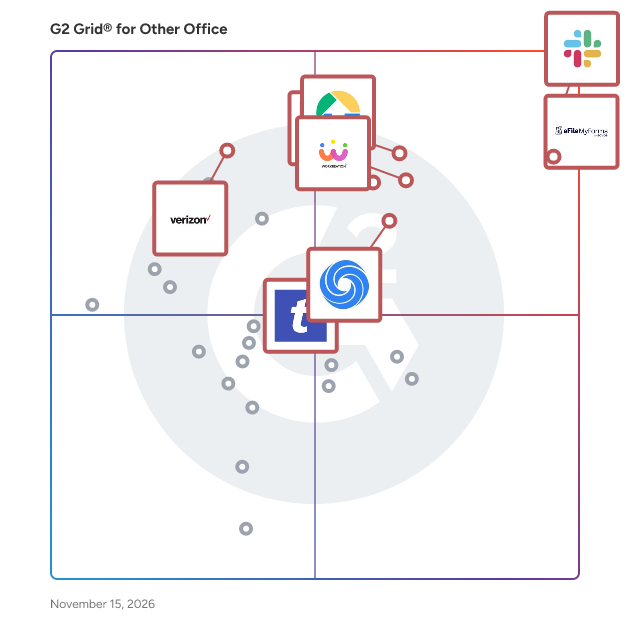
G2 Grid® for Other Office Software

G2 Grid® for Other Office Software plotting products by satisfaction and market presence

Highlighted products: Slack Connector for Jira, Sovos eFileMyForms, Google Drive & Docs for Confluence, Workreation®, Drive Uploader, NoteGPT, TransferNow, and Verizon Business Messaging.

Underlying data: [Grid® JSON](https://www.g2.com/categories/other-office/grids.json?focus%5B%5D=slack-connector-for-jira&focus%5B%5D=sovos-efilemyforms&focus%5B%5D=google-drive-docs-for-confluence&focus%5B%5D=workreation&focus%5B%5D=drive-uploader&focus%5B%5D=notegpt&focus%5B%5D=transfernow&focus%5B%5D=verizon-business-messaging)

Whale

Whale's AI-powered SOP software helps teams document processes, onboard and train employees (and AI) and keep knowledge up to date in one place. Whale helps teams; - Document faster: Coral, Whale's AI assistant, drafts a SOP in seconds from a screen recording, video, PDF or Word doc. - Answer questions once: 94% fewer repetitive questions, because Coral answers from approved SOPs, with the source, in Whale, on mobile, in Slack and in Microsoft Teams. - Onboard and train new hires: 50% faster new-hire ramp time with training flows, AI quizzes and read assignments. - Stay compliant: see who read, understood and signed every policy, with audit-ready records. - Keep AI tools on track: Whale MCP gives Claude, ChatGPT and Gemini the same approved processes your people follow. - Stay current: expert review cycles and Whale Agents flag what needs an update. Key features Documenting: - AI SOP writer: Coral drafts a full SOP in seconds from scratch, a screen recording, a video or an existing PDF or Word doc. - Video to SOP: record a process once and turn it into written steps or a video guide. - 100+ SOP and process templates, checklists and a diagram creator. - Auto-translate: write a SOP once and read it in English, French, German, Portuguese and Spanish. Sharing with teams: - Coral, Whale's AI assistant: ask a question in plain language and get the answer from your approved SOPs, with the source. - - Works in the web app, mobile app, CoPilot browser extension, Slack (@Whale) and Microsoft Teams. Coral only answers from what each person can see, and says so when a topic isn't covered instead of guessing. - Mobile app and QR codes: SOPs on the workfloor, on iOS and Android. - Contextual suggestions: the right SOP shows up inside the web tool your team is working in. - Public share and export to PDF or Word. Training Features - Training flows: build an onboarding path once, then assign or schedule it per team and role. - AI quizzes: turn any SOP into a quiz in one click. - Read assignments with due dates, e-signatures and badges. - Analytics and reporting: see what your team uses, what they skip and who needs help. Manage features - Whale Agents: find outdated content, unanswered questions, search gaps, training gaps and unread content. They run daily, weekly or monthly, you choose, and Coral proposes the fix for you to approve. - Expert review cycles, version history and approval flows. Advanced permissions, SSO, SCIM user provisioning and HRIS integrations. - Whale MCP: connect Claude, ChatGPT, Gemini or any MCP-compatible AI tool to your Whale workspace. - Integrations with Slack, Microsoft Teams, Google Drive, - - OneDrive, Zapier (1,000+ apps) and more. - SOC 2 certified, GDPR aligned and HIPAA ready, with hosting in Europe or the United States. Why Teams Choose Whale SOP Software: - Document SOPs in seconds - Cut onboarding time by 50% by connecting training to live processes - Reduce documentation time by 70% with AI-powered capture - Keep knowledge current (not buried in Google Docs nobody reads) - Train AI agents on company processes Who Uses Whale: Operations, HR, onboarding and training leads at mid-market (+25 people) and enterprise companies who need to onboard faster and standardize without slowing down. in medical, retail, hospitality, manufacturing, construction, warehousing, financial services and IT services. Companies like Nespresso, Johnstone Supply and Harvard Business School use Whale.

Average Rating: 4.8/5.0

Total Reviews: 212

How Do G2 Users Rate Whale?

  • Quality of Support: 9.7/10 (Category avg: 8.9/10)
  • Ease of Use: 9.6/10 (Category avg: 9.0/10)

Who Is the Company Behind Whale?

  • Seller: Whale
  • Company Website:
  • Year Founded: 2022
  • HQ Location: Chicago, IL
  • LinkedIn® Page: www.linkedin.com
    27 employees on LinkedIn®

Who Uses This Product?

  • Top Industries: Marketing and Advertising, Information Technology and Services
  • Company Size: 56% Small, 41% Medium

What Do G2 Reviewers Say About Whale?

AI-generated summary from verified user reviews

Pros
  • Users value the ease of use of Whale, finding it user-friendly and intuitive for daily tasks.
  • Users find Whale extremely user-friendly and straightforward, enhancing productivity with easy uploads and efficient keyword tagging.
  • Users appreciate the flexible and integrated features of Whale, significantly enhancing productivity and collaboration across teams.
  • Users find Whale to be exceptionally user-friendly and intuitive, making document management and onboarding extremely straightforward.
  • Users commend Whale for its easy access to essential information, enhancing efficiency and user experience across teams.
Cons
  • Users find limited customization frustrating, especially regarding user permissions and formatting controls on Whale.
  • Users find a lack of customization in Whale, limiting control over permissions and formatting options when needed.
  • Users highlight a lack of information regarding AI tools, wishing for better resources to enhance documentation.
  • Users face limited access, making it hard to connect files and restrict user permissions effectively.
  • Users note the missing features like individual training records, which hinder usability and integration with external links.

What Are Recent G2 Reviews of Whale?

What Are G2 Users Discussing About Whale?

WhiteSpace

Skimmer Technology utilizes the desktop automation resources found in the Microsoft Office suite combined with data mining and extraction technology to refine data from disparate data sources.

Who Is the Company Behind WhiteSpace?

WholeClear vCard Duplicate Remover

WholeClear MSG to PDF Converter provides an easy method to convert Outlook MSG emails into PDF format while keeping attachments and email properties secure. The application supports the migration of individual as well as multiple MSG files without imposing restrictions on file size or quantity. Built with a straightforward interface, the software can be handled without technical knowledge. Email elements including sender information, recipients, subject lines, dates, hyperlinks, and text formatting are preserved during the conversion process. Attachments are also maintained and saved separately to ensure proper accessibility. The utility supports MSG files created by all major Outlook editions and works smoothly with different versions of Adobe Reader. Batch conversion mode helps process entire folders of MSG files in a single operation, reducing the time required for manual conversion. A separate folder is automatically created to store the generated PDF files in an organized way. Compatible with both old and latest Windows operating systems, the program performs conversion safely without disturbing existing data. A free trial edition is available for testing purposes and allows conversion of up to 25 email items before purchasing the full version.

Who Is the Company Behind WholeClear vCard Duplicate Remover?

AI can help you find the answers. G2 helps you trust them.

Connect G2 to Claude or ChatGPT for answers grounded in G2's trusted reviews, comparisons, and pricing from real user insights.

How it works

WIN-SENSE / INN-FORM

With the WIN-SENSE 32, businesses can generate revenue by reselling phone calls and improving employee productivity. Businesses can also cut costs by allocating telecom expenses, decreasing phone abuse, eliminating toll fraud, and optimizing phone system performance.

Who Is the Company Behind WIN-SENSE / INN-FORM?

Woking Days Calculator

A web-based utility tool designed to quickly and accurately calculate the number of business days between any two calendar dates by automatically excluding weekends and holidays.

Who Is the Company Behind Woking Days Calculator?

WonderGuest

WonderGuest is a digital guidebook (digital welcome book) for vacation rental hosts and property managers with multiple listings on Airbnb, Booking.com and direct booking sites. Guests scan one QR code and get check-in instructions, Wi-Fi, house rules and local recommendations on their phone, with no app to download.

Average Rating: 4.8/5.0

Total Reviews: 5

How Do G2 Users Rate WonderGuest?

  • Quality of Support: 9.6/10 (Category avg: 8.9/10)
  • Ease of Use: 10.0/10 (Category avg: 9.0/10)

Who Is the Company Behind WonderGuest?

Who Uses This Product?

  • Company Size: 100% Small

What Are Recent G2 Reviews of WonderGuest?

Wooo

Wooo is background music for businesses in Spain, with original AI-created music. It runs in the browser, with no new hardware. For each time slot you pick the vibe (calm, balanced or upbeat) and the style (acoustic, current or electronic), with presets for bars, cafés, restaurants, hair salons, fashion stores, clinics and spas. It includes voice messages to announce promotions and a licence certificate for Wooo's music for each venue. €69/year + VAT, no lock-in, 14-day free trial at https://wooo.es

Who Is the Company Behind Wooo?

Woopra

Who Is the Company Behind Woopra?

  • Seller: Woopra
  • Year Founded: 2012
  • HQ Location: San Francisco, CA
  • LinkedIn® Page: www.linkedin.com
    4 employees on LinkedIn®

WordPress RSS Post Importer Plugin

CreativeMinds' RSS Post Importer plugin simplifies WordPress content management by automatically importing posts from RSS feeds. Its customizable settings and scheduling options offer efficient integration of external content sources.

Who Is the Company Behind WordPress RSS Post Importer Plugin?

WordPress Telegram Bot Plugin

Enhance your users' experience with our WordPress Telegram Bot plugin. Enable streamlined interactions, personalized replies, and real-time updates through automated messaging, alerts, and notifications. Effortlessly manage workflows, trigger custom responses, and improve engagement with flexible communication options via Telegram conversations, email, and SMS. Empower your audience to interact with your content seamlessly while maintaining consistent and efficient communication.

Who Is the Company Behind WordPress Telegram Bot Plugin?

WorkFlex

We enable HR teams to automate compliance for business trips, assignments, and work-from-anywhere requests – all in one platform. Before the trip, we handle all the legal paperwork automatically and ensure everything is compliant: A1 certificates, PWD, visas, tax checks. During travel, we provide real-time risk monitoring and 24/7 emergency support. This saves HR 90% of manual work, protects companies from fines up to €500,000, and ensures scalable processes.

Average Rating: 4.8/5.0

Total Reviews: 27

How Do G2 Users Rate WorkFlex?

  • Quality of Support: 9.3/10 (Category avg: 8.9/10)
  • Ease of Use: 9.3/10 (Category avg: 9.0/10)

Who Is the Company Behind WorkFlex?

Who Uses This Product?

  • Company Size: 56% Medium, 37% Large

What Do G2 Reviewers Say About WorkFlex?

AI-generated summary from verified user reviews

Pros
  • Users find WorkFlex to have a very intuitive and easy-to-use interface, enhancing overall efficiency and experience.
  • Users love the convenience of WorkFlex, enjoying its intuitive design and responsive support that streamline travel management.
  • Users value the exceptional customer support of WorkFlex, appreciating their responsiveness and attentiveness to concerns.
  • Users praise the excellent onboarding and responsive support of WorkFlex, enhancing their travel management experience significantly.
  • Users appreciate the intuitive interface of WorkFlex, making onboarding and usage straightforward and efficient.

What Are Recent G2 Reviews of WorkFlex?

Workfolio Client Microsites

Workfolio Client Microsites gives your organization everything it needs to pitch new business to clients and prospects, helping you specifically match your content and tone to each potential new client, distinctively differentiating your organization and increasing new client win-rate.

Who Is the Company Behind Workfolio Client Microsites?

Neeraja Prakash
NP
Researched and written by Neeraja Prakash