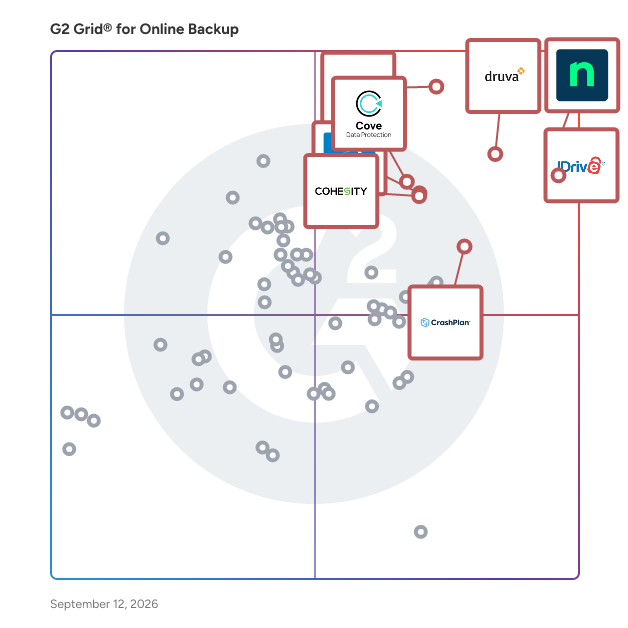
  # Best Online Backup Software - Page 4

  *By [Tian Lin](https://research.g2.com/insights/author/tian-lin)*

   Online backup software secures files and data created or stored digitally by backing them up to the cloud or an online environment, ensuring business continuity in the event of hardware failure, accidental deletion, or data loss. Unlike server backup solutions that operate primarily on-premise, online backup tools function through the internet to protect local and web-based files.

### Core Capabilities of Online Backup Software

To qualify for inclusion in the Online Backup category, a product must:

- Store files and data online or in the cloud
- Integrate with applications or sync with endpoints to back up files
- Provide online access to backup controls

### How Online Backup Software Differs from Other Tools

Online backup software is distinct from [server backup software](https://www.g2.com/categories/server-backup) or [SaaS backup software](https://www.g2.com/categories/saas-backup) in both architecture and scope, it is specifically focused on file- and folder-level protection and recovery for devices, workstations, or networked file locations. Online backups are typically part of a broader [backup software](https://www.g2.com/categories/backup) strategy and may integrate with other backup, recovery, or security solutions.

### Insights from G2 on Online Backup Software

Based on category trends on G2, reliability, ease of recovery, and automated syncing stand out as the most valued features. Businesses across industries note that the ability to access backup controls online, without needing on-site IT involvement, is a key advantage over traditional server backup approaches.


## How Many Online Backup Software Products Does G2 Track?
**Total Products under this Category:** 162

### Category Stats (May 2026)
- **Average Rating**: 4.34/5
- **New Reviews This Quarter**: 215
- **Buyer Segments**: Small-Business 56% │ Mid-Market 28% │ Enterprise 15%
- **Top Trending Product**: Arcserve (+0.035)
*Last updated: May 18, 2026*

  
## How Does G2 Rank Online Backup Software Products?

**Why You Can Trust G2's Software Rankings:**

- 30 Analysts and Data Experts
- 15,700+ Authentic Reviews
- 162+ Products
- Unbiased Rankings

G2's software rankings are built on verified user reviews, rigorous moderation, and a consistent research methodology maintained by a team of analysts and data experts. Each product is measured using the same transparent criteria, with no paid placement or vendor influence. While reviews reflect real user experiences, which can be subjective, they offer valuable insight into how software performs in the hands of professionals. Together, these inputs power the G2 Score, a standardized way to compare tools within every category.

  
## Top Online Backup Software at a Glance
| # | Product | Rating | Best For | What Users Say |
|---|---------|--------|----------|----------------|
| 1 | [NinjaOne](https://www.g2.com/products/ninjaone/reviews) | 4.7/5.0 (4,261 reviews) | Endpoint backup inside IT operations | "[NinjaOne Has Improved Our Support Efficiency](https://www.g2.com/survey_responses/ninjaone-review-12789374)" |
| 2 | [IDrive Online and SaaS Backup, Object Storage e2](https://www.g2.com/products/idrive-online-and-saas-backup-object-storage-e2/reviews) | 4.4/5.0 (1,914 reviews) | Scheduled backup for devices and SaaS data | "[Affordable Backup That Works Great Even on an Older Mac Pro](https://www.g2.com/survey_responses/idrive-online-and-saas-backup-object-storage-e2-review-12609681)" |
| 3 | [Druva Data Security Cloud](https://www.g2.com/products/druva-data-security-cloud/reviews) | 4.7/5.0 (718 reviews) | Cloud-native backup with ransomware protection | "[Simple, Cloud-Native Backups with Strong Ransomware Protection](https://www.g2.com/survey_responses/druva-data-security-cloud-review-12647066)" |
| 4 | [Veeam Data Platform](https://www.g2.com/products/veeam-data-platform/reviews) | 4.6/5.0 (676 reviews) | Backup and recovery across virtual and cloud environments | "[Fast, Secure Backups with Instant Recovery and Multi-Cloud Support](https://www.g2.com/survey_responses/veeam-data-platform-review-12474654)" |
| 5 | [Datto SIRIS](https://www.g2.com/products/kaseya-datto-siris/reviews) | 4.6/5.0 (271 reviews) | Business continuity with server recovery | "[Reliable Backup and Disaster Recovery with Robust Ransomware Protection](https://www.g2.com/survey_responses/datto-siris-review-12857742)" |
| 6 | [Cove Data Protection](https://www.g2.com/products/cove-data-protection/reviews) | 4.5/5.0 (420 reviews) | Cloud-first backup for servers, workstations, and Microsoft 365 | "[Simple To Use, Works Like It Should](https://www.g2.com/survey_responses/cove-data-protection-review-12813286)" |
| 7 | [AvePoint Confidence Platform](https://www.g2.com/products/avepoint-confidence-platform/reviews) | 4.5/5.0 (115 reviews) | Microsoft 365 and SaaS backup governance | "[Reliable Backups and Seamless Restores](https://www.g2.com/survey_responses/avepoint-confidence-platform-review-12366631)" |
| 8 | [Axcient x360Cloud](https://www.g2.com/products/axcient-x360cloud/reviews) | 4.4/5.0 (87 reviews) | — | "[Easy Microsoft 365 Backups with Seamless Integrations, Strong Security, and Great Support](https://www.g2.com/survey_responses/axcient-x360cloud-review-12223240)" |
| 9 | [Backblaze B2 Cloud Storage](https://www.g2.com/products/backblaze-b2-cloud-storage/reviews) | 4.6/5.0 (114 reviews) | — | "[Easy to setup, secure, and multi-purpose](https://www.g2.com/survey_responses/backblaze-b2-cloud-storage-review-12156606)" |
| 10 | [Oracle Database Backup Service](https://www.g2.com/products/oracle-database-backup-service/reviews) | 4.3/5.0 (29 reviews) | Oracle database cloud backup | "[Reliable Automated Backups Give Us Peace of Mind](https://www.g2.com/survey_responses/oracle-database-backup-service-review-12206411)" |

  
## Which Online Backup Software Is Best for Your Use Case?

- **Leader:** [NinjaOne](https://www.g2.com/products/ninjaone/reviews)
- **Highest Performer:** [CrashPlan Platform](https://www.g2.com/products/crashplan-platform/reviews)
- **Easiest to Use:** [Druva Data Security Cloud](https://www.g2.com/products/druva-data-security-cloud/reviews)
- **Top Trending:** [NinjaOne](https://www.g2.com/products/ninjaone/reviews)
- **Best Free Software:** [IDrive Online and SaaS Backup, Object Storage e2](https://www.g2.com/products/idrive-online-and-saas-backup-object-storage-e2/reviews)

  
## Which Type of Online Backup Software Tools Are You Looking For?
  - [Online Backup Software](https://www.g2.com/categories/online-backup) *(current)*
  - [Server Backup Software](https://www.g2.com/categories/server-backup)
  - [Disaster Recovery Software](https://www.g2.com/categories/disaster-recovery)
  - [PC Backup Software](https://www.g2.com/categories/pc-backup)

  
---

**Sponsored**

### Arpio

Arpio is a comprehensive disaster recovery platform designed specifically for the cloud. This innovative solution addresses the unique challenges of AWS &amp; Azure environments by automatically replicating an organization’s entire cloud estate, including data, servers, networking and other infrastructure and resources. With Arpio, businesses can ensure complete application recovery in the event of a disaster, unlike traditional disaster recovery tools that weren’t designed for the cloud. Arpio is suitable for businesses of all sizes that prioritize data security and operational continuity in their AWS &amp; Azure cloud environments. Its automated, dynamic environment replication feature allows users to effortlessly maintain backups of their entire cloud setup. This capability is particularly beneficial for companies that require rapid recovery solutions, such as those in finance, healthcare, and e-commerce, where downtime can lead to significant operational and financial repercussions. By offering a tailored solution for comprehensive disaster recovery, Arpio meets the specific needs of organizations that rely heavily on cloud infrastructure. What stands out about Arpio’s approach? Unlike conventional disaster recovery solutions that may only back up data or specific components, Arpio recognizes the interdependencies within cloud workloads and replicates everything necessary for seamless operation. The ability to recover not just data but the entire operational environment is crucial for maintaining business continuity. Additionally, Arpio offers robust testing capabilities, allowing businesses to validate that they can recover within the required RTO &amp; RPO parameters. Arpio can spin up a recovery environment in parallel with the production environment, letting users test recovery without interrupting ongoing operations. Disaster recovery capabilities include, advanced ransomware recovery protocols through a multi-account strategy, storing backups in an immutable “bunker” account to safeguard against malicious attacks, with recovery in a separate, clean room environment. This proactive approach to security enhances the overall resilience of the organization’s cloud infrastructure. With support for the broadest selection of AWS &amp; Azure resources, Arpio provides comprehensive coverage for a wide range of cloud workloads. Its cross-region and cross-account replication capabilities enhance data protection during regional outages and malicious ransomware events alike, ensuring that critical information remains secure and accessible even in the face of significant threats. As new cloud services are continuously supported, Arpio adapts to the evolving needs of its users, solidifying its position as a vital tool for effective disaster recovery in the cloud.


[Visit website](https://www.g2.com/external_clickthroughs/record?secure%5Bad_program%5D=ppc&amp;secure%5Bad_slot%5D=category_product_list&amp;secure%5Bcategory_id%5D=1518&amp;secure%5Bdisplayable_resource_id%5D=1109&amp;secure%5Bdisplayable_resource_type%5D=Category&amp;secure%5Bmedium%5D=sponsored&amp;secure%5Bplacement_reason%5D=neighbor_category&amp;secure%5Bplacement_resource_ids%5D%5B%5D=2227&amp;secure%5Bprioritized%5D=false&amp;secure%5Bproduct_id%5D=145786&amp;secure%5Bresource_id%5D=1518&amp;secure%5Bresource_type%5D=Category&amp;secure%5Bsource_type%5D=category_page&amp;secure%5Bsource_url%5D=https%3A%2F%2Fwww.g2.com%2Fcategories%2Fonline-backup%3Fpage%3D4&amp;secure%5Btoken%5D=4eeca8a35ef3f267245e27820829cff47d8c3274fc741538aa715ee61d11772b&amp;secure%5Burl%5D=https%3A%2F%2Farpio.io%2Frequest-a-demo%2F&amp;secure%5Burl_type%5D=custom_url)

---

  
## Buyer Guide: Key Questions for Choosing Online Backup Software Software
  ### What does Online Backup software do?
  I define Online Backup software as a system that creates recoverable copies of files, devices, servers, and cloud data. These tools help teams protect laptops, shared folders, virtual machines, NAS storage, Microsoft 365 data, databases, and media files. The category centers on backup schedules, version history, restore points, alerts, and recovery options. In the review patterns I evaluated, users care most about knowing that data can be found and restored when files are deleted, devices fail, or business systems go down.


  ### Why do businesses use Online Backup software?
  Across the review data I analyzed, businesses used Online Backup software to reduce the risk of losing data and to make recovery less dependent on manual labor. Users often mention deleted files, failed laptops, server recovery, client device issues, and ransomware concerns.

The strongest benefits include:

- Reviewers like automatic backup schedules and clear job status.
- IT teams value remote endpoint coverage and centralized policy management.
- MSPs need visibility across client machines and backup jobs.
- Users appreciate being able to restore files, folders, or older versions without starting from scratch.

Common friction areas include storage costs, slow large restores, setup effort, reporting limits, and backup failure alerts.


  ### Who uses Online Backup software primarily?
  After examining G2 reviewer profiles, I found that Online Backup software supports teams and individuals responsible for data protection.

- **IT administrators:** Manage policies, alerts, endpoints, retention, and restore requests.
- **Managed service providers:** Monitor backups across client devices, servers, and cloud workloads.
- **Security teams:** Review ransomware protection, access controls, and recovery readiness.
- **Small business owners:** Protect business documents, shared folders, and user devices.
- **Photographers and media teams:** Store and recover large files, image libraries, and project folders.
- **Education and nonprofit teams:** Back up shared data, cloud files, and staff devices.


  ### What types of Online Backup software should I consider?
  Based on the way reviewers describe the category, Online Backup software usually falls into these groups:

- **Cloud file backup tools:** Best for documents, photos, shared folders, and cross-device access.
- **Endpoint backup tools:** Best for laptops, desktops, remote users, and policy-based protection.
- **Server and disaster recovery platforms:** Best for VMware, Hyper-V, databases, NAS, and business systems.
- **SaaS backup tools:** Best for Microsoft 365, Google Workspace, and cloud application data.
- **Object storage and archive tools:** Best for large backup sets, retention needs, and storage cost control.


  ### What are the core features to look for in Online Backup software?
  When I assessed what G2 reviewers value most, the core capabilities include:

- Scheduled backups, incremental jobs, retention rules, and version history.
- File restore, folder restore, full-device recovery, VM recovery, and database support.
- Backup status, failure alerts, restore logs, and searchable file history.
- Encryption, ransomware controls, immutable backup options, and role-based access.
- Storage reporting, bandwidth settings, cloud region options, and admin permissions.
- Support response during backup failures or recovery work.


  ### What trends are shaping Online Backup software right now?
  From my evaluation of review patterns and current cybersecurity market, these themes stand out:

- **Ransomware-ready recovery:** Buyers are asking whether backups can survive attacks on production systems.
- **Immutable and isolated backups:** Teams want copies that cannot be easily altered, deleted, or encrypted.
- **SaaS data backup:** Microsoft 365, Google Workspace, and cloud app data are appearing more often in backup plans.
- **Remote endpoint protection:** Backup tools need to cover laptops and devices outside the office.
- **Restore testing:** Teams are paying more attention to whether recovery actually works, not only whether backup jobs run.


  ### How should I choose Online Backup software?
  I recommend starting with the data loss scenario that would create the most disruption. If everyday files are at risk, prioritize search, version history, sync behavior, and restore speed. If business systems are at risk, review server coverage, VM recovery, database support, NAS backup, and recovery testing. I also recommend checking alerts, storage estimates, failed-job handling, permissions, and support during a restore.


---

  ## What Are the Top-Rated Online Backup Software Products in 2026?
### 1. [BigMIND Cloud](https://www.g2.com/products/bigmind-cloud/reviews)
  **Average Rating:** 4.4/5.0
  **Total Reviews:** 4
  **Product Description:** Zoolz is a cloud based storage that provide an affordable and secure cloud solution for businesses and individuals.


  #### What Are Recent G2 Reviews of BigMIND Cloud?

**"[Smooth operation system for data management.](https://www.g2.com/survey_responses/bigmind-cloud-review-4193166)"**

**Rating:** 4.5/5.0 stars
*— Ginna L.*

[Read full review](https://www.g2.com/survey_responses/bigmind-cloud-review-4193166)

---

**"[Affordable and reliable cloud storage](https://www.g2.com/survey_responses/bigmind-cloud-review-4211901)"**

**Rating:** 5.0/5.0 stars
*— Julie K.*

[Read full review](https://www.g2.com/survey_responses/bigmind-cloud-review-4211901)

---

  #### What Are G2 Users Discussing About BigMIND Cloud?

- [What is BigMIND Cloud Backup used for?](https://www.g2.com/discussions/what-is-bigmind-cloud-backup-used-for)
### 2. [Data Deposit Box](https://www.g2.com/products/data-deposit-box/reviews)
  **Average Rating:** 4.6/5.0
  **Total Reviews:** 4
  **Product Description:** Smart, simple data protection designed for the Small to Medium Business. Protect your data, protect your business.


### What Do G2 Reviewers Say About Data Deposit Box?
*AI-generated summary from verified user reviews*

**Pros:**

- Users appreciate the **secure cloud backup** of Data Deposit Box, providing peace of mind for their important files.
- Users value the **secure backup** of important files, providing peace of mind for their data safety in the cloud.

**Cons:**

- Users find the **initial setup complex** , leading to longer wait times before enjoying seamless backup functionality.
  #### What Are Recent G2 Reviews of Data Deposit Box?

**"[Simple Backup Solution](https://www.g2.com/survey_responses/data-deposit-box-review-10522696)"**

**Rating:** 4.5/5.0 stars
*— Ava H.*

[Read full review](https://www.g2.com/survey_responses/data-deposit-box-review-10522696)

---

**"[Data Deposit Box is a solution that has given my organization many joys](https://www.g2.com/survey_responses/data-deposit-box-review-2950327)"**

**Rating:** 4.0/5.0 stars
*— Moises G.*

[Read full review](https://www.g2.com/survey_responses/data-deposit-box-review-2950327)

---

  #### What Are G2 Users Discussing About Data Deposit Box?

- [What is Data Deposit Box used for?](https://www.g2.com/discussions/what-is-data-deposit-box-used-for)
### 3. [Jottacloud](https://www.g2.com/products/jottacloud/reviews)
  **Average Rating:** 4.5/5.0
  **Total Reviews:** 4
  **Product Description:** Jottacloud is a service that lets you back up, store, synchronize, access and share your stuff.


  #### What Are Recent G2 Reviews of Jottacloud?

**"[Jottacloud is a good backup service](https://www.g2.com/survey_responses/jottacloud-review-5307183)"**

**Rating:** 4.5/5.0 stars
*— Thor Eric Vågen J.*

[Read full review](https://www.g2.com/survey_responses/jottacloud-review-5307183)

---

**"[Smart and lightweight cloud drive service](https://www.g2.com/survey_responses/jottacloud-review-9388093)"**

**Rating:** 4.0/5.0 stars
*— André A.*

[Read full review](https://www.g2.com/survey_responses/jottacloud-review-9388093)

---

  #### What Are G2 Users Discussing About Jottacloud?

- [What is Jottacloud used for?](https://www.g2.com/discussions/what-is-jottacloud-used-for)
### 4. [TurboBackup](https://www.g2.com/products/turbobackup/reviews)
  **Average Rating:** 5.0/5.0
  **Total Reviews:** 4
  **Product Description:** TurboBackup is the all-in-one go-to solution with the option to create multiple backups of shared documents to more than one destination in one operation. It also offers the ability to back up and retain different versions of the same file to protect your documents from accidental loss.


  #### What Are Recent G2 Reviews of TurboBackup?

**"[TurboBackup Software](https://www.g2.com/survey_responses/turbobackup-review-9105595)"**

**Rating:** 5.0/5.0 stars
*— Edward W.*

[Read full review](https://www.g2.com/survey_responses/turbobackup-review-9105595)

---

**"[Love this program](https://www.g2.com/survey_responses/turbobackup-review-721889)"**

**Rating:** 5.0/5.0 stars
*— Diane S.*

[Read full review](https://www.g2.com/survey_responses/turbobackup-review-721889)

---

  #### What Are G2 Users Discussing About TurboBackup?

- [What is TurboBackup used for?](https://www.g2.com/discussions/what-is-turbobackup-used-for)
### 5. [Zoolz Business](https://www.g2.com/products/zoolz-business/reviews)
  **Average Rating:** 4.5/5.0
  **Total Reviews:** 4
  **Product Description:** The First Cloud Backup Solution based on Amazon Glacier designed for home and business users.


  #### What Are Recent G2 Reviews of Zoolz Business?

**"[Low Cost and Effective Data Insurance](https://www.g2.com/survey_responses/zoolz-business-review-3732355)"**

**Rating:** 4.5/5.0 stars
*— Joey A.*

[Read full review](https://www.g2.com/survey_responses/zoolz-business-review-3732355)

---

**"[Affordable cold storage](https://www.g2.com/survey_responses/zoolz-business-review-694183)"**

**Rating:** 4.0/5.0 stars
*— Przemysław C.*

[Read full review](https://www.g2.com/survey_responses/zoolz-business-review-694183)

---

### 6. [Avast Cloud Backup](https://www.g2.com/products/avast-cloud-backup/reviews)
  **Average Rating:** 4.7/5.0
  **Total Reviews:** 3
  **Product Description:** Keep your data safe and secure, minimize downtime, and access your important information from anywhere, at any time - for total peace of mind.


  #### What Are Recent G2 Reviews of Avast Cloud Backup?

**"[Easy tool for cloud backup](https://www.g2.com/survey_responses/avast-cloud-backup-review-5225479)"**

**Rating:** 5.0/5.0 stars
*— Xiangdong L.*

[Read full review](https://www.g2.com/survey_responses/avast-cloud-backup-review-5225479)

---

**"[the ease of backup process from one portal](https://www.g2.com/survey_responses/avast-cloud-backup-review-8208057)"**

**Rating:** 4.0/5.0 stars
*— chetna g.*

[Read full review](https://www.g2.com/survey_responses/avast-cloud-backup-review-8208057)

---

  #### What Are G2 Users Discussing About Avast Cloud Backup?

- [What is CloudCare Cloud Backup used for?](https://www.g2.com/discussions/what-is-cloudcare-cloud-backup-used-for)
### 7. [BackupVault Cloud Backup](https://www.g2.com/products/backupvault-cloud-backup/reviews)
  **Average Rating:** 4.7/5.0
  **Total Reviews:** 3
  **Product Description:** Combining enterprise-class technology with outstanding support and customer service, BackupVault take the stress out of protecting your data.


  #### What Are Recent G2 Reviews of BackupVault Cloud Backup?

**"[It is reliable and secure](https://www.g2.com/survey_responses/backupvault-cloud-backup-review-4487120)"**

**Rating:** 4.0/5.0 stars
*— Verified User in Professional Training &amp; Coaching*

[Read full review](https://www.g2.com/survey_responses/backupvault-cloud-backup-review-4487120)

---

**"[Superb &amp; Secure UK Based Backup](https://www.g2.com/survey_responses/backupvault-cloud-backup-review-4758965)"**

**Rating:** 5.0/5.0 stars
*— Jeff P.*

[Read full review](https://www.g2.com/survey_responses/backupvault-cloud-backup-review-4758965)

---

### 8. [Canadian Cloud Backup](https://www.g2.com/products/canadian-cloud-backup/reviews)
  **Average Rating:** 4.9/5.0
  **Total Reviews:** 4
  **Product Description:** Canadian Cloud Backup provides everything you need to successfully launch a new arm to your business. Canadian Cloud Backup gives you branded software and licences to use their Data Centres as if they were your own. Software updates, trial accounts, support and a secure web portal are all part of our offering; and they are all branded to your company.


  #### What Are Recent G2 Reviews of Canadian Cloud Backup?

**"[one of the most underrated platform for a managed services providers](https://www.g2.com/survey_responses/canadian-cloud-backup-review-5250622)"**

**Rating:** 5.0/5.0 stars
*— Arwa M.*

[Read full review](https://www.g2.com/survey_responses/canadian-cloud-backup-review-5250622)

---

**"[To go service for the complete backup](https://www.g2.com/survey_responses/canadian-cloud-backup-review-5199623)"**

**Rating:** 5.0/5.0 stars
*— Nishtha D.*

[Read full review](https://www.g2.com/survey_responses/canadian-cloud-backup-review-5199623)

---

  #### What Are G2 Users Discussing About Canadian Cloud Backup?

- [What is Canadian Cloud Backup used for?](https://www.g2.com/discussions/what-is-canadian-cloud-backup-used-for)
### 9. [cbackup](https://www.g2.com/products/cbackup/reviews)
  **Average Rating:** 4.8/5.0
  **Total Reviews:** 3
  **Product Description:** CBackup is a free, safe and easy to use cloud backup software. Its main functions are as follows: -PC to cloud backup, cloud to cloud backup Back up your files from your local PC to the security cloud. Or use cloud to cloud backup to back up files from one cloud drive to another without downloading and re uploading. To ensure data security without loss, it is easier and faster to operate in a timely manner with just a few clicks -Integrate all free cloud spaces Gather the free space of all cloud disks into a larger storage space for all-in-one cloud backup. Users only need a CBackup account for flexible backup. Maximize the use of cloud space, the most secure and stable cloud service, and use it for free forever --Personalized management cloud backup and encryption technology Provide multiple backup schemes, set the schedule and space, and save space and time. Protect personal privacy and make users&#39; data more secure


### What Do G2 Reviewers Say About cbackup?
*AI-generated summary from verified user reviews*

**Pros:**

- Users value the **seamless integration** of Cbackup with various online services, enhancing their cloud storage experience.
- Users value the **community engagement** of Cbackup, appreciating its effectiveness in managing various cloud services.
- Users value the **impressive storage capacity** of Cbackup, efficiently managing backups across various cloud services.

**Cons:**

- Users find the **learning curve challenging** , though online resources are available to assist in understanding the product.
  #### What Are Recent G2 Reviews of cbackup?

**"[An innovative and highly utilized software](https://www.g2.com/survey_responses/cbackup-review-9802936)"**

**Rating:** 5.0/5.0 stars
*— Stephen A.*

[Read full review](https://www.g2.com/survey_responses/cbackup-review-9802936)

---

**"[A powerful and efficient software](https://www.g2.com/survey_responses/cbackup-review-10955415)"**

**Rating:** 5.0/5.0 stars
*— Daniel A.*

[Read full review](https://www.g2.com/survey_responses/cbackup-review-10955415)

---

### 10. [ConnectWise Cloud Backup](https://www.g2.com/products/connectwise-cloud-backup/reviews)
  **Average Rating:** 3.4/5.0
  **Total Reviews:** 6
  **Product Description:** ConnectWise Cloud Backup is a purpose-built solution for MSPs that offers comprehensive protection for their clients&#39; Microsoft 365 environment, including OneDrive, SharePoint, Exchange, Groups, Planner, and Teams. By providing data encryption, versioning, and flexible recovery options to safeguard data against loss, corruption, or cyber threats, ConnectWise Cloud Backup is a best-of-breed SaaS Backup solution supporting organizations of any size in any industry. With a user-friendly interface and unlimited storage, ConnectWise Cloud Backup provides precision in data protection that enables MSPs to scale services and impact on their clients. Some key features of ConnectWise Cloud Backup include: 1. Automated Backup: Streamline operations by effortlessly managing, monitoring, and safeguarding environments at scale through automated onboarding, advanced monitoring, and detailed reporting—all within an intuitive user interface. 2. Secure Data Encryption: Encrypt data during transmission and storage to maintain confidentiality and protect against unauthorized access. 3. Flexible Recovery Options: Easily restore individual files, folders, or entire systems to minimize downtime in case of data loss or system failure. 4. Versioning: Unlimited storage with up to six snapshots per day allows MSPs to keep multiple versions of files to recover previous iterations and track changes over time. 5. Centralized Management: Manage backup settings, schedules, and monitoring from a centralized dashboard for streamlined administration. 6. Compliance Support: Meet regulatory requirements such as HIPAA, GDPR, NIS2, and Essential 8 with ConnectWise Cloud Backup! MSPs choose ConnectWise Cloud Backup for its seamless integration into the ConnectWise ecosystem, multi-platform support, robust security features, scalability, centralized management capabilities, reliability, and dedicated customer support.


### What Do G2 Reviewers Say About ConnectWise Cloud Backup?
*AI-generated summary from verified user reviews*

**Pros:**

- Users appreciate the **affordable pricing and customizable backup options** of ConnectWise Cloud Backup, enhancing their user experience.
- Users find **ConnectWise Cloud Backup easy to use** with a navigable UI and clear alert color coding.
- Users appreciate the **affordable pricing** of ConnectWise Cloud Backup, enjoying flexibility in selecting Office 365 services to backup.
- Users appreciate the **affordable pricing** of ConnectWise Cloud Backup, allowing customization of Office 365 service backups.
- Users appreciate the **color-coded alerts** in ConnectWise Cloud Backup, making it easy to manage backup licenses effectively.

**Cons:**

- Users report **backup issues** with ConnectWise Cloud Backup, finding support dismissive and the portal ineffective for data verification.
- Users face a **lack of reliable backup confirmation** , often requiring support for re-indexing and restore processes.
- Users find the **limited functionality** of ConnectWise Cloud Backup frustrating, especially regarding data confirmation and restoration processes.
- Users find the **interface design poor** , often leading to difficulties in data confirmation and support interactions.
- Users face significant **restoration issues** with ConnectWise Cloud Backup, often needing support for data re-indexing and confirmation.
  #### What Are Recent G2 Reviews of ConnectWise Cloud Backup?

**"[Good,but now owned by Connectwise](https://www.g2.com/survey_responses/connectwise-cloud-backup-review-10752957)"**

**Rating:** 4.0/5.0 stars
*— Rich J.*

[Read full review](https://www.g2.com/survey_responses/connectwise-cloud-backup-review-10752957)

---

**"[Review of Skykick](https://www.g2.com/survey_responses/connectwise-cloud-backup-review-1164275)"**

**Rating:** 4.0/5.0 stars
*— Verified User in Law Practice*

[Read full review](https://www.g2.com/survey_responses/connectwise-cloud-backup-review-1164275)

---

### 11. [HorizonIQ Cloud](https://www.g2.com/products/horizoniq-cloud/reviews)
  **Average Rating:** 4.8/5.0
  **Total Reviews:** 33
  **Product Description:** HorizonIQ Managed Private Cloud delivers fully managed, single-tenant virtualization environments powered by Proxmox VE or VMware vSphere. Each cluster includes a minimum of three high-performance nodes, configurable with up to 48 cores (96 threads), 4TB RAM, and 10Gbps networking per node. Designed for businesses running mission-critical workloads like AI/ML, VDI, and large-scale databases, this solution includes integrated 10Gbps firewalls, scalable hyperconverged or dedicated storage, and flat-rate pricing. With full hypervisor access, optional HA configurations, and centralized management via the Compass Portal, HorizonIQ provides the control of private infrastructure with the ease of a managed service.


  #### What Are Recent G2 Reviews of HorizonIQ Cloud?

**"[INAP Cloud is superb in handling data-intensive workloads &amp; offers highly available instances](https://www.g2.com/survey_responses/horizoniq-cloud-review-7365269)"**

**Rating:** 4.0/5.0 stars
*— Ravi C.*

[Read full review](https://www.g2.com/survey_responses/horizoniq-cloud-review-7365269)

---

**"[INAP cloud provides cloud storage facility making the data available on hand anytime](https://www.g2.com/survey_responses/horizoniq-cloud-review-4498875)"**

**Rating:** 5.0/5.0 stars
*— Trookie Mäklare P.*

[Read full review](https://www.g2.com/survey_responses/horizoniq-cloud-review-4498875)

---

### 12. [SyncBackPro](https://www.g2.com/products/syncbackpro/reviews)
  **Average Rating:** 4.3/5.0
  **Total Reviews:** 3
  **Product Description:** SyncBackPro, the professional&#39;s tool to backup, synchronize, and restore data files. SyncBackPro for Windows is used by individuals, small businesses, and mission critical organizations throughout the world including law enforcement agencies, hospitals, and government departments.


### What Do G2 Reviewers Say About SyncBackPro?
*AI-generated summary from verified user reviews*

**Pros:**

- Users praise SyncBackPro&#39;s **reliability** , noting its consistent performance and data safety once properly configured.
- Users commend the **rock-solid security** of SyncBackPro, ensuring their data remains completely safe and reliable.

**Cons:**

- Users find the **profile management lacking features** , noting a need for more intuitive options and templates.
- Users find the **poor interface design** of SyncBackPro makes profile management unintuitive and challenging to navigate.
  #### What Are Recent G2 Reviews of SyncBackPro?

**"[Robust and reliable -- my go-to back up solution for many years](https://www.g2.com/survey_responses/syncbackpro-review-5180171)"**

**Rating:** 4.5/5.0 stars
*— Verified User in Photography*

[Read full review](https://www.g2.com/survey_responses/syncbackpro-review-5180171)

---

**"[Reliable and Secure, but Profile Management Needs Improvement](https://www.g2.com/survey_responses/syncbackpro-review-11819093)"**

**Rating:** 4.0/5.0 stars
*— Verified User in Wholesale*

[Read full review](https://www.g2.com/survey_responses/syncbackpro-review-11819093)

---

  #### What Are G2 Users Discussing About SyncBackPro?

- [What is SyncBackPro used for?](https://www.g2.com/discussions/what-is-syncbackpro-used-for)
### 13. [Almer Backup](https://www.g2.com/products/almer-backup/reviews)
  **Average Rating:** 4.0/5.0
  **Total Reviews:** 2
  **Product Description:** Almer Backup Pro v 3.9 is an application lifecycle management software that backup utility for backup with Zip, FTP support, incremental backup, and the built-in scheduler.


  #### What Are Recent G2 Reviews of Almer Backup?

**"[An unstoppable product. ](https://www.g2.com/survey_responses/almer-backup-review-2492916)"**

**Rating:** 4.0/5.0 stars
*— Katie  J.*

[Read full review](https://www.g2.com/survey_responses/almer-backup-review-2492916)

---

**"[Good features, and fast support. ](https://www.g2.com/survey_responses/almer-backup-review-2565748)"**

**Rating:** 4.0/5.0 stars
*— Tiffany J.*

[Read full review](https://www.g2.com/survey_responses/almer-backup-review-2565748)

---

  #### What Are G2 Users Discussing About Almer Backup?

- [What is Almer Backup Pro v 3.9 used for?](https://www.g2.com/discussions/what-is-almer-backup-pro-v-3-9-used-for)
### 14. [Backup Platinum](https://www.g2.com/products/backup-platinum/reviews)
  **Average Rating:** 4.5/5.0
  **Total Reviews:** 2
  **Product Description:** Backup Platinum is an easy-to-use yet powerful file backup solution that lets you save a reserve copy of your critical data virtually to any type of storage: hard drives, removable disks, CD-R/W, DVD-R/RW or Blu Ray media, FTP servers, LAN drives and even Amazon cloud storage.


  #### What Are Recent G2 Reviews of Backup Platinum?

**"[Classy Solution To Your All Your Backup Needs](https://www.g2.com/survey_responses/backup-platinum-review-3640951)"**

**Rating:** 5.0/5.0 stars
*— Md Abdur Rahman P.*

[Read full review](https://www.g2.com/survey_responses/backup-platinum-review-3640951)

---

**"[Good value ](https://www.g2.com/survey_responses/backup-platinum-review-576900)"**

**Rating:** 4.0/5.0 stars
*— Verified User in Staffing and Recruiting*

[Read full review](https://www.g2.com/survey_responses/backup-platinum-review-576900)

---

### 15. [Cloudback](https://www.g2.com/products/cloudback/reviews)
  **Average Rating:** 4.5/5.0
  **Total Reviews:** 2
  **Product Description:** Cloudback is a type of repository backup and disaster recovery software that helps organizations automatically back up, retain, and restore source code repositories and their associated metadata across multiple development platforms. Cloudback is designed for software development teams, IT administrators, DevOps engineers, and organizations that rely on Git-based platforms to manage source code and collaboration workflows. It supports backups for GitHub, GitLab, and Azure DevOps environments, addressing operational risks such as accidental deletions, data corruption, security incidents, and platform outages. The product is used in scenarios that require long-term data retention, regulatory compliance, business continuity planning, and migration between version control platforms. Cloudback operates by connecting directly to supported source control platforms and performing scheduled backups of repositories and metadata. Backups can be stored either in customer-managed cloud storage environments or in Cloudback-managed storage, depending on organizational security and infrastructure requirements. The platform provides centralized backup management and recovery through a web-based interface. Core capabilities include: - Automated scheduled backups of repositories, branches, tags, and commit history - Backup of repository-related metadata such as issues, pull requests, releases, collaborators, and wikis - Support for Git Large File Storage (LFS) data - Manual and on-demand backup initiation - Restoration of repositories to supported platforms or download as archive files Cloudback is used by companies that require structured backup policies for development assets, including organizations with distributed engineering teams and regulated data environments. It supports use cases such as disaster recovery, off-platform data retention, platform migration, and internal audit preparation. Key functional and operational characteristics: - Platform coverage across GitHub, GitLab, and Azure DevOps - Storage flexibility through integration with third-party cloud storage providers or managed storage - Data encryption during transfer and at rest - Backup history tracking and retention control - Access management and activity logging Cloudback fits into the broader category of DevOps infrastructure tooling and data protection software. It is typically integrated into existing development workflows to run continuously in the background without interfering with daily engineering operations. The system is structured to provide traceability, repeatability of backups, and predictable recovery processes for software development assets.


### What Do G2 Reviewers Say About Cloudback?
*AI-generated summary from verified user reviews*

**Pros:**

- Users appreciate the **automation of daily backups** in Cloudback, making code storage hassle-free and convenient.
- Users value the **automated daily backups** of Cloudback, ensuring reliable protection for their critical data effortlessly.
- Users love the **automated daily backups** and convenient cloud storage options offered by Cloudback.
- Users love the **automated backups and multiple cloud storage options** of Cloudback, enhancing their coding backup experience.
- Users commend Cloudback for its **community engagement** , making backing up GitHub repositories seamless and user-friendly.

**Cons:**

- Users express concerns over the **limited options** with Cloudback, noting the lack of self-hosted solutions and few supported platforms.
  #### What Are Recent G2 Reviews of Cloudback?

**"[back up](https://www.g2.com/survey_responses/cloudback-review-7410487)"**

**Rating:** 4.0/5.0 stars
*— Paramesha H.*

[Read full review](https://www.g2.com/survey_responses/cloudback-review-7410487)

---

**"[Love Cloudback&#39;s flexibility in storage options](https://www.g2.com/survey_responses/cloudback-review-9144452)"**

**Rating:** 5.0/5.0 stars
*— Vladimir S.*

[Read full review](https://www.g2.com/survey_responses/cloudback-review-9144452)

---

### 16. [CloudCasa](https://www.g2.com/products/cloudcasa/reviews)
  **Average Rating:** 4.5/5.0
  **Total Reviews:** 2
  **Product Description:** What values do you look for in a backup solution? How about these: \* Easy administration \* World class reliability \* Fast backup and recovery with minimal system impact \* An open storage model \* A first-class support team If you don’t have these, the rest doesn’t really matter. That’s why we’ve spent over 20 years focused on these core values. DPX combines an easy-to-use, intuitive management interface with robust backup and recovery capabilities. Our patented block-level protection reduces backup time and impact by 90%, while delivering unprecedented reliability and backup success rates. The DPX software-defined vStor backup repository lets you build your backup targets on any block storage platform to meet your unique performance and capacity requirements. And it’s all backed by a support team that routinely gets 95% or higher customer satisfaction ratings, along with a NetPromoter score consistently over 80 (compared to a software industry average of about 30). Catalogic also has a single-tiered licensing model that provides full functionality, including reporting and all agents, in a single license. Whether you want to completely rearchitect your backup environment, or just need a better solution for a particular problem (SharePoint, remote offices, SQL table restore, BMR, etc.), Catalogic DPX is just what you need.


  #### What Are Recent G2 Reviews of CloudCasa?

**"[Dependable method for the SaaS applications’ backup](https://www.g2.com/survey_responses/cloudcasa-review-10168896)"**

**Rating:** 4.5/5.0 stars
*— Jose D.*

[Read full review](https://www.g2.com/survey_responses/cloudcasa-review-10168896)

---

**"[Great Experience with CloudCasa](https://www.g2.com/survey_responses/cloudcasa-review-10199090)"**

**Rating:** 4.5/5.0 stars
*— Sanjay  K.*

[Read full review](https://www.g2.com/survey_responses/cloudcasa-review-10199090)

---

### 17. [Files.fm Backup](https://www.g2.com/products/files-fm-backup/reviews)
  **Average Rating:** 5.0/5.0
  **Total Reviews:** 2
  **Product Description:** Files.fm is a European cloud storage, backup, and file-sharing platform for individuals, teams, and businesses. It helps store, organize, protect, and share files online without relying on temporary transfer links or complicated workflows. What makes Files.fm stand out is its combination of reliable file storage with smart AI features, including face recognition, text recognition, auto-tagging, and document search. These tools make it easier to find the right files, organize large archives, and save time when working with photos, documents, videos, and other digital content. Compared with basic cloud storage services, Files.fm feels more like a complete platform for backup, sharing, collaboration, and intelligent file management.


  #### What Are Recent G2 Reviews of Files.fm Backup?

**"[Files.fm makes file storage and file sharing easy.](https://www.g2.com/survey_responses/files-fm-backup-review-1889733)"**

**Rating:** 5.0/5.0 stars
*— M H.*

[Read full review](https://www.g2.com/survey_responses/files-fm-backup-review-1889733)

---

**"[Cloud backup for application](https://www.g2.com/survey_responses/files-fm-backup-review-8499008)"**

**Rating:** 5.0/5.0 stars
*— Uchenna K.*

[Read full review](https://www.g2.com/survey_responses/files-fm-backup-review-8499008)

---

  #### What Are G2 Users Discussing About Files.fm Backup?

- [What is Files.fm Backup used for?](https://www.g2.com/discussions/what-is-files-fm-backup-used-for)
### 18. [IBackup](https://www.g2.com/products/ibackup/reviews)
  **Average Rating:** 3.0/5.0
  **Total Reviews:** 3
  **Product Description:** IBackup is a simple to use backup utility for Apple computers. iBackup backups and restores user data, system and applications settings such as system.


  #### What Are Recent G2 Reviews of IBackup?

**"[Worry free hourly backup](https://www.g2.com/survey_responses/ibackup-review-1602163)"**

**Rating:** 5.0/5.0 stars
*— Verified User in Consumer Services*

[Read full review](https://www.g2.com/survey_responses/ibackup-review-1602163)

---

**"[Great Backup service](https://www.g2.com/survey_responses/ibackup-review-4891521)"**

**Rating:** 4.0/5.0 stars
*— Chance N.*

[Read full review](https://www.g2.com/survey_responses/ibackup-review-4891521)

---

  #### What Are G2 Users Discussing About IBackup?

- [How do you use Ibackup?](https://www.g2.com/discussions/how-do-you-use-ibackup)
- [Is IBackup safe?](https://www.g2.com/discussions/is-ibackup-safe)
- [Is IDrive and IBackup the same company?](https://www.g2.com/discussions/is-idrive-and-ibackup-the-same-company)
### 19. [Max SyncUp](https://www.g2.com/products/max-syncup/reviews)
  **Average Rating:** 4.5/5.0
  **Total Reviews:** 2
  **Product Description:** With @Max SyncUp in place, protecting critical documents and projects is a simple matter of running the wizard and setting up a backup profile. You can save backups to some local folder, USB drive, networked computer, NAS or place them online to FTP, SFTP or WebDAV server, Google Drive, OneDrive or Dropbox cloud storage. When you discover that your local files are damaged due to a system failure or a virus attack, you can restore what was lost with a few mouse clicks.


  #### What Are Recent G2 Reviews of Max SyncUp?

**"[Backup files to cloud or local server](https://www.g2.com/survey_responses/max-syncup-review-5207337)"**

**Rating:** 4.5/5.0 stars
*— Virginia T.*

[Read full review](https://www.g2.com/survey_responses/max-syncup-review-5207337)

---

**"[Max SyncUp is a powerful file backup and restore solution](https://www.g2.com/survey_responses/max-syncup-review-2996618)"**

**Rating:** 4.5/5.0 stars
*— Juan G.*

[Read full review](https://www.g2.com/survey_responses/max-syncup-review-2996618)

---

  #### What Are G2 Users Discussing About Max SyncUp?

- [What is Max SyncUp used for?](https://www.g2.com/discussions/what-is-max-syncup-used-for)
### 20. [Xopero ONE MSP Backup](https://www.g2.com/products/xopero-one-msp-backup/reviews)
  **Average Rating:** 4.4/5.0
  **Total Reviews:** 8
  **Product Description:** Best-in-class backup &amp; Disaster Recovery solution for MSPs &amp; IT Providers. Create an additional source of scalable, recurring revenue in minutes with a zero entry threshold. Expand your portfolio with well secured enterprise-class backup with central management and remote recovery from any location. Xopero One MSP can protect any customer&#39;s IT infrastructure - endpoints, servers, virtual machines, Microsoft 365, and databases in any storage - any S3 compatible cloud and on-premise. 🔵 Key features: Policy-based backup Ransomware Protection package Mass deployment Long-term retention Any2Any restore Remote restore to any location Instant granular restore Central backup management console AES encryption WORM datastore Remote Disaster Recovery Multi-tenancy Remote protection of any IT infrastructure - Windows, Linux, macOS, VMware, Hyper-V, Microsoft 365, databases and DevOps. 🔵 We support diverse storages: Local disk resources, iSCSI, SMB, CIFS, NFS Amazon AWS Google Cloud Storage Azure Blob Storage BackBlaze B2 Wasabi Cloud Xopero Cloud Storage any S3 compatible cloud storages 🔵 Minimum order In Xopero ONE MSP Backup when purchasing a license regardless of the service selected, there is no imposed limit. When setting up a cloud backup service, the minimum number of licenses is: min. 5 Endpoint Agents, or 5 Microsoft365 Users, or 5 Git Protect, or 1 Server Agent, or 1 Virtual Agent (two sockets).


### What Do G2 Reviewers Say About Xopero ONE MSP Backup?
*AI-generated summary from verified user reviews*

**Pros:**

- Users value the **comprehensive backup solutions** of Xopero ONE MSP Backup, ensuring thorough protection across environments.
- Users highlight the **ease of use** of Xopero ONE MSP Backup, praising its simple installation and intuitive interface.
- Users find the **easy setup** of Xopero ONE MSP Backup impressive, enabling quick installation in under 10 minutes.
- Users find the **setup process easy** , with quick installation under 10 minutes and an intuitive console.
- Users commend Xopero ONE MSP Backup for its **affordability** , highlighting effective service without breaking the bank.

**Cons:**

- Users face significant **backup issues** with Xopero ONE MSP, including limitations on data transfer and device management.
- Users face **backup problems** with limited control over data transfer, device access, and backup management options.
- Users report encountering **software bugs** that can disrupt functionality, although support is responsive in resolving issues.
- Users experience **frequent bugs** and issues during complex backups, though support is responsive in resolving them.
- Users report **patching issues** with Xopero ONE MSP Backup, hindering updates and backup processes significantly.
  #### What Are Recent G2 Reviews of Xopero ONE MSP Backup?

**"[Speed, reliability - XOPERO!](https://www.g2.com/survey_responses/xopero-one-msp-backup-review-10607913)"**

**Rating:** 5.0/5.0 stars
*— Jacek C.*

[Read full review](https://www.g2.com/survey_responses/xopero-one-msp-backup-review-10607913)

---

**"[A well-organized tool with tremendous capabilities.](https://www.g2.com/survey_responses/xopero-one-msp-backup-review-10608072)"**

**Rating:** 5.0/5.0 stars
*— Robert P.*

[Read full review](https://www.g2.com/survey_responses/xopero-one-msp-backup-review-10608072)

---

### 21. [Zmanda](https://www.g2.com/products/zmanda/reviews)
  **Average Rating:** 4.3/5.0
  **Total Reviews:** 3
  **Product Description:** Zmanda is an enterprise-class backup, recovery, and data resiliency solution designed for businesses seeking robust protection without complexity. Available as both a SaaS offering and a self-hosted solution, Zmanda delivers comprehensive data protection while reducing total cost of ownership by up to 50% compared to other enterprise solutions. You also get 24\*7 support with a 2x higher NPS than the industry average. Since 2005, Zmanda has been trusted by enterprises, governments, and educational institutions worldwide. Zmanda supports advanced features such as, ransomware protection, air gapped backup, client-side deduplication, forever incremental backups, and immutable backups.


### What Do G2 Reviewers Say About Zmanda?
*AI-generated summary from verified user reviews*

**Pros:**

- Users find Zmanda to be **cost-effective** , providing significant savings compared to many competitive products.
- Users value the **cloud integration** of Zmanda, finding it cost-effective and user-friendly for easy configuration.
- Users appreciate the **cost-effective cloud integration** of Zmanda, finding it easy to use and configure.
- Users find **configuration easy** with Zmanda, making it user-friendly and accessible for all types of users.
- Users find Zmanda to be **cost-effective compared to many competitive products** , making it an attractive data management solution.

**Cons:**

- Users face **backup failures** with Zmanda, which can hinder reliability and disrupt data restoration efforts.
- Users experience **backup issues** with Zmanda, noting slower speeds compared to other products and limited documentation.
- Users find the **complex documentation** of Zmanda challenging, especially for beginners trying to navigate the system.
- Users find the **difficult learning curve** challenging, especially for beginners trying to navigate Zmanda&#39;s complexities.
- Users note the need for improved **documentation** in Zmanda, as it can hinder effective use of the product.
  #### What Are Recent G2 Reviews of Zmanda?

**"[Best Recovery Manager](https://www.g2.com/survey_responses/zmanda-review-8773181)"**

**Rating:** 5.0/5.0 stars
*— Ashutosh K.*

[Read full review](https://www.g2.com/survey_responses/zmanda-review-8773181)

---

**"[Use Case of Zmanda Implementation for SQL Server Backup](https://www.g2.com/survey_responses/zmanda-review-10499016)"**

**Rating:** 4.5/5.0 stars
*— Anand J.*

[Read full review](https://www.g2.com/survey_responses/zmanda-review-10499016)

---

  #### What Are G2 Users Discussing About Zmanda?

- [What is Amanda Enterprise used for?](https://www.g2.com/discussions/what-is-amanda-enterprise-used-for)
### 22. [Archiware P5 Backup](https://www.g2.com/products/archiware-p5-backup/reviews)
  **Average Rating:** 5.0/5.0
  **Total Reviews:** 1
  **Product Description:** Archiware P5 Backup is classic server backup software that creates security copies of data on disk and LTO tape. Full, incremental and progressive Backups can be combined to create your ideal backup strategy, making sure your data is safe at any time while using the least resources possible. When backing up to LTO tape, the cloning feature creates two identical sets of tape to facilitate offsite storage. Parallelisation of drives allows for maximum throughput. Restore is very simple and can be done by each user without the help of an administrator, even between different operating systems. P5 Backup is part of the P5 Software suite consisting of four Modules: P5 Synchronize for data replication, P5 Backup for Server Backup, P5 Backup2Go for endpoint backup and P5 Archive for data migration. Archiware P5 runs on Mac, Windows, Linux, FreeBSD and Solaris and is compatible with virtually any storage hardware on the market, including all LTO tape vendors. Find more information about Archiware P5 on our Youtube Channel: https://www.youtube.com/user/ArchiwarePresSTORE


  #### What Are Recent G2 Reviews of Archiware P5 Backup?

**"[The best ever, multitask, to hdd or tape, web browser interface, perfect log reports, user friendly!](https://www.g2.com/survey_responses/archiware-p5-backup-review-168210)"**

**Rating:** 5.0/5.0 stars
*— Albert R.*

[Read full review](https://www.g2.com/survey_responses/archiware-p5-backup-review-168210)

---

  #### What Are G2 Users Discussing About Archiware P5 Backup?

- [What is Archiware P5 Backup used for?](https://www.g2.com/discussions/what-is-archiware-p5-backup-used-for)
### 23. [Bareos](https://www.g2.com/products/bareos/reviews)
  **Average Rating:** 4.0/5.0
  **Total Reviews:** 1
  **Product Description:** &quot;Bareos is a fork of the open source project Bacula version 5.2. In 2010 the Bacula community developer Marco van Wieringen started to collect rejected or neglected community contributions in his own branch. This branch was later on the base of Bareos and since then was enriched by a lot of new features.&quot; [Bareos has kept track of the features of Opensource Bacula as well as incorporating many features that Bacula Systems rejected - most notably the ability to \_easily\_ backup &quot;mobile&quot; clients across the Internet, rather than fixed clients in the local LAN/WAN] Original author of Bacula and its documentation is Kern Sibbald. We thank Kern and all contributors to Bacula and it’s documentation. We maintain a list of contributors to Bacula (until the time we’ve started the fork) and Bareos in our AUTHORS file.


  #### What Are Recent G2 Reviews of Bareos?

**"[The best opensource backup alternative for commercial backup tools](https://www.g2.com/survey_responses/bareos-review-6760018)"**

**Rating:** 4.0/5.0 stars
*— Şenol .*

[Read full review](https://www.g2.com/survey_responses/bareos-review-6760018)

---

### 24. [C2 Storage for Hybrid Share](https://www.g2.com/products/c2-storage-for-hybrid-share/reviews)
  **Average Rating:** 3.8/5.0
  **Total Reviews:** 2
  **Product Description:** C2 Storage for Hybrid Share is a Synology hybrid-cloud solution that seamlessly integrates the performance of Synology NAS with the scalability of the cloud, allowing for enhanced cross-site collaboration and unlocking the true potential of your multiple NAS devices. • Multi-site collaboration for distributed teams C2 Storage for Hybrid Share delivers a unified global file system that ensures seamless access and collaboration across all of your office locations. This includes a global file lock feature to help prevent productivity issues caused by file version conflicts and data corruption. • Immediate data availability for seamless access When you mount a Hybrid Share folder from C2 Storage on your Synology NAS, all of its shared data will be instantly available on the new server. Recently-accessed data is automatically cached locally, meaning that cross-site users can effortlessly share and sync data while enjoying low-latency file access that&#39;s only achievable over the local area network (LAN). • Enhanced privacy and recoverability for data protection Experience unparalleled data security with end-to-end encryption, where no one but you, not even Synology, can access your data. With the added benefit of server-side snapshots, you can easily recover from a ransomware attack in a matter of seconds, and users can utilize the intuitive snapshot viewer to access all older versions of files. • On-demand storage expansion ​for cost-effective deployment Hybrid Share employs automatic cloud-tiering to optimize your on-premises storage by adapting the cache to the usage patterns of recently and less-recently accessed data.​ Effortlessly expand data deployment capacity to the cloud to meet demands for additional storage while maintaining a streamlined and simplified local infrastructure.


  #### What Are Recent G2 Reviews of C2 Storage for Hybrid Share?

**"[Overall Product walkthrough and overview](https://www.g2.com/survey_responses/c2-storage-for-hybrid-share-review-8489825)"**

**Rating:** 4.0/5.0 stars
*— Surendar P.*

[Read full review](https://www.g2.com/survey_responses/c2-storage-for-hybrid-share-review-8489825)

---

### 25. [Copiaris](https://www.g2.com/products/copiaris/reviews)
  **Average Rating:** 2.5/5.0
  **Total Reviews:** 1
  **Product Description:** Copiaris (formerly Backup Magic) is Unicode-aware file copy, backup and automation tool for advanced users and IT professionals.


  #### What Are G2 Users Discussing About Copiaris?

- [What is Copiaris used for?](https://www.g2.com/discussions/what-is-copiaris-used-for)

    ## What Is Online Backup Software?
  [Backup Software](https://www.g2.com/categories/backup)
  ## What Software Categories Are Similar to Online Backup Software?
    - [Server Backup Software](https://www.g2.com/categories/server-backup)
    - [Disaster Recovery Software](https://www.g2.com/categories/disaster-recovery)
    - [PC Backup Software](https://www.g2.com/categories/pc-backup)

  
---

## How Do You Choose the Right Online Backup Software?

### What You Should Know About Online Backup Software

### **Online Backup Software Buying Insights at a Glance**

[Online backup software](https://www.g2.com/categories/online-backup) automates data protection by continuously copying files, databases, and system configurations to secure cloud or remote storage locations. Instead of treating backups as periodic manual tasks prone to human error, these platforms enable automated scheduling, versioning, and rapid recovery workflows. The result is a backup strategy that feels more like continuous data insurance and less like reactive disaster scrambling.

As data volumes grow and ransomware threats intensify, online backup solutions have become essential infrastructure for business continuity. IT teams rely on these platforms to automate backup schedules, encrypt data in transit and at rest, enable point-in-time recovery, monitor backup health across endpoints, and provide self-service restoration for end users. In practice, the best online backup software acts as the connective layer between distributed data sources, secure storage repositories, and recovery workflows.

Based on G2 review data, users rate online backup software strongly overall. Products in the category hold an average star rating of 4.65/5 and an average likelihood to recommend of 9.30/10. Ease-of-use metrics trend high across the category, with 6.47/7 for Ease of Use, 6.46/7 for Ease of Setup, and 6.46/7 for Quality of Support. These scores suggest that most teams are able to adopt online backup systems relatively quickly once backup policies are configured.

The most common buying pattern across reviews is that teams evaluating online backup tools are trying to balance two priorities: comprehensive data protection and operational simplicity. Strong platforms typically succeed by combining automated backup workflows, intuitive recovery interfaces, and reliable support that reduces manual oversight.

Common use cases include automated endpoint backup protecting laptops and workstations across distributed teams, SaaS application backup safeguarding critical business data in Microsoft 365 and Google Workspace, server and database backup ensuring business-critical systems can be restored quickly, ransomware recovery enabling rollback to clean backup states before encryption, disaster recovery providing complete system restoration after catastrophic failures, and compliance archiving maintaining required retention policies for regulatory requirements. Organizations also leverage these platforms for cloud-to-cloud backup, hybrid backup strategies spanning on-premise and cloud infrastructure, and centralized backup management across multiple locations.

Pricing for online backup solutions usually scales with the data volume stored, the number of protected endpoints or servers, retention period requirements, and advanced features such as instant recovery or ransomware detection. Entry-level plans typically start with basic file backup and limited retention, while enterprise online backup systems offer unlimited retention, advanced security features, dedicated account management, and SLA-backed recovery time objectives.

**Top 5 FAQs from zero trust networking software buyers**

- How do online backup platforms balance comprehensive protection with minimal impact on system performance?
- What recovery time objectives can online backup solutions realistically deliver for business-critical systems?
- How well do online backup tools integrate with existing infrastructure, like [virtualization platforms](https://www.g2.com/categories/data-virtualization) and cloud services?
- What level of encryption and security controls do backup providers offer for regulated industries?
- How do backup solutions handle version retention and long-term archival for compliance requirements?

G2&#39;s top-rated online backup software, based on verified reviews, includes [NinjaOne](https://www.g2.com/products/ninjaone/reviews), [IDrive Online and SaaS Backup, Object Storage e2](https://www.g2.com/products/idrive-online-and-saas-backup-object-storage-e2/reviews), [Druva Data Security Cloud](https://www.g2.com/products/druva-data-security-cloud/reviews), [Veeam Data Platform](https://www.g2.com/products/veeam-data-platform/reviews), and [Cove Data Protection](https://www.g2.com/products/cove-data-protection/reviews).

### What are the top-reviewed online backup software on G2?

[**NinjaOne**](https://www.g2.com/products/ninjaone/reviews)

- Number of Reviews: 495
- Satisfaction: 97
- Market Presence: 84
- G2 Score: 90

[**IDrive Online and SaaS Backup, Object Storage e2**](https://www.g2.com/products/idrive-online-and-saas-backup-object-storage-e2/reviews)

- Number of Reviews: 1670
- Satisfaction: 98
- Market Presence: 82
- G2 Score: 90

[Druva Data Security Cloud](https://www.g2.com/products/druva-data-security-cloud/reviews)

- Number of Reviews: 522
- Satisfaction: 86
- Market Presence: 88
- G2 Score: 87

[**Veeam Data Platform**](https://www.g2.com/products/veeam-data-platform/reviews)

- Number of Reviews: 431
- Satisfaction: 71
- Market Presence: 96
- G2 Score: 83

[**Cove Data Protection**](https://www.g2.com/products/cove-data-protection/reviews)

- Number of Reviews: 357
- Satisfaction: 76
- Market Presence: 84
- G2 Score: 80

Satisfaction reflects how users rate their experience with the product based on review signals such as usability, support, and likelihood to recommend. ([Source 2](https://www.g2.com/reports))

Market Presence represents a product&#39;s market footprint based on company size, user adoption, and product growth indicators. ([Source 2](https://www.g2.com/reports))

G2 Score combines Satisfaction and Market Presence to create a category-level ranking that enables direct product comparison. ([Source 2](https://www.g2.com/reports))

Learn more about how G2 calculates these scores. ([Source 1](https://documentation.g2.com/docs/research-scoring-methodologies))

### What I Often See in Online Backup Software

#### Pros: What I See Users Consistently Appreciating

- **Automated backup scheduling eliminating manual intervention and human error**

_“I work as a Dietitian &amp; Nutritionist, manage my clinic, and also create health education content. Because of this, I handle many important and confidential documents daily. These include patient case files, diet charts, lab reports, billing records, clinic-related legal documents, and also health awareness content that I prepare. Losing this data would create serious problems, so keeping it safe is very important for me._

_The main reason I use IDrive is for backup security. Once I selected my clinic folders, it started backing up automatically. I can easily see when the last backup was done, which gives me confidence that my data is protected._

_It was simple to set up, and I did not need technical knowledge. I use it regularly since I keep updating patient records and content files. It runs in the background and does not disturb my work. For me, the biggest benefit is peace of mind. My clinic documents are sensitive, and IDrive helps me keep everything safe without making things complicated.”_ - [Ishan S.](https://www.g2.com/products/idrive-online-and-saas-backup-object-storage-e2/reviews/idrive-online-and-saas-backup-object-storage-e2-review-12428453), IDrive Online and SaaS Backup, Object Storage e2 Review

- **Intuitive restoration interface enabling fast self-service file recovery**

_“The one place to backup all my different types of data on different platforms, and Druva continues to add more features, making my backup management so much better than the many other solutions I have used over the past 20-plus years. A single place to go and see all my data. A single place to go to search for files that we must purge. A single place to go to trace the other users whose files a file may have been shared with. This has been a win as far as solutions for us, and it&#39;s not just a backup solution, it&#39;s a data management and compliance dream.”_ - [Ken A.](https://www.g2.com/products/druva-data-security-cloud/reviews/druva-data-security-cloud-review-12358858), Druva Data Security Cloud Review

- **SaaS application backup protecting Microsoft 365 and Google Workspace data**

_“I love how Druva provides a single, bird&#39;s-eye view of our entire data estate, from Hybrid Workloads to SaaS applications like Microsoft 365 and Google Workspace. The cyber resiliency dashboard is a major standout, having real-time visibility into 234 Data Anomalies and 76 Restore Scans, which gives me immense peace of mind that our recovery protocols are working.”_ - [Avyan S.](https://www.g2.com/products/druva-data-security-cloud/reviews/druva-data-security-cloud-review-12314106), Druva Data Security Cloud Review

#### Cons: Where I See Many Platforms Falling Short

- **Slow initial backup speeds when transferring large datasets to cloud**

_“Since Druva is a cloud-native solution, it requires a reliable internet connection for backups, restores, and daily operations. If the internet connection is unstable or slow, this can significantly impact the speed of backup processes or data recovery times. For organizations in remote or bandwidth-limited environments, this can be a critical limitation.”_- [Verified User in Consulting](https://www.g2.com/products/druva-data-security-cloud/reviews/druva-data-security-cloud-review-11014602), Druva Data Security Cloud Review

- **Learning curve navigating advanced features like granular recovery options**

“While basic functions are straightforward, mastering some of the more advanced features can require significant time and effort. This learning curve might be a hurdle for less experienced IT staff.” - [Renaldo B.](https://www.g2.com/products/veeam-data-platform/reviews/veeam-data-platform-review-10020314), Veeam Data Platform Review

### My Expert Takeaway on Online Backup Software in 2026

G2 review data suggests that online backup software performs particularly well in areas that tend to drive long-term product adoption. The category averages 4.65 out of 5 stars, paired with a 9.30 out of 10 likelihood-to-recommend score, which indicates that most IT teams see meaningful value from these platforms once they become part of infrastructure operations.

Where I see the biggest difference between average and high-performing teams is how they use these tools beyond basic file backup. The most successful teams treat online backup systems as comprehensive data resilience frameworks, not just as disaster recovery insurance. They actively leverage features like continuous data protection for business-critical databases, automated SaaS backup for cloud applications, and immutable backup storage to defend against ransomware. That approach helps maintain stronger recovery point objectives and reduces downtime during incidents.

I also notice stronger adoption patterns in industries where data loss carries significant consequences, such as information technology services, computer and network security, healthcare, and financial services. In those environments, teams often need to meet strict compliance requirements while protecting distributed data across remote workforces. Online backup solutions make it easier to automate protection policies while maintaining audit trails for regulatory compliance.

Another clear trend in the data is that ease of use and support quality strongly influence adoption. Products with the highest recommendation scores tend to combine automated backup workflows with intuitive recovery experiences that reduce training requirements. Metrics like Ease of Use (6.47/7), Ease of Setup (6.46/7), and Quality of Support (6.46/7) reinforce the idea that most teams can implement these platforms without significant operational friction, especially when vendors provide responsive technical support during initial configuration.

If I were advising a team evaluating the best online backup software, I would focus on three things early in the buying process: how quickly the platform can restore critical data when systems fail, how effectively it protects modern SaaS applications alongside traditional infrastructure, and how well it integrates with existing IT management tools and workflows. The tools that perform best in those areas usually become foundational infrastructure for business continuity and disaster recovery operations.

### Online Backup Software FAQs

#### **What is the best backup software for large enterprises?**

Large enterprises need platforms supporting distributed infrastructure, advanced compliance features, and centralized management. Top [enterprise online backup software](https://www.g2.com/categories/online-backup/enterprise) options on G2 include:

- [Druva Data Security Cloud](https://www.g2.com/products/druva-data-security-cloud/reviews) **:** Cloud-native backup designed for enterprise-scale data protection and compliance.
- [BackBox](https://www.g2.com/products/backbox/reviews) **:** Enterprise backup platform with comprehensive SaaS application protection.
- [NinjaOne](https://www.g2.com/products/ninjaone/reviews) **:** Unified IT management with enterprise backup and monitoring capabilities.
- [Veeam Data Platform](https://www.g2.com/products/veeam-data-platform/reviews) **:** Comprehensive backup for virtualized and cloud infrastructure at scale.
- [AvePoint Confidence Platform](https://www.g2.com/products/avepoint-confidence-platform/reviews) **:** Enterprise SaaS backup specializing in Microsoft 365 protection.

#### **What is the best data backup service for software development teams?**

Software development teams need backup solutions that protect code repositories, development environments, and cloud infrastructure. Best services on G2 include:

- [NinjaOne](https://www.g2.com/products/ninjaone/reviews) **:** IT management platform widely adopted by software development companies.
- [IDrive Online and SaaS Backup, Object Storage e2](https://www.g2.com/products/idrive-online-and-saas-backup-object-storage-e2/reviews) **:** Flexible backup with object storage for development data.
- [Datto SIRIS](https://www.g2.com/products/kaseya-datto-siris/reviews) **:** Business continuity backup protecting development infrastructure.
- [Cove Data Protection](https://www.g2.com/products/cove-data-protection/reviews) **:** Cloud backup supporting distributed development teams.
- [Veeam Data Platform](https://www.g2.com/products/veeam-data-platform/reviews) **:** Backup platform protecting virtualized development environments.

#### **What is the best online backup service for small businesses?**

Small businesses typically need affordable, easy-to-manage backup with minimal IT overhead. [Best online backup software for small businesses](https://www.g2.com/categories/online-backup/small-business) on G2 include:

- [IDrive Online and SaaS Backup, Object Storage e2](https://www.g2.com/products/idrive-online-and-saas-backup-object-storage-e2/reviews) **:** Cost-effective backup with broad platform support.
- [NinjaOne](https://www.g2.com/products/ninjaone/reviews) **:** All-in-one IT management with built-in backup for small teams.
- [Cove Data Protection](https://www.g2.com/products/cove-data-protection/reviews) **:** Simple cloud backup designed for small business needs.
- [ScalePad Backup Radar](https://www.g2.com/products/scalepad-backup-radar/reviews) **:** MSP-focused backup monitoring for small business clients.

#### **What is the most secure online backup solution for startups?**

Startups need secure, scalable backup that grows with the business while protecting sensitive data. Most secure options on G2 include:

- [Druva Data Security Cloud](https://www.g2.com/products/druva-data-security-cloud/reviews) **:** Security-first backup with ransomware protection and compliance features.
- [CyberSentriq](https://www.g2.com/products/cybersentriq/reviews) **:** Cybersecurity-focused backup with advanced threat protection.
- [Datto SIRIS](https://www.g2.com/products/kaseya-datto-siris/reviews) **:** Business continuity solution with ransomware detection capabilities.
- [NinjaOne](https://www.g2.com/products/ninjaone/reviews) **:** Secure backup with endpoint protection integration.
- [BackBox](https://www.g2.com/products/backbox/reviews) **:** Secure SaaS backup with data encryption and compliance controls.

#### **What is the recommended online storage service for tech firms?**

Tech firms need flexible storage that supports diverse infrastructure and development workflows. Recommended services on G2 include:

- [Backblaze B2 Cloud Storage](https://www.g2.com/products/backblaze-b2-cloud-storage/reviews) **:** Cost-effective object storage for technical teams.
- [NAKIVO Backup &amp; Replication](https://www.g2.com/products/nakivo-backup-replication/reviews) **:** VMware and Hyper-V backup for virtualized environments.
- [Veeam Data Platform](https://www.g2.com/products/veeam-data-platform/reviews) **:** Comprehensive platform supporting hybrid infrastructure.
- [GoodSync](https://www.g2.com/products/goodsync/reviews) **:** File synchronization and backup for distributed teams.
- [Vinchin Backup &amp; Recovery](https://www.g2.com/products/vinchin-backup-recovery/reviews) **:** VM backup solution for technical infrastructure.

#### **What&#39;s the top-rated cloud backup app for IT companies?**

IT companies need robust backup with strong technical capabilities and automation. Top-rated apps on G2 include:

- [NinjaOne](https://www.g2.com/products/ninjaone/reviews) **:** Highest-rated (satisfaction 97) for IT service providers and internal IT teams.
- [IDrive Online and SaaS Backup, Object Storage e2](https://www.g2.com/products/idrive-online-and-saas-backup-object-storage-e2/reviews) **:** Top satisfaction (98) with comprehensive features.
- [Druva Data Security Cloud](https://www.g2.com/products/druva-data-security-cloud/reviews) **:** Highly rated cloud-native backup for IT infrastructure.
- [Datto SIRIS](https://www.g2.com/products/kaseya-datto-siris/reviews) **:** Strong reputation among IT companies for business continuity.
- [Cove Data Protection](https://www.g2.com/products/cove-data-protection/reviews) **:** Well-rated cloud backup with MSP-friendly features.

#### **Which online backup provider is the most cost-effective?**

Cost-effectiveness requires balancing pricing, features, and storage efficiency. [Most cost-effective providers](https://www.g2.com/categories/online-backup/free) on G2 include:

- [Backblaze B2 Cloud Storage](https://www.g2.com/products/backblaze-b2-cloud-storage/reviews) **:** Industry-leading low-cost cloud storage pricing.
- [IDrive Online and SaaS Backup, Object Storage e2](https://www.g2.com/products/idrive-online-and-saas-backup-object-storage-e2/reviews) **:** Competitive pricing with generous storage allowances.
- [MSP360 Backup](https://www.g2.com/products/msp360-backup/reviews) **:** Flexible pricing for diverse backup needs.
- [ProBackup](https://www.g2.com/products/probackup/reviews) **:** Budget-friendly backup for cost-conscious organizations.

### Sources

1. [G2 Research Scoring Methodologies](https://documentation.g2.com/docs/research-scoring-methodologies)
2. [G2 Market Presence Score Overview](https://www.g2.com/reports)

Researched By: [Tian Lin](https://research.g2.com/insights/author/tian-lin)

Last updated on: March 15, 2026


