Best Knowledge Base Software for Small Business - Page 4

How Many Knowledge Base Software Products Does G2 Track?

Total Products under this Category: 304

Category Stats (Oct 2026)

  • Average Rating: 4.48/5 The average rating of products in this category, based on all submitted ratings
  • Top Trending Product: Fluid Topics (+0.37%) - Among all products in this category, Fluid Topics recorded the largest rating increase compared to last month

Last updated: October 15, 2026

How Does G2 Rank Knowledge Base Software Products?

Why You Can Trust G2's Software Rankings:

  • 30 Analysts and Data Experts
  • 103,500+ Authentic Reviews
  • 304+ Products
  • Unbiased Rankings

G2's software rankings are built on verified user reviews, rigorous moderation, and a consistent research methodology maintained by a team of analysts and data experts. Each product is measured using the same transparent criteria, with no paid placement or vendor influence. While reviews reflect real user experiences, which can be subjective, they offer valuable insight into how software performs in the hands of professionals. Together, these inputs power the G2 Score, a standardized way to compare tools within every category.

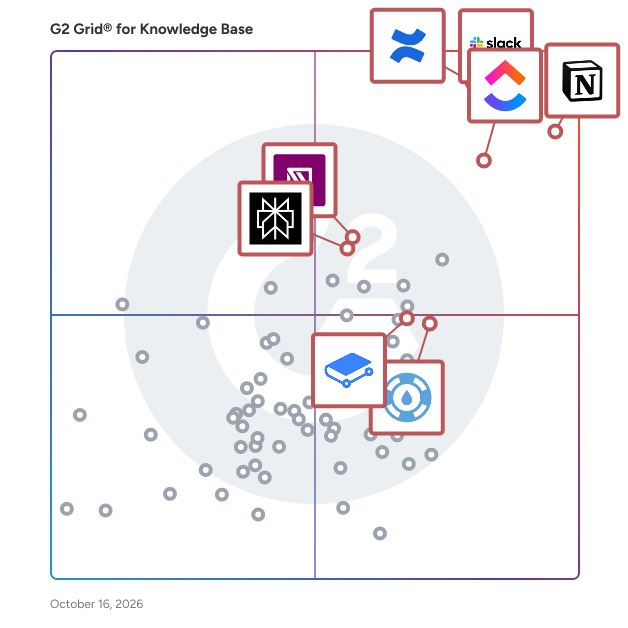
G2 Grid® for Knowledge Base Software

G2 Grid® for Knowledge Base Software plotting products by satisfaction and market presence

Highlighted products: Notion, ClickUp, Slack, Confluence, GitBook, IT Glue, Perplexity, and Helpjuice.

Underlying data: [Grid® JSON](https://www.g2.com/categories/knowledge-base-software/grids.json?focus%5B%5D=notion&focus%5B%5D=clickup&focus%5B%5D=slack&focus%5B%5D=confluence&focus%5B%5D=gitbook&focus%5B%5D=it-glue&focus%5B%5D=perplexity&focus%5B%5D=helpjuice&segment=small-business)

Zoho Learn

Online Portals for Group Collaboration & Knowledge Sharing

Average Rating: 4.1/5.0

Total Reviews: 36

How Do G2 Users Rate Zoho Learn?

  • Has the product been a good partner in doing business?: 9.2/10 (Category avg: 9.0/10)
  • Quality of Support: 7.9/10 (Category avg: 8.8/10)
  • Ease of Use: 7.6/10 (Category avg: 8.8/10)

Who Is the Company Behind Zoho Learn?

  • Seller: Zoho
  • Year Founded: 1996
  • HQ Location: Austin, TX
  • Twitter: @Zoho
    137,880 Twitter followers
  • LinkedIn® Page: www.linkedin.com
    30,913 employees on LinkedIn®
  • Phone: +1 (888) 900-9646

Who Uses This Product?

  • Who Uses This: Graduate Teaching Assistant
  • Top Industries: Higher Education, Education Management
  • Company Size: 42% Large, 39% Medium

What Are Recent G2 Reviews of Zoho Learn?

What Are G2 Users Discussing About Zoho Learn?

Zendesk for Employee Service

Zendesk for Employee Service is an easy to use, AI-powered solution designed to streamline internal service delivery across IT Service Management (ITSM), Human Resources Service Management (HRSM), and other internal support. Built on the Zendesk Resolution Platform and powered by AI trained on 18+ billion service interactions, Zendesk empowers teams to provide fast, accurate resolutions, increasing employee satisfaction and productivity. Easy to implement, scale, and adapt across departments, Zendesk is designed to accommodate the evolving needs of growing organizations without costly developer resources. The platform offers pre-built integrations with popular IT and HR systems, along with robust data analytics to drive informed decisions. Whether you're looking to build a top-tier service desk, improve incident management, automate workflows, or boost self-service capabilities, Zendesk for Employee Service provides the ease of use, flexibility and scalability required for today's dynamic workplace.

Average Rating: 4.5/5.0

Total Reviews: 110

How Do G2 Users Rate Zendesk for Employee Service?

  • Has the product been a good partner in doing business?: 8.3/10 (Category avg: 9.0/10)
  • Quality of Support: 8.9/10 (Category avg: 8.8/10)
  • Other Integrations: 10.0/10 (Category avg: 8.3/10)
  • Ease of Use: 8.9/10 (Category avg: 8.8/10)

Who Is the Company Behind Zendesk for Employee Service?

  • Seller: Zendesk
  • Company Website:
  • Year Founded: 2007
  • HQ Location: San Francisco, CA
  • Twitter: @Zendesk
    102,672 Twitter followers
  • LinkedIn® Page: www.linkedin.com
    7,537 employees on LinkedIn®

Who Uses This Product?

  • Top Industries: Information Technology and Services, Computer Software
  • Company Size: 52% Medium, 25% Small

What Do G2 Reviewers Say About Zendesk for Employee Service?

AI-generated summary from verified user reviews

Pros
  • Users value the quick access to company knowledge with Unleash, enhancing efficiency and team synchronization.
  • Users value the time-saving capabilities of Zendesk for Employee Service, significantly enhancing team efficiency and productivity.
  • Users value the AI-powered search capabilities of Zendesk for Employee Service, significantly enhancing support efficiency and collaboration.
  • Users appreciate the easy integrations of Zendesk for Employee Service, quickly getting up and running with excellent support.
  • Users appreciate the smooth integration process of Zendesk for Employee Service, enabling quick deployment and enhanced productivity.
Cons
  • Users find the AI limitations of Zendesk frustrating, with subpar code generation and transparency issues regarding algorithms.
  • Users note the limited features of Zendesk for Employee Service, lacking advanced options for complex needs.
  • Users find the limited options in Zendesk for Employee Service restricts advanced functionality and customization.
  • Users find the missing features in Zendesk for Employee Service limit its functionality for more complex needs.
  • Users experience slow loading times for complex information retrieval, impacting the overall efficiency of the platform.

What Are Recent G2 Reviews of Zendesk for Employee Service?

What Are G2 Users Discussing About Zendesk for Employee Service?

ProProfs Knowledge Base Software

ProProfs Knowledge Base is built to run your customer help center and internal knowledge base in one place, powered by AI to help organizations create, manage, and deliver help content for both audiences without switching tools. Teams use it to build public help centers, internal wikis, product documentation, SOPs, and onboarding resources, all from one workspace, reducing support tickets and centralizing company knowledge along the way. Popular use cases: Customer help centers and self-service portals Internal wikis and company knowledge hubs Product documentation and user manuals SOPs and process documentation Employee onboarding and training material AI Knowledge Brain: the engine behind the platform The AI Knowledge Brain learns continuously from your existing articles, FAQs, documentation, and videos, keeping answers accurate as your content grows. It powers: AI Writer: drafts full articles from a topic or brief, and refines or simplifies existing content AI Search Assistant: gives a direct, synthesized answer instead of a list of links AI Article Suggestions: reads natural language queries and surfaces the most relevant content AI Translation: translates articles into multiple languages while preserving tone and formatting AI Insights & Reports: flags failed searches, broken links, and knowledge gaps AI SEO Optimization: generates optimized titles and meta descriptions automatically AI Style Guides: keeps brand tone and terminology consistent across every writer AI Guide Creator: converts screen recordings into annotated step-by-step guides Everything else you'd expect from a modern knowledge base: WYSIWYG editor with professionally designed templates Branding and customization (colors, fonts, custom CSS/HTML, custom domains) Roles and permissions, workflows, and conditional content Version control and revision history Ticket forms, deflection, and help widgets SSO/SAML support and multilingual content Detailed reporting and analytics Whether the goal is cutting support volume, keeping internal knowledge from scattering across tools, or building a help center customers actually want to use, ProProfs Knowledge Base brings it all together in one platform.

Average Rating: 4.6/5.0

Total Reviews: 32

How Do G2 Users Rate ProProfs Knowledge Base Software?

  • Has the product been a good partner in doing business?: 8.8/10 (Category avg: 9.0/10)
  • Quality of Support: 9.3/10 (Category avg: 8.8/10)
  • Other Integrations: 9.6/10 (Category avg: 8.3/10)
  • Ease of Use: 9.5/10 (Category avg: 8.8/10)

Who Is the Company Behind ProProfs Knowledge Base Software?

  • Seller: ProProfs
  • Year Founded: 2009
  • HQ Location: Los Angeles, CA
  • Twitter: @ProProfs
    4,731 Twitter followers
  • LinkedIn® Page: www.linkedin.com
    213 employees on LinkedIn®

Who Uses This Product?

  • Top Industries: Information Technology and Services, Computer Software
  • Company Size: 47% Medium, 47% Small

What Are Recent G2 Reviews of ProProfs Knowledge Base Software?

What Are G2 Users Discussing About ProProfs Knowledge Base Software?

AI can help you find the answers. G2 helps you trust them.

Connect G2 to Claude or ChatGPT for answers grounded in G2's trusted reviews, comparisons, and pricing from real user insights.

How it works

Tana

Tana is where your meetings produce finished work, not just notes. Most tools stop at the transcript. Tana keeps going. It joins your meeting, captures the conversation, and turns it into the things you actually needed: action items assigned, decisions logged, a summary written, issues filed in GitHub or Linear, a draft ready to send. Often before the call ends. Everything then connects into one workspace that gets smarter the more you use it. Behind the calls, Tana is a connected workspace for notes, tasks, projects, and AI. You start by writing, and structure shows up when you need it. The AI works across everything you've captured, so it answers from your context instead of guessing. What makes Tana different is simple: other tools give you better notes, Tana gives you the work. And because every meeting and decision feeds the same knowledge graph, your AI keeps getting better at your codebase, your roadmap, and how your team thinks. Key features 🎥 Meetings that ship work Start a call in Tana, or capture one from Zoom, Teams, or Google Meet with the Mac app. Tana transcribes in real time and identifies speakers. When the call ends, it writes the summary, pulls out action items and decisions, and assigns tasks to the right people. You leave with finished work instead of a wall of text to clean up later. 🤖 An AI agent that acts in your meetings Say "Hey Tana" to bring an AI agent into the call. Ask it to pull up context, draft a document, or capture a moment as a structured note while you keep talking. It only reads what everyone in the meeting can already see. 🔌 Push work straight to your tools Tana connects to GitHub, Linear, Jira, Slack, and HubSpot. File a bug with an annotated screenshot, open a ticket, log a decision, or send a Slack update from a conversation. Hand a document or chat to coding agents like Claude Code, Cursor, or Codex to keep building. Connect your own tools through custom integrations. 💬 Chat with leading AI models on your own notes Talk to models from OpenAI, Anthropic, and Google inside Tana, and switch between them whenever you want. Point the AI at specific notes, meetings, or projects so it answers from your real context. Every change the AI makes shows up as a proposal you review before anything sticks. 🛠️ Build your own AI agents Describe what you need and Tana scaffolds an agent: its instructions, the tools it can use, even its voice. Run it on a schedule or bring it into a call. Give each space its own agent that knows that team's context. 📐 Structure that emerges as you work Add fields, status, and links to any note with Types, so your tasks, projects, people, and meetings stay connected. You never design a database first. Start by writing, get organized later, and keep all the context along the way. 📅 Walk into every meeting prepared Connect Google Calendar or Outlook and every event shows up in your day, ready for talking points and a one-click join. Before the call, ask Tana to pull together what matters from past meetings, notes, and decisions, so you walk in with the full picture instead of hunting for context. The Mac app reminds you when a call is starting and lets you begin capturing in a click. 🌅 A clear start to every day Each day opens to your meetings, tasks, and priorities in one place, tied to the date so nothing slips. Plan your day and see how it connects to the bigger picture. 🕸️ A knowledge graph that connects everything Your notes aren't dead pages. Backlinks and meaning-based search surface how meetings, decisions, and ideas relate, so patterns show up across your work and nothing lives in a silo. 🎨 Turn conversations into artifacts Generate storyboards, customer journey maps, and slide decks straight from a meeting or chat. Edit them inline and share a link with anyone, no account required. 🤝 Real-time collaboration and spaces Work together with live cursors and presence. Organize by team, project, or client in spaces, each with its own access and AI context. Bring in guests by link. Switch on Off the record to pause transcription and capture for sensitive moments. 🔎 Find anything, fast Search by keyword or meaning across everything you've captured. Filter by people, type, space, or privacy, and browse your meetings, tasks, documents, and agents in one library. Who it's for Tana is built for teams who want to move fast without losing context. - Product and engineering teams turning reviews, standups, and discovery calls into filed issues, PRDs, and logged decisions. - Founders and executives who want follow-ups, memos, and next steps done before the next meeting starts. - Consultants and advisors who send a polished deliverable before they're back at their desk. - Knowledge workers and teams building a shared brain instead of scattered notes across a dozen apps. Why choose Tana - Meetings that produce finished work, not just transcripts. - An AI agent that acts in your calls and pushes results to GitHub, Linear, Jira, Slack, and HubSpot. - Your choice of OpenAI, Anthropic, and Google models, working on your own notes. - A connected workspace where structure emerges as you work, with no setup tax. - Real-time transcription with action items, decisions, and summaries on every call. - Calendar integration, a Mac desktop app, and full access in any browser, synced in real time. - A knowledge graph that makes your AI smarter about your team over time. - You review every AI change before it lands. Other tools give you better notes. Tana gives you finished work, and a workspace that remembers everything your team decides. Start your next meeting in Tana and walk out with the work already done.

Average Rating: 4.3/5.0

Total Reviews: 45

How Do G2 Users Rate Tana?

  • Has the product been a good partner in doing business?: 9.0/10 (Category avg: 9.0/10)
  • Quality of Support: 8.7/10 (Category avg: 8.8/10)
  • Other Integrations: 10.0/10 (Category avg: 8.3/10)
  • Ease of Use: 8.9/10 (Category avg: 8.8/10)

Who Is the Company Behind Tana?

  • Seller: Tana
  • Year Founded: 2021
  • HQ Location: Palo Alto, US
  • Twitter: @tana_inc
    15,322 Twitter followers
  • LinkedIn® Page: www.linkedin.com
    56 employees on LinkedIn®

Who Uses This Product?

  • Top Industries: Computer Software, Information Technology and Services
  • Company Size: 55% Small, 34% Medium

What Are Recent G2 Reviews of Tana?

Bitrix24

Bitrix24 is an all-in-one business workspace that combines CRM, collaboration, and management tools in a single, easy-to-use platform – free for unlimited users. Whether you're a small team or a growing business, Bitrix24 helps you to: — Track leads and manage customer relationships with a built-in CRM — Stay on top of projects and tasks with Kanban boards, timelines, and time tracking — Communicate easily via team messenger, video calls, and shared calendars — Create and edit documents, manage files, and collect e-signatures — Run marketing campaigns and manage customer interactions through email, calls, and WhatsApp Bitrix24’s AI-powered assistant CoPilot helps automate routine tasks, write emails, analyze data, and suggest next steps, saving time and boosting productivity. What makes Bitrix24 a great solution for businesses: — Free forever for unlimited users, with access to core features and 5 GB storage — No per-user fees – upgrade only when you need more storage or advanced tools — Accessible anywhere via web, desktop, and mobile apps — Scalable – grow your business without switching platforms or juggling tools Over 15 million companies trust Bitrix24 to simplify operations, cut costs, and get more done – all in one place.

Average Rating: 4.1/5.0

Total Reviews: 578

How Do G2 Users Rate Bitrix24?

  • Has the product been a good partner in doing business?: 7.8/10 (Category avg: 9.0/10)
  • Quality of Support: 7.7/10 (Category avg: 8.8/10)
  • Other Integrations: 8.3/10 (Category avg: 8.3/10)
  • Ease of Use: 7.9/10 (Category avg: 8.8/10)

Who Is the Company Behind Bitrix24?

  • Seller: Bitrix24
  • Company Website:
  • Year Founded: 1998
  • HQ Location: Alexandria, Virginia
  • LinkedIn® Page: www.linkedin.com
    269 employees on LinkedIn®

Who Uses This Product?

  • Who Uses This: Marketing Manager, Project Manager
  • Top Industries: Information Technology and Services, Marketing and Advertising
  • Company Size: 56% Small, 34% Medium

What Do G2 Reviewers Say About Bitrix24?

AI-generated summary from verified user reviews

Pros
  • Users find Bitrix24 to be easy to use, effectively streamlining business processes and enhancing customer experience.
  • Users appreciate the team collaboration tools in Bitrix24, enhancing communication and streamlining business processes effortlessly.
  • Users admire the integrated task management of Bitrix24, enhancing collaboration and efficiency across teams.
  • Users appreciate the integration of essential tools in Bitrix24, boosting efficiency and collaboration across teams.
  • Users appreciate the flexibility and versatility of Bitrix24, enjoying its comprehensive features for business management.
Cons
  • Users find the learning curve steep, requiring time and training to fully utilize Bitrix24's extensive features.
  • Users express concern over missing features in Bitrix24, feeling that promised functionalities have been removed or altered.
  • Users express frustration over limited features in Bitrix24, feeling promised functionalities have been removed or restricted.
  • Users express concern over lacking features, with notable omissions affecting value as compared to initial promises.
  • Users report performance issues with Bitrix24, experiencing lag and slowdowns, especially during complex workflows.

What Are Recent G2 Reviews of Bitrix24?

What Are G2 Users Discussing About Bitrix24?

Fleeq

Fleeq allows users to create videos and interactive GIFs without a camera, narrator or a production crew.

Average Rating: 3.6/5.0

Total Reviews: 12

How Do G2 Users Rate Fleeq?

  • Has the product been a good partner in doing business?: 3.3/10 (Category avg: 9.0/10)
  • Quality of Support: 6.9/10 (Category avg: 8.8/10)
  • Ease of Use: 8.0/10 (Category avg: 8.8/10)

Who Is the Company Behind Fleeq?

  • Seller: Fleeq
  • Year Founded: 2016
  • HQ Location: Tel Aviv, Israel
  • Twitter: @fleeQ
    12 Twitter followers
  • LinkedIn® Page: www.linkedin.com
    1 employees on LinkedIn®

Who Uses This Product?

  • Company Size: 83% Small, 8% Medium

What Are Recent G2 Reviews of Fleeq?

What Are G2 Users Discussing About Fleeq?

Docwriter.io

Docwriter is a markdown language-based tool for creating easy-to-use online Documentation or Knowledge Base for your Project or Product. It is specially designed for business analysis and custom software development (web, mobile). ERP, CRM, Logistics, HR, MICE, Enterprise Software, Business tools.

Average Rating: 4.3/5.0

Total Reviews: 26

How Do G2 Users Rate Docwriter.io?

  • Has the product been a good partner in doing business?: 8.3/10 (Category avg: 9.0/10)
  • Quality of Support: 8.4/10 (Category avg: 8.8/10)
  • Other Integrations: 7.9/10 (Category avg: 8.3/10)
  • Ease of Use: 8.5/10 (Category avg: 8.8/10)

Who Is the Company Behind Docwriter.io?

Who Uses This Product?

  • Top Industries: Computer Software, Marketing and Advertising
  • Company Size: 54% Small, 46% Medium

What Are Recent G2 Reviews of Docwriter.io?

What Are G2 Users Discussing About Docwriter.io?

Neeraja Prakash
NP
Researched and written by Neeraja Prakash
Updated