Best GIS Software - Page 2

How Many GIS Software Products Does G2 Track?

Total Products under this Category: 356

Category Stats (Aug 2026)

  • Average Rating: 4.28/5 The average rating of products in this category, based on all submitted ratings
  • Top Trending Product: Octave Alto SDKs (Luciad) (+3.41%) - Among all products in this category, Octave Alto SDKs (Luciad) recorded the largest rating increase compared to last month

Last updated: August 06, 2026

How Does G2 Rank GIS Software Products?

Why You Can Trust G2's Software Rankings:

  • 30 Analysts and Data Experts
  • 8,000+ Authentic Reviews
  • 356+ Products
  • Unbiased Rankings

G2's software rankings are built on verified user reviews, rigorous moderation, and a consistent research methodology maintained by a team of analysts and data experts. Each product is measured using the same transparent criteria, with no paid placement or vendor influence. While reviews reflect real user experiences, which can be subjective, they offer valuable insight into how software performs in the hands of professionals. Together, these inputs power the G2 Score, a standardized way to compare tools within every category.

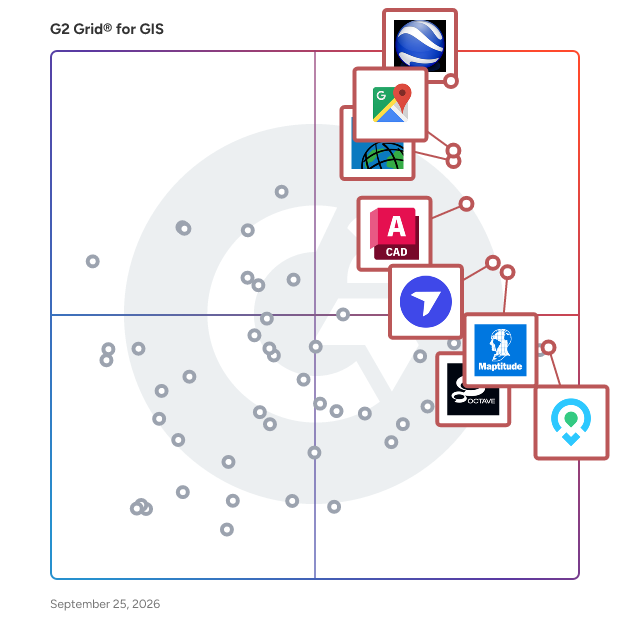
G2 Grid® for GIS Software

G2 Grid® for GIS Software plotting products by satisfaction and market presence

Highlighted products: Google Earth Pro, Google Maps Platform, Esri ArcGIS, AutoCAD, Maptitude, DroneDeploy, Mapme, and BatchGeo.

Underlying data: [Grid® JSON](https://www.g2.com/categories/gis/grids.json?focus%5B%5D=google-earth-pro&focus%5B%5D=google-maps-platform&focus%5B%5D=esri-arcgis&focus%5B%5D=autocad&focus%5B%5D=maptitude&focus%5B%5D=dronedeploy&focus%5B%5D=mapme&focus%5B%5D=batchgeo)

Sponsored

Smarty

Smarty offers global address verification, address validation, and geocoding via API, bulk upload, and a collection of 3rd party integrations that transform how organizations handle address data. With real-time address autocomplete, correction, standardization, and validation, it guarantees the accuracy and reliability of addresses. Smarty's US rooftop geocoding, reverse geocoding, and property data APIs help you enrich and hone your address data. These powerful APIs have far-reaching benefits, from improving the efficiency of your marketing campaigns to enhancing data analysis and operational processes.

Visit website

Mergin Maps

Mergin Maps is a field data collection tool built on the free and open-source QGIS which allows you to collect, store and synchronise your data with your team. It removes the pain of writing down paper notes, georeferencing photos and transcribing GPS coordinates. With Mergin Maps, you can get your QGIS projects into the mobile app, collect data and synchronise it back on the server. Setting up your project with Mergin Maps only takes a few minutes. First, create your survey project in QGIS, then connect it to Mergin Maps with a plugin and synchronise it with the mobile app to start collecting in the field. The data you capture in the field survey is shown on a map and can be exported to a wide variety of formats including CSV, Microsoft Excel, ESRI Shapefile, Mapinfo, GeoPackage, PostGIS, AutoCAD DXF, and KML. Mergin Maps allows you to do live position tracking, fill out survey forms and capture and edit points, lines or polygons. You can also connect external GPS/GNSS devices via Bluetooth for high-precision surveying. Map layers look the same as in QGIS desktop so you can set your layer symbology how you want it on the desktop and it will appear that way on your mobile device. Mergin Maps supports offline field data capture for situations where a data connection is unavailable. It can be configured to use either offline or web-based background maps and contextual layers. Perks of the Mergin Maps sync system: - No need for cables to get your data on/off your device - Share projects with others for collaborative working, even offline - Updates from different surveyors are intelligently merged - Push data back from the field in real time - Version history and cloud-based backup - Fine-grained access control - Record metadata such as EXIF, GPS and external GNSS device information - Sync with your PostGIS datasets and external media storage such as S3 and MinIO Supported field types for forms are: - Text (single or multi-line) - Numeric (plain, with +/- buttons or with slider) - Date / time (with calendar picker) - Photo - Checkbox (yes/no values) - Drop-down with predefined values - Drop-down with values from another table

Average Rating: 4.7/5.0

Total Reviews: 34

How Do G2 Users Rate Mergin Maps?

  • Data Capture: 9.2/10 (Category avg: 8.6/10)
  • Data Visualization: 7.6/10 (Category avg: 8.6/10)
  • Ease of Use: 8.8/10 (Category avg: 8.4/10)
  • Spatial Analysis: 7.7/10 (Category avg: 8.4/10)

Who Is the Company Behind Mergin Maps?

Who Uses This Product?

  • Top Industries: Environmental Services
  • Company Size: 71% Small, 29% Medium

What Do G2 Reviewers Say About Mergin Maps?

AI-generated summary from verified user reviews

Pros
  • Users find Mergin Maps exceptionally easy to use, with seamless integration and smooth setup enhancing their experience.
  • Users find Mergin Maps to be incredibly user-friendly, making GIS accessible for both students and community projects.
  • Users value the easy integration with QGIS, enhancing data collection and user experience in community projects.
  • Users highlight the ease of use and integration of Mergin Maps, enhancing their mapping experiences in educational projects.
  • Users commend the responsive and helpful customer support from Mergin Maps, enhancing their overall experience.
Cons
  • Users note integration issues due to Mergin Maps' popularity, necessitating additional training and compatibility improvements.
  • Users find the learning curve steep due to limited familiarity and complex DB sync setup, necessitating extra training.
  • Users find the DB sync setup overly complex, requiring an API for easier cloud data access and automation.
  • Users experience data loss concerns, compounded by slow support response times in urgent situations.
  • Users face storage limitations on the free plan, which can hinder the use of larger datasets in Mergin Maps.

What Are Recent G2 Reviews of Mergin Maps?

Smarty

Smarty offers global address verification, address validation, and geocoding via API, bulk upload, and a collection of 3rd party integrations that transform how organizations handle address data. With real-time address autocomplete, correction, standardization, and validation, it guarantees the accuracy and reliability of addresses. Smarty's US rooftop geocoding, reverse geocoding, and property data APIs help you enrich and hone your address data. These powerful APIs have far-reaching benefits, from improving the efficiency of your marketing campaigns to enhancing data analysis and operational processes.

Average Rating: 4.6/5.0

Total Reviews: 313

How Do G2 Users Rate Smarty?

  • Data Capture: 9.5/10 (Category avg: 8.6/10)
  • Data Visualization: 9.0/10 (Category avg: 8.6/10)
  • Ease of Use: 9.3/10 (Category avg: 8.4/10)
  • Spatial Analysis: 9.2/10 (Category avg: 8.4/10)

Who Is the Company Behind Smarty?

  • Seller: Smarty
  • Company Website:
  • Year Founded: 2011
  • HQ Location: Provo, Utah
  • Twitter: @smartycompany
    1,251 Twitter followers
  • LinkedIn® Page: www.linkedin.com
    149 employees on LinkedIn®

Who Uses This Product?

  • Who Uses This: CTO, CEO
  • Top Industries: Computer Software, Financial Services
  • Company Size: 51% Small, 38% Medium

What Do G2 Reviewers Say About Smarty?

AI-generated summary from verified user reviews

Pros
  • Users praise Smarty for its ease of use, allowing quick implementation and accurate address verification for mailings.
  • Users value the address validation capabilities of Smarty, significantly reducing mailing errors and saving costs for organizations.
  • Users commend Smarty for its high data accuracy, enabling precise address suggestions essential for e-commerce efficiency.
  • Users appreciate the easy integration of Smarty, significantly improving workflow and reducing errors in address validation.
  • Users praise Smarty for its exceptional customer support, highlighting quick and friendly responses to inquiries and issues.
Cons
  • Users face formatting issues with addresses, leading to frustrating invalid results despite minor errors in input.
  • Users find the API issues confusing, particularly regarding codes and address suggestions affecting usability.
  • Users note the high cost of Smarty, suggesting it could be more accessible for small businesses.
  • Users find feature limitations in Smarty, particularly for complex use cases and detailed usage reporting.
  • Users face integration issues, struggling with testing environments and limited support causing frustration in API implementation.

What Are Recent G2 Reviews of Smarty?

ArcGIS Online

Connect people, locations, and data using interactive maps created with ArcGIS Online. Quickly create maps by dropping in your spreadsheet and mashing it up with other location data included in ArcGIS Online. Apply Smart Mapping styles to make your data visually stunning and use intuitive analysis tools to deliver location intelligence. Add valuable context to your data by combining it with Esri’s demographic and lifestyle data. Work collaboratively with your colleagues to build maps and apps. Instantly share your maps and apps with anyone, anywhere. Thousands of organizations and millions of users have proven ArcGIS Online to be a scalable and secure software-as-a-service hosted by Esri.

Average Rating: 4.5/5.0

Total Reviews: 174

How Do G2 Users Rate ArcGIS Online?

  • Data Capture: 8.3/10 (Category avg: 8.6/10)
  • Data Visualization: 8.8/10 (Category avg: 8.6/10)
  • Ease of Use: 8.4/10 (Category avg: 8.4/10)
  • Spatial Analysis: 8.5/10 (Category avg: 8.4/10)

Who Is the Company Behind ArcGIS Online?

  • Seller: Esri
  • Year Founded: 1969
  • HQ Location: Redlands, CA
  • Twitter: @Esri
    188,738 Twitter followers
  • LinkedIn® Page: www.linkedin.com
    7,311 employees on LinkedIn®

Who Uses This Product?

  • Who Uses This: GIS Analyst, GIS Specialist
  • Top Industries: Government Administration, Civil Engineering
  • Company Size: 40% Medium, 32% Large

What Do G2 Reviewers Say About ArcGIS Online?

AI-generated summary from verified user reviews

Pros
  • Users find the ease of use in ArcGIS Online essential for timely project delivery and effective data visualization.
  • Users praise the user-friendly interface and features of ArcGIS Online for effective project delivery and implementation.
  • Users value the collaboration features of ArcGIS Online, facilitating easy sharing and access to valuable data.
  • Users value the data management capabilities of ArcGIS Online, appreciating access to extensive ESRI datasets for analysis.
  • Users appreciate the intuitive design of ArcGIS Online, enhancing their experience with seamless implementation and features.
Cons
  • Users are frustrated with the high cost of ArcGIS Online, finding it a barrier to frequent use.
  • Users are frustrated with the expensive subscription costs of ArcGIS Online, which limits frequent usage.
  • Users note the high system requirements of ArcGIS Online, limiting its accessibility for complete analysis or modeling tasks.
  • Users find the learning curve steep, requiring full software and processing power for advanced analysis and modeling.
  • Users experience delayed customer support with ArcGIS Online, impacting their overall satisfaction with the product.

What Are Recent G2 Reviews of ArcGIS Online?

What Are G2 Users Discussing About ArcGIS Online?

Living Atlas of the World

Living Atlas of the World is the foremost collection of global geographic information from Esri and its partners, including maps, apps, and data layers used to support critical decision making.

Average Rating: 4.2/5.0

Total Reviews: 10

How Do G2 Users Rate Living Atlas of the World?

  • Data Capture: 7.7/10 (Category avg: 8.6/10)
  • Data Visualization: 8.6/10 (Category avg: 8.6/10)
  • Ease of Use: 8.0/10 (Category avg: 8.4/10)
  • Spatial Analysis: 8.3/10 (Category avg: 8.4/10)

Who Is the Company Behind Living Atlas of the World?

  • Seller: Esri
  • Year Founded: 1969
  • HQ Location: Redlands, CA
  • Twitter: @Esri
    188,738 Twitter followers
  • LinkedIn® Page: www.linkedin.com
    7,311 employees on LinkedIn®

Who Uses This Product?

  • Company Size: 40% Small, 30% Medium

What Do G2 Reviewers Say About Living Atlas of the World?

AI-generated summary from verified user reviews

Pros
  • Users value the comprehensive data available in Living Atlas of the World, simplifying access to global geographic information.
Cons
  • Users often face mapping issues, getting lost without knowing specific data to search for in Living Atlas of the World.

What Are Recent G2 Reviews of Living Atlas of the World?

What Are G2 Users Discussing About Living Atlas of the World?

ArcGIS Enterprise

Manage, map, analyze, and share Geographic Information Systems (GIS) data with ArcGIS Enterprise, the complete geospatial system that powers your data-driven decisions. ArcGIS Enterprise gives you a secure, browser-based mapping and analytics platform that leverages Esri’s powerful technology and extends your capabilities in the areas of real-time, big data, imagery, and more.

Average Rating: 4.4/5.0

Total Reviews: 62

How Do G2 Users Rate ArcGIS Enterprise?

  • Data Capture: 8.5/10 (Category avg: 8.6/10)
  • Data Visualization: 8.7/10 (Category avg: 8.6/10)
  • Ease of Use: 7.9/10 (Category avg: 8.4/10)
  • Spatial Analysis: 8.9/10 (Category avg: 8.4/10)

Who Is the Company Behind ArcGIS Enterprise?

  • Seller: Esri
  • Year Founded: 1969
  • HQ Location: Redlands, CA
  • Twitter: @Esri
    188,738 Twitter followers
  • LinkedIn® Page: www.linkedin.com
    7,311 employees on LinkedIn®

Who Uses This Product?

  • Top Industries: Government Administration, Information Technology and Services
  • Company Size: 51% Medium, 27% Large

What Do G2 Reviewers Say About ArcGIS Enterprise?

AI-generated summary from verified user reviews

Pros
  • Users value the analytical tools of ArcGIS Enterprise for enhancing data visualization and informed decision-making.
  • Users value the collaborative features of ArcGIS Enterprise, enhancing teamwork and data sharing across diverse skill levels.
  • Users value the user-friendly content creation tools of ArcGIS Enterprise, enhancing GIS accessibility and collaboration across skill levels.
  • Users praise the user-friendly interface of ArcGIS Enterprise, making it accessible for all skill levels in GIS.
  • Users value the seamless integrations of ArcGIS Enterprise, enhancing workflow efficiency and collaboration across Esri products.
Cons
  • Users face dependency issues with ArcGIS Enterprise, often affecting usability due to reliance on internet connectivity.
  • Users find ArcGIS Enterprise to be expensive, leading to concerns about cost-effectiveness for their GIS needs.
  • Users note a challenging learning curve with ArcGIS Enterprise, making it difficult for novice users to adapt quickly.
  • Users often face sporadic performance issues with ArcGIS Enterprise, impacting their overall experience and efficiency.

What Are Recent G2 Reviews of ArcGIS Enterprise?

Mapbox

Mapbox is the live location platform preferred by over 4 million developers. Mapbox provides precise location data and flexible developer tools that equip any business to add geospatial features to their applications and enhance operations with location intelligence. Customers span automotive, logistics, business intelligence, retail, travel, data visualization, consumer apps, weather, IoT, geospatial analysis, and beyond. With the leading map rendering technology for web and mobile, Mapbox is known for providing highly performant, customizable, reliable, and scalable location services trusted by developers, companies, and business leaders. Mapbox services include global map data, real-time traffic, geocoding and address search, and routing and directions for navigation. Build with Mapbox via APIs, code libraries, SDKs, and comprehensive developer documentation. Designed for businesses of all sizes, Mapbox is free to start building with and pricing is based on monthly usage, no upfront licenses or contracts required. Mapbox is a global team of 700+ with offices in Washington D.C., Helsinki, and Tokyo. Mapbox was founded in 2010. Today, Mapbox powers the location intelligence of platforms, apps, and brands around the world.

Average Rating: 4.3/5.0

Total Reviews: 41

How Do G2 Users Rate Mapbox?

  • Data Capture: 9.0/10 (Category avg: 8.6/10)
  • Data Visualization: 9.2/10 (Category avg: 8.6/10)
  • Ease of Use: 8.4/10 (Category avg: 8.4/10)
  • Spatial Analysis: 8.3/10 (Category avg: 8.4/10)

Who Is the Company Behind Mapbox?

  • Seller: Mapbox
  • Year Founded: 2011
  • HQ Location: Washington D.C.
  • Twitter: @Mapbox
    76,538 Twitter followers
  • LinkedIn® Page: www.linkedin.com
    956 employees on LinkedIn®

Who Uses This Product?

  • Company Size: 66% Small, 20% Medium

What Are Recent G2 Reviews of Mapbox?

Scribble Maps

Trusted for over 15 years by hobbyists and professionals, Scribble Maps offers an intuitive online platform for web mapping and data visualization. Users can annotate maps, plot territories, filter and analyze data, optimize routes, and more—all with a low learning curve that makes map creation accessible to every level of an organization. Founded in 2009, Scribble Maps has been continuously refined through direct user feedback. Our team portal lets teams collaborate and work together on maps and with a host of exporting options, Scribble Maps can integrate with existing work flows to bring geospatial capability to your entire organization.

Average Rating: 4.6/5.0

Total Reviews: 195

How Do G2 Users Rate Scribble Maps?

  • Data Capture: 9.2/10 (Category avg: 8.6/10)
  • Data Visualization: 9.5/10 (Category avg: 8.6/10)
  • Ease of Use: 9.0/10 (Category avg: 8.4/10)
  • Spatial Analysis: 8.9/10 (Category avg: 8.4/10)

Who Is the Company Behind Scribble Maps?

  • Seller: Scribble Maps
  • Company Website:
  • Year Founded: 2009
  • HQ Location: Walnut, California
  • Twitter: @scribblemaps
    4,106 Twitter followers
  • LinkedIn® Page: www.linkedin.com
    4 employees on LinkedIn®

Who Uses This Product?

  • Top Industries: Construction, Real Estate
  • Company Size: 70% Small, 24% Medium

What Do G2 Reviewers Say About Scribble Maps?

AI-generated summary from verified user reviews

Pros
  • Users highlight the ease of use of Scribble Maps, enabling quick map creation with an intuitive interface.
  • Users value the intuitive mapping features of Scribble Maps, enabling quick, easy customization and effective communication.
  • Users appreciate the intuitive interface of Scribble Maps, allowing quick and easy map creation without GIS expertise.
  • Users love the intuitive interface of Scribble Maps, making map creation easy and accessible for everyone.
  • Users appreciate the easy-to-use design of Scribble Maps, enabling quick visualizations without complex tools.
Cons
  • Users find the limited customization of Scribble Maps makes it hard to manage complex projects and maintain clarity.
  • Users experience mapping issues with lag and clutter when adding multiple elements, hindering a streamlined mapping experience.
  • Users find that app bugs lead to a cluttered interface, making it difficult to manage their maps effectively.
  • Users find customization difficult, particularly with large projects and integration with tools like CAD, impacting efficiency.
  • Users experience lag issues with Scribble Maps when adding multiple elements and desire more icons and templates.

What Are Recent G2 Reviews of Scribble Maps?

What Are G2 Users Discussing About Scribble Maps?

CARTO

CARTO is the leading cloud-native spatial analysis platform. Unlike other GIS systems, CARTO eliminates data fragmentation and technical bottlenecks by letting you build and deploy everything from AI Agents and geospatial workflows to interactive maps directly within your data warehouse. CARTO breaks down the silos between technical and business teams, making spatial analysis accessible to everyone - from technical specialists like data analysts, GIS analysts & developers, to business analysts and decision-makers. This makes Location Intelligence more accessible, scalable, and governable, helping companies turn their data into business value for use cases like optimizing network planning, assessing risk, and identifying growth opportunities.

Average Rating: 4.5/5.0

Total Reviews: 64

How Do G2 Users Rate CARTO?

  • Data Capture: 8.3/10 (Category avg: 8.6/10)
  • Data Visualization: 8.3/10 (Category avg: 8.6/10)
  • Ease of Use: 8.7/10 (Category avg: 8.4/10)
  • Spatial Analysis: 8.3/10 (Category avg: 8.4/10)

Who Is the Company Behind CARTO?

  • Seller: CartoDB
  • Year Founded: 2012
  • HQ Location: New York, NY
  • Twitter: @CARTO
    31,099 Twitter followers
  • LinkedIn® Page: www.linkedin.com
    344 employees on LinkedIn®

Who Uses This Product?

  • Top Industries: Telecommunications, Information Technology and Services
  • Company Size: 47% Small, 31% Large

What Do G2 Reviewers Say About CARTO?

AI-generated summary from verified user reviews

Pros
  • Users value the ease of use of CARTO, enabling quick and intuitive creation of interactive maps without GIS expertise.
  • Users love the ease of map creation with CARTO, enabling intuitive and interactive visualizations without GIS expertise.
  • Users commend the user-friendly 3D visualization of CARTO, enabling effortless mapping and insights without GIS expertise.
  • Users value the powerful data visualization options in CARTO, facilitating easy, intuitive map creation and insights.
  • Users praise CARTO for its user-friendly visualization tools, converting complex data into actionable insights effortlessly.
Cons
  • Users face challenges with big data issues, like needing SQL knowledge and slow performance with large datasets.
  • Users find the customization difficulty challenging, needing SQL skills and facing performance issues with large datasets.
  • Users find the limited customization options of CARTO challenging, especially requiring SQL knowledge for advanced features.
  • Users find CARTO slow when handling large datasets, impacting performance and user experience significantly.
  • Users experience slow performance with CARTO, especially when managing large datasets, affecting usability and efficiency.

What Are Recent G2 Reviews of CARTO?

What Are G2 Users Discussing About CARTO?

Bing Maps API

Bing Maps provides multiple API options for your application including an AJAX control, a Windows Store apps control, a WPF control etc.

Average Rating: 4.4/5.0

Total Reviews: 12

How Do G2 Users Rate Bing Maps API?

  • Data Capture: 7.5/10 (Category avg: 8.6/10)
  • Data Visualization: 10.0/10 (Category avg: 8.6/10)
  • Ease of Use: 8.9/10 (Category avg: 8.4/10)
  • Spatial Analysis: 10.0/10 (Category avg: 8.4/10)

Who Is the Company Behind Bing Maps API?

  • Seller: Microsoft
  • Year Founded: 1975
  • HQ Location: Redmond, Washington
  • Twitter: @microsoft
    13,091,739 Twitter followers
  • LinkedIn® Page: www.linkedin.com
    231,632 employees on LinkedIn®
  • Ownership: MSFT

Who Uses This Product?

  • Company Size: 42% Medium, 33% Large

What Are Recent G2 Reviews of Bing Maps API?

What Are G2 Users Discussing About Bing Maps API?

Azure Maps

Azure Maps provides developers from all industries, powerful geospatial capabilities, packed with fresh mapping data necessary to provide geographic context to web and mobile applications.

Average Rating: 4.1/5.0

Total Reviews: 12

How Do G2 Users Rate Azure Maps?

  • Data Capture: 8.3/10 (Category avg: 8.6/10)
  • Data Visualization: 8.8/10 (Category avg: 8.6/10)
  • Ease of Use: 8.3/10 (Category avg: 8.4/10)
  • Spatial Analysis: 8.8/10 (Category avg: 8.4/10)

Who Is the Company Behind Azure Maps?

  • Seller: Microsoft
  • Year Founded: 1975
  • HQ Location: Redmond, Washington
  • Twitter: @microsoft
    13,091,739 Twitter followers
  • LinkedIn® Page: www.linkedin.com
    231,632 employees on LinkedIn®
  • Ownership: MSFT

Who Uses This Product?

  • Company Size: 50% Small, 50% Large

What Are Recent G2 Reviews of Azure Maps?

ArcGIS Earth

ArcGIS Earth is a simple, lightweight, easy-to-use desktop application that allows you to display and explore a variety of 3D and 2D map data for any part of the world.

Average Rating: 4.3/5.0

Total Reviews: 28

How Do G2 Users Rate ArcGIS Earth?

  • Data Capture: 8.6/10 (Category avg: 8.6/10)
  • Data Visualization: 9.2/10 (Category avg: 8.6/10)
  • Ease of Use: 8.3/10 (Category avg: 8.4/10)
  • Spatial Analysis: 9.3/10 (Category avg: 8.4/10)

Who Is the Company Behind ArcGIS Earth?

  • Seller: Esri
  • Year Founded: 1969
  • HQ Location: Redlands, CA
  • Twitter: @Esri
    188,738 Twitter followers
  • LinkedIn® Page: www.linkedin.com
    7,311 employees on LinkedIn®

Who Uses This Product?

  • Top Industries: Government Administration
  • Company Size: 52% Medium, 41% Small

What Are Recent G2 Reviews of ArcGIS Earth?

Oracle Spatial

Oracle Spatial and Graph supports a full range of geospatial data and analytics for land management and GIS, mobile location services, sales territory management, transportation, LiDAR analysis and location-enabled Business Intelligence.

Average Rating: 4.0/5.0

Total Reviews: 25

How Do G2 Users Rate Oracle Spatial?

  • Data Capture: 8.4/10 (Category avg: 8.6/10)
  • Data Visualization: 9.1/10 (Category avg: 8.6/10)
  • Ease of Use: 7.4/10 (Category avg: 8.4/10)
  • Spatial Analysis: 8.7/10 (Category avg: 8.4/10)

Who Is the Company Behind Oracle Spatial?

  • Seller: Oracle
  • Year Founded: 1977
  • HQ Location: Austin, TX
  • Twitter: @Oracle
    827,997 Twitter followers
  • LinkedIn® Page: www.linkedin.com
    208,078 employees on LinkedIn®
  • Ownership: NYSE:ORCL

Who Uses This Product?

  • Company Size: 44% Medium, 40% Large

What Are Recent G2 Reviews of Oracle Spatial?

Geoapify

The Geoapify Location Platform offers maps, APIs, and location services that help to build custom location-aware applications. Using our vector and raster map tiles, geocoding, routing and route optimization, isoline, and other APIs will allow you to develop beautiful and smart solutions for your business.

Average Rating: 4.9/5.0

Total Reviews: 18

How Do G2 Users Rate Geoapify?

  • Data Capture: 9.4/10 (Category avg: 8.6/10)
  • Data Visualization: 9.0/10 (Category avg: 8.6/10)
  • Ease of Use: 9.4/10 (Category avg: 8.4/10)
  • Spatial Analysis: 10.0/10 (Category avg: 8.4/10)

Who Is the Company Behind Geoapify?

  • Seller: Geoapify
  • Year Founded: 2019
  • HQ Location: Mering, Bayern 86415, DE
  • Twitter: @geoapify
    243 Twitter followers
  • LinkedIn® Page: www.linkedin.com
    3 employees on LinkedIn®

Who Uses This Product?

  • Company Size: 56% Small, 22% Large

What Do G2 Reviewers Say About Geoapify?

AI-generated summary from verified user reviews

Pros
  • Users commend the ease of use of Geoapify, appreciating its straightforward approach and accessibility for all tasks.
  • Users value the uncomplicated address retrieval from Geoapify, simplifying their data processing tasks efficiently.
  • Users value the high data accuracy of Geoapify, enabling precise address generation for targeted sales efforts.
  • Users value Geoapify for its easy implementation, allowing for quick and straightforward setup without confusion.
  • Users appreciate the quick and easy usability of Geoapify, finding it straightforward and instant to set up.
Cons
  • Users experience occasional mapping issues, particularly with specific addresses, impacting the overall effectiveness of Geoapify.

What Are Recent G2 Reviews of Geoapify?

What Are G2 Users Discussing About Geoapify?

OpenStreetMap

OpenStreetMap (OSM) is a collaborative project that creates a free, editable map of the world, maintained by a community of volunteers. Established in 2004, OSM allows users to contribute and update data about roads, trails, cafés, railway stations, and more, utilizing tools like aerial imagery and GPS devices. Key Features and Functionality: - Editable Map Data: Users can add and modify map information, ensuring up-to-date and accurate representations of geographic areas. - Diverse Data Inclusion: OSM encompasses a wide range of data, including roads, buildings, addresses, points of interest, and natural features. - Community-Driven Contributions: With nearly 5 million registered users and over 1 million active contributors worldwide, OSM thrives on local knowledge and collective effort. - Open Data License: All map data is freely available under the Open Database License, allowing unrestricted use and distribution with proper attribution. Primary Value and User Solutions: OpenStreetMap provides an open-source alternative to proprietary mapping services, offering free access to comprehensive and customizable geographic data. It empowers individuals, organizations, and developers to create tailored maps, support navigation applications, and conduct geospatial analyses without licensing fees. OSM's emphasis on local knowledge ensures detailed and accurate mapping, particularly in areas underserved by commercial mapping services. Additionally, its open data model fosters innovation and collaboration across various sectors, including humanitarian aid, urban planning, and transportation.

Average Rating: 3.9/5.0

Total Reviews: 18

How Do G2 Users Rate OpenStreetMap?

  • Data Capture: 7.7/10 (Category avg: 8.6/10)
  • Data Visualization: 8.5/10 (Category avg: 8.6/10)
  • Ease of Use: 8.5/10 (Category avg: 8.4/10)
  • Spatial Analysis: 7.8/10 (Category avg: 8.4/10)

Who Is the Company Behind OpenStreetMap?

  • Seller: OpenStreetMap
  • HQ Location: Netherlands
  • Twitter: @openstreetmap
    83,242 Twitter followers
  • LinkedIn® Page: www.linkedin.com
    99 employees on LinkedIn®

Who Uses This Product?

  • Company Size: 47% Small, 37% Large

What Do G2 Reviewers Say About OpenStreetMap?

AI-generated summary from verified user reviews

Pros
  • Users highlight the easy integration of OpenStreetMap with various projects, enhancing its usability and functionality.
  • Users appreciate the free access to OpenStreetMap, benefiting from its powerful and flexible mapping capabilities.
  • Users appreciate the flexibility and offline capabilities of OpenStreetMap, making it an excellent free mapping tool.
  • Users love the powerful mapping tools of OpenStreetMap, appreciating its flexibility and offline usage for projects.

What Are Recent G2 Reviews of OpenStreetMap?

What Are G2 Users Discussing About OpenStreetMap?

MapInfo Pro

Location-based decisions: Explore, model and act with confidence. Harness the power of sophisticated mapping and geographical analysis software to make intelligent and productive business decisions. Location adds complexity to many decisions, and mistakes are too expensive for a “trial and error” approach. With MapInfo Pro, customers can easily identify – and make better decisions on – people, places, and patterns of interest. More and more people need to explore, model and act with confidence on… - Site selection - Asset management - Demand management - Risk management/ service resource allocation MapInfo Pro delivers: 1) An all-in-one solution A full-featured desktop solution to prepare data for web mapping applications and create presentation quality maps in a familiar environment that combines data analysis, visual insights, and map publishing. - Data analysis - Visual insights - Map publishing 2) MapInfo Marketplace Enhance your location analytics with the MapInfo Marketplace. Bring analytics to life and solve your specific business needs with customized apps that are released and updated continuously. 3) Team MapInfo Pro supports the larger team of business experts, database experts, and developers who collaborate to deliver “self-serve” decision tools across the entire organization allowing location analysts to focus on special projects and creating templates for others to use. 4) Community The MapInfo community is your professional peer group of location analysts who can provide ideas, tips and tricks, and help guide the future development of MapInfo Pro Make the move to MapInfo Pro v2021 and join the MapInfo Pro community. Together, we’ll take a new, exciting journey as we collaborate to improve the future of mapping analytics.

Average Rating: 4.1/5.0

Total Reviews: 107

How Do G2 Users Rate MapInfo Pro?

  • Data Capture: 8.7/10 (Category avg: 8.6/10)
  • Data Visualization: 8.3/10 (Category avg: 8.6/10)
  • Ease of Use: 7.9/10 (Category avg: 8.4/10)
  • Spatial Analysis: 8.2/10 (Category avg: 8.4/10)

Who Is the Company Behind MapInfo Pro?

  • Seller: Precisely
  • HQ Location: Burlington, Massachusetts
  • Twitter: @PreciselyData
    3,963 Twitter followers
  • LinkedIn® Page: www.linkedin.com
    3,006 employees on LinkedIn®

Who Uses This Product?

  • Top Industries: Civil Engineering, Telecommunications
  • Company Size: 46% Large, 28% Medium

What Are Recent G2 Reviews of MapInfo Pro?

What Are G2 Users Discussing About MapInfo Pro?

Daniel Rivera
DR
Researched and written by Daniel Rivera
Updated March 4, 2025