Best Email Signature Manager - Page 2

How Many Email Signature Software Products Does G2 Track?

Total Products under this Category: 82

Category Stats (Aug 2026)

  • Average Rating: 4.47/5 (↑0.02 vs Jul 2026) The average rating of products in this category, based on all submitted ratings
  • Top Trending Product: Rocketseed (+0.55%) - Among all products in this category, Rocketseed recorded the largest rating increase compared to last month

Last updated: August 04, 2026

How Does G2 Rank Email Signature Software Products?

Why You Can Trust G2's Software Rankings:

  • 30 Analysts and Data Experts
  • 16,600+ Authentic Reviews
  • 82+ Products
  • Unbiased Rankings

G2's software rankings are built on verified user reviews, rigorous moderation, and a consistent research methodology maintained by a team of analysts and data experts. Each product is measured using the same transparent criteria, with no paid placement or vendor influence. While reviews reflect real user experiences, which can be subjective, they offer valuable insight into how software performs in the hands of professionals. Together, these inputs power the G2 Score, a standardized way to compare tools within every category.

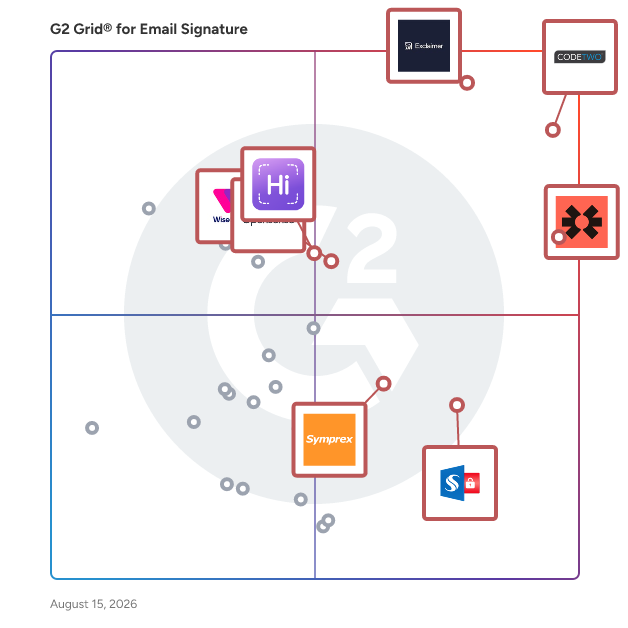
G2 Grid® for Email Signature Software

G2 Grid® for Email Signature Software plotting products by satisfaction and market presence

Highlighted products: CodeTwo Email Signatures 365, Exclaimer, Blinq, WiseStamp, Opensense Email Signatures, HiHello, Sigsync, and Signature 365.

Underlying data: [Grid® JSON](https://www.g2.com/categories/email-signature/grids.json?focus%5B%5D=codetwo-email-signatures-365&focus%5B%5D=exclaimer&focus%5B%5D=blinq-me&focus%5B%5D=wisestamp&focus%5B%5D=opensense-email-signatures&focus%5B%5D=hihello&focus%5B%5D=sigsync&focus%5B%5D=signature-365)

Sponsored

WiseStamp

WiseStamp is an award-winning, enterprise-grade email signature management platform designed to scale with the needs of market-leading organizations. Trusted by over 1.5 million customers worldwide, WiseStamp enables businesses to centrally create, manage, and deploy professional, on-brand email signatures effortlessly. WiseStamp turns every email into a powerful brand asset, enabling enterprises to maintain brand consistency, enhance engagement, and drive business impact at scale. WiseStamp also works seamlessly with all email platforms - no coding needed! Turn every email into an opportunity. Make it count.

Visit website

Dynasend

Pioniere nella gestione delle firme email, Dynasend è stata fondata nel 1999 con l'idea che la semplice firma email svolga un ruolo sproporzionato nel branding aziendale - spesso servendo come prima impressione del marchio. Sostituire firme casuali, create dagli utenti, fai-da-te con firme standardizzate (approvate dal marchio) è stato al centro di tutto ciò che abbiamo fatto negli ultimi 27 anni. La nostra profonda esperienza nel soddisfare le esigenze in continua evoluzione dei dipartimenti di marketing ha guidato la progettazione e il set di funzionalità della nostra piattaforma di gestione delle firme email di seconda generazione. Allo stesso tempo, siamo pienamente consapevoli che il compito di configurare e distribuire la tecnologia delle firme email ricade sulle spalle dell'IT, e inoltre che la manutenzione e il supporto continui del programma possono essere sia ingombranti che dispendiosi in termini di tempo. Dynasend funge da ponte tra IT e marketing. L'approccio è piuttosto semplice: - Dynasend collabora con il tuo team di marketing sui requisiti di progettazione per il programma di firme email e completa l'installazione e la configurazione. Questa è la nostra area di competenza, e non vediamo alcun motivo per chiedere ai nostri clienti di impararla. - L'IT (opzionalmente) configura la sincronizzazione con Entra ID e (opzionalmente) imposta l'SSO. Poi distribuiscono il componente aggiuntivo Dynasend O365 alle caselle di posta degli utenti (tramite la dashboard di amministrazione O365). - Il marketing poi prende in carico la gestione del programma tramite la dashboard del manager Dynasend. In altre parole, prepariamo un servizio plug-and-play per te, l'IT lo collega, e il marketing lo utilizza. Ogni decisione che abbiamo preso nella progettazione del servizio è stata per rendere le cose il più semplici possibile per l'IT, pur dando al marketing la flessibilità e gli strumenti che inevitabilmente vorranno. Dynasend è un vero "una volta e basta" per l'IT, ponendo fine per sempre ai mal di testa delle firme email soddisfacendo le esigenze del tuo dipartimento di marketing. E la cosa migliore di tutte, l'onere aggiuntivo sugli utenti è zero!

Average Rating: 4.9/5.0

Total Reviews: 46

How Do G2 Users Rate Dynasend?

  • Ritiene che the product sia stato un valido partner commerciale?: 9.9/10 (Category avg: 9.2/10)
  • Integrazioni Software Email: 9.8/10 (Category avg: 8.7/10)
  • Distribuzione Email: 9.7/10 (Category avg: 9.0/10)
  • Marketing basato sull'account: 8.7/10 (Category avg: 8.5/10)

Who Is the Company Behind Dynasend?

  • Venditore: Dynasend
  • Sito web dell'azienda:
  • Anno di Fondazione: 1999
  • Sede centrale: 5698 County Rd N, Potosi, WI 53820, USA
  • Pagina LinkedIn®: www.linkedin.com
    2 dipendenti su LinkedIn®

Who Uses This Product?

  • Top Industries: Costruzioni, Produzione
  • Company Size: 67% Medium, 22% Small

What Do G2 Reviewers Say About Dynasend?

AI-generated summary from verified user reviews

Pros
  • Gli utenti apprezzano la facilità d'uso di Dynasend, integrandosi perfettamente nei flussi di lavoro con uno sforzo minimo richiesto.
  • Gli utenti amano la facile configurazione di Dynasend, che consente un'implementazione senza problemi e una gestione automatica delle firme email senza il coinvolgimento degli utenti.
  • Gli utenti apprezzano la facilità di gestione delle firme email con Dynasend, garantendo un branding coerente senza sforzo in tutta l'organizzazione.
  • Gli utenti evidenziano la eccezionale soddisfazione del cliente con Dynasend, elogiando il loro supporto reattivo e l'esperienza intuitiva.
  • Gli utenti apprezzano il eccellente supporto clienti di Dynasend, garantendo assistenza tempestiva ogni volta che è necessario.
Cons
  • Gli utenti trovano una difficoltà di apprendimento con la personalizzazione avanzata di Dynasend, anche se il supporto aiuta a facilitare il processo.

What Are Recent G2 Reviews of Dynasend?

BrandMail

BrandMail is a specialized email branding solution developed by BrandQuantum, designed to assist organizations in maintaining a consistent brand image across all email communications. By integrating seamlessly with Microsoft Outlook and Google Workspace, BrandMail empowers employees to create professionally branded emails effortlessly through a single, user-friendly toolbar. This tool provides access to the latest pre-approved content and brand standards, ensuring that every outgoing email aligns with the organization's branding guidelines. Targeted at businesses of all sizes, BrandMail is particularly beneficial for marketing teams, human resources, and any departments that rely heavily on email as a primary communication channel. The software addresses common challenges faced by organizations, such as inconsistent branding, unauthorized content use, and the complexities of managing email signatures and banners across a large workforce. With BrandMail, companies can ensure that all employees adhere to brand guidelines without the need for extensive training or oversight, thereby simplifying the branding process. Key features of BrandMail include centrally managed, tamper-proof email signatures, banners, and content, which guarantee that all outgoing communications accurately reflect the organization's branding. The tool also provides comprehensive analytics and reporting capabilities, enabling organizations to track engagement and assess the effectiveness of their email campaigns. Its compatibility with various platforms, including Outlook desktop (from 2010 to O365), O365 Web, Mac, and mobile devices, ensures that users can access the tool on their preferred devices, enhancing flexibility and usability. Moreover, BrandMail supports over 133 languages, making it an ideal choice for multinational organizations that require consistent branding across diverse markets. The software also offers 24/7 user and VIP admin support, ensuring that users have access to assistance whenever needed. This robust support system enhances the overall user experience, allowing organizations to streamline their email branding process effectively. By providing a comprehensive solution that prioritizes brand integrity and communication effectiveness, BrandMail stands out as a valuable tool for organizations aiming to elevate their email communications.

Average Rating: 4.9/5.0

Total Reviews: 147

How Do G2 Users Rate BrandMail?

  • Has the product been a good partner in doing business?: 9.8/10 (Category avg: 9.2/10)
  • Email Software Integrations: 9.5/10 (Category avg: 8.7/10)
  • Email Distribution: 9.6/10 (Category avg: 9.0/10)
  • Account-Based Marketing: 9.1/10 (Category avg: 8.5/10)

Who Is the Company Behind BrandMail?

  • Seller: BrandQuantum
  • Company Website:
  • Year Founded: 2014
  • HQ Location: South Carolina, USA
  • Twitter: @BrandQuantum
    79 Twitter followers
  • LinkedIn® Page: www.linkedin.com
    15 employees on LinkedIn®

Who Uses This Product?

  • Who Uses This: CEO
  • Top Industries: Financial Services, Information Technology and Services
  • Company Size: 50% Small, 39% Medium

What Do G2 Reviewers Say About BrandMail?

AI-generated summary from verified user reviews

Pros
  • Users appreciate the seamless branding integration of BrandMail, enhancing consistency and saving time on email signatures.
  • Users appreciate the high reliability and excellent support from BrandMail, enhancing their marketing efforts significantly.
  • Users praise the exceptional customer support from BrandMail, highlighting their professionalism and commitment to client success.
  • Users find BrandMail to be simple and intuitive, making communication effortless and efficient for everyone.
  • Users value the friendly support from the BrandMail team, highlighting their patience and hands-on training assistance.
Cons
  • Users desire the ability to easily change their email signature on BrandMail for more flexibility across platforms.
  • Users find a steep learning curve with BrandMail, needing IT knowledge and time for proper setup.
  • Users find the setup process challenging, requiring time and IT knowledge, though support is available.
  • Users find the slow performance frustrating, especially with delays in updates and syncing processes.
  • Users find the banner visibility tricky, causing initial challenges, though support from BrandMail is appreciated.

What Are Recent G2 Reviews of BrandMail?

What Are G2 Users Discussing About BrandMail?

Crossware Email Signature

Crossware Email Signature is an email signature management solution designed to help organizations maintain consistent, compliant, and personalized signatures across all emails sent from their domain. This tool integrates seamlessly with Microsoft 365, Microsoft Exchange, and HCL Domino, ensuring that every email sent from any device includes a professional signature that reflects the company’s branding and legal requirements. The target audience for Crossware Email Signature includes businesses of all sizes that prioritize brand consistency and compliance in their communications. It is particularly beneficial for marketing and legal teams who need to ensure that signatures not only promote the brand but also include necessary disclaimers and legal information. The solution is versatile, catering to various use cases such as managing marketing campaigns through signature banners, ensuring compliance with legal standards, and enhancing brand visibility in every email correspondence. One of the standout features of Crossware Email Signature is its user-friendly drag-and-drop visual editor, which allows users to create custom signatures without needing extensive technical knowledge. For those who prefer a more hands-on approach, the HTML source code editor provides the flexibility to design signatures with greater complexity. Additionally, the tool is designed to be dynamic and intelligent, allowing for context-sensitive signatures that can adapt based on specific criteria such as recipient details or the sender's department. Crossware Email Signature offers robust rule-building capabilities that enable organizations to define when and how signatures are applied. Users can create rules based on various parameters, including Active Directory fields, recipient addresses, and specific dates. For more advanced needs, the option to write complex rules in C# provides further customization. This level of control ensures that the right signatures are applied in the right contexts, enhancing the relevance and professionalism of email communications. Security is a priority for Crossware Email Signature. The solution is built to operate securely within Microsoft Azure Datacenters, ensuring that emails are processed without being stored or copied. Organizations can also choose their preferred Microsoft Datacenter during setup, adding an extra layer of security. With features such as real-time previewing of signatures based on recipient and sender information, and the ability to manage signature edits by different teams, Crossware Email Signature stands out as a comprehensive solution for email signature management.

Average Rating: 4.8/5.0

Total Reviews: 34

How Do G2 Users Rate Crossware Email Signature?

  • Has the product been a good partner in doing business?: 9.8/10 (Category avg: 9.2/10)
  • Email Software Integrations: 9.1/10 (Category avg: 8.7/10)
  • Email Distribution: 9.0/10 (Category avg: 9.0/10)
  • Account-Based Marketing: 8.6/10 (Category avg: 8.5/10)

Who Is the Company Behind Crossware Email Signature?

  • Seller: Crossware Ltd
  • Company Website:
  • Year Founded: 1992
  • HQ Location: Auckland
  • Twitter: @TeamCrossware
    1,757 Twitter followers
  • LinkedIn® Page: www.linkedin.com
    33 employees on LinkedIn®

Who Uses This Product?

  • Top Industries: Information Technology and Services
  • Company Size: 47% Medium, 44% Small

What Do G2 Reviewers Say About Crossware Email Signature?

AI-generated summary from verified user reviews

Pros
  • Users find Crossware Email Signature to be easy-to-use and intuitive, enhancing consistency across devices and signatures.
  • Users praise the exceptional customer support of Crossware Email Signature, noting quick and helpful responses during complex setups.
  • Users value the signature quality of Crossware, ensuring consistency and professionalism across all email communications.
  • Users value the flexible integrations of Crossware Email Signature, enhancing ease of use and management capabilities.
  • Users appreciate the easy setup of Crossware Email Signature, streamlining email communications effortlessly across departments.
Cons
  • Users find Crossware Email Signature expensive, but would consider paying more for enhanced logging features for better management.
  • Users desire better visibility on email signature logs, highlighting the need for improved tracking functionality in Crossware.
  • Users find the user interface clunky, indicating a need for improved UX in the email signature setup.
  • Users find the complex administration challenging, desiring better logs for email signatures despite concerns over storage limits.
  • Users face email issues where HTML signatures fail to appear correctly, causing icons to drop off in received emails.

What Are Recent G2 Reviews of Crossware Email Signature?

NEWOLDSTAMP

Newoldstamp is an email signature management and marketing platform perfect for mid-sized businesses, enterprises, and teams. Quick and simple signature set up for all company employees that doesn’t require involving Tech or Design Teams. Seamless integration with major email clients and devices including smartphones. Streamline brand consistent signatures in all company emails. With Newoldstamp you can: Create an interactive email signature that meets branding requirements Manage all email signatures of your team in one place Run email signature banner campaigns Track email signature performance Customize existing signature templates Create different email signature templates for every department Key Features: Advanced email signature editor and generator G Suite, Exchange, Microsoft 365 integrations Central signature management Signature banner management Signature analytics Compatible with major email clients Mobile friendly

Average Rating: 4.7/5.0

Total Reviews: 429

How Do G2 Users Rate NEWOLDSTAMP?

  • Has the product been a good partner in doing business?: 9.6/10 (Category avg: 9.2/10)
  • Email Software Integrations: 9.1/10 (Category avg: 8.7/10)
  • Email Distribution: 9.3/10 (Category avg: 9.0/10)
  • Account-Based Marketing: 8.8/10 (Category avg: 8.5/10)

Who Is the Company Behind NEWOLDSTAMP?

  • Seller: NEWOLDSTAMP team
  • Year Founded: 2015
  • HQ Location: Claymont DE, Delaware
  • Twitter: @newoldstamp
    1,181 Twitter followers
  • LinkedIn® Page: www.linkedin.com
    16 employees on LinkedIn®

Who Uses This Product?

  • Who Uses This: Owner, Founder
  • Top Industries: Marketing and Advertising, Internet
  • Company Size: 92% Small, 7% Medium

What Do G2 Reviewers Say About NEWOLDSTAMP?

AI-generated summary from verified user reviews

Pros
  • Users love the ease of use of NEWOLDSTAMP, finding the platform user-friendly and efficient for email signature creation.
  • Users appreciate the easy customization options of Newoldstamp, enjoying the fun and flexibility in design choices.
  • Users appreciate the helpful customer support of NEWOLDSTAMP, enhancing their overall experience and satisfaction.
  • Users appreciate the intuitive editor and wide range of features that streamline email signature management effortlessly.
  • Users love the user-friendly design and customization options of Newoldstamp, creating professional email signatures effortlessly.
Cons
  • Users desire more detailed analytics for tracking banner performance, as the current options feel limited for advanced insights.
  • Users desire expanded customization options in NEWOLDSTAMP, wishing for more templates and advanced analytics.
  • Users report facing billing issues with NEWOLDSTAMP, including unexpected charges and unresponsive customer support for refunds.
  • Users report email issues with NEWOLDSTAMP, leading to unexpected charges and difficulties in securing refunds.
  • Users find the missing dimensions for photos and banners frustrating, leading to excessive trial and error.

What Are Recent G2 Reviews of NEWOLDSTAMP?

What Are G2 Users Discussing About NEWOLDSTAMP?

Bulk Signature

BulkSignature is an Email Signature Management solution for Google Workspace. It automates the process of creating email signatures for your entire organization. Turn your emails into a powerful marketing channel with a BulkSignature! You can upload banners, and run promotion campaigns using the email signatures.

Average Rating: 5.0/5.0

Total Reviews: 11

How Do G2 Users Rate Bulk Signature?

  • Has the product been a good partner in doing business?: 9.8/10 (Category avg: 9.2/10)
  • Email Software Integrations: 9.3/10 (Category avg: 8.7/10)
  • Email Distribution: 9.3/10 (Category avg: 9.0/10)
  • Account-Based Marketing: 8.3/10 (Category avg: 8.5/10)

Who Is the Company Behind Bulk Signature?

  • Seller: Apps Record
  • Year Founded: 2021
  • HQ Location: Austin, US
  • Twitter: @BulkSignature
    4 Twitter followers
  • LinkedIn® Page: www.linkedin.com
    8 employees on LinkedIn®

Who Uses This Product?

  • Company Size: 55% Medium, 45% Small

What Do G2 Reviewers Say About Bulk Signature?

AI-generated summary from verified user reviews

Pros
  • Users appreciate the easy integrations with Google Workspace, simplifying their workflow and enhancing productivity.
  • Users value the easy integration with Google Workspace, enhancing their productivity and workflow efficiency.

What Are Recent G2 Reviews of Bulk Signature?

What Are G2 Users Discussing About Bulk Signature?

Custom Esignature

Custom Esignature is the worlds first fully interactive animated email signature built on our advanced platform. Our software features: • A centralized dashboard which enables users to manage and deploy their signatures with a few clicks • An advanced editor capable of creating professionally design layout with interactive animated icons sequences in seconds. • An AI image animator which transforms their logo into a clean, minimal animation that directly integrates into their email signature.

Average Rating: 5.0/5.0

Total Reviews: 17

How Do G2 Users Rate Custom Esignature?

  • Has the product been a good partner in doing business?: 10.0/10 (Category avg: 9.2/10)
  • Email Software Integrations: 9.7/10 (Category avg: 8.7/10)
  • Email Distribution: 9.9/10 (Category avg: 9.0/10)
  • Account-Based Marketing: 9.9/10 (Category avg: 8.5/10)

Who Is the Company Behind Custom Esignature?

Who Uses This Product?

  • Top Industries: Marketing and Advertising
  • Company Size: 94% Small, 6% Medium

What Do G2 Reviewers Say About Custom Esignature?

AI-generated summary from verified user reviews

Pros
  • Users value the highly customizable features of Custom Esignature, enhancing professionalism and attracting attention effortlessly.
  • Users find the easy setup of Custom Esignature convenient, enabling quick customization for professional email signatures.
  • Users love the quick response time of Custom Esignature, enhancing professionalism and communication effectiveness.
  • Users appreciate the intuitive cloud computing of Custom Esignature, enabling quick setups and seamless integrations for efficiency.
  • Users appreciate the customer satisfaction of Custom Esignature, noting its ease of use and professional results.
Cons
  • Users express a desire for more animation options, feeling limited by the current design choices available.

What Are Recent G2 Reviews of Custom Esignature?

SyncSignature

SyncSignature email signature generator offers you the easiest way to create professional email signatures for Gmail, Outlook, Apple mail, Yahoo and other email clients. SyncSignature offers email signature management software for businesses to standardize company email signatures. SyncSignature automates time-consuming email signature deployment and hence company-wide email signatures can be installed with a single click. This ensures brand consistency and security compliances for your company. SyncSignature offers a wide range of modern and professional email signature designs. Their clean and simple email signature design templates are popular with new age businesses. SyncSignature helps you with email signature marketing. You can run promotional banner campaigns and measure results.

Average Rating: 4.9/5.0

Total Reviews: 24

How Do G2 Users Rate SyncSignature?

  • Has the product been a good partner in doing business?: 10.0/10 (Category avg: 9.2/10)
  • Email Software Integrations: 9.4/10 (Category avg: 8.7/10)
  • Email Distribution: 9.6/10 (Category avg: 9.0/10)
  • Account-Based Marketing: 9.0/10 (Category avg: 8.5/10)

Who Is the Company Behind SyncSignature?

  • Seller: SyncSignature
  • Year Founded: 2023
  • HQ Location: Surat , IN
  • LinkedIn® Page: www.linkedin.com
    5 employees on LinkedIn®
  • Ownership: Neel Patel

Who Uses This Product?

  • Top Industries: Computer Software, Marketing and Advertising
  • Company Size: 88% Small, 13% Medium

What Do G2 Reviewers Say About SyncSignature?

AI-generated summary from verified user reviews

Pros
  • Users find SyncSignature to offer effortless ease of use, streamlining email signature management for a professional look.
  • Users value the professional appearance of SyncSignature, enhancing consistency and branding in their email communications.
  • Users value the super easy setup of SyncSignature, making email signature management effortless and professional.
  • Users appreciate the easy management of email signatures with SyncSignature, ensuring consistent branding across teams effortlessly.
  • Users appreciate the clean and professional email signatures that SyncSignature provides, enhancing brand consistency effortlessly.
Cons
  • Users desire more font options for SyncSignature, feeling limited by the current selection available.
  • Users are disappointed by the missing features of SyncSignature, particularly the non-functional AI Headshot capability.
  • Users wish for a preview feature during signature development to enhance usability and visual confirmation.
  • Users experience template limitations in SyncSignature, restricting full customization and workgroup transfer of designs.

What Are Recent G2 Reviews of SyncSignature?

Email Signature Rescue

Since 2013 we've been providing SMBs with online tools to create, manage and deploy their own HTML email signatures. 250,000+ Professionals trust Email Signature Rescue with their HTML email signature software and template needs.

Average Rating: 4.7/5.0

Total Reviews: 27

How Do G2 Users Rate Email Signature Rescue?

  • Has the product been a good partner in doing business?: 8.5/10 (Category avg: 9.2/10)
  • Email Software Integrations: 7.7/10 (Category avg: 8.7/10)
  • Email Distribution: 8.9/10 (Category avg: 9.0/10)
  • Account-Based Marketing: 7.4/10 (Category avg: 8.5/10)

Who Is the Company Behind Email Signature Rescue?

  • Seller: Loadout Pty Ltd.
  • Year Founded: 2012
  • HQ Location: Adelaide, AU
  • Twitter: @DivParty
    26 Twitter followers
  • LinkedIn® Page: au.linkedin.com
    3 employees on LinkedIn®

Who Uses This Product?

  • Company Size: 93% Small, 4% Large

What Do G2 Reviewers Say About Email Signature Rescue?

AI-generated summary from verified user reviews

Pros
  • Users find Email Signature Rescue to have ease of use, making signature management effortless for teams.
  • Users love the easy integration and design of Email Signature Rescue, making signature creation effortless for small businesses.
  • Users value the signature quality of Email Signature Rescue for its reliability and modern, interactive design.
  • Users commend the amazing customer support of Email Signature Rescue, enhancing their overall experience with the product.
  • Users value the reliability of digital signatures with Email Signature Rescue, enjoying seamless integration across devices.
Cons
  • Users face Outlook integration issues that complicate signature display on the Mail app, suggesting alternative solutions.
  • Users find the setup difficulties challenging, requiring multiple steps to complete the installation process.
  • Users desire a greater option of user accounts, finding the jump in pricing between tiers substantial.
  • Users find the interface not user-friendly, with outdated elements and unintuitive settings making navigation challenging.
  • Users face poor mobile support when using Email Signature Rescue with the Mail app on iPhones, requiring alternative solutions.

What Are Recent G2 Reviews of Email Signature Rescue?

Bybrand

Email signature software that helps strengthen your brand image using the employees. At Bybrand, we improved the way businesses manage email signatures. Our platform offers a seamless and efficient solution to create, manage, and deploy professional email signatures across your organization, enhancing brand consistency and communication effectiveness. ##Integrations Bybrand's key offerings include seamless integrations with leading tools such as Google Workspace, Google Sheets, Zoho, Microsoft 365 (Outlook), and more. This integration capability allows for faster email signature creation and deployment, saving valuable time for IT managers and ensuring uniform email communication across the company. ##For different industries Our solution is designed to meet the needs of various industries, including IT & tech services, marketing, branding, healthcare, accounting firms, tourism, HR, and consulting companies. Bybrand's email signature marketing feature helps capture clients for businesses on every email message sent, contributing to marketing success and brand reinforcement. Your company's email communication (external and internal) with Bybrand will no longer be the same. We will provide you with a powerful tool for marketing, help desk, sales, and finally branding.

Average Rating: 4.7/5.0

Total Reviews: 15

How Do G2 Users Rate Bybrand?

  • Has the product been a good partner in doing business?: 9.5/10 (Category avg: 9.2/10)
  • Email Software Integrations: 9.3/10 (Category avg: 8.7/10)
  • Email Distribution: 9.2/10 (Category avg: 9.0/10)
  • Account-Based Marketing: 9.0/10 (Category avg: 8.5/10)

Who Is the Company Behind Bybrand?

  • Seller: Bybrand
  • Company Website:
  • Year Founded: 2017
  • HQ Location: Rio de Janeiro, BR
  • Twitter: @bybrandio
    228 Twitter followers
  • LinkedIn® Page: www.linkedin.com
    2 employees on LinkedIn®

Who Uses This Product?

  • Company Size: 93% Small, 7% Medium

What Do G2 Reviewers Say About Bybrand?

AI-generated summary from verified user reviews

Pros
  • Users praise the responsive customer support of Bybrand, ensuring a smooth setup and integration experience.
  • Users value the ease of use in Bybrand, facilitating professional email signatures effortlessly.
  • Users find the easy setup of Bybrand beneficial for creating professional email signatures effortlessly.
  • Users love how Email Integration with ByBrand simplifies the process of creating professional signatures effortlessly.
  • Users commend Bybrand's friendly support, highlighting prompt assistance from the CEO in resolving issues effectively.

What Are Recent G2 Reviews of Bybrand?

MySigMail

MySigMail is an open-source email signature generator designed to help users create professional and customizable email signatures without any coding knowledge. It offers a user-friendly interface that allows for deep customization, including fonts, colors, avatar shapes, and social icons, ensuring that each signature aligns with personal or corporate branding. The platform provides ready-to-use templates for a quick start and flexible add-ons like disclaimers and call-to-action blocks to enhance the signature's functionality. Built with Vue 3, Vite, and Tailwind, MySigMail is lightweight and operates entirely on the client-side, making it easy to run locally without server setup. Key Features: - Customization: Adjust fonts, colors, avatar shapes, and social icons to match your brand identity. - Templates: Access a variety of professionally designed layouts for quick and easy signature creation. - Add-Ons: Incorporate elements like disclaimers and call-to-action blocks to enhance your signature's effectiveness. - Client-Side Operation: Run the application locally without the need for server setup, ensuring privacy and control. - Open Source: Freely access, modify, and distribute the code, fostering community-driven improvements and collaboration. The primary value of MySigMail lies in its ability to simplify the creation of professional email signatures, enabling users to enhance their brand image and communication without technical expertise. By offering a free, customizable, and open-source solution, it addresses the need for accessible and flexible email signature generation, catering to individuals and businesses seeking to maintain a consistent and polished email presence.

Average Rating: 4.8/5.0

Total Reviews: 54

How Do G2 Users Rate MySigMail?

  • Has the product been a good partner in doing business?: 9.6/10 (Category avg: 9.2/10)
  • Email Software Integrations: 8.8/10 (Category avg: 8.7/10)
  • Email Distribution: 9.5/10 (Category avg: 9.0/10)
  • Account-Based Marketing: 8.6/10 (Category avg: 8.5/10)

Who Is the Company Behind MySigMail?

  • Seller: MySigMail
  • HQ Location: N/A
  • Twitter: @mysigmail
    78 Twitter followers
  • LinkedIn® Page: www.linkedin.com
    1 employees on LinkedIn®

Who Uses This Product?

  • Top Industries: Marketing and Advertising, Information Technology and Services
  • Company Size: 96% Small, 2% Large

What Do G2 Reviewers Say About MySigMail?

AI-generated summary from verified user reviews

Pros
  • Users find MySigMail's user-friendly interface exceptional, allowing effortless navigation for professional email signature creation.
  • Users love the user-friendly interface of MySigMail, making signature creation simple and intuitive for everyone.
  • Users love the intuitive design of MySigMail, making professional email signature setup easy and efficient.
  • Users value the intuitive communication of MySigMail, simplifying professional email signature management and enhancing efficiency.
  • Users praise the excellent customer satisfaction of MySigMail, highlighting responsive support and ease of use.
Cons
  • Users face challenges due to no direct integration with popular email platforms, making signature management cumbersome.
  • Users find the learning difficulty of MySigMail's advanced features can hinder their overall experience and setup.
  • Users find the initial setup time-consuming with MySigMail, especially if they are unfamiliar with similar tools.
  • Users find the lack of direct integration with email platforms frustrating as it requires manual signature insertion.

What Are Recent G2 Reviews of MySigMail?

What Are G2 Users Discussing About MySigMail?

Mailbutler

This is Mailbutler, the email plugin which makes your inbox smarter. Mailbutler gives you a multitude of useful, productivity-boosting features which you can access right in your inbox. It improves on the native features of your Apple Mail, Gmail or Outlook email client by offering smart functionality. It offers an artificial intelligence-powered email assistant that can write messages for you, Cloud Delivery so your scheduled email can be sent even if your computer is offline, advanced email tracking which doesn't require approval from your recipient, and a powerful Contacts feature which can help you improve your customer relationships, among many other smart, inbox-enhancing features. These include: • Smart Assistant: An AI-powered email assistant that writes, summarizes and improves messages, finds tasks and contacts, and responds for you. • Smart Send Later: Smart scheduling functionality to help you optimize your email delivery times. • Recipient Optimized Scheduling: Suggests the best time for you to send an email to maximize your chances of it being opened. • Email Tracking: Find out when, where, and how often your email or link was opened. For those using iCloud or IMAP email addresses, see exactly who has opened your email when you send a message to multiple recipients. Also send tracked emails from your mobile phone. • Snooze: Snooze less important emails temporarily and they’ll reappear at a time of your choosing. • Contacts: Get essential insights into your contacts to maintain peak customer communication. • Signatures: Beautiful and professional email signatures with extensive creative control. • Templates: Craft message templates to increase productivity and efficiency. • Tasks: Always remember to take action. Attach tasks to your contacts and emails and keep your to-dos organized. • Notes: Never forget anything again. Add notes to your contacts and emails so you never forget any important information. • Collaborators: Be consistent. Share contacts, notes, tasks, signatures, templates and more with your team members. === Why Mailbutler? === • We’re constantly upgrading and revamping features based on customer feedback • Mailbutler integrates directly and easily into your email client • Cross-platform functionality means if other members of your team are using other email clients, Mailbutler still works perfectly • All your messages are secure and never accessed or read by Mailbutler • Every user gets a 14-day free trial with no credit card required • Our dedicated customer support team responds to all queries within 24 hours === Testimonials === “Without a doubt, I recommend Mailbutler. It’s revolutionized my inbox.” Hollie Barac, Accountability and Productivity Partner “Mailbutler’s support feels personal and it’s what sets them apart from so many other companies.” Craig Bowman, President of Common Ground Consulting “With Email Tracking I can focus my energy on serving clients instead of chasing emails.” Charlene Brown, Owner of Bklyn Custom Designs === Got questions? === Contact us anytime at support@mailbutler.io Head to our Support Center for detailed help on using Mailbutler === Connect with us! === Facebook: https://www.facebook.com/mailbutler/ Twitter: https://twitter.com/mailbutler LinkedIn: https://www.linkedin.com/company/mailbutler-gmbh/

Average Rating: 4.4/5.0

Total Reviews: 64

How Do G2 Users Rate Mailbutler?

  • Has the product been a good partner in doing business?: 9.7/10 (Category avg: 9.2/10)
  • Email Software Integrations: 10.0/10 (Category avg: 8.7/10)
  • Email Distribution: 9.2/10 (Category avg: 9.0/10)

Who Is the Company Behind Mailbutler?

Who Uses This Product?

  • Who Uses This: CEO
  • Top Industries: Marketing and Advertising
  • Company Size: 81% Small, 9% Medium

What Do G2 Reviewers Say About Mailbutler?

AI-generated summary from verified user reviews

Pros
  • Users find Mailbutler's Smart Plan to be affordable while providing a comprehensive set of professional tools for email tasks.
  • Users praise the AI Integration in Mailbutler for enhancing professionalism and streamlining email tasks effectively.
  • Users appreciate the excellent customer satisfaction provided by Mailbutler, enhancing their email experience with effective tools.
  • Users admire Mailbutler's responsive customer support, which enhances their overall email productivity and experience.
  • Users find Mailbutler's ease of use outstanding, appreciating the efficient tools that enhance email professionalism.

What Are Recent G2 Reviews of Mailbutler?

What Are G2 Users Discussing About Mailbutler?

SignatureSatori

SignatureSatori puts a sharp tool in people's hands to make their signature and qualities stand out in the online world and supports them in important work and life decisions. ✉️ Managing email signatures manually can be a hassle, especially for growing teams. That’s where SignatureSatori comes in! Our solution allows for centralized management and automation, turning every email into a powerful marketing tool. And thanks to seamless integration with Google Workspace, it all happens effortlessly. ✨ What does this mean for your business? ✅ Consistent branding across all employee emails ✅ Professional-looking signatures that enhance your brand image ✅ Automated updates – no more IT headaches! ✅ Create and deploy signatures for all employees in just 5 minutes ⏳ Join our 900K+ worldwide users who rely on SignatureSatori to enhance their online presence and unlock the full potential of their email signatures. 💡 Visit our website signaturesatori.com to learn more and start creating signatures that signify success! Benefits: ✅ Consistent branding across all employee emails ✅ Professional-looking signatures that enhance your brand image ✅ Automated updates – no more IT headaches! ✅ Create and deploy signatures for all employees in just 5 minutes ⏳ ✅ Signature templates & HTML editor ✅ In sync with Google Directory ✅ Different template for each team ✅ ISO 27001 certification ✅ GDPR compliant ✅ No use of SMTP

Average Rating: 4.3/5.0

Total Reviews: 6

How Do G2 Users Rate SignatureSatori?

  • Has the product been a good partner in doing business?: 8.3/10 (Category avg: 9.2/10)
  • Email Software Integrations: 8.9/10 (Category avg: 8.7/10)
  • Email Distribution: 8.9/10 (Category avg: 9.0/10)
  • Account-Based Marketing: 7.8/10 (Category avg: 8.5/10)

Who Is the Company Behind SignatureSatori?

  • Seller: AppSatori
  • Year Founded: 2010
  • HQ Location: Prague, CZ
  • Twitter: @appsatori
    411 Twitter followers
  • LinkedIn® Page: www.linkedin.com
    16 employees on LinkedIn®

Who Uses This Product?

  • Company Size: 50% Small, 33% Medium

What Do G2 Reviewers Say About SignatureSatori?

AI-generated summary from verified user reviews

Pros
  • Users value the administration control of SignatureSatori for managing email signatures efficiently and effectively across the organization.
  • Users value the enhanced customer satisfaction from efficient email signature management, reducing support requests and administrative tasks.
  • Users value the deployment ease of SignatureSatori, enabling efficient management of email signatures across the organization.
  • Users value the efficiency of digital signatures with SignatureSatori, streamlining signature management across the organization.
  • Users value the ease of use of SignatureSatori, facilitating efficient management and updates of email signatures across the organization.
Cons
  • Users are frustrated by the limited analytics provided by SignatureSatori, finding them insufficient for deeper insights.
  • Users find the limited customization options make signature management less efficient and intuitive than desired.
  • Users find the lack of preview options limits efficiency in managing templates and user groups effectively.
  • Users note the need for a more intuitive and responsive UX, especially when handling multiple templates or user groups.

What Are Recent G2 Reviews of SignatureSatori?

What Are G2 Users Discussing About SignatureSatori?

Symprex Email Signature Manager

Email Signature Manager is a multi-award-winning solution designed to centrally manage email signatures, email disclaimers and email campaigns on Office 365 and Exchange server.

Average Rating: 3.9/5.0

Total Reviews: 6

How Do G2 Users Rate Symprex Email Signature Manager?

  • Has the product been a good partner in doing business?: 5.8/10 (Category avg: 9.2/10)
  • Email Distribution: 10.0/10 (Category avg: 9.0/10)

Who Is the Company Behind Symprex Email Signature Manager?

  • Seller: Symprex
  • Year Founded: 1999
  • HQ Location: Guildford, England
  • Twitter: @Symprex
    46 Twitter followers
  • LinkedIn® Page: www.linkedin.com
    9 employees on LinkedIn®

Who Uses This Product?

  • Company Size: 71% Medium, 29% Small

What Are Recent G2 Reviews of Symprex Email Signature Manager?

htmlsig

htmlsig's email signature generator allows you to effortlessly create signatures to use with your email accounts.

Average Rating: 3.4/5.0

Total Reviews: 5

How Do G2 Users Rate htmlsig?

  • Has the product been a good partner in doing business?: 0.0/10 (Category avg: 9.2/10)
  • Email Software Integrations: 8.3/10 (Category avg: 8.7/10)
  • Email Distribution: 6.7/10 (Category avg: 9.0/10)
  • Account-Based Marketing: 6.7/10 (Category avg: 8.5/10)

Who Is the Company Behind htmlsig?

Who Uses This Product?

  • Company Size: 60% Small, 20% Large

What Are Recent G2 Reviews of htmlsig?

What Are G2 Users Discussing About htmlsig?

PreviewMe

PreviewMe is a video sales enablement tool optimized to support sales and marketing teams build trust and rapport with personalized video messaging and fully customizable landing pages.

Average Rating: 4.8/5.0

Total Reviews: 18

How Do G2 Users Rate PreviewMe?

  • Has the product been a good partner in doing business?: 10.0/10 (Category avg: 9.2/10)
  • Email Software Integrations: 7.9/10 (Category avg: 8.7/10)
  • Email Distribution: 8.9/10 (Category avg: 9.0/10)
  • Account-Based Marketing: 8.3/10 (Category avg: 8.5/10)

Who Is the Company Behind PreviewMe?

Who Uses This Product?

  • Company Size: 89% Small, 11% Medium

What Do G2 Reviewers Say About PreviewMe?

AI-generated summary from verified user reviews

Pros
  • Users love the intuitive workflow and effective communication features of PreviewMe, enhancing video creation and sharing.
  • Users appreciate the intuitive Candidate Management in PreviewMe, enhancing efficiency and effectiveness in recruitment processes.
  • Users enjoy the super simple interface and intuitive workflow of PreviewMe, making video creation effortless and engaging.
  • Users love the easy creation process of PreviewMe, enjoying its intuitive workflow and time-saving features.
  • Users appreciate the innovative recruitment platform of PreviewMe, revolutionizing candidate evaluation and enhancing employer outreach.

What Are Recent G2 Reviews of PreviewMe?

Yukta Rustagi
YR
Researched and written by Yukta Rustagi
Updated April 4, 2025