Best E-Signature Software for Medium-Sized Businesses - Page 3

How Many E-Signature Software Products Does G2 Track?

Total Products under this Category: 434

Category Stats (Aug 2026)

  • Average Rating: 4.59/5 (↑0.01 vs Jul 2026) The average rating of products in this category, based on all submitted ratings
  • Top Trending Product: Kinective SignPlus (+8.33%) - Among all products in this category, Kinective SignPlus recorded the largest rating increase compared to last month

Last updated: August 04, 2026

How Does G2 Rank E-Signature Software Products?

Why You Can Trust G2's Software Rankings:

  • 30 Analysts and Data Experts
  • 56,500+ Authentic Reviews
  • 434+ Products
  • Unbiased Rankings

G2's software rankings are built on verified user reviews, rigorous moderation, and a consistent research methodology maintained by a team of analysts and data experts. Each product is measured using the same transparent criteria, with no paid placement or vendor influence. While reviews reflect real user experiences, which can be subjective, they offer valuable insight into how software performs in the hands of professionals. Together, these inputs power the G2 Score, a standardized way to compare tools within every category.

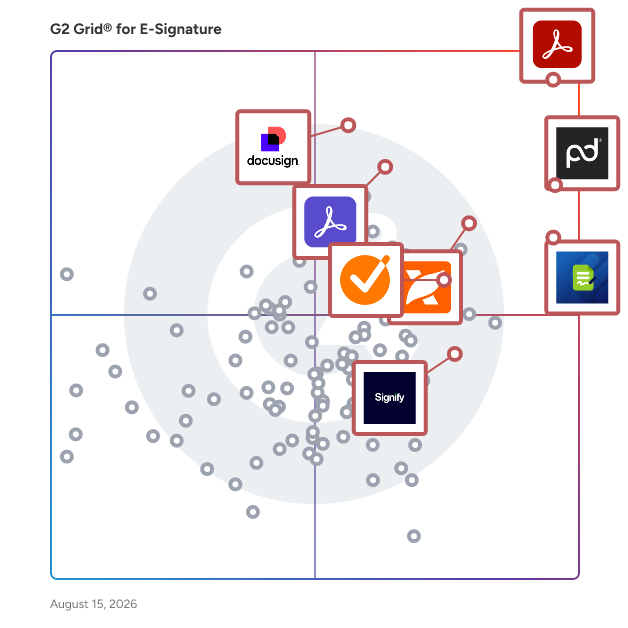
G2 Grid® for E-Signature Software

G2 Grid® for E-Signature Software plotting products by satisfaction and market presence

Highlighted products: Adobe Acrobat, PandaDoc, Docusign, Adobe Acrobat Sign, GetAccept, Jotform Sign, Foxit PDF Editor, and Signify.

Underlying data: [Grid® JSON](https://www.g2.com/categories/e-signature/grids.json?focus%5B%5D=adobe-acrobat&focus%5B%5D=pandadoc&focus%5B%5D=docusign&focus%5B%5D=adobe-acrobat-sign&focus%5B%5D=getaccept&focus%5B%5D=jotform-sign&focus%5B%5D=foxit-pdf-editor&focus%5B%5D=signify-signify&segment=mid-market)

Sponsored

Certyneo

Certyneo is a European electronic signature platform built for SMBs and professional teams. Sign, send, and manage legally binding documents in seconds — fully compliant with eIDAS (SES & AES), GDPR-native, and hosted in the EU. Unlike DocuSign or Yousign, Certyneo includes a built-in AI contract generator, letting you create any contract before signing it — all in one platform. Flat-rate pricing means no per-user fees, saving teams up to 70% vs. legacy solutions. Key features: eIDAS-compliant signatures, AI contract generation, audit trail, custom branding, REST API, multi-signatory workflows, and 10-year archiving.

Visit website

DocVerify

DocVerify advances signatures and notarization into the digital age with a robust eSign and remote online notarization (RON) solution. Now you can securely sign, manage and store legally binding documents in a trusted, online environment. DocVerify's approved and certified e-notary tool does not require software downloads or hardware purchases. Access to this electronic notarization is available through the internet and a standard browser. Accelerate turnaround times, reduce costs and keep transactions moving forward with the trusted DocVerify platform. For contracts and other business documents, DocVerify’s electronic signature tools provide a wealth of options. The digital signing software can simplify obtaining signatures or integrate into your company’s existing systems. DocVerify is offered by Black Knight, an industry-leading technology, data and analytics company, powering the mortgage industry for 60 years.

Average Rating: 4.1/5.0

Total Reviews: 276

How Do G2 Users Rate DocVerify?

  • Has the product been a good partner in doing business?: 8.5/10 (Category avg: 9.2/10)
  • Performance and Reliability: 8.8/10 (Category avg: 9.0/10)
  • Enterprise Scalability: 8.7/10 (Category avg: 8.9/10)
  • Signature Document Creation: 8.4/10 (Category avg: 9.1/10)

Who Is the Company Behind DocVerify?

  • Seller: Black Knight
  • Year Founded: 2014
  • HQ Location: Jacksonville, FL
  • Twitter: @Black_KnightInc
    4,486 Twitter followers
  • LinkedIn® Page: www.linkedin.com
    2,589 employees on LinkedIn®
  • Ownership: NYSE: BKI

Who Uses This Product?

  • Who Uses This: Notary Public, Paralegal
  • Top Industries: Legal Services, Real Estate
  • Company Size: 76% Small, 18% Medium

What Are Recent G2 Reviews of DocVerify?

What Are G2 Users Discussing About DocVerify?

Nitro PDF

1. What is Nitro PDF? Nitro PDF is a full-featured PDF editor that enables you to create, edit, convert, sign, and secure PDF documents. It is designed for individuals, small businesses, and enterprises as a cost-effective alternative to Adobe Acrobat, combining powerful functionality with an intuitive interface that works across devices. 2. What are the main features of Nitro PDF? Nitro PDF is a comprehensive solution for creating, editing, and securing documents across Windows, Mac, iOS, and web browsers. It includes powerful AI productivity tools and is built with an intuitive interface mirroring the Microsoft Office and Apple toolbars. Key features of Nitro PDF include: • Core Editing: Tools to create, edit, convert, combine, and annotate PDFs, including advanced OCR and secure signing capabilities. • AI Smart Tools: Enhances productivity via smart data extraction, automated form creation, and intelligent document redaction. • Nitro Analytics: Real-time visibility into PDF usage, allowing organizations to measure productivity, prove ROI, and track sustainability. • Nitro Workspace: A centralized cloud hub for accessing PDF and eSign tools, AI assistants, and administration from any device. • Advanced Editing: Create PDFs from any file type and convert PDFs into editable Microsoft Word, Excel, and PowerPoint files while maintaining original layouts. • Powerful OCR (Optical Character Recognition): Turn scanned paper documents and images into fully searchable and editable PDFs with high-accuracy text recognition. Nitro PDF is available in multiple plans to suit different business needs. 3. What support options does Nitro offer? Whether you're a five-person team or a global enterprise, our dedicated support is available 24/7. • Human Support: Nitro offers dedicated customer support, including onboarding, training, and troubleshooting resources, to ensure a smooth experience for your team. • Knowledge Base and Guides: Access hundreds of detailed articles covering product features, integrations, workflows, and best practices. • Video Tutorials: Step-by-step walkthroughs and demonstrations to help you learn and master Nitro tools quickly. • Community Forum: Connect with other Nitro users, share feedback, ask questions, and discover tips and solutions. • Knowledge Assistant: A 24/7 in-app AI assistant providing instant, context-aware guidance on features, workflows, and troubleshooting. 4. Does Nitro PDF support integrations with other business tools? Yes. Nitro PDF integrates with software such as Microsoft Office suite, OneDrive, Dropbox, and other platforms. These integrations simplify document workflows and make it easy to create, edit, and share PDFs directly within your existing environment. 5. How does Nitro ensure document security and compliance? Nitro protects sensitive information with advanced encryption, password protection, granular access controls, and tamper-evident audit trails. Nitro's solutions are designed to meet enterprise and mid-market compliance requirements, including ISO 27001, SOC 2, HIPAA, GDPR, eIDAS, UETA, and the ESIGN Act.

Average Rating: 4.4/5.0

Total Reviews: 379

How Do G2 Users Rate Nitro PDF?

  • Has the product been a good partner in doing business?: 8.9/10 (Category avg: 9.2/10)
  • Performance and Reliability: 8.6/10 (Category avg: 9.0/10)
  • Enterprise Scalability: 8.8/10 (Category avg: 8.9/10)
  • Signature Document Creation: 8.9/10 (Category avg: 9.1/10)

Who Is the Company Behind Nitro PDF?

  • Seller: Nitro, Inc
  • Company Website:
  • Year Founded: 2005
  • HQ Location: San Francisco, CA
  • LinkedIn® Page: www.linkedin.com
    371 employees on LinkedIn®

Who Uses This Product?

  • Who Uses This: IT Manager
  • Top Industries: Information Technology and Services, Construction
  • Company Size: 47% Small, 35% Medium

What Do G2 Reviewers Say About Nitro PDF?

AI-generated summary from verified user reviews

Pros
  • Users appreciate the ease of use of Nitro PDF, benefiting from its user-friendly interface and comprehensive features.
  • Users appreciate the easy editing capabilities of Nitro PDF, streamlining their workflow for PDF tasks effectively.
  • Users highlight Nitro PDF's full PDF editing capabilities and user-friendly interface as key benefits for enhancing productivity.
  • Users value the easy conversion feature of Nitro PDF, appreciating seamless transitions without formatting loss.
  • Users value the intuitive PDF editing capabilities of Nitro PDF, enhancing their document management experiences effortlessly.
Cons
  • Users face PDF issues with Nitro PDF, including compatibility limitations and inconsistent text recognition, especially with languages like Hindi.
  • Users find the pricing high, especially for individuals and small teams needing just basic features.
  • Users experience slow performance with Nitro PDF, especially when handling large files, hindering productivity and usability.
  • Users find the limited features of Nitro PDF inadequate for complex documents, requiring extra effort for formatting checks.
  • Users experience significant performance issues with Nitro PDF, often facing slow response times and freezing on large documents.

What Are Recent G2 Reviews of Nitro PDF?

What Are G2 Users Discussing About Nitro PDF?

Zoho Sign

Zoho Sign is a digital signing service that lets you execute contracts quickly without the hassles of handling paper documents while ensuring security and legality. It works completely on cloud and integrates readily with your everyday apps for a completely seamless signing experience. Zoho Sign is built on PKI technology with AES-256 encryption, it ensures every signature is tamper-proof. Configure sequential or parallel signing workflows, authenticate signers using OTP or government-issued IDs, without a line of code. Track document status in real time, automate reminders, and maintain complete audit trails. Zoho Sign supports qualified electronic signatures through certified trust service providers, making it ideal for regulated industries along with APIs, webhooks, and SDKs that make it flexible. Documents that can be signed: - NDAs - Invoices - Sales contracts - Business proposals - Purchase orders - Lease agreements - Partnership agreements - Employment offers and more. Key features: - Sign workflows via email, SMS, and WhatsApp - Reusable and shareable document templates - Bulk send, bulk sign, and in-person signing - Conditional and formula-based signer fields - Public form-based signing via SignForms - Signer authentication via OTP and trust services - Automatic cloud backup - Qualified and advanced electronic signatures - Custom branding and white labeling - Trusted document timestamping - REST APIs, webhooks, mobile and web SDKs - Control module for Life Sciences and Healthcare - Custom user groups, controls, and permissions - AI-powered workflows - Blockchain-based timestamping Support URL: https://www.zoho.com/sign/contact.html?src=G2

Average Rating: 4.4/5.0

Total Reviews: 62

How Do G2 Users Rate Zoho Sign?

  • Has the product been a good partner in doing business?: 9.5/10 (Category avg: 9.2/10)
  • Performance and Reliability: 9.1/10 (Category avg: 9.0/10)
  • Enterprise Scalability: 8.2/10 (Category avg: 8.9/10)
  • Signature Document Creation: 8.3/10 (Category avg: 9.1/10)

Who Is the Company Behind Zoho Sign?

  • Seller: Zoho
  • Year Founded: 1996
  • HQ Location: Austin, TX
  • Twitter: @Zoho
    137,880 Twitter followers
  • LinkedIn® Page: www.linkedin.com
    30,766 employees on LinkedIn®
  • Phone: +1 (888) 900-9646

Who Uses This Product?

  • Top Industries: Information Technology and Services, Computer Software
  • Company Size: 59% Small, 30% Medium

What Do G2 Reviewers Say About Zoho Sign?

AI-generated summary from verified user reviews

Pros
  • Users enjoy the ease of use of Zoho Sign, finding it simple and reliable for their signing needs.
  • Users value the affordability of Zoho Sign, finding it easy to use and manage with professional support.
  • Users value the simplicity of Zoho Sign, finding it easy to manage and stress-free for their needs.
  • Users appreciate the customizability of Zoho Sign, allowing for tailored forms with various design options.
  • Users love the impressive customization options in Zoho Sign, especially for editing forms and defining styles.
Cons
  • Users find the difficult editing process of Zoho Sign frustrating, wishing for more intuitive options for templates.
  • Users find the editing process unintuitive, wishing for more options to streamline template modifications.
  • Users often face email issues with Zoho Sign, affecting the reliability of communication and document handling.
  • Users find the limited features of Zoho Sign restrictive and desire more customizable options in the user interface.

What Are Recent G2 Reviews of Zoho Sign?

What Are G2 Users Discussing About Zoho Sign?

Formstack Sign

Fast and secure digital signatures anywhere. Formstack Sign is a cloud-based electronic signature solution that helps small to large businesses collect e-signatures for document authorization, ensure privacy, and access the system across multiple devices. Offering a host of features, such as customizable templates, a drag-and-drop interface, electronic file conversion, signer redirection/referral, reusable forms, and more, the platform syncs with Google and Outlook to help users import contact information. Additionally, it allows users to personalize documents with custom fonts, branding, and colors. Formstack Sign enables users to create password-protected documents that can be signed via SMS/text messages. To ensure legal compliance, the solution includes an audit trail for all documentation. The product is available on a per-user per-month subscription, and support is extended via email and online helpdesk. Formstack Sign is an ideal digital signature solution for any industry, including: - Healthcare - Higher Education - Insurance - Financial Services - Government - Energy and Utilities Formstack Sign saves teams an average of 13 hours per week, giving them more time to focus on impactful work.

Average Rating: 4.8/5.0

Total Reviews: 404

How Do G2 Users Rate Formstack Sign?

  • Has the product been a good partner in doing business?: 9.5/10 (Category avg: 9.2/10)
  • Performance and Reliability: 9.4/10 (Category avg: 9.0/10)
  • Enterprise Scalability: 9.3/10 (Category avg: 8.9/10)
  • Signature Document Creation: 9.3/10 (Category avg: 9.1/10)

Who Is the Company Behind Formstack Sign?

  • Seller: Formstack, LLC
  • Company Website:
  • Year Founded: 2006
  • HQ Location: Fishers, IN
  • Twitter: @Formstack
    6,392 Twitter followers
  • LinkedIn® Page: www.linkedin.com
    219 employees on LinkedIn®

Who Uses This Product?

  • Who Uses This: Insurance Agent, Account Manager
  • Top Industries: Insurance, Higher Education
  • Company Size: 85% Small, 13% Medium

What Do G2 Reviewers Say About Formstack Sign?

AI-generated summary from verified user reviews

Pros
  • Users appreciate the intuitive and user-friendly interface of Formstack Sign, enhancing their document management experience.
  • Users value the time-saving automation of Formstack Sign, enabling quick form distribution and streamlined processes.
  • Users find Formstack Sign incredibly convenient for its intuitive use and seamless integration with other software.
  • Users appreciate the easy signing process with Formstack Sign, enhancing workflow and integration with other applications.
  • Users appreciate the ease of managing signatures with Formstack Sign, streamlining document distribution and saving time.
Cons
  • Users face form issues related to setup complexity, email recognition, and unmet functionality promises from sales support.
  • Users express frustration over email issues, particularly with sender names and delays due to shared email addresses.
  • Users desire better email management to streamline organization recognition and avoid delays with clients sharing email addresses.
  • Users face e-signature issues due to limits on merges, complicating an otherwise simple platform experience.
  • Users find the limited customization options in Formstack Sign restrict their ability to tailor the tool effectively.

What Are Recent G2 Reviews of Formstack Sign?

What Are G2 Users Discussing About Formstack Sign?

Legalesign

Legalesign is UK-based eSignature software to send, sign and manage contracts online. Companies use Legalesign to gain significant productivity and financial benefits, increase their customers' satisfaction by removing the need for a printer and enabling them to sign from anywhere and, last but not least, relieve the burden of tiresome paperwork upon long suffering staff everywhere. Legalesign customers include legal firms, insurance companies, property firms, recruiters, accountants and many others. Legalesign is built from the ground up to deliver maximum value for our customers. The tariff price of business software is often far exceeded by its costs of use – the cost of adoption, training, the time in day-to-day usage, and the cost of change. Legalesign is designed throughout to minimise these costs so our customers see the most value through to the bottom line: from eliminating un-needed clicks in day-to-day actions so you don’t waste time getting contracts sent out, up to the entire architecture of the system that allows you to scale horizontally and vertically seamlessly and easily. We invest heavily in behind-the-scenes systems to ensure uptime and reliability, providing service where it matters.

Average Rating: 4.8/5.0

Total Reviews: 295

How Do G2 Users Rate Legalesign?

  • Has the product been a good partner in doing business?: 9.6/10 (Category avg: 9.2/10)
  • Performance and Reliability: 9.4/10 (Category avg: 9.0/10)
  • Enterprise Scalability: 9.2/10 (Category avg: 8.9/10)
  • Signature Document Creation: 9.0/10 (Category avg: 9.1/10)

Who Is the Company Behind Legalesign?

  • Seller: Legalesign
  • Year Founded: 2012
  • HQ Location: Cambridge, England
  • Twitter: @Legalesign
    512 Twitter followers
  • LinkedIn® Page: www.linkedin.com
    13 employees on LinkedIn®

Who Uses This Product?

  • Who Uses This: Director, Managing Director
  • Top Industries: Staffing and Recruiting, Accounting
  • Company Size: 66% Small, 29% Medium

What Do G2 Reviewers Say About Legalesign?

AI-generated summary from verified user reviews

Pros
  • Users rave about the exceptional customer support from Legalesign, noting prompt and helpful responses during their onboarding process.
  • Users appreciate the ease of use of Legalesign, valuing its functionality and responsive customer support.
  • Users find Legalesign super intuitive, enabling seamless document signing without the need for any training.
  • Users commend the reliability and speed of Legalesign, seamlessly transforming their document signing process with confidence.
  • Users find Legalesign to be an affordable option with exceptional support, enhancing functionality and satisfaction.
Cons
  • Users find the interface usability issues of Legalesign, such as quirky designs and persistent onboarding cards, frustrating.
  • Users find some features confusing, particularly with checkboxes and the process of bulk sending.
  • Users note signature issues that complicate workflow, although recent updates have improved user experience significantly.
  • Users find difficult editing frustrating, as mistakes require deleting documents and starting the process over.
  • Users express concern over limited customization with Legalesign, particularly regarding integration with JobAdder for efficiency.

What Are Recent G2 Reviews of Legalesign?

What Are G2 Users Discussing About Legalesign?

ReadySign, An Onit Product

Keep business moving with ReadySign electronic signature software - the fast, affordable way for teams to get documents signed anytime, anywhere. Unlike other e-sign solutions, ReadySign won’t limit the number of documents you can send for signature and is committed to ensuring your success through support from an award-winning customer success team - available to all users and signers 24/7. And with predictable, affordable pricing there will never be an unwanted surprise when the bill comes.

Average Rating: 4.8/5.0

Total Reviews: 16

How Do G2 Users Rate ReadySign, An Onit Product?

  • Has the product been a good partner in doing business?: 10.0/10 (Category avg: 9.2/10)
  • Performance and Reliability: 9.7/10 (Category avg: 9.0/10)
  • Enterprise Scalability: 9.4/10 (Category avg: 8.9/10)
  • Signature Document Creation: 8.6/10 (Category avg: 9.1/10)

Who Is the Company Behind ReadySign, An Onit Product?

Who Uses This Product?

  • Top Industries: Education Management, Primary/Secondary Education
  • Company Size: 69% Medium, 19% Small

What Are Recent G2 Reviews of ReadySign, An Onit Product?

Lumin for G Suite

Lumin is a document and agreement workflow solution trusted by more than 100 million people worldwide. Create, edit and collaborate on documents with AI assistance, then send them for signing, all in one place. Standardize how agreements get done, close them faster and keep the work inside the systems your team already uses. Create and collaborate - Generate documents from reusable templates, populated with data from your existing systems or CRM - Describe the agreement you need in plain language and generate it with an AI assistant, then refine it by continuing the conversation or editing the document directly - Draft together in real time, comment, tag teammates and resolve feedback without leaving the document Work with PDFs - Edit PDF text, images and pages directly and annotate with highlights, comments, shapes and images, no conversion or re-uploading - Flexible PDF management, including merging, splitting, compressing and reordering pages - Share PDFs with colleagues for review, with comments and mentions keeping feedback attached to the document Send and sign - Send for legally binding eSignatures and follow progress from sent to signed - Every request carries a full audit trail covering who opened it, who signed and when - Verified Digital Signing adds an extra layer of security by confirming each signer's identity before they sign, so the signature is tied to a verified person rather than an email address Integrations - Work directly from the storage you already use, including Google Drive, Microsoft OneDrive and Dropbox - Connect Lumin to Salesforce, HubSpot, Slack and Claude to keep documents moving with the rest of your work - API and SDKs for teams building Lumin into their own products Lumin is free to start, with Business and Enterprise plans that scale with your team. Available in the browser, on desktop and on mobile.

Average Rating: 4.5/5.0

Total Reviews: 772

How Do G2 Users Rate Lumin for G Suite?

  • Has the product been a good partner in doing business?: 9.1/10 (Category avg: 9.2/10)
  • Performance and Reliability: 8.7/10 (Category avg: 9.0/10)
  • Enterprise Scalability: 9.2/10 (Category avg: 8.9/10)
  • Signature Document Creation: 9.1/10 (Category avg: 9.1/10)

Who Is the Company Behind Lumin for G Suite?

  • Seller: Lumin PDF
  • Company Website:
  • Year Founded: 2014
  • HQ Location: Christchurch, Canterbury
  • Twitter: @LuminPdf
    1,249 Twitter followers
  • LinkedIn® Page: www.linkedin.com
    56 employees on LinkedIn®

Who Uses This Product?

  • Who Uses This: Student, Teacher
  • Top Industries: Primary/Secondary Education, Higher Education
  • Company Size: 59% Small, 26% Medium

What Do G2 Reviewers Say About Lumin for G Suite?

AI-generated summary from verified user reviews

Pros
  • Users love the easy layout of Lumin for G Suite, making document management quick and efficient.
  • Users appreciate the easy editing capabilities of Lumin, finding it powerful and handy for daily tasks.
  • Users value the easy-to-use interface of Lumin for G Suite, appreciating its simplicity and efficiency in document management.
  • Users appreciate the ease of editing with Lumin for G Suite, finding it convenient for everyday PDF tasks.
  • Users appreciate the convenience of sending faxes from anywhere, making work easy from their mobile devices.
Cons
  • Users experience a learning curve with Lumin for G Suite, requiring time to master its features initially.
  • Users experience editing difficulties with Lumin for G Suite, including lag and issues with images and text detection.
  • Users experience difficult editing with Lumin for G Suite, noting slow performance and occasional glitches affecting their workflow.
  • Users experience editing issues with Lumin for G Suite, including slow performance on large files and text detection problems.
  • Users experience limited editing capabilities in Lumin for G Suite, which can hinder efficient document management and professionalism.

What Are Recent G2 Reviews of Lumin for G Suite?

What Are G2 Users Discussing About Lumin for G Suite?

CINCEL

Cincel is the all-in-one trust platform that has allowed more than 500,000 to speed up agreements and processes with services such as digital signature (autograph signature + advanced signature), certification (NOM-151 Timestamps + Blockchain Notarization + Audit Footprint), identity ( Biometric Verification + Background Check) and document management (CLM). Cincel is the 1st Trust Services Provider in the Cloud in Mexico and Latin America, accredited as a Certification Service Provider (PSC) by the Ministry of Economy of Mexico. This enables us to offer trust services with legal and technological compliance through the Confianza 360, the all-in-one with trust services such as Advanced Signature with NOM-151, Identity Verification (Biometrics), CLM - Contract Lifecycle Management, Background Check, and PKI Infraestructure. CINCEL streamlines customer-oriented workflows and onboardings with legal compliance and legal certainty. It allows for reducing fraud and bureaucracy, replacing expensive, complex, and risky tools that do not comply with the law in Mexico and LATAM (ISO/IEC + NOM151 + NIST + AICPA).

Average Rating: 5.0/5.0

Total Reviews: 48

How Do G2 Users Rate CINCEL?

  • Has the product been a good partner in doing business?: 9.9/10 (Category avg: 9.2/10)
  • Performance and Reliability: 9.7/10 (Category avg: 9.0/10)
  • Enterprise Scalability: 9.9/10 (Category avg: 8.9/10)
  • Signature Document Creation: 9.9/10 (Category avg: 9.1/10)

Who Is the Company Behind CINCEL?

  • Seller: CINCEL
  • Year Founded: 2019
  • HQ Location: Juárez, MX
  • Twitter: @cincel
    1 Twitter followers
  • LinkedIn® Page: www.linkedin.com
    30 employees on LinkedIn®

Who Uses This Product?

  • Top Industries: Cosmetics, Information Technology and Services
  • Company Size: 62% Medium, 36% Small

What Are Recent G2 Reviews of CINCEL?

What Are G2 Users Discussing About CINCEL?

Oneflow

Oneflow is an AI-powered contract management platform that turns contracts into an operating system that drives revenue, compliance and operational efficiency. Contracts hold revenue, risk, and obligations, yet they rarely connect to daily workflows. Instead of static PDFs that lock away critical information, Oneflow turns every contract into an actionable asset that reveals opportunities, flags risks, and drives execution across teams so your business moves faster with full visibility. With Oneflow, teams can create, review, sign, and control contracts in one unified platform. Contracts are fully digital, collaborative, and always up to date.Contract data becomes an operational layer that automates workflows across teams, and gives full visibility into obligations, performance, and risk. AI is embedded across the platform to review contracts, extract key data, identify risks, and surface insights at scale. The platform enables you to: - Centralize all contracts, clauses, and obligations in a structured, searchable repository - Automate workflows, compliance checks, and data flows across your existing systems - Execute with full visibility into engagement, deadlines, and contract activity - Optimize using AI-driven portfolio analysis to improve decisions & performance over time With deep integrations into CRM, HR, and automation platforms, Oneflow ensures contracts are no longer disconnected from business processes. Instead, they become an operating system that drives revenue, reduces risk, and enables smarter decision-making. Whether you're in sales, HR, procurement, finance, or legal, Oneflow helps you move faster and stay in control.

Average Rating: 4.4/5.0

Total Reviews: 361

How Do G2 Users Rate Oneflow?

  • Has the product been a good partner in doing business?: 8.9/10 (Category avg: 9.2/10)
  • Performance and Reliability: 8.8/10 (Category avg: 9.0/10)
  • Enterprise Scalability: 8.4/10 (Category avg: 8.9/10)
  • Signature Document Creation: 8.5/10 (Category avg: 9.1/10)

Who Is the Company Behind Oneflow?

  • Seller: Oneflow
  • Year Founded: 2012
  • HQ Location: Stockholm, Stockholm County
  • Twitter: @oneflowcom
    261 Twitter followers
  • LinkedIn® Page: www.linkedin.com
    155 employees on LinkedIn®

Who Uses This Product?

  • Who Uses This: CEO, Konsultchef
  • Top Industries: Staffing and Recruiting, Computer Software
  • Company Size: 44% Small, 43% Medium

What Do G2 Reviewers Say About Oneflow?

AI-generated summary from verified user reviews

Pros
  • Users find Oneflow's ease of use exceptional, streamlining contract management and enhancing workflow efficiency effortlessly.
  • Users find Oneflow to be intuitive and easy to use, enhancing the contract management experience significantly.
  • Users find Oneflow to be an efficient tool that streamlines contract management and enhances workflow significantly.
  • Users appreciate the streamlined contract management of Oneflow, which simplifies processes and enhances overall efficiency.
  • Users commend the fast and accurate customer support from OneFlow, enhancing their overall experience with the product.
Cons
  • Users note a lack of missing features in Oneflow, particularly in customization and integrations that limit flexibility.
  • Users find the limited capabilities for document collaboration frustrating and desire better integration and automation features.
  • Users note the limited customization options in Oneflow, seeking more flexibility and integration features for better usability.
  • Users feel that Oneflow is quite expensive and lacks value due to the additional costs for promised functionalities.
  • Users find feature usability lacking in Oneflow compared to competitors, citing cumbersomeness and design issues.

What Are Recent G2 Reviews of Oneflow?

What Are G2 Users Discussing About Oneflow?

Conga Sign

Secure. Seamless. Scalable. Conga Sign delivers enterprise-grade eSignature experiences that are fully embedded, fully branded, and fully compliant- wherever business happens Most eSignature tools are rigid, unbranded, and hard to integrate. Conga Sign changes that. It enables secure, compliant, and fully customizable signing experiences embedded directly into your systems. With flexible deployment, global compliance, and full audibility, Conga Sign helps teams move faster, reduce risk, and deliver better customer experiences. Fast, Frictionless Signing Experiences To eliminate delays and manual handoffs, signatures can be captured instantly, via embedded portals, mobile devices, or automated workflows. Agreements are generated, signed, and stored without switching systems or emailing attachments, reducing turnaround time and improving accuracy. Branded, Trustworthy Transactions Full white-labeling allows organizations to remove third-party branding from the signing experience. This ensures every agreement reflects your brand, builds trust with customers, and reduces the risk of phishing or spam-related drop-off. Works Where You and Your Customers Work The solution integrates seamlessly into your existing ecosystem, including Salesforce, MS Dynamics, Workday, and custom applications or websites. With flexible deployment via web app, API, or pre-built connectors, teams can embed signing directly into workflows and customer-facing experiences. Secure, Compliant, and Audit-Ready Meets global compliance standards including ESIGN, UETA, eIDAS, HIPAA, and GDPR. Provides robust audit trails, tamper-proof controls, and advanced authentication methods such as SMS codes, ID verification, and knowledge-based authentication, ensuring every signature is legally defensible. Flexible Deployment Across Teams and Systems Whether used by Sales, Legal, Finance, or Operations, the solution adapts to your business needs. It supports multiple deployment models from standalone use to embedded flows, making it easy to scale across departments without complex implementation. Scales from One to Millions From one-off agreements to high-volume onboarding or billing cycles, the platform handles large volumes of signatures with ease. Supports batch sending, time- or action-triggered workflows, and automated delivery, enabling teams to execute agreements at scale without sacrificing speed or control. Automated and Embedded Workflows A good eSignature solution doesn’t just capture signatures, it powers end-to-end agreement workflows. Agreements can be generated, signed, routed, and stored automatically, with data flowing back into your CRM or ERP. This creates a seamless experience for employees and customers, reducing operational overhead and accelerating revenue. Authentication Options: Email Authentication SMS PIN Secret Question Challenge Knowledge-Based Authentication (KBA) Login Credentials (including SSO) Government ID Check Biometric Comparison Certifications & Security Compliance Standards - Conga Sign meets leading industry standards for data protection and compliance: SOC 2 ISO 27001 FedRAMP GDPR HIPAA Connectors & Integrations - Conga Sign works out-of-the-box with major enterprise systems, including: Salesforce & Salesforce CPQ SharePoint Workday SMART Communications Guidewire PEGA Laserfiche Microsoft Dynamics CRM Box Why Conga Sign Stands out in the eSignature market: Brand-first experience: No third-party logos or domains — your brand stays front and center. Flexible integration: Works with any CRM, ERP, or portal via API or pre-built connectors. Compliance confidence: Meets global standards with full audit trails and secure authentication. Better value: 30–40% lower cost than leading competitors, with no feature gating. Part of a broader solution: Seamlessly connects with Conga Composer, CPQ, and CLM for end-to-end agreement workflows.

Average Rating: 4.3/5.0

Total Reviews: 39

How Do G2 Users Rate Conga Sign?

  • Has the product been a good partner in doing business?: 9.1/10 (Category avg: 9.2/10)
  • Performance and Reliability: 8.3/10 (Category avg: 9.0/10)
  • Enterprise Scalability: 7.9/10 (Category avg: 8.9/10)
  • Signature Document Creation: 7.6/10 (Category avg: 9.1/10)

Who Is the Company Behind Conga Sign?

  • Seller: Conga
  • Year Founded: 2006
  • HQ Location: 3200 Kirby Dr., Suite 500, Houston, TX 77098
  • LinkedIn® Page: www.linkedin.com
    2,116 employees on LinkedIn®
  • Phone: (303) 465-1616

Who Uses This Product?

  • Top Industries: Computer Software
  • Company Size: 45% Medium, 31% Large

What Do G2 Reviewers Say About Conga Sign?

AI-generated summary from verified user reviews

Pros
  • Users find high convenience in using Conga Sign for seamlessly executing contracts.
  • Users find Conga Sign to be an easy and convenient solution for executing contracts efficiently.
  • Users find the easy setup of Conga Sign enhances convenience and efficiency in executing contracts.
  • Users find Conga Sign to be an easy and convenient solution for executing contracts efficiently.
  • Users value the seamless integration with Salesforce and Conga Legal, enhancing workflow efficiency and collaboration.
Cons
  • Users face e-signature issues with Conga Sign, including lost envelopes and poor user experience affecting efficiency.
  • Users face challenges with limited signing options, impacting recognition and causing delays in the signing process.
  • Users experience delays in signing due to lost envelopes and a less intuitive user experience.
  • Users often find the poor interface usability of Conga Sign frustrating, leading to lost envelopes and delayed signing.
  • Users find the interface not intuitive, leading to confusion and delays in signing documents.

What Are Recent G2 Reviews of Conga Sign?

What Are G2 Users Discussing About Conga Sign?
Tomorro

Tomorro powers contracts of hundreds of modern companies like Nestlé, Lano, Alma or Voodoo to help them reduce the time spent on contract management and gives them control and visibility over legal and financial risks.

Average Rating: 4.7/5.0

Total Reviews: 71

How Do G2 Users Rate Tomorro?

  • Has the product been a good partner in doing business?: 9.5/10 (Category avg: 9.2/10)
  • Performance and Reliability: 9.0/10 (Category avg: 9.0/10)
  • Enterprise Scalability: 10.0/10 (Category avg: 8.9/10)
  • Signature Document Creation: 9.2/10 (Category avg: 9.1/10)

Who Is the Company Behind Tomorro?

  • Seller: Tomorro
  • Year Founded: 2020
  • HQ Location: France
  • LinkedIn® Page: www.linkedin.com
    134 employees on LinkedIn®

Who Uses This Product?

  • Top Industries: Financial Services, Insurance
  • Company Size: 61% Medium, 36% Small

What Are Recent G2 Reviews of Tomorro?

What Are G2 Users Discussing About Tomorro?

MSB Docs

MSB Docs' platform ensures enterprises achieve and maintain compliance by validating our software against crucial industry regulations. Trusted by more than 1 million users in 188 countries, MSB Docs enables organizations to easily create documents, send these to the signers for eSignatures, and achieve them. MSB Docs has also been consecutively featured on Gartner's eSignature vendor, Gartner's Hype-Cycle, and Gartner's Market Guide for 5 years. MSB Docs features a robust and reliable website integration via APIs and a collaboration tool that helps multiple team members around the globe to seamlessly work on a single contract document. Every part of the signing process is recorded and time-stamped in our Comprehensive Audit trails, which provides data and transparency for regulatory compliance and legal evidence. MSB Docs also integrates with multi-factor authentication such as hardware tokens and one-time passwords.

Average Rating: 4.9/5.0

Total Reviews: 25

How Do G2 Users Rate MSB Docs?

  • Has the product been a good partner in doing business?: 10.0/10 (Category avg: 9.2/10)
  • Performance and Reliability: 9.9/10 (Category avg: 9.0/10)
  • Enterprise Scalability: 9.9/10 (Category avg: 8.9/10)
  • Signature Document Creation: 9.8/10 (Category avg: 9.1/10)

Who Is the Company Behind MSB Docs?

  • Seller: MSB Docs
  • Year Founded: 2005
  • HQ Location: Irvine, California
  • Twitter: @msbdocs
    61 Twitter followers
  • LinkedIn® Page: www.linkedin.com
    74 employees on LinkedIn®

Who Uses This Product?

  • Top Industries: Information Technology and Services
  • Company Size: 52% Small, 44% Medium

What Do G2 Reviewers Say About MSB Docs?

AI-generated summary from verified user reviews

Pros
  • Users praise the easy signing feature of MSB Docs for its fast, secure, and legally valid e-signature capabilities.
  • Users appreciate the convenient document signing process of MSB Docs, streamlining tasks with a user-friendly interface.
  • Users appreciate the secure and efficient e-signature solution of MSB Docs, ensuring legally valid document signing.
  • Users find MSB Docs' user-friendly e-signature solution secure, easy to use, and legally valid.
  • Users value the time-saving efficiency of MSB Docs, simplifying and expediting the document signing process significantly.
Cons
  • Users find the difficult editing limitations frustrating, as mistakes require sending entirely new documents instead of simple adjustments.
  • Users dislike the editing limitations that prevent document corrections, leading to unnecessary duplication of work.

What Are Recent G2 Reviews of MSB Docs?

What Are G2 Users Discussing About MSB Docs?

Inhubber

Inhubber is a contract management platform that combines smart workflows and artificial intelligence (AI) to enhance security and streamline the management of contracts. Designed both for enterprise and SME businesses, Inhubber simplifies their contract processes and automates various tasks associated with contract creation, analysis, execution, and compliance, ultimately saving time and reducing risks. The platform’s integration of blockchain technology ensures that contracts are secured through user-to-user encryption, allowing only authorized parties access to sensitive information. Utilizing an Ethereum-based consortium blockchain, Inhubber provides an immutable audit trail, meaning all actions taken on a document are permanently recorded. This feature not only enhances security but also promotes transparency and traceability, which are critical for maintaining compliance with regulatory standards. With its hosting on ISO 27001-certified servers in Germany, Inhubber adheres to stringent data protection regulations, reinforcing the integrity of your contracts. Inhubber’s AI capabilities significantly enhance the efficiency of contract management. The AI swiftly analyzes contracts to extract vital information such as key dates, obligations, and financial terms. Additionally, it identifies potential risks, helping users stay informed about important deadlines and compliance requirements. By generating concise summaries of contracts, the AI minimizes the likelihood of human error during reviews, allowing teams to make informed decisions quickly. Task automation is another key feature of Inhubber, which assigns tasks, sets reminders, and schedules events based on critical contract dates. This functionality helps teams remain organized and aligned, reducing manual workload and enhancing overall productivity. Inhubber also supports bulk uploads of contracts in various formats, including PDF, Word, and Excel, enabling quick categorization and analysis by the AI. To accommodate diverse security and compliance needs, Inhubber offers three types of electronic signatures: Simple Electronic Signature (SES) for low-risk agreements, a Secured Blockchain-based Signature for tamper-proof protection, and a Qualified Electronic Signature (QES) that meets EU regulations for high-value contracts. This flexibility ensures that businesses can choose the appropriate level of security for each contract. With advanced search capabilities that allow users to filter contracts and clauses based on content rather than just keywords, Inhubber makes it easy to access important information. Trusted by organizations such as EDEKA, Ankerkraut, Rebuy, and OECD, Inhubber stands out as a comprehensive solution for businesses prioritizing security, efficiency, and compliance in their contract management processes.

Average Rating: 5.0/5.0

Total Reviews: 75

How Do G2 Users Rate Inhubber?

  • Has the product been a good partner in doing business?: 10.0/10 (Category avg: 9.2/10)
  • Performance and Reliability: 9.8/10 (Category avg: 9.0/10)
  • Enterprise Scalability: 10.0/10 (Category avg: 8.9/10)
  • Signature Document Creation: 10.0/10 (Category avg: 9.1/10)

Who Is the Company Behind Inhubber?

  • Seller: Inhubber
  • Year Founded: 2020
  • HQ Location: Berlin, DE
  • Twitter: @inhubber
    6 Twitter followers
  • LinkedIn® Page: www.linkedin.com
    22 employees on LinkedIn®

Who Uses This Product?

  • Top Industries: Information Technology and Services, Marketing and Advertising
  • Company Size: 36% Large, 35% Small

What Do G2 Reviewers Say About Inhubber?

AI-generated summary from verified user reviews

Pros
  • Users find Inhubber's platform easy to use, streamlining contract management and saving valuable time.
  • Users find the document management features of Inhubber invaluable for daily tasks, ensuring organization and compliance.
  • Users love the easy international e-signatures with Inhubber, streamlining approval processes and enhancing team efficiency.
  • Users value the time-saving features of Inhubber, streamlining contract management and enhancing productivity significantly.
  • Users highlight the security features of Inhubber, ensuring only authorized personnel access sensitive documents.
Cons
  • Users note the limited customization of Inhubber, expressing a desire for more tailored features for their needs.
  • Users find limited features in Inhubber, making it difficult to customize for specific financial requirements.
  • Users find difficult customization time-consuming, often taking weeks to tailor templates for specific needs.
  • Users note that AI effectiveness is limited, leading to a need for more manual input and contract generation options.
  • Users find the minimalistic interface too simplistic, making it difficult to locate essential buttons and features.

What Are Recent G2 Reviews of Inhubber?

What Are G2 Users Discussing About Inhubber?

DocSend

Dropbox DocSend helps business professionals like you to securely share and control the content that drives your business forward. Dropbox DocSend's powerful link-based system makes it easy to set security preferences for each stakeholder, receive notifications each time someone views your file, analyze content performance on a page-by-page basis, and create modern virtual deal rooms. With DocSend, business can offload administrative burdens and securely share the most impactful proprietary information faster. DocSend’s Virtual Data Rooms manage sensitive documents securely and gets team real-time deal insights, simplying the entire deal process from initial pitch to final signature. Join over 34,000 companies that rely on Dropbox DocSend to share and manage sensitive information.

Average Rating: 4.6/5.0

Total Reviews: 561

How Do G2 Users Rate DocSend?

  • Has the product been a good partner in doing business?: 8.7/10 (Category avg: 9.2/10)
  • Performance and Reliability: 9.1/10 (Category avg: 9.0/10)
  • Enterprise Scalability: 9.0/10 (Category avg: 8.9/10)
  • Signature Document Creation: 8.4/10 (Category avg: 9.1/10)

Who Is the Company Behind DocSend?

  • Seller: Dropbox
  • Company Website:
  • Year Founded: 2007
  • HQ Location: San Francisco, California
  • Twitter: @Dropbox
    3,279,477 Twitter followers
  • LinkedIn® Page: www.linkedin.com
    4,149 employees on LinkedIn®

Who Uses This Product?

  • Who Uses This: CEO, Founder
  • Top Industries: Computer Software, Information Technology and Services
  • Company Size: 75% Small, 21% Medium

What Do G2 Reviewers Say About DocSend?

AI-generated summary from verified user reviews

Pros
  • Users appreciate the ease of use of DocSend, enjoying seamless document sharing and tracking for enhanced engagement.
  • Users appreciate the visibility and tracking DocSend provides, enhancing their document sharing and decision-making processes.
  • Users value the real-time analytics and professional sharing options of DocSend, enhancing content sharing and collaboration.
  • Users value the top-notch security of DocSend, ensuring safe document sharing with detailed engagement insights.
  • Users value the easy sharing of DocSend, gaining insights and control over document engagement in a professional manner.
Cons
  • Users highlight the high pricing of DocSend, making it less accessible for those managing multiple clients.
  • Users face challenges with limited app functionality, including slow loading, integration issues, and mobile optimization concerns.
  • Users express frustration with lacking features on DocSend, especially regarding analytics and mobile optimization for smaller teams.
  • Users note the need for more flexible customization in DocSend to better suit dynamic marketing and collaboration processes.
  • Users express pricing concerns regarding DocSend, noting frequent changes and high costs for multiple user seats.

What Are Recent G2 Reviews of DocSend?

What Are G2 Users Discussing About DocSend?

Signaturit

Building trust in every digital transaction. Signaturit Group, a Namirial Company, European leader in Trusted Digital Transactions. We drive the digital transformation of businesses and administrations with a cloud-native platform that covers the entire digital transaction lifecycle: digital identity, onboarding, electronic signature, fraud prevention, document management and archiving, certified communication, digital identity wallet, and e-invoicing. As a Qualified Trust Service Provider (QTSP) under eIDAS, we guarantee legal certainty, regulatory compliance and maximum trust in every digital transaction. Namirial Company +250,000 customers | +90 countries | +1,400 employees

Average Rating: 4.5/5.0

Total Reviews: 36

How Do G2 Users Rate Signaturit?

  • Has the product been a good partner in doing business?: 9.4/10 (Category avg: 9.2/10)
  • Performance and Reliability: 9.3/10 (Category avg: 9.0/10)
  • Enterprise Scalability: 8.9/10 (Category avg: 8.9/10)
  • Signature Document Creation: 8.5/10 (Category avg: 9.1/10)

Who Is the Company Behind Signaturit?

Who Uses This Product?

  • Company Size: 47% Small, 44% Medium

What Do G2 Reviewers Say About Signaturit?

AI-generated summary from verified user reviews

Pros
  • Users find Signaturit's affordable pricing significantly more appealing than that of its competitors.
  • Users appreciate the intuitive interface of Signaturit, making the signing process fast and reliable.
  • Users love the intuitive interface of Signaturit, enhancing the speed and reliability of the signing process.
  • Users find the pricing of Signaturit significantly more appealing compared to other options in the market.
  • Users value the reliable signing process of Signaturit, appreciating its intuitive interface and legal security.
Cons
  • Users find the pricing structure expensive, particularly for small volumes and limited customization options.
  • Users find the limited customization options for emails restrict their ability to tailor communications effectively.
  • Users feel the limited customization options and high pricing for small volumes make Signaturit less appealing.

What Are Recent G2 Reviews of Signaturit?

What Are G2 Users Discussing About Signaturit?