Best Document Creation Software - Page 9

How Many Document Creation Software Products Does G2 Track?

Total Products under this Category: 343

Category Stats (Sep 2026)

  • Average Rating: 4.37/5 The average rating of products in this category, based on all submitted ratings
  • Top Trending Product: DocNexus (+2.22%) - Among all products in this category, DocNexus recorded the largest rating increase compared to last month

Last updated: September 01, 2026

How Does G2 Rank Document Creation Software Products?

Why You Can Trust G2's Software Rankings:

  • 30 Analysts and Data Experts
  • 156,500+ Authentic Reviews
  • 343+ Products
  • Unbiased Rankings

G2's software rankings are built on verified user reviews, rigorous moderation, and a consistent research methodology maintained by a team of analysts and data experts. Each product is measured using the same transparent criteria, with no paid placement or vendor influence. While reviews reflect real user experiences, which can be subjective, they offer valuable insight into how software performs in the hands of professionals. Together, these inputs power the G2 Score, a standardized way to compare tools within every category.

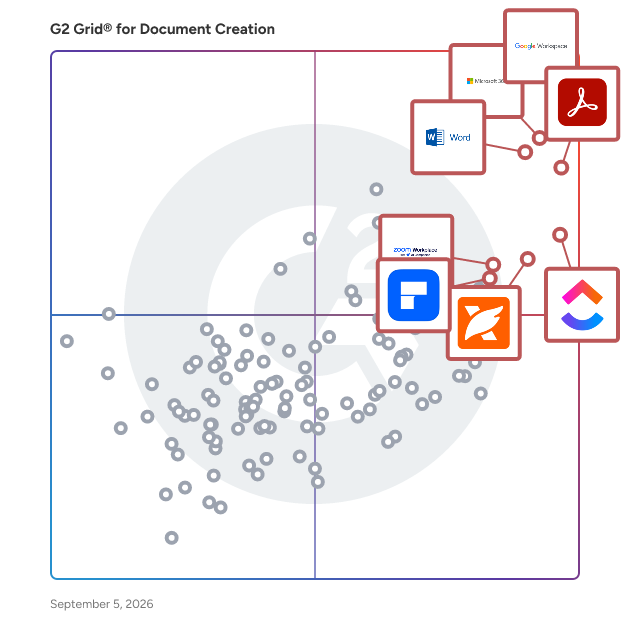
G2 Grid® for Document Creation Software

G2 Grid® for Document Creation Software plotting products by satisfaction and market presence

Highlighted products: Google Workspace, Microsoft 365, Adobe Acrobat, Microsoft Word, ClickUp, Foxit PDF Editor, Zoom Workplace, and Wondershare PDFelement.

Underlying data: [Grid® JSON](https://www.g2.com/categories/document-creation/grids.json?focus%5B%5D=google-workspace&focus%5B%5D=microsoft365&focus%5B%5D=adobe-acrobat&focus%5B%5D=microsoft-word&focus%5B%5D=clickup&focus%5B%5D=foxit-pdf-editor&focus%5B%5D=zoom-workplace&focus%5B%5D=wondershare-wondershare-pdfelement)

PolyEdit

PolyEdit is a multi-purpose word processor and text editor that is designed to help with word processing requirements and offers a variety of features, tools, add-ons so you do not have to jump between programs.

Average Rating: 3.6/5.0

Total Reviews: 12

How Do G2 Users Rate PolyEdit?

  • Has the product been a good partner in doing business?: 5.8/10 (Category avg: 9.0/10)
  • Quality of Support: 6.9/10 (Category avg: 8.6/10)
  • Ease of Use: 9.3/10 (Category avg: 8.9/10)
  • Ease of Admin: 6.7/10 (Category avg: 8.9/10)

Who Is the Company Behind PolyEdit?

  • Seller: PolyEdit
  • HQ Location: N/A
  • Twitter: @Polysoft
    33 Twitter followers
  • LinkedIn® Page: www.linkedin.com
    1 employees on LinkedIn®

Who Uses This Product?

  • Company Size: 50% Small, 33% Medium

What Are Recent G2 Reviews of PolyEdit?

What Are G2 Users Discussing About PolyEdit?

DocSpace

DocSpace is a comprehensive document management platform designed to streamline the creation, organization, and collaboration of documents within teams and organizations. It offers a centralized repository where users can securely store, access, and manage documents, enhancing productivity and ensuring efficient information flow. Key Features and Functionality: - Centralized Document Storage: Provides a unified space for storing all organizational documents, ensuring easy access and retrieval. - Collaborative Editing: Allows multiple users to edit documents simultaneously, fostering teamwork and reducing version conflicts. - Version Control: Maintains a history of document changes, enabling users to track revisions and revert to previous versions if necessary. - Advanced Search Capabilities: Offers robust search tools to quickly locate documents based on keywords, tags, or content. - Access Control and Permissions: Enables administrators to set user permissions, ensuring that sensitive information is only accessible to authorized personnel. - Integration with Other Tools: Seamlessly integrates with popular productivity and communication tools, enhancing workflow efficiency. Primary Value and Solutions Provided: DocSpace addresses the common challenges associated with document management by providing a secure, organized, and collaborative environment. It eliminates the inefficiencies of scattered files and disjointed communication, ensuring that teams can work cohesively and access the information they need without delay. By implementing DocSpace, organizations can enhance productivity, maintain document integrity, and foster a culture of collaboration and transparency.

Average Rating: 4.5/5.0

Total Reviews: 11

How Do G2 Users Rate DocSpace?

  • Has the product been a good partner in doing business?: 10.0/10 (Category avg: 9.0/10)
  • Quality of Support: 8.5/10 (Category avg: 8.6/10)
  • Ease of Use: 8.7/10 (Category avg: 8.9/10)
  • Ease of Admin: 10.0/10 (Category avg: 8.9/10)

Who Is the Company Behind DocSpace?

Who Uses This Product?

  • Company Size: 58% Small, 42% Medium

What Do G2 Reviewers Say About DocSpace?

AI-generated summary from verified user reviews

Pros
  • Users value the ease of use of DocSpace, streamlining document editing and collaboration effortlessly.
  • Users appreciate the time-saving conversion and collaboration features of DocSpace, enhancing productivity and efficiency in academic work.
  • Users love the time-saving conversion features of DocSpace, enhancing productivity and collaboration in academic work.
  • Users love how DocSpace’s automation and collaboration features save time and streamline the academic review process.
  • Users value the team collaboration features of DocSpace that streamline access and enhance project efficiency.
Cons
  • Users experience PDF issues, as embedded fonts can alter layouts in shared files, affecting report presentation.

What Are Recent G2 Reviews of DocSpace?

What Are G2 Users Discussing About DocSpace?

Calculator Studio

Calculator Studio lets you create and publish interactive website calculators using familiar spreadsheet logic. There's no need to code—just build using the skills you already have! Simply connect your existing spreadsheets or create from scratch, and turn your data into stylish, functional tools that engage your audience. Whether it's helping users explore pricing models or showing savings or ROI calculations, Calculator Studio makes it easy. You can also integrate these calculators into your lead-generation process, capture user inputs, and send the results to your CRM. Empower your audience with smart tools that educate and drive conversions.

Average Rating: 4.6/5.0

Total Reviews: 15

How Do G2 Users Rate Calculator Studio?

  • Has the product been a good partner in doing business?: 8.9/10 (Category avg: 9.0/10)
  • Quality of Support: 9.3/10 (Category avg: 8.6/10)
  • Ease of Use: 9.1/10 (Category avg: 8.9/10)
  • Ease of Admin: 7.8/10 (Category avg: 8.9/10)

Who Is the Company Behind Calculator Studio?

Who Uses This Product?

  • Company Size: 47% Small, 40% Medium

What Do G2 Reviewers Say About Calculator Studio?

AI-generated summary from verified user reviews

Pros
  • Users love the speed and accuracy of Calculator Studio, making complex calculations effortless and efficient.
  • Users value the automation features of Calculator Studio, simplifying complex tasks and enhancing efficiency effortlessly.
  • Users value the collaborative sharing capabilities of Calculator Studio, enhancing teamwork and simplifying data presentation.
  • Users enjoy the versatile customer management of Calculator Studio, benefiting from its easy access and diverse options.
  • Users value the customizability of Calculator Studio, enabling tailored solutions for diverse mathematical needs.
Cons
  • Users feel that the complex setup of Calculator Studio can be intimidating, particularly for newcomers needing simpler navigation.
  • Users find the difficult navigation in Calculator Studio intimidating, especially for those new to the software.
  • Users find the difficult setup challenging, especially if they're not familiar with software installation.
  • Users find the installation process difficult, particularly those not familiar with software, although the product is otherwise excellent.
  • Users find the pricing for Calculator Studio to be expensive for smaller teams and individual users, limiting accessibility.

What Are Recent G2 Reviews of Calculator Studio?

Docufree Document Cloud

Docufree Document Cloud is a comprehensive, cloud-based document management and workflow automation platform designed to help organizations efficiently capture, manage, store, and share documents and digital files. By replacing traditional file cabinets with a centralized digital repository, it enables businesses to automate processes, ensure compliance, and provide instant access to critical information across the enterprise. Key Features and Functionality: - Intuitive Digital Filing System: Emulates a physical file room with cabinets, drawers, and folders, accessible based on user permissions. - Versatile Document Capture: Supports scanning, faxing, emailing, and manual uploads, with barcode indexing for automatic filing. - Advanced Security Measures: Utilizes 256-bit encryption for storage and 128-bit SSL encryption for data transmission, ensuring document safety. - Comprehensive Audit Trails: Monitors user activities with detailed access controls and audit logs. - Efficient Search and Retrieval: Offers full-text and index-based searching for quick document access. - Automated Workflow Management: Implements rules-based workflows to route documents for review and approval, with email notifications for status updates. - Seamless Integration: Integrates with line-of-business applications, providing instant document access within existing systems. - Universal Document Viewer: Supports viewing over 300 file types, regardless of their native applications. - Collaboration Tools: Enables secure document sharing, annotations, and redactions for internal and external collaboration. Primary Value and Solutions Provided: Docufree Document Cloud addresses the challenges of managing and processing large volumes of documents by digitizing and centralizing them, thereby eliminating the inefficiencies associated with paper-based systems. It enhances productivity by automating manual tasks, reduces operational costs, and ensures compliance with industry standards through robust security and audit features. The platform's cloud-based nature allows for remote access, supporting the needs of a mobile workforce and facilitating seamless collaboration across departments and with external partners.

Average Rating: 4.4/5.0

Total Reviews: 14

How Do G2 Users Rate Docufree Document Cloud?

  • Has the product been a good partner in doing business?: 8.3/10 (Category avg: 9.0/10)
  • Quality of Support: 9.0/10 (Category avg: 8.6/10)
  • Ease of Use: 9.2/10 (Category avg: 8.9/10)
  • Ease of Admin: 6.7/10 (Category avg: 8.9/10)

Who Is the Company Behind Docufree Document Cloud?

  • Seller: Docufree
  • Year Founded: 1999
  • HQ Location: Alpharetta, US
  • Twitter: @docufree
    193 Twitter followers
  • LinkedIn® Page: www.linkedin.com
    209 employees on LinkedIn®

Who Uses This Product?

  • Top Industries: Information Technology and Services
  • Company Size: 57% Small, 36% Medium

What Do G2 Reviewers Say About Docufree Document Cloud?

AI-generated summary from verified user reviews

Pros
  • Users value the ease of access and security offered by Docufree Document Cloud for managing documents across devices.
  • Users value the document conversion capabilities of Docufree, making file access and editing seamless across devices.
  • Users value the seamless document access and security of Docufree Document Cloud, enhancing productivity across devices.
  • Users find the ease of use in Docufree Document Cloud convenient for editing and accessing documents effortlessly across devices.
  • Users enjoy the easy access to documents from any device, ensuring convenience and security in file management.
Cons
  • Users find the complex setup challenging, requiring time to fully understand advanced features before getting comfortable.
  • Users find the initial setup challenging, requiring extra time to become comfortable with advanced features.
  • Users find the learning curve steep, making it challenging to master advanced features quickly with Docufree Document Cloud.
  • Users find the setup process not intuitive, requiring significant time to become comfortable with advanced features.

What Are Recent G2 Reviews of Docufree Document Cloud?

What Are G2 Users Discussing About Docufree Document Cloud?

Jotform - PDF Editor

Jotform PDF Editor automatically turns collected form responses into professional, secure PDF documents that you can share with colleagues and customers. Easily generate custom PDF files online! Create professional-looking documents with the data you collect. Send PDF invoices to your customers, organize job applications, or prepare proposals for potential clients. Produce any and every type of document you need, to more easily communicate with your clients and colleagues.

Average Rating: 4.3/5.0

Total Reviews: 44

How Do G2 Users Rate Jotform - PDF Editor?

  • Has the product been a good partner in doing business?: 8.1/10 (Category avg: 9.0/10)
  • Quality of Support: 7.9/10 (Category avg: 8.6/10)
  • Ease of Use: 9.1/10 (Category avg: 8.9/10)
  • Ease of Admin: 8.6/10 (Category avg: 8.9/10)

Who Is the Company Behind Jotform - PDF Editor?

  • Seller: Jotform
  • Year Founded: 2006
  • HQ Location: San Francisco, California
  • Twitter: @Jotform
    39,289 Twitter followers
  • LinkedIn® Page: www.linkedin.com
    925 employees on LinkedIn®

Who Uses This Product?

  • Company Size: 48% Small, 41% Medium

What Do G2 Reviewers Say About Jotform - PDF Editor?

AI-generated summary from verified user reviews

Pros
  • Users appreciate the customization options in Jotform - PDF Editor, allowing easy adjustments for tailored forms.
  • Users appreciate the ease of use of Jotform - PDF Editor, making form creation and filling effortless.
  • Users appreciate the easy installation of Jotform - PDF Editor, allowing for a seamless setup experience.
  • Users value the easy setup of Jotform - PDF Editor, allowing quick form creation and customization.
  • Users appreciate the ease of form filling with Jotform - PDF Editor, enjoying seamless PDF uploads and adjustments.
Cons
  • Users experience a cluttered editor that complicates form additions, leading to unintended changes during editing.
  • Users find the text usability lacking, with issues in adding forms causing frustration during editing.

What Are Recent G2 Reviews of Jotform - PDF Editor?

What Are G2 Users Discussing About Jotform - PDF Editor?

Mathpix

Mathpix is an AI-powered document conversion tool designed to streamline the digitization of complex scientific and technical content. It enables users to convert PDFs, images, and handwritten notes into editable, searchable, and machine-readable formats, including LaTeX, DOCX, Markdown, and HTML. By leveraging advanced optical character recognition (OCR) technology, Mathpix accurately processes mathematical equations, chemical structures, tables, and text across multiple languages, significantly enhancing productivity for researchers, educators, and professionals in STEM fields. Key Features and Functionality: - Snip: An AI-powered collaborative editing environment available on web and mobile platforms, facilitating the creation and editing of scientific documents with integrated image and PDF conversion tools. - Snipping Tool: A desktop application that allows users to capture and OCR content directly from their screens, converting math and chemistry notations into formats compatible with LaTeX, Markdown, and Microsoft Word. - Convert API: A robust API offering developers the ability to integrate Mathpix's OCR capabilities into their applications, supporting the extraction of math, text, and handwriting from images, as well as full document conversion. - Handwriting Recognition: Accurately digitizes handwritten mathematical and scientific notes, converting them into editable digital formats. - PDF Conversion: Transforms entire PDF documents into various formats such as LaTeX, DOCX, Markdown, and HTML, preserving the integrity of complex data structures. - Table OCR: Recognizes and converts complex tables and matrices into structured formats, facilitating data analysis and manipulation. Primary Value and User Solutions: Mathpix addresses the challenge of efficiently digitizing and editing complex scientific documents. By automating the conversion of intricate content into editable formats, it saves users significant time and effort, reducing the manual labor associated with typing complex equations and structures. This capability is particularly beneficial for researchers, educators, and students who require precise and rapid digitization of technical materials for analysis, collaboration, and publication. Additionally, Mathpix's support for multiple platforms and integration options ensures flexibility and accessibility, catering to a wide range of user needs in the scientific and educational communities.

Average Rating: 4.8/5.0

Total Reviews: 34

How Do G2 Users Rate Mathpix?

  • Has the product been a good partner in doing business?: 9.2/10 (Category avg: 9.0/10)
  • Quality of Support: 9.5/10 (Category avg: 8.6/10)
  • Ease of Use: 9.6/10 (Category avg: 8.9/10)
  • Ease of Admin: 9.2/10 (Category avg: 8.9/10)

Who Is the Company Behind Mathpix?

  • Seller: Mathpix
  • HQ Location: Brooklyn, US
  • Twitter: @MathpixApp
    3,664 Twitter followers
  • LinkedIn® Page: www.linkedin.com
    40 employees on LinkedIn®

Who Uses This Product?

  • Top Industries: Higher Education
  • Company Size: 69% Small, 20% Medium

What Do G2 Reviewers Say About Mathpix?

AI-generated summary from verified user reviews

Pros
  • Users commend the exceptional reliability of Mathpix, highlighting its consistent performance and high-quality output across applications.
  • Users value the easy integration and implementation of Mathpix, enhancing their overall experience with seamless usability.
  • Users value the ease of use of Mathpix, appreciating its seamless integration and intuitive document conversion process.
  • Users value the easy conversion process of Mathpix, transforming complex documents into accessible formats effortlessly.
  • Users value the advanced editing capabilities of Mathpix for efficient document conversion and accessibility solutions.
Cons
  • Users find conversion issues in Mathpix's mobile app, lacking features like pen width adjustment and accessibility improvements.
  • Users find the limited editing options on Mathpix constraining, especially heavy users needing more conversions monthly.
  • Users note limited functionality in Mathpix's mobile app, lacking essential features for optimal ink-to-text document creation.
  • Users find Mathpix's mobile app has limited resources, especially in ink-to-text capabilities compared to the desktop version.
  • Users find missing features in Mathpix's mobile app, particularly in ink-to-text abilities and accessibility options.

What Are Recent G2 Reviews of Mathpix?

What Are G2 Users Discussing About Mathpix?

Mitratech HotDocs

Mitratech HotDocs is document automation software trusted by thousands of law firms, enterprise teams, and government agencies to eliminate manual drafting at scale. Used across legal, financial services, insurance, and corporate teams, it handling everything from contracts and compliance documents to client-facing forms. HotDocs turns your most complex, high-volume documents into intelligent templates that generate accurate, consistent output every time. Instead of copy-paste drafting and manual edits, teams answer a guided interview and HotDocs does the rest: applying rules-based logic to produce compliant, error-free documents across every office, jurisdiction, and use case. Key features and capabilities include: - Rules-based document templates — convert standard documents into intelligent templates with conditional logic that automatically adapts content based on inputs, matter type, or jurisdiction - Guided interviews and dynamic questionnaires — structured data collection ensures the right information is captured upfront, reducing back-and-forth and improving output quality - High-volume and complex document support — purpose-built for organizations generating large quantities of intricate documents where manual drafting creates risk and inefficiency - Reusable data across documents and workflows — enter data once and populate it across multiple documents and templates, reducing duplication and improving consistency - Integration with Mitratech platform — native integrations with TAP, TeamConnect, and CaseCloud™ support connected document generation within broader legal and operational workflows Common use cases include: - Contract drafting and standard agreement generation - Regulated document production in financial services, insurance, and government - Legal form and pleading assembly - High-volume client-facing document generation - Compliance document creation across jurisdictions HotDocs is designed for legal, compliance, operations, and business teams in mid-size to enterprise organizations that produce high volumes of documents where accuracy, consistency, and compliance are non-negotiable. It is particularly well-suited for organizations looking to reduce the time and cost of manual document drafting, standardize document output across distributed teams, and scale document production without proportionally increasing headcount or outside counsel spend. By transforming static documents into intelligent, reusable templates, Mitratech HotDocs helps organizations reduce drafting risk, accelerate document turnaround, and maintain compliance across even their most complex and high-volume document workflows.

Average Rating: 4.3/5.0

Total Reviews: 84

How Do G2 Users Rate Mitratech HotDocs?

  • Has the product been a good partner in doing business?: 7.9/10 (Category avg: 9.0/10)
  • Quality of Support: 8.2/10 (Category avg: 8.6/10)
  • Ease of Use: 7.4/10 (Category avg: 8.9/10)
  • Ease of Admin: 6.7/10 (Category avg: 8.9/10)

Who Is the Company Behind Mitratech HotDocs?

  • Seller: Mitratech
  • Year Founded: 1987
  • HQ Location: Austin, TX
  • Twitter: @MitratechLegal
    1,055 Twitter followers
  • LinkedIn® Page: www.linkedin.com
    2,105 employees on LinkedIn®

Who Uses This Product?

  • Top Industries: Legal Services, Law Practice
  • Company Size: 66% Small, 19% Medium

What Do G2 Reviewers Say About Mitratech HotDocs?

AI-generated summary from verified user reviews

Pros
  • Users appreciate the ease of use of Mitratech HotDocs, enhancing their document creation efficiency and professionalism.
  • Users value the outstanding technology and ease of use of Mitratech HotDocs for creating professional documents.
  • Users value the highly-customizable nature of Mitratech HotDocs, allowing for tailored solutions to meet specific needs.
  • Users appreciate the highly customizable nature of Mitratech HotDocs, enhancing their experience and meeting diverse needs.
  • Users value the reliable document management of Mitratech HotDocs, ensuring professional and error-free results for important documents.
Cons
  • Users find the inadequate notifications troublesome, often leading to delays in receiving important updates from customer service.
  • Users find the initial difficulty of setting up Mitratech HotDocs quite confusing, though it improves after acclimatization.
  • Users find the learning curve steep, making initial setup and familiarization with features confusing at first.
  • Users express concerns about poor customer support, noting long wait times for responses to their inquiries.
  • Users find the initial setup difficult, leading to confusion before fully benefitting from the software's features.

What Are Recent G2 Reviews of Mitratech HotDocs?

What Are G2 Users Discussing About Mitratech HotDocs?

PrizmDoc® for Java

PrizmDoc® for Java, formerly known as VirtualViewer®, is a comprehensive suite of Java-based APIs designed to seamlessly integrate advanced document viewing and processing capabilities into web applications. It supports a wide array of document types, including AFP, Word, PDF, PNG, PCL, and TIFF, enabling users to view, annotate, redact, and manipulate documents directly within their browser without the need for additional software installations. Key Features and Functionality: - Cross-Platform Compatibility: Operates seamlessly across various platforms with a pure Java solution, ensuring consistent performance regardless of the operating system. - No Client-Side Installation: Eliminates the need for client-side downloads or installations, simplifying deployment and reducing IT overhead. - Localized User Interface: Automatically detects browser settings to display the interface in the appropriate language, enhancing user experience for a global audience. - High-Speed Viewing: Utilizes advanced server processing to deliver rapid document rendering and interaction, even with large files. - Seamless ECM Integration: Easily integrates with existing Enterprise Content Management systems, including Alfresco, IBM FileNet, and OpenText/Documentum, facilitating efficient document management workflows. Primary Value and User Solutions: PrizmDoc® for Java addresses the challenges of efficient document management by providing a robust, web-based solution that enhances productivity and collaboration. By enabling users to perform comprehensive document operations—such as viewing, annotating, redacting, and converting—directly within their web applications, it eliminates the need for multiple software tools and streamlines workflows. Its cross-platform support and lack of client-side installation reduce deployment complexities, while its high-speed performance and seamless ECM integration ensure that organizations can manage their documents effectively and securely.

Average Rating: 4.2/5.0

Total Reviews: 10

How Do G2 Users Rate PrizmDoc® for Java?

  • Quality of Support: 8.0/10 (Category avg: 8.6/10)
  • Ease of Use: 8.7/10 (Category avg: 8.9/10)

Who Is the Company Behind PrizmDoc® for Java?

  • Seller: Apryse
  • Year Founded: 1998
  • HQ Location: Denver, CO
  • Twitter: @aprysesolutions
    381 Twitter followers
  • LinkedIn® Page: www.linkedin.com
    552 employees on LinkedIn®

Who Uses This Product?

  • Company Size: 60% Medium, 20% Large

What Are Recent G2 Reviews of PrizmDoc® for Java?

Celtx

For over twenty years, Celtx has been changing the way people think about creating content. Our all-in-one online solution for writing, planning, and managing media production is the first of its kind and has enjoyed enormous global adoption. Celtx sets the benchmark for collaborative production workflows for professional teams who work in film & television, marketing agencies & in-house teams, and video game production. Unlike our competitors, Celtx is not targeted towards Hollywood. We are for the strivers, the visionaries, the dreamers across the globe - and the professionals who want to make sure their client videos are the best they can be. With over 7,450,000 members in over 140+ countries, Celtx is the world's most popular screenwriting and pre-production software. Collaboration informs everything we do, and we know no skillset is the same. That’s why we back up our clients with passionate, caring Customer Success agents and provide expansive resources for people of any level of expertise to hone their craft and improve their workflow. Our mission has always been to make things easier. We want to empower storytellers from the ground up, which means not only serving industry-leading clients, but partnering with non-profit and educational institutions to help inspire the next generation of creatives. Go ahead and give Celtx a shot by signing up for a free 7-day trial. Have questions? Reach out to our Support Team at support@celtx.com.

Average Rating: 4.2/5.0

Total Reviews: 83

How Do G2 Users Rate Celtx?

  • Has the product been a good partner in doing business?: 8.6/10 (Category avg: 9.0/10)
  • Quality of Support: 8.0/10 (Category avg: 8.6/10)
  • Ease of Use: 8.4/10 (Category avg: 8.9/10)
  • Ease of Admin: 8.3/10 (Category avg: 8.9/10)

Who Is the Company Behind Celtx?

  • Seller: Backlight
  • Company Website:
  • Year Founded: 2021
  • HQ Location: Boston, Massachusetts
  • Twitter: @Backlight
    341 Twitter followers
  • LinkedIn® Page: www.linkedin.com
    273 employees on LinkedIn®

Who Uses This Product?

  • Top Industries: Motion Pictures and Film, Entertainment
  • Company Size: 92% Small, 7% Medium

What Do G2 Reviewers Say About Celtx?

AI-generated summary from verified user reviews

Pros
  • Users appreciate the ease of use of Celtx, finding it intuitive and essential for effective script formatting.
  • Users appreciate the ease of use and simplicity of Celtx, making script formatting and writing a breeze.
  • Users find Celtx intuitive and easy to use, enhancing their scriptwriting experience with a friendly interface.
  • Users appreciate the cloud-based features of Celtx, enhancing collaboration and simplifying pre-production tasks.
  • Users appreciate the accessibility of Celtx's customer service, enhancing their screenwriting and project management experience.
Cons
  • Users find Celtx lacking in essential features, facing limitations in the free version and script breakdown tools.
  • Users find Celtx to be not intuitive, with certain features and the user interface feeling outdated and clunky.
  • Users are frustrated by the data deletion policies, as they are forced to trash valuable screenplays for space limitations.
  • Users find the monthly cost expensive and limited features in the free version restrict their experience.
  • Users often struggle with difficult navigation between projects on Celtx, hindering their workflow efficiency.

What Are Recent G2 Reviews of Celtx?

What Are G2 Users Discussing About Celtx?

ClickHelp

ClickHelp is an AI-powered online documentation tool. Create, translate, and publish your technical documentation in a single portal! Here is how ClickHelp makes your tech writing more effective: * Easy to use WYSIWYG topic editor, as well as HTML source mode. * Simple customization with a block-based Home page editor. * Single-sourcing and content reuse. * AI features (AnswerGenius, WriteAssist, AskYourDocs) * In-depth analytics and reporting. * Readability scores and metrics. * Easy importing and exporting. ClickHelp can import content from Microsoft Word, HTML, Markdown, RTF, CHM, ODT, etc., and export to CHM, HTML5 Web Help, PDF, DOCX, etc. * Translation ecosystem to create multi-language documentation. * Machine translation support. * API features. * Swagger/OpenAPI Definition import. * RTL language support. * Audit trail and IP Allowlist for enhanced security. * Optional block-based editor * Automatic domain management * TwoFactor Authentication * Multi-site setup Integrations: Google Analytics, Google Search Console, Zendesk, Zapier, AddThis, Google Translate, DeepL, YouTube, and much more.

Average Rating: 4.7/5.0

Total Reviews: 65

How Do G2 Users Rate ClickHelp?

  • Has the product been a good partner in doing business?: 9.5/10 (Category avg: 9.0/10)
  • Quality of Support: 9.7/10 (Category avg: 8.6/10)
  • Ease of Use: 9.3/10 (Category avg: 8.9/10)
  • Ease of Admin: 9.4/10 (Category avg: 8.9/10)

Who Is the Company Behind ClickHelp?

  • Seller: ClickHelp
  • Year Founded: 2010
  • HQ Location: Yerevan, Armenia
  • Twitter: @ClickHelpNews
    853 Twitter followers
  • LinkedIn® Page: www.linkedin.com
    20 employees on LinkedIn®

Who Uses This Product?

  • Top Industries: Computer Software, Information Technology and Services
  • Company Size: 60% Small, 33% Medium

What Do G2 Reviewers Say About ClickHelp?

AI-generated summary from verified user reviews

Pros
  • Users appreciate ClickHelp's AI features, enhancing workflow and content quality through tools like Answer Genius and Write Assist.
  • Users appreciate the accessibility of ClickHelp, as it can be used anytime with just a browser and Internet connection.
  • Users praise ClickHelp's AI features for streamlining workflows, enhancing clarity, and improving documentation efficiency.
  • Users praise ClickHelp's AI features, like Answer Genius and Write Assist, for significantly boosting productivity and document quality.
  • Users praise ClickHelp's helpful tech support, available even on weekends for assistance with any questions.

What Are Recent G2 Reviews of ClickHelp?

What Are G2 Users Discussing About ClickHelp?

Docsie

Docsie is an innovative documentation management tool designed for ease of use and efficiency. It stands out with its AI-powered features, enabling automated content creation and updates. Ideal for technical writers, product managers, and developers, Docsie supports multi-language documentation and integrates seamlessly into various workflows. It is particularly popular in the manufacturing sector for its ability to handle extensive product manuals and technical documents. With Docsie, businesses can significantly streamline their documentation processes, improving overall productivity and user experience. You can access Docsie through a SaaS web application to create and edit documentation from any location. Then, you can publish content to a dynamic knowledge portal that end-users and employees can access whenever they need information! Docsie offers a range of powerful business-grade features to help you write and manage product documentation with ease. Onboarding Service: • Free onboarding with Docsie Pilot to import your content and help you get the most value from the platform. • Get help with custom portal design, and an optional training session so your employees can maximize their productivity in Docsie. Knowledge Base and Documentation Portal: • Internal knowledge portals to share self-service knowledge with employees. • External customer knowledge bases to share self-service help documentation and reduce customer support workloads. • Built-in knowledge base statistics and documentation feedback surveys with Docsie Vocally. • Use the default Docsie portal design or deploy a custom knowledge base design based on your brand style and image. • A free custom domain on the free plan for everyone, with additional domains available on paid plans. • Deploy knowledge portals using Docsie hosting, custom deployments, or on-premise instances (Organization plan) Documents and Content Editor: • Support for Markdown syntax and import or export Markdown content. • Docsie Editor allows you to create content in a WYSIWYG editor that supports rich text formatting, emoji symbols, section headers, tables and lists, image and video, iFrame embedded content, tooltip callouts, code snippets, URL hyperlinks • Grammar or spell checking with a configurable rule-based content linter. • Create API documentation, standard operating procedures (SOPs), and technical documents from scratch or with built-in templates. • Create your own snippet and fragment templates to reuse content across your documents with one click. Help Centers and In-App Help Interfaces: • Deploy help centers and in-app support interfaces to share contextual point-in-time help documentation with end-users using a HTML footer script. • Create product and software guided tours to walk end-users through step-by-step workflows. • Add in-app help interfaces to your web application so users can access documentation on the same page. Languages, Versions, and Translations: • Version management allows end-users to view historical documentation in your knowledge base via canonical URLs rather than duplicate pages. • Language management and extended localization helps you automate the deployment of multilingual content without the need for professional translators. • Ghost AI language translation converts source documents automatically to the target language. Docsie AI translation supports these languages: English, French, Spanish, German, Dutch, Norwegian, Portuguese, Danish, Swedish, Arabic, Chinese, and Japanese. Collaboration and Project Management: • Create workspaces for each team, business department, or product and service in your portfolio and organize your content. • Add comments, notes, and tasks to documents and tag team members to assign tasks. • Project management tools based on Agile working methodologies, with Kanban style status indicators for Draft-Review-Approval, per task user assignment, due dates and timelines, and target document or topic selection. • Webhook support enables you to share updates when content is created, edited, deleted, and published in Slack, Mattermost and other business IM tools. Security, Compliance, User Roles, and Data Protection: • Role-based access controls (RBAC) and granular permissions for each workspace. • JWT token authentication with strict and lax options. • Temporary passwords to enable access for contractors and freelancers. • Single sign on via corporate SSO, Google, LinkedIn, or Microsoft logins.

Average Rating: 4.8/5.0

Total Reviews: 115

How Do G2 Users Rate Docsie?

  • Has the product been a good partner in doing business?: 9.7/10 (Category avg: 9.0/10)
  • Quality of Support: 9.9/10 (Category avg: 8.6/10)
  • Ease of Use: 9.5/10 (Category avg: 8.9/10)
  • Ease of Admin: 10.0/10 (Category avg: 8.9/10)

Who Is the Company Behind Docsie?

  • Seller: Docsie
  • Company Website:
  • Year Founded: 2022
  • HQ Location: Ontario, Canada
  • Twitter: @likalo_llc
    18,887 Twitter followers
  • LinkedIn® Page: www.linkedin.com
    17 employees on LinkedIn®

Who Uses This Product?

  • Who Uses This: Technical Writer, Project Manager
  • Top Industries: Information Technology and Services, Management Consulting
  • Company Size: 78% Small, 19% Large

What Do G2 Reviewers Say About Docsie?

AI-generated summary from verified user reviews

Pros
  • Users value the centralization of documentation in Docsie, enhancing collaboration and management for all team members.
  • Users value the collaboration features of Docsie, enabling simultaneous work and seamless version control for all team members.
  • Users appreciate the centralized documentation management of Docsie, making collaboration and version control seamless for all teams.
  • Users appreciate the centralized documentation management of Docsie, enjoying its intuitive interface and collaboration features.
  • Users love the ease of use of Docsie, enjoying its intuitive interface for seamless documentation collaboration.
Cons
  • Users face integration issues with Docsie, longing for better compatibility with popular tools and smoother experience.
  • Users find the lack of integrations with popular tools limits their workflow and overall productivity in Docsie.
  • Users find a steep learning curve with Docsie, particularly regarding advanced features and intuitive UI elements.
  • Users face a learning difficulty with Docsie, particularly regarding advanced features and UI intuitiveness.
  • Users experience a steep learning curve with Docsie, especially for advanced features and UI intuitiveness.

What Are Recent G2 Reviews of Docsie?

What Are G2 Users Discussing About Docsie?

Draft

Version control and collaboration for writers.

Average Rating: 4.5/5.0

Total Reviews: 8

How Do G2 Users Rate Draft?

  • Has the product been a good partner in doing business?: 7.5/10 (Category avg: 9.0/10)
  • Quality of Support: 7.9/10 (Category avg: 8.6/10)
  • Ease of Use: 9.3/10 (Category avg: 8.9/10)
  • Ease of Admin: 7.5/10 (Category avg: 8.9/10)

Who Is the Company Behind Draft?

  • Seller: Draft
  • Year Founded: 2019
  • HQ Location: Paris, FR
  • Twitter: @Draft_io
    70 Twitter followers
  • LinkedIn® Page: www.linkedin.com
    3 employees on LinkedIn®

Who Uses This Product?

  • Company Size: 44% Small, 33% Large

What Do G2 Reviewers Say About Draft?

AI-generated summary from verified user reviews

Pros
  • Users value the sharing ease of Draft, enhancing real-time collaboration and monitoring changes with fellow authors.
  • Users value the real-time collaboration features of Draft, enhancing teamwork and file sharing among authors.
Cons
  • Users highlight the limited data deletion options that hinder the ability to recover previous drafts efficiently.
  • Users feel the missing features lead to limited history management, causing difficulties with text edits and rollbacks.

What Are Recent G2 Reviews of Draft?

What Are G2 Users Discussing About Draft?

OffiDocs

What is OffiDocs? OffiDocs is a cloud-based productivity platform 🌐 that provides free access to office and creative tools directly from the browser—no downloads or installations required. With global availability and a growing user base, it’s designed for individuals, students, and professionals who need flexible and accessible software solutions. The platform includes online versions of popular applications like LibreOffice, GIMP, and Inkscape. Among its key tools is the Online Word Editor, which supports major formats (.doc, .docx, .odt, .rtf, .txt), allows PDF export, and includes advanced features such as media insertion, table editing, and find and replace 🔍. OffiDocs stands out for its cross-platform compatibility, ease of use, and rich functionality—all accessible from any browser, anywhere. It’s an all-in-one workspace for creating, editing, and managing content without the need for heavy software.

Average Rating: 4.7/5.0

Total Reviews: 8

How Do G2 Users Rate OffiDocs?

  • Quality of Support: 8.6/10 (Category avg: 8.6/10)
  • Ease of Use: 8.6/10 (Category avg: 8.9/10)

Who Is the Company Behind OffiDocs?

Who Uses This Product?

  • Company Size: 75% Small, 13% Medium

What Do G2 Reviewers Say About OffiDocs?

AI-generated summary from verified user reviews

Pros
  • Users enjoy the ease of use of OffiDocs, accessing tools directly from the browser without installations or registrations.
  • Users love OffiDocs for its completely free pricing, allowing easy access to versatile online tools without installations.
  • Users enjoy the speed and reliability of OffiDocs, enabling quick access to tools without any installations.
  • Users value the versatility of OffiDocs for offering multiple tools accessible directly from any device without installation.
  • Users love the cost-effectiveness of OffiDocs, appreciating its free access and no registration requirements.
Cons
  • Users experience slow performance depending on their internet connection and browser, affecting overall satisfaction.
  • Users find the difficult navigation in OffiDocs frustrating, impacting their overall experience and usability.
  • Users find OffiDocs expensive and lacking in features compared to competitors, with requests for improved free options.
  • Users are disappointed by the lack of features available in OffiDocs from the beginning.
  • Users are disappointed by the limited features available in OffiDocs, hindering their overall experience and productivity.

What Are Recent G2 Reviews of OffiDocs?

Tex-Edit Plus

Trans-Tex Software Tex-Edit Plus is a scriptable, ASCII text editor that fills the gap between a Apple's bare-bones TextEdit and a full-featured word processor. It's fast, efficient, and has a clean, uncluttered interface. It's also great for cleaning up text which is transmitted over the Internet.

Average Rating: 4.2/5.0

Total Reviews: 18

How Do G2 Users Rate Tex-Edit Plus?

  • Has the product been a good partner in doing business?: 7.5/10 (Category avg: 9.0/10)
  • Quality of Support: 8.3/10 (Category avg: 8.6/10)
  • Ease of Use: 9.0/10 (Category avg: 8.9/10)
  • Ease of Admin: 7.5/10 (Category avg: 8.9/10)

Who Is the Company Behind Tex-Edit Plus?

Who Uses This Product?

  • Company Size: 56% Large, 28% Small

What Are Recent G2 Reviews of Tex-Edit Plus?

What Are G2 Users Discussing About Tex-Edit Plus?

Typed

Typed is a document collaboration tool that streamlines fragmented workflow for you to accomplish more as an individual or a team. Documents are an output of combining information, including both internal and external sources. Yet, many editors today fail to evolve to suit our style of digital workflow. Typed ensures that the process of start to finish can be stored within the document -- so that you and your team can maintain context. Connect documents among team members, receive recommended documents within your organization's document system so that everyone can save precious time and effort -- and actually get work done.

Average Rating: 4.7/5.0

Total Reviews: 13

How Do G2 Users Rate Typed?

  • Has the product been a good partner in doing business?: 8.8/10 (Category avg: 9.0/10)
  • Quality of Support: 8.9/10 (Category avg: 8.6/10)
  • Ease of Use: 9.8/10 (Category avg: 8.9/10)
  • Ease of Admin: 7.9/10 (Category avg: 8.9/10)

Who Is the Company Behind Typed?

Who Uses This Product?

  • Company Size: 62% Small, 15% Medium

What Are Recent G2 Reviews of Typed?

Neeraja Prakash
NP
Researched and written by Neeraja Prakash
Updated April 10, 2026