Best Enterprise Data Visualization Tools - Page 2

How Many Data Visualization Tools Products Does G2 Track?

Total Products under this Category: 762

Category Stats (Nov 2026)

  • Average Rating: 4.44/5 The average rating of products in this category, based on all submitted ratings
  • Top Trending Product: Upsolve AI (+1.75%) - Among all products in this category, Upsolve AI recorded the largest rating increase compared to last month

Last updated: November 01, 2026

How Does G2 Rank Data Visualization Tools Products?

Why You Can Trust G2's Software Rankings:

  • 30 Analysts and Data Experts
  • 22,900+ Authentic Reviews
  • 762+ Products
  • Unbiased Rankings

G2's software rankings are built on verified user reviews, rigorous moderation, and a consistent research methodology maintained by a team of analysts and data experts. Each product is measured using the same transparent criteria, with no paid placement or vendor influence. While reviews reflect real user experiences, which can be subjective, they offer valuable insight into how software performs in the hands of professionals. Together, these inputs power the G2 Score, a standardized way to compare tools within every category.

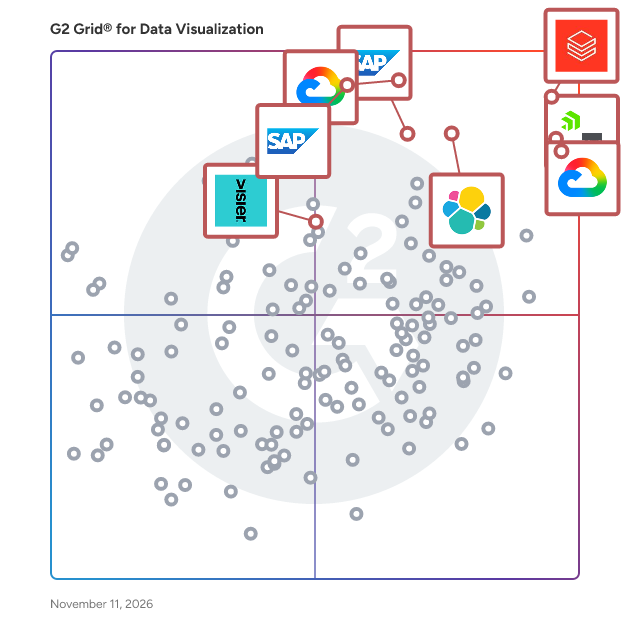
G2 Grid® for Data Visualization Tools

G2 Grid® for Data Visualization Tools plotting products by satisfaction and market presence

Highlighted products: Databricks, Domo, Looker, SAP HANA Cloud, SAP Analytics Cloud, Data Studio, Visier, and Elastic Stack.

Underlying data: [Grid® JSON](https://www.g2.com/categories/data-visualization-tools/grids.json?focus%5B%5D=databricks&focus%5B%5D=domo&focus%5B%5D=looker&focus%5B%5D=sap-hana-cloud-2025-10-01&focus%5B%5D=sap-analytics-cloud&focus%5B%5D=data-studio&focus%5B%5D=visier&focus%5B%5D=elastic-stack&segment=enterprise)

Coefficient

Coefficient is a new way to work with your company data better, faster, and more accurately without ever leaving your spreadsheet, integrating with the tools you already use. Install the Coefficient Excel or Google Sheets extension and use it in a new or existing sheet in seconds. Once installed, Coefficient lives as a sidebar companion so your company data is only a couple of clicks away at any time. Any data source that you work with is available directly in your Coefficient sidebar – such as Salesforce, HubSpot, Snowflake, NetSuite, QuickBooks, MySQL, and Looker – with the ability to consolidate your data from multiple systems into one spreadsheet. Use Coefficient filters to easily customize your imports to only work with the data you need, keeping your spreadsheets performant. Quickly go back anytime to add more data in the same report. Never rebuild the same analysis twice by keeping your data up to date with scheduled updates. And, use Coefficient alerts to trigger Slack or email messages anytime your spreadsheet updates. Now, you can turn your spreadsheet into the most flexible, powerful monitoring system across all of your company data. Say “goodbye” to manual data workflows and “hello” to connected spreadsheets.

Average Rating: 4.7/5.0

Total Reviews: 206

How Do G2 Users Rate Coefficient?

  • Has the product been a good partner in doing business?: 9.0/10 (Category avg: 9.0/10)

Who Is the Company Behind Coefficient?

  • Seller: Coefficient
  • Company Website:
  • Year Founded: 2020
  • HQ Location: Palo Alto, CA
  • LinkedIn® Page: www.linkedin.com
    70 employees on LinkedIn®

Who Uses This Product?

  • Top Industries: Computer Software, Information Technology and Services
  • Company Size: 46% Medium, 35% Small

What Do G2 Reviewers Say About Coefficient?

AI-generated summary from verified user reviews

Pros
  • Users appreciate the ease of use of Coefficient, enjoying seamless data extraction and hassle-free synchronization across tools.
  • Users value the automation capabilities of Coefficient, making data management effortless and efficient.
  • Users appreciate the seamless integrations of Coefficient, enabling effortless data flow between systems like Salesforce and QuickBooks.
  • Users value the time-saving automation of Coefficient, reclaiming hours in their weekly reporting tasks.
  • Users find easy integrations with Coefficient seamless, enhancing productivity and simplifying their data workflow considerably.
Cons
  • Users find the limited filtering options in Coefficient restrictive and detrimental to their data analysis experience.
  • Users find the feature limitations of Coefficient frustrating, particularly with filtering and integration challenges.
  • Users find the limit of Google Sheets for multiple filters and imports restricts their data management capabilities.
  • Users find the missing features in Coefficient limiting, especially with filters and integrating charts from SFDC.
  • Users face integration issues with Coefficient, leading to frustrating limitations when connecting to other tools and systems.

What Are Recent G2 Reviews of Coefficient?

Toucan

Toucan is an AI-embedded analytics platform designed to assist independent software vendors (ISVs) and SaaS companies in integrating advanced analytics features directly into their products, eliminating the need for building these capabilities from the ground up. This platform is tailored specifically for customer-facing applications, meaning that the end users are the clients of these companies rather than internal analysts. By enabling product and operations teams to configure and deploy analytics features independently, Toucan streamlines the development process and reduces reliance on data engineering resources. The target audience for Toucan primarily includes ISVs and SaaS companies across various industries, such as fintech, HR tech, and marketing technology. These organizations often seek to enhance their product offerings with sophisticated analytics capabilities that provide value to their users. With Toucan, product teams can quickly implement features that allow end users to interact with data in meaningful ways. This is particularly beneficial for companies looking to differentiate themselves in competitive markets by offering robust analytics without the lengthy development cycles typically associated with such features. Toucan's key capabilities include conversational AI analytics, which empowers end users to pose questions in natural language and receive instant data visualizations. This feature is anchored in a governed semantic layer, ensuring that the insights provided are consistent and reliable. Additionally, the platform offers automatic dashboard generation through AI, allowing users to customize layouts, colors, and metrics without requiring technical expertise. The white-label, multi-tenant embedding options ensure that analytics seamlessly integrate into existing products, creating a native experience for users. Security and compliance are paramount in today's data-driven landscape, and Toucan addresses these concerns with row-level security and granular permissions. This ensures that each end user only accesses their specific data, making it suitable for regulated industries where data privacy is critical. Furthermore, Toucan supports connections to modern data infrastructures, such as PostgreSQL, MySQL, and AWS Redshift, and offers both SaaS and self-hosted deployment options to meet various organizational needs. The platform's no-code builder is a standout feature, enabling product and operations teams to create, edit, and publish dashboards without any coding knowledge. This capability significantly reduces dashboard development time—by up to two-thirds compared to traditional in-house builds—allowing ISVs to launch reporting modules in days instead of months. By embedding analytics as a premium feature, organizations can also create new revenue streams, enhancing their overall product value while minimizing additional development overhead. With over 350 clients already leveraging its capabilities, Toucan is positioned as a powerful solution for companies looking to enhance their analytics offerings.

Average Rating: 4.7/5.0

Total Reviews: 179

How Do G2 Users Rate Toucan?

  • Has the product been a good partner in doing business?: 9.4/10 (Category avg: 9.0/10)
  • Dashboards: 9.3/10 (Category avg: 9.0/10)
  • Steps to Answer: 8.7/10 (Category avg: 8.6/10)
  • Formats: 8.7/10 (Category avg: 8.6/10)

Who Is the Company Behind Toucan?

  • Seller: Toucan Toco
  • Year Founded: 2015
  • HQ Location: Boston, Massachusetts
  • LinkedIn® Page: www.linkedin.com
    74 employees on LinkedIn®

Who Uses This Product?

  • Who Uses This: Data Analyst
  • Top Industries: Computer Software, Banking
  • Company Size: 43% Small, 30% Medium

What Do G2 Reviewers Say About Toucan?

AI-generated summary from verified user reviews

Pros
  • Users appreciate the ease of use of Toucan, enabling effortless data visualization and integration without coding skills.
  • Users appreciate the easy integrations of Toucan, facilitating seamless connections with various tools and platforms.
  • Users highlight Toucan's easy data visualization, making complex insights accessible for informed business decisions.
  • Users appreciate the seamless integrations of Toucan, enhancing data visualization and workflow efficiency without coding requirements.
  • Users value the powerful insights from Toucan, enhancing decision-making and simplifying data visualization effectively.
Cons
  • Users find the UI too complex, making navigation challenging for new users and affecting autonomous use.
  • Users often face complex usage issues with Toucan, making it challenging for new users to navigate effectively.
  • Users find the learning curve challenging with Toucan, struggling to navigate its complex UI despite its friendly design.
  • Users note limited customization options in Toucan, which sometimes restricts their ability to tailor visual presentations.
  • Users face occasional bugs in Toucan, leading to increased maintenance costs and some necessary learning for technical development.

What Are Recent G2 Reviews of Toucan?

What Are G2 Users Discussing About Toucan?

Rollstack

Rollstack helps data, finance, customer success, and revenue operations teams automate recurring PowerPoint presentations and Word documents by connecting directly to business intelligence tools like Tableau, Power BI, Looker, Metabase, and Google Sheets. If you’re tired of copying charts, pasting screenshots, or triple-checking KPIs across decks, Rollstack eliminates that manual, error-prone work. You can sync up-to-date data into branded templates, update them with one click, and export presentation-ready files in seconds. It’s built for teams responsible for client reporting, executive dashboards, business reviews, and sales enablement materials. Rollstack integrates directly with your existing BI stack, so there’s no need to rebuild dashboards or redesign visuals. Just connect your source, map the data to your slides or docs, and update them on your schedule — daily, weekly, or whenever you need them. Used by companies like Zillow, SoFi, Whirlpool, TripAdvisor, and CarGurus, Rollstack helps teams save 10+ hours per week, avoid mistakes, and focus on the story the data tells — not the tedious mechanics of building decks. For data analysts, program managers, sales ops, finance, and client success teams — Rollstack is how modern enterprises deliver consistent, trusted reports at scale. Whether you’re building a QBR for a $10M account or a weekly EBR, Rollstack makes its creation automatic and accurate. Book a demo today to learn how to automate your most important business reports.

Average Rating: 4.6/5.0

Total Reviews: 78

How Do G2 Users Rate Rollstack?

  • Has the product been a good partner in doing business?: 9.6/10 (Category avg: 9.0/10)
  • Dashboards: 8.2/10 (Category avg: 9.0/10)
  • Steps to Answer: 8.0/10 (Category avg: 8.6/10)
  • Formats: 8.4/10 (Category avg: 8.6/10)

Who Is the Company Behind Rollstack?

  • Seller: Rollstack
  • Year Founded: 2022
  • HQ Location: New York, USA
  • LinkedIn® Page: www.linkedin.com
    33 employees on LinkedIn®

Who Uses This Product?

  • Top Industries: Marketing and Advertising, Computer Software
  • Company Size: 46% Medium, 41% Large

What Do G2 Reviewers Say About Rollstack?

AI-generated summary from verified user reviews

Pros
  • Users appreciate the time-saving automation of Rollstack, freeing them from tedious manual data entry.
  • Users appreciate the responsive customer support of Rollstack, enhancing their experience with prompt assistance and guidance.
  • Users appreciate the ease of use of Rollstack, enjoying its intuitive setup and streamlined automation processes.
  • Users value the ease of automation with Rollstack, streamlining reporting and presentation tasks efficiently.
  • Users value the easy integration of Rollstack, enhancing efficiency in automating reports and presentations seamlessly.
Cons
  • Users experience slow loading times and occasional glitches, which disrupt their overall experience with Rollstack.
  • Users experience slow performance with Rollstack, as updates and data loading can take significant time.
  • Users face limitations in storage with Rollstack, requiring manual intervention to manage slide uploads effectively.
  • Users find the complex setup process time-consuming and confusing, but it simplifies future tasks once completed.
  • Users find limited customization options for capture areas and formatting, impacting their experience with Rollstack.

What Are Recent G2 Reviews of Rollstack?

AI can help you find the answers. G2 helps you trust them.

Connect G2 to Claude or ChatGPT for answers grounded in G2's trusted reviews, comparisons, and pricing from real user insights.

How it works

IBM Environmental Intelligence Suite

The IBM Environmental Intelligence Suite is an AI-powered SaaS solution that provides organizations with timely and fact-based actionable intelligence to proactively plan and manage the economic impact of severe weather and climate change events; built on the world’s most accurate weather data providing clients with the ability to: Monitor for disruptive environmental conditions such as severe weather, wildfires, flooding and air quality and send alerts when detected Predict potential impacts of climate change and weather across the business using climate risk analytics Gain insights into potential operational disruptions and prioritize mitigation and response efforts Measure and report on environmental initiatives and operationalize carbon accounting, while reducing the burden of this reporting on procurement and operations teams The IBM Environmental Intelligence Suite combines key functionality into a single application suite that includes: Climate and Weather Data APIs Data APIs within the IBM® Environmental Intelligence Suite tap into the breadth and depth of climate, environment and weather data to provide current and forecasted conditions, seasonal and sub-seasonal forecasts, lifestyle indices, severe weather and historical weather data for analysis. The packages are curated to give you only what you need in the format you need it, and you can use them quickly and easily by accessing data APIs through the cloud. By applying advanced analytics to a combination of business data and weather data such as alerts and notifications, forecast data and weather imagery, you can build the foundation for informed enterprise decision-making. Geospatial Analytics Engine Formerly IBM PAIRS Geoscope, the Geospatial Analytics component within the Environmental Intelligence Suite is a platform specifically designed for massive geospatial-temporal (maps, satellite, weather, drone, IoT) query and analytics services. It frees up data scientists and developers from cumbersome processes that dominate conventional data preparation, providing search-friendly access to a rich, diverse and growing catalog of continually updated geospatial-temporal information. Dashboard Visualizations Dashboard Visualization provides weather visualizations for nearly all your locations in a single, user-friendly weather dashboard. See severe weather headed to some locations? Quickly deliver guidance to leadership and a prioritized action list for personnel. Awareness of weather forecasts and patterns in advance can also open windows to new or additional business. Scalable Alerting The alerts console combines data science, geo-location and precise weather data so businesses across energy and utilities, insurance, retail, telecommunications, ground transportation and other industries can deliver timely and customized messages. With Alert Console, create meaningful touch points to strengthen customer loyalty, and protect employees and properties in a timely manner.

Average Rating: 4.2/5.0

Total Reviews: 49

How Do G2 Users Rate IBM Environmental Intelligence Suite?

  • Has the product been a good partner in doing business?: 7.8/10 (Category avg: 9.0/10)
  • Dashboards: 8.9/10 (Category avg: 9.0/10)
  • Steps to Answer: 8.2/10 (Category avg: 8.6/10)
  • Formats: 8.1/10 (Category avg: 8.6/10)

Who Is the Company Behind IBM Environmental Intelligence Suite?

  • Seller: IBM
  • Year Founded: 1911
  • HQ Location: Armonk, New York, United States
  • LinkedIn® Page: www.linkedin.com
    344,328 employees on LinkedIn®
  • Ownership: SWX:IBM
  • Phone: 1-866-277-7488

Who Uses This Product?

  • Top Industries: Information Technology and Services, Accounting
  • Company Size: 39% Medium, 35% Small

What Do G2 Reviewers Say About IBM Environmental Intelligence Suite?

AI-generated summary from verified user reviews

Pros
  • Users value the real-time environmental monitoring capabilities, enhancing decision-making and mitigating risks effectively.
  • Users value the real-time predictive analytics of IBM Environmental Intelligence Suite for proactive risk management and decision-making.
  • Users value the real-time data from IBM EIS for quick and informed decision-making in various scenarios.
  • Users value the real-time updates from IBM EIS, enhancing decision-making in supply chain management and disaster response.
  • Users appreciate the comprehensive data analytics of IBM Environmental Intelligence Suite for its timely insights and effective decision-making.
Cons
  • Users find the setup and integration complex, particularly for those not using IBM's existing tools, hindering adoption.
  • Users find the setup and integration process complex, particularly for those not already using IBM products.
  • Users find the pricing structure to be expensive and complex, posing challenges for startups and smaller businesses.
  • Users find the learning difficulty significant due to complex setup, user interface, and integration challenges.
  • Users highlight complex integration issues that hinder seamless adoption, particularly for non-IBM environments and SMBs.

What Are Recent G2 Reviews of IBM Environmental Intelligence Suite?

Sisense

Sisense is an API-first analytics platform that modernizes businesses by seamlessly integrating in-context analytics within applications, leading to action-oriented insights that enhance decision intelligence.

Average Rating: 4.2/5.0

Total Reviews: 1,010

How Do G2 Users Rate Sisense?

  • Has the product been a good partner in doing business?: 8.7/10 (Category avg: 9.0/10)
  • Dashboards: 7.9/10 (Category avg: 9.0/10)
  • Steps to Answer: 6.7/10 (Category avg: 8.6/10)
  • Formats: 7.7/10 (Category avg: 8.6/10)

Who Is the Company Behind Sisense?

  • Seller: Sisense, Inc.
  • Company Website:
  • Year Founded: 2004
  • HQ Location: New York
  • LinkedIn® Page: www.linkedin.com
    534 employees on LinkedIn®

Who Uses This Product?

  • Who Uses This: Data Analyst, Product Manager
  • Top Industries: Information Technology and Services, Computer Software
  • Company Size: 57% Medium, 24% Small

What Do G2 Reviewers Say About Sisense?

AI-generated summary from verified user reviews

Pros
  • Users appreciate the ease of use of Sisense, thanks to its intuitive design and helpful documentation.
  • Users appreciate the data visualization capabilities of Sisense, creating clear and interactive dashboards from complex data sources.
  • Users value the seamless integrations in Sisense, enabling efficient data management and enhanced reporting capabilities.
  • Users commend the quick and helpful customer support of Sisense, enhancing their overall experience with the tool.
  • Users appreciate the dashboard customization in Sisense, enhancing their ability to create tailored and insightful visual presentations.
Cons
  • Users find a significant learning curve with Sisense, requiring time and training to achieve proficiency.
  • Users note missing features in Sisense, including limited transformation options and a lacking query builder.
  • Users report a massive security breach and poor support, requiring significant effort for issue resolution.
  • Users struggle with dashboard issues, finding the UI unhelpful and time-consuming for efficient data presentation.
  • Users find Sisense has limited customization, making it challenging for non-technical users to create tailored dashboards.

What Are Recent G2 Reviews of Sisense?

What Are G2 Users Discussing About Sisense?

iObeya

iObeya is the Digital Obeya Platform™: a type of enterprise visual management and operational excellence software that helps operations, manufacturing, and continuous-improvement teams run Lean and Agile management routines online instead of relying on paper boards or disconnected spreadsheets and slide decks. It digitizes the Obeya room, the dedicated space many Lean organizations use for structured visual management and synchronized decision-making, and connects a network of these rooms across sites, functions, and organizational tiers so that frontline data and executive strategy stay aligned. iObeya is used mainly by mid-to-large enterprises, typically 10,000 or more employees, running multi-site or multi-country operations in sectors including manufacturing, Pharmaceuticals, Aeronautical, logistics and energy sector. Within iObeya, teams and leaders can: Digitize daily management, tiered meetings, Gemba walks, and A3 problem-solving using structured boards designed to mirror how teams already run these routines on paper, so a board stays current during the meeting instead of being updated afterward. Connect a network of Obeya rooms so that issues, actions, and decisions escalate or cascade between frontline, site, and leadership tiers, reducing the need to re-enter the same information in separate reports. Deploy strategy through dedicated Hoshin Kanri, X-matrix, and OKR rooms that link annual objectives to team-level initiatives and owners, including catchball workflows for negotiating targets across tiers. Display KPIs and operational dashboards alongside the rooms and routines that generate them, so a performance signal points directly to its operational context, owner, and next action. Deploy in the cloud or on-premises with role-based access control and security practices aligned to ISO 27001 and GDPR, in environments used at up to more than 10,000 users in a single tenant. Typical users include operational excellence leaders, plant and site managers, transformation leaders, and frontline supervisors responsible for scaling a consistent management system across sites, regions, and functions.

Average Rating: 4.5/5.0

Total Reviews: 148

How Do G2 Users Rate iObeya?

  • Has the product been a good partner in doing business?: 9.0/10 (Category avg: 9.0/10)

Who Is the Company Behind iObeya?

  • Seller: iObeya
  • Company Website:
  • Year Founded: 2011
  • HQ Location: Massy, Ile-de-France
  • LinkedIn® Page: www.linkedin.com
    147 employees on LinkedIn®

Who Uses This Product?

  • Top Industries: Pharmaceuticals, Aviation & Aerospace
  • Company Size: 49% Large, 30% Medium

What Do G2 Reviewers Say About iObeya?

AI-generated summary from verified user reviews

Pros
  • Users praise iObeya for its ease of use, enhancing coordination and making meetings organized and effective.
  • Users value the effective team collaboration that iObeya facilitates, streamlining communication and enhancing project planning.
  • Users value the clarity and organization provided by iObeya, enhancing teamwork and coordination in remote settings.
  • Users value the seamless collaboration iObeya offers, enhancing team coordination and making meetings more effective.
  • Users appreciate the organized collaboration offered by iObeya, enhancing team coordination and productivity in daily tasks.
Cons
  • Users find managing multiple boards cumbersome, causing confusion and slowdowns during busy periods with potential for missed updates.
  • Users find the poor usability of iObeya frustrating, struggling with complexity and navigation across multiple boards.
  • Users experience slow performance with iObeya, especially when managing multiple boards or large diagrams simultaneously.
  • Users express frustration over missing features for creative tasks, impacting workflow and satisfaction with iObeya.
  • Users report slow loading times and frustrations with boards lagging during peak periods, impacting collaborative efficiency.

What Are Recent G2 Reviews of iObeya?

What Are G2 Users Discussing About iObeya?

OriginPro

Origin is a user-friendly and easy-to-learn software application that provides data analysis and publication-quality graphing capabilities tailored to the needs of scientists and engineers. OriginPro offers extended analysis tools for Peak Fitting, Surface Fitting, Statistics, Signal Processing and Image Handling. Along with general statistical tools such as descriptive statistics, T-tests, ANOVA, and survival analysis, OriginPro also offers advanced Time Series analysis and Quality Improvement tools including DOE, SPC, and MSA. Users can customize operations such as importing, graphing and analysis, all from the GUI. Graphs, analysis results and reports update automatically when data or parameters change. This allows for batch analysis of multiple files or data sets without the need for programming.

Average Rating: 4.7/5.0

Total Reviews: 139

How Do G2 Users Rate OriginPro?

  • Has the product been a good partner in doing business?: 9.4/10 (Category avg: 9.0/10)
  • Dashboards: 7.7/10 (Category avg: 9.0/10)
  • Steps to Answer: 6.7/10 (Category avg: 8.6/10)
  • Formats: 8.7/10 (Category avg: 8.6/10)

Who Is the Company Behind OriginPro?

  • Seller: OriginLab Corp.
  • Company Website:
  • Year Founded: 1992
  • HQ Location: Northampton, MA
  • LinkedIn® Page: www.linkedin.com
    33 employees on LinkedIn®

Who Uses This Product?

  • Who Uses This: Research Scientist
  • Top Industries: Research, Higher Education
  • Company Size: 45% Large, 34% Small

What Do G2 Reviewers Say About OriginPro?

AI-generated summary from verified user reviews

Pros
  • Users value the versatile tools for data analysis and visualization that enhance interaction with research results in OriginPro.
  • Users highlight the versatile data analysis capabilities of OriginPro, making it ideal for presentations and publications.
  • Users highlight the ease of use of OriginPro, valuing its intuitive GUI and straightforward analysis capabilities.
  • Users love the dynamic visualization capabilities of OriginPro, enhancing their data analysis and presentation experiences.
  • Users value the intuitive graphical visualization in OriginPro, enhancing their analysis experience without coding requirements.
Cons
  • Users face a steep learning curve with OriginPro, noting challenges in navigation and interface familiarity.
  • Users find the interface not user-friendly, struggling with column manipulation and features, especially on Mac systems.
  • Users find the complexity of column manipulation in OriginPro can hinder a smooth data analysis experience.
  • Users find the subscription expensive and note high maintenance costs for the premium features of OriginPro.
  • Users cite limited flexibility in graphing speed and formula functionality, hindering their overall experience with OriginPro.

What Are Recent G2 Reviews of OriginPro?

What Are G2 Users Discussing About OriginPro?

thinkcell AI Suite

thinkcell is the industry standard for business presentation creation in PowerPoint, trusted by over 1.3 million professionals across 35,000 organizations worldwide, including all of the top 10 global consulting firms and 88% of the Fortune 100. thinkcell AI Suite is purpose-built for high-stakes business communications. You can generate slides or entire presentations, edit slides using natural language chat, make precision text changes, and translate entire presentations across 70+ languages, all while keeping formatting intact and without leaving PowerPoint. thinkcell AI Suite delivers best-in-class data visualization with 40+ chart types, including waterfalls, Mekkos, and Gantt charts. Combined with tools handling layout, design, and annotations like CAGR lines, thinkcell ensures every slide is polished, consistent, and on-brand without the manual effort. Excel links control how you manage updates to your presentations while maintaining full data consistency. With the library capabilities, you can keep your most valuable presentation assets within instant reach. Search and reuse slides from your entire PowerPoint repository at slide level, or choose from 250+ professionally designed templates to get any presentation off the ground faster, without ever starting from a blank slide. Built-in brand controls and style files ensure every asset your team uses stays fully compliant with your visual identity. thinkcell AI Suite also supports seamless collaboration across teams, with full compatibility across Windows, Mac, and ARM systems, making it easy to share and co-develop presentations with colleagues and external stakeholders. Seamlessly integrated with both PowerPoint and Excel, thinkcell automates the time-consuming work of presentation production, freeing teams to focus on the insights and the story behind the data.

Average Rating: 4.4/5.0

Total Reviews: 136

How Do G2 Users Rate thinkcell AI Suite?

  • Has the product been a good partner in doing business?: 8.1/10 (Category avg: 9.0/10)
  • Dashboards: 8.2/10 (Category avg: 9.0/10)
  • Steps to Answer: 7.3/10 (Category avg: 8.6/10)
  • Formats: 7.9/10 (Category avg: 8.6/10)

Who Is the Company Behind thinkcell AI Suite?

  • Seller: thinkcell
  • Company Website:
  • Year Founded: 2002
  • HQ Location: Berlin, Berlin, Germany
  • LinkedIn® Page: www.linkedin.com
    238 employees on LinkedIn®

Who Uses This Product?

  • Top Industries: Financial Services, Information Technology and Services
  • Company Size: 41% Small, 32% Large

What Do G2 Reviewers Say About thinkcell AI Suite?

AI-generated summary from verified user reviews

Pros
  • Users value the ease of use of thinkcell AI Suite, enhancing their ability to create impactful visualizations effortlessly.
  • Users value the ease of use and appealing charts in thinkcell AI Suite, enhancing their visual presentations effectively.
  • Users find that think-cell AI Suite provides a time-saving solution, allowing quick chart creation and efficient updates.
  • Users value the easy integration with Excel and powerful charting capabilities, enhancing their data visualization in PowerPoint.
  • Users value the ease of creating compelling visualizations with think-cell, enhancing their presentations significantly.
Cons
  • Users find limited formatting options in thinkcell, making customization time-consuming and sometimes ineffective when sharing presentations.
  • Users find the learning curve steep, requiring time and tutorials to fully utilize thinkcell AI Suite’s features.
  • Users face limited customization options in thinkcell AI Suite, resulting in a less tailored user experience.
  • Users find the limited customization options frustrating, affecting their ability to navigate and adjust elements efficiently.
  • Users experience slow performance with thinkcell AI Suite, particularly when working with shared files and updating graphs.

What Are Recent G2 Reviews of thinkcell AI Suite?

What Are G2 Users Discussing About thinkcell AI Suite?

Visme

Visme is the operating system for business content, the platform teams use to create, manage, and scale everything their business communicates with, from presentations and reports to infographics, documents, and social graphics. Where most AI creates from a blank prompt, Visme works from what your business already knows. Connect your Drive, OneDrive, SharePoint, and existing decks, and Visme reads them, structures them, and learns your brand, voice, and key facts. Every new piece is held to that brand standard automatically, with the right fonts, colors, logos, and tone applied without anyone enforcing them manually. Visme's AI is grounded in your brand, your content, and your data rather than a generic prompt, so what it produces reads like your company instead of off-the-shelf output. From that foundation, Visme can build on-brand Sales Decks, QBRs, and Proposals from your own content, pull live data from Salesforce, Google Sheets, and Excel, and update a fact once so it carries across every piece built from it. Visme is built for the teams that produce recurring customer-facing content: sales, customer success, marketing, and revenue operations. Real-time collaboration keeps distributed teams working in one place, and Smart Link sharing shows how content performs after it is sent. The outcome is one system the whole company creates from, consistent, current, and built on what your team already has, so the people accountable for the brand can hold the standard without reviewing every piece.

Average Rating: 4.5/5.0

Total Reviews: 498

How Do G2 Users Rate Visme?

  • Has the product been a good partner in doing business?: 9.2/10 (Category avg: 9.0/10)
  • Dashboards: 8.6/10 (Category avg: 9.0/10)
  • Steps to Answer: 7.8/10 (Category avg: 8.6/10)
  • Formats: 8.8/10 (Category avg: 8.6/10)

Who Is the Company Behind Visme?

  • Seller: Visme
  • Company Website:
  • Year Founded: 2014
  • HQ Location: Rockville, Maryland
  • LinkedIn® Page: www.linkedin.com
    89 employees on LinkedIn®

Who Uses This Product?

  • Who Uses This: CEO, Founder
  • Top Industries: Marketing and Advertising, Education Management
  • Company Size: 70% Small, 24% Medium

What Do G2 Reviewers Say About Visme?

AI-generated summary from verified user reviews

Pros
  • Users appreciate the ease of use of Visme, finding it perfect for creating polished visuals effortlessly.
  • Users appreciate the user-friendly interface and beautiful templates that enhance their projects and creativity.
  • Users love the extensive selection of beautiful templates in Visme, enhancing their professional and polished presentations effortlessly.
  • Users praise Visme for its intuitive design and user-friendly features, making graphic creation quick and polished.
  • Users love the easy-to-use interface of Visme, making document creation and chart design straightforward and polished.
Cons
  • Users find Visme's limited features restrict collaborative efforts and necessary tools for comprehensive project management.
  • Users find the missing features in Visme limiting, especially regarding collaboration and mobile functionality.
  • Users experience limited editing capabilities in Visme, hindering their ability to efficiently modify presentations and collaborate.
  • Users find limited options frustrating, especially when seeking specific formatting and features within Visme.
  • Users find Visme expensive for individual use, with additional fees and limited collaboration features adding to the cost.

What Are Recent G2 Reviews of Visme?

What Are G2 Users Discussing About Visme?

PopSQL

PopSQL is the evolution of legacy SQL editors like DataGrip, DBeaver, Postico. We provide a beautiful, modern SQL editor for data focused teams looking to save time, improve data accuracy, onboard new hires faster, and deliver insights to the business fast. With PopSQL, users can easily understand their data model, write version controlled SQL, collaborate with live presence, visualize data in charts and dashboards, schedule reports, share results, and organize foundational queries for search and discovery. Even if your team is already leveraging a large BI tool, like Tableau or Looker, or a hodge podge of SQL editors, PopSQL enables seamless collaboration between your SQL power users, junior analysts, and even your less technical stakeholders who are hungry for data insights. * Cross-platform compatibility with macOS, Windows, and Linux * Works with Snowflake, Redshift, BigQuery, Clickhouse, Databricks, Athena, MongoDB, PostgreSQL, MySQL, SQL Server, SQLite, Presto, Cassandra, and more

Average Rating: 4.6/5.0

Total Reviews: 80

How Do G2 Users Rate PopSQL?

  • Has the product been a good partner in doing business?: 9.6/10 (Category avg: 9.0/10)
  • Dashboards: 8.7/10 (Category avg: 9.0/10)
  • Steps to Answer: 9.0/10 (Category avg: 8.6/10)
  • Formats: 8.8/10 (Category avg: 8.6/10)

Who Is the Company Behind PopSQL?

Who Uses This Product?

  • Top Industries: Computer Software, Information Technology and Services
  • Company Size: 43% Small, 37% Medium

What Are Recent G2 Reviews of PopSQL?

What Are G2 Users Discussing About PopSQL?

iDashboards

iDashboards helps organizations see and act on their data. Business users can connect to the data sources they already have, like databases, spreadsheets and cloud applications, and build interactive dashboards without writing code. With an easy drag-and-drop builder and a large library of charts, maps and visuals, teams can track KPIs, spot trends and share insights across departments in real time. Users can drill down into details, filter views and set alerts, while live and scheduled data refresh keeps every dashboard up to date. Role-based security means each person sees the metrics that matter to them, and dashboards work on desktops, mobile devices, and wall displays. iDashboards can run in the cloud or on-premises. iDashboards has worked with organizations in healthcare, education, government, manufacturing, finance and more for over 20 years. It’s known for being easy to use, flexible, and backed by hands-on support, with onboarding, training, and a team that helps customers succeed from setup to rollout.

Average Rating: 4.5/5.0

Total Reviews: 66

How Do G2 Users Rate iDashboards?

  • Has the product been a good partner in doing business?: 9.6/10 (Category avg: 9.0/10)

Who Is the Company Behind iDashboards?

Who Uses This Product?

  • Top Industries: Information Technology and Services, Financial Services
  • Company Size: 42% Medium, 36% Large

What Are Recent G2 Reviews of iDashboards?

What Are G2 Users Discussing About iDashboards?

Forsta

Forsta, a Press Ganey company, powers the HX (Human Experience) Platform – a comprehensive Experience and Research Technology platform that breaks down the silos between CX (Customer Experience), Employee Experience (EX), Market Research – so that companies can get a deeper, more complete understanding of the experiences of their audiences. The HX Platform gathers and analyzes data, and translates the findings into shareable actions to inform decision-making and drive growth. Forsta’s technology, combined with its team of expert consultants, serves organizations across a variety of industries including financial services, healthcare, hospitality, market research, professional services, retail and technology. Forsta is recognized as a Leader in the 2021 Gartner® Magic Quadrant™ for Voice of the Customer. For more information, visit www.forsta.com.

Average Rating: 4.2/5.0

Total Reviews: 297

How Do G2 Users Rate Forsta?

  • Has the product been a good partner in doing business?: 8.4/10 (Category avg: 9.0/10)
  • Dashboards: 9.3/10 (Category avg: 9.0/10)
  • Steps to Answer: 9.4/10 (Category avg: 8.6/10)
  • Formats: 8.9/10 (Category avg: 8.6/10)

Who Is the Company Behind Forsta?

  • Seller: Forsta
  • Year Founded: 1990
  • HQ Location: London, United Kingdom
  • LinkedIn® Page: www.linkedin.com
    366 employees on LinkedIn®

Who Uses This Product?

  • Who Uses This: Project Manager, Manager
  • Top Industries: Market Research, Management Consulting
  • Company Size: 43% Medium, 29% Large

What Do G2 Reviewers Say About Forsta?

AI-generated summary from verified user reviews

Pros
  • Users value the ease of use of Forsta, appreciating its seamless integration and powerful visualization tools.
  • Users value the ease of use and integration of Forsta for market research visualizations and reporting.
  • Users value the customization capabilities of Forsta, which align perfectly with market research needs and preferences.
  • Users value the advanced data analysis tools in Forsta, facilitating complex research and insightful reporting.
  • Users value the efficiency improvement of Forsta, benefiting from advanced tools that streamline research and analytics.
Cons
  • Users find the limited design options of Forsta hinder their ability to personalize surveys effectively.
  • Users express frustration over poor performance, citing issues like low video quality, delays, and limited design options.
  • Users find the time-consuming setup process frustrating, especially for creating video clips and managing projects.
  • Users often face delay issues with Forsta, leading to frustrating video creation and extended scripting times.
  • Users find Forsta to be expensive, with high licensing costs that discourage smaller teams from utilizing its features.

What Are Recent G2 Reviews of Forsta?

What Are G2 Users Discussing About Forsta?

Databox

Databox is an agentic analytics platform for people responsible for business performance. It brings data from across the business into one place and organizes it around consistent metrics and the context that explains how the business works. Start with prebuilt metrics and definitions, or prepare your own data and create the custom metrics, calculations, and datasets you need. With that foundation in place, Databox does more of the recurring reporting and analysis. Ask its AI Analyst questions about your business and get clear answers with the reasoning behind them. Use Routines to surface important changes automatically. Turn insights into polished reports that explain what happened and why it matters. Or use Databox MCP to bring your performance data and context into AI tools like Claude, so analysis, decisions, and action can happen where you already work. Because the data, metrics, context, analytical capabilities, and AI-powered workflows are connected in one platform, you do not have to assemble the foundation or repeat the same analysis yourself. Databox helps you understand what is changing, see what deserves attention, and take better-informed action faster, while you remain in control. Try it free today at databox.com.

Average Rating: 4.4/5.0

Total Reviews: 189

How Do G2 Users Rate Databox?

  • Has the product been a good partner in doing business?: 9.0/10 (Category avg: 9.0/10)
  • Dashboards: 9.3/10 (Category avg: 9.0/10)
  • Steps to Answer: 8.9/10 (Category avg: 8.6/10)
  • Formats: 8.6/10 (Category avg: 8.6/10)

Who Is the Company Behind Databox?

  • Seller: Databox
  • Year Founded: 2012
  • HQ Location: Boston, MA
  • LinkedIn® Page: www.linkedin.com
    113 employees on LinkedIn®

Who Uses This Product?

  • Who Uses This: Founder, Marketing Manager
  • Top Industries: Marketing and Advertising, Computer Software
  • Company Size: 71% Small, 21% Medium

What Do G2 Reviewers Say About Databox?

AI-generated summary from verified user reviews

Pros
  • Users find Databox to have a user-friendly interface, making it easy to track and report on business metrics.
  • Users value the seamless integrations of Databox, enhancing access to crucial business metrics from various platforms.
  • Users love the easy integrations of Databox, streamlining access to business metrics from multiple platforms effortlessly.
  • Users value the world-class customer support of Databox, ensuring swift resolutions and exceptional assistance when needed.
  • Users value Databox for its transformative reporting capabilities, enhancing insights and data visualization for agencies.
Cons
  • Users find that Databox has connection issues, lacking integrations for specific industry needs and workflows.
  • Users find that Databox has connectivity issues, requiring more integrations for wider industry applicability.
  • Users criticize Databox for being expensive and misleading, with unexpected charges and difficult billing disputes reported.
  • Users express frustration over expensive pricing tactics and misleading subscription charges that lead to distrust and dissatisfaction.
  • Users find the learning curve challenging initially, but adapting leads to significant time savings.

What Are Recent G2 Reviews of Databox?

Spotfire Analytics

Spotfire® is a visual data science platform designed to help organizations address complex, industry-specific challenges by effectively utilizing data. This solution offers a range of flexible packaging options tailored to meet the diverse needs of teams at various stages of their visual data science journey. Turn raw data into real-time decisions with powerful, interactive visual analytics with Spotfire® Analytics. Spotfire Analytics is designed for business agility, enabling every user to explore data visually, uncover patterns quickly, and make confident, data-driven decisions without writing a single line of code. As a self-service visual data science solution, it empowers teams across roles and departments to gain fast, actionable insights that drive impact. With its no-code interactive dashboards and rich visual exploration capabilities, Spotfire Analytics connects natively to hundreds of cloud, on-premises, and real-time data sources. Built-in geoanalytics extend the power of analysis with multi-layer mapping and seamless integration of spatial data, while data wrangling and transformation can be performed directly within the visual interface, making it easy to clean, shape, and blend data as you analyze. AI-assisted recommendations and anomaly detection help uncover hidden patterns, suggest the most meaningful visualizations, and accelerate the path to discovery. Customizable visualizations, workflows, and an intuitive interface ensure that insights are not only easier to create but also easier to share. With seamless collaboration features, Spotfire Analytics enables teams to work together, align on insights, and act decisively. Whether the goal is to analyze trends, detect anomalies, or unlock location-based intelligence, Spotfire Analytics delivers the speed, flexibility, and depth needed to make smarter decisions with confidence. Explore and understand your data visually, uncover hidden insights, and build powerful analytics applications - all without writing a single line of code. Spotfire Analytics combines advanced interactive visualizations and intuitive data wrangling in one environment. Connect to hundreds of data sources, from files to real-time streaming data, and transform messy data directly within your visuals. Built-in AI recommendations help you find patterns, anomalies, and trends faster. With flexible visualizations, spatial analytics, and custom applications, anyone can turn raw data into actionable insights in minutes. Designed for business agility, Spotfire Analytics empowers every user to explore, analyze, and share results confidently - turning questions into decisions. Best for: Analysts, data-savvy professionals, and teams looking to explore and share data visually with maximum flexibility.

Average Rating: 4.2/5.0

Total Reviews: 328

How Do G2 Users Rate Spotfire Analytics?

  • Has the product been a good partner in doing business?: 8.4/10 (Category avg: 9.0/10)
  • Dashboards: 8.3/10 (Category avg: 9.0/10)
  • Steps to Answer: 7.8/10 (Category avg: 8.6/10)
  • Formats: 8.3/10 (Category avg: 8.6/10)

Who Is the Company Behind Spotfire Analytics?

Who Uses This Product?

  • Who Uses This: Student, Manager
  • Top Industries: Oil & Energy, Information Technology and Services
  • Company Size: 52% Large, 26% Medium

What Do G2 Reviewers Say About Spotfire Analytics?

AI-generated summary from verified user reviews

Pros
  • Users appreciate the powerful data visualization capabilities of Spotfire Analytics, enabling easy understanding of complex datasets.
  • Users value the ease of use in Spotfire Analytics, enabling effortless data visualization and swift decision-making.
  • Users value the powerful integration capabilities of Spotfire Analytics, enhancing accuracy and visualization for complex datasets.
  • Users value the easy integrations of Spotfire Analytics, enhancing data accuracy and powering insightful analytics effortlessly.
  • Users admire the powerful integration with multiple data sources, enhancing analytics and streamlining decision-making processes.
Cons
  • Users find the learning curve steep, especially for newcomers, making initial use challenging despite its powerful features.
  • Users note that learning difficulty is significant for beginners, making adoption challenging without prior BI experience.
  • Users find Spotfire Analytics to be expensive, with high licensing and maintenance costs impacting smaller organizations.
  • Users find the steep learning curve of Spotfire Analytics challenging, especially for newcomers to BI tools.
  • Users find the complexity of Spotfire Analytics challenging, particularly those unfamiliar with data modeling and scripting.

What Are Recent G2 Reviews of Spotfire Analytics?

What Are G2 Users Discussing About Spotfire Analytics?

NVivo

NVivo is the leading qualitative and mixed-methods analysis solution, available in two offerings: NVivo AI Cloud is the new AI-native, cloud-based solution powered by AURA (AI Unified Research Assistant). It guides researchers through project setup, literature search, AI-assisted coding, and grounded analysis—weaving AI assistance into the core workflow from the start. Every AI-generated insight includes a transparent audit trail linking back to source data with human approval gates, ensuring findings are defensible and withstand peer review. NVivo Desktop has supported scholars, teams, and institutions across social sciences, education, health, and public policy for over 30 years. It enables researchers to organize and interpret interviews, focus groups, and surveys; compare findings across cases and themes; and visualize results. Both offerings turn unstructured data into evidence-based insights through unified coding, querying, and analysis capabilities. The most cited QDA software in academic publications worldwide (Scopus, 2010–2025), NVivo gives researchers the rigor required for publications, evaluations, and grant proposals.

Average Rating: 4.0/5.0

Total Reviews: 142

How Do G2 Users Rate NVivo?

  • Has the product been a good partner in doing business?: 7.4/10 (Category avg: 9.0/10)
  • Dashboards: 5.6/10 (Category avg: 9.0/10)
  • Steps to Answer: 7.0/10 (Category avg: 8.6/10)
  • Formats: 5.6/10 (Category avg: 8.6/10)

Who Is the Company Behind NVivo?

  • Seller: Lumivero
  • Company Website:
  • Year Founded: 1995
  • HQ Location: Denver, CO
  • LinkedIn® Page: www.linkedin.com
    296 employees on LinkedIn®

Who Uses This Product?

  • Who Uses This: Research Assistant, Student
  • Top Industries: Higher Education, Research
  • Company Size: 47% Small, 33% Large

What Do G2 Reviewers Say About NVivo?

AI-generated summary from verified user reviews

Pros
  • Users find NVivo to be an easy-to-use and efficient system, greatly enhancing qualitative research organization and analysis.
  • Users commend NVivo for its efficiency improvements, facilitating seamless organization and analysis of qualitative research data.
  • Users commend NVivo for its seamless organization and analysis features, which elevate the quality of qualitative research.
  • Users appreciate the analysis accuracy of NVivo, which significantly enhances the depth and clarity of research outcomes.
  • Users appreciate the insightful analytics from NVivo, enhancing their qualitative research with visual and organizational tools.
Cons
  • Users find NVivo to be not user-friendly, citing a confusing interface and frustrating collaborative workflows.
  • Users report significant frustration with NVivo's poor customer support, citing slow responses and lack of timely assistance.
  • Users often experience slow performance with NVivo, leading to frustration and hindering research productivity.
  • Users face significant compatibility issues between Windows and iOS versions, complicating collaboration and user experience.
  • Users find NVivo's interface navigation confusing, complicating the usability and overall effectiveness of the research tool.

What Are Recent G2 Reviews of NVivo?

What Are G2 Users Discussing About NVivo?

Bijou Barry
BB
Researched and written by Bijou Barry
Updated