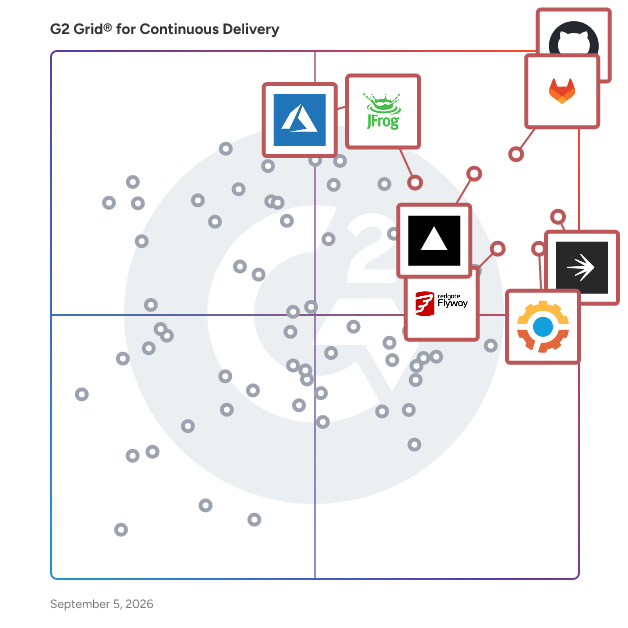
# Best Continuous Delivery Tools for Small Business

  *By [Adam Crivello](https://research.g2.com/insights/author/adam-crivello)*


   Products classified in the overall Continuous Delivery category are similar in many regards and help companies of all sizes solve their business problems. However, small business features, pricing, setup, and installation differ from businesses of other sizes, which is why we match buyers to the right Small Business Continuous Delivery to fit their needs. Compare product ratings based on reviews from enterprise users or connect with one of G2&#39;s buying advisors to find the right solutions within the Small Business Continuous Delivery category.

In addition to qualifying for inclusion in the Continuous Delivery Tools category, to qualify for inclusion in the Small Business Continuous Delivery Tools category, a product must have at least 10 reviews left by a reviewer from a small business.


## Top Continuous Delivery Tools at a Glance
| # | Product | Rating | Best For | What Users Say |
|---|---------|--------|----------|----------------|
| 1 | [GitHub](https://www.g2.com/products/github/reviews) | 4.7/5.0 (2,299 reviews) | Repo-native CI/CD with automated deployment pipelines | "[GitHub is one of those tools that just becomes part of our daily workflow](https://www.g2.com/survey_responses/github-review-12906387)" |
| 2 | [GitLab](https://www.g2.com/products/gitlab/reviews) | 4.5/5.0 (879 reviews) | Unified SCM and CI/CD pipeline delivery | "[User-Friendly Gitlab with Powerful APIs for Smooth Integrations](https://www.g2.com/survey_responses/gitlab-review-12778582)" |
| 3 | [LaunchDarkly](https://www.g2.com/products/launchdarkly/reviews) | 4.5/5.0 (738 reviews) | Deployment-decoupled feature flag rollouts | "[Operational agility at scale — deploys replaced by toggles](https://www.g2.com/survey_responses/launchdarkly-review-12870973)" |
| 4 | [Vercel](https://www.g2.com/products/vercel/reviews) | 4.7/5.0 (68 reviews) | Git-push CI/CD with Next.js preview deployments | "[$0 Hosting, 100 PageSpeed, Zero DevOps](https://www.g2.com/survey_responses/vercel-review-12553750)" |
| 5 | [Gearset DevOps](https://www.g2.com/products/gearset-devops/reviews) | 4.7/5.0 (290 reviews) | Salesforce metadata deployment with dependency-aware CI/CD | "[Straightforward Deployments, Powerful Metadata Tools, and Outstanding Support](https://www.g2.com/survey_responses/gearset-devops-review-12770401)" |
| 6 | [Redgate Flyway](https://www.g2.com/products/redgate-flyway/reviews) | 4.5/5.0 (94 reviews) | SQL-native database schema versioning for CI/CD | "[Redgate Flyway: Schema-as-Code Migrations That Fit Seamlessly Into CI/CD](https://www.g2.com/survey_responses/redgate-flyway-review-12854965)" |
| 7 | [Azure Pipelines](https://www.g2.com/products/azure-pipelines/reviews) | 4.3/5.0 (360 reviews) | Azure-native CI/CD pipeline automation | "[Scalable CI/CD for both Side Projects and Enterprise-Grade Microservices](https://www.g2.com/survey_responses/azure-pipelines-review-12362565)" |
| 8 | [Bitrise Mobile DevOps Platform](https://www.g2.com/products/bitrise-mobile-devops-platform/reviews) | 4.8/5.0 (231 reviews) | Mobile-first CI/CD pipeline automation and store delivery | "[Clear, Reliable, and Handles Any Web or Mobile Solution](https://www.g2.com/survey_responses/bitrise-mobile-devops-platform-review-12938029)" |
| 9 | [Red Hat Ansible Automation Platform](https://www.g2.com/products/red-hat-ansible-automation-platform/reviews) | 4.6/5.0 (369 reviews) | Agentless multi-host infrastructure delivery automation | "[Consistent, Scalable Automation That Boosts Stability and Efficiency](https://www.g2.com/survey_responses/red-hat-ansible-automation-platform-review-12121846)" |
| 10 | [Copado DevOps](https://www.g2.com/products/copado-devops/reviews) | 4.4/5.0 (305 reviews) | Salesforce-native CI/CD pipeline automation | "[Clearer, More Controlled Salesforce Releases with Copado DevOps](https://www.g2.com/survey_responses/copado-devops-review-12616746)" |

    ---
## What Are the Most Common Questions About Continuous Delivery Tools?
*AI-generated · Last updated: May 26, 2026*
  ### What top platforms for blue-green and canary deployments?
  Based on G2 reviews, buyers looking at blue-green and canary-style delivery patterns most often mention platforms that support gradual rollouts, rollback control, and strong deployment visibility. Verified users frequently describe LaunchDarkly as helping teams release features to limited user groups, run percentage-based rollouts, and disable problematic changes quickly without redeploying. G2 reviewers also mention GitLab for structured CI/CD pipelines, staged deployments, and strong visibility across builds and releases. According to verified users, GitHub is commonly used to automate deployments and manage release workflows through Actions, branch controls, and integrated reviews. These tools are often praised for helping teams reduce deployment risk while keeping releases predictable and easier to monitor.

**Here are some of the top-rated products on G2:**

- [GitHub](https://www.g2.com/products/github/reviews) – used for automated deployments, branch-based release workflows, and CI/CD through GitHub Actions
- [GitLab](https://www.g2.com/products/gitlab/reviews) – supports staged CI/CD pipelines, deployment tracking, and integrated code-to-release workflows
- [LaunchDarkly](https://www.g2.com/products/launchdarkly/reviews) – helps teams run gradual rollouts, targeted releases, and fast rollback of features in production


  ### What best tools for multi-environment deployment automation?
  Based on G2 reviews, buyers evaluating multi-environment deployment automation often prioritize consistency across dev, test, staging, and production. According to verified users, GitLab stands out for managing code, CI/CD, and deployments in one place, with teams highlighting its ability to automate builds, tests, and releases across multiple stages. G2 reviewers also mention GitHub for workflows that connect source control, pull requests, and deployment automation in a single environment. For Salesforce-focused teams, Gearset DevOps is repeatedly described as useful for comparing environments, validating changes, and promoting releases with less manual effort. Across reviews, the main themes are reducing deployment friction, keeping environments aligned, and improving visibility when changes move between stages.

**Here are some of the top-rated products on G2:**

- [GitLab](https://www.g2.com/products/gitlab/reviews) – used to automate builds, tests, and deployments across staging and production environments
- [GitHub](https://www.g2.com/products/github/reviews) – supports multi-stage delivery through Actions, branch workflows, and integrated code reviews
- [Gearset DevOps](https://www.g2.com/products/gearset-devops/reviews) – helps teams compare environments, validate changes, and move releases across Salesforce orgs


  ### Which platform offers AI-driven release optimization?
  Based on G2 reviews, Opsera is the clearest match for AI-driven release optimization in this category data. Verified users describe its AI agents as helping analyze pipelines, identify security issues earlier, surface architectural concerns, and improve visibility into delivery workflows. G2 reviewers mention that these capabilities can reduce manual effort in debugging and help teams catch risks before code moves further through CI/CD. Reviewers also note benefits around documentation, security scanning, and delivery insights, all of which support more informed release decisions. While some other products mention AI in narrower contexts, according to verified users, Opsera is the most directly associated with AI-assisted optimization of release and DevOps processes within the recent reviews provided.


  ### Which is the best continuous delivery platform for DevOps teams?
  Based on G2 reviews, GitHub is the strongest fit for many DevOps teams because reviewers repeatedly describe it as combining source control, collaboration, automation, and deployment workflows in one place. According to verified users, GitHub helps teams manage pull requests, reviews, issue tracking, and CI/CD with GitHub Actions, which reduces the need to jump across separate tools. G2 reviewers mention that this centralization improves visibility, speeds collaboration, and makes releases more structured and reliable. Users also call out integrations with common development tools and support for both individual and team workflows. While several products serve DevOps teams well, GitHub appears most frequently in the recent review set and is most consistently tied to end-to-end development and delivery operations.


  ### Which platform offers the fastest software release cycles?
  Based on G2 reviews, LaunchDarkly is strongly associated with faster release cycles because verified users repeatedly say it separates deployment from release. G2 reviewers mention that teams can ship code behind flags, roll features out gradually, test with limited audiences, and turn off problematic functionality instantly without redeploying. That approach is described as reducing release anxiety and helping engineering and product teams move faster with more control. Reviewers also connect LaunchDarkly with quicker experimentation, safer production testing, and faster iteration across different user segments. According to verified users, those capabilities shorten the time between completed code and controlled customer exposure, making it one of the clearest products in this dataset for accelerating release velocity while maintaining operational safety.


  ### Which continuous delivery software is easiest to integrate?
  Based on G2 reviews, GitHub is frequently described as one of the easiest continuous delivery tools to integrate because users already rely on it as a central hub for repositories, pull requests, automation, and connected developer tools. According to verified users, GitHub integrates well with common applications like VS Code, cloud platforms, issue trackers, and deployment services, while GitHub Actions helps automate releases without needing a separate delivery layer. G2 reviewers also mention smooth onboarding, familiar workflows, and broad team adoption as reasons integration tends to be less disruptive. While products like GitLab and Vercel are also praised for easy setup and strong integrations, GitHub appears most consistently in the reviews as a broadly connected platform that teams can adopt with minimal friction.


  ### What best software for ensuring deployment compliance?
  Based on G2 reviews, deployment compliance is most often associated with platforms that provide audit trails, governance controls, approval workflows, and security checks as part of delivery. Verified users frequently mention GitLab for built-in security scanning, compliance visibility, and role-based controls that help teams automate builds and deployments while maintaining governance. G2 reviewers also highlight Gearset DevOps for validations, release controls, and environment comparison that support more reliable, policy-driven changes. In Salesforce-heavy workflows, Copado DevOps is repeatedly described as helping teams manage user stories, approvals, version control, and deployment traceability. Across the recent reviews, the common theme is stronger release discipline through automation paired with clearer visibility into who changed what and when.

**Here are some of the top-rated products on G2:**

- [GitLab](https://www.g2.com/products/gitlab/reviews) – offers security scanning, auditability, and governance controls within CI/CD workflows
- [Gearset DevOps](https://www.g2.com/products/gearset-devops/reviews) – supports validated deployments, environment comparisons, and release controls for regulated changes
- [Copado DevOps](https://www.g2.com/products/copado-devops/reviews) – helps teams enforce approvals, version tracking, and traceable Salesforce release processes


  ### What best platforms for integrating continuous delivery with CI?
  Based on G2 reviews, the strongest platforms for connecting continuous delivery with CI are the ones that combine source control, build automation, testing, and deployment steps in a shared workflow. According to verified users, GitHub is widely used for this through GitHub Actions, where teams automate testing and deployment directly from repository events. G2 reviewers also describe GitLab as an all-in-one platform where code, pipelines, reviews, and deployments stay connected, reducing tool sprawl. Verified users further mention GitHub and GitLab for visibility across release stages and easier coordination between developers and operations. Across the review set, these products are praised for keeping CI and delivery tightly linked so teams can move from code change to tested deployment with fewer manual handoffs.

**Here are some of the top-rated products on G2:**

- [GitHub](https://www.g2.com/products/github/reviews) – combines repositories, pull requests, CI workflows, and deployment automation through GitHub Actions
- [GitLab](https://www.g2.com/products/gitlab/reviews) – unifies code management, CI/CD pipelines, and release workflows in one platform


  ### What top tools for automating software deployment pipelines?
  Based on G2 reviews, the top tools for automating software deployment pipelines are typically the ones reviewers use to standardize builds, testing, approvals, and releases. Verified users repeatedly mention GitHub for Actions-based automation that connects code changes to deployment workflows. G2 reviewers also highlight GitLab for bringing repositories, issue tracking, CI/CD pipelines, and deployment stages together in a single system. For teams focused on feature delivery control rather than only build automation, LaunchDarkly is also frequently mentioned for letting teams release safely through flags, targeted rollouts, and instant rollback. According to verified users, these tools help reduce manual steps, improve release consistency, and make software delivery easier to monitor as changes move from development into production.

**Here are some of the top-rated products on G2:**

- [GitHub](https://www.g2.com/products/github/reviews) – automates builds and deployments through repository-driven workflows and GitHub Actions
- [GitLab](https://www.g2.com/products/gitlab/reviews) – manages end-to-end deployment pipelines with integrated code, CI/CD, and release controls
- [LaunchDarkly](https://www.g2.com/products/launchdarkly/reviews) – adds controlled rollouts and kill-switch style release management to automated delivery processes


  ### What top-rated continuous delivery platforms for large teams?
  Based on G2 reviews, large teams tend to value continuous delivery platforms that combine scalability, governance, and visibility across many contributors and environments. Verified users frequently describe GitHub as a strong fit because it centralizes repositories, pull requests, reviews, Actions, and integrations in one place, which helps larger teams coordinate work and automate releases. G2 reviewers also mention GitLab for its all-in-one DevOps workflow, especially where teams want issue tracking, CI/CD, security, and deployment management together. For Salesforce-centered organizations, Gearset DevOps is often praised for handling complex environment management, metadata comparisons, and release workflows across multiple teams. According to verified users, these platforms help larger teams reduce coordination overhead while keeping delivery structured and reliable.

**Here are some of the top-rated products on G2:**

- [GitHub](https://www.g2.com/products/github/reviews) – supports large-team collaboration with centralized code, reviews, automation, and integrations
- [GitLab](https://www.g2.com/products/gitlab/reviews) – helps larger organizations unify planning, CI/CD, security, and deployment workflows
- [Gearset DevOps](https://www.g2.com/products/gearset-devops/reviews) – manages complex multi-environment Salesforce releases for teams working at scale


## How Many Continuous Delivery Tools Products Does G2 Track?
**Total Products under this Category:** 166

### Category Stats (Jun 2026)
- **Average Rating**: 4.43/5 The average rating of products in this category, based on all submitted ratings
- **New Reviews This Quarter**: 164
- **Buyer Segments**: Mid-Market 44% │ Small-Business 36% │ Enterprise 20% Represents the distribution of reviewers across all products in this category.
- **Top Trending Product**: BMC AMI DevX (+0.17%) - Among all products in this category, BMC AMI DevX recorded the largest rating increase compared to last month
*Last updated: June 01, 2026*

  
## How Does G2 Rank Continuous Delivery Tools Products?

**Why You Can Trust G2's Software Rankings:**

- 30 Analysts and Data Experts
- 12,100+ Authentic Reviews
- 166+ Products
- Unbiased Rankings

G2's software rankings are built on verified user reviews, rigorous moderation, and a consistent research methodology maintained by a team of analysts and data experts. Each product is measured using the same transparent criteria, with no paid placement or vendor influence. While reviews reflect real user experiences, which can be subjective, they offer valuable insight into how software performs in the hands of professionals. Together, these inputs power the G2 Score, a standardized way to compare tools within every category.


---

**Sponsored**

### Redgate Flyway

Redgate Flyway enables teams to deploy stable, secure database changes with confidence. With Flyway’s best-in-class technology and market-leading flexibility, teams have all they need for strong database governance, reliable deployments and the freedom to innovate faster. Redgate’s portfolio of solutions, including Flyway, help organizations reliably solve the complex challenges of database change management across the Database DevOps lifecycle. We make life easier for IT leaders, development and operations teams, increasing efficiency, reducing errors and protecting business-critical data. More than 200,000 data professionals across the globe, including 92% of the Fortune 100, rely on Redgate’s solutions to enable automation, resilience and efficiency throughout the database lifecycle, ensuring they get the most value out of their databases.


[Visit website](https://www.g2.com/external_clickthroughs/record?secure%5Bad_program%5D=ppc&amp;secure%5Bad_slot%5D=category_product_list&amp;secure%5Bcategory_id%5D=536&amp;secure%5Bdisplayable_resource_id%5D=536&amp;secure%5Bdisplayable_resource_type%5D=Category&amp;secure%5Bmedium%5D=sponsored&amp;secure%5Bplacement_reason%5D=page_category&amp;secure%5Bplacement_resource_ids%5D%5B%5D=536&amp;secure%5Bprioritized%5D=false&amp;secure%5Bproduct_id%5D=78698&amp;secure%5Bresource_id%5D=536&amp;secure%5Bresource_type%5D=Category&amp;secure%5Bsource_type%5D=category_page&amp;secure%5Bsource_url%5D=https%3A%2F%2Fwww.g2.com%2Fcategories%2Fcontinuous-delivery-tools%3Fpage%3D12&amp;secure%5Btoken%5D=248fd95b86962fe241eac51d283c5cf9bda6f970725e7bd0ea40a6d0e06575bf&amp;secure%5Burl%5D=https%3A%2F%2Fwww.red-gate.com%2Fproducts%2Fflyway%2Fentrypage%2Fg2-report%2F%3Futm_source%3Dg2%26utm_medium%3Dcpc%26utm_campaign%3Dmc-202603-flyway-g2-clicks-gm-all&amp;secure%5Burl_type%5D=custom_url)

---

  ## What Are the Top-Rated Continuous Delivery Tools Products in 2026?
### 1. [GitHub](https://www.g2.com/products/github/reviews)
  GitHub is where the world builds software. Millions of individuals, organizations and businesses around the world use GitHub to discover, share, and contribute software. Developers at startups to Fortune 50 companies use GitHub, every step of the way.


  **Average Rating:** 4.7/5.0
  **Total Reviews:** 2,299
**How Do G2 Users Rate GitHub?**

- **Deployment-Ready Staging:** 9.1/10 (Category avg: 8.9/10)
- **Processes and Workflow:** 9.1/10 (Category avg: 8.8/10)
- **Integration:** 9.2/10 (Category avg: 8.8/10)
- **Ease of Use:** 8.7/10 (Category avg: 8.7/10)

**Who Is the Company Behind GitHub?**

- **Seller:** [GitHub](https://www.g2.com/sellers/github)
- **Year Founded:** 2008
- **HQ Location:** San Francisco, CA
- **Twitter:** @github (2,671,824 Twitter followers)
- **LinkedIn® Page:** https://www.linkedin.com/company/1418841/ (6,106 employees on LinkedIn®)

**Who Uses This Product?**
  - **Who Uses This:** Software Engineer, Senior Software Engineer
  - **Top Industries:** Computer Software, Information Technology and Services
  - **Company Size:** 47% Small-Business, 31% Mid-Market


#### What Are GitHub's Pros and Cons?

**Pros:**

- Features (124 reviews)
- Ease of Use (111 reviews)
- Team Collaboration (109 reviews)
- Version Control (103 reviews)
- Collaboration (97 reviews)

**Cons:**

- Complexity (47 reviews)
- Learning Curve (45 reviews)
- Difficulty for Beginners (43 reviews)
- Learning Difficulty (41 reviews)
- Steep Learning Curve (36 reviews)

### 2. [Vercel](https://www.g2.com/products/vercel/reviews)
  Vercel is the agentic infrastructure company. As the team behind Next.js, AI SDK, AI Gateway and v0, Vercel is the platform where humans and AI agents build, ship, and scale software together. We are trusted by OpenAI, Ramp, Supreme, and millions of developers worldwide to ship what&#39;s next.


  **Average Rating:** 4.7/5.0
  **Total Reviews:** 68
**How Do G2 Users Rate Vercel?**

- **Deployment-Ready Staging:** 9.7/10 (Category avg: 8.9/10)
- **Processes and Workflow:** 9.5/10 (Category avg: 8.8/10)
- **Integration:** 9.5/10 (Category avg: 8.8/10)
- **Ease of Use:** 9.5/10 (Category avg: 8.7/10)

**Who Is the Company Behind Vercel?**

- **Seller:** [Vercel](https://www.g2.com/sellers/vercel)
- **Year Founded:** 2015
- **HQ Location:** San Francisco, California, United States
- **Twitter:** @vercel (432,041 Twitter followers)
- **LinkedIn® Page:** https://www.linkedin.com/company/vercel/about (913 employees on LinkedIn®)

**Who Uses This Product?**
  - **Who Uses This:** Founder
  - **Top Industries:** Information Technology and Services, Computer Software
  - **Company Size:** 81% Small-Business, 16% Mid-Market


#### What Are Vercel's Pros and Cons?

**Pros:**

- Ease of Use (12 reviews)
- Easy Setup (9 reviews)
- Features (8 reviews)
- Tool Efficiency (8 reviews)
- Deployment Ease (7 reviews)

**Cons:**

- Expensive (4 reviews)
- Pricing Issues (3 reviews)
- Limitations (2 reviews)
- Limited Features (2 reviews)
- Limited Services (2 reviews)

### 3. [GitLab](https://www.g2.com/products/gitlab/reviews)
  GitLab is the most comprehensive AI-Powered DevSecOps platform that enables software innovation by empowering development, security, and operations teams to build better software, faster. With GitLab, teams can create, deliver, and manage code quickly and continuously instead of managing disparate tools and scripts. GitLab helps your teams across the complete DevSecOps lifecycle, from developing, securing, and deploying software. What makes us truly different? - Flexibility: Consume as a service or manage your own deployment - Cloud-Agnostic: Deploy anywhere with no vendor lock-in - No rip and replace: Scale to a platform approach at your own pace


  **Average Rating:** 4.5/5.0
  **Total Reviews:** 879
**How Do G2 Users Rate GitLab?**

- **Deployment-Ready Staging:** 8.8/10 (Category avg: 8.9/10)
- **Processes and Workflow:** 8.8/10 (Category avg: 8.8/10)
- **Integration:** 9.0/10 (Category avg: 8.8/10)
- **Ease of Use:** 8.7/10 (Category avg: 8.7/10)

**Who Is the Company Behind GitLab?**

- **Seller:** [GitLab Inc.](https://www.g2.com/sellers/gitlab-inc)
- **Company Website:** https://about.gitlab.com/
- **Year Founded:** 2014
- **HQ Location:** San Francisco, California
- **Twitter:** @gitlab (171,453 Twitter followers)
- **LinkedIn® Page:** https://www.linkedin.com/company/5101804/ (3,473 employees on LinkedIn®)

**Who Uses This Product?**
  - **Who Uses This:** Software Engineer, Senior Software Engineer
  - **Top Industries:** Computer Software, Information Technology and Services
  - **Company Size:** 37% Mid-Market, 36% Small-Business


#### What Are GitLab's Pros and Cons?

**Pros:**

- Ease of Use (40 reviews)
- Features (39 reviews)
- CI (33 reviews)
- Integrations (32 reviews)
- CD Integration (31 reviews)

**Cons:**

- Complexity (20 reviews)
- Difficult Learning (18 reviews)
- Confusing Interface (15 reviews)
- Complex User Interface (14 reviews)
- Learning Curve (13 reviews)

### 4. [Bitrise Mobile DevOps Platform](https://www.g2.com/products/bitrise-mobile-devops-platform/reviews)
  Bitrise serves mobile application developers navigating the ever-changing landscape of app development, testing, and app store release. Transcending the boundaries of traditional CI/CD platforms, Bitrise accelerates release cycles without compromising app quality. Bitrise boosts developer experience with its fully managed, mobile-first DevOps solutions, supercharged by a CI-agnostic remote build caching platform. Customer include chart-toppers like Reddit, Grindr, Equinox, GoDaddy, Careem, Buffer, Sixt and many more.


  **Average Rating:** 4.8/5.0
  **Total Reviews:** 231
**How Do G2 Users Rate Bitrise Mobile DevOps Platform?**

- **Deployment-Ready Staging:** 9.3/10 (Category avg: 8.9/10)
- **Processes and Workflow:** 9.5/10 (Category avg: 8.8/10)
- **Integration:** 9.3/10 (Category avg: 8.8/10)
- **Ease of Use:** 9.1/10 (Category avg: 8.7/10)

**Who Is the Company Behind Bitrise Mobile DevOps Platform?**

- **Seller:** [Bitrise ltd](https://www.g2.com/sellers/bitrise-ltd)
- **Company Website:** https://www.bitrise.io/
- **Year Founded:** 2015
- **HQ Location:** Budapest, Hungary
- **Twitter:** @bitrise (10,022 Twitter followers)
- **LinkedIn® Page:** https://www.linkedin.com/company/10034798/ (188 employees on LinkedIn®)

**Who Uses This Product?**
  - **Who Uses This:** Software Engineer, iOS Developer
  - **Top Industries:** Computer Software, Information Technology and Services
  - **Company Size:** 54% Small-Business, 33% Mid-Market


#### What Are Bitrise Mobile DevOps Platform's Pros and Cons?

**Pros:**

- Ease of Use (28 reviews)
- Easy Setup (22 reviews)
- Setup Ease (14 reviews)
- Deployment (13 reviews)
- Customer Support (12 reviews)

**Cons:**

- Expensive (4 reviews)
- Pricing Issues (4 reviews)
- Testing Limitations (4 reviews)
- Learning Curve (3 reviews)
- Software Bugs (3 reviews)

### 5. [Azure Pipelines](https://www.g2.com/products/azure-pipelines/reviews)
  Azure Pipelines is a cloud-based service within Microsoft&#39;s Azure DevOps suite that automates the processes of building, testing, and deploying software. It integrates continuous integration (CI) and continuous delivery (CD) to streamline software development workflows and ensure faster, more reliable code delivery. Azure Pipelines supports multiple programming languages and environments, allowing development teams to automate the entire software lifecycle. Whether developing for web, desktop, or mobile applications, Azure Pipelines ensures consistent code quality and faster delivery cycles by automating code integration, testing, and deployment processes. Key Features and Functionality: - Language and Platform Agnostic: Supports a wide range of programming languages, including Python, Java, .NET, Ruby, and JavaScript, as well as popular frameworks. - Cross-Platform Support: Operates seamlessly across Windows, macOS, and Linux environments, making it suitable for diverse development projects. - Parallel Jobs: Enables running multiple builds or tests simultaneously, reducing time-to-market. - Customizable Workflows: Allows defining pipelines as code using YAML files, providing complete control over the CI/CD process. - Integration with Development Tools: Integrates with popular development tools like GitHub, Bitbucket, and Docker, streamlining workflows for developers. Primary Value and User Solutions: Azure Pipelines enhances development efficiency by automating repetitive tasks such as building and testing code, saving time, and reducing human error. Continuous integration ensures that new code is tested and integrated promptly, while continuous delivery accelerates deployments to production. Its scalability supports projects of all sizes, from small teams to large-scale enterprises, and can handle thousands of builds daily. By providing a reliable and efficient CI/CD solution, Azure Pipelines helps development teams deliver high-quality software faster and more consistently.


  **Average Rating:** 4.3/5.0
  **Total Reviews:** 360
**How Do G2 Users Rate Azure Pipelines?**

- **Deployment-Ready Staging:** 8.9/10 (Category avg: 8.9/10)
- **Processes and Workflow:** 9.0/10 (Category avg: 8.8/10)
- **Integration:** 9.2/10 (Category avg: 8.8/10)
- **Ease of Use:** 8.2/10 (Category avg: 8.7/10)

**Who Is the Company Behind Azure Pipelines?**

- **Seller:** [Microsoft](https://www.g2.com/sellers/microsoft)
- **Year Founded:** 1975
- **HQ Location:** Redmond, Washington
- **Twitter:** @microsoft (13,091,954 Twitter followers)
- **LinkedIn® Page:** https://www.linkedin.com/company/microsoft/ (231,632 employees on LinkedIn®)
- **Ownership:** MSFT

**Who Uses This Product?**
  - **Who Uses This:** Software Engineer, Software Developer
  - **Top Industries:** Information Technology and Services, Computer Software
  - **Company Size:** 39% Enterprise, 34% Mid-Market


#### What Are Azure Pipelines's Pros and Cons?

**Pros:**

- Ease of Use (25 reviews)
- Integrations (16 reviews)
- Deployment (15 reviews)
- Automation (14 reviews)
- Features (11 reviews)

**Cons:**

- Complexity (13 reviews)
- Learning Curve (12 reviews)
- Confusing Interface (7 reviews)
- Difficult Navigation (5 reviews)
- Expensive (5 reviews)

### 6. [Gearset DevOps](https://www.g2.com/products/gearset-devops/reviews)
  Gearset is the global leader in Salesforce DevOps. It’s a DevOps platform that helps organizations manage, automate, and govern the full Salesforce development lifecycle, from planning and deployment to testing, data management, and compliance. The platform is designed for Salesforce teams that need reliable, scalable DevOps processes across complex org environments. Gearset is used by mid-market and enterprise organizations across regulated and non-regulated industries, including healthcare, financial services, insurance, and technology. Typical users include Salesforce administrators, developers, DevOps engineers, release managers, and platform owners responsible for maintaining deployment quality, security, and operational consistency. The platform supports a wide range of Salesforce use cases, including metadata and CPQ deployments, CI/CD automation, code review workflows, sandbox seeding, test automation, and monitoring. As well as deployment automation, Gearset includes tools for Salesforce data protection and long-term data management, such as automated backups, data restore, and archiving. Observability and Org Intelligence features provide insight into org health, deployment risk, and system changes over time. Gearset also includes governance and compliance capabilities designed for enterprise environments. These features help teams maintain audit readiness and enforce access controls while supporting compliance frameworks such as SOX, ISO, HIPAA, and GDPR. The platform is delivered as a managed service and integrates with Salesforce environments without requiring complex local infrastructure. Key features and capabilities include: - Salesforce metadata, CPQ, and data deployments with CI/CD automation and version control integration - Code review, test automation, and release validation to support quality and consistency - Automated Salesforce backups, restore, and data archiving for data protection and retention - Sandbox seeding, observability, and Org Intelligence to support environment management and visibility - Governance features including audit trails, role-based access controls, and compliance support Gearset is a Salesforce Partner and has supported Salesforce teams globally since 2015. The platform is used by organizations managing multiple orgs (across regions), frequent releases, and complex compliance requirements, helping teams reduce deployment risk, improve operational visibility, and maintain control over Salesforce change management processes.


  **Average Rating:** 4.7/5.0
  **Total Reviews:** 290
**How Do G2 Users Rate Gearset DevOps?**

- **Deployment-Ready Staging:** 9.1/10 (Category avg: 8.9/10)
- **Processes and Workflow:** 8.6/10 (Category avg: 8.8/10)
- **Integration:** 8.8/10 (Category avg: 8.8/10)
- **Ease of Use:** 9.2/10 (Category avg: 8.7/10)

**Who Is the Company Behind Gearset DevOps?**

- **Seller:** [Gearset](https://www.g2.com/sellers/gearset)
- **Company Website:** https://www.gearset.com
- **Year Founded:** 2015
- **HQ Location:** Cambridge, Cambridgeshire
- **Twitter:** @GearsetHQ (1,182 Twitter followers)
- **LinkedIn® Page:** https://www.linkedin.com/company/10478150/ (361 employees on LinkedIn®)

**Who Uses This Product?**
  - **Who Uses This:** Salesforce Developer, Salesforce Administrator
  - **Top Industries:** Information Technology and Services, Computer Software
  - **Company Size:** 37% Mid-Market, 33% Small-Business


#### What Are Gearset DevOps's Pros and Cons?

**Pros:**

- Ease of Use (25 reviews)
- Deployment (21 reviews)
- Easy Deployment (17 reviews)
- Customer Support (16 reviews)
- Deployment Ease (15 reviews)

**Cons:**

- Deployment Issues (6 reviews)
- Complexity (4 reviews)
- Data Management (4 reviews)
- Expensive (4 reviews)
- Missing Features (4 reviews)

### 7. [Netlify](https://www.g2.com/products/netlify/reviews)
  Netlify is a full-stack, AI-native web development platform where agents and developers build together. Start, build, ship, and run web and internal apps on production infrastructure from the very first prompt. Most AI builders stop at the prototype. Netlify is where prototypes become production. Builders use Netlify to start a project from a prompt, develop with the leading AI coding agents, ship to a global edge network, and run applications at scale. No migration from a sandbox to production. No technical cliff between a working prompt and a working business. Agent Runners brings the leading coding agents into the Netlify dashboard, including Claude Code, Codex CLI, and Gemini CLI. There&#39;s no proprietary in-house agent to lock into. Teams pick the best tool for the job, run it on live projects, and review every change through Deploy Previews before anything reaches production. Netlify Database adds fully-managed serverless Postgres with isolated database branches automatically wired into every Deploy Preview. Agents and teams experiment safely without touching production data. AI Gateway handles LLM integrations without the overhead of managing API keys or environment variables. Observability surfaces what happens after deploy, giving teams the visibility to run AI-driven applications as dependable production workloads. Underneath, Netlify supports every modern web framework, serverless functions, edge computing, and a global CDN. The same infrastructure scales from a first prototype to enterprise production traffic without rewrites or rehoming. This is what we call agent experience (AX): a shared workflow where humans and AI agents work side by side, shipping quality software together. Pro pricing reflects this. Netlify Pro is a flat $20/month with unlimited seats, so every developer, internal builder, PM, marketer, and AI agent on the team can build without added per-seat costs. ####


  **Average Rating:** 4.5/5.0
  **Total Reviews:** 75
**How Do G2 Users Rate Netlify?**

- **Deployment-Ready Staging:** 9.5/10 (Category avg: 8.9/10)
- **Processes and Workflow:** 8.5/10 (Category avg: 8.8/10)
- **Integration:** 9.1/10 (Category avg: 8.8/10)
- **Ease of Use:** 9.2/10 (Category avg: 8.7/10)

**Who Is the Company Behind Netlify?**

- **Seller:** [Netlify](https://www.g2.com/sellers/netlify)
- **Year Founded:** 2015
- **HQ Location:** San Francisco, CA
- **Twitter:** @Netlify (105,211 Twitter followers)
- **LinkedIn® Page:** https://www.linkedin.com/company/6392431/ (184 employees on LinkedIn®)

**Who Uses This Product?**
  - **Who Uses This:** Software Engineer
  - **Top Industries:** Computer Software, Information Technology and Services
  - **Company Size:** 70% Small-Business, 24% Mid-Market


#### What Are Netlify's Pros and Cons?

**Pros:**

- Ease of Use (22 reviews)
- Features (11 reviews)
- Deployment Ease (7 reviews)
- Easy Setup (7 reviews)
- Hosting Services (6 reviews)

**Cons:**

- Limitations (7 reviews)
- Pricing Issues (5 reviews)
- Complexity (3 reviews)
- Not User-Friendly (3 reviews)
- Resource Limitations (3 reviews)

### 8. [Google Cloud Build](https://www.g2.com/products/google-cloud-build/reviews)
  Fast, consistent, reliable builds on Google Cloud Platform


  **Average Rating:** 4.5/5.0
  **Total Reviews:** 61
**How Do G2 Users Rate Google Cloud Build?**

- **Deployment-Ready Staging:** 9.2/10 (Category avg: 8.9/10)
- **Processes and Workflow:** 9.3/10 (Category avg: 8.8/10)
- **Integration:** 9.4/10 (Category avg: 8.8/10)
- **Ease of Use:** 9.3/10 (Category avg: 8.7/10)

**Who Is the Company Behind Google Cloud Build?**

- **Seller:** [Google](https://www.g2.com/sellers/google)
- **Year Founded:** 1998
- **HQ Location:** Mountain View, CA
- **Twitter:** @google (31,901,456 Twitter followers)
- **LinkedIn® Page:** https://www.linkedin.com/company/1441/ (341,888 employees on LinkedIn®)
- **Ownership:** NASDAQ:GOOG

**Who Uses This Product?**
  - **Top Industries:** Computer Software, Information Technology and Services
  - **Company Size:** 40% Small-Business, 35% Enterprise


#### What Are Google Cloud Build's Pros and Cons?

**Pros:**

- Ease of Use (3 reviews)
- Application Development (1 reviews)
- Cloud Integration (1 reviews)
- Configuration Ease (1 reviews)
- Deployment Automation (1 reviews)

**Cons:**

- Cost Issues (1 reviews)
- Limited Compatibility (1 reviews)
- Limited Free Access (1 reviews)
- Missing Features (1 reviews)
- Poor Customer Support (1 reviews)

### 9. [Appcircle](https://www.g2.com/products/appcircle/reviews)
  Appcircle is a mobile ci/cd tool that simplifies mobile app development with a platform that automates building, testing, and deploying. Our tool supports popular frameworks, from React Native to Objective-C/Swift, and integrates with third-party services like Firebase and Amazon S3. Automate key operations, like iOS and Android Code Signing, and run tests with immediate results. Distribute your apps for testing with individual testers and teams and deploy them to app stores, including our own Appcircle Enterprise App Store. Transform Mobile DevOps to Mobile “NoOps” and join the many developers who have switched to Appcircle today!


  **Average Rating:** 4.9/5.0
  **Total Reviews:** 43
**How Do G2 Users Rate Appcircle?**

- **Deployment-Ready Staging:** 9.8/10 (Category avg: 8.9/10)
- **Processes and Workflow:** 9.8/10 (Category avg: 8.8/10)
- **Integration:** 9.8/10 (Category avg: 8.8/10)
- **Ease of Use:** 9.6/10 (Category avg: 8.7/10)

**Who Is the Company Behind Appcircle?**

- **Seller:** [Appcircle](https://www.g2.com/sellers/appcircle)
- **HQ Location:** 8 The Green # 18616; Dover, DE 19901
- **Twitter:** @appcircleio (1,579 Twitter followers)
- **LinkedIn® Page:** https://www.linkedin.com/company/40697709 (21 employees on LinkedIn®)

**Who Uses This Product?**
  - **Top Industries:** Computer Software, Banking
  - **Company Size:** 55% Small-Business, 28% Mid-Market


#### What Are Appcircle's Pros and Cons?

**Pros:**

- Ease of Use (15 reviews)
- Automation (12 reviews)
- Reliability (12 reviews)
- Time Saving (10 reviews)
- Automation Efficiency (9 reviews)

**Cons:**

- Complexity (3 reviews)
- Learning Curve (3 reviews)
- Poor UI (3 reviews)
- Poor Documentation (2 reviews)
- Poor Interface Design (2 reviews)

### 10. [CircleCI](https://www.g2.com/products/circleci/reviews)
  CircleCI is the worlds largest shared continuous integration and continuous delivery (CI/CD) platform, and the central hub where code moves from idea to delivery. As one of the most-used DevOps tools that processes more than 1 million builds a day, CircleCI has unique access to data on how engineering teams work, and how their code runs. Companies like Spotify, Coinbase, Stitch Fix, and BuzzFeed use us to improve engineering team productivity, release better products, and get to market faster.


  **Average Rating:** 4.4/5.0
  **Total Reviews:** 499
**How Do G2 Users Rate CircleCI?**

- **Deployment-Ready Staging:** 8.7/10 (Category avg: 8.9/10)
- **Processes and Workflow:** 8.5/10 (Category avg: 8.8/10)
- **Integration:** 8.5/10 (Category avg: 8.8/10)
- **Ease of Use:** 8.5/10 (Category avg: 8.7/10)

**Who Is the Company Behind CircleCI?**

- **Seller:** [CircleCI](https://www.g2.com/sellers/circleci)
- **Year Founded:** 2011
- **HQ Location:** San Francisco, CA
- **Twitter:** @CircleCI (39,475 Twitter followers)
- **LinkedIn® Page:** https://www.linkedin.com/company/6385214/ (356 employees on LinkedIn®)

**Who Uses This Product?**
  - **Who Uses This:** Software Engineer, Senior Software Engineer
  - **Top Industries:** Computer Software, Information Technology and Services
  - **Company Size:** 45% Small-Business, 43% Mid-Market


#### What Are CircleCI's Pros and Cons?

**Pros:**

- Easy Integrations (4 reviews)
- Integrations (4 reviews)
- Collaboration (3 reviews)
- Ease of Use (3 reviews)
- Automation (2 reviews)

**Cons:**

- Complexity (2 reviews)
- Difficult Configuration (2 reviews)
- Expensive (2 reviews)
- Learning Curve (2 reviews)
- Beginner Unfriendliness (1 reviews)

### 11. [AWS CodePipeline](https://www.g2.com/products/aws-codepipeline/reviews)
  AWS CodePipeline is a continuous integration and continuous delivery (CI/CD) service that automates the build, test, and deployment phases of your release process. By modeling your software release workflow, CodePipeline enables rapid and reliable application and infrastructure updates. It integrates seamlessly with various AWS services and third-party tools, allowing you to create a streamlined and efficient pipeline tailored to your development needs. Key Features and Functionality: - Workflow Modeling: Define your release process with a series of stages (e.g., build, test, deploy) and actions, providing a clear visualization and management of your pipeline. - Parallel Execution: Increase workflow speed by configuring build, test, and deployment actions to run concurrently. - AWS Integrations: Connect with services like AWS CodeCommit, AWS CodeBuild, AWS CodeDeploy, and AWS Lambda to automate various stages of your release process. - Third-Party Tool Integration: Easily incorporate external tools such as GitHub, Jenkins, and others into your pipeline for source control, build, test, or deployment actions. - Custom Plugins: Integrate your own systems by registering custom actions, allowing for a tailored pipeline that meets specific requirements. - Declarative Templates: Define your pipeline structure using JSON documents, facilitating easy updates and creation of new pipelines. - Access Control: Manage permissions and control over your release workflow using AWS Identity and Access Management (IAM). - Notifications: Set up Amazon Simple Notification Service (SNS) notifications for events impacting your pipelines, keeping your team informed of status changes. Primary Value and User Solutions: AWS CodePipeline addresses the need for efficient and reliable software release processes by automating the steps involved in building, testing, and deploying applications. This automation reduces manual intervention, minimizes errors, and accelerates the delivery of new features and updates. By integrating with a wide range of AWS services and third-party tools, CodePipeline offers a flexible and scalable solution that adapts to various development workflows. Ultimately, it empowers development teams to focus on innovation and quality, ensuring that applications are delivered to users swiftly and with confidence.


  **Average Rating:** 4.3/5.0
  **Total Reviews:** 61
**How Do G2 Users Rate AWS CodePipeline?**

- **Deployment-Ready Staging:** 9.2/10 (Category avg: 8.9/10)
- **Processes and Workflow:** 8.4/10 (Category avg: 8.8/10)
- **Integration:** 8.4/10 (Category avg: 8.8/10)
- **Ease of Use:** 7.9/10 (Category avg: 8.7/10)

**Who Is the Company Behind AWS CodePipeline?**

- **Seller:** [Amazon Web Services (AWS)](https://www.g2.com/sellers/amazon-web-services-aws-3e93cc28-2e9b-4961-b258-c6ce0feec7dd)
- **Year Founded:** 2006
- **HQ Location:** Seattle, WA
- **Twitter:** @awscloud (2,231,239 Twitter followers)
- **LinkedIn® Page:** https://www.linkedin.com/company/amazon-web-services/ (156,424 employees on LinkedIn®)
- **Ownership:** NASDAQ: AMZN

**Who Uses This Product?**
  - **Top Industries:** Computer Software, Information Technology and Services
  - **Company Size:** 37% Small-Business, 35% Enterprise


#### What Are AWS CodePipeline's Pros and Cons?

**Pros:**

- Easy Integrations (4 reviews)
- Integrations (4 reviews)
- Cloud Services (3 reviews)
- Features (3 reviews)
- Tools (3 reviews)

**Cons:**

- Complexity Issues (2 reviews)
- API Limitations (1 reviews)
- Complexity (1 reviews)
- Complex Setup (1 reviews)
- Delay Issues (1 reviews)

### 12. [DeployHQ](https://www.g2.com/products/deployhq/reviews)
  DeployHQ is a deployment automation and management platform designed to simplify and streamline the process of deploying code to servers and hosting services. It falls under the category of DevOps tools and continuous deployment software. DeployHQ enables developers and teams to automate deployments, ensuring consistent and reliable releases for web applications. The platform is ideal for businesses, development teams, and organizations of all sizes that aim to improve their deployment workflows and reduce errors. The software supports deployments to various environments, including FTP/SFTP servers, cloud hosting platforms, and containerized environments, making it versatile and adaptable to different tech stacks. Key Features Deployment Automation DeployHQ automates complex deployment tasks, saving time and reducing human errors: - Supports zero-downtime deployments for uninterrupted releases. - Allows configuration of build pipelines for compiling assets and preprocessing files. - Automates rollback processes, enabling quick recovery in case of issues. Integration Capabilities DeployHQ integrates seamlessly with popular development tools and services: - Version control systems like Git, GitHub, GitLab, and Bitbucket. - Hosting providers, including AWS, Heroku, and DigitalOcean. - Notifications via Slack, Microsoft Teams, and email. Advanced Configuration Options - Supports custom scripts for pre-deployment and post-deployment tasks. - Allows configuration of environment variables for staging, production, and other environments. - Offers flexible deployment triggers, including manual and automatic options. Multi-Platform Support DeployHQ is a cloud-based solution that works across devices and operating systems, ensuring accessibility for distributed teams. How DeployHQ Enhances Deployment Workflows DeployHQ addresses common challenges in deployment processes, such as: - Complexity in setup: Streamlines configurations with pre-built templates and scripts. - Risk of downtime: Provides zero-downtime deployment and rollback capabilities. - Team coordination: Centralizes deployment processes and notifications. By offering tools for automated tasks, real-time monitoring, and error handling, DeployHQ ensures smooth deployments and allows teams to focus on development rather than manual deployment tasks. Post-Deployment Insights DeployHQ includes features to help teams monitor and refine their deployment processes: - Activity logs for tracking deployment history and changes. - Error tracking to identify and resolve issues quickly. - Detailed analytics for measuring deployment performance and success rates. User-Friendly and Scalable DeployHQ’s intuitive interface makes it easy for users with varying levels of technical expertise to set up and manage deployments. Its scalability and customization options make it a reliable solution for small development teams and large organizations alike. Use cases include: - Deploying updates to websites and web applications. - Automating build and deployment pipelines for CI/CD workflows. - Managing staging and production environment configurations. Get Started with DeployHQ DeployHQ simplifies deployment so that your team can focus on building great software. Whether you’re deploying to cloud hosting services, virtual servers, or containerized environments, DeployHQ ensures your process is fast, reliable, and stress-free.


  **Average Rating:** 4.5/5.0
  **Total Reviews:** 63
**How Do G2 Users Rate DeployHQ?**

- **Deployment-Ready Staging:** 9.2/10 (Category avg: 8.9/10)
- **Processes and Workflow:** 8.9/10 (Category avg: 8.8/10)
- **Integration:** 9.1/10 (Category avg: 8.8/10)
- **Ease of Use:** 9.3/10 (Category avg: 8.7/10)

**Who Is the Company Behind DeployHQ?**

- **Seller:** [DeployHQ](https://www.g2.com/sellers/deployhq)
- **HQ Location:** Las Vegas, US
- **Twitter:** @deployhq (1,272 Twitter followers)
- **LinkedIn® Page:** https://www.linkedin.com/company/deployhq (3 employees on LinkedIn®)

**Who Uses This Product?**
  - **Top Industries:** Information Technology and Services, Computer Software
  - **Company Size:** 81% Small-Business, 10% Enterprise


#### What Are DeployHQ's Pros and Cons?

**Pros:**

- Deployment Ease (6 reviews)
- Ease of Use (5 reviews)
- Customer Support (4 reviews)
- Easy Setup (4 reviews)
- Performance Efficiency (2 reviews)

**Cons:**

- Configuration Issues (1 reviews)
- Confusing Interface (1 reviews)
- Feature Issues (1 reviews)
- Limited GitHub Integration (1 reviews)
- Pricing Issues (1 reviews)

### 13. [Red Hat Ansible Automation Platform](https://www.g2.com/products/red-hat-ansible-automation-platform/reviews)
  Red Hat® Ansible® Automation Platform is Red Hat&#39;s primary enterprise automation product offering., it includes all of the tooling needed for building, deploying, and managing end-to-end automation at scale. Ansible Automation Platform makes it possible for users across an organization to share, vet, and manage automation content by means of a simple, powerful, and agentless technical implementation. IT managers can provide guidelines on how automation is applied to individual teams. Meanwhile, automation creators retain the freedom to write tasks that use existing knowledge, without the operational overhead of conforming to complex tools and frameworks. It is a more secure and stable foundation for deploying end-to-end automation solutions, from hybrid cloud to the edge. Ansible Automation Platform uses an open source development model of the Ansible project to create an experience tailored to enterprise automation. This open development model connects the engineers behind Ansible Automation Platform to more than a dozen open source Ansible projects in the community. As members work together to identify and elevate the best ideas, Red Hat supports them by contributing to the code and creating products from upstream projects. View more at https://www.ansible.com/compare Ansible Automation Platform simplifies packaging and distribution while providing tested and trusted interoperability between all the components. Combined with an 18-month support life cycle, Ansible Automation Platform takes the complexity, uncertainty, and guesswork out of using upstream open source tools. With a Red Hat subscription, you get certified and validated automation content from our robust partner ecosystem; added security, reporting, and analytics; and life cycle technical support from Red Hat and Red Hat’s technology partners to scale automation across your organization. And you’ll get expert knowledge gained from our success with thousands of customers.


  **Average Rating:** 4.6/5.0
  **Total Reviews:** 369
**How Do G2 Users Rate Red Hat Ansible Automation Platform?**

- **Deployment-Ready Staging:** 9.1/10 (Category avg: 8.9/10)
- **Processes and Workflow:** 9.1/10 (Category avg: 8.8/10)
- **Integration:** 8.9/10 (Category avg: 8.8/10)
- **Ease of Use:** 8.7/10 (Category avg: 8.7/10)

**Who Is the Company Behind Red Hat Ansible Automation Platform?**

- **Seller:** [Red Hat](https://www.g2.com/sellers/red-hat)
- **Year Founded:** 1993
- **HQ Location:** Raleigh, NC
- **Twitter:** @RedHat (300,769 Twitter followers)
- **LinkedIn® Page:** https://www.linkedin.com/company/3545/ (19,413 employees on LinkedIn®)

**Who Uses This Product?**
  - **Who Uses This:** DevOps Engineer, Software Engineer
  - **Top Industries:** Information Technology and Services, Financial Services
  - **Company Size:** 48% Enterprise, 36% Mid-Market


#### What Are Red Hat Ansible Automation Platform's Pros and Cons?

**Pros:**

- Automation (56 reviews)
- Automation Efficiency (47 reviews)
- Ease of Use (41 reviews)
- Easy Integrations (37 reviews)
- Task Automation (37 reviews)

**Cons:**

- Learning Curve (16 reviews)
- Learning Difficulty (16 reviews)
- Complexity (15 reviews)
- Complex Setup (12 reviews)
- Automation Issues (10 reviews)

### 14. [Copado DevOps](https://www.g2.com/products/copado-devops/reviews)
  Copado empowers every Salesforce development team to plan, build, test and deliver applications with speed and confidence by unifying CI/CD pipelines and automated testing on one platform — all powered by integrated AI. Across the globe, 1,400+ customers and 90,000+ Copado Community members leverage our complete and extensible DevOps solution to scale Salesforce, maximize business value and accelerate their careers.


  **Average Rating:** 4.4/5.0
  **Total Reviews:** 305
**How Do G2 Users Rate Copado DevOps?**

- **Deployment-Ready Staging:** 8.6/10 (Category avg: 8.9/10)
- **Processes and Workflow:** 8.7/10 (Category avg: 8.8/10)
- **Integration:** 8.6/10 (Category avg: 8.8/10)
- **Ease of Use:** 8.6/10 (Category avg: 8.7/10)

**Who Is the Company Behind Copado DevOps?**

- **Seller:** [Copado Solutions](https://www.g2.com/sellers/copado-solutions)
- **Company Website:** https://www.copado.com
- **Year Founded:** 2013
- **HQ Location:** Chicago, IL
- **Twitter:** @CopadoSolutions (2,478 Twitter followers)
- **LinkedIn® Page:** https://www.linkedin.com/company/copado-solutions-s.l/ (629 employees on LinkedIn®)

**Who Uses This Product?**
  - **Who Uses This:** Salesforce Developer, Software Engineer
  - **Top Industries:** Information Technology and Services, Computer Software
  - **Company Size:** 54% Enterprise, 28% Mid-Market


#### What Are Copado DevOps's Pros and Cons?

**Pros:**

- Deployment (34 reviews)
- Ease of Use (29 reviews)
- Easy Deployment (21 reviews)
- Version Control (19 reviews)
- Automation (18 reviews)

**Cons:**

- Learning Curve (14 reviews)
- Performance Issues (12 reviews)
- Complexity (11 reviews)
- Difficult Setup (11 reviews)
- Deployment Issues (8 reviews)

### 15. [Buddy](https://www.g2.com/products/buddy/reviews)
  Get back your time with Buddy’s delivery pipelines that eliminate repeatable tasks in your daily development. Automatically build &amp; ship web projects on a single git push, on click, or recurrently. Easily define your own delivery process just like you build a house of bricks: from builds and tests, to deployments, custom scripts, and website monitoring. Bring the newest tech to your team’s stack with native Docker support: containers, microservices, Kubernetes deployments, and more.


  **Average Rating:** 4.7/5.0
  **Total Reviews:** 207
**How Do G2 Users Rate Buddy?**

- **Deployment-Ready Staging:** 9.6/10 (Category avg: 8.9/10)
- **Processes and Workflow:** 9.5/10 (Category avg: 8.8/10)
- **Integration:** 9.5/10 (Category avg: 8.8/10)
- **Ease of Use:** 9.5/10 (Category avg: 8.7/10)

**Who Is the Company Behind Buddy?**

- **Seller:** [Buddy](https://www.g2.com/sellers/buddy)
- **Year Founded:** 2015
- **HQ Location:** Bielsko-Bia_a, Poland
- **Twitter:** @useBuddy (22,886 Twitter followers)
- **LinkedIn® Page:** https://www.linkedin.com/company/buddy---ci-cd-made-easy/ (25 employees on LinkedIn®)

**Who Uses This Product?**
  - **Who Uses This:** Software Engineer, Developer
  - **Top Industries:** Computer Software, Information Technology and Services
  - **Company Size:** 82% Small-Business, 14% Mid-Market


#### What Are Buddy's Pros and Cons?

**Pros:**

- Ease of Use (3 reviews)
- Pipeline Management (3 reviews)
- Deployment (2 reviews)
- Simple (2 reviews)
- Automation (1 reviews)

**Cons:**

- Expensive (2 reviews)
- Limited Features (2 reviews)
- Limited Free Access (2 reviews)
- Pricing Issues (2 reviews)
- Feature Issues (1 reviews)

### 16. [Semaphore](https://www.g2.com/products/semaphore/reviews)
  We’re excited to announce that Semaphore’s core CI/CD platform is officially open source. Now, you can explore, tweak, and contribute to the same production-grade code that’s powered your builds and deployments—all under the Apache 2.0 license. Find the GitHub repo here: https://github.com/semaphoreio/semaphore Semaphore CI/CD helps product teams ship software faster, with quality and security. 🚀 Features Blazing-fast CI/CD – Get your builds &amp; deployments done in record time. Simple yet powerful – YAML-based config, parallel execution, and more! Scales with you – From solo developers to massive engineering teams. Built for the modern cloud – Works seamlessly with containers, Kubernetes, and multi-cloud environments.


  **Average Rating:** 4.7/5.0
  **Total Reviews:** 190
**How Do G2 Users Rate Semaphore?**

- **Deployment-Ready Staging:** 9.3/10 (Category avg: 8.9/10)
- **Processes and Workflow:** 9.3/10 (Category avg: 8.8/10)
- **Integration:** 9.2/10 (Category avg: 8.8/10)
- **Ease of Use:** 9.1/10 (Category avg: 8.7/10)

**Who Is the Company Behind Semaphore?**

- **Seller:** [Semaphore](https://www.g2.com/sellers/semaphore)
- **Company Website:** https://semaphore.io/
- **Year Founded:** 2009
- **HQ Location:** Vojvodina, Serbia
- **Twitter:** @semaphoreci (6,227 Twitter followers)
- **LinkedIn® Page:** https://www.linkedin.com/company/2821755/ (23 employees on LinkedIn®)

**Who Uses This Product?**
  - **Who Uses This:** CTO, Software Engineer
  - **Top Industries:** Computer Software, Information Technology and Services
  - **Company Size:** 66% Small-Business, 27% Mid-Market


#### What Are Semaphore's Pros and Cons?

**Pros:**

- Customer Support (12 reviews)
- Helpful (8 reviews)
- Reliability (6 reviews)
- Ease of Use (5 reviews)
- Easy Integrations (5 reviews)

**Cons:**

- Difficult Navigation (3 reviews)
- Poor Customer Support (3 reviews)
- Poor Documentation (3 reviews)
- Slow Performance (3 reviews)
- Access Control (2 reviews)

### 17. [AWS CodeDeploy](https://www.g2.com/products/aws-codedeploy/reviews)
  AWS CodeDeploy is a fully managed deployment service that automates software deployments to various compute services, including Amazon EC2, AWS Fargate, AWS Lambda, and on-premises servers. By automating the deployment process, CodeDeploy enables rapid release of new features, minimizes downtime during application updates, and simplifies the complexity associated with updating applications. It supports a wide range of application content, such as code, serverless functions, configuration files, and more, without requiring changes to existing code. Key Features and Functionality: - Automated Deployments: CodeDeploy fully automates application deployments across development, test, and production environments, eliminating manual operations and reducing the risk of errors. - Minimized Downtime: The service supports rolling updates and blue/green deployments, ensuring applications remain available during updates. It monitors application health and can automatically roll back changes if issues are detected. - Centralized Control: Users can launch, control, and monitor deployments through the AWS Management Console, AWS CLI, SDKs, or APIs, providing detailed insights into deployment progress and history. - Scalability: CodeDeploy scales with infrastructure, allowing deployments to a single instance or thousands, and integrates with Auto Scaling to maintain application performance during traffic spikes. - Flexibility: Being platform and language agnostic, CodeDeploy works with any application and allows reuse of existing setup code. It integrates seamlessly with existing software release processes and continuous delivery toolchains. Primary Value and Problem Solved: AWS CodeDeploy addresses the challenges of manual, error-prone application deployments by providing an automated, scalable, and flexible solution. It enables organizations to rapidly release new features, maintain high application availability during updates, and manage complex deployment processes with ease. By automating deployments, CodeDeploy reduces the risk of human error, accelerates the release cycle, and ensures consistent application performance across various environments.


  **Average Rating:** 4.2/5.0
  **Total Reviews:** 64
**How Do G2 Users Rate AWS CodeDeploy?**

- **Deployment-Ready Staging:** 8.1/10 (Category avg: 8.9/10)
- **Processes and Workflow:** 8.0/10 (Category avg: 8.8/10)
- **Integration:** 7.8/10 (Category avg: 8.8/10)
- **Ease of Use:** 8.3/10 (Category avg: 8.7/10)

**Who Is the Company Behind AWS CodeDeploy?**

- **Seller:** [Amazon Web Services (AWS)](https://www.g2.com/sellers/amazon-web-services-aws-3e93cc28-2e9b-4961-b258-c6ce0feec7dd)
- **Year Founded:** 2006
- **HQ Location:** Seattle, WA
- **Twitter:** @awscloud (2,231,239 Twitter followers)
- **LinkedIn® Page:** https://www.linkedin.com/company/amazon-web-services/ (156,424 employees on LinkedIn®)
- **Ownership:** NASDAQ: AMZN

**Who Uses This Product?**
  - **Top Industries:** Computer Software, Information Technology and Services
  - **Company Size:** 40% Small-Business, 35% Enterprise


#### What Are AWS CodeDeploy's Pros and Cons?

**Pros:**

- Deployment Ease (2 reviews)
- Automation Efficiency (1 reviews)
- Deployment Automation (1 reviews)
- Integrations (1 reviews)

**Cons:**

- Difficult Setup (1 reviews)
- Error Handling (1 reviews)
- Learning Curve (1 reviews)
- Not User-Friendly (1 reviews)
- Poor Documentation (1 reviews)

### 18. [Bamboo](https://www.g2.com/products/bamboo/reviews)
  Bamboo is Atlassian&#39;s continuous delivery and release management tool. It offers first-class support for the &quot;delivery&quot; aspect of continuous delivery, tying automated builds, tests, and releases together in a single, integrated workflow. Bamboo gives developers, testers, build engineers, and system administrators a common space to work and share information – while still keeping sensitive operations like production deploys locked down. Got Git? Bamboo puts branches under test automatically, as well as merges and deploys them according to your team’s processes. And because Bamboo is from Atlassian, it boasts the best Bitbucket and JIRA Software integration available. Visit out continuous delivery microsite to learn more about CI/ CD and best practices: https://www.atlassian.com/continuous-delivery


  **Average Rating:** 4.1/5.0
  **Total Reviews:** 68
**How Do G2 Users Rate Bamboo?**

- **Deployment-Ready Staging:** 9.0/10 (Category avg: 8.9/10)
- **Processes and Workflow:** 9.3/10 (Category avg: 8.8/10)
- **Integration:** 9.7/10 (Category avg: 8.8/10)
- **Ease of Use:** 8.3/10 (Category avg: 8.7/10)

**Who Is the Company Behind Bamboo?**

- **Seller:** [Atlassian](https://www.g2.com/sellers/atlassian)
- **Year Founded:** 2002
- **HQ Location:** Sydney and San Francisco
- **Twitter:** @Atlassian (106,466 Twitter followers)
- **LinkedIn® Page:** https://www.linkedin.com/company/atlassian (21,081 employees on LinkedIn®)
- **Ownership:** NASDAQ:TEAM

**Who Uses This Product?**
  - **Top Industries:** Computer Software, Information Technology and Services
  - **Company Size:** 42% Mid-Market, 30% Enterprise


#### What Are Bamboo's Pros and Cons?

**Pros:**

- Customer Support (2 reviews)
- Ease of Use (2 reviews)
- User Interface (2 reviews)
- Automation (1 reviews)
- Automation Efficiency (1 reviews)

**Cons:**

- Access Restrictions (1 reviews)
- Integration Issues (1 reviews)
- Limited Compatibility (1 reviews)
- Resource Limitations (1 reviews)

### 19. [Jenkins](https://www.g2.com/products/jenkins/reviews)
  The leading open source automation server, Jenkins provides hundreds of plugins to support building, deploying and automating any project.


  **Average Rating:** 4.4/5.0
  **Total Reviews:** 555
**How Do G2 Users Rate Jenkins?**

- **Deployment-Ready Staging:** 8.7/10 (Category avg: 8.9/10)
- **Processes and Workflow:** 8.5/10 (Category avg: 8.8/10)
- **Integration:** 8.8/10 (Category avg: 8.8/10)
- **Ease of Use:** 8.0/10 (Category avg: 8.7/10)

**Who Is the Company Behind Jenkins?**

- **Seller:** [The Continuous Delivery Foundation (CDF)](https://www.g2.com/sellers/the-continuous-delivery-foundation-cdf)
- **Year Founded:** 2019
- **HQ Location:** San Francisco, CA
- **Twitter:** @CDeliveryFdn (7,810 Twitter followers)
- **LinkedIn® Page:** https://www.linkedin.com/company/19100461/ (24 employees on LinkedIn®)

**Who Uses This Product?**
  - **Who Uses This:** Software Engineer, Senior Software Engineer
  - **Top Industries:** Information Technology and Services, Computer Software
  - **Company Size:** 41% Enterprise, 37% Mid-Market


#### What Are Jenkins's Pros and Cons?

**Pros:**

- Ease of Use (27 reviews)
- Integrations (20 reviews)
- Plugins (18 reviews)
- Plugin Support (17 reviews)
- Automation (14 reviews)

**Cons:**

- Plugin Issues (16 reviews)
- Confusing Interface (12 reviews)
- Difficult Setup (9 reviews)
- Outdated Interface (9 reviews)
- Complexity (8 reviews)

### 20. [Flosum](https://www.g2.com/products/flosum/reviews)
  Flosum is the enterprise platform for Salesforce DevOps, data protection, and governance. Built for organizations operating at scale, Flosum unifies change management, backup and recovery, archival, and compliance orchestration into a single secure framework. Flosum helps Salesforce leaders reduce operational and regulatory risk, strengthen oversight, and govern change with confidence—without slowing innovation. The result is faster, more secure releases, continuous compliance, and the assurance that Salesforce growth never outpaces control.


  **Average Rating:** 4.8/5.0
  **Total Reviews:** 184
**How Do G2 Users Rate Flosum?**

- **Deployment-Ready Staging:** 9.5/10 (Category avg: 8.9/10)
- **Processes and Workflow:** 9.4/10 (Category avg: 8.8/10)
- **Integration:** 9.4/10 (Category avg: 8.8/10)
- **Ease of Use:** 9.6/10 (Category avg: 8.7/10)

**Who Is the Company Behind Flosum?**

- **Seller:** [Flosum](https://www.g2.com/sellers/flosum)
- **Company Website:** https://www.flosum.com
- **Year Founded:** 2013
- **HQ Location:** Silicon Valley, CA
- **Twitter:** @FlosumALM (596 Twitter followers)
- **LinkedIn® Page:** https://www.linkedin.com/company/4825175/ (93 employees on LinkedIn®)

**Who Uses This Product?**
  - **Who Uses This:** Salesforce Developer, Software Engineer
  - **Top Industries:** Information Technology and Services, Computer Software
  - **Company Size:** 50% Small-Business, 27% Mid-Market


#### What Are Flosum's Pros and Cons?

**Pros:**

- Deployment (4 reviews)
- Ease of Use (4 reviews)
- Automation (3 reviews)
- Customer Support (3 reviews)
- Deployment Ease (3 reviews)

**Cons:**

- Difficult Setup (2 reviews)
- Learning Curve (2 reviews)
- Limited Compatibility (2 reviews)
- Not User-Friendly (2 reviews)
- Poor Customer Support (2 reviews)

### 21. [Harness Platform](https://www.g2.com/products/harness-platform/reviews)
  Simplify your developer experience with the world&#39;s first AI-augmented software delivery platform. Upgrade your software delivery with Harness&#39; innovative CI/CD, Feature Flags, Infrastructure as Code Management, and Chaos Engineering tools. We are a software delivery platform that helps developers and infrastructure engineers build and ship code for cloud and on-premise projects. We automate the continuous integration and continuous delivery (CI/CD) process to help teams build faster, ship more frequently, and improve quality, efficiency, and governance. We help companies in four key areas: Number one, we accelerate innovation through DevOps modernization. We provide an approach for software delivery that automates processes, reduces manual interventions, consolidates tools, and accelerates time-to-market for new products, features, and fixes. Number two, we improve developer experience. We give you the ability to attract, retain, and onboard high-caliber engineering talent while fostering a culture of continuous innovation and improvement. Number three, we secure software delivery. We give you the ability to integrate security into every phase of the SDLC. And last but not least is, we optimize cloud costs. We give you the ability to eliminate waste and to ensure that appropriate cloud resources are allocated at the right place at the right time.


  **Average Rating:** 4.6/5.0
  **Total Reviews:** 277
**How Do G2 Users Rate Harness Platform?**

- **Deployment-Ready Staging:** 8.9/10 (Category avg: 8.9/10)
- **Processes and Workflow:** 8.7/10 (Category avg: 8.8/10)
- **Integration:** 8.8/10 (Category avg: 8.8/10)
- **Ease of Use:** 8.8/10 (Category avg: 8.7/10)

**Who Is the Company Behind Harness Platform?**

- **Seller:** [Harness](https://www.g2.com/sellers/harness-25016f40-e80f-4417-bea8-39412055d17a)
- **Company Website:** https://harness.io/
- **Year Founded:** 2018
- **HQ Location:** San Francisco
- **Twitter:** @HarnessWealth (1,392 Twitter followers)
- **LinkedIn® Page:** https://www.linkedin.com/company/harnessinc/ (1,701 employees on LinkedIn®)

**Who Uses This Product?**
  - **Who Uses This:** Software Engineer, DevOps Engineer
  - **Top Industries:** Computer Software, Financial Services
  - **Company Size:** 41% Enterprise, 39% Mid-Market


#### What Are Harness Platform's Pros and Cons?

**Pros:**

- Ease of Use (113 reviews)
- Features (72 reviews)
- Feature Flags (49 reviews)
- Easy Setup (40 reviews)
- Easy Integrations (31 reviews)

**Cons:**

- Missing Features (23 reviews)
- Limitations (20 reviews)
- Limited Features (20 reviews)
- Learning Curve (17 reviews)
- Poor UI (16 reviews)

### 22. [Argo CD](https://www.g2.com/products/argo-cd/reviews)
  Argo CD is a declarative, GitOps-based continuous delivery tool designed specifically for Kubernetes environments. It automates the deployment and lifecycle management of applications by treating Git repositories as the single source of truth for defining the desired application state. By continuously monitoring these repositories, Argo CD ensures that the live state of applications within Kubernetes clusters remains synchronized with the declared configurations, thereby enhancing deployment reliability and consistency. Key Features and Functionality: - Automated Synchronization: Argo CD continuously monitors Git repositories and Kubernetes clusters, automatically detecting and correcting any configuration drift to maintain the desired state. - Multi-Cluster Management: It supports deployment across multiple Kubernetes clusters from a single Argo CD instance, facilitating centralized control and visibility. - Declarative Configuration Support: Argo CD is compatible with various configuration management tools, including Helm charts, Kustomize overlays, and plain YAML manifests, offering flexibility in defining application configurations. - Role-Based Access Control (RBAC): It provides robust RBAC policies, enabling fine-grained access control and multi-tenancy support, which is essential for enterprise-level security and compliance. - User Interfaces: Argo CD offers both a web-based UI and a command-line interface (CLI), allowing users to visualize application states, manage deployments, and troubleshoot issues effectively. - Single Sign-On (SSO) Integration: It integrates with multiple SSO providers, such as OIDC, OAuth2, LDAP, and SAML 2.0, streamlining authentication processes. - Webhook Integration: Argo CD supports webhooks from platforms like GitHub, GitLab, and Bitbucket, enabling automated deployment triggers upon code changes. Primary Value and Problem Solved: Argo CD addresses the complexities associated with deploying and managing applications in Kubernetes environments by implementing GitOps principles. By using Git repositories as the definitive source for application configurations, it ensures that deployments are automated, auditable, and consistent. This approach reduces manual intervention, minimizes configuration errors, and accelerates release cycles. Additionally, Argo CD&#39;s continuous monitoring and automated synchronization capabilities enhance system reliability by promptly detecting and rectifying configuration drifts, thereby maintaining the integrity and desired state of applications across diverse Kubernetes clusters.


  **Average Rating:** 4.6/5.0
  **Total Reviews:** 39
**How Do G2 Users Rate Argo CD?**

- **Deployment-Ready Staging:** 8.5/10 (Category avg: 8.9/10)
- **Processes and Workflow:** 8.9/10 (Category avg: 8.8/10)
- **Integration:** 8.3/10 (Category avg: 8.8/10)
- **Ease of Use:** 8.9/10 (Category avg: 8.7/10)

**Who Is the Company Behind Argo CD?**

- **Seller:** [Intuit](https://www.g2.com/sellers/intuit)
- **Year Founded:** 1983
- **HQ Location:** Mountain View, California
- **Twitter:** @Intuit (80,559 Twitter followers)
- **LinkedIn® Page:** https://www.linkedin.com/company/1666/ (18,185 employees on LinkedIn®)
- **Ownership:** VIE:INTU

**Who Uses This Product?**
  - **Who Uses This:** DevOps Engineer
  - **Top Industries:** Information Technology and Services, Financial Services
  - **Company Size:** 41% Mid-Market, 41% Small-Business


#### What Are Argo CD's Pros and Cons?

**Pros:**

- Deployment Ease (2 reviews)
- Ease of Use (2 reviews)
- CD Tools (1 reviews)
- Integrations (1 reviews)
- Reliability (1 reviews)

**Cons:**

- Complexity (3 reviews)
- Complex Setup (2 reviews)
- Access Control (1 reviews)
- Difficult Setup (1 reviews)
- Error Handling (1 reviews)

### 23. [LaunchDarkly](https://www.g2.com/products/launchdarkly/reviews)
  Founded in 2014 and headquartered in Oakland, California, LaunchDarkly serves over thousands of enterprises, including a quarter of the Fortune 500. LaunchDarkly is the runtime control platform for the AI era, trusted by software teams to control AI-generated code and AI agents in production at any scale. The LaunchDarkly platform delivers runtime control through two solutions: CodeControl and AgentControl. CodeControl helps teams ship AI-generated code confidently. With CodeControl, teams can observe production behavior, make changes in real time, and limit exposure based on actual impact. Through a combination of industry-leading feature flags, progressive rollouts, real-time observability, experimentation, and automatic recovery, LaunchDarkly gives organizations the ability to move at AI speed without giving up control. AgentControl helps teams keep AI agents in check in production, blocking bad behavior and steering responses in real time. Teams can configure prompts and models before launch, monitor and observe live performance and behavior, and automatically take action—without redeploying. When agents make curious decisions, or when small prompt or model changes cause big issues, AgentControl detects and corrects them as they happen. With runtime control across code and agents, LaunchDarkly helps enable teams to ship AI-built software with confidence, govern agent behavior in production, optimize AI performance and cost, build self-healing systems, and experiment continuously. The result is faster release velocity, lower production risk, and the ability to continuously adapt software and AI systems without slowing down to stay safer.


  **Average Rating:** 4.5/5.0
  **Total Reviews:** 738
**How Do G2 Users Rate LaunchDarkly?**

- **Deployment-Ready Staging:** 9.0/10 (Category avg: 8.9/10)
- **Processes and Workflow:** 8.6/10 (Category avg: 8.8/10)
- **Integration:** 8.6/10 (Category avg: 8.8/10)
- **Ease of Use:** 8.7/10 (Category avg: 8.7/10)

**Who Is the Company Behind LaunchDarkly?**

- **Seller:** [LaunchDarkly](https://www.g2.com/sellers/launchdarkly)
- **Company Website:** https://launchdarkly.com/
- **Year Founded:** 2014
- **HQ Location:** Oakland, CA
- **Twitter:** @LaunchDarkly (5,560 Twitter followers)
- **LinkedIn® Page:** https://www.linkedin.com/company/3749939/ (640 employees on LinkedIn®)

**Who Uses This Product?**
  - **Who Uses This:** Software Engineer, Senior Software Engineer
  - **Top Industries:** Computer Software, Information Technology and Services
  - **Company Size:** 47% Mid-Market, 37% Enterprise


#### What Are LaunchDarkly's Pros and Cons?

**Pros:**

- Ease of Use (211 reviews)
- Feature Flags (174 reviews)
- Features (116 reviews)
- Easy Setup (93 reviews)
- Simple (74 reviews)

**Cons:**

- Feature Flags Issues (62 reviews)
- Feature Flags Management (47 reviews)
- Missing Features (45 reviews)
- Limited Features (40 reviews)
- Complex Features (35 reviews)

### 24. [Azure DevOps Server](https://www.g2.com/products/azure-devops-server/reviews)
  Azure DevOps Server, formerly known as Team Foundation Server (TFS), is a comprehensive on-premises solution developed by Microsoft for managing the entire application lifecycle. It integrates version control, project management, build automation, testing, and release management into a unified platform, facilitating collaboration among development teams. Designed to support both agile and waterfall methodologies, Azure DevOps Server enables organizations to plan, develop, test, and deliver software efficiently within their own infrastructure. Key Features and Functionality: - Version Control: Offers robust source code management through Team Foundation Version Control (TFVC) and Git, allowing teams to choose between centralized or distributed version control systems. - Project Management: Provides agile planning tools, including configurable Kanban boards and backlogs, to plan, track, and discuss work across teams. - Build Automation: Enables continuous integration and continuous delivery (CI/CD) pipelines to build, test, and deploy applications across various platforms and environments. - Testing: Includes manual and exploratory testing tools to ensure code quality and support the entire testing lifecycle. - Release Management: Facilitates controlled and automated deployment of applications to different environments, ensuring consistent and reliable releases. - Extensibility: Supports integration with various development environments, including Microsoft Visual Studio and Eclipse, and offers APIs for custom extensions. Primary Value and User Benefits: Azure DevOps Server addresses the challenges of managing complex software development projects by providing a centralized platform that enhances collaboration, streamlines workflows, and improves code quality. By integrating various development tools and processes, it reduces the overhead associated with managing multiple disparate systems. Organizations benefit from increased transparency, better project tracking, and faster delivery times, all while maintaining control over their data within their own infrastructure. This makes Azure DevOps Server particularly valuable for enterprises with strict compliance requirements or those operating in environments where cloud-based solutions are not feasible.


  **Average Rating:** 4.2/5.0
  **Total Reviews:** 192
**How Do G2 Users Rate Azure DevOps Server?**

- **Deployment-Ready Staging:** 8.9/10 (Category avg: 8.9/10)
- **Processes and Workflow:** 8.9/10 (Category avg: 8.8/10)
- **Integration:** 8.6/10 (Category avg: 8.8/10)
- **Ease of Use:** 7.9/10 (Category avg: 8.7/10)

**Who Is the Company Behind Azure DevOps Server?**

- **Seller:** [Microsoft](https://www.g2.com/sellers/microsoft)
- **Year Founded:** 1975
- **HQ Location:** Redmond, Washington
- **Twitter:** @microsoft (13,091,954 Twitter followers)
- **LinkedIn® Page:** https://www.linkedin.com/company/microsoft/ (231,632 employees on LinkedIn®)
- **Ownership:** MSFT

**Who Uses This Product?**
  - **Who Uses This:** Software Engineer, Senior Software Engineer
  - **Top Industries:** Information Technology and Services, Computer Software
  - **Company Size:** 40% Enterprise, 39% Mid-Market


#### What Are Azure DevOps Server's Pros and Cons?

**Pros:**

- Automation (2 reviews)
- Collaboration (2 reviews)
- Convenience (2 reviews)
- Customer Support (2 reviews)
- Deployment (2 reviews)

**Cons:**

- Complex Setup (2 reviews)
- Difficulty (2 reviews)
- Complexity (1 reviews)
- Complex Management (1 reviews)
- Difficult Configuration (1 reviews)

### 25. [Upsun](https://www.g2.com/products/upsun/reviews)
  Test, innovate, and build without limits. Deploy without worry. Upsun is a unified multi-cloud application platform that helps engineering and IT teams build, deploy, and operate applications with standardized workflows across multiple clouds. It provides a managed platform that combines infrastructure automation, container orchestration, CI/CD build processes, observability, and security controls into a single, unified solution. Serving over 6,000 global customers, helping them standardize delivery, accelerate releases, and minimize infrastructure overhead, while giving developers and AI agents consistent, production-grade environments for iterative work across clouds. Test faster with production-perfect environment clones without touching production Analyze code to generate infrastructure configuration, expose infrastructure context through MCP servers to coding assistants, and provide production-grade environments where agents and humans can test changes against representative data. Teams can run RAG, CAG, and agent workflows alongside conventional services using existing Git processes. Every major cloud, every major language, one unified platform Upsun’s Multi-Cloud and Edge capabilities let platform teams choose the cloud provider and region that best fits each application, without changing how they build or operate it. A consistent platform layer handles provider-specific differences, helping teams meet performance, regulatory, and regional requirements without fragmenting workflows or maintaining custom infrastructure for each provider. Automate environments, infrastructure, and workflows through Git Upsun uses Git as the control plane for the application and environment lifecycle. Infrastructure configuration, environment creation, and operational workflows are defined and versioned alongside application code. This approach is built for leaders, developers, platform engineers, and DevOps teams who want repeatable automation, strong governance, and minimal manual intervention without introducing additional orchestration layers. Scale applications predictably without re-architecting Upsun lets teams adjust application capacity and performance characteristics without redesigning infrastructure or changing deployment workflows. Scaling is managed at the platform level, keeping applications responsive as demand changes. Upsun is designed for teams that need to handle growth, traffic spikes, and variable workloads while maintaining stability and control. Understand your full-stack behavior with built-in visibility Upsun provides built-in observability across infrastructure and applications, including metrics, Application Performance Monitoring (APM), and profiling. Engineers can understand how applications behave in real environments without deploying or maintaining separate monitoring infrastructure. Secure, compliant application environments by default Security and Compliance on Upsun are built into the platform, not added as optional layers. Applications inherit a hardened security posture and compliance-ready controls across all environments, from preview to production. This capability is designed for leadership, developer, platform engineering, and DevOps teams that need to meet strict security and regulatory requirements without slowing development or building custom controls. Start testing new features and running your AI agents in a secure, compliant production-perfect sandbox without touching production. Then, when you’re ready to ship, no need to shift to another platform. Upsun is your unified multi-cloud solution to help your teams test, innovate, and ship faster with peace of mind.


  **Average Rating:** 4.6/5.0
  **Total Reviews:** 134
**How Do G2 Users Rate Upsun?**

- **Deployment-Ready Staging:** 9.2/10 (Category avg: 8.9/10)
- **Processes and Workflow:** 9.1/10 (Category avg: 8.8/10)
- **Integration:** 9.0/10 (Category avg: 8.8/10)
- **Ease of Use:** 8.7/10 (Category avg: 8.7/10)

**Who Is the Company Behind Upsun?**

- **Seller:** [Upsun](https://www.g2.com/sellers/upsun)
- **Company Website:** https://upsun.com/
- **Year Founded:** 2015
- **HQ Location:** Paris, lle-de-France
- **Twitter:** @upsundotcom (5,030 Twitter followers)
- **LinkedIn® Page:** https://www.linkedin.com/company/10304431/ (274 employees on LinkedIn®)

**Who Uses This Product?**
  - **Top Industries:** Information Technology and Services, Computer Software
  - **Company Size:** 67% Small-Business, 23% Mid-Market


#### What Are Upsun's Pros and Cons?

**Pros:**

- Customer Support (3 reviews)
- Ease of Use (3 reviews)
- Helpful (3 reviews)
- Features (2 reviews)
- Reliability (2 reviews)

**Cons:**

- Access Restrictions (1 reviews)
- Complexity Issues (1 reviews)
- Complex Setup (1 reviews)
- Difficult Setup (1 reviews)
- Domain Issues (1 reviews)


    ## What Is Continuous Delivery Tools?
  [CI/CD Tools](https://www.g2.com/categories/ci-cd-tools)
  ## What Software Categories Are Similar to Continuous Delivery Tools?
    - [Build Automation Software](https://www.g2.com/categories/build-automation)
    - [Continuous Integration Tools](https://www.g2.com/categories/continuous-integration)
    - [Configuration Management Tools](https://www.g2.com/categories/configuration-management)
    - [Application Release Orchestration (ARO) Tools](https://www.g2.com/categories/application-release-orchestration)
    - [Cloud Infrastructure Automation Software](https://www.g2.com/categories/cloud-infrastructure-automation)
    - [WebOps Platforms](https://www.g2.com/categories/webops-platforms)
    - [DevOps Platforms](https://www.g2.com/categories/devops-platforms)

  
---

## How Do You Choose the Right Continuous Delivery Tools?

### What You Should Know About Continuous Delivery Tools

### What are Continuous Delivery Tools?

Continuous delivery refers to the process of constantly generating deployment-ready code via agile workflows and the quick, efficient automation of repetitive tasks. Continuous delivery tools facilitate this process, enabling development teams to achieve a true DevOps environment. DevOps emerged as the result of companies’ desire to shorten the software development lifecycle. The goal behind DevOps is to create a more responsive development, update, and upkeep strategy, as well as to keep development objectives in constant alignment with business ones. Continuous integration, continuous delivery, and continuous deployment were created to promote more agile strategies on the development side. The theory behind each are as follows:

Continuous integration: Merging all developers’ code into one central repository at regular intervals to avoid code conflicts

Continuous delivery: Keeping code constantly ready for deployment

Continuous deployment: Automatically pushing code updates into production after successfully passing testing

Often, the term CI/CD is used to mean continuous integration/continuous delivery, ignoring continuous deployment, because continuous deployment has become antiquated and exists instead as part of the continuous delivery umbrella. Continuous delivery software facilitates the maintenance of tested and approved code in a deployment-ready state. Once the approved code is ready for deployment, the key lies in whether that code is deployed automatically (continuous deployment) or manually. Continuous deployment necessitates more rigorous testing to ensure nothing broken gets pushed into production, and the potential that bad code can go live is discouraging. Not all continuous delivery solutions include continuous deployment, so companies seeking to avoid the potential pitfalls of continuous deployment should assess their options to ensure the possibility of manual deployment. Regardless, continuous delivery serves up a huge advantage in the form of faster software updates and more responsive upkeep, allowing businesses to remain as competitive as possible.

Key Benefits of Continuous Delivery Tools

- Quicker end user impact from added functionality, updates, and upkeep
- More time saved by eliminating manual tasks
- Smoother transition from development to deployment

### Why Use Continuous Delivery Tools?

While continuous delivery can sound intimidating to a lot of companies, the strategy can be quite beneficial. Continuous delivery—in conjunction with continuous integration—creates a strong, fluid pipeline of unified code production, testing, and distribution. Instead of worrying about intermittent, large updates, companies can quickly crank out small changes to continuously improve their software.

Huge update deployments tend to be painful to release, hectic to track, and difficult to sift through for both businesses and consumers. Continuous delivery strategies allow small, incremental changes that are easier to track (especially in conjunction with [configuration management software](http://g2.com/categories/configuration-management)), troubleshoot, and roll back in the event of a break. Incremental changes are also much faster to redeploy, which saves the effort of going through manual deployment over and over.

**Fast feedback cycle —** Most continuous delivery software enables deployments to occur automatically once functional testing is successful, meaning businesses get quicker feedback around ideas and changes made to their products. Users will have access to changes as soon as they’re ready, which helps businesses keep a consistent stream of feedback on their product. This helps companies build stronger products in the long run.

**Competitive edge —** Taking long spans between software updates or add-on releases leaves businesses vulnerable to being overtaken by more agile, responsive companies. With continuous delivery software, the business can keep updates and constructive changes flowing directly into the production environment, resulting in a stronger, more consistent product.

### Who Uses Continuous Delivery Tools?

Development (specifically DevOps) teams are the primary users of continuous delivery tools. Software engineers and development team leads, both get a lot of value from these tools, albeit for different reasons. Developers easily launch changes directly into pre- and post-production environments with continuous delivery software, which saves them time. Team leads and managers get a lot of use out of the reports, metrics, and dashboards many of these solutions offer, as they provide higher-level insights into the progress the development teams are making.

### Continuous Delivery Tools Features

The following are the most common features seen in continuous delivery solutions:

**Repository connectivity —** Continuous delivery software needs access to code repositories to push successfully tested code into production. This software should have the capability to connect with any of a business’ code repositories, automatically passing successfully tested code into preproduction or live product updates.

**Deployment-ready staging —** Continuous delivery software automatically maintains code in a deployment-ready state. This allows developers to stage their code more quickly and efficiently, and empowers businesses to make changes to their software on the fly as issues or market changes arise.

**Role-based task assignment—** Beyond outright task automation, continuous delivery software designates the necessary tasks and workflows for a team&#39;s unique development cycle. This task designation is role-based and fully customizable so that development teams can build the delivery pipeline that works best for them.

#### Additional Continuous Delivery Tools Features

**Continuous deployment —** Most continuous delivery software allows continuous deployment or automated deployment. Continuous deployment allows companies to push small changes quickly into production, reducing the overall hassle of releasing updates and allowing development teams to focus more on writing quality code.

**Deployment tracking —** Keeping track of automatic code deployments help teams understand exactly why certain shifts occur, like an increase in user errors or an increase in product use. Continuous delivery tools should document each code push that gets sent to production, allowing users to see exactly how the new code performs. It also shows development teams if a build fails to push to production, which will alert them to a potential issue in the code itself.

**Reporting and metrics—** At a higher level, continuous delivery solutions should display push metadata, such as the number of deployments going out in a certain time span, what part of a software solution the deployments are targeting, and more. This feature is particularly useful for managers and team leads since it gives them a top-down view of a development team’s performance.

**Deployment rollback—** This feature is helpful when development teams encounter a problem that testing fails to catch. Some continuous deployment solutions have rollback capabilities, where live code can be restored to prerollout status. This lets development teams work out what went wrong, providing additional insights that can be used to improve pre-deployment testing.

Other features of continuous delivery software: [Containers](https://www.g2.com/categories/continuous-delivery/f/containers), [Databases](https://www.g2.com/categories/continuous-delivery/f/databases), [Mobile Capabilities](https://www.g2.com/categories/continuous-delivery/f/mobile), [Multi-Environment Capabilities](https://www.g2.com/categories/continuous-delivery/f/multi-environment), and [Salesforce Capabilities](https://www.g2.com/categories/continuous-delivery/f/salesforce).

### Potential Issues with Continuous Delivery Tools

**Pushing bad code —** The fault of this issue lies less with the actual continuous delivery solution and more with a business’ testing practices and [test automation](http://g2.com/categories/test-automation). Bad code—code that causes errors, breaks, or crashes—should be caught during the testing process so that it doesn’t create problems in the production environment. If testing practices aren’t strong, continuous delivery solutions end up pushing that bad code into staging and production, which taints the user experience. When implementing a continuous delivery solution, especially one with continuous deployment, it is important for a company to have strong manual and automated tests to catch any bad code before it goes live.

**Pushing too many visible changes —** Companies, when using continuous delivery as part of their development process, should keep in mind the effect it may have on their user base if visible changes or updates keep appearing every few days or each week. While changes to currently existing issues are often welcome, users may start getting concerned if they keep receiving visual or functional changes at small increments. Consistency is key to both improving the learning curve and maintaining customer happiness, and when a company messes with consistency too much or too often, it risks upsetting its users. Generally, a company will want to avoid doing too many noticeable changes too close together, unless those changes are paired with formally released information to update users about the nature and reasons for the changes.

### Software and Services Related to Continuous Delivery Tools

[**Continuous integration tools**](https://www.g2.com/categories/continuous-integration) **—** Continuous integration (CI) is the practice of frequently building and testing each change made to a codebase. Continuous integration involves developers uploading new code or code changes, to a common code repository, which is then tested automatically at the time of upload to ensure changes do not cause issues or breaks. By automating tests, users ensure immediately their code is sound and that important software features are operating as expected.

[**Bug tracking software**](https://www.g2.com/categories/bug-tracking) **—** Bug tracking software or issue tracking software refers to software used by quality assurance (QA) and software development teams to report software bugs and problems. Thorough bug tracking is essential for good software development. Bug tracking software provides a repository that explains how to reproduce a bug and how widespread an issue is, and allows a business to separate, prioritize, sequence, and provide communications about different bugs across many projects or applications.

[**WebOps platforms**](https://www.g2.com/categories/webops-platforms) **—** WebOps platforms are designed to bring DevOps capabilities to website development and management. Unlike broader digital experience platforms (DXPs), WebOps platforms provide refined functionality for web building, maintenance, and content management, facilitating a more unique and purpose-driven approach to web presence. By nature, these products are used most heavily by web development teams, but marketers also leverage the content management or maintenance functions of these platforms.