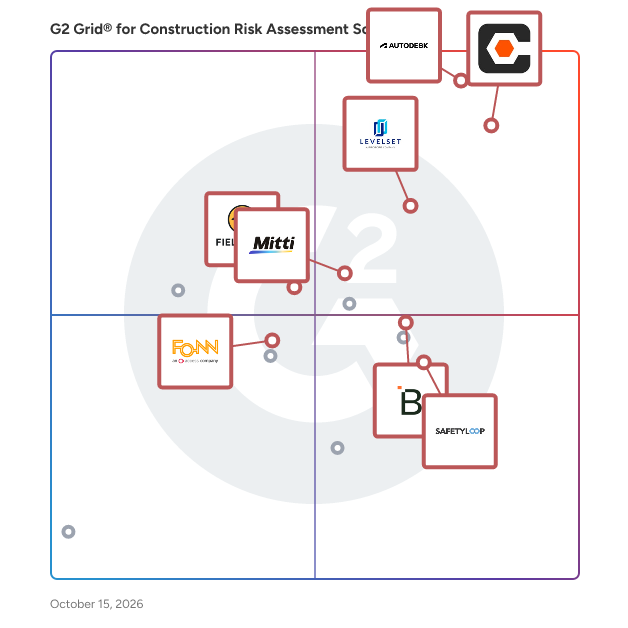
# Best Construction Risk Assessment Software for Small Business

*By [Neya Kumaresan](https://research.g2.com/insights/author/neya-kumaresan)*


Products classified in the overall Construction Risk Assessment Software category are similar in many regards and help companies of all sizes solve their business problems. However, small business features, pricing, setup, and installation differ from businesses of other sizes, which is why we match buyers to the right Small Business Construction Risk Assessment Software to fit their needs. Compare product ratings based on reviews from enterprise users or connect with one of G2&#39;s buying advisors to find the right solutions within the Small Business Construction Risk Assessment Software category.

In addition to qualifying for inclusion in the Construction Risk Assessment Software category, to qualify for inclusion in the Small Business Construction Risk Assessment Software category, a product must have at least 10 reviews left by a reviewer from a small business.


## How Many Construction Risk Assessment Software Products Does G2 Track?
**Total Products under this Category:** 79

### Category Stats (Jun 2026)
- **Average Rating**: 4.49/5 (↑0.02 vs May 2026) The average rating of products in this category, based on all submitted ratings
- **Top Trending Product**: NetVendor (+36.36%) - Among all products in this category, NetVendor recorded the largest rating increase compared to last month
*Last updated: June 29, 2026*


## How Does G2 Rank Construction Risk Assessment Software Products?

**Why You Can Trust G2's Software Rankings:**

- 30 Analysts and Data Experts
- 11,700+ Authentic Reviews
- 79+ Products
- Unbiased Rankings

G2's software rankings are built on verified user reviews, rigorous moderation, and a consistent research methodology maintained by a team of analysts and data experts. Each product is measured using the same transparent criteria, with no paid placement or vendor influence. While reviews reflect real user experiences, which can be subjective, they offer valuable insight into how software performs in the hands of professionals. Together, these inputs power the G2 Score, a standardized way to compare tools within every category.


## What Are the Top-Rated Construction Risk Assessment Software Products in 2026?
### 1. [LEVELSET](https://www.g2.com/products/levelset/reviews)
Levelset, a Procore Company, empowers construction industry credit and finance leaders to streamline lien rights management and automate payment processes. Trusted for over a decade, Levelset has protected 8 million projects with over 500,000 users and supported the largest construction suppliers. Solutions save time, resolve payment issues, and mitigate risk. Critical features like Job Radar provide early risk insights, and the research team delivers unparalleled project data accuracy and depth.


**Average Rating:** 4.5/5.0
**Total Reviews:** 50
**How Do G2 Users Rate LEVELSET?**

- **Has the product been a good partner in doing business?:** 9.8/10 (Category avg: 9.2/10)
- **Risk Management:** 8.1/10 (Category avg: 8.6/10)
- **Photo Documentation:** 5.4/10 (Category avg: 8.5/10)
- **Regulation Compliance:** 6.7/10 (Category avg: 8.3/10)

**Who Is the Company Behind LEVELSET?**

- **Seller:** [Procore Technologies](https://www.g2.com/sellers/procore-technologies)
- **Year Founded:** 2003
- **HQ Location:** Carpinteria, CA
- **Twitter:** @procoretech (16,491 Twitter followers)
- **LinkedIn® Page:** https://www.linkedin.com/company/1912597/ (4,722 employees on LinkedIn®)
- **Ownership:** NYSE: PCOR

**Who Uses This Product?**
- **Top Industries:** Construction
- **Company Size:** 44% Small-Business, 42% Mid-Market


#### What Are LEVELSET's Pros and Cons?

**Pros:**

- Ease of Use (16 reviews)
- Customer Support (15 reviews)
- Helpful (6 reviews)
- Easy Access (5 reviews)
- Implementation Ease (5 reviews)

**Cons:**

- User Difficulty (3 reviews)
- Inefficient Processes (2 reviews)
- Difficult Navigation (1 reviews)
- Email Notifications (1 reviews)
- Inaccurate Information (1 reviews)


### What Do G2 Reviewers Say About LEVELSET?
*AI-generated summary from verified user reviews*

**Pros:**

- Users appreciate the **ease of use** of Levelset, noting its user-friendly experience and seamless Quickbooks integration.
- Users praise the **fantastic customer support** of Levelset, noting quick responses and helpful assistance throughout the process.
- Users find LEVELSET&#39;s support team to be **extremely helpful** , providing valuable assistance and guidance with deadlines and laws.
- Users love the **easy access** of Levelset, appreciating its user-friendly interface and browser compatibility for all team members.
- Users highlight the **ease of implementation** with Levelset, enjoying user-friendly features and responsive support throughout.

**Cons:**

- Users find the **user difficulty** in LEVELSET challenging, especially in locating edits and verifying information correctly.
- Users express concerns about **inefficient processes** in LEVELSET, leading to wasted costs and unresolved lien issues.
- Users find **difficult navigation** on LEVELSET, taking time to acclimate to the site’s layout and features.
- Users express frustration over **lack of effective email notifications** , leaving them uninformed about critical lien updates.
- Users express concerns about **inaccurate information** , leading to inefficient processes and invalid outcomes in their cases.

#### What Are Recent G2 Reviews of LEVELSET?

**"[Exceptional Support and Effortless Navigation](https://www.g2.com/survey_responses/levelset-review-12047913)"**

**Rating:** 5.0/5.0 stars
*— Erika  C.*

[Read full review](https://www.g2.com/survey_responses/levelset-review-12047913)

---

**"[Exceptional Support and Expertise at Every Step](https://www.g2.com/survey_responses/levelset-review-12107023)"**

**Rating:** 5.0/5.0 stars
*— Susie P.*

[Read full review](https://www.g2.com/survey_responses/levelset-review-12107023)

---


### 2. [Procore](https://www.g2.com/products/procore/reviews)
Procore construction software manages your construction projects, resources and financials from planning to closeout. The platform connects every project contributor to solutions built specifically for the industry for the owner, the general contractor and the specialty contractor. The ability to communicate across teams makes it easier to work together by establishing a single source of truth. This is how Procore gives your team easy access to everything they need to know to get the job done.


**Average Rating:** 4.6/5.0
**Total Reviews:** 4,144
**How Do G2 Users Rate Procore?**

- **Has the product been a good partner in doing business?:** 8.8/10 (Category avg: 9.2/10)
- **Risk Management:** 8.4/10 (Category avg: 8.6/10)
- **Photo Documentation:** 9.4/10 (Category avg: 8.5/10)
- **Regulation Compliance:** 8.4/10 (Category avg: 8.3/10)

**Who Is the Company Behind Procore?**

- **Seller:** [Procore Technologies](https://www.g2.com/sellers/procore-technologies)
- **Company Website:** https://www.procore.com
- **Year Founded:** 2003
- **HQ Location:** Carpinteria, CA
- **Twitter:** @procoretech (16,491 Twitter followers)
- **LinkedIn® Page:** https://www.linkedin.com/company/1912597/ (4,722 employees on LinkedIn®)

**Who Uses This Product?**
- **Who Uses This:** Project Manager, Project Engineer
- **Top Industries:** Construction, Architecture &amp; Planning
- **Company Size:** 49% Mid-Market, 39% Small-Business


#### What Are Procore's Pros and Cons?

**Pros:**

- Ease of Use (670 reviews)
- Project Management (355 reviews)
- Centralization (343 reviews)
- Document Management (293 reviews)
- Intuitive (292 reviews)

**Cons:**

- Missing Features (231 reviews)
- Learning Curve (192 reviews)
- Limitations (156 reviews)
- Difficult Learning (148 reviews)
- Improvement Needed (144 reviews)


### What Do G2 Reviewers Say About Procore?
*AI-generated summary from verified user reviews*

**Pros:**

- Users find Procore&#39;s **ease of use** exceptional, making training and navigation simple for newcomers.
- Users value the **organized structure** of Procore, enhancing multi-task management and facilitating effective collaboration.
- Users value the **centralized platform** of Procore, enjoying its ease of use and comprehensive automation features.
- Users value the **efficient document management** in Procore, streamlining tasks and reducing the need for physical storage.
- Users appreciate the **intuitive design** of Procore, enhancing navigation and accessibility for efficient project management.

**Cons:**

- Users highlight **missing features** in Procore, including poor notifications and lack of material procurement solutions.
- Users find the **steep learning curve** for Procore challenging, particularly when importing data from Excel files.
- Users experience **integration limitations** with QuickBooks and reporting features, hindering Procore&#39;s overall functionality.
- Users find Procore&#39;s learning curve to be **difficult** , particularly due to its complexity and extensive features.
- Users find **improvement needed** in Procore&#39;s setup, integrations, notifications, and safety module for a smoother experience.

#### What Are Recent G2 Reviews of Procore?

**"[Procore Keeps Everything Organized from Bidding to Closeout](https://www.g2.com/survey_responses/procore-review-12853904)"**

**Rating:** 5.0/5.0 stars
*— Saugirdas R.*

[Read full review](https://www.g2.com/survey_responses/procore-review-12853904)

---

**"[Procore Makes Collaboration and Project Documentation Seamless](https://www.g2.com/survey_responses/procore-review-12975375)"**

**Rating:** 5.0/5.0 stars
*— Maria Silveria S.*

[Read full review](https://www.g2.com/survey_responses/procore-review-12975375)

---


#### What Are G2 Users Discussing About Procore?

- [What makes Procore a leading solution in construction project management software?](https://www.g2.com/discussions/what-makes-procore-a-leading-solution-in-construction-project-management-software) - 3 comments
- [What is Procore used for?](https://www.g2.com/discussions/procore-what-is-procore-used-for) - 1 comment
- [Does procore have estimating software?](https://www.g2.com/discussions/does-procore-have-estimating-software) - 2 comments
- [What does procore software cost?](https://www.g2.com/discussions/what-does-procore-software-cost) - 2 comments
- [What is procore software?](https://www.g2.com/discussions/what-is-procore-software) - 2 comments

### 3. [Autodesk Forma (formerly Autodesk Construction Cloud)](https://www.g2.com/products/autodesk-forma-formerly-autodesk-construction-cloud/reviews)
Autodesk Forma (formerly Autodesk Construction Cloud) connects workflows, teams and data at every stage of construction to reduce risk, maximize efficiency, and increase profits. Autodesk Build is part of Autodesk Forma (formerly Autodesk Construction Cloud)&#39;s newest set of products that further connect data, workflows, and teams throughout the entire building lifecycle. Build delivers a broad, deep, and connected set of field execution and project management tools for builders in a single software platform that is easy to deploy, adopt and use. Autodesk Build delivers the unification of best-in-class technology from PlanGrid and BIM 360, along with new functionality, to connect construction data and workflows across the headquarters, office, and jobsite. It offers tools for project management, quality, safety, cost, document management and project closeout workflows in a single application that is purpose-built for what you do and where you are working. -Supports integrated &amp; digitized processes for the build phase of a project in a platform that is easy to deploy, adopt and use, while ensuring information sharing and workflows are tightly controlled and highly-configurable. -Standardized and centralized data collection from design through operations enables data-driven decision making, and predictive analytics provide visibility into high-risk issues that can impact project cost, schedule, quality, and safety. -Cloud-based document management provides a single source of truth for all project documentation for the owner, GCs and subs. Autodesk Takeoff empowers estimators to create fast, accurate takeoffs in a cloud-based solution that combines 2D and 3D workflows. Autodesk Takeoff is part of Autodesk Forma (formerly Autodesk Construction Cloud)&#39;s newest set of products that further connect data, workflows, and teams throughout the entire building lifecycle. Autodesk Takeoff allows estimators to perform more accurate 2D takeoffs and generate automated quantities from 3D models in a single online solution. Preconstruction teams are empowered to win more work with integrated takeoffs and quantities that help produce quality estimates for faster, more accurate bidding. -Manage sheets and models in one data environment with Autodesk Docs -Easily capture project scope with linear, count and area takeoff -Generate multiple quantities and use custom formulas -Get instant access to quantities from models for automated 3D takeoffs -Access aggregated quantities from drawings and models Autodesk BIM Collaborate is part of Autodesk Forma (formerly Autodesk Construction Cloud)&#39;s newest set of products that further connect data, workflows, and teams throughout the entire building lifecycle. BIM Collaborate empowers project teams to align and execute on design intent and constructability by managing the entire design collaboration and coordination workflow. Autodesk BIM Collaborate empowers design and construction teams to align and execute on design intent and constructability in a single online solution. By allowing teams to manage the entire design collaboration and coordination process in a single common data environment, BIM Collaborate reduces rework and improves overall design quality. -No limits on projects or file storage -Subscribe once and use on any project you are working on -Flexible subscription offerings for users, projects and businesses -Easily add subscribers and models as your business grows -Keep the same central administration and user login when adding new products


**Average Rating:** 4.4/5.0
**Total Reviews:** 5,198
**How Do G2 Users Rate Autodesk Forma (formerly Autodesk Construction Cloud)?**

- **Has the product been a good partner in doing business?:** 8.3/10 (Category avg: 9.2/10)
- **Risk Management:** 7.5/10 (Category avg: 8.6/10)
- **Photo Documentation:** 8.2/10 (Category avg: 8.5/10)
- **Regulation Compliance:** 7.3/10 (Category avg: 8.3/10)

**Who Is the Company Behind Autodesk Forma (formerly Autodesk Construction Cloud)?**

- **Seller:** [Autodesk](https://www.g2.com/sellers/autodesk)
- **Company Website:** https://www.autodesk.com
- **Year Founded:** 1982
- **HQ Location:** San Francisco
- **Twitter:** @autodesk (273,215 Twitter followers)
- **LinkedIn® Page:** https://www.linkedin.com/company/autodesk/ (15,352 employees on LinkedIn®)

**Who Uses This Product?**
- **Who Uses This:** BIM Manager, Project Manager
- **Top Industries:** Construction, Architecture &amp; Planning
- **Company Size:** 45% Mid-Market, 31% Enterprise


#### What Are Autodesk Forma (formerly Autodesk Construction Cloud)'s Pros and Cons?

**Pros:**

- Ease of Use (556 reviews)
- Collaboration (493 reviews)
- Team Collaboration (429 reviews)
- Sharing (345 reviews)
- Document Management (335 reviews)

**Cons:**

- Missing Features (299 reviews)
- Limitations (226 reviews)
- Access Limitations (183 reviews)
- Improvement Needed (176 reviews)
- Learning Curve (169 reviews)


### What Do G2 Reviewers Say About Autodesk Forma (formerly Autodesk Construction Cloud)?
*AI-generated summary from verified user reviews*

**Pros:**

- Users value the **ease of use** in Autodesk Forma, facilitating simple file access and effective real-time collaboration.
- Users value the **real-time collaboration** capabilities of Autodesk Forma, enhancing coordination among team members and stakeholders.
- Users appreciate the **real-time collaboration** features of Autodesk Forma, enhancing coordination among team members and stakeholders.
- Users love the **seamless collaboration** features of Autodesk Forma, enhancing teamwork and communication in construction projects.
- Users value the **accessible document management** of Autodesk Forma, enabling seamless collaboration on large CAD files anywhere.

**Cons:**

- Users find the **missing features** frustrating, notably the absence of essential tools like undo and access to iProperties.
- Users find the **repeated processes for asset creation** tedious and face challenges with external collaboration on Autodesk Forma.
- Users face **access limitations** in Autodesk Forma, lacking essential admin tools and folder management features.
- Users feel the **data extraction and shared document processes** need significant improvement for better usability and efficiency.
- Users find the **steep learning curve** of Autodesk Forma challenging, especially for smaller teams and simpler projects.

#### What Are Recent G2 Reviews of Autodesk Forma (formerly Autodesk Construction Cloud)?

**"[A Connected Platform That Improves Construction Project Collaboration and Control](https://www.g2.com/survey_responses/autodesk-forma-formerly-autodesk-construction-cloud-review-12844228)"**

**Rating:** 5.0/5.0 stars
*— G I.*

[Read full review](https://www.g2.com/survey_responses/autodesk-forma-formerly-autodesk-construction-cloud-review-12844228)

---

**"[ACC Forma removes the delay from the GC&#39;s world of &quot;requests&quot; via AU&#39;s phenomenal platform !!](https://www.g2.com/survey_responses/autodesk-forma-formerly-autodesk-construction-cloud-review-10380089)"**

**Rating:** 4.5/5.0 stars
*— Kerrie  S.*

[Read full review](https://www.g2.com/survey_responses/autodesk-forma-formerly-autodesk-construction-cloud-review-10380089)

---


#### What Are G2 Users Discussing About Autodesk Forma (formerly Autodesk Construction Cloud)?

- [How is Autodesk Construction Cloud facilitating collaboration and efficiency in the construction industry?](https://www.g2.com/discussions/how-is-autodesk-construction-cloud-facilitating-collaboration-and-efficiency-in-the-construction-industry) - 3 comments, 1 upvote
- [What is Autodesk Construction Cloud used for?](https://www.g2.com/discussions/what-is-autodesk-construction-cloud-used-for) - 2 comments, 1 upvote
- [What is Autodesk 360 used for?](https://www.g2.com/discussions/what-is-autodesk-360-used-for) - 1 comment
- [What does Autodesk BIM 360 do?](https://www.g2.com/discussions/what-does-autodesk-bim-360-do) - 2 comments, 1 upvote
- [Does BIM 360 work with AutoCAD?](https://www.g2.com/discussions/does-bim-360-work-with-autocad) - 5 comments, 1 upvote

### 4. [SafetyCulture](https://www.g2.com/products/safetyculturehq/reviews)
SafetyCulture is a mobile-first operations platform that gives you the knowledge, tools, and processes you need to work safely, meet higher standards, and improve every day, offering a better way to work. What started as a digital checklist app has evolved into a platform for conducting inspections, raising and resolving issues, managing assets, and training teams on the go. SafetyCulture also helps teams do more than just tick the boxes for governance, risk, and compliance – it can help set environment, health and safety standards, and raise the bar when it comes to operational excellence. With real-time data capture and actionable insights at your fingertips, you’ll always know what&#39;s working and what&#39;s not so you can focus on what truly matters – getting better every day. Unlock the potential of your working teams to propel your business forward with SafetyCulture.


**Average Rating:** 4.6/5.0
**Total Reviews:** 239
**How Do G2 Users Rate SafetyCulture?**

- **Has the product been a good partner in doing business?:** 8.8/10 (Category avg: 9.2/10)
- **Risk Management:** 8.6/10 (Category avg: 8.6/10)
- **Photo Documentation:** 8.7/10 (Category avg: 8.5/10)
- **Regulation Compliance:** 8.3/10 (Category avg: 8.3/10)

**Who Is the Company Behind SafetyCulture?**

- **Seller:** [SafetyCulture](https://www.g2.com/sellers/safetyculture)
- **Company Website:** https://www.safetyculture.com
- **Year Founded:** 2004
- **HQ Location:** Surry Hills, New South Wales
- **Twitter:** @SafetyCultureHQ (4,867 Twitter followers)
- **LinkedIn® Page:** https://www.linkedin.com/company/2467945/ (840 employees on LinkedIn®)

**Who Uses This Product?**
- **Top Industries:** Construction, Manufacturing
- **Company Size:** 45% Mid-Market, 38% Small-Business


#### What Are SafetyCulture's Pros and Cons?

**Pros:**

- Ease of Use (163 reviews)
- Efficiency Improvement (76 reviews)
- Efficiency (73 reviews)
- Features (66 reviews)
- Customizability (58 reviews)

**Cons:**

- Missing Features (40 reviews)
- Learning Curve (29 reviews)
- Limited Customization (28 reviews)
- Complexity (27 reviews)
- Limitations (25 reviews)


### What Do G2 Reviewers Say About SafetyCulture?
*AI-generated summary from verified user reviews*

**Pros:**

- Users appreciate the **ease of use** of SafetyCulture, facilitating quick surveys and reports for improved workplace safety.
- Users find that SafetyCulture significantly enhances **efficiency improvement** , streamlining information flow and keeping data up to date.
- Users value the **efficiency** of SafetyCulture, which streamlines information flow and provides timely, shared updates.
- Users appreciate the **ease of access and manageability** of SafetyCulture, enabling quick surveys and effective safety tracking.
- Users value the **customizability** of SafetyCulture, enabling easy creation and management of checklists for various projects.

**Cons:**

- Users face **missing features** in SafetyCulture, particularly with advanced options and integrations, impacting overall functionality.
- Users face a **learning curve** with SafetyCulture, particularly in customizing reports and creating dashboards effectively.
- Users find the **limited customization** of reports and dashboards restrictive, impacting overall usability and flexibility.
- Users report a **significant learning curve** with SafetyCulture, finding the interface and features overwhelming and not intuitive.
- Users note a **significant learning curve** with SafetyCulture, finding its interface less intuitive and features overwhelming.

#### What Are Recent G2 Reviews of SafetyCulture?

**"[Powerful AI, Ready-Made Prompts, and Templates That Boost Productivity](https://www.g2.com/survey_responses/safetyculture-review-12719317)"**

**Rating:** 4.5/5.0 stars
*— Konjengbam  M.*

[Read full review](https://www.g2.com/survey_responses/safetyculture-review-12719317)

---

**"[User-Friendly SafetyCulture with Strong Templates, Reporting, and Reliable Support](https://www.g2.com/survey_responses/safetyculture-review-12720041)"**

**Rating:** 4.0/5.0 stars
*— Verified User in Information Technology and Services*

[Read full review](https://www.g2.com/survey_responses/safetyculture-review-12720041)

---


#### What Are G2 Users Discussing About SafetyCulture?

- [Does iAuditor work on Android?](https://www.g2.com/discussions/does-iauditor-work-on-android)
- [How do I create an iAuditor template?](https://www.g2.com/discussions/how-do-i-create-an-iauditor-template) - 1 comment
- [How much does iAuditor cost?](https://www.g2.com/discussions/how-much-does-iauditor-cost)
- [What is iAuditor used for?](https://www.g2.com/discussions/what-is-iauditor-used-for) - 2 comments

### 5. [Fieldwire by Hilti](https://www.g2.com/products/fieldwire-by-hilti/reviews)
The field-first construction platform for less busywork and more building. Trusted on 4M+ projects worldwide, Fieldwire by Hilti connects the field and office in one simple, powerful platform so teams can move faster, stay aligned, and navigate projects with confidence from start to finish. Construction demands clear information, reliable coordination, and tools that perform where the work happens. Fieldwire brings plans, tasks, and updates into one transparent source of truth, giving everyone – from CEO to installer – access to the information they need, whether in the office or on the jobsite. Built for contractors across every trade, Fieldwire keeps teams aligned with up-to-date information and no surprises. Designed for easy adoption in the field, teams gain real-time visibility into progress, clear ownership of work, and the context to make confident decisions. Automated workflows and streamlined reporting reduce manual work, improve accountability, and help projects stay on schedule and on budget. As part of the Hilti Group, Fieldwire combines deep construction expertise with modern digital innovation to deliver better outcomes on every job. Learn more at Fieldwire.com.


**Average Rating:** 4.5/5.0
**Total Reviews:** 523
**How Do G2 Users Rate Fieldwire by Hilti?**

- **Has the product been a good partner in doing business?:** 8.9/10 (Category avg: 9.2/10)
- **Risk Management:** 8.6/10 (Category avg: 8.6/10)
- **Photo Documentation:** 9.3/10 (Category avg: 8.5/10)
- **Regulation Compliance:** 8.5/10 (Category avg: 8.3/10)

**Who Is the Company Behind Fieldwire by Hilti?**

- **Seller:** [Fieldwire](https://www.g2.com/sellers/fieldwire)
- **Company Website:** https://www.fieldwire.com
- **Year Founded:** 2013
- **HQ Location:** San Francisco, CA
- **LinkedIn® Page:** https://www.linkedin.com/company/3078180/ (354 employees on LinkedIn®)

**Who Uses This Product?**
- **Who Uses This:** Project Manager, Project Engineer
- **Top Industries:** Construction, Architecture &amp; Planning
- **Company Size:** 56% Small-Business, 32% Mid-Market


#### What Are Fieldwire by Hilti's Pros and Cons?

**Pros:**

- Ease of Use (92 reviews)
- Project Management (38 reviews)
- Team Collaboration (34 reviews)
- Easy Access (33 reviews)
- Intuitive (30 reviews)

**Cons:**

- Limited Customization (18 reviews)
- Limited Functionality (16 reviews)
- Slow Performance (14 reviews)
- Missing Features (12 reviews)
- Update Issues (11 reviews)


### What Do G2 Reviewers Say About Fieldwire by Hilti?
*AI-generated summary from verified user reviews*

**Pros:**

- Users find Fieldwire to be very **easy to use** , enhancing efficiency in communication and project management.
- Users value the **short learning curve** of Fieldwire by Hilti, enabling rapid deployment and efficient project management.
- Users value the **team collaboration** capabilities of Fieldwire, enhancing communication and efficiency across projects.
- Users appreciate the **easy access** to files and updates, enhancing organization and efficiency on job sites.
- Users find Fieldwire **intuitive and easy to use** , enhancing project organization and efficiency across devices.

**Cons:**

- Users note the **limited customization** options in Fieldwire, affecting adaptability for specific business needs.
- Users find the **limited functionality** in Fieldwire challenging, especially with project accessibility and annotation options.
- Users experience **slow performance** on mobile and desktop, impacting productivity when switching between projects frequently.
- Users find it challenging due to **missing features** like checklist integration and customization options for reports.
- Users are frustrated by **update issues** , including excessive emails and slow syncing, complicating their overall experience.

#### What Are Recent G2 Reviews of Fieldwire by Hilti?

**"[A Friend in the Face of a Ever Changing Industry](https://www.g2.com/survey_responses/fieldwire-by-hilti-review-12782302)"**

**Rating:** 4.5/5.0 stars
*— Rick B.*

[Read full review](https://www.g2.com/survey_responses/fieldwire-by-hilti-review-12782302)

---

**"[Essential Field Management for Commercial Construction](https://www.g2.com/survey_responses/fieldwire-by-hilti-review-13051751)"**

**Rating:** 5.0/5.0 stars
*— Scott  P.*

[Read full review](https://www.g2.com/survey_responses/fieldwire-by-hilti-review-13051751)

---


#### What Are G2 Users Discussing About Fieldwire by Hilti?

- [What is Fieldwire used for?](https://www.g2.com/discussions/what-is-fieldwire-used-for)
- [What does Fieldwire do?](https://www.g2.com/discussions/what-does-fieldwire-do)
- [How do you use a field wire?](https://www.g2.com/discussions/how-do-you-use-a-field-wire)
- [How much does Fieldwire cost?](https://www.g2.com/discussions/how-much-does-fieldwire-cost)
- [What is Fieldwire app?](https://www.g2.com/discussions/what-is-fieldwire-app) - 2 comments

### 6. [SALUS](https://www.g2.com/products/salus/reviews)
SALUS is the AI-powered operational safety and field intelligence platform built for construction. At the center of it is Rosie, your AI safety administrator — capturing what&#39;s actually happening on jobsites in real time, flagging risk before it becomes a problem, and turning crew-level activity into a defensible record automatically, without adding work for your team. Rosie&#39;s power isn&#39;t limited to the office — she changes how crews interact with safety on the ground. Workers can speak naturally and have Rosie fill out forms for them, eliminating the friction of typing on a phone in the field. Rosie translates in real time, so language is never a barrier to reporting a hazard, completing an inspection, or understanding a procedure. What used to take a crew member five minutes of fumbling through a form now takes one voice note — and what used to go unreported because of a language gap now gets captured the moment it happens. That crew-level capture feeds directly into the bigger picture: instead of treating safety as a box-checking compliance function, SALUS uses AI to close the gap between what&#39;s happening in the field and what leadership actually sees. Rosie handles the administrative burden — chasing signatures, tracking certificates, surfacing patterns across sites — so your safety team can manage by exception instead of drowning in paperwork. The result: fewer surprises, faster resolution when disputes or incidents happen, and full visibility across every project, site, and subcontractor from one centralized dashboard. Built to mirror how construction teams already work, SALUS makes it effortless for field crews to sign and submit documents, manage subcontractors, worksites, and assets, and get instant answers powered by AI. With SALUS, you spend less time on admin and more time leading, backed by a jobsite that&#39;s documented, defended, and always one step ahead.


**Average Rating:** 4.7/5.0
**Total Reviews:** 49
**How Do G2 Users Rate SALUS?**

- **Has the product been a good partner in doing business?:** 9.5/10 (Category avg: 9.2/10)
- **Risk Management:** 8.3/10 (Category avg: 8.6/10)
- **Photo Documentation:** 8.2/10 (Category avg: 8.5/10)
- **Regulation Compliance:** 6.8/10 (Category avg: 8.3/10)

**Who Is the Company Behind SALUS?**

- **Seller:** [Salus Pro](https://www.g2.com/sellers/salus-pro)
- **Company Website:** https://salussafety.io
- **Year Founded:** 2018
- **HQ Location:** Vancouver, CA
- **LinkedIn® Page:** https://www.linkedin.com/company/11808228/ (72 employees on LinkedIn®)

**Who Uses This Product?**
- **Top Industries:** Construction
- **Company Size:** 58% Small-Business, 38% Mid-Market


#### What Are SALUS's Pros and Cons?

**Pros:**

- Document Management (1 reviews)
- Ease of Use (1 reviews)
- Easy Access (1 reviews)
- File Storage (1 reviews)
- Reporting (1 reviews)

**Cons:**

- Document Management (1 reviews)
- Missing Features (1 reviews)


### What Do G2 Reviewers Say About SALUS?
*AI-generated summary from verified user reviews*

**Pros:**

- Users value the **real-time access** to safety processes and training documentation, enhancing accountability and performance tracking.
- Users find SALUS incredibly **easy to use** , providing seamless access to real-time safety documentation and training records.
- Users value the **easy access** to real-time safety records and training documents on SALUS for effective management.
- Users love the **real-time file storage** of SALUS, enabling efficient tracking and documentation of safety processes daily.
- Users appreciate the **real-time reporting** capabilities of SALUS, enhancing efficiency and accountability in safety processes.

**Cons:**

- Users find **limited document tracking and reporting** in SALUS to hinder their efficiency and safety performance improvements.
- Users find the **lack of document tracking features** in SALUS limits their ability to report effectively.

#### What Are Recent G2 Reviews of SALUS?

**"[Fast, User-Friendly Safety Management with Stellar Support](https://www.g2.com/survey_responses/salus-review-13052909)"**

**Rating:** 5.0/5.0 stars
*— Steve H.*

[Read full review](https://www.g2.com/survey_responses/salus-review-13052909)

---

**"[SALUS has increased our employee safety participation and performance significantly.](https://www.g2.com/survey_responses/salus-review-10282933)"**

**Rating:** 5.0/5.0 stars
*— Mike M.*

[Read full review](https://www.g2.com/survey_responses/salus-review-10282933)

---


#### What Are G2 Users Discussing About SALUS?

- [What is SALUS used for?](https://www.g2.com/discussions/what-is-salus-used-for)

### 7. [SiteDocs](https://www.g2.com/products/sitedocs/reviews)
Most intuitive and affordable Safety Software with world class Analytics, an integration and automation engine, and In-App Chat. The easiest way to manage your entire safety program from mobile apps and the web. SiteDocs features a custom form builder, PDF document library, worker certification management, offline-mode, reports, and more. SiteDocs will help you easily manage your safety program while saving you time and helping you maintain the highest standard of safety possible.


**Average Rating:** 4.5/5.0
**Total Reviews:** 32
**How Do G2 Users Rate SiteDocs?**

- **Has the product been a good partner in doing business?:** 8.8/10 (Category avg: 9.2/10)
- **Risk Management:** 7.5/10 (Category avg: 8.6/10)
- **Photo Documentation:** 9.1/10 (Category avg: 8.5/10)
- **Regulation Compliance:** 7.8/10 (Category avg: 8.3/10)

**Who Is the Company Behind SiteDocs?**

- **Seller:** [SiteDocs](https://www.g2.com/sellers/sitedocs)
- **Year Founded:** 2010
- **HQ Location:** Abbotsford, BC
- **Twitter:** @SiteDocs (240 Twitter followers)
- **LinkedIn® Page:** https://www.linkedin.com/company/2699846/ (149 employees on LinkedIn®)

**Who Uses This Product?**
- **Top Industries:** Construction
- **Company Size:** 48% Mid-Market, 45% Small-Business


#### What Are SiteDocs's Pros and Cons?

**Pros:**

- Ease of Use (1 reviews)
- Easy Access (1 reviews)
- File Storage (1 reviews)
- Intuitive (1 reviews)
- Sharing (1 reviews)

**Cons:**

- Access Limitations (1 reviews)
- Document Management (1 reviews)
- User Difficulty (1 reviews)


### What Do G2 Reviewers Say About SiteDocs?
*AI-generated summary from verified user reviews*

**Pros:**

- Users appreciate the **ease of use** of SiteDocs, allowing access to important resources with basic computer skills.
- Users value the **easy access** to signed forms and essential company resources through SiteDocs, enhancing workplace communication.
- Users love the **file storage integration** with Dropbox, enabling seamless digital documentation and organization without physical paperwork.
- Users find SiteDocs to be **intuitive** , easily accessible with basic skills and effective for communication and resources.
- Users value the **seamless sharing** capabilities of SiteDocs, enabling efficient digital documentation without the hassle of paper.

**Cons:**

- Users find **access limitations** frustrating, as navigation is time-consuming and only admins can edit resources.
- Users find the **navigation of the library time consuming** and face limitations in resource management and file uploads.
- Users find the **navigation cumbersome** , making it time-consuming to access resources and manage reports effectively.

#### What Are Recent G2 Reviews of SiteDocs?

**"[SiteDocs manages your health and safety paperwork](https://www.g2.com/survey_responses/sitedocs-review-10929826)"**

**Rating:** 5.0/5.0 stars
*— Scott Raymond Reginald R.*

[Read full review](https://www.g2.com/survey_responses/sitedocs-review-10929826)

---

**"[Transforms Safety Management with Ease and Customization](https://www.g2.com/survey_responses/sitedocs-review-12554575)"**

**Rating:** 4.5/5.0 stars
*— Scott N.*

[Read full review](https://www.g2.com/survey_responses/sitedocs-review-12554575)

---


#### What Are G2 Users Discussing About SiteDocs?

- [How do you use Sitedocs?](https://www.g2.com/discussions/how-do-you-use-sitedocs)
- [Why Use SiteDocs?](https://www.g2.com/discussions/why-use-sitedocs) - 1 comment
- [How do I use SiteDocs?](https://www.g2.com/discussions/how-do-i-use-sitedocs) - 1 comment
- [What does SiteDocs do?](https://www.g2.com/discussions/what-does-sitedocs-do)

### 8. [GoCanvas](https://www.g2.com/products/canvas-solutions-gocanvas/reviews)
GoCanvas is a mobile-first field operations platform that helps businesses eliminate errors, reduce admin time, and complete jobs faster. Built for teams in the field, GoCanvas replaces paperwork and manual handoffs with easy-to-use mobile forms and flexible digital workflows that connect the field and office in real time. Turn your existing PDFs into smart, mobile-friendly forms using an AI-powered form converter or an intuitive drag-and-drop builder. Streamline inspections, work orders, safety checks, and daily reports by capturing photos and videos, scanning barcodes, logging GPS, and collecting e-signatures - even while offline, with automatic sync when connectivity returns. With thousands of integrations, GoCanvas fits seamlessly into your existing systems so teams always have access to accurate, real-time data. And powerful analytics let you track performance, uncover trends, and make data-informed decisions that drive efficiency. GoCanvas is trusted by thousands of businesses across industries like construction, energy and utilities, transportation, and field services to streamline operations, ensure compliance, and deliver better results—faster.


**Average Rating:** 4.3/5.0
**Total Reviews:** 76
**How Do G2 Users Rate GoCanvas?**

- **Has the product been a good partner in doing business?:** 8.8/10 (Category avg: 9.2/10)

**Who Is the Company Behind GoCanvas?**

- **Seller:** [Canvas Solutions](https://www.g2.com/sellers/canvas-solutions)
- **Year Founded:** 2008
- **HQ Location:** Reston, VA
- **Twitter:** @GoCanvas (2,657 Twitter followers)
- **LinkedIn® Page:** https://www.linkedin.com/company/203892/ (229 employees on LinkedIn®)

**Who Uses This Product?**
- **Top Industries:** Construction, Computer Software
- **Company Size:** 44% Mid-Market, 39% Small-Business


#### What Are GoCanvas's Pros and Cons?

**Pros:**

- Ease of Use (2 reviews)
- User-Friendly (2 reviews)
- Customizability (1 reviews)
- Customization (1 reviews)
- Customization Options (1 reviews)

**Cons:**

- Outdated Interface (2 reviews)
- Clarity Issues (1 reviews)
- Complexity (1 reviews)
- Complex Setup (1 reviews)
- Complex Usability (1 reviews)


### What Do G2 Reviewers Say About GoCanvas?
*AI-generated summary from verified user reviews*

**Pros:**

- Users love the **ease of use** of GoCanvas, finding it organized, user-friendly, and affordable.
- Users appreciate the **user-friendly interface** of GoCanvas, finding it easy and organized to use.
- Users value the **customizability** of GoCanvas forms, allowing for tailored and efficient data collection.
- Users appreciate the **customization options** of GoCanvas forms, enhancing usability and meeting their specific needs.
- Users enjoy the **customization options** for forms in GoCanvas, allowing for tailored data collection experiences.

**Cons:**

- Users find the **outdated interface** of GoCanvas complicates scheduling, hindering overall user experience and efficiency.
- Users experience **clarity issues** with GoCanvas, as the AI tool provides slow responses and unclear images.
- Users find the **complexity of scheduling** in GoCanvas to be outdated and unnecessarily complicated for their needs.
- Users find the **complex setup** of GoCanvas to be outdated and unnecessarily complicated for scheduling tasks.
- Users find the **complex usability** of GoCanvas challenging, particularly with its outdated scheduling features.

#### What Are Recent G2 Reviews of GoCanvas?

**"[Eliminates Paperwork, Perfect for Construction](https://www.g2.com/survey_responses/gocanvas-review-12298864)"**

**Rating:** 5.0/5.0 stars
*— Michael  M.*

[Read full review](https://www.g2.com/survey_responses/gocanvas-review-12298864)

---

**"[Easy Assignment Submissions with a Favorite Auto-Save Feature](https://www.g2.com/survey_responses/gocanvas-review-11851008)"**

**Rating:** 5.0/5.0 stars
*— Dawn J.*

[Read full review](https://www.g2.com/survey_responses/gocanvas-review-11851008)

---


### 9. [1Life](https://www.g2.com/products/1life/reviews)
Clients benefit from 1 SOLUTION designed specifically for small-mid-sized businesses. Capabilities include web/mobile document, form, and scheduling management, learning management, online training courses and custom course builder, sub-contractor evaluation and management, WHMIS management, and more. Purchase just the features you want or the whole enchilada! The 1Life Workplace Safety Management System has been continuously improved over 10 years in consultation with our clients and an in-house team of experienced Safety Professionals and Software Developers.


**Average Rating:** 4.7/5.0
**Total Reviews:** 93
**How Do G2 Users Rate 1Life?**

- **Has the product been a good partner in doing business?:** 9.4/10 (Category avg: 9.2/10)
- **Risk Management:** 8.3/10 (Category avg: 8.6/10)
- **Photo Documentation:** 9.2/10 (Category avg: 8.5/10)
- **Regulation Compliance:** 8.5/10 (Category avg: 8.3/10)

**Who Is the Company Behind 1Life?**

- **Seller:** [1Life](https://www.g2.com/sellers/1life)
- **Year Founded:** 2009
- **HQ Location:** Winnipeg, Manitoba
- **Twitter:** @1LifeWSS (1,003 Twitter followers)
- **LinkedIn® Page:** https://www.linkedin.com/company/1127117/ (19 employees on LinkedIn®)

**Who Uses This Product?**
- **Who Uses This:** Owner
- **Top Industries:** Construction, Retail
- **Company Size:** 59% Small-Business, 41% Mid-Market


#### What Are Recent G2 Reviews of 1Life?

**"[Reliable, compliant, easy to use](https://www.g2.com/survey_responses/1life-review-8950039)"**

**Rating:** 4.5/5.0 stars
*— Verified User in Machinery*

[Read full review](https://www.g2.com/survey_responses/1life-review-8950039)

---

**"[Nothing but great experiences so far!](https://www.g2.com/survey_responses/1life-review-8943760)"**

**Rating:** 5.0/5.0 stars
*— Alyssa E.*

[Read full review](https://www.g2.com/survey_responses/1life-review-8943760)

---


#### What Are G2 Users Discussing About 1Life?

- [What is 1Life (mySafetyAssistant) used for?](https://www.g2.com/discussions/what-is-1life-mysafetyassistant-used-for) - 1 comment

### 10. [Fonn](https://www.g2.com/products/fonn/reviews)
Fonn is the user-friendly construction management tool that increases productivity through streamlined collaboration, both in the office, and on site with our easy-to-use mobile app. Plan, track and deliver jobs on time and on budget. Communicate in real time with clients, subcontractors and suppliers to avoid costly re-work errors. Reduce compliance headaches with a clear project audit trail.


**Average Rating:** 4.6/5.0
**Total Reviews:** 30
**How Do G2 Users Rate Fonn?**

- **Has the product been a good partner in doing business?:** 8.7/10 (Category avg: 9.2/10)
- **Risk Management:** 7.8/10 (Category avg: 8.6/10)
- **Photo Documentation:** 9.0/10 (Category avg: 8.5/10)
- **Regulation Compliance:** 8.9/10 (Category avg: 8.3/10)

**Who Is the Company Behind Fonn?**

- **Seller:** [Fonn Construction](https://www.g2.com/sellers/fonn-construction)
- **Year Founded:** 2016
- **HQ Location:** Guildford, GB
- **LinkedIn® Page:** https://www.linkedin.com/company/fonn/ (32 employees on LinkedIn®)

**Who Uses This Product?**
- **Top Industries:** Construction
- **Company Size:** 88% Small-Business, 12% Mid-Market


#### What Are Fonn's Pros and Cons?

**Pros:**

- Ease of Use (1 reviews)
- Efficiency Improvement (1 reviews)
- Information Accuracy (1 reviews)
- Tracking (1 reviews)
- Up-to-date Information (1 reviews)


### What Do G2 Reviewers Say About Fonn?
*AI-generated summary from verified user reviews*

**Pros:**

- Users value the **ease of use** of Fonn, as it automatically generates information effortlessly.
- Users love the **efficiency improvement** of Fonn, as it automatically generates information, saving valuable time.
- Users appreciate the **automatic information generation** feature of Fonn, which enhances accuracy and saves time.
- Users appreciate Fonn&#39;s **automatic information generation** , enhancing efficiency by reducing manual input requirements.
- Users appreciate the **up-to-date information** from Fonn, benefiting from automatic generation without manual input.


#### What Are Recent G2 Reviews of Fonn?

**"[Overall a great program](https://www.g2.com/survey_responses/fonn-review-7236133)"**

**Rating:** 4.5/5.0 stars
*— Dale L.*

[Read full review](https://www.g2.com/survey_responses/fonn-review-7236133)

---

**"[Fonn has become an important part of our process.](https://www.g2.com/survey_responses/fonn-review-4564464)"**

**Rating:** 5.0/5.0 stars
*— Duncan G.*

[Read full review](https://www.g2.com/survey_responses/fonn-review-4564464)

---


#### What Are G2 Users Discussing About Fonn?

- [What is Fonn used for?](https://www.g2.com/discussions/what-is-fonn-used-for)


## What Is Construction Risk Assessment Software?

[Construction Management Software](https://www.g2.com/categories/construction-management)

## What Software Categories Are Similar to Construction Risk Assessment Software?

- [Occupational Health and Safety (OHS) Software](https://www.g2.com/categories/occupational-health-and-safety-ohs)
- [Jobsite Management Software](https://www.g2.com/categories/jobsite-management)
- [Construction Project Management Software](https://www.g2.com/categories/construction-project-management)


