# Best Enterprise Cloud Management Platforms

*By [Rachana Hasyagar](https://research.g2.com/insights/author/rachana-hasyagar)*


Products classified in the overall Cloud Management Platforms category are similar in many regards and help companies of all sizes solve their business problems. However, enterprise business features, pricing, setup, and installation differ from businesses of other sizes, which is why we match buyers to the right Enterprise Business Cloud Management Platforms to fit their needs. Compare product ratings based on reviews from enterprise users or connect with one of G2&#39;s buying advisors to find the right solutions within the Enterprise Business Cloud Management Platforms category.

In addition to qualifying for inclusion in the Cloud Management Platforms category, to qualify for inclusion in the Enterprise Business Cloud Management Platforms category, a product must have at least 10 reviews left by a reviewer from an enterprise business.


## Top Cloud Management Platforms at a Glance
| # | Product | Rating | Best For | What Users Say |
|---|---------|--------|----------|----------------|
| 1 | [Google Compute Engine](https://www.g2.com/products/google-compute-engine/reviews) | 4.5/5.0 (875 reviews) | GCP-native VM provisioning and autoscaling workflows | "[My experience using GCE](https://www.g2.com/survey_responses/google-compute-engine-review-11677030)" |
| 2 | [Ubuntu](https://www.g2.com/products/ubuntu/reviews) | 4.5/5.0 (2,341 reviews) | Zero-cost Linux infrastructure for cloud-native DevOps | "[Best OS for Cybersecurity Professionals — Powerful, Secure &amp; Free](https://www.g2.com/survey_responses/ubuntu-review-12965130)" |
| 3 | [Cast AI](https://www.g2.com/products/cast-ai/reviews) | 4.6/5.0 (192 reviews) | Autonomous Kubernetes cost optimization and rightsizing | "[Revolutionized Our Kubernetes Optimization](https://www.g2.com/survey_responses/cast-ai-review-13076801)" |
| 4 | [Flexera One](https://www.g2.com/products/flexera-one/reviews) | 4.3/5.0 (116 reviews) | Hybrid IT license compliance and FinOps visibility | "[A must have tool for inventory management for every organisation](https://www.g2.com/survey_responses/flexera-one-review-11647810)" |
| 5 | [SAP Business Data Cloud](https://www.g2.com/products/sap-business-data-cloud/reviews) | 4.2/5.0 (74 reviews) | SAP-native unified semantic data governance | "[Unify SAP and non-SAP data](https://www.g2.com/survey_responses/sap-business-data-cloud-review-12851557)" |
| 6 | [CloudKeeper](https://www.g2.com/products/cloudkeeper/reviews) | 4.7/5.0 (300 reviews) | AWS cost visibility with guaranteed commitment-free discounts | "[Excellent Cloud Visibility and Cost Control Made Easy](https://www.g2.com/survey_responses/cloudkeeper-review-12980640)" |
| 7 | [AWS Compute Optimizer](https://www.g2.com/products/aws-compute-optimizer/reviews) | 4.4/5.0 (17 reviews) | ML-driven EC2 right-sizing recommendations | "[AWS through my eyes](https://www.g2.com/survey_responses/aws-compute-optimizer-review-10520148)" |
| 8 | [Rubrik](https://www.g2.com/products/rubrik/reviews) | 4.6/5.0 (277 reviews) | Immutable backup and ransomware-aware cloud recovery | "[Evaluating Rubrik for Enterprise Data Protection](https://www.g2.com/survey_responses/rubrik-review-13103366)" |
| 9 | [Cloudshot](https://www.g2.com/products/cloudshot/reviews) | 4.9/5.0 (60 reviews) | Multi-cloud visibility with diagram-to-deployment automation | "[Great tool, highly recommended](https://www.g2.com/survey_responses/cloudshot-review-10747822)" |
| 10 | [IBM Cloudability](https://www.g2.com/products/ibm-cloudability/reviews) | 4.2/5.0 (203 reviews) | Multi-cloud FinOps cost allocation and chargeback | "[Effective for Cloud Cost Optimization, Minor Hurdles](https://www.g2.com/survey_responses/ibm-cloudability-review-12693260)" |

---
## What Are the Most Common Questions About Cloud Management Platforms?
*AI-generated · Last updated: May 26, 2026*
### What top platforms for ensuring multi-cloud compliance?
Based on G2 reviews, buyers looking at cloud management platforms for multi-cloud compliance consistently mention visibility, policy enforcement, and centralized oversight. Reviewers for Hyperglance describe strong compliance monitoring with visual cloud mapping and rule-based alerts across AWS, Azure, and Google Cloud environments. According to verified users, Flexera One is often used to improve license compliance and governance across cloud, SaaS, and on-prem assets from a single platform. G2 reviewers also mention Cloudshot for governance rules, IAM drift detection, and unified multi-cloud visibility, which can help teams monitor configurations across providers. Common tradeoffs mentioned in reviews include learning curves, setup effort, and occasional UI complexity.

**Here are some of the top-rated products on G2:**

- [Hyperglance](https://www.g2.com/products/hyperglance/reviews) – visualizes multi-cloud resources and flags compliance and security issues across environments
- [Flexera One](https://www.g2.com/products/flexera-one/reviews) – helps teams track compliance, governance, and spend across software, SaaS, and cloud assets
- [Cloudshot](https://www.g2.com/products/cloudshot/reviews) – supports governance monitoring with multi-cloud visibility and IAM drift detection


### What top-rated cloud management platforms for large enterprises?
Based on G2 reviews, large enterprises often prioritize centralized visibility, automation, and governance across broad infrastructure estates. Flexera One is frequently discussed by reviewers managing large organizations because it combines software, SaaS, and cloud visibility in one platform and supports compliance and cost control. According to verified users, IBM Cloudability is valued for multi-cloud cost transparency, forecasting, and chargeback-style reporting across complex environments. G2 reviewers mention CloudKeeper for teams that want hands-on support alongside cost visibility and optimization, especially in AWS-heavy environments. Across reviews, enterprise buyers repeatedly call out reporting depth, hybrid or multi-cloud visibility, and the ability to reduce manual effort, though onboarding and configuration complexity are common concerns.

**Here are some of the top-rated products on G2:**

- [Flexera One](https://www.g2.com/products/flexera-one/reviews) – centralizes cloud, SaaS, and on-prem asset visibility for compliance and cost optimization
- [IBM Cloudability](https://www.g2.com/products/ibm-cloudability/reviews) – provides multi-cloud cost reporting, forecasting, and spend visibility for large teams
- [CloudKeeper](https://www.g2.com/products/cloudkeeper/reviews) – combines cloud cost analysis with technical support and optimization guidance


### Which cloud management tool offers the most automation?
Based on G2 reviews, Cast AI stands out most often for automation-focused use cases in this category. According to verified users, it automates Kubernetes rightsizing, node scaling, rebalancing, and spot instance management with far less manual intervention than traditional tooling. G2 reviewers mention that it continuously adjusts resources, reduces infrastructure babysitting, and helps teams spend more time on product work instead of manual tuning. Reviews also highlight strong visibility into cost and cluster behavior, though some users note that advanced tuning, documentation clarity, and trust in autonomous actions can take time. For buyers prioritizing hands-off optimization, the review language around Cast AI is more automation-centric than most alternatives in this dataset.


### What best platforms for integrating cloud governance and cost control?
Based on G2 reviews, the most commonly cited platforms for combining governance and cost control are Flexera One, IBM Cloudability, and Hyperglance. Reviewers describe Flexera One as useful for bringing compliance, asset visibility, and cloud cost management into one place. According to verified users, IBM Cloudability helps teams centralize spend visibility, budgeting, and optimization across cloud providers, which supports stronger financial governance. G2 reviewers mention Hyperglance for combining cost intelligence with architecture views, security monitoring, and compliance checks inside one platform. Across these products, buyers often value centralized dashboards and actionable recommendations, while also noting that setup, tagging strategy, and customization may require extra effort to get the most value.

**Here are some of the top-rated products on G2:**

- [Flexera One](https://www.g2.com/products/flexera-one/reviews) – combines compliance tracking, asset governance, and cloud cost optimization in one platform
- [IBM Cloudability](https://www.g2.com/products/ibm-cloudability/reviews) – supports cost governance with forecasting, reporting, and optimization across cloud providers
- [Hyperglance](https://www.g2.com/products/hyperglance/reviews) – unifies cloud visibility, cost insights, and compliance monitoring through visual infrastructure mapping


### What best tools for provisioning and scaling cloud resources?
Based on G2 reviews, Cast AI, CloudBolt Software, and IBM Turbonomic are the strongest matches for provisioning and scaling cloud resources. Reviewers describe Cast AI as highly effective for automated Kubernetes scaling, rightsizing, and node management. According to verified users, CloudBolt Software helps teams accelerate provisioning with self-service blueprints, workflow automation, and a single point of entry for deployments. G2 reviewers mention IBM Turbonomic for automatically adjusting resource allocations, scaling workloads, and reducing over-provisioning across hybrid and cloud environments. Buyers often highlight time savings and reduced manual effort with these tools, while also noting that policy tuning, onboarding, or advanced customization can take time before full value is realized.

**Here are some of the top-rated products on G2:**

- [Cast AI](https://www.g2.com/products/cast-ai/reviews) – automates Kubernetes scaling, rightsizing, and node provisioning for dynamic workloads
- [CloudBolt Software](https://www.g2.com/products/cloudbolt-cloudbolt-software/reviews) – supports self-service provisioning with blueprints and workflow automation
- [IBM Turbonomic](https://www.g2.com/products/ibm-turbonomic/reviews) – optimizes and scales resources automatically based on workload demand


### What best software for real-time cloud resource monitoring?
Based on G2 reviews, cloud teams looking for real-time monitoring often point to Hyperglance, Cloudshot, and CloudKeeper. Reviewers for Hyperglance repeatedly mention real-time visibility, topology mapping, and the ability to understand dependencies and issues across cloud resources. According to verified users, Cloudshot is valued for real-time monitoring, topology maps, and alerts that help teams detect changes and manage multi-cloud environments more efficiently. G2 reviewers also mention CloudKeeper for dashboard visibility, cost tracking, and support that helps teams investigate cloud usage and anomalies. Common themes across reviews include better visibility and faster troubleshooting, while drawbacks usually center on learning curves, interface complexity, or occasional lag in large environments.

**Here are some of the top-rated products on G2:**

- [Hyperglance](https://www.g2.com/products/hyperglance/reviews) – provides real-time infrastructure views, dependency mapping, and cloud monitoring insights
- [Cloudshot](https://www.g2.com/products/cloudshot/reviews) – offers real-time monitoring, topology maps, and alerts across multi-cloud environments
- [CloudKeeper](https://www.g2.com/products/cloudkeeper/reviews) – helps teams monitor cloud resources, usage trends, and cost-related changes through dashboards and support


### What top tools for managing multi-cloud deployments?
Based on G2 reviews, buyers managing multi-cloud deployments most often mention Hyperglance, Cloudshot, and IBM Cloudability. Hyperglance reviewers emphasize unified visibility across AWS, Azure, Google Cloud, and Kubernetes, along with diagrams that make distributed infrastructure easier to understand. According to verified users, Cloudshot simplifies multi-cloud oversight with a single dashboard, topology mapping, and budget or governance-oriented monitoring. G2 reviewers mention IBM Cloudability for consolidating cloud spending data and improving control across providers, which is especially useful when financial management is part of deployment oversight. Across these reviews, the strongest themes are centralized visibility, easier troubleshooting, and cost transparency, balanced against setup effort and some dashboard complexity in larger environments.

**Here are some of the top-rated products on G2:**

- [Hyperglance](https://www.g2.com/products/hyperglance/reviews) – visualizes multi-cloud resources and dependencies in one centralized platform
- [Cloudshot](https://www.g2.com/products/cloudshot/reviews) – brings AWS, Azure, and GCP into a single dashboard for easier multi-cloud management
- [IBM Cloudability](https://www.g2.com/products/ibm-cloudability/reviews) – centralizes multi-cloud spend and reporting to improve deployment oversight and financial control


### Which is the best cloud management platform for hybrid environments?
Based on G2 reviews, IBM Turbonomic is the strongest fit for hybrid environments in this dataset. According to verified users, it is frequently used across cloud and on-prem infrastructure to automate resource optimization, improve application performance, and reduce over-provisioning. G2 reviewers mention visibility across hybrid estates, workload-aware scaling, and policy-based automation that helps teams avoid constant manual tuning. Reviews also note benefits for Kubernetes, VMware, and broader hybrid cloud operations, especially when balancing cost and performance. The main cautions mentioned by reviewers are setup complexity, learning curve, and the need to tune policies carefully, but the hybrid environment use case appears consistently throughout the review set.


### Which cloud management solution is easiest to deploy?
Based on G2 reviews, Cast AI appears to be the easiest to deploy among products with enough review volume in this dataset. According to verified users, onboarding is often described as fast and straightforward, with cluster connection happening quickly and initial value visible soon after setup. G2 reviewers mention simple installation, easy initial setup, and smooth onboarding for Kubernetes cost optimization and scaling use cases. Other products in the category are often praised for capabilities, but many reviews also call out steeper setup or configuration effort. Cast AI still has some reported learning curve around advanced controls and documentation, yet its reviews most consistently frame deployment as quick and low-friction.


### Which platform offers AI-powered workload optimization?
Based on G2 reviews, Cast AI is the clearest match for AI-powered workload optimization. Reviewers consistently describe automated rightsizing, workload autoscaling, bin-packing, and cost-aware infrastructure decisions that reduce the need for manual tuning. According to verified users, the platform analyzes workload behavior and automatically recommends or executes optimization actions across Kubernetes environments. G2 reviewers mention that this helps cut waste, improve efficiency, and simplify scaling decisions, especially for teams managing multiple clusters or variable demand. Some reviews note that visibility into decision logic could be better and that teams may need time to build trust in automation, but the workload optimization theme is repeatedly associated with Cast AI.


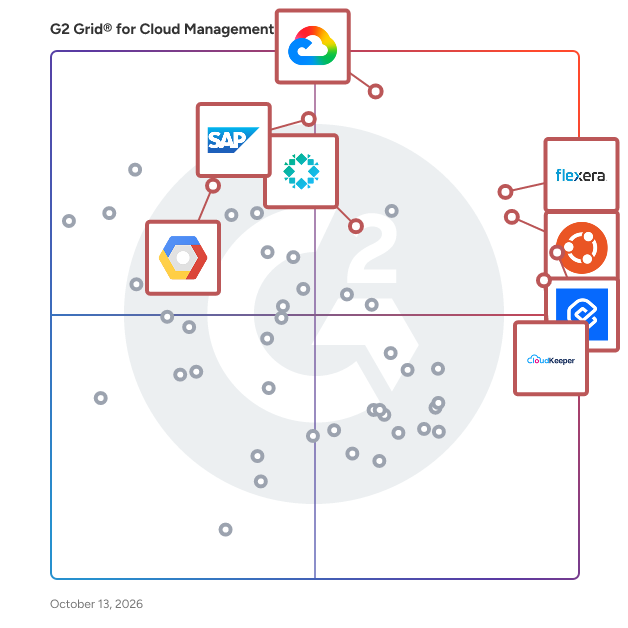
## G2 Grid® for Cloud Management Platforms
![G2 Grid® for Cloud Management Platforms plotting products by satisfaction and market presence](https://www.g2.com/categories/cloud-management-platforms/grids.png?focus%5B%5D=107230&focus%5B%5D=6599&focus%5B%5D=136001&focus%5B%5D=1434713&focus%5B%5D=39310&focus%5B%5D=1464&focus%5B%5D=40537&focus%5B%5D=1400802)
Highlighted products: Flexera One, Google Compute Engine, Cast AI, SAP Business Data Cloud, Rubrik, Ubuntu, Google Cloud Trace, and Cloudshot.
Underlying data: [Grid® JSON](https://www.g2.com/categories/cloud-management-platforms/grids.json?focus%5B%5D=flexera-one&amp;focus%5B%5D=google-compute-engine&amp;focus%5B%5D=cast-ai&amp;focus%5B%5D=sap-business-data-cloud&amp;focus%5B%5D=rubrik&amp;focus%5B%5D=ubuntu&amp;focus%5B%5D=google-cloud-trace&amp;focus%5B%5D=cloudshot&amp;segment=enterprise)


## How Many Cloud Management Platforms Products Does G2 Track?
**Total Products under this Category:** 189

### Category Stats (Jul 2026)
- **Average Rating**: 4.55/5 The average rating of products in this category, based on all submitted ratings
- **Top Trending Product**: Eon Data Protection (+0.24%) - Among all products in this category, Eon Data Protection recorded the largest rating increase compared to last month
*Last updated: July 20, 2026*


## How Does G2 Rank Cloud Management Platforms Products?

**Why You Can Trust G2's Software Rankings:**

- 30 Analysts and Data Experts
- 6,700+ Authentic Reviews
- 189+ Products
- Unbiased Rankings

G2's software rankings are built on verified user reviews, rigorous moderation, and a consistent research methodology maintained by a team of analysts and data experts. Each product is measured using the same transparent criteria, with no paid placement or vendor influence. While reviews reflect real user experiences, which can be subjective, they offer valuable insight into how software performs in the hands of professionals. Together, these inputs power the G2 Score, a standardized way to compare tools within every category.


---

**Sponsored**

### Dataprise

Founded in 1995, Dataprise empowers businesses with proactive managed IT and cybersecurity soutions deliverd around the clock by a team of certified specialists who ensure IT environments are stable, secure, and align with business goals. Dataprise delivers managed IT including infrastructure, cloud and mobility; managed cybersecurity; and offers advisory and professional services that help mitigate risk and optimize IT environments. Thousands of organizations trust Dataprise to serve as their technology partner—from mid-market companies to large enterprises—because we go beyond basic IT support. We align technology with business goals to drive real outcomes, whether it’s improving security posture, increasing operational efficiency, or supporting digital transformation. As a top-tier Microsoft, Cisco, Veeam, and Palo Alto Networks partner, and a certified MSSP, Dataprise delivers best-in-class solutions through deep technical expertise and a relentless focus on client success.


[Visit website](https://www.g2.com/external_clickthroughs/record?secure%5Bad_program%5D=ppc&amp;secure%5Bad_slot%5D=category_product_list&amp;secure%5Bcategory_id%5D=2036&amp;secure%5Bchosen_at%5D=2026-07-21T13%3A48%3A40Z&amp;secure%5Bdisplayable_resource_id%5D=2036&amp;secure%5Bdisplayable_resource_type%5D=Category&amp;secure%5Bmedium%5D=sponsored&amp;secure%5Bplacement_reason%5D=page_category&amp;secure%5Bplacement_resource_ids%5D%5B%5D=2036&amp;secure%5Bprioritized%5D=false&amp;secure%5Bproduct_id%5D=131080&amp;secure%5Bresource_id%5D=2036&amp;secure%5Bresource_type%5D=Category&amp;secure%5Bsource_type%5D=category_page&amp;secure%5Bsource_url%5D=https%3A%2F%2Fwww.g2.com%2Fcategories%2Fcloud-management-platforms%2Fenterprise&amp;secure%5Btoken%5D=f0cb65156a374ff9fb6ff9d3d9fecae539ae5e1a151828ca8b7aac52e8f146eb&amp;secure%5Burl%5D=https%3A%2F%2Fwww.dataprise.com%2F%3Futm_campaign%3D46354575-g2%2520Ads%25202026%26utm_source%3Dg2%26utm_medium%3Dpaid%26utm_content%3Ddefault%2520url&amp;secure%5Burl_type%5D=custom_url)

---

## What Are the Top-Rated Cloud Management Platforms Products in 2026?
### 1. [Flexera One](https://www.g2.com/products/flexera-one/reviews)
Flexera One is a SaaS-based IT management solution designed with and for organizations like yours with highly complex hybrid environments. With Flexera One, you can visualize your entire estate and make data-driven decisions from on-premise to SaaS to the cloud. IT Visibility Flexera One’s IT Visibility solution delivers the most comprehensive and clear view of your IT estate. Discovery and normalization—gain consistent, reliable data and take control of assets to draw valuable insights across software, hardware, SaaS and cloud. Data enrichment—enhance your IT inventory data with market intelligence that improves your decision-making abilities, via Technopedia—the largest and most trusted IT asset information source in the world. Unified data visualization—simplify the view of your environment with clear understanding and analytic that provide context for business initiatives spanning your entire IT estate. IT Asset Management Flexera One’s IT asset management (ITAM) starts with knowing what you have in your IT ecosystem—across hardware, software, SaaS, cloud, containers, clusters and virtual technologies. Optimized for today’s digital business, find the evidence required to determine license consumption, such as IBM sub-capacity requirements. Software asset management— Flexera One is the only SAM solution to solve the exponentiality of licensing with depth, breadth, algorithms and automation required to truly create a trusted and accurate license position. Hardware asset management— manage the hardware you own or lease, no matter where it is. Make critical hardware lifecycle decisions to support user productivity, business continuity and make the most of your hardware investments. SaaS management— get a current and complete picture of SaaS usage to support your business stakeholders while optimizing SaaS spend with all your vendors. Take action by discovering shadow SaaS, removing redundant applications and optimizing subscriptions based on actual usage automatically. Software request and reharvest— proactively reduce the sprawl and provide end users with a catalog of approved software, SaaS and cloud instances–helping you get them within guard rails while enabling the business to be agile and innovative. Reclaim unused technology to avoid future costs. Integrate with ITSM providers so you can meet users where they are and provide a seamless end-user experience. Cloud Cost Optimization Flexera One offers a unique approach to cloud cost optimization that enables cloud governance teams to work collaboratively with business units and cloud resource owners to optimize spend. With Flexera One, you get a comprehensive set of cloud cost optimization capabilities designed to easily reduce costs across your entire cloud environment. Cloud Cost Management— Get visibility into cloud usage and costs for all your cloud accounts. You can evaluate and report on your most cost-effective regions and instance sizes, and dive deep into public and private cloud costs by application, category, business unit, cost center, department or team. You also can allocate costs for chargeback and showback with complete backup and justification. Cloud Governance— Flexera One offers a powerful policies engine that enables your cloud governance teams to manage and control hybrid cloud use with out-of-the-box and custom policies to automate governance of costs, operations, security and compliance. Cloud Migration and Modernization Successful IT modernization requires proper analysis, prioritization and planning. Flexera One’s Cloud Migration and Modernization provides the actionable intelligence you need to optimize your cloud modernization and migration—no matter where you are on your cloud journey. Cloud Migration Planning— Flexera one gives you the actionable intelligence needed to optimize your on-premises to cloud migration journey from start to finish with full context visibility into business services. Cloud Cost Assessment — Flexera One provides comprehensive workload assessments to show you which cloud type, provider, custom instance choice, buying type and resource provisioning are best for your workload, budget and performance requirements—all to optimize your cloud cost savings. Workload Placement — Cloud migration and modernization provides comprehensive workload assessments for full visibility into your current workloads, so you can prioritize and identify which providers are best for your performance requirements to ensure successful migration of workloads to the cloud.


**Average Rating:** 4.3/5.0
**Total Reviews:** 116
**How Do G2 Users Rate Flexera One?**

- **Cloud Optimization:** 8.2/10 (Category avg: 9.1/10)
- **Cloud Orchestration:** 8.1/10 (Category avg: 8.8/10)
- **Quality of Support:** 8.0/10 (Category avg: 9.1/10)
- **Cloud Resource Management:** 8.2/10 (Category avg: 9.0/10)

**Who Is the Company Behind Flexera One?**

- **Seller:** [Flexera](https://www.g2.com/sellers/flexera)
- **Year Founded:** 2008
- **HQ Location:** Itasca, IL
- **Twitter:** @flexera (4,737 Twitter followers)
- **LinkedIn® Page:** https://www.linkedin.com/company/574962/ (2,072 employees on LinkedIn®)

**Who Uses This Product?**
- **Who Uses This:** Analyst, Consultant
- **Top Industries:** Information Technology and Services, Computer Software
- **Company Size:** 75% Enterprise, 16% Mid-Market


#### What Are Flexera One's Pros and Cons?

**Pros:**

- Ease of Use (54 reviews)
- Features (47 reviews)
- Integrations (37 reviews)
- Product Quality (36 reviews)
- Visibility (35 reviews)

**Cons:**

- Complexity (37 reviews)
- Difficult Learning (35 reviews)
- Learning Curve (31 reviews)
- Complex Setup (25 reviews)
- Difficult Setup (23 reviews)


### What Do G2 Reviewers Say About Flexera One?
*AI-generated summary from verified user reviews*

**Pros:**

- Users value the **ease of use** of Flexera One, thanks to its intuitive interface and streamlined functionality.
- Users value the **unified dashboard** of Flexera One, which simplifies management of on-premises and cloud environments.
- Users value the **easy integration** with multiple systems, enhancing data visibility and workflow across IT environments.
- Users appreciate the **high product quality** of Flexera One, noting its user-friendly design and seamless integrations.
- Users value the **unified visibility** of Flexera One, simplifying IT management across software, hardware, and cloud assets.

**Cons:**

- Users face a **steep learning curve** with Flexera One due to its complex setup and initial implementation challenges.
- Users find the **difficult learning curve** of Flexera One challenging, especially with advanced features and initial onboarding.
- Users find the **learning curve steep** , with an overwhelming UI and complex onboarding that requires improvements.
- Users face a **complex setup** process, requiring significant resources and technical expertise for effective implementation.
- Users often face a **difficult setup** due to complex implementation and integration with existing systems.

#### What Are Recent G2 Reviews of Flexera One?

**"[A must have tool for inventory management for every organisation](https://www.g2.com/survey_responses/flexera-one-review-11647810)"**

**Rating:** 5.0/5.0 stars
*— Adeeba I.*

[Read full review](https://www.g2.com/survey_responses/flexera-one-review-11647810)

---

**"[Accurate Spend Visibility and Deep License Intelligence for Confident Decisions](https://www.g2.com/survey_responses/flexera-one-review-12669217)"**

**Rating:** 4.0/5.0 stars
*— imad M.*

[Read full review](https://www.g2.com/survey_responses/flexera-one-review-12669217)

---


### 2. [Google Compute Engine](https://www.g2.com/products/google-compute-engine/reviews)
Compute Engine is Google&#39;s infrastructure as a service (IaaS) platform for organizations to create and run cloud-based virtual machines.


**Average Rating:** 4.5/5.0
**Total Reviews:** 875
**How Do G2 Users Rate Google Compute Engine?**

- **Cloud Optimization:** 8.8/10 (Category avg: 9.1/10)
- **Cloud Orchestration:** 8.7/10 (Category avg: 8.8/10)
- **Quality of Support:** 8.4/10 (Category avg: 9.1/10)
- **Cloud Resource Management:** 8.7/10 (Category avg: 9.0/10)

**Who Is the Company Behind Google Compute Engine?**

- **Seller:** [Google](https://www.g2.com/sellers/google)
- **Year Founded:** 1998
- **HQ Location:** Mountain View, CA
- **Twitter:** @google (31,899,995 Twitter followers)
- **LinkedIn® Page:** https://www.linkedin.com/company/1441/ (341,888 employees on LinkedIn®)
- **Ownership:** NASDAQ:GOOG

**Who Uses This Product?**
- **Who Uses This:** Software Engineer, Data Engineer
- **Top Industries:** Information Technology and Services, Computer Software
- **Company Size:** 35% Small-Business, 34% Enterprise


#### What Are Google Compute Engine's Pros and Cons?

**Pros:**

- Ease of Use (65 reviews)
- Scalability (60 reviews)
- Virtual Machines (59 reviews)
- Features (51 reviews)
- Google Cloud Platform (47 reviews)

**Cons:**

- Pricing Issues (42 reviews)
- Expensive (38 reviews)
- Cost Management (29 reviews)
- Complexity (28 reviews)
- Complex Pricing (23 reviews)


### What Do G2 Reviewers Say About Google Compute Engine?
*AI-generated summary from verified user reviews*

**Pros:**

- Users appreciate the **ease of use** of Google Compute Engine, enabling quick VM provisioning and seamless integration with GCP products.
- Users love the **scalability** of Google Compute Engine, allowing quick adjustments to resources for varying workloads.
- Users value the **flexibility and scalability** of Google Compute Engine, making it easy to customize VMs for various needs.
- Users admire the **flexibility and scalability** of Google Compute Engine, allowing customized and efficient cloud resource management.
- Users appreciate the **scalability and flexibility** of Google Compute Engine, enabling quick and reliable virtual machine provisioning.

**Cons:**

- Users struggle with the **complex pricing structure** of Google Compute Engine, leading to unexpected costs and confusion.
- Users find the **pricing structure confusing** and potentially expensive, especially when scaling multiple instances without careful monitoring.
- Users find the **cost management** challenging, noting confusion over pricing and potential for quickly rising costs.
- Users find the **steep learning curve** of Google Compute Engine daunting, especially for beginners unfamiliar with cloud concepts.
- Users find the **complex pricing structure** of Google Compute Engine challenging, often leading to unexpected costs and confusion.

#### What Are Recent G2 Reviews of Google Compute Engine?

**"[My experience using GCE](https://www.g2.com/survey_responses/google-compute-engine-review-11677030)"**

**Rating:** 5.0/5.0 stars
*— ANUJ J.*

[Read full review](https://www.g2.com/survey_responses/google-compute-engine-review-11677030)

---

**"[Easy Setup, Flexible Instances, and Great Value on Google Compute Engine](https://www.g2.com/survey_responses/google-compute-engine-review-12691758)"**

**Rating:** 5.0/5.0 stars
*— Matthew C.*

[Read full review](https://www.g2.com/survey_responses/google-compute-engine-review-12691758)

---


#### What Are G2 Users Discussing About Google Compute Engine?

- [What is Google Compute Engine used for?](https://www.g2.com/discussions/what-is-google-compute-engine-used-for) - 2 comments
- [What is a compute instance?](https://www.g2.com/discussions/what-is-a-compute-instance) - 2 comments, 2 upvotes
- [Is Google Compute Engine PaaS?](https://www.g2.com/discussions/is-google-compute-engine-paas) - 1 comment, 1 upvote
- [What are the features of Compute Engine?](https://www.g2.com/discussions/what-are-the-features-of-compute-engine)
- [What does Google Compute Engine do?](https://www.g2.com/discussions/what-does-google-compute-engine-do) - 4 comments, 1 upvote

### 3. [Cast AI](https://www.g2.com/products/cast-ai/reviews)
Cast AI is an automation platform for operating cloud-native and AI infrastructure at scale. It keeps applications fast and stable by continuously optimizing production systems and eliminating manual operations as environments scale.


**Average Rating:** 4.6/5.0
**Total Reviews:** 192
**How Do G2 Users Rate Cast AI?**

- **Cloud Orchestration:** 10.0/10 (Category avg: 8.8/10)
- **Quality of Support:** 9.2/10 (Category avg: 9.1/10)

**Who Is the Company Behind Cast AI?**

- **Seller:** [Cast AI](https://www.g2.com/sellers/cast-ai)
- **Company Website:** https://cast.ai
- **Year Founded:** 2019
- **HQ Location:** Miami, FL
- **Twitter:** @cast_ai (1,826 Twitter followers)
- **LinkedIn® Page:** https://www.linkedin.com/company/cast-ai (340 employees on LinkedIn®)

**Who Uses This Product?**
- **Who Uses This:** DevOps Engineer, Senior DevOps Engineer
- **Top Industries:** Financial Services, Information Technology and Services
- **Company Size:** 41% Mid-Market, 23% Enterprise


#### What Are Cast AI's Pros and Cons?

**Pros:**

- Cost Management (53 reviews)
- Cost Saving (53 reviews)
- Ease of Use (50 reviews)
- Cost Reduction (49 reviews)
- Pricing (48 reviews)

**Cons:**

- Scaling Issues (13 reviews)
- Expensive (12 reviews)
- Learning Difficulty (11 reviews)
- Poor Documentation (10 reviews)
- Pricing Issues (10 reviews)


### What Do G2 Reviewers Say About Cast AI?
*AI-generated summary from verified user reviews*

**Pros:**

- Users value the **cost management capabilities** of CAST AI, effectively reducing cluster costs and avoiding interruptions.
- Users value the **cost-saving benefits** of CAST AI, significantly reducing cloud expenses while optimizing Kubernetes management.
- Users value the **ease of use** of CAST AI, finding it straightforward to set up and operate effectively.
- Users highlight the **significant cost reduction** achieved with CAST AI through autonomous optimization and intelligent resource management.
- Users value the **cost-effectiveness** of CAST AI for managing clusters and optimizing expenses effortlessly.

**Cons:**

- Users face **scaling issues** with CAST AI when dealing with bursty workloads, affecting performance and budget management.
- Users find the **pricing high** , especially for small clusters, despite the tool paying for itself initially.
- Users face a **substantial learning curve** with advanced features, requiring time to understand and utilize effectively.
- Users report **poor documentation** leading to confusion and contradictory information from support, complicating their experience.
- Users find **pricing issues** with CAST AI, highlighting a need for improved clarity and transparency in cost reporting.

#### What Are Recent G2 Reviews of Cast AI?

**"[Solid tool for cutting cloud costs and reducing infra toil](https://www.g2.com/survey_responses/cast-ai-review-12457732)"**

**Rating:** 4.5/5.0 stars
*— Rahul Abishek K.*

[Read full review](https://www.g2.com/survey_responses/cast-ai-review-12457732)

---

**"[Revolutionized Our Kubernetes Optimization](https://www.g2.com/survey_responses/cast-ai-review-13076801)"**

**Rating:** 5.0/5.0 stars
*— Dhruv V.*

[Read full review](https://www.g2.com/survey_responses/cast-ai-review-13076801)

---


#### What Are G2 Users Discussing About Cast AI?

- [What is CAST AI used for?](https://www.g2.com/discussions/what-is-cast-ai-used-for) - 1 comment, 1 upvote

### 4. [SAP Business Data Cloud](https://www.g2.com/products/sap-business-data-cloud/reviews)
SAP Business Data Cloud is a fully managed software-as-a-service (SaaS) solution that unifies and governs SAP data and connects with third-party data. As an evolution of the company&#39;s data, planning, and analytics solutions, SAP Business Data Cloud brings together SAP Datasphere, SAP Analytics Cloud, and SAP Business Warehouse with a unified experience that delivers insights across all lines of business. In addition, SAP Databricks is natively available in Business Data Cloud - bringing the power of Databricks Data Intelligence Platform capabilities to the product. SAP Business Data Cloud connects data by leveraging business data fabric principles, making it easier to discover, share, govern, and model this data. It includes SAP Databricks as a first-party data service. The platform combines prebuilt applications and data products across all lines of business. It provides fully managed, curated data products across all lines of business and eliminate the costs of data extracts. Users can build on SAP’s curated data products with their domain expertise, and deliver Intelligent Applications through the Business Data Cloud ecosystem. These intelligent applications are adaptive, AI-powered applications that learn from your data, understand business context, and act on your behalf to transform business outcomes.


**Average Rating:** 4.2/5.0
**Total Reviews:** 74
**How Do G2 Users Rate SAP Business Data Cloud?**

- **Cloud Optimization:** 9.0/10 (Category avg: 9.1/10)
- **Cloud Orchestration:** 8.5/10 (Category avg: 8.8/10)
- **Quality of Support:** 8.2/10 (Category avg: 9.1/10)
- **Cloud Resource Management:** 8.4/10 (Category avg: 9.0/10)

**Who Is the Company Behind SAP Business Data Cloud?**

- **Seller:** [SAP](https://www.g2.com/sellers/sap)
- **Company Website:** https://www.sap.com/
- **Year Founded:** 1972
- **HQ Location:** Walldorf
- **Twitter:** @SAP (297,052 Twitter followers)
- **LinkedIn® Page:** https://www.linkedin.com/company/sap/ (141,955 employees on LinkedIn®)

**Who Uses This Product?**
- **Top Industries:** Computer Software, Information Technology and Services
- **Company Size:** 39% Enterprise, 29% Small-Business


#### What Are SAP Business Data Cloud's Pros and Cons?

**Pros:**

- Ease of Use (32 reviews)
- Features (32 reviews)
- Integration Capabilities (31 reviews)
- Data Discovery (30 reviews)
- Integrations (27 reviews)

**Cons:**

- Complexity (30 reviews)
- Difficult Learning (25 reviews)
- Integration Issues (25 reviews)
- Expensive (23 reviews)
- Learning Curve (18 reviews)


### What Do G2 Reviewers Say About SAP Business Data Cloud?
*AI-generated summary from verified user reviews*

**Pros:**

- Users appreciate the **ease of use** of SAP Business Data Cloud, benefiting from streamlined access to trusted data.
- Users value the **seamless data integration** and robust governance of SAP Business Data Cloud, enhancing organizational efficiency.
- Users value the **integration capabilities** of SAP Business Data Cloud, effectively unifying data from diverse sources for enhanced efficiency.
- Users value the **single, trusted view of data** offered by SAP Business Data Cloud, enhancing efficiency and organization.
- Users value the **seamless integration** capabilities of SAP Business Data Cloud, enhancing data management and decision-making efficiency.

**Cons:**

- Users find the **setup complexity** of SAP Business Data Cloud daunting, especially for hybrid environments and data integration.
- Users face a **difficult learning curve** due to the complexity and advanced features of SAP Business Data Cloud.
- Users face **integration issues** with SAP Business Data Cloud, making setup and configuration challenging in hybrid environments.
- Users highlight the **high costs** associated with SAP Business Data Cloud for large-scale implementations, affecting budget considerations.
- Users note a **steep learning curve** , making it challenging for new users to navigate SAP Business Data Cloud effectively.

#### What Are Recent G2 Reviews of SAP Business Data Cloud?

**"[Unify SAP and non-SAP data](https://www.g2.com/survey_responses/sap-business-data-cloud-review-12851557)"**

**Rating:** 4.0/5.0 stars
*— Maria Francesca I.*

[Read full review](https://www.g2.com/survey_responses/sap-business-data-cloud-review-12851557)

---

**"[Centralized Data Management with User-Friendly UI](https://www.g2.com/survey_responses/sap-business-data-cloud-review-12609585)"**

**Rating:** 4.0/5.0 stars
*— Tejas Kumar V.*

[Read full review](https://www.g2.com/survey_responses/sap-business-data-cloud-review-12609585)

---


### 5. [Ubuntu](https://www.g2.com/products/ubuntu/reviews)
Ubuntu is the Linux OS that’s made for everyone. Harness the freedom and creativity of open source, from laptops and workstations to servers and IoT devices Published by Canonical, Ubuntu brings you the best of open source, backed by enterprise-grade assurance. Ubuntu delivers a unified and stable experience. Ubuntu serves as an interoperable platform, from the desktop to the edge. Wherever you innovate, you can expect high-performance and the same rich tooling ecosystem. Through community and partnership, we ensure that Ubuntu is always at the cutting-edge. Open source contributors work to ensure that the latest applications, tools and libraries have a home in the Ubuntu ecosystem. Our hardware partners, such as Dell, Lenovo, HP, IBM and NVIDIA, work with us to certify Ubuntu out-of-the-box on the latest boards, devices and chipsets, through a series of over 500 OS compatibility tests per device. When the time comes to scale up, Ubuntu provides integrations to make device governance manageable. Enforce strict identity management protocols with support for Microsoft Active Directory, Entra ID and Google Cloud platform, through Ubuntu’s AuthD broker. Ubuntu’s regular release cadence empowers you to plan ahead with confidence. Across your stack, Ubuntu LTS (long-term support) releases receive 5 years of patching and maintenance as standard. Additional enterprise-grade support is delivered through Ubuntu Pro - Canonical’s comprehensive subscription for open source security. Ubuntu Pro expands security patching and maintenance for up to 12 years and includes tooling for hardening and compliance, enabling you to stay ahead of CVEs, minimize downtime and meet your regulatory requirements. This includes support for frameworks such as FIPS, DISA STIG, NIST and the Cyber Resilience Act.


**Average Rating:** 4.5/5.0
**Total Reviews:** 2,341
**How Do G2 Users Rate Ubuntu?**

- **Cloud Optimization:** 8.7/10 (Category avg: 9.1/10)
- **Cloud Orchestration:** 8.8/10 (Category avg: 8.8/10)
- **Quality of Support:** 8.3/10 (Category avg: 9.1/10)
- **Cloud Resource Management:** 8.7/10 (Category avg: 9.0/10)

**Who Is the Company Behind Ubuntu?**

- **Seller:** [Canonical Ltd.](https://www.g2.com/sellers/canonical-ltd)
- **Year Founded:** 2004
- **HQ Location:** London
- **Twitter:** @Canonical (110,908 Twitter followers)
- **LinkedIn® Page:** https://www.linkedin.com/company/234280/ (1,974 employees on LinkedIn®)

**Who Uses This Product?**
- **Who Uses This:** Software Engineer, Senior Software Engineer
- **Top Industries:** Information Technology and Services, Computer Software
- **Company Size:** 47% Small-Business, 34% Mid-Market


#### What Are Ubuntu's Pros and Cons?

**Pros:**

- Ease of Use (337 reviews)
- Linux/Ubuntu OS (299 reviews)
- Open Source (213 reviews)
- User Interface (190 reviews)
- User-Friendly (185 reviews)

**Cons:**

- Compatibility Issues (141 reviews)
- Driver Issues (104 reviews)
- Limited Software (104 reviews)
- Usage Difficulty (91 reviews)
- Performance Issues (80 reviews)


### What Do G2 Reviewers Say About Ubuntu?
*AI-generated summary from verified user reviews*

**Pros:**

- Users find Ubuntu incredibly **easy to use** , benefiting from seamless integration and excellent community support.
- Users appreciate the **reliability and speed** of Ubuntu, making it a solid choice for development and server work.
- Users love Ubuntu&#39;s **open source flexibility** , allowing easy customization and access to a wide range of services.
- Users enjoy Ubuntu&#39;s **user-friendly interface** , appreciated for its stability, extensive software ecosystem, and ease of use.
- Users highlight Ubuntu&#39;s **user-friendly interface** , making it accessible and ideal for newcomers to Linux.

**Cons:**

- Users often face **compatibility issues** with applications, limiting functionality and causing frustration with software availability.
- Users experience **driver issues** with gaming and hardware, often requiring extra effort for proper functionality in Ubuntu.
- Users express frustration with the **limited software availability** on Ubuntu, hindering their productivity and experience.
- Users find the **usage difficulty** of Ubuntu challenging, especially when transitioning from Windows and dealing with command lines.
- Users report **performance issues** with Ubuntu, including sluggish Snap startup and poor gaming software compatibility.

#### What Are Recent G2 Reviews of Ubuntu?

**"[Best OS for Cybersecurity Professionals — Powerful, Secure &amp; Free](https://www.g2.com/survey_responses/ubuntu-review-12965130)"**

**Rating:** 5.0/5.0 stars
*— yash p.*

[Read full review](https://www.g2.com/survey_responses/ubuntu-review-12965130)

---

**"[Fast, Clean, and Efficient—Ubuntu Powers My Daily Workflow](https://www.g2.com/survey_responses/ubuntu-review-12843345)"**

**Rating:** 4.0/5.0 stars
*— Sahil J.*

[Read full review](https://www.g2.com/survey_responses/ubuntu-review-12843345)

---


#### What Are G2 Users Discussing About Ubuntu?

- [I&#39;m having trouble installing applications on Ubuntu. What are the best practices for a beginner?](https://www.g2.com/discussions/i-m-having-trouble-installing-applications-on-ubuntu-what-are-the-best-practices-for-a-beginner) - 7 comments, 1 upvote
- [What is Ubuntu used for?](https://www.g2.com/discussions/what-is-ubuntu-used-for) - 6 comments, 2 upvotes
- [What is Ubuntu Desktop used for?](https://www.g2.com/discussions/what-is-ubuntu-desktop-used-for) - 6 comments, 2 upvotes
- [What is Bazaar used for?](https://www.g2.com/discussions/what-is-bazaar-used-for)
- [What is Ubuntu Core used for?](https://www.g2.com/discussions/what-is-ubuntu-core-used-for) - 2 comments, 1 upvote

### 6. [Rubrik](https://www.g2.com/products/rubrik/reviews)
Rubrik is the leading cyber resilience and data protection company with a mission to secure the world’s data. Rubrik pioneered Zero Trust Data SecurityTM to help organizations achieve business resilience against cyberattacks, malicious insiders, and operational disruptions. Rubrik Security Cloud, built with a Zero Trust design and powered by machine learning, delivers complete cyber resilience in a single platform across enterprise, cloud, and SaaS. Rubrik’s platform automates data policy management and enforcement, safeguards sensitive data, delivers data threat analytics and response, and orchestrates rapid cyber and operational recovery.


**Average Rating:** 4.6/5.0
**Total Reviews:** 277
**How Do G2 Users Rate Rubrik?**

- **Cloud Optimization:** 9.0/10 (Category avg: 9.1/10)
- **Cloud Orchestration:** 9.0/10 (Category avg: 8.8/10)
- **Quality of Support:** 8.8/10 (Category avg: 9.1/10)
- **Cloud Resource Management:** 8.5/10 (Category avg: 9.0/10)

**Who Is the Company Behind Rubrik?**

- **Seller:** [Rubrik](https://www.g2.com/sellers/rubrik)
- **Company Website:** https://www.rubrik.com
- **Year Founded:** 2014
- **HQ Location:** Palo Alto, California
- **Twitter:** @rubrikInc (44,021 Twitter followers)
- **LinkedIn® Page:** https://www.linkedin.com/company/4840301/ (5,110 employees on LinkedIn®)

**Who Uses This Product?**
- **Who Uses This:** System Administrator
- **Top Industries:** Information Technology and Services, Hospital &amp; Health Care
- **Company Size:** 48% Enterprise, 33% Mid-Market


#### What Are Rubrik's Pros and Cons?

**Pros:**

- Ease of Use (48 reviews)
- Backup Solutions (32 reviews)
- Reliability (27 reviews)
- Backup Efficiency (26 reviews)
- User Interface (25 reviews)

**Cons:**

- Expensive (16 reviews)
- Limited Features (10 reviews)
- Complexity (8 reviews)
- Missing Features (8 reviews)
- Cost Management (7 reviews)


### What Do G2 Reviewers Say About Rubrik?
*AI-generated summary from verified user reviews*

**Pros:**

- Users find Rubrik&#39;s **ease of use** and intuitive setup significantly streamline backup and recovery management.
- Users value how Rubrik’s backup solutions provide **ease of implementation** and efficient management without impacting applications.
- Users appreciate the **reliability** of Rubrik, ensuring dependable backups and robust data protection with ease of use.
- Users appreciate the **backup efficiency** of Rubrik, enabling seamless server and database protection with minimal impact.
- Users love Rubrik&#39;s **user-friendly interface** , making navigation and recovery processes efficient and straightforward.

**Cons:**

- Users find Rubrik to be **expensive** , yet acknowledge that its value often justifies the high cost.
- Users find the **limited features** of Rubrik restricting their backup and reporting capabilities, impacting overall functionality.
- Users find the **complexity of advanced features** and integrations with Microsoft 365 data somewhat overwhelming and cumbersome.
- Users find **missing features** like limited database support and inadequate search options in Rubrik, hindering functionality.
- Users express concern over the **cost management** of Rubrik, particularly during yearly renewal processes.

#### What Are Recent G2 Reviews of Rubrik?

**"[Reliable, hands-free backup that actually gives you peace of mind](https://www.g2.com/survey_responses/rubrik-review-13070838)"**

**Rating:** 5.0/5.0 stars
*— Shalu G.*

[Read full review](https://www.g2.com/survey_responses/rubrik-review-13070838)

---

**"[Evaluating Rubrik for Enterprise Data Protection](https://www.g2.com/survey_responses/rubrik-review-13103366)"**

**Rating:** 4.5/5.0 stars
*— Rayanne A.*

[Read full review](https://www.g2.com/survey_responses/rubrik-review-13103366)

---


#### What Are G2 Users Discussing About Rubrik?

- [What operating system does rubrik use?](https://www.g2.com/discussions/what-operating-system-does-rubrik-use)
- [How is rubrik different?](https://www.g2.com/discussions/how-is-rubrik-different)
- [What makes rubrik unique?](https://www.g2.com/discussions/what-makes-rubrik-unique)
- [What is rubrik used for?](https://www.g2.com/discussions/what-is-rubrik-used-for)

### 7. [Google Cloud Trace](https://www.g2.com/products/google-cloud-trace/reviews)
Find performance bottlenecks in production


**Average Rating:** 4.3/5.0
**Total Reviews:** 65
**How Do G2 Users Rate Google Cloud Trace?**

- **Cloud Optimization:** 10.0/10 (Category avg: 9.1/10)
- **Quality of Support:** 8.1/10 (Category avg: 9.1/10)

**Who Is the Company Behind Google Cloud Trace?**

- **Seller:** [Google](https://www.g2.com/sellers/google)
- **Year Founded:** 1998
- **HQ Location:** Mountain View, CA
- **Twitter:** @google (31,899,995 Twitter followers)
- **LinkedIn® Page:** https://www.linkedin.com/company/1441/ (341,888 employees on LinkedIn®)
- **Ownership:** NASDAQ:GOOG

**Who Uses This Product?**
- **Who Uses This:** Software Engineer
- **Top Industries:** Information Technology and Services, Computer Software
- **Company Size:** 37% Small-Business, 34% Mid-Market


#### What Are Google Cloud Trace's Pros and Cons?

**Pros:**

- Customer Support (1 reviews)
- Ease of Use (1 reviews)
- Easy Access (1 reviews)
- Features (1 reviews)
- Implementation Ease (1 reviews)


### What Do G2 Reviewers Say About Google Cloud Trace?
*AI-generated summary from verified user reviews*

**Pros:**

- Users appreciate the **excellent customer support** of Google Cloud Trace, enhancing their experience with efficient issue resolution.
- Users appreciate the **ease of use** of Google Cloud Trace, finding it user-friendly and versatile for various tasks.
- Users value the **easy access** to a versatile platform that simplifies integration and enhances productivity across services.
- Users highlight the **ease of use and extensive features** of Google Cloud Trace, enhancing productivity and integration.
- Users find **implementation easy** , appreciating the user-friendly interface and high-level documentation for effective usage.


#### What Are Recent G2 Reviews of Google Cloud Trace?

**"[Google Cloud Product Review](https://www.g2.com/survey_responses/google-cloud-trace-review-11070510)"**

**Rating:** 5.0/5.0 stars
*— Opeyemi  O.*

[Read full review](https://www.g2.com/survey_responses/google-cloud-trace-review-11070510)

---

**"[My review for Google Cloud Trace!!!](https://www.g2.com/survey_responses/google-cloud-trace-review-8288644)"**

**Rating:** 4.0/5.0 stars
*— Ashish S.*

[Read full review](https://www.g2.com/survey_responses/google-cloud-trace-review-8288644)

---


#### What Are G2 Users Discussing About Google Cloud Trace?

- [What is the features of Google cloud?](https://www.g2.com/discussions/google-cloud-trace-what-is-the-features-of-google-cloud)
- [What is tracing in Google?](https://www.g2.com/discussions/what-is-tracing-in-google) - 1 comment, 1 upvote
- [Which GCP products are integrated into Google Cloud trace?](https://www.g2.com/discussions/which-gcp-products-are-integrated-into-google-cloud-trace)
- [How does Google Cloud trace work?](https://www.g2.com/discussions/how-does-google-cloud-trace-work) - 1 comment, 1 upvote

### 8. [Cloudshot](https://www.g2.com/products/cloudshot/reviews)
Cloudshot is a patented, visual cloud management platform that helps enterprises gain complete visibility, governance, and control across their cloud and IT spend. Designed for organizations operating in complex environments, Cloudshot delivers multi-cloud management visibility across AWS, Azure, GCP, and hybrid setups through an intuitive, visual-first approach. Unlike traditional tools that rely on raw data, scripts, or fragmented dashboards, Cloudshot represents cloud environments visually, enabling teams to understand architecture, dependencies, risks, and costs at a glance. This reduces operational complexity and accelerates decision-making across engineering, security, and finance teams. Cloudshot brings DevOps, SecOps, FinOps, and Sustainability together under a single umbrella. DevOps teams benefit from faster environment understanding and infrastructure insights, SecOps teams gain continuous security posture and drift visibility, and FinOps teams receive accurate, allocation-ready cost and optimization data. Sustainability is natively built into the platform, helping organizations optimize costs while reducing environmental impact. Cloudshot aligns closely with the FinOps Foundation framework and is an official FOCUS-compatible tool, supporting the FinOps Open Cost and Usage Specification (FOCUS). This ensures standardized, portable, and provider-agnostic cost and usage data across cloud platforms, enabling enterprises to scale FinOps practices with confidence and consistency. Beyond cloud infrastructure, Cloudshot provides a unified IT spend dashboard that consolidates multi-cloud costs, cloud marketplace usage, SaaS spend, and shared IT services into a single, consistent view. This enables leadership teams to understand true technology spend, improve accountability, and align IT investments with business outcomes. Enterprise customers using Cloudshot typically achieve 10% to 35% savings on their cloud spend through continuous optimization, waste elimination, and improved governance. By combining patented technology, visual cloud management, and FOCUS-aligned spend visibility, Cloudshot enables enterprises to move from reactive cost control to proactive, strategic management of their IT ecosystem.


**Average Rating:** 4.9/5.0
**Total Reviews:** 60
**How Do G2 Users Rate Cloudshot?**

- **Cloud Optimization:** 10.0/10 (Category avg: 9.1/10)
- **Cloud Orchestration:** 10.0/10 (Category avg: 8.8/10)
- **Quality of Support:** 9.4/10 (Category avg: 9.1/10)
- **Cloud Resource Management:** 10.0/10 (Category avg: 9.0/10)

**Who Is the Company Behind Cloudshot?**

- **Seller:** [Cloudshot](https://www.g2.com/sellers/cloudshot)
- **Year Founded:** 2023
- **HQ Location:** Pune, IN
- **LinkedIn® Page:** https://www.linkedin.com/company/cloudshot-io/ (4 employees on LinkedIn®)

**Who Uses This Product?**
- **Who Uses This:** Cloud Architect, MD
- **Top Industries:** Information Technology and Services
- **Company Size:** 135% Enterprise, 23% Mid-Market


#### What Are Cloudshot's Pros and Cons?

**Pros:**

- Cloud Services (51 reviews)
- Ease of Use (41 reviews)
- Cloud Management (34 reviews)
- Features (24 reviews)
- Cost Optimization (22 reviews)

**Cons:**

- Missing Features (4 reviews)
- Difficult Learning (3 reviews)
- Steep Learning Curve (3 reviews)
- Complex Configuration (2 reviews)
- Difficult Setup (2 reviews)


### What Do G2 Reviewers Say About Cloudshot?
*AI-generated summary from verified user reviews*

**Pros:**

- Users love Cloudshot&#39;s **multi-cloud support** , enhancing management and visibility across AWS, Azure, and Google Cloud environments.
- Users love the **ease of use** of Cloudshot, finding it simple for all team members to track cloud spending.
- Users praise the **user-friendly cloud management** of Cloudshot, making it easy for newcomers to start managing their resources.
- Users love the **intuitive setup and live diagram feature** of Cloudshot, enhancing their cloud management experience dramatically.
- Users appreciate the **cost optimization** features of Cloudshot, making budgeting and chargebacks clear and efficient.

**Cons:**

- Users feel the **missing features** in Cloudshot limit its functionality and integration potential.
- Users find the **difficult learning** curve challenging, as new users may need time to fully grasp Cloudshot&#39;s features.
- Users experience a **steep learning curve** with Cloudshot, requiring time to fully grasp its extensive features.
- Users find the **complex configuration** of Cloudshot challenging, requiring significant effort to integrate into existing workflows.
- Users find the **difficult setup** of Cloudshot challenging, requiring significant effort to customize workflows and policies.

#### What Are Recent G2 Reviews of Cloudshot?

**"[Great tool, highly recommended](https://www.g2.com/survey_responses/cloudshot-review-10747822)"**

**Rating:** 5.0/5.0 stars
*— Natasha B.*

[Read full review](https://www.g2.com/survey_responses/cloudshot-review-10747822)

---

**"[Easy to Use, Multi-Cloud Visualizations and  operational features.](https://www.g2.com/survey_responses/cloudshot-review-10695935)"**

**Rating:** 5.0/5.0 stars
*— Pratik K.*

[Read full review](https://www.g2.com/survey_responses/cloudshot-review-10695935)

---


### 9. [CloudKeeper](https://www.g2.com/products/cloudkeeper/reviews)
CloudKeeper is the only outcome-driven AI &amp; Cloud Cost Optimization partner built for fast-scaling cloud organizations. We deliver guaranteed, continuous cost savings across your cloud and AI estate - combining proven FinOps expertise, proprietary optimization platforms, and hands-on execution to drive measurable financial outcomes at scale. With over 15 years of cloud cost optimization experience, CloudKeeper has helped 400+ global companies reduce cloud and AI spend by an average of 20% across AWS, Microsoft Azure, and Google Cloud. Unlike traditional engagement models, we deliver ongoing savings through an outcome-based model - with no upfront costs and no long-term commitments.


**Average Rating:** 4.7/5.0
**Total Reviews:** 300
**How Do G2 Users Rate CloudKeeper?**

- **Cloud Optimization:** 9.4/10 (Category avg: 9.1/10)
- **Cloud Orchestration:** 8.8/10 (Category avg: 8.8/10)
- **Quality of Support:** 9.6/10 (Category avg: 9.1/10)
- **Cloud Resource Management:** 9.0/10 (Category avg: 9.0/10)

**Who Is the Company Behind CloudKeeper?**

- **Seller:** [CloudKeeper](https://www.g2.com/sellers/cloudkeeper)
- **Company Website:** https://cloudkeeper.com
- **Year Founded:** 2019
- **HQ Location:** Singapore, Singapore
- **Twitter:** @cloud_keeper (125 Twitter followers)
- **LinkedIn® Page:** https://www.linkedin.com/company/cloudkeeper/ (383 employees on LinkedIn®)

**Who Uses This Product?**
- **Who Uses This:** DevOps Engineer, CTO
- **Top Industries:** Computer Software, Information Technology and Services
- **Company Size:** 66% Mid-Market, 24% Small-Business


#### What Are CloudKeeper's Pros and Cons?

**Pros:**

- Customer Support (52 reviews)
- Helpful (32 reviews)
- Recommendations (28 reviews)
- Cost Saving (20 reviews)
- Insights (20 reviews)

**Cons:**

- Missing Features (8 reviews)
- Dashboard Issues (7 reviews)
- AWS Limitations (5 reviews)
- Cost Management (4 reviews)
- Difficult Setup (4 reviews)


### What Do G2 Reviewers Say About CloudKeeper?
*AI-generated summary from verified user reviews*

**Pros:**

- Users praise the **responsive customer support** of CloudKeeper, highlighting timely and effective assistance during critical issues.
- Users appreciate the **responsive support and expert guidance** from CloudKeeper during security incidents and cost management.
- Users appreciate the **collaborative features** of CloudKeeper, facilitating effective cloud cost optimization across teams.
- Users appreciate the **cost-saving insights** from CloudKeeper, significantly reducing cloud expenses and enhancing budget control.
- Users value the **detailed insights** from CloudKeeper, optimizing costs and enhancing budget management effortlessly.

**Cons:**

- Users note the **missing features** like tagging resources and APIs, limiting customization and automation capabilities.
- Users face **complexity in implementation** , making integration challenging and actions slower due to reliance on internal adjustments.
- Users find **AWS limitations** with CloudKeeper restrict flexibility and complicate management of their AWS environment.
- Users note that **cost management insights** in CloudKeeper are unclear, leading to delayed expense tracking and inefficiencies.
- Users find the **difficult setup** process in CloudKeeper challenging, particularly with custom views and integrations.

#### What Are Recent G2 Reviews of CloudKeeper?

**"[Excellent Cloud Visibility and Cost Control Made Easy](https://www.g2.com/survey_responses/cloudkeeper-review-12980640)"**

**Rating:** 4.5/5.0 stars
*— Sachin B.*

[Read full review](https://www.g2.com/survey_responses/cloudkeeper-review-12980640)

---

**"[Review](https://www.g2.com/survey_responses/cloudkeeper-review-8446752)"**

**Rating:** 4.5/5.0 stars
*— Dhirendra K.*

[Read full review](https://www.g2.com/survey_responses/cloudkeeper-review-8446752)

---


#### What Are G2 Users Discussing About CloudKeeper?

- [What do you recommend for organizations considering CloudKeeper for cloud cost optimization?](https://www.g2.com/discussions/what-do-you-recommend-for-organizations-considering-cloudkeeper-for-cloud-cost-optimization) - 1 comment

### 10. [IBM Turbonomic](https://www.g2.com/products/ibm-turbonomic/reviews)
IBM Turbonomic, now part of the Concert platform, is a real-time application resource management platform designed to help users optimize and manage resources across hybrid and multi-cloud environments. This innovative solution continuously analyzes application performance and resource utilization, automating critical resourcing decisions to ensure optimal application performance while minimizing costs associated with cloud and infrastructure resources. IBM Turbonomic addresses the challenges of managing complex, dynamic environments. As organizations increasingly adopt hybrid and multi-cloud strategies, the need for effective resource management becomes paramount. Turbonomic provides a comprehensive approach to performance management by analyzing the entire technology stack, identifying inefficiencies, and uncovering dependencies that can impact application performance. This proactive management capability allows organizations to maintain high service levels while controlling costs. One of the key features of IBM Turbonomic is its ability to continuously adjust application resources in real time. By monitoring resource utilization and application performance, Turbonomic prevents performance degradation and overprovisioning. This dynamic adjustment ensures that applications receive the necessary resources when needed, which is crucial for maintaining optimal performance levels. Additionally, the platform automates resource decisions such as scaling and placement, allowing organizations to focus on strategic initiatives rather than manual resource management tasks. Turbonomic customers report an average 33% reduction in cloud and infrastructure waste without impacting application performance, and return-on-investment of 471% over three years. IBM Turbonomic is also available on AWS Marketplace. By leveraging Turbonomic, businesses can ensure that their applications run smoothly, resources are utilized effectively, and costs are kept in check, all while maintaining a focus on innovation and growth. For further information, please visit www.ibm.com/products/turbonomic


**Average Rating:** 4.4/5.0
**Total Reviews:** 288
**How Do G2 Users Rate IBM Turbonomic?**

- **Cloud Optimization:** 8.5/10 (Category avg: 9.1/10)
- **Cloud Orchestration:** 8.5/10 (Category avg: 8.8/10)
- **Quality of Support:** 8.9/10 (Category avg: 9.1/10)
- **Cloud Resource Management:** 8.8/10 (Category avg: 9.0/10)

**Who Is the Company Behind IBM Turbonomic?**

- **Seller:** [IBM](https://www.g2.com/sellers/ibm)
- **Company Website:** https://www.ibm.com
- **Year Founded:** 1911
- **HQ Location:** Armonk, New York, United States
- **Twitter:** @IBMSecurity (74,660 Twitter followers)
- **LinkedIn® Page:** https://www.linkedin.com/company/1009/ (328,202 employees on LinkedIn®)

**Who Uses This Product?**
- **Who Uses This:** Software Engineer, System Engineer
- **Top Industries:** Information Technology and Services, Computer Software
- **Company Size:** 43% Enterprise, 32% Mid-Market


#### What Are IBM Turbonomic's Pros and Cons?

**Pros:**

- Cost Optimization (41 reviews)
- Ease of Use (39 reviews)
- Automation (38 reviews)
- Performance (31 reviews)
- Real-time Monitoring (29 reviews)

**Cons:**

- Complexity (32 reviews)
- Learning Curve (30 reviews)
- Complex Configuration (26 reviews)
- Difficult Learning (25 reviews)
- Difficult Setup (25 reviews)


### What Do G2 Reviewers Say About IBM Turbonomic?
*AI-generated summary from verified user reviews*

**Pros:**

- Users appreciate the **cost optimization** achieved by IBM Turbonomic, benefiting from improved resource management and reduced expenses.
- Users appreciate the **ease of use** of IBM Turbonomic, making resource management and workload analysis straightforward and efficient.
- Users admire the **impressive automation** of IBM Turbonomic, effectively managing resources and enhancing performance without manual intervention.
- Users value the **automated resource optimization** of IBM Turbonomic, enhancing performance and simplifying resource management efforts.
- Users value the **real-time monitoring** of Turbonomic for its actionable insights that enhance performance and reliability.

**Cons:**

- Users face a **steep learning curve** with IBM Turbonomic, making initial setup and configuration challenging for newcomers.
- Users struggle with a **steep learning curve** for IBM Turbonomic, requiring time and effort to understand its complexities.
- Users face a **complex configuration** process that hinders quick onboarding and a seamless experience with IBM Turbonomic.
- Users face a significant **learning curve** with IBM Turbonomic, requiring time and patience for effective use.
- Users find the **difficult setup** of IBM Turbonomic challenging, requiring significant time and effort to understand and configure.

#### What Are Recent G2 Reviews of IBM Turbonomic?

**"[Advanced Infrastructure Optimizer with challenging configuration requirements.](https://www.g2.com/survey_responses/ibm-turbonomic-review-12821189)"**

**Rating:** 4.0/5.0 stars
*— Pardeep J.*

[Read full review](https://www.g2.com/survey_responses/ibm-turbonomic-review-12821189)

---

**"[Smarter Resource Optimization with Real-Time Automation](https://www.g2.com/survey_responses/ibm-turbonomic-review-12380847)"**

**Rating:** 5.0/5.0 stars
*— Bishal D.*

[Read full review](https://www.g2.com/survey_responses/ibm-turbonomic-review-12380847)

---


#### What Are G2 Users Discussing About IBM Turbonomic?

- [How much does Turbonomic cost?](https://www.g2.com/discussions/how-much-does-turbonomic-cost)
- [Who uses Turbonomic?](https://www.g2.com/discussions/who-uses-turbonomic)
- [What is Turbonomic IBM?](https://www.g2.com/discussions/what-is-turbonomic-ibm)
- [What is Turbonomic used for?](https://www.g2.com/discussions/what-is-turbonomic-used-for)

### 11. [IBM Cloudability](https://www.g2.com/products/ibm-cloudability/reviews)
IBM Cloudability is built to support the organizational adoption of FinOps—the cultural practice and operational process of bringing financial accountability to the scalable, variable, and distributed nature of cloud and related costs. Its enterprise-grade FinOps features enable IT, finance, and business teams to optimize cloud, AI and Kubernetes costs and communicate the business value of these investments. Cloudability normalizes and structures billing and usage data from across public cloud ecosystems. Its robust set of capabilities enable teams to: • Fully allocate cloud spend, including containers and AI related costs, and support charges—enabling chargeback across the business and continuous improvements to cloud unit economics • Estimate workload costs, build budgets and create driver-based forecasts that surface variance details while tracking spend to plan • Automatically optimize cloud costs via industry-leading rightsizing and commitment recommendations, allowing you to reduce operating expenses and fund future innovation investments • Make decisions with speed and confidence, powered by team ownership of cloud spend • Allocate shared costs, like specialized technology, labor and vendors, to extend FinOps and accountability to the total cost of running cloud • Support FinOps organizations in Federal agencies via FedRAMP authorized IBM Cloudability for US Federal • Enable Managed Services Providers to ingest, structure, and customize billing data via IBM Cloudability MSP Cloudability enables practitioners with the capabilities they need to drive FinOps forward— with financial accountability, optimized cloud spend and a roadmap for FinOps maturity. With over 10 years of accumulated expertise and innovation, Cloudability is the category pioneer and market leader dedicated to helping you excel at FinOps.


**Average Rating:** 4.2/5.0
**Total Reviews:** 203
**How Do G2 Users Rate IBM Cloudability?**

- **Cloud Optimization:** 8.7/10 (Category avg: 9.1/10)
- **Cloud Orchestration:** 9.0/10 (Category avg: 8.8/10)
- **Quality of Support:** 8.2/10 (Category avg: 9.1/10)
- **Cloud Resource Management:** 8.9/10 (Category avg: 9.0/10)

**Who Is the Company Behind IBM Cloudability?**

- **Seller:** [Apptio, an IBM Company](https://www.g2.com/sellers/apptio-an-ibm-company)
- **Company Website:** https://www.apptio.com/
- **Year Founded:** 1996
- **HQ Location:** Bellevue, WA
- **Twitter:** @Apptio (9,662 Twitter followers)
- **LinkedIn® Page:** https://www.linkedin.com/company/apptio/ (1,280 employees on LinkedIn®)

**Who Uses This Product?**
- **Top Industries:** Information Technology and Services, Financial Services
- **Company Size:** 62% Enterprise, 20% Mid-Market


#### What Are IBM Cloudability's Pros and Cons?

**Pros:**

- Ease of Use (44 reviews)
- Cost Management (37 reviews)
- Insights (33 reviews)
- Reporting (33 reviews)
- Cost Tracking (30 reviews)

**Cons:**

- Missing Features (20 reviews)
- Cost Management (15 reviews)
- Complexity (14 reviews)
- Inadequate Reporting (12 reviews)
- Integration Issues (12 reviews)


### What Do G2 Reviewers Say About IBM Cloudability?
*AI-generated summary from verified user reviews*

**Pros:**

- Users appreciate the **ease of use** of IBM Cloudability, enhancing efficiency in dashboard creation and collaboration.
- Users value the **cost visibility** provided by IBM Cloudability, enhancing accountability and simplifying multi-cloud financial management.
- Users value the **strong chargeback/showback capabilities** of IBM Cloudability, enhancing accountability and cost management efficiency.
- Users value the **efficient reporting capabilities** of IBM Cloudability, enhancing insights and decision-making on cloud spending.
- Users value the **cost visibility** Cloudability provides, enhancing accountability and simplifying multi-cloud expense management.

**Cons:**

- Users find the **rightsizing recommendations lacking** in IBM Cloudability, missing crucial data for comprehensive cost analysis.
- Users find the **cost management features inadequate** , lacking comprehensive data and sophisticated allocation options for effective analysis.
- Users find the **complexity of IBM Cloudability** can hinder analysis and create a less than smooth experience.
- Users find **inadequate reporting** challenging, as it&#39;s hard to identify resources and pull data effectively.
- Users face **integration issues** with IBM Cloudability, limiting its effectiveness with non-AWS services like Azure.

#### What Are Recent G2 Reviews of IBM Cloudability?

**"[Effective for Cloud Cost Optimization, Minor Hurdles](https://www.g2.com/survey_responses/ibm-cloudability-review-12693260)"**

**Rating:** 4.0/5.0 stars
*— anirban c.*

[Read full review](https://www.g2.com/survey_responses/ibm-cloudability-review-12693260)

---

**"[Granular Visibility and Ease of Use, But Setup Can Improve](https://www.g2.com/survey_responses/ibm-cloudability-review-12656524)"**

**Rating:** 4.0/5.0 stars
*— Raghav  M.*

[Read full review](https://www.g2.com/survey_responses/ibm-cloudability-review-12656524)

---


#### What Are G2 Users Discussing About IBM Cloudability?

- [What do you like most about Apptio Cloudability for cloud cost management, and what could be improved?](https://www.g2.com/discussions/what-do-you-like-most-about-apptio-cloudability-for-cloud-cost-management-and-what-could-be-improved)
- [What is Apptio Cloudability used for?](https://www.g2.com/discussions/what-is-apptio-cloudability-used-for)

### 12. [IBM Cloud Pak for AIOps](https://www.g2.com/products/ibm-cloud-pak-for-aiops/reviews)
IBM Cloud Pak® for Watson AIOps is an AIOps solution that deploys advanced, explainable AI across the ITOps toolchain so you can confidently assess, diagnose and resolve incidents across mission-critical workloads.


**Average Rating:** 4.2/5.0
**Total Reviews:** 57
**How Do G2 Users Rate IBM Cloud Pak for AIOps?**

- **Cloud Optimization:** 8.8/10 (Category avg: 9.1/10)
- **Cloud Orchestration:** 8.3/10 (Category avg: 8.8/10)
- **Quality of Support:** 8.4/10 (Category avg: 9.1/10)
- **Cloud Resource Management:** 7.7/10 (Category avg: 9.0/10)

**Who Is the Company Behind IBM Cloud Pak for AIOps?**

- **Seller:** [IBM](https://www.g2.com/sellers/ibm)
- **Year Founded:** 1911
- **HQ Location:** Armonk, New York, United States
- **Twitter:** @IBMSecurity (74,660 Twitter followers)
- **LinkedIn® Page:** https://www.linkedin.com/company/1009/ (328,202 employees on LinkedIn®)
- **Ownership:** SWX:IBM

**Who Uses This Product?**
- **Top Industries:** Information Technology and Services, Computer Software
- **Company Size:** 43% Enterprise, 35% Mid-Market


#### What Are Recent G2 Reviews of IBM Cloud Pak for AIOps?

**"[Holistic view of the entire IT environment](https://www.g2.com/survey_responses/ibm-cloud-pak-for-aiops-review-8201503)"**

**Rating:** 4.0/5.0 stars
*— Yajur G.*

[Read full review](https://www.g2.com/survey_responses/ibm-cloud-pak-for-aiops-review-8201503)

---

**"[IBM Cloud Pak for AIOps Review](https://www.g2.com/survey_responses/ibm-cloud-pak-for-aiops-review-8326059)"**

**Rating:** 4.5/5.0 stars
*— Balamurthy A.*

[Read full review](https://www.g2.com/survey_responses/ibm-cloud-pak-for-aiops-review-8326059)

---


#### What Are G2 Users Discussing About IBM Cloud Pak for AIOps?

- [How do I recover data from R-studio?](https://www.g2.com/discussions/how-do-i-recover-data-from-r-studio)
- [What is Netcool software?](https://www.g2.com/discussions/what-is-netcool-software)
- [What is IBM Netcool used for?](https://www.g2.com/discussions/ibm-tivoli-netcool-omnibus-what-is-ibm-netcool-used-for)
- [What is IBM Netcool used for?](https://www.g2.com/discussions/what-is-ibm-netcool-used-for)
- [What is Tivoli Netcool OMNIbus?](https://www.g2.com/discussions/what-is-tivoli-netcool-omnibus)

### 13. [Kubex](https://www.g2.com/products/kubex/reviews)
Kubex is a sophisticated AI-driven analytics solution designed to assist enterprises in optimizing their Kubernetes, AI and cloud infrastructure. This innovative platform focuses on reducing operational costs, enhancing efficiency, and ensuring stability within complex and dynamic environments.


**Average Rating:** 4.7/5.0
**Total Reviews:** 27
**How Do G2 Users Rate Kubex?**

- **Cloud Optimization:** 9.7/10 (Category avg: 9.1/10)
- **Cloud Orchestration:** 9.7/10 (Category avg: 8.8/10)
- **Quality of Support:** 9.7/10 (Category avg: 9.1/10)
- **Cloud Resource Management:** 9.2/10 (Category avg: 9.0/10)

**Who Is the Company Behind Kubex?**

- **Seller:** [Kubex](https://www.g2.com/sellers/kubex)
- **Company Website:** https://kubex.ai/
- **Year Founded:** 2022
- **HQ Location:** Richmond Hill, CA
- **Twitter:** @Densify (1 Twitter followers)
- **LinkedIn® Page:** https://www.linkedin.com/company/kubex-ai/ (78 employees on LinkedIn®)

**Who Uses This Product?**
- **Top Industries:** Information Technology and Services, Financial Services
- **Company Size:** 69% Enterprise, 24% Mid-Market


#### What Are Kubex's Pros and Cons?

**Pros:**

- Ease of Use (3 reviews)
- Cloud Management (2 reviews)
- Customer Support (2 reviews)
- Insights (2 reviews)
- Performance (2 reviews)

**Cons:**

- Azure Integration (1 reviews)
- Compatibility Issues (1 reviews)
- Cost Management (1 reviews)
- Limited Cloud Integration (1 reviews)
- User Interface (1 reviews)


### What Do G2 Reviewers Say About Kubex?
*AI-generated summary from verified user reviews*

**Pros:**

- Users appreciate the **ease of use** of Kubex, highlighting its intuitive installation and clear information access.
- Users value the **proactive cloud optimization** capabilities of Densify, enabling cost-awareness and seamless execution of insights.
- Users commend the **exceptional customer support** from Densify, making their experience proactive and collaborative.
- Users value the **contextualized and actionable recommendations** from Densify, enhancing clarity and control in resource optimization.
- Users value the **performance insights and recommendations** from Densify, enhancing cost optimization across multiple cloud platforms.

**Cons:**

- Users are disappointed by the **lack of Oracle Cloud support** in Kubex, affecting integration options until 2026.
- Users are frustrated by the **compatibility issues** with Oracle Cloud, impacting current usability until 2026.
- Users are frustrated with the **lack of network-based cost reporting** , which limits effective cost management with Kubex.
- Users are concerned about the **limited cloud integration** of Kubex, particularly with Oracle Cloud support until 2026.
- Users criticize the **old, clunky UI** of Kubex, though they note significant improvements with the new interface.

#### What Are Recent G2 Reviews of Kubex?

**"[Kubex Delivers Smart Resizing Insights with a Much-Improved UI](https://www.g2.com/survey_responses/kubex-review-12691555)"**

**Rating:** 5.0/5.0 stars
*— Verified User in Insurance*

[Read full review](https://www.g2.com/survey_responses/kubex-review-12691555)

---

**"[Responsive UX, Powerful Drill-Downs, and Collaborative Support from Kubex](https://www.g2.com/survey_responses/kubex-review-12820343)"**

**Rating:** 5.0/5.0 stars
*— Verified User in Computer Software*

[Read full review](https://www.g2.com/survey_responses/kubex-review-12820343)

---


#### What Are G2 Users Discussing About Kubex?

- [What is Densify used for?](https://www.g2.com/discussions/what-is-densify-used-for)

### 14. [ServiceNow Cloud Management](https://www.g2.com/products/servicenow-cloud-management/reviews)
ServiceNow Cloud Management is a comprehensive solution designed to automate and streamline the provisioning, lifecycle, and cost management of both public and private cloud resources. By integrating cloud operations into a unified platform, it enhances operational efficiency, ensures compliance, and provides real-time visibility across cloud environments. Key Features and Functionality: - Automated Cloud Provisioning: Facilitates the rapid deployment of cloud services, including fully configured virtual networks, through a user-friendly interface. - Cloud Governance: Automates governance workflows for cloud accounts, ensuring adherence to compliance and security policies. - Cost Management: Provides tools to monitor and control cloud expenditures, offering insights into spending patterns and enabling proactive budget management. - Cloud Observability: Combines operational monitoring and observability data for cloud and cloud-native applications, bringing critical telemetry data together to improve security, workflows, collaboration, and ROI. - Integration with Major Cloud Providers: Supports seamless integration with leading cloud platforms such as AWS, Azure, GCP, and IBM, ensuring a consistent management framework across hybrid and multi-cloud environments. Primary Value and User Solutions: ServiceNow Cloud Management addresses the complexities of managing diverse cloud environments by providing a centralized platform that automates routine tasks, enforces governance policies, and optimizes costs. This solution empowers organizations to accelerate their cloud transformation journeys, enhance operational agility, and align cloud operations with broader business objectives. By offering real-time visibility and control, it enables IT teams to proactively manage resources, mitigate risks, and deliver reliable services to end-users.


**Average Rating:** 4.5/5.0
**Total Reviews:** 22
**How Do G2 Users Rate ServiceNow Cloud Management?**

- **Cloud Optimization:** 8.1/10 (Category avg: 9.1/10)
- **Cloud Orchestration:** 7.2/10 (Category avg: 8.8/10)
- **Quality of Support:** 7.6/10 (Category avg: 9.1/10)
- **Cloud Resource Management:** 8.1/10 (Category avg: 9.0/10)

**Who Is the Company Behind ServiceNow Cloud Management?**

- **Seller:** [ServiceNow](https://www.g2.com/sellers/servicenow)
- **Year Founded:** 2004
- **HQ Location:** Santa Clara, CA
- **Twitter:** @servicenow (55,548 Twitter followers)
- **LinkedIn® Page:** https://www.linkedin.com/company/29352/ (35,081 employees on LinkedIn®)
- **Ownership:** NYSE:NOW

**Who Uses This Product?**
- **Top Industries:** Information Technology and Services
- **Company Size:** 55% Enterprise, 27% Small-Business


#### What Are ServiceNow Cloud Management's Pros and Cons?

**Pros:**

- Ease of Use (4 reviews)
- Customer Support (3 reviews)
- Integrations (3 reviews)
- Features (2 reviews)
- Learning (2 reviews)

**Cons:**

- Complexity Issues (3 reviews)
- Poor Interface Design (3 reviews)
- Complexity (2 reviews)
- Complex Setup (2 reviews)
- Implementation Difficulty (2 reviews)


### What Do G2 Reviewers Say About ServiceNow Cloud Management?
*AI-generated summary from verified user reviews*

**Pros:**

- Users find ServiceNow Cloud Management to be **exceptionally easy to use** , enhancing productivity with its seamless functionality.
- Users value the **excellent customer support** of ServiceNow, which enhances user experience and problem resolution.
- Users value the **seamless integrations** in ServiceNow Cloud Management, enhancing collaboration and data-driven decision-making effectively.
- Users appreciate the **seamless and powerful experience** of ServiceNow Cloud Management, complimenting its ease of use and integrated features.
- Users enjoy the **easy learning experience** with ServiceNow, finding the platform simple and intuitive to use.

**Cons:**

- Users experience **complexity issues** with ServiceNow Cloud Management, finding navigation and setup quite challenging and confusing.
- Users find the **poor interface design** of ServiceNow complicates navigation and hinders efficient email and case management.
- Users find the **complexity** of ServiceNow Cloud Management challenging, especially with its intricate customization and navigation.
- Users find the **complex setup** of ServiceNow Cloud Management challenging, hindering effective navigation and customization.
- Users find **implementation difficult** due to complexity and challenges in understanding the numerous features offered.

#### What Are Recent G2 Reviews of ServiceNow Cloud Management?

**"[ServiceNow Review](https://www.g2.com/survey_responses/servicenow-cloud-management-review-10987902)"**

**Rating:** 4.0/5.0 stars
*— Helen G.*

[Read full review](https://www.g2.com/survey_responses/servicenow-cloud-management-review-10987902)

---

**"[Powerful All in one tool](https://www.g2.com/survey_responses/servicenow-cloud-management-review-9525729)"**

**Rating:** 5.0/5.0 stars
*— Raffy H.*

[Read full review](https://www.g2.com/survey_responses/servicenow-cloud-management-review-9525729)

---


#### What Are G2 Users Discussing About ServiceNow Cloud Management?

- [Who is the cloud provider for ServiceNow?](https://www.g2.com/discussions/who-is-the-cloud-provider-for-servicenow)
- [Is ServiceNow hosted on Azure?](https://www.g2.com/discussions/is-servicenow-hosted-on-azure)
- [Is ServiceNow a cloud-based solution?](https://www.g2.com/discussions/is-servicenow-a-cloud-based-solution)
- [What is ServiceNow cloud?](https://www.g2.com/discussions/what-is-servicenow-cloud)

### 15. [OpenStack](https://www.g2.com/products/openstack/reviews)
OpenStack is an open-source cloud operating system that enables the management and orchestration of large pools of compute, storage, and networking resources throughout a data center. It provides a unified platform for deploying both public and private clouds, offering users and administrators a comprehensive suite of tools to control and provision resources efficiently. With its modular architecture, OpenStack supports a wide range of workloads, from traditional virtual machines to containerized applications, making it a versatile solution for organizations seeking scalable and flexible cloud infrastructure. Key Features and Functionality: - Compute Management: OpenStack&#39;s Nova component allows for the provisioning and management of large networks of virtual machines, supporting various hypervisors and container technologies. - Networking: Through the Neutron module, OpenStack offers pluggable, scalable, and API-driven network and IP management, facilitating complex networking configurations and services. - Storage Solutions: OpenStack provides both object storage (Swift) and block storage (Cinder) services, catering to diverse storage needs and ensuring data availability and redundancy. - Dashboard Interface: The Horizon dashboard offers a web-based interface for administrators and users to manage and provision cloud resources, enhancing usability and accessibility. - Orchestration and Automation: With components like Heat and Mistral, OpenStack enables orchestration of cloud applications and workflows, automating resource management and deployment processes. Primary Value and Solutions Provided: OpenStack addresses the need for a flexible and scalable cloud infrastructure by offering an open-source platform that integrates seamlessly with existing IT environments. It empowers organizations to accelerate innovation by providing self-service portals and API-driven platforms for developing cloud-aware applications. By supporting a wide range of technologies and offering a modular design, OpenStack allows enterprises to customize their cloud solutions to meet specific requirements, ensuring high availability and performance of applications. Additionally, OpenStack&#39;s commitment to open standards and interoperability provides businesses with the freedom to choose from a diverse ecosystem of vendors and avoid vendor lock-in, ultimately leading to cost savings and increased agility in responding to market demands.


**Average Rating:** 4.2/5.0
**Total Reviews:** 52
**How Do G2 Users Rate OpenStack?**

- **Cloud Optimization:** 9.0/10 (Category avg: 9.1/10)
- **Cloud Orchestration:** 9.0/10 (Category avg: 8.8/10)
- **Quality of Support:** 7.0/10 (Category avg: 9.1/10)
- **Cloud Resource Management:** 8.6/10 (Category avg: 9.0/10)

**Who Is the Company Behind OpenStack?**

- **Seller:** [OpenStack](https://www.g2.com/sellers/openstack)
- **Year Founded:** 2012
- **HQ Location:** United States
- **Twitter:** @OpenStack (145,959 Twitter followers)
- **LinkedIn® Page:** https://www.linkedin.com/company/1126781/ (143 employees on LinkedIn®)

**Who Uses This Product?**
- **Top Industries:** Information Technology and Services, Computer Software
- **Company Size:** 49% Enterprise, 32% Mid-Market


#### What Are Recent G2 Reviews of OpenStack?

**"[Opensource cloud](https://www.g2.com/survey_responses/openstack-review-8301403)"**

**Rating:** 4.0/5.0 stars
*— Verified User in Telecommunications*

[Read full review](https://www.g2.com/survey_responses/openstack-review-8301403)

---

**"[The Best Free Resource You can have it](https://www.g2.com/survey_responses/openstack-review-11443244)"**

**Rating:** 5.0/5.0 stars
*— Hla Bhone A.*

[Read full review](https://www.g2.com/survey_responses/openstack-review-11443244)

---


#### What Are G2 Users Discussing About OpenStack?

- [What is OpenStack used for?](https://www.g2.com/discussions/what-is-openstack-used-for)
- [Does Amazon use OpenStack?](https://www.g2.com/discussions/does-amazon-use-openstack)
- [Is OpenStack free to use?](https://www.g2.com/discussions/is-openstack-free-to-use)
- [What is OpenStack technology?](https://www.g2.com/discussions/what-is-openstack-technology)
- [What are the key components of OpenStack?](https://www.g2.com/discussions/what-are-the-key-components-of-openstack)

### 16. [Oomnitza](https://www.g2.com/products/oomnitza/reviews)
Oomnitza is an IT asset management platform that helps companies get complete visibility and control over all their technology—laptops, servers, SaaS apps, cloud infrastructure, and more—without the heavy lift. Most ITAM tools only track hardware or require multiple systems to manage assets. Oomnitza gives you everything you need in one place, so you can stop managing spreadsheets and chasing data across tools. With 1,500+ pre-built connectors, agentless deployment, and no-code automation, Oomnitza makes it easy to track assets, automate key workflows, and stay audit-ready, all without custom scripts or professional services. Why IT teams choose Oomnitza: - Everything in one place: Manage devices, software, and cloud assets from a single dashboard. - No more spreadsheet cleanup: Asset data is pulled automatically from all your systems and kept accurate. - Automation that saves hours: Streamline tasks like onboarding, offboarding, access reviews, and audits—no tickets or manual handoffs. - Works with your tools: Connects to the systems you already use—Jamf, Intune, Okta, SCCM, Zendesk, and more. - Fast deployment: No agents to install. No rebuild required. You’ll see value in weeks—not months. Oomnitza helps IT, security, and finance teams work from the same playbook so you can reduce risk, improve compliance, and save time every day.


**Average Rating:** 4.6/5.0
**Total Reviews:** 139
**How Do G2 Users Rate Oomnitza?**

- **Cloud Optimization:** 8.3/10 (Category avg: 9.1/10)
- **Quality of Support:** 9.5/10 (Category avg: 9.1/10)
- **Cloud Resource Management:** 8.3/10 (Category avg: 9.0/10)

**Who Is the Company Behind Oomnitza?**

- **Seller:** [Oomnitza](https://www.g2.com/sellers/oomnitza)
- **Company Website:** https://www.oomnitza.com
- **Year Founded:** 2012
- **HQ Location:** San Francisco, CA
- **Twitter:** @Oomnitza (371 Twitter followers)
- **LinkedIn® Page:** https://www.linkedin.com/company/2518359/ (113 employees on LinkedIn®)

**Who Uses This Product?**
- **Top Industries:** Information Technology and Services, Computer Software
- **Company Size:** 52% Enterprise, 37% Mid-Market


#### What Are Oomnitza's Pros and Cons?

**Pros:**

- Customizability (2 reviews)
- Automation (1 reviews)
- Ease of Use (1 reviews)
- Easy Integrations (1 reviews)
- Flexibility (1 reviews)

**Cons:**

- Complexity (2 reviews)
- Poor Interface Design (2 reviews)
- Complex Configuration (1 reviews)
- Difficult Learning (1 reviews)
- Difficult Navigation (1 reviews)


### What Do G2 Reviewers Say About Oomnitza?
*AI-generated summary from verified user reviews*

**Pros:**

- Users appreciate the **high level of customizability** in Oomnitza, enabling tailored solutions and improved operational processes.
- Users value the **flexible automation** capabilities of Oomnitza, enabling effective data integration and operational efficiency.
- Users find Oomnitza&#39;s **customizability** enhances usability, allowing for a tailored experience that meets individual needs.
- Users value the **easy integrations** of Oomnitza, streamlining automation and enhancing IT device management efficiency.
- Users value the **flexibility and deep integration** of Oomnitza, enabling powerful customization and workflows for operational processes.

**Cons:**

- Users find the **complexity** of Oomnitza daunting, especially during setup and configuration without technical expertise.
- Users experience a **poor interface design** with Oomnitza, making navigation and configuration unnecessarily complex and confusing.
- Users find the **complex configuration** process tedious, requiring frequent navigation across multiple screens for changes.
- Users find the **difficult learning curve** of Oomnitza challenging due to its complex setup and design requirements.
- Users find **difficult navigation** in Oomnitza due to scattered data and multiple screens for configuration changes.

#### What Are Recent G2 Reviews of Oomnitza?

**"[Aggregate Internal &amp; External Sources for End-to-End Asset Tracking](https://www.g2.com/survey_responses/oomnitza-review-12953703)"**

**Rating:** 4.5/5.0 stars
*— Ryan M.*

[Read full review](https://www.g2.com/survey_responses/oomnitza-review-12953703)

---

**"[An effective and flexible asset management system](https://www.g2.com/survey_responses/oomnitza-review-4523223)"**

**Rating:** 4.5/5.0 stars
*— Dan B.*

[Read full review](https://www.g2.com/survey_responses/oomnitza-review-4523223)

---


#### What Are G2 Users Discussing About Oomnitza?

- [What is Oomnitza used for?](https://www.g2.com/discussions/what-is-oomnitza-used-for)

### 17. [Hyperglance](https://www.g2.com/products/hyperglance/reviews)
Hyperglance helps cloud, FinOps, platform, and security teams understand what is running across AWS, Azure, Google Cloud, Kubernetes, AWS GovCloud, and Azure Government. Instead of looking at cost, ownership, architecture, and risk in separate tools, teams can use Hyperglance to connect them in one place. See what each resource supports, who owns it, what it costs, how it connects to the rest of your environment, and whether it needs attention. Hyperglance is built for complex cloud estates where visibility alone isn’t enough. It helps teams find waste, improve tagging, understand cost allocation, investigate risk, and decide what can safely change before action is taken. Because Hyperglance is self-hosted, teams keep control over deployment, data handling, and access. That makes it a strong fit for mid-market, enterprise, public sector, regulated, and MSP environments where cloud governance, security, and accountability matter. Use Hyperglance to: 🔷 See cloud resources and relationships across AWS, Azure, Google Cloud, Kubernetes, GovCloud, and Azure Government 🔷 Connect cloud cost to ownership, architecture, risk, and action 🔷 Find unused, underused, untagged, and misconfigured resources 🔷 Support FinOps, cloud governance, showback, chargeback, and cost allocation 🔷 Give architects, engineers, FinOps teams, and leaders a shared view of the estate 🔷 Run cloud management tooling in your own environment Hyperglance helps teams move from “What is this costing us?” to “Who owns it, what does it support, and what should we do next?”


**Average Rating:** 4.6/5.0
**Total Reviews:** 77
**How Do G2 Users Rate Hyperglance?**

- **Cloud Optimization:** 9.0/10 (Category avg: 9.1/10)
- **Cloud Orchestration:** 8.7/10 (Category avg: 8.8/10)
- **Quality of Support:** 8.9/10 (Category avg: 9.1/10)
- **Cloud Resource Management:** 8.9/10 (Category avg: 9.0/10)

**Who Is the Company Behind Hyperglance?**

- **Seller:** [Hyperglance Ltd.](https://www.g2.com/sellers/hyperglance-ltd)
- **Year Founded:** 2011
- **HQ Location:** London, UK
- **Twitter:** @hyperglance (326 Twitter followers)
- **LinkedIn® Page:** https://www.linkedin.com/company/hyperglance/ (10 employees on LinkedIn®)

**Who Uses This Product?**
- **Who Uses This:** DevOps Engineer
- **Top Industries:** Information Technology and Services, Computer Software
- **Company Size:** 43% Small-Business, 39% Mid-Market


#### What Are Hyperglance's Pros and Cons?

**Pros:**

- Features (14 reviews)
- Cloud Services (13 reviews)
- Cloud Management (12 reviews)
- Visualization (12 reviews)
- Real-time Monitoring (11 reviews)

**Cons:**

- Expensive (12 reviews)
- User Interface (11 reviews)
- Complexity (10 reviews)
- Slow Performance (9 reviews)
- Pricing Issues (8 reviews)


### What Do G2 Reviewers Say About Hyperglance?
*AI-generated summary from verified user reviews*

**Pros:**

- Users value the **clear visibility of resources** in Hyperglance, appreciating its user-friendly interface for cloud management.
- Users value the **automated, real-time architecture diagrams** of Hyperglance, enhancing visibility and simplifying complex cloud environments.
- Users value the **real-time visibility** of Hyperglance, enhancing understanding and efficiency in cloud management tasks.
- Users value the **clear visualization** of Hyperglance, greatly enhancing their understanding of complex cloud environments.
- Users value the **real-time monitoring** capabilities of Hyperglance, enhancing visualization and infrastructure tracking effortlessly.

**Cons:**

- Users find Hyperglance **expensive** , especially for small to mid-sized businesses with limited budgets.
- Users find the **interface overwhelming** initially, creating a steep learning curve for new users navigating the features.
- Users find the **initial complexity** of Hyperglance overwhelming, especially for new users and smaller teams.
- Users report **slow performance** when handling large data sets, leading to inefficiencies in their experience with Hyperglance.
- Users find **pricing issues** with Hyperglance, making it less accessible for small to mid-sized businesses.

#### What Are Recent G2 Reviews of Hyperglance?

**"[Real-Time Cloud Topology Diagrams and Continuous Misconfiguration Detection](https://www.g2.com/survey_responses/hyperglance-review-13092910)"**

**Rating:** 4.5/5.0 stars
*— Verified User in Information Technology and Services*

[Read full review](https://www.g2.com/survey_responses/hyperglance-review-13092910)

---

**"[Must-Have Tool for Infrastructure Management](https://www.g2.com/survey_responses/hyperglance-review-12985984)"**

**Rating:** 5.0/5.0 stars
*— Asra F.*

[Read full review](https://www.g2.com/survey_responses/hyperglance-review-12985984)

---


#### What Are G2 Users Discussing About Hyperglance?

- [What is Hyperglance used for?](https://www.g2.com/discussions/what-is-hyperglance-used-for) - 2 comments

### 18. [Pepperdata Capacity Optimizer](https://www.g2.com/products/pepperdata-capacity-optimizer/reviews)
Pepperdata Capacity Optimizer is the only real-time, automated cost optimization solution for Spark workloads that can immediately save you up to 47%. By instructing the scheduler to consider the actual resource utilization instead of allocated resources, Capacity Optimizer reclaims waste, maximizes resources utilization, and optimizes autoscaling in the cloud. It operates autonomously, continuously, and in real time to reclaim application waste.


**Average Rating:** 4.6/5.0
**Total Reviews:** 39
**How Do G2 Users Rate Pepperdata Capacity Optimizer?**

- **Cloud Optimization:** 9.4/10 (Category avg: 9.1/10)
- **Cloud Orchestration:** 9.4/10 (Category avg: 8.8/10)
- **Quality of Support:** 9.3/10 (Category avg: 9.1/10)
- **Cloud Resource Management:** 9.2/10 (Category avg: 9.0/10)

**Who Is the Company Behind Pepperdata Capacity Optimizer?**

- **Seller:** [Pepperdata](https://www.g2.com/sellers/pepperdata)
- **Year Founded:** 2012
- **HQ Location:** Sunnyvale, US
- **Twitter:** @pepperdata (704 Twitter followers)
- **LinkedIn® Page:** https://www.linkedin.com/company/2703086/ (36 employees on LinkedIn®)

**Who Uses This Product?**
- **Top Industries:** Computer Software, Banking
- **Company Size:** 72% Enterprise, 15% Mid-Market


#### What Are Pepperdata Capacity Optimizer's Pros and Cons?

**Pros:**

- Performance (4 reviews)
- Cost Saving (2 reviews)
- Resource Management (2 reviews)
- Savings (2 reviews)
- Analytics (1 reviews)

**Cons:**

- Lack of Automation (1 reviews)
- Learning Curve (1 reviews)
- Learning Difficulty (1 reviews)
- Limited Availability (1 reviews)
- Limited Functionality (1 reviews)


### What Do G2 Reviewers Say About Pepperdata Capacity Optimizer?
*AI-generated summary from verified user reviews*

**Pros:**

- Users enjoy the **enhanced performance** of Pepperdata Capacity Optimizer, achieving significant cost savings and efficiency improvements.
- Users benefit from significant **cost savings** with the Capacity Optimizer, often recouping expenses within months.
- Users value the **resource management efficiency** of Pepperdata Capacity Optimizer, achieving significant savings and optimized cluster performance.
- Users benefit from **substantial cost savings** with Pepperdata Capacity Optimizer, achieving up to 75% savings on clusters.
- Users love the **analytics capabilities** of Pepperdata Capacity Optimizer, enhancing job performance through insightful dashboards and reports.

**Cons:**

- Users find the **lack of automation** frustrating, desiring automated feedback for optimal settings based on workloads.
- Users express concern over a **steep learning curve** , as many developers struggle with advanced tuning recommendations.
- Users find a **learning difficulty** with Pepperdata, as many developers struggle to utilize spark tuning recommendations effectively.
- Users find the **limited availability** of supported tools/products a drawback despite excellent cloud performance.
- Users note that the **limited number of supported tools** in Pepperdata Capacity Optimizer restricts its overall functionality.

#### What Are Recent G2 Reviews of Pepperdata Capacity Optimizer?

**"[Great Easy to use Product. A must for ETL and Big Data](https://www.g2.com/survey_responses/pepperdata-capacity-optimizer-review-9993736)"**

**Rating:** 4.5/5.0 stars
*— Verified User in Banking*

[Read full review](https://www.g2.com/survey_responses/pepperdata-capacity-optimizer-review-9993736)

---

**"[PepperData- a tool for performance](https://www.g2.com/survey_responses/pepperdata-capacity-optimizer-review-4607489)"**

**Rating:** 5.0/5.0 stars
*— akash v.*

[Read full review](https://www.g2.com/survey_responses/pepperdata-capacity-optimizer-review-4607489)

---


#### What Are G2 Users Discussing About Pepperdata Capacity Optimizer?

- [What is Pepperdata Cloud Performance used for?](https://www.g2.com/discussions/what-is-pepperdata-cloud-performance-used-for)

### 19. [Snow Commander](https://www.g2.com/products/snow-commander/reviews)
Snow Software is changing the way organizations understand and manage their technology consumption. Our technology intelligence platform provides comprehensive visibility and contextual insight across software, SaaS, hardware and cloud. With Snow, IT leaders can effectively optimize resources, enhance performance and enable operational agility in a hybrid world.


**Average Rating:** 4.2/5.0
**Total Reviews:** 20
**How Do G2 Users Rate Snow Commander?**

- **Cloud Optimization:** 10.0/10 (Category avg: 9.1/10)
- **Cloud Orchestration:** 8.3/10 (Category avg: 8.8/10)
- **Quality of Support:** 8.5/10 (Category avg: 9.1/10)
- **Cloud Resource Management:** 10.0/10 (Category avg: 9.0/10)

**Who Is the Company Behind Snow Commander?**

- **Seller:** [Flexera](https://www.g2.com/sellers/flexera)
- **Year Founded:** 2008
- **HQ Location:** Itasca, IL
- **Twitter:** @flexera (4,737 Twitter followers)
- **LinkedIn® Page:** https://www.linkedin.com/company/574962/ (2,072 employees on LinkedIn®)

**Who Uses This Product?**
- **Top Industries:** Information Technology and Services
- **Company Size:** 59% Enterprise, 36% Mid-Market


#### What Are Snow Commander's Pros and Cons?

**Pros:**

- Automation (3 reviews)
- Compliance Management (3 reviews)
- Control (3 reviews)
- Ease of Use (3 reviews)
- Efficiency (3 reviews)

**Cons:**

- Complexity (3 reviews)
- Learning Curve (3 reviews)
- Time-Consumption (3 reviews)
- Complex Configuration (2 reviews)
- Complex Reporting (2 reviews)


### What Do G2 Reviewers Say About Snow Commander?
*AI-generated summary from verified user reviews*

**Pros:**

- Users value the **automation features** of Snow Commander, enhancing efficiency while ensuring IT maintains governance and visibility.
- Users appreciate the **compliance management features** of Snow Commander, which enhance visibility and streamline audit readiness effectively.
- Users value the **centralized visibility and control** Snow Commander offers, enhancing governance while streamlining resource management effectively.
- Users appreciate the **ease of use** of Snow Commander, simplifying resource provisioning and management for both IT and business.
- Users value the **efficiency** of Snow Commander, which centralizes control and optimizes resource management across IT operations.

**Cons:**

- Users find the **initial setup complex** , with a steep learning curve and time required to maximize the platform&#39;s potential.
- Users find the **learning curve steep** , requiring time and expertise to effectively utilize Snow Commander’s features.
- Users often experience **time-consumption** during setup and configuration, needing expertise to maximize Snow Commander&#39;s capabilities.
- Users find the **complex configuration** of Snow Commander requires significant time and expertise to navigate effectively.
- Users note the **complex reporting** in Snow Commander can hinder efficient use and require significant learning time.

#### What Are Recent G2 Reviews of Snow Commander?

**"[Maximizing Cloud Value with Snow Commander](https://www.g2.com/survey_responses/snow-commander-review-11681380)"**

**Rating:** 5.0/5.0 stars
*— Mesut M.*

[Read full review](https://www.g2.com/survey_responses/snow-commander-review-11681380)

---

**"[Great for Hybrid Cloud Governance](https://www.g2.com/survey_responses/snow-commander-review-11601843)"**

**Rating:** 5.0/5.0 stars
*— Vladimirs P.*

[Read full review](https://www.g2.com/survey_responses/snow-commander-review-11601843)

---


## What Is Cloud Management Platforms?

[IT Management Software](https://www.g2.com/categories/it-management)

## What Software Categories Are Similar to Cloud Management Platforms?

- [Infrastructure as a Service (IaaS) Software](https://www.g2.com/categories/infrastructure-as-a-service-iaas)
- [Cloud Cost Management Tools](https://www.g2.com/categories/cloud-cost-management)
- [Cloud Compliance Software](https://www.g2.com/categories/cloud-compliance)


---

## How Do You Choose the Right Cloud Management Platforms?

### What You Should Know About Cloud Management Platforms

### What are Cloud Management Platforms?

A cloud management platform (CMP) is a set of unified software tools which help companies monitor and control cloud computing resources. While these tools can be deployed by an enterprise exclusively for a public or private cloud arrangement, CMPs commonly focus on the management of hybrid and multi-cloud models to help optimize control of various cloud-based infrastructures. CMPs also include open-source software modules that provide a framework to create and manage both public and private cloud infrastructure. This aids cost management, backup and disaster recovery, and enhancement of performance and security.

Cloud management platforms offer the administrative visibility and capability of [cloud cost management software](https://www.g2.com/categories/cloud-cost-management), [cloud infrastructure monitoring software](https://www.g2.com/categories/cloud-infrastructure-monitoring), [cloud infrastructure automation software](https://www.g2.com/categories/cloud-infrastructure-automation), and more. CMPs are designed to integrate with a variety of [infrastructure as a service (IaaS)](https://www.g2.com/categories/infrastructure-as-a-service-iaas) tools as well.

#### What Types of Cloud Management Platforms Exist?

**Focused platforms**

Platforms that offer only one type of cloud problem solving, say, cloud security to protect data, applications, and infrastructure from threats, and automation of tasks to reduce manual intervention, or cost optimization to increase business efficiency. These products will generally focus on a specific task.

**Multi-cloud platforms**

In multi-cloud infrastructure, cloud assets, software, and applications are distributed across several cloud environments. With a typical multi-cloud architecture involving two or more public and private clouds, a multi-cloud environment aims to eradicate the dependency on any single provider or instance. Multicloud management is the set of tools and procedures that allows a business to monitor and secure applications and workloads across multiple public or private clouds or a combination of both. By offering simplified, centralized management, a multi-cloud management solution allows IT teams to more effectively manage applications and workloads across multiple clouds.

**Hybrid cloud and hyper-converged infrastructure (HCI)&amp;nbsp;**

Platforms that support hybrid clouds as well as on-premise infrastructure fit into this category. Hyper-converged infrastructure (HCI) is a software-defined, unified system that combines all the elements of a traditional data center—storage, computing, networking, and management. Hybrid cloud solutions combine a private cloud with one or more public cloud services, with proprietary software enabling communication between each distinct service. Hybrid cloud computing is powerful because it gives businesses greater control over their private data. An organization can store sensitive data on a private cloud or local data center and simultaneously leverage the robust computational resources of a managed public cloud. Due to complexities such as migration of services, compatibility issues between different cloud service providers, etc., in the management of such an infrastructure, these tools rely heavily on custom implementation.&amp;nbsp;

### What are the Common Features of Cloud Management Platforms?

The following are a few essential features that a cloud management platform should have to help organizations gain visibility into their cloud deployments and take necessary actions.

**Cost control:** A good cloud management tool should provide insights to the user to help them visualize the utilization and cost of current infrastructure and track cost consumption across all cloud resources. Insights will help the user to reduce overall costs. A cloud management platform is a software solution whose main attribute is a vast and extensive set of APIs that allow it to extract data from every area of the IT infrastructure. The tools should be able to provide cost savings by giving one the capability to hibernate their unutilized resources and provide insights into each service with estimated savings.&amp;nbsp;

**Logs monitoring:** What makes a cloud management tool unique is its ability to integrate monitoring processes by providing logs from all the major resources. CMPs are purpose-built to draw humongous volumes of data from the user’s application stack in the form of automatically generated computer logs. Log files contain information about every event that occurs in the user’s cloud environment. Analyzing those files can yield information about errors, vulnerabilities, compliance, security, and more.&amp;nbsp;

**Compliance:** Cloud compliance is the principle that cloud-delivered systems must be in accordance with the standards their customers require. It ensures that cloud computing services meet the compliance requirements of enterprise customers. Maintaining compliance takes effort on the part of both the cloud service provider and the enterprise; without that effort, the organization&#39;s data could be at risk of not adhering to mandatory rules and regulations.

**Optimizing the overall workload:** CPM implementation in the IT market makes workflow better, optimizing the best practice and managing the resources to get better outcomes without losing out on either money or time. Features of the cloud management tools are connected internally and work together. This means that the tool can automatically control the infrastructure and make adjustments when necessary. The platform also helps in decision making. It can also play a role in managing and creating policy frameworks.

**Billing and metering:** This is another crucial feature provided by a cloud management platform. CPM accounts for an organization’s unique cloud architecture and finds ways to manage billing and chargebacks effectively. Metering refers to the methods and tools used to track the usage of infrastructure and software delivered via the cloud. IaaS, PaaS, and SaaS vendors have a variety of options for metering the usage of the solutions they provide to clients, including per-user metering, per-account metering, and per-transaction metering.

### What are the Benefits of Cloud Management Platforms?

**Self-service management:** Most CMP solutions support self-service cloud resource management. Enterprises can provision resources for their cloud environment themselves rather than having a set amount of resources delivered. A CMP can help enterprises determine if they are using the optimal amount of resources for their business needs. That can help in determining the correct amount of resources to request from the cloud provider in the future.

**Cloud cost management:** Enterprises want to manage their resource usage to reduce costs. Resources that aren&#39;t being used will just be a drain on the company’s finances. By managing operations to ensure that every resource is being used, cloud cost optimization can reduce the wastage of resources.&amp;nbsp;

**Automated management policies:** CMPs deliver automated cloud management policies and tasks to help utilize resources using automatic orchestration. For example, it automates the process of finding spare resources on the network whenever one needs them. Rather than waiting until the IT team discovers wasted resources, the CMP automatically fixes resource usage problems.

**Cloud compliance and governance:** Usage of cloud services requires the integration of traditional IT governance best practices, such as compliance and chargebacks. Therefore, to govern the cloud for operational excellence, it is important to implement cloud management tools for compliance, incident, and transparent financial management. By doing this, the IT team will run responsible, compliant operations—with tight fiscal controls and transparency. As a result, an organization can benefit from economies of scale, lower individual usage costs, and centralize infrastructure costs while extending or improving current governance capabilities.

### Who Uses Cloud Management Platforms?

**IT industry:** CMPs help IT teams secure and optimize cloud infrastructure, including the applications and data residing on it. Administrators can manage compliance, set up real-time monitoring, and prevent cyberattacks and data breaches. Today organizations have dozens of diverse applications running in the cloud. Cloud management gives visibility and control over this otherwise uncoordinated ecosystem, integrating operating systems, applications, storage frameworks, provisioning, cloud security, and anything else hosted on the enterprise’s cloud. Administrators gain access and control over the enterprise cloud through a web-based interface that they can access remotely.&amp;nbsp;

**Finance industry:** Cloud services enable the digital transformation of the finance industry while cloud management platforms offer a dramatically improved experience for this industry using the platform. Due to the increase in mobile consumerization and mass digitization, financial services institutions are transforming data and automating core processes and workflows. The banking sector now provides customized solutions to meet the needs of their diverse customer base with the help of enterprise cloud managed services that support a multitude of enterprise applications. Since cloud offerings and adoption of cloud services are growing, a CMP solution aids in streamlining operations, enabling managed service providers (MSPs) to deliver financial governance, security and compliance governance, and identity and access governance across multiple public clouds. By implementing a CMP solution, the BFSI sector can lower infrastructure costs and increase asset utilization, thereby improving agility and operational efficiency.

**Media and entertainment industry:** A global consumer base with a growing demand for “bingeable” content is pushing the M&amp;E industry to provide content that is not only available in a variety of formats, but also tailored for diverse audiences in disparate geographies. Implementation of a cloud management platform helps media enterprises streamline access to media from any location. It enables the management of huge quantities of digital content in a faster, dynamic, and cost-effective manner.&amp;nbsp;

**E-commerce industry:** The scalability of the cloud complements the needs of the retail sector. Provisioning more servers on its own or obtaining funds to build a bigger IT infrastructure will slow down an enterprise&#39;s growth. Cloud management solutions provide a business the ability to view and search for non-compliant servers across environments. CMP provides superior stability for online retail and ensures cost efficiency. Cloud management provides advanced data security which has been a rising concern for e-commerce platforms.

**Automotive industry:** The automotive industry needs to be up-to-date with its supply chain as this allows them to interact effectively with customers and cater to their needs. Cloud management platforms help this industry as they can have a common environment for both automotive suppliers and manufacturers to share data to ensure that both sides have supply chain visibility. Cloud management platforms are useful for moving, storing, securing, and indexing massive volumes of data generated from connected vehicles.&amp;nbsp;

**Healthcare industry:** Cloud healthcare solutions help doctors to easily stay connected to their patients which improves collaboration with each other. Cloud solutions for the healthcare sector enhance patient engagement, empower health team collaboration, and improve clinical and operational data insights to improve decision making and operational efficiencies. Implementing a cloud management platform by the healthcare industry makes it faster and easier to provide more efficient services to patients and helps ensure the end-to-end security, compliance, and interoperability of health data.

#### Software Related to Cloud Management Platforms

[Cloud cost management software](https://www.g2.com/categories/cloud-cost-management) **:** Cloud cost management software allows an enterprise to understand and manage the costs and needs associated with its cloud technology. In particular, this means finding cost-effective ways to maximize cloud usage and efficiency. These tools are typically paired with an [infrastructure as a service (IaaS) provider](https://www.g2.com/categories/infrastructure-as-a-service-iaas) offering to minimize the costs of their pay-as-you-go model. Cloud cost management software helps companies reduce waste by alerting users of low demand or automatically scaling usage to optimal rates. Companies also use these tools to increase the efficiency of their cloud service usage—these solutions often provide reporting features to outline waste and redundancies. Cloud cost management software has some overlap with [SaaS spend management software](https://www.g2.com/categories/saas-spend-management), but the latter is used to monitor and manage spending on cloud applications rather than infrastructure.

[Cloud infrastructure monitoring software](https://www.g2.com/categories/cloud-infrastructure-monitoring) **:** Cloud infrastructure monitoring software allows companies to visualize and track the performance of their applications or services. These tools aggregate data in real time to display information related to a company’s cloud-based resources. These tools can track application performance, network availability, and resource allocation, among other factors. Cloud infrastructure monitoring is a process that makes sure an application both remains available and responds to user requests within an acceptable amount of time. It can also involve goals such as optimizing code or reducing infrastructure costs. Cloud infrastructure monitoring tools may have overlapping features with either [cloud workload protection platforms](https://www.g2.com/categories/cloud-workload-protection-platforms) or [cloud cost management software](https://www.g2.com/categories/cloud-cost-management). Those tools, however, perform more individualized and specific management capabilities and may not provide adequate or necessary monitoring capabilities.

[Cloud infrastructure automation software](https://www.g2.com/categories/cloud-infrastructure-automation) **:** Cloud infrastructure automation technology is used to provision servers and computer data centers through metadata files, as opposed to physical configuration. The concept in practice can also be referred to as implementing &quot;infrastructure as code&quot; or performing continuous configuration automation. Developers will create templated infrastructure to run their application code, review, and integrate it. These templates can then be reused and generated automatically, minimizing a developer’s need to reconfigure infrastructure. Companies use cloud infrastructure automation technology in DevOps practices to reuse pre-configured infrastructure and ensure configuration visibility at all times. These tools can save developers time in configuring infrastructure as well as reduce downtime. These tools have a strong tie to the continuous delivery process. Many DevOps-focused [configuration management software](https://www.g2.com/categories/configuration-management) tools will have the ability to automate cloud infrastructure, but that capability is not inherent in all configuration management tools.

Other Software Related to Cloud Management Platforms: [AWS management](https://www.g2.com/categories/cloud-management-platforms/f/aws-management), [Azure management](https://www.g2.com/categories/cloud-management-platforms/f/azure-management), [Google Cloud Platform (GCP) management](https://www.g2.com/categories/cloud-management-platforms/f/google-cloud-platform-gcp-management), [Others](https://www.g2.com/categories/cloud-management-platforms/f/others),

### Challenges with Cloud Management Platforms

**Security and privacy:** Keeping confidential data safe and secure is among the topmost priorities for organizations. Earlier, most companies used corporate firewalls to safeguard their sensitive data. Now with migration to the cloud becoming increasingly common, the challenge of keeping the data secure makes businesses extremely cautious. Where the cloud provider provides the first layer of security, the customer must provide the second. The challenge here is that customers must know what is required by each cloud service provider so that they can properly secure data across their various providers.

**Interoperability:** Another common challenge that businesses face while using cloud infrastructure is how to avoid the prospect of being locked into a service. Cloud environments are typically built around an organization’s requirements, which means that switching can be hard. Every business should expect the freedom of portability that allows them to move in and out of the cloud, and between clouds without any hassles. When that is not possible due to lock-in periods and other similar problems, the benefits can be lessened.&amp;nbsp;

**Cloud costs:** Costing is a significant challenge in the adoption, operation, and migration of cloud computing services, especially for small and mid-sized businesses.&amp;nbsp;

**Cloud migration:** Cloud migration refers to the process of moving all the applications and data from on-premises storage to the cloud. Moving business operations to a cloud service provider can be very challenging and may impact the functioning of connected systems. Among the other challenges involved with migration are security configurations, other software investments, time-consuming preparatory work, slow data migrations, extensive troubleshooting, and application downtime.

**Limitations on cloud reporting structure:** Rather than using a single cloud, organizations today are using multiple public and private clouds. Enterprises tend to receive reporting metrics from different cloud service providers. This can be challenging when not only trying to correlate between reports from each of these providers but with the organizational reporting structure itself. This imposes limitations on one’s cloud reporting structure.

### How to Buy Cloud Management Platforms

#### Requirements Gathering (RFI/RFP) for Cloud Management Platforms

If a company is just starting and looking to purchase its first CMP, or maybe an organization needs to update a legacy system--wherever a business is in its buying process, [g2.com](https://www.g2.com/) can help select the best cloud management platform for the business.

Finding the right cloud management platform for a business can be difficult due to numerous potential vendors and seemingly similar offerings. Without digging deeper to uncover the details, enterprises run the risk of selecting a solution that can result in unexpected costs, vendor lock-in, difficult-to-agree service level agreements (SLAs), or simply a lack of fit to requirements.&amp;nbsp;

The functional or technical requirements are a core part of the purchase process. Functional requirements usually vary from one organization to the next. Organizations must determine the end goal of purchasing a CMP, whether it is for optimizing costs, requirements around data retention, security, performance, or specific functional requirements. Depending on the scope of the deployment, it might be helpful to produce an RFI, a one-page list with a few bullet points describing what is needed from the platform.

#### Compare Cloud Management Platform Products&amp;nbsp;

**Create a long list**

As more and more organizations build internal private clouds or enter the service provider market with public clouds, choosing the right vendor and platform for managing today’s hybrid and multi-cloud environments boils down to more than just technical capabilities.

Long lists are created by eliminating the options that do not align with the organization’s cloud strategy. Vendor evaluation is an essential part of the CMP buying process, it helps to prepare a consistent list of questions regarding specific needs and concerns to ask each vendor.

Whether embarking on a proof-of-concept/pilot or a full enterprise-level deployment of the CMP, the following considerations should enable the establishment of realistic and achievable goals:

**Business requirements:** It is important to take into consideration which departments and clients will benefit from the platform deployment and the extent of disruption during the implementation. A business must also take into account the period within which implementation of the CMP will start generating ROI.

**Product requirements**** :** The enterprise willing to adopt a CMP should determine the consistency of the platform with its existing cloud strategy. The tool helps in the management of the various cloud platforms and cloud services. Achieving the full value of this investment also requires integration with other tools in the infrastructure that support functions such as service management, DevOps, configuration management, and financial management. A CMP should allow for seamless integration with the organization’s existing services to generate customized and actionable insights.

Depending on whether a SaaS or on-premises deployment solution is selected, there may be an impact on the existing connectivity and service level commitments. It is crucial to understand the management functions covered by the CMP in terms of resources, spend, and security and how fast it can detect usage of resources and determine their necessity.&amp;nbsp;

**Support requirements:** The enterprise should be aware of the extent to which it will be dependent on the vendor after the full implementation of the platform. Additionally, vendor patch releases are an important consideration when evaluating cloud management vendors. The user must find out about the release cycles and frequency of the releases in their development cycles. Vendors should provide regular fixes and functional enhancements. If an organization is using a CMP with a SaaS model, it can usually minimize the impact of software releases. The process is usually more seamless than an on-premises deployment.

**Create a short list**

From the long list of vendors, it is pragmatic to narrow down the list of contenders. Enterprises must select solutions that are aligned with the enterprise’s goals. With this list, businesses can compare the features offered by different vendors and the pricing structure of various solutions.

**Conduct demos**

Demos provide an opportunity to buyers to see how a cloud management platform works. While pre-recorded demonstrations and slide decks are available online, it is lucrative to request the vendor for a live demo of the CMP platform using the system to dive deep into their technical capabilities.&amp;nbsp;

Additionally, mapping out a draft deployment plan or proof of concept (POC) is highly recommended before making a selection as it provides a roadmap for subsequent activities and defines the resources that are required in each phase. A PoC should prove (or disprove) whether the technology matches the organization’s requirements.&amp;nbsp;

#### Selection of a Cloud Management Platform

**Choose a selection team**

It is important to recognize that project success is based on a team’s effort including the vendor that will support the CMP deployment with their training and professional services staff as well as the tenant and end-user community. Forming the team and establishing a common vision is imperative. The partnerships for deployment must extend into the enterprise itself.&amp;nbsp;

**Final decision**

Cloud services and CMPs are still evolving, it is unlikely that any one platform can serve as a “one size fits all” solution. However, selecting a vendor that has a strategy aligned with the enterprise’s directions and objectives will accelerate growth as the product matures. Rapid developments have pushed providers to innovate and develop mature solutions that work with top public cloud providers as well as on-premises virtual stacks.&amp;nbsp;

Here are few factors to consider while making the final decision:

**Total cost of ownership and cost associated with day-to-day data transfers:** One way to evaluate a cloud management vendor is to establish the total cost of ownership (TCO) of its CMP. This involves calculating the cost of acquisition and the recurring operational costs for the service. If there are any additional integrations required, it’s best to include the anticipated costs into the TCO estimate. Some cloud providers offer a low base price but charge extra fees to transfer data. This could lock the user into their product by making it a costly affair to transfer to another provider, hampering the user’s ability to use their data in a way that best suits their requirements. Many cloud service providers encourage customers to move data into their respective clouds by not charging for data ingress. However, data transfer fees do exist for data egress—or moving data out of a cloud data center—not just from the cloud to on-premises, but also between data centers within the same provider, or another cloud provider. The data transfer fees can add up over time. It is crucial to keep data transfer fees in mind when choosing a cloud management solution.&amp;nbsp;

**Product licensing or service subscription model:** A CMP is either a vendor SaaS offering, open-source or a licensed on-premises product. Acquisition and recurring costs will vary widely based on the model an enterprise opts for. It is imperative to scrutinize the terms and conditions of the product support and licensing agreements or SaaS SLAs to achieve enterprise goals within the defined OPEX (operating expense) and CAPEX (capital expenditure) budgets.&amp;nbsp;

**Identifying risks and opportunities early:** Whether a commitment to a given CMP product has been made, or early evaluation is underway, it is important to capture and monitor deployment and operations risks, and improvement opportunities early so that it is possible to leverage the lessons learned, contain cost overruns, and modify plans when needed. Whenever a new technology is leveraged, it is good to devise back-out plans or alternatives when assumptions and outcomes change. It must be ensured that the solution chosen will be adaptable to the organization’s future requirements.

### Cloud Management Platforms Trends

**Multi and hybrid cloud environments will continue to grow**

Enterprises recognize that cloud management isn’t about having one specific platform or infrastructure, it’s about choosing the solution that’s fit for the job at hand. The emerging trend is that enterprises are becoming less worried about sticking with one vendor and embracing a multi-cloud or hybrid-cloud offering to get the best out of each solution.

**Solution-focused partners**

As businesses continue to move their infrastructure using SaaS, PaaS, and IaaS, there will be a continuous requirement for third-party vendors who specialize in meeting specific use cases and problem-solving. While one’s cloud service provider will be responsible for infrastructure needs such as storage, outsources will be taking care of computing and networking, specific needs such as data, visibility, AI and ML technology, or IoT.

**Continuous shift to tech on demand**

As cloud costs are controlled, businesses will have more revenue at their disposal to take advantage of solutions that beat their specific industry challenges. In turn, providers will look to push out innovation that is easily accessible to a wide audience, has a low learning curve, low-code interface, and is more democratized overall, so that anyone can reap the rewards.


