Best Cloud Content Collaboration Software for Medium-Sized Businesses - Page 4

How Many Cloud Content Collaboration Software Products Does G2 Track?

Total Products under this Category: 329

Category Stats (Nov 2026)

  • Average Rating: 4.35/5 (↑0.01 vs Oct 2026) The average rating of products in this category, based on all submitted ratings
  • Top Trending Product: FileOrbis (+3.7%) - Among all products in this category, FileOrbis recorded the largest rating increase compared to last month

Last updated: November 01, 2026

How Does G2 Rank Cloud Content Collaboration Software Products?

Why You Can Trust G2's Software Rankings:

  • 30 Analysts and Data Experts
  • 188,900+ Authentic Reviews
  • 329+ Products
  • Unbiased Rankings

G2's software rankings are built on verified user reviews, rigorous moderation, and a consistent research methodology maintained by a team of analysts and data experts. Each product is measured using the same transparent criteria, with no paid placement or vendor influence. While reviews reflect real user experiences, which can be subjective, they offer valuable insight into how software performs in the hands of professionals. Together, these inputs power the G2 Score, a standardized way to compare tools within every category.

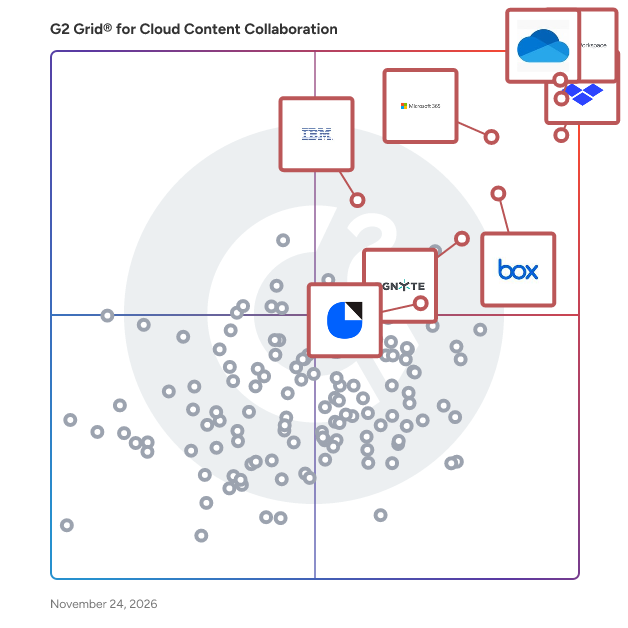
G2 Grid® for Cloud Content Collaboration Software

G2 Grid® for Cloud Content Collaboration Software plotting products by satisfaction and market presence

Highlighted products: Microsoft OneDrive for Business, Google Workspace, Dropbox, Microsoft 365, Box, Egnyte, DocSend, and IBM Aspera on Cloud.

Underlying data: [Grid® JSON](https://www.g2.com/categories/cloud-content-collaboration/grids.json?focus%5B%5D=microsoft-onedrive-for-business&focus%5B%5D=google-workspace&focus%5B%5D=dropbox&focus%5B%5D=microsoft365&focus%5B%5D=box&focus%5B%5D=egnyte&focus%5B%5D=dropbox-docsend&focus%5B%5D=ibm-aspera-on-cloud&segment=mid-market)

Fastio

Fastio: The AI-first workspace where people and AI agents work on the same files Fastio gives teams one place to store, share, and work on content, with AI built into every workspace. It's a modern alternative to Box, Dropbox, and Google Drive for teams that use AI agents alongside people. ✓ Built-in AI: Every file is indexed automatically, so you can search by meaning, ask questions across a workspace, and get answers that cite the source files ✓ AI agents as teammates: Connect Claude or your own agents through MCP, the REST API, or the CLI, each with its own scoped permissions and a full audit trail ✓ Branded sharing: Client portals with your logo, colors, and custom URL, plus expiring, password-protected links with download tracking ✓ Review and approvals: Comments pinned to video frames, pages, and image regions, one-click approvals, and tasks linked to the files they cover ✓ Media and metadata: Adaptive video streaming, in-browser previews for professional formats, and AI extraction that turns documents into structured, searchable data ✓ Security: Geo-IP controls, virus scanning, and email risk screening, plus SSO, admin policies, and SIEM audit streaming on Enterprise. Import from Google Drive, Dropbox, OneDrive, or Box in a few clicks. Plans start at $9.99/month, or $99/year with yearly billing, with a 14-day trial on monthly plans. Built by VividEngine, the company behind MediaFire, and used by teams at Samsung, Amazon, Walmart, Target, Autodesk, Logitech, and GoPro.

Average Rating: 4.2/5.0

Total Reviews: 50

How Do G2 Users Rate Fastio?

  • Has the product been a good partner in doing business?: 7.1/10 (Category avg: 8.8/10)
  • Performance and Reliability: 8.6/10 (Category avg: 8.7/10)
  • File following: 9.4/10 (Category avg: 8.8/10)
  • Device Syncing: 8.3/10 (Category avg: 8.8/10)

Who Is the Company Behind Fastio?

Who Uses This Product?

  • Top Industries: Computer Software, Marketing and Advertising
  • Company Size: 62% Small, 42% Medium

What Do G2 Reviewers Say About Fastio?

AI-generated summary from verified user reviews

Pros
  • Users appreciate the ease of use of Fast.io, finding its intuitive design and quick performance ideal for all skill levels.
  • Users love Fast.io for its clean and intuitive design, ensuring a smooth experience even for newcomers.
  • Users praise Fastio for its speed efficiency, ensuring quick loading and seamless collaboration across devices.
  • Users love the efficient file sharing capabilities of Fast.io, enabling quick and simple management of large media files.
  • Users appreciate the strong security options of Fast.io, ensuring privacy and control over data access.
Cons
  • Users experience slow performance with Fastio, especially during large file uploads which can take longer than expected.
  • Users face slow uploads with Fastio, particularly when dealing with large files or interruptions during the process.
  • Users find limited reporting on Fast.io frustrating, with strict caps on file sizes and bandwidth across tiers.
  • Users feel the lack of limited customization options hinders their ability to personalize the Fastio experience.
  • Users experience data loss when uploading large files, leading to interruptions and flagged issues during the process.

What Are Recent G2 Reviews of Fastio?

Wimi

Wimi is the best all-in-one collaboration tool for businesses. This is not just words, Wimi includes into dedicated workspaces: social network, file sharing & drive, task management, calendar sharing, instant messaging and video conferencing. With this full set of features carefully crafted inside an intuitive and powerful solution, thousands of businesses ranging from small to Fortune 500 companies save time every day and allow their teams to be more productive.

Average Rating: 4.2/5.0

Total Reviews: 105

How Do G2 Users Rate Wimi?

  • Has the product been a good partner in doing business?: 8.6/10 (Category avg: 8.8/10)
  • Performance and Reliability: 8.2/10 (Category avg: 8.7/10)
  • File following: 8.5/10 (Category avg: 8.8/10)
  • Device Syncing: 8.6/10 (Category avg: 8.8/10)

Who Is the Company Behind Wimi?

  • Seller: Wimi
  • Year Founded: 2010
  • HQ Location: Paris, France
  • LinkedIn® Page: www.linkedin.com
    95 employees on LinkedIn®

Who Uses This Product?

  • Top Industries: Information Technology and Services, Hospital & Health Care
  • Company Size: 42% Large, 40% Medium

What Are Recent G2 Reviews of Wimi?

edoclink

The edoclink is an integrated document management, enabling the dematerialisation of processes and administrative decision

Average Rating: 4.4/5.0

Total Reviews: 14

How Do G2 Users Rate edoclink?

  • Has the product been a good partner in doing business?: 8.3/10 (Category avg: 8.8/10)
  • Performance and Reliability: 7.5/10 (Category avg: 8.7/10)
  • File following: 9.0/10 (Category avg: 8.8/10)
  • Device Syncing: 8.8/10 (Category avg: 8.8/10)

Who Is the Company Behind edoclink?

Who Uses This Product?

  • Company Size: 86% Medium, 29% Small

What Do G2 Reviewers Say About edoclink?

AI-generated summary from verified user reviews

Pros
  • Users love the ease of use of edoclink, finding it simple to manage and share documents efficiently.
  • Users value the advanced data management features of edoclink, enhancing organization, security, and accessibility for documents.
  • Users love the easy access to files from anywhere, enhancing their productivity and collaboration in remote work.
  • Users value the organized structure of edoclink, enhancing their ability to manage and access documents efficiently.
  • Users value the seamless collaboration features of edoclink, enhancing teamwork and document management in online environments.
Cons
  • Users find the offline document access cumbersome, hindering quick retrieval of important papers in various situations.
  • Users find the offline limitations of edoclink cumbersome, hindering access to important documents in low connectivity situations.
  • Users find the cost issues with edoclink burdensome, noting high expenses for both the software and maintenance.
  • Users find the delays in offline access of edoclink cumbersome, hindering their workflow and efficiency.
  • Users find the expensive pricing of edoclink a drawback, particularly with high maintenance costs associated.

What Are Recent G2 Reviews of edoclink?

What Are G2 Users Discussing About edoclink?

AI can help you find the answers. G2 helps you trust them.

Connect G2 to Claude or ChatGPT for answers grounded in G2's trusted reviews, comparisons, and pricing from real user insights.

How it works

Trimble Connect

Trimble Connect is an open, cloud-based common data environment (CDE) and collaboration solution for global commercial building, civil construction, and geospatial firms. It provides value across the entire construction project lifecycle, from design teams finding fewer clashes and faster reviews to fabricators having constructible models and smoother coordination. Trimble Connect allows teams to: -Store, organize, and manage version-controlled files across teams. -View, inspect, and overlay over 60 industry file formats—including 2D drawings, 3D models, and point clouds. -Automate clash detection before construction begins in the field. -Assign tasks that tie specific action items directly to 3D model elements. -Link office software with field hardware for real-time data sync and accurate layout verification. Trimble Connect is built for the way you work, with web, desktop, and mobile availability. You can use the tools you know with our hundreds of integrations and open APIs. Permissions, audit logs, and compliance-ready governance allow you to stay in control and keep your data secure. Trimble Connect is a platform your business can rely on today--and grow with tomorrow. -Work from one source of truth → Less confusion, more confidence across your teams. -Reduce costly risk → Fewer errors, rework, and delays eating into your margins. -Decide faster, with confidence → Real-time access to the right models and data. -Stay future-ready → A platform that connects today’s projects with tomorrow’s digital twins and constructible workflows. Join the thousands of companies that trust Trimble Connect to power their projects. With over 24 million projects already created, we're the proven solution for planning, building, and delivering excellence.

Average Rating: 4.4/5.0

Total Reviews: 54

How Do G2 Users Rate Trimble Connect?

  • Has the product been a good partner in doing business?: 8.3/10 (Category avg: 8.8/10)
  • Performance and Reliability: 8.7/10 (Category avg: 8.7/10)
  • File following: 8.6/10 (Category avg: 8.8/10)
  • Device Syncing: 9.2/10 (Category avg: 8.8/10)

Who Is the Company Behind Trimble Connect?

  • Seller: Trimble
  • Year Founded: 1978
  • HQ Location: Sunnyvale, CA
  • LinkedIn® Page: www.linkedin.com
    18,122 employees on LinkedIn®
  • Ownership: NASDAQ
  • Total Revenue (USD mm): $3,147

Who Uses This Product?

  • Top Industries: Construction, Civil Engineering
  • Company Size: 50% Small, 39% Medium

What Do G2 Reviewers Say About Trimble Connect?

AI-generated summary from verified user reviews

Pros
  • Users appreciate the ease of use of Trimble Connect, enjoying a straightforward setup and efficient project organization.
  • Users value the easy collaboration features of Trimble Connect, streamlining project organization and communication among team members.
  • Users appreciate the ease of file sharing in Trimble Connect, enhancing collaboration and project organization effectively.
  • Users value the seamless integration of Trimble Connect, enhancing collaboration and organization across various project teams.
  • Users value the cloud-based platform of Trimble Connect, enhancing collaboration and access to project materials seamlessly.
Cons
  • Users note a lack of features that complicate usability, requiring more effort for onboarding and configuration.
  • Users find the training required for Trimble Connect to be a significant barrier for new team members.
  • Users find the pricing too expensive for smaller contractors, posing challenges despite the platform's solid functionality.
  • Users express frustration over the limited design capabilities and inadequate access to field data in Trimble Connect.
  • Users experience slow performance when handling large models or during peak usage, affecting usability and productivity.

What Are Recent G2 Reviews of Trimble Connect?

What Are G2 Users Discussing About Trimble Connect?

FileRun

FileRun is a self-hosted GDrive alternative. You can install it on any type of web server (a hosting account, a PC/laptop running a HTTP server on Windows, Mac or Linux), a NAS (like Synology, QNAP, TrueNAS, unRaid etc). It is very fast yet feature rich. It allows you to access your files from anywhere (desktop, mobile app or browser), and automatically keep files in sync between your devices and the server.

Average Rating: 4.5/5.0

Total Reviews: 61

How Do G2 Users Rate FileRun?

  • Has the product been a good partner in doing business?: 9.8/10 (Category avg: 8.8/10)
  • Performance and Reliability: 8.7/10 (Category avg: 8.7/10)
  • File following: 8.5/10 (Category avg: 8.8/10)
  • Device Syncing: 9.0/10 (Category avg: 8.8/10)

Who Is the Company Behind FileRun?

Who Uses This Product?

  • Top Industries: Information Technology and Services, Computer Software
  • Company Size: 44% Medium, 42% Small

What Do G2 Reviewers Say About FileRun?

AI-generated summary from verified user reviews

Pros
  • Users love the user-friendly interface of FileRun, making file management and organization effortless and intuitive.
  • Users appreciate the granular security controls of FileRun, ensuring their sensitive data remains protected and compliant.
  • Users value data control and security with FileRun's self-hosted architecture, ensuring data safety without compromise.
  • Users value the easy collaboration features of FileRun, facilitating secure sharing and efficient teamwork across platforms.
  • Users appreciate the easy setup of FileRun, allowing a smooth transition for efficient file management.
Cons
  • Users find FileRun lacking features, particularly in mobile experience and integration options compared to competitors.
  • Users note the limited functionality of FileRun, affecting mobile experience and collaboration features compared to competitors.
  • Users feel that extensive training is required for proper setup and usage of FileRun, posing challenges for beginners.
  • Users experience delays with large file sizes, impacting overall efficiency and performance during uploads.
  • Users face integration difficulties with FileRun due to limited built-in apps compared to major cloud ecosystems.

What Are Recent G2 Reviews of FileRun?

What Are G2 Users Discussing About FileRun?

FileCap

FileCap is a secure file sharing software solution that enables organizations to send and receive sensitive files in a controlled, auditable, and compliant manner. It is designed for organizations that handle confidential or regulated information and require stronger security and oversight than standard email attachments or consumer file-sharing tools can provide. Organizations evaluating secure file sharing solutions can start a free trial of FileCap at https://trial.filecap.com/ to assess its suitability for their security and compliance requirements. FileCap belongs to the secure file transfer and secure file sharing software category. It is used by organizations that need to exchange documents with external parties while maintaining control over access, data retention, and compliance requirements such as the General Data Protection Regulation (GDPR). The product supports use cases where data protection, traceability, and accountability are essential parts of the file exchange process. Organizations commonly use FileCap to replace email-based file sharing, unsecured cloud storage links, or consumer-oriented transfer services. The software allows users to securely send files to external recipients and to receive sensitive documents from customers, partners, or citizens without exposing data to unnecessary risk. FileCap is often implemented in environments where files contain personal data, financial information, legal documents, or other confidential content.

Average Rating: 4.3/5.0

Total Reviews: 75

How Do G2 Users Rate FileCap?

  • Has the product been a good partner in doing business?: 8.5/10 (Category avg: 8.8/10)
  • Performance and Reliability: 8.8/10 (Category avg: 8.7/10)
  • File following: 9.1/10 (Category avg: 8.8/10)
  • Device Syncing: 8.2/10 (Category avg: 8.8/10)

Who Is the Company Behind FileCap?

  • Seller: Contec
  • Year Founded: 2012
  • HQ Location: Enschede, Overijssel
  • LinkedIn® Page: www.linkedin.com
    6 employees on LinkedIn®

Who Uses This Product?

  • Top Industries: Information Technology and Services, Computer Software
  • Company Size: 49% Small, 34% Medium

What Do G2 Reviewers Say About FileCap?

AI-generated summary from verified user reviews

Pros
  • Users value the robust security features of FileCap, ensuring safe sharing of large files with ease and confidence.
  • Users appreciate the ease of use of FileCap, enjoying simple setup and seamless integration into their workflows.
  • Users find the initial setup easy, allowing seamless integration into their existing workflows with FileCap.
  • Users value the ability to send large files up to 5TB securely, enhancing email functionality and workflow.
  • Users appreciate the easy upload process of FileCap, seamlessly integrating with Outlook for secure file sharing.
Cons
  • Users face integration difficulties with FileCap, requiring extra steps and often facing challenges during setup and deployment.
  • Users experience limitations with file size handling, making it challenging to manage very large files effectively.
  • Users report slow uploads in FileCap, often feeling frustrated by upload and download speed dependencies on network quality.
  • Users feel the lack of features in FileCap, particularly regarding outdated Outlook compatibility and insufficient reporting tools.
  • Users desire more customization options for notifications and branding in FileCap to improve their experience.

What Are Recent G2 Reviews of FileCap?

PaperTrail

Papertrail is an enterprise-grade document management and automation platform designed to digitize, process, and integrate documents into core business systems. Built for organizations handling high document volumes, Papertrail combines secure cloud storage, advanced OCR, workflow automation, and API-first integrations in a single platform. Documents can be captured from scanners, email, uploads, or APIs, automatically classified, indexed, and converted into structured data. Papertrail supports intelligent document processing for invoices, contracts, HR records, operational files, and customer documentation. Using OCR and rules-based automation, data is extracted, validated, enriched, and routed through configurable workflows such as approvals, exception handling, and downstream processing. The platform integrates directly with ERP, accounting, HR, and custom systems—including SAP S/4HANA—allowing extracted data and documents to flow seamlessly into existing business applications. REST APIs and webhook support enable tight integration with internal platforms and third-party software. Key platform capabilities include: • OCR-based data extraction and document classification • Centralized cloud document repository with full-text search • Workflow automation for routing, approvals, and validation • Version control and complete audit trails • Role-based access control and user permissions • Secure document sharing and collaboration • API-driven integrations and automated ingestion • Support for multi-branch and multi-entity deployments Security is built into every layer of the platform. Papertrail provides encrypted storage, granular access controls, activity logging, and traceability across the document lifecycle, helping organizations meet internal governance and compliance requirements. Papertrail is used across retail, automotive, healthcare, HR, and professional services to streamline invoice processing, employee onboarding, client file management, and legacy archive digitization. By eliminating manual data capture and disconnected systems, Papertrail reduces operational costs, improves accuracy, and accelerates document-driven workflows. Designed for scalability and flexibility, Papertrail supports both SMBs and large enterprises looking to modernize document operations and build a paperless, automation-first environment.

Average Rating: 4.4/5.0

Total Reviews: 47

How Do G2 Users Rate PaperTrail?

  • Has the product been a good partner in doing business?: 8.9/10 (Category avg: 8.8/10)
  • Performance and Reliability: 8.5/10 (Category avg: 8.7/10)
  • File following: 8.1/10 (Category avg: 8.8/10)
  • Device Syncing: 8.4/10 (Category avg: 8.8/10)

Who Is the Company Behind PaperTrail?

Who Uses This Product?

  • Top Industries: Information Technology and Services, Computer Software
  • Company Size: 43% Medium, 41% Small

What Do G2 Reviewers Say About PaperTrail?

AI-generated summary from verified user reviews

Pros
  • Users find SolarWinds PaperTrail's ease of use exceptional, facilitating quick setup and seamless log management across various platforms.
  • Users commend the effortless document tracking and management capabilities of PaperTrail, enhancing organization and security.
  • Users appreciate the easy setup of PaperTrail, allowing quick access to log management without complex configurations.
  • Users appreciate the easy setup of PaperTrail, allowing quick deployment without the need for technical expertise.
  • Users appreciate the effective document management of PaperTrail, enjoying clear organization and effortless tracking of documents.
Cons
  • Users express frustration with the limited customization options in PaperTrail, affecting their ability to analyze data effectively.
  • Users experience slow performance, especially when using PaperTrail excessively, impacting the overall user experience.
  • Users find PaperTrail expensive, particularly for small businesses, which may limit its overall accessibility.
  • Users face integration difficulties with PaperTrail, finding it challenging to connect with other technologies and manage errors effectively.
  • Users express frustration over the missing features in PaperTrail, particularly the lack of custom dashboards and aggregate analysis.

What Are Recent G2 Reviews of PaperTrail?

What Are G2 Users Discussing About PaperTrail?

TeamDrive

TeamDrive is a secure collaboration and file synchronization solution designed to facilitate seamless teamwork while ensuring the highest standards of data protection. Established in 2008, TeamDrive offers end-to-end encryption, enabling users to share and synchronize files across various devices and platforms without compromising confidentiality. Its modular architecture allows deployment in cloud, on-premise, or hybrid environments, catering to diverse organizational needs. Key Features and Functionality: - End-to-End Encryption: Utilizes AES-256 encryption to secure data during transfer and storage, ensuring that only authorized users can access the information. - Cross-Platform Compatibility: Supports multiple operating systems, including Windows, macOS, Linux, iOS, and Android, allowing users to collaborate seamlessly across different devices. - Flexible Deployment Options: Offers cloud-based, on-premise, and hybrid deployment models, providing organizations with the flexibility to choose the setup that best fits their security and operational requirements. - Automatic Synchronization: Monitors files and synchronizes changes across all connected devices, ensuring that team members always have access to the latest versions of documents. - Granular Access Control: Allows administrators to assign specific access rights to team members, enhancing security and ensuring that sensitive information is only accessible to authorized personnel. - Version Management and Audit Trails: Maintains a history of document versions and provides detailed logs of all activities, facilitating compliance with data protection regulations and internal policies. Primary Value and User Solutions: TeamDrive addresses the critical need for secure and efficient collaboration in today's digital workspace. By providing robust encryption and flexible deployment options, it ensures that sensitive data remains protected against unauthorized access and breaches. Its cross-platform compatibility and automatic synchronization enhance productivity by enabling teams to work together seamlessly, regardless of their location or device. The granular access controls and comprehensive audit trails support compliance with stringent data protection regulations, making TeamDrive an ideal solution for organizations handling confidential information.

Average Rating: 4.5/5.0

Total Reviews: 24

How Do G2 Users Rate TeamDrive?

  • Has the product been a good partner in doing business?: 9.7/10 (Category avg: 8.8/10)
  • Performance and Reliability: 9.2/10 (Category avg: 8.7/10)
  • File following: 8.8/10 (Category avg: 8.8/10)
  • Device Syncing: 8.9/10 (Category avg: 8.8/10)

Who Is the Company Behind TeamDrive?

Who Uses This Product?

  • Company Size: 62% Medium, 35% Small

What Do G2 Reviewers Say About TeamDrive?

AI-generated summary from verified user reviews

Pros
  • Users value the easy access to files from any device, enhancing convenience and collaboration for their work.
  • Users value the strong security features of TeamDrive, ensuring safe file management and compliance for sensitive projects.
  • Users find quick and easy access to their work highly convenient, enhancing collaboration and organization.
  • Users value the ease of use of TeamDrive, enabling efficient organization and collaboration for all their files.
  • Users value the easy collaboration feature of TeamDrive, enabling simultaneous work for increased productivity.
Cons
  • Users find the complex initial encryption setup challenging, especially for those who are not technically inclined.

What Are Recent G2 Reviews of TeamDrive?

What Are G2 Users Discussing About TeamDrive?

Digiboxx

DigiBoxx is a SaaS start-up that provides a digital storage and asset management platform for individuals, gig workers, SMBs, and corporates. It is a Made-in-India service that is intuitive, secure and enables efficient collaboration. Since its inception in 2020, DigiBoxx has won over 1 Million hearts with its competitive pricing plans for individuals and customizable packages for SMBs and corporates.

Average Rating: 4.1/5.0

Total Reviews: 87

How Do G2 Users Rate Digiboxx?

  • Has the product been a good partner in doing business?: 7.5/10 (Category avg: 8.8/10)
  • Performance and Reliability: 7.9/10 (Category avg: 8.7/10)
  • File following: 8.0/10 (Category avg: 8.8/10)
  • Device Syncing: 8.2/10 (Category avg: 8.8/10)

Who Is the Company Behind Digiboxx?

  • Seller: Digiboxx
  • Year Founded: 2013
  • HQ Location: Mumbai, Maharashtra
  • LinkedIn® Page: www.linkedin.com
    37 employees on LinkedIn®

Who Uses This Product?

  • Top Industries: Computer Games, Computer Software
  • Company Size: 58% Small, 24% Medium

What Do G2 Reviewers Say About Digiboxx?

AI-generated summary from verified user reviews

Pros
  • Users find Digiboxx exceptionally easy to use, appreciating its user-friendly interface and quick setup process.
  • Users find the easy setup of Digiboxx quick and user-friendly, allowing immediate access to its features.
  • Users value the high security of Digiboxx, benefiting from features like encryption and two-factor authentication for data protection.
  • Users love the easy access to files from anywhere, making Digiboxx a convenient tool for seamless file management.
  • Users appreciate the user-friendly interface and secure cloud storage of Digiboxx, making file management effortless.
Cons
  • Users often face slow loading times for uploads and syncs, impacting their overall experience with Digiboxx.
  • Users experience slow uploads on mobile, causing frustration and inefficiency despite the app's potential for improvement.
  • Users find the frequent login requirement annoying, wishing for an option to maintain convenience and simplicity.
  • Users find the limited functionality of Digiboxx restricts workflow and complicates basic tasks, impacting their experience.
  • Users report poor customer support from Digiboxx, citing slow responses and unhelpful automated messages during issues.

What Are Recent G2 Reviews of Digiboxx?

What Are G2 Users Discussing About Digiboxx?

Frame.io

One platform for all your creative work. Frame.io is the all-in-one platform that helps creative teams collaborate, review, and deliver projects faster. Whether you’re working in video, design, or marketing, Frame.io centralizes your creative process—from upload to approval—in one secure, easy-to-use workspace built specifically for creatives. Upload nearly any creative file lightning-fast to a cloud workspace purpose-built for visual assets. Panel-based workspaces and nested folder trees make organizing, finding, and sharing assets intuitive and effortless. With flexible metadata, you can tag, sort, and group files by assignee, due date, status, and more—so your team can work the way it wants. Frame.io eliminates silos with secure, centralized communication that follows the work. You can share assets on the fly, collaborate in context, and find anything instantly across projects. Powerful features like speaker-labeled transcripts, searchable captions, and Collections make managing even the most complex creative pipelines simple. Best-in-Class Review & Approval Get precise, actionable feedback on videos, images, and documents with tools designed for every stakeholder—creatives, clients, and executives alike. Comment directly on a frame or image, timestamp notes, and keep conversations tied to specific assets so nothing gets lost in translation. Customized Workflow Management Assign tasks, track milestones, and build workflows tailored to your team’s unique process. Metadata-powered tracking helps you visualize progress from concept through delivery, ensuring every step is aligned, transparent, and on schedule. Beautiful Sharing & Presentations Showcase your work in crystal-clear high resolution with custom-branded share links and presentations. Add your logo, background, colors, and headers so everything stays on brand. Control permissions with a click—decide who can view, comment, or download, and easily toggle settings as needs evolve. Enterprise-Grade Security Protect your intellectual property with advanced security features like watermarking, single sign-on (SSO), and two-factor authentication (2FA). You decide who sees what, how they interact with assets, and when access expires—so your creative work stays safe at every stage. Whatever you create, Frame.io helps you deliver it faster. That’s why teams across industries choose Frame.io to accelerate their creative workflows, unify collaboration, and elevate the way they produce and present their work.

Average Rating: 4.5/5.0

Total Reviews: 271

How Do G2 Users Rate Frame.io?

  • Has the product been a good partner in doing business?: 8.5/10 (Category avg: 8.8/10)
  • Performance and Reliability: 9.0/10 (Category avg: 8.7/10)
  • File following: 10.0/10 (Category avg: 8.8/10)
  • Device Syncing: 10.0/10 (Category avg: 8.8/10)

Who Is the Company Behind Frame.io?

  • Seller: Adobe
  • Company Website:
  • Year Founded: 1982
  • HQ Location: San Jose, CA
  • LinkedIn® Page: www.linkedin.com
    42,975 employees on LinkedIn®
  • Ownership: NASDAQ:ADBE

Who Uses This Product?

  • Who Uses This: Video Editor
  • Top Industries: Marketing and Advertising, Media Production
  • Company Size: 57% Small, 20% Medium

What Do G2 Reviewers Say About Frame.io?

AI-generated summary from verified user reviews

Pros
  • Users appreciate the ease of use in Frame.io, benefiting from its simple interface and efficient access to content.
  • Users value the easy sharing capabilities of Frame.io, which streamlines collaboration and improves project efficiency.
  • Users value the centralized collaboration features of Frame.io, enhancing team communication and project management efficiency.
  • Users praise the easy setup of Frame.io, making it convenient for quick project initiation and collaboration.
  • Users appreciate the intuitive interface of Frame.io, which simplifies project management and client communication effectively.
Cons
  • Users experience slow performance with large files, causing lag during uploads and playback, impacting workflow efficiency.
  • Users find the subscription cost of Frame.io to be relatively high, impacting affordability for growing teams.
  • Users find storage limitations and slow downloads frustrating, especially with multiple files or large projects in Frame.io.
  • Users note the limited options for customization and managing large teams can complicate the overall experience.
  • Users find the UI design confusing, particularly for clients unfamiliar with the platform, impacting initial usability.

What Are Recent G2 Reviews of Frame.io?

What Are G2 Users Discussing About Frame.io?

Discuss Greenbox

Greenbox is a remarkably unique document management system with an advanced integrated business process management system. It is a Document Management System that helps in storing, tracking, retrieving and managing documents while having centralized access. Anyone and everyone with permission can access a file irrespective of where they are. The system takes care of complete safety and confidentiality of the documents and is designed to simplify the otherwise complicated operations. Greenbox allows the user access to a variety of features like unlimited folders and subfolders, universal content search, Solr OCR/text search inside an image, document versioning and restoration, granular access control and advanced document control feature. Document approval workflow, smart handling of metadata and an attractive price bracket are some of its most notable features.

Average Rating: 4.7/5.0

Total Reviews: 16

How Do G2 Users Rate Discuss Greenbox?

  • Has the product been a good partner in doing business?: 8.3/10 (Category avg: 8.8/10)
  • Performance and Reliability: 8.6/10 (Category avg: 8.7/10)
  • File following: 9.5/10 (Category avg: 8.8/10)
  • Device Syncing: 9.8/10 (Category avg: 8.8/10)

Who Is the Company Behind Discuss Greenbox?

Who Uses This Product?

  • Company Size: 63% Medium, 31% Small

What Do G2 Reviewers Say About Discuss Greenbox?

AI-generated summary from verified user reviews

Pros
  • Users appreciate the reliability of Greenbox, ensuring efficient and secure handling of sensitive HR records.
  • Users value the efficient and secure handling of sensitive records that enhances HR collaboration and workflows.
  • Users value the efficient and secure collaboration tools that greatly streamline HR workflows and manage sensitive records.
Cons
  • Users find poor customer support frustrating, especially when needing timely responses for complex issues with Discuss Greenbox.

What Are Recent G2 Reviews of Discuss Greenbox?

What Are G2 Users Discussing About Discuss Greenbox?

BlackBerry UEM

BlackBerry UEM is a suite of solutions that all rely on the same foundation of security to secure the digital workplace. It keeps employees productive on any device, anywhere, while allowing your security team to manage diverse devices, ensure data security, support remote work, and reduce operational costs. Gain comprehensive control, enhance security, and streamline your IT operations.

Average Rating: 3.8/5.0

Total Reviews: 363

How Do G2 Users Rate BlackBerry UEM?

  • Has the product been a good partner in doing business?: 7.8/10 (Category avg: 8.8/10)
  • Performance and Reliability: 7.4/10 (Category avg: 8.7/10)
  • File following: 8.3/10 (Category avg: 8.8/10)
  • Device Syncing: 8.2/10 (Category avg: 8.8/10)

Who Is the Company Behind BlackBerry UEM?

  • Seller: BlackBerry
  • Year Founded: 1984
  • HQ Location: Waterloo, Ontario
  • LinkedIn® Page: www.linkedin.com
    1,987 employees on LinkedIn®
  • Ownership: NYSE:BB
  • Total Revenue (USD mm): $1,040

Who Uses This Product?

  • Who Uses This: Consultant
  • Top Industries: Financial Services, Information Technology and Services
  • Company Size: 55% Large, 27% Small

What Do G2 Reviewers Say About BlackBerry UEM?

AI-generated summary from verified user reviews

Pros
  • Users value the strong security features of BlackBerry UEM, ensuring confidentiality and control over sensitive information.
  • Users appreciate the ease of use of BlackBerry UEM, making communication and task management seamless and efficient.
  • Users value the strong security features of BlackBerry UEM, ensuring robust protection for sensitive corporate data.
  • Users value the impressive reliability of BlackBerry UEM, praising its strong security and control over data access.
  • Users value the strong security features of BlackBerry UEM, ensuring data confidentiality and precise access control.
Cons
  • Users find the learning curve challenging with BlackBerry UEM, especially concerning app dynamics and security setups.
  • Users find the complex features of BlackBerry UEM challenging to navigate, leading to frustration and discouragement.
  • Users find the complexity of design and setup in BlackBerry UEM discouraging, especially if unfamiliar with security options.
  • Users find the complex setup of BlackBerry UEM challenging, which can deter those seeking a simpler solution.
  • Users are frustrated by the limited app selection and lack of updates affecting their BlackBerry UEM experience.

What Are Recent G2 Reviews of BlackBerry UEM?

What Are G2 Users Discussing About BlackBerry UEM?

Documize

Community is the enterprise-ready wiki and knowledge-base software. Simple, elegant, usable by both technical and non-technical people alike.

Average Rating: 4.3/5.0

Total Reviews: 59

How Do G2 Users Rate Documize?

  • Has the product been a good partner in doing business?: 8.3/10 (Category avg: 8.8/10)
  • Performance and Reliability: 8.8/10 (Category avg: 8.7/10)
  • File following: 8.9/10 (Category avg: 8.8/10)
  • Device Syncing: 8.6/10 (Category avg: 8.8/10)

Who Is the Company Behind Documize?

Who Uses This Product?

  • Top Industries: Information Technology and Services
  • Company Size: 47% Medium, 35% Small

What Do G2 Reviewers Say About Documize?

AI-generated summary from verified user reviews

Pros
  • Users value the simple and clean interface of Documize, enabling easy organization and collaboration on documents.
  • Users value the easy collaboration features of Documize that enhance organization and streamline teamwork effectively.
  • Users praise Documize for its simple and clean interface, facilitating organization and efficient collaboration on documents.
  • Users value the effective team collaboration features in Documize, enhancing organization, sharing, and knowledge management.
  • Users value the full privacy and easy organization provided by Documize, enhancing their data management experience.
Cons
  • Users find the pricing expensive, with the Essential plan costing $900 annually, which feels excessive.
  • Users find integration difficulty with Documize due to its limited features compared to more established platforms.
  • Users criticize Documize for its limited features and lack of integrations compared to more established platforms.
  • Users find the limited customization options of Documize restrict their ability to tailor the tool efficiently.
  • Users find the limited functionality of Documize frustrating, particularly with outdated UI and confusing permissions.

What Are Recent G2 Reviews of Documize?

What Are G2 Users Discussing About Documize?

NetExplorer

NetExplorer is a French software company specializing in secure online file sharing, storage, and collaborative solutions for businesses. Founded in 2007, NetExplorer offers a cloud-based platform that enables organizations to manage the entire lifecycle of their documents, accessible from anywhere, while maintaining stringent security standards. The company provides a comprehensive suite of applications, including web interfaces, synchronization software, mobile applications, network drives, and integrations with tools like Microsoft Office and Outlook. NetExplorer's solutions are designed to enhance productivity and ensure data sovereignty, with data centers located in France, Luxembourg, and Switzerland. The platform is certified ISO 27001 for information security, ISO 9001 for quality, and ISO 14001 for environmental management, and is authorized to store and process personal health data through its HDS certification. Key Features and Functionality: - Secure File Sharing: Transfer files of any size or format with restricted access through secure, customizable links. - Real-Time Collaboration: Collaborate on documents with internal and external users, featuring real-time co-editing, version control, and online review and annotation capabilities. - Electronic Signature: Simplify processes with secure electronic signatures compliant with European standards (eIDAS). - Advanced Security Measures: Implement password protection, access expiration settings, download notifications, and single download limitations to safeguard sensitive information. - Integration with Office 365: Edit documents directly in the browser with Office Online, enabling real-time co-editing without the need for downloads or manual saving. - Mobile Accessibility: Access and manage files securely from smartphones or tablets, ensuring data availability on the go. Primary Value and Solutions Provided: NetExplorer addresses the critical need for secure and efficient document management and collaboration within organizations. By offering a centralized platform with robust security features, it ensures that sensitive data is protected while facilitating seamless collaboration among team members, regardless of their location. The integration with tools like Office 365 and compliance with stringent certifications make NetExplorer a trusted solution for businesses aiming to enhance productivity without compromising on security.

Average Rating: 4.4/5.0

Total Reviews: 42

How Do G2 Users Rate NetExplorer?

  • Has the product been a good partner in doing business?: 8.9/10 (Category avg: 8.8/10)
  • Performance and Reliability: 8.6/10 (Category avg: 8.7/10)
  • File following: 8.5/10 (Category avg: 8.8/10)
  • Device Syncing: 8.6/10 (Category avg: 8.8/10)

Who Is the Company Behind NetExplorer?

Who Uses This Product?

  • Top Industries: Information Technology and Services
  • Company Size: 42% Small, 40% Medium

What Do G2 Reviewers Say About NetExplorer?

AI-generated summary from verified user reviews

Pros
  • Users value the ease of use of NetExplorer, finding the interface accessible and intuitive for all tasks.
  • Users enjoy the secure and convenient file sharing feature of NetExplorer, enhancing document management experience significantly.
  • Users highlight the strong data security of NetExplorer, ensuring safe and compliant file management and sharing.
  • Users praise the user-friendly interface of NetExplorer, making file management and access seamless and straightforward.
  • Users value the convenience of NetExplorer for easy file management, sharing, and substantial storage options.
Cons
  • Users feel the product is expensive, especially since there's no free version and costs may burden small teams.
  • Users find the lack of advanced features in NetExplorer a concern, especially for bulk file sharing.
  • Users often experience slow performance, with lags and delays affecting their overall experience with NetExplorer.
  • Users experience occasional time delays and lags with NetExplorer, impacting their overall efficiency and user experience.
  • Users experience unreliable performance with NetExplorer, noting occasional lags and delays in processing.

What Are Recent G2 Reviews of NetExplorer?

What Are G2 Users Discussing About NetExplorer?

Koofr

Koofr is a safe, secure and simple way to store, backup and share your documents, photos, videos and more. The free plan comes with up to 10GB of free cloud storage space for life. In case you ever need more space, Koofr offers affordable storage upgrades with a large variety of plans to fit your needs. All your files are safe on EU based servers. The files you store on Koofr are accessible anytime, from anywhere and from any device, since Koofr comes in a variety of desktop (Windows, Linux, Mac OS X, WebDAV) and mobile apps (Android and iOS). Koofr can be fully branded, running on-premise or in the cloud for STaaS (STorage as a Service) providers.

Average Rating: 4.4/5.0

Total Reviews: 50

How Do G2 Users Rate Koofr?

  • Has the product been a good partner in doing business?: 9.0/10 (Category avg: 8.8/10)
  • Performance and Reliability: 8.5/10 (Category avg: 8.7/10)
  • File following: 8.7/10 (Category avg: 8.8/10)
  • Device Syncing: 8.9/10 (Category avg: 8.8/10)

Who Is the Company Behind Koofr?

Who Uses This Product?

  • Top Industries: Marketing and Advertising, Retail
  • Company Size: 44% Small, 40% Medium

What Do G2 Reviewers Say About Koofr?

AI-generated summary from verified user reviews

Pros
  • Users appreciate the easy-to-use interface of Koofr, enhancing their cloud storage management experience.
  • Users love the ease of use of Koofr, enjoying its clean design and convenient navigation across multiple cloud accounts.
  • Users commend the speed efficiency of Koofr, citing quick uploads and fast file synchronization across devices.
  • Users find Koofr's convenience exceptional, enabling effortless management of multiple cloud accounts in one easy-to-use platform.
  • Users appreciate the seamless cross-platform integration of Koofr, simplifying file management across various cloud services.
Cons
  • Users report poor customer support from Koofr, affecting their overall experience and satisfaction with the service.
  • Users find the lack of built-in document editing and offline access limits Koofr's usability and convenience.
  • Users note the lack of features in Koofr compared to OneDrive or Dropbox, impacting collaboration and functionality.
  • Users find the limited space of Koofr's free storage to be a significant drawback in their experience.
  • Users find the offline limitations of Koofr frustrating, as it lacks offline access and document editing features.

What Are Recent G2 Reviews of Koofr?

What Are G2 Users Discussing About Koofr?

Neeraja Prakash
NP
Researched and written by Neeraja Prakash
Updated