# Best CAD Data Exchange Software

*By [Daniel Rivera](https://research.g2.com/insights/author/daniel-rivera)*


CAD data exchange software allows users to receive data from one system and then translate it into the necessary format so it can be read on another CAD solution. This software integrates with [general-purpose CAD software](https://www.g2.com/categories/general-purpose-cad) to grab all the data needed for the exchange. These solutions should perform quality checks and data validation to ensure the exchange is as clean and accurate as possible.

CAD data exchange ensures all types of data are captured during the exchange process, including geometry and attributes. These solutions are typically leveraged by businesses and in fields that frequently use CAD software, such as architects and engineers. These users can utilize CAD data exchange software to share important data with colleagues and customers to ensure that all necessary parties can view the CAD data.

To qualify for inclusion in the CAD Data Exchange category, a product must:

- Integrate with general-purpose CAD software solutions
- Translate CAD data from one system to another
- Perform data quality and validation checks to ensure data is clean and accurate


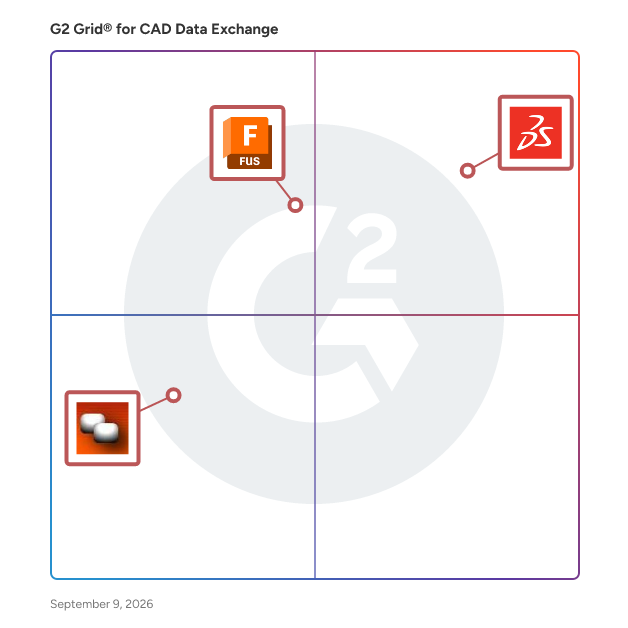
## G2 Grid® for CAD Data Exchange Software
![G2 Grid® for CAD Data Exchange Software plotting products by satisfaction and market presence](https://www.g2.com/categories/cad-data-exchange/grids.png?focus%5B%5D=1795&focus%5B%5D=5307&focus%5B%5D=88572)
Highlighted products: SOLIDWORKS, Autodesk Fusion, and CATIA Tutor.
Underlying data: [Grid® JSON](https://www.g2.com/categories/cad-data-exchange/grids.json?focus%5B%5D=solidworks&amp;focus%5B%5D=autodesk-fusion&amp;focus%5B%5D=catia-tutor)


## How Many CAD Data Exchange Software Products Does G2 Track?
**Total Products under this Category:** 19

### Category Stats (Jul 2026)
- **Average Rating**: 4.17/5 The average rating of products in this category, based on all submitted ratings
- **Top Trending Product**: Autodesk Fusion (+0.02%) - Among all products in this category, Autodesk Fusion recorded the largest rating increase compared to last month
*Last updated: July 15, 2026*


## How Does G2 Rank CAD Data Exchange Software Products?

**Why You Can Trust G2's Software Rankings:**

- 30 Analysts and Data Experts
- 1,200+ Authentic Reviews
- 19+ Products
- Unbiased Rankings

G2's software rankings are built on verified user reviews, rigorous moderation, and a consistent research methodology maintained by a team of analysts and data experts. Each product is measured using the same transparent criteria, with no paid placement or vendor influence. While reviews reflect real user experiences, which can be subjective, they offer valuable insight into how software performs in the hands of professionals. Together, these inputs power the G2 Score, a standardized way to compare tools within every category.


## Which CAD Data Exchange Software Is Best for Your Use Case?

- **Leader:** [Autodesk Fusion](https://www.g2.com/products/autodesk-fusion/reviews)
- **Top Trending:** [SOLIDWORKS](https://www.g2.com/products/solidworks/reviews)
- **Best Free Software:** [Autodesk Fusion](https://www.g2.com/products/autodesk-fusion/reviews)


## What Are the Top-Rated CAD Data Exchange Software Products in 2026?
### 1. [Autodesk Fusion](https://www.g2.com/products/autodesk-fusion/reviews)
Autodesk Fusion connects capabilities, data, and people across the entire product development lifecycle. Fusion provides you with CAD, CAM, CAE and PCB tools along with PLM/PDM and MES (manufacturing execution system) capabilities to facilitate seamless workflows across your entire organization. Key features: - 3D Design and Modeling: Autodesk Fusion offers a robust set of tools for creating 3D models and designs, making it ideal for product development and industrial design. - Manufacturing Integration: With Autodesk Fusion, you can design and manufacture products using the same platform, streamlining the process from concept to production. - Electronics Design: PCB design capabilities are integrated into the Autodesk Fusion platform, allowing for the creation of electronic components as part of the overall product design process. - Simulation and Analysis: Autodesk Fusion includes simulation tools to test and optimize designs before manufacturing, reducing the need for physical prototypes. - Cloud Collaboration: As a cloud-based platform, Autodesk Fusion enables seamless collaboration among design and engineering teams, regardless of location. - Generative Design: This feature allows you to input design goals and constraints, and Autodesk Fusion will generate multiple design options that meet these criteria. By integrating the entire product development process into one platform, Autodesk Fusion allows users to bring products to market faster and more efficiently.


**Average Rating:** 4.5/5.0
**Total Reviews:** 510
**How Do G2 Users Rate Autodesk Fusion?**

- **Data Quality:** 8.7/10 (Category avg: 7.6/10)
- **3D Format:** 9.0/10 (Category avg: 8.5/10)
- **Validation:** 8.8/10 (Category avg: 7.9/10)
- **Quality of Support:** 8.4/10 (Category avg: 8.3/10)

**Who Is the Company Behind Autodesk Fusion?**

- **Seller:** [Autodesk](https://www.g2.com/sellers/autodesk)
- **Company Website:** https://www.autodesk.com
- **Year Founded:** 1982
- **HQ Location:** San Francisco
- **Twitter:** @autodesk (273,215 Twitter followers)
- **LinkedIn® Page:** https://www.linkedin.com/company/autodesk/ (15,352 employees on LinkedIn®)

**Who Uses This Product?**
- **Who Uses This:** Owner, Design Engineer
- **Top Industries:** Mechanical or Industrial Engineering, Design
- **Company Size:** 68% Small-Business, 22% Mid-Market


#### What Are Autodesk Fusion's Pros and Cons?

**Pros:**

- Ease of Use (29 reviews)
- Features (21 reviews)
- Design Efficiency (16 reviews)
- Features Functionality (15 reviews)
- Ease of Learning (14 reviews)

**Cons:**

- Difficult Learning (11 reviews)
- Learning Curve (11 reviews)
- Assembly Difficulties (9 reviews)
- Missing Features (9 reviews)
- Performance Issues (9 reviews)


### What Do G2 Reviewers Say About Autodesk Fusion?
*AI-generated summary from verified user reviews*

**Pros:**

- Users highlight the **ease of use** in Autodesk Fusion, enhancing productivity and simplifying the design process.
- Users appreciate the **flexible and intuitive tools** in Autodesk Fusion, enhancing productivity for diverse design projects.
- Users benefit from the **design efficiency** of Autodesk Fusion, enhancing productivity with customizable tools and intuitive navigation.
- Users love the **user-friendly interface** and extensive capabilities of Autodesk Fusion 360 for seamless design experiences.
- Users find Autodesk Fusion to have a **user-friendly learning curve** , especially for those familiar with CAD software.

**Cons:**

- Users find **difficult learning** curves in Autodesk Fusion, especially for large assemblies, compared to other CAD/CAM software.
- Users face a significant **learning curve** with Autodesk Fusion, complicating design adjustments and assembly tasks.
- Users face **assembly difficulties** with Autodesk Fusion, finding it less intuitive compared to other CAD software alternatives.
- Users note the **missing features** in Autodesk Fusion, particularly compared to competitors, limiting functionality and usability.
- Users report **performance issues** with Autodesk Fusion, including bugs, glitches, and difficulty with real-time editing.

#### What Are Recent G2 Reviews of Autodesk Fusion?

**"[Autodesk Fusion Streamlines Parametric 3D Design from Idea to Prototype](https://www.g2.com/survey_responses/autodesk-fusion-review-13041979)"**

**Rating:** 5.0/5.0 stars
*— Muzammil M.*

[Read full review](https://www.g2.com/survey_responses/autodesk-fusion-review-13041979)

---

**"[Autodesk Fusion 360 is a great parametric 3D modeling software](https://www.g2.com/survey_responses/autodesk-fusion-review-5236244)"**

**Rating:** 5.0/5.0 stars
*— Damaris C.*

[Read full review](https://www.g2.com/survey_responses/autodesk-fusion-review-5236244)

---


#### What Are G2 Users Discussing About Autodesk Fusion?

- [What is Fusion 360 used for?](https://www.g2.com/discussions/what-is-fusion-360-used-for) - 1 comment
- [Is Fusion 360 still free for hobbyists?](https://www.g2.com/discussions/fusion-360-is-fusion-360-still-free-for-hobbyists) - 1 comment
- [Is Fusion 360 a CAD software?](https://www.g2.com/discussions/is-fusion-360-a-cad-software) - 1 comment
- [What is Fusion 360 software used for?](https://www.g2.com/discussions/what-is-fusion-360-software-used-for)
- [What functionality does Fusion 360 offer its users?](https://www.g2.com/discussions/fusion-360-what-functionality-does-fusion-360-offer-its-users)

### 2. [SOLIDWORKS](https://www.g2.com/products/solidworks/reviews)
SOLIDWORKS delivers connected, easy-to-use tools that help you innovate and accelerate every aspect of your product development process.


**Average Rating:** 4.5/5.0
**Total Reviews:** 628
**How Do G2 Users Rate SOLIDWORKS?**

- **Data Quality:** 8.8/10 (Category avg: 7.6/10)
- **3D Format:** 9.3/10 (Category avg: 8.5/10)
- **Validation:** 8.7/10 (Category avg: 7.9/10)
- **Quality of Support:** 8.2/10 (Category avg: 8.3/10)

**Who Is the Company Behind SOLIDWORKS?**

- **Seller:** [Solidworks](https://www.g2.com/sellers/solidworks)
- **Year Founded:** 1993
- **HQ Location:** Waltham, MA
- **Twitter:** @SOLIDWORKS (178,616 Twitter followers)
- **LinkedIn® Page:** https://www.linkedin.com/showcase/solidworks/
- **Ownership:** EPA: DSY

**Who Uses This Product?**
- **Who Uses This:** Design Engineer, Mechanical Design Engineer
- **Top Industries:** Mechanical or Industrial Engineering, Design
- **Company Size:** 51% Small-Business, 39% Mid-Market


#### What Are SOLIDWORKS's Pros and Cons?

**Pros:**

- Ease of Use (34 reviews)
- Features (28 reviews)
- 3D Modeling (25 reviews)
- User Interface (20 reviews)
- CAD Integration (15 reviews)

**Cons:**

- Performance Issues (16 reviews)
- Slow Performance (15 reviews)
- High System Requirements (14 reviews)
- Expensive (11 reviews)
- Slow Simulation (11 reviews)


### What Do G2 Reviewers Say About SOLIDWORKS?
*AI-generated summary from verified user reviews*

**Pros:**

- Users praise **the user-friendly interface** of SOLIDWORKS, appreciating its intuitive design and ease of setup.
- Users value the **flexibility of features** in SOLIDWORKS, enhancing design efficiency and clarity in mechanical drawings.
- Users value the **easy-to-learn 3D modeling** of SOLIDWORKS, making it ideal for beginners in design.
- Users highly value the **user-friendly interface** of SOLIDWORKS, enhancing productivity and ease of learning.
- Users value the **CAD integration** of SOLIDWORKS, which enhances efficiency and streamlines the design process.

**Cons:**

- Users experience **performance issues** with SOLIDWORKS, particularly with large assemblies causing slowdowns and crashes.
- Users experience **slow performance** with SOLIDWORKS, particularly with large assemblies and complex models, affecting productivity.
- Users note the **high system requirements** of SOLIDWORKS, necessitating powerful hardware for optimal performance.
- Users find SOLIDWORKS to be **expensive** , particularly burdensome for small companies needing cost-effective solutions.
- Users report that **slow simulation** can hinder productivity, especially with large assemblies and complex models.

#### What Are Recent G2 Reviews of SOLIDWORKS?

**"[A USER FRIENDLY AND IMPORTANT SOFTWARE FOR THE ENGINEERS](https://www.g2.com/survey_responses/solidworks-review-12735771)"**

**Rating:** 5.0/5.0 stars
*— Vivek  B.*

[Read full review](https://www.g2.com/survey_responses/solidworks-review-12735771)

---

**"[Intuitive UI and Reliable Performance with Strong Integrations](https://www.g2.com/survey_responses/solidworks-review-12674092)"**

**Rating:** 5.0/5.0 stars
*— shrinivasa k.*

[Read full review](https://www.g2.com/survey_responses/solidworks-review-12674092)

---


#### What Are G2 Users Discussing About SOLIDWORKS?

- [What is SOLIDWORKS used for?](https://www.g2.com/discussions/what-is-solidworks-used-for) - 3 comments, 1 upvote
- [Where is the Features toolbar in Solidworks?](https://www.g2.com/discussions/where-is-the-features-toolbar-in-solidworks) - 1 comment
- [What is included in solidworks standard?](https://www.g2.com/discussions/what-is-included-in-solidworks-standard)
- [What is solidworks software used for?](https://www.g2.com/discussions/what-is-solidworks-software-used-for)
- [What are features in Solidworks?](https://www.g2.com/discussions/what-are-features-in-solidworks) - 1 comment

### 3. [CATIA Tutor](https://www.g2.com/products/catia-tutor/reviews)
Find Easy to understand Training video lessons for CATIA V5.


**Average Rating:** 4.3/5.0
**Total Reviews:** 19
**How Do G2 Users Rate CATIA Tutor?**

- **Data Quality:** 8.5/10 (Category avg: 7.6/10)
- **3D Format:** 8.7/10 (Category avg: 8.5/10)
- **Validation:** 8.0/10 (Category avg: 7.9/10)
- **Quality of Support:** 8.4/10 (Category avg: 8.3/10)

**Who Is the Company Behind CATIA Tutor?**

- **Seller:** [Catiatutor](https://www.g2.com/sellers/catiatutor)
- **HQ Location:** N/A
- **Twitter:** @catiatutor (17 Twitter followers)
- **LinkedIn® Page:** https://www.linkedin.com/company/No-Linkedin-Presence-Added-Intentionally-By-DataOps (1 employees on LinkedIn®)

**Who Uses This Product?**
- **Top Industries:** Design, Automotive
- **Company Size:** 45% Mid-Market, 30% Enterprise


#### What Are Recent G2 Reviews of CATIA Tutor?

**"[CATIA SOFTWARE TUTOR REVIEW](https://www.g2.com/survey_responses/catia-tutor-review-8048179)"**

**Rating:** 4.0/5.0 stars
*— santosh k.*

[Read full review](https://www.g2.com/survey_responses/catia-tutor-review-8048179)

---

**"[CATIA for 3D Design](https://www.g2.com/survey_responses/catia-tutor-review-8562759)"**

**Rating:** 5.0/5.0 stars
*— Mohan R.*

[Read full review](https://www.g2.com/survey_responses/catia-tutor-review-8562759)

---


### 4. [SpinFire Enterprise](https://www.g2.com/products/spinfire-enterprise/reviews)
SpinFire Enterprise gives your entire organization a uniform way to view, interrogate, and translate CAD files. It’s the same SpinFire technology automotive manufacturers have trusted for more than 15 years, now available in a revolutionary all-access format. Until now, CAD viewers have been a means to provide non-core engineering workers with cost-effective access to CAD files—as opposed to purchasing expensive CAD licenses and working with multiple CAD formats. However, the entire enterprise can benefit if other teams can interact with CAD models, too. Actify pioneered the CAD viewer category with the SpinFire product family. Now we’ve reimagined the pricing and license structure so that everyone can interact with CAD information.


**Average Rating:** 4.5/5.0
**Total Reviews:** 5
**How Do G2 Users Rate SpinFire Enterprise?**

- **Data Quality:** 10.0/10 (Category avg: 7.6/10)
- **3D Format:** 10.0/10 (Category avg: 8.5/10)
- **Validation:** 10.0/10 (Category avg: 7.9/10)
- **Quality of Support:** 9.4/10 (Category avg: 8.3/10)

**Who Is the Company Behind SpinFire Enterprise?**

- **Seller:** [Actify](https://www.g2.com/sellers/actify)
- **Year Founded:** 1996
- **HQ Location:** Detroit, MI
- **LinkedIn® Page:** https://www.linkedin.com/company/40001/ (17 employees on LinkedIn®)

**Who Uses This Product?**
- **Top Industries:** Automotive
- **Company Size:** 60% Enterprise, 40% Mid-Market


#### What Are Recent G2 Reviews of SpinFire Enterprise?

**"[Great Viewer](https://www.g2.com/survey_responses/spinfire-enterprise-review-5324266)"**

**Rating:** 5.0/5.0 stars
*— Dave P.*

[Read full review](https://www.g2.com/survey_responses/spinfire-enterprise-review-5324266)

---

**"[CAD Viewer for automotive supplier](https://www.g2.com/survey_responses/spinfire-enterprise-review-5323616)"**

**Rating:** 4.5/5.0 stars
*— Bill K.*

[Read full review](https://www.g2.com/survey_responses/spinfire-enterprise-review-5323616)

---


#### What Are G2 Users Discussing About SpinFire Enterprise?

- [What is SpinFire Enterprise used for?](https://www.g2.com/discussions/what-is-spinfire-enterprise-used-for)

### 5. [CAD Exchanger](https://www.g2.com/products/cad-exchanger/reviews)
CAD Exchanger technologies help software developers and end-users to work, share and collaborate on 3D data, which can come in any format, from any source, on any platform. APPLICATION FOR END-USERS – CAD Exchanger Lab. View, analyze and convert 3D data on desktop. SDKs &amp; TOOLS FOR SOFTWARE DEVELOPERS – CAD Exchanger SDK. C++, C#, Java, Python libraries for applications and SaaS solutions. – CAD Exchanger Batch. Light-weight command-line tool for batch conversions in corporate or cloud environments. We are proud to have customers from Fortune-100 companies and feel honored to contribute to today’s leaders’ projects: Tesla in the automotive industry, Apple in consumer electronics, NASA in space exploration, Amazon in the delivery business and many others. – 250K+ CAD Exchanger Lab end-users – 1M+ CAD Exchanger SDK enabled end-users – 110+ countries


**Average Rating:** 4.5/5.0
**Total Reviews:** 3
**How Do G2 Users Rate CAD Exchanger?**

- **Data Quality:** 8.3/10 (Category avg: 7.6/10)
- **3D Format:** 10.0/10 (Category avg: 8.5/10)
- **Validation:** 9.2/10 (Category avg: 7.9/10)
- **Quality of Support:** 10.0/10 (Category avg: 8.3/10)

**Who Is the Company Behind CAD Exchanger?**

- **Seller:** [CAD Exchanger](https://www.g2.com/sellers/cad-exchanger)
- **Year Founded:** 2014
- **HQ Location:** N/A
- **Twitter:** @cadexchanger (176 Twitter followers)
- **LinkedIn® Page:** https://www.linkedin.com/company/cad-exchanger/ (11 employees on LinkedIn®)

**Who Uses This Product?**
- **Company Size:** 67% Small-Business


#### What Are Recent G2 Reviews of CAD Exchanger?

**"[One Place to Review and Connect BIM &amp; Mechanical Design Data](https://www.g2.com/survey_responses/cad-exchanger-review-12605073)"**

**Rating:** 4.5/5.0 stars
*— Deepak K.*

[Read full review](https://www.g2.com/survey_responses/cad-exchanger-review-12605073)

---

**"[Cad exchanger..multi format  conversion tool](https://www.g2.com/survey_responses/cad-exchanger-review-6981469)"**

**Rating:** 5.0/5.0 stars
*— santhosh n.*

[Read full review](https://www.g2.com/survey_responses/cad-exchanger-review-6981469)

---


#### What Are G2 Users Discussing About CAD Exchanger?

- [What is CAD Exchanger used for?](https://www.g2.com/discussions/what-is-cad-exchanger-used-for)

### 6. [Delcam Data Exchange](https://www.g2.com/products/delcam-data-exchange/reviews)
With free version of Delcam Exchange you can read all commonly used CAD format files as ACIS, IGES, Parasolid, STEP, VDA, AutoCAD (dwg, dxf), CATIA V3, V4, V5, Cimatron, Elite, IDEAS, Inventor, Pro/Engineer, Rhino, SolidEdge, SolidWorks, SpaceClaims, TopSolid, Unigraphics NX.


**Average Rating:** 3.4/5.0
**Total Reviews:** 4
**How Do G2 Users Rate Delcam Data Exchange?**

- **Data Quality:** 6.7/10 (Category avg: 7.6/10)
- **3D Format:** 9.2/10 (Category avg: 8.5/10)
- **Validation:** 6.7/10 (Category avg: 7.9/10)
- **Quality of Support:** 8.3/10 (Category avg: 8.3/10)

**Who Is the Company Behind Delcam Data Exchange?**

- **Seller:** [TECHSOFT](https://www.g2.com/sellers/techsoft)
- **Year Founded:** 1993
- **HQ Location:** Poprad, SK
- **LinkedIn® Page:** https://www.linkedin.com/company/521850 (4 employees on LinkedIn®)

**Who Uses This Product?**
- **Company Size:** 75% Mid-Market, 25% Small-Business


#### What Are Recent G2 Reviews of Delcam Data Exchange?

**"[CAD format conversion](https://www.g2.com/survey_responses/delcam-data-exchange-review-8509274)"**

**Rating:** 4.0/5.0 stars
*— Waylon M.*

[Read full review](https://www.g2.com/survey_responses/delcam-data-exchange-review-8509274)

---

**"[Delcam data exchange](https://www.g2.com/survey_responses/delcam-data-exchange-review-7551216)"**

**Rating:** 5.0/5.0 stars
*— Numan B.*

[Read full review](https://www.g2.com/survey_responses/delcam-data-exchange-review-7551216)

---


### 7. [CADmeister](https://www.g2.com/products/cadmeister/reviews)
CADmeister&#39;s robust tool for data exchange DATA EXCHANGE enables users to receive data from and providing to CAD systems correctly.


**Average Rating:** 3.0/5.0
**Total Reviews:** 2
**How Do G2 Users Rate CADmeister?**

- **Data Quality:** 1.7/10 (Category avg: 7.6/10)
- **3D Format:** 1.7/10 (Category avg: 8.5/10)
- **Validation:** 3.3/10 (Category avg: 7.9/10)
- **Quality of Support:** 1.7/10 (Category avg: 8.3/10)

**Who Is the Company Behind CADmeister?**

- **Seller:** [UEL](https://www.g2.com/sellers/uel)
- **HQ Location:** N/A
- **LinkedIn® Page:** https://www.linkedin.com/company/No-Linkedin-Presence-Added-Intentionally-By-DataOps (1 employees on LinkedIn®)

**Who Uses This Product?**
- **Company Size:** 100% Small-Business, 50% Mid-Market


#### What Are Recent G2 Reviews of CADmeister?

**"[Comprehensive CAD /CAM solution.](https://www.g2.com/survey_responses/cadmeister-review-7479786)"**

**Rating:** 4.0/5.0 stars
*— Roshan Kumar J.*

[Read full review](https://www.g2.com/survey_responses/cadmeister-review-7479786)

---


### 8. [3D Interop](https://www.g2.com/products/3d-interop/reviews)
3D InterOp is the industry-leading 3D CAD data translation software development toolkit. It enables your customers to work with imported 3D data as easily as if it was created natively in your own application, as well as export the 3D data for downstream engineering applications. 3D InterOp&#39;s architecture enables users to optimize the interaction with their 3D data. 3D InterOp supports all major 3D data exchange formats that are required in leading engineering applications and supports 3D CAD / CAM data exchange for any modeler including 3D ACIS Modeler, CGM Core Modeler, and Parasolid.


**Average Rating:** 4.5/5.0
**Total Reviews:** 1

**Who Is the Company Behind 3D Interop?**

- **Seller:** [Dassault Systemes](https://www.g2.com/sellers/dassault-systemes)
- **Year Founded:** 1981
- **HQ Location:** Velizy-Villacoublay
- **Twitter:** @Dassault3DS (74,082 Twitter followers)
- **LinkedIn® Page:** https://www.linkedin.com/company/3896/ (27,414 employees on LinkedIn®)
- **Ownership:** EPA: DSY.PA

**Who Uses This Product?**
- **Company Size:** 100% Small-Business


#### What Are Recent G2 Reviews of 3D Interop?

**"[Software with Data driven model approach for CAD](https://www.g2.com/survey_responses/3d-interop-review-6808555)"**

**Rating:** 4.5/5.0 stars
*— Akshit V.*

[Read full review](https://www.g2.com/survey_responses/3d-interop-review-6808555)

---


### 9. [Agni Link CAD/PDM/PLM-to-ERP Data Integration System](https://www.g2.com/products/agni-link-cad-pdm-plm-to-erp-data-integration-system/reviews)
Agni Link is a advanced CAD-ERP data integration systems currently available. It is an add-in to AutoCAD, SolidWorks, Autodesk Inventor, Solid Edge and many others that offers a reliable and cost-effective way to integrate CAD/PDM/PLM applications with ERP systems.


**Average Rating:** 5.0/5.0
**Total Reviews:** 1
**How Do G2 Users Rate Agni Link CAD/PDM/PLM-to-ERP Data Integration System?**

- **Quality of Support:** 10.0/10 (Category avg: 8.3/10)

**Who Is the Company Behind Agni Link CAD/PDM/PLM-to-ERP Data Integration System?**

- **Seller:** [Elmo Solutions](https://www.g2.com/sellers/elmo-solutions)
- **Year Founded:** 1976
- **HQ Location:** Quebec, CA
- **Twitter:** @ElmoSolutions (1,454 Twitter followers)
- **LinkedIn® Page:** https://www.linkedin.com/company/2861153 (3 employees on LinkedIn®)

**Who Uses This Product?**
- **Company Size:** 100% Small-Business


#### What Are Recent G2 Reviews of Agni Link CAD/PDM/PLM-to-ERP Data Integration System?

**"[Finally someones understood this!](https://www.g2.com/survey_responses/agni-link-cad-pdm-plm-to-erp-data-integration-system-review-559213)"**

**Rating:** 5.0/5.0 stars
*— Verified User in Machinery*

[Read full review](https://www.g2.com/survey_responses/agni-link-cad-pdm-plm-to-erp-data-integration-system-review-559213)

---


#### What Are G2 Users Discussing About Agni Link CAD/PDM/PLM-to-ERP Data Integration System?

- [What is Agni Link CAD/PDM/PLM-to-ERP Data Integration System used for?](https://www.g2.com/discussions/what-is-agni-link-cad-pdm-plm-to-erp-data-integration-system-used-for)

### 10. [CADMATIC eShare](https://www.g2.com/products/cadmatic-eshare/reviews)
CADMATIC eShare, a transformative solution in marine and industrial project management, empowers users with the capabilities of a digital twin without compromising data security. The platform ensures that your data remains secure in its original location while eShare efficiently links, visualizes, and shares data from engineering, procurement, construction, and various industrial asset management systems through a unified window using the 3D model. By combining and visualizing real-time data from diverse sources, eShare enables immediate comprehension of complex data interactions, facilitating smarter and faster decision-making. With key benefits such as linking, searching, and visualizing data from any database, monitoring project progress, and boosting efficiency, eShare provides an independent, industry-specific solution supported by professional tech assistance. The platform&#39;s comprehensive data-sharing capabilities contribute to fast and accurate decision-making. By adopting eShare, accelerate your time to market, reduce costs, and shorten project lead times, embracing a new era of efficiency and profitability in your projects.


**Average Rating:** 4.2/5.0
**Total Reviews:** 3
**How Do G2 Users Rate CADMATIC eShare?**

- **Quality of Support:** 7.8/10 (Category avg: 8.3/10)

**Who Is the Company Behind CADMATIC eShare?**

- **Seller:** [Cadmatic](https://www.g2.com/sellers/cadmatic)
- **Year Founded:** 1982
- **HQ Location:** Turku, FI
- **Twitter:** @CADMATICGroup (188 Twitter followers)
- **LinkedIn® Page:** https://www.linkedin.com/company/cadmatic/ (309 employees on LinkedIn®)

**Who Uses This Product?**
- **Company Size:** 33% Enterprise, 33% Mid-Market


#### What Are Recent G2 Reviews of CADMATIC eShare?

**"[A great tool for sharing and reimagining your Designs.](https://www.g2.com/survey_responses/cadmatic-eshare-review-8483809)"**

**Rating:** 4.0/5.0 stars
*— Ishan J.*

[Read full review](https://www.g2.com/survey_responses/cadmatic-eshare-review-8483809)

---

**"[An outstanding tool for db sharing of digital models and designs.](https://www.g2.com/survey_responses/cadmatic-eshare-review-8074492)"**

**Rating:** 4.5/5.0 stars
*— Parth J.*

[Read full review](https://www.g2.com/survey_responses/cadmatic-eshare-review-8074492)

---


### 11. [CrossManager](https://www.g2.com/products/crossmanager/reviews)
CrossManager is a standalone software allowing you to convert files from most CAD formats. With Cross Manager, You just need to select one or several CAD files to translate them automatically in the format you want.


**Average Rating:** 4.5/5.0
**Total Reviews:** 1
**How Do G2 Users Rate CrossManager?**

- **Data Quality:** 8.3/10 (Category avg: 7.6/10)
- **3D Format:** 10.0/10 (Category avg: 8.5/10)
- **Validation:** 8.3/10 (Category avg: 7.9/10)
- **Quality of Support:** 8.3/10 (Category avg: 8.3/10)

**Who Is the Company Behind CrossManager?**

- **Seller:** [Datakit](https://www.g2.com/sellers/datakit)
- **Year Founded:** 1994
- **HQ Location:** Lyon, FR
- **Twitter:** @DatakitSoftware (314 Twitter followers)
- **LinkedIn® Page:** https://www.linkedin.com/company/datakit (28 employees on LinkedIn®)

**Who Uses This Product?**
- **Company Size:** 100% Mid-Market


#### What Are Recent G2 Reviews of CrossManager?

**"[Review on CrossManager software](https://www.g2.com/survey_responses/crossmanager-review-8756510)"**

**Rating:** 4.5/5.0 stars
*— Siva Suriyan S.*

[Read full review](https://www.g2.com/survey_responses/crossmanager-review-8756510)

---


### 12. [Elysium](https://www.g2.com/products/elysium/reviews)
Elysium is a multi-CAD data exchange solution.


**Average Rating:** 3.5/5.0
**Total Reviews:** 1

**Who Is the Company Behind Elysium?**

- **Seller:** [Elysiuminc](https://www.g2.com/sellers/elysiuminc)
- **HQ Location:** N/A
- **LinkedIn® Page:** https://www.linkedin.com/company/elysium-inc./ (2 employees on LinkedIn®)

**Who Uses This Product?**
- **Company Size:** 100% Small-Business


### 13. [Kubotek Kosmos Convert](https://www.g2.com/products/kubotek-kosmos-convert/reviews)
Good to GO No matter where they come from Kubotek Kosmos CONVERT will get CAD files ready to be read with the tools you have. The programs require no additional CAD software licenses. Beyond just a straight pass-through of data, Convert allows filtering out objects by simply hiding the parts you don&#39;t want in the output file. Powered by Kubotek’s next-generation Kosmos technology, it employs full multi-threaded processing guaranteed to bring a new level of speed when opening larger files. Convert has versions supporting Windows, Mac, and Linux. Read MCAD ACIS - SAT, SAB AutoCAD - DWG, DXF CATIA V4 - MODEL, SESSION, EXP CATIA V5 - CATPART, CATPRODUCT CATIA V6 - 3DXML Creo, Pro/E - PRT, ASM ISO, ANSI - STEP, IFC, JT, IGES Inventor - IPT, IAM Kubotek Kosmos - KCM, KFW NX, Unigraphics - PRT Parasolid - X\_T, X\_B Polygon mesh - STL Solid Edge - PAR SolidWorks - SLDPRT, SLDASM


**Average Rating:** 4.0/5.0
**Total Reviews:** 1

**Who Is the Company Behind Kubotek Kosmos Convert?**

- **Seller:** [Kubotek Kosmos](https://www.g2.com/sellers/kubotek-kosmos)
- **Year Founded:** 2003
- **HQ Location:** Marlborough, MA
- **Twitter:** @KubotekKosmos (1,663 Twitter followers)
- **LinkedIn® Page:** https://www.linkedin.com/company/68943/ (30 employees on LinkedIn®)

**Who Uses This Product?**
- **Company Size:** 100% Small-Business


#### What Are Recent G2 Reviews of Kubotek Kosmos Convert?

**"[Easy](https://www.g2.com/survey_responses/kubotek-kosmos-convert-review-7555660)"**

**Rating:** 4.0/5.0 stars
*— Verified User in Education Management*

[Read full review](https://www.g2.com/survey_responses/kubotek-kosmos-convert-review-7555660)

---


### 14. [bananaz](https://www.g2.com/products/bananaz/reviews)
Copilot for Mechanical Engineers. Master design changes, enhance team collaboration, automate documentation, and gain actionable design insights. All embedded into your existing CAD and PDM software. Bananaz picks up where your design tools fall short. AI-powered Validation, Compliance, and Coordination that integrates seamlessly to your design software and turbo-charge your engineers.  Freeing your team to focus on meaningful design and innovation Intelligent Design Validation &amp; Change Management: \* Detecting Differences across 2D drawing and 3D models guiding users through the individual design changes. \* Checklist Compliance verifies whether your design adheres to defined geometrical product specifications on every iteration. \* Issue tracking creates an easy to-do list based on the team communication to ensure the execution meets the requirements. Integrated Collaboration &amp; Workflow Visibility: \* Design Activity Tracking - Auto-generated change logs and visual differences to provide full visibility into the design process. \* Real-Time Notifications Get real-time alerts for design updates, mentions, and tasks requiring your attention. \* Team Comments &amp; Annotations Direct collaboration on 3D and 2D files with synced comments and annotations across versions. \* CAD/PDM Integration - Access control connects seamlessly to your existing design stack, syncs automatically, no manual uploads. Custom Automation &amp; Rule Definition: \* Custom Rules Enforcement - Automated design review tasks - customized to your organization’s standards and processes. \* Flexible Design Review Workflows that align with your organization requirements and adapt to dynamic needs across different projects. \* Automatic Reports Generation - redlining, inspection balloons, audit trail and changes reports are auto-generated according to company templates.


**Average Rating:** 5.0/5.0
**Total Reviews:** 2
**How Do G2 Users Rate bananaz?**

- **Quality of Support:** 9.2/10 (Category avg: 8.3/10)

**Who Is the Company Behind bananaz?**

- **Seller:** [bananaz.ai](https://www.g2.com/sellers/bananaz-ai)
- **Year Founded:** 2023
- **HQ Location:** Tel Aviv, IL
- **LinkedIn® Page:** https://www.linkedin.com/company/bananaz-ai/ (23 employees on LinkedIn®)

**Who Uses This Product?**
- **Company Size:** 50% Mid-Market, 50% Small-Business


#### What Are bananaz's Pros and Cons?

**Pros:**

- Accuracy (1 reviews)
- Drawing Efficiency (1 reviews)
- Ease of Use (1 reviews)
- Efficiency (1 reviews)
- Features (1 reviews)

**Cons:**

- Limited Options (1 reviews)
- Missing Features (1 reviews)
- Software Limitations (1 reviews)


### What Do G2 Reviewers Say About bananaz?
*AI-generated summary from verified user reviews*

**Pros:**

- Users value the **high accuracy** of bananaz, facilitating precise comparison and reducing costly design errors.
- Users love the **2D granular compare tool** in bananaz, significantly boosting drawing efficiency and collaboration during design reviews.
- Users appreciate the **ease of use** of bananaz, which simplifies identifying changes and enhances team alignment during design reviews.
- Users value the **efficiency** of bananaz, saving time on design reviews and preventing costly mistakes.
- Users value the **2D granular compare tool** in bananaz for its clarity in identifying changes, enhancing team alignment.

**Cons:**

- Users experience **limited options** for placing inspection balloons, impacting QA workflow and requiring version changes for updates.
- Users note the **missing feature** of direct inspection balloon placement, limiting post-approval markup flexibility in QA workflows.
- Users feel the **software limitations** hinder efficient workflows, particularly with marking up approved drawings without version changes.

#### What Are Recent G2 Reviews of bananaz?

**"[bananaz Transformed the Way We Review and Approve Designs](https://www.g2.com/survey_responses/bananaz-review-11422557)"**

**Rating:** 5.0/5.0 stars
*— Yuval N.*

[Read full review](https://www.g2.com/survey_responses/bananaz-review-11422557)

---

**"[Streamlined Design Reviews for Mechanical Engineering Teams](https://www.g2.com/survey_responses/bananaz-review-11428407)"**

**Rating:** 5.0/5.0 stars
*— Rimma B.*

[Read full review](https://www.g2.com/survey_responses/bananaz-review-11428407)

---


### 15. [BIMDeX](https://www.g2.com/products/bimdex/reviews)
The world&#39;s best CAD interoperability tools...an unique way for seamless conversion between CAD, BIM and Design Softwares.


**Who Is the Company Behind BIMDeX?**

- **Seller:** [BIMDeX](https://www.g2.com/sellers/bimdex)
- **HQ Location:** Boca Raton, US
- **LinkedIn® Page:** https://www.linkedin.com/company/bimdex-technology (7 employees on LinkedIn®)


### 16. [EXPLORE 3D](https://www.g2.com/products/explore-3d/reviews)
Explore 3D is free software to view 3D CAD data, model information and metadata right inside Windows Explorer, without requiring license of any CAD system.


**Average Rating:** 4.5/5.0
**Total Reviews:** 1
**How Do G2 Users Rate EXPLORE 3D?**

- **Quality of Support:** 10.0/10 (Category avg: 8.3/10)

**Who Is the Company Behind EXPLORE 3D?**

- **Seller:** [CADCAM-E-COM](https://www.g2.com/sellers/cadcam-e-com)
- **Year Founded:** 1989
- **HQ Location:** Farmington Hills, US
- **LinkedIn® Page:** https://www.linkedin.com/company/cadcam-e-com-inc (21 employees on LinkedIn®)

**Who Uses This Product?**
- **Company Size:** 100% Mid-Market


#### What Are Recent G2 Reviews of EXPLORE 3D?

**"[Great 3D CAD Viewer to start working on](https://www.g2.com/survey_responses/explore-3d-review-5129565)"**

**Rating:** 4.5/5.0 stars
*— Max R.*

[Read full review](https://www.g2.com/survey_responses/explore-3d-review-5129565)

---


#### What Are G2 Users Discussing About EXPLORE 3D?

- [What is EXPLORE 3D used for?](https://www.g2.com/discussions/what-is-explore-3d-used-for)

### 17. [Eyeshot Fem](https://www.g2.com/products/eyeshot-fem/reviews)
Eyeshot is a CAD control based on the Microsoft .NET Framework. It allows developers to add CAD functionalities to WinForms and WPF applications in a snap. Eyeshot provides tools for building geometry from scratch, for analyzing it with finite element method and to generate toolpaths on it. Geometry can also be imported or exported using CAD exchange file formats


**Who Is the Company Behind Eyeshot Fem?**

- **Seller:** [devDept Software S.r.l](https://www.g2.com/sellers/devdept-software-s-r-l)
- **Year Founded:** 2006
- **HQ Location:** Bologna, IT
- **LinkedIn® Page:** https://www.linkedin.com/company/devdept (12 employees on LinkedIn®)


### 18. [HOOPS Exchange](https://www.g2.com/products/hoops-exchange/reviews)
HOOPS Exchange is a CAD translation software development kit that delivers access to over 20 CAD file formats through a single interface.


**Who Is the Company Behind HOOPS Exchange?**

- **Seller:** [Tech Soft 3D](https://www.g2.com/sellers/tech-soft-3d-931a4f90-8ee8-4cda-89dd-9ba4eeb0e16a)
- **Year Founded:** 1996
- **HQ Location:** Bend, US
- **LinkedIn® Page:** https://www.linkedin.com/company/829500/ (199 employees on LinkedIn®)


### 19. [Rocket TRUfusion Enterprise](https://www.g2.com/products/rocket-trufusion-enterprise/reviews)
Rocket TRUfusion- Enterprise replaces disconnected, manual data exchange tasks with a single automated process. It&#39;s a simple, cost-effective solution, enabling secure exchanges of CAD files and related product design data from within your PLM system.


**Who Is the Company Behind Rocket TRUfusion Enterprise?**

- **Seller:** [Rocket Software](https://www.g2.com/sellers/rocket-software)
- **Year Founded:** 1990
- **HQ Location:** Waltham, MA
- **Twitter:** @Rocket (3,532 Twitter followers)
- **LinkedIn® Page:** https://www.linkedin.com/company/10127/ (4,347 employees on LinkedIn®)


## What Is CAD Data Exchange Software?

[CAD Software](https://www.g2.com/categories/cad)


---

## How Do You Choose the Right CAD Data Exchange Software?

### Why Use CAD Data Exchange Software?

### Why Use CAD Data Exchange Software?

Companies that use general-purpose CAD software are often exchanging their data with other team members. This data transfer is helpful so other teams within an organization can work on varying parts of a project. For example, one team may be working on the overall aesthetic design of the CAD model while another team is working on measurements. These two teams must be able to exchange data and use each other’s work. CAD data exchange ensures that this happens in an accurate and efficient manner.

A good use case for this can be applied to any large manufacturing company. Car manufacturing companies, for instance, get their parts from a variety of different subcontractors. While their design company may be located in the United States, the manufacturing part of the job may take place in Asia. These two businesses may use completely different CAD data software, which is why it’s crucial to exchange accurate CAD data between these two business operations using CAD data exchange software.

### Who Uses CAD Data Exchange Software?

**Manufacturers —** Manufacturers across a variety of fields use CAD data exchange software as a means of streamlining the design process of a product. Since manufacturers must work with various subcontractors, CAD data must be transferred effectively to ensure that there are no missteps when it comes to the production of the final product.

**Engineers —** Engineers use CAD data exchange software to help them throughout the design process. There are plenty of measurements and geometrical data when it comes to designing bridges, roads, tunnels, and other structures. Because of this, engineers must be in constant communication with each other to ensure that measurements and designs are accurate. CAD data exchange software helps engineers by transferring their data over to one another and visualizing a 3D representation of a product.

### What are the Different Kinds of CAD Data Exchange Software?

**Direct model translation —** Direct model translation is a one-step CAD data exchange solution. In a direct model translation, data stored in a product database is transferred directly from one CAD system to another. Within a direct model translation, there is a neutral database that exists between the two databases that are undergoing the CAD data exchange. The neutral database supports all modelling data types so that any data exchange can occur.

**Neutral file exchange —** Neutral file exchange makes it easier to exchange files with someone who uses a different CAD software. Neutral file formats include IGES, STEP, Parasolid, STL, VRML, DXF, and many more. Many of these transfer data models in different ways and for different purposes; some will be more geared toward the transfer of solid modelling representations, while others are more focused on drawings and other manufacturing functions. Evaluating your business needs will help you find the right solution.

**CAD software toolkits —** Some third-party services provide low-level CAD translation software toolkits, which allow users to write CAD data exchange software on their own. Users can customize and build their own applications and export the CAD data on their own native systems. This can be a good option if your company is looking to build something from scratch.

### CAD Data Exchange Software Features

**Transfer geometric information —** Perhaps the most important feature of CAD data exchange software is the transferring of geometric information. This includes the dimensions of the engineering process (e.g., the height of a building or the width of a road). If data is not exchanged correctly, the visualization of a final product may end up looking completely skewed. Engineers rely on this geometric data to make decisions on whether or not products need modification.

**Transfer CAD metadata —** Metadata provides users with information about the data itself. This includes who made the data, who owns the data, and a general description. This is vital to CAD data, since it provides users with information about who designed the product and who to contact in case there is an issue with the engineering measurements. CAD data exchange software includes features that help transfer all of this data from one user to another.

**Transfer design intent data —** Design intent refers to how objects react to changes within a CAD software. For example, if you were to create a tall building with an arched entrance using CAD software, the design intent would tell the arched entrance to adapt based on how you modify the building height, width, or length. The design intent is important because it saves users plenty of time by not having to modify every aspect of a design manually. Certain CAD data exchange software allows for the transfer of design intent, while others do not have this capability. Since design intent is a crucial part of CAD software, it is important to consider CAD data exchange software that grant this capability.

**Transfer application data —** Application data includes numerical control paths, geometric dimensioning and tolerancing, process planning, and assembly structure. This data is meant to help manufacturers and engineers accurately define the dimensional requirements for certain parts in the design process. As such, it’s important that this data is transferred over correctly from one CAD software to another. CAD data exchange software helps keep this translation process as accurate as possible.

**Geometry comparison —** CAD data exchange software gives users the ability to do a geometry comparison of two models. This way users can see what the model looked like before and after the translation and fix any translation problems that are found.

### Potential Issues with CAD Data Exchange Software

**Data exchange quality —** A huge issue users may encounter with CAD data exchange software is data exchange quality. Since each CAD system has its own unique format of describing geometry, oftentimes there is a loss of information that occurs when data is transferred from one CAD data software to another. The best way to mitigate this issue is by using a neutral file exchange that makes it easier to exchange files with someone who uses a different CAD software. However, even this cannot eliminate all potential translation issues. Understanding the way each CAD system describes its geometry will help users see if there is potential for a data exchange problem.

**Loss of architectural structure —** When data is converted from one CAD software to another, a loss of architectural structure may occur. Features such as building geometry might be altered, and the overall structure of an object may look different. As stated previously, there is no format that can solve all translation issues. This is important to keep in mind when deciding to use CAD data exchange software.

### Software and Services Related to CAD Data Exchange Software

**General-purpose CAD software —** General-purpose CAD software is used in various industries to create 3D models of physical objects. The data that is created within the CAD software is transferred using CAD data exchange software. Depending on the general-purpose CAD software that you use, the CAD data exchange process may differ. Some CAD software can only transfer geometric information, while others can transfer design intent and metadata. Regardless of the capabilities, it’s important to integrate your general-purpose CAD software with CAD data exchange software so users can share important data with colleagues and customers.


