Best Autodesk Construction Cloud Integration Partners - Page 4

Last updated: June 16, 2025

How Many Autodesk Construction Cloud Integration Partners Products Does G2 Track?

Total Products under this Category: 80

Category Stats (Nov 2026)

  • Average Rating: 4.42/5 The average rating of products in this category, based on all submitted ratings
  • Top Trending Product: CMiC Platform (+9.04%) - Among all products in this category, CMiC Platform recorded the largest rating increase compared to last month

Last updated: November 25, 2026

How Does G2 Rank Autodesk Construction Cloud Integration Partners Products?

Why You Can Trust G2's Software Rankings:

  • 30 Analysts and Data Experts
  • 11,500+ Authentic Reviews
  • 80+ Products
  • Unbiased Rankings

G2's software rankings are built on verified user reviews, rigorous moderation, and a consistent research methodology maintained by a team of analysts and data experts. Each product is measured using the same transparent criteria, with no paid placement or vendor influence. While reviews reflect real user experiences, which can be subjective, they offer valuable insight into how software performs in the hands of professionals. Together, these inputs power the G2 Score, a standardized way to compare tools within every category.

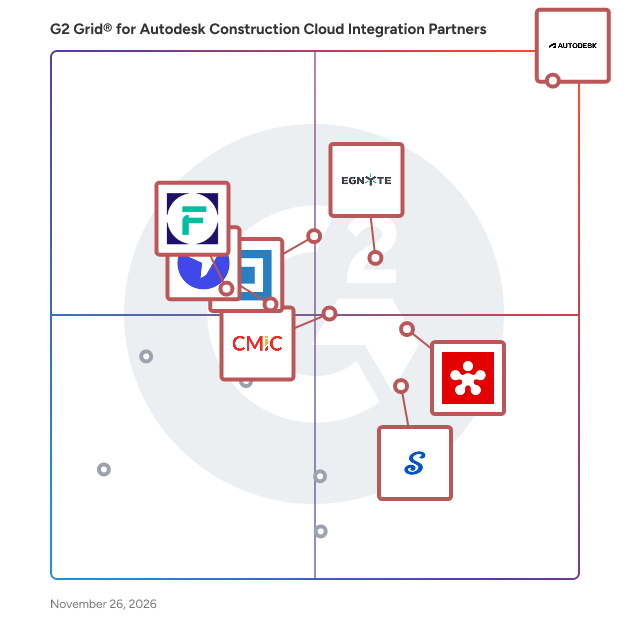
G2 Grid® for Autodesk Construction Cloud Integration Partners

G2 Grid® for Autodesk Construction Cloud Integration Partners plotting products by satisfaction and market presence

Highlighted products: Autodesk Forma (formerly Autodesk Construction Cloud), Egnyte, Bluebeam, Revizto, SignNow, CMiC Platform, DroneDeploy, and Graitec File Sync.

Underlying data: [Grid® JSON](https://www.g2.com/categories/autodesk-construction-cloud-integration-partners/grids.json?focus%5B%5D=autodesk-forma-formerly-autodesk-construction-cloud&focus%5B%5D=egnyte&focus%5B%5D=bluebeam&focus%5B%5D=revizto&focus%5B%5D=signnow&focus%5B%5D=cmic-platform&focus%5B%5D=dronedeploy&focus%5B%5D=graitec-file-sync)

Synapcus

The Synapcus web application is a new way of thinking for your company

Average Rating: 4.8/5.0

Total Reviews: 2

How Do G2 Users Rate Synapcus?

  • Ease of Use: 10.0/10 (Category avg: 8.8/10)
  • Quality of Support: 10.0/10 (Category avg: 8.7/10)
  • Ease of Setup: 10.0/10 (Category avg: 8.4/10)

Who Is the Company Behind Synapcus?

  • Seller: Qalgo
  • Year Founded: 2012
  • HQ Location: Karlsruhe, DE
  • LinkedIn® Page: www.linkedin.com
    4 employees on LinkedIn®

Who Uses This Product?

  • Company Size: 100% Medium

What Do G2 Reviewers Say About Synapcus?

AI-generated summary from verified user reviews

Pros
  • Users commend the excellent customer support of Synapcus, enhancing ease of implementation and overall user experience.
  • Users value the customization options in Synapcus, making it easy to tailor the tool for various roles.
  • Users find Synapcus to be incredibly easy to use, enhancing their experience across various roles and implementations.
  • Users find Synapcus to be easy to implement, enhancing their experience across various roles like CRM and project management.
  • Users find Synapcus to be a fun and easy-to-use tool with excellent customer support for various roles.
Cons
  • Users find the product expensive and report issues with functionality and reliability.

What Are Recent G2 Reviews of Synapcus?

What Are G2 Users Discussing About Synapcus?

Transfer App

TransferApp allows you to transfer your design files between different Autodesk® BIM360® accounts, projects and folders on your BIM360 account. You no longer have to download your files locally and re-upload them on the desired destination. Now you can use TransferApp to avoid this step. Transfer app allows you to use your BIM360 login credentials to access your projects, hubs and accounts, navigate through your files and select the desired files to transfer. Select the destination location and click transfer.

Average Rating: 4.5/5.0

Total Reviews: 1

How Do G2 Users Rate Transfer App?

  • Ease of Use: 8.3/10 (Category avg: 8.8/10)
  • Quality of Support: 8.3/10 (Category avg: 8.7/10)

Who Is the Company Behind Transfer App?

  • Seller: Autodesk
  • Year Founded: 1982
  • HQ Location: San Francisco
  • LinkedIn® Page: www.linkedin.com
    15,757 employees on LinkedIn®
  • Ownership: NASDAQ:ADSK
  • Total Revenue (USD mm): $3,790

Who Uses This Product?

  • Company Size: 100% Large

What Are Recent G2 Reviews of Transfer App?

What Are G2 Users Discussing About Transfer App?

TrueLook

TrueLook is a provider of construction cameras and software used for jobsite monitoring, documentation, and security. The company offers a variety of cameras as well as three different subscription packages, making it so you only pay for what you need. Through the web and mobile platform, users can access live video, create custom time-lapse footage, and receive motion-triggered security recordings with alerts. The system supports multiple users, allowing project stakeholders to view and share updates as needed. In addition to self-monitoring, TrueLook offers a Jobsite Monitoring service where a remote team reviews alerts in real time to help prevent theft and keep jobsites secure after hours. TrueLook is commonly used for progress tracking, stakeholder communication, dispute resolution, insurance compliance, and creating marketing visuals.

Average Rating: 5.0/5.0

Total Reviews: 10

How Do G2 Users Rate TrueLook?

  • Has the product been a good partner in doing business?: 8.9/10 (Category avg: 8.9/10)
  • Ease of Use: 9.4/10 (Category avg: 8.8/10)
  • Quality of Support: 10.0/10 (Category avg: 8.7/10)
  • Ease of Setup: 9.6/10 (Category avg: 8.4/10)

Who Is the Company Behind TrueLook?

  • Seller: TrueLook
  • Year Founded: 1995
  • HQ Location: Winston-Salem, US
  • LinkedIn® Page: www.linkedin.com
    69 employees on LinkedIn®

Who Uses This Product?

  • Top Industries: Construction
  • Company Size: 60% Medium, 20% Large

What Do G2 Reviewers Say About TrueLook?

AI-generated summary from verified user reviews

Pros
  • Users commend the excellent customer support of TrueLook, enhancing overall satisfaction and reliability of the service.
  • Users appreciate the ease of use of TrueLook, noting quick installation and user-friendly software for seamless monitoring.
  • Users find the setup process very easy, allowing quick installation and immediate functionality without hassle.
  • Users highlight the easy installation and user-friendly monitoring features of TrueLook, enhancing project oversight efficiently.
  • Users value the effortless monitoring capabilities of TrueLook, enhancing project oversight and providing peace of mind.
Cons
  • Users experience camera issues with TrueLook, including setup difficulties and slow security footage retrieval.
  • Users face difficult setup challenges with TrueLook, often experiencing delays in accessing security footage.
  • Users find the upfront investment cost of TrueLook to be high, though value is found in the product and support.
  • Users note a lack of installation package availability, which can complicate the setup process.
  • Users desire missing features like customizable add-ons or a middle package to enhance their TrueLook experience.

What Are Recent G2 Reviews of TrueLook?

What Are G2 Users Discussing About TrueLook?

AI can help you find the answers. G2 helps you trust them.

Connect G2 to Claude or ChatGPT for answers grounded in G2's trusted reviews, comparisons, and pricing from real user insights.

How it works

BoxLock

BoxLock is an Intelligent Access Control Platform that secures, monitors, and automates physical access to critical assets, tools, and infrastructure. Designed for construction, utilities, logistics, and industrial environments, BoxLock replaces traditional padlocks with rugged, cellular-connected smart locks that integrate seamlessly with your operational workflows. BoxLock Control, our cloud-based software, provides remote access management, audit trails, compliance automation, and real-time alerts. We enable organizations to lock anything, log everything, and automate access—transforming static processes into smart, secure, and scalable systems. Unlike traditional keys or clipboard logs, BoxLock uses barcodes, badges, or smartphone-based credentials to provide just-in-time, auditable access—while reducing labor costs, theft, and safety risks. Its fail-safe design, lockout/tagout (LOTO) automation, and multi-network connectivity (LTE-M, NB-IoT, Wi-Fi) make it ideal for remote, high-risk, or complex access control scenarios such as: - Utility-scale solar farms - Data center laydown yards - MRO high-value tools and parts - OSHA-compliant LOTO procedures - Industrial gate and perimeter security Whether you’re managing safety protocols on a 600-acre construction site or securing tools in a warehouse, BoxLock gives you full control over who accessed what, when, and where—in real time.

Who Is the Company Behind BoxLock?

  • Seller: BoxLock
  • Year Founded: 2017
  • HQ Location: Atlanta, US
  • LinkedIn® Page: www.linkedin.com
    13 employees on LinkedIn®

build.works

build.works is a BIM model information based business management software (SaaS) for manufacturing, prefabrication of building elements and on-site construction. build.works offers solutions for end-to-end integrated business processes for the construction industry by partnering with industry leading softwares like Autodesk Construction Cloud, SAP, Microsoft, etc. Website: https://build.works/

Who Is the Company Behind build.works?

Builterra

Builterra platform is a construction estimating software that connects the contract administration workflow for civil engineers and owners, incl. cost estimating, bid preparation, field inspection and payment.

Average Rating: 5.0/5.0

Total Reviews: 2

How Do G2 Users Rate Builterra?

  • Ease of Use: 10.0/10 (Category avg: 8.8/10)
  • Quality of Support: 10.0/10 (Category avg: 8.7/10)

Who Is the Company Behind Builterra?

Who Uses This Product?

  • Company Size: 150% Small, 50% Medium

What Are Recent G2 Reviews of Builterra?

What Are G2 Users Discussing About Builterra?

CrewBuilder

CrewBuilder by TrenLot is a cloud-based platform that combines project management with resource optimization to help construction companies grow. CrewBuilder makes it easy to manage projects, crews, and costs with scheduling tools, capacity planning (resource leveling/allocation), and Real Time 360° Dashboards. CrewBuilder’s real time project costing helps project managers make better decisions with the most up to date information. Improve your crew experience by automatically tracking expertise and credentials to create unique incentive programs to help with retention and new hire onboarding. If you are a Veteran or employ Veterans, we will proudly give you an additional discount.

Who Is the Company Behind CrewBuilder?

DESTINI Cloud

Construction estimating software with 2D and 3D takeoff, integrations with Autodesk's BIM 360, Procore, Togal, PowerBI, and Join platforms, fully customizable filtering, data shaping and analysis, and unlimited sort capabilities. Estimator allows you to spend more time on high-value activities like data analysis and trend spotting, improve communication with project owners, establish estimate templates, easily access cost history, and make more accurate predictions faster.

Who Is the Company Behind DESTINI Cloud?

Who Uses This Product?

  • Company Size: 100% Medium

What Are Recent G2 Reviews of DESTINI Cloud?

What Are G2 Users Discussing About DESTINI Cloud?

Digital Handover Management

Integrated Handover Repository prepare an asset-centric view from a file-centric deliverables by extracting mission critical information from your facility files.

Who Is the Company Behind Digital Handover Management?

Doxel

Doxel is artificial intelligence software that uses cameras to automate progress tracking on complex construction. General Contractors use Doxel to boost production rates & eliminate rework, while owners Doxel to gain schedule predictability.

Average Rating: 4.3/5.0

Total Reviews: 2

How Do G2 Users Rate Doxel?

  • Has the product been a good partner in doing business?: 6.7/10 (Category avg: 8.9/10)
  • Ease of Use: 5.0/10 (Category avg: 8.8/10)
  • Quality of Support: 6.7/10 (Category avg: 8.7/10)
  • Ease of Setup: 6.7/10 (Category avg: 8.4/10)

Who Is the Company Behind Doxel?

  • Seller: Doxel
  • Year Founded: 2016
  • HQ Location: Menlo Park, US
  • LinkedIn® Page: www.linkedin.com
    138 employees on LinkedIn®

Who Uses This Product?

  • Company Size: 50% Medium, 50% Small

What Are Recent G2 Reviews of Doxel?

What Are G2 Users Discussing About Doxel?

EC3

EC3 was built for speed and scalability. It has an enterprise engine under the hood, so you can streamline review, shorten timelines, and ensure your eDiscovery is accurate and defensible.

Who Is the Company Behind EC3?

Exact-Built System

Exact-Built System offers a visual as-builts solution for your project using photographic documentation performed at the critical milestones of construction.

Who Is the Company Behind Exact-Built System?

  • Seller: Multivista
  • Year Founded: 2003
  • HQ Location: North Vancouver, CA
  • LinkedIn® Page: www.linkedin.com
    425 employees on LinkedIn®

Eyrus

The Eyrus platform provides simple, seamless solutions that enhance levels of workforce insight and help construction professionals deliver their projects on time and on budget.

Who Is the Company Behind Eyrus?

  • Seller: Eyrus
  • Year Founded: 2015
  • HQ Location: Washington, US
  • LinkedIn® Page: www.linkedin.com
    20 employees on LinkedIn®

FastField

FastField offers a flexible and easy-to-use solution to transform your paper forms into dynamic mobile forms to save time and money – with no technical experience required. Replace your paper inspections, work orders, safety checklists and more by quickly creating a digital version. With FastField’s user-friendly Form Builder you can design perfectly tailored forms for your business and dispatch them to users working remotely in the field. The FastField Mobile App provides a robust interface for users to complete and submit forms wherever they are, even without an Internet connection. Submitted forms are converted to pixel perfect PDF and Word reports all in your own look and feel. FastField supports anything from simple data and report delivery to highly customized business workflow. FastField Business Insight’s platform helps you transform your data into meaningful information with real-time data visualization to identify trends in specific segments of your business. Built in integrations include Email, SFTP, HTTP, DropBox, SQL Server, Google Drive, Sharepoint, Zapier and more. FastField also supports “Direct Post” which allows you to bypass our cloud storage to route data to a private endpoint. Learn more at www.FastFieldForms.com.

Average Rating: 4.6/5.0

Total Reviews: 152

How Do G2 Users Rate FastField?

  • Has the product been a good partner in doing business?: 9.2/10 (Category avg: 8.9/10)
  • Ease of Use: 8.9/10 (Category avg: 8.8/10)
  • Quality of Support: 8.8/10 (Category avg: 8.7/10)
  • Ease of Setup: 8.5/10 (Category avg: 8.4/10)

Who Is the Company Behind FastField?

  • Seller: Quickbase
  • Company Website:
  • Year Founded: 2012
  • HQ Location: Boston, MA
  • LinkedIn® Page: www.linkedin.com
    806 employees on LinkedIn®

Who Uses This Product?

  • Who Uses This: Director, Owner
  • Top Industries: Construction, Facilities Services
  • Company Size: 67% Small, 26% Medium

What Are Recent G2 Reviews of FastField?

What Are G2 Users Discussing About FastField?

Formworks

Rapidly automate data capture. Digitise workflows. Integrate with your existing systems.

Average Rating: 2.5/5.0

Total Reviews: 1

How Do G2 Users Rate Formworks?

  • Has the product been a good partner in doing business?: 6.7/10 (Category avg: 8.9/10)
  • Ease of Use: 6.7/10 (Category avg: 8.8/10)
  • Quality of Support: 10.0/10 (Category avg: 8.7/10)
  • Ease of Setup: 5.0/10 (Category avg: 8.4/10)

Who Is the Company Behind Formworks?

Who Uses This Product?

  • Company Size: 100% Medium

What Do G2 Reviewers Say About Formworks?

AI-generated summary from verified user reviews

Pros
  • Users value the easy implementation of Formworks, enhancing workflow and enabling effective feedback from their team.
  • Users appreciate the responsive customer support that enhances their experience and resolves issues effectively.
  • Users find the ease of use of Formworks invaluable, allowing seamless integration and efficient form management.
  • Users find the easy implementation of Formworks beneficial, allowing seamless integration into daily workflows.
  • Users find form customization in Formworks simplifies their workflow, enhancing collaboration and facilitating effective feedback.
Cons
  • Users find the learning curve steep, as the abundance of features can overwhelm those less familiar with the product.
  • Users find the limited features of Formworks can be cumbersome, potentially overwhelming those unfamiliar with its use.
Neeraja Prakash
NP
Researched and written by Neeraja Prakash