Top Free Animation Software

How Many Animation Software Products Does G2 Track?

Total Products under this Category: 139

Category Stats (Sep 2026)

  • Average Rating: 4.39/5 (↑0.01 vs Aug 2026) The average rating of products in this category, based on all submitted ratings
  • Top Trending Product: VideoScribe (+0.37%) - Among all products in this category, VideoScribe recorded the largest rating increase compared to last month

Last updated: September 01, 2026

How Does G2 Rank Animation Software Products?

Why You Can Trust G2's Software Rankings:

  • 30 Analysts and Data Experts
  • 10,000+ Authentic Reviews
  • 139+ Products
  • Unbiased Rankings

G2's software rankings are built on verified user reviews, rigorous moderation, and a consistent research methodology maintained by a team of analysts and data experts. Each product is measured using the same transparent criteria, with no paid placement or vendor influence. While reviews reflect real user experiences, which can be subjective, they offer valuable insight into how software performs in the hands of professionals. Together, these inputs power the G2 Score, a standardized way to compare tools within every category.

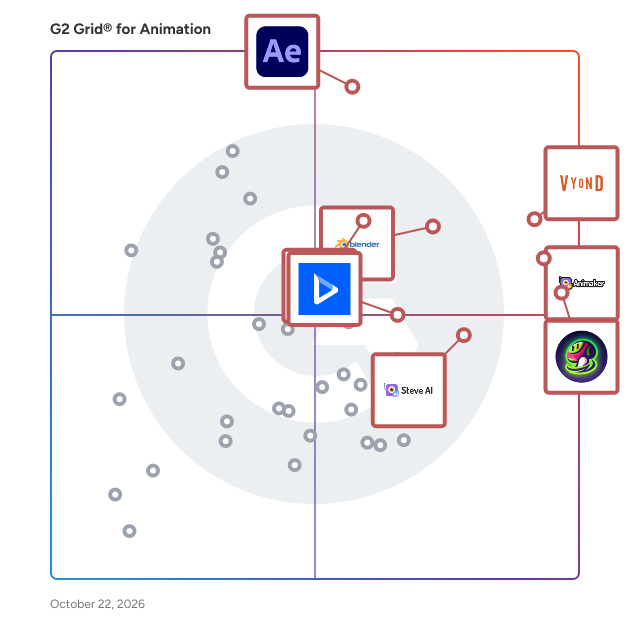
G2 Grid® for Animation Software

G2 Grid® for Animation Software plotting products by satisfaction and market presence

Highlighted products: Vyond, Animaker, Adobe After Effects, Meshy, Blender, Unity, Steve AI, and Powtoon.

Underlying data: [Grid® JSON](https://www.g2.com/categories/animation/grids.json?focus%5B%5D=vyond&focus%5B%5D=animaker&focus%5B%5D=adobe-after-effects&focus%5B%5D=meshy&focus%5B%5D=blender&focus%5B%5D=unity&focus%5B%5D=animaker-inc-steve-ai&focus%5B%5D=powtoon)

Vyond

Vyond is an all-in-one AI video platform designed to empower organizations in creating secure, compliant, and engaging business content at scale. With a history spanning over 15 years, Vyond has established itself as a trusted solution for more than 20,000 companies, including 65% of the Fortune 500. Vyond is particularly suited for enterprises looking to enhance their internal communications, training programs, sales enablement, and marketing efforts through high-quality video content. Vyond serves a diverse range of use cases. It is particularly beneficial for companies aiming to streamline onboarding processes, improve training completion rates, and enhance compliance training. By integrating seamlessly with existing tools such as Slack, Learning Management Systems (LMS), and Customer Relationship Management (CRM) systems, Vyond allows employees to create brand-safe content without the need to switch between multiple applications. This integration not only fosters a more efficient workflow but also ensures that video content aligns with organizational branding and compliance standards. Key features of Vyond include AI avatars, AI-assisted scripting, instant translation, and text-to-speech capabilities, which collectively enhance the video creation process. Users can develop custom characters and utilize various animation styles, including animated, photorealistic, mixed-media, and live-action formats, all within a single platform. This versatility allows organizations to cater to different audience preferences and learning styles, making their content more engaging and effective. Additionally, Vyond’s SCORM-compliant LMS integration ensures that training materials can be easily tracked and measured, providing valuable insights into employee engagement and learning outcomes. Vyond stands out in the market by simplifying the technology stack for enterprises while expanding their creative capabilities. The platform’s focus on measurable outcomes—such as faster onboarding, higher training completion, and improved sales enablement—enables organizations to track return on investment (ROI) within their existing systems of record. This emphasis on data-driven results allows businesses to make informed decisions about their video content strategies and optimize their communication efforts. With a commitment to ongoing innovation and customer trust, Vyond is dedicated to evolving its platform to meet the needs of modern enterprises. By bringing next-generation AI capabilities into a compliant and governed environment, Vyond enables organizations to create content more efficiently, communicate more effectively, and reduce their reliance on fragmented solutions. This positions Vyond as a comprehensive tool for any organization looking to leverage video as a key component of their business strategy.

Average Rating: 4.7/5.0

Total Reviews: 544

How Do G2 Users Rate Vyond?

  • Has the product been a good partner in doing business?: 9.3/10 (Category avg: 8.7/10)
  • Quality of Support: 9.3/10 (Category avg: 8.2/10)
  • Ease of Setup: 9.6/10 (Category avg: 8.9/10)
  • Ease of Admin: 9.4/10 (Category avg: 8.6/10)

Who Is the Company Behind Vyond?

  • Seller: Vyond
  • Company Website:
  • Year Founded: 2007
  • HQ Location: San Mateo, California
  • Twitter: @VyondVideo
    136 Twitter followers
  • LinkedIn® Page: www.linkedin.com
    282 employees on LinkedIn®

Who Uses This Product?

  • Who Uses This: Instructional Designer, Senior Instructional Designer
  • Top Industries: E-Learning, Hospital & Health Care
  • Company Size: 52% Large, 26% Small

What Do G2 Reviewers Say About Vyond?

AI-generated summary from verified user reviews

Pros
  • Users love the ease of use of Vyond, enabling quick video creation with helpful templates and support.
  • Users love the ease of quick video creation with Vyond, enabling fast and effective content production.
  • Users value Vyond's wide range of templates and character customization, enhancing their storytelling and content creation experience.
  • Users love the easy creation process in Vyond, allowing quick video development with intuitive templates and support.
  • Users love the versatility of Vyond, making video creation easy and enjoyable for various needs and projects.
Cons
  • Users express that Vyond offers limited customization, hindering their ability to create diverse and specific character actions.
  • Users find the limited features of Vyond restrict creative flexibility and accessibility for smaller companies.
  • Users find limited options within Vyond, particularly in clothing, accessories, and image diversity, impacting creativity.
  • Users find the learning curve steep, requiring time to master Vyond's limited features and functionalities.
  • Users find the limited selection of clothing and accessories restrictive, hindering customization and creativity in their projects.

What Are Recent G2 Reviews of Vyond?

What Are G2 Users Discussing About Vyond?

Meshy

Meshy is an AI 3D model generator designed to assist artists, game developers, 3D printing enthusiasts, and XR (extended reality) aficionados in transforming text and images into high-quality 3D models. This innovative tool streamlines the 3D modeling and animation process, making it accessible to individuals without prior experience in 3D design. By leveraging advanced AI technology, Meshy empowers users to create stunning 3D assets, thus unlocking their creative potential. The product caters to a diverse audience, including professionals in the gaming and animation industries, as well as hobbyists looking to explore the realm of 3D printing or digital art. With its user-friendly interface, Meshy is suitable for anyone, regardless of their technical background. Artists can utilize the platform for rapid prototyping and concept visualization, while game developers can create intricate models for their projects. Additionally, 3D printing enthusiasts can generate unique designs tailored to their specifications, enhancing their creative workflows. Meshy offers a range of key features that distinguish it from traditional 3D modeling software. The Text to 3D functionality allows users to convert written descriptions into fully realized models, facilitating quick iterations during the design process. The Image to 3D feature enables the transformation of photos or concept art into detailed 3D representations in mere seconds, capturing intricate details with ease. Furthermore, the AI Texturing capability generates beautiful textures for existing models based on simple text prompts, significantly reducing the time required for texture creation. In addition to these core functionalities, Meshy supports PBR (Physically Based Rendering) maps, enhancing the realism of 3D models. Users can choose from various art styles, including Realistic, Cartoon, Sculpture, Anime, and Voxel, allowing for creative flexibility. The platform also features API integration, enabling seamless incorporation of 3D model generation into other applications. With support for multiple export formats such as OBJ, FBX, USDZ, GLB, STL, and BLEND, users can ensure compatibility with various software platforms. The automatic resizing and adjustable polygon count features further streamline the modeling process, making it easier to meet project specifications. By fostering a vibrant community, Meshy encourages users to share their creations and access a wide array of user-generated models. The AI texture editing and smart healing capabilities enhance the visual quality of textures, ensuring professional results. Overall, Meshy stands out as a comprehensive solution for anyone looking to explore the world of 3D modeling and animation, making advanced design techniques accessible to all.

Average Rating: 4.7/5.0

Total Reviews: 3,584

How Do G2 Users Rate Meshy?

  • Has the product been a good partner in doing business?: 8.9/10 (Category avg: 8.7/10)
  • Quality of Support: 8.8/10 (Category avg: 8.2/10)
  • Ease of Setup: 9.3/10 (Category avg: 8.9/10)
  • Ease of Admin: 9.2/10 (Category avg: 8.6/10)

Who Is the Company Behind Meshy?

  • Seller: Meshy
  • Company Website:
  • HQ Location: Sunnyvale, California
  • LinkedIn® Page: www.linkedin.com
    172 employees on LinkedIn®

Who Uses This Product?

  • Who Uses This: Owner, CEO
  • Top Industries: Computer Games, Arts and Crafts
  • Company Size: 75% Small, 1% Medium

What Do G2 Reviewers Say About Meshy?

AI-generated summary from verified user reviews

Pros
  • Users find Meshy remarkably easy to use, simplifying the process of creating 3D printable files effortlessly.
  • Users admire Meshy's effortless 3D modeling, transforming complex tasks into simple, accurate outputs with a user-friendly interface.
  • Users appreciate the speed and efficiency of Meshy, significantly enhancing their creativity in 3D design.
  • Users praise the effortless modeling from text and images, enabling quick and accessible 3D creation.
  • Users value the high quality content produced by Meshy, enhancing their productivity and project outcomes significantly.
Cons
  • Users note that 3D modeling issues arise with complex shapes, requiring extra manual processing for better results.
  • Users report poor rendering quality, noting issues with detail and recognition in 3D model outputs.
  • Users criticize the inaccuracy of generated images, often leading to frustration and wasted credits on unusable models.
  • Users are disappointed with the topology issues in Meshy, leading to inconsistent and unsatisfactory results.
  • Users find the limited modeling capabilities of Meshy hinder advanced asset creation, affecting quality and precision.

What Are Recent G2 Reviews of Meshy?

Steve AI

Steve AI is one of the best ai video generator that enables brands and businesses to create engaging videos for social media, advertising, storytelling, and more. Our technology helps to create captivating videos from prompts and text to video in a matter of minutes. Generate high-quality AI videos with better prompts, faster rendering, and direct YouTube integration which helps to automate your YouTube Channel. Our mission is to enable anybody to create high-quality videos with minimal effort, time, and cost.

Average Rating: 4.6/5.0

Total Reviews: 135

How Do G2 Users Rate Steve AI?

  • Has the product been a good partner in doing business?: 9.3/10 (Category avg: 8.7/10)
  • Quality of Support: 9.2/10 (Category avg: 8.2/10)
  • Ease of Setup: 9.2/10 (Category avg: 8.9/10)
  • Ease of Admin: 9.0/10 (Category avg: 8.6/10)

Who Is the Company Behind Steve AI?

  • Seller: Animaker, Inc
  • Year Founded: 2015
  • HQ Location: San Francisco, California
  • Twitter: @animakerhq
    4,054 Twitter followers
  • LinkedIn® Page: www.linkedin.com
    199 employees on LinkedIn®

Who Uses This Product?

  • Who Uses This: Student
  • Top Industries: Animation, Marketing and Advertising
  • Company Size: 87% Small, 10% Medium

What Do G2 Reviewers Say About Steve AI?

AI-generated summary from verified user reviews

Pros
  • Users appreciate the ease of use of Steve AI, enabling effortless video creation without specialized skills.
  • Users commend the incredible customer support of Steve AI, highlighting their helpful and prompt assistance.
  • Users love the variety of creative options in Steve AI, making video creation simple and enjoyable.
  • Users value the time-saving efficiency of Steve AI, allowing project completion with ease and speed.
  • Users love the ease of use and feature variety of Steve AI, streamlining video creation for projects effortlessly.
Cons
  • Users are frustrated by the limited options for exporting and viewing final edits before committing to a subscription.
  • Users find the subscription price expensive, leading to confusion over costs and limited download options.
  • Users express frustration over the lack of free access, hindering the ability to fully evaluate Steve AI.
  • Users face download issues with Steve AI, as the free plan lacks a clear download option and process.
  • Users face file management issues with Steve AI, including video downloads failing and videos disappearing unexpectedly.

What Are Recent G2 Reviews of Steve AI?

Powtoon

Powtoon is the unified AI video platform that empowers you to easily create, scale, and share professional video content. Instantly deliver high-quality communications and knowledge engagement with complete creative freedom - all while enterprise-grade brand consistency, security, and compliance seamlessly fuel your AI transformation.

Average Rating: 4.4/5.0

Total Reviews: 281

How Do G2 Users Rate Powtoon?

  • Has the product been a good partner in doing business?: 8.5/10 (Category avg: 8.7/10)
  • Quality of Support: 8.5/10 (Category avg: 8.2/10)
  • Ease of Setup: 9.3/10 (Category avg: 8.9/10)
  • Ease of Admin: 9.1/10 (Category avg: 8.6/10)

Who Is the Company Behind Powtoon?

  • Seller: Powtoon
  • Year Founded: 2011
  • HQ Location: Stanmore, GB
  • Twitter: @PowToon
    43,801 Twitter followers
  • LinkedIn® Page: www.linkedin.com
    148 employees on LinkedIn®

Who Uses This Product?

  • Who Uses This: Teacher, Project Manager
  • Top Industries: E-Learning, Computer Software
  • Company Size: 59% Small, 27% Medium

What Do G2 Reviewers Say About Powtoon?

AI-generated summary from verified user reviews

Pros
  • Users appreciate the ease of use of Powtoon, finding it intuitive and efficient for video creation.
  • Users love the creativity options in Powtoon, allowing anyone to easily create engaging animations and presentations.
  • Users appreciate the quick and easy creation process of Powtoon, enjoying user-friendly templates and convenience in one platform.
  • Users appreciate the variety and ease of templates in Powtoon, enhancing their video creation experience significantly.
  • Users value the easy access and convenience of Powtoon, streamlining their video creation experience significantly.
Cons
  • Users experience frustrating technical issues with Powtoon, including bugs, blurriness, and limited customization options.
  • Users face missing features in Powtoon, including limited uploads, blurry images, and frustrating slide management issues.
  • Users express frustration with Powtoon due to its limited content options and numerous functional bugs affecting usability.
  • Users express frustration over Powtoon's limited features, including poor customization and lack of flexibility in projects.
  • Users are frustrated by the limited templates in Powtoon, which restricts creativity and customization in their projects.

What Are Recent G2 Reviews of Powtoon?

What Are G2 Users Discussing About Powtoon?

iClone 8

iClone 8 is an industry-leading, real-time 3D animation software designed to deliver the fastest professional results for indie filmmakers, game developers, 3D artists, and animation studios. As a comprehensive cinematic storytelling platform, iClone 8 enables users to seamlessly orchestrate body and facial animation, motion capture, crowd simulation, scene design, and cinematic lighting—all within a single, highly intuitive ecosystem. By eliminating the steep learning curves of traditional 3D software, iClone 8 empowers creators to produce high-quality character animations and AAA-level cinematic content in a fraction of the time. Core Features & Capabilities: * Advanced Body & Facial Animation: Achieve lifelike movements with real-time puppeteering, smooth motion blending, layered motion editing, and muscle-level facial controls. AccuLips provides highly accurate, automated lip-syncing from audio. * Complete Motion Capture Hub (Motion LIVE): A robust mocap ecosystem that captures full-body, facial, and hand motion simultaneously from gear like Xsens, Rokoko, and Faceware. Includes precision Timecode Sync and AI-driven Video Mocap to generate animations from 2D video. * AI-Powered Animation (AccuPOSE): Leverage cutting-edge AI technologies for automated 3D posing and AI-assisted animation, drastically reducing manual keyframing time. * Motion Director: Drive fully rigged 3D characters like playing a video game using gamepads, AI logic, or custom waypoints for dynamic character navigation. * Advanced Crowd Simulation & Motion Planning: Populate scenes instantly with self-navigating, smart 3D characters. Simulate real-world crowd behaviors and dynamic prop interactions for architectural visualizations or enterprise digital twins. Seamless Ecosystem & Pipeline Integrations iClone 8 acts as a central hub for 3D production, offering frictionless interoperability with the industry's most popular tools: * Live Link & Auto Setup Plugins: Native pipeline connections and free Auto Setup tools for Unreal Engine, Unity, Blender, Maya, 3ds Max, and Marmoset Toolbag. * NVIDIA Omniverse Connector: Seamless integration into Omniverse for real-time collaborative workflows using the USD framework. * Character Creator Sync: Direct, seamless synchronization with CC5 for fully rigged, animatable human models. Who is iClone 8 Best For? iClone 8 is the ideal solution for Previsualization (Previs), Virtual Production, Indie Filmmaking, Game Development, Concept Art, and Enterprise Training Simulations. It scales perfectly from solo artists needing a "one-man studio" to mid-sized production teams requiring agile pipelines.

Average Rating: 4.8/5.0

Total Reviews: 12

How Do G2 Users Rate iClone 8?

  • Has the product been a good partner in doing business?: 9.2/10 (Category avg: 8.7/10)
  • Quality of Support: 8.5/10 (Category avg: 8.2/10)
  • Ease of Setup: 6.7/10 (Category avg: 8.9/10)
  • Ease of Admin: 8.7/10 (Category avg: 8.6/10)

Who Is the Company Behind iClone 8?

  • Seller: Reallusion
  • Year Founded: 2000
  • HQ Location: San Jose, US
  • Twitter: @reallusion
    5,033 Twitter followers
  • LinkedIn® Page: www.linkedin.com
    162 employees on LinkedIn®
  • Ownership: Reallusion Inc.

Who Uses This Product?

  • Company Size: 77% Small, 31% Medium

What Are Recent G2 Reviews of iClone 8?

What Are G2 Users Discussing About iClone 8?

Cinema 4D

Cinema 4D is a professional 3D modeling, animation, simulation, and rendering software developed by Maxon. Renowned for its speed, power, flexibility, and stability, it offers a comprehensive toolset that streamlines 3D workflows across various industries, including design, motion graphics, visual effects (VFX), augmented reality (AR), mixed reality (MR), virtual reality (VR), game development, and architectural visualization. With its intuitive interface and robust features, Cinema 4D empowers artists and designers to create stunning 3D content efficiently. Key Features and Functionality: - Advanced MoGraph Tools: Cinema 4D introduces sophisticated object distribution methods within the MoGraph Cloner, enabling the creation of complex arrangements effortlessly. Users can stack objects of varying sizes or distribute them along a spline without overlaps, enhancing the versatility of motion graphics projects. - Liquid Flow Emitter: The software includes a dedicated emitter for continuous liquid flow, facilitating realistic simulations of fountains, taps, hoses, and similar effects. This feature ensures smooth, uninterrupted liquid streams by minimizing unwanted splashes or gaps. - Enhanced Take System: Cinema 4D's improved Take System offers smarter shot control, allowing for efficient management of multiple versions of a scene within a single project. This streamlines the workflow for complex animations and renders. - Camera View Snapping: The software provides quick switching between camera views, enhancing navigation and scene composition during the design process. - Integration with Redshift: All Cinema 4D subscriptions now include Redshift GPU, offering seamless integration between creativity and performance. This combination delivers a powerful 3D toolset alongside a fast, GPU-accelerated renderer. Primary Value and User Solutions: Cinema 4D addresses the needs of 3D artists and designers by providing a user-friendly yet powerful platform for creating high-quality 3D content. Its comprehensive suite of tools simplifies complex tasks, reduces production time, and enhances creative possibilities. The integration with Redshift ensures that users can achieve photorealistic renders efficiently, making it an ideal solution for professionals seeking to produce compelling visuals across various media platforms.

Average Rating: 4.6/5.0

Total Reviews: 136

How Do G2 Users Rate Cinema 4D?

  • Has the product been a good partner in doing business?: 8.8/10 (Category avg: 8.7/10)
  • Quality of Support: 8.4/10 (Category avg: 8.2/10)
  • Ease of Setup: 8.7/10 (Category avg: 8.9/10)
  • Ease of Admin: 8.2/10 (Category avg: 8.6/10)

Who Is the Company Behind Cinema 4D?

  • Seller: MAXON
  • Year Founded: 1986
  • HQ Location: Friedrichsdorf, Germany
  • Twitter: @maxon3d
    59 Twitter followers
  • LinkedIn® Page: www.linkedin.com
    393 employees on LinkedIn®

Who Uses This Product?

  • Who Uses This: Creative Director
  • Top Industries: Design, Animation
  • Company Size: 73% Small, 15% Medium

What Do G2 Reviewers Say About Cinema 4D?

AI-generated summary from verified user reviews

Pros
  • Users appreciate the user-friendly interface and MoGraph tools for quickly creating complex animations without extensive tutorials.
  • Users highlight the high-quality animations generated effortlessly with Cinema 4D, enhancing their graphic design experience.
  • Users appreciate the ease of use in Cinema 4D, highlighted by a clean interface and efficient tools.
  • Users appreciate the intuitive interface of Cinema 4D, making complex animations quick and easy to create.
  • Users enjoy the clean and user-friendly interface of Cinema 4D, enhancing their animation creation experiences significantly.
Cons
  • Users report performance issues with Cinema 4D, citing long render times and resource-heavy demands on complex scenes.
  • Users experience buffering issues when executing complex designs in Cinema 4D, hindering their workflow efficiency.
  • Users report animation issues when performing complex designs, noting slow buffering with multiple commands in Cinema 4D.
  • Users often face command issues in Cinema 4D, experiencing buffering during complex designs and multitasking.
  • Users find complex animation challenging, especially beginners lacking experience in 3D modeling and principles of animation.

What Are Recent G2 Reviews of Cinema 4D?

What Are G2 Users Discussing About Cinema 4D?

3ds Max Design

Autodesk 3ds Max Design is a professional 3D modeling, rendering, and animation software tailored for architects, designers, and visualization specialists. It enables users to create detailed and realistic visualizations of architectural designs, engineering projects, and other complex structures, facilitating effective communication of design intent and exploration of creative concepts. Key Features and Functionality: - Advanced 3D Modeling: Offers an extensive polygon modeling and texturing toolset, including the Graphite toolset for free-form sculpting and advanced polygonal modeling, allowing for the creation of unique forms and detailed designs. - High-Quality Rendering: Equipped with multiple rendering options, including the integrated Arnold renderer, enabling the production of photorealistic images and animations. - Lighting Simulation and Analysis: Features Exposure technology for simulating and analyzing sun, sky, and artificial lighting, assisting in achieving accurate lighting conditions and supporting LEED 8.1 certification. - Interoperability: Provides optimized workflows for aggregating data from various CAD and Building Information Modeling (BIM) file formats, ensuring efficient data continuity throughout the design process. - Animation Tools: Includes advanced animation support with tools like rigging, keyframing, and procedural animation, helping bring designs to life with natural movement. Primary Value and User Solutions: 3ds Max Design addresses the need for high-quality visual communication in design professions. By offering powerful modeling and rendering tools, it enables users to create compelling visualizations that effectively convey design concepts to clients and stakeholders. The software's interoperability with other Autodesk products and support for various file formats streamline workflows, reducing time and effort in the design process. Additionally, its lighting simulation capabilities allow for accurate analysis of environmental lighting conditions, aiding in sustainable design practices and compliance with certification standards.

Average Rating: 4.3/5.0

Total Reviews: 279

How Do G2 Users Rate 3ds Max Design?

  • Has the product been a good partner in doing business?: 8.3/10 (Category avg: 8.7/10)
  • Quality of Support: 7.7/10 (Category avg: 8.2/10)
  • Ease of Setup: 7.0/10 (Category avg: 8.9/10)
  • Ease of Admin: 7.0/10 (Category avg: 8.6/10)

Who Is the Company Behind 3ds Max Design?

  • Seller: Autodesk
  • Year Founded: 1982
  • HQ Location: San Francisco
  • Twitter: @autodesk
    273,215 Twitter followers
  • LinkedIn® Page: www.linkedin.com
    15,757 employees on LinkedIn®
  • Ownership: NASDAQ:ADSK

Who Uses This Product?

  • Who Uses This: Interior Designer, Architect
  • Top Industries: Architecture & Planning, Design
  • Company Size: 64% Small, 23% Medium

What Do G2 Reviewers Say About 3ds Max Design?

AI-generated summary from verified user reviews

Pros
  • Users value the powerful 3D modeling and visualization tools of 3ds Max Design, enhancing creativity and productivity in design.
  • Users appreciate the ease of use in 3ds Max Design, making complex 3D modeling accessible and efficient.
  • Users value the effective 3D modeling tools in 3ds Max Design, facilitating impressive visualizations and professional results.
  • Users appreciate the effective 3D visualization tools of 3ds Max Design, enabling realistic renders and creative flexibility.
Cons
  • Users find the difficult learning curve of 3ds Max Design challenging, especially for beginners navigating its extensive tools.
  • Users find the high hardware requirements of 3ds Max Design limits its feasibility and efficiency significantly.
  • Users face high system requirements for 3ds Max Design, leading to slow performance with complex scenes and heavy files.
  • Users express frustration with slow rendering times, especially when dealing with complex scenes and limited hardware capabilities.
  • Users often face software bugs, leading to crashes and delays during rendering, affecting workflow efficiency.

What Are Recent G2 Reviews of 3ds Max Design?

What Are G2 Users Discussing About 3ds Max Design?

GreenSock Animation Platform

GSAP (GreenSock Animation Platform) is a professional-grade JavaScript animation library. It's widely regarded as one of the most robust and performant tools for creating animations on the web. It animates anything JavaScript can touch (CSS properties, canvas library objects, SVG, generic objects, whatever) and it solves countless browser inconsistencies, all with blazing speed, including automatic GPU-acceleration of transforms. It's FREE even for commercial uses as of April 2025.

Average Rating: 4.7/5.0

Total Reviews: 13

How Do G2 Users Rate GreenSock Animation Platform?

  • Has the product been a good partner in doing business?: 8.9/10 (Category avg: 8.7/10)
  • Quality of Support: 9.2/10 (Category avg: 8.2/10)
  • Ease of Setup: 9.7/10 (Category avg: 8.9/10)
  • Ease of Admin: 8.9/10 (Category avg: 8.6/10)

Who Is the Company Behind GreenSock Animation Platform?

  • Seller: Greensock
  • Year Founded: 2000
  • HQ Location: WEST CHICAGO, IL
  • Twitter: @greensock
    37,525 Twitter followers
  • LinkedIn® Page: www.linkedin.com
    8 employees on LinkedIn®

Who Uses This Product?

  • Company Size: 54% Small, 38% Large

What Are Recent G2 Reviews of GreenSock Animation Platform?

Harmony

Used by top studios all over the world, Harmony lets you work fast and animate in any style. Harmony has all the tools you need for traditional paperless, cut-out and hybrid animation productions.

Average Rating: 4.7/5.0

Total Reviews: 21

How Do G2 Users Rate Harmony?

  • Has the product been a good partner in doing business?: 8.3/10 (Category avg: 8.7/10)
  • Quality of Support: 9.1/10 (Category avg: 8.2/10)
  • Ease of Setup: 8.3/10 (Category avg: 8.9/10)
  • Ease of Admin: 5.8/10 (Category avg: 8.6/10)

Who Is the Company Behind Harmony?

  • Seller: Toon Boom
  • Year Founded: 1994
  • HQ Location: Montreal, Canada
  • Twitter: @ToonBoom
    57,778 Twitter followers
  • LinkedIn® Page: www.linkedin.com
    199 employees on LinkedIn®

Who Uses This Product?

  • Top Industries: Animation, Entertainment
  • Company Size: 55% Small, 36% Medium

What Are Recent G2 Reviews of Harmony?

KeyShot

KeyShot is the leading 3D rendering and product visualization software, empowering companies worldwide to seamlessly turn product visions into market-ready realities. By integrating every phase of the product journey, from the initial sketch to the final market launch, KeyShot enables businesses of all sizes to design with precision, align processes with clarity, manage workflows with efficiency, and deliver impactful products.

Average Rating: 4.5/5.0

Total Reviews: 178

How Do G2 Users Rate KeyShot?

  • Has the product been a good partner in doing business?: 8.0/10 (Category avg: 8.7/10)
  • Quality of Support: 8.1/10 (Category avg: 8.2/10)
  • Ease of Setup: 8.6/10 (Category avg: 8.9/10)
  • Ease of Admin: 8.1/10 (Category avg: 8.6/10)

Who Is the Company Behind KeyShot?

  • Seller: KeyShot
  • Year Founded: 2010
  • HQ Location: Costa Mesa, US
  • Twitter: @KeyShot3D
    9,466 Twitter followers
  • LinkedIn® Page: www.linkedin.com
    161 employees on LinkedIn®

Who Uses This Product?

  • Who Uses This: Designer, Industrial Designer
  • Top Industries: Design, Higher Education
  • Company Size: 70% Small, 17% Medium

What Do G2 Reviewers Say About KeyShot?

AI-generated summary from verified user reviews

Pros
  • Users appreciate the diverse selection of assets and HDRIs, enhancing their creative possibilities in KeyShot.
  • Users value the ample assets and HDri's available in KeyShot, enhancing their rendering capabilities.
  • Users appreciate the abundance of assets and HDRIs provided by KeyShot, enhancing their rendering experience.
Cons
  • Users report frequent random crashes when assigning materials to complex shapes, impacting workflow and usability.
  • Users report random crashes when assigning materials to complex shapes, disrupting their workflow and design process.
  • Users report experiencing random crashes in KeyShot, particularly when assigning materials to complex shapes.

What Are Recent G2 Reviews of KeyShot?

What Are G2 Users Discussing About KeyShot?

Mango Animate

Mango Animate is a technology company that is committed to developing easy-to-use but powerful software, including animation maker, whiteboard animation maker, character animation maker, and business video maker. No programming required, everyone can use any software from Mango Animate to create amazing videos for all industries, such as Education, Business, Technology, and so on. It’s worth mentioning that all software from Mango Animate comes with a free lifetime version, enabling all users to start their video journey for free.

Average Rating: 4.3/5.0

Total Reviews: 19

How Do G2 Users Rate Mango Animate?

  • Has the product been a good partner in doing business?: 10.0/10 (Category avg: 8.7/10)
  • Quality of Support: 8.5/10 (Category avg: 8.2/10)
  • Ease of Setup: 9.4/10 (Category avg: 8.9/10)
  • Ease of Admin: 10.0/10 (Category avg: 8.6/10)

Who Is the Company Behind Mango Animate?

Who Uses This Product?

  • Top Industries: Animation
  • Company Size: 84% Small, 16% Medium

What Do G2 Reviewers Say About Mango Animate?

AI-generated summary from verified user reviews

Pros
  • Users love the animation variety of Mango Animate, making it easy to create professional animations quickly.
  • Users love the ease of use in Mango Animate, finding it quick to create animations effortlessly.
  • Users appreciate the free services offered by Mango Animate, making it easy to import their own content.
  • Users value the integrations in Mango Animate, enabling easy content import and access to free features.
  • Users love the intuitive drag-and-drop interface of Mango Animate, making animation creation fast and accessible.
Cons
  • Users find the inaccessibility for beginners challenging, as mastering advanced features requires time and exploration.
  • Users find the learning curve steep due to overwhelming features and the time needed for advanced customization.
  • Users find the complicated interface of Mango Animate challenging, especially for newcomers navigating the software.

What Are Recent G2 Reviews of Mango Animate?

What Are G2 Users Discussing About Mango Animate?

VideoScribe

VideoScribe is an easy-to-use, drag and drop animated video maker for beginners to professionals, applicable for any industry and job role. Create professional-quality animated videos that captivate and educate your audience. Communicate any topic or message in a quick and engaging way to grab attention and stand out from the crowd, without breaking the bank. Easy and Intuitive: Whether you're a professional or a beginner, VideoScribe's user-friendly interface makes the animation process quick and simple. Its drag-and-drop functionality and intuitive controls enable you to effortlessly place and manipulate elements on the canvas, making the creation process smooth and enjoyable. Professional-Quality: Achieve professional-grade animation without the need for extensive technical skills or costly production equipment. The various animation effects bring any content to life, creating a visually stunning and dynamic experience for your viewers. Unlimited Creativity: Unleash your creative potential and craft unique and compelling animations. An extensive library of professionally designed images, icons, characters, and backgrounds, means you have an endless range of visual elements to choose from and customize to suit your style and brand. Versatile: Whether you're creating educational videos, marketing campaigns, training materials, presentations, or storytelling content, VideoScribe empowers you to deliver your message effectively and engage your audience on a deeper level.

Average Rating: 4.1/5.0

Total Reviews: 60

How Do G2 Users Rate VideoScribe?

  • Has the product been a good partner in doing business?: 7.8/10 (Category avg: 8.7/10)
  • Quality of Support: 7.4/10 (Category avg: 8.2/10)
  • Ease of Setup: 9.4/10 (Category avg: 8.9/10)
  • Ease of Admin: 9.0/10 (Category avg: 8.6/10)

Who Is the Company Behind VideoScribe?

  • Seller: Sparkol
  • Year Founded: 2008
  • HQ Location: Bristol, United Kingdom
  • Twitter: @SparkolHQ
    2,260 Twitter followers
  • LinkedIn® Page: www.linkedin.com
    22 employees on LinkedIn®

Who Uses This Product?

  • Top Industries: Marketing and Advertising, Computer Software
  • Company Size: 63% Small, 26% Medium

What Do G2 Reviewers Say About VideoScribe?

AI-generated summary from verified user reviews

Pros
  • Users find VideoScribe to be an exceptionally user-friendly tool for effortless video creation, even for beginners.
  • Users find VideoScribe to be incredibly easy to use, making animation accessible even for beginners.
  • Users love the versatile animation features of VideoScribe, finding it easy to create stunning videos for any skill level.
  • Users praise VideoScribe for its beginner-friendly features, enabling creativity with ease and a variety of customizable options.
  • Users love the versatility and ease of use of VideoScribe, making creativity accessible to everyone.
Cons
  • Users experience slow performance with VideoScribe, including glitches and lengthy export times after prolonged use.
  • Users express frustration with the slow rendering times and glitches that disrupt editing efficiency in VideoScribe.
  • Users experience software instability, with glitches and slow processing occurring during extended use and heavy workloads.
  • Users face AI limitations in VideoScribe, unable to efficiently work on multiple projects without glitches and slowdowns.
  • Users experience file management issues in VideoScribe, particularly when attempting to work on multiple projects simultaneously.

What Are Recent G2 Reviews of VideoScribe?

What Are G2 Users Discussing About VideoScribe?

Modo

Modo’s powerful and flexible 3D modeling, texturing and rendering toolset empowers artists to explore and develop ideas without jumping through technical hoops. Modo® is your starting point for creative exploration. Whether you’re creating addictive real-time experiences, innovative product designs, compelling advertising images, or engaging film and video content, MODO’s artist-friendly tools let you iterate freely to realize your ideas’ full creative potential. As part of our Enterprise Solution Partnership Package, not only will you get the photo-realism of Modo, but you get the rapid-iteration software, Colorway. On top of that, you have access to our Modo experts for asset creation, expert training, and dedicated support as you chart your digital design transformation. Users choose Modo for its ability to enable fast direct modeling, flexible procedural modeling, the award-winning MeshFusion Boolean toolset and built-in sculpting tools all working together, Modo’s modeling moxie is unmatched. With its advanced photorealistic viewport and progressive renderer, and WYSIWYG look-dev for Unity and Unreal, Modo lets you visualize your designs as you develop them, so you can discover their ultimate potential in less time. Freedom from creativity-killing constraints, with Modo’s intuitive, artist-friendly toolset. From roughing out volumes to creating highly detailed forms, Modo lets you focus on creation, not construction. Build your own kit of specialized tools by combining different operations, with Modo’s flexible tool assembly system. With Modo, every job you do becomes easier, as you continually develop new efficiencies. Modo fits right into your pipeline, with Python and C++ APIs; a fully customizable UI; and support for industry-standard formats like OpenSubdiv, OpenColorIO, OpenEXR, OpenVDB and Alembic.

Average Rating: 4.3/5.0

Total Reviews: 83

How Do G2 Users Rate Modo?

  • Has the product been a good partner in doing business?: 8.5/10 (Category avg: 8.7/10)
  • Quality of Support: 8.4/10 (Category avg: 8.2/10)
  • Ease of Setup: 8.0/10 (Category avg: 8.9/10)
  • Ease of Admin: 7.7/10 (Category avg: 8.6/10)

Who Is the Company Behind Modo?

  • Seller: Foundry
  • Year Founded: 1996
  • HQ Location: London, United Kingdom
  • Twitter: @TheFoundryTeam
    58,803 Twitter followers
  • LinkedIn® Page: www.linkedin.com
    391 employees on LinkedIn®

Who Uses This Product?

  • Top Industries: Design, Computer Games
  • Company Size: 76% Small, 17% Medium

What Are Recent G2 Reviews of Modo?

What Are G2 Users Discussing About Modo?

Animation Desk

Draw you frame-to-frame animation from scratch, or create animations upon videos, images, PSD layers. Animation Desk supports multiple import and export formats, and lets you create and share animations right on your iPad and iPhone. AWARDS - Featured in Top100 iPad Entertainment apps in 86 App Stores - Featured by Apple on iTunes Home Page - Featured by Yahoo Tech - Featured by TechCrunch - Recommended by edshelf, EducationalAppStore.com, All about apps in YOUR classroom, iPad Educators DRAW YOUR FRAME-TO-FRAME ANIMATION • 46+ brushes • Colored onion skinning (iPad only) • Copy and paste tool • 9 Layers • Perfect with Apple Pencil 1,2, Wacom and Adonit styli MORE ANIMATION TOOLS • Import/export Photoshop layers • Combine animation sequences into an animatic storyboard. (iPad only) • Tag and comment on each frame (iPad only) • Customizable shortcut bar (iPad only) • Export GIFs (up to 640x480px) PLAY • set up any FPS (frame per second) as your like • Play animation backward • Replay your animation in loops EXPORT AND IMPORT OPTIONS • Import video, images, PSD layers, and ad.package • Export MOV, GIF, PSD layers, PDF, and GIF • Export video in 16:9 and 3:4 screen ratio • Share animations on AniZone, a community for creative artists. • Add music to the animations * Premium features available with Creativity 365 or Animation Desk Pro subscription

Average Rating: 4.6/5.0

Total Reviews: 10

How Do G2 Users Rate Animation Desk?

  • Quality of Support: 9.1/10 (Category avg: 8.2/10)

Who Is the Company Behind Animation Desk?

  • Seller: KDAN
  • Year Founded: 2009
  • HQ Location: Irvine, California
  • LinkedIn® Page: www.linkedin.com
    230 employees on LinkedIn®

Who Uses This Product?

  • Company Size: 91% Small, 9% Large

What Are Recent G2 Reviews of Animation Desk?

D-ID

D-ID is a sophisticated software solution that specializes in creating advanced Interactive Visual Agents, which are hyper-realistic, AI-powered digital humans designed to facilitate real-time, face-to-face conversations. This innovative technology allows organizations to enhance their customer interactions by integrating these digital agents into various platforms, including enterprise websites, mobile applications, and internal systems. The primary use cases for D-ID's technology include automating customer service, onboarding new users, guiding product selection, and delivering information in a more natural and human-centered manner. Targeted at a diverse audience, D-ID serves organizations across multiple sectors, including Fortune 500 companies, financial institutions, public sector entities, media networks, and rapidly growing digital platforms. The versatility of D-ID's solutions makes it suitable for businesses looking to improve customer engagement and streamline communication processes. By deploying these digital agents, organizations can ensure that they provide timely and relevant information to their users, thereby enhancing the overall user experience. One of the standout features of D-ID is its AI video generation platform, which allows users to convert text, audio, or cloned voice inputs into high-quality videos featuring lifelike talking avatars. This capability is particularly beneficial for creating engaging content that can be used in various contexts, such as marketing, training, and internal communications. Users can also create personalized digital avatars directly within the platform, enabling a more tailored approach to video content creation. Furthermore, D-ID's recent acquisition of simpleshow enhances its offerings by incorporating a widely adopted explainer video creation tool. This integration provides users with a seamless workflow for producing informative and engaging explainer videos, which can be particularly useful for training and compliance purposes. Supporting over 120 languages, D-ID enables enterprises to create personalized, multilingual content without the traditional costs and constraints associated with video production. D-ID also offers flexible deployment options, including API integration, self-service creation tools, and mobile applications, allowing organizations to scale their intelligent communication efforts efficiently and securely. By adding a human, interactive layer to digital experiences, D-ID empowers businesses to leverage conversational AI and localized video content, ultimately transforming the way they engage with their customers and stakeholders. Organizations use D-ID to build AI-powered training experiences, customer support assistants, sales enablement videos, onboarding programs, knowledge-sharing content, and interactive product demonstrations for global audiences while maintaining a personalized experience. The platform combines conversational AI, large language models (LLMs), real-time speech, expressive digital humans, and enterprise-grade video generation to deliver natural, engaging interactions across every stage of the customer and employee journey. With support for Agentic AI workflows and interactive AI video experiences, D-ID helps enterprises transform static content into dynamic conversations that improve engagement, knowledge retention, and operational efficiency. Whether deployed for Learning & Development, customer experience, marketing, HR, or internal communications, D-ID enables organizations to create secure, enterprise-ready AI video experiences that integrate seamlessly with existing enterprise systems and support modern digital transformation initiatives.

Average Rating: 4.6/5.0

Total Reviews: 130

How Do G2 Users Rate D-ID?

  • Has the product been a good partner in doing business?: 8.9/10 (Category avg: 8.7/10)
  • Quality of Support: 8.7/10 (Category avg: 8.2/10)
  • Ease of Setup: 9.3/10 (Category avg: 8.9/10)
  • Ease of Admin: 8.8/10 (Category avg: 8.6/10)

Who Is the Company Behind D-ID?

  • Seller: D-ID
  • Company Website:
  • Year Founded: 2017
  • HQ Location: Tel Aviv
  • Twitter: @D_ID_
    15,597 Twitter followers
  • LinkedIn® Page: www.linkedin.com
    152 employees on LinkedIn®

Who Uses This Product?

  • Who Uses This: CEO
  • Top Industries: Marketing and Advertising, Education Management
  • Company Size: 85% Small, 9% Medium

What Do G2 Reviewers Say About D-ID?

AI-generated summary from verified user reviews

Pros
  • Users highlight the ease of use of D-ID, making video creation simple and efficient, even for beginners.
  • Users commend the high quality and user-friendliness of D-ID, enhancing their video creation experience significantly.
  • Users praise the high-quality, realistic avatars from D-ID, enhancing their video content with engaging, human-like features.
  • Users praise the high quality and ease of use of D-ID's avatars, making it a top choice in the industry.
  • Users highlight the top-notch quality and ease of use of D-ID for creating interactive videos effortlessly.
Cons
  • Users are frustrated by the watermark limitation and lack of options for cartoon and animal avatars.
  • Users find D-ID's pricing expensive, with added costs for credits if videos don't meet expectations.
  • Users feel that D-ID has pricing issues, wishing for more affordable options and fewer additional costs for features.
  • Users find the unnatural movements of characters to be limiting and detracting from the overall video quality.
  • Users find D-ID's AI limitations troubling, including inconsistent outputs and issues with features and service reliability.

What Are Recent G2 Reviews of D-ID?

What Are G2 Users Discussing About D-ID?