Introducing G2.ai, the future of software buying.Try now

Best 360 Feedback Software for Small Business

Grace Savides
GS
Researched and written by Grace Savides

Products classified in the overall 360 Feedback Software category are similar in many regards and help companies of all sizes solve their business problems. However, small business features, pricing, setup, and installation differ from businesses of other sizes, which is why we match buyers to the right Small Business 360 Feedback Software to fit their needs. Compare product ratings based on reviews from enterprise users or connect with one of G2's buying advisors to find the right solutions within the Small Business 360 Feedback Software category.

In addition to qualifying for inclusion in the 360 Feedback Software category, to qualify for inclusion in the Small Business 360 Feedback Software category, a product must have at least 10 reviews left by a reviewer from a small business.

Show More
Show Less

G2 takes pride in showing unbiased reviews on user satisfaction in our ratings and reports. We do not allow paid placements in any of our ratings, rankings, or reports. Learn about our scoring methodologies.

1 filter applied
Clear All

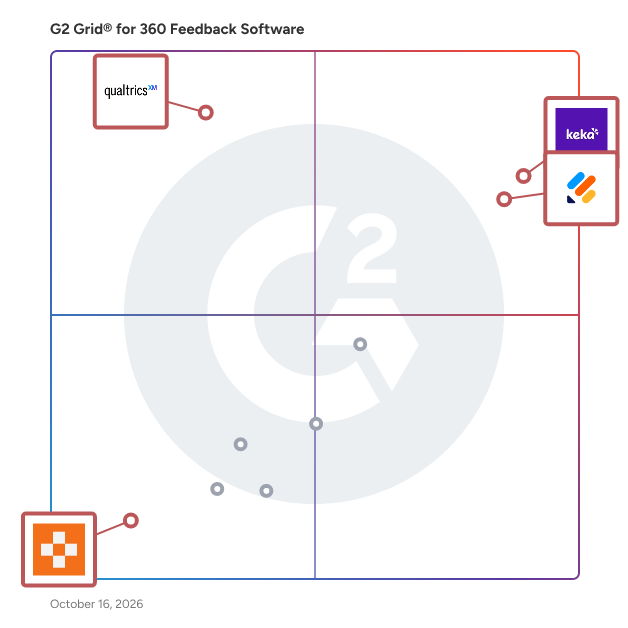
4 Listings in Small Business 360 Feedback Software Available

(4,714)4.7 out of 5
Optimized for quick response
2nd Easiest To Use in 360 Feedback Software software
Save to My Lists
50% Off: $19.50/user/month
  • Overview
    Expand/Collapse Overview
  • Product Description
    How are these determined?Information
    This description is provided by the seller.

    Trusted by more than 35 million users worldwide, Jotform is a powerful online form builder designed to help individuals and organizations create, customize, and publish forms in minutes, from any devi

    Users
    • Owner
    • CEO
    Industries
    • Non-Profit Organization Management
    • Education Management
    Market Segment
    • 69% Small-Business
    • 21% Mid-Market
    User Sentiment
    How are these determined?Information
    These insights, currently in beta, are compiled from user reviews and grouped to display a high-level overview of the software.
    • Jotform is a tool for creating and customizing forms, collecting data, and integrating with various applications, used for various business needs such as filing taxes, collecting client information, and creating workflows.
    • Users like Jotform's user-friendly interface, ease of setup, secure signing features, customization options, and its ability to integrate with other tools like Google Sheets, Slack, and payment gateways.
    • Users experienced issues with the limitations of the free plan, complexity in form creation, occasional lag in the form editor, and difficulties with certain features like conditional logic and payment integrations.
  • Pros and Cons
    Expand/Collapse Pros and Cons
  • Jotform Pros and Cons
    How are these determined?Information
    Pros and Cons are compiled from review feedback and grouped into themes to provide an easy-to-understand summary of user reviews.
    Pros
    Ease of Use
    1,004
    Simple
    639
    Features
    441
    Ease of Creation
    439
    User-Friendly
    428
    Cons
    Expensive
    233
    Limited Customization
    207
    Missing Features
    206
    Form Issues
    199
    Form Design
    185
  • User Satisfaction
    Expand/Collapse User Satisfaction
  • Jotform features and usability ratings that predict user satisfaction
    9.2
    customizable forms
    Average: 8.8
    9.2
    Ease of Use
    Average: 8.8
    9.0
    requesting feedback
    Average: 8.8
    8.7
    continuous feedback
    Average: 8.3
  • Seller Details
    Expand/Collapse Seller Details
  • Seller Details
    Seller
    Jotform
    Company Website
    Year Founded
    2006
    HQ Location
    San Francisco, California
    Twitter
    @Jotform
    39,428 Twitter followers
    LinkedIn® Page
    www.linkedin.com
    900 employees on LinkedIn®
Product Description
How are these determined?Information
This description is provided by the seller.

Trusted by more than 35 million users worldwide, Jotform is a powerful online form builder designed to help individuals and organizations create, customize, and publish forms in minutes, from any devi

Users
  • Owner
  • CEO
Industries
  • Non-Profit Organization Management
  • Education Management
Market Segment
  • 69% Small-Business
  • 21% Mid-Market
User Sentiment
How are these determined?Information
These insights, currently in beta, are compiled from user reviews and grouped to display a high-level overview of the software.
  • Jotform is a tool for creating and customizing forms, collecting data, and integrating with various applications, used for various business needs such as filing taxes, collecting client information, and creating workflows.
  • Users like Jotform's user-friendly interface, ease of setup, secure signing features, customization options, and its ability to integrate with other tools like Google Sheets, Slack, and payment gateways.
  • Users experienced issues with the limitations of the free plan, complexity in form creation, occasional lag in the form editor, and difficulties with certain features like conditional logic and payment integrations.
Jotform Pros and Cons
How are these determined?Information
Pros and Cons are compiled from review feedback and grouped into themes to provide an easy-to-understand summary of user reviews.
Pros
Ease of Use
1,004
Simple
639
Features
441
Ease of Creation
439
User-Friendly
428
Cons
Expensive
233
Limited Customization
207
Missing Features
206
Form Issues
199
Form Design
185
Jotform features and usability ratings that predict user satisfaction
9.2
customizable forms
Average: 8.8
9.2
Ease of Use
Average: 8.8
9.0
requesting feedback
Average: 8.8
8.7
continuous feedback
Average: 8.3
Seller Details
Seller
Jotform
Company Website
Year Founded
2006
HQ Location
San Francisco, California
Twitter
@Jotform
39,428 Twitter followers
LinkedIn® Page
www.linkedin.com
900 employees on LinkedIn®
(1,836)4.5 out of 5
Optimized for quick response
1st Easiest To Use in 360 Feedback Software software
Save to My Lists
Entry Level Price:Contact Us
  • Overview
    Expand/Collapse Overview
  • Product Description
    How are these determined?Information
    This description is provided by the seller.

    Keka is a global People and Project Operations Platform designed for growing businesses to align teams, drive performance, and streamline HR, payroll, and project delivery. From hiring and onboardi

    Users
    • HR Manager
    • HR Executive
    Industries
    • Information Technology and Services
    • Computer Software
    Market Segment
    • 72% Mid-Market
    • 21% Small-Business
    User Sentiment
    How are these determined?Information
    These insights, currently in beta, are compiled from user reviews and grouped to display a high-level overview of the software.
    • Keka is an HR software that manages employees’ data, payroll cycle, employee lifecycle from onboarding through payroll, and performance management.
    • Reviewers appreciate the ease of access that Keka provides, its user-friendly platform, and its ability to simplify HR tasks such as payroll and tax processing, attendance and leave tracking, and performance management.
    • Reviewers mentioned issues with the mobile application, limited customization options, occasional usability gaps in certain workflows, and slow customer support response times.
  • Pros and Cons
    Expand/Collapse Pros and Cons
  • Keka Pros and Cons
    How are these determined?Information
    Pros and Cons are compiled from review feedback and grouped into themes to provide an easy-to-understand summary of user reviews.
    Pros
    Ease of Use
    508
    Intuitive
    297
    Helpful
    278
    Customer Support
    260
    User Interface
    249
    Cons
    Missing Features
    121
    Limited Customization
    110
    Limited Features
    108
    Poor Customer Support
    100
    Slow Loading
    97
  • User Satisfaction
    Expand/Collapse User Satisfaction
  • Keka features and usability ratings that predict user satisfaction
    8.4
    customizable forms
    Average: 8.8
    9.1
    Ease of Use
    Average: 8.8
    8.4
    requesting feedback
    Average: 8.8
    8.4
    continuous feedback
    Average: 8.3
  • Seller Details
    Expand/Collapse Seller Details
  • Seller Details
    Company Website
    Year Founded
    2015
    HQ Location
    Seattle, US
    Twitter
    @kekahr_official
    1,145 Twitter followers
    LinkedIn® Page
    www.linkedin.com
    1,204 employees on LinkedIn®
Product Description
How are these determined?Information
This description is provided by the seller.

Keka is a global People and Project Operations Platform designed for growing businesses to align teams, drive performance, and streamline HR, payroll, and project delivery. From hiring and onboardi

Users
  • HR Manager
  • HR Executive
Industries
  • Information Technology and Services
  • Computer Software
Market Segment
  • 72% Mid-Market
  • 21% Small-Business
User Sentiment
How are these determined?Information
These insights, currently in beta, are compiled from user reviews and grouped to display a high-level overview of the software.
  • Keka is an HR software that manages employees’ data, payroll cycle, employee lifecycle from onboarding through payroll, and performance management.
  • Reviewers appreciate the ease of access that Keka provides, its user-friendly platform, and its ability to simplify HR tasks such as payroll and tax processing, attendance and leave tracking, and performance management.
  • Reviewers mentioned issues with the mobile application, limited customization options, occasional usability gaps in certain workflows, and slow customer support response times.
Keka Pros and Cons
How are these determined?Information
Pros and Cons are compiled from review feedback and grouped into themes to provide an easy-to-understand summary of user reviews.
Pros
Ease of Use
508
Intuitive
297
Helpful
278
Customer Support
260
User Interface
249
Cons
Missing Features
121
Limited Customization
110
Limited Features
108
Poor Customer Support
100
Slow Loading
97
Keka features and usability ratings that predict user satisfaction
8.4
customizable forms
Average: 8.8
9.1
Ease of Use
Average: 8.8
8.4
requesting feedback
Average: 8.8
8.4
continuous feedback
Average: 8.3
Seller Details
Company Website
Year Founded
2015
HQ Location
Seattle, US
Twitter
@kekahr_official
1,145 Twitter followers
LinkedIn® Page
www.linkedin.com
1,204 employees on LinkedIn®
G2 Advertising
Sponsored
G2 Advertising
Get 2x conversion than Google Ads with G2 Advertising!
G2 Advertising places your product in premium positions on high-traffic pages and on targeted competitor pages to reach buyers at key comparison moments.
(459)4.4 out of 5
Optimized for quick response
6th Easiest To Use in 360 Feedback Software software
Save to My Lists
  • Overview
    Expand/Collapse Overview
  • Product Description
    How are these determined?Information
    This description is provided by the seller.

    Used by more than 3,000 brands worldwide, including 75% of the Fortune 500, Qualtrics EmployeeXM is the leading solution for transformative and modern employee experience management. Qualtrics deliv

    Users
    • Senior Data Analyst
    • Business Data Analyst
    Industries
    • Higher Education
    • Information Technology and Services
    Market Segment
    • 48% Enterprise
    • 38% Mid-Market
  • Pros and Cons
    Expand/Collapse Pros and Cons
  • Qualtrics Employee Experience Pros and Cons
    How are these determined?Information
    Pros and Cons are compiled from review feedback and grouped into themes to provide an easy-to-understand summary of user reviews.
    Pros
    Ease of Use
    6
    Data Management
    4
    Features
    4
    Helpful
    3
    Customer Support
    2
    Cons
    Difficult Usability
    3
    Learning Curve
    3
    Complex Usability
    2
    Cost Issues
    2
    Expensive
    2
  • User Satisfaction
    Expand/Collapse User Satisfaction
  • Qualtrics Employee Experience features and usability ratings that predict user satisfaction
    9.1
    customizable forms
    Average: 8.8
    8.6
    Ease of Use
    Average: 8.8
    8.9
    requesting feedback
    Average: 8.8
    8.9
    continuous feedback
    Average: 8.3
  • Seller Details
    Expand/Collapse Seller Details
  • Seller Details
    Seller
    Qualtrics
    Company Website
    Year Founded
    2002
    HQ Location
    Provo, UT
    Twitter
    @Qualtrics
    42,207 Twitter followers
    LinkedIn® Page
    www.linkedin.com
    6,069 employees on LinkedIn®
Product Description
How are these determined?Information
This description is provided by the seller.

Used by more than 3,000 brands worldwide, including 75% of the Fortune 500, Qualtrics EmployeeXM is the leading solution for transformative and modern employee experience management. Qualtrics deliv

Users
  • Senior Data Analyst
  • Business Data Analyst
Industries
  • Higher Education
  • Information Technology and Services
Market Segment
  • 48% Enterprise
  • 38% Mid-Market
Qualtrics Employee Experience Pros and Cons
How are these determined?Information
Pros and Cons are compiled from review feedback and grouped into themes to provide an easy-to-understand summary of user reviews.
Pros
Ease of Use
6
Data Management
4
Features
4
Helpful
3
Customer Support
2
Cons
Difficult Usability
3
Learning Curve
3
Complex Usability
2
Cost Issues
2
Expensive
2
Qualtrics Employee Experience features and usability ratings that predict user satisfaction
9.1
customizable forms
Average: 8.8
8.6
Ease of Use
Average: 8.8
8.9
requesting feedback
Average: 8.8
8.9
continuous feedback
Average: 8.3
Seller Details
Seller
Qualtrics
Company Website
Year Founded
2002
HQ Location
Provo, UT
Twitter
@Qualtrics
42,207 Twitter followers
LinkedIn® Page
www.linkedin.com
6,069 employees on LinkedIn®
(168)4.5 out of 5
7th Easiest To Use in 360 Feedback Software software
Save to My Lists
Entry Level Price:$69.00
  • Overview
    Expand/Collapse Overview
  • Product Description
    How are these determined?Information
    This description is provided by the seller.

    Pointerpro is a software platform that empowers consultants, HR professionals, coaches, and marketers to digitize their expertise and deliver personalized advice at scale. Instead of creating reports

    Users
    No information available
    Industries
    • Consulting
    • Professional Training & Coaching
    Market Segment
    • 68% Small-Business
    • 18% Mid-Market
    User Sentiment
    How are these determined?Information
    These insights, currently in beta, are compiled from user reviews and grouped to display a high-level overview of the software.
    • Pointerpro is a tool for event management, allowing users to create and adapt surveys, forms, and interactive elements for specific needs.
    • Users like the intuitive interface, the ability to customize dashboards, the excellent customer support, and the integration capabilities with external databases for aggregated reporting.
    • Users reported that the report designer tool has a steep learning curve, the software was initially difficult to learn, and the design capabilities could be more efficient and user-friendly.
  • Pros and Cons
    Expand/Collapse Pros and Cons
  • Pointerpro Pros and Cons
    How are these determined?Information
    Pros and Cons are compiled from review feedback and grouped into themes to provide an easy-to-understand summary of user reviews.
    Pros
    Customer Support
    16
    Ease of Use
    16
    Helpful
    14
    Customizability
    11
    Customization
    11
    Cons
    Not Intuitive
    7
    Difficult Usability
    6
    Learning Curve
    6
    Missing Features
    6
    Limited Customization
    5
  • User Satisfaction
    Expand/Collapse User Satisfaction
  • Pointerpro features and usability ratings that predict user satisfaction
    8.1
    customizable forms
    Average: 8.8
    8.1
    Ease of Use
    Average: 8.8
    8.1
    requesting feedback
    Average: 8.8
    6.7
    continuous feedback
    Average: 8.3
  • Seller Details
    Expand/Collapse Seller Details
  • Seller Details
    Year Founded
    2012
    HQ Location
    Antwerp, Belgium
    Twitter
    @Pointerproapp
    1,308 Twitter followers
    LinkedIn® Page
    www.linkedin.com
    26 employees on LinkedIn®
Product Description
How are these determined?Information
This description is provided by the seller.

Pointerpro is a software platform that empowers consultants, HR professionals, coaches, and marketers to digitize their expertise and deliver personalized advice at scale. Instead of creating reports

Users
No information available
Industries
  • Consulting
  • Professional Training & Coaching
Market Segment
  • 68% Small-Business
  • 18% Mid-Market
User Sentiment
How are these determined?Information
These insights, currently in beta, are compiled from user reviews and grouped to display a high-level overview of the software.
  • Pointerpro is a tool for event management, allowing users to create and adapt surveys, forms, and interactive elements for specific needs.
  • Users like the intuitive interface, the ability to customize dashboards, the excellent customer support, and the integration capabilities with external databases for aggregated reporting.
  • Users reported that the report designer tool has a steep learning curve, the software was initially difficult to learn, and the design capabilities could be more efficient and user-friendly.
Pointerpro Pros and Cons
How are these determined?Information
Pros and Cons are compiled from review feedback and grouped into themes to provide an easy-to-understand summary of user reviews.
Pros
Customer Support
16
Ease of Use
16
Helpful
14
Customizability
11
Customization
11
Cons
Not Intuitive
7
Difficult Usability
6
Learning Curve
6
Missing Features
6
Limited Customization
5
Pointerpro features and usability ratings that predict user satisfaction
8.1
customizable forms
Average: 8.8
8.1
Ease of Use
Average: 8.8
8.1
requesting feedback
Average: 8.8
6.7
continuous feedback
Average: 8.3
Seller Details
Year Founded
2012
HQ Location
Antwerp, Belgium
Twitter
@Pointerproapp
1,308 Twitter followers
LinkedIn® Page
www.linkedin.com
26 employees on LinkedIn®