AI-Generated Results
Finding matches…
Payworks offers a comprehensive payroll solution tailored to meet the diverse needs of Canadian businesses, regardless of size. Designed to simplify payroll management, it ensures accuracy, compliance, and efficiency, allowing businesses to focus on their core operations without the complexities of payroll processing.
Key Features and Functionality:
- Scalability: Accommodates businesses with multiple locations and business numbers, providing user-based permissions accessible through a single secure login.
- Seamless Integration: Integrates with Absence and Time Management systems, enabling direct data flow into payroll without the need for manual data entry.
- Auto Filing: Manages tax remittances and Workers' Compensation Board (WCB) premiums, and submits Records of Employment (ROEs) directly to Service Canada on behalf of the employer.
- Continuous Enhancements: Ensures users are always on the latest version without the need for manual upgrades or migrations.
- Unlimited Previews: Allows generation of multiple payroll previews before final authorization, ensuring accuracy and confidence in payroll processing.
- Direct Deposit: Facilitates direct payment to employees' bank accounts, eliminating the need for managing bank files or issuing paper cheques.
Primary Value and Solutions Provided:
Payworks addresses the challenges of payroll management by offering a reliable and efficient system that ensures compliance with ever-changing legislation. With features like auto updates, homepage reminders, and a statutory pay calculator, businesses can stay informed and compliant. The dedicated NPI-trained service representatives provide personalized support, ensuring that businesses have a consistent point of contact familiar with their specific needs. Additionally, the streamlined five-step onboarding process makes transitioning to Payworks straightforward and stress-free. By automating critical payroll functions and providing expert support, Payworks enables businesses to focus on growth and operations without the burden of payroll complexities.
Not seeing what you're looking for?
Dive deeper into "Filie" on G2 AI

MetaDefender MFT is a security-first managed file transfer solution that enables organizations to send/receive files internally and externally while enforcing strong policy controls, visibility, and security. It’s designed to protect files from malware and other risks during transfers.

File Shredder is a free desktop application designed to permanently delete unwanted files from your hard drive, ensuring they cannot be recovered. Unlike the standard Windows "delete" command, which only removes file references and leaves data recoverable, File Shredder overwrites files with random binary data multiple times, a process known as shredding. This method effectively renders the original content irretrievable, providing a secure solution for disposing of confidential documents.
Key Features:
- Multiple Shredding Algorithms: Offers five different shredding algorithms, each progressively more secure, allowing users to choose the level of data destruction that suits their needs.
- Integrated Disk Wiper: Includes a Disk Wiper feature that applies shredding algorithms to wipe unused disk space, ensuring that previously deleted files cannot be recovered.
- Shell Integration: Integrates with Windows Explorer, enabling users to securely delete files or folders directly from the context menu.
- User-Friendly Interface: Provides a simple yet powerful interface that surpasses many commercial file shredders, making it accessible for both personal and commercial use.
Primary Value and Problem Solved:
File Shredder addresses the critical need for secure file deletion, protecting users from potential data breaches and unauthorized recovery of sensitive information. By permanently erasing files beyond recovery, it ensures that confidential data remains private, thereby safeguarding personal and organizational security. This tool is particularly valuable for individuals and businesses seeking a reliable and free solution for data privacy concerns.

QuickFile is a cloud-based accounting software tailored for small to medium-sized businesses, freelancers, and sole traders. It offers a comprehensive suite of tools designed to simplify financial management, including invoicing, expense tracking, bank reconciliation, and VAT compliance. With its user-friendly interface and customizable features, QuickFile enables users to efficiently manage their finances without requiring extensive accounting knowledge.
Key Features and Functionality:
- Professional Invoicing: Create and customize invoices with ease, utilizing templates that reflect your brand identity.
- Expense Tracking: Record and categorize expenses to monitor business costs effectively.
- Bank Reconciliation: Integrate with over 50 UK banking institutions to automatically import transactions, streamlining the reconciliation process.
- VAT Management: Track and file VAT returns directly to HMRC, supporting both Standard and Flat Rate VAT methods on cash or accrual bases.
- Multi-Currency Support: Handle transactions and invoicing in multiple currencies, facilitating international business operations.
- Financial Reporting: Generate detailed reports, including profit and loss statements and balance sheets, to gain insights into business performance.
- Client Management: Maintain a centralized database of clients and suppliers, track communications, and manage contacts efficiently.
- Integrations: Connect with various third-party applications and services such as PayPal, Stripe, GoCardless, and more to enhance functionality.
Primary Value and Solutions Provided:
QuickFile addresses the common challenges faced by small businesses in managing their finances by offering an intuitive and cost-effective solution. Its automation of routine accounting tasks reduces manual effort, minimizes errors, and saves time. The software's compliance with UK tax regulations, including Making Tax Digital (MTD), ensures that businesses meet their legal obligations seamlessly. By providing real-time financial insights and facilitating efficient client interactions through a branded client portal, QuickFile empowers businesses to maintain accurate records, improve cash flow management, and make informed financial decisions.

Control access to web content and block web threats with advanced threat defense and real-time global threat intelligence

Vertex combines the latest tax research with robust technology to improve tax accuracy and consistency on sales and purchase transactions. This powerful automation supports high volume and complex transactions at speed and scale to streamline internal processes and improve audit performance. Cloud and on-premise deployment options allow companies to choose the right fit for their IT and business needs. Integrations to ERP, e-commerce, procurement, and other billing systems enable a single tax engine to seamlessly support a growing business. In addition to tax determination, Vertex provides tools and services to automate and streamline exemption certificate management and compliance filings.

Amazon FSx for Windows File Server provides a fully managed native Microsoft Windows file system so you can easily move your Windows-based applications that require file storage to AWS.

FileGPT is your powerful ally in building custom knowledge bases, leveraging GPT-AI technology.

TaxRaahi offers a GST Return Filing Software, designed to offer users all the updates on GST Bills and information on how it will affect them through articles, videos and more.

Preview, test and share Lottie animations across web, iOS and Android.
Adobe Photoshop Express is a mobile application designed for quick and intuitive photo editing, catering to users of all skill levels. Available on iOS, Android, and Windows devices, it offers a comprehensive suite of tools that enable users to enhance, retouch, and share their images effortlessly. Whether you're looking to apply aesthetic filters, create collages, or perform advanced edits, Photoshop Express provides a user-friendly platform to transform your photos into captivating visuals.
Key Features and Functionality:
- Photo Enhancer: Utilize a range of editing tools and presets, including red-eye correction, dehazing, and aesthetic filters. Adjust photo dimensions and correct camera angles with ease. Smooth over imperfections and retouch portraits swiftly. Create stunning photo collages using ready-to-use grid layouts.
- Video Editor: Trim clips, adjust speed, recolor, resize, and rotate videos for high-resolution exports directly from your device. Combine multiple videos into a single project and access a vast library of music tracks to set the perfect mood for your edits.
- Personalized Image Design: Add text to photos with a wide array of fonts and layouts. Incorporate personalized touches using camera filters, stamps, custom watermarks, and more.
- Retouch Features: Employ AI-powered tools for skin smoothing, content-aware healing, and face-aware liquify to enhance selfies and portraits. Adjust facial features, remove unwanted objects, and apply makeup effects seamlessly.
- Integration with Creative Cloud: Send PSD files directly from your mobile device to Photoshop for more advanced editing capabilities.
Primary Value and User Solutions:
Photoshop Express empowers users to create professional-quality edits without the need for extensive technical knowledge. Its intuitive interface and powerful features address common photo editing challenges, such as correcting imperfections, enhancing colors, and creating engaging content for social media. By providing a comprehensive yet accessible toolset, Photoshop Express enables users to express their creativity and share polished images effortlessly.
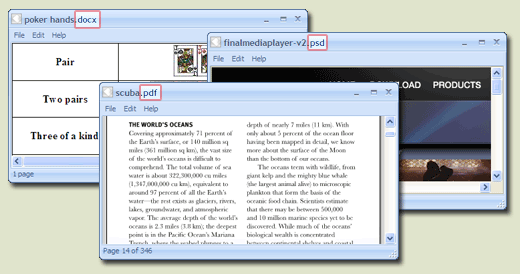
FreeFileViewer is a, all-in-one file viewer designed for Windows operating systems, supporting over 200 file formats. It enables users to open and view a wide array of documents, images, videos, and audio files without the need for multiple specialized software installations. This lightweight application is compatible with Windows 10, 8, 7, Vista, and XP, accommodating both 32-bit and 64-bit versions.
Key Features and Functionality:
- Extensive Format Support: FreeFileViewer can handle a diverse range of file types, including:
- Documents: DOC, DOCX, PDF, TXT, XLS, XLSX
- Images: JPG, PNG, GIF, PSD
- Videos: FLV, MP4, MOV, MPG
- Audio Files: FLAC, MP3, OGG, WMA
- Others: BIN, CFG, DAT, DIZ
- Standalone Operation: The software functions independently, allowing users to view files without requiring the original programs used to create them. For instance, it can display Adobe PDF files and Microsoft Office documents without needing Adobe Reader or Microsoft Office installed.
- User-Friendly Interface: Designed with simplicity in mind, FreeFileViewer offers an intuitive interface that facilitates easy navigation and file access.
- Comprehensive Installation: All necessary components are included within the installer, ensuring a seamless setup process without the need for additional software or plugins.
Primary Value and User Solutions:
FreeFileViewer addresses the common challenge of managing multiple file types by providing a unified solution that eliminates the need for numerous specialized applications. Users can effortlessly open and view a vast array of file formats, streamlining their workflow and enhancing productivity. This all-encompassing approach not only saves time but also conserves system resources, making it an ideal choice for individuals seeking a reliable and efficient file viewing tool.

WebDrive lets you edit files on corporate SFTP and SharePoint Servers as easily as editing any file on your computer.

Cloud Filestore is a managed file storage service for applications that require a filesystem interface and a shared filesystem for data. Filestore gives users a simple, native experience for standing up managed Network Attached Storage (NAS) with their Google Compute Engine and Kubernetes Engine instances. The ability to fine-tune Filestore's performance and capacity independently leads to predictably fast performance for your file-based workloads.

FileOrbis is an on-premise file management system allowing you to:
�Access your files from everywhere,
�Manage authorizations and access to your files,
�Share your files with internal and external users,
�Include your files in security analyzes and processes,
�Conduct content and sensitive data analysis on your files,
and it is equipped with unique operation and control features.

Green Filing is a certified electronic filing service provider to the Utah State District Courts. Our web based software allows Utah attorneys and their staff to view case information, documents on court cases, and e-file new pleadings into Utah's State Courts.

Puran File Recovery can be used to recover deleted/lost files/partitions. Files can be recovered from formatted disks too. Almost everything that is detected as a drive by Windows can be scanned irrespective of its file system. Be it Hard Disks, Pen Drives, Memory Cards, Mobile Phones, CDs, DVDs, basically any storage medium.

Microsoft Teams is a comprehensive collaboration platform developed by Microsoft, designed to streamline communication and teamwork within organizations. It integrates chat, video conferencing, file storage, and application integration into a single interface, facilitating seamless collaboration across various devices and operating systems. As part of the Microsoft 365 suite, Teams enhances productivity by providing a centralized hub for team interactions and project management.
Key Features and Functionality:
- Chat and Messaging: Facilitates real-time text communication with individuals or groups, supporting rich text, emojis, stickers, and GIFs.
- Video Conferencing: Offers high-quality video meetings with features like screen sharing, custom backgrounds, and live captions, accommodating both small team huddles and large webinars.
- File Sharing and Collaboration: Enables secure file storage and sharing through integration with OneDrive and SharePoint, allowing multiple users to co-author documents simultaneously.
- Integration with Applications: Supports integration with a wide range of Microsoft and third-party applications, enhancing workflow efficiency by bringing various tools into one platform.
- Security and Compliance: Provides enterprise-grade security measures, including data encryption for meetings, chats, calls, and files, ensuring compliance with industry standards.
Primary Value and Solutions Provided:
Microsoft Teams addresses the challenges of modern workplace collaboration by unifying communication channels, reducing the need for multiple disparate tools. It enhances team productivity by centralizing resources, facilitating real-time collaboration, and ensuring secure information sharing. By integrating with the broader Microsoft 365 ecosystem, Teams offers a cohesive environment that supports remote work, hybrid teams, and in-person collaboration, adapting to the diverse needs of today's workforce.

AuditFile is a secure, cloud-based solution that helps CPA firms (and internal audit teams) perform dramatically more efficient audits, reviews, and compilations.

Inkscape is a free and open-source vector graphics editor available for GNU/Linux, Windows, and macOS. It is widely used for creating both artistic and technical illustrations, including cartoons, clip art, logos, typography, diagrams, and flowcharts. By utilizing vector graphics, Inkscape ensures sharp printouts and renderings at any resolution, unlike raster graphics that are limited by pixel count. The software employs the standardized Scalable Vector Graphics (SVG) file format as its primary format, which is supported by many other applications, including web browsers.
Key Features and Functionality:
- Object Creation: Inkscape offers a variety of tools for drawing and shaping objects, such as the Pencil tool for freehand drawing, the Pen tool for creating Bézier curves and straight lines, and the Calligraphy tool for producing filled paths that mimic calligraphic strokes. It also includes shape tools for rectangles, ellipses, stars, polygons, and spirals.
- Object Manipulation: Users can perform transformations like moving, scaling, rotating, and skewing objects both interactively and by specifying exact numeric values. Inkscape supports grouping objects, layering, and aligning and distributing objects for precise design control.
- Text Support: The software provides a comprehensive text tool that allows for multi-line text, full on-canvas editing, and the ability to flow text along a path or into a shape. Users can adjust font, spacing, kerning, and more.
- File Format Compatibility: Inkscape can import and export various file formats, including SVG, AI, EPS, PDF, PS, and PNG, facilitating interoperability with other graphic design tools.
- Extensibility: Designed to be extensible, Inkscape allows users to customize its functionality with add-ons, enhancing its capabilities to meet specific needs.
Primary Value and User Solutions:
Inkscape provides a powerful, free alternative to proprietary vector graphics editors, enabling users to create high-quality illustrations without financial barriers. Its support for the SVG standard ensures compatibility and ease of sharing across different platforms and applications. The software's comprehensive feature set, combined with its user-friendly interface and multi-lingual support, makes it accessible to a broad audience, from beginners to professional designers. By offering tools for precise object creation and manipulation, robust text support, and compatibility with various file formats, Inkscape addresses the diverse needs of users seeking a versatile and cost-effective solution for vector graphic design.