AI-Generated Results
Finding matches…
Adlib enables the digital preparation of content for improved migration, compliance, privacy and security, digital transformation, capture and classification.
Not seeing what you're looking for?
Dive deeper into "PDF Reader Pro" on G2 AI

Sejda PDF Editor for G Suite is a comprehensive, cloud-based tool designed to streamline PDF management within the Google Workspace environment. It enables users to edit, sign, compress, convert, split, and merge PDF documents directly from Google Drive, eliminating the need for additional software installations. This integration facilitates seamless workflows, allowing teams to collaborate efficiently on PDF files without leaving the G Suite ecosystem.
Key Features and Functionality:
- PDF Editing: Add or modify text and images, edit existing content, utilize the whiteout tool, annotate with highlights and strike-throughs, and draw shapes.
- Digital Signatures: Sign PDF documents electronically, enhancing document authenticity and security.
- Compression: Reduce PDF file sizes to optimize storage and facilitate faster sharing.
- Format Conversion: Convert PDFs to and from Office formats (Word, Excel, PowerPoint) and images (JPG, PNG).
- Document Organization: Visually combine, reorder, merge multiple PDFs with table of contents and bookmarks, and split documents as needed.
- Page Management: Crop, rotate, delete, resize pages, add watermarks, and insert page numbers or header/footer labels.
- Bates Numbering: Apply Bates stamps to PDF documents for indexing and legal purposes.
Primary Value and User Solutions:
Sejda PDF Editor for G Suite addresses the need for efficient and accessible PDF management within the Google Workspace. By integrating directly with Google Drive, it allows users to perform a wide range of PDF tasks without switching between applications, thereby enhancing productivity and collaboration. Its user-friendly interface ensures that both technical and non-technical users can effectively edit and manage PDFs, making it an ideal solution for businesses, educators, and professionals seeking a reliable and integrated PDF tool.

WinZip has gone beyond zipping to make PDFs easy: read, edit, collaborate, convert, secure PDFs, and more with WinZip PDF Pro.
- Read and review any type of PDF file
- Convert files from and to PDF
- Merge multiple files into one PDF
- Edit, add, delete, extract, and organize PDF pages
- Comment directly within PDFs ...and so much more!
We designed WinZip PDF Pro from the ground up to be easy and straightforward. Cover all your PDF needs at work and home in a few easy clicks. It's simple, powerful, and affordable. WinZip PDF Pro can be used as a 100% Free PDF Reader to view PDFs or have its PRO features unlocked to truly meet your PDF editing and management needs. Your 7-day trial of WinZip PDF Pro starts as soon as you install the program on your device. You won't be asked for your email or credit card, and there's no registration. Whether you just want to view PDFs or professionally create and manage PDFs, we’ve got your back. Go ahead and give WinZip PDF Pro a try today and see how it improves your daily productivity!

CutePDF Professional is a user-friendly Windows application designed to provide advanced control over PDF document creation and management. It enables users to add comments, apply security measures, insert stamps, headers, and footers, create interactive form fields, design booklets or n-Up pages, combine multiple files, and rearrange pages efficiently. This software streamlines business document processing and publishing, while also conserving ink, paper, and time by enhancing printed output.
Key Features and Functionality:
- Page Content Management: Replace page contents, merge multiple interactive PDF forms into a single document, and reduce file sizes.
- Interactive Elements: Create and edit interactive form fields, add hierarchical bookmarks, and utilize the Typewriter tool to insert text anywhere on a PDF page.
- Annotation Tools: Add notes, text, links, highlights, and file attachments to PDFs, facilitating collaboration and feedback.
- Document Security: Protect documents with passwords, set security options, and digitally sign PDFs to ensure authenticity and confidentiality.
- Page Layout and Design: Add headers and footers with date, time, page numbers, and Bates numbering; insert watermarks; overlay pages to add backgrounds or letterheads; and create compact, double-sided PDF booklets.
- File Size Optimization: Reduce large PDF file sizes to save storage space and improve sharing efficiency.
- Additional Functionalities: Convert PDF documents to image files, scan documents directly to PDF, and utilize FTP upload functionality for seamless file sharing.
Primary Value and User Solutions:
CutePDF Professional offers a comprehensive suite of tools that simplify the creation, editing, and management of PDF documents. By providing features such as interactive form creation, document security, and efficient page organization, it addresses the needs of professionals seeking an affordable and efficient solution for handling PDFs. The software's ability to optimize file sizes and enhance printed output further contributes to cost savings and improved productivity in document processing tasks.

DocRaptor is a powerful API service that enables developers to convert HTML, CSS, and JavaScript into high-quality PDF and Excel documents. Utilizing the advanced PrinceXML PDF generator, DocRaptor ensures precise rendering of complex layouts, making it ideal for applications requiring professional document generation. Its seamless integration with various programming languages allows for efficient automation of document workflows across diverse industries.
Key Features and Functionality:
- Comprehensive HTML & CSS Support: DocRaptor fully supports HTML5, CSS3, and JavaScript, enabling the creation of sophisticated document layouts with features like headers, footers, watermarks, footnotes, columns, and cross-references.
- Advanced PDF Output Options: The API offers capabilities such as accessible PDFs, printer's marks, bookmarks, links, forms, font embedding, password protection, and encryption, ensuring documents meet various professional and security standards.
- Flexible Document Generation: DocRaptor supports asynchronous and parallel document generation, with no size limits, facilitating efficient processing of large volumes of documents.
- Multi-Language Integration: The API is compatible with numerous programming languages, including Ruby, JavaScript, PHP, and C#, allowing developers to integrate it seamlessly into their existing systems.
- Security and Compliance: DocRaptor is certified under SOC 2 and HIPAA compliance standards, ensuring the protection of sensitive data during document processing.
Primary Value and User Solutions:
DocRaptor addresses the need for reliable and efficient document generation by automating the conversion of web content into professional-grade PDFs and Excel files. This automation reduces development time, ensures consistent document quality, and allows businesses to focus on core operations without the complexities of manual document creation. Industries such as finance, healthcare, e-commerce, education, and legal services benefit from DocRaptor's ability to produce accurate, accessible, and secure documents at scale.
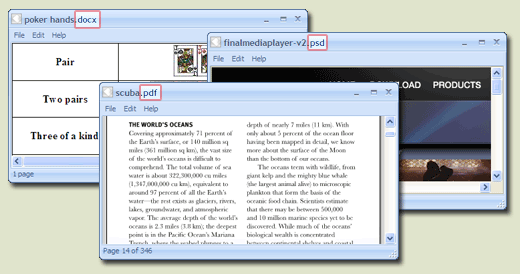
FreeFileViewer is a, all-in-one file viewer designed for Windows operating systems, supporting over 200 file formats. It enables users to open and view a wide array of documents, images, videos, and audio files without the need for multiple specialized software installations. This lightweight application is compatible with Windows 10, 8, 7, Vista, and XP, accommodating both 32-bit and 64-bit versions.
Key Features and Functionality:
- Extensive Format Support: FreeFileViewer can handle a diverse range of file types, including:
- Documents: DOC, DOCX, PDF, TXT, XLS, XLSX
- Images: JPG, PNG, GIF, PSD
- Videos: FLV, MP4, MOV, MPG
- Audio Files: FLAC, MP3, OGG, WMA
- Others: BIN, CFG, DAT, DIZ
- Standalone Operation: The software functions independently, allowing users to view files without requiring the original programs used to create them. For instance, it can display Adobe PDF files and Microsoft Office documents without needing Adobe Reader or Microsoft Office installed.
- User-Friendly Interface: Designed with simplicity in mind, FreeFileViewer offers an intuitive interface that facilitates easy navigation and file access.
- Comprehensive Installation: All necessary components are included within the installer, ensuring a seamless setup process without the need for additional software or plugins.
Primary Value and User Solutions:
FreeFileViewer addresses the common challenge of managing multiple file types by providing a unified solution that eliminates the need for numerous specialized applications. Users can effortlessly open and view a vast array of file formats, streamlining their workflow and enhancing productivity. This all-encompassing approach not only saves time but also conserves system resources, making it an ideal choice for individuals seeking a reliable and efficient file viewing tool.

Public Sector | Citizen Engagement Software
Konveio provides a Document Engagement platform for local governments to present a valuable digital experience for citizen engagement that's simple to setup and share with the public (or stakeholder groups) to capture comments and collaborate with threaded discussions anywhere on PDF documents.
In minutes, PDF documents can be enriched by embedding interactive content anywhere on a page or on the side to be displayed across a range of different pages or chapters, including Youtube videos, ArcGIS maps, images, text overlays, and much more. (Accepts virtually all iFrame embed codes.)
Visitors use Konveio to better navigate and inform themselves through the help of an interactive glossaries (to define jargon and acronyms), interactive table of contents menu, step by step guided tours, translation support, screen reader support, and more.
Beyond commenting on PDF materials, forms, surveys, discussion forums, and more can be placed anywhere on your document (including the sidebar to span any/all of the pages of your document).
All of the feedback and comments received can be analyzed within the platform using search, tagging, and filters. Everything may be exported as a report including CSV or annotated PDF formats.
Konveio's clients receive their own branded space with a unique URL to share. For an even more seamless experience, documents may be embedded to other platforms and websites as an iFrame embed code.
As a purpose built engagement platform, there are a wide range of settings to suit any engagement phase or goal.

Document 365 is a comprehensive, cross-device document solution aimed at improving your productivity. The PDF document solution includes Kdan's best PDF Reader mobile and desktop apps along with online converting and faxing services. With document 365, you can leverage your productivity every day. And it starts now.

EditionGuard is a comprehensive eBook Digital Rights Management (DRM) and fulfillment platform designed to help publishers, authors, and institutions securely distribute and sell their digital content. By leveraging industry-standard DRM solutions, EditionGuard ensures that eBooks and PDFs are protected against unauthorized access and piracy, while providing a seamless experience for both content creators and readers.
Key Features and Functionality:
- Multiple DRM Options: Offers a selection of DRM technologies, including Adobe DRM, Readium LCP, and social DRM solutions, allowing users to choose the level of protection that best suits their needs.
- Secure eBook Fulfillment: Automates the delivery of eBook orders post-purchase, ensuring that content reaches customers securely and promptly.
- Storefront Integration: Provides a customizable storefront with secure payment processing and eBook delivery, enabling users to sell their eBooks directly to consumers without additional percentage fees.
- Comprehensive Content Control: Allows publishers to manage display permissions, restrict copying and printing, and set expiration dates, giving them full control over how their content is accessed and used.
- Easy Integration: Supports integration with popular platforms like WordPress, Shopify, and Magento through plugins, as well as offering a modern RESTful API for custom integrations.
- Activity Monitoring: Provides detailed reports and analytics on eBook downloads and fulfillment, helping users track performance and usage.
Primary Value and Solutions Provided:
EditionGuard addresses the critical need for secure digital content distribution by offering an affordable and flexible DRM solution. It empowers publishers and authors to protect their intellectual property from unauthorized sharing and piracy, ensuring that their eBooks are distributed securely. By simplifying the complexities associated with DRM implementation and eBook fulfillment, EditionGuard enables content creators to focus on producing quality material while confidently managing and monetizing their digital assets.

Download free Aryson PDF Repair Tool which is the best tool for PDF File recovery in Windows. This is the advanced tool for fixing various issues in the PDF file. The various issues which can exist in the PDF file is due to corruption. Because of the corruption you if your PDF files are damaged, corrupted or inaccessible then this tool is very helpful for the recovery of PDF files. The PDF file containing any type of data like images, text, graphics, graphs, etc can easily be repaired by this tool. This tool is designed with advanced technology such that it can recover the external devices PDF files like from USB flash drives, CD's, DVD's, etc. After the completion of the recovery process, the recovered data will be restored in the new PDF file. With the help of an advanced search facility, you will not face any difficulty in finding the PDF files for the recovery. The Preview option is there in the tool by which you can preview the scanning process of the files. This tool is also capable of handling the minor as well as major corruption. There will be flawless recovery without any hindrance. It covers all the possible errors which can occur in the Acrobat Adobe Reader PDF files. There are two dual recovery modes are available for handling the different types of corruption degree these are Standard and Advanced recovery modes. There is no file size limitation for the PDF files even it supports the large-sized PDF files. You can select single and multiple PDF files in the single attempt. The application is designed in keeping the non-technical users in the mind. So, it has a very easy and interactive graphical user interface for both novice and non-technical users. It supports the PDF files which are created by any version of Acrobat Adobe Reader. It is highly compatible with all the versions of the Windows operating system.

PDFMonk is a comprehensive online platform designed to streamline the management of PDF documents for individuals and businesses. It offers a suite of tools that enable users to organize, convert, and secure their PDF files efficiently. With a focus on speed, security, and user-friendliness, PDFMonk eliminates the need for complex software installations, allowing users to perform various PDF-related tasks directly from their web browsers.
Key Features and Functionality:
- Compress PDF: Reduce the size of large PDF files without compromising quality, facilitating easier storage and sharing.
- Merge PDF: Combine multiple PDF documents into a single file, simplifying document management.
- Crop PDF: Remove unwanted margins or sections from PDF pages to focus on essential content.
- Convert EPUB to PDF: Transform ePub e-books into PDF format for broader compatibility.
- Images to PDF: Convert various image formats, including JPG and PNG, into a single PDF document.
- PDF to Images: Extract pages from a PDF and save them as high-quality JPG or PNG images.
- PDF to Word: Convert PDF files into editable Microsoft Word documents.
- Protect PDF: Secure sensitive documents by adding password protection to prevent unauthorized access.
- UnProtect PDF: Remove password protection from PDF files when access is permitted.
- Professional Invoice: Generate professional invoices with customizable templates suitable for various business needs.
- Retail Display Label: Create retail labels for product displays, enhancing in-store marketing efforts.
- UPI QR Code: Generate branded UPI QR codes for seamless digital payments in retail environments.
Primary Value and Solutions Provided:
PDFMonk addresses the common challenges associated with PDF document management by offering a cloud-based solution that is fast, secure, and easy to use. It eliminates the need for complex software installations, allowing users to perform various PDF-related tasks directly from their web browsers. By providing a comprehensive suite of tools, PDFMonk enhances productivity and efficiency for users across various sectors, including education, small businesses, and retail. Its user-friendly interface ensures that even those with minimal technical expertise can manage their PDF documents effectively.

In the past 7 years, iSeePassword have helped millions of users successfully retrieve their login passwords from their locked PC, locked PDF document and Excel file, etc., and helped them regain their access rights to device and documents. At the same time, hundreds of tech websites and blogs also mentioned our brands and products to the readers, helping us to move towards the world. This is not only an affirmation for iSeePassword hard work, but also an encouragement for us to keep striving.

React PDF is a powerful PDF viewer component built in React.js. Unlike iframe-based viewers or generic wrappers, React PDF integrates natively into your React app, providing full control over the viewing experience with minimal setup.
With developer-first features like flexible toolbar customization, zoom and layout control, page rendering hooks, and clear documentation, it enables teams to render PDF viewer into their applications easily.
React PDF integrates well with various React framework such as Next.js, Remix, Gatsby and Docusaurus. It is compatible with React 18 and React 19.
Ideal for teams looking to an AI tool, document management system, or just a PDF reader. React PDF offers the performance and flexibility needed for production-grade applications.
React PDF is regularly updated with dedicated support. It includes a perpetual license model with 1-year support and version updates.

5kFlip Windows Flipbook Maker Software provides the easiest way to make digital page-flipping Flash/HTML5 flip books from PDF. To make flipbooks with 5kFlip flip book maker Windows, all you need to do is import PDF files, customize flash flip books with built-in template and scene, logo, background music and background image, bookmark, etc. and then publish PDF to flash/html5 page flipping books easily. Readers can view the flash page flipping e-books with page-flipping effect on any computers, tablets, and mobile phones like iPhone, iPad and Android devices.

Add PDF viewing and annotating functionality to your application by integrating PDF Web Viewer. Benefit from our latest generation rendering engine for world-class rendering quality. Design the mobile-friendly PDF viewer’s appearance, behavior, and functionality, including annotations to match your requirements.

Business Card Scanner is an online SaaS-based tool that can easily extract text from images, PDFs, handwritten notes, and printed documents. It uses advanced OCR algorithms to provide super-fast and accurate results. It is accessible through a vast number of operating systems and devices, thanks to its universal compatibility. Another great feature that sets it apart from its counterparts is its ability to translate the extracted text into more than 100 languages. If you're an Android or iOS user, you can use its business card scanner and reader application to convert your physical cards into a digitized form.

WholeClear Thunderbird to PDF Converter to transfer Thunderbird emails to Adobe PDF file format. Users are free to convert unlimited mailboxes from Thunderbird to Adobe PDF file format. No need for Adobe Reade installation to export Thunderbird mailboxes to a PDF file format. Download the demo version of the program before you invest in the license version. 100% of data safety is provided by the tool throughout the conversion.

Photopea is a free, web-based image editor that offers advanced photo editing and graphic design capabilities directly in your browser. It supports a wide range of file formats, including PSD, AI, PDF, SVG, and CDR, making it compatible with Adobe Photoshop and other popular tools. With Photopea, users can perform tasks such as photo retouching, image composition, vector editing, and UI design without installing any software. Its intuitive interface closely resembles that of traditional desktop tools, making it accessible for both professionals and casual users. Whether you're a designer, student, or hobbyist, Photopea delivers professional-grade editing tools for free, accessible from any device with internet access.
Key Features and Functionality:
- Comprehensive Editing Tools: Offers a full suite of tools, including cropping, resizing, layering, masking, blending, adjustment layers, and advanced filters like Liquify and Puppet Warp.
- Extensive Format Support: Compatible with over 40 file types, such as PSD, PNG, JPG, GIF, SVG, PDF, AI, and raw camera formats, facilitating seamless editing across various platforms.
- Vector and Raster Graphics Support: Enables the creation and editing of both vector shapes and paths alongside pixel-based images, catering to diverse design needs.
- Browser-Based Operation: Runs entirely within the user's browser without requiring file uploads to external servers, ensuring privacy and the ability to work offline once loaded.
- AI-Powered Features: Provides advanced AI tools for tasks like background removal, image replacement, and image generation, enhancing editing efficiency.
- Cross-Device Compatibility: Accessible on desktops, laptops, tablets, and smartphones, with performance optimized based on hardware capabilities.
Primary Value and User Solutions:
Photopea addresses the need for a versatile, accessible, and cost-effective image editing solution by offering a comprehensive set of tools comparable to those found in premium software, all within a free, browser-based platform. It eliminates the barriers of software installation and high costs, making professional-grade editing accessible to a broader audience. By processing files locally, it ensures user privacy and allows for offline work, catering to users who require reliable and efficient editing capabilities without compromising security.

Vole PDF Creator is a tool designed to simplify the creation of professional PDF documents directly from scratch, utilizing a built-in Word editor. This software enables users to craft PDFs that mirror the quality and formatting of Word documents, incorporating rich text, images, various paragraph and font styles, and access to over 100 professional table designs. Its intuitive interface ensures that users can produce polished PDFs without the need for external applications or complex processes.
Key Features and Functionality:
- Integrated Word Editor: Allows for the direct creation and editing of documents within the application, streamlining the PDF creation process.
- Rich Formatting Options: Supports the inclusion of rich text, images, diverse paragraph and font styles, enhancing the visual appeal and readability of documents.
- Extensive Table Designs: Offers more than 100 professional table styles, facilitating the organization and presentation of data in a structured manner.
- Custom Content Blocks: Enables users to define content once and reference it multiple times throughout the document, ideal for consistent headers, footers, or recurring sections.
Primary Value and User Solutions:
Vole PDF Creator addresses the need for an efficient and user-friendly solution to produce high-quality PDF documents without relying on multiple software tools. By integrating a Word editor within the application, it eliminates compatibility issues and reduces the learning curve associated with separate PDF creation software. This all-in-one approach not only saves time but also ensures consistency and professionalism in document formatting, making it an invaluable asset for professionals, educators, and anyone requiring reliable PDF creation capabilities.

The pdflayer API was built to provide a quick and seamless way to automate HTML to PDF conversion in any application. Its lightweight RESTful infrastructure is based on an efficient combination of the most powerful PDF rendering engines available, making it the most cost-effective and reliable option for anyone looking to process small or large numbers of documents within short time windows.