Best PDF SDKs Software

How Many PDF SDKs Software Products Does G2 Track?

Total Products under this Category: 45

Category Stats (Sep 2026)

  • Average Rating: 4.51/5 (↓0.04 vs Aug 2026) The average rating of products in this category, based on all submitted ratings
  • Top Trending Product: Nitro PDF (+0.05%) - Among all products in this category, Nitro PDF recorded the largest rating increase compared to last month

Last updated: September 06, 2026

How Does G2 Rank PDF SDKs Software Products?

Why You Can Trust G2's Software Rankings:

  • 30 Analysts and Data Experts
  • 1,700+ Authentic Reviews
  • 45+ Products
  • Unbiased Rankings

G2's software rankings are built on verified user reviews, rigorous moderation, and a consistent research methodology maintained by a team of analysts and data experts. Each product is measured using the same transparent criteria, with no paid placement or vendor influence. While reviews reflect real user experiences, which can be subjective, they offer valuable insight into how software performs in the hands of professionals. Together, these inputs power the G2 Score, a standardized way to compare tools within every category.

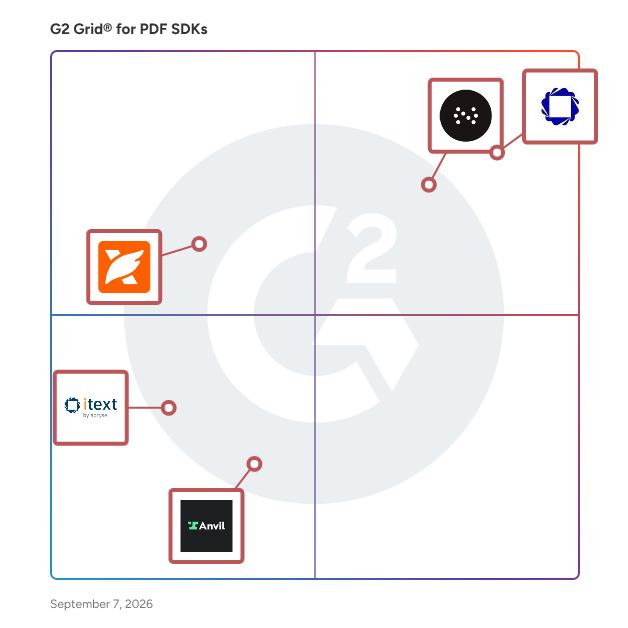
G2 Grid® for PDF SDKs Software

G2 Grid® for PDF SDKs Software plotting products by satisfaction and market presence

Highlighted products: Apryse PDF SDK, Nutrient SDK, Foxit PDF SDK, Anvil, and iText by Apryse.

Underlying data: [Grid® JSON](https://www.g2.com/categories/pdf-sdks/grids.json?focus%5B%5D=apryse-pdf-sdk&focus%5B%5D=nutrient-sdk&focus%5B%5D=foxit-pdf-sdk&focus%5B%5D=anvil-foundry-anvil&focus%5B%5D=itext-by-apryse)

Apryse PDF SDK

Apryse: The Future of Document Intelligence Apryse (formerly PDFTron) empowers businesses and developers to handle complex document workflows with unmatched speed, precision, and security. Whether you are building for the browser or scaling enterprise-grade server infrastructure, Apryse delivers a frictionless document experience that keeps your data secure and your users productive. Leading organizations choose Apryse for several reasons. Best-in-class performance powers your applications with high-fidelity viewing, editing, and annotation capabilities that handle large files without the lag. Native React integration accelerates your development cycle with dedicated React-compatible components. Advanced OCR and data extraction turn static scans and image-based files into searchable, machine-readable documents, allowing you to extract text and data with high precision regardless of layout complexity. WebViewer UI is built with React PDF, providing a fully customizable, modular, and accessible document interface that integrates into your stack in minutes, not weeks. Security without compromise means you maintain complete control over your data, since our solutions run on your own infrastructure, ensuring you never rely on third-party cloud dependencies or external document processing services. Multi-format versatility takes you beyond PDF, empowering your users to view, edit, and collaborate on 160+ formats, including Microsoft Office (DOCX, XLSX, PPTX), CAD, images, and video, all within a single, consistent interface. Enterprise-ready compliance from redaction and digital signatures to ISO-compliant PDF/A conversion, provides the tools necessary to meet strict industry regulations and security standards. Trusted globally by Fortune 500 companies and innovative startups, Apryse transforms how the world works with documents. Learn more: https://bit.ly/46T0jCt

Average Rating: 4.2/5.0

Total Reviews: 131

How Do G2 Users Rate Apryse PDF SDK?

  • Quality of Support: 8.3/10 (Category avg: 9.0/10)
  • Ease of Use: 8.6/10 (Category avg: 8.8/10)

Who Is the Company Behind Apryse PDF SDK?

  • Seller: Apryse
  • Company Website:
  • Year Founded: 1998
  • HQ Location: Denver, CO
  • Twitter: @aprysesolutions
    381 Twitter followers
  • LinkedIn® Page: www.linkedin.com
    569 employees on LinkedIn®

Who Uses This Product?

  • Who Uses This: CTO, Product Manager
  • Top Industries: Computer Software, Information Technology and Services
  • Company Size: 48% Small, 39% Medium

What Do G2 Reviewers Say About Apryse PDF SDK?

AI-generated summary from verified user reviews

Pros
  • Users find Apryse PDF SDK to be a user-friendly and easy-to-implement PDF solution with excellent customer support.
  • Users commend Apryse PDF SDK for its outstanding PDF editing capabilities, making document manipulation seamless and efficient.
  • Users highlight the versatility of Apryse PDF SDK, enjoying diverse options for various document generation needs.
  • Users commend the reliability of Apryse PDF SDK, seamlessly integrating and functioning well across platforms without issues.
  • Users commend the seamless compatibility of Apryse PDF SDK, enabling effortless integration across multiple platforms and environments.
Cons
  • Users find the learning curve steep for advanced features, but support assistance helps ease the process.
  • Users find the licensing options confusing and costly, especially for smaller projects, impacting their overall experience.
  • Users find the setup difficulty can be time-consuming, especially when aligning with brand styles and navigating license options.
  • Users find the licensing inflexibility and high costs challenging, especially when needing only specific SDK features.
  • Users find the poor documentation challenging, often requiring extra effort to navigate and troubleshoot issues effectively.

What Are Recent G2 Reviews of Apryse PDF SDK?

Nutrient SDK

Nutrient SDK (formerly PSPDFKit and ORPALIS) is a document SDK that provides developers with a set out-of-the-box tools to add advanced functionality like PDF viewing, annotation, signing, form fill, and more to their applications. 1. PDF SDK PRODUCTS Our SDK lets you focus on shipping features and not on building PDF software. Accelerate product innovation by integrating prebuilt solutions like PDF viewing, signing, annotating, and editing directly in your web, mobile or desktop app. 2. PDF SERVER PRODUCTS Embed PDF processing capabilities into your server to redact, fill forms, edit PDFs, convert documents, and more. Choose between a .NET or Java PDF library or add a plug and play headless document processor that integrates into any server environment. 3. AI DOCUMENT PROCESSING XtractFlow combines generative AI with Nutrient's machine vision technology to automatically identify, extract, and process data in unstructured documents. 4. PDF API Use hosted PDF API to generate, convert, and modify PDF documents in your workflows. We manage the development and server administration, letting you focus on what you do best.

Average Rating: 4.7/5.0

Total Reviews: 68

How Do G2 Users Rate Nutrient SDK?

  • Quality of Support: 9.4/10 (Category avg: 9.0/10)
  • Ease of Use: 9.1/10 (Category avg: 8.8/10)

Who Is the Company Behind Nutrient SDK?

  • Seller: Nutrient
  • Company Website:
  • Year Founded: 2011
  • HQ Location: Raleigh, North Carolina USA
  • Twitter: @nutrientdocs
    4,183 Twitter followers
  • LinkedIn® Page: www.linkedin.com
    144 employees on LinkedIn®

Who Uses This Product?

  • Top Industries: Computer Software, Information Technology and Services
  • Company Size: 54% Small, 40% Medium

What Do G2 Reviewers Say About Nutrient SDK?

AI-generated summary from verified user reviews

Pros
  • Users appreciate the ease of use of Nutrient SDK, enjoying seamless integration and excellent support throughout the process.
  • Users value the exceptional reliability of Nutrient SDK, ensuring seamless PDF integration and outstanding support throughout.
  • Users praise the outstanding customer support of Nutrient SDK, noting their attentiveness and problem-solving skills.
  • Users value the exceptional PDF viewing experience and seamless integration of Nutrient SDK across platforms.
  • Users value the intuitive integration of Nutrient SDK, enhancing their PDF viewing and annotating experience effortlessly.
Cons
  • Users note the high cost of Nutrient SDK, making it challenging for smaller teams and budget-conscious projects.
  • Users find the pricing high, which can be a barrier for smaller teams and budget-sensitive projects.
  • Users express concerns about high pricing, which may be prohibitive for smaller teams or budget-conscious projects.
  • Users find the initial learning curve of Nutrient SDK challenging, requiring significant time investment for effective usage.
  • Users feel that while the HTML quality is high, there are still accessibility issues that need addressing.

What Are Recent G2 Reviews of Nutrient SDK?

What Are G2 Users Discussing About Nutrient SDK?

Foxit PDF SDK

Foxit is the Industry Leader in PDF SDK Technology, we open billions of PDF’s every day. Our Clients include household names, such as: Google, Amazon, IBM, Intel, Microsoft, J.P. Morgan, Bank of America, NASDAQ, as well as upcoming startups. We offer 7 x Platforms: Web, Windows, iOS, Android, Mac, Linux & UWP which support modern languages and frameworks. Our 150+ features include: Viewer, Annotations, Forms, Digital Signatures, Edit & Manipulate, Security, Redaction, Full-Text Search, Creation and much more. We have 330 Million End Users, 100+ Thousand Clients in 170 Countries. You will be supported by 200+ Developers with 15+ Years Development Experience. Our Support and our Dedicated Solution Engineers are located all over the globe. We offer flexible licensing and partnership opportunities. Download our Foxit PDF SDK and try it out today.

Average Rating: 4.5/5.0

Total Reviews: 52

How Do G2 Users Rate Foxit PDF SDK?

  • Quality of Support: 8.5/10 (Category avg: 9.0/10)
  • Ease of Use: 9.2/10 (Category avg: 8.8/10)

Who Is the Company Behind Foxit PDF SDK?

  • Seller: Foxit
  • Company Website:
  • Year Founded: 2001
  • HQ Location: Fremont, CA
  • Twitter: @foxitsoftware
    6,226 Twitter followers
  • LinkedIn® Page: www.linkedin.com
    590 employees on LinkedIn®

Who Uses This Product?

  • Top Industries: Computer Software
  • Company Size: 37% Small, 33% Medium

What Are Recent G2 Reviews of Foxit PDF SDK?

What Are G2 Users Discussing About Foxit PDF SDK?

Anvil

Anvil helps turn clunky paperwork processes into embeddable document workflows with document APIs for product teams. We work closely with HRtech, Insurtech, FinTech, Healthcare, Real Estate, and startup companies where paperwork, user experience, and data accessibility are considered "high-priority".

Average Rating: 4.7/5.0

Total Reviews: 32

How Do G2 Users Rate Anvil?

  • Quality of Support: 9.4/10 (Category avg: 9.0/10)
  • Ease of Use: 9.0/10 (Category avg: 8.8/10)

Who Is the Company Behind Anvil?

Who Uses This Product?

  • Company Size: 63% Small, 26% Medium

What Do G2 Reviewers Say About Anvil?

AI-generated summary from verified user reviews

Pros
  • Users find Anvil's ease of use exceptional, praising its effortless implementation and outstanding support experience.
  • Users commend Anvil for its outstanding customer support, noting swift onboarding and superb assistance throughout setup.
  • Users praise Anvil's efficiency in connecting databases and APIs, streamlining app development for non-developers.
  • Users appreciate the effortless software integration of Anvil, making app development fast and accessible for everyone.
  • Users highlight the incredible ease of use of Anvil, appreciating its intuitive setup and seamless integration features.
Cons
  • Users find the navigation confusing, often losing their place in long documents despite robust documentation.
  • Users find the template builder complex and tedious, making the experience less user-friendly and efficient.
  • Users face implementation difficulties with Anvil, particularly in integrating APIs and navigating costly custom workflow options.
  • Users find the missing translation and document versioning features hinder their experience, leading to inaccuracies and inefficiencies.
  • Users find the poor documentation lacking in clear examples and tutorials, complicating the learning experience.

What Are Recent G2 Reviews of Anvil?

iText by Apryse

Now part of the Apryse family, iText is one of the best-documented and most versatile PDF SDKs in the world. The open-source iText Core library features a powerful layout engine and intuitive high-level APIs for document creation and manipulation, digital signing and validation, and much more. It has built-in support for PDF 2.0, all variants of PDF/A and PDF/UA, FIPS-140-2 and the very latest ISO standards for digital signatures and encryption. You can extend iText's capabilities even further, with add-ons for comprehensive HTML/XML and CSS templating, global language and writing systems, secure document redaction, OCR, document optimization, and working with dynamic XFA. iText Core is free to use under the AGPLv3 license, while a commercial license releases you from the AGPL terms and gives you professional support and maintenance. Visit the iText website at https://itextpdf.com/ to try the entire iText Suite free for 30 days, while keeping your IP safe under iText's commercial license terms.

Average Rating: 4.2/5.0

Total Reviews: 26

How Do G2 Users Rate iText by Apryse?

  • Quality of Support: 8.2/10 (Category avg: 9.0/10)
  • Ease of Use: 7.9/10 (Category avg: 8.8/10)

Who Is the Company Behind iText by Apryse?

  • Seller: Apryse
  • Year Founded: 1998
  • HQ Location: Denver, CO
  • Twitter: @aprysesolutions
    381 Twitter followers
  • LinkedIn® Page: www.linkedin.com
    569 employees on LinkedIn®

Who Uses This Product?

  • Who Uses This: Software Engineer
  • Top Industries: Computer Software
  • Company Size: 52% Small, 34% Large

What Are Recent G2 Reviews of iText by Apryse?

What Are G2 Users Discussing About iText by Apryse?

Adobe PDF Library by Datalogics

Adobe PDF Library SDK gives developers the tools to solve even the most complex PDF workflows. SOC 2 Type 2 certified. Global OEMs, SaaS and enterprise end-users rely on Adobe PDF Library to automate the creation, editing and management of PDFs. An Adobe partner, our SDK uses the same source code as Acrobat for stability, reliability and quality results. Flexible programming language and platform options include .NET, .NET Framework, Java and C/C++ on Windows, Linux, MacOS; NuGet & Maven; pdfRest API Toolkit Container option. Free trial with proof of concept support, join us on Discord or use our AI assistant for help. Our expertise and support is the reason we have a 94% customer retention rate. Need more info? Ask our AI Assistant "Scout" on our website or join the Datalogics Discord server. Capabilities include but are not limited to: -Annotations -Archiving with PDF/A -Content creation -Content modification – change layers, change configurations, flatten transparencies, merge, split, underlines, highlights, watermarks -Color management -Extraction - text, images, forms -Compression/optimize -Conversion - PDF/A, PDF/X, EPS, PostScript, XPS, ZUGFeRD, color -Display -Digital Signature -Extract text, images & other content -Forms - Import, export, flatten static & dynamic XFA forms, AcroForms -Images - extract, import/export, thumbnails, render/rasterize pages, separations -Optimization - size, content, images, etc. -OCR - Optical Character Recognition - add text to document, add text to image -PDF to Office Documents (Word, Excel, PPT) -Printing -Security - Viewer settings, redactions, password, encrypt/decryption, watermark -Text modifications Our extensive documentation includes getting started guides, API references, and hundreds of sample code examples on GitHub to help developers precisely create and define PDF workflow solutions. Pricing for Adobe PDF Library is based on your business model & software usage, starting at $5,999 for internal use. Please contact us for OEM & SaaS pricing. Details: OEMs Customers incorporating our PDF software into an application for external distribution pay a flat annual fee per platform and a royalty based on product distribution. The royalty fee is based on a percentage of sales, a flat fee per unit, or fixed distribution – based on how you license your product. SaaS Customers using our PDF software in an externally accessible service (SaaS) license the software based on the number of servers deployed or a customized model based on users, activations, quantity of documents processed, or revenue. Internal Usage/End-Users Starting at $5,999, licensing is based on the number of servers or desktops where the software is deployed. Download a free trial today and get started!

Average Rating: 4.1/5.0

Total Reviews: 5

How Do G2 Users Rate Adobe PDF Library by Datalogics?

  • Quality of Support: 8.3/10 (Category avg: 9.0/10)
  • Ease of Use: 6.7/10 (Category avg: 8.8/10)

Who Is the Company Behind Adobe PDF Library by Datalogics?

Who Uses This Product?

  • Company Size: 60% Large, 20% Medium

What Are Recent G2 Reviews of Adobe PDF Library by Datalogics?

What Are G2 Users Discussing About Adobe PDF Library by Datalogics?

ComPDF

ComPDF, powered by KDAN (TPEx: 7737), is built on the vision of “Leading the Intelligent PDF Era with Continuous Innovation”. ComPDF offers following products: - ComPDF SDK is highly compatible with web, server, desktop, and mobile platforms, seamlessly integrating with various development frameworks. It provides features lincluding generation, viewing, editing, conversion, signing, etc. - ComPDF Cloud delivers a secure, stable, and efficient service environment, simplifying enterprise document processing and business integration workflows. With the flexibility to use either Open API calls or private deployment, enterprises can generate, edit, convert, OCR recognize, and extract data. - ComPDF AI provides intelligent document processing capabilities, enabling automated data extraction, parsing, and knowledge management. Together, these components streamline workflows, improve operational efficiency, and accelerate enterprise digital transformation.

Average Rating: 4.7/5.0

Total Reviews: 3

How Do G2 Users Rate ComPDF?

  • Quality of Support: 10.0/10 (Category avg: 9.0/10)
  • Ease of Use: 9.4/10 (Category avg: 8.8/10)

Who Is the Company Behind ComPDF?

  • Seller: PDF Technologies, Inc
  • Year Founded: 2013
  • HQ Location: Singapore, Central Region
  • Twitter: @PDFReaderPro
    350 Twitter followers
  • LinkedIn® Page: www.linkedin.com
    4 employees on LinkedIn®

Who Uses This Product?

  • Company Size: 60% Small, 40% Medium

What Are Recent G2 Reviews of ComPDF?

pdfFiller

pdfFiller is a cloud-native document management platform that unifies editing, e-signing, storage, and collaboration. Purpose-built for small and mid-sized businesses, it eliminates the need for multiple subscriptions and constant app-switching, delivering enterprise-grade functionality without enterprise-grade complexity. pdfFiller is engineered for value-driven small businesses, enabling teams to work confidently from wherever they choose. Documents are securely stored in the cloud, giving teams reliable anytime-anywhere access with zero risk of data loss. Recognized internationally as a leading PDF solution across industries and sectors of various sizes, pdfFiller is trusted by organizations seeking to modernize their document workflows and scale operational efficiency. Across sectors, pdfFiller has become a go-to solution for a wide range of business-critical workflows. Real estate professionals rely on the platform for fast, secure contract signing, while healthcare providers and patients use its HIPAA-compliant e-signature capabilities to manage medical forms with confidence. Insurance professionals turn to pdfFiller for editable, fillable application forms, and HR teams — from lean startups to large enterprises — use it to streamline employee onboarding. Educators leverage the platform to quickly create worksheets and instructional materials, nonprofit organizations and researchers apply it for scalable online data collection. Finance professionals, bookkeepers, and accountants value its intuitive, low-friction approach to everyday document handling. Beyond its core editing and signing capabilities, pdfFiller offers a robust set of value-added tools designed to support evolving business needs, including document resizing and cropping, AI-powered summarization and translation, and AI-assisted document generation and template creation. Together, these capabilities position pdfFiller as more than a document tool — it's a platform built to keep pace with the demands of modern, fast-moving organizations. Integrating pdfFiller into daily operations delivers measurable business impact, strengthening cross-departmental collaboration, boosting organizational productivity, and elevating the overall customer experience. The results speak for themselves: businesses using pdfFiller report saving over 40 hours of employee work time per week, achieving a 70% reduction in document preparation errors, and realizing contract turnaround times up to 24 times faster than traditional methods, a clear testament to the platform's impact on operational excellence.

Average Rating: 4.6/5.0

Total Reviews: 878

How Do G2 Users Rate pdfFiller?

  • Quality of Support: 9.0/10 (Category avg: 9.0/10)
  • Ease of Use: 9.1/10 (Category avg: 8.8/10)

Who Is the Company Behind pdfFiller?

  • Seller: airSlate
  • Company Website:
  • Year Founded: 2006
  • HQ Location: Brookline, Massachusetts
  • Twitter: @airSlate
    1,234 Twitter followers
  • LinkedIn® Page: www.linkedin.com
    816 employees on LinkedIn®

Who Uses This Product?

  • Who Uses This: Owner, President
  • Top Industries: Real Estate, Insurance
  • Company Size: 82% Small, 13% Medium

What Do G2 Reviewers Say About pdfFiller?

AI-generated summary from verified user reviews

Pros
  • Users appreciate the ease of use of pdfFiller, enjoying its user-friendly interface and quick accessibility.
  • Users value the easy editing capabilities of pdfFiller, enabling fast modifications and seamless document management from anywhere.
  • Users value the cloud-based access of pdfFiller, enabling work flexibility and efficient document management from anywhere.
  • Users value the easy editing of PDF files with pdfFiller, enhancing productivity and streamlining document management.
  • Users value the e-signing features of pdfFiller, enhancing document approvals and boosting workplace efficiency.
Cons
  • Users note the missing features in pdfFiller, including limitations with signatures and template customization.
  • Users find the high pricing of pdfFiller to be a barrier, especially with limited free features available.
  • Users find pdfFiller not user friendly, particularly for newcomers struggling with its overwhelming interface and complex features.
  • Users find feature limitations frustrating, particularly with customization and slow loading for complex documents.
  • Users face PDF issues like slow performance with large documents and limited copy-paste functions, causing frustration.

What Are Recent G2 Reviews of pdfFiller?

What Are G2 Users Discussing About pdfFiller?

React PDF Kit

React PDF Kit is a powerful PDF viewer component built in React.js. Unlike iframe-based viewers or generic wrappers, React PDF integrates natively into your React app, providing full control over the viewing experience with minimal setup. With developer-first features like flexible toolbar customization, zoom and layout control, page rendering hooks, and clear documentation, it enables teams to render PDF viewer into their applications easily. React PDF Kit integrates well with various React framework such as Next.js, Remix, Gatsby and Docusaurus. It is compatible with React 18 and React 19. Ideal for teams looking to an AI tool, document management system, or just a PDF reader. React PDF offers the performance and flexibility needed for production-grade applications. React PDF is regularly updated with dedicated support. It includes a perpetual license model with 1-year support and version updates.

Average Rating: 4.8/5.0

Total Reviews: 3

How Do G2 Users Rate React PDF Kit?

  • Quality of Support: 6.7/10 (Category avg: 9.0/10)
  • Ease of Use: 8.9/10 (Category avg: 8.8/10)

Who Is the Company Behind React PDF Kit?

Who Uses This Product?

  • Company Size: 100% Small

What Are Recent G2 Reviews of React PDF Kit?

DevExpress

DevExpress engineers feature-complete Presentation Controls, IDE Productivity Tools, Business Application Frameworks, and Reporting / Dashboard Systems for Visual Studio, Delphi, HTML5 or iOS & Android development. Our product line includes UI components and libraries for desktop and mobile development (WinForms / WPF / WinUI / MAUI / Xamarin / VCL), the web (ASP.NET Core / Blazor / Web Forms / MVC / JavaScript: Angular, React, Vue, jQuery), Office File API, .NET Application Frameworks, ORM Tools, and End-to-End Web Testing.

Average Rating: 4.8/5.0

Total Reviews: 112

How Do G2 Users Rate DevExpress?

  • Quality of Support: 9.6/10 (Category avg: 9.0/10)
  • Ease of Use: 8.6/10 (Category avg: 8.8/10)

Who Is the Company Behind DevExpress?

  • Seller: DevExpress
  • Year Founded: 1998
  • HQ Location: Glendale, CA
  • Twitter: @DevExpress
    8,517 Twitter followers
  • LinkedIn® Page: www.linkedin.com
    192 employees on LinkedIn®

Who Uses This Product?

  • Top Industries: Computer Software, Information Technology and Services
  • Company Size: 70% Small, 16% Medium

What Do G2 Reviewers Say About DevExpress?

AI-generated summary from verified user reviews

Pros
  • Users praise DevExpress for their responsive customer support, which consistently delivers effective solutions quickly and professionally.
  • Users value the responsive tech support and the high quality features and documentation of DevExpress.
  • Users appreciate the superior product quality of DevExpress, consistently outperforming alternatives with excellent code and features.
  • Users appreciate the high-quality code editing features of DevExpress, consistently surpassing other component suites in performance.
  • Users highlight the excellent documentation of DevExpress, making it easier to utilize its Angular features.
Cons
  • Users note a lack of features in DevExpress, though improvements are being made over time.
  • Users often face navigation issues with DevExpress, finding the user experience challenging and frustrating.
  • Users find the user experience not intuitive, making it challenging to navigate DevExpress effectively.
  • Users experience performance issues with DevExpress, finding the interface challenging and not user-friendly.
  • Users experience poor customer support, often facing unhelpful responses that detract from their overall satisfaction.

What Are Recent G2 Reviews of DevExpress?

What Are G2 Users Discussing About DevExpress?

PDF SDK

PDF SDK generates and modifies PDF files easily and fast. It is available in C# and VB.NET. It allows PDF conversion and multimedia, annotations support. It is based on innovative sophisticated technologies. Regular updates and documentation are included. Developer-friendly interface and awesome support provided.

Average Rating: 4.3/5.0

Total Reviews: 2

Who Is the Company Behind PDF SDK?

  • Seller: Artifex Software
  • Year Founded: 1993
  • HQ Location: San Francisco, US
  • Twitter: @Artifex
    211 Twitter followers
  • LinkedIn® Page: www.linkedin.com
    21 employees on LinkedIn®

Who Uses This Product?

  • Company Size: 100% Medium, 50% Small

What Are Recent G2 Reviews of PDF SDK?

What Are G2 Users Discussing About PDF SDK?

RadaeePDF

Use RadaeePDF SDK in the applications you develop for your customers and in your software products to deliver rich, complete PDF file management capabilities. Your applications will display, edit, annotate, sign, and manipulate any PDF file. Your microservices will generate PDF/A files, convert DOCX documents, and optimize files and reports for archiving and web delivery. Trusted by organizations such as IEEE, Namirial, Bank of Scotland, Apparound, IBM, and Deutsche Bahn, as well as small and medium businesses and startups worldwide. Available on Android, Windows UWP, iOS, and Linux through native languages and cross-platform frameworks.

Average Rating: 4.3/5.0

Total Reviews: 2

How Do G2 Users Rate RadaeePDF?

  • Quality of Support: 6.7/10 (Category avg: 9.0/10)
  • Ease of Use: 9.2/10 (Category avg: 8.8/10)

Who Is the Company Behind RadaeePDF?

Who Uses This Product?

  • Company Size: 67% Small, 33% Medium

What Are Recent G2 Reviews of RadaeePDF?

What Are G2 Users Discussing About RadaeePDF?

Vue PDF Viewer

Vue PDF Viewer is a developer-focused PDF viewing component built specifically for Vue.js and Nuxt applications. Unlike iframe-based viewers or generic wrappers, it integrates natively into the Vue rendering lifecycle, giving teams full control over layout, behavior, and customization. Designed for modern frontend workflows, Vue PDF Viewer supports advanced PDF rendering layers including text, canvas, and form annotations, while remaining lightweight and performant. Developers can easily customize toolbars, control page rendering, manage zoom and navigation behavior, and integrate the viewer seamlessly into existing Vue layouts. Vue PDF Viewer works well with Vue 3 and Nuxt, supports responsive layouts out of the box, and includes features such as search, print, download, thumbnails, page navigation, theming, and localization. It is suitable for applications ranging from document portals and internal tools to SaaS platforms and AI-driven document workflows. The product follows a developer-friendly licensing model with perpetual licenses and optional renewals for updates and support. Vue PDF Viewer is actively maintained, regularly updated, and backed by clear documentation and responsive technical support. Ideal for teams that need a reliable, flexible, and production-ready PDF viewer that feels native to the Vue ecosystem rather than bolted on.

Average Rating: 4.3/5.0

Total Reviews: 2

How Do G2 Users Rate Vue PDF Viewer?

  • Quality of Support: 8.3/10 (Category avg: 9.0/10)
  • Ease of Use: 9.2/10 (Category avg: 8.8/10)

Who Is the Company Behind Vue PDF Viewer?

Who Uses This Product?

  • Company Size: 100% Small

What Are Recent G2 Reviews of Vue PDF Viewer?

Fern

SDKs and Docs for your API

Average Rating: 5.0/5.0

Total Reviews: 1

How Do G2 Users Rate Fern?

  • Quality of Support: 10.0/10 (Category avg: 9.0/10)
  • Ease of Use: 10.0/10 (Category avg: 8.8/10)

Who Is the Company Behind Fern?

  • Seller: Fern
  • Year Founded: 2007
  • HQ Location: Brooklyn, US
  • LinkedIn® Page: www.linkedin.com
    11 employees on LinkedIn®

Who Uses This Product?

  • Company Size: 100% Small

What Are Recent G2 Reviews of Fern?

Foxit Document Workflow APIs

Foxit offers a comprehensive suite of cloud native APIs designed to automate, secure, and modernize every stage of the document lifecycle. Built on scalable REST architecture, these APIs give developers and enterprise teams the tools to generate, transform, sign, and display documents directly within their applications, eliminating manual processes and ensuring fast, consistent digital workflows. The Foxit PDF Services API delivers high performance automation for PDF creation, conversion, extraction, and optimization at scale. Ideal for operations teams handling bulk document tasks, it supports everything from large volume report generation to precise data extraction and certified redaction. With encryption in transit and at rest, role-based access, PDF/A export, and infrastructure that meets SOC 2 Type II and HIPAA-ready requirements, the API enables secure deployment in even the most regulated environments. For organizations that rely on consistent and personalized document output, the Foxit Document Generation API streamlines the production of professional PDFs and DOCX files using dynamic templates. Real time data from CRMs, ERPs, or online forms flows seamlessly into branded layouts built in Word or HTML. Developers use this API to automate quotes, contracts, disclosures, onboarding forms, and other documents where accuracy and compliance are essential. Enterprise-grade security—including TLS 1.2+, AES-256 encryption, and SOC 2 Type II–certified infrastructure—ensures protected, standards-aligned document creation. The Foxit eSign API embeds fully auditable, legally binding eSignature workflows directly into applications and business systems. It offers complete control over signer flows, authentication, approvals, and audit trails, enabling teams to power customer facing signing experiences or large scale internal approval processes. Supporting HIPAA, SOC 2, eIDAS, ESIGN, and 21 CFR Part 11 compliance, the API helps organizations accelerate agreements without sacrificing security or regulatory alignment. Rounding out the platform, the Foxit PDF Embed API provides seamless, customizable in-app PDF viewing with support for annotations, form filling, and secure access controls. With lightweight JavaScript integration and options for modifying toolbars, permissions, and themes, developers can deliver a fully branded document experience. The API is built for secure environments requiring password protection, RBAC, SAML-based SSO, PDF/A output, and HIPAA-ready deployment. Together, Foxit’s APIs equip organizations with a powerful, secure, and flexible foundation for end-to-end document automation and digital transformation.

Average Rating: 4.2/5.0

Total Reviews: 3

How Do G2 Users Rate Foxit Document Workflow APIs?

  • Quality of Support: 10.0/10 (Category avg: 9.0/10)
  • Ease of Use: 6.7/10 (Category avg: 8.8/10)

Who Is the Company Behind Foxit Document Workflow APIs?

  • Seller: Foxit
  • Company Website:
  • Year Founded: 2001
  • HQ Location: Fremont, CA
  • Twitter: @foxitsoftware
    6,226 Twitter followers
  • LinkedIn® Page: www.linkedin.com
    590 employees on LinkedIn®

Who Uses This Product?

  • Company Size: 75% Small, 25% Medium

What Are Recent G2 Reviews of Foxit Document Workflow APIs?

Adam Crivello
AC
Researched and written by Adam Crivello
Updated October 3, 2024