
Compare this with other toolsSave it to your board and evaluate your options side by side.
Save to board

Ping Assistant Reviews & Product Details

Profile Status

This profile is currently managed by Ping Assistant but has limited features.

Are you part of the Ping Assistant team? Upgrade your plan to enhance your branding and engage with visitors to your profile!

Ping Assistant Media

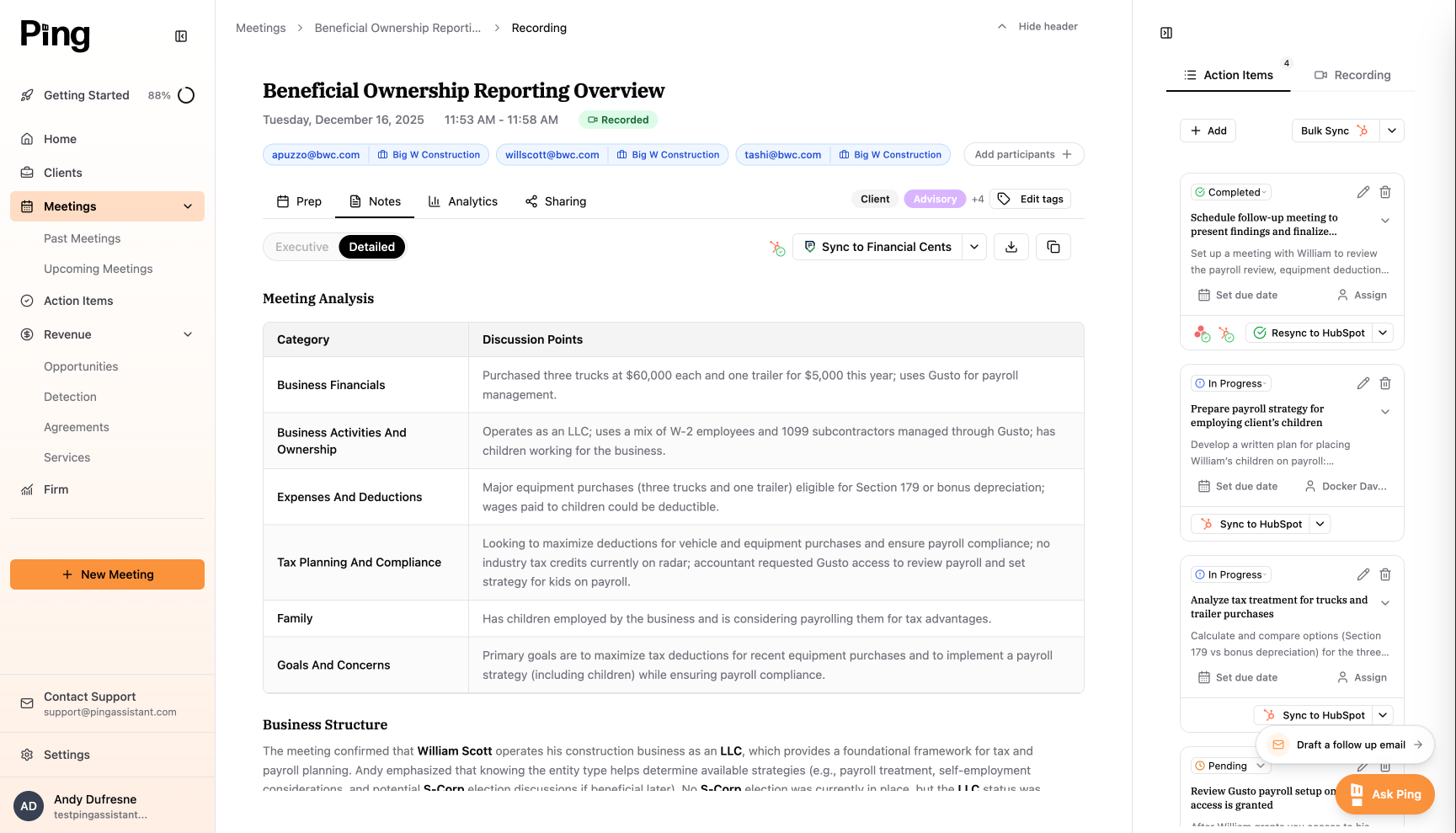
Ping Assistant Demo - Meeting Page
Manage meeting notes, action items and client information
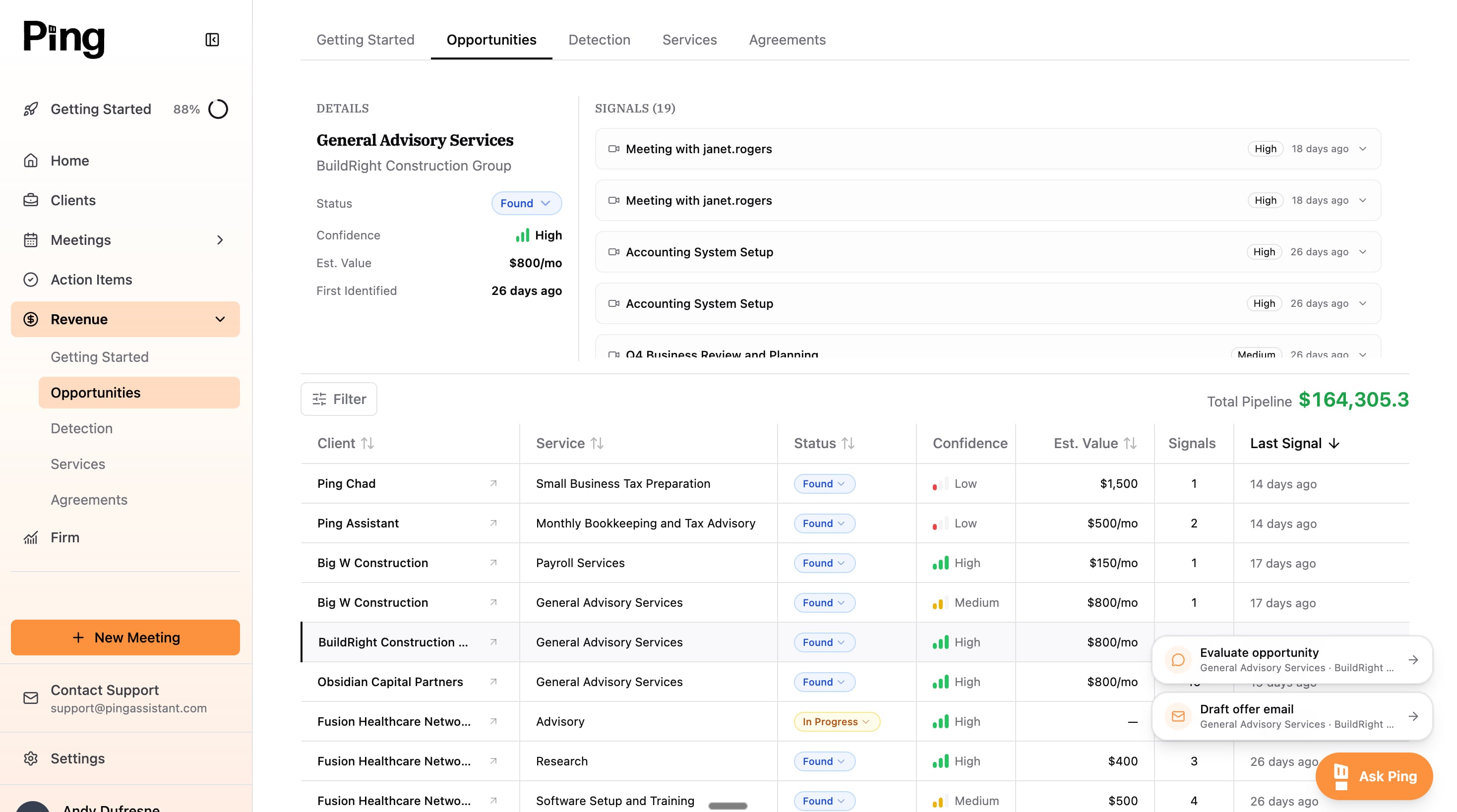
Ping Assistant Demo - Revenue Finder
Helping you discover cross and upselling opportunities based on the interactions you're already having
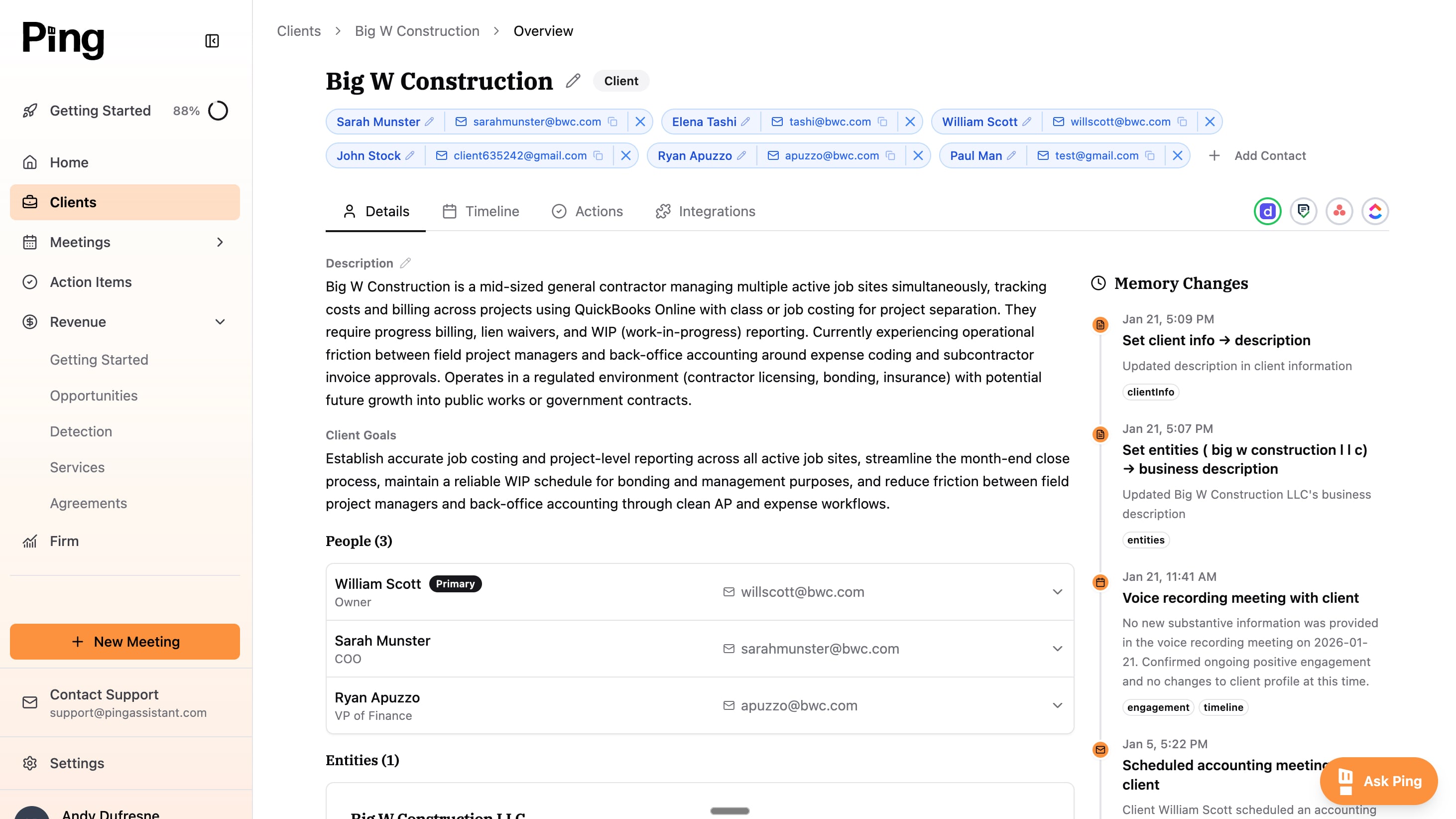
Ping Assistant Demo - Client Intelligence
A centralized location for all your client intelligence from meeting, emails, calls, etc. Updating with each interaction
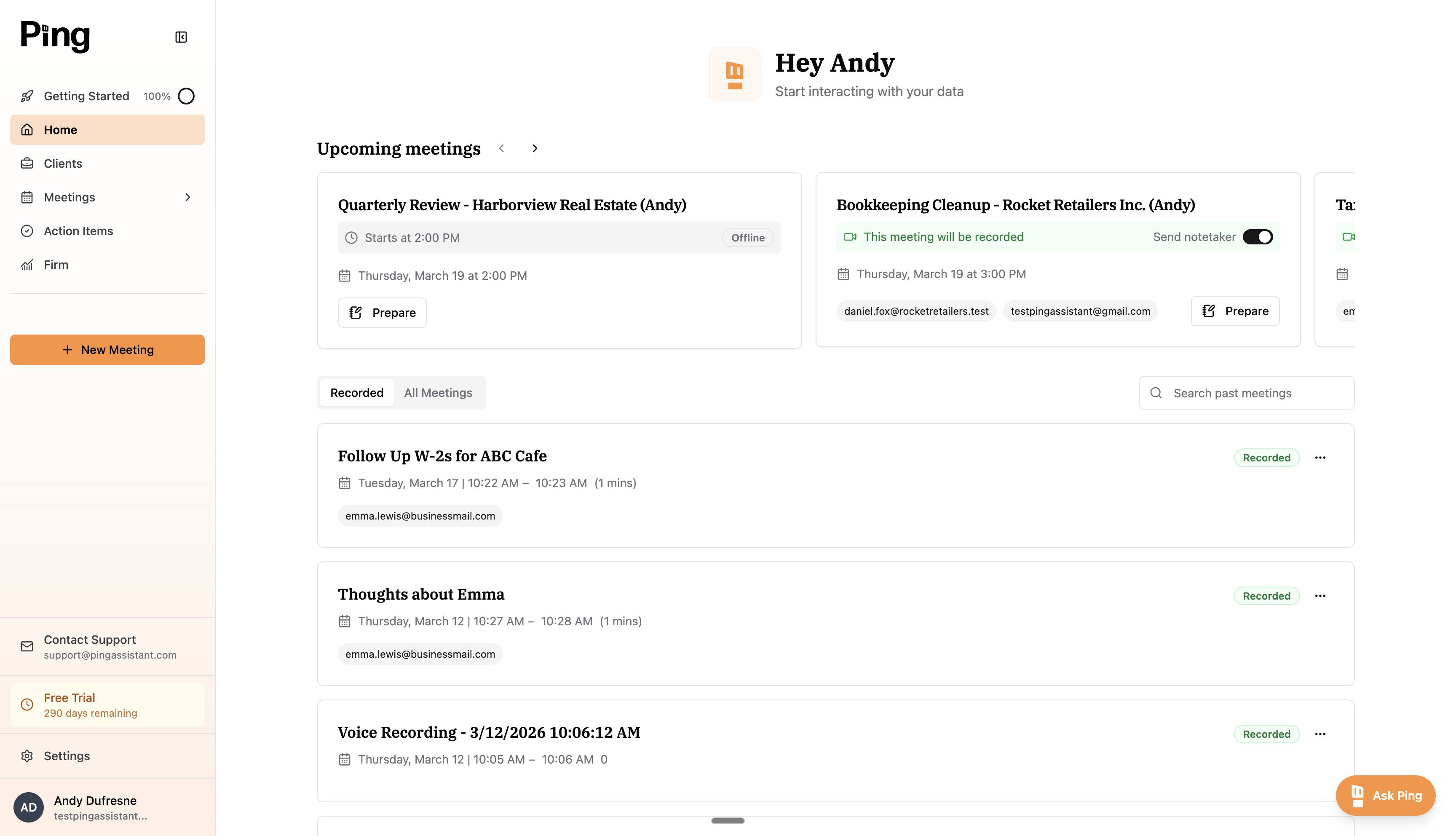
Ping Assistant Demo - Ping Home Page
AI built for advisory. Advisory, by its nature, creates a lot of moving parts. Ping eliminates admin work around meetings and emails, so you can focus on servicing your client.
Product Avatar Image

Have you used Ping Assistant before?

Answer a few questions to help the Ping Assistant community

Ping Assistant Reviews (2)

Reviews

Ping Assistant Reviews (2)

5.0
2 reviews
Search reviews
Filter Reviews
Clear Results
G2 reviews are authentic and verified.
Verified User in Accounting
IA
Small-Business (50 or fewer emp.)
"efficent Automations and Integrations with a Friendly, Helpful Team"
What do you like best about Ping Assistant?

Deep automations, and a very friendly, helpful team. It works with the apps I need, and the integrations are deep. Review collected by and hosted on G2.com.

What do you dislike about Ping Assistant?

maybe that it is younger so there isint as much of a community Review collected by and hosted on G2.com.


MG
Small-Business (50 or fewer emp.)
"Insightful Tool with Stellar Responsiveness"
What do you like best about Ping Assistant?

I really like the firm overview section in Ping Assistant. It provides valuable insights into how much we are communicating with our clients and how much our staff communicates. This helps us quantify the amount of communication, so we can better evaluate if we're over-communicating or not communicating enough. Additionally, the initial setup of Ping Assistant was very easy. Review collected by and hosted on G2.com.

What do you dislike about Ping Assistant?

It's a new product so there are still bugs that we run into that are being worked out. Review collected by and hosted on G2.com.

There are not enough reviews of Ping Assistant for G2 to provide buying insight. Below are some alternatives with more reviews:

1
NinjaOne Logo
NinjaOne
4.7
(4,270)
NinjaOne unifies IT to simplify work for 35,000+ customers in 140+ countries. The NinjaOne Unified IT Operations Platform delivers endpoint management, autonomous patching, backup, and remote access in a single console to improve efficiency, increase resilience, and reduce spend. Intelligent automation and human-centered AI gives employees a great technology experience.
2
TeamViewer Logo
TeamViewer
4.5
(3,859)
Easy-to-use remote support and access software that lets you securely connect to and monitor desktop-to-desktop, desktop-to-mobile, mobile-to-mobile, or to unattended devices like servers and IoT devices from anywhere.
3
Dynatrace Logo
Dynatrace
4.5
(1,363)
Dynatrace has redefined how you monitor today’s digital ecosystems. AI-powered, full stack and completely automated, it’s the only solution that provides answers, not just data, based on deep insight into every user, every transaction, across every application. The world’s leading brands trust Dynatrace to optimize customer experiences, innovate faster and modernize IT operations with absolute confidence.
4
Atera Logo
Atera
4.6
(1,102)
Atera offers an all-in-one IT management platform that combines Remote Monitoring and Management (RMM), Helpdesk, Ticketing, and automation tools, providing efficient infrastructure management, enhanced service quality, and comprehensive features like patch management and AI-driven analytics, all under a transparent per-technician pricing model.
5
SolarWinds Observability Logo
SolarWinds Observability
4.3
(825)
SolarWinds® Observability is a comprehensive full-stack observability solution designed to meet the diverse needs of modern organizations, regardless of their size. This solution provides deep visibility into hybrid ecosystems, enabling users to monitor and manage both on-premises and cloud environments effectively. By optimizing performance and ensuring availability across distributed hybrid IT infrastructures, SolarWinds Observability supports organizations in navigating the complexities of their IT environments. Targeted at IT professionals and organizations that require robust monitoring capabilities, SolarWinds Observability caters to a wide range of use cases. It is particularly beneficial for businesses operating in hybrid environments, where the integration of on-premises and cloud resources is essential. The solution allows users to gain a holistic view of their networks, applications, databases, and user experiences, thereby facilitating better decision-making and operational efficiency. This is especially crucial in today’s fast-paced digital landscape, where downtime can significantly impact service reliability and customer satisfaction. One of the standout features of SolarWinds Observability is its built-in intelligence powered by AIOps capabilities. This functionality accelerates issue remediation by enabling users to detect, troubleshoot, and resolve problems more efficiently. The advanced predictive analysis and anomaly-based alerts help organizations proactively address potential issues before they escalate, ultimately reducing downtime and enhancing service reliability. Additionally, the solution's log pattern analysis further streamlines the troubleshooting process, allowing IT teams to focus on strategic initiatives rather than being bogged down by operational challenges. SolarWinds Observability offers flexibility in deployment, providing users with the option to choose between self-hosted and SaaS models. The self-hosted option integrates seamlessly with other SolarWinds services, such as security and storage monitoring, while the SaaS option is tailored for deeper monitoring of custom and cloud-based applications. This adaptability ensures that organizations can select the deployment method that best aligns with their operational needs and infrastructure. Moreover, SolarWinds Observability stands out by consolidating multiple monitoring tools into a single, integrated solution. This not only simplifies the monitoring process but also helps organizations reduce costs associated with managing disparate systems. By offering comprehensive visibility across hybrid IT environments, SolarWinds Observability empowers organizations to optimize their operations and enhance overall performance.
6
Datadog Logo
Datadog
4.4
(699)
Datadog is a monitoring service for IT, Dev and Ops teams who write and run applications at scale, and want to turn the massive amounts of data produced by their apps, tools and services into actionable insight.
7
LogicMonitor Logo
LogicMonitor
4.5
(634)
LogicMonitor is the SaaS-based, automated performance monitoring platform that provides agile IT Ops teams with the visibility and actionable metrics they need to ensure the availability of services and applications running on complex and distributed infrastructure.
8
N-able N-central Logo
N-able N-central
4.4
(545)
As networks grow in complexity and scale to thousands or tens of thousands of devices, IT service providers need powerful tools to help them keep up. N-able N-central gives you that power.
9
Site24x7 Logo
Site24x7
4.6
(427)
An all-in-one cloud monitoring service for DevOps and IT operations with broad monitoring capabilities covering applications, servers, networks, public and private clouds, websites and web apps.
10
Progress WhatsUp Gold Logo
Progress WhatsUp Gold
4.4
(390)
WhatsUp Gold is unified infrastructure and application monitoring software that gives modern IT teams the ability to monitor their increasingly complex IT environment with a single product.
Show More
People Icons

Start a Discussion about Ping Assistant

Have a software question? Get answers from real users and experts.

Start a Discussion
Pricing

Pricing details for this product isn’t currently available. Visit the vendor’s website to learn more.

Product Avatar Image
Ping Assistant