Best Automation Testing Tools

How Many Automation Testing Tools Products Does G2 Track?

Total Products under this Category: 335

Category Stats (Aug 2026)

  • Average Rating: 4.46/5 The average rating of products in this category, based on all submitted ratings
  • Top Trending Product: Gatling (+1.24%) - Among all products in this category, Gatling recorded the largest rating increase compared to last month

Last updated: August 19, 2026

How Does G2 Rank Automation Testing Tools Products?

Why You Can Trust G2's Software Rankings:

  • 30 Analysts and Data Experts
  • 18,600+ Authentic Reviews
  • 335+ Products
  • Unbiased Rankings

G2's software rankings are built on verified user reviews, rigorous moderation, and a consistent research methodology maintained by a team of analysts and data experts. Each product is measured using the same transparent criteria, with no paid placement or vendor influence. While reviews reflect real user experiences, which can be subjective, they offer valuable insight into how software performs in the hands of professionals. Together, these inputs power the G2 Score, a standardized way to compare tools within every category.

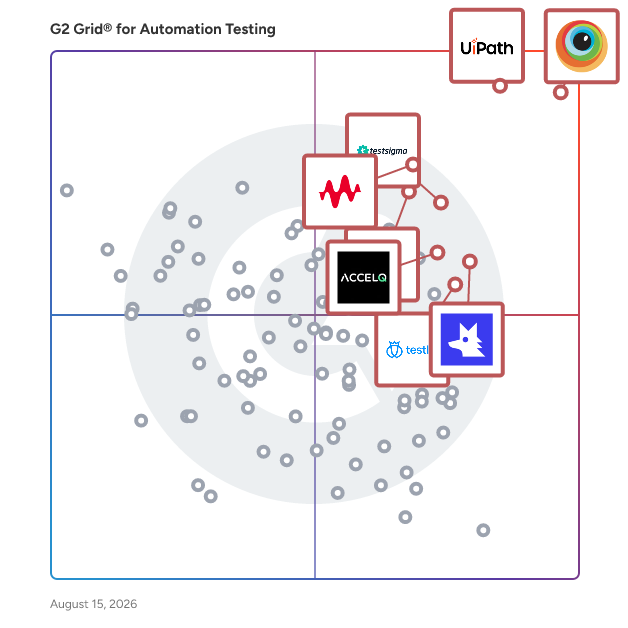
G2 Grid® for Automation Testing Tools

G2 Grid® for Automation Testing Tools plotting products by satisfaction and market presence

Highlighted products: BrowserStack, UiPath Agentic Automation, Keysight Eggplant, Testsigma, Katalon, QA Wolf, ACCELQ, and Testlio.

Underlying data: [Grid® JSON](https://www.g2.com/categories/automation-testing-tools/grids.json?focus%5B%5D=browserstack&focus%5B%5D=uipath-agentic-automation&focus%5B%5D=keysight-eggplant&focus%5B%5D=testsigma&focus%5B%5D=katalon&focus%5B%5D=qa-wolf&focus%5B%5D=accelq&focus%5B%5D=testlio)

Sponsored

Tricentis qTest

Tricentis qTest is an AI-driven test management platform designed to help enterprise organizations centralize, standardize, and scale their software testing operations. It is a type of test management solution that helps QA teams, project managers, and development leads plan, track, and report on testing activities across Agile, waterfall, and hybrid delivery methodologies. qTest provides a centralized repository for test cases, test plans, and test execution results, enabling teams to maintain visibility and control over testing across large, distributed projects. It integrates with the leading ALM, CI/CD, and defect management tools used across enterprise software delivery pipelines, including Jira, Azure DevOps, Jenkins, Bamboo, Cucumber, Selenium, and Rally. Key capabilities include: - AI-powered agentic test creation (qTest Copilot) that autonomously drafts and reuses test cases from natural-language requirements - Test case management supporting structured, exploratory, and automated test types, deployable in the cloud or on-premises - DevOps-native workflow integration for event-driven, automated testing processes - Exploratory testing with built-in recording, annotation, and session management - Behavior-driven development support through qTest Scenario, a Jira app that helps Agile teams scale BDD practices - Customizable dashboards and analytics for quality metrics, test coverage, and sprint velocity - Automated test orchestration and execution host management - Scaling to support thousands of test cases, multiple projects, and large distributed teams qTest is well suited for enterprise QA organizations transitioning from legacy test management tools, teams implementing AI-assisted quality practices, and organizations that need a single source of truth for testing across complex programs. Its reporting and analytics capabilities give program managers and quality leads the visibility needed to make informed decisions about release readiness and quality risk throughout the development lifecycle. qTest also integrates with Tricentis Tosca, enabling teams to sync manual test cases for automated execution, and with Tricentis Vera for organizations that need compliance validation alongside Agile software testing.

Visit website

BrowserStack

BrowserStack is the world’s leading cloud-based testing platform, trusted by 50,000+ Dev and QA teams to deliver fast, reliable, and high-quality software. From manual to automated, visual to accessibility testing, BrowserStack brings every layer of the QA process onto a single, integrated platform, so you can ship confidently at scale. Our Products: Manual Testing Live: Cross-browser testing App Live: Real device testing Testing Toolkit: Essential manual testing tools Test Automation Automate: Browser automation cloud App Automate: Mobile app automation cloud Percy: Visual testing & review App Percy: Visual testing & review Management & Optimization Test Management: Plan, track, and manage tests Test Management for Jira: Manage tests inside Jira Test Reporting & Analytics: Monitor & optimize all tests Automation without coding Low Code Automation: AI-driven automated tests Website Scanner: All-in-one website checker

Average Rating: 4.4/5.0

Total Reviews: 3,323

How Do G2 Users Rate BrowserStack?

  • Reliability: 8.5/10 (Category avg: 8.7/10)
  • Thoroughness: 8.5/10 (Category avg: 8.7/10)
  • Test Feedback: 8.6/10 (Category avg: 8.8/10)
  • Has the product been a good partner in doing business?: 8.8/10 (Category avg: 9.2/10)

Who Is the Company Behind BrowserStack?

  • Seller: BrowserStack
  • Company Website:
  • Year Founded: 2011
  • HQ Location: Dublin, Dublin
  • Twitter: @browserstack
    11,547 Twitter followers
  • LinkedIn® Page: www.linkedin.com
    1,797 employees on LinkedIn®

Who Uses This Product?

  • Who Uses This: Software Engineer, QA Engineer
  • Top Industries: Computer Software, Information Technology and Services
  • Company Size: 40% Small, 38% Medium

What Do G2 Reviewers Say About BrowserStack?

AI-generated summary from verified user reviews

Pros
  • Users find BrowserStack's interface easy to use, facilitating seamless access to real device testing across multiple platforms.
  • Users value the real device testing feature of BrowserStack, enhancing compatibility across diverse platforms without physical hardware.
  • Users value the wide coverage of real devices on BrowserStack, ensuring comprehensive product testing across different environments.
  • Users appreciate the extensive device and browser combinations in BrowserStack, significantly enhancing testing efficiency and compatibility.
  • Users find BrowserStack's easy testing capabilities invaluable for efficient cross-platform and UI-specific testing.
Cons
  • Users often experience slow performance with BrowserStack, impacting testing efficiency and reliability of results.
  • Users experience slow loading times with BrowserStack, leading to frustrating delays during tests and setup.
  • Users feel that the pricing of BrowserStack is expensive and suggest more affordable package options.
  • Users report testing difficulties due to inconsistencies and lag, making reliable results hard to achieve.
  • Users often face slow speed during peak hours, impacting performance and complicating debugging efforts.

What Are Recent G2 Reviews of BrowserStack?

What Are G2 Users Discussing About BrowserStack?

UiPath Agentic Automation

UiPath (NYSE: PATH) is a global leader in agentic automation, empowering enterprises to harness the full potential of AI agents to autonomously execute and optimize complex business processes. The UiPath Platform™ uniquely combines controlled agency, developer flexibility, and seamless integration to help organizations scale agentic automation safely and confidently. Committed to security, governance, and interoperability, UiPath supports enterprises as they transition into a future where automation delivers on the full potential of AI to transform industries. For more information, visit www.uipath.com. Agentic testing is an AI-powered approach to software quality assurance that leverages autonomous agents to generate, execute, and evolve tests across the entire testing lifecycle. By partnering intelligent agents with human testers, agentic testing dramatically increases test coverage, accelerates release cycles, improves system resilience, and enables continuous testing at enterprise scale. It empowers teams to shift from manual, reactive testing to proactive, scalable quality engineering—driving faster innovation with higher confidence.

Average Rating: 4.6/5.0

Total Reviews: 6,136

How Do G2 Users Rate UiPath Agentic Automation?

  • Reliability: 9.2/10 (Category avg: 8.7/10)
  • Thoroughness: 9.2/10 (Category avg: 8.7/10)
  • Test Feedback: 9.2/10 (Category avg: 8.8/10)
  • Has the product been a good partner in doing business?: 8.8/10 (Category avg: 9.2/10)

Who Is the Company Behind UiPath Agentic Automation?

  • Seller: UiPath
  • Company Website:
  • Year Founded: 2005
  • HQ Location: New York
  • Twitter: @UiPath
    108,104 Twitter followers
  • LinkedIn® Page: www.linkedin.com
    5,134 employees on LinkedIn®

Who Uses This Product?

  • Who Uses This: RPA Developer, Software Engineer
  • Top Industries: Information Technology and Services, Computer Software
  • Company Size: 51% Large, 29% Medium

What Do G2 Reviewers Say About UiPath Agentic Automation?

AI-generated summary from verified user reviews

Pros
  • Users appreciate the advanced AI capabilities of UiPath Agentic Automation, enhancing adaptability and seamless workflow integration.
  • Users appreciate the ease of use of UiPath Agentic Automation, making it simple for developers to integrate and automate tasks.
  • Users value the seamless integration of AI with automation in UiPath Agentic Automation for handling complex tasks.
  • Users commend the automation ease of UiPath Agentic Automation, benefiting from its advanced AI capabilities and orchestration.
  • Users value the efficiency of UiPath Agentic Automation, enjoying streamlined automation solutions that save time and effort.
Cons
  • Users find the product expensive, with high licensing costs compared to other RPA tools, impacting overall value.
  • Users find the learning curve challenging, especially with agent training and required programming knowledge for non-tech individuals.
  • Users find the complexity of UiPath Agentic Automation overwhelming, especially when navigating advanced features and setups.
  • Users feel that the pricing issues of UiPath Agentic Automation are too high, affecting repurchase decisions.
  • Users find the licensing issues confusing, making initial setup and advanced feature access challenging for newcomers.

What Are Recent G2 Reviews of UiPath Agentic Automation?

What Are G2 Users Discussing About UiPath Agentic Automation?

Keysight Eggplant

Keysight Eggplant is a leading intelligent test automation platform that uses ML/AI to test the entire user journey — identifying and predicting any potential defects along the way. Unlike other testing tools, Eggplant can test any technology, platform, or device, no matter the complexity. Because Eggplant is non-invasive, it does not require access to source code, making it the best solution for black box testing in secure environments. Eggplant delivers the coverage you need to optimize the user experience, speed up release cycles, and improve your quality assurance process. Discover a fast, secure, and easy-to-use solution that tests any software on any platform or device.

Average Rating: 4.2/5.0

Total Reviews: 87

How Do G2 Users Rate Keysight Eggplant?

  • Reliability: 8.1/10 (Category avg: 8.7/10)
  • Thoroughness: 8.2/10 (Category avg: 8.7/10)
  • Test Feedback: 8.4/10 (Category avg: 8.8/10)
  • Has the product been a good partner in doing business?: 8.8/10 (Category avg: 9.2/10)

Who Is the Company Behind Keysight Eggplant?

  • Seller: Keysight Technologies
  • Year Founded: 2014
  • HQ Location: Santa Rosa, California, United States
  • Twitter: @Keysight
    13,585 Twitter followers
  • LinkedIn® Page: www.linkedin.com
    13,542 employees on LinkedIn®
  • Ownership: NYSE: KEYS

Who Uses This Product?

  • Who Uses This: Software Engineer, Test Automation Engineer
  • Top Industries: Computer Software, Information Technology and Services
  • Company Size: 44% Large, 35% Small

What Do G2 Reviewers Say About Keysight Eggplant?

AI-generated summary from verified user reviews

Pros
  • Users find Eggplant's ease of use remarkable, with a low learning curve and intuitive interface enhancing automation efforts.
  • Users value the ease of automation with Eggplant, appreciating its user-friendly interface and quick implementation.
  • Users value the ease of use in automation support of Keysight Eggplant, facilitating quick and effective test implementation.
  • Users find automation easy with Keysight Eggplant, appreciating its quick setup and low learning curve for scripting.
  • Users value the outstanding customer support from Keysight Eggplant, enhancing the overall user experience significantly.
Cons
  • Users face challenges with browser compatibility, which can hinder testing effectiveness across various platforms.
  • Users face compatibility challenges with various technologies and applications, impacting the effectiveness of Eggplant Functional.
  • Users face recurring OCR issues in Keysight Eggplant, leading to frequent test case failures during complex scenarios.
  • Users often face significant compatibility challenges with various technologies and specific applications when using Keysight Eggplant.
  • Users find the complexity of Keysight Eggplant challenging, particularly in managing logs and file conversions effectively.

What Are Recent G2 Reviews of Keysight Eggplant?

What Are G2 Users Discussing About Keysight Eggplant?

Testsigma

Testsigma is an agentic test automation platform that runs the full testing lifecycle: generating, executing, healing, and diagnosing tests, then filing the bugs, in one platform, on web, mobile, API, desktop, and Salesforce. At the end of that loop, it scores your release: a confidence number, backed by evidence, that tells you whether you're actually safe to ship, not just whether the build is green. Used by Nestlé, KFC, DHL, Samsung, Cisco, and more, Testsigma empowers quality engineering teams to speed up their testing effortlessly, thus ensuring high-quality software delivery with confidence.

Average Rating: 4.4/5.0

Total Reviews: 134

How Do G2 Users Rate Testsigma?

  • Reliability: 8.6/10 (Category avg: 8.7/10)
  • Thoroughness: 8.6/10 (Category avg: 8.7/10)
  • Test Feedback: 8.6/10 (Category avg: 8.8/10)
  • Has the product been a good partner in doing business?: 9.3/10 (Category avg: 9.2/10)

Who Is the Company Behind Testsigma?

  • Seller: Testsigma
  • Company Website:
  • Year Founded: 2019
  • HQ Location: Bangalore, Karnataka
  • Twitter: @testsigmainc
    1,796 Twitter followers
  • LinkedIn® Page: www.linkedin.com
    239 employees on LinkedIn®

Who Uses This Product?

  • Who Uses This: QA Engineer, Software Engineer
  • Top Industries: Computer Software, Information Technology and Services
  • Company Size: 44% Medium, 41% Small

What Do G2 Reviewers Say About Testsigma?

AI-generated summary from verified user reviews

Pros
  • Users appreciate the ease of use of Testsigma, making automation and collaboration simple and effective for teams.
  • Users appreciate the ease of creating automation tests without coding experience, enhancing their testing efficiency.
  • Users appreciate the excellent customer support provided by Testsigma, enhancing their overall user experience.
  • Users praise the exceptional automation support of Testsigma, enhancing their transition from manual to automated testing.
  • Users benefit from time-saving features in Testsigma, enabling quick script development and an easy learning curve.
Cons
  • Users occasionally face slow performance with larger test suites, leading to longer wait times for results and execution.
  • Users face testing difficulties with TestSigma due to challenges in API testing and slow test completion times.
  • Users face testing issues with TestSigma, including errors with mobiledriver and lack of download options for tests.
  • Users find complexity issues with TestSigma, especially in automating challenging scenarios and achieving desired customization.
  • Users find the insufficient training leads to a steep learning curve for new TestSigma users, impacting initial setup.

What Are Recent G2 Reviews of Testsigma?

What Are G2 Users Discussing About Testsigma?

Katalon

Katalon True Platform is an AI-driven software quality solution designed to unify the software testing lifecycle, enabling Quality Assurance (QA) teams to deliver high-quality software more efficiently. By integrating multiple essential capabilities into a single platform, it addresses the challenges of fragmented testing environments that often hinder productivity and inflate costs. The True Platform encompasses six core functionalities: Manual Testing, Test Automation, Test Management, Test Execution Environment, Reporting & Analytics, and Production Insights, all coordinated by the Katalon AI Assistant. The fragmentation of software quality tools has historically created inefficiencies, with separate tools for each aspect of testing leading to delays and increased costs. Katalon True Platform seeks to eliminate these barriers by automating the entire testing lifecycle, not just the execution phase. This holistic approach allows QA teams to accelerate their delivery timelines, identify defects earlier in the process, and scale their quality efforts without the need for additional personnel. By streamlining the testing process, teams can focus on enhancing software quality and meeting project deadlines more effectively. A standout feature of the True Platform is the Katalon AI Assistant, which enhances productivity at every stage of the testing lifecycle. This embedded AI assistant employs six specialized agents that facilitate various tasks, from analyzing requirements and generating test cases to autonomously executing tests and reporting defects. For instance, the Requirement Analyzer identifies ambiguities in specifications, while the Bug Reporter automates the generation of detailed defect reports, integrating seamlessly with tools like Jira or Azure DevOps. This conversational AI experience keeps users in control while significantly reducing the time spent on routine tasks. Katalon Studio, a well-established test automation tool, remains an integral part of the True Platform. It provides a robust environment for teams seeking in-depth coded test automation, including custom frameworks and complex scripting. The key enhancement is that Katalon Studio now operates in conjunction with the broader platform, ensuring that all outputs are connected to the same test management and reporting infrastructure. This integration allows for a cohesive workflow across the QA team, enhancing collaboration and visibility. Designed to cater to the diverse needs of the entire QA organization, Katalon True Platform accommodates manual testers through intuitive, zero-code workflows, while providing automation engineers with the familiar scripting environment of Katalon Studio. QA managers benefit from real-time dashboards and predictable execution, and QA leaders gain consolidated visibility and cost efficiency by replacing multiple vendor solutions with a single, unified system. This comprehensive approach ensures that all team members can contribute effectively to the software quality process, ultimately leading to improved outcomes and faster delivery times.

Average Rating: 4.4/5.0

Total Reviews: 216

How Do G2 Users Rate Katalon?

  • Reliability: 8.6/10 (Category avg: 8.7/10)
  • Thoroughness: 8.7/10 (Category avg: 8.7/10)
  • Test Feedback: 8.9/10 (Category avg: 8.8/10)
  • Has the product been a good partner in doing business?: 8.9/10 (Category avg: 9.2/10)

Who Is the Company Behind Katalon?

  • Seller: Katalon LLC
  • Company Website:
  • Year Founded: 2016
  • HQ Location: Atlanta, US
  • Twitter: @KatalonPlatform
    1,613 Twitter followers
  • LinkedIn® Page: www.linkedin.com
    301 employees on LinkedIn®

Who Uses This Product?

  • Who Uses This: Test Engineer, QA Engineer
  • Top Industries: Computer Software, Information Technology and Services
  • Company Size: 40% Small, 30% Medium

What Do G2 Reviewers Say About Katalon?

AI-generated summary from verified user reviews

Pros
  • Users find Katalon easy to use, simplifying automation with intuitive features and minimal need for help.
  • Users find Katalon to provide user-friendly automation capabilities, allowing easy implementation and collaboration on test cases.
  • Users enjoy the ease of automation with Katalon, appreciating its simplicity and comprehensive features for effective testing.
  • Users find Katalon easy to implement, appreciating its user-friendly interface and extensive support for various testing needs.
  • Users value the time-saving capabilities of Katalon, allowing quick creation and maintenance of automated tests.
Cons
  • Users experience slow performance with Katalon, especially with large test suites causing extended execution times.
  • Users note the high cost of accessing advanced features, which can limit the overall usability of Katalon.
  • Users experience system delays with Katalon, particularly during code crashes and lengthy test executions.
  • Users experience bug issues with Katalon, including glitches, crashes, and unreliable self-healing capabilities affecting their workflow.
  • Users find a steep learning curve with Katalon, facing challenges in training and understanding variable management.

What Are Recent G2 Reviews of Katalon?

What Are G2 Users Discussing About Katalon?

QA Wolf

QA Wolf is the fastest path to deterministic
end-to-end test coverage for web and mobile apps. In one platform, teams can manage the entire testing lifecycle: Map out your workflows and coverage gaps, automate your tests in Playwright or Appium, and run your suite fully in parallel. - Build and maintain E2E tests 10x faster than agentic CLIs. - Run tests 12x faster than non-deterministic computer-use agents. - Release 5x more often with faster testing. Want all your testing done for you? QA Wolf’s Coverage as a Service delivers 80%+ test coverage in 4 months with 24-hour failure investigation, test maintenance, and guaranteed zero flakes.

Average Rating: 4.8/5.0

Total Reviews: 190

How Do G2 Users Rate QA Wolf?

  • Reliability: 9.4/10 (Category avg: 8.7/10)
  • Thoroughness: 9.4/10 (Category avg: 8.7/10)
  • Test Feedback: 9.4/10 (Category avg: 8.8/10)
  • Has the product been a good partner in doing business?: 9.8/10 (Category avg: 9.2/10)

Who Is the Company Behind QA Wolf?

  • Seller: QA Wolf
  • Company Website:
  • Year Founded: 2019
  • HQ Location: Seattle, US
  • Twitter: @QAWolfHQ
    864 Twitter followers
  • LinkedIn® Page: www.linkedin.com
    247 employees on LinkedIn®

Who Uses This Product?

  • Who Uses This: Engineering Manager, Product Manager
  • Top Industries: Computer Software, Marketing and Advertising
  • Company Size: 56% Medium, 43% Small

What Do G2 Reviewers Say About QA Wolf?

AI-generated summary from verified user reviews

Pros
  • Users appreciate the helpful support from QA Wolf, ensuring fast, reliable testing while allowing focus on development.
  • Users appreciate the responsive customer support of QA Wolf, highlighting their quick and attentive communication.
  • Users value the automation capabilities of QA Wolf, enhancing testing efficiency and improving product release quality.
  • Users find that QA Wolf offers time-saving solutions, achieving 99% test coverage with minimal ongoing investment needed.
  • Users praise the ease of use of QA Wolf, highlighting its user-friendly interface and streamlined setup process.
Cons
  • Users find the costly nature of QA Wolf challenging, especially as testing needs grow beyond budget limits.
  • Users find pricing issues with QA Wolf, noting unexpected test charges and budget limitations as challenges.
  • Users experience slow performance with QA Wolf, noting lengthy test runs and optimization issues that hinder efficiency.
  • Users experience slow testing execution that hampers efficiency and adds frustration to the testing process.
  • Users face challenges with testing difficulties, noting slow test updates and longer execution times than anticipated.

What Are Recent G2 Reviews of QA Wolf?

ACCELQ

ACCELQ offers AI-powered No-Code test automation and management built on a cloud-native platform. ACCELQ provides a unified platform for web, mobile, API, database, and packaged apps. Automation-first, codeless capabilities make it easy to use for testing teams without deep programming expertise. ACCELQ allows businesses to achieve 7.5x productivity and over 72% savings with its industry-first autonomics-based automation platform. ACCELQ was named a leader in The Forrester Wave™: Continuous Automation Testing Platforms, Q4 2022.

Average Rating: 4.8/5.0

Total Reviews: 113

How Do G2 Users Rate ACCELQ?

  • Reliability: 9.4/10 (Category avg: 8.7/10)
  • Thoroughness: 9.3/10 (Category avg: 8.7/10)
  • Test Feedback: 9.3/10 (Category avg: 8.8/10)
  • Has the product been a good partner in doing business?: 9.4/10 (Category avg: 9.2/10)

Who Is the Company Behind ACCELQ?

  • Seller: ACCELQ
  • Company Website:
  • Year Founded: 2014
  • HQ Location: Dallas, US
  • Twitter: @accelq
    1,677 Twitter followers
  • LinkedIn® Page: www.linkedin.com
    217 employees on LinkedIn®

Who Uses This Product?

  • Top Industries: Information Technology and Services, Computer Software
  • Company Size: 39% Medium, 35% Large

What Do G2 Reviewers Say About ACCELQ?

AI-generated summary from verified user reviews

Pros
  • Users value the ease of use of ACCELQ, enabling rapid implementation and efficient automation without deep technical knowledge.
  • Users praise the ease of automation with ACCELQ, enabling rapid development of comprehensive testing suites.
  • Users value the codeless automation of ACCELQ, enabling easy collaboration and effective testing for all team members.
  • Users appreciate the time-saving features of ACCELQ, enabling efficient backend testing and quicker bug detection.
  • Users appreciate the automation ease of ACCELQ, streamlining testing processes and enhancing efficiency from day one.
Cons
  • Users find the learning curve steep for desktop automation compared to web and mobile testing, impacting user experience.
  • Users find integration issues with ACCELQ, noting limited options and complexities in learning the platform effectively.
  • Users mention poor reporting, noting the dashboard becomes congested when handling many test cases and scenarios.
  • Users face a difficult learning curve in ACCELQ, particularly when trying to grasp advanced features and setup.
  • Users find the insufficient information on features and documentation to be a barrier for effective use.

What Are Recent G2 Reviews of ACCELQ?

What Are G2 Users Discussing About ACCELQ?

Testlio

Testlio’s AI-driven, fully managed crowdsourced testing platform integrates expert, on-demand testers directly into your release process. Ship faster and more confidently everywhere it matters. In any location. On any device. With any payment method. In any language. Powered by LeoAI Engine™, our proprietary intelligence layer, Testlio’s platform combines human expertise with machine intelligence to orchestrate testing, accelerate tester matching (LeoMatch™), streamline test execution, and deliver predictive insights across engagements. The result is faster releases, smarter testing, and consistently exceptional user experiences at a global scale. We’re a fully remote, distributed-by-design company with team members working from over 40 countries. Our freelance testing community is just as global, with vetted experts across 150+ countries, speaking 100+ languages. Each tester is carefully matched to your product, domain, and tech stack through LeoMatch™, ensuring you get the right fit every time. We support more than 20 testing capabilities, including payments, localization, accessibility, and AI. With access to 600k+ devices and 800+ payment methods, we test in-region, in-language, and in context. That’s why leading companies like Amazon, Microsoft, Netflix, NBA, Paramount, PayPal, and Uber rely on Testlio to deliver seamless experiences at scale, collectively serving billions of users. To learn more, visit testlio.com.

Average Rating: 4.7/5.0

Total Reviews: 76

How Do G2 Users Rate Testlio?

  • Reliability: 10.0/10 (Category avg: 8.7/10)
  • Thoroughness: 10.0/10 (Category avg: 8.7/10)
  • Test Feedback: 10.0/10 (Category avg: 8.8/10)
  • Has the product been a good partner in doing business?: 9.8/10 (Category avg: 9.2/10)

Who Is the Company Behind Testlio?

  • Seller: Testlio Inc.
  • Company Website:
  • Year Founded: 2012
  • HQ Location: San Francisco, CA
  • Twitter: @testlio
    2,545 Twitter followers
  • LinkedIn® Page: www.linkedin.com
    891 employees on LinkedIn®

Who Uses This Product?

  • Who Uses This: Product Manager
  • Top Industries: Computer Software, Financial Services
  • Company Size: 39% Medium, 39% Small

What Do G2 Reviewers Say About Testlio?

AI-generated summary from verified user reviews

Pros
  • Users commend the automation expertise of Testlio, highlighting its seamless adaptation to evolving testing requirements.
  • Users admire the reliable support from Testlio, which adapts impressively to their evolving testing needs and standards.
  • Users admire the seamless automation of Testlio, expressing satisfaction with its reliability and adaptability to changing needs.
  • Users commend the exceptional reliability of automation support, consistently adapting to evolving testing needs seamlessly.
  • Users are impressed by Testlio's reliable automation capabilities, seamlessly adapting to evolving testing needs and maintaining high standards.

What Are Recent G2 Reviews of Testlio?

What Are G2 Users Discussing About Testlio?

Cyara Platform

Cyara is a customer experience (CX) assurance platform designed to help organizations optimize their customer interactions across every communication channel. As a leader in AI-powered CX assurance, Cyara provides a unified platform that enables continuous testing and monitoring of voice, digital, messaging, and conversational AI channels. This comprehensive approach allows businesses to ensure that every touchpoint in the customer journey functions flawlessly, ultimately enhancing the overall customer experience. Targeted primarily at enterprises and organizations that prioritize customer satisfaction, Cyara serves a diverse range of industries, including telecommunications, finance, retail, and healthcare. The platform is particularly beneficial for teams involved in software development, quality assurance, and customer service, as it supports the entire software development lifecycle. By focusing on the customer’s perspective, Cyara helps identify and resolve issues that may impact the customer experience, ensuring that businesses can deliver secure and high-quality interactions at scale. One of the key features of the Cyara platform is its ability to handle a comprehensive range of CX development and assurance needs. From the initial design phase to functional and regression testing, user acceptance testing, load testing, and production monitoring, Cyara provides a collaborative environment where team members can share and reuse scripts and data. This streamlined approach not only enhances efficiency but also fosters teamwork, enabling organizations to work more effectively toward common goals. Cyara's automation capabilities significantly enhance productivity by allowing users to automatically discover existing customer experiences and generate test scripts with minimal manual intervention. The platform employs Robotic Process Automation (RPA) to simulate real-world customer interactions, generating thousands of automated tests that replicate actual customer contact. This level of automation not only saves time but also ensures thorough testing across a wide range of digital and voice channels, including IVR, chat, and conversational AI. Moreover, Cyara is designed to support Agile and DevOps practices, enabling organizations to accelerate development cycles while improving quality. By facilitating the generation of test cases from the design phase, the platform encourages a shift-left approach, allowing teams to identify potential issues earlier in the development process. With visualization tools and capabilities tailored for different teams, Cyara enhances collaboration and ensures that all stakeholders are aligned in their efforts to deliver an exceptional customer experience.

Average Rating: 4.7/5.0

Total Reviews: 42

How Do G2 Users Rate Cyara Platform?

  • Reliability: 9.5/10 (Category avg: 8.7/10)
  • Thoroughness: 9.5/10 (Category avg: 8.7/10)
  • Test Feedback: 9.4/10 (Category avg: 8.8/10)
  • Has the product been a good partner in doing business?: 9.7/10 (Category avg: 9.2/10)

Who Is the Company Behind Cyara Platform?

  • Seller: Cyara
  • Company Website:
  • Year Founded: 2006
  • HQ Location: Redwood City, California
  • Twitter: @cyara
    4 Twitter followers
  • LinkedIn® Page: www.linkedin.com
    396 employees on LinkedIn®

Who Uses This Product?

  • Top Industries: Financial Services, Insurance
  • Company Size: 57% Large, 26% Small

What Do G2 Reviewers Say About Cyara Platform?

AI-generated summary from verified user reviews

Pros
  • Users value the automation capabilities of Cyara Platform, significantly enhancing testing efficiency for Omnichannel experiences.
  • Users praise the exceptional customer support of Cyara Platform, enhancing their Omnichannel experience and troubleshooting effectively.
  • Users value the ease of use of the Cyara Platform, enjoying its intuitive tools and user-friendly interface.
  • Users find Cyara Platform incredibly helpful for testing NLP models, benefiting from automated regression testing and insightful reports.
  • Users value the time-saving automation of Cyara, significantly reducing manual testing efforts and boosting release confidence.
Cons
  • Users note a high learning curve, making it challenging for new team members to efficiently use the platform.
  • Users face a high learning curve with Cyara Platform, making it challenging for newcomers to adapt effectively.
  • Users find the poor UI of the Cyara Platform frustrating, especially when uploading large datasets takes too long.
  • Users notice that the platform has a slow loading interface, especially when uploading large datasets, hindering efficiency.
  • Users report slow performance in the Cyara Platform, particularly when uploading large datasets for training.

What Are Recent G2 Reviews of Cyara Platform?

What Are G2 Users Discussing About Cyara Platform?

Panaya Smart Testing and Change Intelligence

Panaya is a SaaS-based company certified by SAP, Oracle, and Salesforce.com. It offers an all-in-one platform for Smart Testing solutions and Change Intelligence tailored for ERP, CRM, and cloud business applications. Panaya accelerates and de-risks digital landscapes with AI-powered Test Automation, Test Management, and Impact Analysis. Panaya's focus on ease of use and an intuitive interface ensures seamless collaboration between business and IT, empowering business users and IT professionals to gain real-time visibility and control over their projects. This capability enables faster releases and continuous delivery of high-quality software. Since its founding in 2006, over 3,000 companies across 62 countries, including a third of the Fortune 500, have trusted Panaya to drive rapid, quality testing and change management in their enterprise business applications.

Average Rating: 4.5/5.0

Total Reviews: 534

How Do G2 Users Rate Panaya Smart Testing and Change Intelligence?

  • Reliability: 8.8/10 (Category avg: 8.7/10)
  • Thoroughness: 9.1/10 (Category avg: 8.7/10)
  • Test Feedback: 8.8/10 (Category avg: 8.8/10)
  • Has the product been a good partner in doing business?: 9.0/10 (Category avg: 9.2/10)

Who Is the Company Behind Panaya Smart Testing and Change Intelligence?

  • Seller: Panaya LTD
  • Company Website:
  • Year Founded: 2006
  • HQ Location: Hod Hasharon, Center
  • Twitter: @panaya
    4,478 Twitter followers
  • LinkedIn® Page: www.linkedin.com
    202 employees on LinkedIn®

Who Uses This Product?

  • Who Uses This: Consultant, Project Manager
  • Top Industries: Information Technology and Services, Electrical/Electronic Manufacturing
  • Company Size: 57% Large, 27% Medium

What Do G2 Reviewers Say About Panaya Smart Testing and Change Intelligence?

AI-generated summary from verified user reviews

Pros
  • Users praise the ease of use of Panaya Smart Testing, enhancing efficiency in managing testing and documentation tasks.
  • Users value the efficient testing capabilities of Panaya Smart Testing, enhancing project speed and reducing manual efforts.
  • Users value the time-saving features of Panaya Smart Testing, enhancing productivity during data validation and testing processes.
  • Users value the efficiency of automation in Panaya Smart Testing, significantly reducing effort and project timelines.
  • Users praise the intuitive user interface of Panaya Smart Testing, making integration and management seamless and efficient.
Cons
  • Users face significant testing difficulties due to non-deletable data and the inability to easily manage test results.
  • Users face challenges with recording issues, including complicated interfaces and bugs that slow down testing processes.
  • Users find the learning curve steep, requiring time and effort to become proficient with the tool's navigation.
  • Users report slow performance with Panaya Smart Testing, experiencing lag and issues with the recorder functionality.
  • Users note the missing features in Panaya, highlighting a need for improved recording and evidence management.

What Are Recent G2 Reviews of Panaya Smart Testing and Change Intelligence?

What Are G2 Users Discussing About Panaya Smart Testing and Change Intelligence?

Harness Platform

Simplify your developer experience with the world's first AI-augmented software delivery platform. Upgrade your software delivery with Harness' innovative CI/CD, Feature Flags, Infrastructure as Code Management, and Chaos Engineering tools. We are a software delivery platform that helps developers and infrastructure engineers build and ship code for cloud and on-premise projects. We automate the continuous integration and continuous delivery (CI/CD) process to help teams build faster, ship more frequently, and improve quality, efficiency, and governance. We help companies in four key areas: Number one, we accelerate innovation through DevOps modernization. We provide an approach for software delivery that automates processes, reduces manual interventions, consolidates tools, and accelerates time-to-market for new products, features, and fixes. Number two, we improve developer experience. We give you the ability to attract, retain, and onboard high-caliber engineering talent while fostering a culture of continuous innovation and improvement. Number three, we secure software delivery. We give you the ability to integrate security into every phase of the SDLC. And last but not least is, we optimize cloud costs. We give you the ability to eliminate waste and to ensure that appropriate cloud resources are allocated at the right place at the right time.

Average Rating: 4.6/5.0

Total Reviews: 313

How Do G2 Users Rate Harness Platform?

  • Has the product been a good partner in doing business?: 9.3/10 (Category avg: 9.2/10)

Who Is the Company Behind Harness Platform?

  • Seller: Harness
  • Company Website:
  • Year Founded: 2018
  • HQ Location: San Francisco
  • Twitter: @HarnessWealth
    1,389 Twitter followers
  • LinkedIn® Page: www.linkedin.com
    1,701 employees on LinkedIn®

Who Uses This Product?

  • Who Uses This: Software Engineer, DevOps Engineer
  • Top Industries: Computer Software, Financial Services
  • Company Size: 42% Large, 39% Medium

What Do G2 Reviewers Say About Harness Platform?

AI-generated summary from verified user reviews

Pros
  • Users find the ease of use of Harness Platform essential for streamlining their development projects effectively.
  • Users highlight the easy integration and comprehensive documentation of Harness Platform, streamlining project implementation and feature management.
  • Users value the ease of managing feature flags across environments, enhancing flexibility and control in deployment.
  • Users appreciate the easy setup of Harness Platform, allowing quick implementation of feature flags and A/B testing.
  • Users find the easy integrations in Harness Platform enhance their workflow and improve productivity significantly.
Cons
  • Users note the missing features in Harness Platform, particularly regarding multiple filters and flexibility compared to other tools.
  • Users find the activation and deactivation clarity lacking, causing confusion in managing feature flags effectively.
  • Users express frustration over limited features, including SDK options and difficulties with traffic splitting and flag management.
  • Users note a steep learning curve with Harness Platform, requiring time to master its extensive features and tools.
  • Users criticize the poor UI of Harness Platform, finding it difficult to manage feature flags effectively.

What Are Recent G2 Reviews of Harness Platform?

What Are G2 Users Discussing About Harness Platform?

Qase

Qase is a test management platform for QA and development teams responsible for quality. It brings CI results, automated test runs, and manual test cases into one system of record, so you can tell whether a release is ready from the data, not from a Slack thread or a judgment call. As a product grows, test results spread out. They sit across CI pipelines, spreadsheets, and issue trackers, with no single view tying them together. Requirements lose their link to test outcomes, so when something breaks in production it's hard to reconstruct what was tested. That's a tooling problem, not a team problem, and it's what Qase is built to fix. What you get: - A unified results view: Automated and manual results from CI/CD, test frameworks, and manual runs in one place, with requirements linked to test cases so coverage gaps are visible. - Release readiness reporting: Pass rates, coverage gaps, and open blockers in a shared dashboard, so the go/no-go call comes from one view instead of informal consensus. - Automation that keeps pace: Qase connects to Playwright, Cypress, and Selenium, and uses AI to convert manual test cases into automated scripts. You review what it drafts before anything runs. - Core test management: Test cases, test plans, test runs, defect management, a rich REST API, and webhooks to trigger builds in your CI. - MCP Server: The AI tools in your development stack can connect to Qase and work with your test data, cases, runs, coverage, and defects, as part of how your team already builds. - 35+ bidirectional integrations with the tools you already use, including Jira and Slack. Create an issue without leaving the app; get notified in Slack when a run starts. Qase also offers an MCP server, so AI assistants and coding agents can read and write your test data directly. Qase fits teams with a dedicated QA function and teams where developers write and own tests alongside their code. Both are valid ways in. Organizations use it to make quality visible and ship with more confidence.

Average Rating: 4.7/5.0

Total Reviews: 305

How Do G2 Users Rate Qase?

  • Reliability: 9.2/10 (Category avg: 8.7/10)
  • Thoroughness: 8.8/10 (Category avg: 8.7/10)
  • Test Feedback: 8.9/10 (Category avg: 8.8/10)
  • Has the product been a good partner in doing business?: 9.2/10 (Category avg: 9.2/10)

Who Is the Company Behind Qase?

  • Seller: Qase Inc
  • Company Website:
  • Year Founded: 2018
  • HQ Location: San Francisco, California
  • Twitter: @qase_io
    364 Twitter followers
  • LinkedIn® Page: www.linkedin.com
    64 employees on LinkedIn®

Who Uses This Product?

  • Who Uses This: QA Engineer, QA Lead
  • Top Industries: Computer Software, Information Technology and Services
  • Company Size: 57% Small, 33% Medium

What Do G2 Reviewers Say About Qase?

AI-generated summary from verified user reviews

Pros
  • Users find Qase to have a clean and intuitive interface that simplifies test management and collaboration.
  • Users rave about the excellent customer support of Qase, praising its responsiveness and effective resolutions.
  • Users appreciate the exceptional customer support of Qase, praising its quick responses and effective problem resolution.
  • Users love the easy integration with other applications, enhancing their test management and workflow efficiency.
  • Users appreciate the conditional test cases in Qase, making it easy to manage similar scenarios efficiently.
Cons
  • Users find the limited customization of Qase restrictive, particularly for test reports and organizational features.
  • Users face testing difficulties, such as a cumbersome CSV import process and repetitive confirmation for deletions.
  • Users highlight integration issues with GitLab, affecting customization and report generation capabilities.
  • Users note the missing features in Qase, highlighting the need for more advanced testing options and app integrations.
  • Users note the limited features of Qase, wishing for more advanced testing options and functionalities.

What Are Recent G2 Reviews of Qase?

What Are G2 Users Discussing About Qase?

Tricentis Testim

Tricentis Testim is an AI-powered test automation solution designed for teams building and maintaining automated tests for web, Salesforce, and mobile applications. It is a type of software test automation platform that helps development and QA teams author, execute, and maintain tests faster through AI-driven test generation, self-healing locators, and cloud-based execution infrastructure. Testim uses machine learning to identify and interact with UI elements reliably, even as application interfaces evolve over time. Its AI-powered locator technology reduces test flakiness and lowers the cost of test maintenance by automatically adapting tests when underlying application elements change. Teams can create tests through visual recording, natural language input via Testim Copilot, or by writing custom JavaScript steps. Key capabilities include: - Agentic test automation that builds complete test cases from natural language descriptions - Testim Copilot for generating and debugging custom test steps using generative AI, plus a Help Assistant that answers testing questions and surfaces best practices - Self-healing AI locators that automatically adapt to application changes - Cloud execution grid for parallel test runs across browsers and environments, plus a Virtual Mobile Grid for native, hybrid, and cross-platform mobile apps - Optimized support for Salesforce Lightning with pre-built components and metadata-based locators - Root cause analysis tools to diagnose test failures quickly using screenshots, console logs, and network logs - TestOps capabilities for managing test changes, organizing teams and tests, and prioritizing testing activities at scale - CI/CD integrations with Jenkins, GitHub Actions, and other pipeline tools Testim is well suited for Agile development teams that need to maintain fast feedback loops, Salesforce organizations requiring reliable automated testing, and QA engineers looking to reduce time spent on test maintenance. It operates as a SaaS platform with a freemium tier, eliminating the need for infrastructure management and allowing teams to get started with no upfront commitment.

Average Rating: 4.5/5.0

Total Reviews: 52

How Do G2 Users Rate Tricentis Testim?

  • Reliability: 8.3/10 (Category avg: 8.7/10)
  • Thoroughness: 8.3/10 (Category avg: 8.7/10)
  • Test Feedback: 8.3/10 (Category avg: 8.8/10)
  • Has the product been a good partner in doing business?: 8.9/10 (Category avg: 9.2/10)

Who Is the Company Behind Tricentis Testim?

  • Seller: Tricentis
  • Year Founded: 2007
  • HQ Location: Austin, Texas
  • Twitter: @Tricentis
    12,931 Twitter followers
  • LinkedIn® Page: www.linkedin.com
    1,676 employees on LinkedIn®

Who Uses This Product?

  • Top Industries: Computer Software, Information Technology and Services
  • Company Size: 53% Medium, 29% Small

What Do G2 Reviewers Say About Tricentis Testim?

AI-generated summary from verified user reviews

Pros
  • Users find the automation capabilities of Tricentis Testim easy and efficient, significantly reducing testing time.
  • Users appreciate the easy and fast automation support of Tricentis Testim, significantly reducing time spent on testing.
  • Users find the ease of use of Tricentis Testim noteworthy, making automation quick and efficient.
  • Users value the efficient parallel testing in Tricentis Testim, significantly reducing time spent on automation tasks.
  • Users find the speed of automation in Tricentis Testim remarkable, significantly enhancing efficiency and reducing effort.
Cons
  • Users find the pricing of Tricentis Testim to be expensive, impacting overall value for the features offered.
  • Users face inconsistent functionality issues, including flaky tests and the need for custom code in complex scenarios.

What Are Recent G2 Reviews of Tricentis Testim?

What Are G2 Users Discussing About Tricentis Testim?

Leapwork

Leapwork is a test automation platform designed to help users build, maintain, and scale complex data-driven test scenarios without the need for coding. This no-code visual experience allows software testing teams to create automated tests quickly and effectively, facilitating a more efficient testing process that can adapt to the evolving needs of various projects. The platform is particularly beneficial for software testing teams looking to accelerate their release cycles while minimizing defects. By optimizing and reusing test flows, Leapwork simplifies the maintenance of test cases, which can often become cumbersome in traditional testing environments. Its capability for end-to-end testing across all applications enhances the digital experience, ensuring that every aspect of the software functions as intended before it reaches the end user. Leapwork is designed with a focus on ease of use and flexibility, making it accessible to a wide range of users, from technical engineers to non-technical business users. This democratization of test automation empowers teams to collaborate more effectively, as individuals with varying levels of expertise can contribute to the testing process. The visual interface allows users to create test scenarios intuitively, reducing the learning curve typically associated with automation tools. Key features of Leapwork include its drag-and-drop interface, which allows users to build test flows visually, and its ability to integrate seamlessly with various applications and systems. This integration capability ensures that testing can be conducted across diverse environments, providing comprehensive coverage of the software's functionality. Additionally, Leapwork supports data-driven testing, enabling users to run the same test scenarios with different sets of data, which is crucial for validating applications under various conditions. By leveraging Leapwork, organizations can achieve significant improvements in their testing processes, leading to higher quality software releases and enhanced customer satisfaction. The platform's focus on automation not only reduces manual testing efforts but also increases the reliability of test results, making it a valuable tool for any team committed to delivering exceptional digital experiences.

Average Rating: 4.5/5.0

Total Reviews: 103

How Do G2 Users Rate Leapwork?

  • Reliability: 8.3/10 (Category avg: 8.7/10)
  • Thoroughness: 8.4/10 (Category avg: 8.7/10)
  • Test Feedback: 8.1/10 (Category avg: 8.8/10)
  • Has the product been a good partner in doing business?: 9.3/10 (Category avg: 9.2/10)

Who Is the Company Behind Leapwork?

  • Seller: Leapwork
  • Company Website:
  • Year Founded: 2015
  • HQ Location: København K, DK
  • Twitter: @LEAPWORKglobal
    1,058 Twitter followers
  • LinkedIn® Page: www.linkedin.com
    264 employees on LinkedIn®

Who Uses This Product?

  • Top Industries: Information Technology and Services, Computer Software
  • Company Size: 46% Large, 35% Medium

What Do G2 Reviewers Say About Leapwork?

AI-generated summary from verified user reviews

Pros
  • Users commend the ease of use of Leapwork, appreciating its straightforward approach and excellent UI/UX design.
  • Users appreciate the ease of use of Leapwork, making automation of tests straightforward and efficient.
  • Users praise the world-class customer support of Leapwork, highlighting their helpfulness and partnership approach.
  • Users value the exceptional automation support from Leapwork, enhancing efficiency and simplifying complex tasks with professionalism.
  • Users appreciate the intuitive and visually appealing user interface of Leapwork, facilitating easy solution building.
Cons
  • Users find Leapwork expensive for scaling, leading to concerns about cost-efficiency and high maintenance expenses.
  • Users find missing features in Leapwork, such as variable management and enhanced reporting capabilities, limiting the tool's effectiveness.
  • Users find cloud limitations frustrating, feeling trapped in Leapwork without export options or robust infrastructure management.
  • Users experience limited customization with Leapwork, struggling with constraints due to the lack of coding options.
  • Users often face recording issues that hinder the automation process, especially regarding screen resolution and test management.

What Are Recent G2 Reviews of Leapwork?

What Are G2 Users Discussing About Leapwork?

ContextQA

ContextQA is a context-aware, AI-powered test automation platform that helps engineering and QA teams ship faster without compromising quality. Built on an agentic AI engine, it understands how code fits together identifying what changed, what matters, and what needs testing so teams can put QA on autopilot. Key features include: - Agentic AI Testing: Autonomous AI agents continuously monitor every build, catching bugs the moment they appear across web, mobile, and API environments. - AI Auto-Healing Tests: Tests automatically repair themselves as code evolves, eliminating repetitive maintenance and flaky test cycles. - Root Cause & Impact Analysis: Pinpoints exactly why a test broke, reducing time spent chasing false failures. - AI Prompt Engineering: Teams can describe tests in plain language and have them generated instantly no scripting required. - CodiTOS: Converts code to tests in seconds. - Continuous Testing (CI/CD): Integrates natively with Jenkins, GitHub Actions, GitLab, and other pipeline tools. - Comprehensive Coverage: Web, mobile (iOS & Android), API (REST & GraphQL), Salesforce, ERP/SAP, visual regression, performance, database, and email testing all on one platform. - AI Insights & Analytics: Delivers clear metrics on coverage, stability, and release readiness. - AI Data Validation & Management: Ensures accurate, consistent test data at scale. - Security: Dynamic Application Security Testing (DAST) built in. - Enterprise-Ready: On-prem and private cloud (VPC) deployment options with SOC 2, ISO 27001, and GDPR compliance. No vendor lock-in export your code anytime. - Unlimited Parallel Execution: Scale testing without scaling infrastructure or headcount.

Average Rating: 4.8/5.0

Total Reviews: 132

How Do G2 Users Rate ContextQA?

  • Reliability: 9.5/10 (Category avg: 8.7/10)
  • Thoroughness: 9.5/10 (Category avg: 8.7/10)
  • Test Feedback: 9.5/10 (Category avg: 8.8/10)
  • Has the product been a good partner in doing business?: 9.6/10 (Category avg: 9.2/10)

Who Is the Company Behind ContextQA?

  • Seller: ContextQA
  • Year Founded: 2022
  • HQ Location: Austin, Texas
  • Twitter: @ContextQa
    95 Twitter followers
  • LinkedIn® Page: www.linkedin.com
    50 employees on LinkedIn®

Who Uses This Product?

  • Top Industries: Computer Software, Information Technology and Services
  • Company Size: 67% Small, 32% Medium

What Do G2 Reviewers Say About ContextQA?

AI-generated summary from verified user reviews

Pros
  • Users appreciate the no-code automation of ContextQA, significantly enhancing efficiency and saving time during release cycles.
  • Users appreciate the ease of use of ContextQA, allowing testers to efficiently manage automation without coding skills.
  • Users find the time-saving benefits of ContextQA impressive, allowing efficient automation without coding skills.
  • Users value the easy integrations with tools like JIRA and Jenkins, enhancing efficiency and simplifying test management.
  • Users value the no-code automation support of ContextQA, greatly simplifying testing processes and saving time.
Cons
  • Users experience an initial learning curve which may require time to fully grasp the advanced AI features.
  • Users find the complexity of initial setup and data handling to be challenging during integration of ContextQA.
  • Users face a difficult learning curve with ContextQA, requiring time to fully grasp its advanced capabilities.
  • Users desire improved browser compatibility for testing, especially for Safari and Firefox, beyond just Chrome.
  • Users find the difficult setup of ContextQA challenging, especially newcomers integrating it with existing systems.

What Are Recent G2 Reviews of ContextQA?

Adam Crivello
AC
Researched and written by Adam Crivello
Updated March 3, 2025

Learn More About Automation Testing Tools

What are Automation Testing Tools?

Automation testing tools, also known as test automation software, allow development teams to run prescripted tests on their applications before they are pushed into production. These tools give developers the means to set standard test parameters and automate their execution. While the setup for these standard testing frameworks requires initial effort, they are then run quickly, repeatedly, and automatically to the benefit of developer workloads over time, reducing the need for manual testing. 

While the core concept that defines automation testing software is relatively straightforward, there exists a wide variety of tools based on the types of tests they handle. This includes, but is not limited to, user interface (UI) testing, desktop testing, and different types of performance testing. These tools can be run across programming languages and operating systems, including Python, Java, JavaScript, Windows, and more. 

What Types of Automation Testing Tools Exist?

There is a wide variety of automation testing tools on the market. These tools help test for a range of issues across several different use cases. These tests include: 

Desktop testing

Desktop testing tests the functionality, security, usability, and stability of an application after it is deployed. This includes desktop application testing tools such as Katalon Studios. 

User interface (UI) testing

UI testing tests the aspects that a user will come into contact with. This type of testing often focuses on visuals, as that is what the user most often sees and comes into contact with. UI testing alusuallyten tests for potential bugs. 

No-code testing

No-code testing is an automated form of testing that does not require the intervention of developers. Codeless testing frees up time for developers, as they do not need to get involved with potentially long, time-intensive testing. 

Mobile testing

Mobile device testing, or mobile applications testing, is the process by which mobile devices and applications are tested for areas such as functionality, usability, and consistency. As mobile apps and devices continue to become more common, this type of app testing will become increasingly important. An example of this is Appium. Appium is an open-source test automation framework for native, hybrid, and mobile web apps and web applications. 

Cross-browser testing

Cross-browser testing compares and analyzes the behavior of a website in various browser environments. This web testing ensures that the website has an optimal user experience across different web apps and services. An example of this is Selenium, an integrated development environment (IDE). Selenium WebDriver conducts automated regression testing across web browsers. 

API testing

API testing allows users to test APIs directly. This includes functional testing, as well as testing for reliability, performance, and security. 

Load testing

Load testing tools simulate real-world load environments for apps or websites in a safe, controlled environment. These testing tools will monitor and report on the performance of applications or websites to catch slowdowns or other issues.

What are the Common Features of Automation Testing Tools?

The following are some core features of test automation software: 

Test feedback: Testers rely on test automation tools to automatically produce reports upon testing. These reports provide actionable insights when issues arise, giving development teams a jumping-off point to react accordingly. This feedback helps testers save time and effort hunting down bugs and solutions.

Test history: ​​Test automation platforms maintain a thorough history of logs for future reference and analysis. Users rely on these test logs when tracking an issue across multiple cycles to determine possible causes. Test history serves as a roadmap that aids development teams working to resolve issues.

Custom parameters: Most test automation tools allow users to define custom tests and test parameters to best suit their needs. This allows development teams to test the exact qualities of their software that warrant analysis without wasting time with irrelevant data.

Organization: Test automation platfroms automatically notifies relevant team members with updates upon testing. Development teams also rely on test automation to accurately assign follow-up tasks when action is needed after testing. This takes effort within the software testing process off developers’ hands, freeing their time to focus on other aspects of development.

What are the Benefits of Automation Testing Tools?

While there are many facets to consider, some key benefits apply to the successful adoption of any automation testing platform.

Automate repetitive tasks: As the name implies, test automation systems automate repetitive software testing tasks. These tasks are crucial to the software development process and time consuming when handled exclusively by developers. Implementing test automation software shifts the workload off of developers’ shoulders, allowing them to spend more time on their in-production applications.

Gain immediate insights on test outcomes: Since automation testing solutions run outcome reports after each test and automatically compare test outcomes against previous tests and benchmarks, developers can easily diagnose software flaws. Without these tools, developers must compare test results manually or use less comprehensive software to handle analysis. Test automation software reports give teams a starting point by which they more effectively solve issues with their software.

Who Uses Automation Testing Tools?

As automation testing software is costly, enterprise companies are more likely to implement them. However, depending on the situation, these solutions may also represent worthwhile value for mid-market companies.

Enterprise development teams: Enterprise development teams tend to have many software applications and updates in production simultaneously. Companies employing these teams often have the resources to justify the investment required to get test automation software set up, which then generates long-term value by saving time and effort indefinitely.

Mid-market development teams: Depending on the situation and the tool selected, mid-market development teams find enough value in implementing test automation software to make the upfront investment worth it, despite their relatively smaller resource pool.

What are the Alternatives to Automation Testing Tools?

Alternatives that can replace test automation software, either partially or completely:

Continuous integration (CI) tools: CI, or continuous testing, is the practice of frequently building and testing each change made to a codebase. Continuous testing involves developers uploading new code, or code changes, to a common code repository, which is then tested automatically at the time of upload to ensure changes do not cause issues or breaks. By automating tests, users ensure immediately their code is sound and that important software features are operating as expected.

Software testing tools: Software testing tools give development teams the methods and tools to determine the quality of their software creation and improvement projects. Development teams use software testing tools to assess whether the software is usable, performs properly, meets development team goals, and satisfies overall requirements. Test automation software automates many of the more tedious tasks associated with software testing tools, meaning the two often go together.

Software Related to Automation Testing Tools

Related solutions that can be used together with test automation tools include:

Bug tracking software: Bug tracking software, or issue tracking software, refers to software used by quality assurance (QA) and software development teams to report software bugs and problems. Thorough bug tracking is essential for good software development. Bug tracking software provides a repository that explains how to reproduce a bug and how widespread an issue is and allows a business to separate, prioritize, sequence, and provide communications about different bugs across many projects or applications. These tools can pair with test automation tools to automatically find new bugs and begin debugging. QA testing tools, including QA automation tools, help QA testers measure the quality of the software. 

Test management software: Test management tools help development teams manage, track, and maintain their software tests. Unlike software testing tools or test automation software, test management software is not designed to run software tests themselves. Instead, developers use test management solutions to maintain test cases and test results in a repository-like structure, which are then turned into actionable reports.

Challenges with Automation Testing Tools

Software solutions can come with their own set of challenges. 

Cost: Test automation tools may be an expensive investment. Picking the right tool for the right job is crucial to ensure the investment is worthwhile. 

Thoroughness: For test automation software to be effective, it needs to take testing tasks thoroughly and reliably off development teams’ workload. If a test automation tool requires too much human intervention to function reliably, the time and effort saved come into question. 

Test variety: Some development teams have niche testing needs. When selecting the right test automation tool, one must ensure that their chosen software covers the right variety of testing types according to development need. A test automation software tool that is unable to automate development teams’ desired test types delivers a less valuable result.

Which Companies Should Buy Automation Testing Tools?

Automation testing tools and software can be used by almost any organization across industries and company sizes. In particular, any company that only has a limited number of developers can benefit from automation testing tools. These tools will help manage the workflow of the small team of developers and coders. 

How to Buy Automation Testing Tools

Requirements Gathering (RFI/RFP) for Automation Testing Tools

The requirements for automation testing software will be dependent on which type the company is purchasing. A load testing tool, for example, may have different requirements than an API testing tool. As mentioned earlier, one of the challenges of test automation software is just how niche it can get. It can be highly dependent on the individual organization’s needs and desires. A company also must consider what related technology it plans to purchase alongside the automation testing software. 

Compare Automation Testing Products

Create a long list

Buyers should start by identifying which specific type of test automation software tool it is looking to purchase. Once the type of tool is identified, buyers can then use G2.com and other online resources to research the top products on the market. 

Create a short list

After identifying the exact type of automation testing tools needed, buyers can then dig deeper into which product fits their specific needs. Companies should consider the bandwidth of developers on their team, which could help determine whether they need a codeless tool. Companies should also consider what pre-existing software they already have on site, as well as what additional software they may need to purchase. 

Conduct demos

Companies should walk through a demo of each product they are considering purchasing. This allows them to get an up close and personal view of the testing platform, its functionality, and how it fits into the current test automation framework at the company. This allows organizations to initiate test creation to see how the test execution is performed in a test environment. 

Selection of Automation Testing Tools

Choose a selection team

The selection team should include a mix of roles and titles that would interact with test automation software. First and foremost, at least one member of the development team should be involved, as the development team would be most likely to interact with the tool regularly. Other roles may be dependent on the automation testing use cases. If the tool purchased is for UI testing, roles such as site administrators and product managers may also need to be involved. 

Negotiation

While some test automation vendors will have a set cost for their product, others may be open to negotiation. Organizations should do their research prior to the negotiation phase to ensure that what they are asking for is a reasonable price. 

Final decision

Ultimately, organizations will need to decide which product they want to go forward with. Companies should consider what specific features, use cases, and capabilities they are looking for depending on their organizational needs. 
How much do Automation Testing Tools cost?

Automation testing software tends to be relatively expensive, meaning that a company must carefully weigh the benefits of using such software against the costs. These products span a wide variety of use cases and functionality. Development teams searching for a test automation solution should consider each product’s feature set to weigh the potential benefits against current operational costs. 

Return on Investment (ROI)

With the right tool applied in the right way, test automation software ultimately saves companies time, money, and effort indefinitely after the initial investment. Companies should compare the upfront costs of implementation to potential gains that can be had later down the line after implementation. 

Implementation of Automation Testing Tools

How is Automation Testing Software Implemented?

As stated above, there is a wide variety of use cases and functionalities of test automation software. This means that implementation can often depend on the tool or the specific kind of testing being conducted. 

Test automation software is often implemented through the cloud. There are tools for both desktop and mobile devices, including IoS and Android devices. Automation testing tools can also be open source, which will be important as open-source software continues to rise in popularity. 

Who is Responsible for Automation Testing Tool Implementation?

Developers are often key members of the implementation process, as they are the ones who will be using them regularly. QA team may be involved along with agile project managers in a DevOps environment. In reality, anyone involved in test coverage across the test suite could ultimately become involved. 

What Does the Implementation Process Look Like for Automation Testing Tools?

Companies should plan to run tests multiple times prior to going live in order to collect test data. This test data helps ensure that testing solutions work properly, and it identifies different potential problems before they occur.

When Should You Implement Automation Testing Tools?

Organizations should implement test automation systems once they have conducted initial testing on the tool. Once up and running, developers will be eager to utilize test automation software, as it saves them time and allows them to focus on other, more engaging activities.