Best Virtual IT Labs Software

Last updated: November 14, 2026

How Many Virtual IT Labs Software Products Does G2 Track?

Total Products under this Category: 44

Category Stats (Nov 2026)

  • Average Rating: 4.49/5 (↓0.02 vs Oct 2026) The average rating of products in this category, based on all submitted ratings
  • Top Trending Product: CloudShare (+0.26%) - Among all products in this category, CloudShare recorded the largest rating increase compared to last month

Last updated: November 26, 2026

How Does G2 Rank Virtual IT Labs Software Products?

Why You Can Trust G2's Software Rankings:

  • 30 Analysts and Data Experts
  • 5,300+ Authentic Reviews
  • 44+ Products
  • Unbiased Rankings

G2's software rankings are built on verified user reviews, rigorous moderation, and a consistent research methodology maintained by a team of analysts and data experts. Each product is measured using the same transparent criteria, with no paid placement or vendor influence. While reviews reflect real user experiences, which can be subjective, they offer valuable insight into how software performs in the hands of professionals. Together, these inputs power the G2 Score, a standardized way to compare tools within every category.

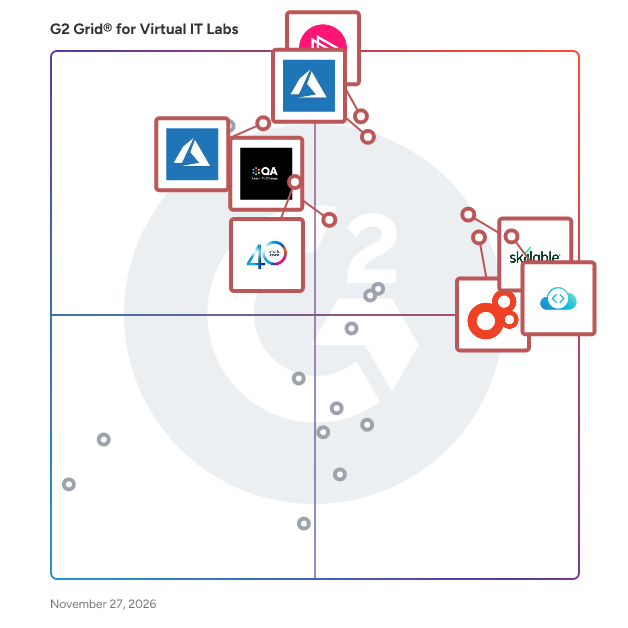
G2 Grid® for Virtual IT Labs Software

G2 Grid® for Virtual IT Labs Software plotting products by satisfaction and market presence

Highlighted products: KodeKloud, Skillable, Pluralsight, CloudShare, Azure DevOps Labs, Azure Lab Services, QA USA, and Cisco Packet Tracer.

Underlying data: [Grid® JSON](https://www.g2.com/categories/virtual-it-labs/grids.json?focus%5B%5D=kodekloud&focus%5B%5D=skillable&focus%5B%5D=pluralsight&focus%5B%5D=cloudshare&focus%5B%5D=azure-devops-labs&focus%5B%5D=azure-lab-services&focus%5B%5D=qa-usa&focus%5B%5D=cisco-packet-tracer)

KodeKloud

BUILD REAL-WORLD DEVOPS, CLOUD & AI SKILLS THROUGH HANDS-ON LEARNING. KodeKloud offers immersive learning experiences that guide your team members to master DevOps, Cloud and AI, regardless of previous experience. Your engineers don't just watch videos; they practice in real environments until the skills stick. Accelerate your company's growth by taking your team to the next level with our in-depth courses, hands-on labs and cloud playgrounds.

Average Rating: 4.7/5.0

Total Reviews: 816

How Do G2 Users Rate KodeKloud?

  • Ease of Admin: 9.3/10 (Category avg: 9.1/10)
  • Degree of Simulation: 9.1/10 (Category avg: 8.9/10)
  • Ease of Understanding: 9.3/10 (Category avg: 9.0/10)
  • Results of the Experiment: 9.2/10 (Category avg: 8.8/10)

Who Is the Company Behind KodeKloud?

  • Seller: KodeKloud
  • Company Website:
  • Year Founded: 2017
  • HQ Location: Singapore, SG
  • LinkedIn® Page: www.linkedin.com
    183 employees on LinkedIn®

Who Uses This Product?

  • Who Uses This: DevOps Engineer, Software Engineer
  • Top Industries: Information Technology and Services, Computer Software
  • Company Size: 47% Small, 30% Large

What Do G2 Reviewers Say About KodeKloud?

AI-generated summary from verified user reviews

Pros
  • Users value the hands-on labs for enhancing confidence and practical skills in DevOps and related fields.
  • Users value the hands-on labs of KodeKloud, enhancing confidence and providing practical experience in DevOps practices.
  • Users value the hands-on experience provided by KodeKloud, enhancing their confidence and practical skills in DevOps.
  • Users commend the ease of use of KodeKloud, appreciating its simple setup and interactive, hands-on labs.
  • Users value the high-quality content of KodeKloud, noting its clarity and effectiveness in teaching DevOps concepts.
Cons
  • Users criticize the overly guided lab experiences, wishing for more independent, real-world scenarios to enhance learning.
  • Users report lab malfunctions such as crashes and loading issues, impacting the overall usability of KodeKloud.
  • Users find the slow loading of KodeKloud frustrating, especially with issues like lab crashes and video playback problems.
  • Users face connectivity issues with KodeKloud, leading to frustration during video playback and course access.
  • Users desire more course options in KodeKloud, particularly in cloud and specialized topics to enhance learning.

What Are Recent G2 Reviews of KodeKloud?

What Are G2 Users Discussing About KodeKloud?

Skillable

Skillable is the trusted pioneer and innovator in hands-on learning and skill validation. In job and organization-tailored scenarios, people develop and validate their skills through live learning experiences that accelerate job readiness and produce performance-based skill data and intelligence. Since 2004, more than 400 global customers have created and launched 60 million labs, using Skillable to practice and validate their skills. To learn more, visit skillable.com.

Average Rating: 4.6/5.0

Total Reviews: 444

How Do G2 Users Rate Skillable?

  • Ease of Admin: 9.0/10 (Category avg: 9.1/10)
  • Degree of Simulation: 8.8/10 (Category avg: 8.9/10)
  • Ease of Understanding: 8.9/10 (Category avg: 9.0/10)
  • Results of the Experiment: 8.7/10 (Category avg: 8.8/10)

Who Is the Company Behind Skillable?

  • Seller: Skillable
  • Company Website:
  • Year Founded: 2004
  • HQ Location: New Port Richey, Florida
  • LinkedIn® Page: www.linkedin.com
    309 employees on LinkedIn®

Who Uses This Product?

  • Who Uses This: Customer Engineer, Microsoft Certified Trainer
  • Top Industries: Information Technology and Services, Professional Training & Coaching
  • Company Size: 37% Small, 35% Medium

What Do G2 Reviewers Say About Skillable?

AI-generated summary from verified user reviews

Pros
  • Users appreciate the hands-on learning environment Skillable provides, enabling effective training and support for students globally.
  • Users value the ease of use of Skillable, appreciating its straightforward implementation and hands-on learning approach.
  • Users value the hands-on labs in Skillable that enhance real-time learning and effective student engagement.
  • Users value the hands-on learning experience provided by Skillable's labs, enhancing practical skills in safe environments.
  • Users value the hands-on experience Skillable offers, significantly improving learning retention and student confidence.
Cons
  • Users experience lab issues like access problems and discrepancies in instructions, impacting their overall learning experience.
  • Users frequently face lab malfunctions that hinder productivity and disrupt the learning experience significantly.
  • Users often face connectivity issues that hinder their training experience and affect lab performance and delivery.
  • Users experience significant lag and performance issues with Skillable, causing frustration during time-sensitive tasks and learning.
  • Users often face unclear instructions leading to confusion and disrupting their overall learning experience with Skillable.

What Are Recent G2 Reviews of Skillable?

What Are G2 Users Discussing About Skillable?

Pluralsight

Pluralsight is a technology learning platform that enables organizations to build and validate the capabilities needed to execute critical business priorities. By combining expert-led learning, hands-on practice, skill assessments, and workforce capability insights, Pluralsight equips teams with the skills to put technology to work and gives leaders visibility into workforce readiness. Designed for organizations navigating rapid technological change, Pluralsight connects skill development to business priorities across AI, cloud, cybersecurity, software development, and other critical technology domains. The platform goes beyond content access to help organizations identify skill gaps, develop technical capabilities, measure progress, and understand where additional investment in workforce development is needed. Pluralsight brings together five core capabilities: 1. Expert-led learning: Access a broad library of technology courses and learning paths developed by industry experts, helping teams build relevant skills and stay current as technologies evolve. 2. Hands-on practice: Apply new knowledge through interactive labs and practical learning experiences that help bridge the gap between understanding technology and using it in real-world scenarios. 3. Skill assessments: Evaluate technical proficiency, identify skill gaps, and establish a clearer understanding of individual and team capabilities to guide learning and development. 4. Workforce capability insights: Gain visibility into learning engagement, skill development, and workforce capabilities to inform decisions, track progress, and align development efforts with organizational priorities. 5. Outcome-focused solutions: Address strategic technology priorities through learning solutions designed to develop critical capabilities in areas such as AI, cloud, and cybersecurity. Pluralsight supports both individual technology professionals and organizations responsible for developing technical talent at scale. Its integrated approach connects learning, practice, assessment, and measurement, giving employees opportunities to develop their skills while providing leaders with information to guide workforce development. By connecting technology skill development to organizational priorities, Pluralsight enables businesses to move from learning activity toward demonstrated capability, helping teams apply technology effectively and supporting measurable business outcomes.

Average Rating: 4.6/5.0

Total Reviews: 1,310

How Do G2 Users Rate Pluralsight?

  • Ease of Admin: 9.0/10 (Category avg: 9.1/10)
  • Degree of Simulation: 8.8/10 (Category avg: 8.9/10)
  • Ease of Understanding: 9.0/10 (Category avg: 9.0/10)
  • Results of the Experiment: 8.7/10 (Category avg: 8.8/10)

Who Is the Company Behind Pluralsight?

  • Seller: Pluralsight
  • Company Website:
  • Year Founded: 2004
  • HQ Location: Westlake, TX
  • LinkedIn® Page: www.linkedin.com
    1,832 employees on LinkedIn®

Who Uses This Product?

  • Who Uses This: Software Engineer, Software Developer
  • Top Industries: Information Technology and Services, Computer Software
  • Company Size: 48% Large, 31% Medium

What Do G2 Reviewers Say About Pluralsight?

AI-generated summary from verified user reviews

Pros
  • Users appreciate the high-quality, expert-led tech courses on Pluralsight, facilitating effective learning across various topics.
  • Users appreciate the intuitive interface of Pluralsight, making it simple to find relevant courses effortlessly.
  • Users appreciate the straightforward learning experience of Pluralsight, making skill development simple and efficient.
  • Users appreciate the high-quality, expert-led courses on Pluralsight, simplifying learning paths and skill assessments for effective upskilling.
  • Users value the wide variety of skills offered by Pluralsight, enhancing their learning and practice experience effectively.
Cons
  • Users find the subscription prices to be expensive, especially for those without company support or in Latin America.
  • Users find the high subscription cost of Pluralsight limiting, especially without lifetime access and frequent billing frustrations.
  • Users find the lack of hands-on labs for all topics limits practical learning and skill application.
  • Users face lack of clarity in course content and search functionality, making it challenging to find relevant topics.
  • Users express concern over outdated content in Pluralsight, noting some courses do not align with current standards.

What Are Recent G2 Reviews of Pluralsight?

What Are G2 Users Discussing About Pluralsight?

AI can help you find the answers. G2 helps you trust them.

Connect G2 to Claude or ChatGPT for answers grounded in G2's trusted reviews, comparisons, and pricing from real user insights.

How it works

CloudShare

CloudShare is the leading virtual hands-on labs enterprise solution for the entire software customer journey. From personalized POCs that turn prospects into buyers to optimized onboarding that slashes time-to-value, and ongoing training that maximizes feature adoption, our easy-to-use, AI-powered environments turn customer education into meaningful and memorable experiences. In a pixel-perfect, play & break simulation of your software, end users can explore freely and gain the confidence to apply what they’ve learned. You’ll feel the benefits in every area, improving operational training KPIs and driving business growth. Sleep easy at night knowing that your team will be more efficient when they leverage API & LMS automation capabilities that allow you to create content and labs faster than it takes to finish your coffee. Cost control capabilities look after the pennies while you bring in the big bucks, and our analytics dashboards present the data that enables you to prove ROI. That’s why organizations like Salesforce, Palo Alto Networks, RSA, and Atlassian use CloudShare to scale training and sales enablement, reduce support overhead, and improve business outcomes.

Average Rating: 4.5/5.0

Total Reviews: 272

How Do G2 Users Rate CloudShare?

  • Ease of Admin: 8.8/10 (Category avg: 9.1/10)
  • Degree of Simulation: 9.4/10 (Category avg: 8.9/10)
  • Ease of Understanding: 9.1/10 (Category avg: 9.0/10)
  • Results of the Experiment: 9.0/10 (Category avg: 8.8/10)

Who Is the Company Behind CloudShare?

  • Seller: CloudShare
  • Company Website:
  • Year Founded: 2007
  • HQ Location: San Francisco, CA
  • LinkedIn® Page: www.linkedin.com
    93 employees on LinkedIn®

Who Uses This Product?

  • Who Uses This: Sales Engineer
  • Top Industries: Information Technology and Services, Computer Software
  • Company Size: 36% Medium, 35% Small

What Do G2 Reviewers Say About CloudShare?

AI-generated summary from verified user reviews

Pros
  • Users appreciate the ease of use of CloudShare, making setup and access quick and effortless.
  • Users love the setup ease of CloudShare, allowing for quick access and efficient environment cloning.
  • Users value the speedy cloning and launching of complex IT environments, enhancing efficiency and saving setup time.
  • Users love the easy creation of training environments in CloudShare, seamlessly integrating it into their workflow.
  • Users appreciate the time-saving features of CloudShare, enhancing efficiency with easy sharing and reliable templates.
Cons
  • Users notice slow performance during peak hours, which can hinder usability, especially with an unreliable internet connection.
  • Users notice a complex configuration process that presents a steep learning curve and limited customization options.
  • Users find CloudShare expensive, especially for small projects, and desire a more flexible pricing model.
  • Users struggle with connectivity issues on CloudShare, leading to noticeable latency and inconsistent performance during slow connections.
  • Users face virtual machine connectivity issues with CloudShare, impacting their experience and usability during classes.

What Are Recent G2 Reviews of CloudShare?

What Are G2 Users Discussing About CloudShare?

Azure DevOps Labs

Azure DevOps Labs is a comprehensive platform offering a suite of hands-on labs designed to facilitate learning and mastery of Azure DevOps services. These labs provide an interactive environment where users can explore various aspects of Azure DevOps, including agile planning, version control, continuous integration and deployment (CI/CD), testing, and release management. By engaging with these labs, users can gain practical experience in managing the entire application lifecycle, from development to deployment, using Azure DevOps tools. Key Features and Functionality: - Interactive Hands-On Labs: Users can access a variety of labs that cover different facets of Azure DevOps, such as agile planning, version control with Git, CI/CD pipelines, and testing methodologies. - Pre-Configured Virtual Environments: Each lab provides a ready-to-use virtual environment, eliminating the need for complex setup or installation, allowing users to focus solely on learning and experimentation. - Comprehensive Coverage: The labs encompass a wide range of topics, including agile work item management, collaboration experiences for development teams, debugging techniques, and deployment strategies, ensuring a holistic understanding of Azure DevOps services. - Accessibility: Labs are accessible directly through a web browser, providing flexibility and convenience for users to learn at their own pace and from any location. Primary Value and User Solutions: Azure DevOps Labs serves as an invaluable resource for developers, testers, and project managers aiming to enhance their proficiency with Azure DevOps services. By offering practical, hands-on experience in a controlled environment, these labs help users: - Accelerate Learning: Users can quickly grasp complex concepts and workflows within Azure DevOps, reducing the learning curve associated with new tools and practices. - Enhance Productivity: By familiarizing themselves with Azure DevOps features and best practices, users can streamline their development processes, leading to more efficient project execution. - Improve Collaboration: The labs emphasize collaborative tools and techniques, enabling teams to work more cohesively and effectively manage projects. - Facilitate Continuous Improvement: Regular engagement with the labs allows users to stay updated with the latest Azure DevOps features and methodologies, fostering a culture of continuous learning and improvement. In summary, Azure DevOps Labs provides a structured and practical approach to mastering Azure DevOps services, empowering users to implement DevOps practices effectively and drive successful software development projects.

Average Rating: 4.5/5.0

Total Reviews: 31

How Do G2 Users Rate Azure DevOps Labs?

  • Ease of Admin: 9.1/10 (Category avg: 9.1/10)
  • Degree of Simulation: 8.7/10 (Category avg: 8.9/10)
  • Ease of Understanding: 9.4/10 (Category avg: 9.0/10)
  • Results of the Experiment: 9.0/10 (Category avg: 8.8/10)

Who Is the Company Behind Azure DevOps Labs?

  • Seller: Microsoft
  • Year Founded: 1975
  • HQ Location: Redmond, Washington
  • LinkedIn® Page: www.linkedin.com
    232,750 employees on LinkedIn®
  • Ownership: MSFT
  • Phone: +1 (877) 276-2464

Who Uses This Product?

  • Top Industries: Information Technology and Services, Computer Software
  • Company Size: 50% Small, 41% Medium

What Do G2 Reviewers Say About Azure DevOps Labs?

AI-generated summary from verified user reviews

Pros
  • Users appreciate the integration of tools in Azure DevOps Labs, covering the entire software development lifecycle seamlessly.
  • Users value the hands-on practice Azure DevOps Labs offers, facilitating step-by-step learning with real tools and workflows.
  • Users value the structured environment of Azure DevOps Labs, which seamlessly supports the entire software development lifecycle.
  • User reviews highlight the ease of use of Azure DevOps Labs, making software development efficient and seamless.
  • Users appreciate the hands-on practice and guided labs, which clarify DevOps concepts and enhance understanding effectively.
Cons
  • Users face limited error handling and troubleshooting help, making it difficult to resolve script or deployment issues effectively.
  • Users find the lack of examples in Azure DevOps Labs makes troubleshooting challenging during script or deployment failures.
  • Users find the dashboard confusing, suggesting it could be more user-friendly for a better experience.
  • Users find the slow performance of Azure DevOps Labs frustrating, impacting their overall productivity significantly.

What Are Recent G2 Reviews of Azure DevOps Labs?

What Are G2 Users Discussing About Azure DevOps Labs?

Azure Lab Services

Compile relevant lab resources for your classroom, research project, development and testing, or other scenario using custom templates. And support your demand with built-in scaling and resiliency.

Average Rating: 4.4/5.0

Total Reviews: 23

How Do G2 Users Rate Azure Lab Services?

  • Ease of Admin: 9.0/10 (Category avg: 9.1/10)
  • Degree of Simulation: 8.6/10 (Category avg: 8.9/10)
  • Ease of Understanding: 8.6/10 (Category avg: 9.0/10)
  • Results of the Experiment: 8.7/10 (Category avg: 8.8/10)

Who Is the Company Behind Azure Lab Services?

  • Seller: Microsoft
  • Year Founded: 1975
  • HQ Location: Redmond, Washington
  • LinkedIn® Page: www.linkedin.com
    232,750 employees on LinkedIn®
  • Ownership: MSFT
  • Phone: +1 (877) 276-2464

Who Uses This Product?

  • Top Industries: Information Technology and Services
  • Company Size: 42% Medium, 33% Large

What Do G2 Reviewers Say About Azure Lab Services?

AI-generated summary from verified user reviews

Pros
  • Users appreciate the variety of features offered in Microsoft Azure DevOps, enjoying the convenience of an integrated suite.
Cons
  • Users find the UI not user-friendly, suggesting improvements for a better experience with Azure Lab Services.
  • Users find the poor interface design of Azure Lab Services to be a major barrier to usability.

What Are Recent G2 Reviews of Azure Lab Services?

Cisco Packet Tracer

Cisco Packet Tracer is a comprehensive network simulation tool developed by Cisco Systems, designed to facilitate the learning and teaching of complex networking concepts. It enables users to create, configure, and troubleshoot virtual networks, providing a realistic environment for practicing networking skills without the need for physical hardware. This software is particularly beneficial for students and professionals preparing for Cisco certifications such as CCNA and CCNP. Key Features and Functionality: - Network Simulation: Allows the creation of network topologies by adding and configuring devices like routers, switches, and end devices through a user-friendly drag-and-drop interface. - Protocol Support: Supports a wide range of protocols across various layers, including HTTP, FTP, SMTP, DNS, DHCP, TCP/IP, RIP, OSPF, EIGRP, BGP, and more, enabling comprehensive network behavior simulation. - Multiuser Collaboration: Facilitates collaborative learning by enabling multiple users to connect and work on the same network topology simultaneously over a real network. - Activity Wizard: Provides tools for instructors to create customized learning activities, set up scenarios, and offer feedback, enhancing the educational experience. - Cross-Platform Compatibility: Available on multiple operating systems, including Windows, Linux, and macOS, ensuring accessibility for a broad user base. Primary Value and User Solutions: Cisco Packet Tracer addresses the challenge of limited access to physical networking equipment by offering a virtual environment where users can practice and develop their networking skills. It serves as an invaluable educational resource, allowing learners to experiment with network configurations, understand protocol behaviors, and troubleshoot issues in a risk-free setting. By simulating real-world networking scenarios, Packet Tracer helps users build a solid foundation in networking principles, preparing them for real-world applications and certification exams.

Average Rating: 4.6/5.0

Total Reviews: 150

How Do G2 Users Rate Cisco Packet Tracer?

  • Ease of Admin: 9.0/10 (Category avg: 9.1/10)
  • Degree of Simulation: 8.9/10 (Category avg: 8.9/10)
  • Ease of Understanding: 9.3/10 (Category avg: 9.0/10)
  • Results of the Experiment: 9.4/10 (Category avg: 8.8/10)

Who Is the Company Behind Cisco Packet Tracer?

  • Seller: Cisco
  • Year Founded: 1984
  • HQ Location: San Jose, CA
  • LinkedIn® Page: www.linkedin.com
    95,294 employees on LinkedIn®
  • Ownership: NASDAQ:CSCO
  • Phone: 847-678-6600

Who Uses This Product?

  • Who Uses This: Network Engineer
  • Top Industries: Computer Networking, Computer & Network Security
  • Company Size: 50% Small, 32% Medium

What Do G2 Reviewers Say About Cisco Packet Tracer?

AI-generated summary from verified user reviews

Pros
  • Users appreciate the ease of use in Cisco Packet Tracer for conducting labs effortlessly.
  • Users enjoy the ease and simplicity of conducting Cisco labs, enhancing their practical learning experience.
  • Users value the ease and simplicity of using Cisco Packet Tracer for labs, enhancing their learning experience.
  • Users find Cisco Packet Tracer's labs practice invaluable for mastering network topology and configurations effectively.
  • Users find practice sessions valuable for understanding network configurations and communications in a virtual environment.
Cons
  • Users find insufficient content limits Cisco Packet Tracer's effectiveness for large projects and real-world scenarios.
  • Users feel restricted by the limited course options on Cisco Packet Tracer, as it only focuses on Cisco products.

What Are Recent G2 Reviews of Cisco Packet Tracer?

What Are G2 Users Discussing About Cisco Packet Tracer?

QA USA

QA's products include apprenticeships, a cloud-based self-paced learning platform, instructor-led learning, and fully bespoke learning program curation.

Average Rating: 4.7/5.0

Total Reviews: 437

G2 Deal: Save 15% with annual subscription to Team's edition.

Build skills that boost your career! Save 15% with annual subscription to Team's edition.

Price: ~~$780~~ → $660/user/year

View this exclusive G2 deal

How Do G2 Users Rate QA USA?

  • Ease of Admin: 9.5/10 (Category avg: 9.1/10)
  • Degree of Simulation: 9.5/10 (Category avg: 8.9/10)
  • Ease of Understanding: 9.3/10 (Category avg: 9.0/10)
  • Results of the Experiment: 9.5/10 (Category avg: 8.8/10)

Who Is the Company Behind QA USA?

  • Seller: QA USA
  • Year Founded: 1985
  • HQ Location: London, GB
  • LinkedIn® Page: www.linkedin.com
    3,984 employees on LinkedIn®

Who Uses This Product?

  • Who Uses This: Software Engineer, Consultant
  • Top Industries: Information Technology and Services, Computer Software
  • Company Size: 57% Large, 22% Medium

What Do G2 Reviewers Say About QA USA?

AI-generated summary from verified user reviews

Pros
  • Users find the content quality of QA USA outstanding, enjoying interactive labs that enhance learning and retention.
  • Users appreciate the intuitive interface and engaging labs of QA USA, enhancing their online learning experience significantly.
  • Users appreciate the progress tracking of QA USA, enabling effective learning through interactive labs and intuitive navigation.
  • Users find the intuitive interface and interactive labs of QA USA immensely helpful for online learning.
  • Users find QA USA's intuitive interface and integrated labs enhance their online learning and retention of information.
Cons
  • Users experience access issues with QA USA labs due to outdated content, requiring alternative environments for completion.
  • Users report access limitations in QA USA labs due to outdated content, requiring alternative solutions to complete tasks.
  • Users notice tracking issues in QA USA labs due to outdated content, requiring additional workarounds for completion.

What Are Recent G2 Reviews of QA USA?

What Are G2 Users Discussing About QA USA?

AWS Training and Certification

It provides access to on-demand digital courses like AWS Cloud Practitioner Essentials, Big Data Technical Fundamentals, Security Fundamentals, and Job Roles in the Cloud. You can also explore new training to learn about Machine Learning and Storage.

Average Rating: 4.3/5.0

Total Reviews: 20

How Do G2 Users Rate AWS Training and Certification?

  • Ease of Admin: 9.6/10 (Category avg: 9.1/10)
  • Degree of Simulation: 8.7/10 (Category avg: 8.9/10)
  • Ease of Understanding: 9.0/10 (Category avg: 9.0/10)
  • Results of the Experiment: 8.0/10 (Category avg: 8.8/10)

Who Is the Company Behind AWS Training and Certification?

Who Uses This Product?

  • Top Industries: Information Technology and Services
  • Company Size: 48% Large, 38% Medium

What Are Recent G2 Reviews of AWS Training and Certification?

What Are G2 Users Discussing About AWS Training and Certification?

CBT Nuggets

CBT Nuggets is an IT training platform for the teams responsible for keeping infrastructure running, systems secure, and certifications current. IT managers and directors use it to onboard new hires, prepare team members for more technical responsibilities, and make sure critical IT knowledge isn't limited to just a few people. Built for IT teams and the people managing them: CBT Nuggets gives managers a central place to assign training, track individual and team progress, and see who's completing what. Pre- and Post-Assessments help identify what team members already know and measure their knowledge after training. Whether preparing for upcoming projects, building backup coverage for critical systems, or documenting training for compliance requirements, managers have better visibility into where their teams stand. Practical training for real IT work: The platform includes expert-led video training in networking, cybersecurity, cloud, and other core IT areas, with courses covering certifications from CompTIA, Cisco, Microsoft, and AWS. Trainers bring real-world IT experience, and courses are broken into focused skills so IT professionals can spend time on what they need without reviewing material they already know. Virtual Labs provide hands-on practice, while Practice Exams, quizzes, and flashcards help reinforce knowledge and prepare learners for certification exams. Additional tools for IT teams: IT Trainerbot answers technical questions using CBT Nuggets training content, with citations to source videos and connections to related courses and labs. IT professionals can get answers when they need them and explore the training behind those answers. Internal Training lets organizations upload their own materials, including runbooks, onboarding documents, and training videos, alongside CBT Nuggets courses. Teams can access both in one place, while managers track training progress. CBT Nuggets also supports Single Sign-On (SSO) and LMS integration for organizations that need them. Anyone can get started with a free account at cbtnuggets.com.

Average Rating: 4.7/5.0

Total Reviews: 440

How Do G2 Users Rate CBT Nuggets?

  • Ease of Admin: 9.4/10 (Category avg: 9.1/10)
  • Degree of Simulation: 8.9/10 (Category avg: 8.9/10)
  • Ease of Understanding: 9.1/10 (Category avg: 9.0/10)
  • Results of the Experiment: 9.0/10 (Category avg: 8.8/10)

Who Is the Company Behind CBT Nuggets?

  • Seller: CBT Nuggets
  • Company Website:
  • Year Founded: 1999
  • HQ Location: Eugene, OR
  • LinkedIn® Page: www.linkedin.com
    123 employees on LinkedIn®

Who Uses This Product?

  • Who Uses This: Network Engineer, Network Administrator
  • Top Industries: Information Technology and Services, Computer & Network Security
  • Company Size: 41% Small, 32% Medium

What Do G2 Reviewers Say About CBT Nuggets?

AI-generated summary from verified user reviews

Pros
  • Users rave about the high-quality, well-structured content of CBT Nuggets, enhancing real-world understanding and career advancement.
  • Users appreciate the ease of use in CBT Nuggets, enjoying interactive training and structured lessons for flexible learning.
  • Users value the flexible self-paced learning of CBT Nuggets, enhancing understanding and fostering career growth.
  • Users value the thorough lab environment of CBT Nuggets, enhancing their learning with hands-on opportunities and clear explanations.
  • Users value the in-depth coverage provided by CBT Nuggets, encompassing various IT topics and hands-on labs.
Cons
  • Users face lab issues with repeated information and limited access due to network restrictions on lab videos.
  • Users find the high cost of CBT Nuggets prohibitive, making it difficult to sustain long-term use.
  • Users express concerns about inadequate assessment due to repetitive content and insufficient practical labs and resources.
  • Users express frustration over the lack of mobile accessibility, hindering convenient learning on-the-go with CBT Nuggets.
  • Users are frustrated by the lack of a mobile app, limiting convenient access to learning on the go.

What Are Recent G2 Reviews of CBT Nuggets?

What Are G2 Users Discussing About CBT Nuggets?

ACI Learning [ITPro]

ACI Learning is a comprehensive IT and cybersecurity training solution designed to equip users with practical skills necessary for real-world applications. This platform focuses on outcome-driven learning, ensuring that teams can effectively build their expertise through hands-on labs, certification preparation, and engaging video content crafted by industry experts. By providing structured assignments and guided learning pathways, ACI Learning facilitates purposeful upskilling, allowing learners to remain focused and make consistent progress towards their professional goals. The target audience for ACI Learning includes IT professionals, cybersecurity specialists, and organizations seeking to enhance their workforce's capabilities in a rapidly evolving technological landscape. The platform is particularly beneficial for teams looking to stay ahead of industry trends, improve their skill sets, and achieve certification in various IT and cybersecurity domains. Specific use cases include preparing for certification exams, enhancing practical skills through lab exercises, and fostering a culture of continuous learning within organizations. Key features of ACI Learning include the myACI platform, which integrates video content, hands-on labs, and assessments into a cohesive learning experience. This all-in-one solution not only enhances engagement and retention but also provides built-in dashboards and analytics that enable teams to track their progress and measure the impact of their training initiatives. Organizations can align their training efforts with business outcomes, ensuring that the skills developed are directly applicable to their operational needs. Additionally, myACI offers Marketplace access to a wide range of top-tier content beyond IT and cybersecurity, allowing organizations to scale their training efforts effectively. This feature helps boost retention and demonstrates return on investment (ROI) at every stage of the training process. By providing a robust and flexible learning environment, ACI Learning stands out as a valuable resource for organizations aiming to enhance their workforce's technical capabilities and adapt to the demands of the digital age.

Average Rating: 4.7/5.0

Total Reviews: 384

How Do G2 Users Rate ACI Learning [ITPro]?

  • Ease of Admin: 9.4/10 (Category avg: 9.1/10)

Who Is the Company Behind ACI Learning [ITPro]?

  • Seller: ACI Learning
  • Company Website:
  • HQ Location: Centennial, Colorado
  • LinkedIn® Page: www.linkedin.com
    685 employees on LinkedIn®

Who Uses This Product?

  • Who Uses This: Network Engineer, Student
  • Top Industries: Information Technology and Services, Computer & Network Security
  • Company Size: 46% Small, 32% Medium

What Do G2 Reviewers Say About ACI Learning [ITPro]?

AI-generated summary from verified user reviews

Pros
  • Users value the comprehensive content of ACI Learning [ITPro], enjoying its user-friendly and engaging format.
  • Users appreciate the ease of use of ACI Learning [ITPro], benefiting from well-organized, user-friendly content.
  • Users appreciate the relevant and engaging content of ACI Learning [ITPro], which adapts to evolving business needs.
  • Users value the updated and relevant video content of ACI Learning, which enhances information retention and learning efficiency.
  • Users appreciate the expert instructors and hands-on training of ACI Learning, fostering practical, career-focused skills.
Cons
  • Users find the outdated content concerning, with missing newer topics and delayed updates affecting learning effectiveness.
  • Users note that the lab environments could be more advanced, as some courses lack interactivity and real-world relevance.
  • Users desire more content on virtualization platforms, particularly certification videos for Microsoft and EC-Council topics.
  • Users express concern over outdated courses, noting delays in updates and missing newer certifications like XK0-006.
  • Users note that there is insufficient hands-on learning, with a desire for more interactive and practical elements in training.

What Are Recent G2 Reviews of ACI Learning [ITPro]?

ReadyTech

All-in-one technical training with multiple lab options. ReadyTech is an all-in-one platform for hands-on technical training. It brings virtual IT labs, lab management, a training-focused virtual classroom, course materials, assessments, self-paced learning, and instructor monitoring and control into one place. Choose the lab environment that fits the course. Use ReadyTech-hosted cloud or bare metal, your own AWS, Azure, or Google Cloud account, existing in-house systems and equipment, or Local Labs on learner computers. In-House Labs let you use infrastructure you already own for browser-based training. Local Labs let instructors monitor and assist learners on local machines, including systems with installed software, GPUs, USB license dongles, printers, and serial devices. Instructors can monitor and control learner labs during class, provide remote assistance, transfer files, manage timers, and respond to help requests. ReadyTech supports instructor-led, self-paced, and blended training. Pricing is flexible, with pay-as-you-go or month-to-month options, no long-term contracts, and live support, 24 hours a day, every day of the year.

Average Rating: 4.5/5.0

Total Reviews: 220

How Do G2 Users Rate ReadyTech?

  • Ease of Admin: 8.9/10 (Category avg: 9.1/10)
  • Degree of Simulation: 8.3/10 (Category avg: 8.9/10)
  • Ease of Understanding: 8.5/10 (Category avg: 9.0/10)
  • Results of the Experiment: 8.1/10 (Category avg: 8.8/10)

Who Is the Company Behind ReadyTech?

Who Uses This Product?

  • Who Uses This: Student, Consultant
  • Top Industries: Computer Software, Information Technology and Services
  • Company Size: 39% Large, 32% Medium

What Do G2 Reviewers Say About ReadyTech?

AI-generated summary from verified user reviews

Pros
  • Users appreciate the exceptional customer support of ReadyTech, ensuring quick resolutions and consistently high attentiveness to issues.
  • Users find ReadyTech's ease of use remarkable, enabling smooth access and connectivity for virtual training and demos.
  • Users value ReadyTech for its reliability, providing consistent connectivity and dependable performance during virtual training sessions.
  • Users value the simple initial setup of ReadyTech, leading to a smooth and efficient integration experience.
  • Users commend the fast response of ReadyTech's support team, ensuring quick resolutions and reliable assistance when needed.
Cons
  • Users face connectivity issues with audio/video and screen sharing, impacting the overall effectiveness of the platform.
  • Users experience audio issues, including connectivity problems and noise interference, impacting the overall user experience.
  • Users experience inconsistent audio quality issues, affecting connectivity and causing disturbances during sessions.
  • Users find the limited features of ReadyTech hinder troubleshooting and flexibility during events and classes.
  • Users report technical issues such as outages and difficulties with screen control during training sessions.

What Are Recent G2 Reviews of ReadyTech?

Heropa

Heropa specializes in high-performance, cloud-based Virtual IT Labs designed for hands-on software training, sales demos, and proofs of concept. Labs can be provisioned on-demand, scaled globally, and configured to support advanced networking or compute-intensive software. We help software companies get their products into the hands of learners and prospects quickly, reliably, and securely. Whether you're training customers, onboarding partners, or enabling your sales team, Heropa streamlines the process, reduces support overhead, and delivers engaging, hands-on experiences that drive adoption, sales success, and long-term customer satisfaction. Founded in 2010, with a global team supporting customers worldwide, we combine deep technical expertise with real-world experience in infrastructure and software enablement to support complex, global training and demo programs. Key capabilities include: - Customizable lab templates - Real-time classroom management tools - Support for instructor-led and on-demand sessions - User access controls - Detailed analytics

Average Rating: 4.9/5.0

Total Reviews: 47

How Do G2 Users Rate Heropa?

  • Ease of Admin: 9.6/10 (Category avg: 9.1/10)
  • Degree of Simulation: 9.9/10 (Category avg: 8.9/10)
  • Ease of Understanding: 9.5/10 (Category avg: 9.0/10)
  • Results of the Experiment: 9.8/10 (Category avg: 8.8/10)

Who Is the Company Behind Heropa?

  • Seller: HEROPA
  • Company Website:
  • Year Founded: 2010
  • HQ Location: Sydney, New South Wales
  • LinkedIn® Page: www.linkedin.com
    16 employees on LinkedIn®

Who Uses This Product?

  • Top Industries: Computer Software, Information Technology and Services
  • Company Size: 52% Medium, 29% Large

What Do G2 Reviewers Say About Heropa?

AI-generated summary from verified user reviews

Pros
  • Users praise the ease of use of Heropa, enabling quick setup of interactive labs and smooth user experiences.
  • Users value the quick and helpful customer support of Heropa, ensuring smooth operations for seamless learning experiences.
  • Users praise the setup ease of Heropa, appreciating its intuitive design and quick configuration for class environments.
  • Users appreciate the powerful and user-friendly platform of Heropa, praising its stability and excellent customer support.
  • Users highlight the fast response of Heropa's support team, ensuring a smooth experience with minimal disruption.
Cons
  • Users experience frustrating connectivity issues that lead to lost files and slow response times during use.
  • Users find the navigation occasionally cumbersome, requiring extra clicks, but expect improvements with future updates.
  • Users find difficult navigation occasionally frustrating, though they are hopeful for improvements in future updates.
  • Users find the internet connectivity issues frustrating, often losing files and repeatedly needing to reconnect during demos.
  • Users find navigation issues occasionally frustrating, requiring extra clicks and making the interface feel tricky at times.

What Are Recent G2 Reviews of Heropa?

What Are G2 Users Discussing About Heropa?

Nuvepro

Nuvepro accelerates digital workforce readiness through hands-on learning. We partner with EdTech organizations and Corporates to create a sustainable pool of ready-to-deploy talent in digital technologies. We do this through our Playgrounds with real-world environments, Projects with real-world problems, and Assessments with real-world scenarios. Nuvepro has over 1000+ digital labs and 200+ projects served over 200K+ learners and delivered over 2M+ lab hours.

Average Rating: 4.8/5.0

Total Reviews: 44

How Do G2 Users Rate Nuvepro?

  • Ease of Admin: 9.6/10 (Category avg: 9.1/10)
  • Degree of Simulation: 9.2/10 (Category avg: 8.9/10)
  • Ease of Understanding: 9.5/10 (Category avg: 9.0/10)
  • Results of the Experiment: 9.4/10 (Category avg: 8.8/10)

Who Is the Company Behind Nuvepro?

Who Uses This Product?

  • Top Industries: Information Technology and Services, Computer & Network Security
  • Company Size: 47% Large, 27% Medium

What Do G2 Reviewers Say About Nuvepro?

AI-generated summary from verified user reviews

Pros
  • Users value the hands-on labs by Nuvepro for building confidence and understanding in technology learning.
  • Users value the hands-on experience with Nuvepro, boosting their confidence in technology and automation skills.
  • Users appreciate the ease of use of Nuvepro, enabling non-technical individuals to automate workflows effortlessly.
  • Users appreciate the hands-on experience with Nuvepro, enjoying easy implementation and immediate access to trending tools.
  • Users value the pre-configured real-time environment in Nuvepro's Practical Labs, allowing immediate participation without setup hassles.
Cons
  • Users find the pacing issues of Nuvepro sessions too fast, suggesting a slower approach for beginners.
  • Users suggest a slow pace during initial sessions to enhance understanding and overall learning experience.
  • Users report experiencing technical issues with keyboard shortcuts and tool functionality in Nuvepro, though resolutions are quick.
  • Users report occasional technical issues in labs, but appreciate the quick resolutions provided by Nuvepro.
  • Users report occasional lab malfunctions with tools, though these technical issues are typically resolved quickly.

What Are Recent G2 Reviews of Nuvepro?

What Are G2 Users Discussing About Nuvepro?

Instruqt

Instruqt is the go-to platform for software companies looking to engage developers through hands-on product adoption. We make complex technology easy to understand through interactive, real-world experiences that showcase true product value. Our platform enables marketing, sales, and education teams at cutting-edge companies like MongoDB, Datadog, Hashicorp, and Google to create immersive demos, self-guided trials, and scalable training—without the extra complexity. By integrating seamlessly across the go-to-market journey, Instruqt empowers businesses to attract qualified leads, accelerate sales cycles, and build product champions. Book a demo today: https://instruqt.com/demo

Average Rating: 4.8/5.0

Total Reviews: 60

How Do G2 Users Rate Instruqt?

  • Ease of Admin: 8.7/10 (Category avg: 9.1/10)
  • Degree of Simulation: 9.3/10 (Category avg: 8.9/10)
  • Ease of Understanding: 8.9/10 (Category avg: 9.0/10)
  • Results of the Experiment: 8.8/10 (Category avg: 8.8/10)

Who Is the Company Behind Instruqt?

  • Seller: instruqt
  • Company Website:
  • Year Founded: 2018
  • HQ Location: Hilversum, North Holland
  • LinkedIn® Page: www.linkedin.com
    34 employees on LinkedIn®

Who Uses This Product?

  • Top Industries: Computer Software, Information Technology and Services
  • Company Size: 51% Medium, 41% Large

What Do G2 Reviewers Say About Instruqt?

AI-generated summary from verified user reviews

Pros
  • Users love the ease of use of Instruqt, enabling quick setups for hands-on learning experiences.
  • Users value the hands-on labs of Instruqt, facilitating effective, practical learning without lengthy video sessions.
  • Users commend Instruqt for its powerful course creation capabilities, enabling effective hands-on learning with minimal setup.
  • Users praise Instruqt for its easy creation of guided experiences, enabling rapid development from idea to production.
  • Users appreciate the hands-on labs of Instruqt, enabling effective learning experiences without lengthy presentations.
Cons
  • Users note a steep learning curve initially, emphasizing the need for guidance to navigate the platform effectively.
  • Users note the missing features in Instruqt, including organization tools and simplified workflows, affecting usability.
  • Users find the complex configuration of Instruqt challenging, particularly with integrations and customization options.
  • Users find the difficult setup process of Instruqt initially challenging, impacting the overall learning experience.
  • Users identify integration issues with CRMs and cloud infrastructure, expressing a need for improved connectivity and customization.

What Are Recent G2 Reviews of Instruqt?

What Are G2 Users Discussing About Instruqt?

Reviews of Virtual IT Labs products
Tian Lin
TL
Researched and written by Tian Lin

Learn More About Virtual IT Labs Software

What is Virtual IT Labs Software?

Virtual IT labs are simulated training environments that provide access to virtualized resources for interactive learning. It allows instructors to set up sandbox environments for learners with remote access, allowing them to experiment as much as necessary without worrying about posing a threat to the company’s internal IT infrastructure. With cloud-based virtual IT labs, there is no need for installing software on a computer, and learners can complete training from any device, irrespective of the time and location. All that is necessary is a browser and a stable internet connection.

Companies use these tools to help train employees on new development practices and the complexities of new software. Virtual labs are used to educate both employees and clients on new tools for projects. They are well-suited for training and testing because the solutions provide real-world resources without impacting live applications, websites, or networks. Some online course providers offer virtualized IT labs as their training platform in addition to their range of courses, but many true virtual IT labs are used for internal purposes within a company or classroom. Additionally, small startups to large enterprises can all benefit from a corporate learning management system with virtual lab integration. This can be used to train customers, employees, and partners on a replica of an actual product in a live online session, including additional web resources, animated demonstrations, and self-assessment.

What Types of Virtual IT Labs Software Exist?

Remote triggered labs: This refers to a lab which a learner can access from remote locations and conduct experiments over the internet. In these labs, the user can trigger a real experiment on a real piece of equipment or hardware. The outcome of the experiment, conducted remotely, is communicated back to the learner over the internet. This category of virtual lab solution provides the output of real-time experiments to the learners. Usually, time slots are booked before executing these experiments. Numerous such labs offer additional information to the learners like accompanying audio and video streaming of an actual lab experiment and equipment.

Simulation or modeling-based labs: In these virtual training labs, mathematical equations are used to model the experiments. The simulations are executed remotely at a high-end server, and the results are conveyed to the learner over the internet. This class of virtual labs, at best, emulates real-world scenarios/experiments. Simulation-based virtual labs are scalable and can cater to a large number of simultaneous users.

Measurement-based labs: These labs provide the corresponding measurement data for the experiment earlier conducted on an actual system. These labs are closer to the ‘real world’ experiments than the simulation-based labs because they deliver measurement data from real equipment to the learners.

VR spaces: Virtual reality classes offer a more immersive experience than simulators. Some gadgets provide a personalized three-dimensional ecosystem accompanied by audio. 

What are the Common Features of Virtual IT Labs Software?

Virtual IT labs combine the best of technology to deliver an interactive hands-on learning and training experience to learners and educators. Following are some of the core features within virtual IT lab software that can help users make the most of them:

Personalized learning: Virtual labs solutions enable organizations to create as many labs as necessary. Each lab can be tailored to the kind of training each learner requires. Learners can start at different stages of the training with different preloaded information. For example, these solutions facilitate the creation of beginner and advanced courses, allowing learners to begin at different entry points. 

Live virtual events: The live virtual events feature of virtual IT lab solutions makes it easy to efficiently manage online and onsite hands-on training meant to take place within designated time frames. This easy-to-configure, event-centric feature is useful if the organization needs to train many learners in a live scheduled session and start multiple lab environments simultaneously. Administrators can also set the length of an event, designate an expiration date, and set usage caps for learners.

Analytics capabilities: Virtual labs solutions come with built-in analytics capabilities, as well as a dashboard to help manage the labs. These statistics include the number of labs that have been started from a given project, and the number of times a given user has accessed their lab. It is also possible to access the labs to audit the work learners have completed and ensure they are advancing through the training course correctly.

What are the Benefits of Virtual IT Labs Software?

An ideal way to impart knowledge is to adopt a technologically advanced method of learning. Virtual IT labs are technologically efficient, convenient, and easy to use for trainees to demonstrate their skills. Here are some of the benefits that Virtual IT lab software offers:

Ease the burden on IT departments: The software environment is hosted by the virtual labs solution provider to ease the burden on the IT department’s resources. Instead of asking the IT department to set up a virtual lab, anybody, with any level of technical knowledge, can create a personalized, cloud-based learning environment with the click of a button. These labs can also be scaled up to meet user demand without any intervention from IT, and modifications can be made to the lab by the course creator through the admin panel without involving developers. Companies can also choose to use developers to maintain the labs if they prefer. 

Ensure safety: Virtual training labs are contained and secure, giving learners a safe space to practice their skills without the risk of corrupting live data, giving away sensitive information, or damaging expensive hardware. They can also test different scenarios, compare, and analyze which one is the most effective without trying them out in real life.

Offers more scheduling flexibility: No on-site staff is required to keep virtual IT labs open or maintained. As long as high-speed internet is available, labs are accessible whenever learners need to use them.

Promotes employee development: A virtual training lab is an economical way to offer a wide range of educational options to company staff, thereby increasing employee productivity. Often learners have to estimate how a machine operates, what the outcome of a piece of code would be, and so on. As such, they may ignore limitations or malfunctions that can occur in a real work environment. Virtual labs help in building a realistic learning environment so that users can learn at their own pace to get hands-on training and be more prepared.

Reduce attrition and support tickets: Delivering training using virtual IT labs ensures that learners fully understand the product before they start using it regularly. As a result, they would be less likely to face issues that require support ticket creation. Better user adoption also means that the software will have more of a positive impact on the business while reducing the possibility of attrition. 

Accelerate software adoption: As virtual training labs empower users to learn by practicing, it helps improve knowledge retention and helps learners become adept at using the software. The immersive, first-hand training allows learners to utilize the product features more efficiently, and determine how they can use them to improve the way they execute their routine work. Virtual labs also provide a more fun way of learning the software, which enthuses learners to complete the course and undertake further software training. 

Generate leads: Virtual IT labs can be used for passive lead generation and converting these leads into paying customers. Setting up a sandbox environment for leads using virtual labs helps them see how the software could be used to solve their exact issues, improve the day-to-day running of their business, and reduce the workload of their staff.

Who Uses Virtual IT Labs Software?

Corporate sector: Organizations use these tools for training and educating employees. Simulations are particularly useful for junior employees, who might need additional training or new employees who need some onboarding until they’re comfortable enough to take on actual projects.

Education sector: Virtual labs can empower teachers to become more effective and increase their impact while reducing their workload over time. Virtual lab solutions enable institutions to do everything from preparing students better with lab exercises, to taking entire degrees online. 

Mechanical engineering industry: Mechanical engineering sector tackles problems that involve visual-spatial elements, sometimes at the molecular level. To reinforce learning about material properties, virtual labs allow players to experiment with various materials in a three-dimensional simulated world. Virtual IT labs help in creating a hands-on, immersive, learning environment for the learners where they can physically see and spatially manipulate materials and their properties.

Construction industry: Construction simulation in virtual IT lab software can be used for construction planning and scheduling for architects, engineers, contractors, and designers. It assists them in visualizing construction sequences and reviewing site progress across the project lifetime.

Challenges with Virtual IT Labs Software

There are some drawbacks to virtual training labs, especially if introduced into a workplace setting that isn’t already technologically savvy and tuned in to the latest innovations. Here are a few challenges to keep in mind:

Limited engagement: Learners who are still in the process of acclimating to a technology-heavy work environment may not enjoy online training or may have difficulty appreciating its advantages. Virtual training labs are a new, innovative approach to learning, and navigating them well is a skill in itself. Some workers may find the shift from traditional to virtual learning experience to be jarring.

Need for prerequisite technology skills: Some workers may need general technology skills training before they feel comfortable using virtual training labs. Offering prerequisite technology skills training may lengthen the process for rolling out virtual training labs and can make the support staff feel burdened with questions on how to use them.

Unrealistic or irrelevant simulation: It’s essential to create virtual experiences that are relative to the learners’ career paths, interests, or day-to-day work environments. Otherwise, learners will find the virtual environments disengaging or irrelevant, and they won’t be able to gain complete exposure from the training. For instance, organizations can create virtual training sessions for their remote employees who are learning how to navigate a new software that has been implemented to help them with their routine work.

Technical issues: By their very nature, virtual learning environments and platforms are subject to technical issues, such as network, security, and bandwidth glitches. It is crucial to make sure that the organization is aware of the kinds of issues their virtual training platform is most likely to experience so that they can prevent them from happening or quickly resolve when the issue arises.

How to Buy Virtual IT Labs Software

Requirements Gathering (RFI/RFP) for Cloud Management Platforms

If a company is just starting and looking to purchase its first Virtual IT Lab, or maybe an organization needs to update a legacy system--wherever a business is in its buying process, g2.com can help select the best Virtual IT lab for the business.

Digitalization has necessitated the adoption of virtual training software and platforms. But with so many options available, it has become more complex for businesses to select a virtual training provider that suits their organizational goals and strategy.

Taking a comprehensive overview of the business and identifying pain points can help the team to produce an RFI, a one-page list with a few bullet points describing what is needed from the virtual IT lab.

The checklist serves as a guide that helps in determining both necessary and good-to-have features including budget features, number of users, integrations, security requirements, cloud or on-premises solutions, and more.

Compare Virtual IT Labs Software Products

Create a long list

An initial list of potential virtual IT training labs software should include any products that meet the company’s basic feature requirements. At this point, buyers should just be aiming to get a sense of the options that meet essential needs. The following lab types must be looked at while deciding on the company’s ideal lab setup:

Cloud labs: A cloud lab is a marketplace and SaaS platform through which one can rapidly configure and have on-demand access to a virtual training environment on a cloud through a fully automated self-service portal and within a few minutes. Cloud-based IT labs offer substantial benefits to training teams like automation and ease of lab creation and management, instant worldwide scalability, cost control, the ability to directly connect with learners, and more. Moving to the cloud should not require a hefty investment of the organization’s internal resources. For maximum benefit, it is important to ensure that the IT lab vendor offers the ability to import the organization’s existing virtual machines to their platform, allowing the IT labs to work on the cloud exactly as they do on-premises.

Hardware labs: With hardware labs, there is no layer of virtualization between the application and the physical server. A physical server is available for each learner so there isn’t any sharing. A hardware lab may be well-suited for a buyer over a cloud-based solution due to other reasons as well. For instance, some users need systems with real graphics cards or access to real-time processing that isn’t available in the cloud. Some customers may require each user to have hypervisor access to a system. Another advantage of hardware can be the cost. Hardware can provide cost savings since the organization pays a daily fee for the physical server regardless of how many virtual machines (VM) are run on it, while in lab configurations each user needs access to many VMs. 

Custom labs: Some vendors offer the benefit of customizing virtual IT lab solutions to meet the requirements of the organization. Custom labs are tailored to meet the organization’s training requirements without limiting functionality as opposed to pre-made labs. It offers the choice to modify course materials easily to meet user requirements.

Create a short list

After a long list has been created, it’s pragmatic to look at each product in more detail to determine if it will meet the needs of the company’s employees and customers to narrow down the list. This should include evaluating additional features of each product (say availability of the lab in multiple languages for non-English speakers), beyond the ones identified as essential to determine if that additional functionality would further enrich the learning experience for the users. 

Conduct demos

Demos provide an opportunity to buyers to see how a virtual lab works in engaging their employees, prospects, learners, and more. It is lucrative to request the vendor for a live demo of the virtual lab to see the platform in action. Buyers also have the option of comparing and trying out various virtual IT labs software that are available free of cost. 

Selection of Virtual IT Labs Software

Choose a selection team

When choosing a virtual IT lab software, it is important to involve any relevant stakeholder who might be using the product to ensure that the software will meet everyone’s needs. This likely includes employers or managers who can decide on the appropriate course material and the IT team that supports the organization’s training requirements.

Negotiation

After narrowing in on a preferred product, it’s time to negotiate a pricing package. Buyers must consider the pricing model of the software, such as whether the seller charges a flat monthly fee or, more commonly, charges a fee based on how many users would be utilizing the product. Also, the buyer can consider negotiating a discount in exchange for multi-year contracts.

Final decision

Selecting a vendor that has a strategy aligned with the enterprise’s directions and objectives will accelerate the growth of the organization. Here are few factors to consider while making the final decision:

Compatibility with industry standards: In case the buyer decides to go for a cloud-based virtual IT labs solution, the final decision should be made after ensuring that the vendor’s solution is fully compatible with IaaS and virtualization standards. It is imperative to be cautious about working with vendors that require compatibility with non-standard hypervisors, restructuring or reprogramming the labs, or on-premises solutions. This type of investment on the buyer’s part can get them locked into the vendor’s cloud platform, restricting their capability to scale according to future needs.

Full stack of benefits: Buyers should insist on a “full-stack solution” to correlate costs directly to consumption. It must be ensured that the vendor’s solution gives them the ability to efficiently clone and share environments. A virtual classroom should provide the same instructor-student experience as a physical classroom. A high-level user experience solution should include the following features:

  • The ability to automatically send login credentials to users once they sign up for the course.
  • A simple way for learners to check that they are set up correctly before starting the course.
  • The capability to monitor and support from trainers to learners as they experiment with the labs.
  • The scope for the learners to chat with the instructor or with each other during live sessions.

Technical support: The process of troubleshooting technical problems is the last thing a buyer should worry about. Virtual IT training lab solution providers must assist users with 24/7 monitoring and technical support to resolve issues that users might face while accessing and using the labs.