Best Enterprise Statistical Analysis Software

How Many Statistical Analysis Software Products Does G2 Track?

Total Products under this Category: 113

Category Stats (Oct 2026)

  • Average Rating: 4.25/5 The average rating of products in this category, based on all submitted ratings
  • Top Trending Product: Rapidminer SLC (+0.61%) - Among all products in this category, Rapidminer SLC recorded the largest rating increase compared to last month

Last updated: October 08, 2026

How Does G2 Rank Statistical Analysis Software Products?

Why You Can Trust G2's Software Rankings:

  • 30 Analysts and Data Experts
  • 8,000+ Authentic Reviews
  • 113+ Products
  • Unbiased Rankings

G2's software rankings are built on verified user reviews, rigorous moderation, and a consistent research methodology maintained by a team of analysts and data experts. Each product is measured using the same transparent criteria, with no paid placement or vendor influence. While reviews reflect real user experiences, which can be subjective, they offer valuable insight into how software performs in the hands of professionals. Together, these inputs power the G2 Score, a standardized way to compare tools within every category.

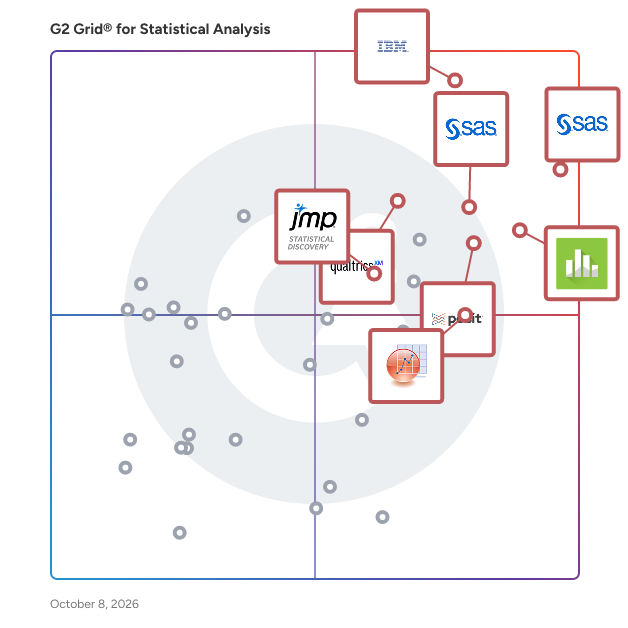
G2 Grid® for Statistical Analysis Software

G2 Grid® for Statistical Analysis Software plotting products by satisfaction and market presence

Highlighted products: SAS Viya, IBM SPSS Statistics, Qualtrics Market Research, Minitab Statistical Software, Posit Team, Base SAS, JMP, and OriginPro.

Underlying data: [Grid® JSON](https://www.g2.com/categories/statistical-analysis/grids.json?focus%5B%5D=sas-sas-viya&focus%5B%5D=ibm-spss-statistics&focus%5B%5D=qualtrics-market-research&focus%5B%5D=minitab-statistical-software&focus%5B%5D=posit-team&focus%5B%5D=base-sas&focus%5B%5D=jmp&focus%5B%5D=originpro&segment=enterprise)

SAS Viya

SAS Viya is a cloud-native data and AI platform that enables teams to build, deploy and scale explainable AI that drives trusted, confident decisions. It unites the entire data and AI life cycle and empowers teams to innovate quickly while balancing speed, automation and governance by design. Viya unifies data management, advanced analytics and decisioning in a single platform, so organizations can move from experimentation to production with confidence, delivering measurable business impact that is secure, explainable and scalable across any environment. Key capabilities required to deliver trusted decisions include: • End-to-end clarity across the data and AI life cycle, with built-in lineage, auditability and continuous monitoring to support defensible decisions. • Governance by design, enabling consistent oversight across data, models and decisions to reduce risk and accelerate adoption. • Explainable AI at scale, so insights and outcomes can be understood, validated and trusted by business and regulators alike. • Operationalized analytics, ensuring value continues beyond deployment through monitoring, retraining and life cycle management. • Flexible, cloud-native deployment, allowing organizations to start anywhere and scale everywhere while maintaining control.

Average Rating: 4.3/5.0

Total Reviews: 778

How Do G2 Users Rate SAS Viya?

  • Quality Control: 8.9/10 (Category avg: 8.3/10)
  • Has the product been a good partner in doing business?: 8.2/10 (Category avg: 8.7/10)
  • Survival Analysis: 8.9/10 (Category avg: 8.4/10)
  • Data Sampling: 8.9/10 (Category avg: 8.6/10)

Who Is the Company Behind SAS Viya?

  • Seller: SAS Institute
  • Company Website:
  • Year Founded: 1976
  • HQ Location: Cary, NC
  • Twitter: @SASsoftware
    60,863 Twitter followers
  • LinkedIn® Page: www.linkedin.com
    15,122 employees on LinkedIn®

Who Uses This Product?

  • Who Uses This: Student, Biostatistician
  • Top Industries: Pharmaceuticals, Banking
  • Company Size: 33% Small, 33% Large

What Do G2 Reviewers Say About SAS Viya?

AI-generated summary from verified user reviews

Pros
  • Users value the ease of use in SAS Viya, enhancing data visualization and decision-making for businesses.
  • Users appreciate the advanced analytical capabilities of SAS Viya, making data analysis and decision-making more efficient.
  • Users value the sophisticated analytical capabilities of SAS Viya, enhancing decision-making and insights from diverse data sources.
  • Users value the end-to-end data lifecycle tooling in SAS Viya, enhancing insights and strategic decision-making capabilities.
  • Users value the powerful data visualization capabilities of SAS Viya, enhancing insights and decision-making in their organizations.
Cons
  • Users find SAS Viya difficult for non-technical users to navigate, impacting ease of access to reports and dashboards.
  • Users find the visualization complexity of SAS Viya challenging, especially for those without technical expertise.
  • Users find the learning curve challenging, especially for non-technical individuals navigating reports and dashboards.
  • Users find the difficult learning curve for SAS Viya challenging, especially for non-technical users attempting to access features.
  • Users find the expensive pricing of SAS Viya a potential barrier, complicating their decision-making process.

What Are Recent G2 Reviews of SAS Viya?

What Are G2 Users Discussing About SAS Viya?

IBM SPSS Statistics

IBM SPSS Statistics is an end-to-end statistical solution that simplifies advanced statistical analysis across industries for users of any statistical expertise. It offers comprehensive resources, expert support, and proven reliability to transform complex data into impactful decisions IBM SPSS Statistics recent version 32 release comes up with powerful new features such as AI Output Assistant, Mediation Analysis, Curated Help Designer and many advanced algorithms. IBM SPSS Statistics • offers an easy to use drag and drop interface along with AI Output Assistant to interpret complex statistical output in easy language. • simplifies complex data analysis using advanced statistical techniques that performs data preparation and management, to analysis and reporting. • performs predictive analysis using advanced forecasting procedures to uncover patterns and predict future trends. • creates compelling visual representations to identify trends, derive accurate conclusions and deliver graphs and presentation-ready reports Explore how both individuals and organizations spanning across Industries can simply complex statistical test through an easy to use, accurate ,reliable and secure solution. Use Cases 1. Market Research - Statistical procedures highlighting how to do market research with IBM SPSS 2. Client Acquisition – Emphasizes on how can organizations can acquire more clients and understand consumer behavior 3. Forecasting – Analyze historical sales data, evaluate key trends, predict outcomes relevant to inventory planning 4. Healthcare - Enabling healthcare organizations to improve patient outcomes 5. Government - Empowering Government institutions to take smarter policy decisions 6. Supply Chain - Utilize Statistical Algorithms to make data-driven decisions across procurement, inventory, logistics, and demand planning. Visit here to see what's new in v32 - https://www.ibm.com/products/spss-statistics/whats-new

Average Rating: 4.2/5.0

Total Reviews: 900

G2 Deal: Turn complex data into reliable insights. Get 30% off your first monthly or annual subscriptions. Offer ends 15 April 2026.

Analyze data, forecast trends faster now with AI that interprets results. With IBM SPSS Statistics, you get 30% off your first monthly subscriptions. Offer ends 15 April 2026.

Price: ~~79.00 USD~~ → 55.30 USD

View this exclusive G2 deal

How Do G2 Users Rate IBM SPSS Statistics?

  • Quality Control: 8.4/10 (Category avg: 8.3/10)
  • Has the product been a good partner in doing business?: 8.0/10 (Category avg: 8.7/10)
  • Survival Analysis: 8.4/10 (Category avg: 8.4/10)
  • Data Sampling: 8.7/10 (Category avg: 8.6/10)

Who Is the Company Behind IBM SPSS Statistics?

  • Seller: IBM
  • Company Website:
  • Year Founded: 1911
  • HQ Location: Armonk, New York, United States
  • Twitter: @IBMSecurity
    74,660 Twitter followers
  • LinkedIn® Page: www.linkedin.com
    344,328 employees on LinkedIn®

Who Uses This Product?

  • Who Uses This: Research Assistant, Assistant Professor
  • Top Industries: Higher Education, Research
  • Company Size: 43% Large, 30% Medium

What Do G2 Reviewers Say About IBM SPSS Statistics?

AI-generated summary from verified user reviews

Pros
  • Users appreciate the ease of use in SPSS Statistics, enjoying its intuitive interface for complex analyses.
  • Users praise SPSS Statistics for its ease of use in complex statistical analysis, making data handling straightforward and efficient.
  • Users value the strong data management and cleaning capabilities of IBM SPSS Statistics, enhancing accuracy and efficiency in analyses.
  • Users appreciate the intuitive user interface of IBM SPSS Statistics, simplifying complex analysis and saving time.
  • Users value the robust analysis capabilities of IBM SPSS Statistics, enabling data-driven decisions that enhance credibility in UX work.
Cons
  • Users find the high cost of IBM SPSS Statistics to be a significant barrier for smaller teams.
  • Users find the poor visualization in SPSS Statistics hampers usability and complicates data interpretation for stakeholders.
  • Users find the steep learning curve of IBM SPSS Statistics challenging, especially for those new to statistical analysis.
  • Users find the outdated interface of SPSS unappealing and cumbersome compared to modern data analysis tools.
  • Users often experience performance issues with IBM SPSS Statistics, particularly when handling large datasets, impacting usability.

What Are Recent G2 Reviews of IBM SPSS Statistics?

What Are G2 Users Discussing About IBM SPSS Statistics?

Qualtrics Market Research

Decision-grade insights at business speed. The AI-native research platform where research becomes the thing every decision runs through — not the thing every decision waits for. Most organizations are making high-stakes decisions — product launches, market entry, pricing, campaigns — without the market intelligence to back them up. Not because teams lack expertise, but because the tools and timelines they're working with were built for a slower era, and business decisions can't wait. • Eight to twelve weeks from question to answer. • Five to seven disconnected vendors per study. • Insights that arrive after the decision has already been made. • Business teams route around research — using unvalidated generic AI tools. Qualtrics Market Research replaces that infrastructure. We're the only platform where research expertise, validated methodology, and AI are natively embedded, not bolted on — built on 20+ years of experience insights and trained on millions of proprietary and unique market research survey responses that generic AI tools can’t replicate. Research platform, human and synthetic panels, advanced methodology, and AI-powered synthesis — integrated natively, not stitched together. And uniquely: research sits in the same system as CX and EX data, closing the loop between insight and measurable business outcomes in a way no agency or point solution can. The result: research shifts from scarcity to abundance. • Decision-grade insights in 24–48 hours instead of 6–8 weeks. • Research costs cut 50–85%. • Insights compound into institutional knowledge instead of disappearing into slide decks. • Research becomes the thing every business decision runs through. Customers see the difference quickly. • Gabb cut time-to-insight from 7 days to 4 hours and runs research at 50% lower cost. • Navy Federal Credit Union delivers strategic research in under 4 hours versus 5 days. • Workday generated 1,700 product improvement ideas in 3 months. • Booking.com cut fielding costs 50% with synthetic panels. • Victoria's Secret runs 200%+ more research projects on the same team. • Across deployments, Nucleus Research finds an average 100% ROI with 1.5-year payback. Qualtrics is also named a Strong Performer in The Forrester Wave™ for Experience Research Platforms (https://www.qualtrics.com/ebooks-guides/experience-research-wave-report/). _____________________________________________________________________________________ Why teams choose Qualtrics Market Research 1) Research platform + research expertise + research-grade AI — purpose-built to work together Most platforms give you survey software. Qualtrics gives you a research system. 20+ years of market research expertise embedded in the platform itself. AI trained on real market research data, not internet scraping. Panel access, study design, advanced analytics, and synthesis — integrated natively, not stitched together through APIs. And when you need to connect to your BI tools (Tableau, Power BI, Looker) or bring in specialized panels, Qualtrics is built to integrate, not replace. Agencies have the expertise but not the platform. DIY tools have the platform but not the expertise. Generic AI moves fast but has no research foundation. Qualtrics is the only option where all three exist natively — and plays well with the rest of your stack. 2) The only ecosystem that connects research to CX, EX, and operational data Research sits in the same system as the experience data your organization already collects — CX satisfaction scores, EX engagement metrics, operational performance data. Research questions can be triggered by what's happening in your programs. Findings can be validated against real business outcomes. You can prove research ROI by connecting insights to measurable results. No agency, no specialized MR platform, and no AI tool offers this natively — and it cannot be replicated by stitching tools together. This closes the loop between insight and outcome in a way no one else can. 3) Governance that scales research without diluting it The risk of research democratization is confident conclusions built on flawed inputs — more teams running studies, fewer with methodology expertise to run them well. Qualtrics is the only platform with built-in guardrails that prevent flawed studies from being fielded, a published validation framework for synthetic data that survives stakeholder scrutiny, and centralized visibility that lets research leaders see and govern everything running across the organization. Fast and governed. Scaled and rigorous. That combination doesn't exist anywhere else. _____________________________________________________________________________________ What you can do with Qualtrics Market Research Move from project to platform. Research becomes always-on infrastructure, not a request queue. Continuous tracking, always-available findings, and AI that surfaces what teams already know before they ask. Every study compounds in Research Hub — the 10th study on a topic makes the 1st study more valuable, not obsolete. Research Agent lets any team member get validated answers without a trained researcher in the room — so research scales beyond the research team without creating governance risk. Get decision-grade insights without the agency wait. Deliver insights in 24–48 hours instead of 6–8 weeks — so findings arrive before the decision, not after it. Synthetic panels compress directional research from weeks to hours at 50% lower cost. Apply advanced methodology (Conjoint with HB analysis, MaxDiff with TURF, Van Westendorp, Gabor-Granger) without an agency — built into the platform so the economics of high-quality research change permanently. AI handles transcript coding, theme detection, and summary generation, so researchers spend their time on interpretation, not mechanics. Govern research as it scales. Built-in methodology guardrails prevent flawed studies from being fielded — Research Agent (early access) enforces best practices at the point of study creation, not after results come back. Federated permissions and branded templates let every team operate within shared quality standards. Audit trails, AI transparency, and a published synthetic validation framework (Generalization, Data Shape, Diversity, Transferability) provide the provenance enterprise stakeholders will ask about. SOC 2, GDPR, HITRUST, ISO 27001, and FedRAMP round out the compliance posture procurement teams already know how to approve. _____________________________________________________________________________________ Key Qualtrics Market Research capabilities • Research hub — AI-powered search and synthesis across every study, including external documents; cross-study intelligence surfaces patterns automatically • Advanced survey tools — Drag-and-drop survey builder, advanced logic, quota management, support for 100+ question types, and PhD-backed templates • Research agent (early access) — AI-guided study scoping for Conjoint and MaxDiff, questionnaire drafting, plain-language Q&A against your accumulated research library • Synthetic panels — Launch studies instantly to pre-test survey designs, screen dozens of ideas, explore new populations, or extend first-wave findings with simulated row-level responses from research- grade AI that replicate real-world audience patterns • Integrated human panels — reach 200M+ vetted respondents across 200+ global markets through a curated network of 30+ panel partners, all accessible in the platform • UX research - Moderated and unmoderated user testing, card sorting and tree testing on the same platform as other market research capabilities. • Advanced methodology — Conjoint (CBC with HB analysis), MaxDiff with TURF, Van Westendorp PSM, Gabor-Granger, segmentation, brand tracking, concept testing • AI summary — automated transcript coding, theme detection, and highlight reel generation for qualitative work • Video & audio analysis — Analyzes thousands of open-text responses and automatically surfaces key themes, sentiment trends, and representative quotes with AI. • Conversational feedback — Uncover layers of valuable context with intelligent follow-up questions that dynamically adapts to customer input • ExpertReview — AI-driven survey quality and methodology checks at the point of design • Stats iQ + Text iQ — AI-powered statistical analysis and open-end text analytics CX + EX + MR integration — research connects natively to experience programs, the only platform that does • Prebuilt XM solutions — survey-in-a-box for brand tracking, concept testing, message testing, A&U, and UX research •Advanced analysis — Crosstabs and customizable reporting dashboards REST API, multi-channel distribution including email and SMS, WCAG 2.0 compliant • Enterprise governance — federated permissions, branded templates, audit trails, AI transparency, bias auditing • System integrations — Salesforce, Snowflake, Tableau, Power BI • Compliance — SOC 2, GDPR, HITRUST, ISO 27001, FedRAMP _____________________________________________________________________________________ - ABOUT QUALTRICS Qualtrics is the AI-powered experience and research platform organizations use to understand customers, employees, and markets — and act on what they learn. Across customer experience, employee experience, and market research, the Qualtrics platform combines proprietary AI, PhD-backed methodology, and the world's most flexible feedback technology to help teams design better products, deliver better experiences, and make better decisions, faster. _____________________________________________________________________________________ - RELATED QUALTRICS PRODUCTS Qualtrics Customer Experience Hear every customer's voice, fix every broken experience, and increase loyalty and lifetime value. Combines an AI-powered listening engine, predictive intelligence, and closed-loop action capabilities so teams can move beyond measurement to drive change across the entire customer journey. https://www.g2.com/products/qualtrics-customer-experience/reviews Qualtrics Employee Experience Gather continuous feedback at every employee moment that matters and take action to improve engagement, talent planning, productivity, and innovation. Pairs AI-driven analytics and IO-psychology-based decision tools with guided manager action planning and real-time automated workflows. https://www.g2.com/products/qualtrics-employee-experience/reviews

Average Rating: 4.4/5.0

Total Reviews: 2,914

How Do G2 Users Rate Qualtrics Market Research?

  • Quality Control: 8.5/10 (Category avg: 8.3/10)
  • Has the product been a good partner in doing business?: 8.7/10 (Category avg: 8.7/10)
  • Survival Analysis: 8.5/10 (Category avg: 8.4/10)
  • Data Sampling: 8.2/10 (Category avg: 8.6/10)

Who Is the Company Behind Qualtrics Market Research?

  • Seller: Qualtrics
  • Company Website:
  • Year Founded: 2002
  • HQ Location: Provo, UT
  • Twitter: @Qualtrics
    42,137 Twitter followers
  • LinkedIn® Page: www.linkedin.com
    11,647 employees on LinkedIn®

Who Uses This Product?

  • Who Uses This: Student, Research Assistant
  • Top Industries: Higher Education, Education Management
  • Company Size: 45% Large, 34% Medium

What Do G2 Reviewers Say About Qualtrics Market Research?

AI-generated summary from verified user reviews

Pros
  • Users appreciate the ease of use of Qualtrics Market Research, finding it intuitive for building and managing surveys.
  • Users enjoy the self-service platform of Qualtrics for easily building, testing, and measuring surveys efficiently.
  • Users appreciate the ease of creating sophisticated surveys with Qualtrics, benefiting from its robust workflow and scalability.
  • Users value the intuitive interface of Qualtrics Market Research, enabling easy survey creation and data analysis.
  • Users value the ease of creating surveys with Qualtrics, finding the platform intuitive and user-friendly.
Cons
  • Users express frustration with collaboration limitations, making it difficult to manage and share survey previews effectively.
  • Users note the limited international survey capacity of Qualtrics Market Research compared to other specialized firms.
  • Users report a steep learning curve with Qualtrics, making it daunting for beginners to utilize effectively.
  • Users find the limited customization options in Qualtrics Market Research frustrating, impacting their survey design and usability.
  • Users express concerns about pricing issues, noting high costs and limited access to advanced features without higher plans.

What Are Recent G2 Reviews of Qualtrics Market Research?

What Are G2 Users Discussing About Qualtrics Market Research?
AI can help you find the answers. G2 helps you trust them.

Connect G2 to Claude or ChatGPT for answers grounded in G2's trusted reviews, comparisons, and pricing from real user insights.

How it works

Minitab Statistical Software

Minitab Statistical Software is a comprehensive data analysis and statistical solution designed to assist users in exploring data, identifying trends, and making informed, data-driven decisions. This software caters to a diverse audience, ranging from beginners to seasoned analysts, by combining powerful statistical methods with an intuitive interface. This design approach simplifies complex analyses while ensuring depth and accuracy are not compromised. The capabilities of Minitab are extensive, encompassing a variety of statistical techniques such as descriptive statistics, hypothesis testing, regression analysis, ANOVA, time series analysis, design of experiments (DOE), reliability analysis, and predictive analytics. The software's guided workflows and Assistant feature are particularly beneficial, as they help users select appropriate tools, interpret results effectively, and communicate findings in a clear manner. This accessibility makes advanced analytics feasible for users across different skill levels, promoting a culture of data-driven decision-making within organizations. Minitab is available in both desktop and cloud-based versions, providing users with the flexibility to work from various locations while ensuring secure access to their data and analyses. The cloud version enhances collaboration among teams by allowing them to share projects and standardize analyses without the need for local installation. This feature is particularly advantageous for organizations with remote teams or those looking to streamline their analytical processes. The software also includes built-in data preparation tools that facilitate the cleaning and organization of data, which is crucial for accurate analysis. Furthermore, Minitab seamlessly integrates with other Minitab solutions and supports quality improvement methodologies such as Six Sigma. This integration helps organizations enhance their processes, reduce variation, and achieve measurable business outcomes. By providing a robust suite of tools and features, Minitab Statistical Software stands out as a valuable resource for organizations aiming to leverage data for strategic advantage.

Average Rating: 4.6/5.0

Total Reviews: 221

How Do G2 Users Rate Minitab Statistical Software?

  • Quality Control: 8.2/10 (Category avg: 8.3/10)
  • Has the product been a good partner in doing business?: 8.6/10 (Category avg: 8.7/10)
  • Survival Analysis: 8.3/10 (Category avg: 8.4/10)
  • Data Sampling: 8.4/10 (Category avg: 8.6/10)

Who Is the Company Behind Minitab Statistical Software?

  • Seller: Minitab
  • Company Website:
  • Year Founded: 1972
  • HQ Location: State College, Pennsylvania, United States
  • Twitter: @Minitab
    5,017 Twitter followers
  • LinkedIn® Page: www.linkedin.com
    732 employees on LinkedIn®

Who Uses This Product?

  • Who Uses This: Quality Manager
  • Top Industries: Automotive, Manufacturing
  • Company Size: 46% Large, 32% Medium

What Do G2 Reviewers Say About Minitab Statistical Software?

AI-generated summary from verified user reviews

Pros
  • Users appreciate the ease of use of Minitab Statistical Software, enjoying its intuitive interface and efficient setup.
  • Users appreciate the ease of use of Minitab, enhancing their overall data analysis experience significantly.
  • Users value the user-friendly guides in Minitab, enhancing the ease of statistical analysis and improving overall experience.
  • Users find Minitab to have a user-friendly interface that simplifies statistical analysis and methodology selection.
  • Users value the robust analysis capabilities of Minitab, enabling effortless and detailed statistical evaluations for informed decision-making.
Cons
  • Users find Minitab's licensing fees expensive, making it difficult to justify for infrequent use.
  • Users find Minitab's steep learning curve challenging, often requiring more training and clearer guidance for effective use.
  • Users find the complexity of Minitab's interface and functionality hinders ease of use and workflow efficiency.
  • Users find Minitab's interface not user-friendly, citing outdated design and confusing menus that complicate the experience.
  • Users face data management issues in Minitab, complicating dataset handling and analysis processes.

What Are Recent G2 Reviews of Minitab Statistical Software?

What Are G2 Users Discussing About Minitab Statistical Software?

Posit Team

Posit is a Public Benefit Corporation building open-source software and an enterprise data science platform. We created the RStudio IDE, Shiny, Positron, and Quarto — tools used by millions of data scientists, machine learning engineers, and researchers worldwide, including teams at 25% of the Fortune Global 100. Our commercial products help organizations put those tools into production: Posit Workbench provides centralized development environments supporting Positron, RStudio, VS Code, and Jupyter; Posit Connect handles publishing and deployment for Shiny, AI applications, Streamlit, Dash, FastAPI, Flask, Bokeh, and more; and Posit Package Manager provides security-compliant package management for R and Python.

Average Rating: 4.5/5.0

Total Reviews: 569

How Do G2 Users Rate Posit Team?

  • Quality Control: 8.7/10 (Category avg: 8.3/10)
  • Has the product been a good partner in doing business?: 8.6/10 (Category avg: 8.7/10)
  • Survival Analysis: 8.9/10 (Category avg: 8.4/10)
  • Data Sampling: 9.2/10 (Category avg: 8.6/10)

Who Is the Company Behind Posit Team?

  • Seller: Posit
  • Year Founded: 2009
  • HQ Location: Boston, US
  • Twitter: @posit_pbc
    120,874 Twitter followers
  • LinkedIn® Page: www.linkedin.com
    439 employees on LinkedIn®

Who Uses This Product?

  • Who Uses This: Research Assistant, Graduate Research Assistant
  • Top Industries: Higher Education, Information Technology and Services
  • Company Size: 49% Large, 26% Medium

What Do G2 Reviewers Say About Posit Team?

AI-generated summary from verified user reviews

Pros
  • Users appreciate the ease of use of Posit Team, simplifying data analysis workflows and enhancing productivity.
  • Users praise Posit for its reliable performance and seamless integrations, enhancing productivity and simplifying workflows.
  • Users value Posit's commitment to open source software, enhancing productivity and integration with R programming.
  • Users appreciate the responsive and reliable customer support of Posit Team, enhancing their overall experience and productivity.
  • Users appreciate the easy integrations of Posit Team, enhancing their workflows with seamless compatibility with multiple tools.
Cons
  • Users experience slow performance with large datasets, which disrupts workflow and demands higher system requirements.
  • Users face a steep learning curve with Posit Team, making initial usage and advanced features challenging.
  • Users report performance issues with Posit Team, particularly during use with larger datasets and frequent crashes.
  • Users report a steep learning curve with Posit Team, making initial setup and advanced features challenging for newcomers.
  • Users face lagging performance with Posit Team, especially when handling large datasets, impacting overall productivity.

What Are Recent G2 Reviews of Posit Team?

What Are G2 Users Discussing About Posit Team?

Base SAS

Base SAS is a comprehensive software suite that provides a flexible and extensible fourth-generation programming language (4GL) designed for data access, transformation, analysis, and reporting. It serves as the foundation of the SAS System, enabling users to manage and analyze data efficiently across various platforms. With its intuitive syntax and extensive library of prewritten procedures, Base SAS simplifies complex data tasks, making it an essential tool for data professionals. Key Features and Functionality: - Intuitive 4GL Programming Language: Offers an easy-to-learn syntax with hundreds of language elements and functions, supporting tasks from data extraction and cleansing to reporting and information delivery. - Rich Library of Integrated Procedures: Provides prewritten procedures for data manipulation, management, information storage, retrieval, and report writing, enhancing productivity by reducing the need for extensive coding. - Powerful Data Analysis Tools: Capable of performing a wide range of analyses, from simple descriptive statistics to advanced data correlation and distribution analysis. - Cross-Platform Support: Runs on all major computing platforms, allowing seamless integration into any computing environment and ensuring code portability across different systems. - Web-Based Interface: Includes SAS Studio, a web-based developer interface that enables access to data files, libraries, and existing programs from any device with a web browser, facilitating coding and data management tasks. Primary Value and Solutions Provided: Base SAS significantly reduces programming and maintenance time by offering an intuitive programming language and a comprehensive set of tools for data management and analysis. It enables organizations to integrate data across diverse environments, ensuring a unified view of information. The software simplifies the creation and distribution of visually appealing reports in various formats, including Microsoft Excel, PowerPoint, PDF, and HTML, catering to the preferred platforms of decision-makers. By providing a robust and scalable solution, Base SAS addresses the challenges of complex data manipulation and reporting, empowering users to derive meaningful insights and make informed decisions.

Average Rating: 4.4/5.0

Total Reviews: 144

How Do G2 Users Rate Base SAS?

  • Quality Control: 9.3/10 (Category avg: 8.3/10)
  • Has the product been a good partner in doing business?: 8.7/10 (Category avg: 8.7/10)
  • Survival Analysis: 9.2/10 (Category avg: 8.4/10)
  • Data Sampling: 9.0/10 (Category avg: 8.6/10)

Who Is the Company Behind Base SAS?

  • Seller: SAS Institute
  • Year Founded: 1976
  • HQ Location: Cary, NC
  • Twitter: @SASsoftware
    60,863 Twitter followers
  • LinkedIn® Page: www.linkedin.com
    15,122 employees on LinkedIn®
  • Phone: 1-800-727-0025

Who Uses This Product?

  • Top Industries: Hospital & Health Care, Banking
  • Company Size: 48% Large, 28% Small

What Do G2 Reviewers Say About Base SAS?

AI-generated summary from verified user reviews

Pros
  • Users appreciate the ease of use of Base SAS, benefiting from its user-friendly features and extensive documentation.
  • Users value the coding simplification of Base SAS, enabling easy error identification and consistent coding over time.
  • Users value the ease of learning Base SAS, thanks to abundant resources and an intuitive interface.
  • Users value the strong capabilities for data management in Base SAS, facilitating efficient data analysis and reporting.
  • Users appreciate the performance efficiency of Base SAS, noting its speed and power in handling large datasets.
Cons
  • Users find the complexity of setup and usage for Base SAS cumbersome compared to similar tools.
  • Users find Base SAS lacking in visualization capabilities, making it tough to create complex and effective graphics.
  • Users experience slow performance with Base SAS, particularly struggling with long processing times for large datasets.
  • Users find that Base SAS has a learning difficulty due to its syntax and outdated features, requiring extensive research.
  • Users find Base SAS not user-friendly, requiring time-consuming research and difficulty with basic tasks.

What Are Recent G2 Reviews of Base SAS?

What Are G2 Users Discussing About Base SAS?

JMP

JMP, data analysis software for Mac and Windows, combines the strength of interactive visualization with powerful statistics. Importing and processing data is easy. The drag-and-drop interface, dynamically linked graphs, libraries of advanced analytic functionality, scripting language and ways of sharing findings with others, allows users to dig deeply into their data, with greater ease and speed. Originally developed in the 1980’s to capture the new value in GUI for personal computers, JMP remains dedicated to adding cutting-edge statistical methods and special analysis techniques from a variety of industries to the software’s functionality with each release. The organization's founder, John Sall, still serves as Chief Architect. To see a full list of data connectors please visit https://www.jmp.com/en/software/analytic-workflow/data-connectors

Average Rating: 4.5/5.0

Total Reviews: 206

How Do G2 Users Rate JMP?

  • Quality Control: 8.6/10 (Category avg: 8.3/10)
  • Has the product been a good partner in doing business?: 8.9/10 (Category avg: 8.7/10)
  • Survival Analysis: 8.7/10 (Category avg: 8.4/10)
  • Data Sampling: 8.8/10 (Category avg: 8.6/10)

Who Is the Company Behind JMP?

  • Seller: JMP Statistical Discovery
  • Company Website:
  • Year Founded: 1989
  • HQ Location: Cary, North Carolina
  • Twitter: @JMP_software
    2,760 Twitter followers
  • LinkedIn® Page: www.linkedin.com
    1,063 employees on LinkedIn®

Who Uses This Product?

  • Who Uses This: Student
  • Top Industries: Higher Education, Information Technology and Services
  • Company Size: 42% Large, 33% Small

What Do G2 Reviewers Say About JMP?

AI-generated summary from verified user reviews

Pros
  • Users appreciate the ease of use in JMP, allowing simple data exploration and visualization without complicated coding.
  • Users appreciate the interactive data visualization in JMP, making it easy to explore and understand complex datasets.
  • Users value the ease of statistical analysis with JMP, enabling intuitive data exploration and visualization effortlessly.
  • Users appreciate the dynamic and intuitive visualization capabilities of JMP, making data exploration and analysis effortless.
  • Users appreciate the intuitive and interactive interface of JMP, enhancing their data analysis and visualization experience.
Cons
  • Users find JMP to be quite expensive, making it challenging for smaller businesses to adopt effectively.
  • Users find the learning curve steep, especially for those unfamiliar with statistical analysis, making mastery challenging.
  • Users find JMP offers limited flexibility in integration and model options, impacting their analysis capabilities.
  • Users note that JMP has a steep learning curve and can be overwhelming for new users and beginners.
  • Users find limitations in storage with JMP, especially lacking models for multivariate analysis and time series.

What Are Recent G2 Reviews of JMP?

What Are G2 Users Discussing About JMP?

OriginPro

Origin is a user-friendly and easy-to-learn software application that provides data analysis and publication-quality graphing capabilities tailored to the needs of scientists and engineers. OriginPro offers extended analysis tools for Peak Fitting, Surface Fitting, Statistics, Signal Processing and Image Handling. Along with general statistical tools such as descriptive statistics, T-tests, ANOVA, and survival analysis, OriginPro also offers advanced Time Series analysis and Quality Improvement tools including DOE, SPC, and MSA. Users can customize operations such as importing, graphing and analysis, all from the GUI. Graphs, analysis results and reports update automatically when data or parameters change. This allows for batch analysis of multiple files or data sets without the need for programming.

Average Rating: 4.7/5.0

Total Reviews: 139

How Do G2 Users Rate OriginPro?

  • Quality Control: 7.6/10 (Category avg: 8.3/10)
  • Has the product been a good partner in doing business?: 9.4/10 (Category avg: 8.7/10)
  • Survival Analysis: 8.3/10 (Category avg: 8.4/10)
  • Data Sampling: 9.1/10 (Category avg: 8.6/10)

Who Is the Company Behind OriginPro?

  • Seller: OriginLab Corp.
  • Company Website:
  • Year Founded: 1992
  • HQ Location: Northampton, MA
  • Twitter: @OriginLab
    2,428 Twitter followers
  • LinkedIn® Page: www.linkedin.com
    33 employees on LinkedIn®

Who Uses This Product?

  • Who Uses This: Research Scientist
  • Top Industries: Research, Higher Education
  • Company Size: 45% Large, 34% Small

What Do G2 Reviewers Say About OriginPro?

AI-generated summary from verified user reviews

Pros
  • Users commend OriginPro's versatility and comprehensive tools for seamless data analysis and impressive figure presentations.
  • Users appreciate the versatile data analysis tools in OriginPro, enhancing their ability to interact with results effectively.
  • Users find OriginPro to be highly user-friendly and versatile, facilitating effortless data analysis and presentation.
  • Users value the versatile visualization capabilities of OriginPro, enhancing their data presentations and analysis efficiency.
  • Users value the graphical visualization capabilities of OriginPro, praising its flexibility and professional output for research.
Cons
  • Users face a steep learning curve with OriginPro due to its complexity and occasional interface challenges.
  • Users find the user-unfriendliness of OriginPro challenging, particularly in column manipulation and limited Mac OS support.
  • Users find complexity in column manipulation and the outdated interface may hinder effective use of OriginPro.
  • Users find the subscription expensive and mention high maintenance costs for the premium OriginPro software.
  • Users note limited flexibility in graphing and formula functionalities, impacting their overall experience with OriginPro.

What Are Recent G2 Reviews of OriginPro?

What Are G2 Users Discussing About OriginPro?

KNIME

KNIME helps everybody make sense of data. Its free and open source KNIME Analytics Platform enables anyone — whether they come from a business, technical or data background — to intuitively work with data, every day. KNIME Business Hub is the commercial complement to KNIME Analytics Platform and enables users to collaborate on data science and share insights across the organization. Together, the products support the complete data science lifecycle, allowing teams at all levels of analytics readiness to support the operationalization of data and to build a scalable data science practice.

Average Rating: 4.5/5.0

Total Reviews: 116

How Do G2 Users Rate KNIME?

  • Quality Control: 8.4/10 (Category avg: 8.3/10)
  • Has the product been a good partner in doing business?: 8.5/10 (Category avg: 8.7/10)
  • Survival Analysis: 8.5/10 (Category avg: 8.4/10)
  • Data Sampling: 8.8/10 (Category avg: 8.6/10)

Who Is the Company Behind KNIME?

  • Seller: KNIME
  • Company Website:
  • Year Founded: 2008
  • HQ Location: Zurich, Switzerland
  • Twitter: @knime
    7,998 Twitter followers
  • LinkedIn® Page: www.linkedin.com
    245 employees on LinkedIn®

Who Uses This Product?

  • Top Industries: Information Technology and Services, Higher Education
  • Company Size: 39% Large, 33% Medium

What Do G2 Reviewers Say About KNIME?

AI-generated summary from verified user reviews

Pros
  • Users find KNIME's ease of use enhances productivity, enabling even non-technical individuals to build workflows effortlessly.
  • Users find KNIME's coding ease remarkable, enabling effortless workflows without requiring extensive technical skills.
  • Users find KNIME to be an easy-to-learn platform, enabling quick workflow creation without coding skills.
  • Users find KNIME easy to learn and start delivering results, thanks to its intuitive visual workflow interface.
  • Users love the easy and intuitive data visualization capabilities of KNIME, enhancing understanding and communication of data insights.
Cons
  • Users find the initial learning curve challenging, especially for those unfamiliar with data science concepts and visual programming.
  • Users face memory usage issues with KNIME, leading to slow performance, especially with larger files and operations.
  • Users report storage limitations with KNIME, leading to performance issues and difficulties with large datasets.
  • Users note that data management issues hinder their experience, especially with file handling and certain databases.
  • Users find the lack of learning resources for KNIME to be a significant barrier to effective usage.

What Are Recent G2 Reviews of KNIME?

What Are G2 Users Discussing About KNIME?

SAS/STAT

SAS/STAT includes exact techniques for small data sets, high-performance statistical modeling tools for large data tasks and modern methods for analyzing data with missing values.

Average Rating: 4.2/5.0

Total Reviews: 58

How Do G2 Users Rate SAS/STAT?

  • Quality Control: 9.1/10 (Category avg: 8.3/10)
  • Has the product been a good partner in doing business?: 7.6/10 (Category avg: 8.7/10)
  • Survival Analysis: 9.1/10 (Category avg: 8.4/10)
  • Data Sampling: 9.1/10 (Category avg: 8.6/10)

Who Is the Company Behind SAS/STAT?

  • Seller: SAS Institute
  • Year Founded: 1976
  • HQ Location: Cary, NC
  • Twitter: @SASsoftware
    60,863 Twitter followers
  • LinkedIn® Page: www.linkedin.com
    15,122 employees on LinkedIn®
  • Phone: 1-800-727-0025

Who Uses This Product?

  • Top Industries: Research, Higher Education
  • Company Size: 49% Large, 31% Medium

What Do G2 Reviewers Say About SAS/STAT?

AI-generated summary from verified user reviews

Cons
  • Users find the learning curve challenging for newcomers, although improvements are being made over time.

What Are Recent G2 Reviews of SAS/STAT?

What Are G2 Users Discussing About SAS/STAT?

eviews

EViews offers academic researchers, corporations, government agencies, and students access to statistical, forecasting, and modeling tools through an object-oriented interface.

Average Rating: 4.2/5.0

Total Reviews: 111

How Do G2 Users Rate eviews?

  • Quality Control: 7.8/10 (Category avg: 8.3/10)
  • Has the product been a good partner in doing business?: 8.2/10 (Category avg: 8.7/10)
  • Survival Analysis: 7.9/10 (Category avg: 8.4/10)
  • Data Sampling: 8.5/10 (Category avg: 8.6/10)

Who Is the Company Behind eviews?

  • Seller: S&P Global
  • HQ Location: New York, NY
  • Twitter: @SPGlobal
    47,349 Twitter followers
  • LinkedIn® Page: www.linkedin.com
    40,459 employees on LinkedIn®
  • Ownership: NYSE: SPGI

Who Uses This Product?

  • Top Industries: Higher Education, Financial Services
  • Company Size: 40% Medium, 40% Small

What Are Recent G2 Reviews of eviews?

What Are G2 Users Discussing About eviews?

Stata

The complete statistical software for data science. Stata delivers everything you need for reproducible data analysis—powerful statistics, visualization, data manipulation, and automated reporting—all in one intuitive platform.

Average Rating: 4.3/5.0

Total Reviews: 163

How Do G2 Users Rate Stata?

  • Quality Control: 8.5/10 (Category avg: 8.3/10)
  • Has the product been a good partner in doing business?: 8.3/10 (Category avg: 8.7/10)
  • Survival Analysis: 8.6/10 (Category avg: 8.4/10)
  • Data Sampling: 8.9/10 (Category avg: 8.6/10)

Who Is the Company Behind Stata?

  • Seller: StataCorp
  • Year Founded: 1985
  • HQ Location: College Station, TX
  • Twitter: @Stata
    32,329 Twitter followers
  • LinkedIn® Page: www.linkedin.com
    141 employees on LinkedIn®

Who Uses This Product?

  • Who Uses This: Research Assistant, Analyst
  • Top Industries: Higher Education, Research
  • Company Size: 42% Large, 31% Medium

What Do G2 Reviewers Say About Stata?

AI-generated summary from verified user reviews

Pros
  • Users value the coding simplification in Stata, enabling easier data analysis and flexibility in usage.
  • Users praise the easy big data analysis and variety of built-in methods offered by Stata.
  • Users appreciate the easy handling of big data with simple coding and diverse analytical methods in Stata.
  • Users find STATA's flexibility in coding and ease of use highly beneficial for effective data management and monitoring.
  • Users find Stata's ease of installation beneficial, allowing for straightforward implementation in data management tasks.
Cons
  • Users find that Stata's memory usage can be excessive, leading to concerns during statistical analyses in the background.
  • Users often find poor customer support with Stata, leading to dissatisfaction and unresolved issues.
  • Users find the poor graphics of Stata unappealing, detracting from their overall experience with the software.

What Are Recent G2 Reviews of Stata?

What Are G2 Users Discussing About Stata?

SAS Visual Statistics

Multiple users can explore data, then interactively create and refine predictive models. Distributed, in-memory processing slashes model development time, quickly surfacing valuable insights you can act on.

Average Rating: 4.4/5.0

Total Reviews: 24

How Do G2 Users Rate SAS Visual Statistics?

  • Quality Control: 7.5/10 (Category avg: 8.3/10)
  • Has the product been a good partner in doing business?: 8.1/10 (Category avg: 8.7/10)
  • Survival Analysis: 7.9/10 (Category avg: 8.4/10)
  • Data Sampling: 7.9/10 (Category avg: 8.6/10)

Who Is the Company Behind SAS Visual Statistics?

  • Seller: SAS Institute
  • Year Founded: 1976
  • HQ Location: Cary, NC
  • Twitter: @SASsoftware
    60,863 Twitter followers
  • LinkedIn® Page: www.linkedin.com
    15,122 employees on LinkedIn®
  • Phone: 1-800-727-0025

Who Uses This Product?

  • Company Size: 52% Large, 32% Small

What Do G2 Reviewers Say About SAS Visual Statistics?

AI-generated summary from verified user reviews

Pros
  • Users value the ease of use in SAS Visual Statistics, noting no training required for effective operation.
  • Users value the automated analytics in SAS Visual Statistics, making data understanding and forecasting straightforward.
  • Users value the proactive customer support of SAS Visual Statistics, enhancing their overall experience with the product.
  • Users value the advanced machine learning capabilities of SAS Visual Statistics for efficient data analysis and predictive modeling.
  • Users value the reliable reporting tools of SAS Visual Statistics for their effective forecasting and clarity.
Cons
  • Users express concerns about the high licensing cost, making SAS Visual Statistics difficult to afford for many.
  • Users find that learning may be difficult without prior experience with SAS tools, limiting usability and understanding.
  • Users are concerned about the high licensing cost and associated infrastructure requirements of SAS Visual Statistics.
  • Users feel that customization difficulty in SAS Visual Statistics hinders their ability to tailor the software effectively.
  • Users struggle with data analysis difficulty, finding it hard to grasp modeling calculations and reconcile approaches effectively.

What Are Recent G2 Reviews of SAS Visual Statistics?

Grapher

Grapher™ is a full-function graphing application for scientists, engineers, and business professionals. With over 80 unique graph types, data is quickly transformed into knowledge. Virtually every aspect of the graph is customizable. Enhance your graph with legends, titles and labels, summation plots, graph magnifiers, and statistical reports. Grapher is used extensively by those who care deeply about the visual quality of their final plot.

Average Rating: 4.5/5.0

Total Reviews: 113

How Do G2 Users Rate Grapher?

  • Quality Control: 8.3/10 (Category avg: 8.3/10)
  • Has the product been a good partner in doing business?: 8.8/10 (Category avg: 8.7/10)
  • Survival Analysis: 8.3/10 (Category avg: 8.4/10)
  • Data Sampling: 7.5/10 (Category avg: 8.6/10)

Who Is the Company Behind Grapher?

  • Seller: Golden Software
  • Year Founded: 1983
  • HQ Location: Golden, CO
  • Twitter: @GoldenSoftware1
    780 Twitter followers
  • LinkedIn® Page: www.linkedin.com
    32 employees on LinkedIn®

Who Uses This Product?

  • Top Industries: Research, Environmental Services
  • Company Size: 39% Large, 33% Medium

What Are Recent G2 Reviews of Grapher?

What Are G2 Users Discussing About Grapher?

Mathematica

Mathematica is a computational software program based on symbolic mathematics, developed by Wolfram Research.

Average Rating: 4.1/5.0

Total Reviews: 86

How Do G2 Users Rate Mathematica?

  • Has the product been a good partner in doing business?: 5.8/10 (Category avg: 8.7/10)

Who Is the Company Behind Mathematica?

  • Seller: Wolfram Research
  • Year Founded: 1987
  • HQ Location: Champaign, US
  • Twitter: @WolframResearch
    68,699 Twitter followers
  • LinkedIn® Page: www.linkedin.com
    629 employees on LinkedIn®

Who Uses This Product?

  • Who Uses This: Research Assistant
  • Top Industries: Research, Information Technology and Services
  • Company Size: 45% Large, 31% Small

What Are Recent G2 Reviews of Mathematica?

What Are G2 Users Discussing About Mathematica?

Bijou Barry
BB
Researched and written by Bijou Barry
Updated
Reviews & FAQs

Reviews Summary: The Best Statistical Analysis Software for Enterprise Businesses

Thanks to 7774 Statistical Analysis software reviews and associated data from users working for large-scale companies, at G2 we have some of the most definitive data on the best Statistical Analysis software for the large space. We have identified 21 individual Statistical Analysis products offering the features, pricing and support that Enterprise companies look for when comparing Statistical Analysis software and solutions. These reviews are generated using the qualitative and quantitative feedback from G2 members working in large-scale companies and who have used these Statistical Analysis software products.

When G2 reviewers submit their Statistical Analysis software reviews, they often provide information on the type of company they work for and what market segment they belong to. We break these different market segments into three distinct groups:

  • Small Business Statistical Analysis Software Reviews (< 50 employees)
  • large Statistical Analysis Software Reviews (51-1,000 employees)
  • Enterprise Statistical Analysis Software Reviews (1,001+ employees)

large businesses have their own unique requirements when it comes to Statistical Analysis software compared to small or enterprise companies. That is why these individual large-scale company Statistical Analysis software reviews are especially helpful when comparing product set up, ease of use and overall cost.

Below you will find FAQs and review snippets for Statistical Analysis software products that work well in large environments. These reviews are written by real G2 users working for these Enterprise companies who have real-world experience with these Statistical Analysis software products.

FAQs About Statistical Analysis Software for Enterprise Businesses

Q. What are the best Statistical Analysis software products for large-scale businesses, according to G2 reviewers?
  • SAS Viya - 4.4-stars, 64 reviews (26% from large reviewers)
  • IBM SPSS Statistics - 4.1-stars, 386 reviews (43% from large reviewers)
  • Qualtrics Market Research - 4.5-stars, 129 reviews (46% from large reviewers)
  • Minitab Statistical Software - 4.6-stars, 99 reviews (46% from large reviewers)
  • Posit Team - 4.5-stars, 271 reviews (48% from large reviewers)
Q. What are the least-liked Statistical Analysis software products for professionals at large-scale companies, based on the overall G2 rating?
  • Analyse-it - 3.8-stars, 29 reviews (73% from large reviewers)
  • TIMi - 4.9-stars, 10 reviews (37% from large reviewers)
  • Spotfire Analytics - 4.1-stars, 18 reviews (47% from large reviewers)
  • GraphPad Prism - 4.8-stars, 17 reviews (31% from large reviewers)
  • XLSTAT - 4.8-stars, 14 reviews (30% from large reviewers)
Q. What are the highest-rated Statistical Analysis software tool features according to employees at Enterprise companies?
  • Regression - 4.5-stars
  • Time Series Analysis - 4.4-stars
  • ANOVA Support - 4.4-stars
Q. What are the features that are rated lowest by employees at Enterprise companies?
  • AI Text Summarization - 3.5-stars
  • AI Text Generation - 3.5-stars
  • Cost Analysis - 4.0-stars
Q. How many Statistical Analysis software reviews are from users working in large companies?

1486 out of all Statistical Analysis software reviews on G2 are from users working in Enterprise companies (19%).

Here's What Reviewers Working at large Businesses Have to Say About Statistical Analysis Software

What Enterprise Professionals Liked What Enterprise Professionals Disliked

IBM SPSS Statistics: “Easy and straightforward. Allows users of any grade level to complete projects. Allows the addition of fantastic macros.”

Read Review

IBM SPSS Statistics: “Where do I start? It's expensive, and if something breaks, good luck with support. I've wasted literally a week of time just trying to pay them for my license. I'm not kidding. They outsource to Mexico and have a ton of turnover so every time I try to email our account rep, they're no longer there. I will never use another IBM product.”

Read Review

JMP: “JMP has superior capabilities for preparing data for analyses as well as outstanding ways to visualize and understand what the data is telling. The training and community available is excellent as well.”

Read Review

Base SAS: “The subscription is costly and it’s outdated”

Read Review

TIMi: “1. Intuitive and visual for better efficiency: no need to code. You can intuitively design and follow the flow of data. This makes the whole process much less prone to errors and easier to debug 2. Fast and powerful: Can process huge amounts of data on an ordinary laptop 3. Designed for real world applications: I appreciated the fact that Anatella was clearly designed for data science partitioners in the real world and not only academia (and I say this as an academic). The predictive models fit very well with the ETL and pretty much all components needed for data processing and analysis are natively available. 4. The perfect “cognition amplifier” for data scientists: As a programmer, my experience is that data processing can become cumbersome when done exclusively with programming. The logic of the data flow is lost in the code and debugging becomes pretty tedious. Anatella fulfills perfectly this job while maintaining the clarity of the process. I would say, even for experienced programmers and Excel wizard and may be especially for them, Anatella has all its place in the data scientist toolbox.”

Read Review

IBM SPSS Statistics: “took too long to install, ROI not clear. hard to integrate with open source product, not many experts out there in academia/new user base”

Read Review

Recommendations To Others Problems Solved & Benefits

Minitab Statistical Software: “Visit the community page before beginning to use the software. The software has the potential to solve more problems but please refer if it suits you before buying it”

Read Review

Posit Team: “Posit connect has been our team primary platform for shiny app/r markdown/ schedule report, serving hundreds of users for daily business. It enabled data scientists/ actuaries to transform insights to action. Positron has been my go-to editor with seamless AI integration and Rstudo essence. I can experiment more complicate assumptions and larger scale project with more confidence.”

Read Review

Minitab Statistical Software: “If Minitab 18 can have the option to allow users to set any projects or any analysis to save automatically, it can help to avoid any worksheets or any projects unsaved. The choice of having Minitab to save any analysis automatically will allow the user to redo any analysis again, which in turn saves a lot of time-wasting.”

Read Review

IBM SPSS Statistics: “IBM SPSS Statistics simplifies statistical analysis, provides reliable insights, and efficiently handles complex tasks with its user-friendly interface, saving time and effort in interpreting data.”

Read Review

Minitab Statistical Software: “It's fast and easy to implement and pretty easy to train on.”

Read Review

IBM SPSS Statistics: “IBM SPSS Statistics helps me solve complex data analysis, statistical modeling, and data management problems without writing code. It balances powerful analytics and user accessibility, democratizing advanced data analysis for teams.”

Read Review