Best PCB Design Software

How Many PCB Design Software Products Does G2 Track?

Total Products under this Category: 69

Category Stats (Sep 2026)

  • Average Rating: 4.31/5 The average rating of products in this category, based on all submitted ratings
  • Top Trending Product: Xpedition Standard (+1.01%) - Among all products in this category, Xpedition Standard recorded the largest rating increase compared to last month

Last updated: September 01, 2026

How Does G2 Rank PCB Design Software Products?

Why You Can Trust G2's Software Rankings:

  • 30 Analysts and Data Experts
  • 3,700+ Authentic Reviews
  • 69+ Products
  • Unbiased Rankings

G2's software rankings are built on verified user reviews, rigorous moderation, and a consistent research methodology maintained by a team of analysts and data experts. Each product is measured using the same transparent criteria, with no paid placement or vendor influence. While reviews reflect real user experiences, which can be subjective, they offer valuable insight into how software performs in the hands of professionals. Together, these inputs power the G2 Score, a standardized way to compare tools within every category.

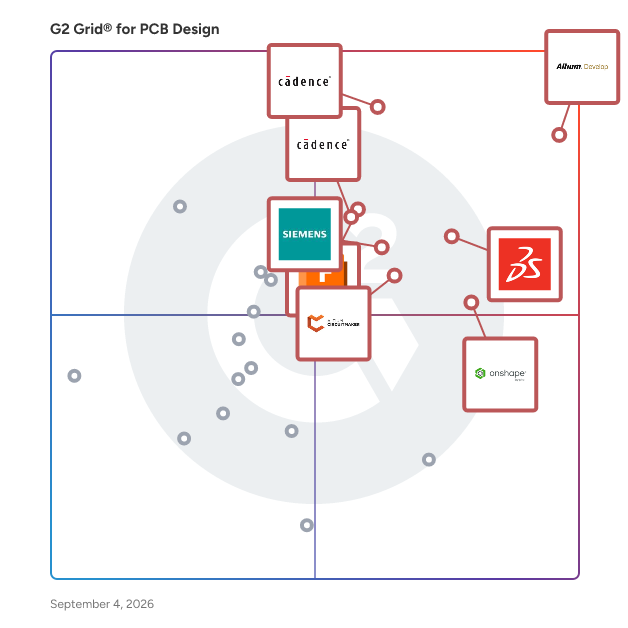
G2 Grid® for PCB Design Software

G2 Grid® for PCB Design Software plotting products by satisfaction and market presence

Highlighted products: Altium Develop, Sigrity X Platform, SOLIDWORKS, Onshape, Autodesk Fusion, Xpedition Standard, Allegro X PCB Designer, and Altium CircuitMaker.

Underlying data: [Grid® JSON](https://www.g2.com/categories/pcb-design/grids.json?focus%5B%5D=altium-develop&focus%5B%5D=sigrity-x-platform&focus%5B%5D=solidworks&focus%5B%5D=onshape&focus%5B%5D=autodesk-fusion&focus%5B%5D=xpedition-standard&focus%5B%5D=allegro-x-pcb-designer&focus%5B%5D=altium-circuitmaker)

Altium Develop

Altium Develop is a collaborative platform for electronic product development that connects requirements management (via Requirements Portal), ECAD design, supply chain, and manufacturing into a single, unified environment. Built on Altium Designer® and Altium 365®, it enables real-time collaboration across engineering, design, and operations teams, reducing delays caused by disconnected tools and file-based workflows. Designed for electronics teams and organizations managing complex PCB and hardware development, Altium Develop supports cross-functional collaboration throughout the entire product lifecycle. Through Requirements Portal, stakeholders can contribute to and review requirements in a centralized workspace, helping ensure alignment from definition through design and delivery. Key capabilities include: • Real-time collaboration: Shared workspace for ECAD design, reviews, and project coordination • Component and supply chain visibility: Access to live component data, pricing, and availability • Requirements management (Requirements Portal): Capture, review, and link product requirements to design decisions for end-to-end traceability • BOM and workflow management: Manage bill of materials, sourcing, and change processes in one platform • ECAD-MCAD co-design: Enable collaboration between electrical and mechanical teams By centralizing design data, workflows, and collaboration, Altium Develop improves visibility, reduces rework, and helps teams bring electronic products to market faster. The platform is particularly well suited for organizations looking to streamline PCB design processes, enhance collaboration, and scale development across distributed teams. Altium Develop is used by teams evaluating alternatives to tools like Autodesk Fusion, KiCad, Cadence OrCAD, and SOLIDWORKS for PCB design and collaborative electronics development, including requirements management for hardware and electronics systems.

Average Rating: 4.5/5.0

Total Reviews: 1,044

How Do G2 Users Rate Altium Develop?

  • Schematic editor: 9.2/10 (Category avg: 8.5/10)
  • PCB layout editing: 9.1/10 (Category avg: 8.5/10)
  • Quality of Support: 8.2/10 (Category avg: 8.5/10)
  • 3D modeling tools: 7.6/10 (Category avg: 8.0/10)

Who Is the Company Behind Altium Develop?

  • Seller: Altium
  • Company Website:
  • Year Founded: 1985
  • HQ Location: La Jolla, CA
  • Twitter: @altium
    9,901 Twitter followers
  • LinkedIn® Page: www.linkedin.com
    1,242 employees on LinkedIn®

Who Uses This Product?

  • Who Uses This: Electrical Engineer, Student
  • Top Industries: Electrical/Electronic Manufacturing, Automotive
  • Company Size: 59% Small, 29% Medium

What Do G2 Reviewers Say About Altium Develop?

AI-generated summary from verified user reviews

Pros
  • Users love the intuitive ease of use of Altium Develop, which greatly enhances their PCB design experience.
  • Users appreciate the powerful collaboration features of Altium Develop, streamlining teamwork and enhancing design efficiency.
  • Users appreciate the user-friendly interface and seamless integration of Altium Designer for efficient PCB design.
  • Users value the collaborative environment of Altium Develop, enhancing teamwork and efficiency during design and testing phases.
  • Users commend Altium Develop for its efficiency, significantly enhancing productivity and streamlining PCB design processes.
Cons
  • Users find the steep learning curve challenging, requiring significant time and effort to master Altium Develop.
  • Users find Altium Develop expensive, with high costs posing barriers for hobbyists and new learners in the ecosystem.
  • Users express the need for more editing options and tools, as current features feel limited and confusing.
  • Users find the complex interface of Altium Develop confusing, especially when navigating layers and settings.
  • Users experience slow performance issues, particularly with loading times and clunky interfaces, impacting productivity.

What Are Recent G2 Reviews of Altium Develop?

What Are G2 Users Discussing About Altium Develop?

Sigrity X Platform

With Sigrity X, you're not just working with another tool; you're unlocking seamless in-design analysis synergy within the Allegro X PCB and IC Package platforms. Dive into a comprehensive suite of SI/PI analysis, in-design interconnect modeling, and PDN analysis tools designed to supercharge your performance, ensuring your projects not only meet but exceed deadlines and budgets.

Average Rating: 4.2/5.0

Total Reviews: 57

How Do G2 Users Rate Sigrity X Platform?

  • Schematic editor: 8.3/10 (Category avg: 8.5/10)
  • PCB layout editing: 10.0/10 (Category avg: 8.5/10)
  • Quality of Support: 8.5/10 (Category avg: 8.5/10)
  • 3D modeling tools: 8.9/10 (Category avg: 8.0/10)

Who Is the Company Behind Sigrity X Platform?

  • Seller: Cadence Design Systems
  • Company Website:
  • Year Founded: 1988
  • HQ Location: San Jose, California
  • Twitter: @Cadence
    20,302 Twitter followers
  • LinkedIn® Page: www.linkedin.com
    11,249 employees on LinkedIn®

Who Uses This Product?

  • Top Industries: Automotive
  • Company Size: 46% Small, 21% Large

What Do G2 Reviewers Say About Sigrity X Platform?

AI-generated summary from verified user reviews

Pros
  • Users appreciate the seamless integration and advanced SI features of Sigrity X Platform, enhancing their PCB design workflow.
  • Users appreciate the ease of use of Sigrity X Platform, praising its seamless integration and intuitive UI.
  • Users find Sigrity X Platform offers highly accurate simulations that enhance workflow and reduce hardware failures effectively.
  • Users value the easy setup of Sigrity X Platform, enhancing their workflow and productivity from the start.
  • Users value the high-speed simulation tools of Sigrity X, enhancing real-time design analysis and efficiency.
Cons
  • Users face a complex interface and steep learning curve, making onboarding and usage challenging for newcomers.
  • Users note a steep learning curve and complex interface that hinder initial productivity and comfort with the platform.
  • Users cite the complex setup and steep learning curve as major challenges in effectively using the Sigrity X Platform.
  • Users find the high licensing costs of Sigrity X Platform to be a significant barrier, especially for smaller projects.
  • Users find the high subscription cost of Sigrity X Platform to be a significant barrier for small projects.

What Are Recent G2 Reviews of Sigrity X Platform?

What Are G2 Users Discussing About Sigrity X Platform?

SOLIDWORKS

SOLIDWORKS is the industry-standard 3D CAD solution trusted by more than 8 million engineers and designers worldwide. For over 30 years, it has helped mechanical engineers, product designers and manufacturing firms compress design cycles, control costs and deliver higher-quality products faster. SOLIDWORKS combines parametric 3D modeling, integrated simulation, product data management and direct manufacturing workflows in a single, connected environment—eliminating the need for disconnected point tools. Key Benefits: Parametric 3D Modeling: Design parts, assemblies and production-ready drawings with tools built for large, complex products. Changes ripple automatically across all models, drawings and documentation. Integrated Simulation and FEA: Validate designs early with built-in structural, thermal, motion and flow analysis to reduce physical prototyping costs. Cloud Collaboration and Secure File Management: Share and mark up designs in 3D in a browser—no extra software needed. CAD-aware cloud storage keeps file relationships intact with a single source of truth. PDM and Data Lifecycle Management: Automate workflows, manage revisions and control engineering change orders with full version control. AI Virtual Companions: Reduce repetitive tasks with assistive, predictive and generative AI tools that understand your design intent and keep projects moving. Design-to-Manufacturing Workflows: Take designs from ideation to production with integrated CAM, model-based definition, inspection and costing—all driven by the same 3D data. What Sets SOLIDWORKS Apart Built by engineers, for engineers, SOLIDWORKS delivers an intuitive, customizable interface backed by decades of user-driven development and regular capability updates throughout the year.

Average Rating: 4.4/5.0

Total Reviews: 639

How Do G2 Users Rate SOLIDWORKS?

  • Schematic editor: 7.8/10 (Category avg: 8.5/10)
  • PCB layout editing: 7.9/10 (Category avg: 8.5/10)
  • Quality of Support: 8.2/10 (Category avg: 8.5/10)
  • 3D modeling tools: 9.2/10 (Category avg: 8.0/10)

Who Is the Company Behind SOLIDWORKS?

  • Seller: SOLIDWORKS
  • Company Website:
  • Year Founded: 1981
  • HQ Location: Velizy-Villacoublay
  • Twitter: @SOLIDWORKS
    74,082 Twitter followers
  • LinkedIn® Page: www.linkedin.com
    27,414 employees on LinkedIn®

Who Uses This Product?

  • Who Uses This: Design Engineer, Mechanical Design Engineer
  • Top Industries: Mechanical or Industrial Engineering, Design
  • Company Size: 52% Small, 38% Medium

What Do G2 Reviewers Say About SOLIDWORKS?

AI-generated summary from verified user reviews

Pros
  • Users appreciate the user-friendly interface of SOLIDWORKS, enhancing their design experience across various sectors.
  • Users appreciate the user-friendly interface and robust tool options in SOLIDWORKS that enhance productivity and flexibility.
  • Users find SOLIDWORKS to be user-friendly and cost-effective, making it ideal for both beginners and professionals.
  • Users value the user-friendly interface of SOLIDWORKS, facilitating fast learning and enhancing productivity in design tasks.
  • Users value the CAD integration of SOLIDWORKS, enhancing design flexibility with comprehensive tools and simulation capabilities.
Cons
  • Users experience performance issues with SOLIDWORKS, especially with large assemblies and complex models, affecting productivity.
  • Users experience slow performance with large assemblies, affecting productivity and causing occasional crashes during complex modeling.
  • Users note the high system requirements of SOLIDWORKS, necessitating powerful hardware for optimal performance.
  • Users find SOLIDWORKS to be expensive, particularly challenging for small businesses to afford and justify.
  • Users experience slow simulation issues with large assemblies, affecting performance and responsiveness during complex modeling tasks.

What Are Recent G2 Reviews of SOLIDWORKS?

What Are G2 Users Discussing About SOLIDWORKS?

Onshape

Onshape by PTC is the leading cloud-native CAD & PDM platform that runs on any device, anywhere-requiring zero IT. Onshape is for product design companies who are fed up with the errors, time waste, and hidden costs of outdated file-based CAD & PDM. Only Onshape: - Eliminates CAD crashes and never loses data - Enables secure, real-time collaboration - Tracks all activity and provides infinite restore - Has built-in PDM with branching and merging

Average Rating: 4.7/5.0

Total Reviews: 711

How Do G2 Users Rate Onshape?

  • Schematic editor: 1.7/10 (Category avg: 8.5/10)
  • PCB layout editing: 2.2/10 (Category avg: 8.5/10)
  • Quality of Support: 9.3/10 (Category avg: 8.5/10)
  • 3D modeling tools: 7.8/10 (Category avg: 8.0/10)

Who Is the Company Behind Onshape?

  • Seller: PTC
  • Company Website:
  • Year Founded: 1985
  • HQ Location: Boston, Massachusetts
  • Twitter: @PTC
    37,560 Twitter followers
  • LinkedIn® Page: www.linkedin.com
    8,145 employees on LinkedIn®

Who Uses This Product?

  • Who Uses This: Mechanical Engineer, Owner
  • Top Industries: Mechanical or Industrial Engineering, Design
  • Company Size: 78% Small, 17% Medium

What Do G2 Reviewers Say About Onshape?

AI-generated summary from verified user reviews

Pros
  • Users praise the ease of use in Onshape, finding it simple, fast, and accessible from any device.
  • Users value the collaboration features of Onshape, enabling seamless communication and real-time document access with their teams.
  • Users appreciate the online accessibility of Onshape, enabling work from any device without installation concerns.
  • Users appreciate the easy cloud-based access of Onshape, allowing seamless workflow and organization from any device.
  • Users value the ease of sharing documents in Onshape, allowing collaboration even with non-CAD users effectively.
Cons
  • Users note the missing features in Onshape compared to established CAD software, specifically in sheet metal and CAM options.
  • Users note a lack of features compared to Solidworks, impacting usability and collaboration potential.
  • Users experience internet dependency issues with Onshape, leading to frustration during slow or unstable connections.

What Are Recent G2 Reviews of Onshape?

What Are G2 Users Discussing About Onshape?

Autodesk Fusion

Autodesk Fusion connects capabilities, data, and people across the entire product development lifecycle. Fusion provides you with CAD, CAM, CAE and PCB tools along with PLM/PDM and MES (manufacturing execution system) capabilities to facilitate seamless workflows across your entire organization. Key features: - 3D Design and Modeling: Autodesk Fusion offers a robust set of tools for creating 3D models and designs, making it ideal for product development and industrial design. - Manufacturing Integration: With Autodesk Fusion, you can design and manufacture products using the same platform, streamlining the process from concept to production. - Electronics Design: PCB design capabilities are integrated into the Autodesk Fusion platform, allowing for the creation of electronic components as part of the overall product design process. - Simulation and Analysis: Autodesk Fusion includes simulation tools to test and optimize designs before manufacturing, reducing the need for physical prototypes. - Cloud Collaboration: As a cloud-based platform, Autodesk Fusion enables seamless collaboration among design and engineering teams, regardless of location. - Generative Design: This feature allows you to input design goals and constraints, and Autodesk Fusion will generate multiple design options that meet these criteria. By integrating the entire product development process into one platform, Autodesk Fusion allows users to bring products to market faster and more efficiently.

Average Rating: 4.5/5.0

Total Reviews: 509

How Do G2 Users Rate Autodesk Fusion?

  • Schematic editor: 8.4/10 (Category avg: 8.5/10)
  • PCB layout editing: 8.5/10 (Category avg: 8.5/10)
  • Quality of Support: 8.4/10 (Category avg: 8.5/10)
  • 3D modeling tools: 9.1/10 (Category avg: 8.0/10)

Who Is the Company Behind Autodesk Fusion?

  • Seller: Autodesk
  • Company Website:
  • Year Founded: 1982
  • HQ Location: San Francisco
  • Twitter: @autodesk
    273,215 Twitter followers
  • LinkedIn® Page: www.linkedin.com
    15,352 employees on LinkedIn®

Who Uses This Product?

  • Who Uses This: Owner, Design Engineer
  • Top Industries: Mechanical or Industrial Engineering, Design
  • Company Size: 68% Small, 22% Medium

What Do G2 Reviewers Say About Autodesk Fusion?

AI-generated summary from verified user reviews

Pros
  • Users find Autodesk Fusion's ease of use advantageous for linking 3D printers and managing personal projects seamlessly.
  • Users appreciate the customizable toolbars and advanced modeling tools in Autodesk Fusion, enhancing productivity and design precision.
  • Users praise the design efficiency of Autodesk Fusion, as customizable tools and easy navigation enhance productivity.
  • Users commend the user-friendly interface and extensive capabilities of Autodesk Fusion 360, enhancing their design engineering experience.
  • Users find Autodesk Fusion’s ease of learning beneficial for product design, especially with prior CAD experience.
Cons
  • Users find difficult learning in Autodesk Fusion, making initial use challenging despite its smoother operation afterward.
  • Users face a challenging learning curve in Autodesk Fusion, complicating design adjustments and assembly processes.
  • Users face assembly difficulties due to limited customization options and complex timeline management when adjusting designs.
  • Users express frustration over missing features like real-time editing and easy adjustments, impacting their overall experience.
  • Users experience significant performance issues with Autodesk Fusion, including bugs, glitches, and slow processing.

What Are Recent G2 Reviews of Autodesk Fusion?

What Are G2 Users Discussing About Autodesk Fusion?

Allegro X PCB Designer

Allegro X PCB Designer is a comprehensive and scalable PCB design solution developed by Cadence Design Systems. It integrates schematic capture, PCB layout, and in-design analysis within a unified platform, facilitating efficient and collaborative design processes for complex electronic systems. The platform is engineered to address the challenges of modern PCB design, offering advanced automation and high-performance capabilities to streamline workflows and reduce time-to-market. Key Features and Functionality: - Advanced High-Speed Design: Allegro X PCB Designer provides sophisticated constraint management and signal integrity analysis tools tailored for complex, high-speed designs. Engineers can manage differential pairs, impedance control, and advanced routing requirements with precision, supporting demanding applications in telecommunications, aerospace, and computing hardware. - Automated HDI and Miniaturization: The platform supports a rules-driven High-Density Interconnect (HDI) design flow, enabling the creation of reliable, compact designs. It includes parameters for HDI spacing, stacking, and micro-via insertion, along with manufacturing rules for embedded package components, ensuring overall design success and reliability. - Design for Manufacturing (DFM): Integrated DFM rules allow designers to verify PCB designs against manufacturing capabilities during the layout process. This real-time manufacturability validation reduces rework and shortens design cycles, enhancing first-pass manufacturing success. - Real-Time Collaboration: Allegro X PCB Designer enables concurrent collaboration among team members within a single design database. Access restrictions and real-time updates eliminate the need to merge revisions, reducing errors and improving productivity. - AI-Enabled Automation: The platform incorporates AI-driven automation for placement and routing tasks, significantly reducing design turnaround times. This generative AI technology automates component placement, power plane creation, and critical net routing, allowing engineers to explore alternative design solutions efficiently. Primary Value and User Solutions: Allegro X PCB Designer addresses the complexities of modern PCB design by providing a unified, high-performance environment that enhances productivity and design quality. Its advanced features and automation capabilities reduce manual effort, minimize errors, and accelerate design cycles. By integrating real-time collaboration and AI-driven automation, the platform empowers design teams to tackle complex projects efficiently, ensuring designs are both electrically correct and manufacturable. This comprehensive approach enables organizations to bring innovative products to market faster while maintaining high standards of quality and reliability.

Average Rating: 4.4/5.0

Total Reviews: 30

How Do G2 Users Rate Allegro X PCB Designer?

  • Schematic editor: 9.3/10 (Category avg: 8.5/10)
  • PCB layout editing: 9.3/10 (Category avg: 8.5/10)
  • Quality of Support: 9.1/10 (Category avg: 8.5/10)
  • 3D modeling tools: 7.9/10 (Category avg: 8.0/10)

Who Is the Company Behind Allegro X PCB Designer?

  • Seller: Cadence Design Systems
  • Year Founded: 1988
  • HQ Location: San Jose, California
  • Twitter: @Cadence
    20,302 Twitter followers
  • LinkedIn® Page: www.linkedin.com
    11,249 employees on LinkedIn®
  • Ownership: CDNS

Who Uses This Product?

  • Top Industries: Electrical/Electronic Manufacturing
  • Company Size: 57% Small, 50% Medium

What Do G2 Reviewers Say About Allegro X PCB Designer?

AI-generated summary from verified user reviews

Pros
  • Users find Allegro X PCB Designer to be easy to use, facilitating quick and efficient circuit design processes.
  • Users value the ease of use and speed of Allegro X PCB Designer for efficient circuit design and layout.
  • Users find Allegro X PCB Designer user-friendly and efficient, simplifying the transition from schematics to gerber generation.
  • Users value the quick and advanced features of Allegro X PCB Designer for easy and fast circuit design.
  • Users value the user-friendly interface of Allegro X PCB Designer, enabling quick and efficient PCB layout design.
Cons
  • Users report that the customer support is often delayed, impacting their overall experience with Allegro X PCB Designer.
  • Users experience technical glitches with Allegro X PCB Designer, such as the tool closing unexpectedly during layout design.
  • Users find Allegro X PCB Designer to be expensive, particularly for smaller organizations or individual users.
  • Users experience performance issues with Allegro X PCB Designer, including delays in analysis time and customer support responsiveness.

What Are Recent G2 Reviews of Allegro X PCB Designer?

Xpedition Standard

Xpedition Standard is a type of PCB (Printed Circuit Board) design solution specifically engineered to assist individual engineers and expanding teams in the electronics design industry. Built on Siemens’ robust Xpedition technology stack, this software integrates intelligent automation and collaborative workflows, enabling users to design, reuse, and efficiently release their projects to manufacturing. The primary goal of Xpedition Standard is to enhance productivity and scalability, allowing teams to work with confidence as they navigate the complexities of PCB design. Targeted at small to mid-sized engineering teams, Xpedition Standard serves as a bridge between entry-level tools that may limit growth and comprehensive enterprise solutions that can overwhelm smaller teams with unnecessary features. It offers professional-grade capabilities in a mid-tier package, ensuring that users have access to advanced functionalities without the associated costs and complexities of higher-tier solutions. This makes it an ideal choice for organizations looking to enhance their design processes while maintaining budgetary constraints. One of the key features of Xpedition Standard is its support for seamless collaboration across various domains, including electrical design (ECAD), mechanical design (MCAD), manufacturing, and sourcing. This integration allows distributed teams to work together more efficiently, minimizing costly handoffs and reducing the likelihood of rework. Additionally, the software provides flexible expansion options, enabling teams to incorporate advanced capabilities such as rigid-flex design, signal integrity analysis, and enhanced MCAD co-design as their projects evolve. This adaptability ensures that teams can meet increasing design challenges without the need for a complete upgrade. The user experience of Xpedition Standard is designed to be intuitive, with built-in automation that accelerates every stage of PCB development, from schematic capture to manufacturing preparation. The solution also includes integrated real-time component sourcing intelligence, which offers live insights into the supply chain. This feature helps reduce risks associated with component availability and enhances the overall reliability of designs. Xpedition Standard is suitable for a range of projects, from simple circuit boards to more intricate designs, delivering enterprise-grade results without the associated costs and complexities. By empowering growing teams to achieve shorter design cycles and higher first-pass success rates, Xpedition Standard provides a clear and efficient pathway to advanced and enterprise-level Xpedition tiers, all while ensuring data continuity and familiar workflows.

Average Rating: 4.5/5.0

Total Reviews: 11

How Do G2 Users Rate Xpedition Standard?

  • Schematic editor: 9.7/10 (Category avg: 8.5/10)
  • PCB layout editing: 10.0/10 (Category avg: 8.5/10)
  • Quality of Support: 9.7/10 (Category avg: 8.5/10)
  • 3D modeling tools: 6.0/10 (Category avg: 8.0/10)

Who Is the Company Behind Xpedition Standard?

Who Uses This Product?

  • Top Industries: Airlines/Aviation, Computer & Network Security
  • Company Size: 236% Large, 173% Medium

What Do G2 Reviewers Say About Xpedition Standard?

AI-generated summary from verified user reviews

Pros
  • Users appreciate the seamless integration of Xpedition Standard, enhancing communication and efficiency across various software platforms.
  • Users admire the native 3D visualization of Xpedition Standard, enhancing early detection of mechanical issues for better designs.
  • Users appreciate the AI-driven automation in Xpedition Standard, which significantly enhances routing and layout efficiency.
  • Users appreciate the cloud collaboration tools of Xpedition Standard for efficient design reviews in distributed teams.
  • Users appreciate the seamless collaboration features of Xpedition Standard, enhancing team efficiency and design management.
Cons
  • Users find the licensing issues with Xpedition Standard restrictive, preferring a concurrent license model for better flexibility.
  • Users find Xpedition Standard has missing features compared to PADS Pro, impacting usability and functionality.

What Are Recent G2 Reviews of Xpedition Standard?

Altium CircuitMaker

Altium CircuitMaker is the best free-to-use schematic and PCB design tool for the Open Source Hardware community of designers, makers, hobbyists, students and professionals. CircuitMaker delivers powerful autorouting capabilities, hierarchical schematic entry, and Native 3D™ technology that's easily accessible and free to use.

Average Rating: 4.3/5.0

Total Reviews: 110

How Do G2 Users Rate Altium CircuitMaker?

  • Schematic editor: 8.8/10 (Category avg: 8.5/10)
  • PCB layout editing: 8.8/10 (Category avg: 8.5/10)
  • Quality of Support: 7.7/10 (Category avg: 8.5/10)
  • 3D modeling tools: 7.5/10 (Category avg: 8.0/10)

Who Is the Company Behind Altium CircuitMaker?

  • Seller: Altium
  • Company Website:
  • Year Founded: 1985
  • HQ Location: La Jolla, CA
  • Twitter: @altium
    9,901 Twitter followers
  • LinkedIn® Page: www.linkedin.com
    1,242 employees on LinkedIn®

Who Uses This Product?

  • Top Industries: Electrical/Electronic Manufacturing, Consumer Electronics
  • Company Size: 68% Small, 16% Large

What Do G2 Reviewers Say About Altium CircuitMaker?

AI-generated summary from verified user reviews

Pros
  • Users appreciate the ease of use and powerful tools of Altium CircuitMaker for efficient PCB design and development.
  • Users appreciate the wide range of intuitive features in Altium CircuitMaker, facilitating efficient PCB design and project collaboration.
  • Users love the intuitive interface of Altium CircuitMaker, making it easy for anyone to learn and design circuits.
  • Users highlight the ease of use of Altium CircuitMaker, enabling quick learning and intuitive design experiences.
  • Users value the robust library management capabilities of CircuitMaker, facilitating seamless component integration and project development.
Cons
  • Users report slow rendering times, particularly with large files, affecting efficiency during design processes.
  • Users find the complex interface of Altium CircuitMaker frustrating, hindering usability and complicating their design experience.
  • Users find the difficult learning process of Altium CircuitMaker challenging, particularly for beginners navigating its complex features.
  • Users find the limited features of Altium CircuitMaker restrictive, particularly in importing external footprints and file compatibility.
  • Users highlight missing features in Altium CircuitMaker, particularly in the component library and support functionalities.

What Are Recent G2 Reviews of Altium CircuitMaker?

What Are G2 Users Discussing About Altium CircuitMaker?

PADS Professional

PADS Professional PCB software is a comprehensive electronic design automation (EDA) software suite developed by Siemens Digital Industries Software, formerly Mentor Graphics. It provides advanced tools for designing, simulating, verifying, and manufacturing printed circuit boards (PCBs) and electronic systems.

Average Rating: 4.1/5.0

Total Reviews: 63

How Do G2 Users Rate PADS Professional?

  • Schematic editor: 8.2/10 (Category avg: 8.5/10)
  • PCB layout editing: 8.3/10 (Category avg: 8.5/10)
  • Quality of Support: 8.7/10 (Category avg: 8.5/10)
  • 3D modeling tools: 8.0/10 (Category avg: 8.0/10)

Who Is the Company Behind PADS Professional?

Who Uses This Product?

  • Top Industries: Electrical/Electronic Manufacturing, Design
  • Company Size: 78% Small, 63% Medium

What Do G2 Reviewers Say About PADS Professional?

AI-generated summary from verified user reviews

Pros
  • Users value the advanced design features of PADS Professional, enhancing efficiency and accuracy in PCB development.
  • Users value the advanced simulation tools of PADS Professional, enhancing design accuracy and streamlining hardware development.
  • Users value the comprehensive PCB design tools of PADS Professional, enhancing efficiency and collaboration in projects.
  • Users appreciate the design accuracy of PADS Professional, enhancing workflows and minimizing errors in PCB design.
  • Users value the comprehensive PCB design tools of PADS Professional, enhancing efficiency in high-speed and complex layouts.
Cons
  • Users find the complex interface of PADS Professional challenging, leading to a steep learning curve and reduced productivity.
  • Users find the difficult learning process of PADS Professional overwhelming, especially with its complex setup and interface.
  • Users find the steep learning curve of PADS Professional challenging, especially when navigating advanced features.
  • Users find the complex design process of PADS Professional to be slow and lacking essential features for advanced PCB designs.
  • Users report back-annotation problems and issues with the Decal Editor and constraints management in PADS Professional.

What Are Recent G2 Reviews of PADS Professional?

What Are G2 Users Discussing About PADS Professional?

Autodesk EAGLE

Autodesk EAGLE is an electronic design automation (EDA) software. Enabling printed circuit board (PCB) designers to seamlessly connect schematic diagrams, component placement, PCB routing, and comprehensive library content.

Average Rating: 4.0/5.0

Total Reviews: 76

How Do G2 Users Rate Autodesk EAGLE?

  • Schematic editor: 8.4/10 (Category avg: 8.5/10)
  • PCB layout editing: 8.5/10 (Category avg: 8.5/10)
  • Quality of Support: 7.8/10 (Category avg: 8.5/10)
  • 3D modeling tools: 7.2/10 (Category avg: 8.0/10)

Who Is the Company Behind Autodesk EAGLE?

  • Seller: Autodesk
  • Year Founded: 1982
  • HQ Location: San Francisco
  • Twitter: @autodesk
    273,215 Twitter followers
  • LinkedIn® Page: www.linkedin.com
    15,352 employees on LinkedIn®
  • Ownership: NASDAQ:ADSK

Who Uses This Product?

  • Top Industries: Electrical/Electronic Manufacturing, Consumer Electronics
  • Company Size: 75% Small, 16% Medium

What Are Recent G2 Reviews of Autodesk EAGLE?

What Are G2 Users Discussing About Autodesk EAGLE?

SolidWorks PCB

SOLIDWORKS PCB enables the productivity you need to design Printed Circuit Boards (PCBs) quickly along with unique, collaboration between electrical and 3D mechanical design teams. It offers a clear advantage where ECAD-MCAD collaboration is critical for overall success of electronic product design

Average Rating: 3.8/5.0

Total Reviews: 14

How Do G2 Users Rate SolidWorks PCB?

  • Schematic editor: 8.3/10 (Category avg: 8.5/10)
  • PCB layout editing: 9.2/10 (Category avg: 8.5/10)
  • Quality of Support: 9.3/10 (Category avg: 8.5/10)
  • 3D modeling tools: 6.7/10 (Category avg: 8.0/10)

Who Is the Company Behind SolidWorks PCB?

  • Seller: SOLIDWORKS
  • Year Founded: 1981
  • HQ Location: Velizy-Villacoublay
  • Twitter: @SOLIDWORKS
    74,082 Twitter followers
  • LinkedIn® Page: www.linkedin.com
    27,414 employees on LinkedIn®
  • Ownership: EPA: DSY.PA

Who Uses This Product?

  • Company Size: 93% Small, 7% Medium

What Are Recent G2 Reviews of SolidWorks PCB?

SolidWorks Electrical Schematics

SOLIDWORKS Electrical Schematics has an intuitive and easy-to-use interface that automates complex tasks, such as contact cross-referencing and terminal drawings. It accelerates product development by simultaneously minimizing the repetitive tasks associated with developing electrical schematics

Average Rating: 4.4/5.0

Total Reviews: 10

How Do G2 Users Rate SolidWorks Electrical Schematics?

  • Schematic editor: 7.8/10 (Category avg: 8.5/10)
  • PCB layout editing: 5.8/10 (Category avg: 8.5/10)
  • Quality of Support: 8.6/10 (Category avg: 8.5/10)
  • 3D modeling tools: 7.2/10 (Category avg: 8.0/10)

Who Is the Company Behind SolidWorks Electrical Schematics?

  • Seller: SOLIDWORKS
  • Year Founded: 1981
  • HQ Location: Velizy-Villacoublay
  • Twitter: @SOLIDWORKS
    74,082 Twitter followers
  • LinkedIn® Page: www.linkedin.com
    27,414 employees on LinkedIn®
  • Ownership: EPA: DSY.PA

Who Uses This Product?

  • Company Size: 55% Medium, 45% Small

What Are Recent G2 Reviews of SolidWorks Electrical Schematics?

What Are G2 Users Discussing About SolidWorks Electrical Schematics?

NI Multisim

Multisim is industry standard SPICE simulation and circuit design software for analog, digital, and power electronics in education and research. Multisim integrates industry standard SPICE simulation with an interactive schematic environment to instantly visualize and analyze electronic circuit behavior. Multisim has an intuitive interface that helps educators reinforce circuit theory and improve retention of theory throughout engineering curriculum. Researchers and designers use Multisim to reduce PCB prototype iterations and save development costs by adding powerful circuit simulation and analyses to the design flow.

Average Rating: 4.3/5.0

Total Reviews: 42

How Do G2 Users Rate NI Multisim?

  • Schematic editor: 9.2/10 (Category avg: 8.5/10)
  • PCB layout editing: 7.8/10 (Category avg: 8.5/10)
  • Quality of Support: 8.3/10 (Category avg: 8.5/10)
  • 3D modeling tools: 6.7/10 (Category avg: 8.0/10)

Who Is the Company Behind NI Multisim?

  • Seller: NI
  • Year Founded: 1976
  • HQ Location: Austin, TX
  • Twitter: @NIglobal
    26,204 Twitter followers
  • LinkedIn® Page: www.linkedin.com
    7,957 employees on LinkedIn®
  • Ownership: NASDAQ: NATI

Who Uses This Product?

  • Top Industries: Electrical/Electronic Manufacturing
  • Company Size: 48% Small, 26% Large

What Are Recent G2 Reviews of NI Multisim?

What Are G2 Users Discussing About NI Multisim?

DipTrace

DipTrace is professional PCB design software by Novarm Limited, used by 30,000+ engineers worldwide — from Fortune 500 companies to independent designers. Features include interactive push-and-shove routing and editing — traces and components move fluidly with automatic rerouting — hierarchical multi-sheet schematics, IPC-compliant footprint generator, real-time 3D preview, and direct access to 2M+ components via SnapEDA integration. Supports multi-layer boards with copper pours, differential pairs, and high-speed design rules. Imports Eagle, Altium, KiCad, OrCAD, and other formats. Perpetual license — pay once, no subscription.

Average Rating: 4.3/5.0

Total Reviews: 44

How Do G2 Users Rate DipTrace?

  • Schematic editor: 8.6/10 (Category avg: 8.5/10)
  • PCB layout editing: 8.8/10 (Category avg: 8.5/10)
  • Quality of Support: 8.5/10 (Category avg: 8.5/10)
  • 3D modeling tools: 7.5/10 (Category avg: 8.0/10)

Who Is the Company Behind DipTrace?

  • Seller: DipTrace
  • Year Founded: 2002
  • HQ Location: Ukraine
  • Twitter: @DipTrace
    256 Twitter followers
  • LinkedIn® Page: www.linkedin.com
    1 employees on LinkedIn®

Who Uses This Product?

  • Top Industries: Electrical/Electronic Manufacturing, Automotive
  • Company Size: 61% Small, 22% Medium

What Are Recent G2 Reviews of DipTrace?

What Are G2 Users Discussing About DipTrace?

Ultiboard

Ultiboard is printed circuit board design and layout software that integrates seamlessly with Multisim to accelerate PCB prototype development. Ultiboard software offers efficient PCB design layout and routing with a customizable environment. You can use its flexible tools to place parts and copper with manual precision to define critical board elements. With its automated functionality, you can quickly complete a design. The advanced spreadsheet view, toolbox, and design wizards help you easily manage, control, and define any board layout. Seamless integration with Multisim software provides simple schematic transfer to PCB, and forward and backward annotation ensures design iteration management. You can easily export industry-standard file formats such as Gerber and DXF to complete the design flow from schematic to layout

Average Rating: 4.3/5.0

Total Reviews: 21

How Do G2 Users Rate Ultiboard?

  • Schematic editor: 8.7/10 (Category avg: 8.5/10)
  • PCB layout editing: 8.2/10 (Category avg: 8.5/10)
  • Quality of Support: 8.0/10 (Category avg: 8.5/10)
  • 3D modeling tools: 7.4/10 (Category avg: 8.0/10)

Who Is the Company Behind Ultiboard?

  • Seller: NI
  • Year Founded: 1976
  • HQ Location: Austin, TX
  • Twitter: @NIglobal
    26,204 Twitter followers
  • LinkedIn® Page: www.linkedin.com
    7,957 employees on LinkedIn®
  • Ownership: NASDAQ: NATI

Who Uses This Product?

  • Top Industries: Electrical/Electronic Manufacturing, Higher Education
  • Company Size: 68% Small, 18% Medium

What Are Recent G2 Reviews of Ultiboard?

What Are G2 Users Discussing About Ultiboard?

Daniel Rivera
DR
Researched and written by Daniel Rivera
Updated March 5, 2025