# Best Password Managers for Small Business - Page 2

*By [Brandon Summers-Miller](https://research.g2.com/insights/author/brandon-summers-miller)*


Products classified in the overall Password Managers category are similar in many regards and help companies of all sizes solve their business problems. However, small business features, pricing, setup, and installation differ from businesses of other sizes, which is why we match buyers to the right Small Business Password Managers to fit their needs. Compare product ratings based on reviews from enterprise users or connect with one of G2&#39;s buying advisors to find the right solutions within the Small Business Password Managers category.

In addition to qualifying for inclusion in the Password Managers category, to qualify for inclusion in the Small Business Password Managers category, a product must have at least 10 reviews left by a reviewer from a small business.


## Top Password Managers at a Glance
| # | Product | Rating | Best For | What Users Say |
|---|---------|--------|----------|----------------|
| 1 | [1Password](https://www.g2.com/products/1password/reviews) | 4.6/5.0 (1,788 reviews) | Enterprise credential organization | "[Seamless, Simple Password Management Across Desktop and Mobile](https://www.g2.com/survey_responses/1password-review-12976873)" |
| 2 | [Bitwarden](https://www.g2.com/products/bitwarden/reviews) | 4.6/5.0 (1,342 reviews) | Value-focused secure credential sharing | "[BitWarden: Seamless Cross-Device Password Management with Secure Send](https://www.g2.com/survey_responses/bitwarden-review-13112835)" |
| 3 | [LastPass](https://www.g2.com/products/lastpass/reviews) | 4.5/5.0 (2,040 reviews) | Everyday password access across devices | "[Stress-Free Password Management with Seamless Autofill and Sync](https://www.g2.com/survey_responses/lastpass-review-12845237)" |
| 4 | [NordPass Business](https://www.g2.com/products/nordpass-business/reviews) | 4.5/5.0 (641 reviews) | Secure team password sharing | "[Simple, Secure Team Password Management with NordPass Business](https://www.g2.com/survey_responses/nordpass-business-review-12856345)" |
| 5 | [Keeper Password Manager](https://www.g2.com/products/keeper-password-manager/reviews) | 4.6/5.0 (1,226 reviews) | Enterprise vault administration | "[Feature rich password manager meeting all our business needs for password security and hygiene](https://www.g2.com/survey_responses/keeper-password-manager-review-10821974)" |
| 6 | [Dashlane Password Manager](https://www.g2.com/products/dashlane-password-manager/reviews) | 4.5/5.0 (623 reviews) | Autofill and password health workflows | "[A Must-Have for Agency Password Management](https://www.g2.com/survey_responses/dashlane-password-manager-review-6669879)" |
| 7 | [Rippling IT](https://www.g2.com/products/rippling-it/reviews) | 4.7/5.0 (1,050 reviews) | Employee IT access management | "[IT provisioning and app access made completely painless for everyday employees.](https://www.g2.com/survey_responses/rippling-it-review-13035351)" |
| 8 | [Proton Pass For Business](https://www.g2.com/products/proton-pass-for-business/reviews) | 4.7/5.0 (102 reviews) | — | "[Privacy Focused](https://www.g2.com/survey_responses/proton-pass-for-business-review-12854370)" |
| 9 | [IT Glue](https://www.g2.com/products/it-glue/reviews) | 4.6/5.0 (706 reviews) | IT documentation and credential linking | "[Centralized Documentation That Streamlines Support and Collaboration](https://www.g2.com/survey_responses/it-glue-review-12813006)" |
| 10 | [Zoho Vault](https://www.g2.com/products/zoho-vault/reviews) | 4.4/5.0 (73 reviews) | Affordable centralized team vaults | "[Keeps My Login Details Organized in One Place and Makes It Easy to Manage](https://www.g2.com/survey_responses/zoho-vault-review-12733975)" |

---
## What Are the Most Common Questions About Password Managers?
*AI-generated · Last updated: May 26, 2026*
### What best user-friendly password manager software for desktops?
Based on G2 reviews, [1Password](https://www.g2.com/products/1password) stands out for desktop usability because reviewers repeatedly describe it as easy to use for both end users and admins, with a clean interface, reliable browser support, and smooth cross-device access. According to verified users, it helps reduce login friction through autofill, password generation, and organized vaults. G2 reviewers mention that setup is generally straightforward, though some first-time users still note a learning curve around vault structure and onboarding. Overall, recent feedback points to a desktop experience that balances convenience, organization, and secure access for both individual and team workflows.

**Here are some of the top-rated products on G2:**

- [1Password](https://www.g2.com/products/1password) – often praised for intuitive desktop use, autofill, and organized vaults for personal and team credentials
- [LastPass](https://www.g2.com/products/lastpass) – commonly used for centralized password storage, browser autofill, and multi-device access
- [Bitwarden](https://www.g2.com/products/bitwarden) – valued for straightforward cross-device access, simple UI, and secure password generation


### Which password tool is best for business security?
Based on G2 reviews, [1Password](https://www.g2.com/products/1password) is the strongest recent fit for business security in this dataset. According to verified users, teams rely on it for secure vaults, controlled sharing, password generation, and security visibility features that help reduce reused or weak credentials. G2 reviewers mention benefits such as sharing access without sending passwords through chat or email, organizing credentials by vault, and supporting onboarding and offboarding with more control. Recent reviews also highlight Watchtower alerts, passkey support, and broad browser and device access. Some users mention setup complexity and occasional autofill or reauthentication issues, but security-focused feedback is consistently strong.


### What best password manager for small business?
Based on G2 reviews, small businesses tend to value password managers that combine secure storage, easy sharing, and simple day-to-day administration. According to verified users, recent feedback most often highlights tools that help teams replace spreadsheets, notes, and informal sharing with centralized vaults and browser-based autofill. G2 reviewers mention that these products are especially helpful for onboarding, offboarding, and keeping shared credentials accessible without exposing them unnecessarily. Small business users also call out ease of setup, cross-device access, and organized folders or vaults as practical advantages. Across the latest reviews, the strongest signals point to solutions built for secure sharing, quick access, and straightforward team management rather than overly complex administration.

**Here are some of the top-rated products on G2:**

- [LastPass](https://www.g2.com/products/lastpass) – frequently used by smaller teams for centralized password storage, sharing, and easy browser access
- [1Password](https://www.g2.com/products/1password) – helpful for small teams that want secure vaults, shared access, and strong password hygiene
- [Bitwarden](https://www.g2.com/products/bitwarden) – often chosen for simple setup, organized sharing, and easy access across devices


### Which password manager has the best reviews?
Based on G2 reviews, [1Password](https://www.g2.com/products/1password) has the strongest concentration of recent positive feedback among the password managers in this dataset. According to verified users, reviewers consistently praise its ease of use, secure vault sharing, browser integrations, password generation, and cross-device sync. G2 reviewers mention that it helps reduce password reuse, speeds up logins, and gives teams a more structured way to manage shared credentials. Many also highlight security-focused features such as alerts and support for newer authentication workflows. While some users note pricing concerns, onboarding friction, or occasional autofill issues, the overall review language is especially favorable and consistently buyer-relevant.


### What&#39;s the best software for managing team passwords?
Based on G2 reviews, the best software for managing team passwords is the one that makes secure sharing, permissions, and organization easy to maintain every day. According to verified users, recent reviews repeatedly emphasize the value of shared vaults, role-based access, and the ability to avoid passing credentials through email, chat, or spreadsheets. G2 reviewers mention that effective team password tools reduce onboarding friction, simplify offboarding, and give staff access to the right accounts without exposing sensitive information more broadly than needed. They also point to browser autofill, password generation, and centralized management as major productivity gains. Overall, team buyers should prioritize platforms with strong sharing workflows and dependable day-to-day access.

**Here are some of the top-rated products on G2:**

- [LastPass](https://www.g2.com/products/lastpass) – widely used for team password sharing, centralized vaults, and controlled access across organizations
- [Keeper Password Manager](https://www.g2.com/products/keeper-password-manager) – strong fit for teams that need secure sharing, permissions, and organized credential storage
- [Bitwarden](https://www.g2.com/products/bitwarden) – often cited for secure team sharing, collections, and efficient browser-based access


### What top rated enterprise password manager app?
Based on G2 reviews, enterprise buyers focus on password managers that support centralized administration, secure sharing, auditability, and reliable browser or device access. According to verified users, recent feedback points to products that help larger organizations replace weak sharing habits with vault-based controls, organized access, and clearer visibility into credentials. G2 reviewers mention enterprise use cases such as onboarding and offboarding, role-based sharing, password hygiene monitoring, and access control across teams. They also value integrations with identity systems, admin oversight, and dependable access for distributed teams. In the latest review set, the strongest enterprise signals come from tools that combine broad usability with controlled sharing and operational consistency across many users.

**Here are some of the top-rated products on G2:**

- [1Password](https://www.g2.com/products/1password) – praised by larger teams for shared vaults, admin controls, and secure credential management across devices
- [Bitwarden](https://www.g2.com/products/bitwarden) – recognized for centralized vault access, secure sharing, and admin-friendly setup for broader teams
- [LastPass](https://www.g2.com/products/lastpass) – commonly used for enterprise password sharing, access controls, and centralized credential organization


### What most secure password app for companies?
Based on G2 reviews, companies define secure password apps by how well they reduce password reuse, control access, and support safe sharing across teams. According to verified users, recent reviews emphasize secure vaults, role-based access, password generation, and alerts that help identify weak or exposed credentials. G2 reviewers mention that secure platforms also help remove passwords from spreadsheets, browser memory, notes, and chat messages, which lowers day-to-day risk. They also value features like controlled sharing, multi-device access, and audit-friendly administration. Across the latest reviews, the most trusted products are the ones that combine strong credential organization with practical workflows that employees will actually use consistently.


### What best-rated app to manage business passwords?
Based on G2 reviews, business buyers consistently favor password managers that combine secure storage with simple access for employees and admins. According to verified users, recent reviews highlight the importance of browser autofill, organized vaults or folders, and secure sharing that avoids exposing passwords in plain text. G2 reviewers mention that the best-rated tools help teams centralize credentials, speed up logins, and support smoother onboarding and offboarding. Business users also value products that work across devices and keep password hygiene manageable without adding too much overhead. In this review set, the strongest buyer signals come from tools that balance usability, secure sharing, and dependable daily workflow support.

**Here are some of the top-rated products on G2:**

- [1Password](https://www.g2.com/products/1password) – well reviewed for business vaults, secure sharing, and consistent browser and device usability
- [Keeper Password Manager](https://www.g2.com/products/keeper-password-manager) – valued for team sharing, organized credential storage, and strong security controls
- [LastPass](https://www.g2.com/products/lastpass) – often used to centralize business credentials and simplify secure access across teams


### What leading password management solution for office use?
Based on G2 reviews, office-oriented password management solutions are most useful when they reduce daily login delays and make shared access easier to manage. According to verified users, recent feedback favors products that let staff quickly autofill credentials, organize shared logins, and avoid storing sensitive information in spreadsheets or handwritten notes. G2 reviewers mention that office teams especially benefit from browser extensions, shared vaults, and quick search or retrieval when multiple tools are used throughout the day. They also value straightforward setup and cross-device consistency for employees working across browsers, laptops, and mobile devices. Overall, the leading options in this dataset are the ones that improve routine productivity while strengthening access control.

**Here are some of the top-rated products on G2:**

- [LastPass](https://www.g2.com/products/lastpass) – often used in office settings for centralized credentials, autofill, and team password sharing
- [Bitwarden](https://www.g2.com/products/bitwarden) – useful for offices that need organized password storage and easy access across devices
- [1Password](https://www.g2.com/products/1password) – supports office teams with secure vaults, browser access, and controlled credential sharing


### What recommend best corporate password management tool?
Based on G2 reviews, corporate teams usually need a password management tool that supports secure sharing, centralized visibility, and dependable access at scale. According to verified users, recent feedback points to products that reduce password sprawl, help enforce stronger credential habits, and make onboarding or offboarding more controlled. G2 reviewers mention that corporate buyers value vault structures, browser integrations, password generation, and ways to share access without revealing credentials broadly. They also look for solutions that support compliance-minded workflows, admin oversight, and smoother coordination across departments. In the latest review data, the most recommended corporate tools are the ones that combine strong everyday usability with clear access management and secure collaboration.

**Here are some of the top-rated products on G2:**

- [Bitwarden](https://www.g2.com/products/bitwarden) – recommended for centralized credential storage, secure sharing, and practical administration across teams
- [1Password](https://www.g2.com/products/1password) – frequently praised for corporate password sharing, organized vaults, and secure day-to-day access
- [LastPass](https://www.g2.com/products/lastpass) – commonly used for corporate password organization, access control, and easy browser-based workflows


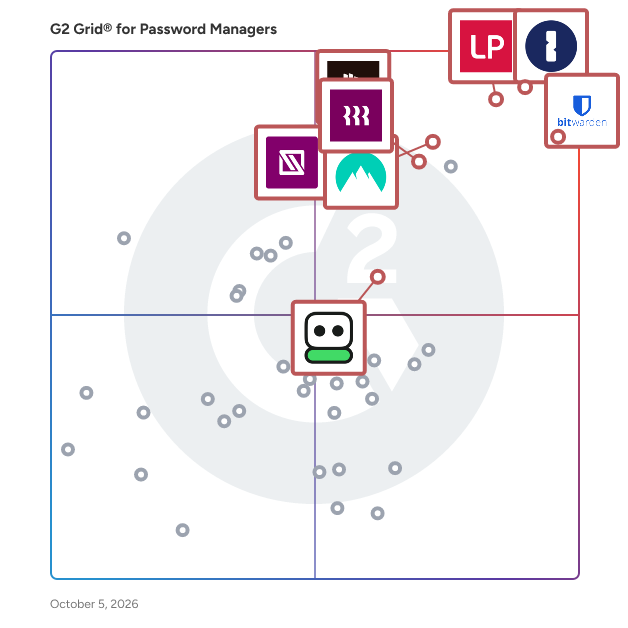
## G2 Grid® for Password Managers
![G2 Grid® for Password Managers plotting products by satisfaction and market presence](https://www.g2.com/categories/password-managers/grids.png?focus%5B%5D=1718&focus%5B%5D=41107&focus%5B%5D=4533&focus%5B%5D=107342&focus%5B%5D=18742&focus%5B%5D=41823&focus%5B%5D=1204&focus%5B%5D=135327)
Highlighted products: LastPass, Bitwarden, 1Password, NordPass Business, Dashlane Password Manager, IT Glue, RoboForm, and Hudu.
Underlying data: [Grid® JSON](https://www.g2.com/categories/password-managers/grids.json?focus%5B%5D=lastpass&amp;focus%5B%5D=bitwarden&amp;focus%5B%5D=1password&amp;focus%5B%5D=nordpass-business&amp;focus%5B%5D=dashlane-password-manager&amp;focus%5B%5D=it-glue&amp;focus%5B%5D=roboform&amp;focus%5B%5D=hudu&amp;segment=small-business)


## How Many Password Managers Products Does G2 Track?
**Total Products under this Category:** 101

### Category Stats (Jul 2026)
- **Average Rating**: 4.41/5 The average rating of products in this category, based on all submitted ratings
- **Top Trending Product**: PasswordState (+5.0%) - Among all products in this category, PasswordState recorded the largest rating increase compared to last month
*Last updated: July 16, 2026*


## How Does G2 Rank Password Managers Products?

**Why You Can Trust G2's Software Rankings:**

- 30 Analysts and Data Experts
- 12,300+ Authentic Reviews
- 101+ Products
- Unbiased Rankings

G2's software rankings are built on verified user reviews, rigorous moderation, and a consistent research methodology maintained by a team of analysts and data experts. Each product is measured using the same transparent criteria, with no paid placement or vendor influence. While reviews reflect real user experiences, which can be subjective, they offer valuable insight into how software performs in the hands of professionals. Together, these inputs power the G2 Score, a standardized way to compare tools within every category.


---

**Sponsored**

### ManageEngine ADSelfService Plus

ManageEngine ADSelfService Plus is an identity security solution with MFA, SSO, and SSPR capabilities. ADSelfService Plus is an identity security solution that ensures secure and seamless access to enterprise resources and establishes a Zero Trust environment. With adaptive multi-factor authentication (MFA), single sign-on (SSO), self-service password management, a password policy enhancer, remote work enablement, and workforce self-service, ADSelfService Plus provides your employees with secure, simple access to the resources they need. ADSelfService Plus helps keep identity-based threats out, fast-tracks application onboarding, improves password security, reduces help desk tickets, and empowers remote workforces. The core features of ADSelfService Plus include: Adaptive MFA Enable context-based MFA with 19 different authentication factors for endpoint and application logins. Enterprise SSO Allow users to access all enterprise applications with a single, secure authentication flow. Password management and security Simplify password management with self-service password resets and account unlocks, strong password policies, and password expiry notifications. Enterprise self-service Delegate profile updates and group subscriptions to end users and monitor these self-service actions with approval workflows. Remote work enablement Enhance remote work with cached credential updates, secure logins, and mobile password management. Powerful integrations Establish an efficient and secure IT environment through integration with SIEM, ITSM, and IAM tools. Reporting and auditing Simplify auditing with predefined, actionable reports about authentication failures, logon attempts, and blocked users.


[Visit website](https://www.g2.com/external_clickthroughs/record?secure%5Bad_program%5D=ppc&amp;secure%5Bad_slot%5D=category_product_list&amp;secure%5Bcategory_id%5D=593&amp;secure%5Bchosen_at%5D=2026-07-17T06%3A34%3A03Z&amp;secure%5Bdisplayable_resource_id%5D=1083&amp;secure%5Bdisplayable_resource_type%5D=Category&amp;secure%5Bmedium%5D=sponsored&amp;secure%5Bplacement_reason%5D=neighbor_category&amp;secure%5Bplacement_resource_ids%5D%5B%5D=254&amp;secure%5Bplacement_resource_ids%5D%5B%5D=1083&amp;secure%5Bprioritized%5D=false&amp;secure%5Bproduct_id%5D=5690&amp;secure%5Bresource_id%5D=593&amp;secure%5Bresource_type%5D=Category&amp;secure%5Bsource_type%5D=category_page&amp;secure%5Bsource_url%5D=https%3A%2F%2Fwww.g2.com%2Fcategories%2Fpassword-managers%2Fsmall-business%3Fpage%3D2&amp;secure%5Btoken%5D=c8e90706027e13b6a7c313bd83c2245a8da50e1409a8295684aed9c72582f67f&amp;secure%5Burl%5D=https%3A%2F%2Fwww.manageengine.com%2Fproducts%2Fself-service-password%2Fsem%2Fadselfservice-plus.html%3Futm_source%3DG2%26utm_medium%3Dtpac%26utm_campaign%3DADSSP-MFA&amp;secure%5Burl_type%5D=custom_url)

---

## What Are the Top-Rated Password Managers Products in 2026?
### 1. [KeePass](https://www.g2.com/products/keepass/reviews)
KeePass is a free, open-source password manager designed to securely store and manage your passwords in an encrypted database. It supports multiple operating systems, including Windows, macOS, and Linux, and offers portability without requiring installation. KeePass employs strong encryption algorithms like AES and ChaCha20 to ensure the safety of your sensitive information. Key Features and Functionality: - Strong Security: KeePass encrypts the entire database, including usernames and notes, using robust algorithms such as AES and ChaCha20. It also utilizes SHA-256 for hashing master key components, providing protection against dictionary and guessing attacks. - Multiple User Keys: Users can secure their databases with a master password, a key file, or a combination of both. Additionally, KeePass 2.x allows locking the database to the current Windows user account for enhanced security. - Portability and Accessibility: KeePass is portable and can run directly from a USB stick without installation. It doesn&#39;t store data on the system, leaving no traces after deletion. The software also offers an optimized user interface for screen readers, enhancing accessibility. - Data Import and Export: KeePass supports importing from and exporting to various formats, including TXT, HTML, XML, and CSV, facilitating easy database transfer and integration with other applications. - Password Groups and Management: Users can organize passwords into groups, set expiration dates, and attach files to entries. KeePass also includes a strong random password generator to create secure passwords. - Auto-Type and Drag &amp; Drop: The software features auto-type functionality and global auto-type hotkeys, allowing users to input credentials into other applications seamlessly. Drag &amp; drop support further simplifies the process. - Plugin Architecture: KeePass offers a plugin architecture, enabling users to extend its functionality according to their needs. Primary Value and User Solutions: KeePass addresses the challenge of managing multiple passwords by providing a secure, centralized repository for all credentials. Its strong encryption ensures that sensitive information remains protected, while features like auto-type and password generation enhance user convenience. The portability and cross-platform support make it a versatile solution for users seeking a reliable and accessible password management tool.


**Average Rating:** 4.5/5.0
**Total Reviews:** 220
**How Do G2 Users Rate KeePass?**

- **Has the product been a good partner in doing business?:** 8.6/10 (Category avg: 9.0/10)
- **Admin Management:** 8.9/10 (Category avg: 9.0/10)
- **Quick Login:** 9.2/10 (Category avg: 9.1/10)
- **Two-Factor Authentication:** 8.2/10 (Category avg: 9.1/10)

**Who Is the Company Behind KeePass?**

- **Seller:** [KeePass](https://www.g2.com/sellers/keepass)
- **HQ Location:** N/A
- **Twitter:** @KeePass (4,453 Twitter followers)
- **LinkedIn® Page:** https://www.linkedin.com/company/No-Linkedin-Presence-Added-Intentionally-By-DataOps (1 employees on LinkedIn®)

**Who Uses This Product?**
- **Who Uses This:** Software Engineer
- **Top Industries:** Information Technology and Services, Computer Software
- **Company Size:** 41% Small-Business, 36% Mid-Market


#### What Are KeePass's Pros and Cons?

**Pros:**

- Ease of Use (4 reviews)
- Password Security (4 reviews)
- Easy Setup (2 reviews)
- Open Source (2 reviews)
- Password Management (2 reviews)

**Cons:**

- Data Loss (2 reviews)
- UI Issues (2 reviews)
- Difficult Setup (1 reviews)
- Learning Curve (1 reviews)
- Password Sharing (1 reviews)


### What Do G2 Reviewers Say About KeePass?
*AI-generated summary from verified user reviews*

**Pros:**

- Users find KeePass **easy to use** , appreciating its straightforward setup and local password management without cloud dependency.
- Users value the **strong local encryption** of KeePass, ensuring complete control and security of their passwords.
- Users appreciate the **easy setup** of KeePass, allowing quick installation and credential management to start securely.
- Users appreciate the **free and secure nature** of KeePass, giving them control over their passwords without cloud reliance.
- Users love the **ease of tracking passwords** with KeePass, ensuring their security and accessibility effortlessly.

**Cons:**

- Users face significant **data loss risks** due to challenges in sharing and managing KeePass files securely and effectively.
- Users find the **difficulties with the outdated UI** hinder usability, making it less friendly, especially for beginners.
- Users find the **difficult setup** of KeePass cumbersome, especially when managing shared and secure password files.
- Users find the **steep learning curve** of KeePass challenging, particularly with its outdated UI and complex setup requirements.
- Users face challenges with **password sharing** , as it complicates security and management for organizations significantly.

#### What Are Recent G2 Reviews of KeePass?

**"[A Simple Yet Powerful Offline Password Vault](https://www.g2.com/survey_responses/keepass-review-12104779)"**

**Rating:** 4.0/5.0 stars
*— Anish T.*

[Read full review](https://www.g2.com/survey_responses/keepass-review-12104779)

---

**"[Secure, Free Password Management Without Cloud Storage!](https://www.g2.com/survey_responses/keepass-review-12723003)"**

**Rating:** 4.5/5.0 stars
*— Brad M.*

[Read full review](https://www.g2.com/survey_responses/keepass-review-12723003)

---


#### What Are G2 Users Discussing About KeePass?

- [What is KeePass used for?](https://www.g2.com/discussions/keepass-what-is-keepass-used-for)
- [Can KeePass be hacked?](https://www.g2.com/discussions/can-keepass-be-hacked)
- [Is KeePass safe?](https://www.g2.com/discussions/is-keepass-safe) - 1 comment
- [What types of authentication are supported by KeePass?](https://www.g2.com/discussions/what-types-of-authentication-are-supported-by-keepass)
- [What is KeePass used for?](https://www.g2.com/discussions/what-is-keepass-used-for)

### 2. [Passpack](https://www.g2.com/products/passpack/reviews)
Passpack is the Team Password &amp; Credentials Manager for every business: A mission-critical solution built for secure Team &amp; Role access management and productive collaboration, yet easy and versatile for everyone to use. Passpack delivers a compelling value proposition for businesses as a platform-agnostic solution offering highly secure, organization-wide online password &amp; credentials management. Enhance company defenses against cyberattacks with end-to-end encryption and organize your library of digital credentials, PINs, registration codes, account numbers, and certificates in a central repository that can be updated in real time and shared among trusted individuals.


**Average Rating:** 4.0/5.0
**Total Reviews:** 35
**How Do G2 Users Rate Passpack?**

- **Has the product been a good partner in doing business?:** 7.8/10 (Category avg: 9.0/10)
- **Admin Management:** 8.7/10 (Category avg: 9.0/10)
- **Quick Login:** 8.6/10 (Category avg: 9.1/10)
- **Two-Factor Authentication:** 8.1/10 (Category avg: 9.1/10)

**Who Is the Company Behind Passpack?**

- **Seller:** [Passpack](https://www.g2.com/sellers/passpack)
- **Company Website:** https://www.passpack.com
- **Year Founded:** 2013
- **HQ Location:** Sandy, UT, USA
- **Twitter:** @passpack (901 Twitter followers)
- **LinkedIn® Page:** https://www.linkedin.com/company/745968/ (8 employees on LinkedIn®)

**Who Uses This Product?**
- **Top Industries:** Computer Software, Marketing and Advertising
- **Company Size:** 54% Small-Business, 43% Mid-Market


#### What Are Passpack's Pros and Cons?

**Pros:**

- Ease of Use (2 reviews)
- Password Security (2 reviews)
- Centralized Management (1 reviews)
- Customer Support (1 reviews)
- Cybersecurity (1 reviews)

**Cons:**

- Manual Intervention Required (1 reviews)
- Poor Interface Design (1 reviews)
- Poor UI (1 reviews)
- Process Complexity (1 reviews)
- UI Issues (1 reviews)


### What Do G2 Reviewers Say About Passpack?
*AI-generated summary from verified user reviews*

**Pros:**

- Users find Passpack&#39;s **ease of use** outstanding, appreciating simple setup and effective password management features.
- Users appreciate the **robust password security** offered by Passpack, ensuring their critical information remains safe and trusted.
- Users value the **centralized management** of Passpack for its strong security and quick setup in handling sensitive information.
- Users commend the **responsive customer support** of Passpack, enhancing their overall experience and satisfaction.
- Users appreciate the **robust cybersecurity** of Passpack, ensuring trust and safety in managing critical passwords and credentials.

**Cons:**

- Users find it challenging to manage **label creation** , requiring manual steps that disrupt the login process.
- Users feel the **poor interface design** of Passpack detracts from usability and could use significant improvement.
- Users find the **poor UI** of Passpack needs improvements for better usability and overall experience.
- Users find the **label creation process complex** , as it requires additional steps rather than being user-friendly during login saves.
- Users feel the **UI could be improved** for a smoother and more intuitive experience overall.

#### What Are Recent G2 Reviews of Passpack?

**"[Easy Password Management with a Handy Generator and Security Ratings](https://www.g2.com/survey_responses/passpack-review-12400935)"**

**Rating:** 4.5/5.0 stars
*— Rudi D.*

[Read full review](https://www.g2.com/survey_responses/passpack-review-12400935)

---

**"[Highly Secure Password Management, Needs UI Improvement](https://www.g2.com/survey_responses/passpack-review-12408258)"**

**Rating:** 4.5/5.0 stars
*— Jay T.*

[Read full review](https://www.g2.com/survey_responses/passpack-review-12408258)

---


#### What Are G2 Users Discussing About Passpack?

- [What is Passpack used for?](https://www.g2.com/discussions/what-is-passpack-used-for)


## What Is Password Managers?

[Identity Management Software](https://www.g2.com/categories/identity-management)

## What Software Categories Are Similar to Password Managers?

- [Single Sign-On (SSO) Solutions](https://www.g2.com/categories/single-sign-on-sso)
- [Identity and Access Management (IAM) Software](https://www.g2.com/categories/identity-and-access-management-iam)
- [Multi-Factor Authentication (MFA) Software](https://www.g2.com/categories/multi-factor-authentication-mfa)


---

## How Do You Choose the Right Password Managers?

### What You Should Know About Password Managers

### Password Managers software buying insights at a glance

[Password Managers](https://www.g2.com/categories/password-managers) software helps organizations securely store, generate, autofill, and manage credentials across applications, devices, and teams. These **password managers** enable businesses to centralize access to sensitive logins, enforce stronger password practices, and reduce reliance on manual credential handling. As companies operate across cloud tools, shared accounts, and distributed environments, **password manager software** is becoming essential infrastructure for organizations that need both security and seamless access control. The most effective **password management tools** and **password management systems** allow teams to move quickly while maintaining strict credential governance and visibility.

Organizations typically adopt **password manager software** to reduce password reuse, simplify onboarding, and securely share credentials across teams without exposing sensitive information. Across password managers reviews, buyers frequently highlight benefits such as reliable autofill, intuitive browser extensions, and easier credential management across desktop and mobile environments. The **best password manager software** stands out when it combines strong security with ease of use, helping employees adopt better password habits without adding friction. In practice, the most effective **password managers** function as a foundational security layer, connecting credential storage, access control, and day-to-day login workflows within a single system.

Pricing varies depending on team size, administrative controls, and the level of security and reporting required. Many **password management tools** offer per-user subscription pricing with tiered plans that include features like secure sharing, audit logs, and advanced admin controls. Some **password management systems** also provide enterprise add-ons for compliance, reporting, and identity integrations. Organizations evaluating **password manager software** often consider ease of use, rollout complexity, admin overhead, and long-term adoption when estimating total cost of ownership.

### Top 5 FAQs from software buyers:

- How do password managers improve security, access control, and credential visibility across teams?
- What features should organizations evaluate when selecting the best password manager software?
- How well do password management tools support secure sharing, admin controls, and audit visibility?
- What level of usability and automation do password managers offer for autofill, password generation, and access management?
- How scalable are password management systems for businesses with distributed teams, shared accounts, and growing security needs?

G2’s top-rated Password Managers software, based on verified reviews, includes [LastPass](https://www.g2.com/products/lastpass/reviews) **,** [1Password](https://www.g2.com/products/1password/reviews) **,** [NordPass Business](https://www.g2.com/products/nordpass-business/reviews) **,** and [Bitwarden](https://www.g2.com/products/bitwarden/reviews).

### What are the top-reviewed Password Managers on G2?

[LastPass](https://www.g2.com/products/lastpass/reviews)

- Number of Reviews: 1,921
- Satisfaction: 93
- Market Score: 97
- G2 score: 95

[1Password](https://www.g2.com/products/1password/reviews)

- Number of Reviews: 1,655
- Satisfaction: 92
- Market Score: 98
- G2 score: 95

[NordPass Business](https://www.g2.com/products/nordpass-business/reviews)

- Number of Reviews: 622
- Satisfaction: 91
- Market Score: 90
- G2 score: 90

[Bitwarden](https://www.g2.com/products/bitwarden/reviews)

- Number of Reviews: 956
- Satisfaction: 95
- Market Score: 86
- G2 score: 90

[Dashlane Password Manager](https://www.g2.com/products/dashlane-password-manager/reviews)

- Number of Reviews: 609
- Satisfaction: 84
- Market Score: 85
- G2 score: 84

Satisfaction reflects user-reported ratings across various factors, including ease of use, feature fit, and quality of support. ([Source 2](https://www.g2.com/reports))

Market Presence scores are calculated based on review volume, third-party signals, and overall market visibility. ([Source 2](https://www.g2.com/reports))

G2 Score is a weighted composite of Satisfaction and Market Presence. ([Source 2](https://www.g2.com/reports))

Learn how G2 scores products. ([Source 1](https://documentation.g2.com/docs/research-scoring-methodologies?_gl=1*5vlk6s*_gcl_au*MTAwMzU5MzUxLjE3NjM0MTg0NzYuNjY0NTIxMTY0LjE3NjQ2MTc0NzcuMTc2NDYxNzQ3Nw..*_ga*NzY1MDU0NjE3LjE3NjM0NzQ3ODM.*_ga_MFZ5NDXZ5F*czE3NjYwODk1MTMkbzY3JGcxJHQxNzY2MDkyMjQyJGo1NyRsMCRoMA..))

### What I Often See in Password Managers

#### Feedback Pros: What Users Consistently Appreciate

- **Seamless autofill and secure password storage simplify daily logins**
- “_I use 1Password to store and manage my passwords securely. It helps me log in to websites easily and keeps my personal information safe. 1Password helps me remember my passwords, so I don&#39;t need to worry about forgetting them and keeps my account secure. My favorite feature is the autofill. It helps me log in quickly without remembering many passwords. The autofill feature saves time because it fills my login details automatically, making logging in faster and easier. We switched to 1Password from another password manager because it is easier to use and more secure. The initial setup of 1Password was very quick and didn&#39;t take much time, allowing our team to start using it quickly. I would recommend 1Password because it is easy to use and helps keep passwords secure._” - [Mohit N.](https://www.g2.com/products/1password/reviews/1password-review-12463037), 1Password review
- **Easy setup with seamless browser integration for frequent daily logins**
- “_What stands out to me about Lastpass is the overall ease of use and how smoothly it fits into daily browsing. The ease of implementation is impressive because setting it up on my browser and mobile device took very little time. It offers a strong number of features such as password generation, secure vault storage, autofill and security alerts. I also appreciate the responsive customer support when help is needed. Because I log into many platforms every day the frequency of use is very high and the ease of integration with different browsers and applications makes managing credentials simple and efficient.”_ - [Piyush P.](https://www.g2.com/products/lastpass/reviews/lastpass-review-12451331), LastPass review
- **Open-source transparency with flexible self-hosting for security control**
- “_It’s free and open source – and that shouldn’t be able to work together this well - but here we are. One of the things I really appreciate is that the self-hosted option is available if you choose it (which is somewhat rare) and the fact that you’re able to check the code for yourself matters if you are the type of individual who cares about that sort of thing.”_ - [Jeremy P.](https://www.g2.com/products/bitwarden/reviews/bitwarden-review-12455715), Bitwarden review

#### Cons: Where Many Platforms Fall Short

- **Frequent extension logouts and limited folder customization options**
- “_Well, sometimes the browser extension disconnects and asks for the master password too frequently, which delays certain processes. If someone loses the master password, the recovery process can be tedious. There are no custom folders and I would like to have a few more options in this regard.”_ - [Angel B.](https://www.g2.com/products/nordpass-business/reviews/nordpass-business-review-12243480), NordPass Business review
- **Inconsistent autofill across complex sites and limited field-level control**
- “_I have very few problems with Dashlane and most of them creep in because of the nature of the web. Different sites have different login flows and on occasion I&#39;ll bump into a site where Dashlane doesn&#39;t know how or what to fill in. They have made improvements on that recently by adding Dashlane to the context menu. I also occasionally have problems with Dashlane wanting to help me fill things that I don&#39;t need its help filling. Like a contact record in my CRM. I can&#39;t turn dashlane off for the site because I want help logging in, but it doesn&#39;t know what I need to put into the CRM. That said, it never really gets in the way.”_ - [Kevin R.](https://www.g2.com/products/dashlane-password-manager/reviews/dashlane-password-manager-review-7750286), Dashlane Password Manager review
- **Overactive autofill prompts on niche tools create occasional friction**
- “_Occasionally, the browser extension can be a little too aggressive with autofill prompts on less common internal tools, which creates minor friction. However, this is easily adjustable with a few clicks, and the trade-off for consistent security is well worth it.”_ - [Michael K.](https://www.g2.com/products/1password/reviews/1password-review-12392978), 1Password review

### My Expert Takeaway on Password Managers

Password manager software delivers the most value when organizations treat it as a security and access control layer rather than just a digital vault. The strongest password managers combine secure credential storage with autofill, sharing, and admin controls, allowing teams to manage access while improving day-to-day login efficiency. The best password management tools and password management systems help employees move quickly without compromising security.

Review sentiment across the category is strong. In this dataset, password manager software holds a 4.59 average star rating, with high usability scores including 6.49 for meets requirements, 6.43 for ease of use, 6.43 for ease of setup, and 6.34 for quality of support. Likelihood to recommend is also high at 9.17, showing that buyers consistently see value after adoption.

Friction tends to appear as organizations scale usage or introduce more advanced admin controls. Teams that struggle often underestimate the effort required to manage shared credentials and enforce policies across users. High-performing teams approach password managers with clear governance and consistent usage across departments.

The best password manager software balances strong security with everyday usability. Leading password managers make it easy for employees to access credentials while giving administrators visibility and control. As businesses adopt more cloud tools and support distributed teams, password management systems are becoming essential security infrastructure.

### Password Managers FAQs

#### **What are the best password managers?**

The best password managers include [LastPass](https://www.g2.com/products/lastpass/reviews) **,** [1Password](https://www.g2.com/products/1password/reviews) **,** [NordPass Business](https://www.g2.com/products/nordpass-business/reviews) **,** [Bitwarden](https://www.g2.com/products/bitwarden/reviews), and [Dashlane](https://www.g2.com/products/dashlane-password-manager/reviews). These tools combine secure vaulting, reliable autofill, and simple sharing, making them strong choices for teams that need consistent access across browsers and devices.

#### **What are the best-rated apps to manage business passwords?**

Top-rated apps to manage business passwords include [1Password](https://www.g2.com/products/1password/reviews), [Bitwarden](https://www.g2.com/products/bitwarden/reviews) **,** [Keeper Password Manager](https://www.g2.com/products/keeper-password-manager/reviews) **,** and [NordPass Business](https://www.g2.com/products/nordpass-business/reviews). Buyers rate these highly for balancing admin controls with usability, offering secure sharing, password generation, and smooth onboarding across teams.

#### **What are the leading password management solutions for office use?**

Leading office-ready password management solutions include [1Password](https://www.g2.com/products/1password/reviews) **,** [LastPass](https://www.g2.com/products/lastpass/reviews) **,** [Dashlane](https://www.g2.com/products/dashlane-password-manager/reviews) **,** and [Bitwarden](https://www.g2.com/products/bitwarden/reviews). These platforms centralize credentials, reduce password reuse, and support secure team sharing, making them well-suited for organizations managing multiple users and shared logins.

#### **Which password tool is best for business security?**

For business security, tools like [Keeper Password Manager](https://www.g2.com/products/keeper-password-manager/reviews) **,** [1Password](https://www.g2.com/products/1password/reviews) **,** and [Bitwarden](https://www.g2.com/products/bitwarden/reviews) stand out. These platforms are favored for strong encryption, admin visibility, and secure credential sharing while still maintaining usability across desktop, browser, and mobile environments.

#### **What are the best user-friendly password manager software for desktops?**

User-friendly desktop password manager softwares include [1Password](https://www.g2.com/products/1password/reviews) **,** [Dashlane](https://www.g2.com/products/dashlane-password-manager/reviews) **,** [Bitwarden](https://www.g2.com/products/bitwarden/reviews) **,** and [NordPass Business](https://www.g2.com/products/nordpass-business/reviews). These tools are known for intuitive setup, reliable browser extensions, and fast autofill, helping users manage credentials efficiently without adding friction to daily workflows.

### Sources

1. [G2 Scoring Methodologies](https://documentation.g2.com/docs/research-scoring-methodologies?_gl=1*5ky9es*_gcl_au*MTY2NDg2MDY3Ny4xNzU1MDQxMDU4*_ga*MTMwMTMzNzE1MS4xNzQ5MjMyMzg1*_ga_MFZ5NDXZ5F*czE3NTUwOTkzMjgkbzQkZzEkdDE3NTUwOTk3NzYkajU3JGwwJGgw)
2. [G2 Winter 2026 Reports](https://company.g2.com/news/g2-winter-2026-reports)

Researched By: [Brandon Summers-Miller](https://research.g2.com/insights/author/brandon-summers-miller)

**Last updated on March 17, 2026**


