  # Best Org Chart Software - Page 5

  *By [Grace Savides](https://research.g2.com/insights/author/grace-savides)*

   Org chart software allows users to create organizational charts of all employees within a company. These tools are designed to facilitate improved internal communications within an organization by offering awareness of current employees. Org charts also help define individual roles in the company and cross-team connections. These solutions often work in tandem with [workforce management software](https://www.g2.com/categories/workforce-management), which HR teams use to plan, manage, and track employee work.

The [best org chart software](https://learn.g2.com/best-org-chart-software) offers a variety of ways to create and design the chart itself. Many tools come with prebuilt templates and designs to help speed up the creation process. These solutions also enable users to upload employee rosters to create an employee directory with full-text search capabilities, with options to upload individual names on an as-needed basis or import a list in bulk from [spreadsheets software](https://www.g2.com/categories/spreadsheets). These tools should allow users to indicate specific roles, departments, and more, as well as enable the publication and updating of organizational charts as a business grows.

Org chart software should not be confused with [diagramming software](https://www.g2.com/categories/diagramming), as diagramming tools can be used to create a number of different charts; org chart solutions are solely intended to create organizational charts.

To qualify for inclusion in the Org Chart category, a product must:

- Include the specific functionality to create business organizational charts
- Allow users to upload employee roster lists
- Offer custom org chart design options
- Enable users to publish and update org charts as needed


    ---
## What Are the Most Common Questions About Org Chart Software?
*AI-generated · Last updated: May 26, 2026*
  ### Which vendor offers drag-and-drop org chart editing features?
  Based on G2 reviews, Lucid Visual Collaboration Suite is frequently described as easy to edit with drag-and-drop tools for org charts and related diagrams. According to verified users, the interface helps teams quickly build, adjust, and share org structures, with reviewers also mentioning templates, collaboration, and AI-assisted creation. G2 reviewers mention that some users needed a little time to learn more advanced features, but the overall sentiment points to flexible editing and straightforward navigation for day-to-day org chart updates. Miro reviewers also mention ease of use for creating organization charts, though some note drag-and-drop limitations in that specific use case.


  ### What platform provides analytics on workforce distribution?
  Based on G2 reviews, several products help teams analyze workforce distribution visually rather than through deep standalone analytics. OrgChart reviewers mention planning, budget, compensation, and future-state workforce views that help leaders understand headcount, department structure, and hiring needs across the organization. According to verified users, TeamOhana is also used to track current and forecasted headcount, vacancies, and workforce planning data in one place. G2 reviewers mention that these tools are especially helpful when organizations need a current snapshot of where people sit, where gaps exist, and how staffing changes may affect planning and resource allocation.


  ### Which org chart software supports secure sharing with stakeholders?
  Based on G2 reviews, OrgChart is commonly mentioned for sharing organizational views with different audiences while keeping information current through HRIS connections. According to verified users, teams use it to publish charts company-wide, share links, create different views for different populations, and support reporting for leadership and stakeholders. G2 reviewers mention security setup and access controls as part of implementation, especially when sensitive HR information is involved. Reviews also note that ChartHop and Lucid Visual Collaboration Suite support sharing and collaboration, but OrgChart stands out in the review set for stakeholder visibility paired with controlled access and HR-connected chart management.


  ### What is the best platform for creating dynamic org charts?
  Based on G2 reviews, Lucid Visual Collaboration Suite appears as the strongest recent option for creating dynamic org charts because it has the highest recent review volume among eligible products in this dataset. According to verified users, Lucid supports quick org chart creation with templates, AI prompts, real-time collaboration, and easy sharing, making it useful for both planning and ongoing updates. G2 reviewers mention that teams use it for reorganizational planning, staffing visibility, and building a single source of truth for organizational structures. Some users note pricing concerns or a learning curve for advanced features, but reviews consistently highlight flexibility and speed for changing org chart needs.

**Here are some of the top-rated products on G2:**

- [Lucid Visual Collaboration Suite](https://www.g2.com/products/lucid-software-inc-lucid-visual-collaboration-suite) – used for org charts, reorg planning, templates, and collaborative editing
- [OrgChart](https://www.g2.com/products/orgchart) – suited for HRIS-connected org charts with planning and live update workflows
- [Miro](https://www.g2.com/products/miro) – helpful for organization charts, team structure views, and collaborative whiteboarding


  ### Which platform supports multi-location organizational structures?
  Based on G2 reviews, OneDirectory, Sift, and GoProfiles all show evidence of helping employees understand people across offices and locations. According to verified users, OneDirectory makes it easier to find coworkers by department or location and supports company-wide directories with reporting structure visibility. G2 reviewers mention that Sift helps users locate coworkers, office details, and reporting lines, while GoProfiles is valued for showing where teammates are based and helping remote teams navigate org structures across time zones. In this review set, these tools are most clearly associated with multi-location visibility rather than simple static chart creation alone.


  ### What tool integrates org charts with HR management systems?
  Based on G2 reviews, OrgChart is the clearest fit for teams that want org charts connected directly to HR management systems. According to verified users, reviewers repeatedly mention integrations with ADP, Workday, UKG, Dayforce, and other HRIS tools to keep organizational charts current without manual rebuilding. G2 reviewers mention that these integrations reduce administrative effort, improve reporting, and support workforce planning, mergers, and leadership visibility. Some reviews note that setup details or certain integrations can take extra work, but the recurring theme is that OrgChart helps organizations replace spreadsheets, slides, or manual charts with a more automated HR-connected source of truth.


  ### What is the top-rated org chart tool for large enterprises?
  Based on G2 reviews, large organizations appear to favor tools that combine org visibility with integrations, planning, and collaboration. According to verified users, OrgChart is used for global visibility, multiple business units, workforce planning, and sharing live organizational views from connected HR systems. G2 reviewers also mention Lucid Visual Collaboration Suite for enterprise documentation, process mapping, and collaborative org chart creation, while Miro is praised for large-team collaboration and centralizing organizational information. Reviews suggest the best fit depends on whether the priority is formal HR-connected structure management or broader collaborative diagramming, but OrgChart and Lucid appear most consistently aligned with complex enterprise use cases.

**Here are some of the top-rated products on G2:**

- [OrgChart](https://www.g2.com/products/orgchart) – used for global visibility, HRIS-connected charts, and workforce planning
- [Lucid Visual Collaboration Suite](https://www.g2.com/products/lucid-software-inc-lucid-visual-collaboration-suite) – supports collaborative org charts, reorg planning, and cross-functional documentation
- [Miro](https://www.g2.com/products/miro) – used by distributed teams for organization charts, shared planning, and centralized information


  ### Which vendor provides real-time updates for organizational changes?
  Based on G2 reviews, OrgChart is the vendor most often associated with real-time or near-real-time organizational updates. According to verified users, integrations with systems like ADP, UKG, Dayforce, and Workday help teams avoid manual revisions and keep charts aligned with current headcount and reporting changes. G2 reviewers mention that this is especially useful during reorganizations, staffing changes, mergers, and ongoing workforce planning. Several reviews highlight live or automated refreshes as a major time saver compared with spreadsheets, PowerPoint, Adobe, or Visio. The recurring buyer takeaway is that OrgChart is built to reduce lag between HR system changes and visible organizational structure updates.


  ### Which org chart software offers the most customizable visual layouts?
  Based on G2 reviews, OrgChart, Lucid Visual Collaboration Suite, and OneDirectory all receive praise for flexible visual presentation, though they emphasize different strengths. According to verified users, OrgChart offers multiple views, custom chart outputs, formatting options, and tailored displays for different audiences. G2 reviewers mention that Lucid Visual Collaboration Suite stands out for templates, diagram customization, and collaborative editing, while OneDirectory is praised for polished profile displays and an easy-to-use live org chart. Reviews suggest OrgChart is strongest when buyers need many presentation formats and audience-specific views, while Lucid is a strong option for teams that want more freeform editing and visual collaboration.


  ### What is the most cost-effective org chart tool for SMBs?
  Based on G2 reviews, Lucid Visual Collaboration Suite and Miro are the most grounded options for SMB buyers looking for a cost-effective org chart tool in this dataset. According to verified users, Lucid is described in several reviews as cost-effective, workable for smaller teams, and valuable because templates, collaboration, and org chart creation save time. G2 reviewers also mention Miro as easy to learn and useful for organization charts, brainstorming, and shared planning, though some users still call pricing expensive. Reviews for OrgChart emphasize time savings and automation, but they focus more on HRIS-driven org management than affordability. Buyer fit depends on whether lower-friction collaboration or deeper org administration matters most.

**Here are some of the top-rated products on G2:**

- [Lucid Visual Collaboration Suite](https://www.g2.com/products/lucid-software-inc-lucid-visual-collaboration-suite) – good for small teams needing templates, collaboration, and flexible org chart creation
- [Miro](https://www.g2.com/products/miro) – helpful for easy collaboration, organization charts, and visual planning in one workspace
- [OrgChart](https://www.g2.com/products/orgchart) – useful when SMBs want HRIS-connected org charts and less manual upkeep


## How Many Org Chart Software Products Does G2 Track?
**Total Products under this Category:** 92

### Category Stats (Jun 2026)
- **Average Rating**: 4.43/5 The average rating of products in this category, based on all submitted ratings
- **New Reviews This Quarter**: 196
- **Buyer Segments**: Mid-Market 51% │ Small-Business 34% │ Enterprise 16% Represents the distribution of reviewers across all products in this category.
- **Top Trending Product**: Visio (+0.31%) - Among all products in this category, Visio recorded the largest rating increase compared to last month
*Last updated: June 09, 2026*

  
## How Does G2 Rank Org Chart Software Products?

**Why You Can Trust G2's Software Rankings:**

- 30 Analysts and Data Experts
- 32,500+ Authentic Reviews
- 92+ Products
- Unbiased Rankings

G2's software rankings are built on verified user reviews, rigorous moderation, and a consistent research methodology maintained by a team of analysts and data experts. Each product is measured using the same transparent criteria, with no paid placement or vendor influence. While reviews reflect real user experiences, which can be subjective, they offer valuable insight into how software performs in the hands of professionals. Together, these inputs power the G2 Score, a standardized way to compare tools within every category.

  
## Which Org Chart Software Is Best for Your Use Case?

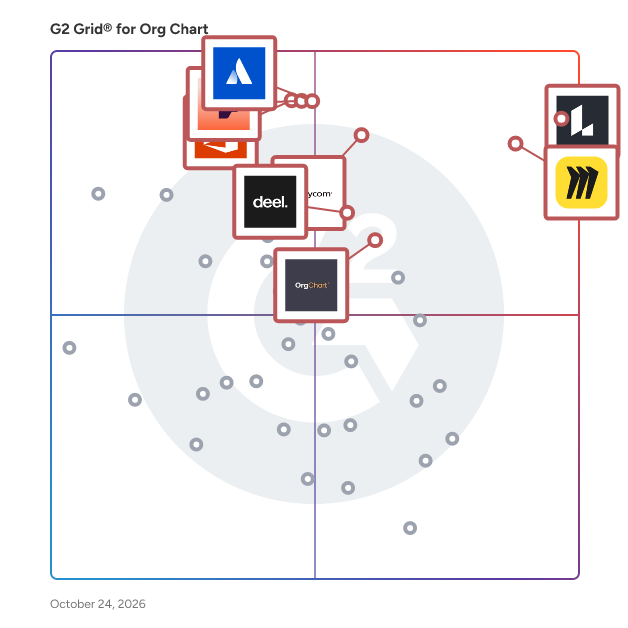
- **Leader:** [Lucid Visual Collaboration Suite](https://www.g2.com/products/lucid-software-inc-lucid-visual-collaboration-suite/reviews)
- **Highest Performer:** [OneDirectory](https://www.g2.com/products/onedirectory/reviews)
- **Easiest to Use:** [Squivr](https://www.g2.com/products/squivr/reviews)
- **Top Trending:** [GoProfiles](https://www.g2.com/products/goprofiles/reviews)
- **Best Free Software:** [Lucid Visual Collaboration Suite](https://www.g2.com/products/lucid-software-inc-lucid-visual-collaboration-suite/reviews)

  
---

**Sponsored**

### OrgChart

OrgChart is a leading org chart automation and workforce planning solution, built for HR professionals and the people leaders they support. OrgChart seamlessly integrates employee data from multiple sources, including over 50 HR systems, allowing for an always-accurate, and visually sophisticated org chart. Once connected, easily keep charts up to date without any manual effort – at any time – by scheduling automated syncs or updating charts with one simple click. OrgChart simplifies the complexity of HR work, providing unparalleled visibility into an organization’s personnel, and surfacing valuable insights for strategic decisions about future organizational structures. OrgChart is trusted by thousands of organizations worldwide across multiple industries – from non-profits, government agencies, and educational institutions – to Fortune 500 companies.


[Visit website](https://www.g2.com/external_clickthroughs/record?secure%5Bad_program%5D=ppc&amp;secure%5Bad_slot%5D=category_product_list&amp;secure%5Bcategory_id%5D=1533&amp;secure%5Bdisplayable_resource_id%5D=1533&amp;secure%5Bdisplayable_resource_type%5D=Category&amp;secure%5Bmedium%5D=sponsored&amp;secure%5Bplacement_reason%5D=page_category&amp;secure%5Bplacement_resource_ids%5D%5B%5D=1533&amp;secure%5Bprioritized%5D=false&amp;secure%5Bproduct_id%5D=73989&amp;secure%5Bresource_id%5D=1533&amp;secure%5Bresource_type%5D=Category&amp;secure%5Bsource_type%5D=category_page&amp;secure%5Bsource_url%5D=https%3A%2F%2Fwww.g2.com%2Fcategories%2Forg-chart%3Fpage%3D5&amp;secure%5Btoken%5D=cc7694b573ace5b585871504a11d89c77711c80807cb64ad3c0a0be84901b2c7&amp;secure%5Burl%5D=https%3A%2F%2Ftheorgchart.com%2Fp%2Forg-chart-automated-software%2F%3Futm_source%3Dg2%26utm_medium%3Dcpc%26utm_campaign%3Dg2-clicks&amp;secure%5Burl_type%5D=book_demo)

---

  
    ## What Is Org Chart Software?
  [HR Software](https://www.g2.com/categories/hr)
  ## What Software Categories Are Similar to Org Chart Software?
    - [Core HR Software](https://www.g2.com/categories/core-hr)
    - [Diagramming Software](https://www.g2.com/categories/diagramming)
    - [HR Analytics Software](https://www.g2.com/categories/hr-analytics)

  
---

## How Do You Choose the Right Org Chart Software?

### What You Should Know About Org Chart Software

### What is Org Chart Software?

Organizational charts are diagrams of the structure of an organization or business that delineate employee roles, departments, and hierarchy among the organization’s members. Org chart software allows users to generate and update organizational charts digitally as opposed to creating them by hand. Standalone org chart software is readily available, but most are built into larger diagramming tools or HR platforms.

Key Benefits of Org Chart Software

- Visual clarity for organization structure 
- Easy to use
- Specific to organizational charts as opposed to a generalized diagramming tool

### Why Use Org Chart Software?

Organizational charts can bring unprecedented clarity to a business’s structure, and org chart software simplifies the process of creating and maintaining them.

**Visibility —** Conveying complex structural information isn’t easy, especially when it needs to be digestible for an entire business. Organizational charts are the most succinct method to explain how a business is structured.

**Ease of use —** Org chart tools are straightforward and easy to understand. Generating an org chart can be as simple as uploading a roster list or drawing one in an application.

### Who Uses Org Chart Software?

Org charts themselves are helpful for any business of all sizes and industries. Employees at any level or in any department can benefit from the visual clarity org charts offer. While org charts themselves are useful across organizations, typically org chart software itself is in the hands of human resources (HR) departments. Since HR teams handle workforce roster lists across a business, org chart generation features are sometimes built into broader HR tools.

### Kinds of Org Chart software

Organizational charts seem simple, but there are multiple types available to suit different types of businesses, departments, and use cases. Org chart solutions will often provide pre-built templates for all the types of organizational structures outlined below.

**Hierarchical —** Hierarchical org charts are organized by tiers of authority; those at the bottom of the chart answer to those immediately above them, culminating with a single leader who oversees the organization. This is the most common type of organizational chart.

**Matrix —** Matrix org charts are used when individuals within an organization have multiple managers and/or have cross-functional roles. Organizations that don’t silo or separate their workforce by departments benefit most from matrix org charts because they are less concerned with hierarchy and focus more on the skills necessary for specific projects.

**Flat —** Flat org charts, sometimes called horizontal org charts, are similar to hierarchical org charts, but are best suited for organizations with little middle management and small companies. While flat org charts are organized by relative role and authority, there is more room for overlap between roles and skill sets. As businesses grow, they will often transition to hierarchical org charts to draw clear lines between roles and departments.

### Org Chart Software Features

The basic features of org chart software are ubiquitous across all products, whether they be standalone or built into broader offerings. Some org chart solutions do provide more complex functionality should buyers want features like automation or generalized employee directories.

**Templates —** Pre-made and/or customizable org chart templates. Having different templates available can be helpful if you anticipate making multiple types of organization charts.

**Roster upload —** Allows users to upload a roster of employees to automatically generate an organizational chart.

**Publishing tools —** Allows users to publish or store org charts in different content management systems or other software solutions.

#### Additional Org Chart Features

**Automation —** Allows users to connect with external roster lists, allowing for automatic updates to already published org charts.

**Workforce planning —** Users can create tentative roster lists privately or create succession charts for workforce planning. This feature is popular in dedicated org chart solutions intended for HR professionals.

**Staff directory —** Provides a separate employee directory where staff can be viewed in a simple list form. Some staff directories are interactive, and clicking on employee portraits presents more information.

### Potential Issues With Org Chart Software

**Requires constant updates —** The most noticeable problem with org charts is that they can quickly become out-of-date. Unless the software solution provides automatic updates, as a company changes, an org chart can quickly become inaccurate. For large businesses with multiple large departments that are always shifting, organizational charts that aren’t updated frequently can be completely useless. Businesses that want to use org chart software will either need to find an offering that provides automatic updates or will need to ensure information is manually updated as workforce changes are made.

**Variation in clarity —** Org charts aren’t always effectively implemented. As mentioned previously, there are multiple types of organizational charts, and each excels at presenting different kinds of organizational information. If created haphazardly or without context, a poorly-made org chart will only cause more confusion for those with questions.

Similarly, businesses may need to leverage multiple org charts of different types to adequately cover all the relationships that exist in their organization. Just one organizational chart may not be enough to provide enough clarity. If a business wants to implement org charts, the undertaking may take more time than they anticipate if they want to do it well. Businesses should be prepared to spend a sufficient amount of time and manpower creating and maintaining org charts if they choose to have them at all.

### Software and Services Related to Org Chart Software

**Diagramming software—** Many [diagramming software](https://www.g2.com/categories/diagramming) solutions offer org chart templates within their offering or users can make org charts from scratch within the application. The key difference between the two types of products is that org chart software is only capable of building organizational charts while diagramming tools can create any kind of diagram.


