Best Enterprise Operating Systems

How Many Operating Systems Products Does G2 Track?

Total Products under this Category: 146

Category Stats (Sep 2026)

  • Average Rating: 4.31/5 The average rating of products in this category, based on all submitted ratings
  • Top Trending Product: SUSE Multi-Linux Support (+3.13%) - Among all products in this category, SUSE Multi-Linux Support recorded the largest rating increase compared to last month

Last updated: September 01, 2026

How Does G2 Rank Operating Systems Products?

Why You Can Trust G2's Software Rankings:

  • 30 Analysts and Data Experts
  • 18,500+ Authentic Reviews
  • 146+ Products
  • Unbiased Rankings

G2's software rankings are built on verified user reviews, rigorous moderation, and a consistent research methodology maintained by a team of analysts and data experts. Each product is measured using the same transparent criteria, with no paid placement or vendor influence. While reviews reflect real user experiences, which can be subjective, they offer valuable insight into how software performs in the hands of professionals. Together, these inputs power the G2 Score, a standardized way to compare tools within every category.

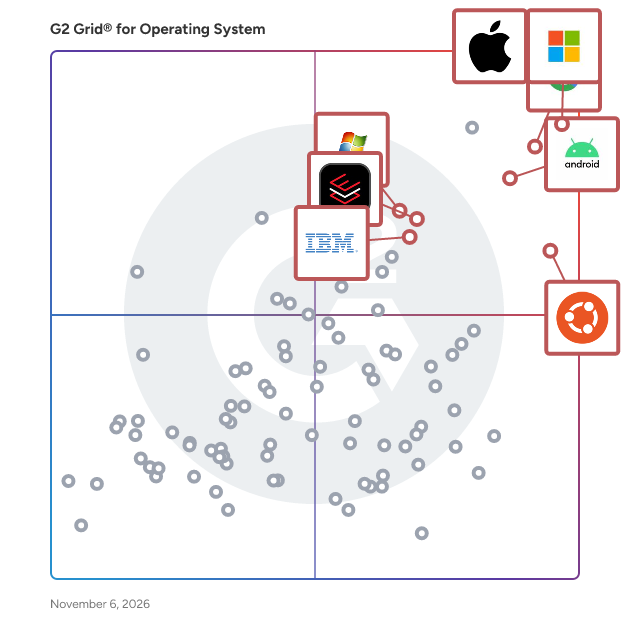
G2 Grid® for Operating Systems

G2 Grid® for Operating Systems plotting products by satisfaction and market presence

Highlighted products: Windows 11, Apple iOS, Android, Chrome OS, Red Hat Enterprise Linux, Windows 7, Ubuntu, and Windows Server.

Underlying data: [Grid® JSON](https://www.g2.com/categories/operating-system/grids.json?focus%5B%5D=windows-11&focus%5B%5D=apple-ios&focus%5B%5D=android&focus%5B%5D=chrome-os&focus%5B%5D=red-hat-enterprise-linux&focus%5B%5D=windows-7&focus%5B%5D=ubuntu&focus%5B%5D=tidal-media-inc-windows-server&segment=enterprise)

Windows 11

Windows 11 is Microsoft's latest operating system, designed to provide a seamless and intuitive user experience across various devices. With a fresh, modern interface and enhanced performance, Windows 11 aims to boost productivity, creativity, and connectivity for users worldwide. Key Features and Functionality: - Redesigned Start Menu: Centered on the taskbar, the new Start Menu offers a clean layout with customizable sections for favorite apps, enabling quicker access to essential tools. - Snap Assist and Virtual Desktops: Enhance multitasking by organizing open windows into aligned grids and creating personalized desktops for different tasks, such as work, gaming, or personal use. - Integrated Microsoft Teams: Seamlessly connect with friends, family, and colleagues through chat, voice, or video directly from the taskbar, facilitating effortless communication. - Widgets: Stay updated with personalized content and news feeds powered by AI, accessible directly from the desktop. - Gaming Enhancements: Experience immersive gaming with technologies like DirectX 12 Ultimate, DirectStorage for faster load times, and Auto HDR for vivid visuals. - Enhanced Security: Benefit from built-in security features, including biometric logins, encrypted authentication, and advanced antivirus defenses to protect against cyber threats. Primary Value and User Solutions: Windows 11 addresses the evolving needs of users by offering a streamlined interface that simplifies navigation and enhances productivity. Its multitasking capabilities, such as Snap Assist and Virtual Desktops, allow users to manage multiple tasks efficiently. The integration of Microsoft Teams directly into the taskbar ensures seamless communication, while gaming enhancements provide a superior entertainment experience. Additionally, robust security measures safeguard user data, offering peace of mind in an increasingly digital world. Overall, Windows 11 delivers a comprehensive solution that balances functionality, security, and user-friendly design.

Average Rating: 4.5/5.0

Total Reviews: 4,127

How Do G2 Users Rate Windows 11?

  • Has the product been a good partner in doing business?: 8.9/10 (Category avg: 8.5/10)
  • Ease of Use: 9.2/10 (Category avg: 8.5/10)
  • Quality of Support: 8.5/10 (Category avg: 8.2/10)
  • Ease of Admin: 9.0/10 (Category avg: 8.5/10)

Who Is the Company Behind Windows 11?

  • Seller: Microsoft
  • Year Founded: 1975
  • HQ Location: Redmond, Washington
  • Twitter: @microsoft
    13,091,739 Twitter followers
  • LinkedIn® Page: www.linkedin.com
    232,750 employees on LinkedIn®
  • Ownership: MSFT

Who Uses This Product?

  • Who Uses This: Software Engineer, Software Developer
  • Top Industries: Information Technology and Services, Computer Software
  • Company Size: 37% Small, 31% Medium

What Do G2 Reviewers Say About Windows 11?

AI-generated summary from verified user reviews

Pros
  • Users commend Windows 11 for its user-friendly interface and intuitive navigation, enhancing productivity and multitasking efficiency.
  • Users appreciate the ease of use in Windows 11, enjoying a smooth, modern interface and straightforward setup.
  • Users enjoy the enhanced speed and performance of Windows 11, finding it significantly smoother than Windows 10.
  • Users appreciate the seamless and modern user interface of Windows 11, enhancing their overall experience and productivity.
  • Users appreciate the clean and modern design of Windows 11, enjoying its simplicity and ease of navigation.
Cons
  • Users find the limited customization in Windows 11 frustrating, especially for the taskbar and Start Menu options.
  • Users often face high system requirements with Windows 11, leading to compatibility issues and performance slowdowns.
  • Users find the spread-out settings menu confusing, making it difficult to locate simple options easily.
  • Users are frustrated by taskbar issues, including limited customization and missing features from previous Windows versions.
  • Users experience performance issues with Windows 11, citing slow navigation and frequent blue screens after updates.

What Are Recent G2 Reviews of Windows 11?

What Are G2 Users Discussing About Windows 11?

Apple iOS

Apple's iOS is a sophisticated mobile operating system that powers the iPhone, offering a seamless and intuitive user experience. With each iteration, iOS introduces innovative features and enhancements that elevate device functionality and user engagement. Key Features and Functionality: - Liquid Glass Design: iOS 26 introduces the Liquid Glass design, characterized by rounded, translucent elements that react dynamically to motion and user inputs, providing a visually engaging interface. - Visual Intelligence: This feature enables users to search, ask questions, and take actions directly with the content displayed on their iPhone screen, enhancing interactivity and efficiency. - Live Translation: Integrated into Messages, FaceTime, and Phone apps, Live Translation facilitates real-time communication across different languages, breaking down language barriers. - Enhanced Messaging: Users can personalize chats with new backgrounds and utilize polls in Messages, enriching the communication experience. - Advanced Privacy Controls: iOS 26 offers new screening tools in Phone, FaceTime, and Messages to help users manage distractions and maintain privacy. - CarPlay Enhancements: The latest update includes Live Activities and Tapbacks in CarPlay, providing more information at a glance and improving in-car connectivity. Primary Value and User Solutions: iOS delivers a cohesive and user-friendly platform that integrates cutting-edge technology with everyday usability. The introduction of the Liquid Glass design and Visual Intelligence in iOS 26 enhances the aesthetic appeal and functionality of the device, making interactions more intuitive. Features like Live Translation and enhanced messaging capabilities address the need for effective and personalized communication. Advanced privacy controls empower users to manage their digital environment, ensuring a secure and distraction-free experience. Overall, iOS continues to set the standard for mobile operating systems by combining innovation with user-centric design.

Average Rating: 4.6/5.0

Total Reviews: 1,553

How Do G2 Users Rate Apple iOS?

  • Has the product been a good partner in doing business?: 9.0/10 (Category avg: 8.5/10)
  • Ease of Use: 9.4/10 (Category avg: 8.5/10)
  • Quality of Support: 9.0/10 (Category avg: 8.2/10)
  • Ease of Admin: 8.7/10 (Category avg: 8.5/10)

Who Is the Company Behind Apple iOS?

  • Seller: Apple
  • Year Founded: 1976
  • HQ Location: Cupertino, CA
  • Twitter: @Apple
    9,935,357 Twitter followers
  • LinkedIn® Page: www.linkedin.com
    187,339 employees on LinkedIn®
  • Ownership: NASDAQ:AAPL

Who Uses This Product?

  • Who Uses This: Software Engineer, Owner
  • Top Industries: Information Technology and Services, Computer Software
  • Company Size: 49% Small, 27% Medium

What Do G2 Reviewers Say About Apple iOS?

AI-generated summary from verified user reviews

Pros
  • Users find Apple iOS incredibly user-friendly, appreciating its easy layout and seamless integration with devices.
  • Users appreciate the ease of use of Apple iOS, valuing its intuitive design and reliable performance over time.
  • Users admire the beautiful design and smooth interface of Apple iOS, enhancing their overall experience and satisfaction.
  • Users admire the smooth and fast performance of iOS, ensuring a reliable experience across all their devices.
  • Users admire the sophisticated and fluid user interface of Apple iOS, enhancing both work and leisure experiences.
Cons
  • Users are frustrated by the limited customization of iOS and its dependence on the Apple ecosystem.
  • Users feel the limited customization of Apple iOS restricts their experience and integration with other devices.
  • Users are concerned about the high cost of Apple iOS devices, feeling priced out of premium offerings.
  • Users find the limited app availability on iOS restricts functionality and hinders file management and customization.
  • Users find the usage difficulty of iOS frustrating, especially with updates complicating communication and customization.

What Are Recent G2 Reviews of Apple iOS?

What Are G2 Users Discussing About Apple iOS?

Android

Android Enterprise Management is a comprehensive solution designed to simplify the deployment, management, and security of Android devices within business environments. It offers a suite of tools that enable organizations to efficiently configure devices, enforce security policies, and manage applications across their workforce. This platform supports various device management scenarios, including employee-owned devices, company-owned devices, and dedicated devices for specific tasks. Key Features and Functionality: - Zero-Touch Enrollment: Facilitates the rapid deployment of devices by allowing them to be configured remotely upon first boot, reducing manual setup time. - Work Profiles: Creates a clear separation between work and personal data on devices, ensuring corporate information remains secure while respecting user privacy. - Managed Google Play: Enables IT administrators to distribute and manage applications efficiently, providing employees with access to approved apps while maintaining control over app installations. - Comprehensive Security Controls: Offers robust security features, including enforcing lock screens, encryption, and the ability to remotely wipe data from lost or stolen devices. - Flexible Management Options: Supports various device management modes, such as fully managed devices for work-only use and dedicated devices locked to specific functions. Primary Value and Solutions Provided: Android Enterprise Management addresses the challenges businesses face in managing a diverse range of Android devices by offering a unified platform that enhances security, streamlines device deployment, and simplifies application management. By leveraging these capabilities, organizations can ensure that their mobile workforce operates efficiently and securely, regardless of device ownership or usage scenarios.

Average Rating: 4.6/5.0

Total Reviews: 1,224

How Do G2 Users Rate Android?

  • Has the product been a good partner in doing business?: 8.8/10 (Category avg: 8.5/10)
  • Ease of Use: 9.3/10 (Category avg: 8.5/10)
  • Quality of Support: 8.5/10 (Category avg: 8.2/10)
  • Ease of Admin: 8.7/10 (Category avg: 8.5/10)

Who Is the Company Behind Android?

  • Seller: Google
  • Year Founded: 1998
  • HQ Location: Mountain View, CA
  • Twitter: @google
    31,899,995 Twitter followers
  • LinkedIn® Page: www.linkedin.com
    301,144 employees on LinkedIn®
  • Ownership: NASDAQ:GOOG

Who Uses This Product?

  • Who Uses This: Software Engineer, Senior Software Engineer
  • Top Industries: Information Technology and Services, Computer Software
  • Company Size: 51% Small, 26% Medium

What Do G2 Reviewers Say About Android?

AI-generated summary from verified user reviews

Pros
  • Users appreciate the unmatched flexibility and customization of Android, allowing for a highly personalized user experience.
  • Users enjoy the user-friendly interface of Android, appreciating its ease of use and accessibility.
  • Users appreciate the ease of use of Android, enjoying its intuitive design and hassle-free navigation.
  • Users love the vast app ecosystem of Android, enjoying the flexibility and multitude of free applications available.
  • Users value the easy setup of Android, finding it straightforward and enhancing their overall experience.
Cons
  • Users express frustration with slow updates across devices, leading to inconsistent performance and delayed security fixes.
  • Users express concerns over bloatware issues, citing excessive pre-installed apps that hinder performance and user experience.
  • Users highlight significant security issues with Android due to inconsistent updates and manufacturer neglect, impacting overall safety.
  • Users report performance issues with Android, noting frequent slowdowns and bugs that hinder their experience.
  • Users criticize the poor UI/UX of Android, highlighting issues with inconsistency and frustrating navigation across devices.

What Are Recent G2 Reviews of Android?

What Are G2 Users Discussing About Android?

Red Hat Enterprise Linux

Red Hat Enterprise Linux (RHEL) is a enterprise operating system designed to provide a secure, stable, and high-performance environment for modern IT infrastructures. It supports a wide range of applications across physical, virtual, and cloud environments, making it a versatile choice for businesses of all sizes. Key Features and Functionality: - Security: RHEL offers live kernel patching, security profiles, and adheres to security standards certifications, ensuring a robust defense against vulnerabilities. - Consistent Lifecycle: The operating system follows a predictable lifecycle with three phases: full support, maintenance support, and an extended life phase, providing long-term stability and planning capabilities. - Cloud Integration: RHEL is optimized for cloud environments and collaborates with major cloud providers like AWS, Microsoft Azure, and Google Cloud, facilitating seamless workload migration and management. - Developer Access: Red Hat provides developers with free access to RHEL through the "Red Hat Enterprise Linux for Business Developers" platform, allowing up to 25 instances for development purposes. Primary Value and Solutions: RHEL addresses the need for a reliable and secure operating system that can handle diverse workloads across various environments. Its comprehensive security features mitigate risks, while the consistent lifecycle ensures long-term support and stability. The integration with leading cloud providers simplifies cloud adoption and management, and the provision of free developer access fosters innovation and accelerates application development. Overall, RHEL empowers organizations to build, deploy, and manage applications efficiently, aligning with business demands for production-readiness and operational excellence.

Average Rating: 4.6/5.0

Total Reviews: 933

How Do G2 Users Rate Red Hat Enterprise Linux?

  • Has the product been a good partner in doing business?: 8.8/10 (Category avg: 8.5/10)
  • Ease of Use: 8.4/10 (Category avg: 8.5/10)
  • Quality of Support: 8.8/10 (Category avg: 8.2/10)
  • Ease of Admin: 8.5/10 (Category avg: 8.5/10)

Who Is the Company Behind Red Hat Enterprise Linux?

  • Seller: Red Hat
  • Year Founded: 1993
  • HQ Location: Raleigh, NC
  • Twitter: @RedHat
    300,769 Twitter followers
  • LinkedIn® Page: www.linkedin.com
    19,487 employees on LinkedIn®

Who Uses This Product?

  • Who Uses This: Software Engineer, DevOps Engineer
  • Top Industries: Information Technology and Services, Computer Software
  • Company Size: 49% Large, 29% Medium

What Do G2 Reviewers Say About Red Hat Enterprise Linux?

AI-generated summary from verified user reviews

Pros
  • Users value the enterprise-grade stability of Red Hat Enterprise Linux, facilitating the management of numerous VM servers.
  • Users appreciate the reliability of Red Hat Enterprise Linux, ensuring stability for automation and long-running workloads.
  • Users value the high level of security offered by Red Hat Enterprise Linux, ensuring reliable protection against threats.
  • Users praise the excellent customer support of Red Hat Enterprise Linux, highlighting its availability and timely assistance.
  • Users value the ease of use of Red Hat Enterprise Linux, enabling efficient management of numerous servers effortlessly.
Cons
  • Users find the high cost of Red Hat Enterprise Linux burdensome, especially for smaller teams and budget constraints.
  • Users find Red Hat Enterprise Linux too expensive compared to other free alternatives, impacting accessibility for smaller teams.
  • Users find usage difficult due to a steep learning curve and reliance on command line configurations.
  • Users find the outdated software can complicate tasks and frustrate those seeking a modern experience.
  • Users find the complexity of the subscription system for Red Hat Enterprise Linux to be challenging and costly.

What Are Recent G2 Reviews of Red Hat Enterprise Linux?

What Are G2 Users Discussing About Red Hat Enterprise Linux?

Chrome OS

ChromeOS is a lightweight, cloud-centric operating system developed by Google, designed to provide a fast, secure, and user-friendly computing experience. Built upon the Linux kernel, it primarily utilizes the Google Chrome web browser as its main interface, emphasizing web applications and cloud storage. Since its debut in 2011, ChromeOS has powered a range of devices, including Chromebooks, Chromeboxes, and Chromebits, catering to users seeking simplicity and efficiency in their digital tasks. Key Features and Functionality: - Seamless Integration with Google Services: ChromeOS offers built-in access to Google applications such as Gmail, Google Drive, and Google Photos, ensuring a cohesive and synchronized user experience across devices. - Support for Android and Linux Applications: Users can install and run a vast array of Android apps from the Google Play Store, as well as Linux applications, expanding the system's versatility and functionality. - Enhanced Security Measures: With features like verified boot, automatic updates, and sandboxing, ChromeOS provides robust protection against malware and security threats, minimizing the need for additional antivirus software. - Optimized Performance and Battery Life: Designed for efficiency, ChromeOS devices typically offer quick boot times and extended battery life, making them ideal for on-the-go usage. - Cloud-Based Storage and Synchronization: Emphasizing cloud storage, ChromeOS ensures that user data is accessible from any device with internet connectivity, promoting flexibility and ease of access. Primary Value and User Solutions: ChromeOS addresses the needs of users seeking a straightforward, secure, and efficient computing platform. Its cloud-centric approach reduces reliance on local storage, facilitating seamless access to files and applications from various devices. The integration with Google services and support for a wide range of applications cater to both productivity and entertainment needs. Additionally, the system's emphasis on security and automatic updates provides peace of mind, particularly for users concerned about online threats. Overall, ChromeOS offers a streamlined and reliable computing experience suitable for students, professionals, and casual users alike.

Average Rating: 4.5/5.0

Total Reviews: 732

How Do G2 Users Rate Chrome OS?

  • Has the product been a good partner in doing business?: 8.7/10 (Category avg: 8.5/10)
  • Ease of Use: 9.3/10 (Category avg: 8.5/10)
  • Quality of Support: 8.7/10 (Category avg: 8.2/10)
  • Ease of Admin: 8.8/10 (Category avg: 8.5/10)

Who Is the Company Behind Chrome OS?

  • Seller: Google
  • Year Founded: 1998
  • HQ Location: Mountain View, CA
  • Twitter: @google
    31,899,995 Twitter followers
  • LinkedIn® Page: www.linkedin.com
    301,144 employees on LinkedIn®
  • Ownership: NASDAQ:GOOG

Who Uses This Product?

  • Who Uses This: Software Engineer, Senior Software Engineer
  • Top Industries: Information Technology and Services, Computer Software
  • Company Size: 45% Small, 31% Medium

What Do G2 Reviewers Say About Chrome OS?

AI-generated summary from verified user reviews

Pros
  • Users love the lightning-fast boot times and overall speed of Chrome OS, enhancing their productivity and efficiency.
  • Users love the ease of use of Chrome OS, praising its simplicity, speed, and seamless integration of apps.
  • Users appreciate the user-friendly interface of Chrome OS, making it easy and efficient for everyone to use.
  • Users love the easy setup of Chrome OS, enjoying a smooth transition and efficient initial configuration.
  • Users value the lightweight size of Chrome OS, enjoying its fast performance and seamless cloud integration.
Cons
  • Users experience limited software compatibility on Chrome OS, restricting access to essential applications for their work.
  • Users find the limited app availability on Chrome OS restricts functionality and hampers offline productivity.
  • Users find the limited customization options in Chrome OS restrict their ability to tailor the system to their needs.
  • Users often face connectivity issues with Chrome OS, limiting offline functionality and cloud-based document access.
  • Users experience significant performance issues with Chrome OS, including slow page loading and high RAM usage.

What Are Recent G2 Reviews of Chrome OS?

Windows 7

Windows 7, released by Microsoft in October 2009, is a desktop operating system designed to enhance user experience and system performance. Building upon its predecessor, Windows Vista, it introduced a more intuitive interface and improved functionality, catering to both home and business users. Key Features and Functionality: - Redesigned Taskbar: The new taskbar allows users to pin applications for quick access and provides live previews of open windows, streamlining navigation. - Aero Snap and Aero Shake: These window management features enable users to easily organize open windows by snapping them to screen edges or minimizing all but the active window with a simple shake gesture. - HomeGroup: Simplifies home networking by allowing users to share files and printers across multiple PCs effortlessly. - Libraries: Aggregates files from various locations into unified views, making it easier to manage documents, music, pictures, and videos. - Improved Performance: Optimized for faster boot times and efficient resource management, Windows 7 delivers a more responsive computing experience. - Enhanced Security: Features like the Action Center provide a centralized location for security and maintenance notifications, while User Account Control (UAC) has been refined to be less intrusive. Primary Value and User Solutions: Windows 7 addresses the shortcomings of previous operating systems by offering a more stable and user-friendly environment. Its enhanced performance and intuitive features reduce system crashes and improve productivity. The streamlined interface and advanced window management tools allow users to multitask more effectively. Additionally, improved networking capabilities simplify the sharing of resources among multiple devices, making it an ideal solution for both personal and professional use.

Average Rating: 4.2/5.0

Total Reviews: 878

How Do G2 Users Rate Windows 7?

  • Has the product been a good partner in doing business?: 8.7/10 (Category avg: 8.5/10)
  • Ease of Use: 9.1/10 (Category avg: 8.5/10)
  • Quality of Support: 7.9/10 (Category avg: 8.2/10)
  • Ease of Admin: 8.9/10 (Category avg: 8.5/10)

Who Is the Company Behind Windows 7?

  • Seller: Microsoft
  • Year Founded: 1975
  • HQ Location: Redmond, Washington
  • Twitter: @microsoft
    13,091,739 Twitter followers
  • LinkedIn® Page: www.linkedin.com
    232,750 employees on LinkedIn®
  • Ownership: MSFT

Who Uses This Product?

  • Who Uses This: Software Engineer, Senior Software Engineer
  • Top Industries: Information Technology and Services, Computer Software
  • Company Size: 35% Small, 33% Medium

What Do G2 Reviewers Say About Windows 7?

AI-generated summary from verified user reviews

Pros
  • Users appreciate the user-friendly interface of Windows 7, finding it stable and easy for effortless navigation.
  • Users appreciate the ease of use of Windows 7, enjoying its user-friendly features for all skill levels.
  • Users appreciate the fast and reliable performance of Windows 7, enhancing their overall computing experience.
  • Users commend the stability of Windows 7, appreciating its reliable performance and minimal resource usage.
  • Users love the intuitive user interface of Windows 7, which ensures effective operation for all skill levels.
Cons
  • Users face risks due to outdated technology in Windows 7, lacking modern features and security updates.
  • Users are concerned about the security issues of Windows 7 due to the lack of official updates and support.
  • Users are concerned about the slow updates of Windows 7, as it no longer receives crucial security patches, increasing vulnerability.
  • Users face significant challenges due to the lack of support for Windows 7, raising concerns about security and compatibility.
  • Users report significant compatibility issues with Windows 7, facing challenges with modern applications and hardware.

What Are Recent G2 Reviews of Windows 7?

What Are G2 Users Discussing About Windows 7?

Ubuntu

Ubuntu is the Linux OS that’s made for everyone. Harness the freedom and creativity of open source, from laptops and workstations to servers and IoT devices Published by Canonical, Ubuntu brings you the best of open source, backed by enterprise-grade assurance. Ubuntu delivers a unified and stable experience. Ubuntu serves as an interoperable platform, from the desktop to the edge. Wherever you innovate, you can expect high-performance and the same rich tooling ecosystem. Through community and partnership, we ensure that Ubuntu is always at the cutting-edge. Open source contributors work to ensure that the latest applications, tools and libraries have a home in the Ubuntu ecosystem. Our hardware partners, such as Dell, Lenovo, HP, IBM and NVIDIA, work with us to certify Ubuntu out-of-the-box on the latest boards, devices and chipsets, through a series of over 500 OS compatibility tests per device. When the time comes to scale up, Ubuntu provides integrations to make device governance manageable. Enforce strict identity management protocols with support for Microsoft Active Directory, Entra ID and Google Cloud platform, through Ubuntu’s AuthD broker. Ubuntu’s regular release cadence empowers you to plan ahead with confidence. Across your stack, Ubuntu LTS (long-term support) releases receive 5 years of patching and maintenance as standard. Additional enterprise-grade support is delivered through Ubuntu Pro - Canonical’s comprehensive subscription for open source security. Ubuntu Pro expands security patching and maintenance for up to 12 years and includes tooling for hardening and compliance, enabling you to stay ahead of CVEs, minimize downtime and meet your regulatory requirements. This includes support for frameworks such as FIPS, DISA STIG, NIST and the Cyber Resilience Act.

Average Rating: 4.5/5.0

Total Reviews: 2,351

How Do G2 Users Rate Ubuntu?

  • Has the product been a good partner in doing business?: 8.7/10 (Category avg: 8.5/10)
  • Ease of Use: 8.7/10 (Category avg: 8.5/10)
  • Quality of Support: 8.3/10 (Category avg: 8.2/10)
  • Ease of Admin: 8.7/10 (Category avg: 8.5/10)

Who Is the Company Behind Ubuntu?

  • Seller: Canonical Ltd.
  • Year Founded: 2004
  • HQ Location: London
  • Twitter: @Canonical
    110,908 Twitter followers
  • LinkedIn® Page: www.linkedin.com
    2,067 employees on LinkedIn®

Who Uses This Product?

  • Who Uses This: Software Engineer, Senior Software Engineer
  • Top Industries: Information Technology and Services, Computer Software
  • Company Size: 48% Small, 33% Medium

What Do G2 Reviewers Say About Ubuntu?

AI-generated summary from verified user reviews

Pros
  • Users find Ubuntu's user-friendly interface enhances their experience, making it accessible even to Linux newcomers.
  • Users love Ubuntu for its lightweight efficiency and extensive compatibility, making it ideal for coding and development tasks.
  • Users love Ubuntu for its open-source nature, allowing customization and free use while ensuring robust security and stability.
  • Users appreciate the user-friendly interface of Ubuntu, finding it accessible and efficient for both new and experienced users.
  • Users praise Ubuntu for its user-friendly interface, making it accessible for both new users and experienced developers.
Cons
  • Users often face compatibility issues with software, particularly proprietary apps and graphical games, impacting their overall experience.
  • Users often face limited software availability on Ubuntu, impacting productivity and the ability to use essential applications.
  • Users often face driver issues with Ubuntu, affecting gaming, AMD chipsets, and WiFi connectivity.
  • Users often face usage difficulties without prior UNIX/Linux experience, particularly with command lines and snap management.
  • Users report performance issues with gaming, Snap packages, and overall usability, affecting their experience on Ubuntu.

What Are Recent G2 Reviews of Ubuntu?

What Are G2 Users Discussing About Ubuntu?

Windows Server

Windows Server is a comprehensive operating system designed to meet the needs of businesses by providing a robust platform for managing applications, networks, and web services. It seamlessly integrates on-premises environments with Azure, enhancing security and facilitating the modernization of applications and infrastructure. Key Features and Functionality: - Multilayered Security: Windows Server offers advanced identity protection through Active Directory, virtualization-based security with Hyper-V, and secure networking features like TLS 1.3 encryption and SMB over QUIC. - Hybrid Cloud Integration: With Azure Arc, Windows Server enables seamless management across on-premises and cloud environments, providing deployment flexibility and unified management. - Scalability and Performance: The system supports large-scale virtualization with Hyper-V, accommodating up to 240 TB of RAM and 2,048 virtual processors per virtual machine, making it suitable for demanding workloads. - Container Support: Windows Server facilitates the development, deployment, and management of containers, allowing for efficient application modernization using containers and microservices. Primary Value and Solutions: Windows Server addresses critical business needs by offering a secure, scalable, and flexible infrastructure. It enhances productivity through hybrid operations, allowing applications running on-premises to leverage cloud innovations such as Artificial Intelligence and IoT. The system's advanced security features protect data and applications from evolving threats, while its scalability supports the growth and performance demands of modern businesses. By integrating with Azure, Windows Server enables organizations to bridge their on-premises environments with cloud services, facilitating a smooth transition to hybrid cloud solutions.

Average Rating: 4.5/5.0

Total Reviews: 370

How Do G2 Users Rate Windows Server?

  • Has the product been a good partner in doing business?: 8.8/10 (Category avg: 8.5/10)
  • Ease of Use: 9.2/10 (Category avg: 8.5/10)
  • Quality of Support: 8.6/10 (Category avg: 8.2/10)
  • Ease of Admin: 9.1/10 (Category avg: 8.5/10)

Who Is the Company Behind Windows Server?

Who Uses This Product?

  • Who Uses This: System Administrator, Software Engineer
  • Top Industries: Information Technology and Services, Computer Software
  • Company Size: 41% Medium, 28% Large

What Do G2 Reviewers Say About Windows Server?

AI-generated summary from verified user reviews

Pros
  • Users value the reliability of Windows Server, appreciating its dependable performance and effective security measures.
  • Users value the seamless integration of Windows Server with the Microsoft ecosystem, enhancing management and user experience.
  • Users value the strong security features of Windows Server, ensuring a secure environment against threats and vulnerabilities.
  • Users value the user-friendly interface of Windows Server, simplifying management and enhancing overall functionality.
  • Users find Windows Server to be user-friendly and easy to navigate, streamlining management tasks and role installations.
Cons
  • Users find the high cost of Windows Server licensing and management a significant drawback compared to alternatives.
  • Users note that mandatory updates and restarts can disrupt uptime and complicate maintenance efforts for Windows Server.
  • Users highlight the requirement for advanced technical expertise to effectively manage Windows Server, complicating maintenance.
  • Users find that maintenance and updates are time-consuming, leading to challenges in scheduling and system performance.
  • Users find mandatory updates disruptive, often requiring server restarts that negatively impact system uptime.

What Are Recent G2 Reviews of Windows Server?

Oracle Linux

A highly performant and secure operating environment, Oracle Linux delivers virtualization, management, automation, and cloud native computing tools, along with the operating system, in a single, easy-to-manage support offering. Oracle Linux provides a 100% application binary compatible alternative to Red Hat Enterprise Linux and CentOS Linux and is supported across both hybrid and multicloud environments.

Average Rating: 4.4/5.0

Total Reviews: 328

How Do G2 Users Rate Oracle Linux?

  • Has the product been a good partner in doing business?: 8.5/10 (Category avg: 8.5/10)
  • Ease of Use: 8.5/10 (Category avg: 8.5/10)
  • Quality of Support: 8.2/10 (Category avg: 8.2/10)
  • Ease of Admin: 8.5/10 (Category avg: 8.5/10)

Who Is the Company Behind Oracle Linux?

  • Seller: Oracle
  • Year Founded: 1977
  • HQ Location: Austin, TX
  • Twitter: @Oracle
    827,997 Twitter followers
  • LinkedIn® Page: www.linkedin.com
    207,576 employees on LinkedIn®
  • Ownership: NYSE:ORCL

Who Uses This Product?

  • Who Uses This: DevOps Engineer, Senior Software Engineer
  • Top Industries: Information Technology and Services, Computer Software
  • Company Size: 47% Large, 31% Medium

What Do G2 Reviewers Say About Oracle Linux?

AI-generated summary from verified user reviews

Pros
  • Users value the reliable stability of Oracle Linux, making it a top choice for mission-critical workloads.
  • Users value the RHEL compatibility of Oracle Linux, facilitating seamless transitions from CentOS and enhancing productivity.
  • Users value the strong compatibility of Oracle Linux with enterprise software, ensuring seamless operations across various workloads.
  • Users value the regular updates of Oracle Linux, enhancing stability and reducing maintenance efforts for critical workloads.
  • Users commend Oracle Linux for its exceptional reliability, ensuring stability and performance for mission-critical workloads.
Cons
  • Users experience a lack of support due to reliance on official resources and a smaller community for guidance.
  • Users are concerned about the high cost of enterprise support from Oracle, which may burden smaller organizations.
  • Users express concerns about limited software flexibility, which hinders integration and support outside the Oracle ecosystem.
  • Users feel that the poor UI/UX of Oracle Linux hampers their overall satisfaction and experience with the system.
  • Users notice slow updates with Oracle Linux, which can hinder their experience compared to other Linux distributions.

What Are Recent G2 Reviews of Oracle Linux?

What Are G2 Users Discussing About Oracle Linux?

Kali Linux

Desktop Kali Linux is a specialized Linux distribution designed for penetration testing and security auditing. This Kali Linux VM (configured by Techlatest.net) with GUI Desktop interface is pre-installed with 2500+ wide variety of security tools that can be used for ethical hacking, vulnerability assessment, and other security-related tasks and made available on the leading Cloud Marketplaces so you can quickly and easily spin up an instance and start using its powerful security tools. Key Features: - GUI Based : Desktop Interface for easy and intuitive user experience. - Pre-installed Security Tools : 2500+ Comprehensive set of security tools, including Nmap, Metasploit Framework, Wireshark, Aircrack-ng, John the Ripper, Hydra, Nikto, Burp Suite, Sqlmap, THC-Hydra, among others. - Easy Deployment : With Desktop Linux Kali available on the Cloud Marketplace, you can quickly spin up an instance of the operating system on Cloud Platforms with just a few clicks. - High Performance : Cloud Platforms provide a reliable and high-performance infrastructure for running Desktop Linux Kali, ensuring that your security testing and auditing tasks can be completed quickly and efficiently. - Secure : Cloud Platforms provide a secure infrastructure for running Desktop Linux Kali, with features such as encryption at rest and in transit, security key management, and DDoS protection. - Use Cases: Kali Linux is an ideal solution for security professionals, ethical hackers, and other individuals or organizations that need to perform security testing and auditing. Its pre-installed security tools and easy deployment on Cloud Platforms make it a powerful and convenient solution for testing the security of networks, web applications, and other systems. - Legal & Ethical Use: It is important to note that the security tools included in the VM should only be used for legal and ethical purposes. - Disclaimer : Other trademarks and trade names may be used in this document to refer to either the entities claiming the marks and/or names or their products and are the property of their respective owners. We disclaim proprietary interest in the marks and names of others.

Average Rating: 4.5/5.0

Total Reviews: 243

How Do G2 Users Rate Kali Linux?

  • Has the product been a good partner in doing business?: 8.8/10 (Category avg: 8.5/10)
  • Ease of Use: 8.2/10 (Category avg: 8.5/10)
  • Quality of Support: 8.3/10 (Category avg: 8.2/10)
  • Ease of Admin: 8.6/10 (Category avg: 8.5/10)

Who Is the Company Behind Kali Linux?

  • Seller: OffSec
  • Year Founded: 2006
  • HQ Location: New York, US
  • Twitter: @offsectraining
    329,436 Twitter followers
  • LinkedIn® Page: www.linkedin.com
    1,141 employees on LinkedIn®

Who Uses This Product?

  • Who Uses This: Software Engineer
  • Top Industries: Information Technology and Services, Computer & Network Security
  • Company Size: 52% Small, 26% Medium

What Do G2 Reviewers Say About Kali Linux?

AI-generated summary from verified user reviews

Pros
  • Users praise the extensive pre-installed tools in Kali Linux, enhancing efficiency and facilitating effective security testing.
  • Users value the strong community support in Kali Linux, which enhances troubleshooting and learning experiences effectively.
  • Users appreciate the comprehensive security tools in Kali Linux, enabling seamless practice and learning in cybersecurity.
  • Users love the customization options in Kali Linux, enhancing their experience for learning and practicing cybersecurity.
  • Users value the regular updates of Kali Linux, ensuring access to the latest security tools and improvements.
Cons
  • Users find the skill requirements of Kali Linux overwhelming, making it challenging for beginners to navigate effectively.
  • Users find Kali Linux to have a steep learning curve, making it challenging for beginners to navigate effectively.
  • Users face driver issues with Kali Linux, particularly with Wi-Fi and hardware compatibility, complicating their experience.
  • Users report that Kali Linux has hardware limitations, resulting in slow performance on lower-end systems and resource-heavy demands.
  • Users experience performance issues with Kali Linux, especially on lower-end systems and when using hacking tools.

What Are Recent G2 Reviews of Kali Linux?

What Are G2 Users Discussing About Kali Linux?

Oracle Solaris

Oracle Solaris 11 is a robust, enterprise-grade UNIX operating system engineered to deliver consistent compatibility, simplicity, and security for mission-critical applications. Designed over two decades, it ensures backward compatibility, allowing both modern and legacy applications to run seamlessly on contemporary infrastructure. Key Features and Functionality: - Consistent Compatibility: The Application Binary Guarantee ensures that existing applications operate without modification on the latest hardware, protecting software investments. - Simplified Management: Integrated lifecycle management technologies enable comprehensive system updates with a single command, covering firmware and virtualized environments. Enhanced observability tools provide real-time and historical insights, facilitating efficient troubleshooting. - Advanced Security: Oracle Solaris offers end-to-end security, from hypervisor to application. Features like Silicon Secured Memory prevent common security attacks, and one-step, multi-node compliance reporting streamlines auditing processes. - Built-in Virtualization: The operating system includes low-overhead virtualization capabilities, such as Solaris Zones, allowing for efficient resource utilization and isolation of workloads. - Scalable Data Management: With ZFS as the default file system, Oracle Solaris provides advanced storage features like built-in deduplication, encryption, and thin provisioning, ensuring data integrity and efficient storage management. Primary Value and Solutions Provided: Oracle Solaris 11 addresses the critical needs of enterprises by offering a stable and secure platform that simplifies system management and enhances performance. Its backward compatibility protects existing software investments, while integrated virtualization and data management capabilities support efficient and scalable cloud deployments. The comprehensive security features ensure that systems remain protected against evolving threats, making it an ideal choice for organizations seeking a reliable and future-proof operating environment.

Average Rating: 4.2/5.0

Total Reviews: 94

How Do G2 Users Rate Oracle Solaris?

  • Has the product been a good partner in doing business?: 8.0/10 (Category avg: 8.5/10)
  • Ease of Use: 8.2/10 (Category avg: 8.5/10)
  • Quality of Support: 8.2/10 (Category avg: 8.2/10)
  • Ease of Admin: 8.3/10 (Category avg: 8.5/10)

Who Is the Company Behind Oracle Solaris?

  • Seller: Oracle
  • Year Founded: 1977
  • HQ Location: Austin, TX
  • Twitter: @Oracle
    827,997 Twitter followers
  • LinkedIn® Page: www.linkedin.com
    207,576 employees on LinkedIn®
  • Ownership: NYSE:ORCL

Who Uses This Product?

  • Who Uses This: Software Engineer
  • Top Industries: Information Technology and Services, Computer Software
  • Company Size: 45% Large, 32% Medium

What Do G2 Reviewers Say About Oracle Solaris?

AI-generated summary from verified user reviews

Pros
  • Users value the exceptional stability and reliability of Oracle Solaris, ensuring smooth performance and secure enterprise workloads.
  • Users value the powerful features of Oracle Solaris, highlighting efficient storage management and robust data integrity.
  • Users commend the exceptional stability of Oracle Solaris, providing a reliable foundation for enterprise workloads.
  • Users appreciate the robust security features of Oracle Solaris, ensuring safety for critical applications in enterprise environments.
  • Users appreciate the speed and performance of Oracle Solaris, ensuring smooth operation even under heavy workloads.
Cons
  • Users find the high cost of Oracle Solaris to be a significant drawback compared to open-source alternatives.
  • Users experience compatibility issues with third-party applications and limited support for newer software on Oracle Solaris.
  • Users often face installation difficulties with Oracle Solaris, finding the setup process complex and less intuitive.
  • Users experience a significant lack of support and limited compatibility with newer software and packages in Oracle Solaris.
  • Users express concern over the licensing limitations of Oracle Solaris, preferring more open and flexible alternatives.

What Are Recent G2 Reviews of Oracle Solaris?

What Are G2 Users Discussing About Oracle Solaris?

IBM i

IBM i is a fully integrated operating system designed for IBM Power servers, combining database, middleware, security, runtime, and hypervisor into a single, cohesive solution. This integration simplifies system management, reduces total cost of ownership (TCO), and enhances operational efficiency. IBM i supports a wide range of business applications and offers flexible deployment options, including on-premises, private cloud, and public cloud environments. Key Features and Functionality: - Full Stack Integration: IBM i integrates all essential components—database, middleware, security, runtime, and hypervisor—into one seamless system, streamlining operations and reducing complexity. - Object-Based Architecture: The system's object-based design ensures that programs cannot disguise themselves as other types, enhancing security by protecting against viruses and unauthorized access. - Subscription Term Licensing: Offers predictable and consistent payment options, combining software licenses and support into a single annual subscription, facilitating easier budget planning and ensuring technology remains current. - Multi-Factor Authentication (MFA): Integrated MFA in IBM i 7.6 enhances security by requiring multiple forms of verification for system and application access, reducing reliance on third-party tools. - Autonomous Systems Management: Features autonomous capabilities that minimize administrative overhead, allowing system administrators to monitor and manage licenses efficiently through Navigator for i. - Cloud Deployment Options: Supports flexible deployment across on-premises and various cloud environments, including IBM Power Virtual Server, ensuring a consistent user experience in hybrid cloud setups. Primary Value and User Solutions: IBM i delivers significant value by reducing operational costs through its integrated design, which eliminates the need for multiple support contracts and simplifies system management. Its robust security features, including object-based architecture and built-in MFA, protect business-critical applications from threats. The flexible licensing model and deployment options allow businesses to adapt to changing needs, whether scaling operations or transitioning to cloud environments. By modernizing application development with industry-standard tools, IBM i helps organizations bridge skill gaps and boost productivity, ensuring they remain competitive in a rapidly evolving technological landscape.

Average Rating: 4.4/5.0

Total Reviews: 66

How Do G2 Users Rate IBM i?

  • Has the product been a good partner in doing business?: 8.5/10 (Category avg: 8.5/10)
  • Ease of Use: 8.6/10 (Category avg: 8.5/10)
  • Quality of Support: 8.3/10 (Category avg: 8.2/10)
  • Ease of Admin: 8.6/10 (Category avg: 8.5/10)

Who Is the Company Behind IBM i?

  • Seller: IBM
  • Year Founded: 1911
  • HQ Location: Armonk, New York, United States
  • Twitter: @IBMSecurity
    74,660 Twitter followers
  • LinkedIn® Page: www.linkedin.com
    344,328 employees on LinkedIn®
  • Ownership: SWX:IBM

Who Uses This Product?

  • Top Industries: Information Technology and Services, Computer Software
  • Company Size: 44% Medium, 32% Large

What Do G2 Reviewers Say About IBM i?

AI-generated summary from verified user reviews

Pros
  • Users commend the incredible reliability of IBM i, ensuring peace of mind for mission-critical operations.
  • Users praise the strong built-in security features of IBM i, ensuring robust data protection and compliance with standards.
  • Users value the robust security architecture of IBM i, ensuring dependable protection and reliability for business operations.
  • Users value the ease of use of IBM i, appreciating its smooth integration and responsive customer support.
  • Users find the initial setup to be incredibly simple, minimizing downtime and facilitating quicker implementation in systems.
Cons
  • Users struggle with the steep skill requirements for IBM i, making it challenging to find qualified professionals.
  • Users feel that the outdated technology of IBM i complicates the learning curve and limits talent availability.
  • Users note the high costs of IBM i, which can be a significant barrier for smaller organizations and projects.
  • Users find the poor UI/UX of IBM i frustrating, especially for new users navigating its steep learning curve.
  • Users find the unfriendly interface of IBM i cumbersome, creating hurdles for new users and impeding efficiency.

What Are Recent G2 Reviews of IBM i?

What Are G2 Users Discussing About IBM i?

Apple OS X Mountain Lion

OS X Mountain Lion, version 10.8, is the ninth major release of Apple's desktop operating system for Macintosh computers, launched on July 25, 2012. This release introduced over 200 new features, many inspired by iOS, to enhance user experience and system functionality. Key Features and Functionality: - iCloud Integration: Seamless synchronization of Mail, Contacts, Calendar, Messages, Reminders, Notes, and iWork documents across all Apple devices. - Messages App: Replaces iChat, bringing iMessage to the Mac, allowing users to send messages to anyone with an iPhone, iPad, iPod touch, or another Mac. - Notification Center: Provides a unified view of alerts from Mail, Calendar, Messages, Reminders, system updates, and third-party apps. - System-wide Sharing: Enables easy sharing of links, photos, videos, and other files without switching apps, with integrated support for services like Facebook, Twitter, Flickr, and Vimeo. - Facebook Integration: Allows posting of photos, links, and comments directly from apps, adds Facebook friends to Contacts, and enables status updates from Notification Center. - Dictation: System-wide voice input mechanism that converts speech to text, requiring an internet connection. - AirPlay Mirroring: Wirelessly mirrors the Mac's screen to an Apple TV, facilitating presentations and media sharing. - Game Center: Brings the iOS gaming network to Mac, allowing users to play and share games with friends. - Gatekeeper: A security feature that helps protect the Mac from malicious software by allowing users to control which apps can be installed. Primary Value and User Solutions: OS X Mountain Lion enhances the Mac experience by integrating features familiar to iOS users, promoting a cohesive ecosystem across Apple devices. The deep iCloud integration ensures that users' data remains consistent and accessible, while features like Notification Center and system-wide sharing streamline daily tasks. Security is bolstered with Gatekeeper, and productivity is enhanced through tools like Dictation and AirPlay Mirroring. Overall, Mountain Lion offers a more connected, secure, and user-friendly environment for Mac users.

Average Rating: 4.2/5.0

Total Reviews: 216

How Do G2 Users Rate Apple OS X Mountain Lion?

  • Has the product been a good partner in doing business?: 8.6/10 (Category avg: 8.5/10)
  • Ease of Use: 9.0/10 (Category avg: 8.5/10)
  • Quality of Support: 8.3/10 (Category avg: 8.2/10)
  • Ease of Admin: 8.8/10 (Category avg: 8.5/10)

Who Is the Company Behind Apple OS X Mountain Lion?

  • Seller: Apple
  • Year Founded: 1976
  • HQ Location: Cupertino, CA
  • Twitter: @Apple
    9,935,357 Twitter followers
  • LinkedIn® Page: www.linkedin.com
    187,339 employees on LinkedIn®
  • Ownership: NASDAQ:AAPL

Who Uses This Product?

  • Who Uses This: Software Engineer
  • Top Industries: Computer Software, Information Technology and Services
  • Company Size: 44% Small, 30% Medium

What Do G2 Reviewers Say About Apple OS X Mountain Lion?

AI-generated summary from verified user reviews

Pros
  • Users appreciate the ease of use of Apple OS X Mountain Lion, enhancing their overall experience and efficiency.
  • Users love the seamless integration of iOS apps like iMessage and enhanced iCloud features in OS X Mountain Lion.
  • Users praise the improved speed and performance of OS X Mountain Lion, enhancing overall user experience significantly.
  • Users love the user-friendly design of Apple OS X Mountain Lion, enabling quick familiarity and efficient productivity.
  • Users find the easy installation of Apple OS X Mountain Lion convenient and efficient, especially when upgrading from Snow Leopard.
Cons
  • Users face compatibility issues with older applications and external environments, complicating their experience with OS X Mountain Lion.
  • Users face installation difficulties, particularly with disk partitioning and missing apps in Apple OS X Mountain Lion.
  • Users express concern over limited app availability as non-App Store software installation faces restrictions on OS X Mountain Lion.
  • Users report performance issues, noting slowdowns on older hardware and complications with battery life after the upgrade.
  • Users report compatibility issues with apps after the update, requiring reinstallation to restore functionality.

What Are Recent G2 Reviews of Apple OS X Mountain Lion?

What Are G2 Users Discussing About Apple OS X Mountain Lion?

CentOS

CentOS is a community-driven, free software project that provides a robust and reliable Linux distribution, serving as a foundational platform for open-source communities, cloud providers, hosting services, and scientific data processing. Derived from Fedora Linux, CentOS Stream offers a continuously delivered distribution that tracks just ahead of Red Hat Enterprise Linux (RHEL), with major releases every three years and each maintained for five years. This structure allows CentOS Stream to function as a production operating system, a development environment, or a preview of upcoming RHEL releases. Key Features and Functionality: - Continuous Delivery: CentOS Stream provides a rolling-release model, delivering updates that precede RHEL's official releases, ensuring users have access to the latest features and improvements. - Community Collaboration: The project fosters a collaborative environment where Special Interest Groups (SIGs) develop and package software tailored to specific needs, such as cloud infrastructure, storage solutions, and virtualization technologies. - Enterprise Compatibility: By closely tracking RHEL, CentOS Stream ensures compatibility and stability, making it suitable for enterprise deployments and development environments. Primary Value and User Solutions: CentOS Stream addresses the need for a stable yet forward-looking Linux distribution that bridges the gap between development and production environments. It offers a reliable platform for developers to test and deploy applications that will be compatible with future RHEL releases, thereby reducing the time and effort required for migration and ensuring smoother transitions. Additionally, the active community and SIGs provide specialized solutions and support, enhancing the overall ecosystem and catering to diverse user requirements.

Average Rating: 4.4/5.0

Total Reviews: 409

How Do G2 Users Rate CentOS?

  • Has the product been a good partner in doing business?: 8.6/10 (Category avg: 8.5/10)
  • Ease of Use: 8.5/10 (Category avg: 8.5/10)
  • Quality of Support: 8.1/10 (Category avg: 8.2/10)
  • Ease of Admin: 8.5/10 (Category avg: 8.5/10)

Who Is the Company Behind CentOS?

  • Seller: CentOS
  • HQ Location: North Carolina, United States
  • Twitter: @CentOSProject
    82 Twitter followers
  • LinkedIn® Page: www.linkedin.com
    16 employees on LinkedIn®

Who Uses This Product?

  • Who Uses This: Software Engineer, Senior Software Engineer
  • Top Industries: Information Technology and Services, Computer Software
  • Company Size: 39% Medium, 32% Small

What Do G2 Reviewers Say About CentOS?

AI-generated summary from verified user reviews

Pros
  • Users value the enterprise-grade reliability of CentOS, ensuring stability for long-term server environments without high costs.
  • Users value CentOS for its long-term stability, ensuring reliable operation for production environments and critical services.
  • Users value the ease of use of CentOS, appreciating its straightforward setup and reliable management for servers.
  • Users value CentOS for its RHEL compatibility, ensuring a stable and reliable environment for critical production systems.
  • Users value the strong community support of CentOS, enhancing their experience with reliable assistance and resources.
Cons
  • Users find CentOS suffers from outdated technology, with slow updates and lack of support affecting usability.
  • Users struggle with a lack of support, facing slow updates and limited documentation that complicate the user experience.
  • Users note that slow updates hinder software access and complicate planning, impacting long-term stability and support.
  • Users find the lack of features in CentOS frustrating, as updates and newer software are delayed compared to other distributions.
  • Users express concerns about limited availability of updates and newer software, making it less suitable for current needs.

What Are Recent G2 Reviews of CentOS?

IBM AIX

IBM AIX is a robust and secure UNIX operating system designed for IBM Power Systems, offering a scalable and cost-effective platform for mission-critical workloads in regulated environments. With a history dating back to 1986, AIX has evolved to provide 99.9999% uptime, hybrid cloud integration, and AI-ready performance, enabling organizations to modernize infrastructure, reduce risk, and streamline operations. Built for long-term return on investment, AIX supports both legacy and cloud-native applications through automation, live migration, and enterprise-grade security, allowing businesses to transform confidently at their own pace. Key Features and Functionality: - Integrated Security & Compliance: AIX includes built-in encryption, secure boot, and PowerSC policy enforcement to protect data across hybrid environments and simplify compliance in regulated industries. - Intelligent Resource Management: Features like micro-partitioning, dynamic allocation, and multi-threading optimize CPU, memory, and I/O resources, reducing IT costs and improving sustainability. - High Availability Architecture: With Live Partition Mobility and deep hardware-software integration, AIX delivers 99.9999% uptime, ensuring uninterrupted performance for mission-critical workloads. - Hybrid Cloud & AI Integration: AIX supports containerized, cloud-native, and AI workloads with seamless integration into IBM Cloud, Red Hat OpenShift, and modern automation frameworks. Primary Value and Solutions Provided: IBM AIX addresses the needs of organizations requiring a secure, reliable, and scalable operating system for their critical applications. By offering advanced security features, efficient resource management, and high availability, AIX helps businesses minimize downtime, comply with regulatory requirements, and optimize operational costs. Its support for hybrid cloud and AI workloads enables enterprises to innovate and modernize their IT infrastructure, ensuring they remain competitive in a rapidly evolving technological landscape.

Average Rating: 4.4/5.0

Total Reviews: 68

How Do G2 Users Rate IBM AIX?

  • Has the product been a good partner in doing business?: 8.6/10 (Category avg: 8.5/10)
  • Ease of Use: 8.5/10 (Category avg: 8.5/10)
  • Quality of Support: 9.2/10 (Category avg: 8.2/10)
  • Ease of Admin: 8.3/10 (Category avg: 8.5/10)

Who Is the Company Behind IBM AIX?

  • Seller: IBM
  • Year Founded: 1911
  • HQ Location: Armonk, New York, United States
  • Twitter: @IBMSecurity
    74,660 Twitter followers
  • LinkedIn® Page: www.linkedin.com
    344,328 employees on LinkedIn®
  • Ownership: SWX:IBM

Who Uses This Product?

  • Top Industries: Information Technology and Services, Banking
  • Company Size: 56% Large, 27% Medium

What Do G2 Reviewers Say About IBM AIX?

AI-generated summary from verified user reviews

Pros
  • Users commend the world-class security of IBM AIX, ensuring exceptional protection for mission-critical workloads and data.
  • Users value the exceptional stability of IBM AIX, ensuring reliable performance for mission-critical workloads and enterprise demands.
  • Users praise the excellent performance of IBM AIX, especially under heavy enterprise workloads and mission-critical demands.
  • Users value the long-term support of IBM AIX, ensuring stability and reliability for critical tasks and systems.
  • Users appreciate the exceptional stability, scalability, and security of IBM AIX, ensuring superb performance for critical workloads.
Cons
  • Users highlight the high cost of IBM AIX compared to similar applications, making it less accessible for smaller organizations.
  • Users face a high complexity and cost with IBM AIX, necessitating specialized training and knowledge for effective use.
  • Users find it challenging to stay current with JDK versions not supported by IBM, limiting flexibility and updates.
  • Users find integration issues with IBM AIX hinder their experience and compatibility with existing technologies.
  • Users find the limited apps and store of IBM AIX restrictive compared to other options available.

What Are Recent G2 Reviews of IBM AIX?

What Are G2 Users Discussing About IBM AIX?

Shalaka Joshi
SJ
Researched and written by Shalaka Joshi
Updated