# Best Online Form Builder Software - Page 15

*By [Neeraja Prakash](https://research.g2.com/insights/author/neeraja-prakash)*


Online form builder software allows users to create fillable forms, including surveys, quizzes, and questionnaires, using a drag-and-drop interface, collect responses, and store submission data within the application itself.

### Core Capabilities of Online Form Builder Software

To qualify for inclusion in the Online Form Builder category, a product must:

- Offer a drag-and-drop or simplified interface for building fillable forms
- Provide native form building features without relying on integrations
- Allow users to share forms or embed them on websites for data collection
- Provide analytics on form submission data
- Offer multiple templates for distinct types of fillable forms

### Common Use Cases for Online Form Builder Software

Online form builders are used by teams across functions to quickly gather structured information from internal or external audiences. Common use cases include:

- Collecting lead information from potential customers or clients
- Running internal surveys and feedback forms
- Embedding registration or intake forms on web pages

### How Online Form Builder Software Differs from Other Tools

Some online form builders operate as standalone solutions, while tools like [CRM software](https://www.g2.com/categories/crm), [lead capture software](https://www.g2.com/categories/lead-capture), and [survey software](https://www.g2.com/categories/survey) may include form building as a secondary feature. Dedicated online form builders distinguish themselves through native form creation, robust templating, and broad integration support for sharing and exporting data.

### Insights from G2 on Online Form Builder Software

Based on category trends on G2, ease of use and the variety of available templates stand out as primary strengths. The ability to embed forms directly on websites and quickly analyze submission data is frequently noted as a major productivity benefit.
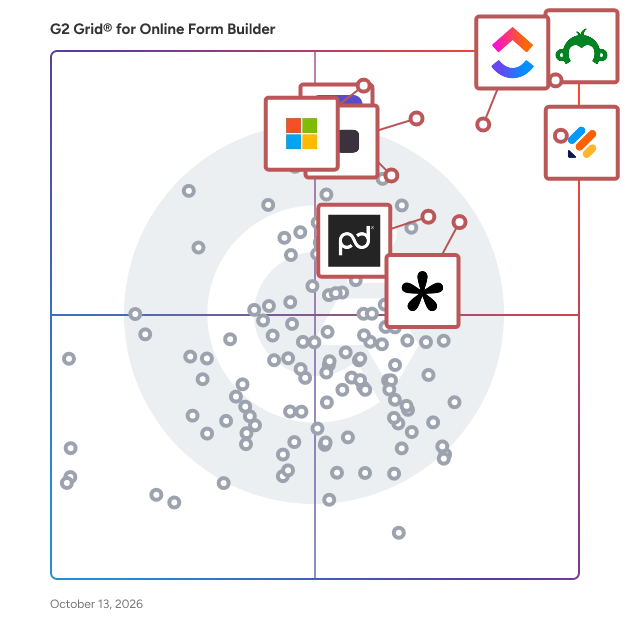


## Top Online Form Builder Software at a Glance
| # | Product | Rating | Best For | What Users Say |
|---|---------|--------|----------|----------------|
| 1 | [Jotform](https://www.g2.com/products/jotform/reviews) | 4.7/5.0 (5,035 reviews) | Multi-step forms with payment and e-signature | "[Powerful Yet Intuitive Forms—Jotform Streamlines Our Resident Communication](https://www.g2.com/survey_responses/jotform-review-13039815)" |
| 2 | [SurveyMonkey](https://www.g2.com/products/surveymonkey/reviews) | 4.4/5.0 (23,212 reviews) | Survey feedback with built-in analytics and AI | "[Fast Idea-to-Live Surveys with Smart Logic Branching](https://www.g2.com/survey_responses/surveymonkey-review-12831740)" |
| 3 | [ClickUp](https://www.g2.com/products/clickup/reviews) | 4.6/5.0 (12,412 reviews) | Form-triggered task automation across connected workflows | "[ClickUp Simplifies Project Management and Team Collaboration](https://www.g2.com/survey_responses/clickup-review-13064964)" |
| 4 | [Typeform](https://www.g2.com/products/typeform/reviews) | 4.5/5.0 (976 reviews) | Conversational forms with conditional logic and branding | "[Flexible, Easy-to-Use, Robust, and Fits the Budget](https://www.g2.com/survey_responses/typeform-review-12873950)" |
| 5 | [Microsoft Forms](https://www.g2.com/products/microsoft-forms/reviews) | 4.4/5.0 (460 reviews) | Microsoft 365-native surveys with Excel integration | "[Simple and Efficient Tool for Surveys and Academic Forms](https://www.g2.com/survey_responses/microsoft-forms-review-12839124)" |
| 6 | [ActiveCampaign](https://www.g2.com/products/activecampaign/reviews) | 4.4/5.0 (14,165 reviews) | Lead-capture forms wired into CRM automations | "[Strong Automation Features With Some Scaling Challenges](https://www.g2.com/survey_responses/activecampaign-review-12798717)" |
| 7 | [Adobe Acrobat Sign](https://www.g2.com/products/adobe-acrobat-sign/reviews) | 4.4/5.0 (1,017 reviews) | Multi-party contract signing with Adobe integration | "[Clean UI, Smooth Signing, and Seamless PDF Workflow Integration](https://www.g2.com/survey_responses/adobe-acrobat-sign-review-12770100)" |
| 8 | [Tally](https://www.g2.com/products/tally-forms-tally/reviews) | 4.9/5.0 (135 reviews) | Notion-style form building with conditional logic | "[Flexible Form Builder for Registrations, Surveys and Data Collection](https://www.g2.com/survey_responses/tally-review-12957852)" |
| 9 | [Laserfiche](https://www.g2.com/products/laserfiche/reviews) | 4.7/5.0 (1,206 reviews) | Government forms with automated retention workflows | "[Robust and Reliable](https://www.g2.com/survey_responses/laserfiche-review-10968098)" |
| 10 | [PandaDoc](https://www.g2.com/products/pandadoc/reviews) | 4.7/5.0 (3,417 reviews) | Contract workflows with e-signature and payment collection | "[Effective for Document Tracking, but Needs Improvements](https://www.g2.com/survey_responses/pandadoc-review-11792847)" |

---
## What Are the Most Common Questions About Online Form Builder Software?
*AI-generated · Last updated: May 26, 2026*
### What tool provides real-time analytics for form submissions?
Based on G2 reviews, several products in the online form builder software category are praised for helping teams monitor responses as they come in, especially when users mention dashboards, auto-generated charts, summaries, and organized reporting views. According to verified users, Microsoft Forms is often used for real-time response tracking and automatic chart generation, while SurveyMonkey reviewers mention grouped reports and easy-to-track results. G2 reviewers also mention Jotform for organizing responses in one place and automatically routing data into sheets or dashboards. Buyers focused on ongoing visibility into submissions tend to value simple reporting, easy exports, and clear response summaries more than advanced customization alone.


### Which vendor offers advanced conditional logic for form fields?
Based on G2 reviews, Jotform and Typeform are repeatedly described as strong choices for conditional logic. According to verified users, Jotform is often used for conditional logic that guides customers to the right section, supports dynamic forms, and helps with workflows like payments, onboarding, and registrations. G2 reviewers mention Typeform for logic jumps and branching that make forms feel more conversational and easier for respondents to complete. SurveyMonkey reviewers also mention skip logic and more structured survey flows. If advanced field logic is a top priority, buyers should focus on products where reviewers consistently call out branching, conditional paths, and tailored user journeys in real workflows.


### What platform supports payment collection through forms?
Based on G2 reviews, several platforms support payment collection directly through forms, but Jotform stands out because reviewers repeatedly mention using it for payments, bookings, registrations, invoices, and product orders. According to verified users, Jotform is used to collect payments before submission, connect with Stripe or Square, and combine ordering with form completion in one workflow. G2 reviewers also mention built-in product carts, payment-enabled booking flows, and workshop registrations with signed documents. Other products in the broader dataset mention payment workflows too, but in recent online form builder reviews, Jotform is the most consistently referenced for payment collection tied directly to form experiences.


### What is the top online form builder for lead generation campaigns?
Based on G2 reviews, the strongest lead generation theme appears around Typeform, Tally, and Jotform. According to verified users, Typeform is often chosen when teams want conversational forms that feel more engaging and help reduce drop-off, especially for lead generation and customer feedback. G2 reviewers mention Tally for lead capture, audit tools, and fast setup with generous free-tier functionality. Jotform reviewers mention website integrations, branded forms, and workflows that capture inquiries and route them into business systems. For lead generation campaigns, buyers seem to value ease of publishing, strong user experience, and integrations that reduce manual follow-up after a submission.

**Here are some of the top-rated products on G2:**

- [Jotform](https://www.g2.com/products/jotform) – used for branded website forms, intake flows, and inquiries that connect to business systems
- [Typeform](https://www.g2.com/products/typeform) – favored for conversational lead generation forms that feel more engaging to complete
- [Tally](https://www.g2.com/products/tally-forms-tally) – popular for fast lead capture forms, quizzes, and onboarding flows with easy customization


### Which form builder offers the best mobile optimization features?
Based on G2 reviews, mobile readiness is most commonly associated with Jotform and Typeform. According to verified users, Jotform is praised for mobile-friendly data collection, offline form support, and forms that work well on phones and tablets for field work or events. G2 reviewers mention Typeform for a clean one-question-at-a-time experience that feels light and easy to complete on mobile devices. Reviewers also note that both products help improve completion by keeping the form experience smooth outside desktop use. For buyers prioritizing mobile optimization, the recurring review themes are responsive layouts, ease of use on phones, and shareable links that work cleanly across devices.


### What is the best form builder for integrating with CRM systems?
Based on G2 reviews, Jotform appears most consistently tied to CRM integrations in the online form builder software category. According to verified users, it is used with CRMs, Zendesk, Salesforce, Google Sheets, and website workflows to reduce manual entry and move form data into downstream systems. G2 reviewers mention smooth CRM integrations, customizable submission forms, and onboarding or intake use cases where data moves directly into existing business tools. Typeform also receives positive mentions for CRM syncing, but Jotform is referenced more frequently across recent reviews for this specific need. Buyers focused on CRM workflows should look for repeated reviewer mentions of connected lead capture and simplified handoffs.


### Which vendor provides the most customizable form templates?
Based on G2 reviews, Jotform, Tally, and Paperform are the strongest matches when customization is a priority. According to verified users, Jotform is praised for templates, branding controls, logic options, and the ability to adapt forms to different workflows. G2 reviewers mention Tally for highly customizable forms that still feel fast and intuitive, including strong branding flexibility. Paperform reviewers repeatedly emphasize design flexibility, polished form experiences, and the ability to tailor forms, payments, and workflows for different business uses. If buyers want the broadest template flexibility, the strongest signals in reviews point toward tools that balance speed, branding, and logic-driven customization.


### Which online form builder offers the highest form conversion rates?
Based on G2 reviews, Typeform is the platform most often associated with stronger completion and response quality. According to verified users, its conversational format makes forms feel lighter, less boring, and more engaging than traditional layouts. G2 reviewers mention higher completion rates, reduced form fatigue, and better response quality because the experience feels more like a conversation than a static form. Other tools like Tally and Jotform also help capture responses efficiently, but Typeform has the clearest recurring review language tied directly to conversion and completion. Buyers prioritizing conversion should look closely at user experience, pacing, and the way questions are presented.


### Which platform supports multi-language form creation?
Based on G2 reviews, Typeform and Microsoft Forms show the clearest support signals for multilingual workflows. According to verified users, Typeform is praised for localization support that allows surveys in different languages to live within the same survey structure. G2 reviewers mention Microsoft Forms for multilingual support in sharing and form distribution. SurveyMonkey also has reviewer mentions related to language and translation, though some users note limits or friction in setup. For buyers with multi-language requirements, the most useful review-backed indicators are localization, easy sharing across audiences, and the ability to manage translated content without duplicating too much work.


### What is the most affordable online form builder for small businesses?
Based on G2 reviews, affordable options are most often associated with Tally, SurveyMonkey, and Jotform, depending on needs. According to verified users, Tally is praised for its generous free tier, simple setup, and lower-cost access for teams that want strong functionality without heavy per-user pricing. G2 reviewers mention SurveyMonkey as affordable and accessible in some small-scale use cases, while Jotform is described by many as easy to start with and useful even on lower plans, though some reviewers also flag upgrade limits. Buyers looking for affordability tend to value a usable free tier, simple publishing, and enough integrations to avoid extra software costs.

**Here are some of the top-rated products on G2:**

- [Tally](https://www.g2.com/products/tally-forms-tally) – favored for a generous free tier, low-cost scaling, and fast setup for forms and surveys
- [SurveyMonkey](https://www.g2.com/products/surveymonkey) – often used for simple surveys and feedback collection with accessible setup
- [Jotform](https://www.g2.com/products/jotform) – commonly used for website forms, registrations, and intake workflows with flexible starter options


## How Many Online Form Builder Software Products Does G2 Track?
**Total Products under this Category:** 413

### Category Stats (Jul 2026)
- **Average Rating**: 4.47/5 (↓0.01 vs Jun 2026) The average rating of products in this category, based on all submitted ratings
- **Top Trending Product**: pro-Forms (+4.24%) - Among all products in this category, pro-Forms recorded the largest rating increase compared to last month
*Last updated: July 05, 2026*


## How Does G2 Rank Online Form Builder Software Products?

**Why You Can Trust G2's Software Rankings:**

- 30 Analysts and Data Experts
- 107,400+ Authentic Reviews
- 413+ Products
- Unbiased Rankings

G2's software rankings are built on verified user reviews, rigorous moderation, and a consistent research methodology maintained by a team of analysts and data experts. Each product is measured using the same transparent criteria, with no paid placement or vendor influence. While reviews reflect real user experiences, which can be subjective, they offer valuable insight into how software performs in the hands of professionals. Together, these inputs power the G2 Score, a standardized way to compare tools within every category.


## Which Online Form Builder Software Is Best for Your Use Case?

- **Leader:** [Jotform](https://www.g2.com/products/jotform/reviews)
- **Highest Performer:** [Paperform](https://www.g2.com/products/paperform/reviews)
- **Easiest to Use:** [Paperform](https://www.g2.com/products/paperform/reviews)
- **Top Trending:** [Tally](https://www.g2.com/products/tally-forms-tally/reviews)
- **Best Free Software:** [SurveyMonkey](https://www.g2.com/products/surveymonkey/reviews)


---

**Sponsored**

### altaFlow

altaFlow generates custom docs with a click, integrates eSignatures, creates webforms, and more without coding. It’s the ultimate tool to simplify, automate, and elevate your workflows.


[Visit website](https://www.g2.com/external_clickthroughs/record?secure%5Bad_program%5D=ppc&amp;secure%5Bad_slot%5D=category_product_list&amp;secure%5Bcategory_id%5D=1253&amp;secure%5Bchosen_at%5D=2026-07-06T08%3A05%3A36Z&amp;secure%5Bdisplayable_resource_id%5D=1253&amp;secure%5Bdisplayable_resource_type%5D=Category&amp;secure%5Bmedium%5D=sponsored&amp;secure%5Bplacement_reason%5D=page_category&amp;secure%5Bplacement_resource_ids%5D%5B%5D=1253&amp;secure%5Bprioritized%5D=false&amp;secure%5Bproduct_id%5D=116146&amp;secure%5Bresource_id%5D=1253&amp;secure%5Bresource_type%5D=Category&amp;secure%5Bsource_type%5D=category_page&amp;secure%5Bsource_url%5D=https%3A%2F%2Fwww.g2.com%2Fcategories%2Fonline-form-builder%3Fpage%3D17&amp;secure%5Btoken%5D=9a39a827462da8fd4d602b76d8ed358a2edda5d788e03d96e348eb82f93df714&amp;secure%5Burl%5D=https%3A%2F%2Faltaflow.com%2Fg2-demo%2F%3Futm_source%3Dg2%26utm_medium%3Dppc%26utm_campaign%3Dg2clicks&amp;secure%5Burl_type%5D=book_demo)

---

## What Are the Top-Rated Online Form Builder Software Products in 2026?
### 1. [Nerdy Form](https://www.g2.com/products/nerdy-form/reviews)
Nerdy Form is a feature rich and free to use form builder application with a generous free plan. It allows a user without any programming experience to quickly create online forms of any complexity. The forms look very natural on any website because design can be easily adjusted, pick colors, sizes of elements, etc. The forms can be shared as a link, put into newsletters, embedded to a specific page of any website or published as a widget that can be opened in popup on all pages.


**Who Is the Company Behind Nerdy Form?**

- **Seller:** [Nerdy Apps](https://www.g2.com/sellers/nerdy-apps)
- **HQ Location:** N/A
- **LinkedIn® Page:** https://www.linkedin.com/company/No-Linkedin-Presence-Added-Intentionally-By-DataOps (1 employees on LinkedIn®)


### 2. [omniForms](https://www.g2.com/products/omniforms/reviews)
Simple to use online forms for every business. Businesses use omniForms to build any type of online forms, manage workflows, collect and manage data with no monthly fees. Create an online form in minutes with omniForms. omniForms is Omnibasis&#39;s simple to use form builder that enables businesses and professionals, large and small, to build and launch any type of online form in minutes. Using omniForms, we bring together all Omnibasis solutions together with mobile friendly forms with a rich selection of data collections controls and data management features. omniForms give your the power of online data management and analytics, email and SMS notifications, custom design and look and feel, and intuitive form builder without the costs and challenges associated with building and maintaining their own infrastructure. Unleash the power and capabilities of a flexible web-based forms management software with Omnibasis. omniForms is online forms software that enables businesses to create and manage various types of web-based forms, such as registration forms, contact forms, feedback forms, surveys, and more with the key features of online forms software. Form Builder A form builder is the core feature of online forms software omniForms and allows users to create forms easily by dragging and dropping various form fields, such as text boxes, radio buttons, checkboxes, drop-down menus, and more. Customization Options omniForms software offers a wide range of customization options, allowing users to design forms that match their branding and style. Customization options includes font styles, colors, themes, logos, and custom hosting pages. Form Templates Online forms software from Omnibasis comes with a library of pre-built form templates that users can choose from. These templates can save time and effort when creating forms, and can be customized to meet specific needs. Integration Options omniForms online forms software is integrated with other products from Omnibasis, such as CRMs, marketing automation tools, payment gateways, and more. This helps automate workflows and improve efficiency of your business. Form Analytics omniForms analytics and reporting features enable users to track form submissions, view response rates, and analyze form data to gain insights into customer behavior and preferences. Collaboration Features omniForms online forms software includes collaboration features, such as team members&#39; permissions and sharing options. This enables multiple users to collaborate on form creation and management and use viral options when needed a high response rate. Security and Privacy omniForms online forms software provides security features to protect user data, such as SSL encryption, CAPTCHA, and spam filters. It also often includes privacy features, such as GDPR compliance, data retention policies, and more. With omniForms online forms software your business can streamline form creation and management processes and gather valuable insights into customer behavior and preferences. Start with omniForms FREE today.


**Who Is the Company Behind omniForms?**

- **Seller:** [Omnibasis Inc.](https://www.g2.com/sellers/omnibasis-inc)
- **HQ Location:** N/A
- **Twitter:** @omnibasisinc (23 Twitter followers)
- **LinkedIn® Page:** https://www.linkedin.com/company/No-Linkedin-Presence-Added-Intentionally-By-DataOps (1 employees on LinkedIn®)


### 3. [One Dollar Form](https://www.g2.com/products/one-dollar-form/reviews)
OneDollarForm is a simple, affordable form builder for makers and small businesses. Create professional forms with branching logic, custom theming, and webhook integrations for just $1/month per form. Start free with 1 form and 5 questions - no credit card required. Features: - 12 question types (text, email, phone, dropdown, rating, file upload, text blocks, and more) - Branching logic (if/then page jumps) - Custom colors and branding - Webhook integrations (JSON POST with HMAC signatures) - CSV export - Rolling storage (forms never block respondents) Perfect for waitlist signups, contact forms, feedback surveys, and event RSVPs.


**Who Is the Company Behind One Dollar Form?**

- **Seller:** [One Dollar Form](https://www.g2.com/sellers/one-dollar-form)
- **HQ Location:** N/A
- **LinkedIn® Page:** https://www.linkedin.com/company/No-Linkedin-Presence-Added-Intentionally-By-DataOps (1 employees on LinkedIn®)


### 4. [onsubmit](https://www.g2.com/products/onsubmit/reviews)
Onsubmit.dev is a simple and reliable form backend for static websites, JAMstack applications, landing pages, and frontend projects. It lets developers collect form submissions without building or maintaining a custom backend. Connect any HTML form to a dedicated endpoint and instantly receive submissions. Create notifications, trigger webhooks, integrate with email, Slack, Discord, and other services, and automate workflows while keeping your infrastructure lightweight, scalable, and easy to manage.


**Who Is the Company Behind onsubmit?**

- **Seller:** [onSubmit](https://www.g2.com/sellers/onsubmit)
- **HQ Location:** N/A
- **LinkedIn® Page:** https://www.linkedin.com/company/No-Linkedin-Presence-Added-Intentionally-By-DataOps (1 employees on LinkedIn®)


### 5. [Payformix](https://www.g2.com/products/payformix/reviews)
Payformix is a revolutionary new way to create modern online forms, manage online registrations, and accept payments over the Internet.


**Who Is the Company Behind Payformix?**

- **Seller:** [Payformix](https://www.g2.com/sellers/payformix)
- **HQ Location:** N/A
- **LinkedIn® Page:** https://www.linkedin.com/company/No-Linkedin-Presence-Added-Intentionally-By-DataOps (1 employees on LinkedIn®)


### 6. [PaymentForm.io](https://www.g2.com/products/paymentform-io/reviews)
PaymentForm.io allows you to create a form-based checkout for selling anything or collecting money online without a website. Whether you want to run a small online store, collect donations, sell digital products, or manage event ticket sales, PaymentForm.io makes the process simple and fast. You can customize it to match your brand, and once your form is live, you can share it via a direct link, embed it on any website, post it on social media, or even download a QR code for print materials.


**Who Is the Company Behind PaymentForm.io?**

- **Seller:** [Shopper Form](https://www.g2.com/sellers/shopper-form)
- **HQ Location:** N/A
- **LinkedIn® Page:** https://www.linkedin.com/company/shopper-form (1 employees on LinkedIn®)


### 7. [PingPolls](https://www.g2.com/products/pingpolls/reviews)
Forms shouldn&#39;t feel like an interrogation. We built this platform because as fellow researchers, we are tired of &quot;walls of questions&quot; that look like homework. PingPolls changes the game by mimicking the interface people actually like using: chat. It feels natural, not just conversational. You can type answers or even leave voice notes, just like you would on WhatsApp. The result? A form that people don&#39;t just open—they actually finish.


**Who Is the Company Behind PingPolls?**

- **Seller:** [Internet Respons Lab](https://www.g2.com/sellers/internet-respons-lab)
- **HQ Location:** N/A
- **LinkedIn® Page:** https://www.linkedin.com/company/No-Linkedin-Presence-Added-Intentionally-By-DataOps (1 employees on LinkedIn®)


### 8. [Pipelyne](https://www.g2.com/products/pipelyne/reviews)
Pipelyne replaces a company&#39;s generic contact from with an engaging, high-converting questionnaire form that captures reliable zero-party data from users, allowing them to learn much more about their prospects while increasing conversions. Our tool allows you to capture reliable zero-party data from your users (i.e. data that the users offers willingly and knowingly) while rewarding them with a tailored recommendation once they&#39;ve completed the form. This newly acquired data will give you more insight into your customers, allowing you to provide them with a more personalized experience, which has allowed several businesses that use Pipelyne to increase their lead-to-sale conversion rate by up to 220%.


**Who Is the Company Behind Pipelyne?**

- **Seller:** [Pipelyne](https://www.g2.com/sellers/pipelyne)
- **Year Founded:** 2021
- **HQ Location:** Cork, IE
- **LinkedIn® Page:** https://www.linkedin.com/company/pipelyne/ (3 employees on LinkedIn®)


### 9. [Pixelform](https://www.g2.com/products/pixelform/reviews)
Pixelform is a modern form builder that lets you create beautiful, interactive forms with a one-question-at-a-time experience – just like Typeform, but at a fraction of the cost. Why Pixelform? Typeform charges $29/month for just 100 responses. That&#39;s $0.29 per response. Pixelform gives you 2,000-30,000 responses with a one-time lifetime payment. No monthly fees. No per-response charges. No surprise price hikes. What you get: • Drag-and-drop form builder with live preview • 21+ field types (text, email, rating, file upload, signature, and more) • One-question-at-a-time UX for higher completion rates • Conditional logic and branching • Custom themes and branding removal • File uploads with generous storage limits • Webhooks and integrations • Response analytics and CSV export • Custom domains (Tier 2+) • White-label option (Tier 3) Perfect for lead generation, customer feedback, surveys, event registration, contact forms, and more. Built for freelancers, startups, marketers, and agencies who want professional forms without paying enterprise prices.


**Who Is the Company Behind Pixelform?**

- **Seller:** [Pixelform](https://www.g2.com/sellers/pixelform)
- **HQ Location:** N/A
- **LinkedIn® Page:** https://www.linkedin.com/company/No-Linkedin-Presence-Added-Intentionally-By-DataOps (1 employees on LinkedIn®)


### 10. [PlatoForms](https://www.g2.com/products/dapeng-ni-platoforms/reviews)
PlatoForms&amp;nbsp; is a powerful and easy-to-use online PDF tool that lets you convert your PDF into Web Forms that your customers can easily fill out using a web browser.&amp;nbsp; The online PDF Form offers features that lets you fill once to generate multiple PDF files as well as complete your PDF in a workflow. It is widely used by businesses to make PDF effortlessly shareable and fillable to their customers online.


**Who Is the Company Behind PlatoForms?**

- **Seller:** [Dapeng Ni](https://www.g2.com/sellers/dapeng-ni)
- **HQ Location:** Ultimo, AU
- **LinkedIn® Page:** https://www.linkedin.com/company/platoforms (5 employees on LinkedIn®)


### 11. [porsline](https://www.g2.com/products/porsline/reviews)
Porsline is a smart survey and form platform that turns questions into confident decisions through intuitive design, logic and real‑time analytics. Porsline empowers organizations to collect, analyze and act on feedback without coding. Its drag‑and‑drop builder and 200+ templates let you create surveys, quizzes and forms for customers, employees, students or beneficiaries. Sophisticated logic and automation ensure respondents see only what matters, while the built‑in reporting and analytics instantly turn responses into charts, dashboards and exports. With multilingual support and integrations to tools like Google Sheets, WhatsApp, Zapier and Slack, Porsline scales from simple polls to enterprise research programs. Who it’s for (ICPs): Researchers and academic institutions NGOs and non-profits conducting beneficiary feedback or M&amp;E programs HR and People Ops teams tracking engagement, 360 reviews, and pulse surveys Marketing, CX, and product teams measuring satisfaction and NPS K-12 schools, universities, and training centres running exams or evaluations Business analysts, decision-makers, and data teams Digital agencies and white-label partners Top Use Cases: • Built-in decision intelligence: Real-time dashboard, report builder, and advanced filters turn feedback into actionable insights without third-party BI tools. • logic &amp; calculations: Branching, conditional rules, score variables, and automatic grading support complex tests and pricing forms. • Secure authentication &amp; access control: OTP / email login, single-use links, response limits, and time restrictions safeguard data collection. • Multilingual &amp; accessible: Supports English, Arabic (RTL), Turkish, and more than 25 question types for inclusive, mobile-friendly experiences. • Flexible distribution &amp; integrations: Share via custom domains or embeds and connect with Google Analytics, Sheets, Slack, Trello, Zapier, Make, and WhatsApp for instant automation. • Comprehensive support ecosystem: Step-by-step tutorials, ready Templates, live onboarding, and a developer API portal for advanced integrations. Key Differentiators (evidence‑tied) Outcomes/ROI • Organisations achieve 80 %+ completion rates and cut analysis time by 50 % through built-in analytics and automation. • Trusted by 50 000+ companies, universities, and NGOs across MENA, Europe, and North America. • Flexible plans—Free, Pro (€23 / mo), and Enterprise (€53 / mo)—deliver enterprise-grade features at small-team prices.


**Who Is the Company Behind porsline?**

- **Seller:** [porsline](https://www.g2.com/sellers/porsline)
- **Year Founded:** 2016
- **HQ Location:** Estonia
- **LinkedIn® Page:** https://www.linkedin.com/company/porsline (7 employees on LinkedIn®)
- **Phone:** +44 7700 160890


### 12. [powform](https://www.g2.com/products/powform/reviews)
Build professional and fast branded web apps and online forms, no coding experience needed. Scalable solutions that can be built and integrated into your business in minutes. Start building your own branded form based web applications via our easy to use form building dashboard. Export your finished forms from the dashboard to standalone web applications for your end users to use.


**Who Is the Company Behind powform?**

- **Seller:** [Powform](https://www.g2.com/sellers/powform)
- **HQ Location:** N/A
- **LinkedIn® Page:** https://www.linkedin.com/company/No-Linkedin-Presence-Added-Intentionally-By-DataOps (1 employees on LinkedIn®)


### 13. [Primeforms](https://www.g2.com/products/primeforms/reviews)
PrimeForms: The Ultimate Solution for Modern Form Building, Data Collection, and Digital Process Automation PrimeForms is designed to empower organizations, teams, and professionals with a comprehensive, intuitive, and scalable form building and automation platform. More than just a form builder, it is a complete system for digital workflows, seamless integrations, secure data management, and actionable insights. This overview provides an in-depth exploration of PrimeForms’ distinctive features, technical strengths, deployment versatility, and specific benefits for different business scenarios. Whether you need to capture leads, process orders, automate onboarding, run surveys, or manage payments, PrimeForms turns manual, repetitive procedures into streamlined, error-free automated processes—driving productivity, customer satisfaction, and business growth. Effortless Form Creation for Every Skill Level PrimeForms offers a modern, drag-and-drop form builder that enables anyone—regardless of technical background—to create complex, branded, and responsive forms within minutes. Users can start with pre-built templates for common business needs (lead generation, feedback, event registration, HR processes, customer support) or design custom forms from scratch. The intuitive visual editor reduces learning curves for beginners and speeds up workflows for professionals. Adding and organizing fields is as simple as dragging elements onto the canvas. Choose from a comprehensive set of standard and advanced field types such as text, email, dropdowns, checkboxes, file uploads, images, ratings, date pickers, conditional sections, and calculated fields. Advanced users can further customize field logic, validation, and display settings to match even the most sophisticated use cases. Form layout and styling controls allow for pixel-perfect customization: adjust colors, fonts, padding, and button designs to perfectly fit your brand identity. All forms built with PrimeForms are fully responsive, automatically adapting to mobile, tablet, and desktop screens without extra configuration. Templates and Modular Library PrimeForms’ growing library of templates and form modules provides a quick start for new users and a rich resource for advanced customization. Quickly deploy ready-made templates for a wide variety of business functions: - Lead capture forms with conversion optimization elements (double opt-in, progressive profiling) - Multi-step surveys that improve completion rates - Payment and donation forms with secure online transactions - Event registrations, ticketing, and RSVP forms - Appointment and meeting booking forms with calendar integrations - Job applications and employee onboarding modules - Product order forms linked to inventory and payment gateways - Customer service request and feedback forms Each template is a starting point that you can fully modify, combine, or expand, enabling rapid prototyping and deployment for campaigns or daily operations. Seamless Ecosystem Integrations Modern businesses use an array of platforms to manage their activities—CRM, marketing automation tools, email services, cloud storage, and more. PrimeForms is engineered for effortless integration with leading third-party applications, saving time and reducing manual effort. Connect natively with popular CRMs (such as Salesforce, Microsoft Dynamics 365, Zoho CRM, Insightly) to automatically create and update leads, contacts, and opportunities as soon as form submissions arrive. Marketing teams can direct leads from forms straight into email marketing platforms like Mailchimp, Campaign Monitor, AWeber, or Brevo, enabling instant follow-ups or nurturing campaigns. Automate data flows into Google Sheets for real-time reporting and analysis, or trigger PDFs and dynamic documents using document automation integrations. Utilize webhook and API support for custom workflows or to connect with in-house systems and legacy databases. Integration with payment gateways such as Stripe, PayPal, Braintree, and Adyen allows for seamless, compliant online transactions in any currency. Security, Privacy, and Compliance at the Core Data security and privacy are paramount when collecting sensitive information. PrimeForms embeds industry best practices into every layer of its architecture to guarantee confidentiality, integrity, and regulatory compliance. End-to-end encryption secures sensitive fields both in transit and at rest. Flexible field-level validation prevents bad or unsafe data from entering your systems. GDPR and CCPA compliance is built-in, including consent management, customizable privacy notifications, data subject request handling, and full audit logs. Invisible honeypots, CAPTCHA, and anti-bot filters guard your forms against spam and abuse. Regular security audits, 2FA, role-based access controls, and detailed permissions prevent unauthorized access. These robust standards make PrimeForms suitable for organizations handling everything from routine feedback to highly confidential and regulated data. Advanced Logic, Automation, and Dynamic Workflows One of PrimeForms’ key strengths is the ability to simplify and automate complex business processes through advanced workflow logic. Conditional visibility rules allow you to show or hide fields, sections, or entire steps based on user responses, keeping forms clean and relevant and improving user completion rates. Post-submission automations are easily configured. Trigger personalized email confirmations, send submitted data to specific departments, generate custom documents, update a CRM, or start automated onboarding processes based on responses. Workflow branching supports multiple approval steps, notifications to different team members, and business rules that scale from simple to enterprise-grade complexity. Use real-time calculations for price quotes, eligibility screening, or interactive product configurators. Dynamic routing ensures that each submission activates the right internal or external processes—no technical expertise required. Fully Customizable Design and Seamless Embedding Brand consistency and seamless user experiences are essential for digital success. PrimeForms gives you full control over the design and placement of every form. Use embedded forms to insert modules directly into your website, landing pages, blogs, or product pages using JavaScript, plugin, or iframe options. Display forms as overlays, pop-ups, slide-ins, or widgets triggered by user interaction or timed delays for maximum engagement. Advanced customization options—CSS, custom fonts, logo and imagery uploads—let you match every element to your desired look and feel. Localization tools let you deliver forms and notifications in any language, automatically adapting content based on user location or browser preference. Accessibility compliance ensures that every form works smoothly with screen readers and assistive devices. Omnichannel Data Collection and User Experience PrimeForms is designed for every interaction touchpoint. Whether your users are on desktop, mobile, or tablet devices, forms adapt instantly and remain fast, intuitive, and accessible. Users can save their progress and return later to complete multi-step forms, a valuable feature for lengthy processes such as job applications or onboarding. Integrated validation and instant inline feedback help users enter accurate data and reduce friction. Built-in autosave and failover features eliminate worries about losing progress due to network issues or interruptions. Analytics, Insights, and Performance Reporting Data has limited value unless you can extract actionable insights. PrimeForms includes powerful real-time analytics dashboards to help you measure, visualize, and optimize every stage of your data collection process. Monitor submission rates, identify drop-off points in multi-step forms, analyze completion times, and track conversion rates by source, device, or campaign. Export data in multiple formats (CSV, Excel) or automate data transfers with robust API integrations. Filter and segment responses for in-depth analysis based on demographics, product interest, feedback ratings, or any collected field. Use automated trends and anomaly alerts to identify performance issues, campaign opportunities, or operational bottlenecks. Scalability for Teams, Departments, and Enterprises From first form to full-scale digital transformation, PrimeForms is built to support individual users, growing teams, and large enterprises. Flexible user licenses allow for solo operators, interdisciplinary teams, or large-scale department collaboration. Use role-based permissions to control access at the organizational, department, or specific form level. Centralized management tools give administrators full visibility and control over active forms, submission data, workflows, and integrations across multiple websites or business units. Build libraries of reusable form components, templates, and workflows to drive consistency and best practices across your entire organization. PrimeForms’ robust cloud infrastructure guarantees high availability, low latency, reliable backups, and data residency options for companies operating in regulated sectors or global markets. Payment Processing, Invoicing, and Order Management Modern business increasingly requires frictionless online transactions. PrimeForms enables you to collect payments, donations, and fees directly from your forms—ideal for e-commerce, event registrations, online services, or non-profit fundraising. Accept major credit cards, digital wallets, or direct payment options via Stripe, PayPal, Braintree, Adyen, and more. Configure conditional logic for variable pricing, coupon codes, tiered fees, and automatic calculation of charges. Integrated tax (including EU VAT) and invoicing features make PrimeForms suitable for both local and international sales, with support for digital receipts, custom payment confirmation emails, and reconciliation-ready exports for your accounting system. Reliable Support and Continuous Improvement PrimeForms is committed to helping customers succeed at every step: from initial setup and design to ongoing optimization and troubleshooting. Self-service help includes comprehensive documentation, tutorial libraries, best practice guides, and live webinars. For advanced or business-critical needs, access rapid-response support via live chat, email, or tickets. Dedicated account managers and onboarding programs are available for larger deployments or custom integrations. An evolving public roadmap and active feature-request channels ensure the platform continues to improve based on real customer needs. Use Cases by Industry and Department The platform’s flexibility is proven across dozens of industries and internal business departments: Marketing: Generate and nurture leads, manage surveys and contests, run loyalty programs. Sales: Qualify prospects, process B2B and B2C orders, coordinate product demos and trials. Human Resources: Collect applications, onboard new hires, gather employee feedback, manage training registrations. Customer Support: Handle service requests, capture tickets, survey user satisfaction, streamline troubleshooting. Education: Enroll students, manage class registrations, collect assignments, organize campus events. Healthcare: Securely process patient intake forms, appointment bookings, post-visit surveys. Non-Profit: Manage event signups, volunteer registration, donation collection, and grant applications. The ability to design, deploy, and iterate every form, workflow, or survey quickly and securely makes PrimeForms an ideal solution for any organization seeking to digitize and automate information gathering. Best Practices for Maximum Results To make the most out of PrimeForms, consider these best practices: Customize and personalize each form to your audience’s language, branding, and preferences for higher engagement. Leverage conditional logic and multi-step flows for complex or segmented data collection. Automate follow-ups, notifications, and CRM actions immediately on submission to accelerate your business cycles. Analyze analytics dashboards regularly to improve conversion rates and identify form improvements. Use integrations to eliminate manual data entry and reduce errors. Test forms across devices and screen sizes before launching to ensure perfect accessibility. Review and adapt privacy and consent settings as regulations and business practices evolve. Summary: PrimeForms as a Digital Productivity Engine PrimeForms stands out as more than a basic form builder—it is the backbone of modern digital process automation, data-driven marketing, customer operations, and secure online transactions. By delivering a no-compromise platform that combines flexibility, security, scalability, performance, and ease of use, PrimeForms enables organizations to move faster, grow smarter, and operate with maximum agility. With PrimeForms, you gain a resilient, future-proof solution capable of supporting your digital journey—regardless of size, sector, or ambition. Start creating smarter forms and automated workflows today and unlock the full potential of your online business, team, or project.


**Who Is the Company Behind Primeforms?**

- **Seller:** [Web Marketing Aziendale](https://www.g2.com/sellers/web-marketing-aziendale)
- **Year Founded:** 2012
- **HQ Location:** Brescia, IT
- **LinkedIn® Page:** https://www.linkedin.com/company/web-marketing-aziendale/ (9 employees on LinkedIn®)


### 14. [Pulz.io](https://www.g2.com/products/pulz-io/reviews)
Pulz.io is a platform for businesses to create custom AI-driven lead magnets like interactive forms, intelligent agents, and dynamic widgets to enhance user engagement and boost conversions.


**Who Is the Company Behind Pulz.io?**

- **Seller:** [Pulz.io](https://www.g2.com/sellers/pulz-io)
- **Year Founded:** 2024
- **HQ Location:** N/A
- **LinkedIn® Page:** https://www.linkedin.com/company/pulz-io (5 employees on LinkedIn®)


### 15. [PWI FormBuilder](https://www.g2.com/products/pwi-formbuilder/reviews)
Empower your nonprofit with PWI FormBuilder: Easily create and embed unlimited forms and surveys, from volunteer sign-ups to post-event feedback, and gain real-time insights to drive your mission. About Project World Impact: Project World Impact is helping thousands of nonprofits connect with people looking for ways they can impact the world&#39;s most fundamental needs. https://projectworldimpact.com/products


**Who Is the Company Behind PWI FormBuilder?**

- **Seller:** [Project World Impact](https://www.g2.com/sellers/project-world-impact)
- **Year Founded:** 2013
- **HQ Location:** St Charles, US
- **LinkedIn® Page:** http://www.linkedin.com/company/project-world-impact (19 employees on LinkedIn®)


### 16. [Quadric](https://www.g2.com/products/quadric/reviews)
Quadric sets a vision for a next-generation data platform for the sole purpose of driving business digitally through dynamic data collection, workflow automation, and data analytics including Geo-spatial features. Our platform allows non-developers to rapidly build their customised app - in minutes rather than days - without code. The result is rapid time to value for customers, high fidelity data collection and reporting, and a data driven approach to process automation and performance optimisation for field workforce and in-house operation. In this way, Quadric by virtue of its open flexible standards and smart integration capabilities, floats above the competitions to keep uncertainties at bay for years to come.


**Who Is the Company Behind Quadric?**

- **Seller:** [Quadric Platform](https://www.g2.com/sellers/quadric-platform)
- **HQ Location:** Kolkata, IN
- **LinkedIn® Page:** https://www.linkedin.com/company/quadricplatform (5 employees on LinkedIn®)


### 17. [Quandis Forms Hub](https://www.g2.com/products/quandis-forms-hub/reviews)
Quandis offers software solutions that focus on our customer needs and the ever-changing dynamics of the mortgage banking industry


**Who Is the Company Behind Quandis Forms Hub?**

- **Seller:** [Quandis](https://www.g2.com/sellers/quandis)
- **Year Founded:** 2003
- **HQ Location:** Rancho Santa Margarita, US
- **LinkedIn® Page:** https://www.linkedin.com/company/quandis/ (26 employees on LinkedIn®)


### 18. [QuickForm](https://www.g2.com/products/quickform/reviews)
QuickForm is a fast, simple, Intuitive form builder for easily creating bespoke and secure forms that are built to mould around you and your business.


**Who Is the Company Behind QuickForm?**

- **Seller:** [QuickForm](https://www.g2.com/sellers/quickform)
- **Year Founded:** 2004
- **HQ Location:** N/A
- **LinkedIn® Page:** https://www.linkedin.com/company/quickformapp (3 employees on LinkedIn®)


### 19. [QuickSignup](https://www.g2.com/products/quicksignup/reviews)
QuickSignup.com is an online tool for creating and managing event signup sheets. It allows organizers to set up registration forms for single or multiple dates and locations. Features include customizable signup slots, timezone support, and automated confirmation emails. The platform enables participants to self-manage their registrations, while providing organizers with options for real-time notifications and participant list management. Organizers can add custom questions to registration forms, allowing them to capture specific information from participants beyond standard signup details. This functionality supports the collection of tailored data relevant to each event&#39;s requirements.


**Who Is the Company Behind QuickSignup?**

- **Seller:** [QuickSignup](https://www.g2.com/sellers/quicksignup)
- **HQ Location:** N/A
- **LinkedIn® Page:** https://www.linkedin.com/company/No-Linkedin-Presence-Added-Intentionally-By-DataOps (1 employees on LinkedIn®)


### 20. [Quik! App](https://www.g2.com/products/quik-app/reviews)
Tired of manually processing mountains of paperwork? Quik! simplifies complex forms automation for financial advisors. Whether you’re a small team or a large enterprise, Quik! helps you: Reduce manual data entry: Eliminate errors and save time with pre-filled forms that pull data from your existing CRM or internal systems. Handle frequent form changes: Quik! adapts to updates, ensuring smooth processing even with evolving forms. Boost processing speed: Get forms e-signed and submitted electronically, accelerating approvals and account opening. Focus on clients, not paperwork: Quik! handles the heavy lifting, freeing you to provide exceptional client service. Quik! goes beyond basic automation. Our team maintains a library of over 40,000+ forms and builds them to your specifications. This ensures accuracy and consistency across all your forms.


**Who Is the Company Behind Quik! App?**

- **Seller:** [Efficient Technology](https://www.g2.com/sellers/efficient-technology)
- **Year Founded:** 2002
- **HQ Location:** Redondo Beach, US
- **LinkedIn® Page:** http://linkedin.com/company/quikforms (29 employees on LinkedIn®)


### 21. [RapidForms](https://www.g2.com/products/rapidforms/reviews)
RapidForms simplifies the task of creating effective online forms for developers. With RapidForms, you can effortlessly build shareable and embeddable forms such as newsletters, waitlists, and contact forms. Our intuitive interface requires no coding skills, allowing you to create forms that not only look great but also drive conversions effortlessly.


**Who Is the Company Behind RapidForms?**

- **Seller:** [RapidForms](https://www.g2.com/sellers/rapidforms)
- **HQ Location:** N/A
- **LinkedIn® Page:** https://www.linkedin.com/company/No-Linkedin-Presence-Added-Intentionally-By-DataOps (1 employees on LinkedIn®)


### 22. [Rapidoform](https://www.g2.com/products/rapidoform/reviews)
RapidoForm is here to change the way you think about forms. It&#39;s not just about getting answers; it&#39;s about making the entire process enjoyable for everyone involved. Ready to transform your forms? Dive into RapidoForm now! Craft dynamic surveys with audio/video elements. Introduce unique Coding Questions tailored for efficient and accurate tech evaluations. AI-driven form creation ensures seamless and efficient workflows. Customization Mastery: Personalize forms with a rich palette of colors, images, and intricate logic. Variable fields offer a dynamic range for personalized and context-driven questions. Seamless Integrations with Leading Tools: Connect effortlessly with key platforms including HubSpot, Zapier, Microsoft Teams, Calendly. Enhance workflow efficiency with streamlined and integrated processes. Real-time Results Dashboard and In-depth Analytics: Access a comprehensive Results Dashboard for real-time completion rates. Dive into question-level analytics for profound insights. Visual graphs depict user behavior patterns for informed decision-making. Security at the Core: Experience peace of mind with strong encryption ensuring data integrity. Transcription and translation features add an extra layer of security and accessibility to your valuable insights. Rapidoform: Elevate data collection with dynamic surveys, coding questions, seamless integrations, and robust security. Your go-to solution for insightful and engaging forms.


**Who Is the Company Behind Rapidoform?**

- **Seller:** [Rapidoform](https://www.g2.com/sellers/rapidoform)
- **Year Founded:** 2023
- **HQ Location:** New York 
- **Twitter:** @rapidoform (2 Twitter followers)
- **LinkedIn® Page:** https://www.linkedin.com/company/rapidoform/


### 23. [Rebolt Form Builder](https://www.g2.com/products/rebolt-form-builder/reviews)
Rebolt is a powerful and intuitive form builder that lets you create unlimited forms and collect unlimited responses — even on the free plan. With drag-and-drop editing, full branding control, conditional logic, file uploads, and seamless integrations, Rebolt is built for modern teams and growing businesses. Whether you&#39;re generating leads, collecting feedback, or managing applications, Rebolt helps you do it faster and smarter — no coding required.


**Who Is the Company Behind Rebolt Form Builder?**

- **Seller:** [WebContrive Technologies Pvt Ltd](https://www.g2.com/sellers/webcontrive-technologies-pvt-ltd)
- **Year Founded:** 2014
- **HQ Location:** Surat, IN
- **LinkedIn® Page:** https://www.linkedin.com/company/webcontriveshopifyexperts (81 employees on LinkedIn®)


### 24. [Reform by FunnelEnvy](https://www.g2.com/products/reform-by-funnelenvy/reviews)
Reform is the #1 conversion-focused form builder app, designed to deploy multi-step, interactive forms that maximize both lead quality and quantity for lead generation, capture, qualification, nurturing, and routing.


**Who Is the Company Behind Reform by FunnelEnvy?**

- **Seller:** [Reform](https://www.g2.com/sellers/reform)
- **Year Founded:** 2013
- **HQ Location:** Millbrae, US
- **LinkedIn® Page:** https://www.linkedin.com/company/funnelenvy/ (10 employees on LinkedIn®)


### 25. [Response-O-Matic](https://www.g2.com/products/response-o-matic/reviews)
Response-O-Matic is an online contact form creation platform.


**Who Is the Company Behind Response-O-Matic?**

- **Seller:** [Response-O-Matic](https://www.g2.com/sellers/response-o-matic)
- **HQ Location:** N/A
- **LinkedIn® Page:** https://www.linkedin.com/company/No-Linkedin-Presence-Added-Intentionally-By-DataOps (1 employees on LinkedIn®)


## What Is Online Form Builder Software?

[Content Management Systems](https://www.g2.com/categories/content-management)

## What Software Categories Are Similar to Online Form Builder Software?

- [Survey Software](https://www.g2.com/categories/survey)
- [CRM Software](https://www.g2.com/categories/crm)
- [Lead Capture Software](https://www.g2.com/categories/lead-capture)


---

## How Do You Choose the Right Online Form Builder Software?

### What You Should Know About Online Form Builder Software

### Online form builder software buying insights at a glance&amp;nbsp;

[Online form builder software](https://www.g2.com/categories/online-form-builder) helps teams capture requests and collect structured information by turning questions into shareable, mobile-friendly forms that feed directly into the systems where work happens. These platforms typically support templates, drag-and-drop form creation, conditional logic, and routing so submissions can trigger workflows across [CRMs](https://www.g2.com/categories/crm), [service desks,](https://www.g2.com/categories/service-desk) [onboarding processes](https://www.g2.com/categories/onboarding-software), approvals, and analytics. In practice, online form builder software bridges intake and execution—helping organizations move from “what do we need to collect?” to “where should this go next?” with less manual follow-up.

As more customer and internal workflows shift to self-serve experiences, expectations have risen around both polish and speed: forms need to look clean on any device and deliver data that’s immediately usable. That’s why the best online form builder software and modern online form builder platforms aren’t limited to simple surveys; they function as lightweight workflow engines that reduce back-and-forth and keep teams moving.

Based on G2 review data, buyers consistently reward form builder software that’s easy to learn and quick to deploy: the average star rating is 4.62/5, and the average “likely to recommend” score is 9.23/10. Ease scores are especially strong (average 6.46/7 for ease of use; 6.42/7 for ease of setup), reinforcing that the category delivers the most value when it removes friction for both form creators and respondents. While most reviewers didn’t switch tools, 21% did, signaling teams outgrowing basic online form builder tools and moving toward deeper logic, controls, and integrations that better align with how they operate.

**Common use cases (and how businesses benefit)**

- **Lead capture and qualification:** Route form submissions into sales pipelines automatically for faster follow-up.
- **Customer intake, onboarding, and documentation:** Standardize required details upfront to reduce rework and delays.
- **Internal request workflows (IT, HR, facilities, procurement):** Centralize requests with approvals and SLAs to keep work moving.
- **Event registration, payments, and waivers:** Collect attendee data cleanly while minimizing manual errors and reconciliation time.
- **Feedback loops and surveys:** Capture structured responses that can be tied back to teams, accounts, and outcomes.

Most online form builder software vendors offer a free plan or free trial, then tier pricing based on submissions, features (logic, branding, permissions), and integrations. On G2 listings, entry-level pricing for prominent tools often starts at roughly $15-$30/user/month, with higher tiers unlocking advanced logic, admin controls, and reporting.

### Top 5 FAQs from software buyers:

- What platform supports payment collection through forms?
- What tool provides real-time analytics for form submissions?
- Which platform supports multi-language form creation?
- Which vendor offers advanced conditional logic for form fields?
- Which vendor provides the most customizable form templates?

G2’s top-rated **Online Form Builder** software, based on verified reviews, includes [Jotform](https://www.g2.com/products/jotform/reviews) **,** [ActiveCampaign](https://www.g2.com/sellers/activecampaign) **,** [Survey Monkey](https://www.g2.com/products/surveymonkey/reviews) **, and** [Microsoft Forms.](https://www.g2.com/products/microsoft-forms/reviews)

### What are the top-reviewed Online Form Builder on G2?

[Jotform](https://www.g2.com/products/jotform/reviews)

- Number of Reviews: 3445
- Satisfaction: 99&amp;nbsp;
- Market Score: 88
- G2 Score: 94

[ActiveCampaign](https://www.g2.com/sellers/activecampaign)

- Number of Reviews: 2830
- Satisfaction: 89
- Market Score: 84
- G2 Score: 87

[Survey Monkey](https://www.g2.com/products/surveymonkey/reviews)

- Number of Reviews: 5326
- Satisfaction: 75
- Market Score: 94
- G2 Score: 84

[Microsoft Forms](https://www.g2.com/products/microsoft-forms/reviews)

- Number of Reviews: 335
- Satisfaction: 67
- Market Score: 99
- G2 Score: 83

[Click Up](https://www.g2.com/products/clickup/reviews)

- Number of Reviews: 1093
- Satisfaction: 75
- Market Score: 89
- G2 Score: 82

**Satisfaction score** reflects how positively users rate and feel about a product based on review-driven signals (beyond just a star average). ([Source 2](https://www.g2.com/reports))&amp;nbsp;

**Market Presence score** reflects a product’s reach and strength in the market using signals like market share, seller size, and broader visibility/impact indicators. ([Source 2](https://www.g2.com/reports))

**G2 Score** is calculated as a proprietary composite that (in simplified terms) averages Satisfaction and Market Presence to rank products within a category. ([Source 2](https://www.g2.com/reports))

Learn how G2 scores products. ([Source 1](https://documentation.g2.com/docs/research-scoring-methodologies?_gl=1*5vlk6s*_gcl_au*MTAwMzU5MzUxLjE3NjM0MTg0NzYuNjY0NTIxMTY0LjE3NjQ2MTc0NzcuMTc2NDYxNzQ3Nw..*_ga*NzY1MDU0NjE3LjE3NjM0NzQ3ODM.*_ga_MFZ5NDXZ5F*czE3NjYwODk1MTMkbzY3JGcxJHQxNzY2MDkyMjQyJGo1NyRsMCRoMA..))

### What I Often See in Online Form Builder Tools

#### Feedback Pros: What Users Consistently Appreciate

- **Drag-and-drop templates accelerate building branded multi-step forms**

_&quot;What I like best about Jotform is how intuitive and flexible it is. The platform makes it incredibly easy to build forms, collect responses, and streamline workflows without needing any technical background. The drag-and-drop builder is clean and user-friendly, and I love how quickly I can customize designs, add conditional logic, and automate follow-up emails. Jotform also integrates seamlessly with the tools I use every day, which saves me time and keeps everything organized in one place. Whether I need to create a simple sign-off form or a more complex registration workflow, Jotform makes the entire process smooth and efficient.”_

_-_ [_Allison C._](https://www.g2.com/products/jotform/reviews/jotform-review-12077608)_, Jotform Review_

- **Native integrations push submissions into spreadsheets, CRMs, and workflows**

_&quot;What is most helpful about ActiveCampaign is how automation-friendly and integration-ready the platform is. It is built in a way that doesn&#39;t fight me; it actually supports my mindset. The automation builder is honestly one of the cleanest I have used. The webhooks are reliable, the API documentation is solid, and syncing between systems doesn&#39;t feel fragile. The reporting dashboards provide the right level of details.”_

_-_ [_Sathya G._](https://www.g2.com/products/activecampaign/reviews/activecampaign-review-12373182)_,_ _ActiveCampaign Review_

- **Conditional logic and routing reduce manual follow-up and errors**

_“What I don’t like about SurveyMonkey is that many advanced features—such as deeper analytics, logic controls, and export options—are locked behind higher-priced plans. Because of this, the free and lower-tier versions can feel quite limiting if you need more detailed insights. Also, while the interface is easy to use, the design and branding customization options are fairly limited, which can be a downside for teams that want surveys to look more tailored or visually distinctive.”_

_-_ [_Tiwari S_](https://www.g2.com/products/surveymonkey/reviews/surveymonkey-review-12293707)_._ **_,_** _Survey Monkey Review_

#### Cons: Where Many Platforms Fall Short

- **Advanced logic, reporting, and design controls gated by tiers**

_“Many essential features are only available on higher-tier plans, which can become pretty spendy fast. It would also be helpful if the customization options were more flexible without requiring coding knowledge. You can apply some branding to your surveys, but achieving complete design control is difficult unless you upgrade or work directly with CSS. Finally, mastering some of the advanced logic features takes a fair amount of trial and error.”_

_-_ [_Julie K_](https://www.g2.com/products/surveymonkey/reviews/surveymonkey-review-11764117)_._ **_,_** _Survey Monkey Review_

- **Complex forms become clunky; learning curve for new admins**

_“While excellent for basic to intermediate surveys, it lacks the deep analytical and branding features of a dedicated platform like Qualtrics. The customisation options for fonts and themes are limited, which can be a minor drawback for customer-facing surveys that require a fully branded experience. It&#39;s a tool for gathering data efficiently, not for complex customer experience (CX) program management.”_

_-_ [_Krisztián T.,_](https://www.g2.com/products/microsoft-forms/reviews/microsoft-forms-review-11996308)_Microsoft Forms Review_

- **Integration setup can be inconsistent, especially for real-time syncing**

_“The API is great and solid, but the rate limits at times feel tight for high-volume operations when syncing large datasets. This requires batching strategies sometimes.”_

_-_ [_Ramesh K._](https://www.g2.com/products/activecampaign/reviews/activecampaign-review-12313091)_, ActiveCampaign Review_

### My Expert Takeaway on Online Form Builder in 2026

Based on G2 reviews, Online form builder tools score strongly on the signals that typically drive adoption: a 4.62/5 average star rating, 9.23/10 likelihood to recommend, 6.46/7 ease of use, and 6.42/7 ease of setup. That profile suggests the category works well for fast rollouts and quick launches, especially when the workflow is straightforward: collect a submission, route it, and notify the right person.

The differences show up after teams move past the first few forms. For basic intake, templates and drag-and-drop builders are usually enough. As usage expands across departments, requirements become more operational. Teams start needing multi-step flows, conditional logic, dependable data syncing, shared assets, and consistent branding. At that point, the question shifts from “How fast can we build?” to “How well can we run this at scale?” In reviews, friction tends to concentrate in two areas: advanced features are often tied to higher tiers, and administration effort increases as more teams share the same environment.

Teams that get the best long-term outcomes treat form builders as workflow infrastructure. They define where submissions land and who owns downstream systems, standardize repeatable patterns like intake, approvals, and handoffs, and enforce guardrails through permissions, templates, and brand controls. They also validate early with the people building the most complex forms, since platforms that feel simple for basic use cases can strain under heavier logic, reporting needs, and sync expectations.

If you’re choosing an Online form builder for a scaling organization, validate four things up front: conditional logic depth, admin controls and permissions, integration reliability, and pricing that stays predictable as volume and governance needs increase. Teams that confirm these early tend to land on a platform that supports both rapid launches and standardized intake across the business.

### Online Form Builder FAQs

#### **What is the best software to create forms?&amp;nbsp;**

[Jotform](https://www.g2.com/products/jotform/reviews) is known for its large template library, drag-and-drop builder, and support for payments and integrations, making it useful for registrations, intake workflows, and business forms. [Survey Monkey](https://www.g2.com/products/surveymonkey/reviews) is often chosen for surveys and feedback programs where analytics and reporting are important. Microsoft Forms is a strong option for teams already using Microsoft 365 that need quick internal surveys or simple forms.

#### **What is the easiest way to make a fillable form?&amp;nbsp;**

The easiest way to create a fillable form is to use a drag-and-drop online form builder that lets you add fields and publish forms without coding. [Microsoft Forms](https://www.g2.com/products/microsoft-forms/reviews) is often considered one of the simplest tools because of its streamlined interface and quick setup for surveys or quizzes. [Jotform](https://www.g2.com/products/jotform/reviews) also makes it easy to build forms with a drag-and-drop editor and prebuilt templates, which helps teams launch forms quickly.

#### **What is the best free online form builder?**

[Jotform](https://www.g2.com/products/jotform/reviews) provides a free plan with templates, integrations, and the ability to create forms for registrations or data collection. [Survey Monkey](https://www.g2.com/products/surveymonkey/reviews) is commonly used for free surveys and feedback collection with built-in reporting. Microsoft Forms is another free option included with Microsoft 365 and widely used for internal [surveys](https://www.g2.com/categories/survey) and quizzes.

#### **What is the best form builder for integrating with CRM systems?**

[ActiveCampaign](https://www.g2.com/products/activecampaign/reviews) includes built-in forms that connect directly to its [CRM](https://www.g2.com/categories/crm) and marketing automation platform, allowing teams to capture leads and trigger campaigns automatically. [Jotform](https://www.g2.com/products/jotform/reviews) integrates with many CRM systems, making it useful for collecting leads that sync into sales pipelines.

#### **What is the most affordable online form builder for small businesses?**

[Jotform](https://www.g2.com/products/jotform/reviews) is commonly used by small businesses because it offers a free plan and flexible paid options while still supporting features like payments and integrations. [Microsoft Forms](https://www.g2.com/products/microsoft-forms/reviews) can also be cost-effective for organizations already using Microsoft 365 since it’s included in the subscription. [Survey Monkey](https://www.g2.com/products/surveymonkey/reviews) provides entry-level plans that work well for teams focused on surveys and feedback collection.

#### Sources

- [G2 Research Hub](https://research.g2.com/insights/demo-automation)
- [G2 Research Scoring Methodologies](https://documentation.g2.com/docs/research-scoring-methodologies)
- [G2 Market Presence Score Overview](https://www.g2.com/reports)

Researched and written by[Gauri Pawsey](https://research.g2.com/insights/author/gauri-pawsey)[&amp;nbsp;](https://research.g2.com/insights/author/gauri-pawsey)

Date published: March 16, 2026


