# Best Online Form Builder Software - Page 12

*By [Neeraja Prakash](https://research.g2.com/insights/author/neeraja-prakash)*


Online form builder software allows users to create fillable forms, including surveys, quizzes, and questionnaires, using a drag-and-drop interface, collect responses, and store submission data within the application itself.

### Core Capabilities of Online Form Builder Software

To qualify for inclusion in the Online Form Builder category, a product must:

- Offer a drag-and-drop or simplified interface for building fillable forms
- Provide native form building features without relying on integrations
- Allow users to share forms or embed them on websites for data collection
- Provide analytics on form submission data
- Offer multiple templates for distinct types of fillable forms

### Common Use Cases for Online Form Builder Software

Online form builders are used by teams across functions to quickly gather structured information from internal or external audiences. Common use cases include:

- Collecting lead information from potential customers or clients
- Running internal surveys and feedback forms
- Embedding registration or intake forms on web pages

### How Online Form Builder Software Differs from Other Tools

Some online form builders operate as standalone solutions, while tools like [CRM software](https://www.g2.com/categories/crm), [lead capture software](https://www.g2.com/categories/lead-capture), and [survey software](https://www.g2.com/categories/survey) may include form building as a secondary feature. Dedicated online form builders distinguish themselves through native form creation, robust templating, and broad integration support for sharing and exporting data.

### Insights from G2 on Online Form Builder Software

Based on category trends on G2, ease of use and the variety of available templates stand out as primary strengths. The ability to embed forms directly on websites and quickly analyze submission data is frequently noted as a major productivity benefit.


## Top Online Form Builder Software at a Glance
| # | Product | Rating | Best For | What Users Say |
|---|---------|--------|----------|----------------|
| 1 | [Jotform](https://www.g2.com/products/jotform/reviews) | 4.7/5.0 (5,035 reviews) | Multi-step forms with payment and e-signature | "[Powerful Yet Intuitive Forms—Jotform Streamlines Our Resident Communication](https://www.g2.com/survey_responses/jotform-review-13039815)" |
| 2 | [SurveyMonkey](https://www.g2.com/products/surveymonkey/reviews) | 4.4/5.0 (23,212 reviews) | Survey feedback with built-in analytics and AI | "[Fast Idea-to-Live Surveys with Smart Logic Branching](https://www.g2.com/survey_responses/surveymonkey-review-12831740)" |
| 3 | [ClickUp](https://www.g2.com/products/clickup/reviews) | 4.6/5.0 (12,412 reviews) | Form-triggered task automation across connected workflows | "[ClickUp Simplifies Project Management and Team Collaboration](https://www.g2.com/survey_responses/clickup-review-13064964)" |
| 4 | [Typeform](https://www.g2.com/products/typeform/reviews) | 4.5/5.0 (976 reviews) | Conversational forms with conditional logic and branding | "[Flexible, Easy-to-Use, Robust, and Fits the Budget](https://www.g2.com/survey_responses/typeform-review-12873950)" |
| 5 | [Microsoft Forms](https://www.g2.com/products/microsoft-forms/reviews) | 4.4/5.0 (460 reviews) | Microsoft 365-native surveys with Excel integration | "[Simple and Efficient Tool for Surveys and Academic Forms](https://www.g2.com/survey_responses/microsoft-forms-review-12839124)" |
| 6 | [ActiveCampaign](https://www.g2.com/products/activecampaign/reviews) | 4.4/5.0 (14,165 reviews) | Lead-capture forms wired into CRM automations | "[Strong Automation Features With Some Scaling Challenges](https://www.g2.com/survey_responses/activecampaign-review-12798717)" |
| 7 | [Adobe Acrobat Sign](https://www.g2.com/products/adobe-acrobat-sign/reviews) | 4.4/5.0 (1,017 reviews) | Multi-party contract signing with Adobe integration | "[Clean UI, Smooth Signing, and Seamless PDF Workflow Integration](https://www.g2.com/survey_responses/adobe-acrobat-sign-review-12770100)" |
| 8 | [Tally](https://www.g2.com/products/tally-forms-tally/reviews) | 4.9/5.0 (135 reviews) | Notion-style form building with conditional logic | "[Flexible Form Builder for Registrations, Surveys and Data Collection](https://www.g2.com/survey_responses/tally-review-12957852)" |
| 9 | [Laserfiche](https://www.g2.com/products/laserfiche/reviews) | 4.7/5.0 (1,206 reviews) | Government forms with automated retention workflows | "[Robust and Reliable](https://www.g2.com/survey_responses/laserfiche-review-10968098)" |
| 10 | [PandaDoc](https://www.g2.com/products/pandadoc/reviews) | 4.7/5.0 (3,417 reviews) | Contract workflows with e-signature and payment collection | "[Effective for Document Tracking, but Needs Improvements](https://www.g2.com/survey_responses/pandadoc-review-11792847)" |

---
## What Are the Most Common Questions About Online Form Builder Software?
*AI-generated · Last updated: May 26, 2026*
### What tool provides real-time analytics for form submissions?
Based on G2 reviews, several products in the online form builder software category are praised for helping teams monitor responses as they come in, especially when users mention dashboards, auto-generated charts, summaries, and organized reporting views. According to verified users, Microsoft Forms is often used for real-time response tracking and automatic chart generation, while SurveyMonkey reviewers mention grouped reports and easy-to-track results. G2 reviewers also mention Jotform for organizing responses in one place and automatically routing data into sheets or dashboards. Buyers focused on ongoing visibility into submissions tend to value simple reporting, easy exports, and clear response summaries more than advanced customization alone.


### Which vendor offers advanced conditional logic for form fields?
Based on G2 reviews, Jotform and Typeform are repeatedly described as strong choices for conditional logic. According to verified users, Jotform is often used for conditional logic that guides customers to the right section, supports dynamic forms, and helps with workflows like payments, onboarding, and registrations. G2 reviewers mention Typeform for logic jumps and branching that make forms feel more conversational and easier for respondents to complete. SurveyMonkey reviewers also mention skip logic and more structured survey flows. If advanced field logic is a top priority, buyers should focus on products where reviewers consistently call out branching, conditional paths, and tailored user journeys in real workflows.


### What platform supports payment collection through forms?
Based on G2 reviews, several platforms support payment collection directly through forms, but Jotform stands out because reviewers repeatedly mention using it for payments, bookings, registrations, invoices, and product orders. According to verified users, Jotform is used to collect payments before submission, connect with Stripe or Square, and combine ordering with form completion in one workflow. G2 reviewers also mention built-in product carts, payment-enabled booking flows, and workshop registrations with signed documents. Other products in the broader dataset mention payment workflows too, but in recent online form builder reviews, Jotform is the most consistently referenced for payment collection tied directly to form experiences.


### What is the top online form builder for lead generation campaigns?
Based on G2 reviews, the strongest lead generation theme appears around Typeform, Tally, and Jotform. According to verified users, Typeform is often chosen when teams want conversational forms that feel more engaging and help reduce drop-off, especially for lead generation and customer feedback. G2 reviewers mention Tally for lead capture, audit tools, and fast setup with generous free-tier functionality. Jotform reviewers mention website integrations, branded forms, and workflows that capture inquiries and route them into business systems. For lead generation campaigns, buyers seem to value ease of publishing, strong user experience, and integrations that reduce manual follow-up after a submission.

**Here are some of the top-rated products on G2:**

- [Jotform](https://www.g2.com/products/jotform) – used for branded website forms, intake flows, and inquiries that connect to business systems
- [Typeform](https://www.g2.com/products/typeform) – favored for conversational lead generation forms that feel more engaging to complete
- [Tally](https://www.g2.com/products/tally-forms-tally) – popular for fast lead capture forms, quizzes, and onboarding flows with easy customization


### Which form builder offers the best mobile optimization features?
Based on G2 reviews, mobile readiness is most commonly associated with Jotform and Typeform. According to verified users, Jotform is praised for mobile-friendly data collection, offline form support, and forms that work well on phones and tablets for field work or events. G2 reviewers mention Typeform for a clean one-question-at-a-time experience that feels light and easy to complete on mobile devices. Reviewers also note that both products help improve completion by keeping the form experience smooth outside desktop use. For buyers prioritizing mobile optimization, the recurring review themes are responsive layouts, ease of use on phones, and shareable links that work cleanly across devices.


### What is the best form builder for integrating with CRM systems?
Based on G2 reviews, Jotform appears most consistently tied to CRM integrations in the online form builder software category. According to verified users, it is used with CRMs, Zendesk, Salesforce, Google Sheets, and website workflows to reduce manual entry and move form data into downstream systems. G2 reviewers mention smooth CRM integrations, customizable submission forms, and onboarding or intake use cases where data moves directly into existing business tools. Typeform also receives positive mentions for CRM syncing, but Jotform is referenced more frequently across recent reviews for this specific need. Buyers focused on CRM workflows should look for repeated reviewer mentions of connected lead capture and simplified handoffs.


### Which vendor provides the most customizable form templates?
Based on G2 reviews, Jotform, Tally, and Paperform are the strongest matches when customization is a priority. According to verified users, Jotform is praised for templates, branding controls, logic options, and the ability to adapt forms to different workflows. G2 reviewers mention Tally for highly customizable forms that still feel fast and intuitive, including strong branding flexibility. Paperform reviewers repeatedly emphasize design flexibility, polished form experiences, and the ability to tailor forms, payments, and workflows for different business uses. If buyers want the broadest template flexibility, the strongest signals in reviews point toward tools that balance speed, branding, and logic-driven customization.


### Which online form builder offers the highest form conversion rates?
Based on G2 reviews, Typeform is the platform most often associated with stronger completion and response quality. According to verified users, its conversational format makes forms feel lighter, less boring, and more engaging than traditional layouts. G2 reviewers mention higher completion rates, reduced form fatigue, and better response quality because the experience feels more like a conversation than a static form. Other tools like Tally and Jotform also help capture responses efficiently, but Typeform has the clearest recurring review language tied directly to conversion and completion. Buyers prioritizing conversion should look closely at user experience, pacing, and the way questions are presented.


### Which platform supports multi-language form creation?
Based on G2 reviews, Typeform and Microsoft Forms show the clearest support signals for multilingual workflows. According to verified users, Typeform is praised for localization support that allows surveys in different languages to live within the same survey structure. G2 reviewers mention Microsoft Forms for multilingual support in sharing and form distribution. SurveyMonkey also has reviewer mentions related to language and translation, though some users note limits or friction in setup. For buyers with multi-language requirements, the most useful review-backed indicators are localization, easy sharing across audiences, and the ability to manage translated content without duplicating too much work.


### What is the most affordable online form builder for small businesses?
Based on G2 reviews, affordable options are most often associated with Tally, SurveyMonkey, and Jotform, depending on needs. According to verified users, Tally is praised for its generous free tier, simple setup, and lower-cost access for teams that want strong functionality without heavy per-user pricing. G2 reviewers mention SurveyMonkey as affordable and accessible in some small-scale use cases, while Jotform is described by many as easy to start with and useful even on lower plans, though some reviewers also flag upgrade limits. Buyers looking for affordability tend to value a usable free tier, simple publishing, and enough integrations to avoid extra software costs.

**Here are some of the top-rated products on G2:**

- [Tally](https://www.g2.com/products/tally-forms-tally) – favored for a generous free tier, low-cost scaling, and fast setup for forms and surveys
- [SurveyMonkey](https://www.g2.com/products/surveymonkey) – often used for simple surveys and feedback collection with accessible setup
- [Jotform](https://www.g2.com/products/jotform) – commonly used for website forms, registrations, and intake workflows with flexible starter options


## How Many Online Form Builder Software Products Does G2 Track?
**Total Products under this Category:** 413

### Category Stats (Jul 2026)
- **Average Rating**: 4.47/5 (↓0.01 vs Jun 2026) The average rating of products in this category, based on all submitted ratings
- **Top Trending Product**: pro-Forms (+4.24%) - Among all products in this category, pro-Forms recorded the largest rating increase compared to last month
*Last updated: July 05, 2026*


## How Does G2 Rank Online Form Builder Software Products?

**Why You Can Trust G2's Software Rankings:**

- 30 Analysts and Data Experts
- 107,400+ Authentic Reviews
- 413+ Products
- Unbiased Rankings

G2's software rankings are built on verified user reviews, rigorous moderation, and a consistent research methodology maintained by a team of analysts and data experts. Each product is measured using the same transparent criteria, with no paid placement or vendor influence. While reviews reflect real user experiences, which can be subjective, they offer valuable insight into how software performs in the hands of professionals. Together, these inputs power the G2 Score, a standardized way to compare tools within every category.


## Which Online Form Builder Software Is Best for Your Use Case?

- **Leader:** [Jotform](https://www.g2.com/products/jotform/reviews)
- **Highest Performer:** [Paperform](https://www.g2.com/products/paperform/reviews)
- **Easiest to Use:** [Paperform](https://www.g2.com/products/paperform/reviews)
- **Top Trending:** [Tally](https://www.g2.com/products/tally-forms-tally/reviews)
- **Best Free Software:** [SurveyMonkey](https://www.g2.com/products/surveymonkey/reviews)


---

**Sponsored**

### Splashtop Remote Support

Splashtop Remote Support is a comprehensive solution for helpdesks and IT teams combining remote support, endpoint management, and security. It offers multi-platform attended and unattended access, efficient troubleshooting tools, and automated endpoint management capabilities. Splashtop Autonomous Endpoint Management (AEM) is an automation led endpoint management solution that helps IT teams streamline software updates, improve security posture, and reduce manual workloads. With real-time OS and third-party software patching, cross-platform support, dashboards, inventory reporting and quick remediation tools, AEM can be used by IT teams to stay secure, compliant, and efficient. Splashtop Remote Support features include: - On-demand quick support access to Windows, Mac, iOS, and Android - Unattended anytime access to Windows, Mac, Android and Linux computers in SOS+10 and Unlimited - High performance - Robust security - Screen sharing for collaboration - Remotely view iOS screens in real-time - File transfer - Remote reboot and reconnect - Endpoint Management Add-on: • Automate patching for OS, third-party, and custom apps • Complement Intune and other MDMs with real-time patching, scripting and remediation • Detect and prioritize vulnerabilities using AI-powered based threat CVE insights • Track and manage hardware and software inventory across all endpoints • Monitor endpoints and resolve issues proactively - SSO / SAML integration - Advanced service desk workflow - User and computer grouping - Session recording - In-session voice call - Antivirus (Bitdefender) Add-on - Custom branding - User management - Integration with PSA tools - ServiceNow integration - Chat - User management - Custom branding - Licensed per technician Get started with a free trial! https://www.splashtop.com/products/remote-support


[Visit website](https://www.g2.com/external_clickthroughs/record?secure%5Bad_program%5D=ppc&amp;secure%5Bad_slot%5D=category_product_list&amp;secure%5Bcategory_id%5D=1253&amp;secure%5Bchosen_at%5D=2026-07-06T10%3A07%3A23Z&amp;secure%5Bdisplayable_resource_id%5D=1207&amp;secure%5Bdisplayable_resource_type%5D=Category&amp;secure%5Bmedium%5D=sponsored&amp;secure%5Bplacement_reason%5D=retargeted_product&amp;secure%5Bplacement_resource_ids%5D%5B%5D=32593&amp;secure%5Bprioritized%5D=false&amp;secure%5Bproduct_id%5D=32593&amp;secure%5Bresource_id%5D=1253&amp;secure%5Bresource_type%5D=Category&amp;secure%5Bsource_type%5D=category_page&amp;secure%5Bsource_url%5D=https%3A%2F%2Fwww.g2.com%2Fcategories%2Fonline-form-builder%3Fpage%3D12&amp;secure%5Btoken%5D=d5442de4ed4c4369da6f44b4c160eb250de6717cce06981e90f768b4c8875584&amp;secure%5Burl%5D=https%3A%2F%2Fwww.splashtop.com%2Flp%2Fremote-support-get-started%3Futm_source%3Dg2%26utm_medium%3Dcpc%26utm_campaign%3D260312_WW_WW_EN_G2ClicksRS&amp;secure%5Burl_type%5D=custom_url)

---

## What Are the Top-Rated Online Form Builder Software Products in 2026?
### 1. [elixForms](https://www.g2.com/products/elixforms/reviews)
elixForms is a low-code platform built for Italian public administrations. It enables municipalities, universities, regions, and government agencies to create, publish, and manage digital forms and online procedures — without requiring IT expertise. Public sector staff build custom forms, automate back-office workflows, and handle citizen requests entirely online. The platform integrates natively with Italy&#39;s national digital infrastructure: SPID and CIE for identity verification, PagoPA for payments, and the protocol and document management systems used across the Italian PA. The elixForms community includes over 30,000 shared templates, allowing public bodies to reuse forms already deployed by other administrations — cutting setup time and standardizing citizen-facing services. The platform has managed more than 11 million form submissions to date. elixForms is hosted exclusively on OVHcloud EU infrastructure, fully outside the scope of US CLOUD Act. It holds ISO 9001, ISO/IEC 27001, 27017, and 27018 certifications, and is qualified as a SaaS provider by ACN (Italy&#39;s National Cybersecurity Agency). Adopted by 200+ public entities, including Comune di Milano, Ministero delle Infrastrutture e dei Trasporti, Università Politecnica delle Marche, and Regione Puglia.


**Who Is the Company Behind elixForms?**

- **Seller:** [Anthesi](https://www.g2.com/sellers/anthesi)
- **Year Founded:** 1995
- **HQ Location:** Tenno, IT
- **LinkedIn® Page:** https://www.linkedin.com/company/anthesi-srl/ (24 employees on LinkedIn®)


### 2. [ExpressBase](https://www.g2.com/products/expressbase/reviews)
ExpressBase is an open-source, low-code rapid application development platform designed to help small and mid-sized businesses (SMBs build, run, and manage internal business process applications up to ten times faster. By combining the stability of ready-made software with the flexibility of custom solutions, ExpressBase enables organizations to develop comprehensive web and mobile applications efficiently. Its cloud-native architecture and suite of intuitive builders empower developers to create complex business applications with minimal coding, significantly reducing development time and effort. Key Features and Functionality: - Drag-and-Drop Builders: Utilize web-based builders for forms, visualizations, dashboards, PDF reports, mobile pages, emails, SMS, chatbots, and more, facilitating rapid application development. - Low-Code Environment: While offering extensive pre-built components, ExpressBase allows for custom coding in JavaScript, C#, and SQL to meet complex business requirements. - Database Integration: Connects natively with popular databases like PostgreSQL and MySQL, supporting both on-premise and cloud environments. - Role-Based Access Control (RBAC: Implement robust security measures by authorizing users based on roles, with the ability to create unlimited roles and group permissions. - Comprehensive Integrations: Seamlessly integrate with services such as Amazon S3, Dropbox, Google Drive, Slack, Twilio, SendGrid, Cloudinary, Google Analytics, Google Maps, ExpertTexting, WhatsApp, and Facebook. - Built-in Audit Trail: Track field-level modifications to maintain data integrity and compliance. Primary Value and Solutions Provided: ExpressBase addresses the challenges SMBs face in developing and deploying internal business applications by offering a platform that accelerates the development process without compromising on customization or security. It reduces the time, effort, and cost associated with traditional application development, enabling businesses to respond swiftly to evolving requirements. By providing a low-code environment with extensive integrations and robust security features, ExpressBase empowers organizations to create tailored solutions that enhance operational efficiency and drive growth.


**Who Is the Company Behind ExpressBase?**

- **Seller:** [ExpressBase](https://www.g2.com/sellers/expressbase)
- **Year Founded:** 2019
- **HQ Location:** Newark, US
- **LinkedIn® Page:** http://www.linkedin.com/company/expressbase-systems-private-limited (12 employees on LinkedIn®)


### 3. [FigForm](https://www.g2.com/products/figform/reviews)
FigForm is a free, no-code form and survey builder designed for marketers, founders, and teams that care about visual design. It features a Figma-like editor, making it easy to create beautifully branded, interactive forms without writing code. Forms can be embedded anywhere with a single script tag, and FigForm includes basic analytics, AI-assisted form generation, and webhook integration.


**Who Is the Company Behind FigForm?**

- **Seller:** [FigForm](https://www.g2.com/sellers/figform)
- **Year Founded:** 2025
- **HQ Location:** Dover, US
- **LinkedIn® Page:** https://www.linkedin.com/company/figform (1 employees on LinkedIn®)


### 4. [Fiiber](https://www.g2.com/products/fiiber/reviews)
Design how your business, does business. Fiiber is the toolkit designed for businesses looking for fast and easy client billing and registration.


**Who Is the Company Behind Fiiber?**

- **Seller:** [Fiiber](https://www.g2.com/sellers/fiiber)
- **HQ Location:** N/A
- **LinkedIn® Page:** https://www.linkedin.com/company/No-Linkedin-Presence-Added-Intentionally-By-DataOps (1 employees on LinkedIn®)


### 5. [Filla](https://www.g2.com/products/filla/reviews)
Filla is an Airtable-native form builder that helps teams create forms directly from their Airtable bases without complex setup or field mapping. It is built for workflows that go beyond basic forms, including updating existing records, working with linked records, using conditional logic, prefilling fields, and managing relational data cleanly. Filla is designed for Airtable-first teams that want a simpler way to collect, manage, and automate data through forms while keeping Airtable as their source of truth. It works well for use cases like client intake, CRM updates, internal requests, surveys, onboarding, and operational workflows.


**Who Is the Company Behind Filla?**

- **Seller:** [Filla](https://www.g2.com/sellers/filla)
- **HQ Location:** N/A
- **LinkedIn® Page:** https://www.linkedin.com/company/No-Linkedin-Presence-Added-Intentionally-By-DataOps (1 employees on LinkedIn®)


### 6. [Filly AI](https://www.g2.com/products/filly-ai/reviews)
Filly AI is an AI-powered document filling solution designed to streamline the process of completing forms and contracts for professionals such as lawyers, freelancers, and HR teams. By leveraging advanced artificial intelligence, Filly AI automates the extraction and population of form fields, significantly reducing the time and effort required for manual data entry. The platform operates by allowing users to upload any form or contract in PDF or DOCX format, including scanned documents. Filly AI&#39;s AI engine then identifies and extracts every field within the document, determining the type of data each field requires. This process is enhanced by Optical Character Recognition (OCR) capabilities, ensuring accurate extraction even from scanned documents. One of the core features of Filly AI is its reusable client profiles. Users can save client information once, and the system will automatically populate relevant fields across all forms associated with that client. This not only ensures consistency but also provides a completeness score, indicating any missing information that may be required. The smart autofill functionality enables users to select a client profile and have matching fields filled automatically. The system employs a color-coded confidence system, highlighting fields based on the certainty of the autofill, allowing users to focus their review efforts where it&#39;s most needed. For users handling multiple clients, the batch fill feature allows the generation of the same form for up to 20 clients simultaneously, with all completed forms available for download as a single ZIP file. This is particularly beneficial for HR teams or legal professionals managing high volumes of standardized documents. Filly AI also facilitates the sharing and electronic signing of documents. Users can send no-login-required links to clients, enabling them to review, edit, and sign documents on any device. Notifications are sent to the user once the client has completed the signing process. The platform ensures that exported PDFs maintain the original document&#39;s formatting, overlaying the filled data onto the original form. This pixel-perfect export feature guarantees that completed documents are ready for immediate use or filing without additional adjustments. By automating the document filling process, Filly AI offers substantial time savings. For instance, filling 20 forms manually might take approximately 3.3 hours per week, whereas with Filly AI, the same task can be completed in about 15 minutes, translating to over 13 hours saved per month. In summary, Filly AI provides a comprehensive solution for professionals seeking to automate and optimize their document filling processes. Its features, including AI field extraction, reusable client profiles, smart autofill, batch processing, and seamless e-signature integration, collectively enhance efficiency, accuracy, and productivity in handling forms and contracts.


**Who Is the Company Behind Filly AI?**

- **Seller:** [Filly AI](https://www.g2.com/sellers/filly-ai)
- **HQ Location:** N/A
- **LinkedIn® Page:** https://www.linkedin.com/company/No-Linkedin-Presence-Added-Intentionally-By-DataOps (1 employees on LinkedIn®)

**Who Uses This Product?**
- **Company Size:** 100% Small-Business


#### What Are Recent G2 Reviews of Filly AI?

**"[easy to use](https://www.g2.com/survey_responses/filly-ai-review-13063826)"**

**Rating:** 5.0/5.0 stars
*— Ardalan F.*

[Read full review](https://www.g2.com/survey_responses/filly-ai-review-13063826)

---


### 7. [Fingertip](https://www.g2.com/products/fingertip-fingertip/reviews)
Fingertip is an all-in-one platform that lets you run your entire business from a single link. It combines essential tools in one place, allowing you to sell products, book clients, and connect with customers across Instagram, TikTok, and Facebook—all from your phone, with no technical skills required.


**Who Is the Company Behind Fingertip?**

- **Seller:** [Fingertip](https://www.g2.com/sellers/fingertip)
- **HQ Location:** N/A
- **LinkedIn® Page:** https://www.linkedin.com/company/fingertip_com (2 employees on LinkedIn®)


### 8. [Florm](https://www.g2.com/products/florm/reviews)
Florm is a no-code form builder software solution designed to help small businesses create customized, logic-driven forms, surveys, and data collection workflows without the need for programming knowledge. The software is aimed at users who need to develop branded forms that integrate seamlessly with over 6,500 third-party applications, providing a comprehensive solution for data gathering, processing, and analysis within a small business environment. Florm falls under the software category of &quot;No-Code Development Platforms,&quot; particularly focusing on form building and data collection tools. Its primary audience includes small business owners, marketers, and anyone who requires a versatile tool to create forms for customer feedback, lead generation, event registrations, and other data collection needs. The platform’s simplicity and integration capabilities make it suitable for users with minimal technical expertise.


**Who Is the Company Behind Florm?**

- **Seller:** [Florm](https://www.g2.com/sellers/florm)
- **HQ Location:** London, GB
- **LinkedIn® Page:** https://www.linkedin.com/company/florm/ (2 employees on LinkedIn®)


### 9. [FlowyForm](https://www.g2.com/products/flowyform/reviews)
FlowyForm is the design-first conversational form builder engineered for high-growth teams. We replace static, friction-heavy forms with a high-fidelity &quot;one-question-at-a-time&quot; interface proven to maximize completion rates and reduce abandonment. Unlike legacy platforms that penalize your growth with per-response &quot;Success Taxes,&quot; FlowyForm offers a transparent, fixed-cost infrastructure with truly unlimited submissions. Built for builders who value aesthetic integrity, our platform features deep conditional logic, answer piping, and native webhook support, ensuring your data collection is as powerful as it is beautiful.


**Who Is the Company Behind FlowyForm?**

- **Seller:** [FlowyForm](https://www.g2.com/sellers/flowyform)
- **HQ Location:** N/A
- **LinkedIn® Page:** https://www.linkedin.com/company/flowyform/ (2 employees on LinkedIn®)


### 10. [FluxForms](https://www.g2.com/products/fluxforms-fluxforms/reviews)
FluxForms is an intuitive, no-code form builder designed to streamline data collection and analysis for businesses of all sizes. With its user-friendly interface, users can effortlessly create engaging forms without any coding experience. Beyond form creation, FluxForms offers powerful analytics through actionable dashboards and visual charts, enabling organizations to gain deep insights into their data and make informed decisions. By simplifying the form-building process and providing comprehensive analytics, FluxForms helps businesses save time and enhance their data-driven strategies. Key Features and Functionality: - No-Code Form Builder: Easily design and customize forms with a drag-and-drop interface, eliminating the need for technical expertise. - Form Analysis: Access detailed analytics, including form performance metrics, completion rates, and drop-off points, presented through intuitive dashboards and charts. - User-Friendly Forms: Enhance user engagement with forms that present one question at a time, improving completion rates and user experience. - Sentiment Analysis: Understand customer sentiments by analyzing responses, allowing for more targeted improvements. - Custom Branding: Tailor forms to reflect your brand identity with customizable themes and branding options. - Partial Responses: Capture and analyze incomplete form submissions to identify potential issues and optimize the form experience. - Website Embed: Seamlessly integrate forms into your website for a cohesive user experience. - Email Notifications: Receive instant email alerts for new form responses, ensuring timely follow-ups. - Workspaces: Organize forms into different workspaces for efficient management and collaboration. - AI-Powered Templates: Utilize AI-generated questions to expedite form creation and ensure relevance. Primary Value and Solutions Provided: FluxForms addresses the challenges businesses face in efficient data collection and analysis. By offering a no-code platform, it empowers users to create professional forms without technical skills, reducing development time and costs. The integrated analytics tools provide actionable insights, enabling organizations to understand customer behavior, measure satisfaction, and identify areas for improvement. Features like sentiment analysis and partial response tracking offer deeper understanding of user interactions, allowing businesses to optimize their forms and enhance user engagement. Overall, FluxForms simplifies the process of gathering and analyzing data, supporting informed decision-making and improved business outcomes.


**Who Is the Company Behind FluxForms?**

- **Seller:** [FluxForms](https://www.g2.com/sellers/fluxforms)
- **Year Founded:** 2022
- **HQ Location:** Middletown, US
- **LinkedIn® Page:** https://linkedin.com/company/fluxforms (1 employees on LinkedIn®)


### 11. [Fomr](https://www.g2.com/products/fomr/reviews)
Fomr is a modern form builder that lets you create professional forms in minutes. With our intuitive drag-and-drop editor, smart features, and enterprise-grade security, you can focus on collecting valuable data while we handle the rest. Perfect for surveys, lead generation, event registration, and more. Fomr allows you to create forms using dozens of components to capture all sorts of data, enjoy instant previews and edit content right where it belongs using our revolutionary editor experience, which is both fast and flexible. Work on your forms in a draft mode and publish only when you’re ready. Get short shareable links and start collecting responses. Never lose a lead or a survey response again thanks to our smart version history - change your form as much as you like without any worries. Receive email notifications of new responses and export in CSV. Experience the fastest form builder on the market. - See changes instantly. Watch your form take shape in real time with our instant preview feature, so what you see is exactly what users get. - Drag, drop, done. Simply drag elements onto your canvas and arrange them exactly how you want, making form creation truly effortless. - Edit where your eyes are. Modify any element right in place, no more hunting through menus or complex settings panels. Start building beautiful forms today without subscription fees or hidden costs. Fomr gives you everything needed to collect data, generate leads, and create surveys - all completely free. No more waiting on developers, no design skills required - just drag, drop, and launch.


**Who Is the Company Behind Fomr?**

- **Seller:** [SOPHISTYKA TECH FZCO](https://www.g2.com/sellers/sophistyka-tech-fzco)
- **Year Founded:** 2024
- **HQ Location:** Dubai, AE
- **LinkedIn® Page:** https://www.linkedin.com/company/fomr-io (1 employees on LinkedIn®)


### 12. [Foorm](https://www.g2.com/products/foorm/reviews)
Create intelligent self-improving forms, links, popups, and campaigns at the speed of thought using voice or text. Foorm is an agentic AI for self-improving data collection and insights. We are the first platform where forms, links, popups, and campaigns monitor their own performance, learn from user behavior, and optimize themselves without human intervention. Instead of manually typing questions, dragging fields, setting logic, and stitching multiple tools together, you describe what you need. Foorm generates a production-ready form in seconds, improves question clarity, reduces bias, and applies smart logic automatically. Our intelligence loop monitors behavioral signals in real time, diagnoses friction, makes autonomous optimizations, and compounds in quality with every interaction. Foorm replaces fragmented, expensive stacks (Typeform, Tally, Bitly, OptinMonster, Mailchimp, Zapier) with one unified system: AI forms, intelligent links, smart modals, voice collection, built-in intelligence, and marketing automation. Six products. One behavioral engine. Zero data silos. Today, hundreds of teams trust Foorm for smarter data collection and insights. Try it at www.foorm.xyz


**Who Is the Company Behind Foorm?**

- **Seller:** [Foorm](https://www.g2.com/sellers/foorm)
- **Year Founded:** 2026
- **HQ Location:** Delaware , US
- **LinkedIn® Page:** https://www.linkedin.com/company/usefoorm/ (2 employees on LinkedIn®)


### 13. [Formable](https://www.g2.com/products/formable/reviews)
Formable lets you create forms you can embed on any website.


**Who Is the Company Behind Formable?**

- **Seller:** [Formable](https://www.g2.com/sellers/formable)
- **HQ Location:** N/A
- **LinkedIn® Page:** https://www.linkedin.com/company/No-Linkedin-Presence-Added-Intentionally-By-DataOps (1 employees on LinkedIn®)


### 14. [FormBit](https://www.g2.com/products/formbit/reviews)
FormBit is a form and application builder to build custom forms.


**Who Is the Company Behind FormBit?**

- **Seller:** [FormBit](https://www.g2.com/sellers/formbit)
- **HQ Location:** United States
- **LinkedIn® Page:** http://www.linkedin.com/company/form-bit (2 employees on LinkedIn®)


### 15. [FormBucket](https://www.g2.com/products/formbucket/reviews)
FormBucket offers forms for static sites.


**Who Is the Company Behind FormBucket?**

- **Seller:** [FormBucket](https://www.g2.com/sellers/formbucket)
- **HQ Location:** N/A
- **LinkedIn® Page:** https://www.linkedin.com/company/No-Linkedin-Presence-Added-Intentionally-By-DataOps (1 employees on LinkedIn®)


### 16. [Form Builder](https://www.g2.com/products/jivrus-technologies-form-builder/reviews)
Form Builder Plus helps you to build Google Forms™ in a very simple and fast way by importing fields/ questions/ quizzes from existing Google Sheets™, Google Docs™, Google Slides™, Google Forms™, Google Drive™, Google Calendar™ events, Gmail™ messages, and Google Chat™ interactions. Form Builder Plus now works with non-native files like PDFs, MS Word, MS Powerpoint, and image files too from Drive™. Also automatically and intelligently identifies images in questions as well as answer options.


**Who Is the Company Behind Form Builder?**

- **Seller:** [Fillable Document](https://www.g2.com/sellers/fillable-document)
- **Year Founded:** 2016
- **HQ Location:** Bengaluru, IN
- **LinkedIn® Page:** https://www.linkedin.com/company/jivrus-technologies/ (26 employees on LinkedIn®)


### 17. [Form Builder](https://www.g2.com/products/vazco-form-builder/reviews)
Form Builder is a ready-to-use set of React components for your project to have a fully functional form builder in minutes. In addition to an intuitive no-code UI with drag &amp; drop, developers can use the WYSIWYG code editor and many more features such as display-if or conditional field validation to save even 1500 work hours. Key functionalities: - Display-if - conditional fields rendering - Conditional field validation - Custom fields - Schema-based headless approach - No-code UI with drag &amp; drop interface - WYSIWYG code interface Technical requirements: - Form Builder requires React to work, but you can embed it in your application even if it’s not there yet (e.g., it’s an Angular- or Vue-based app). About creators: Form Builder has been developed by creators of uniforms - the most popular schema-agnostic React form library in the world.


**Who Is the Company Behind Form Builder?**

- **Seller:** [Vazco](https://www.g2.com/sellers/vazco)
- **Year Founded:** 2009
- **HQ Location:** Wrocław, PL
- **LinkedIn® Page:** https://www.linkedin.com/company/vazco (67 employees on LinkedIn®)


### 18. [FormBuilder Rx](https://www.g2.com/products/formbuilder-rx/reviews)
FormBuilder Rx is a Salesforce-native platform for building, protecting, and optimizing digital experiences. Create dynamic web forms, constituent portals, shopping cart storefronts, and self-service experiences with clicks, not code. Whether you&#39;re collecting inquiries, processing applications, selling products or services, registering attendees, or creating authenticated customer portals, FormBuilder Rx gives administrators the tools to build sophisticated experiences directly on Salesforce Experience Cloud while keeping every interaction connected to your CRM. Build Rich Salesforce Experiences Without Code Replace custom development with an intuitive drag-and-drop designer that empowers administrators to create responsive pages, forms, portals, and storefronts in minutes. Features include: • Multi-page forms and guided experiences • Conditional logic and dynamic fields • File uploads and document management • Responsive page layouts and reusable components • Translation Studio for multilingual experiences • Guest and authenticated user support • Standard and custom Salesforce object support • Lightning Web Runtime (LWR) and Lightning Web Components (LWC) • Compatible with Education Cloud, EDA, Nonprofit Cloud, Person Accounts, and standard Salesforce environments More Than Forms FormBuilder Rx has grown beyond form building into a complete platform for digital engagement. Shopping Cart Launch Salesforce-native storefronts for continuing education, workforce programs, event registrations, merchandise, memberships, software licensing, donations, and more. Configure searchable product catalogs, product detail pages, shopping carts, discount codes, flexible payment options, guest checkout, authenticated experiences, and automated Salesforce workflows without custom development. Protect Every Submission with FormGuard Public forms are constantly targeted by bots, duplicate submissions, spam, and fraudulent activity. FormGuard protects your Salesforce data before it enters your CRM through configurable fraud detection and risk management. Capabilities include: • Bot detection • Duplicate submission detection • Rate limiting • Field validation • IP monitoring • Risk scoring • Automated blocking • Review workflows • Real-time monitoring Stop bad data at the source before it impacts reports, automation, recruiting, admissions, or customer service. Continuously Improve with FormAnalyzer As forms and portals grow, so does complexity. FormAnalyzer continuously evaluates your FormBuilder Rx environment and provides administrators with actionable recommendations to improve quality and performance. Features include: • Configuration health scores • Environment analytics • Form performance insights • Optimization recommendations • Configuration monitoring • Operational health reporting Identify issues before users experience them and continuously improve every digital experience. Common Use Cases Organizations use FormBuilder Rx to power: • Admissions and enrollment applications • Student portals • Applicant portals • Customer portals • Alumni portals • Parent portals • Donor portals • Volunteer portals • Agent portals • Employee portals • Event registration • Continuing education registration • Workforce program enrollment • Shopping carts and storefronts • Service request forms • Inquiry forms • Case management • Scholarship applications • Surveys • Any external or internal Salesforce data collection process Why FormBuilder Rx Unlike traditional form builders, FormBuilder Rx keeps your forms, portals, commerce, fraud protection, optimization, and Salesforce automation together in one native platform. No integrations to maintain. No duplicate databases. No custom development. Just connected digital experiences built with clicks, not code. Build. Protect. Optimize. All on Salesforce.


**Who Is the Company Behind FormBuilder Rx?**

- **Seller:** [Enrollment Rx](https://www.g2.com/sellers/enrollment-rx)
- **Year Founded:** 2008
- **HQ Location:** Skokie, US
- **Twitter:** @EnrollmentRx (783 Twitter followers)
- **LinkedIn® Page:** https://www.linkedin.com/company/enrollment-rx-llc (22 employees on LinkedIn®)


### 19. [FORMCLICK](https://www.g2.com/products/formclick/reviews)
What is Formclick?Formclick is a no-code online form builder that helps you to create online forms within a few clicks that automate your workflow, reduce menial tasks, gather information, and manage your business.Who uses Formclick?Formclick is widely used across various industries to create digital forms and streamline data collection processes.


**Who Is the Company Behind FORMCLICK?**

- **Seller:** [FORMCLICK](https://www.g2.com/sellers/formclick)
- **HQ Location:** Wilmington, US
- **LinkedIn® Page:** https://www.linkedin.com/company/formclick/ (2 employees on LinkedIn®)


### 20. [FormCRM AI Custom Form Builder](https://www.g2.com/products/formcrm-ai-custom-form-builder/reviews)
FormCRM helps you build professional-looking custom forms with the advanced AI form builder. Create multi-step form, warranty form, survey form, lead form, registration form, product form, wholesale form or contact form builder with file upload option; our powerful form builder has you covered. The drag-and-drop feature and natural prompts let you refine your forms effortlessly. This Shopify form builder allows customer creation and seamlessly integrates with 3rd-party email tools. - Build contact form, warranty registration form, wholesale form &amp; any custom form - Create forms using a easy drag-and-drop interface with image/file uploads option - Craft multistep forms with multilingual support and conditional logic - Enable auto-response, admin notifications, submission limit and domain blocking - Integrate with Shopify customers, Mailchimp, Google Sheets and Google Drive


**Who Is the Company Behind FormCRM AI Custom Form Builder?**

- **Seller:** [Shopify](https://www.g2.com/sellers/shopify)
- **Year Founded:** 2006
- **HQ Location:** Ottawa, ON
- **Twitter:** @Shopify (450,909 Twitter followers)
- **LinkedIn® Page:** https://www.linkedin.com/company/784652/ (28,516 employees on LinkedIn®)
- **Ownership:** NYSE:SHOP

**Who Uses This Product?**
- **Company Size:** 100% Small-Business


#### What Are FormCRM AI Custom Form Builder's Pros and Cons?

**Pros:**

- Ease of Creation (1 reviews)
- Ease of Use (1 reviews)
- Templates (1 reviews)
- Time Management (1 reviews)

**Cons:**

- Limited Integrations (1 reviews)


### What Do G2 Reviewers Say About FormCRM AI Custom Form Builder?
*AI-generated summary from verified user reviews*

**Pros:**

- Users find the **ease of creation** with FormCRM AI Custom Form Builder to be time-saving and efficient.
- Users find the **ease of use** of FormCRM AI Custom Form Builder to be an impressive time-saver with its templates.
- Users appreciate the **wide range of templates** in FormCRM, making form creation quick and efficient.
- Users value the **time-saving features** of FormCRM AI Custom Form Builder, enabling quick and efficient response collection.

**Cons:**

- Users find the **limited integrations** of FormCRM AI Custom Form Builder restrict its accessibility to only Shopify users.


### 21. [FormEagle](https://www.g2.com/products/formeagle/reviews)
FormEagle is an all-in-one platform that revolutionizes form management and lead generation for businesses. With seamless integrations across major social media platforms, advanced AI-powered analytics, and a user-friendly dashboard, FormEagle empowers you to collect, track, and optimize leads effortlessly. Whether you&#39;re running campaigns or creating data-driven content, FormEagle provides the tools to succeed.


**Who Is the Company Behind FormEagle?**

- **Seller:** [ClickSambo](https://www.g2.com/sellers/clicksambo)
- **Year Founded:** 2025
- **HQ Location:** Kesklinna linnaosa, EE
- **LinkedIn® Page:** https://linkedin.com/company/clicksambo (3 employees on LinkedIn®)


### 22. [FormGrid](https://www.g2.com/products/formgrid/reviews)
FormGrid is a form builder for creating visually unique, eye-catching forms and surveys – with free unlimited responses. The form design and layout are fully flexible, allowing every detail to be shaped to fit any idea, brand, or project. A complete, ready-to-share form with a custom style can be generated with AI in seconds, or everything can start from a blank canvas. The form content is edited like a document, with questions, images, and text arranged freely on a flexible grid.


**Who Is the Company Behind FormGrid?**

- **Seller:** [FormGrid](https://www.g2.com/sellers/formgrid)
- **Year Founded:** 2025
- **HQ Location:** N/A
- **LinkedIn® Page:** https://www.linkedin.com/company/FormGrid/ (1 employees on LinkedIn®)


### 23. [FormHippo](https://www.g2.com/products/formhippo/reviews)
FormHippo empowers users to send and publish fillable, signable HIPAA compliant Web and PDF forms online within minutes. Use our pre-built templates or create your own with our online form builder. Send PDF documents to multiple parties for electronic signature from any device all from our easy-to-use online platform.


**Who Is the Company Behind FormHippo?**

- **Seller:** [MailHippo](https://www.g2.com/sellers/mailhippo-24695676-2aeb-4393-8845-fe692632e93f)
- **HQ Location:** Pompano Beach, FL
- **LinkedIn® Page:** https://www.linkedin.com/company/mailhippo


### 24. [FormHug](https://www.g2.com/products/formhug/reviews)
FormHug is an AI-powered form builder designed for both humans and agents. Built by Formagic, FormHug helps teams create beautiful, structured forms for registration, surveys, quizzes, bookings, and assessments—without sacrificing usability or design. Unlike traditional tools that rely on rigid templates or one-question-per-page flows, FormHug delivers fast, multi-field layouts that are easier to scan, complete, and convert. With its AI Form Builder, users can simply describe what they need, and FormHug automatically generates complete forms with fields, logic, descriptions, and visual elements. It supports multiple use cases across different scenes, including event registration, customer feedback, scheduling, quizzes with auto-scoring, and assessments with insights like radar charts. FormHug also introduces Public Query, a feature that turns form submissions into searchable, shareable lookup pages without exposing sensitive data. FormHug is built for modern workflows, including integration with AI agents via MCP (Model Context Protocol), enabling programmatic form creation and submission. With a generous free tier offering unlimited forms and up to 3,000 submissions per month, FormHug is a cost-effective alternative to popular form builders while delivering advanced capabilities and a clean, user-friendly experience.


**Who Is the Company Behind FormHug?**

- **Seller:** [Formagic](https://www.g2.com/sellers/formagic)
- **HQ Location:** N/A
- **LinkedIn® Page:** https://www.linkedin.com/company/No-Linkedin-Presence-Added-Intentionally-By-DataOps (2 employees on LinkedIn®)


### 25. [Formify](https://www.g2.com/products/tepesoft-formify/reviews)
Formify is an intuitive, AI‑powered form builder that lets you build responsive forms in under 2 minutes. Enjoy drag‑drop design, templates, file uploads, conditional logic, and 10+ native integrations.


**Who Is the Company Behind Formify?**

- **Seller:** [Formify](https://www.g2.com/sellers/formify)
- **HQ Location:** N/A
- **LinkedIn® Page:** https://www.linkedin.com/company/No-Linkedin-Presence-Added-Intentionally-By-DataOps (1 employees on LinkedIn®)


## What Is Online Form Builder Software?

[Content Management Systems](https://www.g2.com/categories/content-management)

## What Software Categories Are Similar to Online Form Builder Software?

- [Survey Software](https://www.g2.com/categories/survey)
- [CRM Software](https://www.g2.com/categories/crm)
- [Lead Capture Software](https://www.g2.com/categories/lead-capture)


---

## How Do You Choose the Right Online Form Builder Software?

### What You Should Know About Online Form Builder Software

### Online form builder software buying insights at a glance&amp;nbsp;

[Online form builder software](https://www.g2.com/categories/online-form-builder) helps teams capture requests and collect structured information by turning questions into shareable, mobile-friendly forms that feed directly into the systems where work happens. These platforms typically support templates, drag-and-drop form creation, conditional logic, and routing so submissions can trigger workflows across [CRMs](https://www.g2.com/categories/crm), [service desks,](https://www.g2.com/categories/service-desk) [onboarding processes](https://www.g2.com/categories/onboarding-software), approvals, and analytics. In practice, online form builder software bridges intake and execution—helping organizations move from “what do we need to collect?” to “where should this go next?” with less manual follow-up.

As more customer and internal workflows shift to self-serve experiences, expectations have risen around both polish and speed: forms need to look clean on any device and deliver data that’s immediately usable. That’s why the best online form builder software and modern online form builder platforms aren’t limited to simple surveys; they function as lightweight workflow engines that reduce back-and-forth and keep teams moving.

Based on G2 review data, buyers consistently reward form builder software that’s easy to learn and quick to deploy: the average star rating is 4.62/5, and the average “likely to recommend” score is 9.23/10. Ease scores are especially strong (average 6.46/7 for ease of use; 6.42/7 for ease of setup), reinforcing that the category delivers the most value when it removes friction for both form creators and respondents. While most reviewers didn’t switch tools, 21% did, signaling teams outgrowing basic online form builder tools and moving toward deeper logic, controls, and integrations that better align with how they operate.

**Common use cases (and how businesses benefit)**

- **Lead capture and qualification:** Route form submissions into sales pipelines automatically for faster follow-up.
- **Customer intake, onboarding, and documentation:** Standardize required details upfront to reduce rework and delays.
- **Internal request workflows (IT, HR, facilities, procurement):** Centralize requests with approvals and SLAs to keep work moving.
- **Event registration, payments, and waivers:** Collect attendee data cleanly while minimizing manual errors and reconciliation time.
- **Feedback loops and surveys:** Capture structured responses that can be tied back to teams, accounts, and outcomes.

Most online form builder software vendors offer a free plan or free trial, then tier pricing based on submissions, features (logic, branding, permissions), and integrations. On G2 listings, entry-level pricing for prominent tools often starts at roughly $15-$30/user/month, with higher tiers unlocking advanced logic, admin controls, and reporting.

### Top 5 FAQs from software buyers:

- What platform supports payment collection through forms?
- What tool provides real-time analytics for form submissions?
- Which platform supports multi-language form creation?
- Which vendor offers advanced conditional logic for form fields?
- Which vendor provides the most customizable form templates?

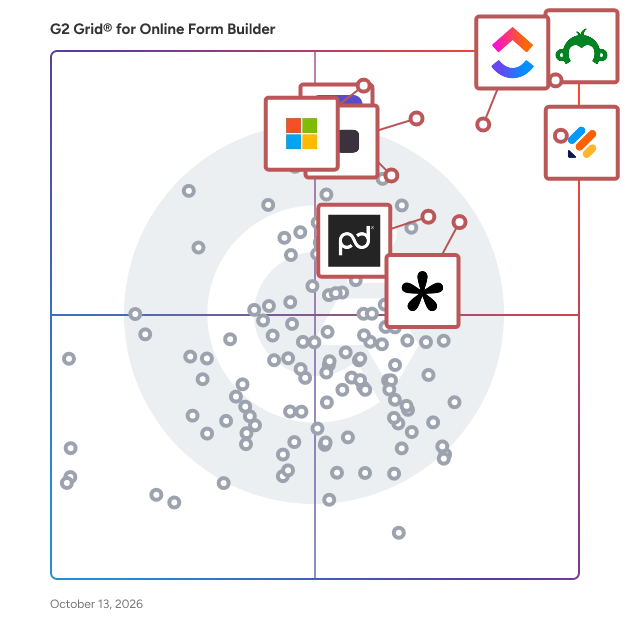
G2’s top-rated **Online Form Builder** software, based on verified reviews, includes [Jotform](https://www.g2.com/products/jotform/reviews) **,** [ActiveCampaign](https://www.g2.com/sellers/activecampaign) **,** [Survey Monkey](https://www.g2.com/products/surveymonkey/reviews) **, and** [Microsoft Forms.](https://www.g2.com/products/microsoft-forms/reviews)

### What are the top-reviewed Online Form Builder on G2?

[Jotform](https://www.g2.com/products/jotform/reviews)

- Number of Reviews: 3445
- Satisfaction: 99&amp;nbsp;
- Market Score: 88
- G2 Score: 94

[ActiveCampaign](https://www.g2.com/sellers/activecampaign)

- Number of Reviews: 2830
- Satisfaction: 89
- Market Score: 84
- G2 Score: 87

[Survey Monkey](https://www.g2.com/products/surveymonkey/reviews)

- Number of Reviews: 5326
- Satisfaction: 75
- Market Score: 94
- G2 Score: 84

[Microsoft Forms](https://www.g2.com/products/microsoft-forms/reviews)

- Number of Reviews: 335
- Satisfaction: 67
- Market Score: 99
- G2 Score: 83

[Click Up](https://www.g2.com/products/clickup/reviews)

- Number of Reviews: 1093
- Satisfaction: 75
- Market Score: 89
- G2 Score: 82

**Satisfaction score** reflects how positively users rate and feel about a product based on review-driven signals (beyond just a star average). ([Source 2](https://www.g2.com/reports))&amp;nbsp;

**Market Presence score** reflects a product’s reach and strength in the market using signals like market share, seller size, and broader visibility/impact indicators. ([Source 2](https://www.g2.com/reports))

**G2 Score** is calculated as a proprietary composite that (in simplified terms) averages Satisfaction and Market Presence to rank products within a category. ([Source 2](https://www.g2.com/reports))

Learn how G2 scores products. ([Source 1](https://documentation.g2.com/docs/research-scoring-methodologies?_gl=1*5vlk6s*_gcl_au*MTAwMzU5MzUxLjE3NjM0MTg0NzYuNjY0NTIxMTY0LjE3NjQ2MTc0NzcuMTc2NDYxNzQ3Nw..*_ga*NzY1MDU0NjE3LjE3NjM0NzQ3ODM.*_ga_MFZ5NDXZ5F*czE3NjYwODk1MTMkbzY3JGcxJHQxNzY2MDkyMjQyJGo1NyRsMCRoMA..))

### What I Often See in Online Form Builder Tools

#### Feedback Pros: What Users Consistently Appreciate

- **Drag-and-drop templates accelerate building branded multi-step forms**

_&quot;What I like best about Jotform is how intuitive and flexible it is. The platform makes it incredibly easy to build forms, collect responses, and streamline workflows without needing any technical background. The drag-and-drop builder is clean and user-friendly, and I love how quickly I can customize designs, add conditional logic, and automate follow-up emails. Jotform also integrates seamlessly with the tools I use every day, which saves me time and keeps everything organized in one place. Whether I need to create a simple sign-off form or a more complex registration workflow, Jotform makes the entire process smooth and efficient.”_

_-_ [_Allison C._](https://www.g2.com/products/jotform/reviews/jotform-review-12077608)_, Jotform Review_

- **Native integrations push submissions into spreadsheets, CRMs, and workflows**

_&quot;What is most helpful about ActiveCampaign is how automation-friendly and integration-ready the platform is. It is built in a way that doesn&#39;t fight me; it actually supports my mindset. The automation builder is honestly one of the cleanest I have used. The webhooks are reliable, the API documentation is solid, and syncing between systems doesn&#39;t feel fragile. The reporting dashboards provide the right level of details.”_

_-_ [_Sathya G._](https://www.g2.com/products/activecampaign/reviews/activecampaign-review-12373182)_,_ _ActiveCampaign Review_

- **Conditional logic and routing reduce manual follow-up and errors**

_“What I don’t like about SurveyMonkey is that many advanced features—such as deeper analytics, logic controls, and export options—are locked behind higher-priced plans. Because of this, the free and lower-tier versions can feel quite limiting if you need more detailed insights. Also, while the interface is easy to use, the design and branding customization options are fairly limited, which can be a downside for teams that want surveys to look more tailored or visually distinctive.”_

_-_ [_Tiwari S_](https://www.g2.com/products/surveymonkey/reviews/surveymonkey-review-12293707)_._ **_,_** _Survey Monkey Review_

#### Cons: Where Many Platforms Fall Short

- **Advanced logic, reporting, and design controls gated by tiers**

_“Many essential features are only available on higher-tier plans, which can become pretty spendy fast. It would also be helpful if the customization options were more flexible without requiring coding knowledge. You can apply some branding to your surveys, but achieving complete design control is difficult unless you upgrade or work directly with CSS. Finally, mastering some of the advanced logic features takes a fair amount of trial and error.”_

_-_ [_Julie K_](https://www.g2.com/products/surveymonkey/reviews/surveymonkey-review-11764117)_._ **_,_** _Survey Monkey Review_

- **Complex forms become clunky; learning curve for new admins**

_“While excellent for basic to intermediate surveys, it lacks the deep analytical and branding features of a dedicated platform like Qualtrics. The customisation options for fonts and themes are limited, which can be a minor drawback for customer-facing surveys that require a fully branded experience. It&#39;s a tool for gathering data efficiently, not for complex customer experience (CX) program management.”_

_-_ [_Krisztián T.,_](https://www.g2.com/products/microsoft-forms/reviews/microsoft-forms-review-11996308)_Microsoft Forms Review_

- **Integration setup can be inconsistent, especially for real-time syncing**

_“The API is great and solid, but the rate limits at times feel tight for high-volume operations when syncing large datasets. This requires batching strategies sometimes.”_

_-_ [_Ramesh K._](https://www.g2.com/products/activecampaign/reviews/activecampaign-review-12313091)_, ActiveCampaign Review_

### My Expert Takeaway on Online Form Builder in 2026

Based on G2 reviews, Online form builder tools score strongly on the signals that typically drive adoption: a 4.62/5 average star rating, 9.23/10 likelihood to recommend, 6.46/7 ease of use, and 6.42/7 ease of setup. That profile suggests the category works well for fast rollouts and quick launches, especially when the workflow is straightforward: collect a submission, route it, and notify the right person.

The differences show up after teams move past the first few forms. For basic intake, templates and drag-and-drop builders are usually enough. As usage expands across departments, requirements become more operational. Teams start needing multi-step flows, conditional logic, dependable data syncing, shared assets, and consistent branding. At that point, the question shifts from “How fast can we build?” to “How well can we run this at scale?” In reviews, friction tends to concentrate in two areas: advanced features are often tied to higher tiers, and administration effort increases as more teams share the same environment.

Teams that get the best long-term outcomes treat form builders as workflow infrastructure. They define where submissions land and who owns downstream systems, standardize repeatable patterns like intake, approvals, and handoffs, and enforce guardrails through permissions, templates, and brand controls. They also validate early with the people building the most complex forms, since platforms that feel simple for basic use cases can strain under heavier logic, reporting needs, and sync expectations.

If you’re choosing an Online form builder for a scaling organization, validate four things up front: conditional logic depth, admin controls and permissions, integration reliability, and pricing that stays predictable as volume and governance needs increase. Teams that confirm these early tend to land on a platform that supports both rapid launches and standardized intake across the business.

### Online Form Builder FAQs

#### **What is the best software to create forms?&amp;nbsp;**

[Jotform](https://www.g2.com/products/jotform/reviews) is known for its large template library, drag-and-drop builder, and support for payments and integrations, making it useful for registrations, intake workflows, and business forms. [Survey Monkey](https://www.g2.com/products/surveymonkey/reviews) is often chosen for surveys and feedback programs where analytics and reporting are important. Microsoft Forms is a strong option for teams already using Microsoft 365 that need quick internal surveys or simple forms.

#### **What is the easiest way to make a fillable form?&amp;nbsp;**

The easiest way to create a fillable form is to use a drag-and-drop online form builder that lets you add fields and publish forms without coding. [Microsoft Forms](https://www.g2.com/products/microsoft-forms/reviews) is often considered one of the simplest tools because of its streamlined interface and quick setup for surveys or quizzes. [Jotform](https://www.g2.com/products/jotform/reviews) also makes it easy to build forms with a drag-and-drop editor and prebuilt templates, which helps teams launch forms quickly.

#### **What is the best free online form builder?**

[Jotform](https://www.g2.com/products/jotform/reviews) provides a free plan with templates, integrations, and the ability to create forms for registrations or data collection. [Survey Monkey](https://www.g2.com/products/surveymonkey/reviews) is commonly used for free surveys and feedback collection with built-in reporting. Microsoft Forms is another free option included with Microsoft 365 and widely used for internal [surveys](https://www.g2.com/categories/survey) and quizzes.

#### **What is the best form builder for integrating with CRM systems?**

[ActiveCampaign](https://www.g2.com/products/activecampaign/reviews) includes built-in forms that connect directly to its [CRM](https://www.g2.com/categories/crm) and marketing automation platform, allowing teams to capture leads and trigger campaigns automatically. [Jotform](https://www.g2.com/products/jotform/reviews) integrates with many CRM systems, making it useful for collecting leads that sync into sales pipelines.

#### **What is the most affordable online form builder for small businesses?**

[Jotform](https://www.g2.com/products/jotform/reviews) is commonly used by small businesses because it offers a free plan and flexible paid options while still supporting features like payments and integrations. [Microsoft Forms](https://www.g2.com/products/microsoft-forms/reviews) can also be cost-effective for organizations already using Microsoft 365 since it’s included in the subscription. [Survey Monkey](https://www.g2.com/products/surveymonkey/reviews) provides entry-level plans that work well for teams focused on surveys and feedback collection.

#### Sources

- [G2 Research Hub](https://research.g2.com/insights/demo-automation)
- [G2 Research Scoring Methodologies](https://documentation.g2.com/docs/research-scoring-methodologies)
- [G2 Market Presence Score Overview](https://www.g2.com/reports)

Researched and written by[Gauri Pawsey](https://research.g2.com/insights/author/gauri-pawsey)[&amp;nbsp;](https://research.g2.com/insights/author/gauri-pawsey)

Date published: March 16, 2026