# Best Mobile Device Management (MDM) Software

*By [Adam Crivello](https://research.g2.com/insights/author/adam-crivello)*


Mobile device management (MDM) software enables IT departments to monitor, secure, and manage mobile devices, including smartphones and tablets, across various providers and operating systems, applying custom policies to prevent data loss, restrict unauthorized software installs, and maintain control over corporate data access.

### Core Capabilities of MDM Software

To qualify for inclusion in the Mobile Device Management category, a product must:

- Be compatible with all common or company-issued mobile devices and support necessary operating systems and platforms
- Function through and with multiple service providers
- Customize device settings and policies according to company requirements
- Integrate with existing IT, administrative, and application systems
- Enable the remote configuration, locking, wiping, detection, and encryption of devices
- Report on device activity

### Common Use Cases for MDM Software

IT and security teams use MDM software to maintain control and compliance across mobile device fleets in increasingly distributed work environments. Common use cases include:

- Provisioning and configuring company-issued or BYOD devices with corporate policies and security settings
- Remotely wiping or locking lost or compromised devices to prevent unauthorized data access
- Enforcing app management policies to prevent unauthorized software installs and maintain compliance

### How MDM Software Differs from Other Tools

MDM software focuses specifically on the management and security of mobile endpoints, smartphones and tablets, distinguishing it from broader endpoint management platforms that cover desktops, servers, and IoT devices. While MDM addresses device-level provisioning and policy enforcement, it is often used alongside identity and access management tools to provide a complete mobile security posture for the enterprise.

### Insights from G2 on MDM Software

Based on category trends on G2, remote device management capabilities and cross-platform compatibility stand out as the most valued features. Improved security posture and reduced time spent on device provisioning stand out as primary outcomes of adoption.


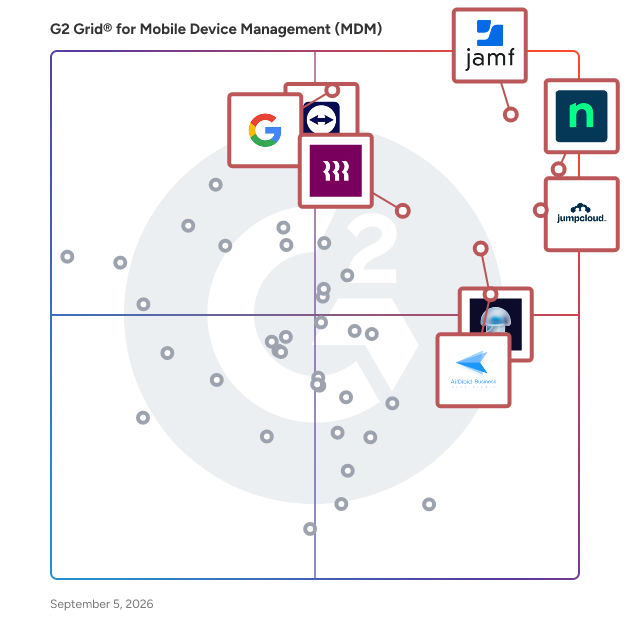
## Top Mobile Device Management (MDM) Software at a Glance
| # | Product | Rating | Best For | What Users Say |
|---|---------|--------|----------|----------------|
| 1 | [Jamf](https://www.g2.com/products/jamf/reviews) | 4.7/5.0 (2,215 reviews) | Enterprise Apple device management with zero-touch enrollment | "[Jamf Cloud Makes Apple Environment Setup and Migration Seamless](https://www.g2.com/survey_responses/jamf-review-12704988)" |
| 2 | [NinjaOne](https://www.g2.com/products/ninjaone/reviews) | 4.7/5.0 (4,347 reviews) | Unified RMM with patching and remote access for MSPs | "[NinjaOne Streamlines Endpoint Management and Remote Troubleshooting](https://www.g2.com/survey_responses/ninjaone-review-12791930)" |
| 3 | [JumpCloud](https://www.g2.com/products/jumpcloud/reviews) | 4.5/5.0 (3,880 reviews) | Cloud directory for identity, devices, and SSO | "[All-in-One Access and Device Management That Saves Time](https://www.g2.com/survey_responses/jumpcloud-review-12977315)" |
| 4 | [Admin](https://www.g2.com/products/google-admin/reviews) | 4.4/5.0 (108 reviews) | Centralized Google Workspace user and policy administration | "[Versatile Admin Console with Robust Features](https://www.g2.com/survey_responses/admin-review-12375405)" |
| 5 | [Iru](https://www.g2.com/products/iru/reviews) | 4.7/5.0 (813 reviews) | Apple MDM with blueprint provisioning for growing teams | "[Enterprise-Grade Device Management Without the Complexity](https://www.g2.com/survey_responses/iru-review-12866404)" |
| 6 | [AirDroid Business](https://www.g2.com/products/airdroid-business/reviews) | 4.9/5.0 (423 reviews) | Remote Android device management for distributed fleets | "[Clear Insights and a Straightforward Interface That Speeds Up Work](https://www.g2.com/survey_responses/airdroid-business-review-13041539)" |
| 7 | [Rippling IT](https://www.g2.com/products/rippling-it/reviews) | 4.7/5.0 (1,036 reviews) | HR-triggered device and access provisioning | "[IT provisioning and app access made completely painless for everyday employees.](https://www.g2.com/survey_responses/rippling-it-review-13035351)" |
| 8 | [TeamViewer](https://www.g2.com/products/teamviewer/reviews) | 4.5/5.0 (3,893 reviews) | Cross-platform remote access and IT support at scale | "[Wonderful product, very flexible, use over many platforms](https://www.g2.com/survey_responses/teamviewer-review-4314442)" |
| 9 | [IBM MaaS360](https://www.g2.com/products/ibm-maas360/reviews) | 4.2/5.0 (191 reviews) | — | "[Efficient and Secure Management for Remote Teams](https://www.g2.com/survey_responses/ibm-maas360-review-12996280)" |
| 10 | [Jamf Now](https://www.g2.com/products/jamf-now/reviews) | 4.4/5.0 (51 reviews) | Simple Apple MDM for small teams with blueprint configuration | "[Easy MDM That Just Works](https://www.g2.com/survey_responses/jamf-now-review-11931306)" |


## How Many Mobile Device Management (MDM) Software Products Does G2 Track?
**Total Products under this Category:** 105

### Category Stats (Jun 2026)
- **Average Rating**: 4.53/5 (↑0.01 vs May 2026) The average rating of products in this category, based on all submitted ratings
- **Top Trending Product**: Ivanti Neurons for Unified Endpoint Management (+0.94%) - Among all products in this category, Ivanti Neurons for Unified Endpoint Management recorded the largest rating increase compared to last month
*Last updated: June 30, 2026*


## How Does G2 Rank Mobile Device Management (MDM) Software Products?

**Why You Can Trust G2's Software Rankings:**

- 30 Analysts and Data Experts
- 22,400+ Authentic Reviews
- 105+ Products
- Unbiased Rankings

G2's software rankings are built on verified user reviews, rigorous moderation, and a consistent research methodology maintained by a team of analysts and data experts. Each product is measured using the same transparent criteria, with no paid placement or vendor influence. While reviews reflect real user experiences, which can be subjective, they offer valuable insight into how software performs in the hands of professionals. Together, these inputs power the G2 Score, a standardized way to compare tools within every category.


## Which Mobile Device Management (MDM) Software Is Best for Your Use Case?

- **Leader:** [Jamf](https://www.g2.com/products/jamf/reviews)
- **Highest Performer:** [SureMDM by 42Gears](https://www.g2.com/products/suremdm-by-42gears/reviews)
- **Easiest to Use:** [AirDroid Business](https://www.g2.com/products/airdroid-business/reviews)
- **Top Trending:** [Rippling IT](https://www.g2.com/products/rippling-it/reviews)
- **Best Free Software:** [TeamViewer](https://www.g2.com/products/teamviewer/reviews)


---

**Sponsored**

### JumpCloud

JumpCloud® delivers a unified identity, device, and access management platform that makes it easy to securely manage identities, devices, and access across your organization. With JumpCloud, IT teams and MSPs enable users to work securely from anywhere and manage their Windows, Apple, Linux, and Android devices from a single platform.


[Visit website](https://www.g2.com/external_clickthroughs/record?secure%5Bad_program%5D=paid_promo&amp;secure%5Bad_slot%5D=category_product_list&amp;secure%5Bcategory_id%5D=161&amp;secure%5Bmedium%5D=sponsored&amp;secure%5Bprioritized%5D=false&amp;secure%5Bproduct_id%5D=36316&amp;secure%5Bresource_id%5D=161&amp;secure%5Bresource_type%5D=Category&amp;secure%5Bsource_type%5D=category_page&amp;secure%5Bsource_url%5D=https%3A%2F%2Fwww.g2.com%2Fcategories%2Fmobile-device-management-mdm%3Fpage%3D3&amp;secure%5Btoken%5D=1fa98e6b49bda6106c1271f6030570d0e4e714c9b5f8eab99aebadc0048a23b6&amp;secure%5Burl%5D=https%3A%2F%2Fjumpcloud.com%2Flp%2Fmdm-fava-bean-demo%3Futm_source%3DG2-Paid%26utm_medium%3DPaid-Directory%26utm_content%3DMDM%26utm_campaign%3DG2PaidPromotions&amp;secure%5Burl_type%5D=paid_promos)

---

## What Are the Top-Rated Mobile Device Management (MDM) Software Products in 2026?
### 1. [Jamf](https://www.g2.com/products/jamf/reviews)
Jamf gives organizations a dedicated platform for managing, securing and onboarding Apple devices at scale, including iPhone, iPad, Mac, Apple Watch and Apple TV. It fits seamlessly into Windows-centric environments and also supports Android to unify mixed-fleet mobility. IT teams gain powerful automation, accurate Apple endpoint telemetry and continuous compliance monitoring, while users enjoy a fast, native Apple experience. Jamf also enables mobility and industry workflows across healthcare, retail and education, providing secure identity, access and purpose-built frontline experiences. Jamf delivers the Apple-specific management, security and compliance capabilities organizations need without adding complexity.


**Average Rating:** 4.7/5.0
**Total Reviews:** 2,215
**How Do G2 Users Rate Jamf?**

- **Has the product been a good partner in doing business?:** 9.3/10 (Category avg: 9.0/10)
- **Whitelist:** 8.5/10 (Category avg: 8.9/10)
- **Remote Wipe:** 9.2/10 (Category avg: 9.2/10)
- **Blacklist:** 8.6/10 (Category avg: 8.9/10)

**Who Is the Company Behind Jamf?**

- **Seller:** [Jamf](https://www.g2.com/sellers/jamf)
- **Company Website:** https://www.jamf.com/
- **Year Founded:** 2002
- **HQ Location:** Minneapolis, MN
- **Twitter:** @JAMFSoftware (11,069 Twitter followers)
- **LinkedIn® Page:** https://www.linkedin.com/company/717074/ (2,521 employees on LinkedIn®)

**Who Uses This Product?**
- **Who Uses This:** Systems Administrator, IT Manager
- **Top Industries:** Higher Education, Education Management
- **Company Size:** 50% Enterprise, 41% Mid-Market


#### What Are Jamf's Pros and Cons?

**Pros:**

- Device Management (98 reviews)
- Ease of Use (93 reviews)
- Features (61 reviews)
- Customer Support (54 reviews)
- Apple Device Management (53 reviews)

**Cons:**

- Complexity (30 reviews)
- Difficult Learning (27 reviews)
- Learning Curve (21 reviews)
- Improvement Needed (20 reviews)
- Expensive (16 reviews)


### What Do G2 Reviewers Say About Jamf?
*AI-generated summary from verified user reviews*

**Pros:**

- Users value the **powerful device management tools** of Jamf, appreciating its seamless integration with Apple systems.
- Users appreciate the **ease of use** of Jamf, simplifying Mac management through intuitive tools and features.
- Users appreciate the **enhanced security and efficient management** offered by Jamf Pro, making IT tasks significantly easier.
- Users highly value the **best-in-class customer support** from Jamf, praising their reliable and timely assistance.
- Users appreciate the **simplicity of managing Apple devices** with Jamf Pro, streamlining their device administration effectively.

**Cons:**

- Users find **Jamf&#39;s complexity** challenging, especially with setup and declining support for assistance.
- Users find the **difficult learning curve** of Jamf frustrating, especially with support quality declining over time.
- Users find the **learning curve** of Jamf challenging, particularly when transitioning between different versions and seeking support.
- Users find that **improvements are needed** in JAMF&#39;s UI, deployment logs, and patch management for better functionality.
- Users find the **cost of Jamf Pro** to be high, necessitating additional investments in third-party support solutions.

#### What Are Recent G2 Reviews of Jamf?

**"[Top Rated  MDM Software](https://www.g2.com/survey_responses/jamf-review-837848)"**

**Rating:** 5.0/5.0 stars
*— Kim T.*

[Read full review](https://www.g2.com/survey_responses/jamf-review-837848)

---

**"[Jamf Cloud Makes Apple Environment Setup and Migration Seamless](https://www.g2.com/survey_responses/jamf-review-12704988)"**

**Rating:** 4.5/5.0 stars
*— Victor P.*

[Read full review](https://www.g2.com/survey_responses/jamf-review-12704988)

---


#### What Are G2 Users Discussing About Jamf?

- [What do you recommend for those looking to replace Jamf Connect with another identity management solution?](https://www.g2.com/discussions/what-do-you-recommend-for-those-looking-to-replace-jamf-connect-with-another-identity-management-solution)
- [How can a new IT administrator best utilize Jamf Pro for managing a fleet of Apple devices in an organization?](https://www.g2.com/discussions/how-can-a-new-it-administrator-best-utilize-jamf-pro-for-managing-a-fleet-of-apple-devices-in-an-organization)
- [What is Jamf Pro used for?](https://www.g2.com/discussions/what-is-jamf-pro-used-for)
- [Who uses Jamf?](https://www.g2.com/discussions/who-uses-jamf) - 3 comments
- [What is the difference between Jamf now and Jamf pro?](https://www.g2.com/discussions/what-is-the-difference-between-jamf-now-and-jamf-pro) - 4 comments

### 2. [NinjaOne](https://www.g2.com/products/ninjaone/reviews)
NinjaOne is the unified IT operations platform that helps IT teams and managed service providers manage, secure, and support every endpoint from a single cloud-native console. Nearly 40,000 customers across 140+ countries use NinjaOne to replace fragmented point tools with one platform built to scale. The platform brings together the core work of modern IT operations: endpoint management, autonomous patch management, vulnerability management, endpoint and SaaS backup, remote access, and IT service desk. Teams monitor and control Windows, macOS, Linux, mobile, and virtual devices in one place, automate routine work with policy-based automation and human-centered AI, and cut the cost and risk that come from running many disconnected tools. NinjaOne serves internal IT teams and MSPs alike, from lean IT departments to mid-market and large enterprise organizations managing distributed, multi-site environments. Common uses include consolidating IT tooling, automating patching for security and compliance, managing distributed and hybrid workforces, improving endpoint visibility, and strengthening backup and ransomware readiness. NinjaOne has maintained a 98 percent customer satisfaction score for more than five years, backed by free unlimited onboarding and 24/7 support in seven languages. Organizations that move to NinjaOne report replacing four or more separate tools with the single platform. NinjaOne is FedRAMP Moderate Authorized and SOC 2 Type II and Type III compliant, and supports audit-ready compliance evidence across frameworks including CMMC, ISO 27001, and HIPAA. The mission behind the platform is simple: unify IT to simplify work, giving IT teams better tools and employees a great technology experience at work.


**Average Rating:** 4.7/5.0
**Total Reviews:** 4,347
**How Do G2 Users Rate NinjaOne?**

- **Has the product been a good partner in doing business?:** 9.4/10 (Category avg: 9.0/10)
- **Whitelist:** 8.4/10 (Category avg: 8.9/10)
- **Remote Wipe:** 8.6/10 (Category avg: 9.2/10)
- **Blacklist:** 8.3/10 (Category avg: 8.9/10)

**Who Is the Company Behind NinjaOne?**

- **Seller:** [NinjaOne](https://www.g2.com/sellers/ninjaone)
- **Company Website:** https://www.ninjaone.com/
- **Year Founded:** 2013
- **HQ Location:** Austin, Texas
- **Twitter:** @NinjaOne (3,607 Twitter followers)
- **LinkedIn® Page:** https://www.linkedin.com/company/6436301/ (2,121 employees on LinkedIn®)

**Who Uses This Product?**
- **Who Uses This:** IT Manager, Owner
- **Top Industries:** Information Technology and Services, Computer &amp; Network Security
- **Company Size:** 48% Mid-Market, 44% Small-Business


#### What Are NinjaOne's Pros and Cons?

**Pros:**

- Ease of Use (1373 reviews)
- Remote Access (867 reviews)
- Features (852 reviews)
- Automation (820 reviews)
- Customer Support (733 reviews)

**Cons:**

- Missing Features (715 reviews)
- Limited Features (396 reviews)
- Improvement Needed (372 reviews)
- Needs Improvement (362 reviews)
- Feature Issues (306 reviews)


### What Do G2 Reviewers Say About NinjaOne?
*AI-generated summary from verified user reviews*

**Pros:**

- Users appreciate the **ease of use** of NinjaOne, simplifying management of company assets with its all-in-one solution.
- Users appreciate the **remote access capabilities** of NinjaOne, enjoying flexibility and control over their devices efficiently.
- Users appreciate the **automation and alert features** of NinjaOne, greatly simplifying server management and enhancing productivity.
- Users praise the **automation features** of NinjaOne, highlighting their simplicity and effectiveness in enhancing workflow.
- Users highly value the **exceptional customer support** from NinjaOne, appreciating quick access to knowledgeable staff and effective solutions.

**Cons:**

- Users find the **missing features** in NinjaOne limit its usability, particularly concerning the mobile app and policy application.
- Users find NinjaOne has **limited features** , especially in scripting and mobile app functionality, hindering usability.
- Users find the **search function lacking** and desire quicker feature delivery and improved endpoint visibility.
- Users find that NinjaOne&#39;s **search function and dashboard could use substantial improvement** for better usability and feature visibility.
- Users face **feature issues** with NinjaOne, struggling with function settings and application installations, affecting usability.

#### What Are Recent G2 Reviews of NinjaOne?

**"[NinjaOne Streamlines Endpoint Management and Remote Troubleshooting](https://www.g2.com/survey_responses/ninjaone-review-12791930)"**

**Rating:** 4.0/5.0 stars
*— Richard T.*

[Read full review](https://www.g2.com/survey_responses/ninjaone-review-12791930)

---

**"[Super Easy and Effective - Loved my Experience!](https://www.g2.com/survey_responses/ninjaone-review-9229992)"**

**Rating:** 5.0/5.0 stars
*— Kyle P.*

[Read full review](https://www.g2.com/survey_responses/ninjaone-review-9229992)

---


#### What Are G2 Users Discussing About NinjaOne?

- [What is NinjaOne (formerly NinjaRMM) used for?](https://www.g2.com/discussions/what-is-ninjaone-formerly-ninjarmm-used-for) - 2 comments
- [Does Office 365 Backup your data?](https://www.g2.com/discussions/does-office-365-backup-your-data) - 3 comments
- [What does Dropsuite Backup?](https://www.g2.com/discussions/what-does-dropsuite-backup) - 1 comment

### 3. [JumpCloud](https://www.g2.com/products/jumpcloud/reviews)
JumpCloud® delivers a unified identity, device, and access management platform that makes it easy to securely manage identities, devices, and access across your organization. With JumpCloud, IT teams and MSPs enable users to work securely from anywhere and manage their Windows, Apple, Linux, and Android devices from a single platform.


**Average Rating:** 4.5/5.0
**Total Reviews:** 3,880
**How Do G2 Users Rate JumpCloud?**

- **Has the product been a good partner in doing business?:** 9.0/10 (Category avg: 9.0/10)
- **Whitelist:** 8.4/10 (Category avg: 8.9/10)
- **Remote Wipe:** 8.8/10 (Category avg: 9.2/10)
- **Blacklist:** 8.2/10 (Category avg: 8.9/10)

**Who Is the Company Behind JumpCloud?**

- **Seller:** [JumpCloud Inc.](https://www.g2.com/sellers/jumpcloud-inc)
- **Company Website:** https://jumpcloud.com/
- **Year Founded:** 2012
- **HQ Location:** Louisville, CO
- **Twitter:** @JumpCloud (36,368 Twitter followers)
- **LinkedIn® Page:** https://www.linkedin.com/company/jumpcloud/ (974 employees on LinkedIn®)

**Who Uses This Product?**
- **Who Uses This:** IT Manager, System Administrator
- **Top Industries:** Information Technology and Services, Computer Software
- **Company Size:** 53% Mid-Market, 35% Small-Business


#### What Are JumpCloud's Pros and Cons?

**Pros:**

- Ease of Use (766 reviews)
- Device Management (588 reviews)
- Security (471 reviews)
- Integrations (430 reviews)
- Features (400 reviews)

**Cons:**

- Missing Features (326 reviews)
- Improvement Needed (263 reviews)
- Limited Features (199 reviews)
- Limitations (162 reviews)
- UX Improvement (134 reviews)


### What Do G2 Reviewers Say About JumpCloud?
*AI-generated summary from verified user reviews*

**Pros:**

- Users appreciate the **ease of use** of JumpCloud, enjoying smooth management of users and devices in one platform.
- Users appreciate the **unified device management** capabilities of JumpCloud, streamlining operations and enhancing security seamlessly.
- Users value the **robust security features** of JumpCloud, ensuring secure identity and access management seamlessly.
- Users praise the **seamless integrations** of JumpCloud, enhancing user and device management with a user-friendly interface.
- Users appreciate the **robust support for multiple operating systems** and streamlined management capabilities offered by JumpCloud.

**Cons:**

- Users are concerned about **missing features** like advanced endpoint controls and improved reporting in JumpCloud.
- Users find that **improvement is needed** in macOS deployment success and advanced endpoint controls, affecting overall usability.
- Users note the **limited features** of JumpCloud, particularly a smaller SSO app catalog compared to competitors like Okta.
- Users face **deployment challenges** with macOS apps and express a need for improved reporting and integrations in JumpCloud.
- Users find the **UX improvement necessary** due to confusing UI and a noticeable learning curve with complex permissions.

#### What Are Recent G2 Reviews of JumpCloud?

**"[Easy Setup and Strong Security for Password Management](https://www.g2.com/survey_responses/jumpcloud-review-12976011)"**

**Rating:** 4.5/5.0 stars
*— Siddharth V.*

[Read full review](https://www.g2.com/survey_responses/jumpcloud-review-12976011)

---

**"[All-in-One Access and Device Management That Saves Time](https://www.g2.com/survey_responses/jumpcloud-review-12977315)"**

**Rating:** 4.0/5.0 stars
*— AK J.*

[Read full review](https://www.g2.com/survey_responses/jumpcloud-review-12977315)

---


#### What Are G2 Users Discussing About JumpCloud?

- [How is JumpCloud redefining identity and access management in hybrid IT environments for tech companies?](https://www.g2.com/discussions/how-is-jumpcloud-redefining-identity-and-access-management-in-hybrid-it-environments-for-tech-companies) - 1 comment, 4 upvotes
- [What is JumpCloud used for?](https://www.g2.com/discussions/jumpcloud-what-is-jumpcloud-used-for) - 3 comments, 4 upvotes
- [Can JumpCloud replace Active Directory?](https://www.g2.com/discussions/jumpcloud-can-jumpcloud-replace-active-directory) - 3 comments, 1 upvote
- [Is JumpCloud secure?](https://www.g2.com/discussions/is-jumpcloud-secure) - 2 comments, 3 upvotes
- [What is JumpCloud?](https://www.g2.com/discussions/what-is-jumpcloud) - 1 comment

### 4. [Admin](https://www.g2.com/products/google-admin/reviews)
Google Workspace Admin is a centralized management console designed to streamline the administration of Google Workspace services within an organization. It enables administrators to efficiently manage users, devices, and security settings, ensuring data protection and compliance without the need for extensive technical expertise. Key Features and Functionality: - User Management: Easily add, remove, and manage user accounts, assign roles, and control access to various Google Workspace services. - Device Management: Monitor and manage company-owned and personal devices accessing organizational data, enforce security policies, and remotely wipe data from lost or compromised devices. - Security Controls: Implement robust security measures such as two-step verification, security keys, and manage password policies to safeguard organizational data. - Data Regions and Compliance: Specify the geographical location for data storage to meet regulatory requirements and gain visibility into actions taken by Google staff related to your data. - Reporting and Insights: Access detailed reports and audit logs to monitor usage, track security incidents, and ensure compliance with organizational policies. Primary Value and Solutions Provided: Google Workspace Admin simplifies the complex task of managing an organization&#39;s digital environment by providing a unified platform for user and device management, security enforcement, and compliance monitoring. It addresses the need for efficient administration, enhances data security, and ensures that organizations can meet regulatory requirements with ease. By offering intuitive tools and comprehensive controls, it empowers administrators to maintain a secure and productive workspace without requiring extensive technical knowledge.


**Average Rating:** 4.4/5.0
**Total Reviews:** 108
**How Do G2 Users Rate Admin?**

- **Has the product been a good partner in doing business?:** 8.7/10 (Category avg: 9.0/10)
- **Whitelist:** 8.9/10 (Category avg: 8.9/10)
- **Remote Wipe:** 8.8/10 (Category avg: 9.2/10)
- **Blacklist:** 8.8/10 (Category avg: 8.9/10)

**Who Is the Company Behind Admin?**

- **Seller:** [Google](https://www.g2.com/sellers/google)
- **Year Founded:** 1998
- **HQ Location:** Mountain View, CA
- **Twitter:** @google (31,899,995 Twitter followers)
- **LinkedIn® Page:** https://www.linkedin.com/company/1441/ (341,888 employees on LinkedIn®)
- **Ownership:** NASDAQ:GOOG

**Who Uses This Product?**
- **Top Industries:** Information Technology and Services, Computer Software
- **Company Size:** 45% Small-Business, 39% Mid-Market


#### What Are Admin's Pros and Cons?

**Pros:**

- Ease of Use (43 reviews)
- Security (22 reviews)
- Management (16 reviews)
- Integrations (13 reviews)
- Simple (13 reviews)

**Cons:**

- Poor Navigation (14 reviews)
- Learning Curve (11 reviews)
- Improvement Needed (9 reviews)
- Expensive (6 reviews)
- Poor Reporting (5 reviews)


### What Do G2 Reviewers Say About Admin?
*AI-generated summary from verified user reviews*

**Pros:**

- Users find Admin to be **incredibly easy to use** , significantly simplifying office management and enhancing workflow efficiency.
- Users praise the **superb security** features of Admin, ensuring a safe and efficient management experience for organizations.
- Users value the **ease of managing users and settings** efficiently with Google Admin&#39;s centralized dashboard, simplifying tasks.
- Users appreciate the **seamless integration** of Google Admin with other tools, streamlining workflow and enhancing productivity.
- Users highlight the **ease of use** of Admin, making office management and user management efficient and straightforward.

**Cons:**

- Users struggle with **poor navigation** , finding it challenging to locate settings and access necessary documentation effectively.
- Users face a **steep learning curve** with Admin, complicating initial setup and understanding of features.
- Users feel that **improvement is needed** in usability and reporting flexibility for a more efficient Admin experience.
- Users find the product **expensive** , with confusing pricing and frustrating cancellation fees complicating the experience.
- Users find the **poor reporting** and limited analytics challenging, requiring extra steps for data tracking and visibility.

#### What Are Recent G2 Reviews of Admin?

**"[Unified Management Simplified, Needs More Control](https://www.g2.com/survey_responses/admin-review-12661072)"**

**Rating:** 4.0/5.0 stars
*— Chad P.*

[Read full review](https://www.g2.com/survey_responses/admin-review-12661072)

---

**"[Versatile Admin Console with Robust Features](https://www.g2.com/survey_responses/admin-review-12375405)"**

**Rating:** 4.5/5.0 stars
*— Vikas V.*

[Read full review](https://www.g2.com/survey_responses/admin-review-12375405)

---


### 5. [Iru](https://www.g2.com/products/iru/reviews)
Iru is an AI-powered IT and security platform designed to help organizations secure their users, applications, and devices in an increasingly complex digital landscape. Tailored for the AI era, Iru integrates identity and access management, endpoint security, and compliance automation into a single cohesive solution. This unification streamlines operations, allowing IT and security teams to regain control and allocate their time more effectively. Targeted at fast-growing companies, Iru addresses the challenges faced by IT and security professionals who often juggle multiple tools and systems. The platform is particularly beneficial for organizations that require robust security measures while maintaining agility and efficiency. Use cases include managing user access across various applications, ensuring device security, and automating compliance processes, all of which are critical in today’s fast-paced business environment. At the heart of Iru is the Iru Context Model, which provides a dynamic overview of the organization’s environment by continuously monitoring users, devices, and applications in real-time. Complementing this model is Iru AI, an intelligent layer that transforms live data signals into actionable insights, orchestrates necessary actions, and maintains a comprehensive audit trail. This integration enhances policy enforcement, automates response mechanisms, and simplifies compliance, making it easier for organizations to adhere to regulatory requirements. One of Iru&#39;s standout features is its single endpoint agent, which manages and secures every device within an organization’s fleet. By implementing passwordless access through device-bound passkeys linked to device posture, Iru creates a trust fabric that strengthens security between users and devices. Additionally, compliance is continuously monitored with customized controls and an Adaptive Evidence Map that updates automatically, reducing the burden on IT teams and minimizing the risk of oversight. Iru aims to bring clarity and control back to overwhelmed IT and security teams by consolidating disparate tools into one unified platform. This shift allows teams to transition from reactive firefighting to proactive strategic initiatives that drive business success. The result is a more robust security posture, simplified workflows, and outcomes that align with organizational goals, ultimately fostering a safer and more efficient operational environment.


**Average Rating:** 4.7/5.0
**Total Reviews:** 813
**How Do G2 Users Rate Iru?**

- **Has the product been a good partner in doing business?:** 9.4/10 (Category avg: 9.0/10)
- **Whitelist:** 8.7/10 (Category avg: 8.9/10)
- **Remote Wipe:** 9.5/10 (Category avg: 9.2/10)
- **Blacklist:** 8.6/10 (Category avg: 8.9/10)

**Who Is the Company Behind Iru?**

- **Seller:** [Iru](https://www.g2.com/sellers/iru)
- **Year Founded:** 2018
- **HQ Location:** Miami, FL
- **Twitter:** @officiallyiru (2,021 Twitter followers)
- **LinkedIn® Page:** https://linkedin.com/company/officiallyiru (379 employees on LinkedIn®)

**Who Uses This Product?**
- **Who Uses This:** IT Manager, CTO
- **Top Industries:** Computer Software, Information Technology and Services
- **Company Size:** 71% Mid-Market, 23% Small-Business


#### What Are Iru's Pros and Cons?

**Pros:**

- Ease of Use (339 reviews)
- Customer Support (251 reviews)
- Device Management (173 reviews)
- Easy Setup (150 reviews)
- Apple Device Management (148 reviews)

**Cons:**

- Missing Features (71 reviews)
- Lacking Features (55 reviews)
- Device Management (53 reviews)
- Limited Compatibility (51 reviews)
- Expensive (46 reviews)


### What Do G2 Reviewers Say About Iru?
*AI-generated summary from verified user reviews*

**Pros:**

- Users appreciate the **ease of use** of Kandji, benefiting from its friendly UI and effective device management.
- Users praise the **top-notch customer support** of Iru, highlighting dedicated assistance and tailored solutions for their needs.
- Users appreciate the **user-friendly device management** of Iru, which simplifies management for both remote and office teams.
- Users value the **easy setup** process of Iru, aided by excellent blueprints and responsive customer support.
- Users highlight the **reliable platform** of Iru for Apple device management, appreciating its ease of use and intuitive setup.

**Cons:**

- Users desire **missing features** like advanced EDR capabilities and improved reporting options for a better experience.
- Users note the **lack of features** in Iru, mentioning design limitations and the need for workarounds.
- Users face challenges with **device management limitations** in Kandji, particularly with non-Apple devices and offboarding processes.
- Users express frustration with **limited compatibility** , as Iru exclusively supports Mac OS, excluding Windows and other devices.
- Users find Kandji&#39;s pricing to be **expensive for smaller teams** , complicating budget management and limiting access to necessary features.

#### What Are Recent G2 Reviews of Iru?

**"[Mac management without the Jamf effort](https://www.g2.com/survey_responses/iru-review-12969987)"**

**Rating:** 5.0/5.0 stars
*— Kay N.*

[Read full review](https://www.g2.com/survey_responses/iru-review-12969987)

---

**"[Enterprise-Grade Device Management Without the Complexity](https://www.g2.com/survey_responses/iru-review-12866404)"**

**Rating:** 5.0/5.0 stars
*— Ryan O.*

[Read full review](https://www.g2.com/survey_responses/iru-review-12866404)

---


#### What Are G2 Users Discussing About Iru?

- [How much does Addigy cost?](https://www.g2.com/discussions/how-much-does-addigy-cost)
- [What is Macos MDM?](https://www.g2.com/discussions/what-is-macos-mdm) - 2 comments, 1 upvote
- [Why Kandji?](https://www.g2.com/discussions/why-kandji) - 4 comments, 1 upvote
- [Is kandji a SaaS?](https://www.g2.com/discussions/is-kandji-a-saas) - 6 comments, 1 upvote

### 6. [AirDroid Business](https://www.g2.com/products/airdroid-business/reviews)
AirDroid Business, developed by Singapore-based SandStudio, is a comprehensive mobile device management (MDM) solution designed to help businesses manage and control fleets of Android and Windows devices from a central dashboard. With AirDroid Business, businesses can easily monitor device usage, deploy apps and updates, and remotely troubleshoot issues. It offers features such as kiosk mode, security policy, alerts &amp; notifications, location tracking, file transfer in bulk, and more. It aims to simplify the device management process, increase productivity and efficiency, and reduce management costs. AirDroid Business MDM Highlights: \*Multiple enrollment options - For Android: Zero-Touch, Android Enterprise(AE), Knox Mobile Enrollment(KME), Device Owner, and Regular Enrollment. For Windows: Regular Enrollment. \*Unattended remote access \*Batch operations \*Tasks &amp; Action logs \*Patch management \*Limit incoming &amp; outgoing calls \*Kiosk mode &amp; Policy \*Remote control with Black Screen security mode \*Location tracking \*Application management service(AMS):custom apps, Google Play Store apps and web apps \*Content management service \*Whitelisting and blocklisting browsers &amp; apps \*Remote monitor devices’ status \*Real-time alerts &amp; notifications \*Supports all Android-based endpoints \*Devices fleet management from a centralized dashboard AirDroid Business&#39;s acclaimed MDM solution currently empowers organizations across 100+ countries. Our expertise spans various vertical markets such as retail, healthcare, digital signage, transportation &amp; logistics, IT &amp; MSP services, and education. We offer free trial, online demos, and email &amp; call support to all prospects and customers, contact us for more information today!


**Average Rating:** 4.9/5.0
**Total Reviews:** 423
**How Do G2 Users Rate AirDroid Business?**

- **Has the product been a good partner in doing business?:** 9.8/10 (Category avg: 9.0/10)
- **Whitelist:** 9.7/10 (Category avg: 8.9/10)
- **Remote Wipe:** 9.6/10 (Category avg: 9.2/10)
- **Blacklist:** 9.7/10 (Category avg: 8.9/10)

**Who Is the Company Behind AirDroid Business?**

- **Seller:** [Sand Studio](https://www.g2.com/sellers/sand-studio)
- **Company Website:** https://www.airdroid.com/
- **Year Founded:** 2011
- **HQ Location:** Singapore, SG
- **Twitter:** @AirDroidB (184 Twitter followers)
- **LinkedIn® Page:** https://www.linkedin.com/company/airdroidbusiness/about (90 employees on LinkedIn®)

**Who Uses This Product?**
- **Who Uses This:** IT Manager, IT Consultant
- **Top Industries:** Information Technology and Services, Renewables &amp; Environment
- **Company Size:** 68% Mid-Market, 41% Small-Business


#### What Are AirDroid Business's Pros and Cons?

**Pros:**

- Ease of Use (93 reviews)
- Device Management (89 reviews)
- Remote Access (88 reviews)
- Features (65 reviews)
- Customer Support (49 reviews)

**Cons:**

- Expensive (17 reviews)
- Improvement Needed (11 reviews)
- Missing Features (8 reviews)
- Pricing Issues (8 reviews)
- Difficult Learning (6 reviews)


### What Do G2 Reviewers Say About AirDroid Business?
*AI-generated summary from verified user reviews*

**Pros:**

- Users love the **ease of use** of AirDroid Business, finding it simple to manage devices from any browser.
- Users praise the **effective device management** features of AirDroid Business, simplifying operations with tracking and alerts.
- Users love the **remote access capabilities** of AirDroid Business, enabling control over devices from anywhere, anytime.
- Users value the **efficient management features** of AirDroid Business, particularly for device deployment and monitoring.
- Users value the **responsive customer support** of AirDroid Business, enhancing their experience with reliable assistance.

**Cons:**

- Users find the product **expensive** for multiple devices, which can strain startup budgets despite its valuable features.
- Users suggest that **improvement is needed** in pricing and mobile dashboard settings for AirDroid Business.
- Users find the **missing features** in AirDroid Business limiting, desiring improved settings and advanced automation options.
- Users find the **pricing issues** with AirDroid Business can become steep when enrolling multiple rarely-used devices.
- Users note a **difficult learning process** due to the feature-rich interface, requiring time to master the platform.

#### What Are Recent G2 Reviews of AirDroid Business?

**"[Clear Insights and a Straightforward Interface That Speeds Up Work](https://www.g2.com/survey_responses/airdroid-business-review-13041539)"**

**Rating:** 4.5/5.0 stars
*— Franco D.*

[Read full review](https://www.g2.com/survey_responses/airdroid-business-review-13041539)

---

**"[AirDroid Business Way to Go](https://www.g2.com/survey_responses/airdroid-business-review-13039532)"**

**Rating:** 5.0/5.0 stars
*— Laiba F.*

[Read full review](https://www.g2.com/survey_responses/airdroid-business-review-13039532)

---


#### What Are G2 Users Discussing About AirDroid Business?

- [Is AirDroid a good app?](https://www.g2.com/discussions/is-airdroid-a-good-app)
- [What is the use of AirDroid?](https://www.g2.com/discussions/what-is-the-use-of-airdroid)
- [Is AirDroid completely free?](https://www.g2.com/discussions/is-airdroid-completely-free)
- [Can AirDroid be trusted?](https://www.g2.com/discussions/can-airdroid-be-trusted) - 5 comments

### 7. [Rippling IT](https://www.g2.com/products/rippling-it/reviews)
Transform your organization’s IT operations with Rippling’s unified platform for identity, device, access, and security management. Centralize every IT workflow, from provisioning apps and laptops to enforcing security policies, in a single dashboard. Seamlessly manage the entire employee lifecycle, automatically granting and revoking app access, configuring devices, and maintaining least-privilege controls. Enforce compliance with real-time monitoring, automated patching, and integrated endpoint protection. Streamline offboarding with instant lockouts and secure device recovery. Gain full visibility across hardware, software, and user risk without the complexity of multiple tools. Rippling helps your business cut costs, eliminate manual work, and strengthen security, so your team can move faster. Experience the power of unified IT management with Rippling today.


**Average Rating:** 4.7/5.0
**Total Reviews:** 1,036
**How Do G2 Users Rate Rippling IT?**

- **Has the product been a good partner in doing business?:** 8.9/10 (Category avg: 9.0/10)
- **Whitelist:** 8.9/10 (Category avg: 8.9/10)
- **Remote Wipe:** 9.5/10 (Category avg: 9.2/10)
- **Blacklist:** 8.8/10 (Category avg: 8.9/10)

**Who Is the Company Behind Rippling IT?**

- **Seller:** [Rippling](https://www.g2.com/sellers/rippling)
- **Company Website:** https://www.rippling.com
- **Year Founded:** 2016
- **HQ Location:** San Francisco, CA
- **Twitter:** @Rippling (12,402 Twitter followers)
- **LinkedIn® Page:** https://www.linkedin.com/company/17988315/ (7,523 employees on LinkedIn®)

**Who Uses This Product?**
- **Who Uses This:** Software Engineer, CEO
- **Top Industries:** Computer Software, Information Technology and Services
- **Company Size:** 59% Mid-Market, 27% Small-Business


#### What Are Rippling IT's Pros and Cons?

**Pros:**

- Ease of Use (670 reviews)
- Intuitive (467 reviews)
- Simple (413 reviews)
- Easy Access (374 reviews)
- User Interface (363 reviews)

**Cons:**

- Missing Features (165 reviews)
- Limited Features (112 reviews)
- Improvement Needed (89 reviews)
- Learning Curve (74 reviews)
- Poor Customer Support (73 reviews)


### What Do G2 Reviewers Say About Rippling IT?
*AI-generated summary from verified user reviews*

**Pros:**

- Users appreciate the **ease of use** in Rippling IT, finding it intuitive and well-organized for efficient management.
- Users find Rippling **intuitive and user-friendly** , making navigation and task completion effortless and efficient.
- Users appreciate the **user-friendly design** of Rippling IT, noting its straightforward navigation and intuitive interface.
- Users appreciate the **easy access** provided by Rippling, streamlining their workflow and enhancing organizational efficiency.
- Users appreciate the **simple and intuitive interface** of Rippling IT, making navigation effortless and efficient.

**Cons:**

- Users express disappointment over **missing integrations** and functionality issues that hinder efficient use of Rippling IT.
- Users are frustrated by the **limited features** of Rippling IT, often wishing for more comprehensive options and integrations.
- Users find the **interface disorganized** , with payroll features scattered and alerts unrelated to current needs.
- Users find the **learning curve challenging** , especially if they&#39;re not particularly tech-savvy during setup.
- Users experience **poor customer support** from Rippling, with friendly but ineffective assistance limiting resolution efficiency.

#### What Are Recent G2 Reviews of Rippling IT?

**"[Say Rippl](https://www.g2.com/survey_responses/rippling-it-review-12960600)"**

**Rating:** 5.0/5.0 stars
*— Mourya P.*

[Read full review](https://www.g2.com/survey_responses/rippling-it-review-12960600)

---

**"[IT provisioning and app access made completely painless for everyday employees.](https://www.g2.com/survey_responses/rippling-it-review-13035351)"**

**Rating:** 5.0/5.0 stars
*— Kupeshanth K.*

[Read full review](https://www.g2.com/survey_responses/rippling-it-review-13035351)

---


### 8. [TeamViewer](https://www.g2.com/products/teamviewer/reviews)
TeamViewer is a leading provider of remote connectivity software for individuals and businesses of all sizes. Our remote software enables companies across various industries to enhance their efficiency and achieve their business goals by digitally transforming their processes. We offer a selection of bespoke solutions: TeamViewer Tensor, our enterprise remote connectivity solution, enables businesses to connect, manage, and protect computers, mobile devices, and embedded platforms – on site and around the globe. TeamViewer Remote, our remote access and support solution, enables secure access to devices for remote support in small and medium-sized businesses. A free version of TeamViewer Remote is available for personal use. TeamViewer is actively working to shape the digital revolution by innovating in the fields of augmented reality (AR) and the Internet of Things (IoT). Our AR platform, Frontline, brings digital technology onto the shop floor with industrial AR solutions designed to optimize manual processes. Strategic partnerships and software integrations with other industry leaders such as SAP, Google, and Microsoft let us provide our customers with a seamless experience, regardless of their device or operating system. Since TeamViewer was founded in Göppingen, Germany, in 2005, our solutions have been installed on more than 2.5 billion devices worldwide. For more information, visit www.teamviewer.com.


**Average Rating:** 4.5/5.0
**Total Reviews:** 3,893
**How Do G2 Users Rate TeamViewer?**

- **Has the product been a good partner in doing business?:** 8.6/10 (Category avg: 9.0/10)
- **Whitelist:** 8.9/10 (Category avg: 8.9/10)
- **Remote Wipe:** 8.7/10 (Category avg: 9.2/10)
- **Blacklist:** 8.5/10 (Category avg: 8.9/10)

**Who Is the Company Behind TeamViewer?**

- **Seller:** [TeamViewer](https://www.g2.com/sellers/teamviewer)
- **Company Website:** https://www.teamviewer.com
- **Year Founded:** 2005
- **HQ Location:** Goppingen
- **Twitter:** @TeamViewer (48,070 Twitter followers)
- **LinkedIn® Page:** https://www.linkedin.com/company/3479536/ (2,769 employees on LinkedIn®)

**Who Uses This Product?**
- **Who Uses This:** Software Engineer, IT Manager
- **Top Industries:** Information Technology and Services, Computer Software
- **Company Size:** 41% Small-Business, 35% Mid-Market


#### What Are TeamViewer's Pros and Cons?

**Pros:**

- Ease of Use (518 reviews)
- Remote Access (428 reviews)
- Remote Control (343 reviews)
- Easy Access (278 reviews)
- Remote Work (277 reviews)

**Cons:**

- Connection Issues (180 reviews)
- Connectivity Issues (146 reviews)
- Expensive (138 reviews)
- Slow Performance (135 reviews)
- Remote Access Issues (119 reviews)


### What Do G2 Reviewers Say About TeamViewer?
*AI-generated summary from verified user reviews*

**Pros:**

- Users praise the **ease of use** of TeamViewer, enjoying its intuitive interface and seamless remote access.
- Users enjoy the **easy remote access** with TeamViewer, simplifying connections and enhancing productivity effortlessly.
- Users enjoy the **easy remote access** feature of TeamViewer, making connections and control effortless and efficient.
- Users find **Easy Access** of TeamViewer highly convenient, making remote connections simple and effective.
- Users value the **seamless remote access** of TeamViewer, enhancing productivity with easy connections across different devices.

**Cons:**

- Users experience **connection issues** with TeamViewer, especially when internet quality is poor, impacting performance significantly.
- Users often face **connectivity issues** with TeamViewer, impacting performance significantly during bad or slow connections.
- Users find TeamViewer **expensive** due to high subscription fees and limitations of the free version.
- Users experience **slow performance** during weak internet connections, affecting loading times and overall usability of TeamViewer.
- Users report **remote access issues** with TeamViewer, including connection failures and confusion from multiple control panels.

#### What Are Recent G2 Reviews of TeamViewer?

**"[TeamViewer: One Click Away from Easy Remote Support](https://www.g2.com/survey_responses/teamviewer-review-12714214)"**

**Rating:** 5.0/5.0 stars
*— Ebini M.*

[Read full review](https://www.g2.com/survey_responses/teamviewer-review-12714214)

---

**"[Wonderful product, very flexible, use over many platforms](https://www.g2.com/survey_responses/teamviewer-review-4314442)"**

**Rating:** 5.0/5.0 stars
*— Danny B.*

[Read full review](https://www.g2.com/survey_responses/teamviewer-review-4314442)

---


#### What Are G2 Users Discussing About TeamViewer?

- [What are the unique benefits of using TeamViewer Remote for remote access and support?](https://www.g2.com/discussions/what-are-the-unique-benefits-of-using-teamviewer-remote-for-remote-access-and-support) - 2 comments, 1 upvote
- [How is TeamViewer Remote being used to enhance operational efficiency and user experience in its specific field?](https://www.g2.com/discussions/how-is-teamviewer-remote-being-used-to-enhance-operational-efficiency-and-user-experience-in-its-specific-field) - 1 comment
- [What is TeamViewer used for?](https://www.g2.com/discussions/what-is-teamviewer-used-for) - 2 comments
- [Do hackers use TeamViewer?](https://www.g2.com/discussions/teamviewer-do-hackers-use-teamviewer) - 2 comments
- [What is TeamViewer tensor?](https://www.g2.com/discussions/teamviewer-engage-what-is-teamviewer-tensor)

### 9. [IBM MaaS360](https://www.g2.com/products/ibm-maas360/reviews)
IBM MaaS360 is an easy to use, unified endpoint management (UEM) solution that transforms the way that organizations support users, apps, content, and data across essentially every type of device. Its open, cloud-based platform integrates with preferred security and productivity tools. You can protect your workforce with evolved Threat Management, Mobile Security, Device management features and your analytics will be powered by watsonx AI capabilities, helping you to set up a good security posture. IBM MaaS360 is available for purchase on ibm.com and AWS Marketplace.


**Average Rating:** 4.2/5.0
**Total Reviews:** 191
**How Do G2 Users Rate IBM MaaS360?**

- **Has the product been a good partner in doing business?:** 8.0/10 (Category avg: 9.0/10)
- **Whitelist:** 8.5/10 (Category avg: 8.9/10)
- **Remote Wipe:** 8.9/10 (Category avg: 9.2/10)
- **Blacklist:** 8.9/10 (Category avg: 8.9/10)

**Who Is the Company Behind IBM MaaS360?**

- **Seller:** [IBM](https://www.g2.com/sellers/ibm)
- **Company Website:** https://www.ibm.com
- **Year Founded:** 1911
- **HQ Location:** Armonk, New York, United States
- **Twitter:** @IBMSecurity (74,660 Twitter followers)
- **LinkedIn® Page:** https://www.linkedin.com/company/1009/ (328,202 employees on LinkedIn®)

**Who Uses This Product?**
- **Who Uses This:** IT Manager, Software Engineer
- **Top Industries:** Information Technology and Services, Computer Software
- **Company Size:** 44% Mid-Market, 34% Enterprise


#### What Are IBM MaaS360's Pros and Cons?

**Pros:**

- Features (48 reviews)
- Security (46 reviews)
- Device Management (38 reviews)
- Ease of Use (37 reviews)
- Protection (24 reviews)

**Cons:**

- Learning Curve (24 reviews)
- Poor Interface Design (17 reviews)
- Poor UI (17 reviews)
- Slow Performance (17 reviews)
- Outdated Interface (13 reviews)


### What Do G2 Reviewers Say About IBM MaaS360?
*AI-generated summary from verified user reviews*

**Pros:**

- Users praise the **robust security features** of IBM MaaS360, appreciating its comprehensive threat management and user-friendly experience.
- Users value the **robust security** of IBM MaaS360, effectively protecting tools and managing threats for enterprises.
- Users appreciate the **unified device management** of IBM MaaS360, providing seamless security across all devices and operating systems.
- Users appreciate the **ease of onboarding and intuitive dashboard** of IBM MaaS360, streamlining device management effectively.
- Users value the **strong protection** provided by IBM MaaS360, ensuring security and management of essential tools against cyber threats.

**Cons:**

- Users find the **learning curve steep** for IBM MaaS360, especially for clients lacking technical knowledge.
- Users find the **interface design poor** , feeling it is outdated and clunky, hindering their experience.
- Users find the **user interface outdated** , describing it as clunky and overwhelming for new users.
- Users experience **slow performance** due to outdated interface and sync delays, impacting overall efficiency and user satisfaction.
- Users find the **interface outdated** , noting it feels clunky and slow, especially on mobile devices.

#### What Are Recent G2 Reviews of IBM MaaS360?

**"[Efficient and Secure Management for Remote Teams](https://www.g2.com/survey_responses/ibm-maas360-review-12996280)"**

**Rating:** 5.0/5.0 stars
*— Juen Hui C.*

[Read full review](https://www.g2.com/survey_responses/ibm-maas360-review-12996280)

---

**"[Seamless Security and Device Management with IBM MaaS360](https://www.g2.com/survey_responses/ibm-maas360-review-12998220)"**

**Rating:** 4.0/5.0 stars
*— Soumyadip H.*

[Read full review](https://www.g2.com/survey_responses/ibm-maas360-review-12998220)

---


#### What Are G2 Users Discussing About IBM MaaS360?

- [What is IBM Security MaaS360 with Watson used for?](https://www.g2.com/discussions/what-is-ibm-security-maas360-with-watson-used-for)
- [Can MaaS360 read text messages?](https://www.g2.com/discussions/can-maas360-read-text-messages)
- [Can IBM MaaS360 track your location?](https://www.g2.com/discussions/can-ibm-maas360-track-your-location)
- [What does IBM MaaS360 do?](https://www.g2.com/discussions/what-does-ibm-maas360-do)
- [What is IBM MaaS360 with Watson?](https://www.g2.com/discussions/what-is-ibm-maas360-with-watson) - 2 comments

### 10. [Jamf Now](https://www.g2.com/products/jamf-now/reviews)
Jamf Now, a cloud-based Mobile Device Management (MDM) solution, is the easiest way to manage iPads, iPhones, Macs and Apple TVs devices for growing small and medium-sized businesses. With Jamf Now you can set up, manage and secure Apple devices in minutes. Jamf Now helps configure settings on your Apple devices quickly and consistently and allows you to manage your devices by centrally deploying apps anytime from anywhere. Jamf Now helps ensure the sensitive company information your employees access on their Apple devices remains secure. Enforce passcodes and encryption and even remotely lock or wipe a device.


**Average Rating:** 4.4/5.0
**Total Reviews:** 51
**How Do G2 Users Rate Jamf Now?**

- **Has the product been a good partner in doing business?:** 9.6/10 (Category avg: 9.0/10)
- **Whitelist:** 8.9/10 (Category avg: 8.9/10)
- **Remote Wipe:** 9.7/10 (Category avg: 9.2/10)
- **Blacklist:** 10.0/10 (Category avg: 8.9/10)

**Who Is the Company Behind Jamf Now?**

- **Seller:** [Jamf](https://www.g2.com/sellers/jamf)
- **Year Founded:** 2002
- **HQ Location:** Minneapolis, MN
- **Twitter:** @JAMFSoftware (11,069 Twitter followers)
- **LinkedIn® Page:** https://www.linkedin.com/company/717074/ (2,521 employees on LinkedIn®)
- **Ownership:** NASDAQ: JAMF

**Who Uses This Product?**
- **Top Industries:** Information Technology and Services, Computer Software
- **Company Size:** 53% Mid-Market, 34% Small-Business


#### What Are Jamf Now's Pros and Cons?

**Pros:**

- Ease of Use (5 reviews)
- Device Management (4 reviews)
- Security (3 reviews)
- Cross-platform (2 reviews)
- Deployment Ease (2 reviews)

**Cons:**

- System Limitations (3 reviews)
- Missing Features (2 reviews)
- Compatibility Issues (1 reviews)
- Device Management (1 reviews)
- Expensive (1 reviews)


### What Do G2 Reviewers Say About Jamf Now?
*AI-generated summary from verified user reviews*

**Pros:**

- Users appreciate the **ease of use** of Jamf Now, finding Apple device management simple and intuitive.
- Users value the **simple and intuitive device management** of Jamf Now, making it effortless for small teams.
- Users appreciate the **robust security features** of Jamf Now, making Apple device management effortless and effective.
- Users appreciate the **cross-platform compatibility** of Jamf Now, making device management simple across all Apple devices.
- Users find **deployment to be incredibly simple** with Jamf Now, making device management quick and efficient.

**Cons:**

- Users notice **system limitations** in Jamf Now, especially regarding support for mixed environments and advanced features.
- Users note the **missing advanced features** in Jamf Now, limiting control for larger or complex environments.
- Users face **compatibility issues** with mixed environments, leading to problems such as directory binding failures.
- Users find it limiting that Jamf Now cannot manage **other platforms like Android** , impacting their device management options.
- Users find Jamf Now **expensive** , often needing extra staff support for its complexities, impacting overall value.

#### What Are Recent G2 Reviews of Jamf Now?

**"[Easy MDM That Just Works](https://www.g2.com/survey_responses/jamf-now-review-11931306)"**

**Rating:** 4.5/5.0 stars
*— Ahsan Y.*

[Read full review](https://www.g2.com/survey_responses/jamf-now-review-11931306)

---

**"[Proactive Protection Against Phishing](https://www.g2.com/survey_responses/jamf-now-review-11788437)"**

**Rating:** 5.0/5.0 stars
*— abril z.*

[Read full review](https://www.g2.com/survey_responses/jamf-now-review-11788437)

---


#### What Are G2 Users Discussing About Jamf Now?

- [What kind of software is Jamf?](https://www.g2.com/discussions/jamf-now-what-kind-of-software-is-jamf)
- [What is a reason a customer would transition from Jamf now to Jamf pro?](https://www.g2.com/discussions/what-is-a-reason-a-customer-would-transition-from-jamf-now-to-jamf-pro)
- [What is the difference between Jamf now and Jamf now plus?](https://www.g2.com/discussions/what-is-the-difference-between-jamf-now-and-jamf-now-plus) - 1 comment, 1 upvote
- [What can you do with Jamf now?](https://www.g2.com/discussions/what-can-you-do-with-jamf-now) - 1 comment

### 11. [Microsoft Enterprise Mobility and Security](https://www.g2.com/products/microsoft-enterprise-mobility-and-security/reviews)
Microsoft Enterprise Mobility + Security (EMS) is a comprehensive suite designed to enhance organizational security and productivity in today&#39;s mobile and cloud-centric environment. It integrates advanced identity and access management, device and application management, information protection, and threat detection capabilities to safeguard corporate assets while enabling employees to work efficiently from any location. Key Features and Functionality: - Microsoft Entra ID: Provides identity and access management solutions, ensuring secure connections between users and the applications they need. - Microsoft Intune: Offers cloud-based unified endpoint management, facilitating the management of user access and simplifying app and device management across various platforms. - Azure Information Protection: Delivers data classification, tracking, protection, and encryption to secure sensitive information. - Microsoft Defender for Cloud Apps: Acts as a cloud access security broker, offering discovery, behavioral analytics, risk assessment, data protection, and threat protection. - Microsoft Advanced Threat Analytics: Provides on-premises protection against advanced targeted cyber attacks and insider threats. Primary Value and Solutions Provided: EMS addresses the critical need for organizations to protect their data and resources in an increasingly mobile and cloud-based world. By integrating identity management, device and application control, and advanced threat protection, EMS enables businesses to: - Enhance Security: Safeguard user credentials, devices, and sensitive data against unauthorized access and cyber threats. - Improve Productivity: Allow employees to work securely from any device and location, accessing necessary applications and data without compromising security. - Simplify Management: Streamline the administration of users, devices, and applications through a unified platform, reducing complexity and operational costs. By implementing EMS, organizations can confidently embrace digital transformation, knowing their assets are protected while empowering their workforce to perform at their best.


**Average Rating:** 4.5/5.0
**Total Reviews:** 34
**How Do G2 Users Rate Microsoft Enterprise Mobility and Security?**

- **Has the product been a good partner in doing business?:** 8.1/10 (Category avg: 9.0/10)

**Who Is the Company Behind Microsoft Enterprise Mobility and Security?**

- **Seller:** [Microsoft](https://www.g2.com/sellers/microsoft)
- **Year Founded:** 1975
- **HQ Location:** Redmond, Washington
- **Twitter:** @microsoft (13,091,739 Twitter followers)
- **LinkedIn® Page:** https://www.linkedin.com/company/microsoft/ (231,632 employees on LinkedIn®)
- **Ownership:** MSFT

**Who Uses This Product?**
- **Top Industries:** Information Technology and Services, Computer Software
- **Company Size:** 42% Enterprise, 36% Mid-Market


#### What Are Microsoft Enterprise Mobility and Security's Pros and Cons?

**Pros:**

- Security (13 reviews)
- Device Management (8 reviews)
- Features (6 reviews)
- Integration Capabilities (6 reviews)
- Integrations (5 reviews)

**Cons:**

- Complexity (6 reviews)
- Integration Issues (6 reviews)
- Complex Setup (5 reviews)
- Expensive (5 reviews)
- Lacking Features (4 reviews)


### What Do G2 Reviewers Say About Microsoft Enterprise Mobility and Security?
*AI-generated summary from verified user reviews*

**Pros:**

- Users value the **seamless integration and robust security features** of Microsoft Enterprise Mobility and Security for efficient management.
- Users appreciate the **seamless integration** of Microsoft Enterprise Mobility and Security, simplifying device management and enhancing security.
- Users value the **seamless integration** of Microsoft Enterprise Mobility and Security, enhancing protection and management across platforms.
- Users value the **seamless integration capabilities** of Microsoft Enterprise Mobility and Security, enhancing management and protection efficiency.
- Users appreciate the **seamless integration** of Microsoft Enterprise Mobility and Security with Microsoft 365 for efficient management.

**Cons:**

- Users highlight the **complexity** of Microsoft Enterprise Mobility and Security, making it difficult to navigate and utilize effectively.
- Users face significant **integration issues** with Microsoft Enterprise Mobility and Security, leading to a frustrating and inefficient experience.
- Users find the **complex setup** and management of Microsoft Enterprise Mobility and Security a significant challenge and time-consuming.
- Users find Microsoft Enterprise Mobility and Security **expensive** , especially with essential features locked behind premium licenses.
- Users find Microsoft Enterprise Mobility and Security **lacking essential features** , leading to usability issues and dissatisfaction.

#### What Are Recent G2 Reviews of Microsoft Enterprise Mobility and Security?

**"[Unified Security Ecosystem That Simplifies Daily Management](https://www.g2.com/survey_responses/microsoft-enterprise-mobility-and-security-review-12207415)"**

**Rating:** 5.0/5.0 stars
*— Avnish P.*

[Read full review](https://www.g2.com/survey_responses/microsoft-enterprise-mobility-and-security-review-12207415)

---

**"[Powerful Security Suite with a Steep Learning Curve](https://www.g2.com/survey_responses/microsoft-enterprise-mobility-and-security-review-12698359)"**

**Rating:** 4.5/5.0 stars
*— Riham E.*

[Read full review](https://www.g2.com/survey_responses/microsoft-enterprise-mobility-and-security-review-12698359)

---


### 12. [Deel IT](https://www.g2.com/products/deel-it/reviews)
Deel IT is a global IT management platform that helps organizations provision, secure, support, and recover employee devices and software across distributed teams. It enables IT teams to manage the full device and access lifecycle for remote and international employees, with onboarding and offboarding actions triggered automatically through connected HR systems. Devices arrive ready to use with predefined security, applications, and access controls, and are recovered and secured when employees leave. Deel IT supports operations in more than 130 countries and replaces manual coordination across vendors, regions, and tools with centralized workflows and shared visibility across IT and HR. Key capabilities and value include: - Device lifecycle management: Centralized ordering, shipping, tracking, repairs, recovery, storage, and reuse of laptops and accessories with real-time inventory visibility, supported by a 99.1% on-time delivery rate. - Global device recovery: Coordinated collection, wiping, storage, and redeployment of devices worldwide, with a 96% global device recovery rate. - Mobile device management (MDM): Automated enrollment, policy enforcement, remote locking, and device wiping to maintain compliance and consistency across all company-owned devices. - Security and endpoint protection: Built-in endpoint monitoring, encryption, and threat prevention help protect company data across distributed environments. - Access and identity management: Single sign-on, multi-factor authentication, and automated access provisioning and revocation ensure employees have appropriate access throughout their lifecycle. - Software and app provisioning: Applications and licenses are assigned, updated, and removed automatically based on employee status. - Global IT support: 24/7 employee-facing support provides troubleshooting and device assistance across regions and time zones. - HR-connected automation: Onboarding and offboarding workflows sync with HR systems to reduce handoffs and manual work. Deel IT is used by IT managers, system administrators, and People Ops teams who need centralized control, security, and visibility as their workforce scales globally.


**Average Rating:** 4.8/5.0
**Total Reviews:** 271
**How Do G2 Users Rate Deel IT?**

- **Has the product been a good partner in doing business?:** 9.5/10 (Category avg: 9.0/10)
- **Whitelist:** 10.0/10 (Category avg: 8.9/10)
- **Remote Wipe:** 10.0/10 (Category avg: 9.2/10)

**Who Is the Company Behind Deel IT?**

- **Seller:** [Deel](https://www.g2.com/sellers/deel)
- **Company Website:** https://www.deel.com/
- **Year Founded:** 2019
- **HQ Location:** San Francisco, California
- **Twitter:** @deel (30,540 Twitter followers)
- **LinkedIn® Page:** https://www.linkedin.com/company/deel/ (9,619 employees on LinkedIn®)

**Who Uses This Product?**
- **Who Uses This:** Interpreter
- **Top Industries:** Information Technology and Services, Computer Software
- **Company Size:** 45% Mid-Market, 44% Small-Business


#### What Are Deel IT's Pros and Cons?

**Pros:**

- Ease of Use (294 reviews)
- Simple (100 reviews)
- Intuitive (97 reviews)
- Customer Support (58 reviews)
- User Interface (50 reviews)

**Cons:**

- Expensive (46 reviews)
- Improvement Needed (44 reviews)
- Insufficient Information (37 reviews)
- Missing Features (37 reviews)
- Slow Performance (33 reviews)


### What Do G2 Reviewers Say About Deel IT?
*AI-generated summary from verified user reviews*

**Pros:**

- Users find Deel IT to be **extremely user-friendly** , streamlining tasks like invoicing and contract reviews seamlessly.
- Users appreciate the **user-friendly interface** of Deel IT, making fund transfers simple and straightforward.
- Users find Deel IT to be **intuitive** , facilitating easy navigation and a smooth onboarding experience for newcomers.
- Users praise Deel IT&#39;s **responsive customer support** , highlighting their attentiveness and quick resolution of concerns.
- Users appreciate the **responsive and user-friendly interface** of Deel IT, enhancing their overall experience with the platform.

**Cons:**

- Users find Deel IT&#39;s services **expensive** due to high withdrawal and conversion fees, limiting its overall value.
- Users feel the **insights tab needs improvement** due to inaccuracies in spending and categorization issues.
- Users find the **insufficient information** on the insights tab and tax-related options frustrating and confusing.
- Users find the **missing features** of Deel IT limiting, with some options unavailable in their countries.
- Users experience **slow performance** with Deel IT, noting long load times and occasional delays in response times.

#### What Are Recent G2 Reviews of Deel IT?

**"[Fast, Hassle-Free Transfers and Easy Payments with Deel](https://www.g2.com/survey_responses/deel-it-review-13043793)"**

**Rating:** 5.0/5.0 stars
*— Hammad Q.*

[Read full review](https://www.g2.com/survey_responses/deel-it-review-13043793)

---

**"[Streamlined Global Payments with Exceptional Security](https://www.g2.com/survey_responses/deel-it-review-12644513)"**

**Rating:** 5.0/5.0 stars
*— Sofia A.*

[Read full review](https://www.g2.com/survey_responses/deel-it-review-12644513)

---


### 13. [Ivanti Neurons for Unified Endpoint Management](https://www.g2.com/products/ivanti-neurons-for-unified-endpoint-management/reviews)
Ivanti Neurons for UEM unifies the management and security of every device across the enterprise—Windows, macOS, Linux, mobile, rugged, IoT, and VR/XR headsets—within a single platform. Powered by AI, it automates patching, compliance, onboarding, and remediation, eliminating manual effort while strengthening protection across the entire device estate. With Ivanti Neurons for UEM, organizations gain risk based patching, zero touch onboarding, self healing device capabilities, proactive digital experience optimization, and continuous compliance, all reinforced by automated AI insights that surface issues before they impact productivity. Ivanti Neurons for UEM delivers full visibility across your environment, eliminating blind spots and enabling IT and Security teams to shift from reactive firefighting to strategic action. Its native integrations streamline workflows, enhance cross team alignment, and help strengthen an organization’s overall security posture. The result: organizations reduce risk, scale IT efficiency, and deliver seamless, resilient, and secure digital experiences for every user.


**Average Rating:** 4.3/5.0
**Total Reviews:** 136
**How Do G2 Users Rate Ivanti Neurons for Unified Endpoint Management?**

- **Has the product been a good partner in doing business?:** 8.3/10 (Category avg: 9.0/10)
- **Whitelist:** 8.6/10 (Category avg: 8.9/10)
- **Remote Wipe:** 8.6/10 (Category avg: 9.2/10)
- **Blacklist:** 8.5/10 (Category avg: 8.9/10)

**Who Is the Company Behind Ivanti Neurons for Unified Endpoint Management?**

- **Seller:** [Ivanti](https://www.g2.com/sellers/ivanti)
- **Company Website:** https://www.ivanti.com/
- **Year Founded:** 1985
- **HQ Location:** South Jordan, UT
- **Twitter:** @GoIvanti (6,761 Twitter followers)
- **LinkedIn® Page:** https://www.linkedin.com/company/15224185/ (3,023 employees on LinkedIn®)

**Who Uses This Product?**
- **Top Industries:** Information Technology and Services, Computer &amp; Network Security
- **Company Size:** 36% Enterprise, 32% Mid-Market


#### What Are Ivanti Neurons for Unified Endpoint Management's Pros and Cons?

**Pros:**

- Automation (4 reviews)
- Features (4 reviews)
- Device Management (3 reviews)
- Ease of Use (3 reviews)
- Easy Implementation (2 reviews)

**Cons:**

- Poor Customer Support (3 reviews)
- Communication Delays (2 reviews)
- Feature Issues (2 reviews)
- Learning Curve (2 reviews)
- Patching Issues (2 reviews)


### What Do G2 Reviewers Say About Ivanti Neurons for Unified Endpoint Management?
*AI-generated summary from verified user reviews*

**Pros:**

- Users appreciate the **strong automation** of Ivanti Neurons, enhancing efficiency and simplifying system management through self-healing features.
- Users praise the **strong automation and self-healing features** of Ivanti Neurons, enhancing device management efficiency and visibility.
- Users appreciate the **robust automation and self-healing features** of Ivanti Neurons, enhancing device management efficiency significantly.
- Users praise the **ease of use** of Ivanti Neurons, highlighting its seamless integration and user-friendly interface.
- Users find the **easy implementation** of Ivanti Neurons UEM essential for optimizing device management and security updates.

**Cons:**

- Users are frustrated by the **poor customer support** , with slow response times impacting troubleshooting during critical incidents.
- Users experience frustrating **communication delays** due to slow support responsiveness, impacting timely troubleshooting and updates.
- Users often face **feature issues** with a cluttered UI and slow performance, complicating navigation and functionality.
- Users find the **steep learning curve** challenging, especially during initial setup and feature navigation.
- Users face **patching issues** due to inconsistent deployment timelines and a cluttered interface affecting efficiency.

#### What Are Recent G2 Reviews of Ivanti Neurons for Unified Endpoint Management?

**"[Self-Healing Bots That Cut Helpdesk Tickets and Save Hours Weekly](https://www.g2.com/survey_responses/ivanti-neurons-for-unified-endpoint-management-review-13024817)"**

**Rating:** 5.0/5.0 stars
*— Kyle Jonathan D.*

[Read full review](https://www.g2.com/survey_responses/ivanti-neurons-for-unified-endpoint-management-review-13024817)

---

**"[Ivanti Neurons: Massive ROI, Fast Performance, and Seamless Cross-Platform Management](https://www.g2.com/survey_responses/ivanti-neurons-for-unified-endpoint-management-review-13047936)"**

**Rating:** 5.0/5.0 stars
*— Angelique C.*

[Read full review](https://www.g2.com/survey_responses/ivanti-neurons-for-unified-endpoint-management-review-13047936)

---


### 14. [Palo Alto Networks GlobalProtect](https://www.g2.com/products/palo-alto-networks-globalprotect/reviews)
Palo Alto Networks&#39; GlobalProtect is a comprehensive network security solution designed to extend the protection of the Next-Generation Security Platform to mobile users, regardless of their location. By establishing a secure connection between remote devices and the corporate network, GlobalProtect ensures consistent enforcement of security policies, safeguarding sensitive data and applications from potential threats. Key Features and Functionality: - Identity-Based Access Control: GlobalProtect simplifies remote access management by implementing identity-aware authentication, allowing organizations to enforce access policies based on user identity and device posture. - Device Trust Enforcement: Before granting network access, GlobalProtect assesses the health and security posture of devices, ensuring compliance with organizational security standards and supporting Zero Trust Network Access principles. - Consistent Security Policies: The solution extends industry-leading security controls across all mobile application traffic, regardless of the user&#39;s location or connection method, providing seamless protection against threats. - Comprehensive Security: GlobalProtect delivers transparent, risk-free access to sensitive data through an always-on, secure connection, ensuring that remote users are protected without compromising performance. - Full Visibility: By eliminating blind spots, GlobalProtect offers complete visibility into remote workforce traffic across all applications, ports, and protocols, enabling organizations to monitor and manage network activity effectively. Primary Value and Problem Solved: GlobalProtect addresses the challenges associated with securing a hybrid workforce by providing a robust solution that ensures secure remote access to corporate resources. It mitigates increased security risks associated with remote work by enforcing consistent security policies and maintaining visibility into network traffic. By integrating identity-based access control and device trust enforcement, GlobalProtect supports organizations in implementing Zero Trust principles, thereby reducing the attack surface and enhancing overall security posture. This comprehensive approach enables businesses to maintain productivity and performance without compromising on security, effectively protecting against advanced threats targeting remote users.


**Average Rating:** 4.5/5.0
**Total Reviews:** 71
**How Do G2 Users Rate Palo Alto Networks GlobalProtect?**

- **Has the product been a good partner in doing business?:** 8.6/10 (Category avg: 9.0/10)
- **Whitelist:** 9.6/10 (Category avg: 8.9/10)
- **Remote Wipe:** 9.0/10 (Category avg: 9.2/10)
- **Blacklist:** 9.6/10 (Category avg: 8.9/10)

**Who Is the Company Behind Palo Alto Networks GlobalProtect?**

- **Seller:** [Palo Alto Networks](https://www.g2.com/sellers/palo-alto-networks)
- **Year Founded:** 2005
- **HQ Location:** Santa Clara, CA
- **Twitter:** @PaloAltoNtwks (128,951 Twitter followers)
- **LinkedIn® Page:** https://www.linkedin.com/company/30086/ (22,313 employees on LinkedIn®)
- **Ownership:** NYSE: PANW

**Who Uses This Product?**
- **Top Industries:** Information Technology and Services, Computer Software
- **Company Size:** 55% Enterprise, 40% Mid-Market


#### What Are Palo Alto Networks GlobalProtect's Pros and Cons?

**Pros:**

- Ease of Use (4 reviews)
- Remote Access (3 reviews)
- Security (3 reviews)
- Easy Integrations (2 reviews)
- Integrations (2 reviews)

**Cons:**

- Slow Performance (3 reviews)
- Technical Difficulties (3 reviews)
- Poor Connectivity (2 reviews)
- Compatibility Issues (1 reviews)
- Complexity (1 reviews)


### What Do G2 Reviewers Say About Palo Alto Networks GlobalProtect?
*AI-generated summary from verified user reviews*

**Pros:**

- Users find Palo Alto Networks GlobalProtect **easy to use** , making secure remote access straightforward and reliable.
- Users appreciate the **easy remote access** provided by GlobalProtect, ensuring secure connections to networks and applications.
- Users value the **strong security integration** of GlobalProtect, enhancing confidence in their online safety.
- Users value the **easy integrations** with existing tools and identity providers, enhancing their overall secure access experience.
- Users highlight the **smooth integration** with enterprise identity providers and tools, enhancing access control and user experience.

**Cons:**

- Users frequently experience **slow performance** with GlobalProtect, impacting their ability to manage workloads effectively.
- Users report **technical difficulties** with GlobalProtect, including high resource usage, connection stability issues, and frequent crashes.
- Users often face **poor connectivity** issues with GlobalProtect, experiencing slow connections and unexpected drops during network switches.
- Users often face **compatibility issues** with GlobalProtect that negatively affect performance and user experience.
- Users often find the **initial setup process complex** , leading to frustrations with connectivity and resource consumption.

#### What Are Recent G2 Reviews of Palo Alto Networks GlobalProtect?

**"[Identity-Aware VPN with Seamless Zero Trust Integration](https://www.g2.com/survey_responses/palo-alto-networks-globalprotect-review-12845098)"**

**Rating:** 5.0/5.0 stars
*— Asutosh N.*

[Read full review](https://www.g2.com/survey_responses/palo-alto-networks-globalprotect-review-12845098)

---

**"[Reliable and Secure Enterprise VPN for Daily Business Use](https://www.g2.com/survey_responses/palo-alto-networks-globalprotect-review-11592555)"**

**Rating:** 5.0/5.0 stars
*— VInay B.*

[Read full review](https://www.g2.com/survey_responses/palo-alto-networks-globalprotect-review-11592555)

---


#### What Are G2 Users Discussing About Palo Alto Networks GlobalProtect?

- [What kind of VPN is Palo Alto GlobalProtect?](https://www.g2.com/discussions/what-kind-of-vpn-is-palo-alto-globalprotect)
- [How do I install GlobalProtect in Palo Alto?](https://www.g2.com/discussions/how-do-i-install-globalprotect-in-palo-alto)
- [How does GlobalProtect work in Palo Alto?](https://www.g2.com/discussions/how-does-globalprotect-work-in-palo-alto)
- [What is Palo Alto Networks GlobalProtect?](https://www.g2.com/discussions/what-is-palo-alto-networks-globalprotect)

### 15. [SureMDM by 42Gears](https://www.g2.com/products/suremdm-by-42gears/reviews)
SureMDM is an intuitive and powerful Unified Endpoint Management (UEM) solution that supports Android, iOS/iPadOS, Windows, Linux, macOS, Wear OS, Chrome OS, VR, and IoT platforms. It also enables management of rugged handhelds and mobile computing devices from various OEMs, along with Peripheral or Things Management capabilities through plugins. In addition, SureMDM has built in Mobile Threat Defense to protect Android devices from cyberthreats, Zero Trust Network Access through SureAccess, and identity security via SureIdP solution.


**Average Rating:** 4.8/5.0
**Total Reviews:** 96
**How Do G2 Users Rate SureMDM by 42Gears?**

- **Has the product been a good partner in doing business?:** 9.4/10 (Category avg: 9.0/10)
- **Whitelist:** 8.9/10 (Category avg: 8.9/10)
- **Remote Wipe:** 9.2/10 (Category avg: 9.2/10)
- **Blacklist:** 8.8/10 (Category avg: 8.9/10)

**Who Is the Company Behind SureMDM by 42Gears?**

- **Seller:** [42Gears Mobility Systems](https://www.g2.com/sellers/42gears-mobility-systems)
- **Year Founded:** 2009
- **HQ Location:** Bangalore, Karnataka
- **Twitter:** @42gears (4,934 Twitter followers)
- **LinkedIn® Page:** https://www.linkedin.com/company/42gears (558 employees on LinkedIn®)

**Who Uses This Product?**
- **Top Industries:** Information Technology and Services, Financial Services
- **Company Size:** 48% Mid-Market, 33% Enterprise


#### What Are SureMDM by 42Gears's Pros and Cons?

**Pros:**

- Ease of Use (39 reviews)
- Customer Support (35 reviews)
- Device Management (25 reviews)
- Features (23 reviews)
- Remote Access (18 reviews)

**Cons:**

- Device Management (7 reviews)
- Improvement Needed (7 reviews)
- Poor UI (6 reviews)
- Slow Performance (6 reviews)
- Learning Curve (5 reviews)


### What Do G2 Reviewers Say About SureMDM by 42Gears?
*AI-generated summary from verified user reviews*

**Pros:**

- Users value the **ease of use** of SureMDM, making remote device management and monitoring seamless and efficient.
- Users praise the **responsive and knowledgeable customer support** of SureMDM, enhancing their overall experience and confidence.
- Users value the **ease of remote device management** with SureMDM, enhancing efficiency and simplifying daily tasks.
- Users value the **flexibility and comprehensive features** of SureMDM, complemented by exceptional support from the team.
- Users appreciate the **easy remote device management** with SureMDM, enjoying a simple and intuitive interface for hassle-free monitoring.

**Cons:**

- Users find the **device management process cumbersome** , facing issues with enrollment, support, and a cluttered dashboard.
- Users find that **profile and policy management needs improvement** , lacking flexibility and clarity for effective usage at scale.
- Users find the **poor UI** of SureMDM challenging, especially for newcomers and in navigating advanced settings.
- Users report **slow performance** in SureMDM, with noticeable lag and delays affecting overall usability and functionality.
- Users find a **steep learning curve** with SureMDM, noting complexity in features and a need for more support.

#### What Are Recent G2 Reviews of SureMDM by 42Gears?

**"[SureMDM: The MDM Solution That Keeps Your Endpoints in Check](https://www.g2.com/survey_responses/suremdm-by-42gears-review-12963592)"**

**Rating:** 5.0/5.0 stars
*— Ansh B.*

[Read full review](https://www.g2.com/survey_responses/suremdm-by-42gears-review-12963592)

---

**"[Managing 206 locations was chaos before this - SureMDM changed how our whole IT operation woks](https://www.g2.com/survey_responses/suremdm-by-42gears-review-12952616)"**

**Rating:** 5.0/5.0 stars
*— Shibu K.*

[Read full review](https://www.g2.com/survey_responses/suremdm-by-42gears-review-12952616)

---


#### What Are G2 Users Discussing About SureMDM by 42Gears?

- [What is Android for enterprise?](https://www.g2.com/discussions/suremdm-what-is-android-for-enterprise) - 1 comment
- [What is Android for enterprise?](https://www.g2.com/discussions/what-is-android-for-enterprise)
- [What are device management apps?](https://www.g2.com/discussions/what-are-device-management-apps) - 1 comment
- [What is SureMDM Nix used for?](https://www.g2.com/discussions/what-is-suremdm-nix-used-for) - 2 comments, 1 upvote
- [What is a common feature of MDM software?](https://www.g2.com/discussions/what-is-a-common-feature-of-mdm-software) - 1 comment

### 16. [Sophos Mobile](https://www.g2.com/products/sophos-mobile/reviews)
Sophos Mobile is a Unified Endpoint Management (UEM) solution that helps businesses spend less time and effort to manage and secure traditional and mobile endpoints. The only UEM solution that integrates natively with a leading next-gen endpoint security platform, Sophos Mobile manages and secures Windows 10, macOS, Android and iOS and devices in the easy-to-use unified Sophos Central admin interface alongside other security products from Sophos. With industry leading mobile threat defense (MTD) utilizing Intercept X for Mobile and best-in-class data protection, Sophos Mobile is the best way to consolidate endpoint management for consistent policies, comprehensive security, and letting users be productive on the devices they prefer.


**Average Rating:** 4.4/5.0
**Total Reviews:** 30
**How Do G2 Users Rate Sophos Mobile?**

- **Has the product been a good partner in doing business?:** 9.0/10 (Category avg: 9.0/10)
- **Whitelist:** 8.9/10 (Category avg: 8.9/10)
- **Remote Wipe:** 9.0/10 (Category avg: 9.2/10)
- **Blacklist:** 10.0/10 (Category avg: 8.9/10)

**Who Is the Company Behind Sophos Mobile?**

- **Seller:** [Sophos](https://www.g2.com/sellers/sophos)
- **Year Founded:** 1985
- **HQ Location:** Oxfordshire
- **Twitter:** @Sophos (36,759 Twitter followers)
- **LinkedIn® Page:** https://www.linkedin.com/company/5053/ (5,500 employees on LinkedIn®)
- **Ownership:** LSE:SOPH

**Who Uses This Product?**
- **Top Industries:** Information Technology and Services
- **Company Size:** 51% Mid-Market, 40% Small-Business


#### What Are Sophos Mobile's Pros and Cons?

**Pros:**

- Security (10 reviews)
- Ease of Use (7 reviews)
- Device Management (6 reviews)
- Product Quality (6 reviews)
- Policy Management (4 reviews)

**Cons:**

- Complexity (4 reviews)
- Learning Curve (4 reviews)
- Complex Setup (3 reviews)
- Configuration Issues (3 reviews)
- Difficult Setup (3 reviews)


### What Do G2 Reviewers Say About Sophos Mobile?
*AI-generated summary from verified user reviews*

**Pros:**

- Users appreciate the **robust security features** of Sophos Mobile, offering comprehensive protection for all devices.
- Users appreciate the **ease of use** of Sophos Mobile, benefiting from its intuitive management and seamless integration.
- Users appreciate the **strong security and easy management** of Sophos Mobile, enhancing compliance and reducing admin time.
- Users value the **robust security** and easy management of Sophos Mobile, enhancing device monitoring and compliance.
- Users appreciate the **easy management of security policies** in Sophos Mobile, ensuring compliance and seamless device oversight.

**Cons:**

- Users find the **complexity of setup and management** in Sophos Mobile challenging, especially for newcomers and small businesses.
- Users note that the **learning curve for advanced configurations** can be challenging for those new to MDM tools.
- Users find the **complex setup** of Sophos Mobile frustrating, slowing down initial configuration and device management.
- Users often face **configuration issues** during initial setup, especially with complex user groups and multiple devices.
- Users find the **difficult setup** of Sophos Mobile can be time-consuming and confusing, especially for new users.

#### What Are Recent G2 Reviews of Sophos Mobile?

**"[Practical Device Control Without Micromanagement](https://www.g2.com/survey_responses/sophos-mobile-review-12117511)"**

**Rating:** 5.0/5.0 stars
*— Santosh K.*

[Read full review](https://www.g2.com/survey_responses/sophos-mobile-review-12117511)

---

**"[Seamless Sophos Central Integration for Simple, Strong Mobile Management](https://www.g2.com/survey_responses/sophos-mobile-review-11772205)"**

**Rating:** 5.0/5.0 stars
*— Rafael L.*

[Read full review](https://www.g2.com/survey_responses/sophos-mobile-review-11772205)

---


### 17. [ManageEngine Mobile Device Manager Plus](https://www.g2.com/products/manageengine-mobile-device-manager-plus/reviews)
ManageEngine Mobile Device Manager Plus is an Enterprise Mobility Management (EMM) solution that gives enterprises the ability to harness the power of mobility. Improve employee productivity without compromising on enterprise security with features like mobile device management, application management, email management and device containerization. Available as both an on premise as well as a cloud offering, MDM has been developed keeping user demands and IT security requirements in mind.


**Average Rating:** 4.5/5.0
**Total Reviews:** 250
**How Do G2 Users Rate ManageEngine Mobile Device Manager Plus?**

- **Has the product been a good partner in doing business?:** 8.8/10 (Category avg: 9.0/10)
- **Whitelist:** 8.8/10 (Category avg: 8.9/10)
- **Remote Wipe:** 9.1/10 (Category avg: 9.2/10)
- **Blacklist:** 8.7/10 (Category avg: 8.9/10)

**Who Is the Company Behind ManageEngine Mobile Device Manager Plus?**

- **Seller:** [Zoho](https://www.g2.com/sellers/zoho-b00ca9d5-bca8-41b5-a8ad-275480841704)
- **Year Founded:** 1996
- **HQ Location:** Austin, TX
- **Twitter:** @Zoho (137,880 Twitter followers)
- **LinkedIn® Page:** https://www.linkedin.com/company/38373/ (30,766 employees on LinkedIn®)
- **Phone:** +1 (888) 900-9646 

**Who Uses This Product?**
- **Who Uses This:** IT Manager, System Administrator
- **Top Industries:** Information Technology and Services, Hospital &amp; Health Care
- **Company Size:** 58% Mid-Market, 28% Small-Business


#### What Are ManageEngine Mobile Device Manager Plus's Pros and Cons?

**Pros:**

- Ease of Use (6 reviews)
- Device Management (5 reviews)
- Features (4 reviews)
- Cross-platform (3 reviews)
- Cross-platform Support (3 reviews)

**Cons:**

- Feature Dysfunction (3 reviews)
- Limited Compatibility (3 reviews)
- Limited Integration (3 reviews)
- Platform Compatibility (3 reviews)
- UX Improvement (3 reviews)


### What Do G2 Reviewers Say About ManageEngine Mobile Device Manager Plus?
*AI-generated summary from verified user reviews*

**Pros:**

- Users value the **ease of use** of ManageEngine Mobile Device Manager Plus, appreciating its quick setup and intuitive interface.
- Users value the **user-friendly device management** features of ManageEngine Mobile Device Manager Plus, enhancing efficiency and coordination.
- Users appreciate the **user-friendly ticketing system** and the mobile app that enhances work efficiency significantly.
- Users value the **cross-platform support** of ManageEngine Mobile Device Manager Plus, enhancing management efficiency across diverse devices.
- Users value the **cross-platform support** of ManageEngine Mobile Device Manager Plus, enabling efficient management of diverse devices.

**Cons:**

- Users report frequent **feature dysfunction** issues, including bugs and limited functionality for Apple devices, complicating management.
- Users face **limited compatibility** with tablets and the Apple ecosystem, hindering functionality and usability.
- Users face **limited integration** with the Apple Ecosystem, complicating compliance and functionality across devices.
- Users report significant **platform compatibility issues** , particularly with tablet and Apple devices, hindering effective management.
- Users find the **user interface lacks intuitiveness** and has a steep learning curve, particularly on tablet devices.

#### What Are Recent G2 Reviews of ManageEngine Mobile Device Manager Plus?

**"[Simple, Effective Device Management with Strong Security](https://www.g2.com/survey_responses/manageengine-mobile-device-manager-plus-review-12828870)"**

**Rating:** 4.0/5.0 stars
*— Manivasagam M.*

[Read full review](https://www.g2.com/survey_responses/manageengine-mobile-device-manager-plus-review-12828870)

---

**"[Streamlines Endpoint Security, but UI Needs Modernizingform Device Management](https://www.g2.com/survey_responses/manageengine-mobile-device-manager-plus-review-12810170)"**

**Rating:** 4.5/5.0 stars
*— surya k.*

[Read full review](https://www.g2.com/survey_responses/manageengine-mobile-device-manager-plus-review-12810170)

---


#### What Are G2 Users Discussing About ManageEngine Mobile Device Manager Plus?

- [What is ManageEngine Mobile Device Manager Plus used for?](https://www.g2.com/discussions/what-is-manageengine-mobile-device-manager-plus-used-for) - 1 comment

### 18. [Scalefusion](https://www.g2.com/products/scalefusion/reviews)
Scalefusion builds software for managing devices, access, and security. The unique advantage Scalefusion customers benefit from is the one platform, one agent solution that lets IT admins manage endpoints, secure access, and security in one dashboard. The powerful product lineup includes: ➠ Scalefusion Endpoint Management: Manage and secure smartphones, tablets, laptops, rugged devices, POS systems, and digital signage across operating systems, from a single dashboard. ➠ OneIdP | Zero Trust Access: Conditional access built on real-time device posture, ensuring only trusted users on compliant devices can access business emails and apps. ➠ Veltar | Endpoint Security &amp; Compliance: Endpoint security with automated compliance, secure web gateway, and endpoint DLP to keep devices aligned with security standards. Together, they run on a single platform, powered by a single agent. With Scalefusion, businesses globally ensure their devices are configured, secure user access is enforced, and security is continuous. Trusted by 12,000+ businesses across 120+ countries, with a global partner network of 200+ partners.


**Average Rating:** 4.7/5.0
**Total Reviews:** 382
**How Do G2 Users Rate Scalefusion?**

- **Has the product been a good partner in doing business?:** 9.3/10 (Category avg: 9.0/10)
- **Whitelist:** 9.0/10 (Category avg: 8.9/10)
- **Remote Wipe:** 8.8/10 (Category avg: 9.2/10)
- **Blacklist:** 8.7/10 (Category avg: 8.9/10)

**Who Is the Company Behind Scalefusion?**

- **Seller:** [ProMobi Technologies](https://www.g2.com/sellers/promobi-technologies)
- **Company Website:** https://scalefusion.com/
- **Year Founded:** 2014
- **HQ Location:** Pune
- **Twitter:** @scalefusion (5,101 Twitter followers)
- **LinkedIn® Page:** https://www.linkedin.com/company/scalefusion/ (134 employees on LinkedIn®)

**Who Uses This Product?**
- **Who Uses This:** CEO, IT Manager
- **Top Industries:** Computer Software, Information Technology and Services
- **Company Size:** 49% Mid-Market, 45% Small-Business


#### What Are Scalefusion's Pros and Cons?

**Pros:**

- Customer Support (25 reviews)
- Device Management (20 reviews)
- Features (13 reviews)
- Ease of Use (12 reviews)
- Problem Resolution (11 reviews)

**Cons:**

- Improvement Needed (6 reviews)
- Learning Curve (5 reviews)
- Complex Setup (4 reviews)
- Difficult Learning (4 reviews)
- Insufficient Information (4 reviews)


### What Do G2 Reviewers Say About Scalefusion?
*AI-generated summary from verified user reviews*

**Pros:**

- Users highlight the **responsive customer support** of Scalefusion, consistently providing timely and effective assistance.
- Users value the **exceptional support team** of Scalefusion, which provides quick and helpful assistance for device management.
- Users value the **excellent feature set** of Scalefusion for managing diverse operating systems with ease.
- Users praise the **ease of use** of Scalefusion, emphasizing its elegant UI and simplified device management.
- Users appreciate the **responsive support team** of Scalefusion, consistently resolving issues promptly and professionally.

**Cons:**

- Users note there is **room for improvements** in Scalefusion, particularly regarding setup complexity for multiple profiles.
- Users find the **learning curve steep** due to complex setup processes and insufficient documentation for beginners.
- Users find the **complex setup** of Scalefusion challenging, particularly when managing multiple profiles across different systems.
- Users find **difficult learning** curves with Scalefusion, especially during setup and for those unfamiliar with the technology.
- Users find **insufficient information** regarding device management and support features, complicating their use of Scalefusion.

#### What Are Recent G2 Reviews of Scalefusion?

**"[Effortless Device Management with a alot of features](https://www.g2.com/survey_responses/scalefusion-review-12853527)"**

**Rating:** 5.0/5.0 stars
*— Jahangeer W.*

[Read full review](https://www.g2.com/survey_responses/scalefusion-review-12853527)

---

**"[Scalefusion Makes APK Deployment and Device Management Effortless](https://www.g2.com/survey_responses/scalefusion-review-12964984)"**

**Rating:** 5.0/5.0 stars
*— Kago M.*

[Read full review](https://www.g2.com/survey_responses/scalefusion-review-12964984)

---


#### What Are G2 Users Discussing About Scalefusion?

- [What is Scalefusion used for?](https://www.g2.com/discussions/what-is-scalefusion-used-for) - 1 comment

### 19. [LogMeIn Resolve](https://www.g2.com/products/logmein-resolve/reviews)
LogMeIn Resolve is a unified endpoint management (UEM) platform that helps IT teams and managed service providers (MSPs) centrally manage, secure, and support every device across their organization — from a single intelligent console, without the complexity of disconnected tools. Designed for IT professionals facing growing device diversity, escalating security demands, and relentless pressure to do more with less, Resolve combines proactive endpoint management with AI-driven automation to shift IT from constant firefighting to predictive, outcome-driven support. Whether managing a lean SMB environment or a multi-tenant MSP operation, Resolve scales to fit your team and your workflows. Built on a zero-trust security architecture, Resolve verifies every identity, device, and action before access is granted — making enterprise-grade security a built-in default, not an afterthought. Key capabilities include: -Remote Monitoring &amp; Management (RMM): Automated patch management, IT alerting, and scheduled background maintenance keep endpoints healthy and compliant without technician intervention or end-user disruption -Mobile Device Management (MDM): Enforce security policies, application controls, and remote lock/wipe capabilities across iOS, Android, and BYOD environments to minimize data exposure -AI-driven automation &amp; reporting: Codeless automation, AI-generated scripts, on-demand fleet reporting, and an AI Virtual Technician handle repeatable tasks so technicians can focus on higher-impact work -Integrated helpdesk &amp; knowledge management: AI-powered ticket classification, automated knowledge base article creation, and session summaries capture institutional knowledge and accelerate time-to-resolution -Asset management: Real-time software discovery, license tracking, lifecycle monitoring, and asset-to-ticket correlation give IT full visibility across their environment -Cross-platform remote support: Seamless access and control across Windows, macOS, iOS, Android, and Chrome OS from a single console Resolve integrates with the tools IT teams already rely on — including Microsoft Teams, Microsoft Intune, ServiceNow, Acronis, SentinelOne, Jira Service Desk, ConnectWise PSA, HaloPSA, Logitech, and more — reducing stack complexity and streamlining workflows end-to-end.


**Average Rating:** 4.3/5.0
**Total Reviews:** 463
**How Do G2 Users Rate LogMeIn Resolve?**

- **Has the product been a good partner in doing business?:** 8.7/10 (Category avg: 9.0/10)
- **Whitelist:** 8.1/10 (Category avg: 8.9/10)
- **Remote Wipe:** 8.6/10 (Category avg: 9.2/10)
- **Blacklist:** 8.1/10 (Category avg: 8.9/10)

**Who Is the Company Behind LogMeIn Resolve?**

- **Seller:** [GoTo](https://www.g2.com/sellers/goto-e9cfa0d5-5de0-41fa-9bc6-a0e0ce54cb86)
- **Company Website:** https://www.goto.com
- **Year Founded:** 2003
- **HQ Location:** Boston, MA
- **Twitter:** @goto (41,211 Twitter followers)
- **LinkedIn® Page:** https://www.linkedin.com/company/37788/ (996 employees on LinkedIn®)

**Who Uses This Product?**
- **Who Uses This:** IT Manager, IT Director
- **Top Industries:** Information Technology and Services, Computer Software
- **Company Size:** 43% Mid-Market, 36% Small-Business


#### What Are LogMeIn Resolve's Pros and Cons?

**Pros:**

- Ease of Use (54 reviews)
- Remote Control (29 reviews)
- Remote Access (26 reviews)
- Remote Support (25 reviews)
- Customer Support (23 reviews)

**Cons:**

- Remote Access Issues (14 reviews)
- Expensive (12 reviews)
- Slow Performance (12 reviews)
- Technical Issues (10 reviews)
- Connection Issues (9 reviews)


### What Do G2 Reviewers Say About LogMeIn Resolve?
*AI-generated summary from verified user reviews*

**Pros:**

- Users appreciate the **ease of use** of LogMeIn Resolve, which simplifies tasks and enhances productivity.
- Users love the **convenient remote control** feature of LogMeIn Resolve, enhancing their support efficiency and accessibility.
- Users love the **convenient remote access** of LogMeIn Resolve, enhancing efficiency and support diagnosis across devices.
- Users find **remote support** with LogMeIn Resolve essential for seamless assistance anytime, enhancing productivity on the go.
- Users value the **excellent customer support** provided by LogMeIn Resolve, enhancing overall satisfaction and efficiency.

**Cons:**

- Users face **remote access issues** with GoTo Resolve, including performance problems and inconsistent client interactions.
- Users find the pricing of LogMeIn Resolve to be **expensive** compared to similar products, raising concerns about value.
- Users experience **slow performance** after updates, especially on older machines, affecting remote support effectiveness.
- Users experience **technical issues** like glitches during remote sessions, inaccurate geolocation, and problems with long file transfers.
- Users experience **connection issues** that lead to delays and occasionally require reconnecting to the host machine.

#### What Are Recent G2 Reviews of LogMeIn Resolve?

**"[Efficient Remote Access, Frustrating Support](https://www.g2.com/survey_responses/logmein-resolve-review-12800737)"**

**Rating:** 4.0/5.0 stars
*— David K.*

[Read full review](https://www.g2.com/survey_responses/logmein-resolve-review-12800737)

---

**"[Strong MSP Toolset with Room to Smooth Out Large-Scale Onboarding](https://www.g2.com/survey_responses/logmein-resolve-review-12873985)"**

**Rating:** 4.0/5.0 stars
*— Steve K.*

[Read full review](https://www.g2.com/survey_responses/logmein-resolve-review-12873985)

---


#### What Are G2 Users Discussing About LogMeIn Resolve?

- [How much does LogMeIn Resolve cost?](https://www.g2.com/discussions/how-much-does-logmein-resolve-cost)
- [How do I use LogMeIn Resolve remote?](https://www.g2.com/discussions/how-do-i-use-logmein-resolve-remote) - 1 comment
- [What is LogMeIn Resolve remote support?](https://www.g2.com/discussions/what-is-logmein-resolve-remote-support)
- [Is LogMeIn Resolve legitimate?](https://www.g2.com/discussions/is-logmein-resolve-legitimate) - 3 comments

### 20. [Mobile](https://www.g2.com/products/google-mobile/reviews)
Keep employees happy and data secure with easy to set-up mobile management for Android, iOS, Windows and other smartphones.


**Average Rating:** 4.5/5.0
**Total Reviews:** 19
**How Do G2 Users Rate Mobile?**

- **Has the product been a good partner in doing business?:** 10.0/10 (Category avg: 9.0/10)
- **Whitelist:** 7.8/10 (Category avg: 8.9/10)
- **Remote Wipe:** 8.8/10 (Category avg: 9.2/10)
- **Blacklist:** 7.1/10 (Category avg: 8.9/10)

**Who Is the Company Behind Mobile?**

- **Seller:** [Google](https://www.g2.com/sellers/google)
- **Year Founded:** 1998
- **HQ Location:** Mountain View, CA
- **Twitter:** @google (31,899,995 Twitter followers)
- **LinkedIn® Page:** https://www.linkedin.com/company/1441/ (341,888 employees on LinkedIn®)
- **Ownership:** NASDAQ:GOOG

**Who Uses This Product?**
- **Company Size:** 53% Small-Business, 26% Mid-Market


#### What Are Recent G2 Reviews of Mobile?

**"[Google Mobile has become an inseparable part of our lives](https://www.g2.com/survey_responses/mobile-review-5209961)"**

**Rating:** 5.0/5.0 stars
*— Verified User in Information Technology and Services*

[Read full review](https://www.g2.com/survey_responses/mobile-review-5209961)

---

**"[Google Mobile is a Game Changer.](https://www.g2.com/survey_responses/mobile-review-1501373)"**

**Rating:** 4.5/5.0 stars
*— Dawn Marie W.*

[Read full review](https://www.g2.com/survey_responses/mobile-review-1501373)

---


### 21. [Prey](https://www.g2.com/products/prey/reviews)
Prey is a comprehensive, cross-platform solution designed to help IT teams maintain full visibility and control over their entire fleet of laptops, tablets, and smartphones. By providing a lightweight and easy-to-deploy agent, Prey empowers organizations to protect their assets, secure sensitive data, and ensure compliance, regardless of the devices&#39; locations. With over 8 million devices trusted globally, Prey stands as a reliable choice for organizations seeking robust device management and security. The primary target audience for Prey includes IT departments across various sectors, including education, healthcare, and corporate environments, where device security and management are critical. Organizations that handle sensitive data or operate in regulated industries will find Prey particularly beneficial due to its compliance features. Specific use cases range from tracking lost or stolen devices to managing a diverse fleet of devices used by remote employees. The platform&#39;s capabilities extend beyond mere tracking; it offers a comprehensive approach to device security and management. One of the standout features of Prey is its asset tracking and recovery capabilities. Users can locate any device in real-time through a combination of GPS, Wi-Fi triangulation, and GeoIP technology. This functionality allows IT teams to review location history, create dynamic geofenced zones that trigger security actions, and generate actionable evidence reports. These reports can include camera shots, network data, and screenshots, providing essential support for law enforcement in recovering missing devices. This level of control not only aids in asset recovery but also enhances overall organizational security. Prey also prioritizes the protection of sensitive data and compliance with various regulations. The platform enables immediate actions to prevent data breaches, such as remote file wiping, screen locks, and device alarms. With SOC 2 certification and alignment with GDPR and HIPAA/FERPA standards, Prey offers audit-ready logs and automated compliance alerts. Features like selective data retrieval further ensure that organizations can maintain compliance without the risk of data exposure, making it an invaluable tool for businesses that require stringent data protection measures. Finally, Prey simplifies fleet management through a user-friendly dashboard that allows IT teams to manage their entire device fleet efficiently. Administrators can easily assign devices to employees, group them by usage or location, and monitor hardware changes. This streamlined approach reduces operational overhead, facilitating off-boarding processes and loaner device programs. By consolidating device management into a single platform, Prey enhances productivity and operational efficiency for IT teams, making it a vital component of modern device management strategies.


**Average Rating:** 4.7/5.0
**Total Reviews:** 54
**How Do G2 Users Rate Prey?**

- **Has the product been a good partner in doing business?:** 9.6/10 (Category avg: 9.0/10)
- **Whitelist:** 6.5/10 (Category avg: 8.9/10)
- **Remote Wipe:** 9.8/10 (Category avg: 9.2/10)
- **Blacklist:** 6.5/10 (Category avg: 8.9/10)

**Who Is the Company Behind Prey?**

- **Seller:** [Prey Project](https://www.g2.com/sellers/prey-project)
- **Company Website:** https://preyproject.com
- **Year Founded:** 2010
- **HQ Location:** Santiago, Santiago
- **Twitter:** @preyproject (9,376 Twitter followers)
- **LinkedIn® Page:** https://www.linkedin.com/company/931433/ (36 employees on LinkedIn®)

**Who Uses This Product?**
- **Top Industries:** Information Technology and Services
- **Company Size:** 51% Small-Business, 40% Mid-Market


#### What Are Prey's Pros and Cons?

**Pros:**

- Tracking (6 reviews)
- Device Management (5 reviews)
- Device Monitoring (5 reviews)
- Ease of Use (4 reviews)
- Asset Management (3 reviews)

**Cons:**

- Connection Issues (2 reviews)
- Improvement Needed (2 reviews)
- Lack of Remote Access (2 reviews)
- Remote Access Issues (2 reviews)
- Update Issues (2 reviews)


### What Do G2 Reviewers Say About Prey?
*AI-generated summary from verified user reviews*

**Pros:**

- Users value the **instant tracking** of Prey, effectively recovering lost devices with accurate location services.
- Users value the **accurate device tracking** of Prey, enhancing their ability to monitor and recover devices effectively.
- Users value the **instant device location tracking** and comprehensive monitoring features provided by Prey.
- Users value the **ease of use** of Prey, simplifying device tracking and management through a user-friendly dashboard.
- Users value the **improved search capabilities** of Prey, enabling efficient device tracking and organization.

**Cons:**

- Users face **connection issues** with Prey, making it difficult to locate devices when offline and complicating use.
- Users note that **improvement is needed** in device tracking when offline, complicating the ability to locate lost devices.
- Users find the **lack of remote access** troublesome, as tracking only works when the device is online.
- Users often face **remote access issues** due to reliance on an internet connection, complicating device tracking and communication.
- Users experience **update issues** with Prey, complicating device tracking and recovery when offline or disconnected.

#### What Are Recent G2 Reviews of Prey?

**"[PREY excellent tool for the mobile teams of our organization](https://www.g2.com/survey_responses/prey-review-11698265)"**

**Rating:** 5.0/5.0 stars
*— Alex P.*

[Read full review](https://www.g2.com/survey_responses/prey-review-11698265)

---

**"[Essential Asset Tracking and Security Features](https://www.g2.com/survey_responses/prey-review-12457778)"**

**Rating:** 5.0/5.0 stars
*— Avery M.*

[Read full review](https://www.g2.com/survey_responses/prey-review-12457778)

---


#### What Are G2 Users Discussing About Prey?

- [How do you use prey app?](https://www.g2.com/discussions/how-do-you-use-prey-app)
- [What is Android prey?](https://www.g2.com/discussions/what-is-android-prey)
- [What is prey computer?](https://www.g2.com/discussions/what-is-prey-computer)
- [What is Prey software used for?](https://www.g2.com/discussions/what-is-prey-software-used-for)

### 22. [Hexnode UEM](https://www.g2.com/products/hexnode-uem/reviews)
Hexnode is a comprehensive unified endpoint management tool used by IT professionals to deploy and secure corporate devices. It enables businesses to handle mobility concerns by providing a simple, effective way to view and control devices from a single administrative platform. Hexnode ensures a total separation of corporate and personal data on devices, ensuring the security of the data and the privacy of employees. Supported Operating Systems - Android, Fire OS, iOS, macOS, Linux, ChromeOS, visionOS, tvOS, Windows. Integrations: -Android Enterprise -Apple Business Manager (ABM) -Apple School Manager (ASM) -Azure AD Integration -G Suite (now Google Workspace) -Freshservice -LG, Kyocera and Samsun Knox Enterprise Solution -Microsoft AD -Okta -SCCM -Zendesk Here&#39;re the best features of Hexnode UEM: -Android Enterprise program. -Apple Business Manager and Apple School Manager Integrations. -Automated device management. -Web Content Filtering. -BYOD Deployment. -WPCO - Enrollment for Android -Bypass Activation Lock on Apple devices. -Co-managing Windows devices. -Enrollment Profiles for Android, iOS and Windows -Compliance management across the entire device fleet. -Custom Roles for technicians. -Digital Signage -Custom Reports -Different Device Encryption and Security Strategies. -Over-the-air deployment of endpoints using Samsung&#39;s Knox Mobile -Enrollment and Google&#39;s Zero Touch Enrollment. -Enable Account and Network Configuration. -Enroll using Apple Configurator and other quick enrollment options. -Enterprise application installation using IPA, APK, XAPK, MSI, DMG or PKG files for different platforms. -AI based Scripting with the help of Hexnode Genie. -Automate routine device management tasks with Deployments -Hexnode browser to enable multi-tabbed browsing on mobile devices. -Kiosk mode with a wide range of functionalities. -Unattended Remote Access -Account driven enrollment for Apple devices -Patch management. -Manage any number of devices within a single centralized console. -Monitor and track everything from an intuitive dashboard. -Out-of-the-box devices management. -Out-of-bound product management with REST-based API. -Precisely document security and compliance through a wide array of reports. -Provision, deploy and manage mobile applications. -Remotely set up device configurations on the user devices. -Remote view and control help admins troubleshoot the devices remotely. -ROM Enrollment for Android. -Seamless User Provision. -Selectively restrict device functionalities. -Incidents tab -Compliance policy -LAPS for Windows Security -Self Service device management for macOS and Windows -ChromeOS Managed Guest Sessions -Okta Device Trust -Conditional Access using Entra ID -Android SCEP Solutions we offer: -Unified Endpoint Management -Application Management -Bring Your Own Device -Cross-Platform Support -Enterprise Mobility Management -Identity and Access Management -IoT Device Management -Mobile Device Management -Mobile Application Management -Mobile Content Management -Mobile Expense Management -Mobile Security Management -Mobile Threat Defense -Kiosk Software -Remote Monitoring and Management -Rugged Device Management -Patch Management Trusted by SMBs to Fortune 100 Companies around the world. Check out these case studies: AudiçãoActiva - https://www.hexnode.com/mobile-device-management/mdm-case-study-audicaoactiva/ Andalusia Hospitals - https://www.hexnode.com/mobile-device-management/mdm-case-study-andalusia-hospitals/ Choyce - https://www.hexnode.com/mobile-device-management/mdm-case-study-choyce/ Condé Nast - https://www.hexnode.com/mobile-device-management/mdm-case-study-conde-nast/ DigitalMint - https://www.hexnode.com/mobile-device-management/mdm-case-study-digitalmint/ DKT Philippines - https://www.hexnode.com/mobile-device-management/mdm-case-study-dkt-international/ Hartley ISD - https://www.hexnode.com/mobile-device-management/mdm-case-study-hartley-isd/ Ur &amp; Penn - https://www.hexnode.com/mobile-device-management/mdm-case-study-ur-penn/ Western Airways - https://www.hexnode.com/mobile-device-management/mdm-case-study-western-airways/


**Average Rating:** 4.5/5.0
**Total Reviews:** 242
**How Do G2 Users Rate Hexnode UEM?**

- **Has the product been a good partner in doing business?:** 9.1/10 (Category avg: 9.0/10)
- **Whitelist:** 9.1/10 (Category avg: 8.9/10)
- **Remote Wipe:** 9.4/10 (Category avg: 9.2/10)
- **Blacklist:** 9.0/10 (Category avg: 8.9/10)

**Who Is the Company Behind Hexnode UEM?**

- **Seller:** [Mitsogo Inc.](https://www.g2.com/sellers/mitsogo-inc)
- **Company Website:** https://www.mitsogo.com/
- **Year Founded:** 2013
- **HQ Location:** San Francisco, CA
- **Twitter:** @thehexnode (17,615 Twitter followers)
- **LinkedIn® Page:** https://www.linkedin.com/company/4823816/ (497 employees on LinkedIn®)

**Who Uses This Product?**
- **Who Uses This:** Business Analyst, IT Manager
- **Top Industries:** Information Technology and Services, Computer Software
- **Company Size:** 54% Mid-Market, 35% Small-Business


#### What Are Hexnode UEM's Pros and Cons?

**Pros:**

- Ease of Use (22 reviews)
- Features (21 reviews)
- Device Management (16 reviews)
- Customer Support (15 reviews)
- Policy Management (9 reviews)

**Cons:**

- Lacking Features (8 reviews)
- Expensive (7 reviews)
- Limited Features (7 reviews)
- Missing Features (7 reviews)
- Device Management (6 reviews)


### What Do G2 Reviewers Say About Hexnode UEM?
*AI-generated summary from verified user reviews*

**Pros:**

- Users find Hexnode UEM to be **very easy to use** , with excellent support for resolving any issues promptly.
- Users appreciate the **flexible policy management** of Hexnode UEM, enhancing ease of use across diverse platforms.
- Users value the **integrated device management** of Hexnode, streamlining compliance and enhancing overall functionality.
- Users highlight the **excellent customer support** of Hexnode UEM, appreciating 24/7 assistance and thorough documentation.
- Users love the **flexibility of policies** in Hexnode UEM, simplifying device management across the board.

**Cons:**

- Users feel that Hexnode UEM has **lacking features** , particularly in reporting, automation, and Windows environment management.
- Users find the pricing **quite expensive** , particularly for smaller teams needing flexible plans and features.
- Users express frustration over the **limited features** of Hexnode UEM, particularly for user management and Windows environments.
- Users face **missing features** in Hexnode UEM, including user management and functionality in Kiosk mode for Windows.
- Users are frustrated with the **MFA process for bulk device removal** , causing inefficiency and inbox clutter during administration tasks.

#### What Are Recent G2 Reviews of Hexnode UEM?

**"[Clean, Intuitive Device Management That Just Works](https://www.g2.com/survey_responses/hexnode-uem-review-12917877)"**

**Rating:** 5.0/5.0 stars
*— Armand S.*

[Read full review](https://www.g2.com/survey_responses/hexnode-uem-review-12917877)

---

**"[Easy, Discreet Device Management with Great Value for Charities](https://www.g2.com/survey_responses/hexnode-uem-review-12981023)"**

**Rating:** 5.0/5.0 stars
*— James F.*

[Read full review](https://www.g2.com/survey_responses/hexnode-uem-review-12981023)

---


#### What Are G2 Users Discussing About Hexnode UEM?

- [What is Hexnode UEM used for?](https://www.g2.com/discussions/what-is-hexnode-uem-used-for) - 1 comment
- [What is the best MDM solution?](https://www.g2.com/discussions/what-is-the-best-mdm-solution)
- [What does MDM software do?](https://www.g2.com/discussions/what-does-mdm-software-do)
- [How do you use Hexnode MDM?](https://www.g2.com/discussions/how-do-you-use-hexnode-mdm) - 1 comment
- [What is Hexnode MDM?](https://www.g2.com/discussions/what-is-hexnode-mdm)

### 23. [ManageEngine Mobile Device Manager Plus MSP](https://www.g2.com/products/manageengine-mobile-device-manager-plus-msp/reviews)
The true MDM solution for MSPs and VARs managing multiple enterprises.


**Average Rating:** 4.4/5.0
**Total Reviews:** 20
**How Do G2 Users Rate ManageEngine Mobile Device Manager Plus MSP?**

- **Has the product been a good partner in doing business?:** 8.7/10 (Category avg: 9.0/10)
- **Whitelist:** 8.6/10 (Category avg: 8.9/10)
- **Remote Wipe:** 9.3/10 (Category avg: 9.2/10)
- **Blacklist:** 8.3/10 (Category avg: 8.9/10)

**Who Is the Company Behind ManageEngine Mobile Device Manager Plus MSP?**

- **Seller:** [Zoho](https://www.g2.com/sellers/zoho-b00ca9d5-bca8-41b5-a8ad-275480841704)
- **Year Founded:** 1996
- **HQ Location:** Austin, TX
- **Twitter:** @Zoho (137,880 Twitter followers)
- **LinkedIn® Page:** https://www.linkedin.com/company/38373/ (30,766 employees on LinkedIn®)
- **Phone:** +1 (888) 900-9646 

**Who Uses This Product?**
- **Top Industries:** Information Technology and Services
- **Company Size:** 62% Small-Business, 38% Mid-Market


#### What Are ManageEngine Mobile Device Manager Plus MSP's Pros and Cons?

**Pros:**

- Device Management (2 reviews)
- Ease of Use (2 reviews)
- Easy Setup (1 reviews)
- Reliability (1 reviews)
- Remote Control (1 reviews)

**Cons:**

- Compatibility Issues (1 reviews)
- Feature Dysfunction (1 reviews)
- Lack of Customization (1 reviews)
- Limited Compatibility (1 reviews)
- Outdated Interface (1 reviews)


### What Do G2 Reviewers Say About ManageEngine Mobile Device Manager Plus MSP?
*AI-generated summary from verified user reviews*

**Pros:**

- Users value the **effective device management** capabilities for both iOS and Android devices, particularly kiosk mode enforcement.
- Users value the **ease of use** of ManageEngine Mobile Device Manager Plus MSP, appreciating its simple administration interface.
- Users value the **quick and easy setup** of ManageEngine Mobile Device Manager Plus MSP, enhancing their overall efficiency.
- Users appreciate the **reliability** of ManageEngine Mobile Device Manager Plus MSP, noting it as a significant time saver.
- Users appreciate the **ease of remote control** for managing company-owned devices effectively and efficiently.

**Cons:**

- Users note **compatibility issues** with non-Samsung devices, impacting performance and settings adjustments on various tablets.
- Users often face **feature dysfunction** with selected applications not displaying correctly on the kiosk, hindering usability.
- Users find the **role management limited** , impacting the overall customization experience of ManageEngine Mobile Device Manager Plus MSP.
- Users find the solution has **limited compatibility** as it performs better on specific devices like Samsung tablets.
- Users find the **outdated interface** challenging, suggesting the need for a modern, streamlined installation process.

#### What Are Recent G2 Reviews of ManageEngine Mobile Device Manager Plus MSP?

**"[Easy Management APP](https://www.g2.com/survey_responses/manageengine-mobile-device-manager-plus-msp-review-9766908)"**

**Rating:** 5.0/5.0 stars
*— Jenry R.*

[Read full review](https://www.g2.com/survey_responses/manageengine-mobile-device-manager-plus-msp-review-9766908)

---

**"[Quick and easy tablet management](https://www.g2.com/survey_responses/manageengine-mobile-device-manager-plus-msp-review-9341127)"**

**Rating:** 4.0/5.0 stars
*— Luca S.*

[Read full review](https://www.g2.com/survey_responses/manageengine-mobile-device-manager-plus-msp-review-9341127)

---


#### What Are G2 Users Discussing About ManageEngine Mobile Device Manager Plus MSP?

- [What is the purpose of Mobile Device Management MDM software?](https://www.g2.com/discussions/manageengine-mobile-device-manager-plus-msp-what-is-the-purpose-of-mobile-device-management-mdm-software)
- [What is device plus used for?](https://www.g2.com/discussions/what-is-device-plus-used-for)
- [What are the set of features MDM offer?](https://www.g2.com/discussions/what-are-the-set-of-features-mdm-offer)
- [What are features of MDM?](https://www.g2.com/discussions/what-are-features-of-mdm)

### 24. [Esper](https://www.g2.com/products/esper/reviews)
Esper is an enterprise-grade, OS-agnostic device orchestration solution purpose-built to manage and scale fleets of dedicated devices in complex, high-stakes environments—like restaurants, retail, hospitality, logistics, and healthcare Esper supports Android, Linux, Windows, and iOS/iPadOS devices, offering a single, unified platform to provision, monitor, update, and secure devices at scale. Whether you&#39;re managing kiosks, digital signage, POS systems, handhelds, or edge AI devices, Esper provides the tools to ensure uptime, enforce policy, and automate updates—without the need for fragile scripting or manual intervention. By using Esper’s device management solution, organizations can: - Eliminate tool sprawl and vendor lock-in with a single platform that manages every device, legacy and modern, across diverse form factors and operating systems. - Scale device fleets, without over-burdening IT, with Esper’s standardized processes and workflows, plus developer-friendly tools and automation that reduce siloes and put the focus back on high-value work. - Deliver consistent, reliable device experiences at every location with unified onboarding, compliance, telemetry, and troubleshooting that protect uptime and reduce fire drills. Through advanced capabilities, such as remote control and debugging, Pipelines for software deployment, Esper device SDK and APIs, Blueprints for dynamic configuration, and Seamless Provisioning, Esper is leading the market beyond standard MDM practices into the modern era of DevOps for devices and beyond.


**Average Rating:** 4.5/5.0
**Total Reviews:** 233
**How Do G2 Users Rate Esper?**

- **Has the product been a good partner in doing business?:** 9.1/10 (Category avg: 9.0/10)
- **Whitelist:** 8.7/10 (Category avg: 8.9/10)
- **Remote Wipe:** 9.4/10 (Category avg: 9.2/10)
- **Blacklist:** 8.5/10 (Category avg: 8.9/10)

**Who Is the Company Behind Esper?**

- **Seller:** [Esper](https://www.g2.com/sellers/esper)
- **Company Website:** https://esper.io
- **Year Founded:** 2018
- **HQ Location:** Bellevue, Washington
- **Twitter:** @esperdev (2,464 Twitter followers)
- **LinkedIn® Page:** https://www.linkedin.com/company/esperdev/ (205 employees on LinkedIn®)

**Who Uses This Product?**
- **Who Uses This:** IT Manager
- **Top Industries:** Information Technology and Services, Computer Software
- **Company Size:** 49% Small-Business, 45% Mid-Market


#### What Are Esper's Pros and Cons?

**Pros:**

- Ease of Use (14 reviews)
- Remote Access (10 reviews)
- Customer Support (9 reviews)
- Features (9 reviews)
- User Interface (9 reviews)

**Cons:**

- Missing Features (5 reviews)
- Expensive (4 reviews)
- Connection Issues (3 reviews)
- Delays (3 reviews)
- Limited Compatibility (3 reviews)


### What Do G2 Reviewers Say About Esper?
*AI-generated summary from verified user reviews*

**Pros:**

- Users love the **ease of use** of Esper, appreciating its quick updates and seamless provisioning process.
- Users appreciate the **remote access capabilities** of Esper, enabling effective troubleshooting and real-time hardware monitoring.
- Users praise the **excellent customer support** , particularly valuing personalized assistance that enhances their overall experience.
- Users value the **user-friendly interface** of Esper, facilitating seamless updates and quick onboarding for all.
- Users rave about Esper&#39;s **intuitive user interface** , making device management simple and seamless for all team members.

**Cons:**

- Users note the **missing features** in Esper, such as limited WiFi support for enterprise networks and sync delays.
- Users find Esper to be **too expensive** for the benefits provided, especially with added charges for remote viewing.
- Users experience **connection issues** that hinder seamless functionality and require additional setup efforts for enterprise networks.
- Users often face **delays** in deployment due to queued commands and occasional sync issues with configurations.
- Users struggle with **limited compatibility** as enterprise WiFi credentials often don&#39;t work, creating provisioning challenges.

#### What Are Recent G2 Reviews of Esper?

**"[Effortless Device Management with Esper](https://www.g2.com/survey_responses/esper-review-12251169)"**

**Rating:** 4.5/5.0 stars
*— Chad P.*

[Read full review](https://www.g2.com/survey_responses/esper-review-12251169)

---

**"[Seamless Device Management with Stellar Support](https://www.g2.com/survey_responses/esper-review-12260386)"**

**Rating:** 4.5/5.0 stars
*— Tomas P.*

[Read full review](https://www.g2.com/survey_responses/esper-review-12260386)

---


### 25. [Addigy](https://www.g2.com/products/addigy/reviews)
Addigy is the only Apple Device Management platform that lets IT admins manage Apple devices in real-time, including macOS, iOS, iPadOS and tvOS devices. Our cloud-based multi-tenant platform combines MDM with live agent capabilities to manage and secure your Apple ecosystem — whether you’re managing 100 devices or 10,000. Addigy Guarantees Your Apple Success! How? Let us show you: • Real-time monitoring and management of all your Apple devices. • Secure user onboarding, fully automated. Deploy a new Mac in less than 5 minutes. • Custom compliance support to enforce policies for both groups and individual devices. • Easy software updates. Report, configure, and deploy all OS and third-party software updates. • Instant remote access to macOS devices for fast troubleshooting and issue resolution. Everything your team needs for optimal Apple management—and nothing you don’t. Addigy also integrates with other leading IT solutions, including ConnectWise Manage, Datto/Autotask, BrightGauge, Liongard, ITGlue, Malwarebytes, Zapier, Zendesk, Freshdesk, Augmentt, CloudRadial, and Splashtop.


**Average Rating:** 4.5/5.0
**Total Reviews:** 210
**How Do G2 Users Rate Addigy?**

- **Has the product been a good partner in doing business?:** 9.3/10 (Category avg: 9.0/10)
- **Whitelist:** 8.6/10 (Category avg: 8.9/10)
- **Remote Wipe:** 9.2/10 (Category avg: 9.2/10)
- **Blacklist:** 8.4/10 (Category avg: 8.9/10)

**Who Is the Company Behind Addigy?**

- **Seller:** [Addigy](https://www.g2.com/sellers/addigy)
- **Company Website:** https://www.addigy.com
- **Year Founded:** 2013
- **HQ Location:** Miami, FL
- **Twitter:** @addigy (478 Twitter followers)
- **LinkedIn® Page:** https://www.linkedin.com/company/3738632/ (77 employees on LinkedIn®)

**Who Uses This Product?**
- **Who Uses This:** Owner, President
- **Top Industries:** Information Technology and Services, Computer &amp; Network Security
- **Company Size:** 60% Small-Business, 34% Mid-Market


#### What Are Addigy's Pros and Cons?

**Pros:**

- Ease of Use (33 reviews)
- Features (27 reviews)
- Customer Support (26 reviews)
- Device Management (23 reviews)
- Apple Device Management (22 reviews)

**Cons:**

- Missing Features (11 reviews)
- Improvement Needed (9 reviews)
- Feature Issues (7 reviews)
- UX Improvement (7 reviews)
- Device Management (5 reviews)


### What Do G2 Reviewers Say About Addigy?
*AI-generated summary from verified user reviews*

**Pros:**

- Users appreciate the **ease of use** of Addigy, facilitating seamless deployment and effective Mac OS device management.
- Users appreciate the **ease of managing Apple devices** with Addigy due to its intuitive interface and helpful features.
- Users praise Addigy&#39;s **exceptional customer support** , finding it quick and effective in resolving issues and enhancing experience.
- Users highlight the **ease of device management** with Addigy, appreciating its seamless deployment and efficient centralized control.
- Users value the **feature-rich Apple device management** of Addigy, facilitating intuitive control and support for Mac environments.

**Cons:**

- Users desire **more frequent feature updates** and improvements in Addigy&#39;s installer library for enhanced functionality.
- Users note that **improvement is needed** in documentation and interface simplicity to enhance overall usability.
- Users experience **feature issues** with the clunky UI and unclear navigation, leading to frustration with the system.
- Users find the **UX improvement** necessary, as the interface is not intuitive and can be overwhelming to navigate.
- Users experience **slow customer support** , often requiring repeated communications for issue resolution, impacting urgent situations.

#### What Are Recent G2 Reviews of Addigy?

**"[Stable and powerful. Their’s does what Brand J does for less](https://www.g2.com/survey_responses/addigy-review-8980562)"**

**Rating:** 4.5/5.0 stars
*— Vincent H.*

[Read full review](https://www.g2.com/survey_responses/addigy-review-8980562)

---

**"[Strong macOS Management Backed by an A+ Team](https://www.g2.com/survey_responses/addigy-review-11960968)"**

**Rating:** 5.0/5.0 stars
*— Hector D.*

[Read full review](https://www.g2.com/survey_responses/addigy-review-11960968)

---


#### What Are G2 Users Discussing About Addigy?

- [What is Addigy used for?](https://www.g2.com/discussions/what-is-addigy-used-for)


## What Is Mobile Device Management (MDM) Software?

[IT Management Software](https://www.g2.com/categories/it-management)

## What Software Categories Are Similar to Mobile Device Management (MDM) Software?

- [Mobile Application Management Software](https://www.g2.com/categories/mobile-application-management)
- [Enterprise Mobility Management Software](https://www.g2.com/categories/enterprise-mobility-management)
- [Unified Endpoint Management (UEM) Software](https://www.g2.com/categories/unified-endpoint-management-uem)


---

## How Do You Choose the Right Mobile Device Management (MDM) Software?

### What You Should Know About Mobile Device Management (MDM) Software

### What is mobile device management software?

Mobile devices like smartphones and tablets have become indispensable assets, often rivaling or surpassing the significance of laptops or desktop computers in specific roles. Navigating this landscape is complex, but MDM solutions can help you out.&amp;nbsp;

MDM tools are designed to help businesses overcome the challenges of keeping track of mobile endpoints across organizations. Companies can oversee crucial mobile devices and applications with features like device detection and integration, adherence to policy rules, and application deployment.&amp;nbsp;

MDM solutions also play a pivotal role in securing the corporate data on the devices, allowing businesses to control access to confidential information or take more drastic measures such as locking or wiping the device remotely.&amp;nbsp;

### What are the standard features of mobile device management software?

Mobile device management software offers a range of core features that users find highly beneficial, including:

- **Device identification:** MDM solutions make it possible to create a comprehensive directory of company-owned mobile assets and bring your own devices (BYOD). It includes device ownership, age, and maintenance history.
- **Device configuration:** A significant advantage of MDM solutions lies in their capacity to configure company devices uniformly according to specified requirements. Particularly valuable for ensuring regulatory compliance, MDM tools assist in meeting data security regulations applicable to mobile devices.
- **Device activity tracking:** MDM software allows businesses to monitor the use of corporate mobile devices to gain insights into proper handling. Tracking usage helps justify the need for corporate mobile devices and optimizes their use.
- [Data security](https://www.g2.com/glossary/data-security-definition) **:** Specific MDM solutions incorporate robust data security measures in device configuration. These may include additional anti-malware solutions, heightened identity verification, or data encryption to support overall [data protection](https://learn.g2.com/data-protection).
- **Remote security actions:** In the event of a compromised device, many MDM solutions can take control of the device remotely by locking the device, purging all business data, or initiating a complete wipe.

### What are the benefits of mobile device management software?

The benefits of using a mobile device management software include:

- **Control over corporate mobile devices:** MDM software provides comprehensive visibility into varying devices and operating systems. MDM facilitates control over a device’s entire lifecycle, supporting remote configuration, timely replacements, and prompt updates. It also swiftly restricts access to business information when an employee leaves the company.
- **Cost reduction, increased productivity, and efficiency:** MDM centralizes the management of multiple devices. Automation capabilities streamline device management tasks, saving time, minimizing errors, and expediting device setup.&amp;nbsp;
- **Compliance management:** MDM simplifies adherence to IT guidelines and standards by handling compliance initiatives from a unified console.&amp;nbsp;
- **Device and data security:** MDM focuses on enriching data security in an era when mobile devices are susceptible to cyber threats. It employs various restriction options and configurations to safeguard against cyberattacks to properly address the vulnerability of smartphones and tablets.
- **Remote management:** Organizations can centrally manage devices from any location, which provides flexibility and control. This includes the installation of required software and the assurance that devices are appropriately configured.&amp;nbsp;
- **Policy enforcement:** MDM allows employers to employ app restrictions and passcode enforcement policies. This secures organizational information; it is particularly valuable for shared devices for personal and work purposes.

### Who uses mobile device management software?

The following professionals most commonly use mobile device management software:

- **Internal IT Teams** use MDM for advanced supervision and integrate it into security strategies to prevent unauthorized access.
- **Healthcare professionals** turn to MDM to secure devices for in-home health aides and patient monitoring and to ensure compliance with regulations like HIPAA.
- **Transportation and logistics sector employees** rely on MDM for rapid device enrollment to guarantee adherence to standards like the electronic logging device (ELD) rule.
- **Educational institutions** utilize MDM for remote configuration, app installation, and a secure learning environment with usage restrictions.
- **Retail and service industries** securely deploy mobile devices for various roles, like Single-App Kiosk mode and customization options for brand consistency.
- **Government employees** use MDM to secure devices and data, enhancing operational efficiency while meeting stringent standards.
- **Small businesses** opt for cloud-based MDM tools for device tracking and remote management, enhancing efficiency without needing in-house IT specialists.
- **Managed service provider** institute automated and secure processes using MDM. They proactively manage customer devices through a centralized portal for enhanced service delivery.

### Mobile device management software pricing

Mobile device management software providers offer pricing plans to cater to the diverse needs of businesses. While specific details vary among providers, here are common pricing plans associated with MDM software.

- **Per-device pricing:** Charges are based on the number of devices the MDM software manages. This suits businesses with a predictable number of devices that require management.
- **User-based pricing:** Costs are determined by the number of users or employees who require device management. User-based works for businesses with a fluctuating number of devices per user or multiple devices per user.
- **Cloud-based vs. on-premises:** Cloud-based MDM solutions often follow a subscription model with pricing based on the number of devices or users. On-premises solutions may involve a one-time licensing fee or annual maintenance costs.
- **Trial periods:** Some providers offer free trial periods for businesses that want to test the MDM software before committing to a paid plan.

### Software and services related to mobile device management software

Related solutions and services that can be used alongside mobile device management software include:

- **Mobile application management (MAM) software****:** [Mobile application management (MAM) solutions](https://www.g2.com/categories/mobile-application-management) pair well with MDM tools and focus on the actual device applications instead of the overall device. They let companies deliver and manage necessary applications to mobile devices, helping secure any company data that might flow through them.
- [Enterprise mobility management (EMM) software](https://www.g2.com/categories/enterprise-mobility-management) **:** The summary of MDM and MAM enterprise mobility management (EMM) solutions cover the basic needs of organizing and tracking a company&#39;s mobile devices. These tools function particularly nicely for smaller businesses that might not have many endpoints but heavily utilize mobile devices in their workflow.
- **Endpoint management software**** :** Another valuable partner to MDM tools, [endpoint management solutions](https://www.g2.com/categories/endpoint-management) help companies secure mobile devices and other endpoints. Businesses use them together to view their mobile devices comprehensively.
- [Unified endpoint management (UEM) software](https://www.g2.com/categories/unified-endpoint-management-uem) **:&amp;nbsp;** UEM encompasses all of MAM, MDM, and endpoint management functions under a single platform. These products are typically employed at the enterprise level, where the number of individual endpoints is in the thousands.

### Challenges with mobile device management software

Some common challenges with mobile device management software are:

- **Device compatibility:** Not all MDM solutions cover every mobile [OS](https://www.g2.com/glossary/operating-system-definition) or device hardware. To prevent compatibility issues, ensure that the selected MDM software supports specific mobile OS and devices used by the company.
- **Provider compatibility:** Compatibility challenges extend to data providers like ISPs or telecom companies. Ensuring compatibility with all potential vendors can prove to be cumbersome.
- **Data security and privacy:** Transmitting sensitive corporate data via personal mobile devices raises security and privacy concerns. Some MDM solutions may not fully safeguard against breaches.
- **Vendor lock-in:** MDM solutions from major tech companies may lead to vendor lock-in, limiting flexibility when supporting third-party applications. This restriction hinders the organization&#39;s software choices and may require integration-specific APIs.
- **Complexity:** MDM solutions can be intricate and pose challenges in setup and maintenance. Technical expertise is often necessary, which may be lacking. Investing in training or dedicated IT support becomes essential to overcome these difficulties.
- **Cost:** Implementing and maintaining an MDM solution incurs a notable cost, typically involving monthly or annual fees based on the number of managed devices.&amp;nbsp;

### Which companies should buy mobile device management software?

Industries across various sectors can benefit from implementing mobile device management software. Here are a few sectors where [MDM](https://www.g2.com/glossary/mobile-device-management-definition) is particularly advantageous.

- **Healthcare:** Healthcare providers use mobile devices extensively to access and update patient records, monitor recovery, and deliver treatment. The privacy and security of this sensitive data are paramount, necessitating MDM platforms.&amp;nbsp;
- **Retail sector:** Mobile devices serve diverse purposes, from information kiosks to mPOS systems and inventory tools. MDM solutions offer real-time information for better efficiency and coordination. They simplify tasks, track inventory, and improve decision-making. MDM ensures security by protecting sensitive retail data.
- **Education:** The education sector employs many mobile devices for students and teachers, including tablets and smartphones. MDM software creates a safe learning environment by giving educators control over user activity, limiting access to approved websites and apps, and preventing exposure to inappropriate online content.&amp;nbsp;
- **Warehousing and logistics:** Mobile devices like rugged tablets, handheld scanners, and wearable devices are integral to warehouse operations. MDM platforms efficiently manage these devices to ensure workers get updates, patches, and monitoring capabilities.&amp;nbsp;
- **Transportation:** In transportation, mobile devices are used for navigation, communication, and remote operations. MDM software becomes essential for configuring, updating, and managing these devices remotely. It helps troubleshoot issues, locate devices, and ensure secure communication, mainly when devices go offline or encounter technical problems.

### How to choose mobile device management software

Choosing a mobile device management software depends on the business needs, preferences, and work type. The following explains the step-by-step process buyers can use to find a suitable mobile device management software:

#### Identify business needs and priorities

Consider whether the focus is safeguarding sensitive data, enhancing productivity, or achieving a balance between the two. For instance, an effective MDM solution can increase productivity by limiting employee access to specific distracting applications.&amp;nbsp;

Simultaneously, establishing robust password requirements and encryption features fortifies defense against unauthorized access, further safeguarding sensitive data. The company must frame goals to address specific challenges that have measurable outcomes.

#### Choose the necessary technology and features

Selecting the essential technology, MDM involves careful consideration of four indispensable&amp;nbsp;factors:

- **Remote device management:** AnMDM solution must empower administrators to efficiently oversee and control devices remotely to guarantee uninterrupted functionality and quick issue resolution.
- **User experience and ease of use:** An effective MDM solution should prioritize a user-friendly interface to facilitate straightforward navigation and configuration.
- **Multi-platform support for BYOD Policies:** An MDM solution must be versatile enough to accommodate various operating systems and device types to maintain compatibility with different devices.
- **Application management:** The organization ought to be able to more easily enforce policies, roll out updates, and optimize application usage with a comprehensive MDM solution.
- **Reporting and analytics:** To enable proactive measures and strategic planning, an MDM solution should provide full insight into device usage, security metrics, and performance data.

In addition to these core features, the value of integrations cannot be overstated. Smooth integration with third-party tools and services enhances the MDM solution&#39;s capacity to extend beyond traditional device management and fosters a comprehensive and cohesive IT ecosystem.

#### Review vendor vision, roadmap, viability, and support

Evaluating an MDM vendor involves meticulously examining its vision and roadmap to ensure it matches the organization&#39;s trajectory and can adapt to evolving technological landscapes. Prioritizing these aspects ensures effective deployment and ongoing adaptability to dynamic needs.

A vendor who offers comprehensive support from onboarding to setup assistance contributes to an easy integration process. Furthermore, an extensive knowledge base and community empower users to find context-specific solutions.&amp;nbsp;

#### Evaluate the deployment and purchasing model

It&#39;s imperative to understand the organization&#39;s budget constraints and the IT team&#39;s capabilities in terms of initial setup and ongoing maintenance.

Whether on-premise or cloud-based, the deployment model should align with the organization&#39;s preferences and requirements. An on-premise solution may offer greater control but could demand more resources. On the other hand, a cloud-based solution often provides flexibility and scalability, which reduces the burden on internal IT departments.&amp;nbsp;

The purchasing model should also be transparent and meet the budgetary constraints. Whether it&#39;s a subscription-based model, perpetual licensing, or a combination of both, the finance team must understand the total cost of ownership and the scalability of the pricing structure.&amp;nbsp;

#### Put it all together

Choose an MDM solution prioritizing data security, user-friendly design, and multi-platform support. Evaluate vendors based on alignment, support, and integration options and consider on-premise tools for control or cloud-based for flexibility. For a comprehensive solution, align the purchasing model with budget and scalability needs.

### Implementation of mobile device management software

#### How is mobile device management software implemented?

The team responsible for implementation needs a comprehensive communication plan to set up the MDM platform successfully. They must Initiate the communication plan early and emphasize transparency and overcommunication to clarify what MDM is and how teams will use it.

Address potential hesitation by offering alternatives, such as giving them corporate devices or financial incentives for compliance. Make sure to discuss the requirements for a password, rules for password complexity, device encryption, and the limits of corporate access.

Additionally, differentiate between Android and iOS. For Android, use the Android Enterprise framework during provisioning to convert phones into business-ready devices with a focus on preventing data leakage. For Apple devices, register on the Apple ABM portal to obtain an ABM organization ID to prepare all supervised devices for MDM enrollment.&amp;nbsp;

### Mobile device management software trends

- **Rising mobility:** The pervasiveness of mobile devices continues to grow, especially in the corporate world. Mobile endpoints are on the rise, and with them, the need for effective tracking and management strategies.
- **Privacy and security emphasis:** With increasing scrutiny on data privacy and security, MDM software is a crucial layer of protection for corporate and individual user data. The evolving regulatory landscape underscores the importance of full [mobile data security](https://www.g2.com/glossary/mobile-data-security-definition) measures.
- **BYOD evolution:** The sudden shift to remote work due to the COVID-19 pandemic led to the inevitable rise of bring your own device (BYOD). While IT policies may have become more flexible, well-ordered MDM has become paramount for managing personal devices.
- **Integration with virtual reality (VR) and augmented reality (AR):** The integration of MDM with VR is revolutionizing industries like field service and maintenance. [Augmented reality AR](https://www.g2.com/glossary/augmented-reality-definition) tools, facilitated by MDM, allow technicians to overlay digital information on physical equipment to enhance precision and collaboration. These technologies require high performance, high bandwidth, and high-security management to support immersive experiences in various business applications.
- **AI-driven innovation:** Artificial intelligence (AI) is steering innovation in MDM, enabling automation, optimization, and personalization. AI-powered MDM analyzes device usage patterns, identifies threats, optimizes performance, and provides proactive support.
- **Zero-trust security model:** Adopting a zero-trust security model in MDM assumes that every device, network, or user is inherently suspicious. Along with continuous monitoring and verification, this model uses the principle of least privilege to prevent data breaches and reduce the risk of insider threats.

_Researched and written by_ [_Tian Lin_](https://research.g2.com/insights/author/tian-lin)

_Edited and reviewed by_ [_Aisha West_](https://www.linkedin.com/in/westeawest/)


---
## What Are the Most Common Questions About Mobile Device Management (MDM) Software?
*AI-generated · Last updated: June  3, 2026*
### Best MDM platform for BYOD policies
Based on G2 reviews, these products are most often mentioned for managing personal and company-owned devices with policy control.

- [JumpCloud](https://www.g2.com/products/jumpcloud) — cross-platform device and identity management.
- [NinjaOne](https://www.g2.com/products/ninjaone) — centralized endpoint visibility and patching.
- [Microsoft Enterprise Mobility and Security](https://www.g2.com/products/microsoft-enterprise-mobility-and-security) — app protection for BYOD access.
- [IBM MaaS360](https://www.g2.com/products/ibm-maas360) — policy enforcement in BYOD environments.


### Leading mobile device management solutions for mid-sized companies
Based on G2 reviews, these products are frequently described as strong fits for mid-sized teams balancing deployment speed, visibility, and control.

- [JumpCloud](https://www.g2.com/products/jumpcloud) — centralized management for mixed fleets.
- [NinjaOne](https://www.g2.com/products/ninjaone) — remote support and patch automation.
- [IBM MaaS360](https://www.g2.com/products/ibm-maas360) — centralized policy and compliance controls.
- [AirDroid Business](https://www.g2.com/products/airdroid-business) — remote device control and monitoring.


### Highly recommended mobile device management software
Based on G2 reviews, buyers most often recommend products that combine centralized control, remote support, app deployment, and policy enforcement for distributed device fleets.

- [NinjaOne](https://www.g2.com/products/ninjaone) — endpoint management with remote support.
- [Jamf](https://www.g2.com/products/jamf) — Apple device deployment and compliance.
- [JumpCloud](https://www.g2.com/products/jumpcloud) — unified identity and device management.
- [AirDroid Business](https://www.g2.com/products/airdroid-business) — Android and Windows remote management.


### What are the most important features in mobile device management software
According to verified users, the most important capabilities in mobile device management software are centralized device visibility, remote troubleshooting, policy enforcement, app deployment, and update management. Reviews also point to value in zero-touch or simplified enrollment, kiosk controls, location tracking, compliance monitoring, and the ability to lock, wipe, or restrict devices remotely. Buyers consistently describe strong platforms as the ones that reduce manual setup, keep fleets standardized, and let small IT teams manage many devices from one console. Cross-platform coverage matters too, especially for teams supporting combinations of Android, iOS, Windows, macOS, or shared-device environments.


### How do teams use Mobile Device Management (MDM) for remote troubleshooting
According to verified users, teams use Mobile Device Management (MDM) for remote troubleshooting by connecting to devices without waiting for in-person access. Reviews frequently mention remote control, screen viewing, background scripting, policy updates, app pushes, and quick configuration changes as core support workflows. This is especially valuable for distributed workforces, field teams, shared devices, and small IT departments supporting many endpoints at once. Users describe faster issue resolution when they can inspect device status, verify compliance, restart services, or push fixes from a central dashboard. Across recent reviews, remote troubleshooting is tied closely to less downtime, fewer manual steps, and more consistent support for end users.


